What You Need to Know in 30 Seconds
- Three workflows exist. Text or prompt-to-Shorts, script-to-Shorts (faceless), and long-video repurposing (podcasts, webinars, Twitch VODs, Zoom calls) into vertical 9:16 clips.
- Input breadth is the real differentiator. Leading engines ingest MP4/MOV/WebM uploads plus links from YouTube, Vimeo, Twitch, Zoom, Loom, StreamYard, Riverside, Wistia, Google Drive, Dropbox, Facebook, and Twitter/X, alongside MP3/WAV podcasts, PDFs, and raw scripts.
- For long-to-short, source length matters. Upload at least 10 minutes of spoken-audio content; most production engines accept masters up to 3 hours.
- Localization scales reach. Top tools auto-caption in 75+ languages, dub in 35+ languages, and clone a narrator's voice from a sample of roughly 30 seconds.
- Money. Entry paid tiers run roughly $8 to $29 per month; free tiers usually cap output at 10 to 60 minutes or 60 to 100 credits per month, at 720p, with watermarks and 3-day export windows.
- Governance is non-optional for organizations. Verify commercial licensing, data retention windows, provenance marking (C2PA or SynthID), YouTube's synthetic-media disclosure rules, and vendor security posture (SOC 2 Type II, GDPR, IP indemnification) before deployment.

Who This Guide Is For and What It Helps You Decide
This is written for two readers who rarely sit in the same meeting. The first is a creator or channel operator who wants more publishable clips per week. The second is the person who has to sign off on the tool: a marketing lead in a regulated firm, a communications owner inside a bank, or an AI governance function that keeps an inventory of every model touching company data.
Three decisions run through the whole guide.
Everything else is detail. Useful detail, but detail.
- Which engine type fits your input.Do you already own long footage, or are you starting from a blank page and a prompt?
- Where the free tier stops being useful.Watermarks, 720p ceilings, credit card requirements, and non-commercial licenses each block a different workflow.
- What has to be verified before publication.Caption accuracy, asset licensing, consent for cloned voices, and platform disclosure labels.
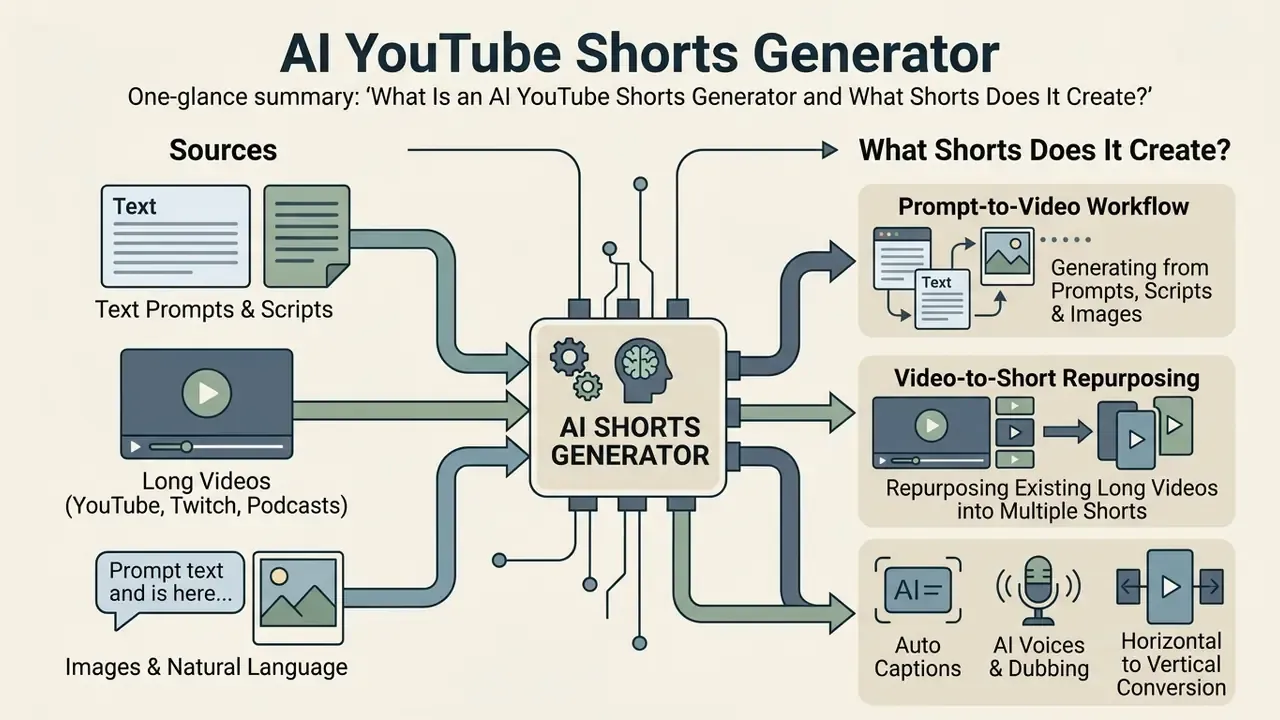
What Is an AI YouTube Shorts Generator and What Shorts Does It Create?
An AI YouTube Shorts generator is automated video production software that converts long-form video files, text prompts, scripts, or images into vertical 9:16 short-form videos tailored for social media platforms. These tools automate visual clip selection, scene generation, speech-to-text subtitling, voice synthesis, and vertical reframing to deliver publishable content within minutes. Some vendors market the same engine as an AI shorts maker, some as a clip generator, some as an ai app to create youtube shorts. The label changes more often than the underlying pipeline does.
Modern AI generators support four primary short-form video formats:
- Faceless videos.Automated clips created without on-camera talent, using stock footage, AI visuals, auto captions, and synthetic narration.
- Educational explainers.Instructional shorts of 15 to 60 seconds distilled from dense articles, documents, or long lectures.
- Product promos.Dynamic visual teasers highlighting brand features, launch announcements, or software demonstrations.
- Social and event highlights.High-energy clips extracted from long podcasts, livestreams, webinars, Twitch VODs, or recorded Zoom panels.
According to a large-scale platform study analyzing 9.9 million Shorts across 70,000 channels (Violot et al., WebSci 2024), YouTube Shorts generate four to six times more views than regular long-form videos on average.
"Shorts attract on average 110 times more views than regular videos from the same channel, yet receive fewer comments per view."
The same study found lower comment density per view compared with standard videos. That matters more than the headline multiplier. Short-form content excels at mass reach, not at deep conversational community building. Practically, Shorts should be treated as a discovery surface that funnels viewers toward long-form videos, newsletters, or product pages, rather than as the primary venue for dialogue with your audience.
One format rule matters before you cut anything. YouTube classifies new vertical uploads of 1 to 3 minutes (uploaded on or after 15 October 2024) as Shorts, and its native Shorts creation tools support clips up to three minutes. Older uploads keep their prior classification, so archive re-cuts should be re-uploaded rather than re-labeled.
Shorts from Prompts, Scripts, and Images
A prompt-to-video workflow generates complete vertical videos directly from natural language topics, full scripts, or static image sequences, with no existing source footage required. Diffusion and transformer architectures parse input prompts, construct structured storyboards, generate matching scene imagery or AI avatars, synthesize natural voiceovers, and synchronize timed subtitles. Readers comparing engines can study the mechanics behind text-to-video AI tools before committing to a platform.
Research on video-language instruction tuning (VIIT Study, IEEE CVPR 2024) shows that training multimodal models on millions of auto-labeled video captions improves text-to-video alignment by 6% over prior baselines.
"Fine-tuning multimodal models on auto-labeled video captions improves zero-shot text-video retrieval by 6% over prior baselines."
When an ai generator shorts pipeline builds a clip from a prompt, advanced tools apply an intermediate text-to-image step before animating frames. This keeps visual coherence across scene transitions while preserving narrative structure. The factorized design is now standard in the literature: MicroCinema (CVPR 2024) splits generation into text-to-image and then image-plus-text-to-video stages, Emu Video applies the same two-step factorization, and CogVideoX (2024) reports 10-second continuous clips at 16 fps and 768x1360 resolution generated directly from text prompts using a diffusion transformer. Creators can explore adjacent workflows such as how to create a video with pictures or review animation maker tooling to automate multi-step motion-graphics publishing.
Converting YouTube Videos and Long Videos into Short Clips
AI long-to-short repurposing converts existing long videos into multiple vertical clips by analyzing audio transcripts, speaker energy, and scene dynamics to identify standalone hooks. An ai make shorts from youtube video tool ingests a link or upload, generates a word-level transcript, segments the timeline, and selects top-ranked highlight clips automatically. Turn one long video into eight, and the publishing calendar stops being the bottleneck.
In academic benchmarks, multimodal long-video models such as Repurpose-10K (Repurpose-10K Dataset Study, 2024, Video Repurposing from User Generated Content; DOI pending verification) demonstrate that combining speech recognition, visual motion tracking, and audio energy scoring outperforms single-modality clipping.
"The Repurpose-10K dataset contains more than 10,000 source videos and over 120,000 annotated clips for user-generated content repurposing."
The system isolates coherent narrative units, trims filler speech, and centers active speakers within a vertical 9:16 frame. Recent pipelines formalize this in three stages: segment the timeline into clips of roughly 20 seconds, caption each clip, then let a language model select the top-K segments carrying the most salient information (Minimal Clips, Maximum Salience, ACL Anthology, 2026). Unsupervised variants cluster videos into pseudo-categories and compute audio-visual pseudo-highlight scores to train without manual labels (Unsupervised Video Highlight Detection by Learning, arXiv, 2025), while conversational-stream methods such as COHETS (2022) fuse streamer dialogue, viewer chat messages, and position embeddings to rank livestream highlights.
For technical implementations that need programmatic access to video model endpoints, teams can evaluate the AI Media API documentation or the Google Veo implementation guide for cost and rate-limit planning.
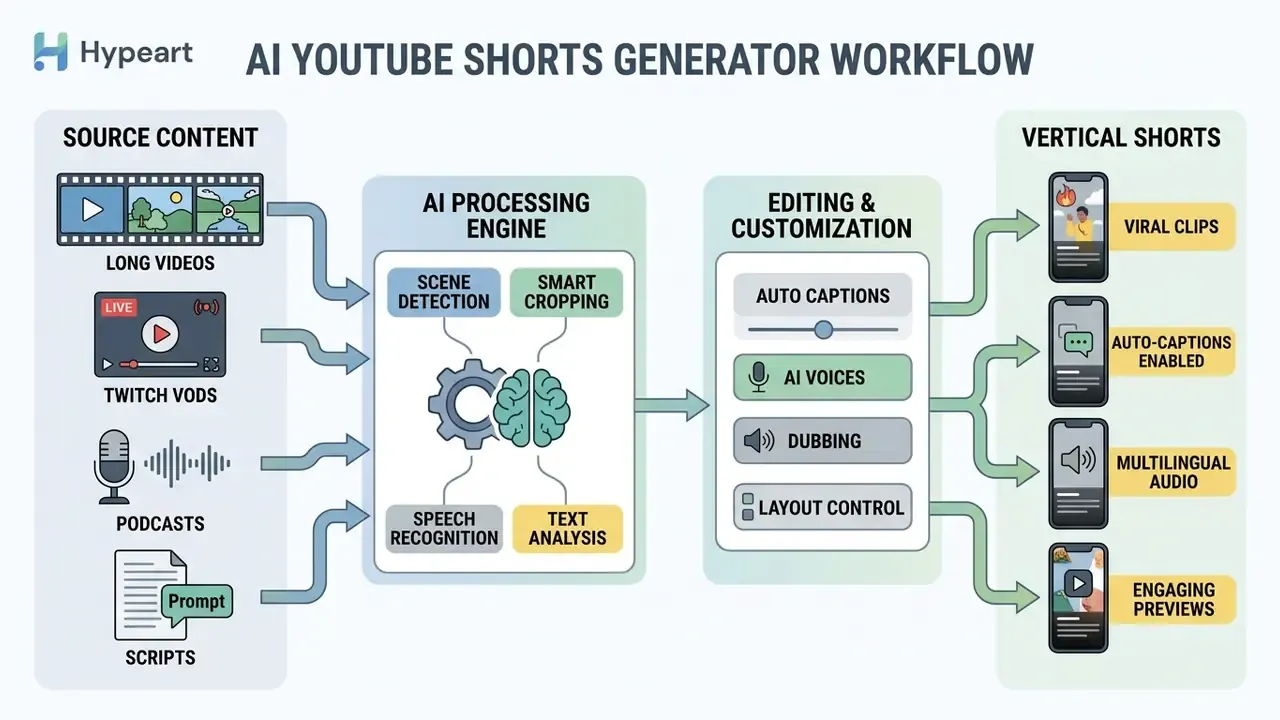
Two inputs feed one engine. Path A: prompt, script, or plain text (text-to-video). Path B: video file, VOD, or audio link (long-to-short). Both enter the AI YouTube Shorts generator, which handles multimodal clipping, virality scoring, auto captions, AI voices, and 9:16 reframing. Output splits again: human editing and verification (compliance and quality control), then multi-platform export to YouTube Shorts, Instagram Reels, and TikTok. All node labels must exist as indexable text, not baked into an image.
How to Choose an AI Generator for YouTube Shorts for Your Needs
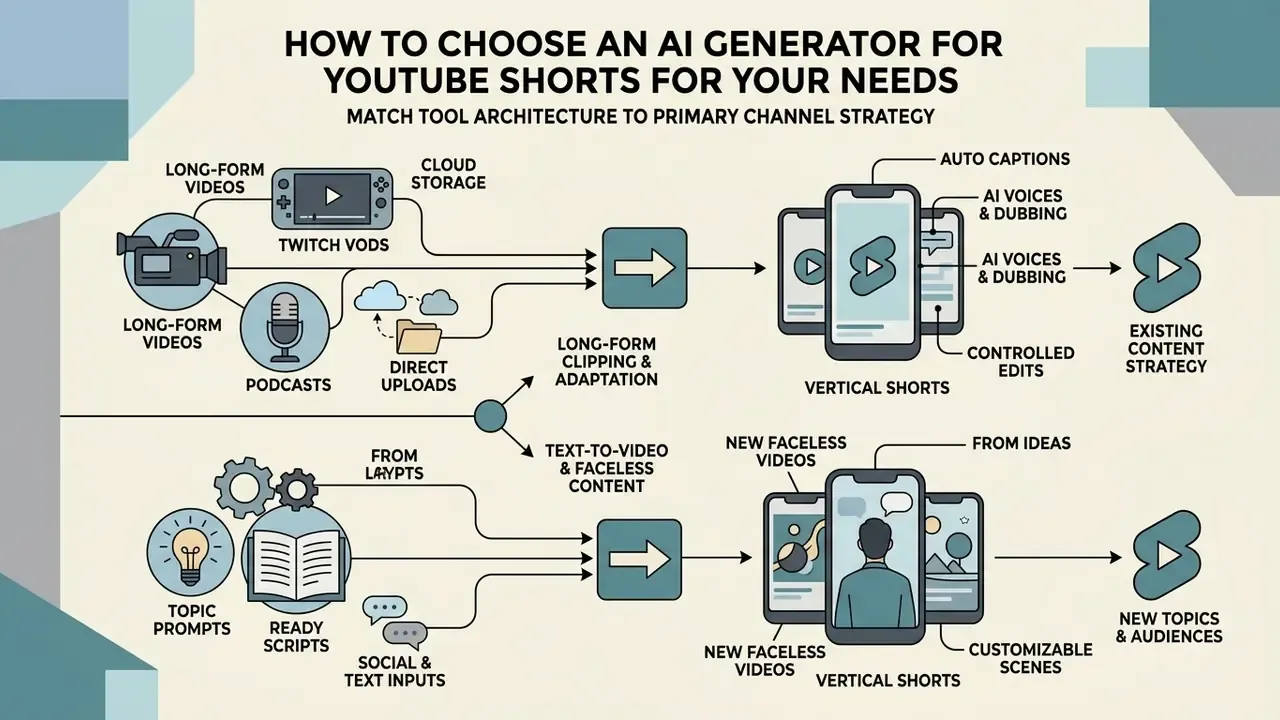
Selecting the right ai generator for youtube shorts means matching the tool's core processing architecture, text-to-video versus long-form clipping, to your primary channel workflow and your editing control requirements. Operators should prioritize transcript accuracy, speaker tracking precision, licensing transparency, and export resolution limits over headline speed claims. A structured AI video generators comparison shortens this evaluation by normalizing quality and pricing criteria across vendors.
When auditing tools, benchmark five technical capabilities:
- Source ingestion. Direct support for YouTube URLs, MP4/MOV/WebM uploads, cloud-recording links, audio-only files, and document or script pasting.
- Visual editing and reframing. Dynamic 9:16 auto reframing with face tracking, so active speakers are never cut off at the jaw.
- Subtitling controls. Animated auto captions, customizable typography, multilingual caption libraries, and SRT/VTT file export.
- Audio synthesis. Synthetic AI voices, voice cloning, multi-language dubbing, and integrated background music balancing.
- Export standards. Watermark-free 1080p or 4K rendering at 30 or 60 frames per second in MP4 (H.264) or MOV.
Supported Input Formats and Platforms
Input breadth is where most buyers discover a mismatch after purchase. Modern AI generators ingest both direct file uploads and platform URLs across several pipelines:
- Long-form video platforms. YouTube links, Vimeo, Wistia, and Twitch VODs (exported livestream recordings for gaming highlight clips).
- Cloud storage and meeting recorders. Zoom, Google Meet exports, Loom, StreamYard, Riverside, Google Drive, and Dropbox links.
- Social and text inputs. Facebook and Twitter/X posts, blog article URLs, PDFs and slide decks, and raw text scripts.
- Audio-only inputs. MP3/WAV podcast episodes and interview recordings, converted into captioned vertical video with waveform or B-roll visuals.
- Direct file uploads. MP4, MOV, and WebM masters at 1080p or 4K.
Because highlight detection depends on speech, content without voiceover or dialogue often produces no usable clips at all. The engine simply has no audio context from which to score hooks. Podcasts, interviews, webinars, presentations, and livestreams remain the strongest source categories.
Generation from Long Videos, Links, and Existing YouTube Videos
Tools specialized in repurposing existing videos focus on automated moment extraction, timestamp detection, and semantic segmentation from long-form source files. These systems ingest a youtube video link or a raw footage upload, transcribe the audio track, and present ranked clip suggestions based on calculated engagement hooks.
Inside YouTube Studio itself, editors can create clips from an existing video by selecting transcript text or entering exact start and end timestamps, and can define manual chapters (minimum three timestamps, starting at 00:00, each at least 10 seconds long, in HH:MM:SS chronological order). Third-party engines extend this by auto-detecting clip boundaries across hours-long uploads and generating titles and descriptions per clip.
For creators managing extensive video archives, automated clipping saves dozens of hours of manual timeline scrubbing. Evaluating performance across different platforms is simpler when working from the AI Media Comparison criteria.
Creating Faceless Video by Topic or Ready Script
Faceless video generators assemble complete short clips from text scripts by combining stock footage libraries, generative AI scenes, voice synthesis, and dynamic text overlays. Platforms such as InVideo AI, Pictory, and HeyGen analyze input text paragraph by paragraph, match key concepts to royalty-free media, and generate synchronized voiceovers. Pictory documents matching each script paragraph to Getty Images and Storyblocks footage; InVideo AI reports a 16-million-asset stock library plus prompt-driven voice changes; HeyGen converts a pasted script or idea into a scene structure before rendering narration, footage, and captions. Avatar-based systems additionally generate a synthetic presenter with lip-synced narration for segments where a "host" is expected.
This approach suits news recaps, historical explainers, and product teasers where no host appearance is needed. Faceless youtube channels lean on it heavily, for obvious reasons. Creators can also review guidelines on how to create custom media assets, or study file-size optimization for uploads when publishing at volume.
Generating Stylized Aesthetic Shorts (Anime, Pixar-Style, and 2D Animation)
Prompt-to-video generators increasingly ship style-transfer and style-conditioned models, so creators can render specialized aesthetics without any stock footage. Style is controlled through explicit modifiers appended to the prompt:
- Anime AI style. "Japanese hand-drawn anime aesthetic, cel-shaded, vibrant ink lines, dramatic speed lines, saturated color grade."
- 3D Pixar-style render. "3D digital render, smooth character geometry, oversized expressive eyes, soft volumetric studio lighting, family-animation aesthetic."
- 2D vector explainer. "Flat 2D motion graphics, minimal vector illustration, bold outlines, clean white background, single accent color."
- AI cartoon conversion. Existing footage can be restyled, for example by instructing the tool to "turn the video into a 2D cartoon", using natural-language style commands instead of manual rotoscoping.
- AI avatar presenters. A synthetic host delivers the script with lip-sync. Useful for recurring educational or product formats where brand consistency matters more than personality.
Put the style block at the end of the prompt so subject and action instructions stay dominant, and reuse it verbatim across a series. That single habit does more for channel consistency than any template pack.
Features That Impact the Quality of Finished Shorts
The technical features that decide finished Short quality are word-level subtitle synchronization, active speaker tracking, and non-destructive 9:16 vertical cropping. High-retention shorts depend on immediate visual engagement within the first two seconds, which makes precise caption placement and visible motion essential.
Predictive virality scoring. Advanced tools assign each generated clip a 0–100 score computed from hook strength in the opening 2 to 3 seconds, speech pitch and energy shifts, visual motion frequency, pacing, and platform fit. Operators use the ranking to decide publishing order rather than treating all extracted clips as equal. Research pipelines describe the same signal stack: prosodic emphasis measured through pitch, loudness, and tonality; transcript semantics for contextual significance; and a self-containedness check verifying the clip still makes sense once cut away from surrounding context.
Natural language video editing. Leading generators expose an AI chat interface, often branded as an "Edit Magic Box" or command bar. Instead of dragging timeline keyframes, operators issue text instructions: "Delete scene 3", "Change the voiceover accent to British male", "Replace the B-roll in scene 2 with server-room footage", "Add a dynamic zoom on the keyword 'Risk'". Revision cycles shrink dramatically. They should still terminate in a human review pass, because command-driven edits can silently alter meaning.
Global localization and voice cloning. Top-tier AI Shorts makers generate auto captions in 75+ languages and support full AI dubbing in 35+ languages. Voice cloning lets a creator record a single sample of about 30 seconds and then synthesize multi-language narration that retains the original speaker's timbre. That is the difference between a translated clip and a clip that still sounds like the channel. Verify that cloning consent and voice-likeness terms are documented before using a real person's voice.
An empirical study of Message Sensation Value (MSV Study, 2026, arXiv preprint 2601.18218; the preprint year should be re-verified against the current arXiv listing before republication) across 14,492 short videos found that high sensory intensity increases initial view retention, but shows an inverted U-shaped relationship with behavioral engagement such as likes, comments, and shares.
"Moderate sensory intensity optimizes behavioral engagement such as likes and shares, while excessively high MSV produces diminishing returns."
Moderating visual cuts and keeping subtitles clean and readable converts better than burying viewers under animation. Less confetti, more clarity.
| Selection Criterion | Long-Video Repurposing Tools | Prompt-to-Video Generators | Faceless Script Creators |
|---|---|---|---|
| Primary input | YouTube/Twitch/Zoom/Riverside links, long MP4/MOV/WebM files, MP3 podcasts | Text prompts, visual ideas, reference images | Written scripts, topic outlines, PDFs and articles |
| Representative tools | Opus Clip, Vmaker AI, Descript, Quso.ai | Runway, CogVideoX-class models, Canva Magic Media | InVideo AI, Pictory, HeyGen, Fliki |
| Key AI mechanism | Multimodal highlight detection, transcription, virality scoring | Diffusion and transformer video generation, text to image to video factorization | Script parsing, stock media matching, avatar synthesis |
| Caption quality | Speech-to-text with word timing, 75+ caption languages | Script-aligned text overlays | Synchronized auto captions, SRT/VTT export |
| Speaker tracking | 9:16 face-centering and auto reframing | AI avatar positioning | Optional digital presenters with lip-sync |
| Localization | Captions 75+ languages, dubbing 35+ languages | Prompt-language dependent | Multilingual TTS plus voice cloning |
| Source length fit | 10 min minimum recommended, masters up to 3 h | Generated clips of 5 to 60 s | Script length dictates runtime (130 to 150 words is roughly 60 s) |
| Target use case | Podcast, webinar, livestream, and vlog clips | Concept visualization and short ads | Educational and faceless niche channels |
| Typical export | 1080x1920 MP4, SRT subtitle files | 1080x1920 MP4 video | 1080x1920 MP4, multi-platform sync |
Read the table as a routing decision, not a ranking. Long-video tools win when you already own footage; prompt engines win when you own only an idea; faceless script creators win when you publish on a fixed weekly cadence and need volume without a camera.
Vendor Due Diligence, Provenance, and Data Governance
Tool selection should begin with compliance, not end with it. In regulated environments, banking, insurance, healthcare communications, an unvetted Shorts generator is a shadow AI vector. Confidential webinar recordings, unreleased product footage, and customer voices leave the perimeter the moment a marketing team pastes a private link into a free trial.
Service verification notice (E-E-A-T). Before deploying any AI YouTube Shorts generator in commercial workflows, verify platform terms against official vendor documentation. Key verification items:
- Commercial usage rights. Confirm whether outputs generated under free tiers carry commercial licenses or require a paid upgrade.
- Watermark policies. Test whether exports include visible brand watermarks or invisible digital provenance markers such as SynthID.
- Data retention and privacy. Audit retention policies for uploaded source files and any custom models trained on your material.
- Security attestations. Request SOC 2 Type II reports, GDPR data-processing addenda, sub-processor lists, SSO and SCIM support, and regional processing options.
- IP indemnification. Confirm whether the vendor indemnifies customers against third-party copyright claims arising from generated output.
- Provenance and disclosure. Verify support for C2PA Content Credentials or equivalent metadata, and map the workflow to YouTube's altered-or-synthetic-content disclosure requirements.
Retention windows vary widely across published vendor policies, which makes this a contract question rather than a marketing one. Documented examples range from source inputs and outputs auto-deleted after 14 days, to generation history retained for up to 2 years, to API logs kept for 1 year, to cloud-processing files deleted once the requested task and related security or support needs are complete. Some providers also state that certain service data may be kept longer, in some cases beyond a year, for security and fraud prevention.
On provenance: Google's AI Studio image outputs, for instance, carry invisible SynthID watermarks even where commercial use is permitted. YouTube requires disclosure when synthetic media makes a real person appear to say or do something they did not, alters a real event or place, or depicts a realistic scene that never happened. Content created with YouTube's own in-app AI features is auto-disclosed by the platform. Deepfake-style likeness or voice simulation of an identifiable person can also be removed under YouTube's privacy request process.
Teams extending this into automated publishing pipelines, where a scheduler or agent posts without a human in the loop, should treat the agent itself as an asset with an owner, an approved role, access limits, and a shutdown mechanism. The practical build questions are covered in how to create ai agents.
Regulatory note: this section is general information about platform and vendor practices, not legal advice. Validate contracts, retention terms, and disclosure obligations with qualified counsel and your privacy or security function.
Free AI Shorts Generators vs. Paid Plans: What to Compare Before Choosing
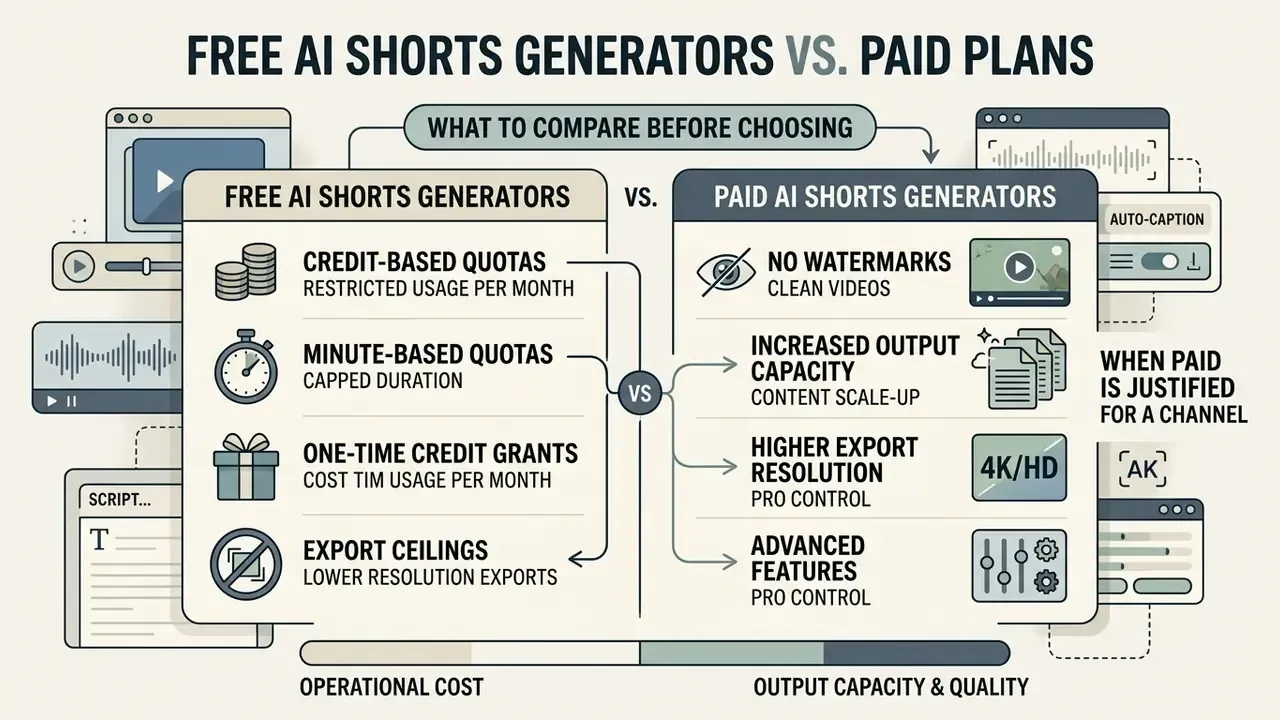
Evaluating AI Shorts generators means balancing operational cost against output capacity, export resolution, and licensing constraints. Free plans are a fine testing surface for features. Production channels usually need paid tiers to unlock watermark-free high-definition renders.
What Is Typically Available in a Free AI Shorts Creator
A free ai shorts generator typically restricts processing capacity through monthly credit caps or minute limits, commonly 10 to 60 processing minutes per month. Outputs are frequently limited to 720p and often carry a permanent vendor watermark. A structured overview of free AI video generators helps map which limits are cosmetic and which block production entirely.
Documented free-tier patterns in 2026 include:
- Credit-based quotas. 60 credits per month, where 1 credit equals one source minute, with 720p exports, a watermark, AI captions, auto reframe, and a 3-day window before rendered clips expire.
- Minute-based quotas. 10 minutes per month with a watermark, or 3 minutes per month at 720p on "free forever" tiers.
- One-time credit grants. Roughly 125 non-renewing credits, after which every free-plan export stays watermarked and commercial use requires an upgrade.
- Export ceilings. Monthly export caps, for example 100 exports, paired with explicitly non-commercial license terms.
Free plans may also delete rendered files after 3 days, enforce non-commercial terms, or ask for credit card registration before trial access. Several major providers now advertise card-free access with generous daily caps, so the credit card requirement is no longer universal. Worth checking rather than assuming. Users estimating production cost per published clip can work through the calculators.
When a Paid AI Video Generator Is Justified for a Channel
Upgrading to a paid subscription, typically $8 to $29 per month at entry level, becomes necessary once publishing cadence scales. Documented examples span $8 to $28 per month for script-to-video suites, $12 per month for 100 watermark-free processing minutes, and $19 to $29 per month for clip-repurposing platforms with 1080p output. Team, agency, and enterprise tiers with SSO, seat management, and indemnification are quoted separately. Comparing the best free AI video generators before upgrading clarifies whether a paid tier actually removes your specific bottleneck, or just raises a limit you were never hitting.
Paid tiers remove watermarks, unlock Full HD or 4K exports, and widen access to premium AI voices, custom voice clones, and stock footage. For commercial channels, they also unlock bulk generation (batch processing dozens of clips from CSV files or long video playlists) and scheduled posting directly to TikTok, Reels, YouTube Shorts, LinkedIn, and Facebook.
A correction on watermarks. I would soften the usual claim here. Watermark removal is a brand-credibility and platform-hygiene decision, not an absolute requirement. Vendor watermarks attribute your content to a third-party tool, compete with captions for screen space, and can conflict with client brand guidelines. They are not, on their own, documented grounds for demonetization. Monetization risk attaches to content characteristics instead: mass-produced, repetitive, or inauthentic uploads with no meaningful original contribution. So the common guidance that "removing visual watermarks is mandatory for monetization eligibility" should be read as a branding recommendation plus a separate and stricter originality requirement.
How to Create YouTube Shorts with AI from Long Videos
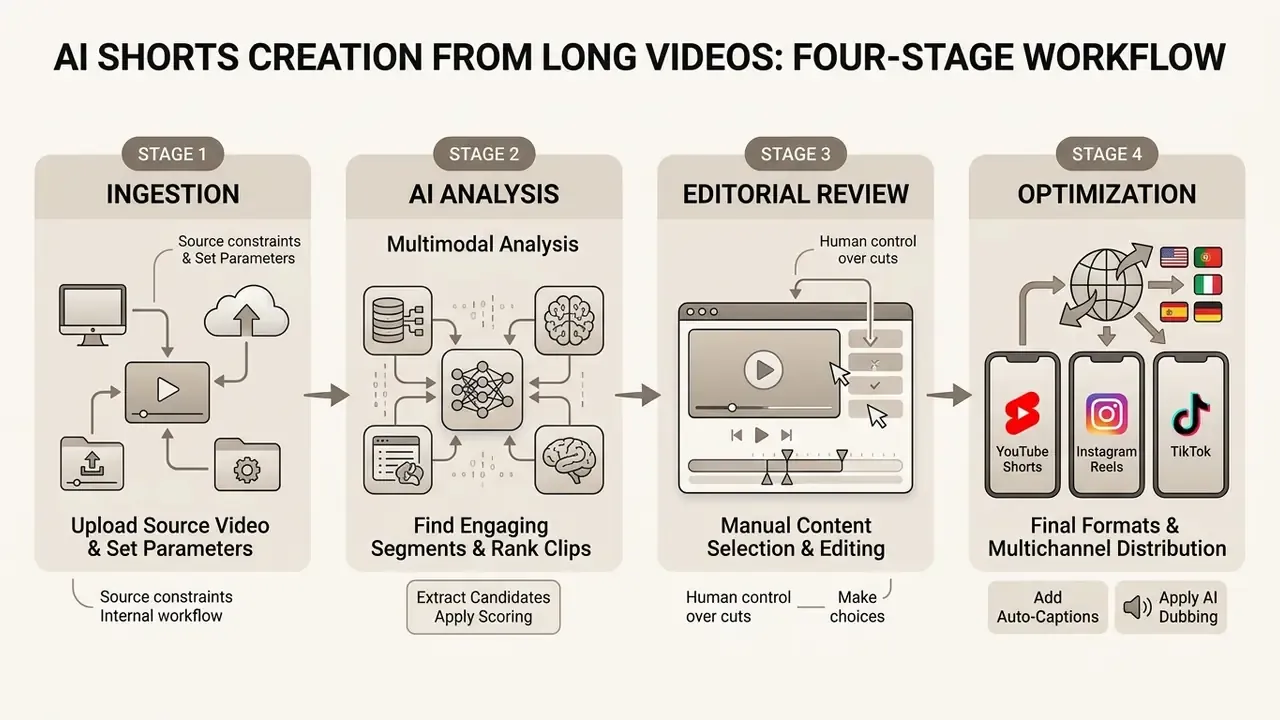
Creating YouTube Shorts from long-form video follows a four-stage workflow: ingestion, AI analysis, manual editorial review, and multi-platform optimization. A systematic procedure keeps you inside platform guidelines while protecting narrative integrity.
Step 1: Upload Your Video and Set Initial Parameters
Step 2: Use AI to Find Engaging Shorts and Create Clips
Run the highlight detection model across the timeline. Algorithms analyze transcript semantics, pitch variation, and visual change to score potential hooks in the opening 2 to 5 seconds. You can steer extraction by supplying keywords or a topic prompt, so the engine clusters clips around a specific discussion thread instead of generic energy peaks.
Highlight detection models using spatial-temporal graph convolutions (HighlightMe Study, 2024) achieve a 4 to 12 percentage point increase in mean average precision over traditional frame-sampling techniques.
"A graph-convolution autoencoder method exceeds prior baselines by 4 to 12 percentage points in mAP across four benchmarks."
The system identifies self-contained concepts that still make narrative sense when isolated from surrounding context. Review the resulting ranking, then publish in descending score order while keeping human veto power over any clip that misrepresents the source argument. The score ranks attention, not accuracy.
Step 3: Prepare Versions for YouTube Shorts, Reels, and TikTok
Review auto-generated captions for transcript accuracy, then adjust word styling, background contrast, and safe-zone margins, keeping graphics 10% away from display edges. Practitioners publishing at volume can compare end-to-end YouTube video editing workflows to standardize this review stage. Reframe vertical crop zones so active speakers stay centered during multi-person dialogue.
Export the finalized clip as a 1080x1920 H.264 MP4 at 30 or 60 fps with AAC audio. A single vertical master can be cross-posted across YouTube Shorts, Instagram Reels, and TikTok without manual re-encoding: Reels accepts 1.91:1 through 9:16 at a minimum of 30 fps and 720 px, TikTok treats 9:16 H.264 MP4/MOV as standard, and YouTube classifies 9:16 or 1:1 clips up to three minutes as Shorts.
"Algorithmic content personalization increases engagement metrics by approximately 60% compared with non-personalized campaigns."
Because distribution is algorithmic rather than chronological, the same master file can perform very differently per platform. Tag, caption, and title each upload natively instead of pushing one description everywhere.
Step-by-step long-video repurposing workflow.
- Source ingestion.Paste a long YouTube, Twitch, Zoom, or Riverside URL, or upload a raw 1080p/4K master (10 min minimum, up to 3 h).
- AI multimodal analysis.The algorithm scans audio transcript, speaker energy, prosody, and scene transitions.
- Candidate extraction and scoring.The system generates 5 to 15 vertical 9:16 clip options with 0–100 virality scores.
- Caption and frame editing.Review auto subtitles, adjust speaker tracking, verify margin safe zones, apply the brand kit.
- Human verification.Fact-check claims, confirm consent and licensing, add required AI disclosure where applicable.
- Export and cross-posting.Render 1080x1920 MP4 (H.264/AAC) and schedule to YouTube Shorts, Reels, and TikTok.
How AI Creates Shorts from an Idea, Prompt, and Script
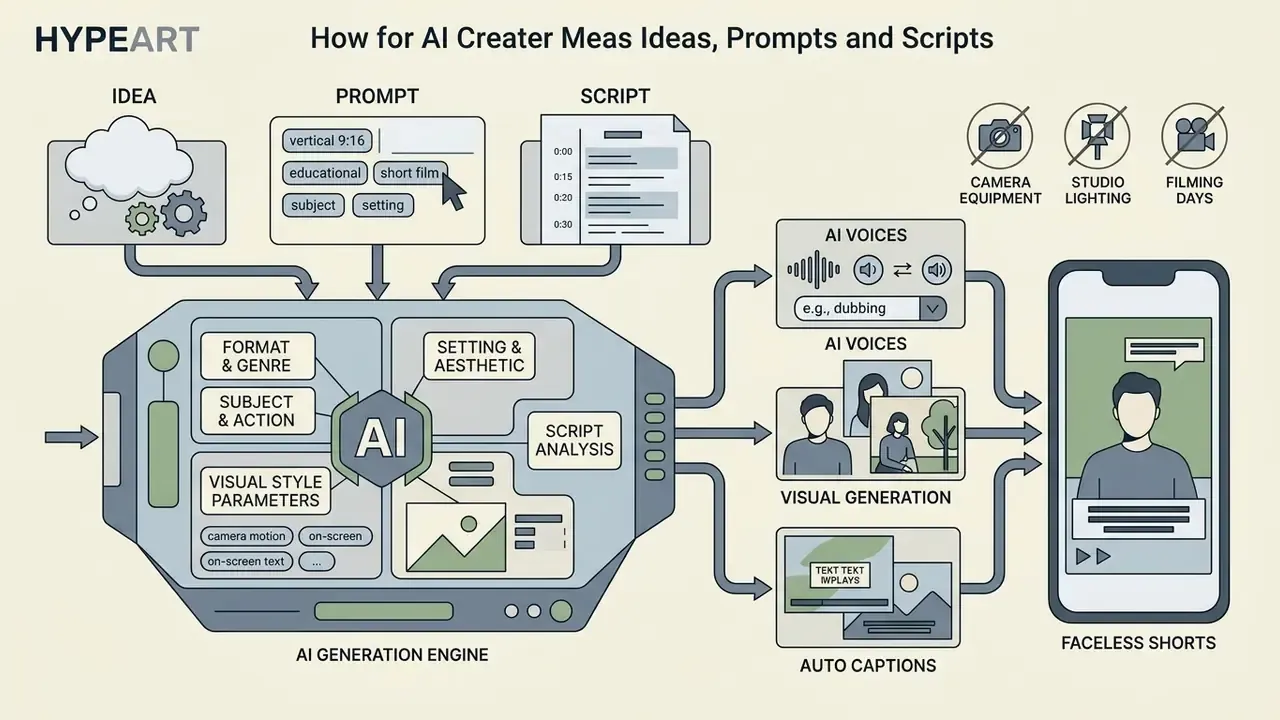
Generating YouTube Shorts from scratch removes the need for camera equipment, studio lighting, and filming days. Creators input a clear topic or script, and language models plus synthetic media engines build the visual and auditory sequence. YouTube itself now ships experimental in-app AI features for turning an idea into a Short, while third-party engines cover the full script-to-render pipeline outside the platform.
How to Formulate a Prompt for an AI YouTube Shorts Generator
Effective video prompts specify format, visual aesthetic, camera motion, subject action, on-screen text, and timing constraints. Vague inputs produce generic visuals. Structured prompts produce targeted, high-retention scenes.
A proven prompt structure follows a fixed sequence: [Format & Genre] + [Subject & Action] + [Setting & Lighting] + [Camera Motion] + [On-Screen Text] + [Style Constraints].
Example prompt:
Script, AI Voices, and Visuals for Faceless YouTube
To build a faceless YouTube Short, large language models generate a tight script of 130 to 150 words, tuned for a 60-second runtime. Text-to-speech models then render narration, matching pauses and emphasis to visual scene changes; a comparison of AI voice generators covers voice quality, language coverage, and licensing differences between vendors.
The faceless stack resolves into four stages: an LLM generates the script from a topic or brief; TTS or a cloned voice narrates it; visuals are sourced automatically from stock libraries or generative image and video models; then audio, visuals, captions, and music are assembled into a single render. The media pipeline matches each script paragraph with relevant B-roll from stock libraries or diffusion models. Teams building a publishing hub around these clips can also review how to create a website with ai, and for hosted media assets there is guidance on how to create a url for an image.
Editing AI-Generated Shorts Before Export
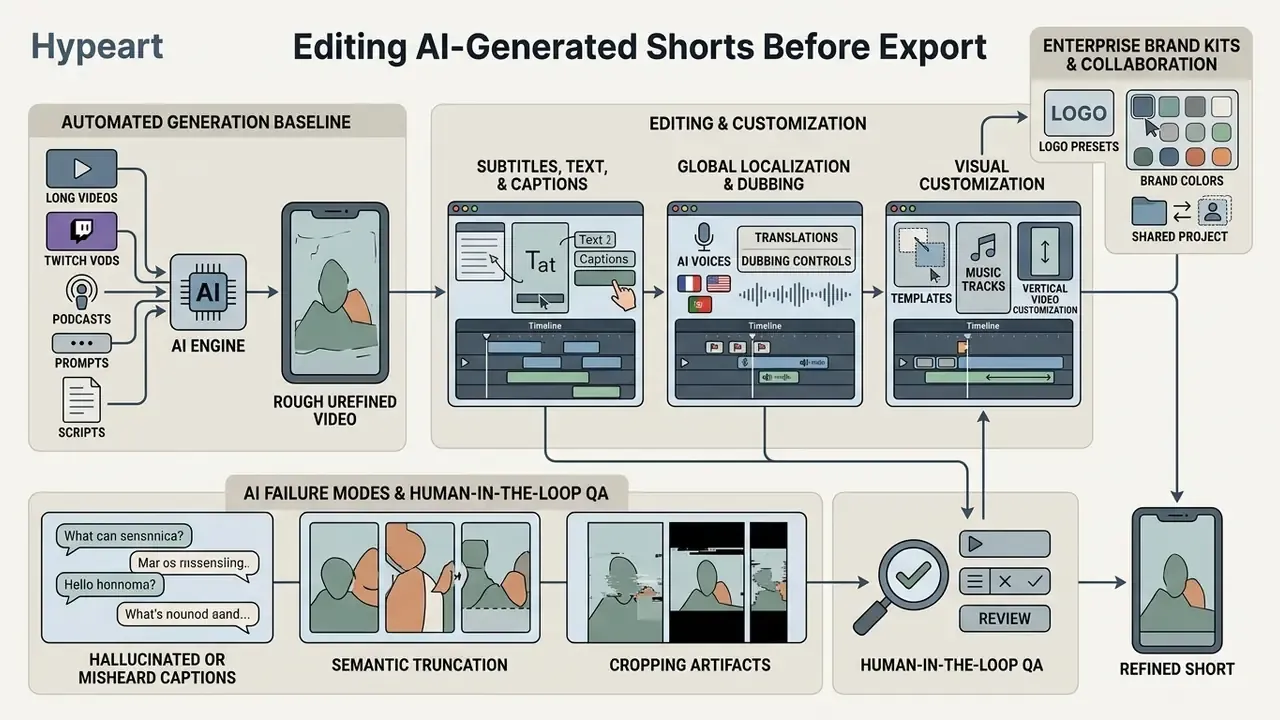
Automated generation gives you a strong baseline. Manual editing is still what protects retention and factual accuracy. A working knowledge of general-purpose video editing tools stays valuable even in an AI-first pipeline, because the final 10% of polish remains manual. Reviewing word timing, visual density, and audio levels before rendering prevents the errors that are painful to fix after publication.
Editorial touchpoints before publishing:
- Remove dead air, verbal pauses, filler words, and non-essential intro cards inside the first 2 seconds.
- Verify auto-caption accuracy against specialized industry terms and proper nouns.
- Balance background music so the synthetic voice stays clear (roughly a -18 dB music offset).
- Change something visually every 2 to 5 seconds, and insert B-roll roughly every 15 to 20 seconds in longer cuts, to prevent monotony.
- Design the ending to loop cleanly, since looped replays inflate measured retention.
- Keep key text inside screen safe zones so it never collides with native platform UI buttons.
- Test one variable at a time (intro length, pacing, audio level, caption style) and compare retention curves between uploads.
Subtitles, Text, and Caption Generators for Short Videos
Auto captions are critical for mobile viewers watching with sound off. Most of your audience, in other words.
"Analysis of 685,842 videos revealed systematic recommendation drift toward entertainment content with positive or neutral emotional tone."
That drift has a practical editing consequence. Caption tone and thumbnail-frame energy influence how far a clip travels, so neutral-to-positive framing of technical content generally outperforms alarmist phrasing on Shorts surfaces.
Section 508 guidance recommends clear sans-serif typography such as Arial or Helvetica, default 18-point white text on a black translucent backdrop, high contrast, and no scrolling or flashing animation. On synchronization, the widely quoted 100-millisecond threshold traces to accessibility standards rather than marketing copy: EN 301 549:2024 requires preserved synchronization, so recorded captions appear within 100 ms of the caption timestamp and live captions within 100 ms of availability to the player. Broadcast style guides (BBC Subtitle Guidelines, Clearcast, Netflix timed-text specs) align on white-on-black legibility, Arial-class fonts, and speaker color-coding restricted to white, yellow, cyan, and green used consistently.
Single-word or short-phrase animated captions hold visual pacing better than dense multi-line blocks, because block captions push readers ahead of the narration. A good ai subtitle or caption generator will also highlight spoken keywords in a contrasting accent color such as yellow or cyan to steer viewer focus.
Global localization and dubbing controls. Production-grade tools generate captions in 75+ languages and dubbing in 35+ languages, with voice cloning from a single short sample so localized versions keep the original speaker's timbre. Export SRT or VTT sidecar files for platforms that index caption text, and keep a hardcoded burned-in version for feeds that ignore sidecars.
Templates, Music, and Vertical Video Customization
Pre-designed vertical templates give consistent brand styling, text placement, and transitions across channel uploads. Teams evaluating editors for template work can review free video editing software options before committing budget. Royalty-free music libraries supply mood tracks that match narration pacing without triggering copyright claims. Documented catalogs range from a handful of free tracks on entry tiers, for example 95 royalty-free tracks, to 25,000 or more tracks on paid plans, alongside stock video, image, background, and sound-effect libraries bundled with template packs.
Enterprise brand kits and collaboration. When scaling video creation across teams, prioritize platforms with brand kit integration: automatic application of corporate color palettes, licensed fonts, logo lockups, lower-third templates, and watermark placement. Add real-time multiplayer editing so reviewers comment and adjust concurrently instead of trading exported files. Role-based permissions and shared asset folders prevent the most common agency failure mode, which is an off-brand clip published from a stale local template.
When customizing vertical layouts, verify that on-screen graphics do not collide with YouTube Shorts interface overlays, such as the right-side like and comment icons or the bottom channel title bar. Clean 10% edge margins keep graphics readable on every mobile device and survive consumer-TV cropping if clips are later repurposed to connected-TV surfaces.
Common AI Failure Modes and Human-in-the-Loop QA
Generative and clipping models fail in predictable ways. Auditing for these categories turns a black-box tool into a reviewable process:
- Hallucinated or misheard captions. Proper nouns, tickers, regulatory acronyms, and numbers are the highest-risk tokens. Spot-check every figure and name against the source transcript.
- Semantic truncation. A clip that ends mid-argument can invert the speaker's meaning. Verify each clip is self-contained and does not strip a qualifier ("we would not recommend...").
- Cropping artifacts. Auto-reframing can decapitate speakers, cut out on-screen slides, or oscillate between faces in multi-person dialogue. Review frames at every speaker change.
- Generative visual defects. Malformed hands, unreadable signage and background text, unstable object geometry between frames, and lip-sync drift on long or technical words.
- Voice and likeness risk. Synthetic voices resembling identifiable individuals, or avatars implying endorsement, require documented consent.
- Style inconsistency across a series. Re-running prompts without a fixed seed or a saved style block produces visibly mismatched episodes.
Mitigation is procedural, not clever. A named human reviewer signs off on transcript accuracy, factual claims, licensing of every asset, and disclosure labeling before publication. Rejected clips and their failure reason are logged, so recurring model weaknesses can be raised with the vendor or folded back into prompt templates. Organizations maintaining an AI system inventory should record the tool, model family, input data categories, retention window, and reviewer of record. Boring discipline, but it is exactly what an auditor asks for.
Pre-Publication Quality, Safety, and Compliance Checklist
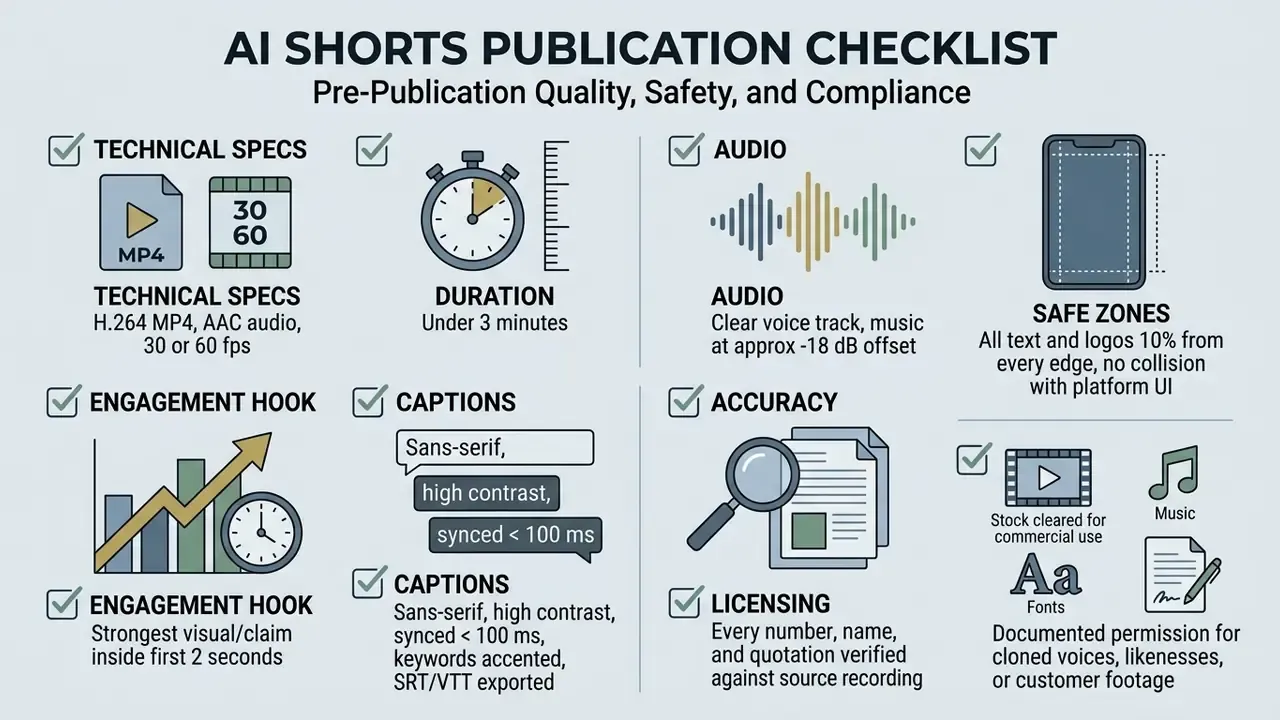
- Format. 1080x1920 (9:16), H.264 MP4, AAC audio, 30 or 60 fps, duration under 3 minutes.
- Hook. Strongest visual frame and spoken claim inside the first 2 seconds. No intro card.
- Captions. Sans-serif, high contrast, synced within 100 ms, keywords accented, SRT/VTT exported.
- Audio. Voice track clear with music at roughly a -18 dB offset. No clipping, no dead air.
- Safe zones. All text and logos at least 10% from every edge, with no collision with platform UI.
- Accuracy. Every number, name, and quotation verified against the source recording.
- Self-containment. The clip makes sense without surrounding context and does not invert meaning.
- Licensing. Stock footage, music, fonts, voices, and avatars cleared for commercial use.
- Consent. Documented permission for any cloned voice, likeness, or customer footage.
- Disclosure. Altered-or-synthetic-content label applied where platform rules require it.
- Provenance. C2PA or SynthID-style metadata retained where the vendor supports it.
- Branding. Brand kit applied, no third-party vendor watermark on published exports.
- Governance. Tool, retention window, and human reviewer logged in the AI system inventory.
FAQ About AI YouTube Shorts Generators
These are the frequently asked questions that come up most often once a team moves from testing to weekly publishing.
Can I Use an AI Shorts Maker on a Phone?
Yes. Many AI shorts video makers ship native iOS or Android apps, or responsive mobile browser interfaces. Mobile apps let creators ingest smartphone camera recordings directly, auto-generate captions, apply vertical templates, and publish straight to social media platforms. Coverage is uneven, though. Some listed apps are iPhone-only, require a recent OS version such as iOS 18.2 or later, and gate video creation behind a PRO subscription, so verify platform support and paywall terms before standardizing on mobile. Desktop web interfaces still give better precision for timeline trimming, word-level subtitle adjustment, and multi-layer editing.
How Long Should My Source Video Be, and How Many Clips Will I Get?
For long-to-short repurposing, aim for at least 10 minutes of source material with continuous spoken audio; engines commonly accept up to 3 hours. Output volume depends on total length, the density of distinct discussion topics, and your chosen clip duration. A 60-minute interview with several self-contained arguments can yield a dozen or more usable clips, while a 12-minute monologue may yield two or three. Footage with no speech typically yields none, because highlight scoring depends on audio context.
Does It Work with Twitch VODs, Podcasts, and Zoom Recordings?
Yes. Export the Twitch VOD or livestream recording and the engine will detect standout moments for gaming clips. The same applies to MP3/WAV podcast episodes, rendered with captions plus B-roll or waveform visuals, and to Zoom, Loom, StreamYard, or Riverside recordings pasted as links. Confirm two things first: that private or unlisted links are accepted, and that your organization actually permits uploading meeting recordings to a third-party cloud.
Is My Data Safe When Uploading Videos to an AI Generator?
Data security depends on vendor cloud infrastructure and privacy terms, so the honest answer is "it varies". Established platforms encrypt uploaded files in transit and at rest, keeping cloud processing files only for active rendering tasks before auto-deleting source media after 14 to 30 days. Published policies range from 14-day deletion of inputs and outputs, to two-year retention of generation history, to one-year API log retention. Creators working with confidential or unreleased material must review vendor data policies to confirm uploads are not used to train public machine learning models. Enterprise buyers should request a data-processing addendum, a sub-processor list, regional processing options, and a SOC 2 Type II attestation.
Do I Have to Disclose That a Short Was Made with AI?
Disclosure obligations depend on realism, not on tooling. YouTube requires a label when synthetic or altered content makes a real person appear to say or do something they did not, alters footage of a real event or place, or depicts a realistic scene that never happened. Content produced with YouTube's own in-app AI features is auto-disclosed by the platform. Stylized, obviously animated, or clearly fictional visuals generally fall outside the mandatory label, but platform policy keeps evolving. Re-check the current help documentation before you write a standing internal rule.
Can I Use AI-Generated Shorts for Commercial Purposes?
AI-generated Shorts can be used commercially provided the underlying assets, stock media, music, and synthesized voices, carry valid commercial licenses and the content complies with platform disclosure rules. The general principles of commercial use of AI image generators apply equally to video output. Under U.S. Copyright Office guidance, purely AI-generated material lacking human authorship cannot be registered for copyright protection, and only human-authored portions are registrable. YouTube monetization policies also require original transformational value: channels posting mass-produced, low-effort synthetic clips without unique human commentary risk demonetization under repetitive content rules. Note too that free tiers frequently carry explicitly non-commercial licenses even when the output looks production-ready, and that some providers embed invisible provenance watermarks in output they otherwise permit for commercial use. This information is general in nature and does not replace consultation with a qualified attorney on copyright, likeness rights, and content licensing questions.