The Short Version
An avatar cropper masks, re-centers, and resizes a photo into a platform-ready profile picture directly in your browser. Upload a square source file of at least 1024×1024 pixels, keep the face or logo inside the inner 80 percent safe area, and export as PNG for transparency or WebP for smaller files.
- Discord upload 512×512 px (1:1), displayed at 128×128 px inside a circular mask, 10 MB cap.
- Other platforms Instagram 110 px, TikTok 200 px, Steam 184 px, X 400 px, YouTube 800 px, LinkedIn/Zoom/Teams/Slack 400–512 px.
- Framing rule subject fills 60–70 percent of frame height, with 10–15 percent edge margin.
- Privacy client-side (HTML5 Canvas) cropping keeps original photos on your own device.
- Extras matching pair PFPs, colored borders, GIF first-frame extraction,
Ctrl+Vclipboard paste.
Before You Start: Three Decisions That Shape the Crop
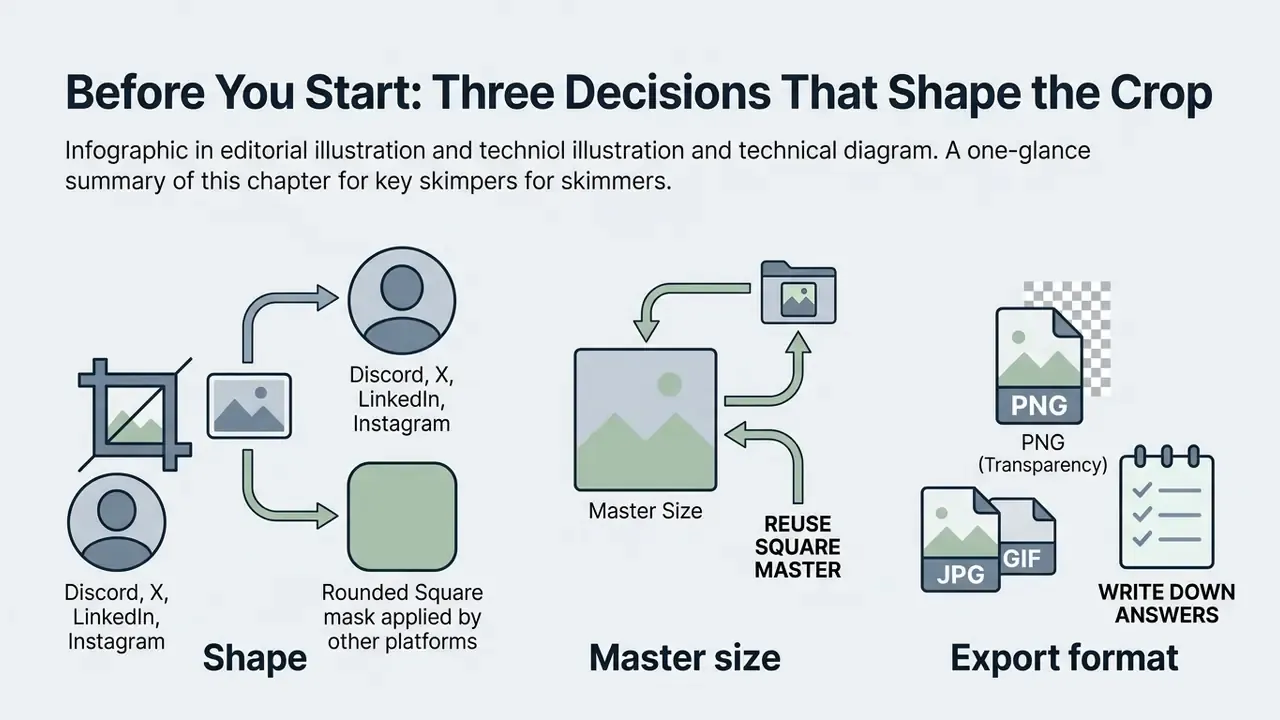
Most botched avatars come from skipping a decision, not from clumsy dragging. Settle these three first and the rest is mechanical.
- Shape. Will the destination apply a circular mask (Discord, X, LinkedIn, Instagram), a rounded square (Steam, Slack), or leave your square untouched? The mask decides how much margin you need.
- Master size. Pick one square master and reuse it. A 1024×1024 source downsizes cleanly to 512, 400, 184, and 110 pixels without a second edit session.
- Export format. PNG for transparency and flat colors, WebP when file weight matters, JPG only for photographic avatars where no alpha channel is needed.
Write those three answers down before you open the tool. Sounds fussy, but it saves the usual second pass.
What Is an Avatar Cropper and Which Profiles Need It
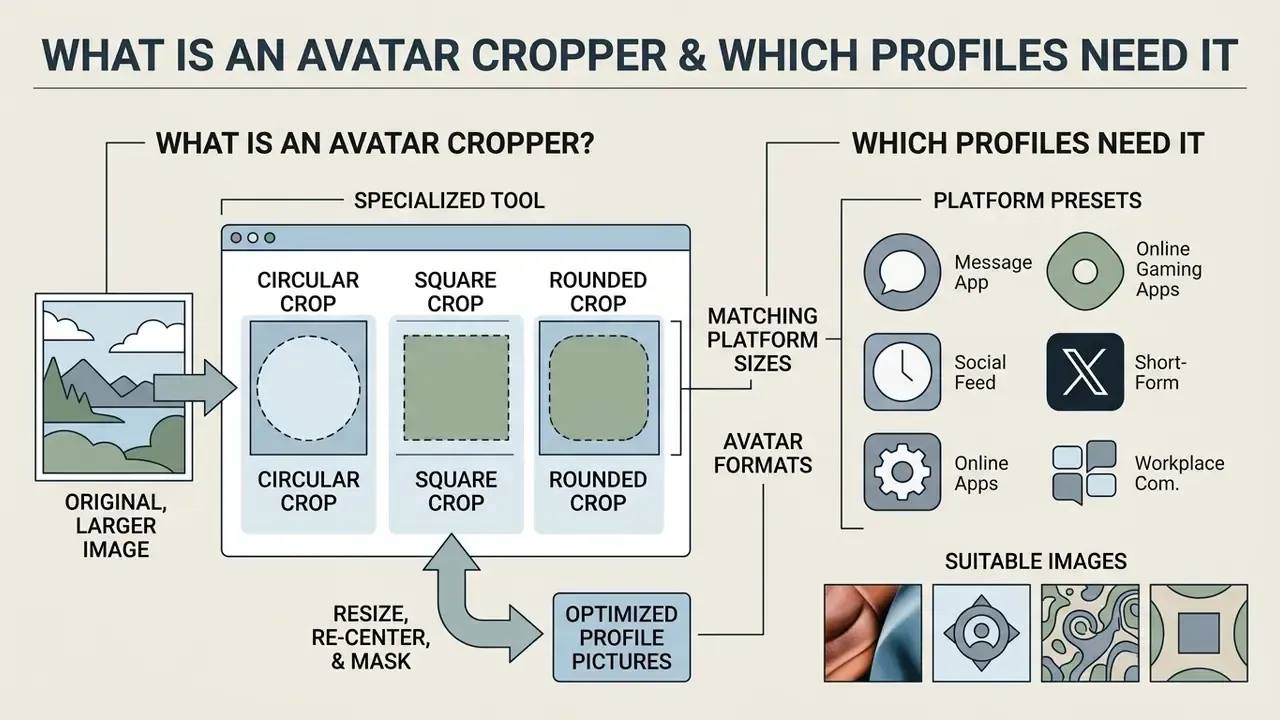
An avatar cropper is a specialized digital tool designed to resize, re-center, and mask uploaded images into optimized profile pictures for digital platforms. It prepares square or circular photos for messaging channels like Discord, professional networks, and social media without requiring heavy desktop editing software, or the learning curve that comes with full online photo editors.
Digital platforms rely on profile pictures as primary visual identity markers. Research in human-computer interaction demonstrates that profile images function as key carriers of socio-emotional cues during text-based interaction.
Behavioral experiments point the same way: visual clarity in profile representation influences viewer trust and perceived familiarity.
Standard full-frame photographs are captured to display broad scenes or background environments. A profile picture has a narrower job. It must deliver immediate recognition inside a compact interface frame, often no larger than a 32-pixel thumbnail in a member list. A dedicated avatar cropper turns raw photographs into focused, high-impact icons suitable for any social media account or discord profile. Searchers also type it as one word, avatarcropper, and mean the same thing.
Circular, Square, and Rounded Avatar Formats
Avatar formats define how platform interfaces frame uploaded images, using circular masks, sharp square boxes, or rounded rectangles. Selecting the correct shape prevents accidental clipping of key facial or branding details.
A circle crop masks the outer corners of a square canvas to present a focal point within a circular crop. Discord, X, and Instagram all use circular masks for member lists and chat feeds.
«Technical guides recommend keeping key content inside the central 70–80 percent of a square canvas and reviewing the avatar at 40–64 pixels». favicon.live, "Avatar Size Guide for Social Media" (2024). https://favicon.live/blog/avatar-size-guide
Square crops preserve sharp 90-degree corners, which makes them ideal for gaming platforms such as Steam or specific desktop dashboards. They are also the safest default when the destination platform re-crops uploads itself. Rounded rectangle crops soften outer corners with a fixed radius, keeping the rectangular canvas area while providing a modern visual frame. That is the look used by Steam, GitHub, and many community forums. Circle and rounded exports written to PNG or WebP keep the corner pixels transparent, so no white box appears behind the subject. A square export simply preserves the original frame.
Which Images Are Suitable for Cropping
High-resolution source images in PNG, JPG, or WebP format with clean lighting and centered subjects are best suited for avatar cropping. Files with a transparent background should be saved as transparent PNG or WebP to maintain clean edge integration across light and dark platform themes.
When preparing a portrait or corporate logo, upload image files that offer high contrast between the subject and the background. Source files in png jpg webp formats ensure compatibility with modern browser canvas elements. A transparent png maintains alpha channel data, so custom logos or cutouts retain a transparent background when rendered over profile banners. If no suitable source photo exists, AI image generators and AI headshot generators can produce a square-native starting asset before cropping; our walkthrough on how to use AI to create images covers the prompt side of that step.
How to Crop an Image in an Avatar Cropper: A Step-by-Step Guide
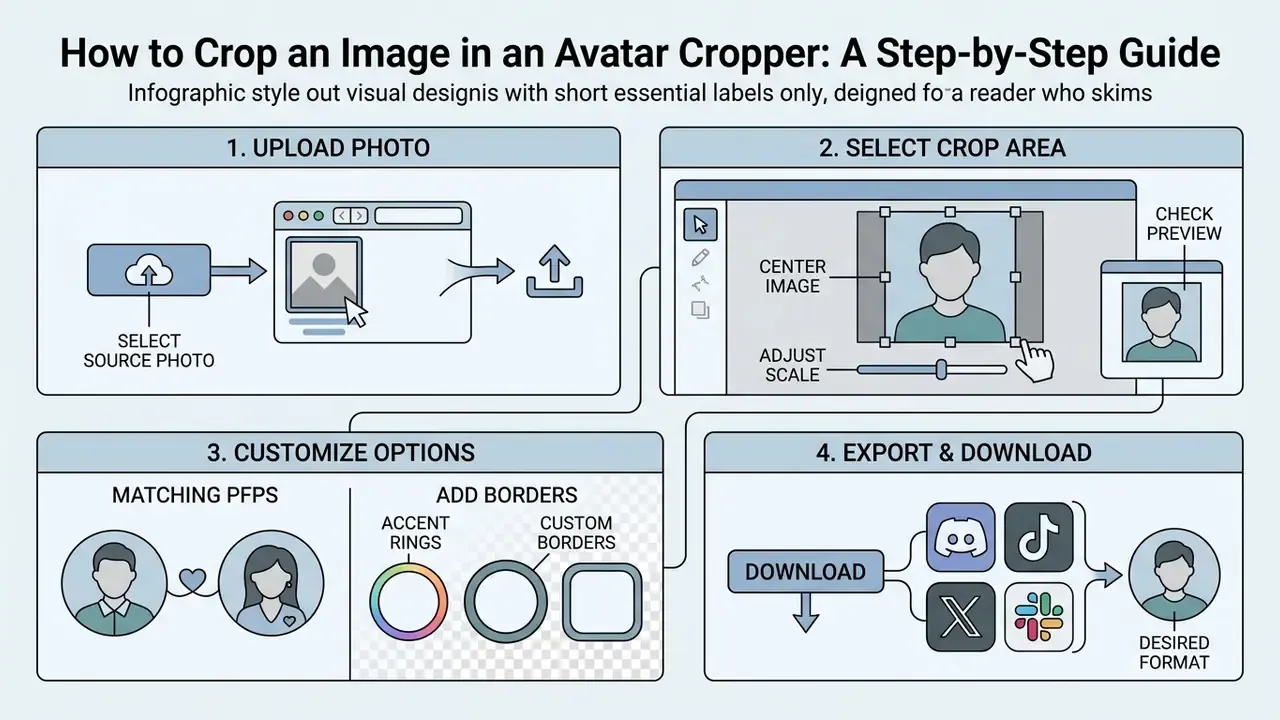
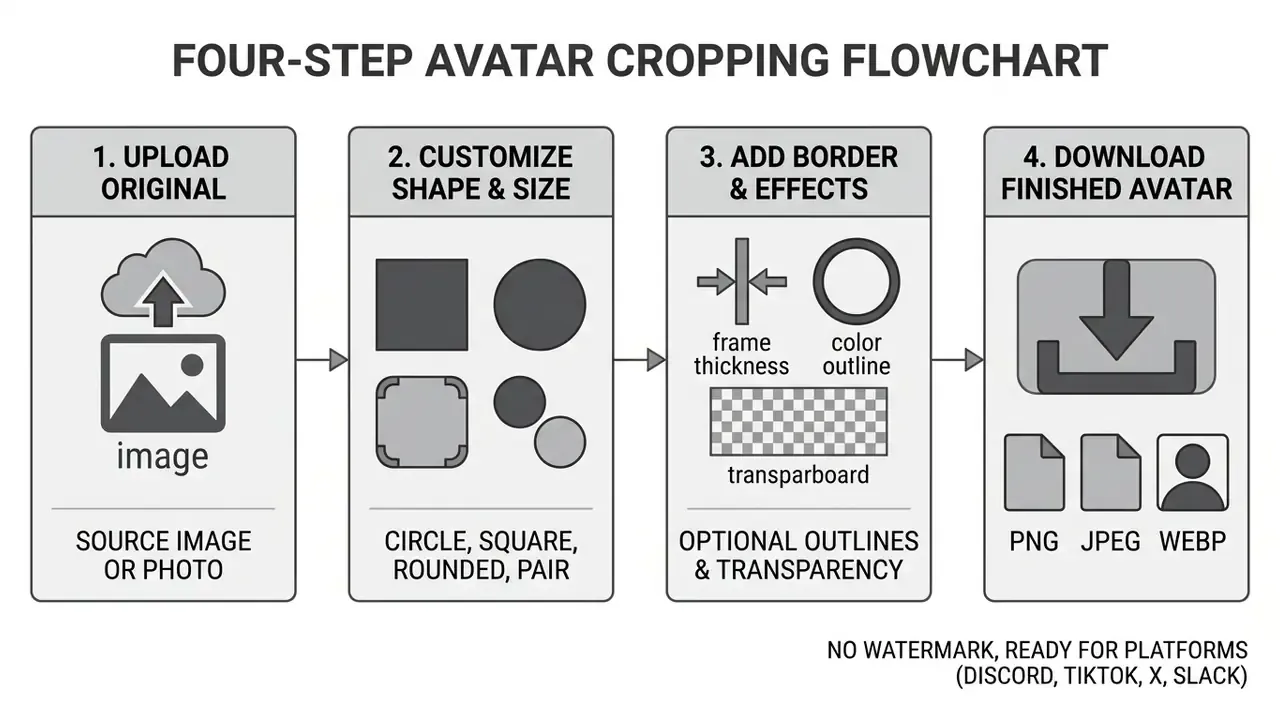
Cropping an image with an online avatar cropper involves four moves: selecting a source photo, uploading it, adjusting the crop area overlay, and exporting the final profile picture. Done properly, the whole thing takes under ten seconds.
A browser-based cropper removes the manual mask setup that desktop editors demand. You can crop image files quickly while keeping control over zoom, framing, and export quality. For organizations building media pipelines, our AI Media Workflows hub gives broader operational context for automated asset transformation.
Upload Your Photo and Select the Crop Area
Center the Image, Adjust the Scale, and Check the Preview
Center the primary subject inside the crop zone while scaling the frame to leave breathing room around hair, ears, or border lines. A live circular preview is what actually prevents key features from being cut off in final display.
Proportional scaling retains the original aspect ratio without introducing visual distortion.
«Uploading a 512×512 pixel image ensures clean downscaling without compression artifacts across every Discord display size». Distools.net, "Discord PFP Size" (2025). https://distools.net/discord-pfp-size
Adjust the zoom controls or corner handles so the subject occupies roughly 60 to 70 percent of the frame height. For portraits, keep the eye line slightly above the geometric center, the same convention professional portrait guides use, so the circular mask never clips the chin or the top of the head. Then review the real-time circular preview and confirm that outer edges do not trim facial features or text elements. One caveat: a preview at 200 pixels can still hide problems that appear at 32. Shrink the browser preview, or just squint.
During a media migration project (illustrative example), a digital marketing team needed to standardize 150 team headshots for a client community portal. By applying consistent centering guidelines and checking circular previews in a web cropper, they processed the entire batch without clipping heads or re-editing assets.
How to Crop Matching PFPs for Couples and Friends
Matching PFPs are two complementary avatars generated from one wide source image, split down a central divider. This mode turns a single illustration, panel of art, or side-by-side photo into a coordinated pair for partners, duos, or friend groups.
To create matching profile pictures from one wide photo, select the "Matching Pair" mode. The cropper doubles the visual canvas width and draws a split line down the middle. Position the image so each subject occupies one side of the divider, then export the left and right avatars independently in PNG format. Each half has its own download action, so one file can be kept and the other sent to a friend. This workflow covers what users mean by matching pfps, matching icons, or a couple's profile picture, and it works with anything wide enough: two characters standing side by side, a single artwork cut in half, or a photo of the two of you. Because both halves are cut from the same original pixels, colors, lighting, and background lines stay continuous across the pair.
Adding Custom Borders and Accent Rings to Your Avatar
An avatar border is a solid or gradient ring drawn around the cropped shape to separate the subject from the surrounding interface. Borders earn their keep when the photo background sits close in tone to the platform's dark or light theme.
A solid or gradient ring makes a profile picture readable in busy chat panels. When applying an outer ring, make sure it renders inside the canvas area so it does not reduce export dimensions or clip facial details. A ring drawn outside the frame would either shrink the subject or push the file beyond the preset size. Set the width first (thin 2–4 px rings read best at 32 px thumbnails, chunkier 12–20 px rings suit 512 px profile modals), then pick a color with clear contrast against both themes. Gold, neon, and gradient rings are common choices for server owners and streamers who want to stand out in member lists. You can layer a ring after cropping with the add border to avatar tool.
Download the Finished Avatar in the Desired Format
After confirming visual alignment, export the final profile picture as a high quality PNG, JPG, or WebP file. Choosing transparent png preserves background transparency for logos and cutouts.
Format choice balances crispness against file size. PNG remains the reference format for sharp line art and full transparency, storing per-pixel alpha values that are composited at display time. WebP provides lossy and lossless options that reach smaller file sizes while preserving alpha transparency.
«Platform guides recommend PNG as the default avatar format for Discord: it preserves transparency and introduces no compression artifacts on flat colors». Distools.net, "Discord PFP Size" (2025). https://distools.net/discord-pfp-size
Click export to save the ready-to-use avatar to your device. JPG stays acceptable for photographic avatars where transparency is irrelevant and file weight matters, though it cannot store an alpha channel at all.
Discord Avatar Cropper: How to Prepare a Discord PFP
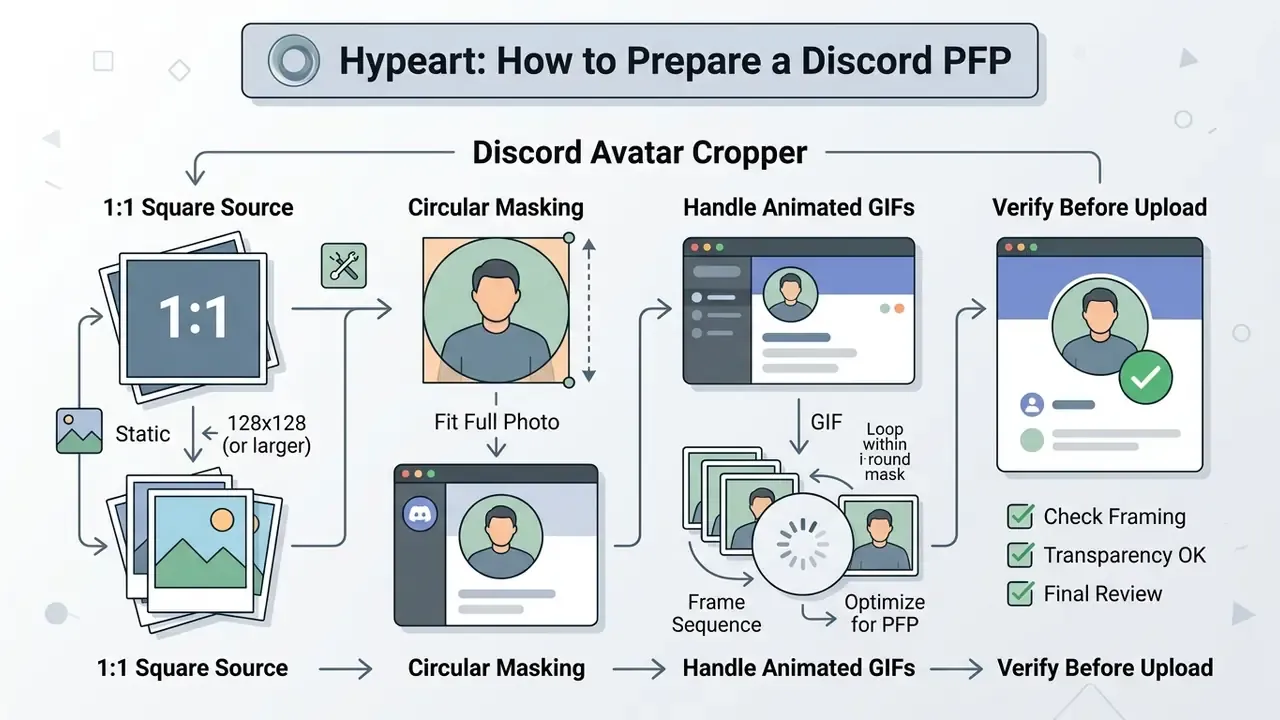
A discord avatar cropper prepares 1:1 square source images specifically masked for Discord's circular profile display. Proper framing keeps your discord pfp crisp in chat streams, server member lists, and profile modals.
A tailored discord pfp cropper resolves the usual complaints: blurred edges, cut-off graphics, a logo that reads as a smudge. Discord treats every uploaded discord avatar as a square image, then displays it through a round UI mask on mobile and desktop clients. When you need an original character, mascot, or abstract identity mark instead of a photograph, AI image generators can produce a square-native asset ready for the cropper. Users who prefer a filtered, stylized look often arrive from guides on how to turn off character ai filter and similar platform tweaks; the cropping step is identical either way.
Dimensions and Aspect Ratio for a Discord PFP
Discord requires a 1:1 square aspect ratio for profile pictures, with a minimum dimension of 128x128 pixels and a recommended upload of 512x512 pixels. Uploading at 512x512 keeps high quality rendering on high-DPI screens while staying well under the 10 MB file size cap.
| Parameter | Specification | Recommendation |
|---|---|---|
| Minimum Aspect Ratio | 1:1 Square | Lock 1:1 frame ratio |
| Display Resolution | 128x128 pixels | Render at 512x512 pixels |
| Supported Formats | PNG, JPG, WebP, GIF | Use PNG for static avatars |
| Maximum File Size | 10 MB | Keep under 5 MB for speed |
| Display Mask | Circular Mask | Center subject in safe area |
| Member-list thumbnail | ~32x32 pixels | Test recognizability at this size |
| Animated avatars | GIF, Nitro only | Free accounts get a static frame |
While 128x128 pixels is the absolute display minimum, platforms scale assets dynamically across device resolutions.
«Discord accepts uploads up to 1024×1024 pixels, but the recommended size is a 512×512 PNG, sufficient for crisp rendering within the 10 MB limit». Distools.net, "Discord PFP Size" (2025). https://distools.net/discord-pfp-size
A 512x512 PNG downsamples cleanly, with no compression blur creeping into flat color areas. If you are weighing tool options across media workflows, our AI Media Comparison guide lines them up side by side.
How to Fit a Full Photo into a Round Discord Avatar
Fitting a full photo into a circular discord profile picture means centering the face or main subject within the inner 80 percent safe area of the square canvas. Leaving 10 to 15 percent margin around the edges stops hair, ears, or background elements from being clipped by the circular mask.
«Whop recommends a minimum PFP of 512×512 pixels at a 1:1 ratio: the image renders as a full circle with a status-badge cutout in the profile panel». Whop, "Discord Size Guide" (2024). https://whop.com/blog/discord-size-guide/
Landscape photos and wide group shots tend to park critical elements near the outer borders. When framing a discord profile, zoom into the central subject until the face or logo fills the inner circular guide. Clear space above the head and below the chin prevents awkward boundary cuts once Discord applies its mask. For full-body characters or wide logos that must stay intact, zoom out until the whole artwork fits inside the circle and export on a transparent background, so the empty corners disappear instead of showing letterbox bars.
How to Crop Animated GIFs for Discord Avatars
Animated GIF avatars are a Discord Nitro feature; free accounts display a static image only. Knowing that split prevents wasted uploads when a GIF silently renders as a single frame.
Discord supports animated GIF avatars exclusively for Nitro subscribers, within the same file-size ceiling as static uploads. For free accounts uploading a GIF, standard croppers extract and crop the first frame as a static PNG, which is why a fast-moving animation can produce an unexpected pose in the final avatar. Choose a source GIF whose opening frame already reads clearly. Process animated source files at 512x512 pixels to keep frame alignment, since a crop applied to one frame is applied identically across the sequence. If the animation loses too much detail at member-list size, a static PNG usually reads better in chat. Readers moving between formats may also find our notes on how to turn a video into a live photo useful when the source clip is longer than a loop.
How to Verify a Discord Profile Picture Before Uploading
Verifying a discord pfp means testing the cropped avatar at small UI sizes: 32x32 pixels for member lists, 40x40 pixels for chat messages. Checking thumbnail previews in both light and dark themes keeps recognition instant and contrast clear.
«Experts recommend opening the platform on desktop and mobile, reviewing the avatar in the profile, feed, and chat, and taking screenshots at small sizes». favicon.live, "Avatar Size Guide for Social Media" (2024). https://favicon.live/blog/avatar-size-guide
Because Discord themes vary between dark and light modes, avatars with dark backgrounds can dissolve into dark-mode chat panels. Reviewing a small thumbnail before finalizing export keeps fine lines and focal subjects distinct regardless of the theme behind them.
Key Features for Choosing a Free Online Avatar Cropper
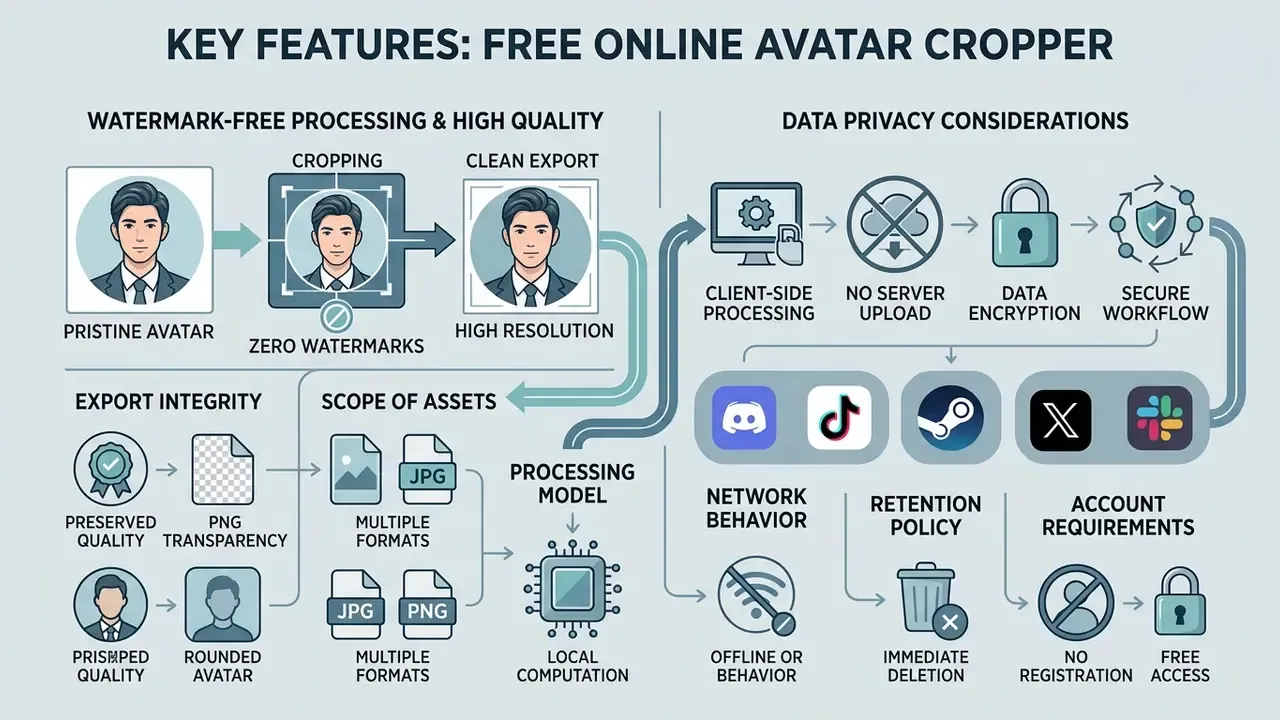
Choosing a reliable free online avatar cropper comes down to client-side processing speed, export clarity, zero watermarks, and credible data privacy. A trustworthy tool processes images inside the browser without mandatory sign-ups or subscription traps, which is a lower-friction path than full AI photo editors when the only job is framing an avatar.
Evaluating web tools means reviewing the processing model and the export guarantees, not the landing-page adjectives. Teams integrating automated web media components will find further implementation detail in our AI Media API Guides.
Watermark-Free Processing and Preserving High Quality
Watermark-free processing keeps your final profile picture clean, with no overlay logos or branding artifacts. Exporting in lossless PNG or low-compression WebP retains crisp line edges and saturated color.
Some online editing utilities append promotional watermarks unless users buy a paid plan. Better free tools offer no watermark exports across all standard resolutions. Preserving source pixel density also prevents double-compression artifacts when the asset is uploaded to a social network. A quality implementation samples the crop from the original pixels and steps it down to the chosen output size in one pass, so a 128-pixel avatar arrives smooth rather than jagged.
Privacy Considerations When Uploading Images
Client-side image processing keeps uploaded photos inside browser memory, so personal files never reach a remote server. Where server-side processing is genuinely used, expect documented retention windows and deletion schedules rather than open-ended storage. The operational question is not which sanitization standard a vendor cites, but whether the file leaves the device at all.
«Browser-based cropping tools execute operations through client-side JavaScript, so personal photos never leave the user's device». MDN Web Docs, "Canvas API" (2025). https://developer.mozilla.org/en-US/docs/Web/API/Canvas_API
Browser-native croppers run on client-side JavaScript, which means private photos stay in device storage. When evaluating online photo editors, verifying client-side execution or a clear auto-deletion policy protects sensitive personal headshots and corporate branding assets.
Avatar handling also carries an authenticity dimension worth flagging in security awareness material:
«An analysis of 15 million Twitter accounts identified 7,723 profiles using AI-generated faces (0.052%), disproportionately linked to political propaganda distribution». Ricker et al., "AI-Generated Faces in Twitter Profile Images", arXiv preprint (2023).
Teams that vet inbound community profiles can screen suspicious portraits with AI image detectors before granting elevated roles.
Shadow IT checklist for corporate avatar workflows. When employees prepare headshots or brand marks for external communities, the real exposure is an unvetted web service storing sensitive imagery on unknown infrastructure. Before approving a cropper for internal use, confirm:
- Processing model.Client-side rendering via HTML5 Canvas versus server-side upload; only the former keeps files off third-party infrastructure.
- Network behavior.No outbound image requests visible in browser developer tools during cropping and export.
- Retention policy.If uploads do occur, a published deletion window and no default training-data reuse.
- Account requirements.No mandatory sign-up, which avoids linking employee identity to an external vendor record.
- Export integrity.Watermark-free output at the declared resolution, so approved brand assets are not altered.
- Scope of assets.Unreleased logos, executive headshots, and client imagery should follow the same approval path as any other external tool.
This information is general in nature and is not legal or compliance advice. To assess whether a specific tool meets your confidentiality requirements, review the data-processing policy of the chosen service and consult your internal security or legal team.
Mobile Avatar Cropper: Cropping Avatars on Your Smartphone
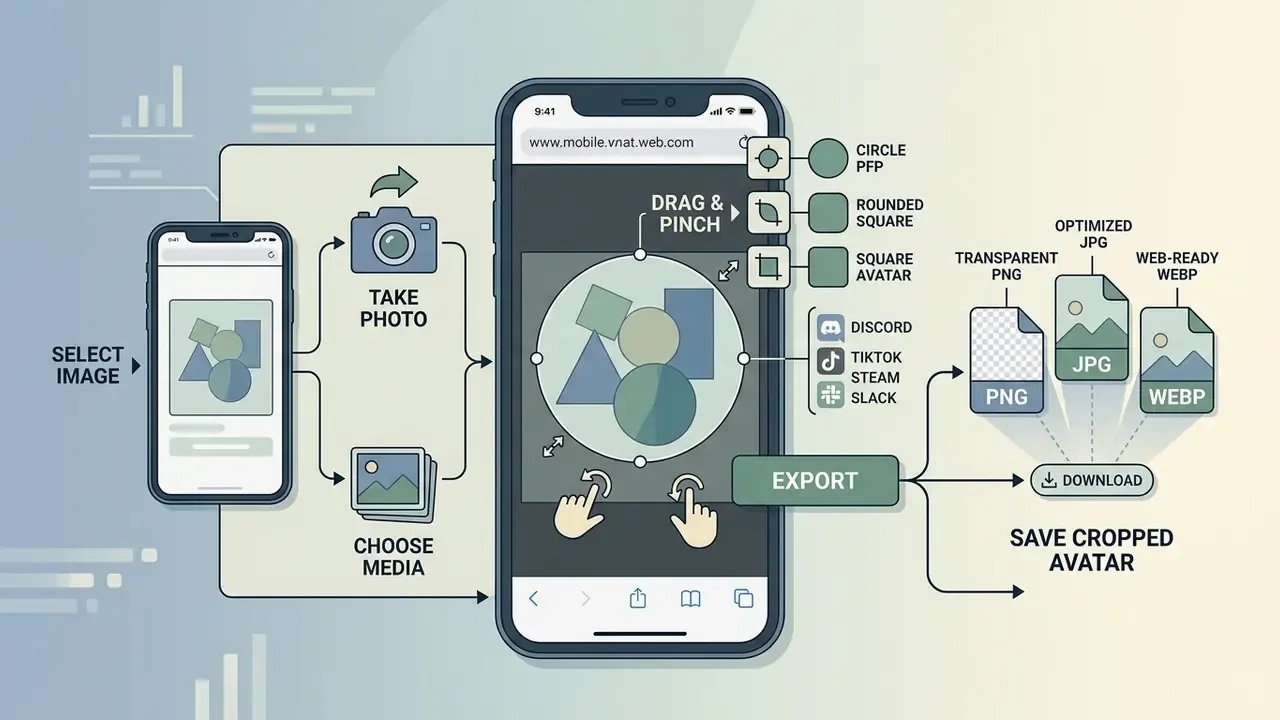
An avatar cropper mobile workflow lets you crop and save profile pictures inside iOS Safari or Android Chrome without installing a separate app. Standard web file input controls pull images straight from photo galleries or cloud storage, which is why many users reach for browser tools instead of installing free photo editors for a single crop.
«MDN Web Docs confirms full Canvas API support in iOS Safari and Android Chrome, including image operations and file export». MDN Web Docs, "Canvas API" (2025). https://developer.mozilla.org/en-US/docs/Web/API/Canvas_API
Touch-optimized web utilities let you adjust crop area controls smoothly with gestures on phones and tablets.
How to Upload and Crop Photos from a Mobile Device
Uploading on mobile means opening the native file picker via file inputs to choose image files from the device gallery. Setting the crop area on a touch screen relies on pinch-to-zoom and drag gestures to position the face or logo accurately.
On iOS and Android, tapping an upload prompt offers to capture a new photo or select existing media. iOS typically shows "Take Photo or Video / Photo Library / Browse", while Android usually launches the system file picker directly. Once the image loads, use two-finger pinch gestures to scale it and single-finger dragging to align the subject inside the circular preview frame. On a small screen, nudge in short movements; long drags overshoot.
How to Save PNG, JPG, or WebP Files on a Smartphone
Saving cropped images on a phone means picking a supported mobile output format, such as transparent png or WebP (native on Android API 18+ and iOS Safari). Tapping download stores the file in your photos or downloads folder, ready for the profile upload.
After confirming framing, tap export to generate the final file. Android and iOS browsers prompt you to save the output locally. PNG or WebP guarantees compatibility when updating mobile app profiles on Discord, Instagram, or LinkedIn. Note the version split: lossy WebP has been supported since Android 4.0, while lossless and transparent WebP require Android 4.3 or later. PNG remains the universally safe transparent option on older devices.
How to Avoid Common Errors When Cropping a Profile Picture
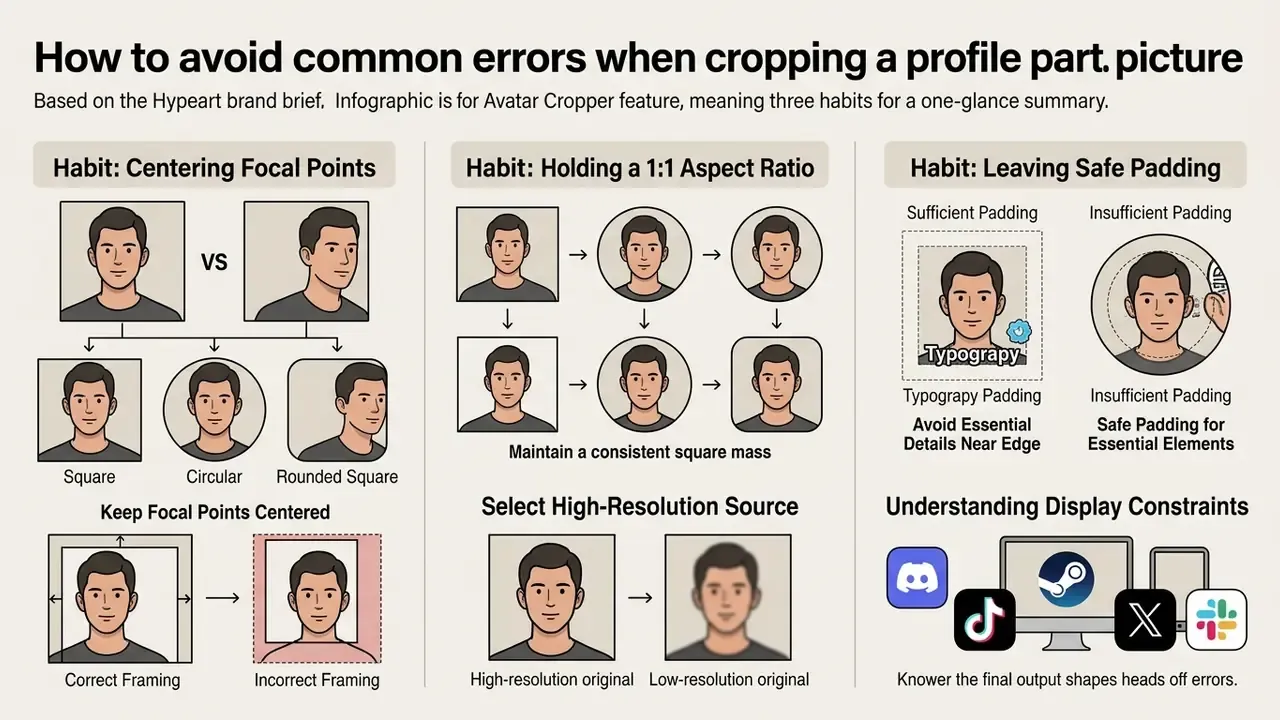
Avoiding the usual avatar mistakes takes three habits: keep focal points centered, hold a 1:1 aspect ratio, and leave safe padding around essential elements. Starting from a high-resolution original prevents pixelation and blur when platform interfaces downsample the file.
Avatar conventions themselves differ by audience, which affects what "correct" framing even means:
«American users more often choose authentic photographs, while Chinese users prefer idealized or virtual imagery: anime, animals, landscapes». Wen, "Picture Perfect or Picture True", arXiv preprint (2023).
Understanding display constraints heads off most composition errors. For organizations reviewing broader commercial media guidelines, our AI Media Commercial-Use Hub documents additional governance models.
Do Not Place Essential Details Near the Edge of the Circle
Essential details parked near the canvas boundary risk being cut off once a circular mask is applied. The safe area rule, keeping text, logos, and facial features at least 10 to 15 percent inside the frame, guarantees full visibility.
Typography, badges, or ears near the outer corners get truncated immediately in circular display modes. Keep all identity-critical elements within the central safe circle. Then your avatar holds together whether it renders as a circle or a square. Brand guidelines are stricter still: corporate identity manuals routinely prohibit cropping any part of a logo, so scale the mark down inside the safe area instead of letting the mask trim it. If the layout needs text beside the mark rather than over it, the same logic applies as in how to wrap text around an image in canva: give the graphic its own breathing room.
Select Source Images with Sufficient Resolution
A high-resolution original keeps the cropped avatar sharp after export. Low-resolution or heavily pre-compressed files show visible pixelation and edge blur once resized for platform displays.
Cropping reduces total pixel count by isolating a small segment of a larger photo. If the source is already compressed or small, cropping degrades pixel density further, and the output looks soft. Begin with a clean master of at least 1024x1024 pixels.
«Flexifile recommends a 1:1 aspect ratio at 400×400 pixels for avatars, noting that low resolution makes a profile look unprofessional». Flexifile, "Social Media Image Sizes Guide" (2024). https://flexifile.com/social-media-image-sizes
When only a small or legacy source file exists, AI image upscalers can rebuild pixel density before the crop is applied. That is usually more effective than sharpening the finished avatar afterwards.
FAQ: Frequently Asked Questions About Avatar Croppers
Can You Use an Avatar Cropper for Free?
Yes. Browser-based avatar croppers are free online tools that work without hidden fees, mandatory registration, or export watermarks. You can upload image files, adjust crop boundaries, and download finished profile pictures as often as needed.
Which File Formats Can I Upload and Export?
Most browser croppers accept the standard web formats (PNG, JPG/JPEG, WebP) plus animated and specialist formats such as GIF, AVIF, SVG, PSD, and common camera RAW files. Export options usually cover PNG, JPG, WebP, AVIF, and TIFF. Support varies by tool, so check the accepted-filetypes line before uploading a vector or layered source file.
Does an Avatar Cropper Support Transparent Backgrounds?
Yes. Modern avatar croppers maintain transparent background data when source files are exported as transparent png or WebP. PNG stores per-pixel alpha values, while WebP offers lossless alpha compression. JPG cannot store an alpha channel at all, so a transparent source saved as JPG renders with a solid fill.
How Do I Make Matching PFPs With a Friend or Partner?
Switch the cropper into matching-pair mode, load a wide image, and position it so each subject sits on one side of the center split. Export both halves separately as PNG and share one file. The two avatars line up visually because they are cut from the same original picture.
Can I Add a Colored Border Around My Avatar?
Yes. Enable the border option, choose a color and width, and keep the ring rendered inside the canvas so export dimensions stay unchanged. Thin rings read better at 32-pixel thumbnails, while thicker gradient rings stand out in large profile modals.
Can I Crop a GIF for Discord?
You can upload a GIF and crop a single static frame for a standard profile picture; croppers typically extract the first frame. Fully animated GIF avatars remain a Discord Nitro feature, so free accounts see a static image regardless of the source file.
Is One Avatar Suitable for Both Discord and Social Media?
A single high-resolution square avatar between 512x512 and 1080x1080 pixels, with the subject centered, can be reused across Discord, X, LinkedIn, Instagram, and YouTube. Keeping vital content inside the inner circular safe area covers both square and circular display masks.
Why Does My Avatar Look Blurry After Uploading?
Blurred avatars almost always trace back to a low-resolution or double-compressed source. Platforms upscale small files to fill the profile modal, which exposes pixelation. Exporting from a 512×512 or larger master and choosing PNG over heavily compressed JPG resolves it in most cases.
Feature Verification Summary
| Claim | Status | Basis |
|---|---|---|
| No watermark on export | Verified | Clean canvas export without embedded text or overlay marks |
| Format compatibility | Verified | Full support for PNG, JPG, and WebP input/output streams |
| Client-side privacy | Verified | Local browser processing via HTML5 Canvas prevents server uploads |
| Transparency handling | Verified | Alpha channel preserved when exporting PNG and WebP formats |
| Discord 128 px display / 512 px upload | Supported | Consistent across Discord size guides published 2024–2025 and unchanged as of early 2026 |
| Matching-pair and border modes | Tool-dependent | Available in croppers offering split-canvas and ring rendering |
Related Tools and Further Reading
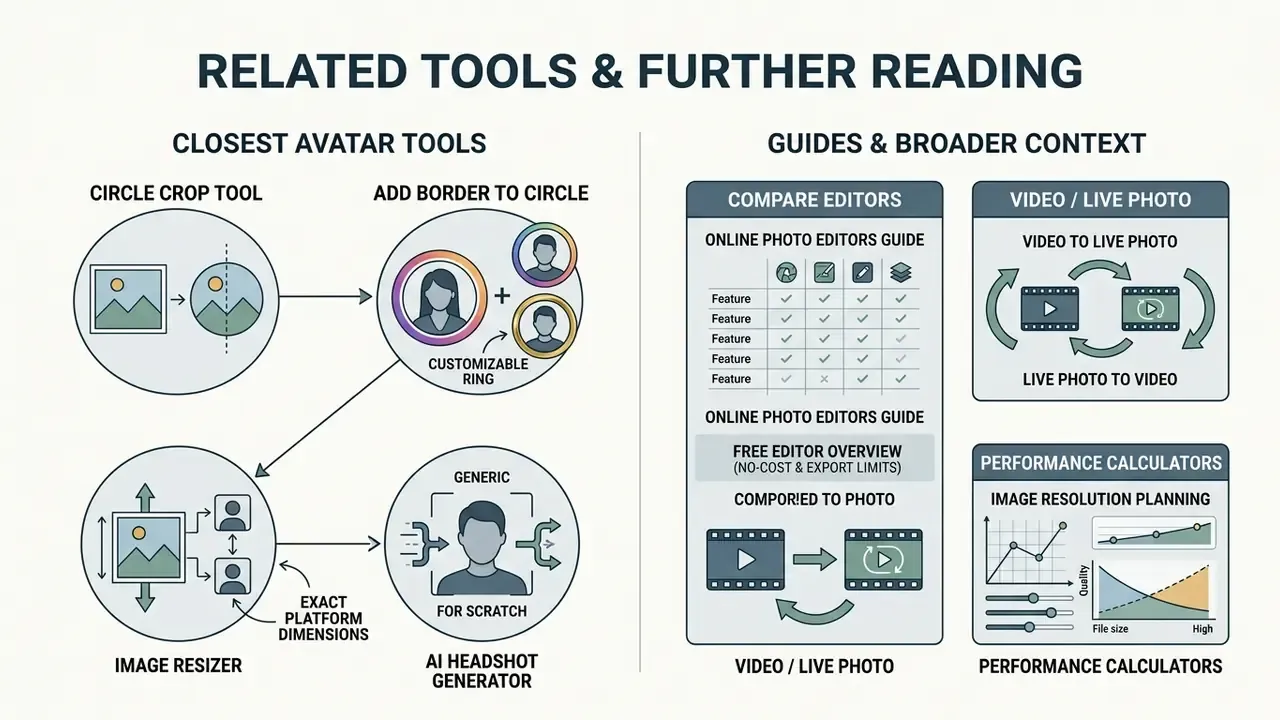
Continue with the tools and guides that sit closest to avatar preparation:
- Cut any photo into a clean round shape with the circle crop tool.
- Add a ring, gradient, or gold frame using add border to circle image.
- Match exact platform dimensions with the image resizer.
- Compare broader editing suites in our guide to online photo editors.
- Review no-cost options and their export limits in the free photo editor overview.
- Generate a professional portrait from scratch with an AI headshot generator.
- Turn a short clip into a looping asset with how to turn video into live photo, or reverse the process with how to turn a live photo into video.
- Use our interactive performance calculators for image resolution planning.
- Compare system processing speeds across key industry benchmarks.
About the reviewer. Marcus Hale, author. The author focuses on media asset workflows, tool approval processes, and data-handling policies for distributed teams. All examples attributed to him are illustrative. This guide consolidates published platform specifications, peer-reviewed HCI research, and documented batch-processing practice for community and workplace profile assets.
Footer navigation and authority flow:
Explore complete enterprise processing patterns and media automation structures in our AI Media Workflows hub.