Executive Summary
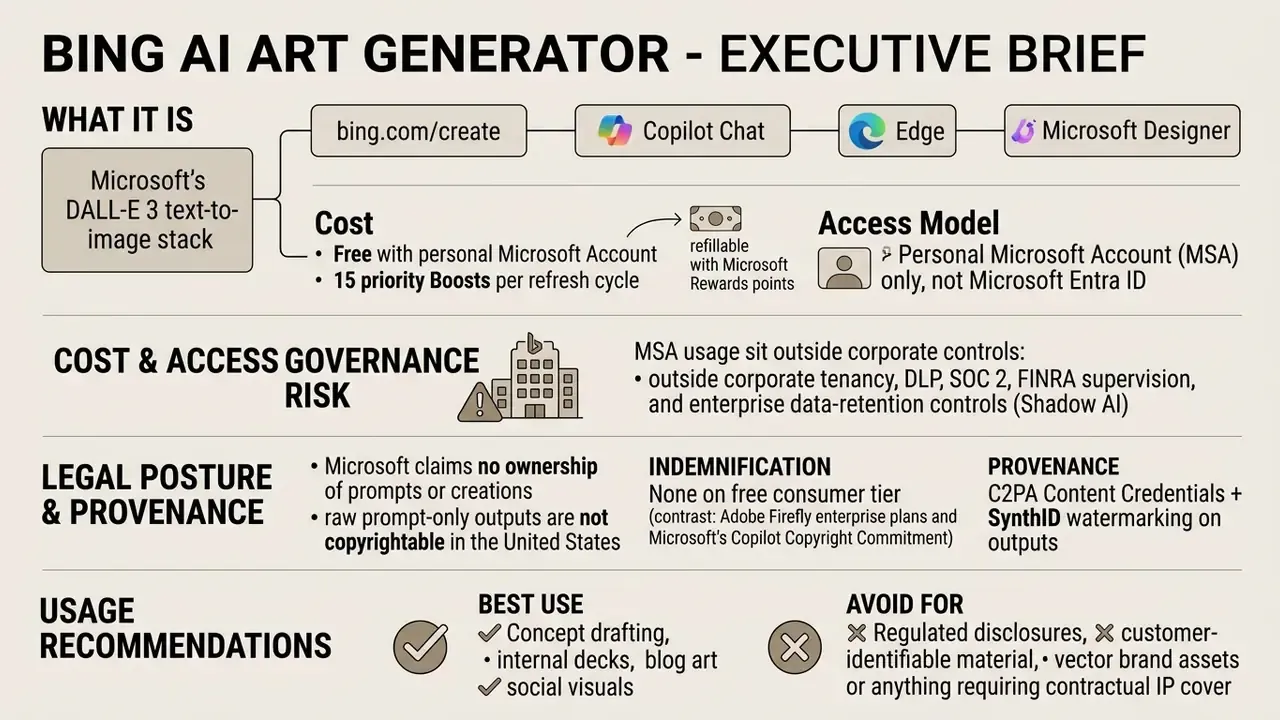
On this page: what the tool is and where it runs, a step-by-step generation guide, safety guardrails and ban triggers, prompt engineering with copy-paste templates, variations and Designer editing, the free tier and Boosts, commercial use with C2PA audit verification, a platform comparison matrix, an FAQ, and strategic recommendations.
What is Bing AI Art Generator and Where is It Available?
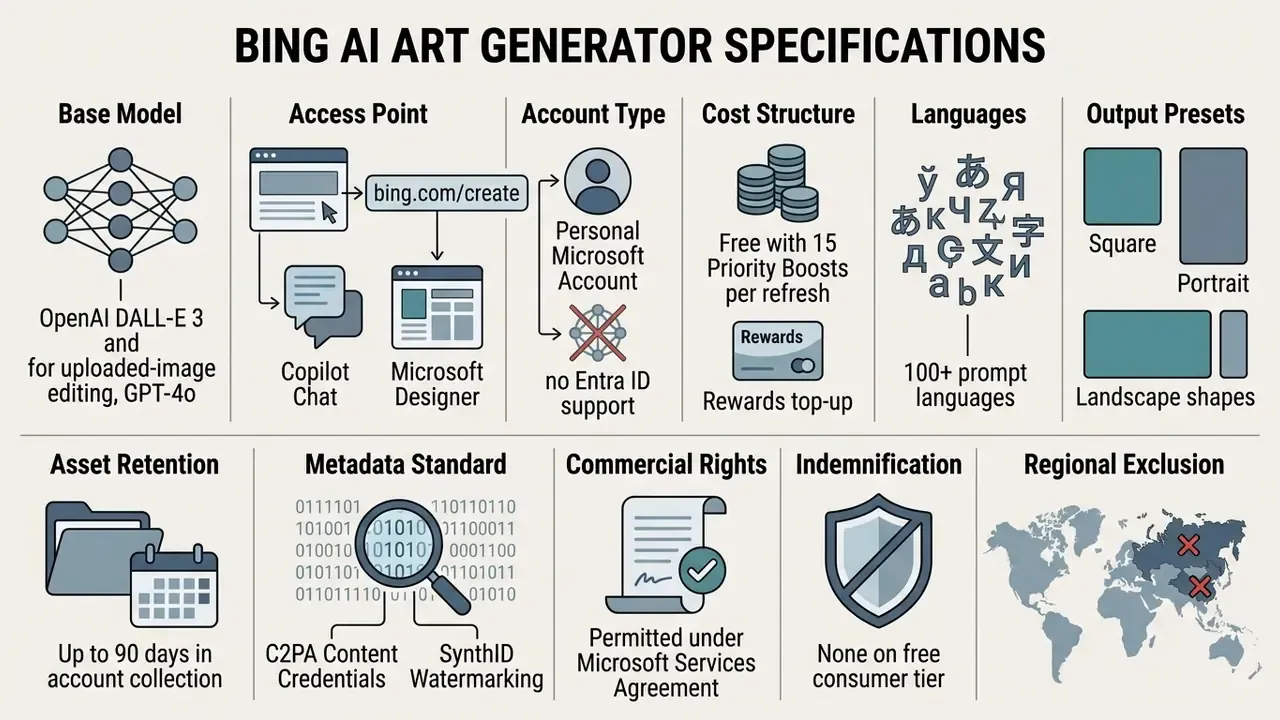
Bing AI Art Generator is an umbrella term for Microsoft's text-to-image capabilities powered by OpenAI's DALL·E 3 model. It is accessible across multiple Microsoft platforms, including Bing Image Creator, Copilot Chat, Microsoft Edge, and Microsoft Designer. Readers benchmarking the wider market can review how consumer and enterprise AI image generators differ in licensing and data handling before standardizing on any single vendor.
A small naming note, since it affects how requests reach your service desk. Users search for this product under many labels: "ai bing art", "ai bing art generator", "ai bing create", and misspelled variants such as "being ai generator", "big ai image generator", or "bin ai image generator". They all point at the same Microsoft stack.
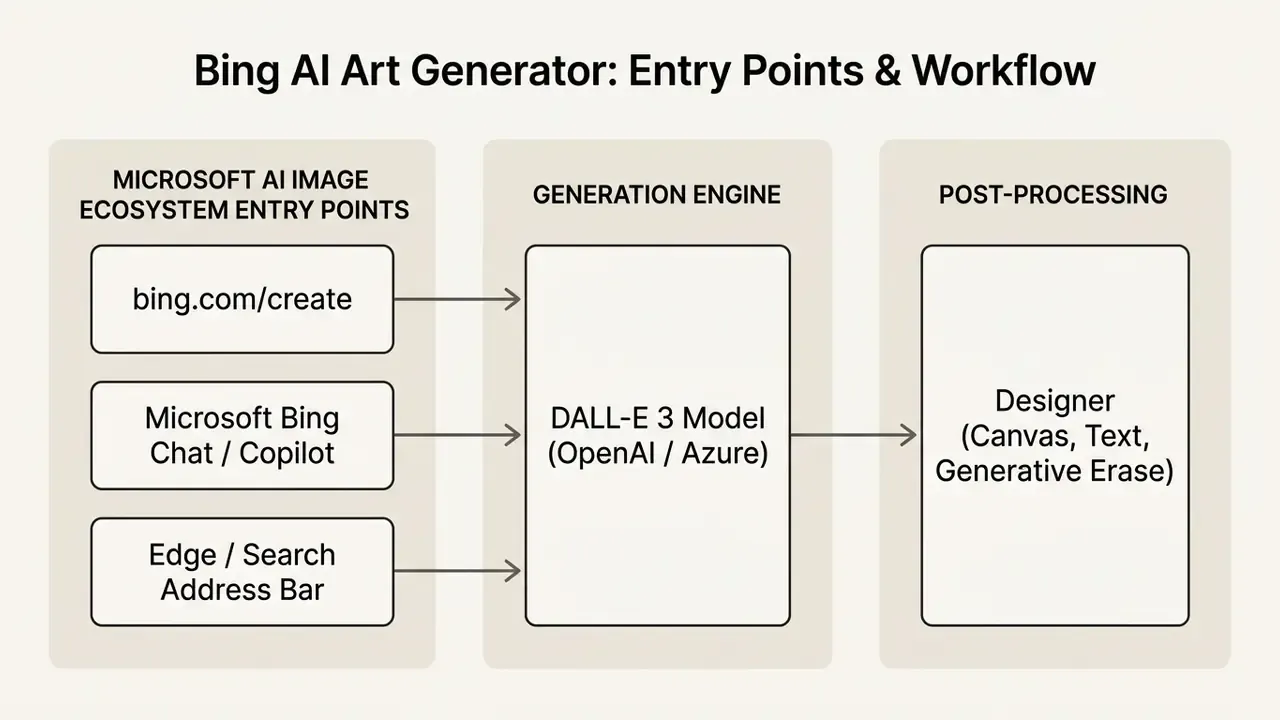
Users can generate high-quality visual outputs directly within search workflows or inside dedicated design interfaces. The service is available globally to anyone with a personal Microsoft account, with specific regulatory exclusions in Russia and China. Microsoft's help documentation also confirms support for more than 100 prompt languages, and generated assets are retained in the account collection for up to 90 days.
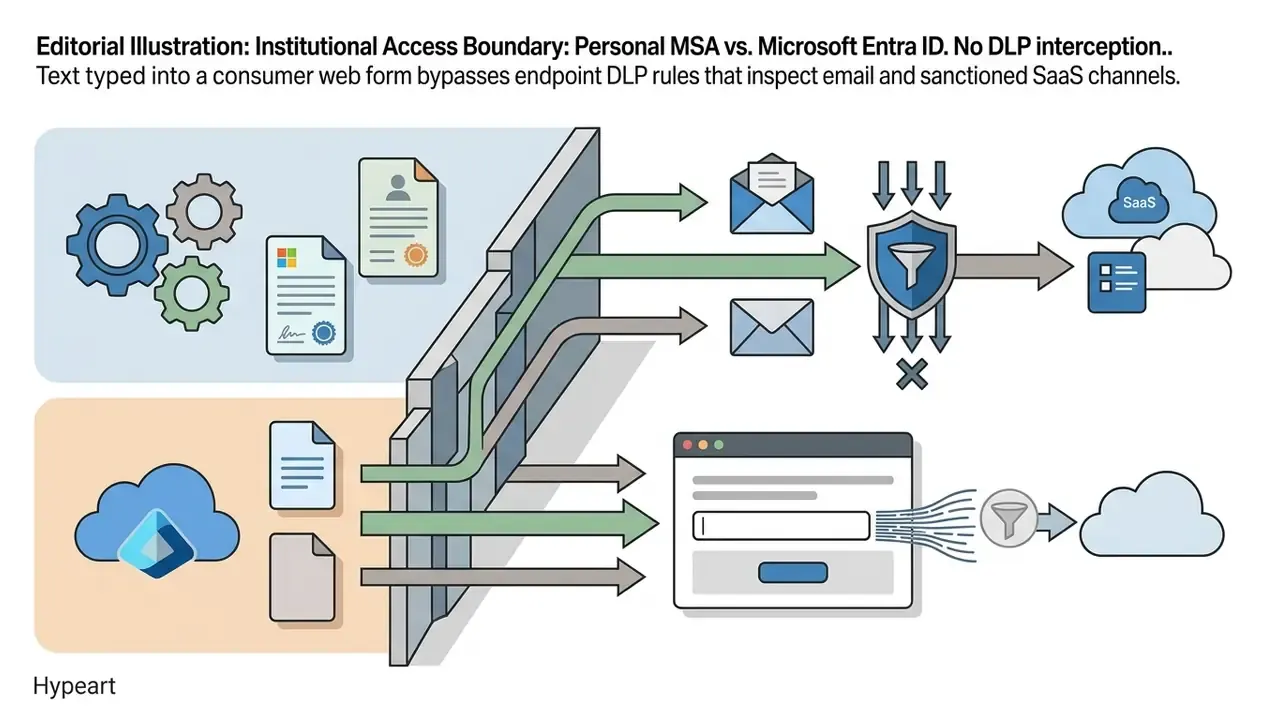
Institutional Access Boundary: Personal MSA vs. Microsoft Entra ID
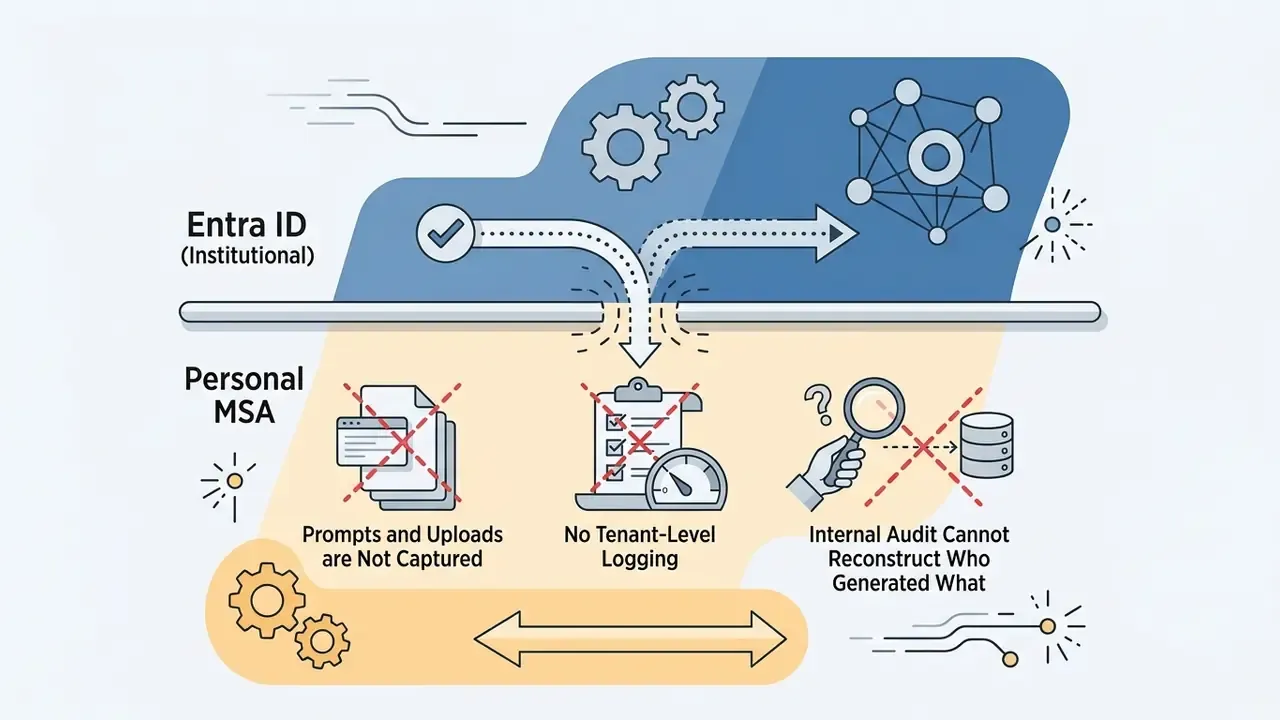
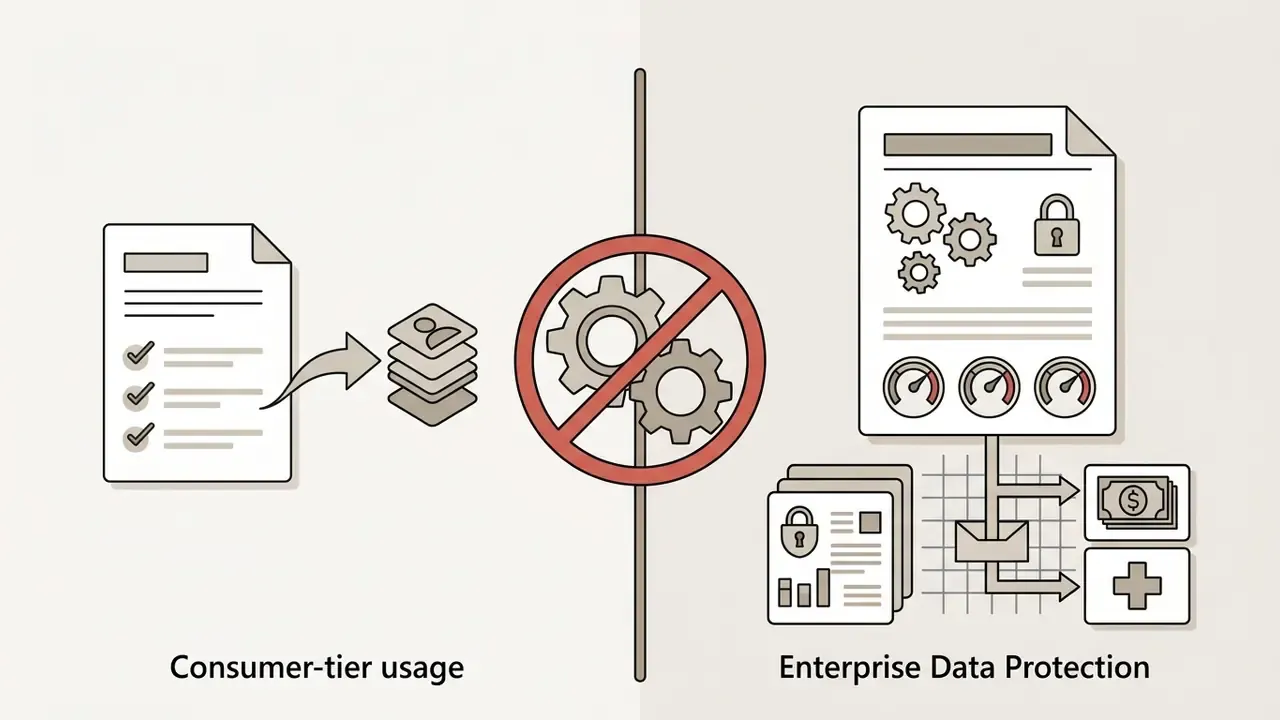
Before any deployment discussion, one architectural fact determines the entire risk profile: bing.com/create authenticates only through a personal Microsoft Account (MSA). It does not accept Microsoft Entra ID (corporate) credentials, which means generation activity occurs outside the organization's tenant boundary.
For a bank, broker-dealer, or regulated fintech, that distinction carries four consequences:
Practical control: route employees who need image generation to Azure OpenAI Service or Microsoft 365 Copilot and Designer under Entra ID, where tenant isolation and the "customer data is not used to train models" commitment apply, then block or monitor the consumer endpoint at the proxy layer. Treat any unsanctioned use as a Shadow AI finding inside your model inventory, consistent with NIST AI RMF (GOVERN-1, MAP-4) and the model-inventory expectations of SR 11-7 supervisory guidance on model risk management.
One more thing worth saying plainly. The owner of this capability is rarely the CISO. It is usually a marketing manager with a personal account and a deadline.
Bing Image Creator, Bing AI, and Microsoft Designer: How Services Are Connected
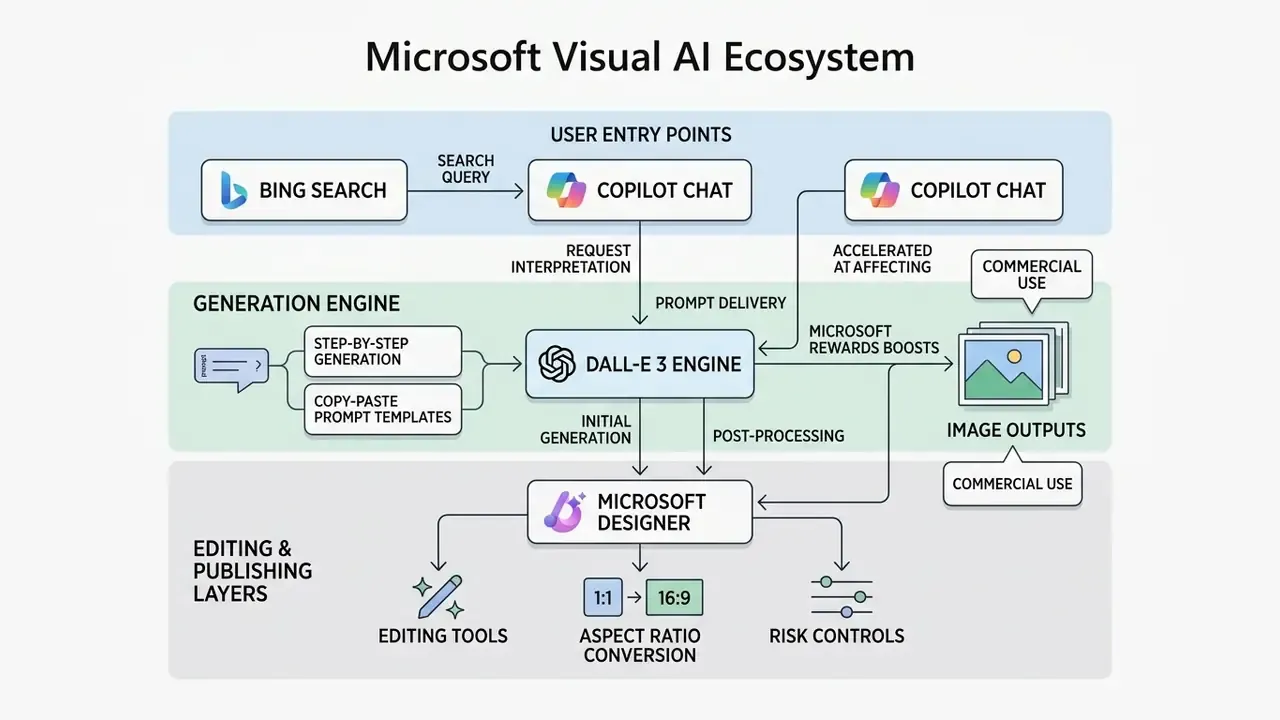
Bing Image Creator serves as the core text-to-image engine, while Bing AI (Copilot) provides a conversational chat interface to trigger image creation. Microsoft Designer acts as the post-generation canvas where created visuals can be edited, reformatted, or combined with typography.
According to Microsoft's technical documentation, the standalone bing.com/create endpoint was rebranded to Image Creator from Microsoft Designer to build one unified design pipeline. When a user requests visual assets in Copilot chat, the system invokes the same underlying DALL·E 3 pipeline. Once generated, the asset can be transferred into Microsoft Designer for background removal, generative erase, or social media layout adjustments. A deeper functional walkthrough of the individual surfaces sits in this analysis of the Microsoft AI Image Generator family.
One terminology note matters for governance documentation. Microsoft's consumer Designer terms historically stated that Designer is "for personal use only and not for use in the course of trade or commerce," while the separate Image Creator from Microsoft Designer terms do not carry that explicit restriction and state that Microsoft does not claim ownership of Prompts or Creations. Because the two documents version independently, legal teams should record which surface, which terms version, and which date applied to each asset.
What Images Can Be Created with AI Bing Art
The bing ai art generator can produce photorealistic images, stylized digital art, vector-style graphic illustrations, 3D renders, and cinematic concept designs. Because the AI image generator in Bing Image Creator runs on OpenAI's DALL·E 3 architecture, it processes complex spatial queries and nuanced stylistic instructions with unusual accuracy for a free tool. Current templates expose fixed output presets with aspect ratios including 1:1, 3:2, 2:3, 7:4, 4:7, 9:16, and 16:9, plus descriptive presets such as "Detailed & dynamic" and "Stylized illustration."
Research on text-to-image variability published in EMNLP 2024 shows that DALL·E 3 maintains high prompt reusability, generating a large number of distinct visual seeds from a single descriptive prompt before visual convergence occurs. The measured range matters, because it sets a realistic expectation for how long one prompt remains productive:
Users can generate diverse visuals ranging from studio product renders to complex architectural concepts. To evaluate broader generative tools, teams often compare options across commercial-grade models and rank the best AI image generators by fidelity, licensing, and control surface.
How to Use Bing AI Image Generator: Step-by-Step Guide
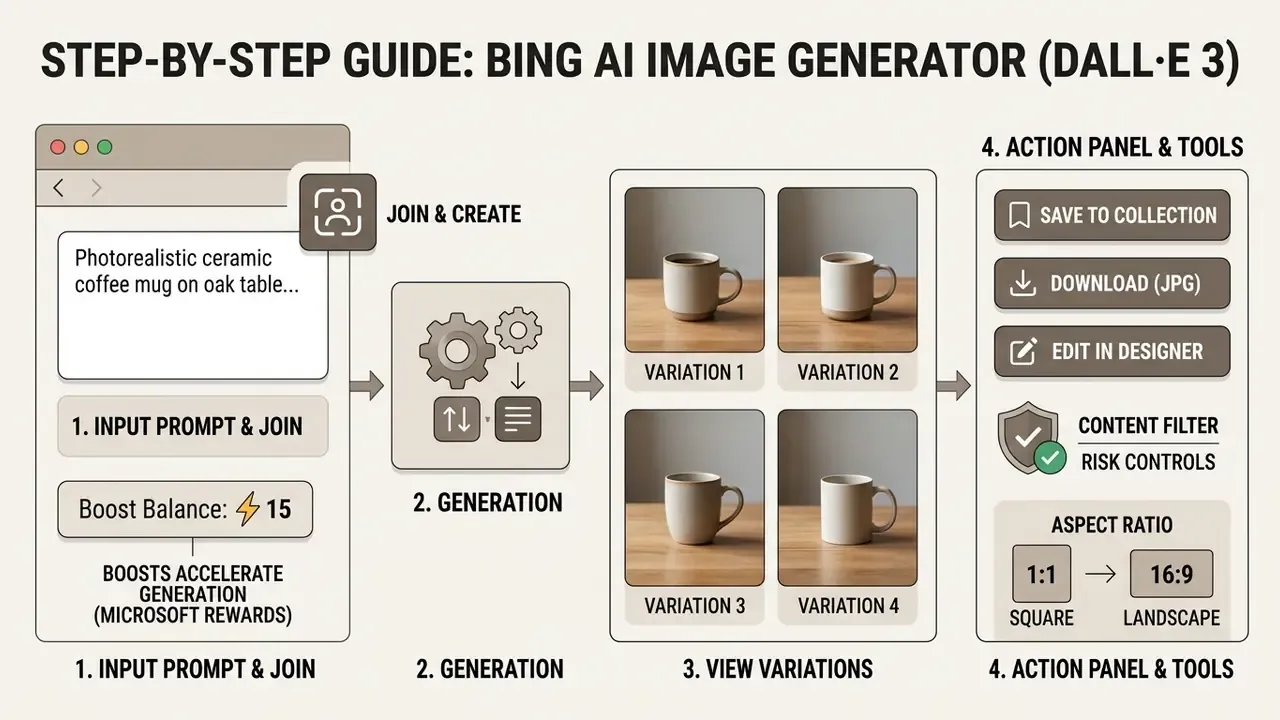
Using the bing ai image generator requires signing in with a personal Microsoft account, entering a descriptive prompt into the generation field, and selecting from four initial output variations. The entire process runs in a browser or mobile app without software installation.
Sign-in via Microsoft Account and Launching Image Creator
Access to the ai image creator microsoft bing interface begins by navigating to bing.com/create and clicking "Sign in to Create." The service requires a personal Microsoft account (MSA) and is not reachable through enterprise Microsoft Entra ID logins. There is no waiting list and no upfront cost.
Once authenticated, new accounts receive 15 boosted generations, which prioritize compute processing time. The interface presents a primary text bar alongside sample prompts and recent creation history. Organizations reviewing enterprise model risks can browse the hub for standardized risk management documentation.
How to Write a Prompt and Run Image Generation
To generate images, type a detailed text prompt into the input field and click "Create." The ai bing create engine processes the request through DALL·E 3 and returns four candidate images at once.
Effective text prompts include the primary subject, visual medium, lighting conditions, framing, and color palette. One finding is worth internalizing before you rely on shorthand prompts:
«An online experiment with 1,891 participants found that automatic prompt rewriting erased roughly 58% of DALL·E 3's advantage over DALL·E 2.»
In practice the model rewards prompts that are already specific. When the system has little to work with, its internal rewriting step fills gaps with generic choices and flattens quality. Entering "a high-quality product photo of a stainless steel water bottle on a rock, morning sunlight, wide-angle shot" yields precise candidates within seconds. "Nice bottle photo" does not.
How to Download, Save, and Continue Working with Results
After the bing image creator finishes generation, selecting an individual thumbnail opens a high-resolution preview window. Users can click "Download" to save a local JPG file or "Save" to archive it within a Microsoft account collection.
To perform advanced edits, selecting "Customize" opens the visual directly inside Microsoft Designer. Downloaded files contain embedded content credentials and a subtle visual watermark in the lower-left corner indicating synthetic origin. Note a documented quirk: saving via the browser's native "Save image as" on a gallery thumbnail can capture a reduced-size copy, so always open the full preview before exporting.
Safety Guardrails and Account Suspension Triggers
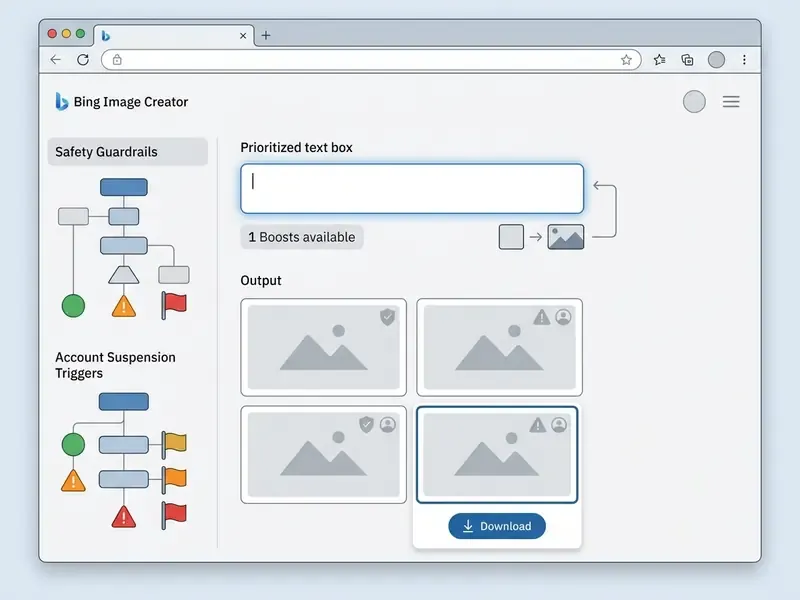
Microsoft enforces automated, multi-layered safety filters at both the prompt and the output stage. Prompts that could produce the following categories are rejected instantly and may generate account warnings or suspension:
- Identity fraud fake IDs, passports, driver's licences, official credentials, badges, or realistic personal signatures.
- Financial and legal fraud synthetic insurance claim documentation, fabricated damage evidence, forged statements, or invented legal exhibits.
- Fake personas profile imagery intended to support fabricated accounts, synthetic identities, or social-engineering campaigns.
- Impersonation and deepfakes likenesses of living political figures, executives, or any non-consensual explicit depiction.
- Protected IP verbatim trademarked logos, corporate marks, or copyrighted cartoon and franchise characters.
- Harm categories violence, hateful imagery, self-harm, and sexual content involving minors.
Every accepted output is also labelled: a visible watermark appears in the lower-left corner, and Content Credentials are embedded so downstream reviewers can identify AI provenance. For financial institutions, this guardrail list should be mirrored verbatim into the acceptable-use section of the internal generative AI policy. The most common cause of employee-account suspension is an ill-considered "mock document" request, not deliberate misuse.
How to Write Prompts for High-Quality Images in Bing AI
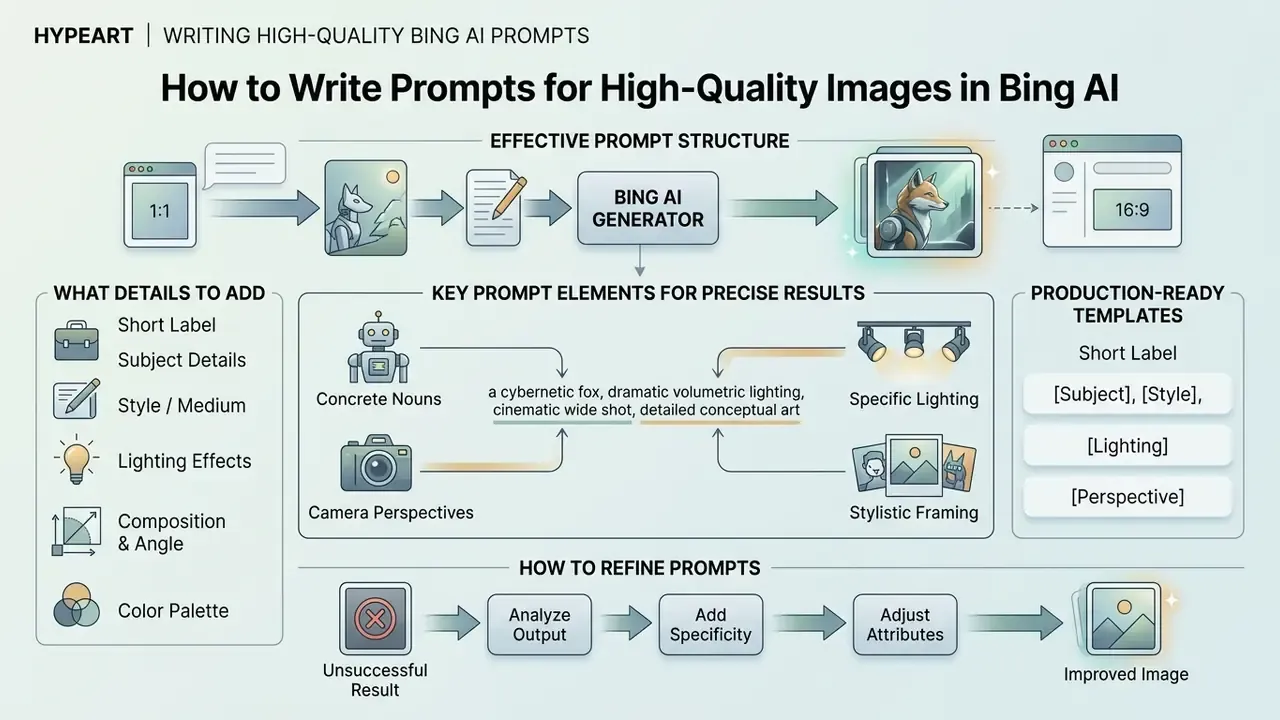
Writing effective text prompts for the bing ai image generator requires concrete nouns, specific lighting attributes, camera perspectives, and clear stylistic framing. Avoiding vague adjectives produces more predictable visual outputs.
The clearest way to see this is a regulated-industry example, and this one is illustrative rather than a named client case. During a commercial digital asset review, a marketing group tried to generate background imagery for a financial report. The initial prompt ("professional banking background") returned generic, cluttered office images. By refining it to "minimalist glass office building interior, soft morning sunlight, low-contrast neutral tones, wide-angle corporate photography," the team produced crisp, brand-compliant hero assets in four iterations. The only variable that changed was prompt specificity.
What Details to Add to Text Prompts for Precise Results
A high-quality text prompt must define five structural elements: subject, style, lighting, composition, and color palette. Explicit descriptions reduce model ambiguity and deliver consistent visual assets.
- Subject: Specify object characteristics and actions (for example, "a matte black electric kettle pouring water").
- Style / Medium: Name the visual technique ("studio photography," "3D isometric render," "watercolor illustration").
- Lighting: Define light sources and quality ("soft diffused window light," "dramatic rim lighting").
- Composition & Angle: Set camera placement ("eye-level macro shot," "overhead flat lay," "shallow depth of field").
- Color Palette: Constrain color usage ("monochromatic warm gray," "vibrant pastel tones").
An empirical study from UC Berkeley on DALL·E 3 prompting demonstrated that user-written prompts with specific, concrete descriptions achieved significantly higher target fidelity than short, abstract inputs. The measured mechanism was prompt length and semantic density:
«Participants writing directly for DALL·E 3 produced longer, semantically richer descriptions, which raised fidelity to the target image.»
Microsoft's own Copilot prompting guidance aligns with this. It recommends a minimum of roughly six descriptive words, and ideally one or two full sentences covering subject, style, mood, environment, camera angle, colour, texture, and framing.
Production-Ready Bing AI Prompt Templates
Copy these structures directly, swap the bracketed variables, and adjust one modifier at a time. They cover the highest-volume commercial and social scenarios.
| Target Use Case | Detailed Copy-Paste Prompt | Key Technical Parameters | Primary Asset Output |
|---|---|---|---|
| 3D Name & Brand Typography | Glossy 3D typography reading "[BRAND/NAME]", neon cyan and purple accent lighting, dark reflective glass background, premium studio render, 8k detail | High contrast, volumetric lighting | Social logos, branding headers, gaming tags |
| Social Profile Picture (WhatsApp / LinkedIn DP) | Professional corporate avatar of a tech founder, soft diffused lighting, neutral modern office background, shallow depth of field, natural skin texture, square composition | Eye-level, 85mm portrait framing | Profile pictures, chat icons, speaker cards |
| E-Commerce Hero Shot | Studio product photography of a [PRODUCT], placed on wet black basalt stone, dramatic side rim lighting, water droplets, ultra-sharp detail, minimal negative space for copy | Commercial lighting, macro camera | Amazon/Shopify banners, ad creatives |
| 3D Character Poster | Cute 3D cartoon character standing beside bold name text "[NAME]", vibrant gradient background, cinematic rim light, toy-like render, social media poster | Toy-render shading, centered subject | Birthday posts, creator accounts, trend content |
| Conceptual Video Frame | Cinematic wide-angle shot of a futuristic neon-lit city street at dusk, reflective pavement, wet atmosphere, dynamic perspective, opening scene framing | 16:9 ready layout, strong vanishing point | Storyboards, hero web banners, reel first frames |
| Corporate / Financial Report Cover | Minimalist glass office building interior, soft morning sunlight, low-contrast neutral tones, wide-angle corporate photography, no visible signage or logos | Low contrast, brand-safe palette | Report covers, investor decks, webinar slides |
| Editorial Blog Illustration | Flat vector-style illustration of [CONCEPT], limited three-colour palette, generous white space, clean geometric shapes, editorial magazine style | Vector-look flat shading | Article headers, newsletter art |
| Festival / Greeting Visual | Warm festive greeting visual with the text "[GREETING]", soft bokeh lights, gold and deep red palette, centered square composition, high detail | Square 1:1, bokeh depth | WhatsApp greetings, group icons |
For likeness-heavy work such as staff portraits or speaker cards, compare output realism against purpose-built AI headshot generators before publishing anything client-facing.
How to Refine Prompts After an Unsuccessful Generation
When an initial generation yields imprecise results, refine the text prompt iteratively by changing one variable at a time rather than rewriting everything. Adding descriptive constraints or adjusting lighting terms produces clearer, traceable adjustments. Microsoft's own refinement guidance recommends changing colour, size, shape, position, orientation, perspective, lighting, or mood, and testing synonyms, instead of restarting from scratch.
If the generated image contains unwanted elements, state the environment or framing adjustments you need explicitly. When prompts trigger content filters, simplify sensitive language and reword abstract phrases, avoiding terms that can read as violent, adult, political, or document-forging (see the guardrail list above). Teams assessing alternative text tools can review the deep ai text documentation for text-based workflow integrations, and organizations without Microsoft accounts can evaluate no-sign-up AI image generators as a stopgap for low-sensitivity drafts.
Prompt Troubleshooting Matrix
| Symptom in the Output | Likely Cause | Corrective Prompt Edit |
|---|---|---|
| Image looks soft, blurry, or unintentionally cartoonish | No medium or optics specified | Append shot on 35mm lens, f/2.8, natural film grain, studio photography |
| Extra fingers, warped hands, distorted limbs | Complex anatomy in frame | Reframe: hands out of frame or close-up shot from the shoulders up |
| Garbled letters on signage or packaging | Text rendering ambiguity | Wrap the exact string: text reading "EXACT WORDS", or overlay type in Microsoft Designer instead |
| Cluttered, generic corporate scene | Abstract noun prompt | Replace the abstraction with a physical scene, one light source, and one camera angle |
| Colours drift off brand | No palette constraint | Add limited palette: [hex-adjacent colour names], low saturation |
| Every variation looks the same | Prompt exhausted for this seed family | Change one structural word (medium, angle, or lighting) rather than regenerating verbatim |
| Prompt silently blocked | Filter trigger on a single token | Remove document, weapon, celebrity, or political references and restate the visual goal neutrally |
| Accidental logo or trademark appears | Style reference implied a brand | Add no logos, no brand marks, no text and re-run a visual audit |
| Subject centred when copy space is needed | No layout instruction | Add subject positioned left third, clean negative space on the right for headline text |
Capabilities of Bing AI Art Creator for Generation and Editing
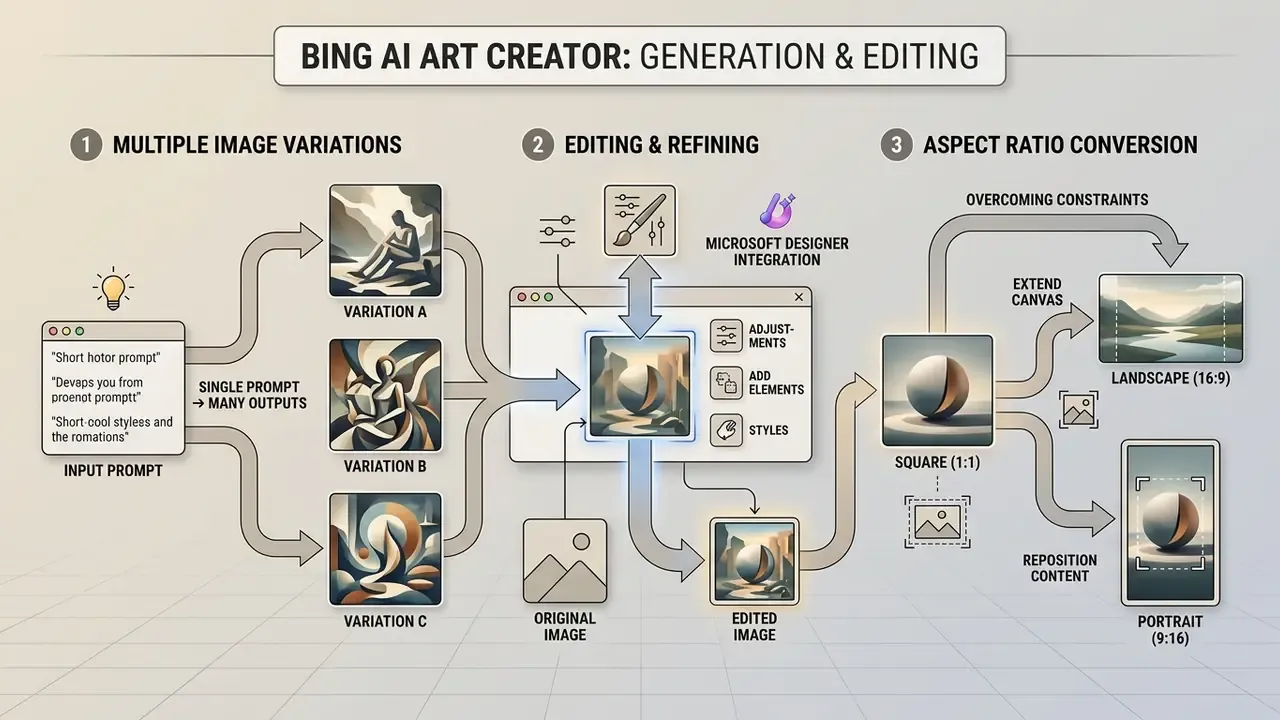
The bing ai art creator balances multi-variant generation with integrated post-processing through Microsoft Designer. Users can explore visual concepts rapidly and execute basic graphic editing in one environment.
Generating Multiple Image Variations for One Prompt
Every prompt submission in bing ai art gen triggers four simultaneous image variants. That parallel output lets creative teams evaluate alternate compositions, lighting arrangements, and detail variations without additional submissions.
Published design guidance for text-to-image prompting recommends generating roughly 3 to 9 seed variants to obtain a representative sample of a model's behaviour for a given prompt. Treat that as a practical selection window, not a hard limit. Variability research puts a firmer ceiling on how far a single prompt can be pushed:
You can therefore re-run the same prompt many times to explore additional random seeds while keeping core instructions intact. For selection discipline, apply hard pass/fail gates first: missing required components, wrong rendered text, or edits outside the intended region are automatic rejections. Then score the survivors 0 to 5 on prompt faithfulness, rendering quality, and brand fit.
Editing and Refining Images in Microsoft Designer
Microsoft Designer provides post-generation editing features including background removal, generative erase, text overlays, canvas resizing, and style restyling. These tools turn raw AI outputs into completed marketing assets. Teams can also benchmark them against general-purpose AI photo editors and conventional online photo editors when pixel-level control matters.
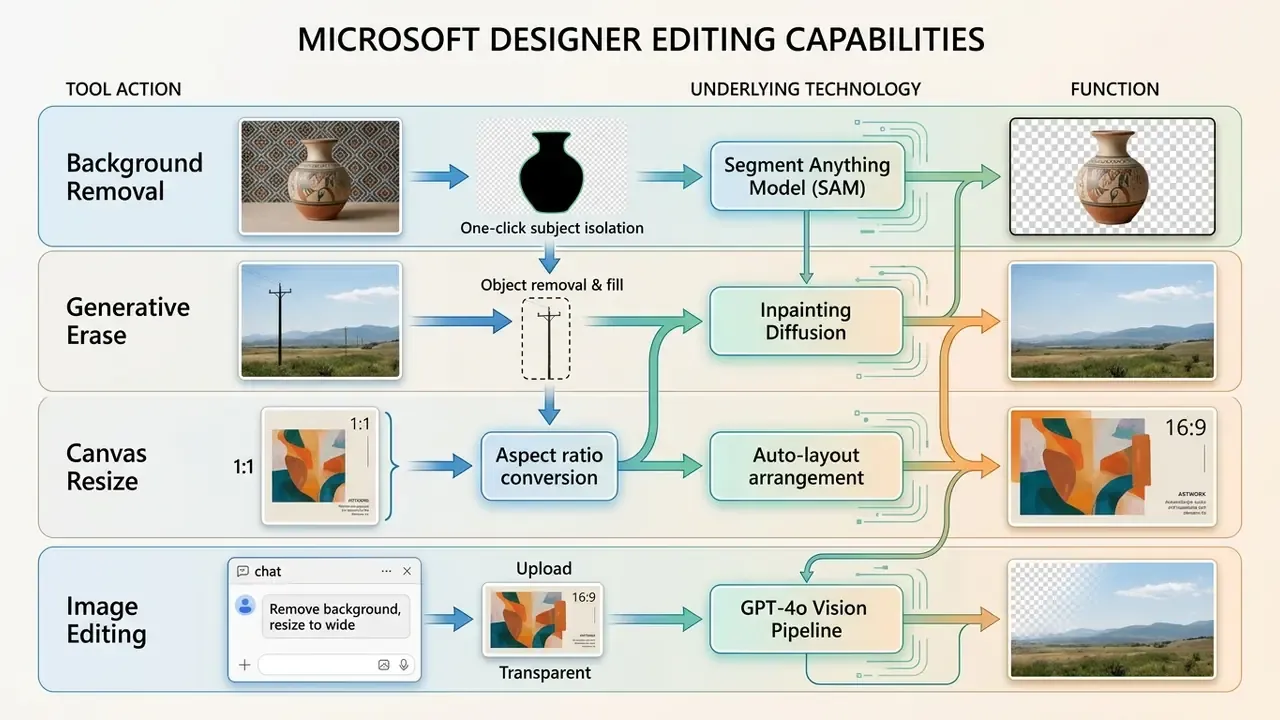
Microsoft Designer relies on GPT-4o for conversational image edits, and Microsoft's Designer FAQ states that Generative Erase uses SAM-based selection support to remove unwanted objects or areas from photos. Microsoft's Bing Image Creator feature page likewise notes that editing of uploaded images is handled by GPT-4o rather than by the generation model. Two caveats belong in any internal spec sheet. Microsoft has documented generative fill and generative expand as phased features, and the published export-format list varies across Microsoft surfaces (PNG, JPG, PDF and SVG are commonly reported), so verify the export matrix in your own tenant before standardizing a delivery pipeline. To analyze dedicated image modification platforms, teams can check the deep image ai review.
Overcoming Aspect Ratio Constraints: 1:1 to 16:9 and 9:16
By default, many Bing Image Creator flows output a 1:1 square asset at 1024×1024 px, which is the single most common blocker for YouTube banners and vertical stories. Rather than stretching or hard-cropping the file, extend it generatively:
- Click Customize to open the asset in Microsoft Designer.
- Select Canvas Size and choose the target dimension (1920×1080 for 16:9, or 1080×1920 for 9:16).
- Use the Generative Expand / Fill tool so DALL·E 3 context fill synthesizes the extended background edges instead of leaving empty canvas.
- Reposition the subject into the rule-of-thirds zone and reserve the opposite third for headline copy.
- Export the resulting uncropped high-resolution asset without manual canvas stretching.
Where Designer's expansion quality falls short, for example on complex reflective surfaces, compare results with dedicated AI outpainting tools for expanding images, which usually offer finer control over edge continuity. If you need the reverse operation, meaning multiple platform crops from one master, generate at 16:9 first and crop downward. Downsizing preserves detail; expansion invents it.
Bing AI Generator Free: Free Access and Practical Limitations
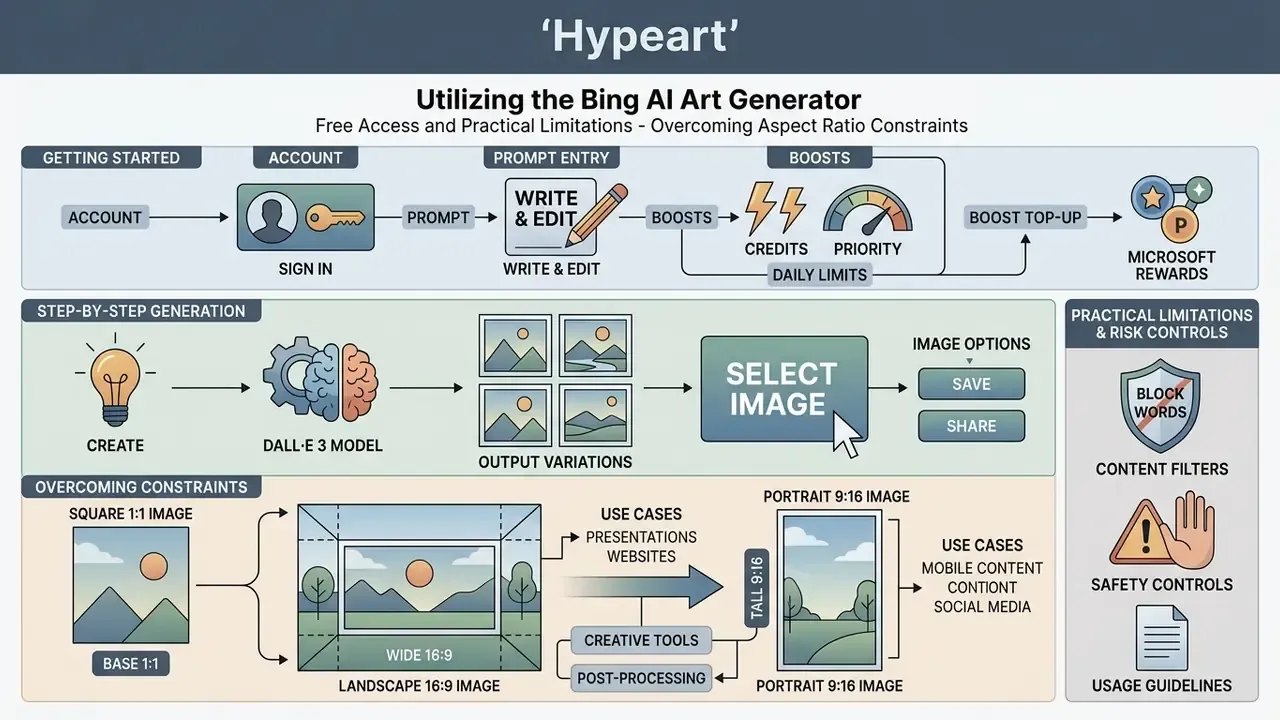
What You Need to Start in the Free Version of Bing Image Creator
To use the bing ai art generator free service, users only require an active personal Microsoft account and a supported web browser. No credit card registration, paid tier, or software installation is necessary.
New and active personal accounts receive 15 Boosts per refresh cycle. Boosts grant priority compute processing; once exhausted, image generation continues at standard, non-prioritized speeds. Microsoft's help documentation states that Boosts replenish in a day, while community reports describe weekly or account-specific behaviour. Treat the cadence as variable rather than contractual, and note that work or school accounts behave differently: when their Boosts run out, generation pauses until replenishment instead of falling back to standard speed.
How to Get More Boosts via Microsoft Rewards
When your initial 15 priority Boosts are gone, visual generation slows noticeably. You do not, however, need a paid subscription to refill compute priority. By opting into the free Microsoft Rewards program, you earn reward points through daily Bing search queries, Microsoft Edge browsing activity, and quiz or streak tasks. Those points can be redeemed directly for additional Image Creator Boosts from within your account profile, where generation history and the current Boost balance are also visible.
The result is an unusual gamified economy: generation consumes points and priority, while product usage earns points back, so heavy users can sustain fast generation indefinitely without spending money. Two governance notes follow from that design. First, Rewards is a consumer loyalty scheme tied to a personal MSA. It is not a procurement channel and should never be presented as a corporate cost-avoidance strategy. Second, Rewards participation increases search-activity data collection on that account, which is another reason to keep personal-account image generation off managed devices.
When Free Bing AI Image Generator May Not Be Enough
The free tier of the ai generator free bing tool hits operational limits fast in high-volume enterprise workflows. Output images are fixed at standard square or pre-set aspect ratios with embedded watermarks, and there are no custom seed controls, negative prompts, or batch processing APIs.
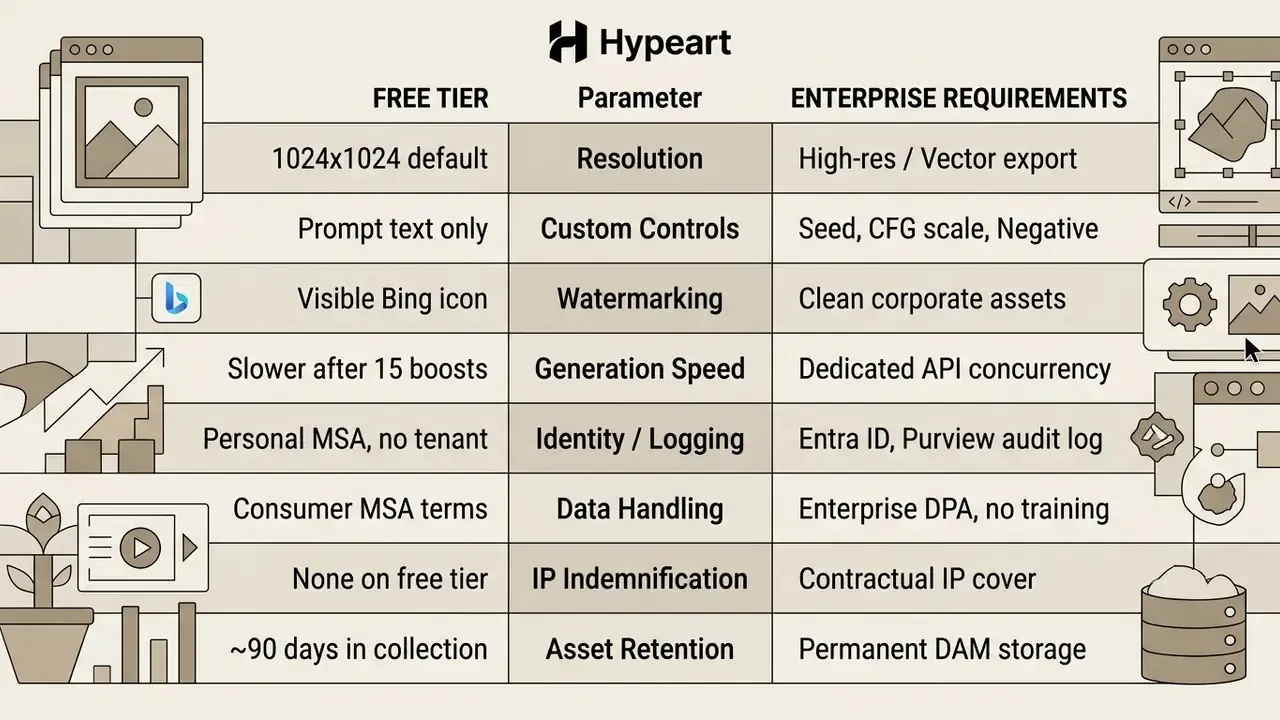
For high-volume production, organizations often explore dedicated platforms or review specialized options like the dalle ai image generator for direct API integration, evaluate image-to-image AI generators when transforming existing assets, or shortlist from a ranked review of free AI image generators where watermark policy is the deciding factor.
Can You Use Bing AI Art Generator Images for Commercial Purposes?
Images generated by the bing ai art maker may be used in commercial projects under current Microsoft terms, provided users comply with Microsoft's Services Agreement and Code of Conduct. Microsoft's 2026 support material states that Bing Image Creator images may be used commercially, including for publishing and selling books. Outputs still carry legal and intellectual property considerations that require validation.
What to Check Before Commercial Use of AI Generated Images
Before deploying generated visual assets commercially, organizations must verify platform terms, trademark exposure, and copyright protectability. Current Microsoft Q&A guidance indicates that Microsoft claims no ownership over prompts or generated creations, while also granting Microsoft a licence to use them for business operations. Crucially, Microsoft does not guarantee that outputs are unique or non-infringing.
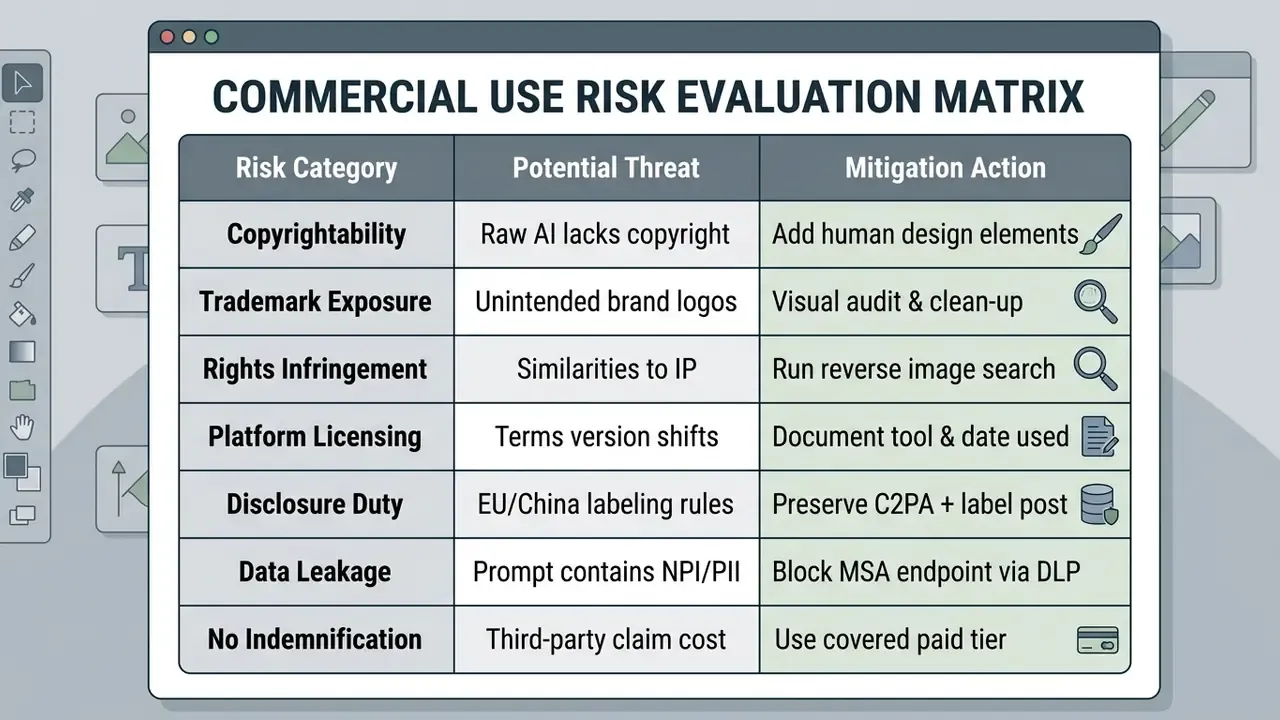
Reverse-image verification is the cheapest control in that matrix. Run finished assets through AI reverse-image-search tools and confirm synthetic origin with AI image detectors before a campaign goes live.
The U.S. Copyright Office (January 2025 AI Report, Part 2) affirmed that raw AI outputs generated solely from text prompts lack human authorship and cannot be copyrighted. Protection attaches only when human creators contribute sufficient expressive elements through arrangement, editing, or design composition. The report also contains the constructive counterpart, which matters for production teams:
Jurisdictional obligations diverge from there. EU AI Act Article 50 requires machine-readable marking of synthetic image outputs and viewer-facing disclosure for deepfakes. China's 2025 labeling measures require both explicit labels and embedded metadata or watermarks, and oblige platforms to preserve them. U.S. guidance centres instead on authorship and copyrightability. A single global asset therefore needs both a preserved provenance chain and a disclosure decision per market.
Commercial deployments must also avoid depicting trademarked logos, recognizable corporate designs, or protected celebrity likenesses. Microsoft's own trademark guidelines prohibit unlicensed use of its logos, product icons, illustrations, and designs. To analyze risks related to synthetic human representations, organizations can review the deepfake ai image generator guide.
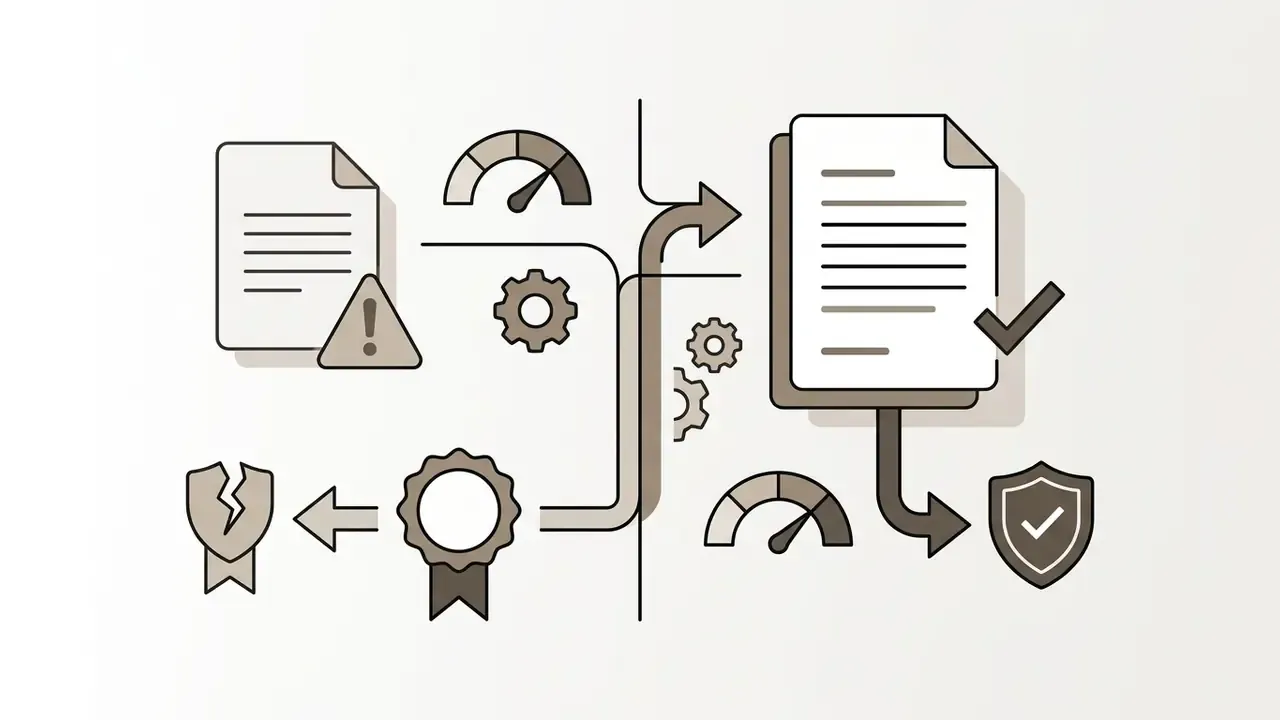
How to Verify C2PA Content Credentials for Internal Audit
Model risk and internal audit functions need reproducible evidence that an asset is synthetic and that its provenance survived post-processing. A minimal, repeatable procedure:
- Capture the baseline.Immediately after download, upload the original file to
contentcredentials.org/verifyand export the manifest showing issuer, generating tool or service, and creation timestamp. - Hash and store.Record a SHA-256 hash of the original file alongside the prompt text, the surface used (
bing.com/create, Copilot, Designer), and the account type, in the asset register. - Re-verify after editing.Run the same verification after Designer edits, upscaling, or export through third-party software. Some pipelines strip metadata, and a stripped manifest must be flagged rather than assumed intact.
- Attach the SynthID note.Where SynthID watermarking is present, record it as a secondary, edit-resistant signal that survives some transformations which destroy metadata.
- Retain the evidence bundle(manifest export, hash, prompt, timestamp, reviewer sign-off) for the same period as the campaign or disclosure it supports.
This bundle is what converts "we think it was AI-generated" into audit-ready evidence, and it maps cleanly onto the documentation expectations of model-risk frameworks such as SR 11-7 and the MEASURE and MANAGE functions of NIST AI RMF.
How to Prepare a Bing AI Image for Publication and Projects
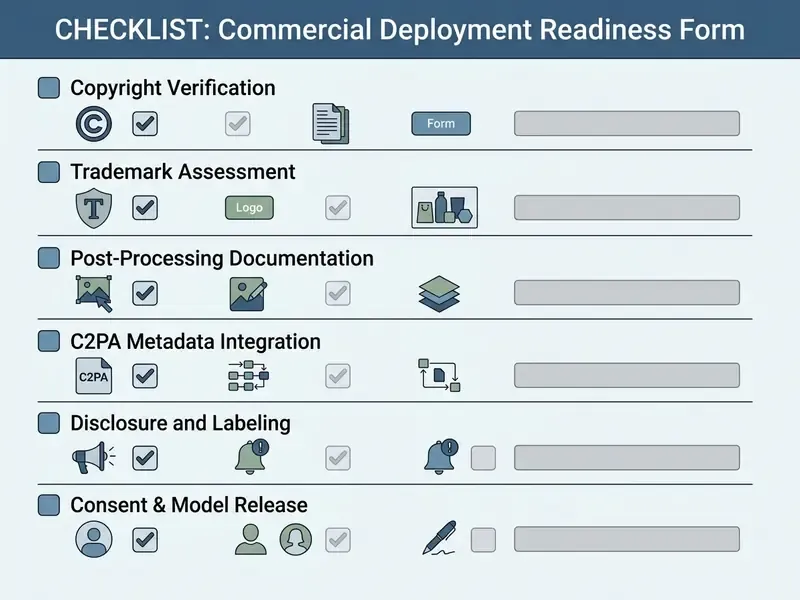
Preparing a generated asset for commercial publication involves upscaling, visual editing, and verifying provenance metadata. Converting a raw output into a commercial asset keeps quality consistent across media channels.
- Visual Audit: Inspect the generated image for rendering artifacts, anatomical errors, or accidental trademark likenesses.
- Post-Processing & Editing: Import the image into Microsoft Designer or professional editing software to crop, adjust color profiles, and integrate original corporate typography.
- Upscaling: Apply AI image upscalers to increase resolution for print or high-density displays. Microsoft does not publish a Bing-specific upscaling pipeline, so this step happens outside the tool.
- Metadata Preservation: Ensure C2PA Content Credentials remain attached to maintain transparency under international synthetic media regulations such as the EU AI Act.
- Human Authorship Log: Record the specific human contributions (layout, typography, colour system, compositing) that support any copyright claim in the finished work.
A consumer research study by Hartmann et al. (2023) across 17,000 evaluations found that AI-generated ad visuals achieved a 21.5% higher click-through rate than human photography. The spread between models, however, was larger than the headline gain:
«The strongest AI image (Stable Diffusion v1-3) beat the human benchmark CTR by 21.5%, while the weakest model trailed the leader by 65.5%.»
So "AI imagery performs better" holds only for well-chosen models and well-audited outputs. Disclosure expectations complicate the picture further. Survey data from Bazaarvoice indicates that 78% of consumers prefer explicit disclosure when visual content is AI-generated, and independent polling points the same way:
«57% of respondents said they feel uncomfortable when brands use undisclosed AI photography; only 18% said it does not affect purchase decisions.»
When Bing AI Image Generator Fits and When You Need Other Image Generator Tools
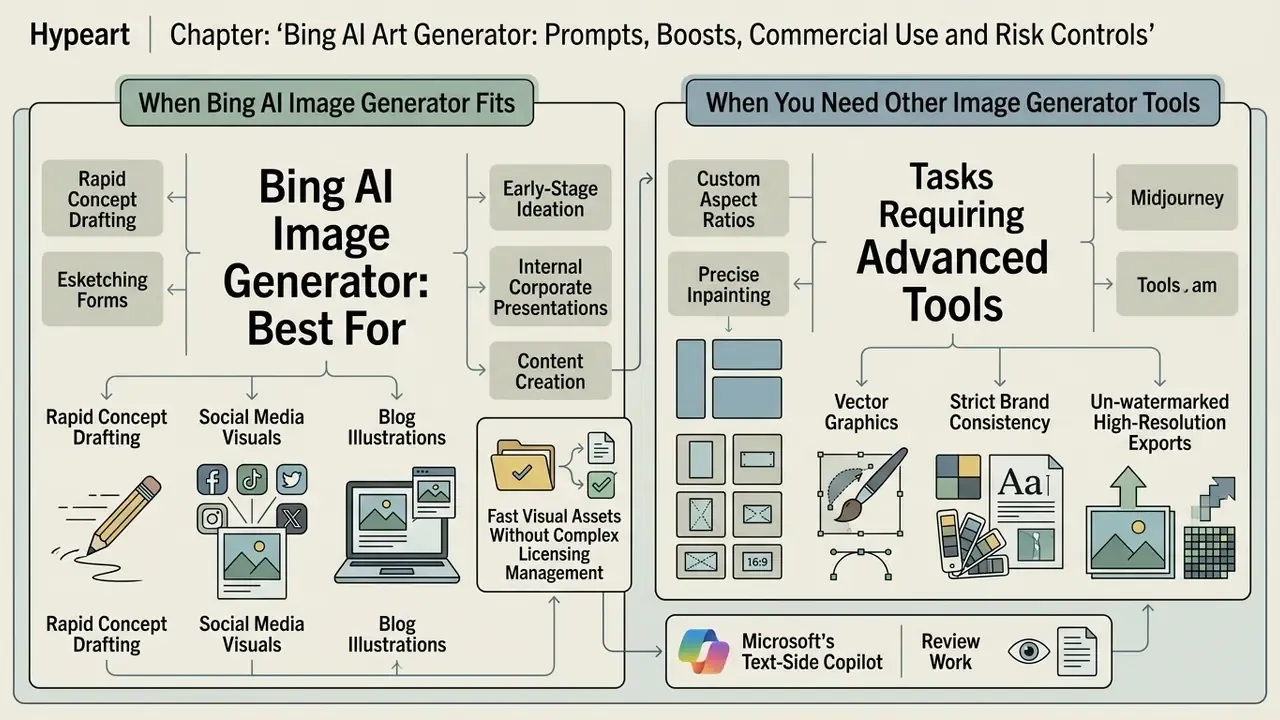
The bing ai image generator suits rapid concept drafting, social media visuals, and blog illustrations. Specialized enterprise production or pixel-level editing calls for more advanced image generator tools.
Scenarios Where Bing Image Creator Is Sufficient
Bing Image Creator performs well in early-stage ideation, internal corporate presentations, content marketing illustrations, and quick social media posts. Its DALL·E 3 integration delivers strong prompt adherence without software costs, and Microsoft's own documentation frames the tool around exactly these jobs: generating a set of images from a description, adding context such as location, activity, or art style, then sharing the selected result.
When teams need fast visual assets without complex licensing management, Bing offers a practical entry point. Organizations evaluating broader graphic software options can view the guide for structured workflow planning, and template-driven marketing teams may find the Canva AI Generator route faster for layout-first work.
Tasks Requiring Advanced Editing Tools
Bing AI falls short in professional tasks that need custom aspect ratios, precise inpainting, vector graphics export, localized lighting manipulation, style-locked brand consistency, or batch generation pipelines. It is equally unsuitable wherever contractual IP cover is a procurement requirement.
| Feature / Criterion | Bing Image Creator | Midjourney | Adobe Firefly | Stable Diffusion |
|---|---|---|---|---|
| Pricing Model | Free (Boost-based) | Paid Subscription | Credit-based / Paid | Open Source / Hosted |
| Commercial Rights | Permitted under terms | Included in paid plans | Enterprise indemnified | Model-dependent |
| Enterprise IP Indemnification | None on free consumer tier | Not offered as legal indemnity | Offered on enterprise plans | None (user bears risk) |
| Identity / Access Control | Personal MSA only | Platform account | Adobe enterprise SSO | Self-managed / self-hosted |
| Data Retention & Training Use | Consumer MSA terms apply | Platform terms; plan-dependent | Enterprise terms; trained on licensed data | Fully under your control if self-hosted |
| Built-in Editing | Basic via Designer | Pan, Zoom, Vary Region | Advanced Photoshop tools | High via ControlNet/UI |
| API Access | Limited / Consumer | Third-party / Discord | Native Adobe API | Fully customizable |
| Provenance (C2PA) | Yes (SynthID / C2PA) | No native C2PA | Native Content Credentials | Extension-dependent |
For work demanding strict brand consistency or un-watermarked high-resolution exports, tools like Midjourney or Adobe Firefly offer deeper control. A side-by-side read of Midjourney vs. alternative image generators is the fastest way to test that trade-off against your own brief. Teams comparing specialized tools can check the deep ai image generator overview, review dirty ai image risks, or examine style-specific engines such as Ghibli-style AI image generators where aesthetic fidelity outranks licensing breadth.
A parallel limitation applies to Microsoft's text-side Copilot when it is used for review work rather than generation. Documented constraints include a five-file ceiling for multi-document comparison, no creation of new files from "Edit with Copilot" in Word, format and size limits on uploads, and degraded attention on very long documents. Treat generation and document-review capabilities as separate risk objects in your inventory.
FAQ About Bing AI Art Generator
Is Bing AI Image Creator Linked to AI Video and Video Generators?
Bing Image Creator is strictly dedicated to still image generation and does not produce AI video files. Microsoft's broader ecosystem does include Bing Video Creator, powered by OpenAI's video generation technologies (with Sora integration rolling out in staged preview across Bing mobile and Copilot surfaces), plus a separate "Create a video" flow inside the Microsoft Copilot app. While Bing Image Creator handles text-to-image requests via DALL·E 3, video generation relies on separate model architectures, separate free-creation quotas, and its own terms. Users seeking dedicated synthetic video tools can explore the video generator capabilities to analyze API costs and limits, or survey the market of AI video generators before committing. To review legal frameworks surrounding synthetic media, risk officers can explore the hub for compliance documentation.
What is the practical difference between Bing Image Creator and Bing Video Creator?
Image Creator is prompt-to-still-image, four candidates per submission, Boost-priority based, with C2PA credentials and a corner watermark. Video Creator is prompt-to-short-clip, governed by its own quota (free creations in fast mode plus slower standard queueing), and produces assets whose provenance, duration, and aspect-ratio constraints differ from stills. Practically, most teams use Image Creator to lock a visual direction, meaning a first frame, thumbnail, or concept board, and only then move into a video workflow.
Can I use Bing Image Creator output in paid advertising?
Microsoft's current terms do not impose a blanket prohibition on commercial use of Image Creator output, and Microsoft does not claim ownership of prompts or creations. But "permitted" is not "protected". The raw output is not copyrightable in the U.S. without human authorship, there is no indemnification on the free tier, and disclosure duties may apply in the EU and China. Add human design contribution, run the trademark and reverse-image audit, and document the tool and terms version used.
How many images can I generate per day for free?
There is no published hard daily cap for personal accounts. You get 15 priority Boosts per refresh cycle; once spent, generation continues at standard, slower speed, and Boosts can be topped up with Microsoft Rewards points. Work or school accounts differ, since generation stops until Boosts replenish.
Can the watermark be removed for a client deliverable?
The visible corner watermark is applied by the service, and removing provenance signals to disguise synthetic origin conflicts with both Microsoft's terms and emerging disclosure law in the EU and China. If a clean, un-watermarked asset is a hard requirement, use a paid platform that grants that right contractually rather than editing the mark out.
Which languages and aspect ratios are supported?
Microsoft states support for more than 100 prompt languages. Current Image Creator templates expose preset ratios including 1:1, 3:2, 2:3, 7:4, 4:7, 9:16, and 16:9. Where a needed ratio is unavailable at generation time, extend the canvas generatively in Microsoft Designer rather than cropping.
Is Image Creator from Microsoft Designer the same product as Bing Image Creator?
Functionally they expose the same generation stack; the naming and entry points overlap because Microsoft renamed and unified the surfaces. Legally they are not identical. Designer's consumer terms and the Image Creator terms are separate documents that have historically differed on personal-use language. Record which surface produced each asset. A surface-by-surface walkthrough is available in this guide to Bing AI image creation.
How long are my generated images stored?
Microsoft's documentation indicates that images remain available in the account collection for up to 90 days. Anything intended for reuse should be exported into your own digital asset management system with its provenance bundle attached.
Technical & Legal Summary
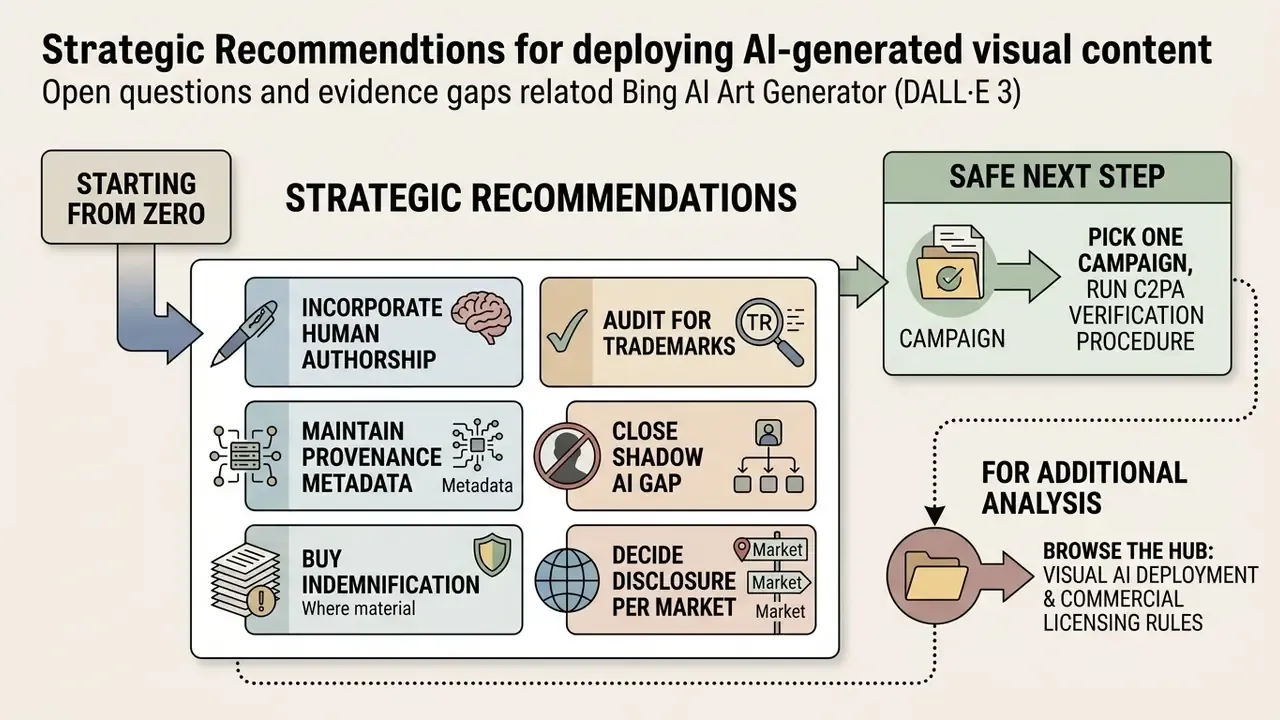
Open Questions and Evidence Gaps
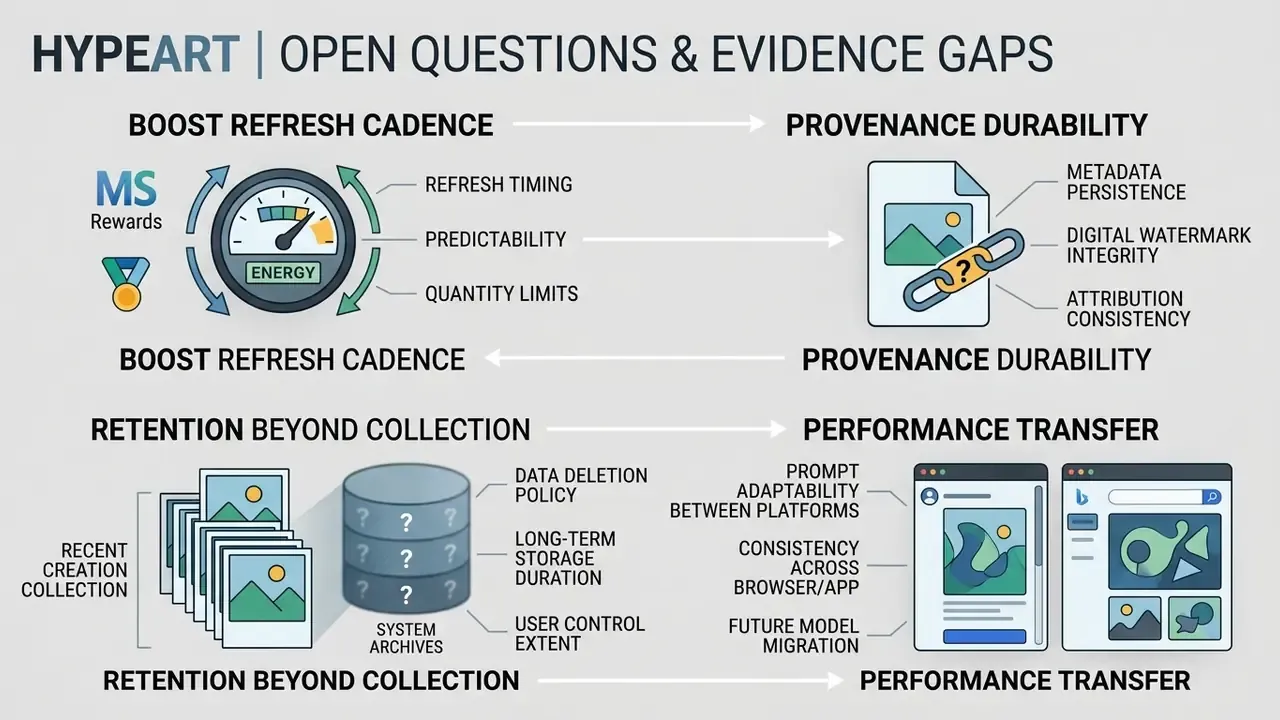
Honesty about what is not settled is part of the control environment. Four items stay open as of February 2026.
Boost refresh cadence. Microsoft documents a daily replenishment, community reports describe weekly behaviour, and enterprise-linked accounts behave differently again. Do not build a throughput forecast on it.
Provenance durability. C2PA manifests survive some editing chains and vanish in others. We have no published, tool-by-tool survival matrix, so re-verification after every export remains mandatory rather than optional.
Retention beyond the collection. The 90-day figure describes user-visible availability. It does not tell you how long prompts and uploads persist in abuse-monitoring or service-improvement logs under consumer terms.
Performance transfer. The 21.5% CTR uplift came from consumer product ads, not from regulated financial creative where disclosure and suitability review change the funnel. Treat it as a hypothesis to test, not a benchmark to quote in a business case.
Strategic Recommendations