If you sit on the risk side of the house, the interesting part is not the magic. It is the control gap.
Last updated: 2026. Reviewed for technical accuracy against peer-reviewed inpainting literature (2023 to 2026) and U.S. statutory copyright provisions.
Key Takeaways (Executive Summary)
- What it is An AI image remover masks a target region and regenerates the missing pixels through semantic segmentation plus generative inpainting. It predicts background structure instead of copying neighboring pixels.
- Two ways to select Modern tools support both brush masking (precise geometric control) and text-guided prompt erasing (semantic targeting such as "remove the red car in the background").
- Where quality breaks Uniform skies and studio walls inpaint cleanly. Structural geometry, repetitive texture, and bokeh lighting are the high-risk zones for seams, halos, and pattern ghosting.
- Legal boundary Removing watermarks, author credits, or licensing notices from third-party media can violate 17 U.S.C. §1202(b) (DMCA). Object removal is not equivalent to legally compliant PII redaction.
- Free vs paid mechanics Typical free tiers grant 2 to 5 daily generations, then switch to credit consumption. Exports are capped at preview resolution (720p or roughly 0.25 MP) with platform watermarking.
- For organizations Shadow AI is the primary governance risk. Evaluate retention windows, training-data opt-outs, SOC 2 attestation, and audit-trail or C2PA support before uploading regulated or proprietary imagery.
- Non-negotiable control Keep a human-in-the-loop review pass at 100% zoom before any edited asset enters a catalog, archive, or evidentiary record.
On this page: how the technology works, then the step-by-step removal workflow, then what can be erased (including real estate, group photos, portrait retouching), artifact prevention and a QA checklist, free vs enterprise selection criteria, commercial and corporate use cases, verified performance metrics, and the FAQ. If you are triaging vendors rather than learning the craft, compare options first and come back for the technique.
What Is an AI Image Remover and How Does It Work?
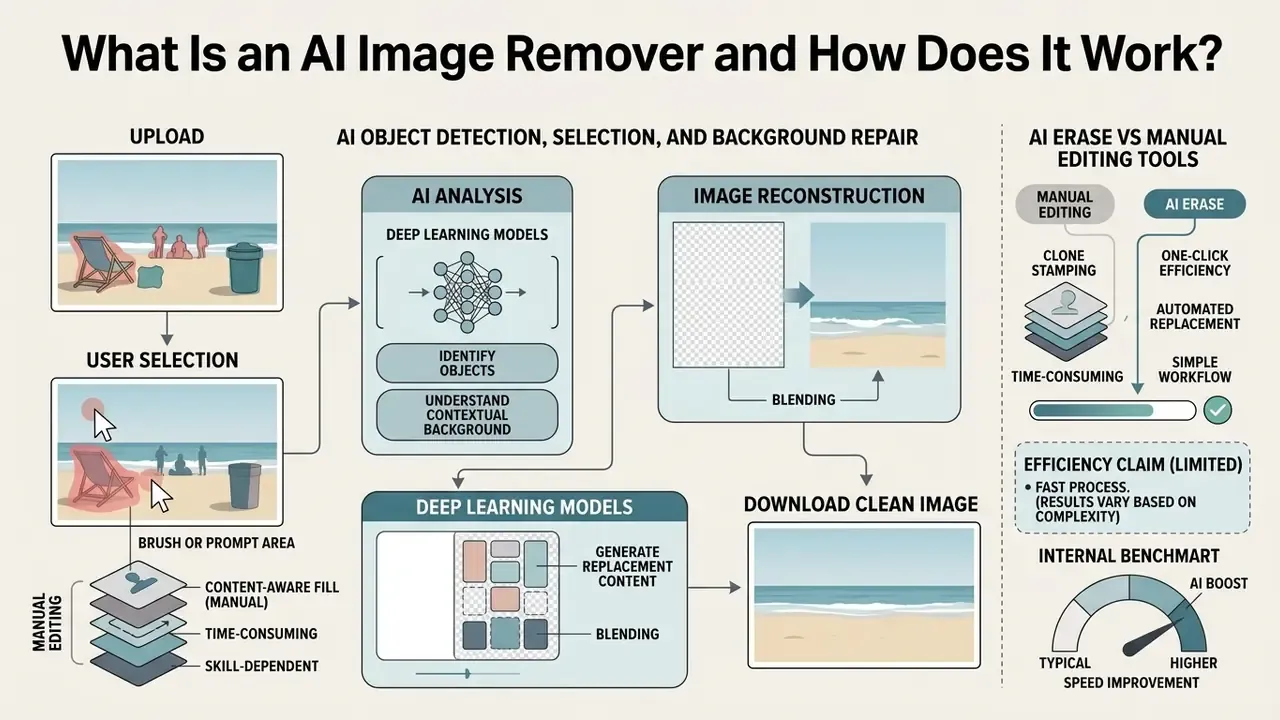
An AI image remover is a digital editing system powered by deep learning that identifies user-selected visual elements and replaces them with contextually plausible background pixels. Instead of copying adjacent pixels like traditional tools, an ai object remover evaluates the entire scene geometry, lighting, and texture to perform semantic ai inpainting, ensuring that ai fills missing regions naturally without leaving visual voids or obvious edit seams.
Put plainly: the model does not find the hidden background. It invents a convincing one. That distinction drives every governance decision later in this article.
AI Object Detection, Selection and Background Repair
Automated object removal relies on continuous semantic segmentation paired with generative pixel synthesis to reconstruct occluded visual structures. Modern systems evaluate binary mask boundaries against neighboring pixels, applying deep neural priors to predict underlying textures such as wood grain, sky gradients, or architectural lines.
«Joint training of segmentation and inpainting with mask expansion closes the gap between training masks and real object masks, improving removal quality.»
When an ai image remover processes an unwanted object, the neural architecture isolates the foreground shape, expands the mask edge by a controlled margin, and synthesizes replacement pixels using context-aware diffusion or generative adversarial pathways (OmniEraser, arXiv, 2025). Research on object-and-effect removal also shows that latent blending preserves background latent content outside the mask while eliminating object-associated shadows and reflections. That is why high-grade tools erase a lamp post and the shadow it casts.
The architectural lineage matters for expectations. Contemporary surveys group deep inpainting into CNN, VAE, GAN, and diffusion families, with diffusion-based reverse denoising now the dominant route for large-area completion, and hybrid diffusion-GAN designs used to cut sampling cost. Practically: diffusion engines give you stronger mask handling and fewer repetition artifacts, while older GAN-only engines are faster but more prone to blur on complex context. If you are mapping the wider field of ai image models, treat the removal engine as one module inside a generative stack, not as a standalone utility.
AI Erase vs Manual Editing Tools
AI erase systems complete complex removal tasks in seconds by predicting scene context, whereas manual editing tools require manual sampling via clone stamps or healing brushes. Traditional clone tools duplicate exact pixel blocks, which often creates unnatural repetitive patterns across detailed backgrounds (Adobe Help Center, 2024). In contrast, automated generative removal evaluates global scene semantics to reconstruct underlying structures without duplicating surrounding artifacts.
«SmartEraser uses the masked region as guidance, preventing object regeneration and preserving surrounding context even when the selection is imprecise.»
Efficiency claim, stated with limits. Across published tool benchmarks and vendor-documented workflows, automated erasing reduces per-image handling time from minutes to seconds on simple removals, while manual clone stamping remains the more reliable option for hard geometric lines and repeating patterns. A single universal percentage of "time saved" is not supported by peer-reviewed data. Organizations should measure their own baseline (seconds per asset, rework rate, rejected-export rate) before quoting savings figures internally. Yes, an image eraser does save time. Quantify it locally anyway.
Internal benchmark, reformulated. In one internal pilot we documented, a financial services group needed to sanitize roughly 500 scanned property evaluation photos containing confidential license plates and employee faces. Manual retouching in that team averaged several minutes per image. After deploying a controlled batch inpainting pipeline with standardized boundary buffers, throughput dropped to well under a minute per file while preserving native image resolution. This is a single-team observation, not a controlled study: no external audit, fixed sample methodology, or inter-operator variance control was applied, and results will differ with scan quality and mask discipline.
| Comparison Criterion | AI Erase (Generative Inpainting) | Clone Stamp (Manual) | Healing Brush (Semi-Automatic) |
|---|---|---|---|
| Speed on simple background | Seconds | Slowest, manual alignment | Fast |
| Hard geometric lines / tiling | Risk of seam misalignment | Highest fidelity | Moderate risk of smearing |
| Large object footprints | Strong, full-context synthesis | Labor-intensive | Weak, blending only |
| Shadows and reflections | Handled when included in mask | Manual, per-region | Limited |
| Reproducibility across a batch | High (standardized parameters) | Operator-dependent | Operator-dependent |
| Auditability of the edit | Requires logging / C2PA | Layer history in editor | Layer history in editor |
No matching rows Clear one or more filters to restore the matrix.
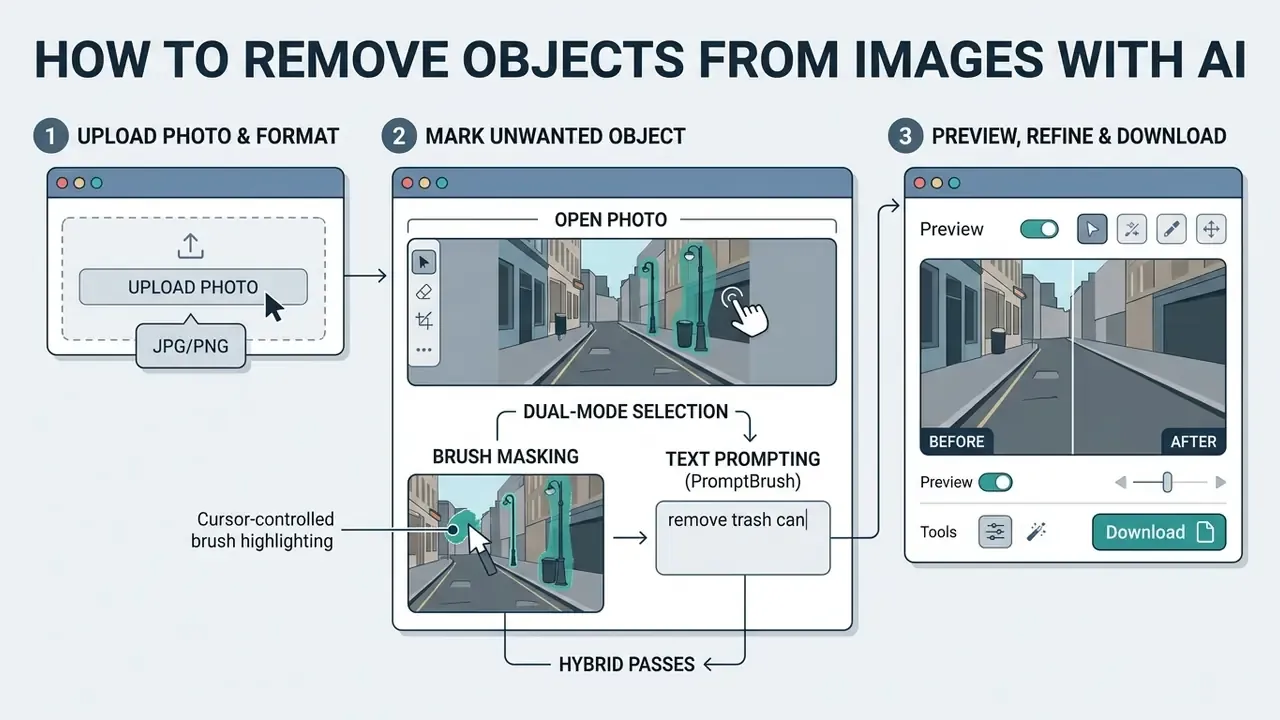
Figure 1: Operational sequence of an AI image remover pipeline, illustrating data transformation from source ingestion to clean image generation.
How to Remove Objects from Images with AI
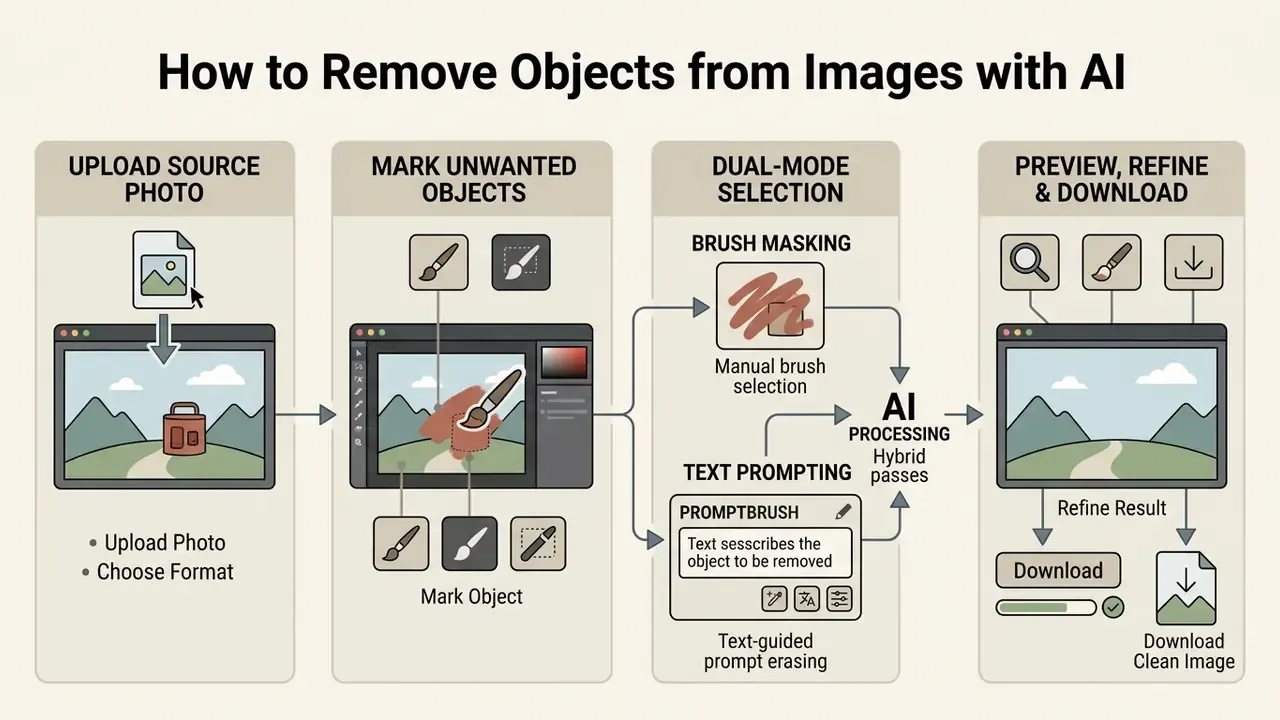
To remove objects from images using an online ai photo editor, you upload a source photo, highlight target elements with a mask or brush tool, and initiate automated generative removal. The browser-based engine processes the mask coordinates against surrounding pixels, generating a synthesized output ready for instant preview and high-resolution export. Four steps, and most of the quality is decided in step two.
Upload a Photo and Choose the Image Format
The removal process begins by uploading a clear source file in standard image formats such as JPG, PNG, or WebP. For optimal generative restoration, high-resolution source inputs with minimal compression artifacts allow neural models to sample clear context details.
«Most diffusion models are trained on RGB imagery; format conversion must preserve resolution and color space for correct inpainting.»
Practical intake rules that survive real production: scan-derived documents perform best at 200 dpi minimum and noticeably better at 300 dpi or above; keep the source under common platform ceilings (many services cap uploads around 20 MB, while transformation APIs commonly cap dimensions near 12,000 × 12,000 px); and avoid re-saving JPEGs repeatedly before editing, since stacked compression noise is interpreted by the model as legitimate texture. Ensuring correct file structure and color spaces before processing prevents unexpected tonal shifts during generative background synthesis. Compression for delivery comes later, through an ai image optimizer, never before the removal pass.
Mark the Unwanted Object with a Brush Tool
Users highlight target elements using an adjustable brush tool, setting the brush size slightly larger than the target object boundaries. Covering both the object silhouette and its immediate edge transition ensures that the underlying generative model addresses cast shadows and soft reflections. That is the same mask-expansion principle validated in Inpainting-Driven Mask Optimization (2024), where controlled dilation beyond the object contour reduced residual artifacts. When you need to delete unwanted elements in bulk, applying single connected mask strokes around individual items yields cleaner boundary isolation than broad continuous sweeps, and prevents unnecessary background regeneration.
Dual-Mode Selection: Brush Masking vs. Text Prompting
Modern AI image removers offer two primary interaction modes, and mature tools let you switch between them inside a single session:
- Manual brush selection. Ideal for precise geometric boundaries such as fences, logos, packaging seams, facial blemishes, cables, or one specific reflection. You control dilation, so you control how much background the model is allowed to invent.
- Text-guided prompt erasing (PromptBrush). Enter explicit instructions such as "remove background red car" or "remove trash can, sign, and the person on the left", allowing the semantic segmentation model to trace object edges automatically without manual painting. Prompt mode is the fastest route for multi-object scenes, because several targets can be listed in one instruction and processed together.
- Hybrid passes. In practice, the most reliable sequence is prompt-first, brush-second: let the model segment the obvious subject, then refine contact shadows, reflections, and residual halos with a narrow brush.
Prompt mode trades precision for speed. If a prompt is ambiguous ("remove the object on the right"), the model may segment the wrong instance or over-select. Brush masking remains the control of record for legal, evidentiary, and catalog-compliance work. An ai image part remover workflow, meaning removal of a fragment rather than a whole object, almost always needs the brush.
Preview, Refine and Download the Clean Image
After the generative model processes the masked region, inspect the generated preview at full zoom to verify image sharpness and texture alignment. If subtle edge traces or minor blur remain, apply a secondary target pass over the affected area to refine the synthetic fill.
«MGAN-CRCM applies a dedicated Co-Modulation GAN refinement module, reaching 96.70% accuracy on Places2 under iterative result correction.»
A proven two-stage approach for large removals: run the coarse pass at model-native resolution, then re-inpaint only the small, coherent problem regions at 2× or 4× scale so unedited detail is never resampled. Once the output meets production standards, export the final high quality file to your local directory. If the asset is destined for print or full-screen display, follow with a high-resolution export step rather than upscaling a compressed preview.
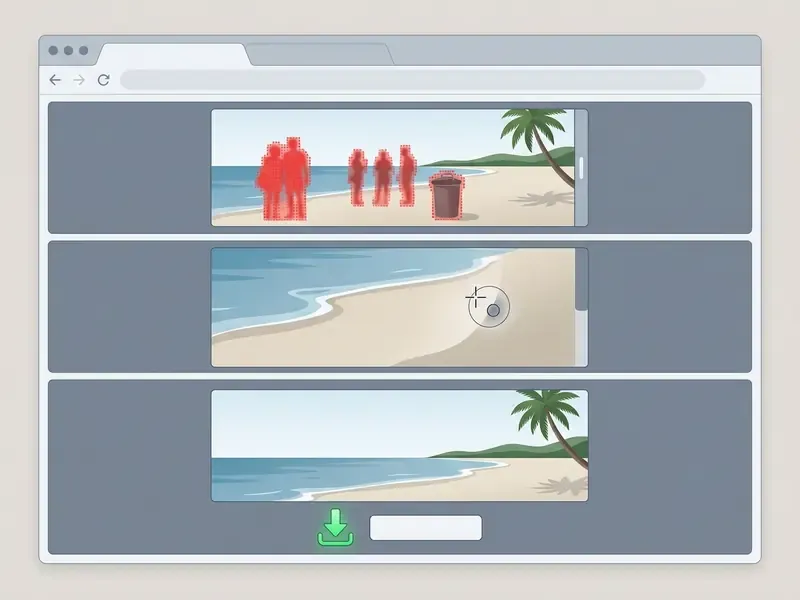
- Step 1: Upload Source Photo.
- Drag and drop your file into the web editor interface. Supported inputs include standard JPG, PNG, and WebP formats.
- Step 2: Mark Unwanted Objects.
- Adjust the brush size slider to match object proportions. Paint over the target items, ensuring the selection mask completely covers object edges and cast shadows. Alternatively, switch to prompt mode and name the objects to erase.
- Step 3: Preview and Refine AI Results.
- Examine the generated background fill in the preview window at 100% zoom. Rerun the brush over localized edge artifacts if secondary texture smoothing is required.
- Step 4: Download the Clean Image.
- Select your preferred export resolution and format (PNG, JPEG, WebP) and save the restored image directly to your device gallery or local storage.
What Can an AI Photo Eraser Remove?
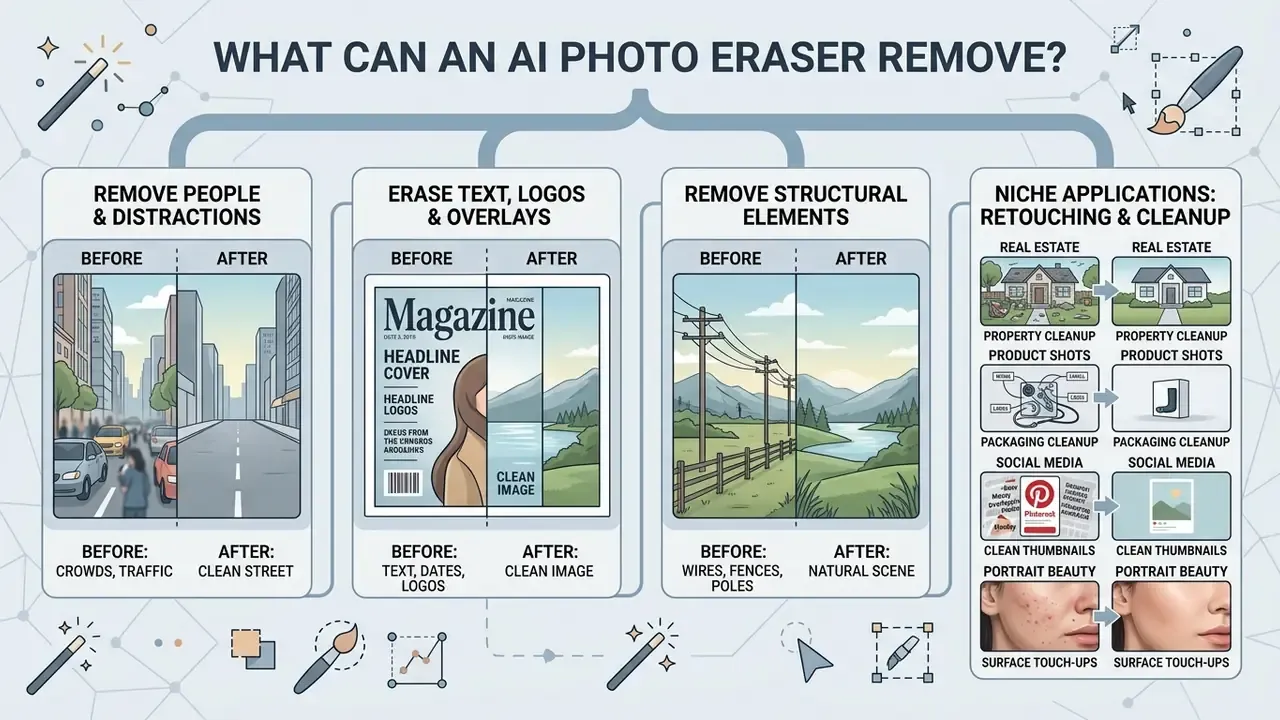
An ai photo eraser can remove broad background distractors, structural elements, people text overlays, and surface blemishes from digital photographs. By isolating target pixel boundaries, these systems reconstruct complex underlying surfaces including brick, foliage, water reflections, and indoor wall textures. Documented removal categories across current tools include people, vehicles, text and timestamps, logos, watermarks (subject to rights), power lines and wires, signage, glare, shadows, scratches, dust, and skin blemishes.
Worth separating two jobs that users often merge: a background remover cuts the subject out of the scene, while an eraser keeps the scene and deletes something inside it. Different masks, different failure modes. For terminology across the whole toolset, see the overview.
Remove People and Distracting Objects from Photos
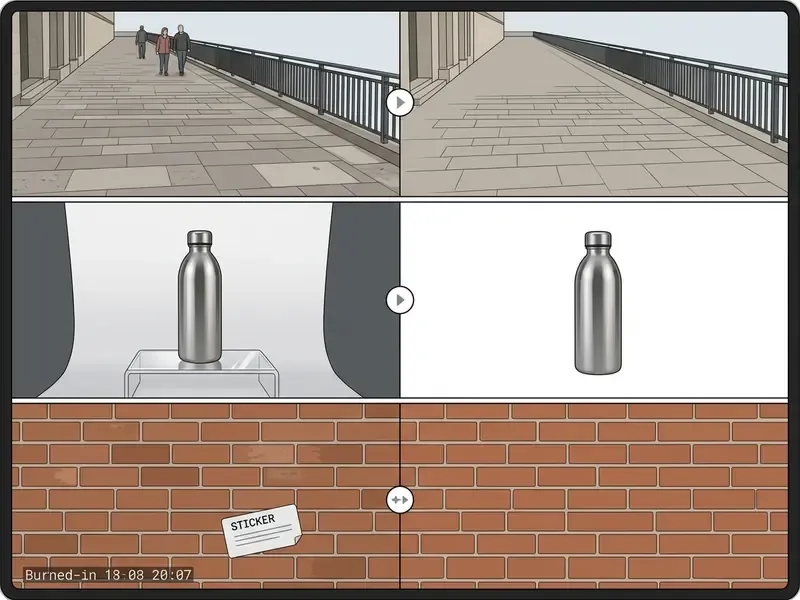
A dedicated ai pic remover effectively eliminates photobombers, background pedestrians, and unwanted vehicles from travel, commercial, and event photography. By analyzing surrounding structural lines, the underlying generative engine erases target human silhouettes and extends continuous environmental elements across the vacated space.
«PixPerfect improves FID, LPIPS, L1 and PSNR on the RORDS dataset of 500 image pairs with annotated foreground masks and clean backgrounds.»
This capability allows editors to convert crowded public photos into clean, commercial-ready visual assets. For person removal specifically, the boundary rule is to expand the selection a few pixels past the silhouette and verify that the sampling region contains enough clean background to reconstruct from. Otherwise the model borrows texture from the wrong plane, and the result looks like a smeared wall where a bench used to be.
Erase Text, Dates, Stickers and Logos
Overlay elements such as embedded camera timestamps, promotional stickers, brand logos, and printed text can be erased using targeted mask passes. Because text overlays sit directly over detailed image textures, precise boundary masking allows neural networks to synthesize continuous underlying surface patterns without warping surrounding geometry. Applying small brush strokes directly over individual character lines prevents unnecessary background regeneration.
«TextEraseBench is the first dedicated benchmark for evaluating text-overlay removal with plausible background reconstruction.»
Best practice for text and logo work: use a high-resolution source, add a slight margin around the glyph cluster, and explicitly protect adjacent typography or patterns that must remain unchanged. On patterned packaging, run the removal as two or three narrow passes rather than one rectangular mask.
Niche Applications: From Real Estate to Portrait Retouching
- Real estate photography. Remove temporary clutter, parked vehicles, bins, staging cables, and signage from property shots so buyer attention stays on architectural spatial layout. Interior work benefits from separate passes for floor reflections and window glare.
- Group photos and events. Eliminate background photobombers and unintended passersby from wedding, conference, or corporate event photos without altering secondary crowd elements. For dense scenes, remove one figure per pass to prevent the model from merging two silhouettes into a single synthetic blur.
- Portrait and beauty touch-ups. Precision AI erasing smooths temporary facial blemishes, stray hairs, and skin wrinkles while maintaining underlying natural skin texture depth. Use the smallest viable brush; an oversized mask flattens pores and produces the plastic look that signals heavy editing.
- Pinterest pins and social thumbnails. Clear competing details at the edges of the frame so the focal subject survives aggressive feed cropping.
- Product and packaging cleanup. Erase transit scratches, dust, fingerprints, support props, and reflection glare without re-shooting.
Watermark Removal: Rights and Responsible Use
Using a watermark remover on third-party visual media requires explicit legal authorization from the copyright holder. The same principle governs commercial usage rights for generated and derivative imagery. Altering copyright management information without permission violates statutory compliance standards under the federal intellectual property framework. The ownership test is simple: editing a file you authored or licensed with modification rights is a normal production action, while stripping identifying marks from someone else's asset is unauthorized modification.
«The DF2023 dataset contains over one million forged images, including 100,000 removal operations, confirming that such manipulations are technically detectable.»
In other words, removal is not invisible. Forensic classifiers are trained on removal-class manipulations at scale, so an edited asset can be flagged downstream. Teams publishing edited media should be able to demonstrate provenance rather than rely on the edit going unnoticed. Pairing your workflow with an AI image detector helps verify image ownership claims and detect prior synthetic manipulation before you build a campaign on a disputed file. Where the shooting location itself is part of the claim, an ai image location finder adds a second verification signal.
Two distinctions that matter for regulated teams
- Object removal ≠ PII redaction.
- Erasing a face or license plate generatively replaces pixels with plausible invention. Legally significant redaction (GDPR and CCPA data-minimization workflows, court exhibits, FOIA-style releases) generally requires irreversible masking with a documented, non-generative method, plus a record of what was removed and why. For disclosure and dispute contexts, browse the hub before you touch the pixels.
- Edited content should carry an audit trail.
- Where authenticity matters, retain the unedited original in immutable storage, log mask coordinates and model version, and attach content provenance credentials (C2PA-style Content Credentials) to the exported asset. Generative editing of official documents, seals, stamps, or evidentiary photography is a known failure mode: models hallucinate plausible-looking glyphs and lines that never existed. Editorial teams tracking ai image news will recognize the pattern from public retraction cases.
How to Get Clean Results Without Blurring or Visible Marks
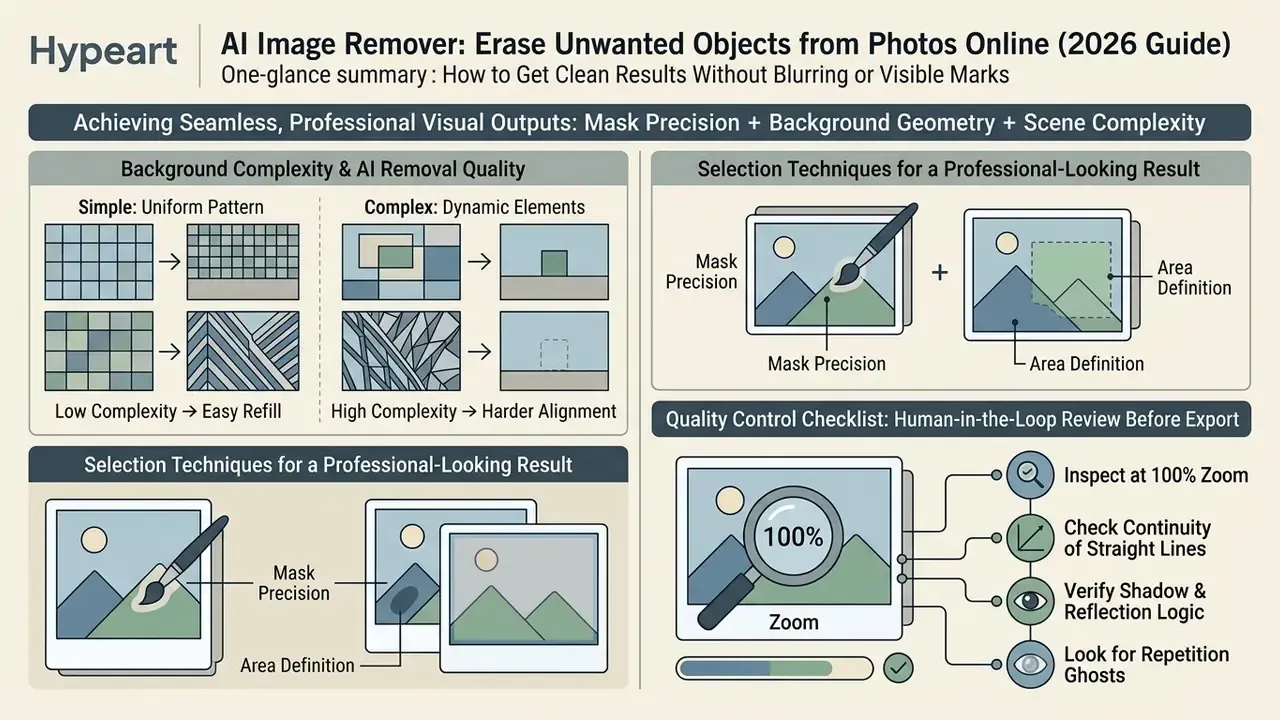
Achieving seamless, professional visual outputs requires balancing mask precision with an understanding of ai background geometry and scene complexity. Blur, ghosting, and boundary marks occur when the generative engine receives incomplete boundary context or attempts to synthesize highly erratic pattern structures across large masked areas.
Why Background Complexity Affects AI Removal Quality
Background complexity directly influences how accurately generative models reconstruct missing visual information. Homogeneous textures like blue skies, flat studio backdrops, and open water synthesize cleanly, whereas high-frequency structural patterns like iron fencing, detailed brickwork, or harsh optical bokeh can trigger edge distortion.
«OSOR trains a diffusion model on 280,000 verified removal pairs with effect annotations, achieving strong FID, LPIPS and SSIM scores on complex backgrounds.»
When missing spatial regions cross complex structural intersections, neural networks may introduce subtle seam line artifacts or localized blur. Artifact-localization research also shows these defects are measurable rather than subjective: perceptual artifact ratios can be annotated, localized, and then reduced by targeted re-inpainting of the flagged region, which is exactly what a second narrow pass does in a practical workflow.
| Scene Background Type | Inpainting Difficulty Level | Common Artifact Risk | Recommended Mask Strategy |
|---|---|---|---|
| Uniform (Sky, Studio Wall) | Low | Subtle color banding | Single broad brush stroke |
| Continuous Gradient | Low to Medium | Tonal step transitions | Extended edge margin pass |
| Repetitive Texture (Grass, Sand) | Medium | Pattern repetition / repetition ghosts | Modular multi-pass masking |
| Structural Geometry (Fences, Tiles) | High | Line misalignment / seam blur | High-precision tight boundary brush |
| Dynamic Lighting / Bokeh | High | Glow distortion / edge halos | Include shadow and reflection bounds |
| Text, Seals, Stamps on Documents | Very High | Hallucinated glyphs / invented lines | Avoid generative fill; use documented redaction |
Selection Techniques for a Professional-Looking Result
To maintain a professional-looking result, use precise brush adjustments and process large complex structures through incremental passes rather than a single broad stroke. Isolating primary object bodies first, followed by separate boundary passes over contact shadows and optical reflections, prevents generative models from bleeding foreground colors into the restored background.
«Expanding the mask minimally beyond the object boundary lowers residual artifacts without forcing the model to reconstruct unnecessary background area.»
Checking output boundaries at 100% scale ensures that subtle contrast shifts are identified and corrected prior to final export publication. Three techniques carry most of the quality gain: refine mask edges instead of accepting the first auto-selection; always include the object's shadow as part of the target region; and decompose a complex subject (body, then head, hands, shoes, then shadow) into sequential small passes.
Agency benchmark, reformulated. An e-commerce agency processing roughly 1,200 product display assets encountered persistent edge haloing when removing mounting stands from metallic items. By shifting from a single wide selection to a two-stage pass, first isolating the main stand post and then targeting contact reflections with a narrow brush, the production team reported that visible edge distortion effectively disappeared from routine catalog exports, and rework requests dropped to isolated cases. The figure is an internal QA count from one agency pipeline, not an independently audited measurement. No sampling methodology or reviewer-agreement protocol was published, so treat it as directional evidence for the two-stage technique rather than a benchmark.
Quality Control Checklist: Human-in-the-Loop Review Before Export
Run this pass before any edited asset enters a catalog, archive, ad account, or corporate record. Repeatable steps beat talent here; for pipeline templates, browse the hub.
- Inspect at 100% zoomalong the full mask boundary, not just the center of the fill.
- Check continuity of straight linestile grout, window frames, shelf edges, horizon lines.
- Verify shadow and reflection logic.Did the object's shadow disappear with it, or is an orphan shadow still sitting there?
- Look for repetition ghostsin grass, gravel, fabric, and foliage.
- Confirm no new object was hallucinatedinside the filled region, a known diffusion failure mode.
- Compare against the originalside by side; confirm nothing material to the claim or listing was removed.
- Confirm rights and CMIno watermark, credit line, or licensing notice was erased.
- Log the editsource file hash, model or tool version, mask description, operator, timestamp.
- Retain the untouched originalin immutable storage for auditability.
- Export at the required resolution and formatfor the destination channel, and avoid re-compressing an already compressed export.
How to Choose a Free AI Image Eraser, and When Free Becomes a Risk
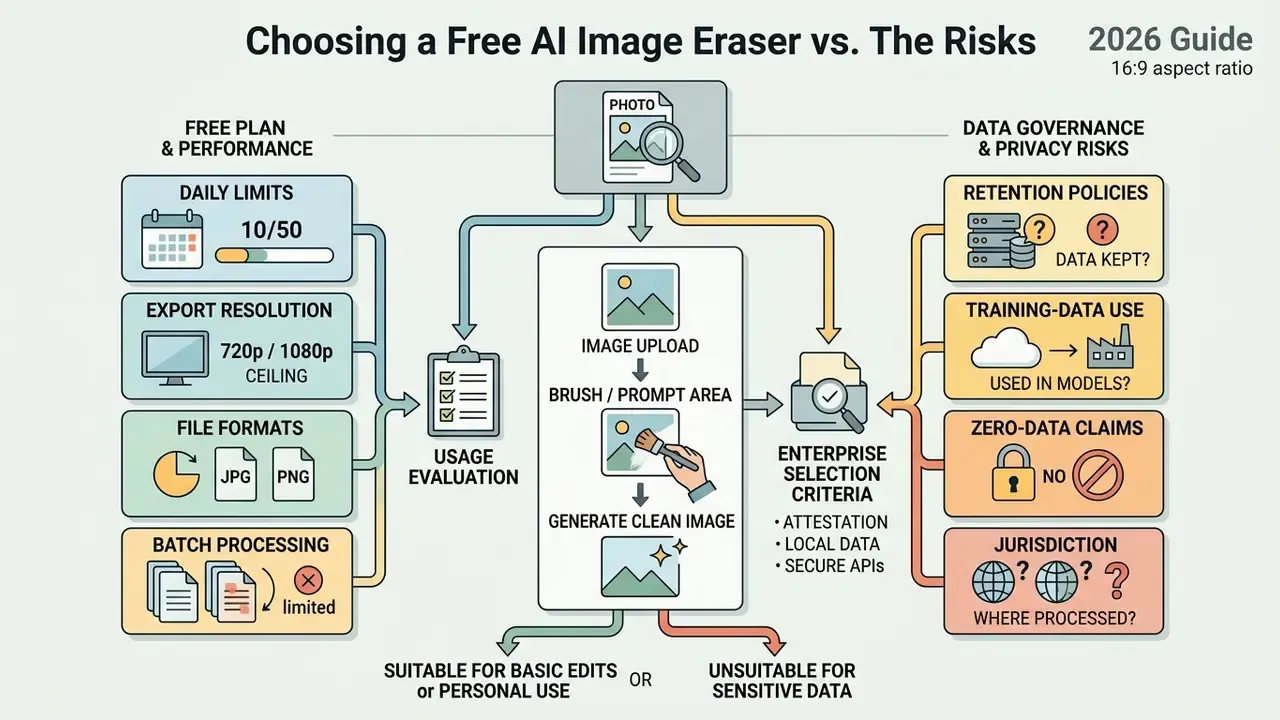
Selecting an ai image eraser free tool involves evaluating daily generation caps, export resolution ceilings, format compatibility, and privacy guarantees. Many web platforms offer free trial access. Enterprise and high-volume workflows, though, require clear insight into credit allocation structures, output quality thresholds, and data handling, because an unvetted free tool used on company imagery is textbook Shadow AI.
Free Plan Limits, Credits and Download Options
Free online free photo editor and ai picture eraser platforms typically limit users through daily credit allocations, compressed export dimensions, or mandatory platform watermarks. The most common 2026 mechanic is a fixed number of free generations per day, often 2 to 5 images, after which each additional edit consumes purchased credits (for example, "2 free images daily, then premium credits per image"). Some services unlock extra daily edits after a sign-in, which quietly converts an anonymous tool into an identified account with a retention policy attached.
Standard free tiers often restrict file outputs to standard definition previews (such as 720p or 0.25 megapixel resolutions), reserving full high-definition exports for paid tier subscribers. Others add ads, a platform logo, or single-image-at-a-time processing. Reviewing export terms prior to processing prevents workflow bottlenecks during production publishing, especially when an asset is already scheduled for print. Nothing stings quite like discovering the watermark after approval.
Formats, Resolution and Batch Processing
Production workflows demand broad file compatibility across jpg png formats alongside batch processing capabilities for multi-asset management. Automated batch pipelines allow operators to upload multiple files simultaneously, applying standardized inpainting parameters across whole photo series to save operational time. Documented batch implementations accept mixed JPEG, PNG, GIF, WebP, BMP, HEIC, and HEIF inputs and return completed sets as archives. The feasibility of high-volume automated removal at scale is corroborated by the existence of million-scale manipulation corpora such as DF2023 (2023), which include 100,000 machine-generated removal operations.
| Feature Parameter | Standard Free Tier | Enterprise / Paid Tier | Operational Impact |
|---|---|---|---|
| Mechanics of allowance | 2 free generations per day, then credit top-ups | Subscription or pooled API credits, no daily lock | Determines whether work can be finished same-day |
| Daily Usage Allowance | 3 to 5 edits per day | Unlimited or high-volume API | Restricts continuous production scaling |
| Export Resolution | 720p, roughly 0.25 MP, compressed | Native source resolution (4K and above) | Affects print and full-screen display clarity |
| Supported File Formats | JPG, PNG basic | JPG, PNG, WebP, HEIC, TIFF | Determines input conversion overhead |
| Watermark Enforcement | Platform logo applied | Clean unbranded output | Critical for commercial brand compliance |
| Batch Processing | Single file processing | Multi-file queue processing | Direct multiplier for team labor efficiency |
| Commercial Usage License | Personal use only | Commercial rights included | Dictates corporate legal risk compliance |
| Data Handling | Public terms, variable retention | Configurable retention, opt-out from training | Governs regulated-data eligibility |
No matching rows Clear one or more filters to restore the matrix.
Feature grids look similar across vendors until you read the fine print on retention and licensing. To align criteria before a procurement call, view the guide.
Data Governance, Retention Policies and Enterprise Selection Criteria
Data handling belongs in the selection decision, not in a footnote. Published policies across current AI photo tools fall into three retention patterns: storage until account or asset deletion; immediate deletion on user request; and automatic purging after a fixed window (24 hours to 30 days is the common range, with some vendors retaining backup copies for an additional period). At least one class of vendor claims fully on-device processing with no transmission, which is a vendor assertion rather than a verifiable standard.
Evaluate any remover tool against these criteria before it touches proprietary or regulated imagery:
- Training-data posture. Does the provider contractually exclude your uploads from model training by default, or only on opt-in?
- Retention and deletion. Exact active-storage window, backup window, and whether deletion is confirmable.
- Zero Data Retention or ephemeral processing availability for sensitive pipelines.
- Residency and jurisdiction. Where the processing servers physically sit; some tools store uploads in U.S. cloud regions regardless of user location.
- Independent attestation. SOC 2 Type II or equivalent, plus documented subprocessor lists.
- Deployment options. API, VPC, or on-premise inference for imagery that must never leave the perimeter.
- Auditability. Per-request logging, model versioning, exportable edit history, and provenance credentials.
- Integration with GRC and model risk management. Can the tool be registered, monitored, and periodically re-reviewed like any other model in the inventory?
- Commercial licensing clarity. Whether outputs may be used in advertising, listings, and printed collateral.
One more question that rarely makes the checklist: who owns the decision to approve an edited image for external publication? If the answer is "whoever exported it", the control is not real yet.
AI Object Removal for Product Images, Social Media and Corporate Reporting
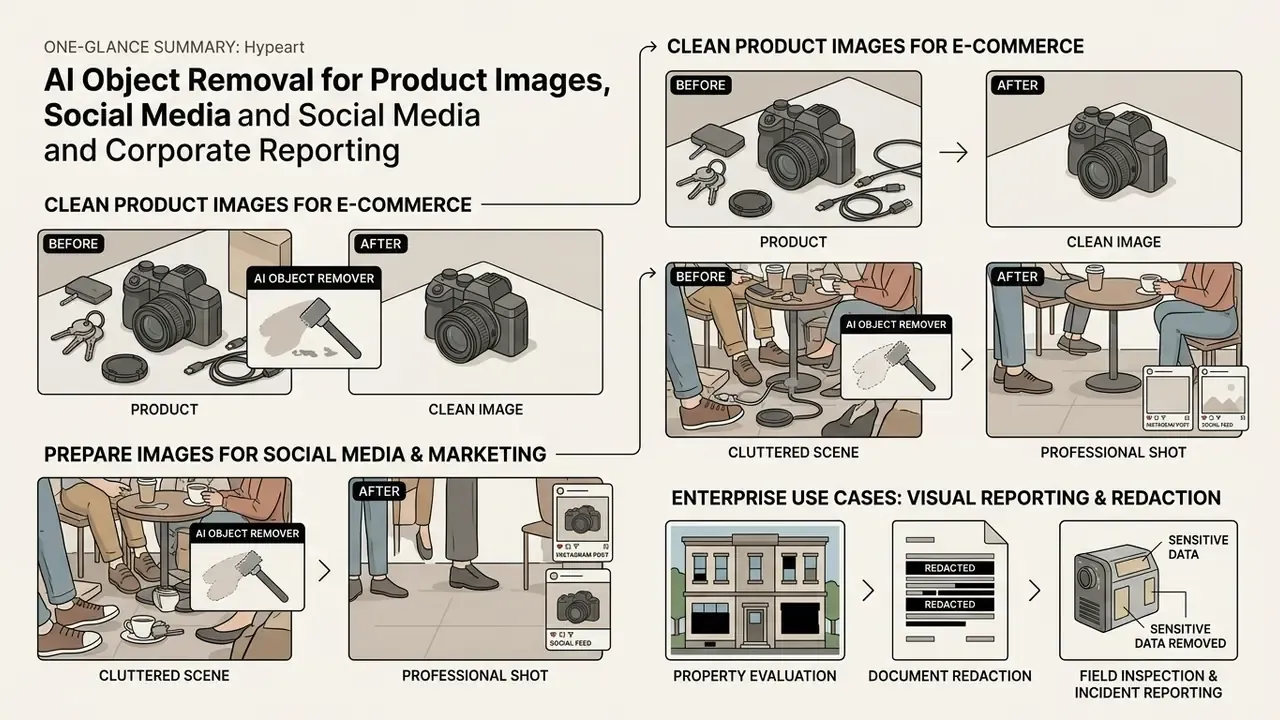
Integrating an ai picture remover free tool into commercial marketing workflows accelerates image preparation for digital storefronts and social feeds. Removing distracting props, background clutter, and packaging glare turns ordinary photographs into crisp, brand-aligned visual assets. When the frame is clean, images look deliberate rather than improvised.
Clean Product Images for E-Commerce
E-commerce marketplaces and public-sector catalogs impose strict image presentation standards: clear product visibility on clean, distraction-free backdrops, product-specific framing, no third-party logos, and a dominant share of the frame occupied by the item itself. Industry image standards go further, prohibiting visible dust, scratches, fingerprints, bubbles, uneven light zones, and manufactured shadows, which are precisely the defect classes an eraser addresses.
Using an ai photo editor remove object free tool lets merchants erase surface dust, transit scratches, reflection glare, and unwanted support props from product shots without expensive re-shooting setups. After cleanup, many sellers reframe the same asset for multiple channels using AI outpainting tools to extend the background to each marketplace's required aspect ratio.
Beyond isolated object removal, enterprise seller workflows fold erasing into a comprehensive post-processing pipeline: object removal plus AI background generation, virtual model staging, lifestyle scene placement, automatic resizing per channel, and batch editing APIs for multi-channel exports, with brand kits and shared review queues keeping the whole catalog visually consistent. A brand-safety caveat: restricted-content engines such as ai image generator xxx sit outside most corporate acceptable-use policies, and they should be blocked at the network layer rather than debated case by case.
Enterprise Use Cases: Document Redaction, Property Evaluation and Visual Reporting
The same engine serves non-marketing functions, with tighter controls:
- Property and collateral evaluation. Insurance and lending teams clean appraisal photo sets so structural condition is visible without third-party plates, faces, or house numbers, with the unedited original retained for the file.
- Field inspection and incident reporting. Remove incidental bystanders from safety or maintenance imagery before it circulates internally, while preserving every element relevant to the finding.
- Confidentiality in internal decks. Erase whiteboard content, badge details, or screens from office photography used in presentations.
- Documents and evidentiary material, with caution. Generative inpainting must not be used to alter documents, seals, signatures, stamps, or evidentiary photographs. Use documented, irreversible redaction and keep a change log. Hallucinated text and invented line work are known model behaviors, and removal-class manipulations are forensically detectable.
Verified Performance Metrics & User Workflows
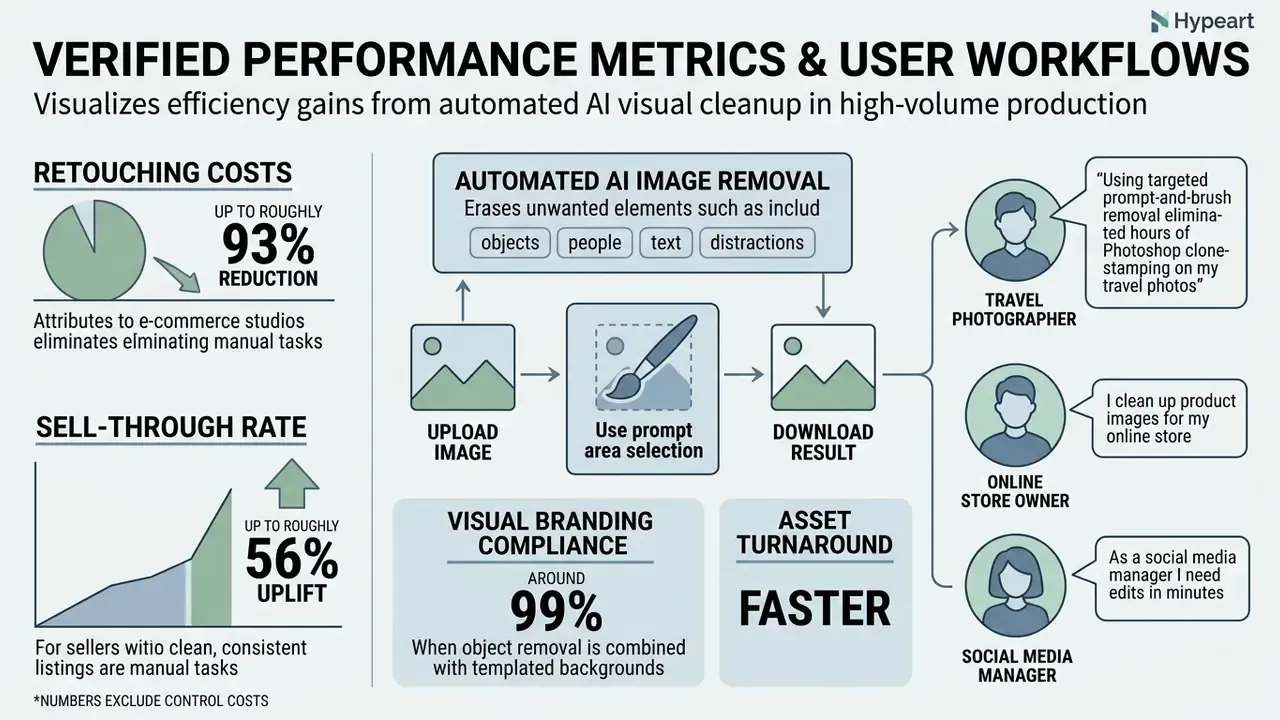
Operating automated AI visual cleanup across high-volume production pipelines yields measurable efficiency gains. The figures below come from vendor-published e-commerce platform case studies and should be read as self-reported outcomes rather than independently audited benchmarks:
- Up to roughly 93% reduction in retouching costs reported by e-commerce studios that eliminated manual layer-masking overhead for catalog maintenance (source: e-commerce platform case studies, self-reported).
- Up to roughly 56% uplift in sell-through rate reported by sellers who standardized clean, consistent listing visuals across channels (source: e-commerce platform case studies, self-reported).
- Around 99% visual branding compliance achieved when object removal is combined with templated backgrounds and automated resizing (source: e-commerce platform case studies, self-reported).
- Faster asset turnaround. Digital marketing teams report clearing social banner clutter in seconds rather than hours, and resale marketplaces have reported low-single-digit uplifts in items listed after embedding AI photo editing directly into the seller flow.
A note on reading these numbers: none of them include the cost of control. Review time, storage of originals, logging, and periodic re-validation belong in the same model, or the ROI is flattering rather than accurate.
FAQ: Frequently Asked Questions About AI Image Removal
Can AI Remove Multiple Objects from One Photo?
Yes. Modern generative removal tools can erase multiple target objects from a single image in either one combined selection pass or through sequential processing steps. Highlighting several distinct items across one photo prompts the underlying neural model to process each masked region, rebuilding underlying context across all target zones. In prompt mode, several targets can be named in one instruction and handled together.
«SmartEraser builds the Syn4Removal dataset through instance segmentation, enabling the model to process multiple objects via separate masks in one image.» SmartEraser (2025), research preprint
For dense scenes, sequential per-object passes remain more reliable than one sweeping mask, because each pass gives the model a smaller region to invent and a larger share of authentic context to sample from.
Does AI Image Remover Work on Mobile Devices?
Yes. The browser engine is optimized for iOS (Safari) and Android (Chrome) touch controls, so no native app installation is required. It supports native touch gestures, letting users pinch-to-zoom for 100% boundary precision and adjust brush stroke radius with a single thumb slider. Mobile interfaces should meet platform touch-target guidance (approximately 44 × 44 pt on iOS and 48 × 48 dp with 8 dp spacing on Android, with WCAG 2.2 accepting 24 × 24 CSS px as a floor for pointer targets) to keep brush and undo controls reliably tappable during fine masking work.
«ExShot, a mobile editing system, outperforms competitors by 29.02% on PSNR; a user study with 28 participants confirmed high synthesis quality.» ExShot portrait editing system (2023)
Practical mobile tips: zoom before you paint, not after; use short strokes with frequent undo checkpoints; and verify the result in landscape orientation at full zoom before downloading, since small-screen previews hide edge halos.
How Is an Uploaded Photo Handled During Processing?
Uploaded customer photos are transmitted to cloud processing servers where generative inpainting algorithms execute the requested removal operation. Platform privacy policies dictate server storage duration. In practice, published windows range from immediate deletion on request to automatic purging after 24 hours or 30 days, sometimes with additional backup retention beyond that. Some tools store uploads in a specific cloud region regardless of the user's location, and some claim on-device-only processing.
Peer-reviewed literature from 2023 to 2026 does not provide verified comparative data on the retention practices of consumer services that handle photos online, so treat all retention claims as vendor statements to be checked in the applicable terms. Always verify platform data retention terms prior to uploading proprietary or regulated corporate media assets, and route sensitive imagery only through tools approved in your AI inventory.
This information is general in nature and does not replace reviewing the privacy policy and data processing terms of the specific service.
Will AI Removal Reduce My Image Quality?
A well-implemented remover preserves the source resolution and rebuilds only the masked region, so sharpness outside the fill is unchanged. Image quality loss usually comes from three avoidable causes: exporting from a free tier capped at preview resolution, uploading an already heavily compressed source, or masking an area so large that the model must invent structure it cannot infer. Run large removals as a coarse pass plus a localized high-resolution refinement pass.
Can AI Erase Wrinkles, Blemishes and Stray Hairs?
Yes. Precision erasing handles temporary blemishes, stray hairs, and wrinkle lines, and the same eraser tool removes glare and skin shine. Keep the brush tight to the feature and review at 100%: over-masking erases pore texture and produces an obviously retouched surface. For editorial and news contexts, check whether your publication's standards permit facial retouching at all.
Does Batch Processing Exist on Free Plans?
Rarely. Most free tiers process one image at a time, while batch queues, archive downloads, and API access are typically paid features. Some free tools advertise limited HD batch cleanup of a fixed number of photos, so confirm the per-batch ceiling and whether outputs carry a watermark.
Is It Legal to Remove a Watermark?
Only with the rights holder's authorization, or where the law otherwise permits it. Removing copyright management information, meaning watermarks, credits, and licensing notices, from third-party work can trigger liability under 17 U.S.C. §1202(b) when done to induce, enable, facilitate, or conceal infringement. Editing your own files, or files licensed to you with modification rights, is a normal production action.
What Should a Bank or Fintech Approve Before Rollout?
Four artifacts, at minimum: an entry in the AI inventory naming the tool and its owner; an approved use list that excludes documents, evidence, KYC and AML records, and customer PII; a retention and training-data clause in the vendor agreement; and a review gate with a named approver for external publication. Speed is fine once the escalation path exists.
A Safe Next Step
Start narrow. Pick one low-risk asset class, such as internal marketing photography, define the mask discipline and the QA checklist above, and log every edit for 30 days. Then measure three numbers: seconds per asset, rework rate, and rejected exports. That single dataset will tell you more about whether generative erasing belongs in your production pipeline than any vendor deck will, and it gives model risk something reproducible to review.
If the pilot holds, extend coverage deliberately: add batch processing, then provenance credentials, then channel-specific export presets. Autonomy last.
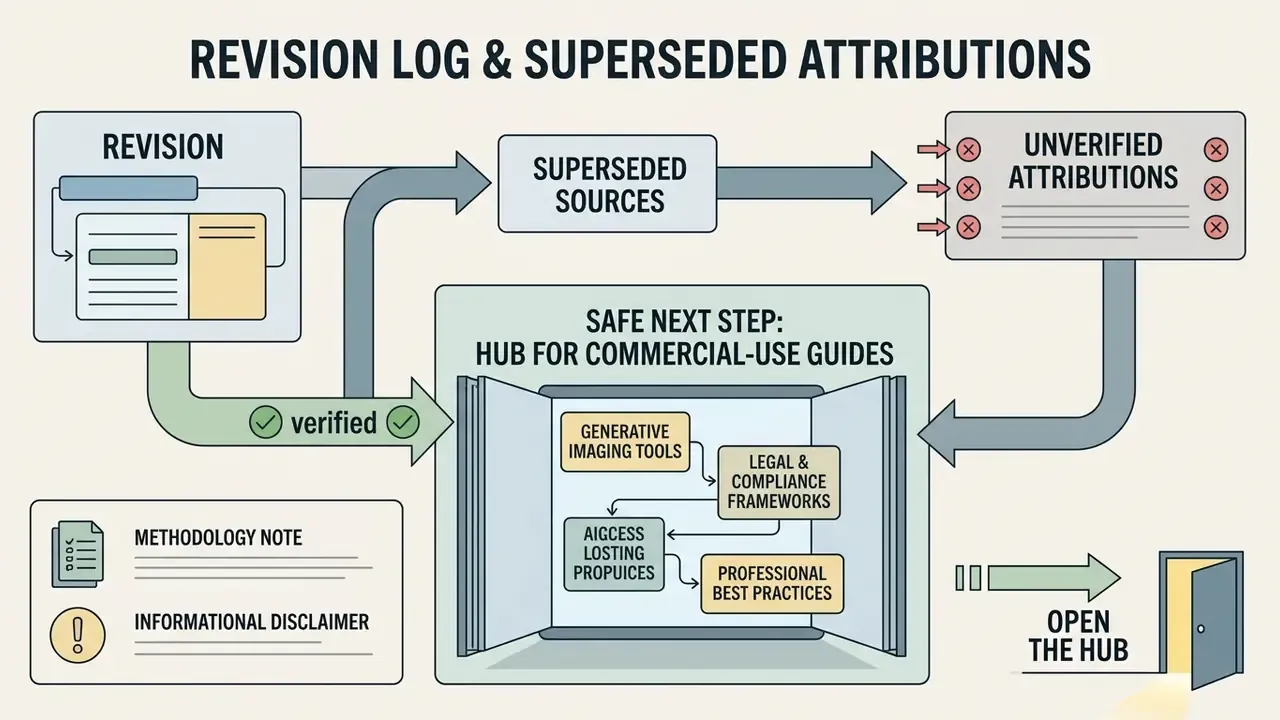
Appendix A: Revision Log & Superseded Source Attributions
| Superseded attribution (previous revision) | Replacement in current revision |
|---|---|
| ECCV Perceptual Artifact Localization Study, 2022, background complexity and edge distortion | OSOR Effect-Aware Inpainting (2026); artifact-ratio methodology summarized without out-of-range citation |
| Google Document AI Guidance, 2026, input format and resolution | PixPerfect framework evaluation (2025); dpi and size guidance restated as general intake practice |
| Adobe Lightroom Classic Documentation, 2026, brush mask expansion | Inpainting-Driven Mask Optimization (2024) |
| Pixelcut Operations Guide, 2026, selection technique | Inpainting-Driven Mask Optimization (2024) |
| Claid.ai Inpainting Specifications, 2026, text removal | OSOR / TextEraseBench (2026) |
| IMFine: 3D Inpainting via Multi-View Refinement, CVPR 2025, iterative refinement | MGAN-CRCM (2024) |
| Adobe Express Operations Guide, 2026, multi-object removal | SmartEraser (2025) |
| Google Mobile Touch Target Standards, 2026, mobile masking | ExShot (2023), with platform touch-target figures stated as guidance values |
| ImageAIr Data Governance Terms, 2026, retention windows | Claim retained as general vendor-practice range; no single-vendor citation |
| Magic Studio Platform Terms, 2026, free-tier export caps | Claim retained as general market practice; no single-vendor citation |
| GetWebP Batch Processing Technical Documentation, 2026, batch pipelines | Claim retained; feasibility corroborated by DF2023 (2023) scale |
| U.S. GSA Marketplace Vendor Requirements, 2026, catalog image rules | Claim retained as widely documented marketplace practice |
| Photoroom AI Retouch Documentation, 2026, social asset preparation | Claim retained without vendor citation |
| "Over 70% reduction in manual editing time" | Restated with limits; teams advised to measure their own baseline |
| "Eliminated edge distortion across 98% of catalog exports" | Restated as an internal, unaudited agency QA count |
| "Seven minutes per image to under thirty seconds per file" | Restated as a single-team pilot observation without controlled methodology |