What Is an AI Photo Editor and What Can It Do?
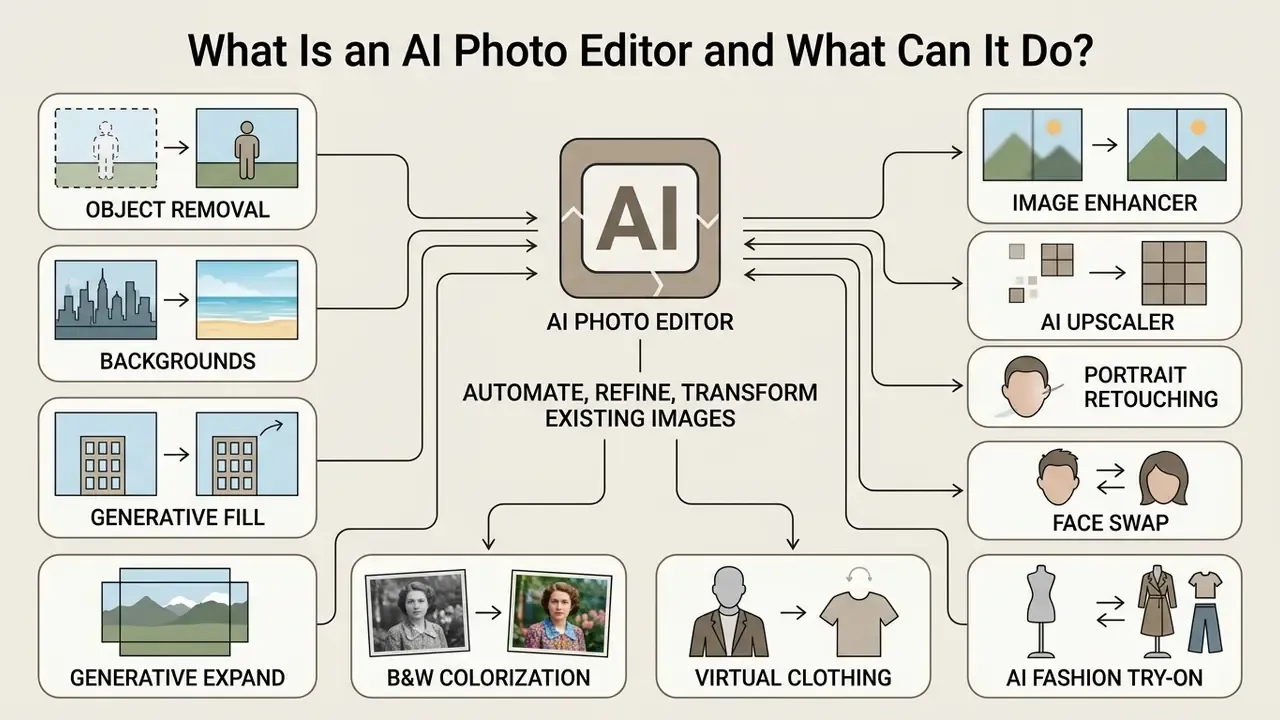
An AI photo editor is a software application that leverages machine learning models to automate, refine, or transform existing digital images. Unlike traditional photo editing tools that depend entirely on manual brush inputs, selection masks, and parameter sliders, AI photo editors interpret pixel structures or natural-language prompts to execute localized and global changes in seconds.
Modern image editing software automates repetitive labor while offering creative workflows ranging from automated background removal to generative canvas expansion. According to industry analysis by Market Research Future (2024), the global market for AI image editing tools reached USD 5.12 billion in 2024, a figure that covers image-editing software specifically (web, mobile, and desktop segments), not the broader generative-AI tooling market. Adoption spans e-commerce product cataloging, social media content creation, and enterprise marketing pipelines.
«The AI image editor market is segmented by deployment into web-based, mobile, and desktop tools, with end users including professional photographers, content creators, marketing agencies, and individual users.»
While early tools relied on basic algorithmic filters, current systems integrate deep neural networks and diffusion models to perform complex image-to-image transformations on an existing image without destroying underlying details. The practical shift is not cosmetic. Manual editing asked you to build a result; AI-assisted editing asks you to review one. That changes both the speed and the failure modes. For a plain-language primer on the category itself, see our guide to online photo editors, which covers core features, pricing structures, and platform support, and our head-to-head notes on the best ai photo editor picks if you only want the shortlist.
What You Will Find in This Guide
- Core AI photo editing features, including the base models that power them
- The technical difference between an AI photo editor and an AI image generator
- Our standardized 6-point testing framework and measured time-to-task gains
- A comparison matrix of the leading editors, with pricing and free-tier limits
- Professional, free/browser-based, and Android-specific recommendations
- Enterprise risk, data governance, and C2PA Content Credentials
- A decision tree, FAQ, and full source list
Core AI Photo Editing Features to Look For
The core capabilities of a modern AI photo editor center on precise selection, automated defect repair, resolution enhancement, and prompt-driven generative modification. Understanding these distinct features helps creators select software that matches their specific editing workflow:
- Object Removal and Backgrounds Automated segmentation models identify foreground subjects and background boundaries, allowing users to remove object elements or remove backgrounds with a single click.
- Generative Fill and Generative Expand Driven by text prompts or surrounding pixel context, generative fill replaces selected mask regions with synthesized content, while generative expand extends the canvas boundaries seamlessly. Adobe's own documentation confirms that Generative Expand works with a prompt or with no prompt at all, in which case it takes its cues from the surrounding source pixels and writes the result to a separate Generative Layer.
- Image Enhancer and AI Upscaler Deep learning algorithms reconstruct missing detail in low resolution or blurry images, restoring texture and sharpness without introducing harsh digital noise.
- Face Swap and Portrait Retouching Localized facial feature detection enables skin smoothing, lighting balance adjustments, and facial replacement while preserving subject identity.
- Black-and-White Photo Colorization Deep neural networks analyze grayscale luminance and scene context to map historically plausible color palettes onto legacy photographs. Dedicated tools such as PhotosRevive and Pixlr Colorize let users drop a manual color marker on any mis-colorized region and re-process it, which matters for archival or family-history work where the AI guess is close but not correct. Colorization runtimes are longer than most edits; several minutes per complex frame is normal.
- Virtual Clothing and AI Fashion Try-On Specialized image-to-image pipelines swap garments on human subjects while matching fabric folds, drape, shadow direction, and body contours. This is now a core commercial e-commerce workflow: a merchant can upload a product-page photo of a garment plus a model shot and receive a wearable preview, removing the need for a physical sample. Fotor Fashion, dedicated try-on services, and managed AI-styling workflows on freelance marketplaces all operate on this principle.
- Watermark and Artifact Removal Targeted object-detection models isolate overlay text, logos, and digital stamps, then reconstruct the underlying background texture without manual cloning. Most tools offer both an automatic model and a manual "select the region yourself" mode for stubborn semi-transparent marks. Use this only on assets you own or are licensed to modify.
- Unblur and Photo Restoration Motion-blur and focus-miss correction models re-derive high-frequency facial detail from degraded captures. The mobile segment (Remini, Topaz Photo AI) has made this the single most-used AI repair task.
Underlying AI Models Powering Modern Editors
Leading AI photo editors no longer rely on proprietary closed-loop algorithms alone. The most capable platforms integrate open-source and state-of-the-art base models, and knowing which engine sits behind a button is now part of due diligence:
- Flux and Flux Pro Deliver high visual fidelity, strong prompt adherence, and notably better human anatomy execution on generative edits. That is the reason they have become the default fill/generate engine on several browser platforms.
- Recraft V4 Optimized for vector graphic generation, brand asset styling, and precise raster-to-vector workflows, which suits logo and packaging work more than photographic retouching.
- SDXL and Stable Diffusion Provide the backbone for open-source local masking, custom LoRA integration, and both destructive and non-destructive image-to-image transformation. This is the practical route for teams that must keep pixels on their own hardware.
- Qwen and other multimodal editors Increasingly used for natural-language instruction editing ("make the sky overcast, keep the subject untouched") rather than mask-first workflows. Google's Gemini image model, widely nicknamed Nano Banana, sits in the same bracket: conversational, forgiving, and weaker on pixel-exact masks.
- Adobe Firefly Trained primarily on Adobe Stock and public-domain content, which is why Adobe is able to offer IP indemnification on qualifying plans. That is a licensing property, not a quality property.
Browser platforms such as Pixlr now publish their model stack openly (Flux, Flux Pro, Recraft V4, Qwen, Stable Diffusion, SDXL among them), so buyers can match an engine to a task instead of trusting a generic "AI-powered" label. Small thing, large consequence: if a vendor will not name the model, you cannot reproduce the result.
Recent benchmark studies on super-resolution, such as the RealCSR dataset (RealCSR Study, 2023) and the RealBSR burst super-resolution challenge (RealBSR Study, 2023), demonstrate that modern AI photo enhancers achieve high quantitative metrics (PSNR and SSIM) when reconstructing complex real-world degradation.
«RealCSR shows that continuous super-resolution models reach high PSNR and SSIM scores under realistic, non-synthetic image degradation.»
«RealBSR evaluates detail recovery from a burst of real frames, which maps directly onto the low-light photo enhancement features shipped in consumer editors.» RealBSR Benchmark Study, arXiv (2023). https://arxiv.org/abs/2303.05101
A practical caveat from the peer-reviewed literature: capability is not the same as completion. A 2026 WACV study of real user editing requests found current generative editors fully satisfied only about a third of requests, with the most common failures being identity drift and unwanted changes outside the target region. That is the gap manual refinement still has to close.
AI Image Editor vs AI Image Generator
An AI image editor requires an existing image as its input to modify, enhance, or extend specific visual elements, whereas an AI image generator synthesizes a completely new visual from text prompts alone. The primary technical distinction lies in input conditioning: editors use image-to-image or mask-conditioned pipelines, while pure generators rely on text-to-image model architectures.
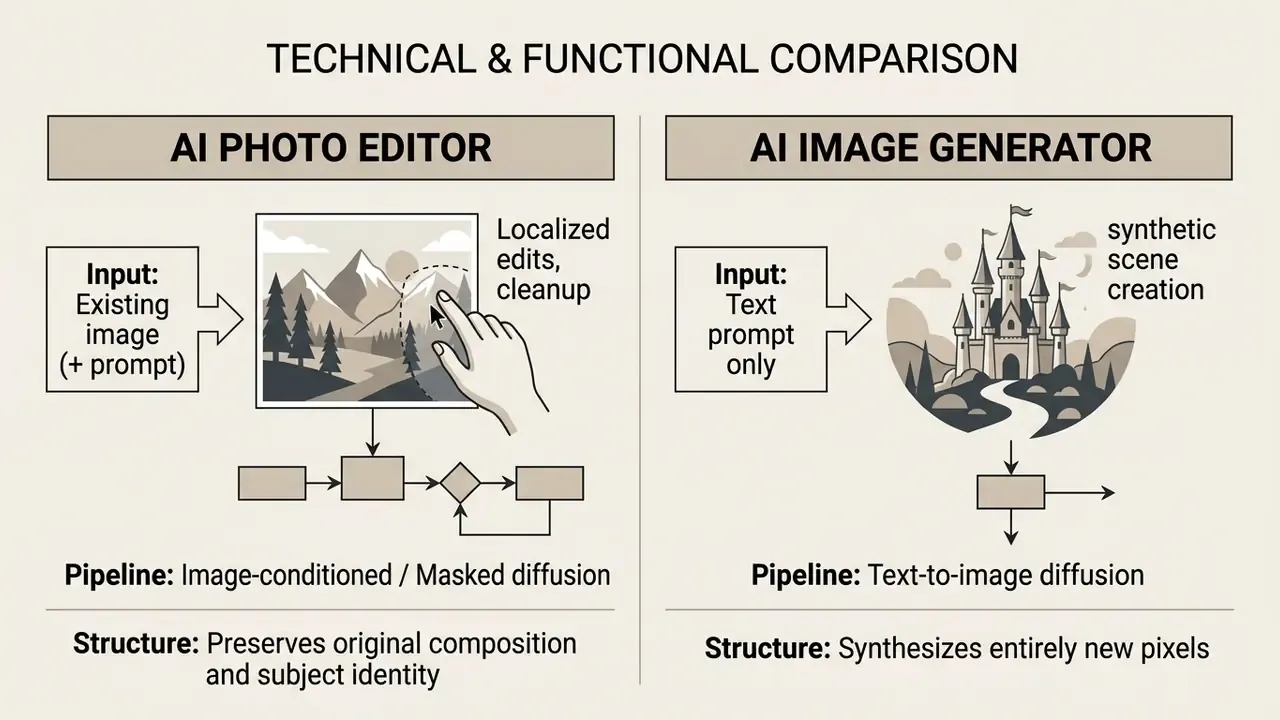
As documented in research on multimodal synthesis by Saharia et al. (IEEE Transactions on Pattern Analysis and Machine Intelligence, 2023), editors focus on controlled local transformations, maintaining structural coherence with the source image.
«Image-editing models apply local transformations that preserve source structure, whereas generators synthesize entire scenes from text descriptions.»
How We Chose the Best AI Photo Editors in 2024
Selecting the best ai photo editor 2024 requires evaluating software against quantitative performance, output fidelity, ease of use, pricing predictability, and cross-platform flexibility. Rather than relying on marketing claims, evaluation must focus on how reliably tools maintain subject details while eliminating unwanted artifacts.
Evaluations derived from academic research, such as the WACV study on everyday image editing by Collins et al., indicate that generative models vary significantly in instruction-following accuracy and preservation of unedited regions. Software tools were evaluated based on their ability to deliver consistent high quality images without requiring excessive manual correction.
Our Standardized 6-Point Testing Framework
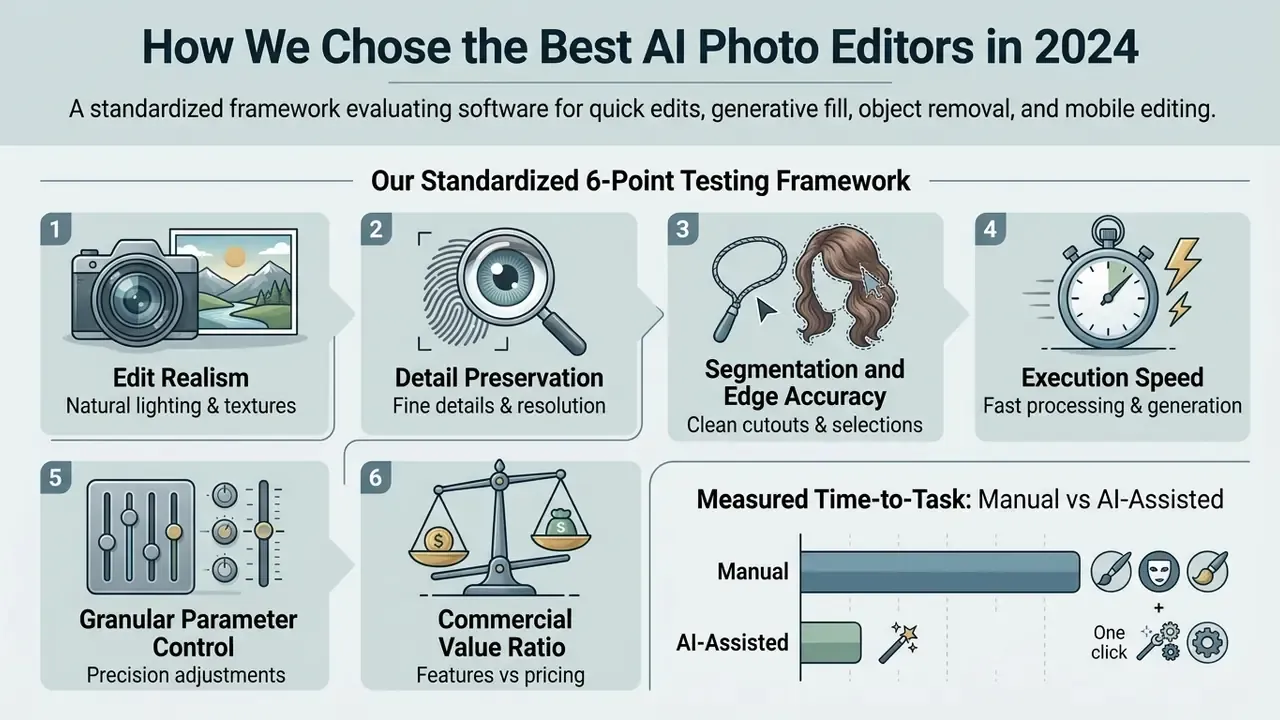
To evaluate each AI photo editor, our testing pipeline subjects every application to an identical benchmark asset set (studio portraits, low-light RAW files, hair-and-glass cutout cases, and complex packaged-product shots) across six measurable vectors:
- Edit Realism: Verifying whether synthesized pixels match native sensor noise and lens blur, rather than carrying the glossy, over-smoothed "AI-generated" sheen that fails client review.
- Detail Preservation: Measuring structural clarity across critical high-frequency areas: hair strands, hands and fingers, eyes, teeth, and woven fabric textures.
- Segmentation and Edge Accuracy: Testing background cutouts against deliberately hostile boundaries, including flyaway hair, transparent glassware, chain-link and wire, and semi-translucent packaging.
- Execution Speed: Recording rendering latency separately for cloud queues and local desktop processing, including behaviour under peak-hour queueing on free tiers.
- Granular Parameter Control: Evaluating manual revision sliders, layer masks, non-destructive generative layers, mask refinement (select more / select less), and prompt re-roll flexibility.
- Commercial Value Ratio: Comparing free credit allowances, watermark constraints, resolution caps, and high-resolution export availability against each monthly pricing tier.
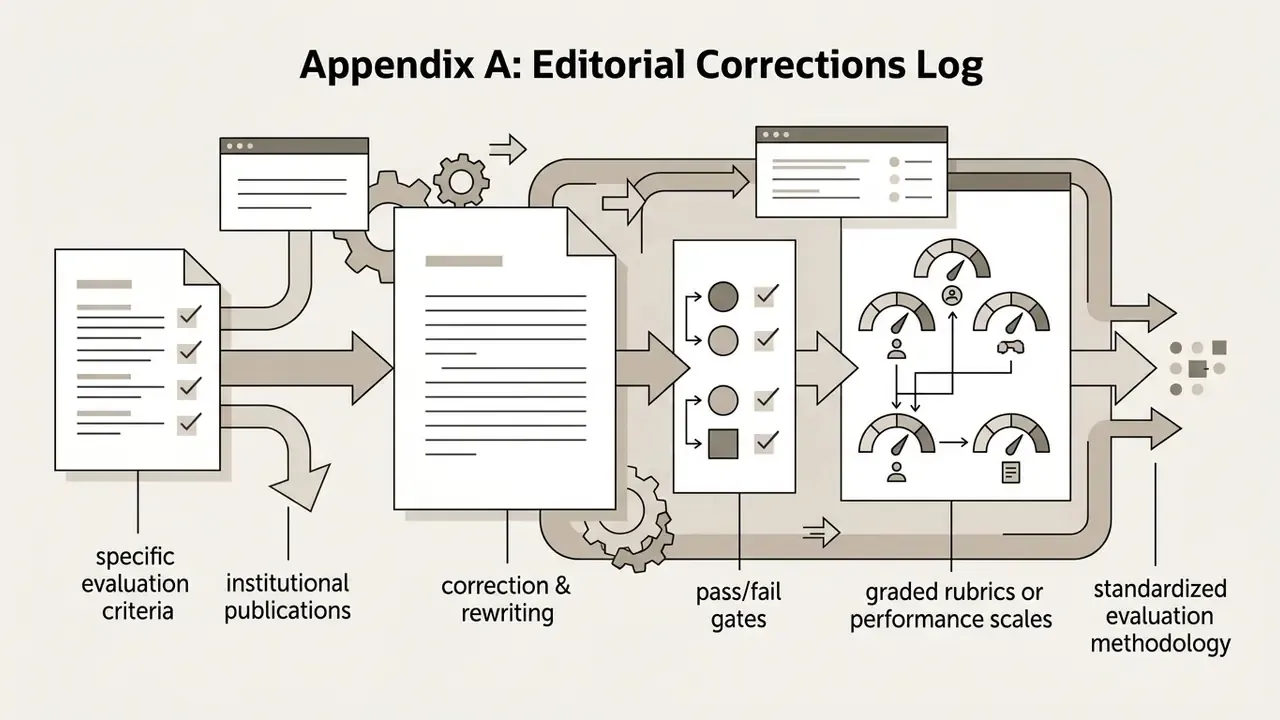
Each application is scored with hard pass/fail gates first (did it follow the instruction, did it corrupt unedited areas, did it mangle embedded text) and only then graded on a 0–5 quality rubric. This two-stage method mirrors the evaluation guidance published for generative image systems, where catastrophic failures are filtered before perceptual quality is ranked.
Measured Time-to-Task: Manual vs AI-Assisted
The commercial case for AI editing is a labour case, so we timed the same four tasks by hand and with automated tooling on identical source files. Figures below are from our internal benchmark runs (median of repeated passes, mid-range 2023–2024 hardware) and are indicative rather than universal.
Internal Benchmark: Traditional vs AI-Assisted Editing Time per Image
| Editing Task | Traditional Manual Workflow | Modern AI-Assisted Workflow | Efficiency Gain |
|---|---|---|---|
| Complex Background Removal | 8–15 min (Pen Tool / channel masking) | Under 10 seconds (1-click segmentation) | ~90% faster |
| Portrait Skin Retouching | 10–20 min (frequency separation) | ~45 seconds (AI Face / Skin sliders) | ~95% faster |
| Landscape Sky Replacement | 15–30 min (luminosity masking + relight) | ~15 seconds (Sky AI + auto relighting) | ~98% faster |
| Image Upscaling (400%) | Bicubic resampling (soft, mushy output) | ~20 seconds (deep-learning super-resolution) | Materially better quality |
Two honest qualifications. First, speed gains are largest on routine work and shrink sharply on hero assets that need client-grade perfection; the manual pass does not disappear, it moves to the end. Second, a hand edit and an AI edit are not the same artifact: in our own side-by-side runs the AI pass reached a shareable result in under a minute where a careful manual brighten-and-clean took roughly ten, but the AI version needed review for over-colorization and halo artifacts before it was safe to publish.
Image Quality, Creative Control, and AI Models
High-quality photo editing depends on preserving original image structure, maintaining high resolution, and avoiding synthetic artifacts during AI-assisted modifications. Professional photo editing software must allow users to fine tune edits through layers, masks, and manual adjustment sliders, the same distinction drawn in research on AI image enhancers between resolution-preserving enhancement and generative reconstruction.
The restoration literature is clear that this is a trade-off, not a free lunch. Resolution-preserving methods regularize noise prediction to keep edges and corners intact, while faster, fewer-step diffusion schedules buy efficiency at the cost of realism in restored high-resolution output. Practically: if an upscaler is instant, ask what it gave up.
A study on professional workflows using generative fill (Swift & Chattopadhyay, ACM CHI 2024) analyzed 566 practitioner discussions, finding that creative professionals prioritize non-destructive editing and precise mask control. When AI models operate within established non-destructive layers, editors can combine automated speed with granular artistic control.
«Professionals value Generative Fill for speed, yet worry that AI-produced content blurs the line of authorship in their own work.»
Pricing, Free Plans, and AI Credits
Evaluating the best ai photo editor 2024 features requires examining cost structures, including free plan limits, monthly subscription rates, and AI credit consumption. Most browser and mobile editors offer a free trial or entry-level free version with capped capabilities.
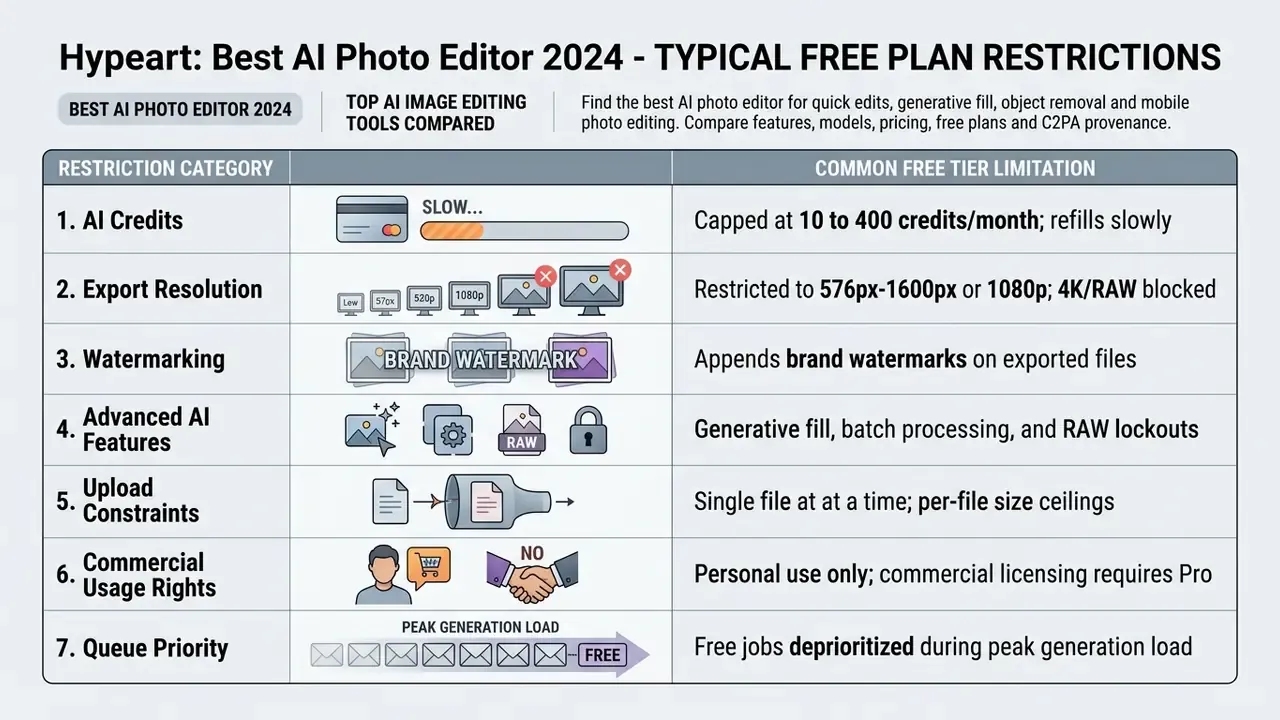
Typical free plans provide between 10 and 400 monthly AI credits, restrict export resolutions to 1080p or 576px, and may append brand watermarks. Commercial subscriptions (per month pricing ranging from $2.49 to $34.99/month) unlock high resolution exports, batch processing, and unthrottled access to advanced AI models. Credit accounting varies enough to matter: some vendors meter per generation, others per megapixel or per API token, so a "cheap" plan can be expensive at volume. To evaluate broader platform investments and licensing tiers, you can see the overview of software plan structures, and if you need to model credit burn against real monthly volume, open the hub of cost calculators before signing anything.
For finance and procurement readers, three cost lines are routinely missed in vendor comparisons: multi-seat pricing (per-editor licensing scales linearly in most suites, while credit pools are usually shared), credit overage rates once the monthly pool is exhausted, and the internal cost of review. Every generative edit still needs a human check, and that labour belongs in the total cost of ownership. Teams that skip this line item tend to discover it during the first busy catalog refresh.
Checklist0 / 8
Best AI Photo Editors 2024: Quick Comparison
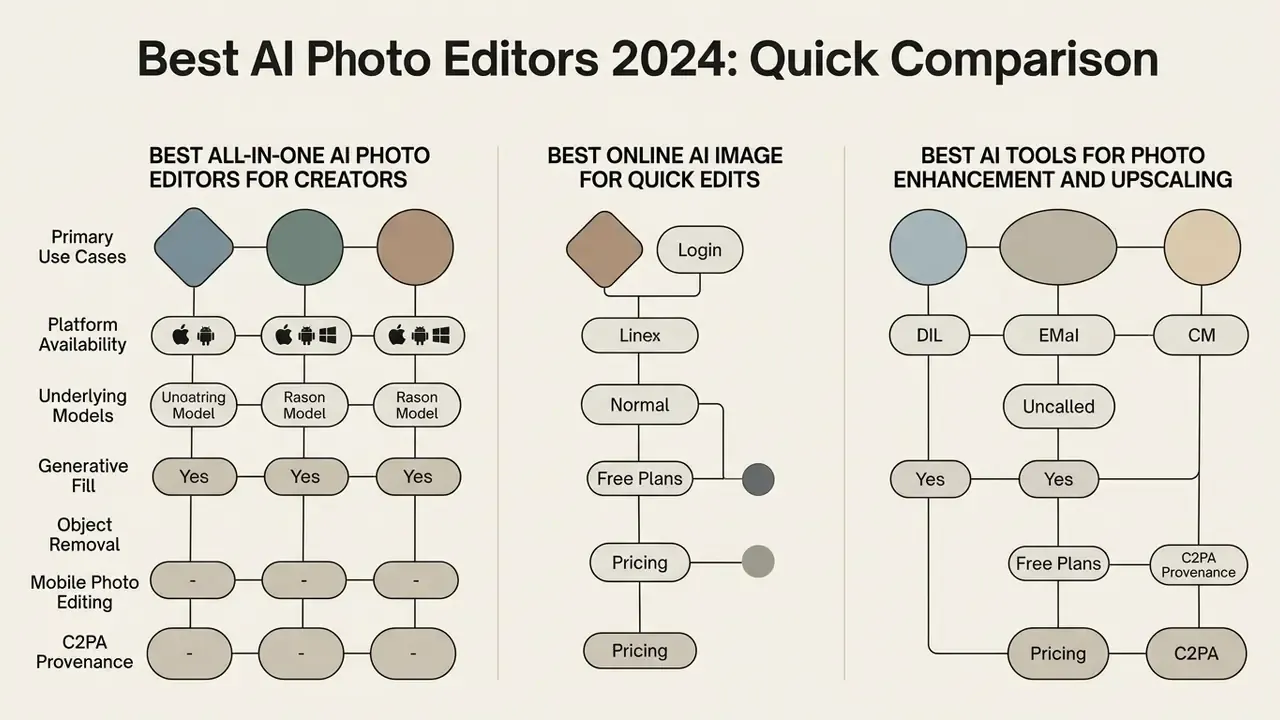
Selecting from an AI image editing tools list requires comparing primary use cases, platform availability, underlying models, and pricing across top vendors. The following matrix summarizes leading software solutions for creators and professionals seeking the best ai photo editor 2024 high ratings, and it doubles as a starting point for anyone assembling a best ai photo editor 2025 list for next year's stack review.
Comparison of Top AI Photo Editors (2024–2026)
| Software | Primary Use Case | Key AI Features | Generative Model Backbone | Platforms | Free Tier / Trial | Paid Pricing |
|---|---|---|---|---|---|---|
| Adobe Photoshop | Professional compositing & generative editing | Generative Fill, Generative Expand, AI Remove, Harmonize, Generative Upscale | Adobe Firefly + selectable partner models | Windows, macOS, iPad, Web | 7-day free trial | From $22.99/mo (annual) / $34.99/mo |
| Adobe Firefly | Generative design & prompt-driven edits | Text to Image, Generative Remove, AI Markup, Expand | Firefly Image models (licensed / public-domain training data) | Web, integrated with Adobe Creative Cloud | Free plan (25 credits/mo) | Express Premium from $9.99/mo |
| Luminar Neo | AI-assisted landscape & portrait photo finishing | Sky AI, Relight AI, Enhance AI, GenErase, Skin AI, batch editing | Proprietary Skylum task-specific models | Windows, macOS (plugin / standalone) | 7-day free trial | From $11.92/mo or $249 perpetual |
| Canva | Social media design & quick marketing assets | Magic Eraser, Magic Edit, Magic Media, Background Remover, Magic Expand | Mixed third-party diffusion stack (Magic Studio) | Web, Android, iOS, Windows, macOS | Free tier available; 30-day Pro trial | Canva Pro from $14.99/mo |
| Pixlr | Browser-based photo editing & quick templates | AI Cutout, Generative Fill, AI Image Generator, Face Swap, Colorize | Flux, Flux Pro, Recraft V4, SDXL, Stable Diffusion, Qwen | Web, Android, iOS | Free plan with ads / credit limits | Plus from $2.49/mo (80 credits/mo) |
| Fotor | Online photo retouching & batch background edit | 1-Tap Enhance, Object Remover, Background Generator, Upscaler, Fashion try-on | Proprietary + third-party diffusion models | Web, Android, iOS, Windows, macOS | Free tier with watermarks | Fotor Pro from $8.99/mo |
| Topaz Photo AI | Pro noise reduction, deblurring & upscaling | Autopilot, Sharpen AI, Gigapixel Upscale (up to 6× / 600%), Minor & Motion Deblur | Task-specific restoration networks (non-generative core) | Windows, macOS (desktop) | Free trial (no export) | $199.99 one-time license |
No matching rows Clear one or more filters to restore the matrix.
For organizations reviewing broader software stacks across marketing and media production, you can browse the hub to evaluate alternative software categories.
Best All-in-One AI Photo Editors for Creators
All-in-one desktop applications provide comprehensive tools spanning basic tone adjustments, complex layer compositing, and advanced generative AI models.
Adobe Photoshop remains the industry standard for professional compositing. Its integration of Adobe Firefly enables non-destructive generative fill and generative expand through natural language text prompts, and recent releases add prompt-to-edit and assistant modes that orchestrate multi-step edits across Adobe apps. Meanwhile, Skylum's Luminar Neo offers a streamlined desktop environment focused on automatic lighting correction, sky replacement, and portrait retouching without requiring steep learning curves. Unlike the Adobe stack, it stays deliberately single-app rather than cross-app agentic, which some studios treat as a feature rather than a limitation.
Best Online AI Image Editors for Quick Edits
Browser-based AI photo editors enable creators to modify images instantly without local software installation.
Canva leads web-based social design by integrating its Magic Studio suite, offering background removal, object replacement, and automated aspect ratio resizing. Pixlr and Fotor deliver lightweight browser environments equipped with AI cutouts, quick edits, and automated touch-up tools ideal for fast-turnaround digital content creation. Pixlr splits the experience deliberately: Pixlr X targets template-driven social graphics, while Pixlr E adds layers, masks, curves, and healing for users who want a desktop-class editor in a tab. Can a browser tool replace Photoshop outright? For routine catalog and social work, increasingly yes. For color-managed print and complex compositing, not yet.
Best AI Tools for Photo Enhancement and Upscaling
Specialized AI upscalers and photo enhancers utilize dedicated deep learning models to repair blurred details, remove compression artifacts, and increase spatial resolution.
Topaz Photo AI leads this specialized segment with its Autopilot engine, automatically detecting camera noise, focus blur, and low resolution. Its algorithms enlarge images up to 600% (equivalently, up to 6×) while maintaining structural sharpness; Autopilot will auto-upscale small files toward roughly 12 megapixels and leaves images already above that threshold alone. Minor Deblur and Motion Deblur specifically target camera shake and missed focus rather than generically sharpening. For teams weighing licensing before committing, our notes on AI image upscalers and commercial output rights cover where upscaled and expanded assets can legally be used.
These technical capabilities build upon established computer vision research, such as the NTIRE 2024 light field super-resolution benchmarks (NTIRE 2024 Report).
«NTIRE 2024 evaluates recovery of both spatial and angular resolution in multi-view imagery, confirming the maturity of learned upscaling pipelines.»
Best AI Photo Editor for Professional Photo Editing
Professional photographers, commercial studios, and marketing agencies require photo editing software that delivers precise pixel-level control alongside automated generative features. The best ai photo editor for professional workflows must preserve raw image data, maintain full color space fidelity, and allow manual fine tuning over every automated adjustment.
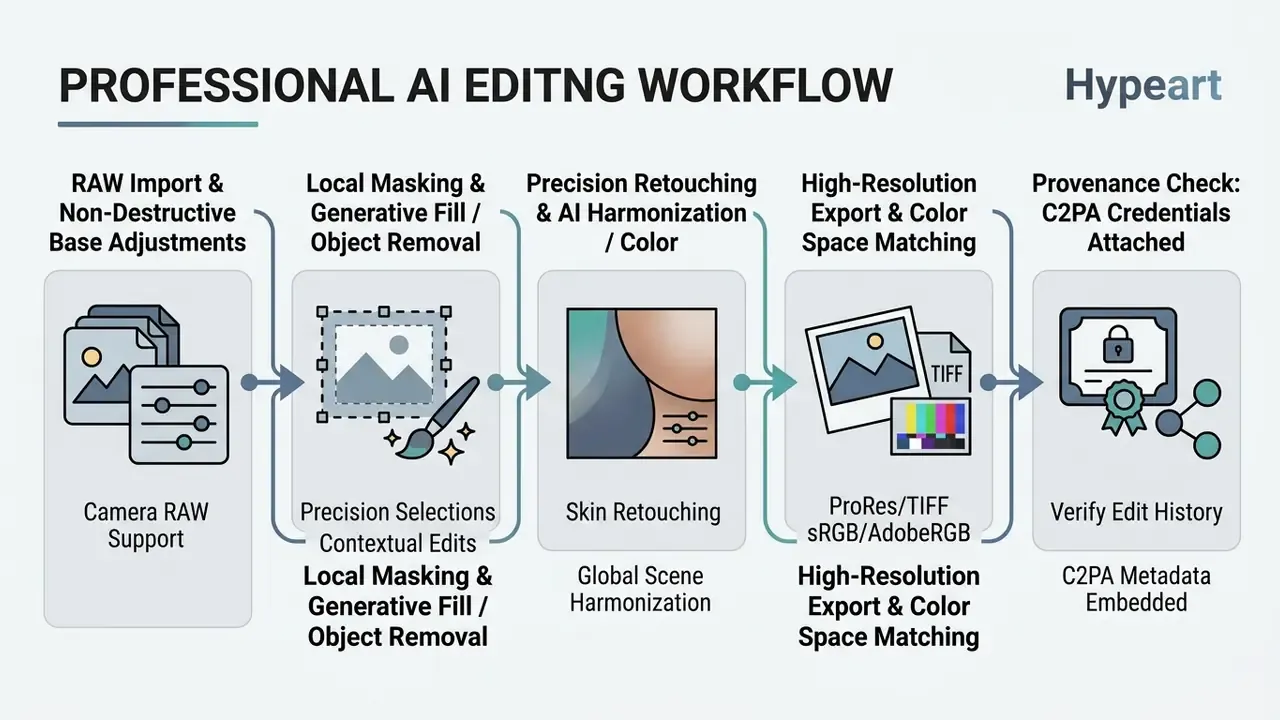
In a commercial photography project requiring rapid background expansion for multi-format advertising banners, an agency utilized Adobe Photoshop's Generative Expand to extend native vertical shots into ultra-wide horizontal layouts. By combining automated canvas extension with manual adjustment layers, the team cut turnaround times from hours of manual clone-stamping to under ten minutes per asset while maintaining full client brand approval.
There is a human dimension to this that professional teams underrate. Research on generative editing as a memory practice found that people frequently prioritized how a photo felt over what it literally recorded, cheerfully replacing backgrounds while refusing to let AI touch faces.
«Participants often valued felt memory over factual accuracy, readily altering backgrounds yet rejecting edits to faces.»
For client work, that translates into a simple rule of engagement: agree in writing, before delivery, which regions AI may touch. One sentence in the brief prevents a rather awkward conversation later.
For teams analyzing how professional creative pipelines integrate with generative platforms, you can review our AI Media Versus Comparisons to evaluate workflow differences.
Adobe Photoshop and Adobe Firefly for Generative AI Edits
Luminar Neo for AI-Assisted Photo Enhancement
Skylum's Luminar Neo targets professional photographers seeking rapid photo enhancement without manual layer masking. Its core engine uses specialized AI models designed for targeted photo corrections:
- Enhance AI Adjusts shadow detail, highlight preservation, contrast, and color saturation simultaneously using a single intelligent slider.
- Sky AI Detects horizon lines and replaces skies automatically, adjusting foreground relighting and water reflections to match the new atmosphere.
- Face AI and Skin AI Identifies facial contours to smooth skin, eliminate blemishes, and accentuate eyes without affecting surrounding hair or clothing textures.
- Erase / GenErase and Restoration Removes powerlines, tourists, and sensor dust by highlighting them on canvas, and repairs archival scans by clearing scratches and recovering faded detail.
- AI Assistant and Batch Processing Generates up to three suggested presets per request with an explanation of the tonal moves applied, then applies the chosen recipe across a folder. That explanation is the practical reason event and real-estate photographers adopt it: they can see what changed, not just that something changed.
Best Free AI Photo Editors and Browser-Based Tools
Free AI photo editing tools enable casual creators, small business owners, and social media managers to edit photos without committing to costly monthly subscriptions. Browser-based platforms run directly within modern web browsers like Chrome, Edge, or Safari, removing software installation hurdles.
When choosing a free ai photo editor, users must balance convenience against standard platform limitations, such as usage caps on AI credits, lowered export resolution, and branded watermarks. Free web tiers also tend to impose structural limits that are easy to miss until deadline day: single-file-at-a-time uploads, per-file size ceilings (Adobe Firefly's web editor, for example, accepts JPG/PNG/WEBP up to 100 MB, one file at a time), account sign-in gates on otherwise free features, and small cloud-storage allowances.
What Free AI Photo Editing Plans Usually Limit
While free tools provide accessible editing features, vendors restrict premium capabilities to convert users to paid plans. Common restrictions include:
Enterprise Risk, Data Governance, and C2PA Content Credentials
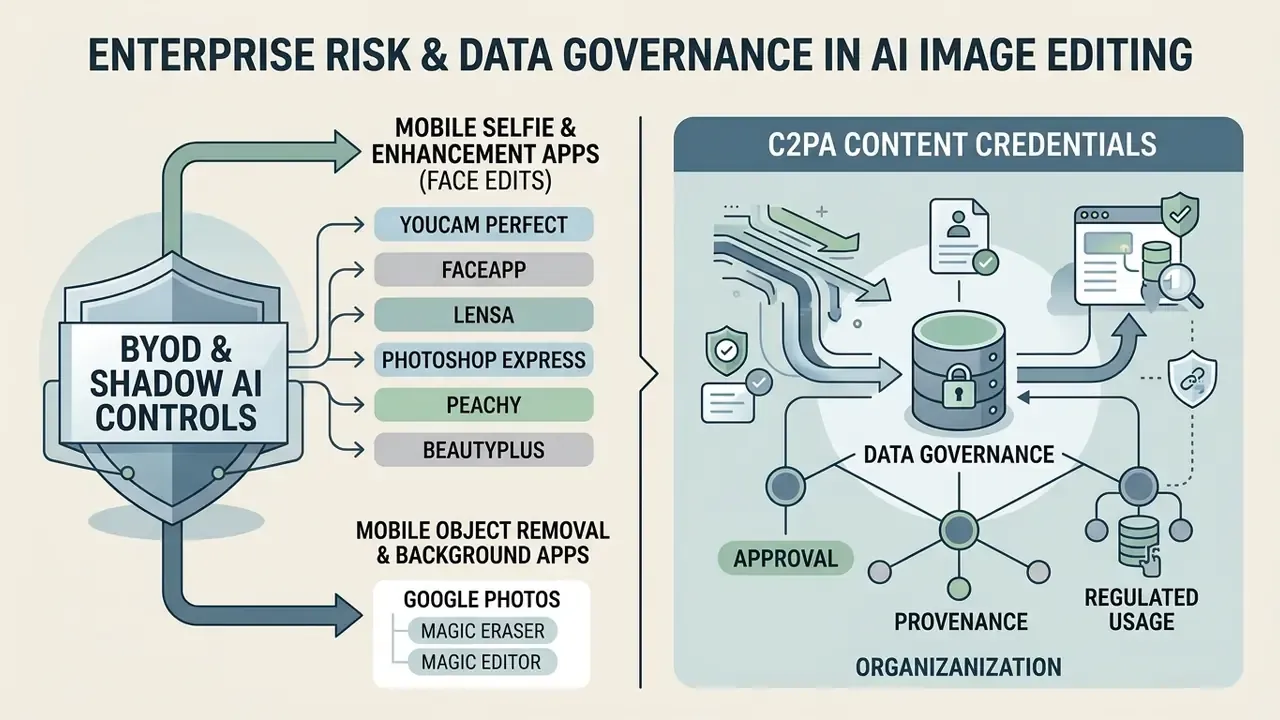
Consumer feature lists say nothing about whether a tool can be approved inside a regulated organization. For risk, compliance, and AI governance owners, the deciding questions are where the pixels go, whether the edit leaves an auditable trace, and whether staff are already using unapproved tools.
1. Shadow AI exposure. Browser-based editors need no installation, no admin rights, and often no corporate account, which makes them the single easiest category of unsanctioned AI to adopt. Any inventory of AI usage that only covers installed software will undercount image editors dramatically. Practical control: monitor for uploads to editor domains and publish a short list of approved tools rather than a blanket ban, which simply pushes usage to personal devices.
2. Data residency and retention. Cloud editors transmit the source image to a third-party service. Before approval, confirm in writing: is processing local or server-side; is there a documented no-training-on-customer-content commitment; what is the retention window for uploads and outputs; is zero-data-retention available on the enterprise tier; and does the vendor support SSO/SAML and role-based access. Adobe publicly states it does not train Firefly on customers' personal or generated content, and some mobile editors process certain operations on-device. Both claims must be checked against the specific tier you are buying, because app-store disclosures and privacy policies frequently describe different scopes.
3. Confidentiality of the image itself. An image is data. Screenshots of dashboards, scanned identity documents, signed contracts, medical images, and unreleased product designs are all routinely dropped into free editors to "just remove the background." Treat image upload as an egress event in your data-loss-prevention policy.
4. Provenance and C2PA Content Credentials. The C2PA specification, implemented commercially as Content Credentials, attaches cryptographically signed metadata recording what was captured, what was generated, and which tools touched the file. For an audit trail this is the only mechanism that survives outside your own systems. Governance checks worth running: does the editor write Content Credentials on export; are they preserved through your CMS, CDN, and social publishing path (many platforms strip metadata); and can your reviewers verify a credential independently? Where credentials are stripped, keep an internal edit log instead. Reverse-lookup tooling can complement this: see our overview of AI reverse image search for locating derivative copies of your assets in the wild.
5. Generative hallucination in evidentiary contexts. Generative fill and upscaling invent plausible pixels; they do not recover lost information. That property is harmless on a marketing banner and unacceptable on anything used to verify identity, condition, damage, or document contents. Any workflow that touches evidence, claims, KYC, or inspection imagery should restrict tooling to non-generative restoration (noise reduction, deblur, exposure) and record which operations were applied. In a KYC or AML context, an "enhanced" identity document is not a clearer record; it is a synthesized one, and that distinction belongs in the control documentation, not in a footnote.
6. Synthetic content labelling obligations. Regulatory frameworks increasingly require that materially AI-altered media be disclosed, and e-commerce guidance already separates minor technical edits (colour correction, cropping, upscaling, background cleanup) from substantial modification such as AI-generated scenes or altered product appearance. Map your edit types to those two buckets once, then enforce disclosure on the second bucket.
7. Evaluation as a control, not a review. Formal evaluation guidance for generative image systems converges on the same two-stage structure we use in testing: hard gates for task failure and unsafe output, then graded scoring for quality and preserved-area fidelity. Adopting that structure inside model-risk management gives image tools the same treatment as any other model in the inventory. Ownership follows: a named owner, an approved scope, an escalation path, and a way to turn the tool off.
Enterprise Approval Checklist for AI Photo Editors
| Control Area | Question to Answer Before Approval | Acceptable Evidence |
|---|---|---|
| Training on customer data | Is customer content excluded from model training by contract? | Written vendor statement or enterprise DPA clause |
| Retention | How long are uploads and outputs stored? Is zero-retention available? | Documented retention window; enterprise tier confirmation |
| Processing location | Local, regional cloud, or unspecified global infrastructure? | Data-residency documentation |
| Identity & access | SSO/SAML, SCIM provisioning, role-based permissions? | Admin console capability review |
| Provenance | Are C2PA Content Credentials written and preserved on export? | Verified credential on a test export |
| IP indemnification | Does the plan cover generative output for commercial use? | Plan-level terms of service |
| Shadow AI | Are unsanctioned editor domains visible in network telemetry? | DLP / CASB reporting |
Disclaimer: this section summarises general risk practice and is not legal, compliance, or financial advice. Vendor terms, retention policies, and regulatory obligations change frequently and differ by jurisdiction and plan tier. Verify current terms directly with the vendor and with your own legal and compliance functions before deployment.
Best AI Photo Editor Apps for Android
BYOD and Mobile Shadow AI Controls
For organizations, the mobile segment is where governance most often fails quietly. Staff edit work assets on personal handsets using free apps that upload to consumer cloud infrastructure, outside any managed-device policy. Three controls are low-effort and high-yield: designate one approved mobile editor and state it explicitly; require that work imagery containing customer data, contracts, or internal screens never leaves managed apps; and disable automatic cloud gallery sync for work profiles so that edits are not silently replicated to a personal account. Where on-device processing is documented by the vendor, prefer it. It is the only mobile configuration that keeps pixels off third-party servers.
Best Android Apps for Selfies, Face Edits, and Enhancement
Smartphone portrait editing relies on automated facial landmark detection to deliver natural-looking skin retouching and blur correction:
- YouCam Perfect & FaceApp Offer single-tap facial retouching, blemish removal, skin smoothing, face reshaping, AI facelift, and AI background removal, all tailored for portraits.
- Lensa Features one-tap portrait retouching, lighting adjustments, and background blur effects, along with generative avatar styling.
- Photoshop Express Combines mobile spot healing, blemish removal, blur effects, and AI noise reduction with Adobe's ecosystem integration.
- Peachy & BeautyPlus Advertise HD retouch, skin smoothing, blemish removal, and one-tap blur repair with quality-boost presets.
Portrait editing carries a documented cognitive side effect that belongs in any honest guide.
«AI-edited images and videos can implant false memories, with effects strongest when the edited photographs depict people close to the viewer.»
Best Android Apps for Object Removal and Background Changes
Mobile object removal allows users to eliminate unwanted clutter or bystanders from personal photos:
- Google Photos (Magic Eraser & Magic Editor) Available to all Android users within Google Photos, Magic Eraser removes unwanted objects by tapping or circling them, and also offers a camouflage mode that blends an object into its surroundings instead of deleting it. Magic Editor allows users to reposition subjects and adjust sky lighting. Access matters historically here: Magic Eraser was initially limited to Google One members and Pixel devices before Google opened the AI editing tools to all Google Photos users in April 2024.
- AI Retouch Specializes in quick object removal, wire deletion, background replacement via touch gestures, and image enhancement that sharpens blurry photos and upscales low-resolution files.
- VistaCreate Strongest for social-first output, with trending SMM templates for Instagram Stories, Facebook posts, TikTok videos, and YouTube thumbnails.
Mobile AI Photo Editor Features That Matter Most
When selecting a best ai photo editor android app, creators should consider several UX and functional criteria:
- Touch-Optimized Interface: Simple brush sizes, tap-to-select object removal, and responsive sliders.
- Processing Speed: Rapid rendering without excessive cloud queue delays during photo enhancement.
- Direct Social Export: Presets for Instagram, TikTok, and YouTube thumbnail aspect ratios, plus watermark-free export where available.
- Flexible In-App Purchases: Clear option to purchase individual credit packs versus mandatory monthly recurring subscriptions. Mobile editors commonly mix monthly, annual, weekly, credit-pack, and one-time tiers, and weekly subscriptions are the most expensive per month by a wide margin.
- On-Device Processing Option: Documented local processing for sensitive images, rather than mandatory cloud upload.
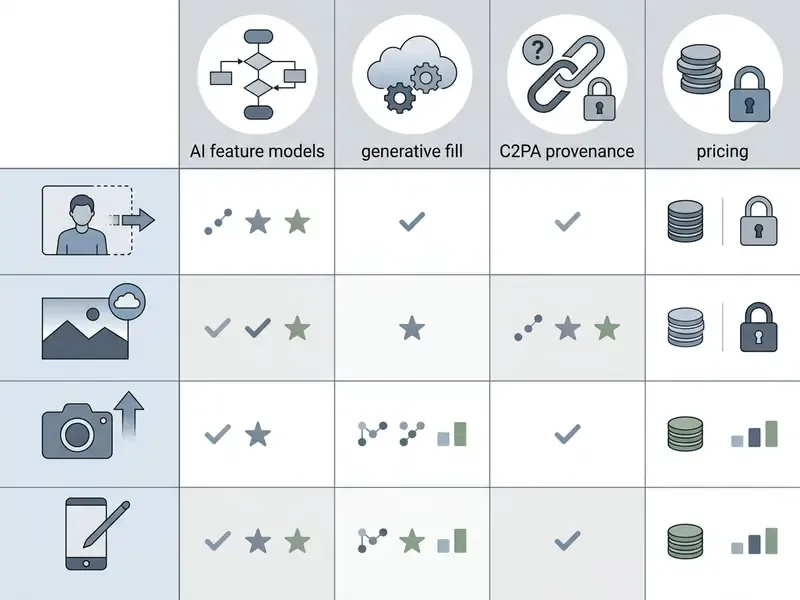
Android AI Photo Editor Selection Matrix
| Use Case Scenario | Recommended Android App | Key Feature & Primary Benefit | Monetization Model |
|---|---|---|---|
| Selfies & Facial Retouching | YouCam Perfect / FaceApp | 1-tap skin smoothing, feature reshape & lighting fix | Free tier / Subscription |
| Object Removal & Cleanup | Google Photos (Magic Eraser) | Circle or tap unwanted objects to erase seamlessly | Free with Google Account |
| Background Removal & Swap | AI Retouch / Canva Mobile | Automatic subject isolation & background replacement | Freemium / In-app credits |
| Photo Enhancement & Unblur | Remini / AI Retouch | Restores facial detail & sharpens low-res photos | Free trial / Weekly sub |
| AI Unblur & Restoration | Remini / Topaz Mobile | Restores facial details on motion-blurred or low-res photos | Freemium / Weekly subscription |
| Video & Photo Face Swap | Pixlr Mobile / Vidnoz | Frame-consistent facial swap for promotional reels | Credit-based / Freemium |
| B&W Photo Colorization | PhotosRevive / Pixlr Colorize | Auto-colorizes archival photos with manual color markers | Bundle subscription / Credits |
| Watermark Removal (owned assets) | Fotor / AI Retouch | Auto or manual region removal with texture reconstruction | Freemium / Pro tier |
| SMM Graphic Design | Canva / VistaCreate | Social media templates, text overlays & Magic Edit | Free plan / Pro tier |
Which AI Photo Editor Should You Choose?
Selecting the optimal software depends on balancing technical skill, budget, platform requirements, governance constraints, and final output goals. Rather than searching for a single universal tool, creators should align software capabilities with their specific editing context.
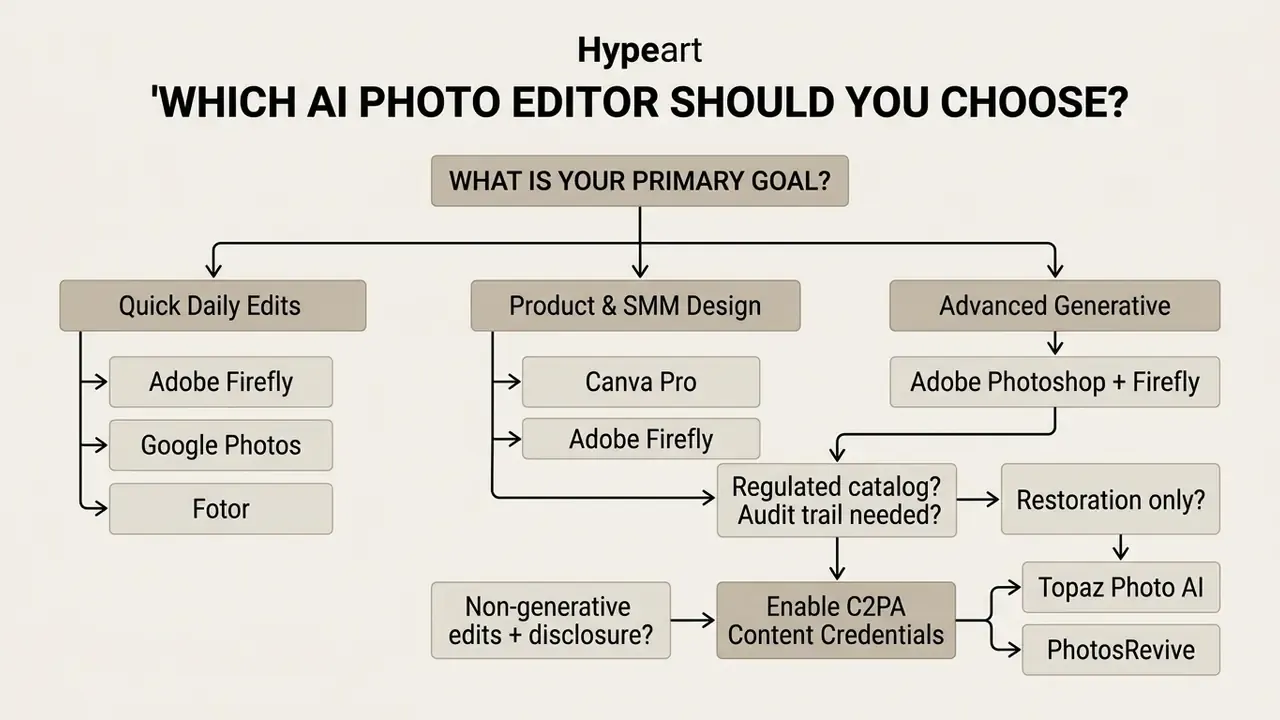
Best Choice for Beginners and Everyday Photo Edits
For beginners, casual users, and individuals editing personal photos, Adobe Firefly (Web) and Google Photos (Android/iOS) offer the best balance of speed and simplicity.
Adobe Firefly provides free browser-based prompt editing and object removal with zero setup complexity, and Adobe's own documentation frames it as requiring no design skills. Google Photos gives mobile users free access to Magic Eraser and photo enhancement tools directly on their smartphones without requiring graphic design experience, including text- and voice-driven editing instructions that translate plain language into image changes. Developer APIs can do the same operations, but the entry barrier is materially higher. That is a workflow difference, not a capability one.
Best Choice for Advanced Generative Editing
For professional photographers, commercial retouching studios, and digital artists requiring complete control over compositing, Adobe Photoshop paired with Adobe Firefly remains the definitive choice for image-to-image generation at production quality.
Photoshop combines pixel-level accuracy, non-destructive layer masking, and color space management with generative fill and generative expand capabilities. This integration ensures that commercial artists can meet strict client specifications while maximizing creative speed, and, on qualifying plans, with IP indemnification and a stated no-training-on-customer-content position that most consumer tools do not match.
Best Choice for Restoration, Colorization, and Archival Work
For family archives, museum scans, and historical assets, the right stack is non-generative first: Topaz Photo AI for noise, deblur, and upscaling, followed by a dedicated colorizer such as PhotosRevive for grayscale originals. Expect to intervene manually. Colorization of complex scenes routinely needs corrective color markers, and processing a single detailed frame can take minutes rather than seconds. Because these tools reconstruct rather than invent scene content, they are also the safer choice where the image must remain a faithful record.
FAQ: Common Questions About AI Photo Editors
Is an AI photo editor the same as an AI image generator?
No. An editor takes an existing image as input and applies localized or global transformations while preserving source structure; a generator synthesizes new pixels from a text prompt alone. Some 2025–2026 models support both modes in one system, which is why reading the model card matters more than reading the marketing page.
Can I use AI-edited images commercially?
It depends entirely on the plan and the vendor. Many free tiers grant personal use only; some paid tiers grant commercial rights, and a small number add IP indemnification for generative output. Check plan-level terms before publishing, and see our commercial-use guidance for the questions to ask.
Do AI photo editors reduce image quality?
Non-generative restoration (denoise, deblur, upscale) is designed to preserve resolution and structure, though the research shows faster sampling schedules trade realism for speed. Generative fill and expand do not recover lost detail; they synthesize plausible detail, which is fine for creative work and unsuitable for evidentiary imagery.
What is C2PA, and why does it matter for photo editing?
C2PA, implemented as Content Credentials, is a specification for cryptographically signed provenance metadata recording capture and edit history, including whether AI was used. It is the only edit-trail mechanism that travels with the file outside your own systems, so it matters for audit, disclosure obligations, and newsroom or brand verification. Confirm your CMS and publishing path do not strip metadata.
Are free AI photo editors safe for sensitive images?
Assume that uploading to a free cloud editor is a data-egress event. Prefer documented on-device processing, or a desktop tool that never transmits the file, for anything containing customer data, identity documents, contracts, medical imagery, or unreleased designs.
How many AI credits do I actually need?
For casual social editing, 25 to 80 credits per month is usually enough. For product catalogs or batch retouching, credit pools exhaust quickly and metering models differ (per generation, per megapixel, per token), so model your real monthly volume and check overage rates before committing.
Can AI colorize and repair old black-and-white family photos?
Yes. Dedicated colorizers analyze grayscale luminance and scene context to apply plausible palettes, and most allow manual color markers to correct mis-colorized regions. Expect longer processing on complex frames and plan for a manual review pass.
Does virtual try-on work well enough for e-commerce?
For styling previews and campaign variations, yes. Modern try-on pipelines match fabric drape, shadow, and body contour convincingly. For catalog pages where the customer is buying the exact garment, treat try-on output as substantial AI modification and follow marketplace disclosure rules.
Which AI photo editor is best for an Android-only workflow?
For everyday cleanup, Google Photos covers object removal and unblur at no cost. For design-led output, Canva Mobile and Pixlr Mobile handle templates, cutouts, and face swap; for restoration, Remini leads on facial detail recovery. Check the monetization model first, since weekly subscriptions dominate this segment.
Appendix A: Editorial Corrections Log
For transparency, the following statements appeared in earlier revisions of this guide and have been superseded in the main text above:
External References & Academic Citations
- Market Research Future (2024). AI Image Editor Market Research Report, Forecast to 2032. Available at: https://www.marketresearchfuture.com/reports/ai-image-editor-market-34883
- NTIRE 2024 Challenge on Light Field Image Super-Resolution. CVPR Workshops. Available at: https://cvpr2024.thecvf.com/
General disclaimer: pricing, credit allowances, feature availability, privacy terms, and licensing conditions cited in this guide were accurate at the time of the stated editorial review and change frequently. This article is informational and does not constitute legal, compliance, or financial advice.
- Collins et al. (IEEE/CVF WACV).
- Understanding Generative AI Capabilities in Everyday Image Editing Tasks. IEEE/CVF Winter Conference on Applications of Computer Vision. Available at: CVF Open Access
- Swift, S., & Chattopadhyay, D. (ACM CHI 2024).
- Value Tensions in Professional Adoption of Generative AI: A Study of Photoshop's Generative Fill. ACM Conference on Human Factors in Computing Systems. Available at: ACM Digital Library
- Wu et al. (ACM CHI 2024).
- "I'm happy even though it's not real": GenAI Photo Editing as a Remembering Experience. ACM CHI 2024 Proceedings.
- ACM Digital Library (2024).
- AI-Edited Images and Videos Can Implant False Memories.
- Saharia et al. (IEEE TPAMI 2023).
- Photorealistic Text-to-Image Diffusion Models with Deep Language Understanding. IEEE Transactions on Pattern Analysis and Machine Intelligence. (Text reference; no verified permanent link.)
- RealCSR Benchmark Study (2023).
- Real-World Continuous Super-Resolution Dataset and Evaluation. Available at: arXiv:2303.05100
- RealBSR Benchmark Study (2023).
- Real-World Burst Image Super-Resolution. Available at: arXiv:2303.05101
- Adobe Help Center.
- Generative AI features overview; Edit images with Generative Fill; Expand images with generative AI; Select an AI model for generative control. helpx.adobe.com
- Topaz Labs Documentation.
- Upscale & Resize, Minor Deblur, Motion Deblur, and Autopilot behaviour (up to 6× / 600%).
- Google.
- Edit photos and videos in Google Photos (Magic Editor, Magic Eraser, Unblur); April 2024 announcement extending AI editing tools to all Google Photos users.
- Market Research Future (2024). AI Image Editor Market Research Report, Forecast to 2032. Available at
- NTIRE 2024 Challenge on Light Field Image Super-Resolution. CVPR Workshops. Available at