Executive Summary
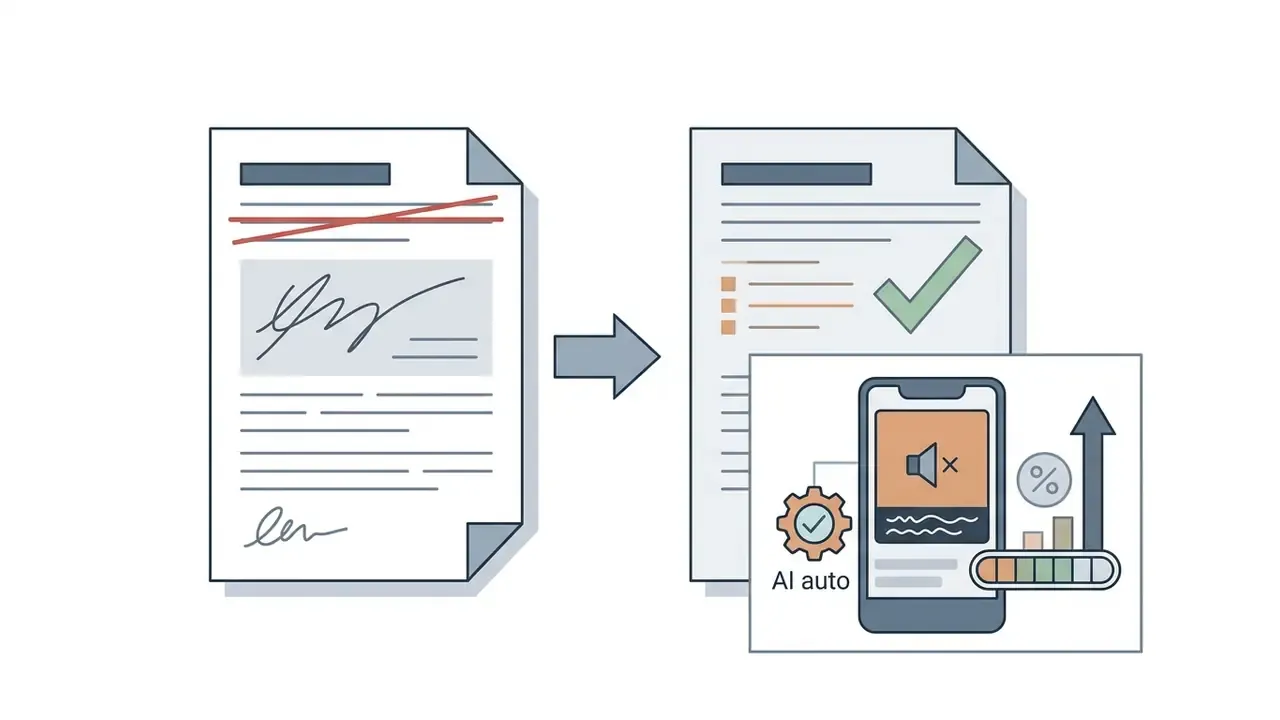
- An AI auto video editor applies machine learning, signal processing, and computer vision to raw footage, so cutting, transcription, captioning, reframing, and audio cleanup happen without manual timeline work.
- Verified production data shows meaningful savings. AI-assisted editing cut post-production time by 35 to 40% per episode on a Korean broadcast program, and Runway-based background removal compressed a six-hour VFX task into six minutes on a US late-night show.
- Feature depth now matters more than raw speed. Expect Voice Activity Detection, ASR captions, auto reframe, neural matting, eye contact correction, auto B-roll, AI voiceover, and brand kits in a competitive 2026 toolset.
What this guide covers: what an AI automatic video editor actually automates, which features are worth paying for, the full workflow from upload to export, long-to-short repurposing, the choice between online, app, and desktop software, security and Shadow AI controls, current pricing bands, and answers to the questions buyers keep asking.
Automated video editing tools are reshaping digital media post-production across US enterprise and creative workflows. Modern software leans on machine learning to streamline raw footage ingestion, silence trimming, transcript generation, and multi-platform publishing. The mechanics changed fast. The approval habits did not.
What Is an AI Auto Video Editor and Which Tasks It Automates
An AI auto video editor is software that uses machine learning, computer vision, and speech processing to inspect, cut, format, and synthesize raw video footage with minimal manual timeline intervention.
Traditional non-linear editing software (NLE) needs a human operator for shot selection, audio leveling, and cut-point timing. An automatic video editor instead reads audio waveforms and visual frames, then executes the repetitive part of post-production on its own. The creative judgement stays with you. The dull scrubbing does not.
Core tasks these systems automate: dead-air removal, filler-word trimming, speech-to-text transcription, dynamic caption placement, and camera reframing. A 2024 broadcasting implementation study of the Korean terrestrial television program Earth Sweepers showed that adding AI multicamera alignment and automated scene segmentation inside Adobe Premiere Pro reduced total editing time by 35 to 40% per episode.
«AI-assisted editing reduced editing time by 35 to 40% and cut costs by more than 20 million won per episode.»
One enterprise example, anonymized and illustrative rather than audited: a financial media team processed weekly two-hour market briefings into compliance-cleared executive summaries. With automated silence detection and speech-to-text scene indexing, post-production turnaround dropped from three days to under four hours, and every version stayed traceable in the audit log. Creators who want a structured publishing workflow can review our guide to YouTube video editors.
Because the machine output is a draft, never a finished master, every regulated workflow keeps a human checkpoint between generation and distribution. No evidence, no autonomy.

AI Editor, Automatic Video Maker, AI Video Generator and Data-Driven Automation: What Is the Difference
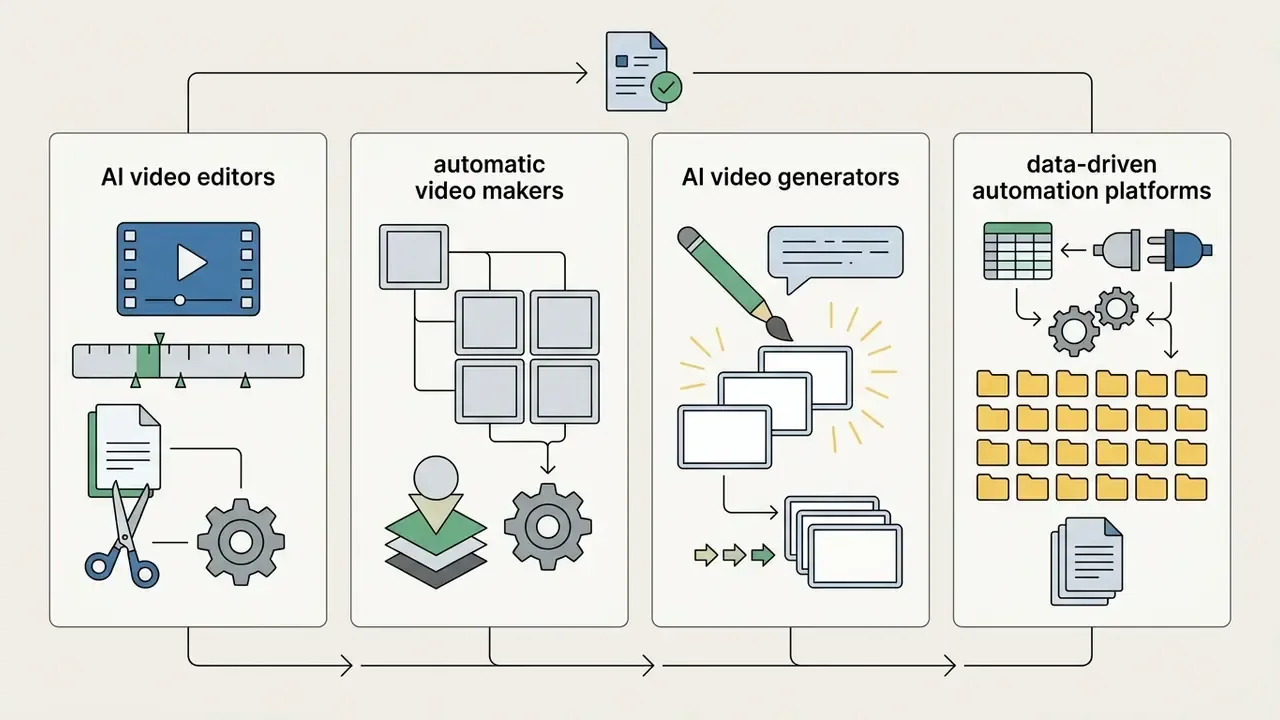
The technical distinction between these product classes rests on three things: input source media, timeline generation mechanics, and output volume.
- AI Video Editor Accepts pre-existing footage (rushes or recorded video) as its primary input. It performs timeline cuts, speech cleanup, visual reframing, and multi-track additions without altering the underlying recorded pixels. Comparative reviews of general-purpose video-editing tools help teams map these capabilities onto an existing NLE stack.
- Automatic Video Maker Combines structured assets such as script text, brand images, slides, and stock footage into a timeline built from pre-defined layout templates.
- AI Video Generator Synthesizes entirely new frames from natural language prompts or static images using diffusion or autoregressive architectures. Readers comparing model families can review our overview of AI video generators, the mechanics of text-to-video AI, and animation from static images.
- Data-Driven Video Automation Platform Ingests a finished graphic template (an After Effects project, for example) plus an external data source such as CSV, Google Sheets, Airtable, or a REST API. The system populates dynamic layers with text, images, clips, colors, and audio, then renders hundreds or thousands of individual videos in the cloud within minutes, with nobody touching a timeline. This is the architecture behind personalized ads, localized campaigns, and marketplace product feeds.
Comparison of the Four Auto-Editor Architectures
| Auto-editor type | Primary input | Processing mechanics | Main output | Core use case |
|---|---|---|---|---|
| AI Video Editor | Raw video files (rushes) | Cutting, VAD, ASR, reframing | Cleaned timeline with captions | Podcasts, interviews, vlogs |
| Automatic Video Maker | Script, photos, stock assets | Template-driven layout assembly | Finished presentation video | Explainers, slideshows |
| AI Video Generator | Text prompt | Generative diffusion or autoregression | Frames synthesized from scratch | B-roll, concept art, stylized scenes |
| Data-Driven Automation | AE template plus spreadsheet or API | Cloud batch rendering of dynamic layers | 100 to 1,000+ personalized videos | Targeted ads, e-commerce, localization |
Engineers building custom API pipelines for generative video can explore our AI Media API Guides and the technical overview of the Google Veo API.
How AI Automatically Edits Uploaded Videos
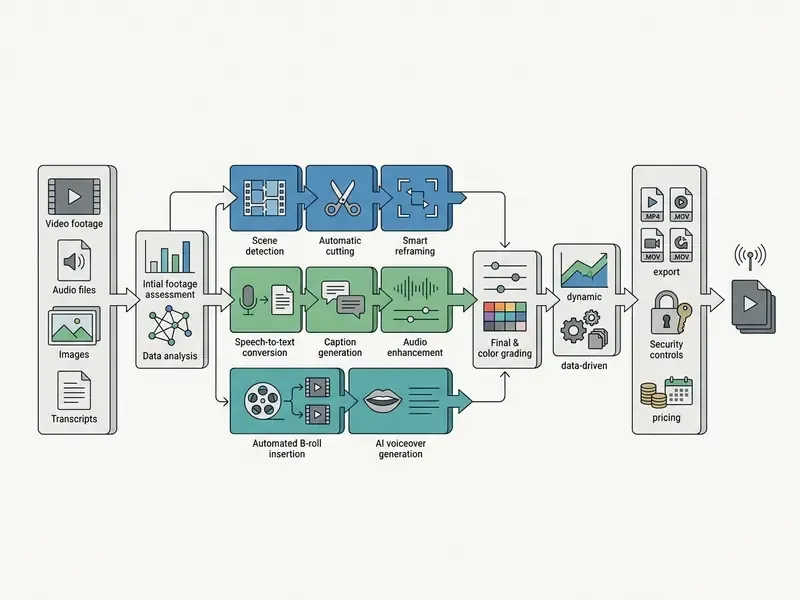
Upload raw footage into an automatic video editing platform and the software starts a multi-stage pipeline, each stage driven by a specialized algorithm.
- Ingestion and audio separationThe system reads the container file and splits the primary audio track for acoustic analysis.
- Voice Activity Detection (VAD)VAD algorithms measure loudness and frequency to detect dead air, pauses longer than a preset threshold (typically 0.5 to 3.0 seconds), and background noise.
- Automatic Speech Recognition (ASR)Speech-to-text engines produce time-aligned transcripts and flag filler words such as "uh", "um", and "you know" for removal.
- Visual and motion analysisComputer vision models score frame saliency, facial expression, and motion vectors to find focal points and natural scene cuts.
«A reinforcement learning method with a pre-trained vision-language model frames editing as sequential decision-making, training an agent to select segments using rewards derived from professional references.»
- Timeline rendering: The editor applies non-destructive ripple edits, adjusts aspect ratios, layers dynamic captions, and generates a preview for human review.
«The LAVE agent let participants perform editing tasks through natural language, lowering the entry barrier to professional editing.»
One operational caveat for finance, legal, and healthcare teams. ASR pipelines mis-transcribe or outright hallucinate domain terminology: ticker symbols, statute references, drug names, internal product codes. Mitigations are unglamorous but effective. Upload a custom vocabulary before processing, filter the transcript by confidence score, and require a named reviewer to sign off on every terminology-heavy segment before export.

Which Features You Need in AI Automatic Video Editing Software
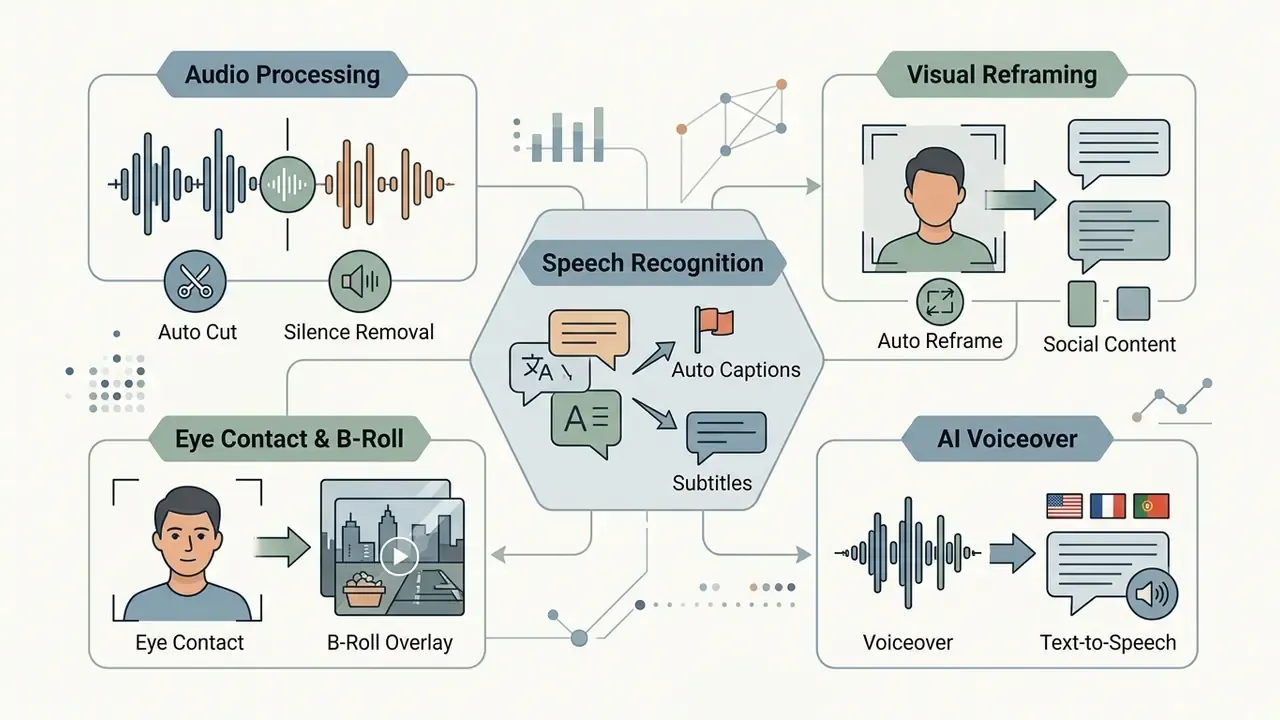
Choosing enterprise-grade AI automatic video editing software means evaluating five capability groups: audio processing, speech recognition, visual reframing, generative enhancement, and multi-track compositing.
The essential modules are Voice Activity Detection (VAD), acoustic noise suppression, automated subtitle generation, optical flow reframing, and non-destructive timeline editing. Teams weighing complementary graphic and image tooling alongside video platforms can explore the hub for side-by-side comparisons.
Auto Cut, Silence Removal and Audio Cleanup
Auto cut and silence removal modules read waveform amplitude, then purge dead air and non-speech gaps while keeping natural cadence intact.
Tools such as Microsoft Clipchamp and Auto-Editor isolate audio segments below a set volume threshold and execute precise cuts across synced video tracks (Clipchamp Documentation, 2026). Clipchamp's silence removal detects pauses longer than three seconds and splits the recording into separate clips for review. More advanced systems add Voice Activity Detection to tell a deliberate dramatic pause apart from unwanted dead air, holding timeline sync across multi-track audio.
Noise suppression separates speech from steady hums, HVAC rumble, and room reverberation. To avoid jarring joins, software applies micro-crossfades of roughly 10 to 50 ms at each cut point, which keeps zero frame drift and continuous background beds. Well-implemented auto cut also protects music structure: silent gaps disappear without slicing the music bed or scrambling speaker order. Teams needing synthetic voice replacement or audio repair can consult our analysis of AI voice generators.
Automatic Captions, Subtitles and Video Transcription
Automatic captioning converts spoken audio into time-aligned text overlays through end-to-end Automatic Speech Recognition.
Top-tier ASR models such as OpenAI Whisper reach 95 to 99% accuracy on clean acoustic input.
«Whisper-based systems generate subtitles and translations to support accessibility, although accuracy varies with accent and background noise.»
Eye Contact Correction and Automatic B-Roll Overlay
AI Voiceover and Multilingual Text-to-Speech
For localization and narrated formats, modern platforms embed speech synthesis inside the auto-editing timeline:
- Text-to-Speech voiceover: Narration generated from a script, with libraries exceeding 400 AI voices across 80+ languages plus adjustable pace, pitch, and emotional tone (Microsoft Clipchamp AI voiceover documentation, 2026). Premium tiers add voice cloning and automated dubbing of existing tracks.
- Automatic subtitle translation: Subtitle generation in 80+ languages using voice-detection technology, so one source master feeds multiple regional cuts.
- Brand kit (one-click branding): Automatic application of approved logos, typefaces, color palettes, and lower-thirds at export, which keeps every auto-generated variation inside brand and disclosure guidelines.
| AI feature | Uploaded input | Technical algorithm | Editing outcome |
|---|---|---|---|
| Auto Cut / Silence Removal | Raw video or audio track | Waveform thresholding and VAD analysis | Removes dead air and pauses over 3s |
| Automatic Captions | Spoken audio | Speech-to-Text ASR (Whisper and similar) | Time-aligned SRT subtitles and burned text |
| Auto Reframe | Horizontal 16:9 video | Computer vision and object tracking | Vertical 9:16 cut with re-centered subject |
| Background Removal | Single-track video | Neural matting and subject masking | Isolated subject with transparent alpha channel |
| Transcript-Based Editing | Video plus ASR transcript | Text-to-timeline timestamp alignment | Cuts video frames by deleting transcript text |
| Eye Contact Correction | Talking-head footage | Gaze estimation and pupil re-synthesis | Speaker appears to address the lens continuously |
| Auto B-Roll Overlay | Video plus ASR transcript | Entity extraction and asset matching | Relevant stock or generated clips on upper track |
| AI Voiceover (TTS) | Script text | Neural speech synthesis | Narration in 80+ languages, adjustable pace and pitch |
| Brand Kit Application | Finished timeline | Preset-driven asset injection | Logo, fonts, colors, lower-thirds on every export |
| Beat Sync | Video plus music track | Onset and beat detection, cut alignment | Cuts and transitions locked to musical beats |
How to Edit Videos Automatically: From Upload to Export
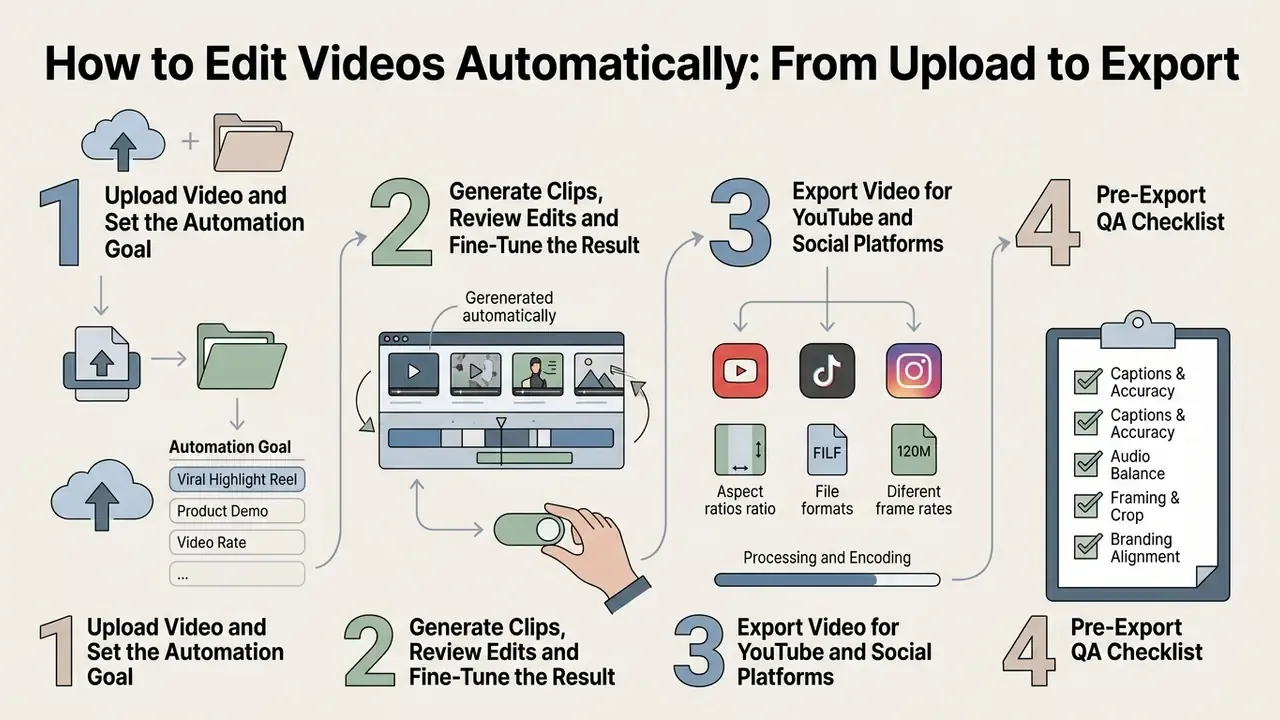
Automatic video editing follows a repeatable four-stage workflow built to strip friction out of post-production.
Upload Video and Set the Automation Goal
It starts with ingesting good source footage into the editor workspace and stating an explicit goal.
Before you launch AI processing, set the parameters: target platform, target duration (30 seconds behaves nothing like 3 minutes), and content objective (Adobe Firefly Production Guide, 2026). Those constraints steer highlight detection and cut frequency. Production planning guidance converges on the same order of operations, define purpose, audience, and length first, with 3 to 5 minutes a common target for edited explainer deliverables.
«LAVE automatically generates language descriptions of uploaded footage, letting the editor specify editing goals in natural language.»
High-resolution source footage produces better object tracking and cleaner transcription. Media operations running high-volume pipelines can examine our guide to video compressors to optimize upload bandwidth and cloud storage spend.
Generate Clips, Review Edits and Fine-Tune the Result
Once targets are set, the AI engine processes footage into automated cuts, transcripts, and candidate clip selections.
Human review is the step nobody should compress. Editors inspect generated clips for narrative flow, speech accuracy, framing, and brand compliance. Public-sector AI guidance recommends an independent evaluation mechanism plus documentation before release, and vendor QA checklists suggest two passes: one viewing for overall coherence, a second for motion artifacts, caption timing, audio sync, and platform formatting.
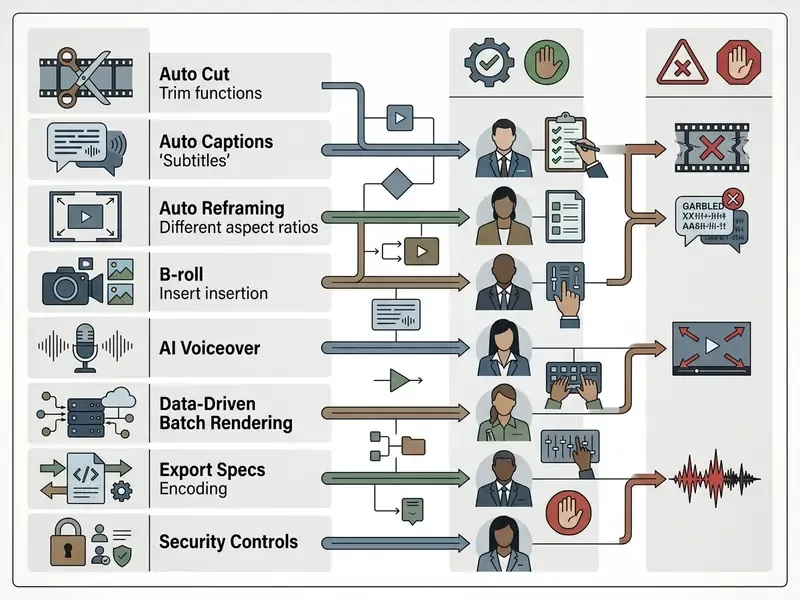
During review, operators make targeted manual adjustments:
- Fixing misspelled words or proper nouns in generated captions.
- Nudging cut boundaries to preserve natural speech pauses.
- Adding background music with auto-ducking.
- Applying brand fonts, lower-thirds, and color presets.
- Swapping mismatched auto B-roll and confirming no gaze-correction artifacts survived.
For projects that carry animated corporate branding, editors can drop in assets built with an animated logo maker during final composition.
Pre-Export QA Checklist
Checklist0 / 8
AI Video Auto Editor for Long Videos, Clips and Social Media
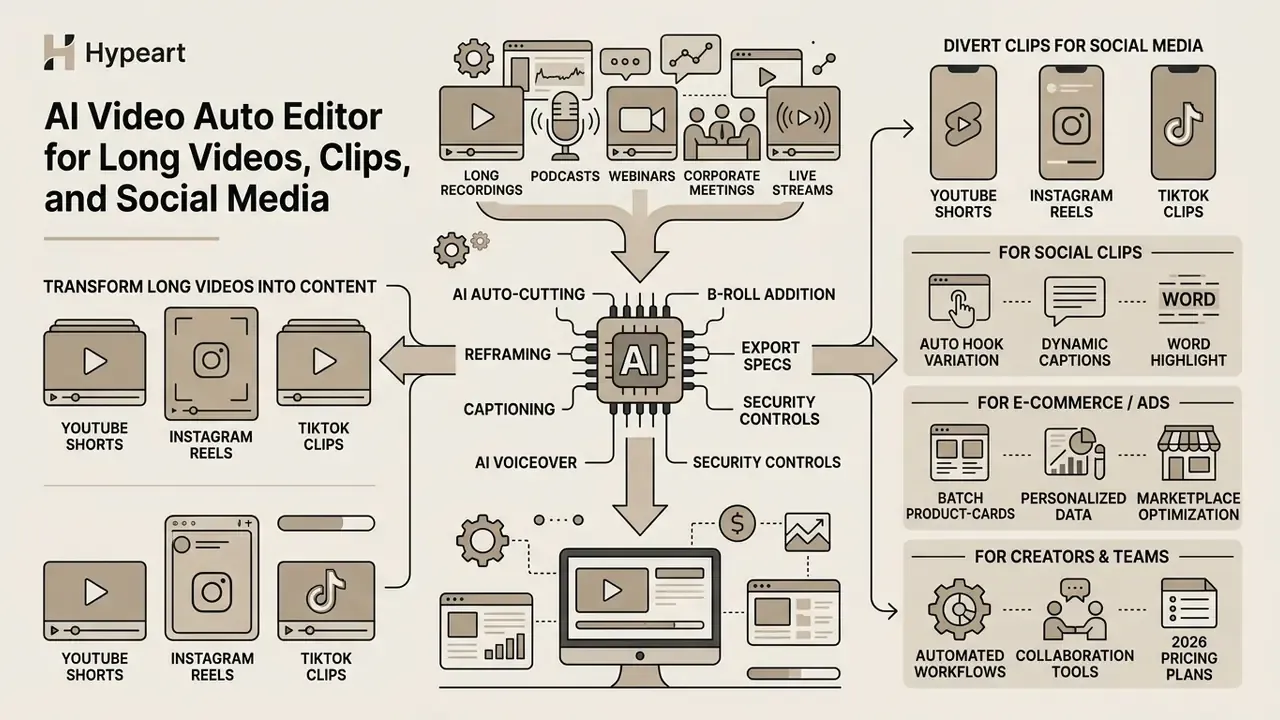
An AI video auto editor earns its keep most obviously when long-form recordings, podcasts, webinars, corporate meetings, live streams, need to become short clips for social channels.
How to Turn Long Videos Into Short Engaging Clips
Turning long recordings into engaging short clips depends on multimodal highlight detection.
Instead of scrubbing manually, multimodal models score transcript sentiment, acoustic energy spikes such as laughter, applause, or a raised voice, and visual scene transitions, then identify self-contained conversational arcs.
«HIVE decomposes editing into highlight detection, opening and ending selection, and pruning of irrelevant content, consistently outperforming baselines in experiments.»
Benchmark datasets show how those preferences get learned at scale.
«Repurpose-10K contains 4,539.94 hours of source video and over 120,000 annotated clips collected from real users of a repurposing SaaS platform.»
The AI isolates high-scoring segments, extracts story blocks, adds hook titles, and generates dynamic captions. Whether the output is a marketing asset, a corporate summary, an educational explainer, or a creative project, content classification, rights clearance, and compliance verification stay mandatory. Especially when clips auto-publish to several channels without a second editorial pass.
Videos for YouTube, Shorts and Social Media
Adapting assets across YouTube, Instagram, and TikTok means adjusting framing, pacing, and metadata to platform norms rather than exporting one file everywhere.
«A platform-scale study of Kuaishou covered 248.2 million short-form videos over two weeks, illustrating the volume environment AI editors optimize for.»
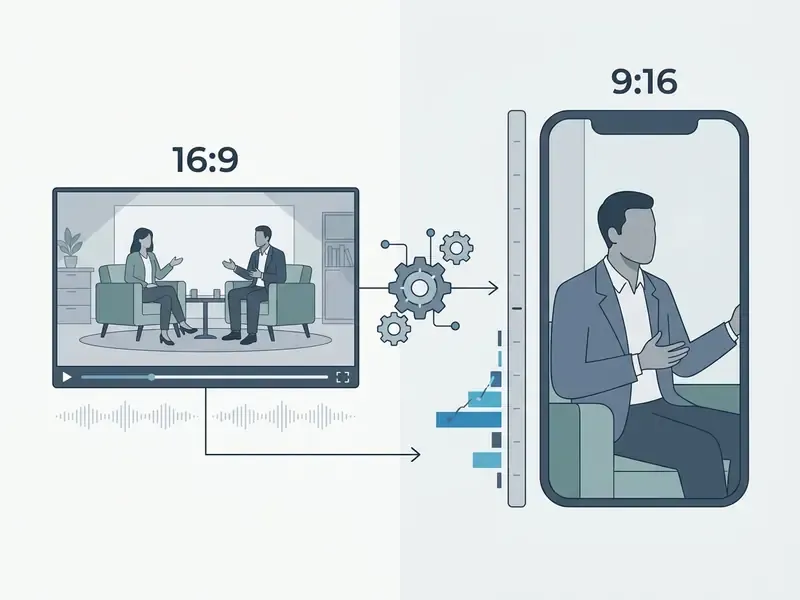
Long-form YouTube content rewards detailed 16:9 tutorial pacing, while vertical channels need a hook inside the first three seconds. Automatic reframing centers speakers, and automated caption styling carries the message on muted mobile feeds. Teams testing generative options for hook visuals can compare free AI video generators before committing budget.
Organizations distributing commercial media on public channels must verify intellectual property and usage rights. Our analysis of commercial use rights covers the licensing checks that keep distribution defensible.
AI Auto-Editing for UGC Ads, Marketplaces and E-commerce
In performance marketing, automatic editors act as creative-volume engines for hypothesis testing:
- Automated hook variation The AI generates up to ten different three-second openings from a single master recording, which makes A/B testing of retention curves inside paid social realistic rather than aspirational.
- Dynamic word-highlight captions Kinetic emphasis on offers, prices, and discount terms lifts sound-off comprehension in UGC creatives. Validate the uplift against your own campaign data, not a blanket benchmark.
- Batch product-card adaptation Automatic background removal on product shots, dynamic price-text substitution from a spreadsheet, and beat-synced cut timing produce marketplace-ready variants at volume.
- Data-driven personalization An After Effects template plus a CSV, Google Sheets, Airtable, or API feed renders hundreds of localized variants, different languages, currencies, store names, or audience segments, all from one approved creative.
Advertising output carries disclosure and substantiation obligations. Every auto-generated variation should clear the same claims review as a hand-edited ad. Volume is not an excuse.
Automatic Video Editing for Creators and Teams
«AI-assisted editing reduced total editing time by 35 to 40% and saved more than 20 million won per episode under real production conditions.»
Creator-side survey figures circulating in 2026, for example 56% of creators saving over 30 minutes per video and per-video cost reductions in the 72 to 94% range, come from self-reported vendor and community surveys. Treat them as directional, not audited. Appendix A keeps the original wording and verification status.
A defensible ROI formula for automated editing:
Net monthly ROI = (Baseline manual hours × blended hourly cost)
                − (HITL review hours × blended hourly cost)
                − (subscription + AI credit/render-minute spend)
                − (rework hours caused by AI errors × blended hourly cost)
Two inputs get underestimated almost every time: human-in-the-loop verification (caption proofing, B-roll relevance, claim review) and rework triggered by ASR or gaze-correction artifacts. Model both explicitly before signing an annual contract. A pilot that ignores control cost is not a pilot, it is a forecast you will have to walk back.
Teams scaling output across marketing channels can explore our guides on animated video production and animated music videos to build repeatable digital media workflows.
Online, App or Software: How to Choose an AI Video Editor
Selection runs on two axes: the business problem you are solving and the technical environment where processing happens.
1. By task type
- Social-first editors (CapCut, VEED) Built for fast vertical Shorts and Reels edits, trending templates, auto-captions, immediate publishing.
- Cleanup and repurposing tools (Descript, Opus Clip, Kapwing) Specialized in silence and filler removal, long podcast processing, viral clip extraction.
- Generative AI platforms (Runway, Synthesia) Create presenters and visual sequences from text alone.
- Data-driven automation platforms (Plainly-class tools) Mass-render ad variations from databases, spreadsheets, and APIs.
2. By execution environment
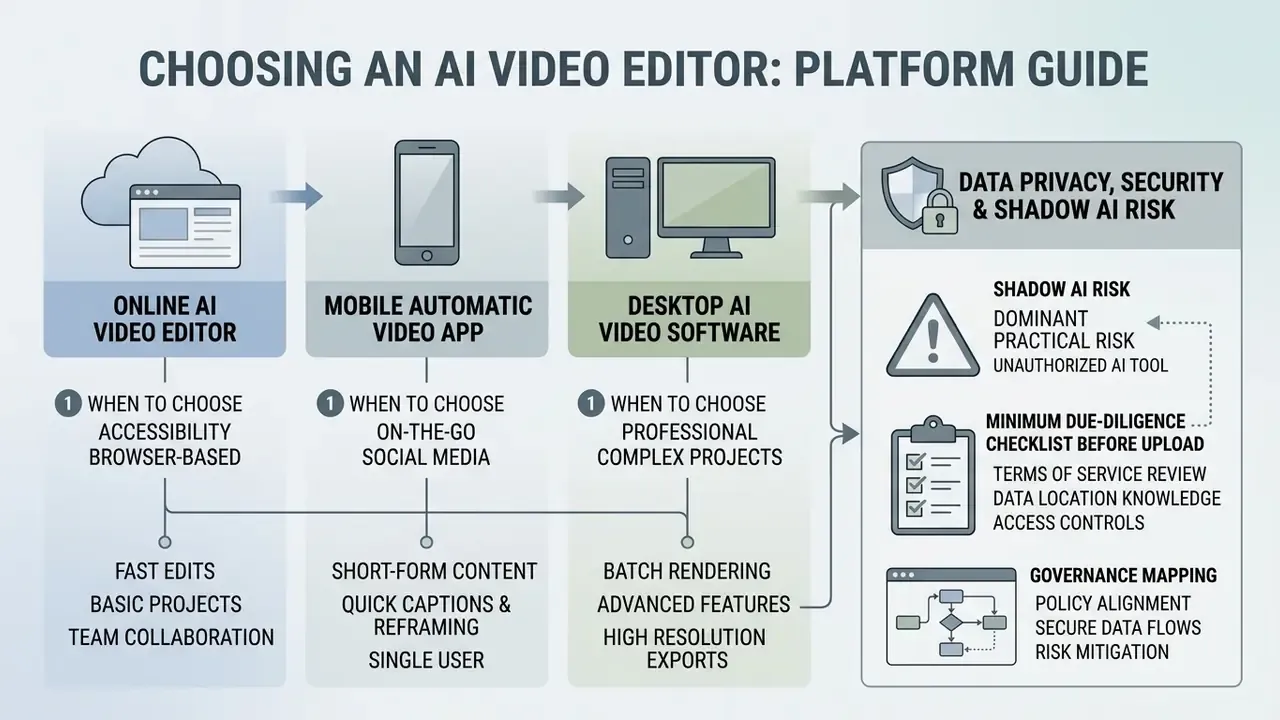
The choice between a browser-based online editor, a mobile app, and desktop NLE software comes down to hardware, file sizes, multi-track needs, security posture, and collaboration model. Teams benchmarking no-cost desktop alternatives can also review our comparison of free video editing software.
When to Choose an Online AI Video Editor
An AI automatic video editor online, Kapwing, VEED, or Descript Web for instance, runs inside the browser and offloads heavy AI compute to cloud servers.
Online tools suit cross-platform collaboration, rapid transcript editing, and quick clip generation without a local GPU. There is a ceiling, though. Browser memory limits, such as Chrome's roughly 4 GB per-tab allocation, cause throttling or crashes on long high-bitrate files (Kapwing Technical Docs, 2025). Plan-level limits bite too: Descript's free tier caps exports at 720p with a 1 GB upload limit, and Opus Clip handles source videos up to roughly 10 hours before processing turns unreliable.
«Cloud repurposing platforms operate at scale: the Repurpose-10K dataset was compiled through a SaaS service that processed 4,539 hours of user video.»
Users preparing static graphics or headshots before video composition can examine our guides on free photo editors, standard photo editors, and AI headshot generators.
When a Mobile Automatic Video Editing App Works Better
An AI video editing app with automatic editing, CapCut Mobile or Captions on iOS and Android, wins when the whole production happens on a phone.
Mobile apps use native camera integration, on-device neural processing, and touch controls for fast speech trimming, auto-captioning, and filters (CapCut Help Center, 2026). CapCut documents Auto Cut on mobile with beat-, speech-, or prompt-driven editing plus a minimum-clip-duration control. Captions documents mobile-only AI features including AI Trim for pause and "uhm" removal, AI Voiceover, and AI Zoom, with per-file imports up to 60 minutes. Both are tuned for creators who film, edit, and post vertical video in one sitting.
When You Need Desktop AI Video Editing Software
Desktop NLE software, Adobe Premiere Pro or DaVinci Resolve, remains essential for 4K and 8K multi-camera work, complex multi-track compositing, and shared studio storage.
These applications use local GPU acceleration, robust proxy management, and uncompressed multi-track audio mixing. Adobe Premiere Pro calls for 32 GB RAM and 10 GbE networking for shared 4K workflows (Adobe Hardware Requirements, 2026). Note that Premiere proxies are unsupported for growing files, and DaVinci Resolve handles demanding timelines through proxy generation, render cache, and GPU status controls rather than one hardware threshold.
Desktop or on-premise processing is also the default answer when footage cannot leave a controlled environment: pre-release financial disclosures, unredacted customer recordings, or material under legal hold.
To analyze cost structures and build a financial plan, readers can view the guide for operational calculators and consult our AI Media Pricing Guides.
Data Privacy, Security and Shadow AI Risk
This section covers the governance criteria that feature comparisons routinely skip.
Cloud auto-editors are, functionally, third-party data processors. Raw footage, transcripts, and metadata all leave the corporate perimeter. For banks, insurers, healthcare providers, and public companies, the real question is rarely "which tool has the best captions". It is "which tool survives security review".
Minimum due-diligence checklist before upload
| Control area | What to verify | Why it matters |
|---|---|---|
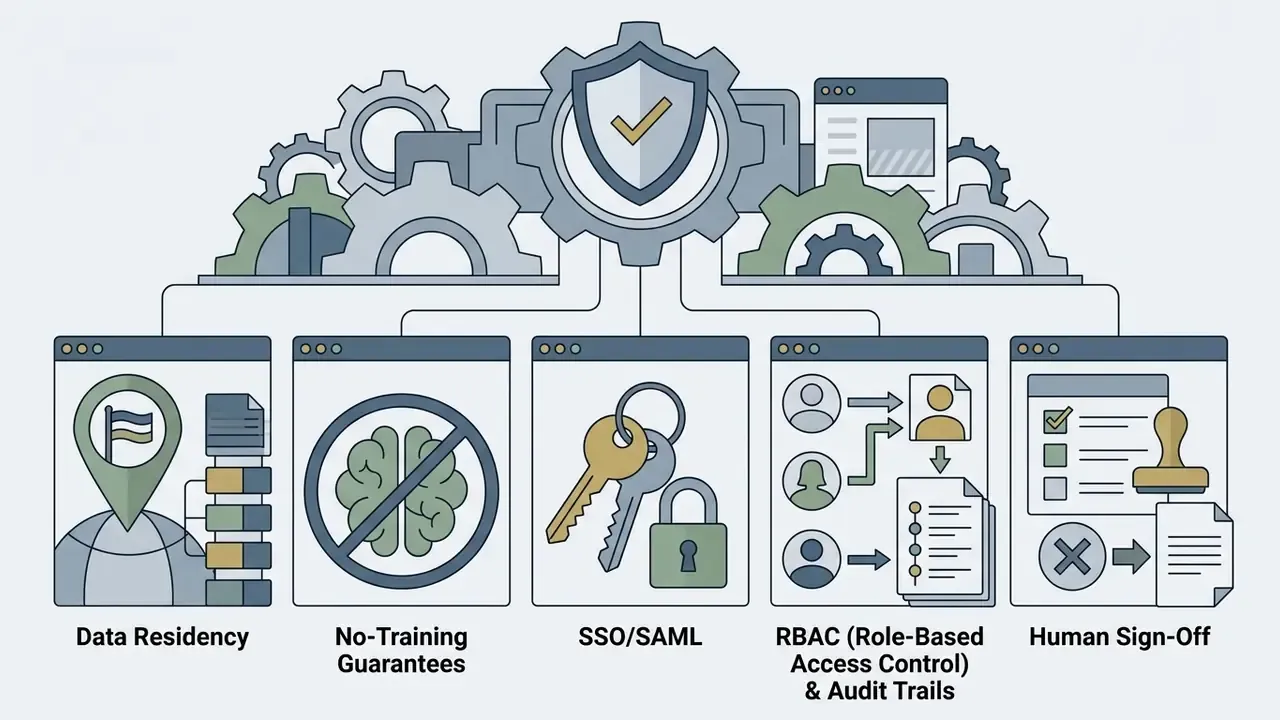
| Model training | Contractual guarantee that customer media is not used to train vendor models | Prevents confidential footage becoming model weights |
| Data residency and retention | Storage region, deletion SLA, backup retention window | Cross-border transfer and record-retention exposure |
| Certifications | SOC 2 Type II, ISO 27001, GDPR posture, penetration test summary | Evidence for third-party risk assessment |
| Identity | SSO/SAML, SCIM provisioning, MFA enforcement | Removes shared logins and orphaned accounts |
| Access control | RBAC, per-project permissions, external share expiry | Limits blast radius of a compromised seat |
| Encryption | TLS in transit, AES-256 at rest, customer-managed keys where required | Baseline confidentiality control |
| Audit trail | Immutable log of uploads, edits, approvals, exports, publish events | Reproducibility and regulatory inspection |
| Deployment model | Cloud, private tenant, VPC, or fully on-premise processing | Some footage must never leave the network |
Shadow AI is the dominant practical risk. A free browser editor asks for nothing but a personal email, so an analyst can upload an unreleased earnings video in under a minute. Countermeasures that actually work: publish an approved-tool allowlist, block unapproved editing domains at the proxy, provide a sanctioned alternative fast enough that people prefer it, and require named approvers for any externally published asset. Prohibition without a usable substitute just moves the traffic to a phone.
Governance mapping. Automated editing lives inside broader AI risk frameworks. Teams already operating under the NIST AI Risk Management Framework can treat auto-editing as a mapped use case: document intended purpose and limitations (Map), test caption accuracy and artifact rates (Measure), enforce human sign-off and logged exports (Manage and Govern). Where marketing or investor-facing video falls under recordkeeping obligations, retain the source footage, the transcript, the approval record, and the exported master together as one evidentiary package. Reconstructing that package after an inspection request is expensive. Capturing it at export costs almost nothing.
| Selection criterion | Online AI Editor | Mobile AI App | Desktop AI Software |
|---|---|---|---|
| Device requirements | Standard laptop, web browser | Smartphone (iOS or Android) | High-end PC or Mac (32GB+ RAM, GPU) |
| Maximum resolution | 1080p (4K on higher plans) | 1080p or 4K mobile export | Uncapped (4K, 8K, ProRes, RAW) |
| Processing speed | Cloud-dependent, fast AI | Fast local mobile rendering | High-speed local GPU rendering |
| Multi-track capability | Basic (2 to 4 tracks) | Basic to intermediate | Professional multi-track NLE |
| Primary use case | Quick social clips, collaboration | On-the-go vertical content | Complex long-form, 4K, studio VFX |
| Data location | Vendor cloud (third-party processor) | Mixed: on-device plus cloud AI calls | Local workstation or private storage |
| SSO / SAML and RBAC | Enterprise tiers only | Rarely available | Corporate IdP plus license server |
| Encryption and no-training terms | Contract-dependent, verify | App store terms, often broad | Under organizational control |
| Audit trail depth | Platform activity logs, tier-dependent | Minimal | Project files plus storage and version control logs |
| Best fit for regulated media | Low to medium (with enterprise agreement) | Low | High |
Free AI Video Editor and Paid Capabilities: What to Check Before You Choose
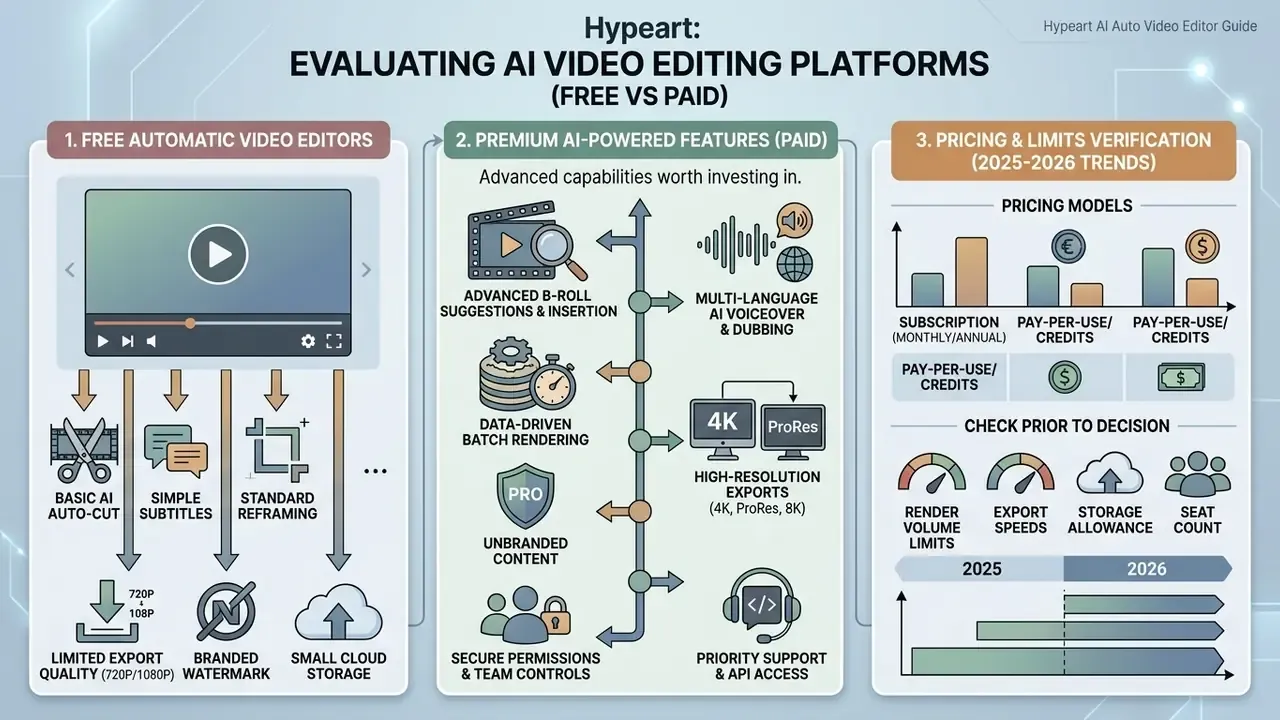
Evaluating AI video editing platforms means understanding exactly where the free plan stops and the paid tier starts. Buyers cross-shopping generative tools can also review our comparison of the best AI video generators for quality-versus-price context.
What Free Automatic Video Editors Usually Include
A free AI video editor with automatic editing lets you test the core mechanics, then enforces technical limits on production output.
Typical free plan restrictions:
- Mandatory platform watermarks on exports.
- Export resolution capped at 720p or 1080p.
- Maximum export length limits, often 1 to 10 minutes.
- Monthly AI credit quotas, for example 30 processing minutes.
- Short project-storage windows and caps on videos per month.
To assess no-cost creation tools, teams can consult our comparative review of the best free AI video generator options.
Which AI-Powered Features Are Worth Paying For
Paid tiers unlock the operational features professional media production actually depends on.
The upgrades that usually justify themselves: watermark removal, 4K UHD rendering, multi-language voice cloning, automated dubbing, unlimited AI processing credits, brand kits, API access, and enterprise team permissions with SSO. For a regulated buyer, SSO and audit logging often matter more than the export resolution.
«Professional AI functions, automatic scene segmentation and de-identification, delivered 35 to 40% time savings and more than 20 million won in cost reduction per episode in live production.»
Organizations that need dedicated SLA tiers can reference AI Media Support. Where commercial media licensing or a dispute arises, consult our analysis of media litigation risks.
E-E-A-T Verification: 2025 to 2026 Platform Pricing and Limits
| Platform | Free tier | Paid tier | Export limits | Verified |
|---|---|---|---|---|
| Opus Clip | $0/mo (30 processing mins/mo) | Starter: $15/mo, Pro: $29/mo (300 processing mins/mo) | Free: watermarked, 720p. Paid: 4K, no watermark. | August 2026 |
| Descript | Free trial (limited transcription, 720p, 1 GB upload) | Creator: $24/mo, Pro: $35/mo | Free: 720p export. Paid: watermark-free 4K, Overdub voice cloning. | August 2026 |
| CapCut | Free basic editing and Auto Cut | Pro: about $7.99/mo to $19.99/mo | Free: basic watermark-free export. Pro: premium AI effects and 4K. | August 2026 |
| VEED.io | $0/mo (10 min cap, 720p) | Lite: about $12/mo, Pro: about $24/mo | Free: platform watermark. Paid: 4K export, auto-subtitles, Brand Kit. | August 2026 |
| Clipchamp | Free AI tools, 1080p export | Premium: about $11.99/mo or $119.99/yr | Free: 1080p. Premium: up to 4K UHD, brand kit. | August 2026 |
Pricing, quotas, and feature gating change often. Verify current terms on the vendor's official pricing page and through your procurement and security review before purchase.
FAQ About Automatic AI Video Editing
Can I set an exact duration and sync clips to music in an AI editor?
Yes. Modern AI video editors let operators specify an exact target runtime, precisely 30 seconds if that is the brief. Tools with beat-sync technology such as Canva Beat Sync, CapCut Auto Cut, and EchoWave analyze the music waveform and align cuts, transitions, and scene changes to the rhythm automatically. CapCut additionally exposes minimum-clip-duration and sensitivity settings, so cut density can be tuned before rendering rather than fixed afterwards.
How accurate is automatic AI speech recognition for video captions?
State-of-the-art ASR models such as OpenAI Whisper reach 95 to 99% transcription accuracy on clear, low-noise audio. Accuracy is measured with Word Error Rate, computed from substitutions, insertions, and deletions against a reference transcript. Whisper-based systems support captioning and translation for accessibility, but accuracy degrades with background noise, strong accents, and specialized jargon (Enhancing Multimedia Accessibility: Automated Video Captioning and Translation System Using OpenAI Whisper, IEEE Conference on Intelligent Technologies, 2024, https://ieeexplore.ieee.org). Domain vocabulary lists and human proofreading stay necessary for financial, legal, and medical content.
Who owns the copyright for AI-selected background music and auto-edited videos?
This is general information, not a substitute for advice from qualified copyright counsel. Ownership depends on platform terms of service, the degree of human creative contribution, and the applicable jurisdiction. Ordinary copyright rules require a human author, so purely machine-generated output may attract limited or no protection without sufficient human input. Treatment differs across jurisdictions, and some legal systems recognize separate categories for computer-generated works. Separately, confirm that any background music selected by an AI tool carries a valid commercial license for your intended distribution and monetization channels.
Can I manually override and edit cuts made by an AI auto video editor?
Yes. Modern AI editors output non-destructive timeline drafts or interactive transcripts. You retain full manual control to trim cut points, rewrite captions, swap B-roll overlays, adjust audio levels, disable gaze correction, or reorder clips before final render. Treat the automatic result as a first draft, never a locked master.
Is it safe to upload confidential corporate footage to a cloud AI video editor?
Only after security review. Confirm in writing that customer media is excluded from model training, check data residency and deletion SLAs, require SOC 2 Type II or ISO 27001 evidence, enforce SSO/SAML with RBAC, and verify encryption in transit and at rest. Where footage contains material non-public information, unredacted personal data, or content under legal hold, use desktop or private-tenant processing instead of a public free tier. An approved-tool allowlist remains the single most effective control against Shadow AI uploads.
What audit trail should we keep for AI-edited video?
Retain the original footage, the generated transcript, the list of AI operations applied (silence removal, caption generation, reframing, B-roll insertion, voiceover synthesis), the named human approver, timestamps for review and export, and the delivered master. That package supports reproducibility, satisfies internal AI governance documentation expectations, and maps cleanly onto the Map, Measure, Manage, Govern structure of the NIST AI Risk Management Framework.
How do I generate hundreds of ad variations from one template?
Use a data-driven video automation platform, not a clip editor. You upload a template with dynamic layers (After Effects or equivalent), connect a data source such as CSV, Google Sheets, Airtable, or a REST API, map each column to a layer, then trigger a cloud batch render. Output volumes of 100 to 1,000+ personalized videos are routine for localized campaigns and marketplace product feeds. Budget for render-minute consumption and keep a claims-review step for every variant family.
Who should own the decision to approve an AI video tool?
In practice, a named owner beats a committee. Assign one accountable owner for the toolchain, usually inside marketing operations or content production, with security review, model risk (where the tool touches regulated content), and legal as required sign-offs. Document the escalation path and the shutdown mechanism: who revokes access, how fast, and on what trigger. A digital worker without an owner is an unmanaged risk, whatever it edits.
Conclusion
AI auto video editors have moved from simple pause-trimming utilities into full post-production automation platforms. Speech recognition, computer vision reframing, generative enhancement (eye contact correction, auto B-roll, synthetic voiceover), multimodal highlight detection, and data-driven batch rendering now sit in one workflow. That lets creators and enterprise teams scale video output convincingly, provided human verification, licensing checks, and security governance stay in the loop.
A safe next step for a regulated organization: pick one low-sensitivity video workflow, run it through an approved tool for 30 days, and measure caption error rate, rework hours, and export log completeness. Then decide.
To explore additional software evaluations, workflow tools, and platform comparisons, visit our hub navigation to compare options across the complete media software catalog.
Appendix A: Editorial Notes on Revised Claims
For transparency, the statements below appeared in earlier versions of this guide and have been superseded in the main text. They are kept here with their verification status.
Status: Source not verifiable in our reference corpus; the 65% figure is unconfirmed. Updated position: captions serve accessibility and sound-off comprehension; measure uplift against first-party campaign data (see W3C WAI accessibility guidance, 2024).
Status: Conference reference could not be verified. Updated position: engagement varies non-linearly with caption length and density according to available marketing research, but no universal uplift benchmark is established; A/B testing required.
Status: Self-reported survey data, not independently audited. Updated position: cite the verified Earth Sweepers broadcast implementation (35 to 40% editing-time reduction, over 20 million won saved per episode; Journal of Broadcast Engineering, 2024).
Status: Range appears in vendor and comparative write-ups; no primary methodology available. Updated position: model savings with the ROI formula above, including human-in-the-loop review and rework time.