Executive Summary
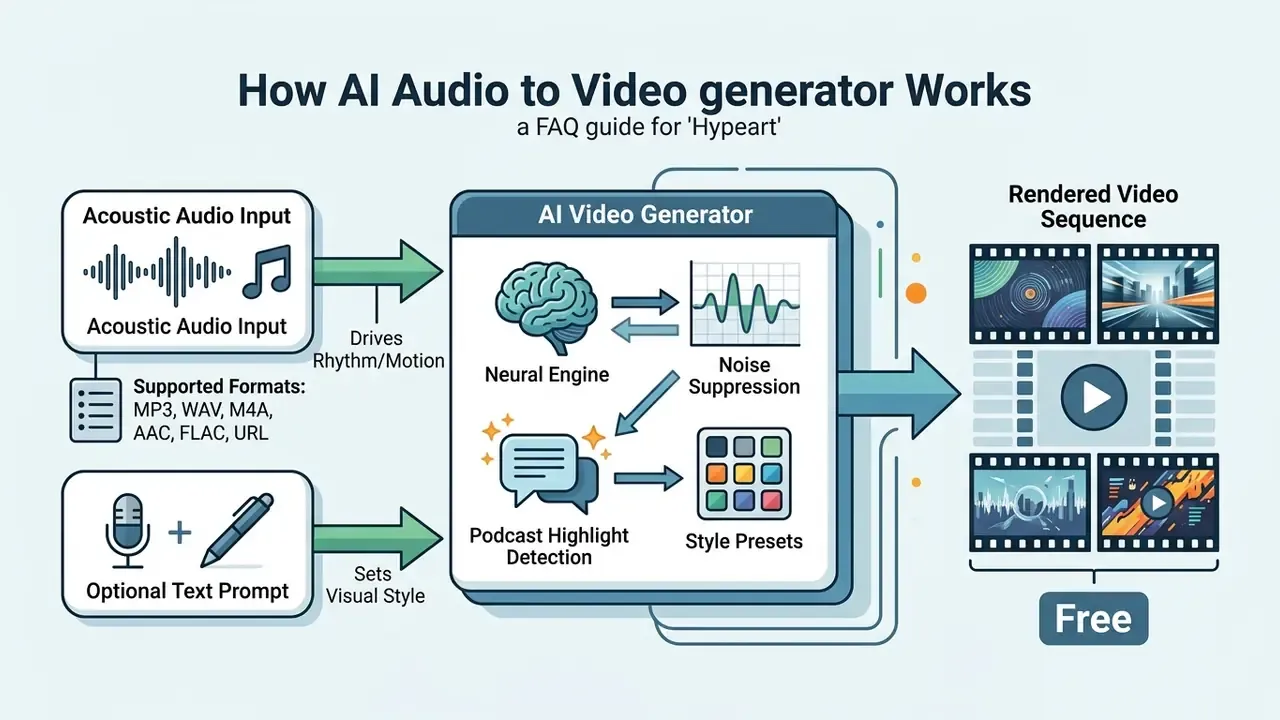
- What it is An AI audio to video generator converts speech, music, or ambient sound into synchronized video frames. It extracts acoustic features (STFT spectrograms, Wav2Vec speech embeddings, CLAP music embeddings) and conditions a diffusion transformer or a NeRF-based renderer on those features. No camera footage required.
- What you can build Lyric and music videos, avatar-led executive briefs, podcast highlight clips, multilingual training modules, and vertical social cut-downs.
- Inputs and outputs MP3, WAV, M4A, AAC, and FLAC uploads plus direct URL ingestion (YouTube, SoundCloud, podcast RSS). Exports as MP4 (H.264/AAC) or WebM (VP9/Opus) at 720p, 1080p, 2K, or 4K.
- Cost reality Free tiers cap resolution at 720p, watermark exports, and restrict duration. Developer APIs charge per clip: Google Veo 3.1 lists $0.40 per 720p/1080p clip with audio and $0.60 for 4K, with no free API allocation.
- Legal reality Purely AI-generated visual output without human creative input is not registrable with the U.S. Copyright Office. Commercial rights depend on paid vendor licences plus clearance of the underlying voice, music, and image assets.
- Governance reality Enterprise deployments need ISO 27001 / SOC 2 Type II / GDPR alignment, Zero Data Retention (ZDR) commitments, AES-256 at rest and TLS 1.3 in transit, a reproducible audit trail (source-audio hash, prompt configuration, model ID, output hash), and explicit Shadow AI controls.
This material is general in nature and does not replace advice from a qualified specialist.
Who Should Read This, and How to Use It
This guide is written for two overlapping groups. The first: media and communications teams that want to turn audio into video quickly, without a studio. The second: risk, compliance, and model-risk owners inside US banks and mature fintechs who will eventually be asked to approve the same tooling.
Read it in either direction. Creators can start with the workflow and formats, then skim the governance sections before uploading anything sensitive. Governance leads can start with the audit evidence pack and the validation checklist, then work backwards into how the pipeline actually behaves. The pricing section sits in the middle, because budget and control usually collide there first.
One practical warning up front. The moment a voice recording of an executive, a customer, or a compliance call enters a consumer free tier, you no longer have a media project. You have a data-handling question.
Audio-driven video generation has become a working capability for modern media teams, enterprise communications, and automated content operations. By processing speech recordings, musical tracks, or ambient sound, an AI video generator based on audio transforms raw waveforms into synchronized clips without manual camera work. Selecting the right system means evaluating acoustic conditioning, visual style controls, rendering performance, and enterprise compliance terms. Not just the demo reel.
What Is an AI Audio to Video Generator and How Does It Work?
An AI audio to video generator is a machine learning system that converts sound recordings, such as speech, music, or environmental audio, into synchronized video frames without requiring existing footage. The system extracts acoustic features from an input audio file, then uses those representations to condition a generative visual model: typically a diffusion transformer or a neural radiance field (NeRF).
«Audio-driven methods must infer lip motion, facial expression, head movement, and speaking style solely from the speech signal.»
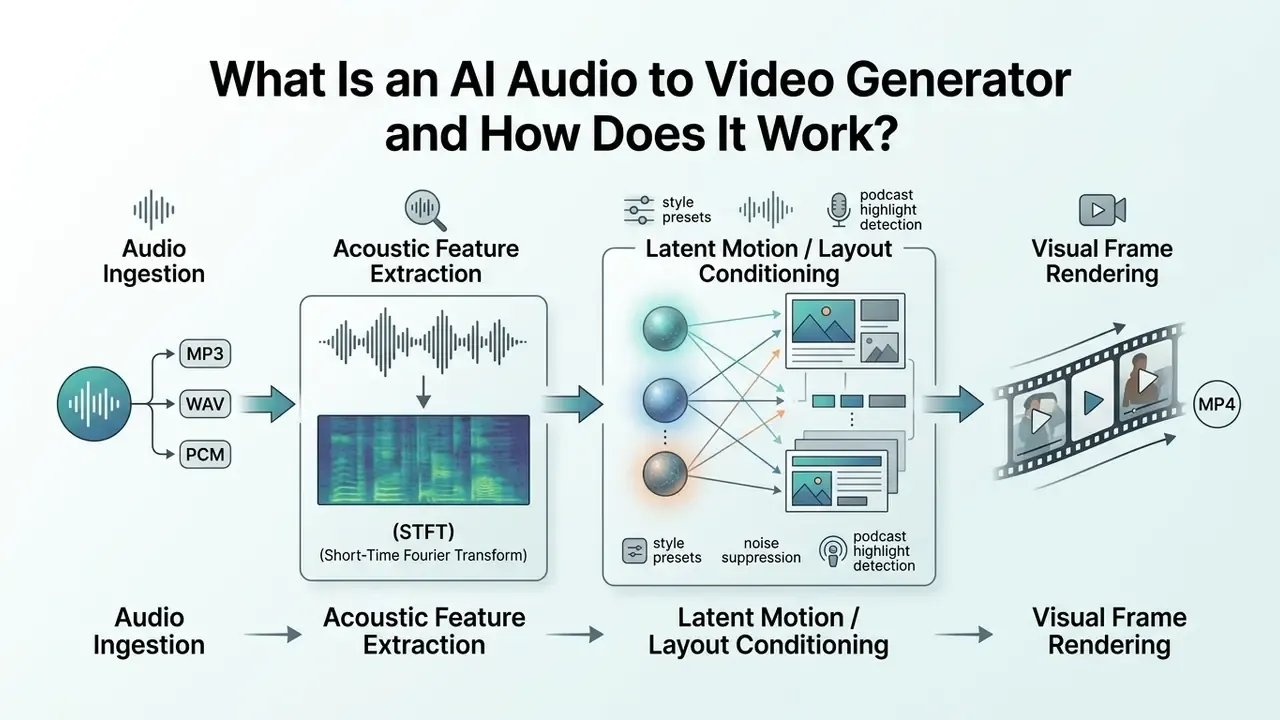
Modern architectures analyze raw waveforms by applying Short-Time Fourier Transforms (STFT) to create mel-scaled spectrograms. Reference implementations such as AudioViewer use 25 ms Hanning windows with 10 ms hop shifts before visual synthesis begins. Encoders such as Wav2Vec process speech to isolate phonetic boundaries, while architectures like CLAP capture musical dynamics, pitch, and timbre. These acoustic embeddings are injected into visual generation pipelines through cross-attention layers, mapping audio rhythm and semantics directly onto image frames.
«MultiTalk applies Wav2Vec to extract acoustic embeddings that are passed into the audio cross-attention layers of a diffusion transformer to synchronize motion.»
Research on state-of-the-art models such as Google Veo 3.1 and ByteDance Seedance 2.5 shows that joint audio-visual models align temporal audio cues directly with generated visual output at resolutions up to 4K (Google AI for Developers, 2026; Cloudflare Seedance Documentation, 2026). Veo 3.1 renders eight-second clips with natively generated audio at 720p, 1080p, or 4K in 9:16 and 16:9 aspect ratios. Seedance 2.5 is documented as a native audio-video joint generation model targeting 30-second storytelling with reference control and editing. Artlist additionally exposes Seedance 2.0 and a lower-latency Seedance 2.0 Fast variant for rapid pacing and visual-direction iteration, and music-video engines such as SunoMV route generation through audio models including Suno V5, Lyria 3 Pro, and MiniMax 2.5+.
To review broader media automation tools, check the AI Media Glossary for structural definitions and technical frameworks, and compare categories of AI video generators before you commit to any audio-driven engine.
AI Visual Generation From Music, Voice, and Sound
An AI sound to video generator isolates specific acoustic components, whether voice, music, or sound effects, and converts those cues into contextually appropriate visual movement. Speech models prioritize phonetic transcription and facial mechanics. Music-driven models align visual transitions with tempo, harmonic shifts, and volume spikes.
Technical frameworks segment audio into speech and non-speech events using Mel-Frequency Cepstral Coefficients (MFCCs) and spectral spread measurements (NIST Audio Processing Standards, 2024). Classification pipelines documented in NIST-linked publications also rely on MPEG-7 descriptors such as harmonicity ratio, alongside F0 standard deviation, signal-to-noise ratio, inter-onset interval variance, and onset loudness variance, to separate musical structure from ambient noise and speech events. For music-driven video creation, diffusion models use harmonic-percussive decomposition to construct audio energy vectors. Those vectors guide frame interpolation between keyframes, so visual scene intensity tracks the underlying musical track rather than drifting on its own schedule.
Audio-to-Video, Static Video, and Lip Sync: What Is the Difference?
Audio-to-video generation synthesizes dynamic visual scenes directly from sound features. Static video creation places a non-moving image over an audio track inside a media container, which is closer to a video converter task than to generative AI. Lip sync sits between them: it modifies the lower facial region of a character or avatar so mouth shapes align with spoken audio.
| Generation Approach | Visual Motion Mechanism | Audio Conditioning Target | Primary Technical Focus |
|---|---|---|---|
| Generative Audio-to-Video | Algorithmic frame synthesis via diffusion transformers | Rhythm, energy, semantics, and acoustic events | Open-domain scene evolution and temporal coherence |
| Static Image + Audio Overlay | None (fixed visual frame) | None (simple container multiplexing) | Basic file conversion without generative AI processing |
| Lip-Sync Avatar Animation | Viseme mapping on 2D/3D facial geometry | Phonetic boundaries and vocal cadence | Accurate mouth movement and facial expression matching |
Vendor runtime documentation reinforces this split. Meta's Oculus Lipsync converts audio input or files into visemes that drive avatar mouth motion, whereas CVPR-era synchronization research such as DiVAS applies transformers over raw audio and video to correct dynamic audio-visual drift. Static image overlays remain a container-level multiplexing task, where mismatch is measured as audio-video skew rather than as generated motion. Different failure modes, different fixes.
«In the SyncTalk user study with 35 participants (Cronbach's α = 0.96), the method outperformed competing approaches across all five dimensions, including a 20% lead in perceived video realness.»
Illustrative scenario (hypothetical). A mature financial institution wanted to convert weekly economic podcast recordings into executive video briefs for client portals. The team ingested raw voice tracks into a voice-driven avatar framework, applied viseme mapping for lip synchronization, and added automated subtitles. The pipeline published finished MP4 updates in under ten minutes per episode, cutting production overhead while keeping brand oversight in human hands.
How to Generate Video From Audio With AI
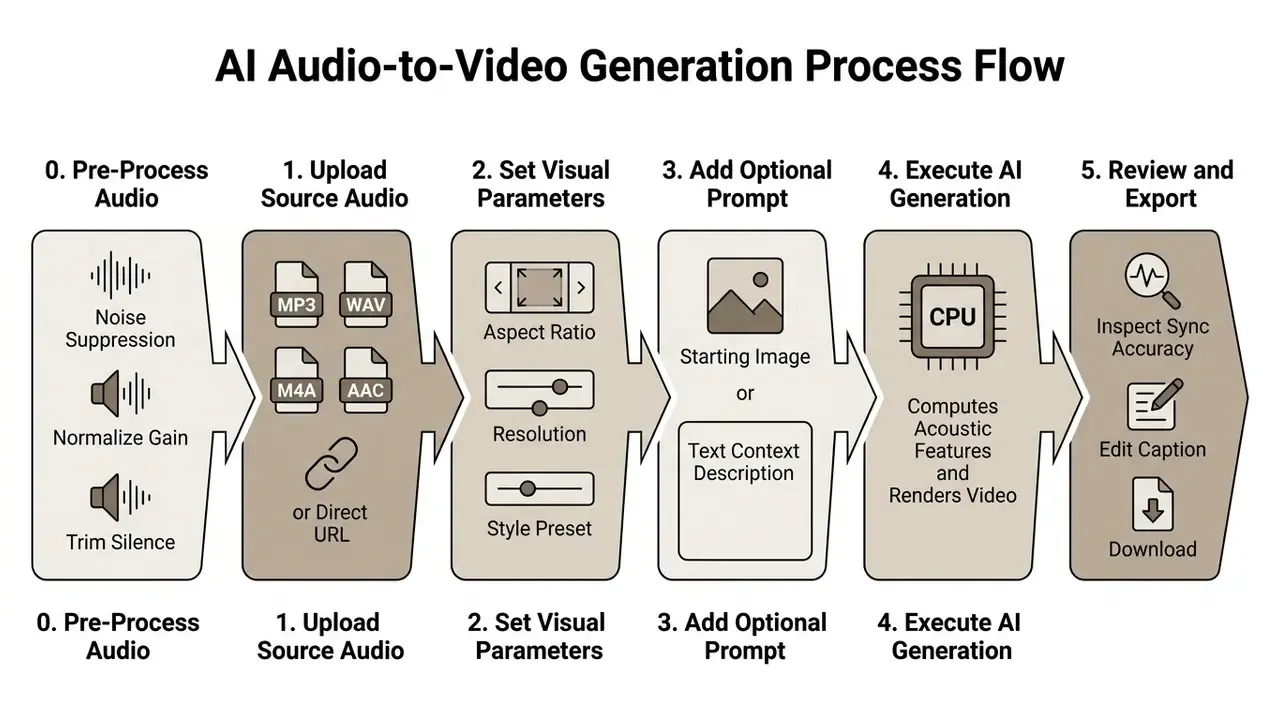
To generate video from audio, you upload a sound file, select visual style parameters or reference images, process the inputs through an AI generation pipeline, and download the finished MP4.
Recent technical updates show how generative visual workflows keep shifting across platforms; details sit in the text to video ai news section. Teams that have already mapped the pipeline can shortlist vendors through our roundup of the best AI video generators.
Audio Pre-Processing: Noise Suppression and Dynamic Range Polish
Before passing raw waveforms into acoustic feature extractors, enterprise pipelines apply digital signal processing (DSP) or neural noise suppression models such as RNNoise or DeepFilterNet. This phase filters out room chatter, HVAC hum, doorbell interruptions, audience cross-talk, and microphone pops.
Cleaning input audio improves downstream viseme extraction accuracy by up to 35% in vendor-reported benchmarks, which means mouth shapes and keyframe transitions align with clean vocal phonemes rather than background artifacts. Treat that figure as vendor-reported, not independently validated. Consumer tools expose this as a single "remove background noise" toggle at upload time. Enterprise APIs usually expose gain normalization, loudness targets (LUFS), and spectral gating thresholds as explicit parameters you can log.
Upload Your Audio File or Add an Audio Source
Choose Visuals, Image, Style, and Video Parameters
Visual customization means defining output dimensions, resolution, style presets, and optional reference assets before rendering. You can pick aspect ratios tailored to a distribution channel: 16:9 for landscape presentations, 9:16 for vertical mobile feeds.
Modern diffusion models support 16:9, 9:16, 1:1, 4:3, 3:4, and 21:9, with target resolutions spanning 480p, 720p, 1080p, and 4K (Cloudflare Seedance Documentation, 2026). When you add an image alongside the audio track, advanced models automatically match the aspect ratio of that reference to preserve composition. Cloudflare's Seedance documentation notes that an explicit aspect_ratio value is ignored or auto-matched in image-conditioned runs.
Rather than an abstract "style" field, production engines now expose named render presets. The table below maps common presets to their pipeline mechanics, recommended source audio, and motion overlay behaviour.
| Visual Style Preset | Render Pipeline Mechanics | Recommended Audio Type | Motion Overlay Features |
|---|---|---|---|
| Cinematic Realism | High-guidance diffusion with photorealistic keyframing | Film score, orchestral, narrative voice | Dynamic depth-of-field, volumetric light |
| Neon Glow / Cyberpunk | High-contrast latent color shifting matched to spectral peaks | Synthwave, EDM, upbeat electronic | Pulsing neon edge-detection overlays |
| Minimalist Soundwave | Vector wave graphics synced to real-time audio amplitude | Podcasts, audiobooks, interviews | Dynamic frequency bars, pulsing audio rings |
| Karaoke / Lyric Sync | Line-by-line frame refresh with active word highlighting | Vocal tracks, pop, rap, songs | Word-level timestamped text animations |
| Typewriter Storyboard | Sequential textual rendering on vintage texture latents | Documentaries, educational briefs | Frame-by-frame character reveal animations |
| Classic / Gradient | Low-guidance latent blending with slow color ramps | Ambient, lo-fi, meditation tracks | Soft crossfades, gradient drift, grain overlay |
An optional dynamic soundwave visualization can be layered over any preset. The overlay renders an animated waveform, frequency bar cluster, or pulsing ring reacting to instantaneous amplitude. That keeps otherwise static podcast frames visually alive on mobile feeds, which matters more than it should. Media libraries with stock B-roll, images, and music are often paired with these presets, so generated scenes can be mixed with licensed footage on the same timeline.
Generate, Review, Edit, and Download the Video
After configuring parameters, the pipeline renders the visual sequence and aligns frame transitions with the audio timeline. Review the output for visual quality, lip-sync precision, and temporal smoothness before you export anything public.
«Livatar reaches a LipSync Confidence score of 8.50 on the HDTF dataset with a throughput of 141 frames per second and 0.17 s latency on a single NVIDIA A10 GPU.»
Supported Audio Files and Video Export Options
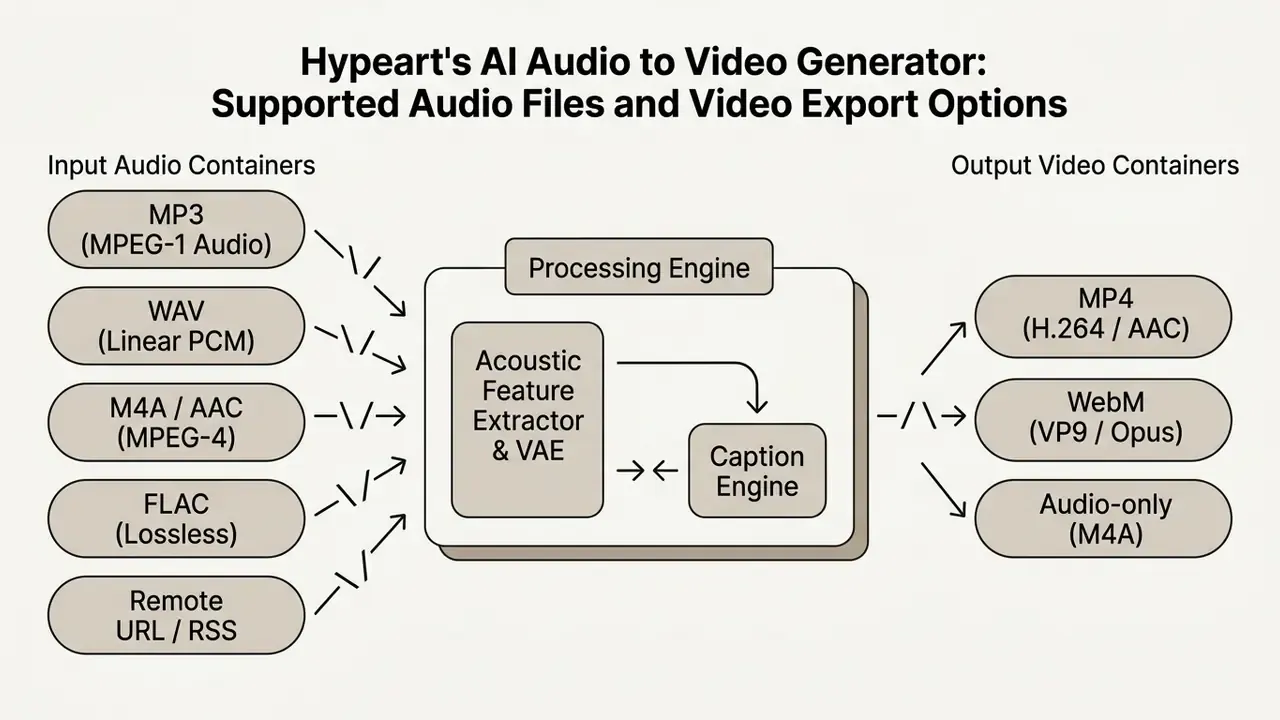
AI audio to video tools process input files across several audio containers and export synchronized results primarily as MP4 or WebM.
«The TalkVerse corpus contains 2.3 million synchronized clips at 720p/1080p resolution, covering more than 6,300 hours of video with time-aligned audio.»
Platform performance varies with developer options and API costs; developers can explore implementation workflows in the api section and compare post-production tooling in our guide to free video editing software. To weigh operational trade-offs and cost structures, view the guide on AI media metrics. Teams shipping large batches of renders should also read our video compressor guide before distributing 4K masters.
Converting MP3 and Other Audio Formats Into MP4 Video
Using an AI MP3 to video generator, converting an MP3, WAV, M4A, AAC, or FLAC into MP4 requires re-encoding the audio stream alongside the generated visual frames inside a single media container.
Container standards such as MPEG-4 Audio (RFC 4337) define how audio tracks are multiplexed with video streams (IETF RFC 4337 Standards, 2006), while the W3C WebM Byte Stream Format specifies Opus or Vorbis as valid audio codecs for audio/webm and video/webm payloads. Real-time pipelines, such as the Google Gemini Live API, process raw 16-bit PCM audio sampled at 16 kHz for input and output audio at 24 kHz to preserve vocal clarity during streaming (Google Gemini API Documentation, 2026). Keeping original sample rates prevents compression artifacts from bleeding into frame synchronization.
One caveat worth writing into your archival policy: no published standard guarantees a fully lossless path from MP3 or M4A into MP4 or WebM. Any container change that re-encodes audio introduces generational loss, so keep lossless FLAC or WAV masters.
Audio Length, Quality, and Export Resolution
Maximum supported audio duration and export resolution depend on tier access, platform compute limits, and subscriber level.
| Platform / Endpoint | Documented Input Limit | Documented Export Ceiling |
|---|---|---|
| OpenAI Transcriptions API | 25 MB per audio file (MP3, M4A, WAV) | MP4 retrieval via content endpoint; 1080p on pro tier |
| ElevenLabs Voice Isolator | 500 MB / 60 minutes per file | Cleaned audio stem for downstream render |
| ElevenLabs Voice Changer | 300 seconds per input | Processed voice track for avatar sync |
| Google Gemini (free) | 10 minutes of audio per session | 720p export |
| Google Gemini (Pro / Ultra) | Up to 3 hours per upload | 1080p and above |
| Google Veo 3.1 | Text / image conditioning; 4, 6, or 8-second clips | 720p, 1080p, 4K at 24 FPS, video/mp4 |
| Seedance 2.5 | Speech, music, or sound design input | Up to 30 seconds per clip, dialogue locked to timeline |
| Descript (free) | 60 minutes of media per month | 720p watermarked export |
| Kapwing (free) | 10-minute video limit | 720p watermarked export |
Google Gemini restricts free tier audio uploads to 10 minutes per session, while paid enterprise tiers allow up to 3 hours per file (Google AI Documentation, 2025). Export resolutions on platforms such as Microsoft Clipchamp and Kapwing scale from 720p HD on free plans to 4K UHD on premium subscriptions (Clipchamp Pricing Overview, 2026; Kapwing Terms, 2026). Luma Dream Machine's free plan renders silent 720p output only, reserving 1080p and 4K for paid subscribers. Because tier structures differ by vendor, the consolidated Free / Standard / Enterprise comparison lives in the pricing section below, so nothing is duplicated.
Controls That Improve AI Video Results From Audio
Fine-tuning an AI video generator from audio input means combining initial frame anchors, structured text prompts, cross-attention scaling, and synchronized subtitle layers.
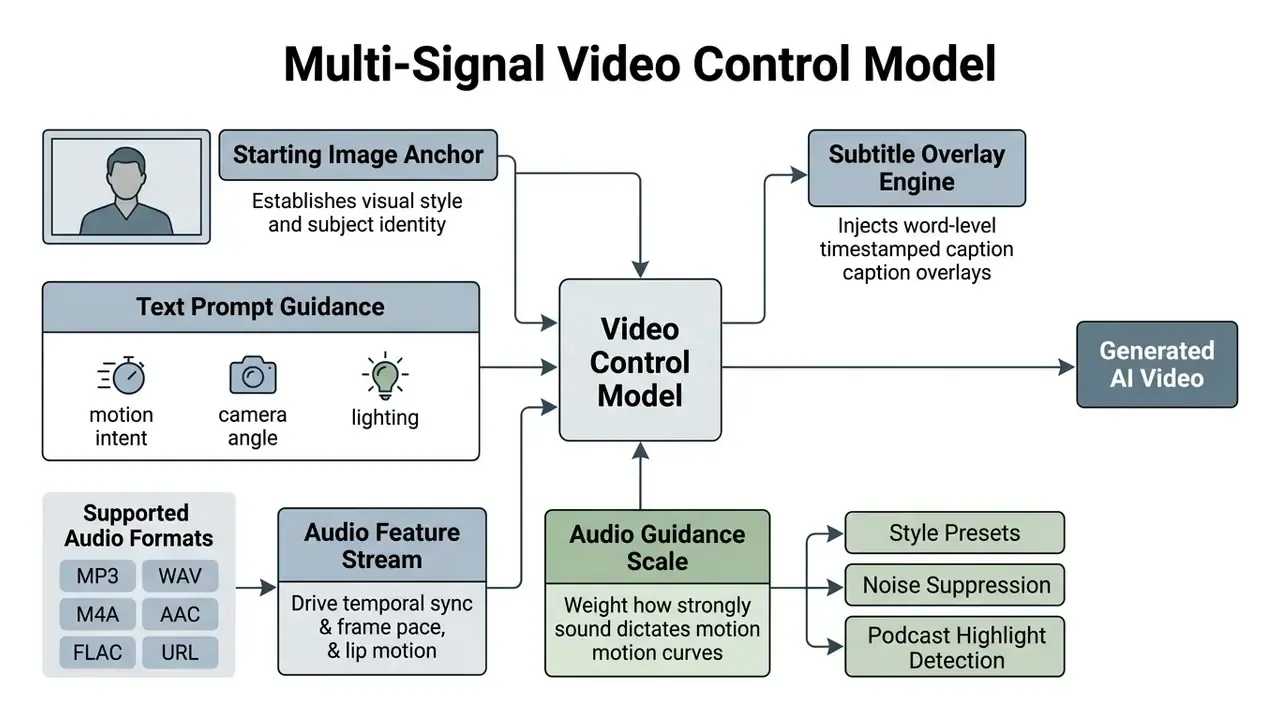
Research pipelines expose an explicit audio guidance scale. KeyVID localizes motion curves from audio, generates keyframes, then interpolates motion, tuning how heavily acoustic cues weigh in final synthesis. Stable-V2A applies ControlNet over the audio envelope for temporal alignment while using cross-attention conditioning for semantic alignment. EditYourself trains audio projection layers first, then applies a 128-rank LoRA pass to sharpen lip sync without destroying the pretrained video prior. These staged strategies explain why commercial tools ship separate sliders for prompt adherence and audio adherence.
Readers who want the underlying diffusion mechanics can review foundational concepts in the text to video resource and the broader landscape of text-to-video AI tools. For direct platform feature comparisons, explore the hub to evaluate alternative software options.
Starting Image and Prompt for More Consistent Visuals
Providing a starting reference image gives the model a baseline visual anchor. Characters, lighting, and background composition then hold together across generated frames instead of mutating scene by scene.
«StableAvatar and TalkVerse condition diffusion transformers on reference images to preserve identity across infinite-length or minute-long generations.»
Vendor prompting standards recommend using an input image as the initial frame anchor, paired with structured prompt blocks: Subject Description + Action Intent + Environmental Context + Visual Ambiance (Runway Prompting Guide, 2026; Google Cloud Veo Documentation, 2026). Google Cloud's Veo 3.1 "ingredients to video" workflow accepts separate reference images for scene, character, object, or style, while Vidu recommends repeating an identical anchoring description whenever the same character or location reappears. Re-using explicit character descriptions across prompts preserves brand identity and subject structure, which prevents visual drift during scene transitions.
«ACTalker's audio-plus-visual signal mode raises Sync-C to 5.737 and lowers FID to 29.977 compared with the audio-only mode.»
Teams that prefer to start from a still frame rather than a written description can review the mechanics of image-to-video AI tools as a complementary conditioning path.
Captions, Lyrics, Subtitles, and Voice-Led Video
Integrated subtitle systems extract spoken words or song lyrics from the audio track and create synchronized caption overlays directly on the rendered video file.
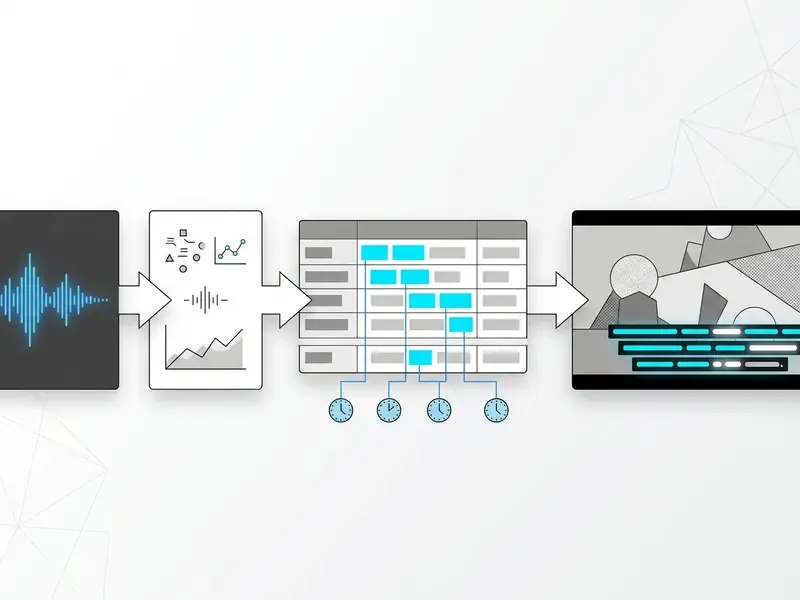
Advanced caption engines perform word-level timestamping and export standard subtitle formats such as SRT or VTT (AudioShake API Reference, 2026). Animated karaoke-style engines highlight words in real time as they are spoken or sung, which lifts engagement on social platforms (Braiv Documentation, 2026), with translated caption tracks available in 80+ languages. HeyGen's create-video API returns a sidecar subtitle_url alongside the rendered asset, so compliance teams can archive a machine-readable transcript with every clip. Small detail, large audit value.
Voice-led pipelines frequently pair these captions with synthetic narration; see our AI voice generator guide for licensing and quality benchmarks on the audio side.
The table below compares the four dominant creation modes, so you can match the workflow to your source audio type.
| Creation Mode | Source Audio Input | Visual Output Result | Prompt Requirement | Primary Use Case |
|---|---|---|---|---|
| Static Image Video | Voice or music track | Fixed visual frame with audio playback | Optional (image anchor required) | Basic podcast distribution and simple audio archiving |
| Generative AI Visuals | Ambient sound or music | Dynamic abstract or contextual scenes | Recommended (guides visual context) | Background visuals, ambient videos, soundscapes |
| Music Video Mode | Musical track (beat/song) | Rhythm-synced scene cuts and motion | Optional (driven by audio energy) | Track promotion, lyric videos, visualizers |
| Voice Avatar (Lip Sync) | Spoken voice / dialogue | Animated avatar with synced mouth motion | Optional (avatar selection required) | Training clips, executive briefs, interview clips |
What Can You Create With an AI Audio to Video Tool?
An AI video maker from audio streamlines production across marketing, educational publishing, enterprise communications, and social channels.
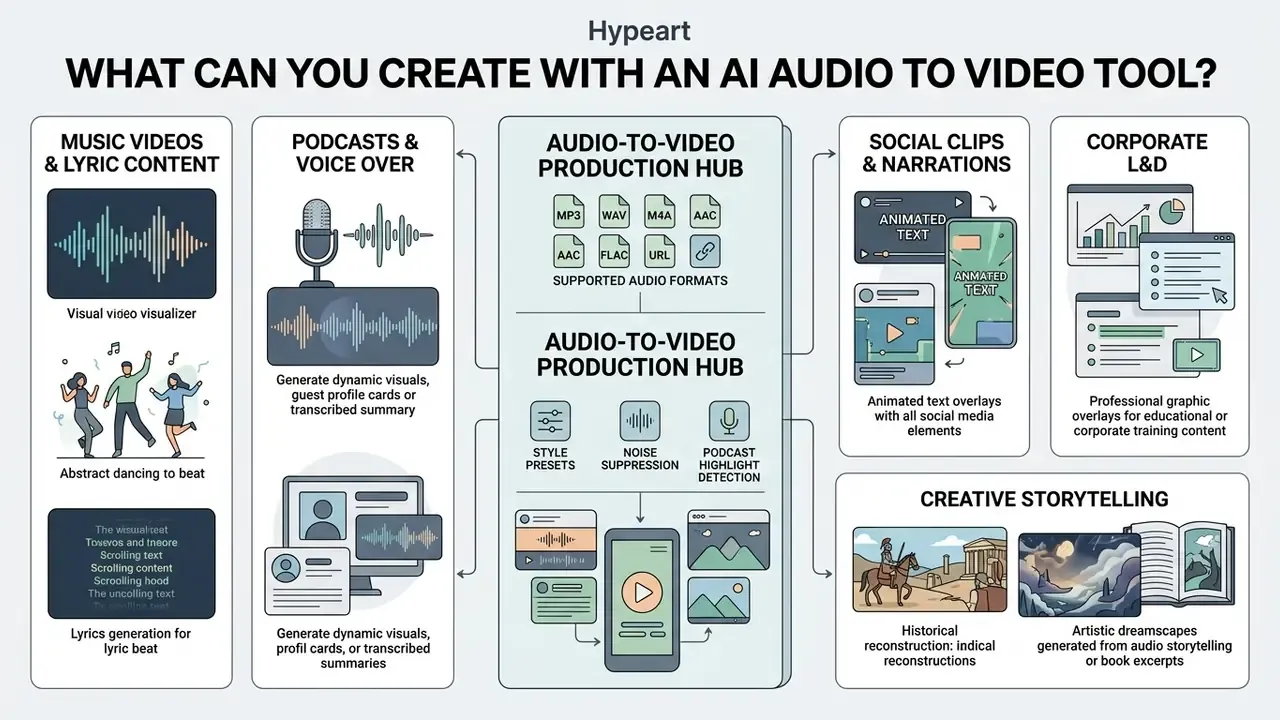
Enterprise media workflows use generative models to convert archive audio into multi-format video assets, lowering production costs (AI4Media European Media Industry White Paper, 2024; figures require independent verification). Adjacent primary sources support the same direction of travel. The World Economic Forum's 2025 analysis of media, entertainment and sport reports that generative AI can streamline scripted production from development through character creation and dialogue writing, and Meta's Movie Gen documentation describes 1080p video with synchronized audio generated from text prompts for advertising and entertainment use. For broader commercial considerations, review guidelines on commercial use rights.
Music Videos and Animated Lyrics Content
«The CLAP-based pipeline for AI-authored music videos received a mean overall rating of 2.93 (SD 1.01) versus 2.64 (SD 0.89) for the alternative approach in user studies.»
Advanced systems such as YingVideo-MV analyze musical tempo and mood to generate automated shot lists, executing complex camera movements synchronized with the music (YingVideo-MV Research, 2025). Consumer music-video engines expose the same capability through preset stacks: Classic, Neon Glow, Minimal, Cinematic, Karaoke, Typewriter, and Gradient, with per-line artwork generated for each lyric segment and exports at 720p, 1080p, or 2K in 16:9, 9:16, or 1:1.
Podcasts, Interviews, and Voice-Overs as Video Content
Spoken-word audio from podcasts, interviews, and corporate voice-overs converts into video presentations with talking avatars, dynamic backgrounds, and automated captions.
Platforms such as AI Studios and Wavel provide workflows that turn raw recordings into avatar-led presentations complete with intros, logos, and burned-in subtitles (Wavel Studio Guides, 2025; AI Studios Platform Update, 2026). Podcasters can publish video episodes to YouTube and Spotify without setting up camera equipment. Descript customer stories note that one-click captioning is the single fastest lever for extending reach on repurposed audio.
For long-form podcasts and multi-speaker interviews, modern engines combine Natural Language Processing (NLP) with acoustic energy analysis to run automated highlight detection. The system flags viral candidate segments, characterized by elevated vocal cadence, emotional emphasis, or key semantic summaries, and extracts 30-to-90-second standalone clips. One episode, several publishable assets.
During rendering, multi-speaker diarization models assign distinct visual focus, dynamic captions, or speaker-specific avatars depending on who is actively speaking, which also enables key-quote highlighting and speaker labels for LinkedIn and YouTube distribution. Avatar libraries covering 100+ characters across 15+ ethnicities and 120+ lip-sync languages let publishers match the on-screen presenter to regional audiences without new recording sessions.
Is an AI Audio to Video Generator Free?
Most tools offer limited free tiers or trial credits. Full-resolution exports, longer clip durations, and commercial rights sit behind paid subscriptions. Readers evaluating no-cost options can start with our overview of free AI video generators.
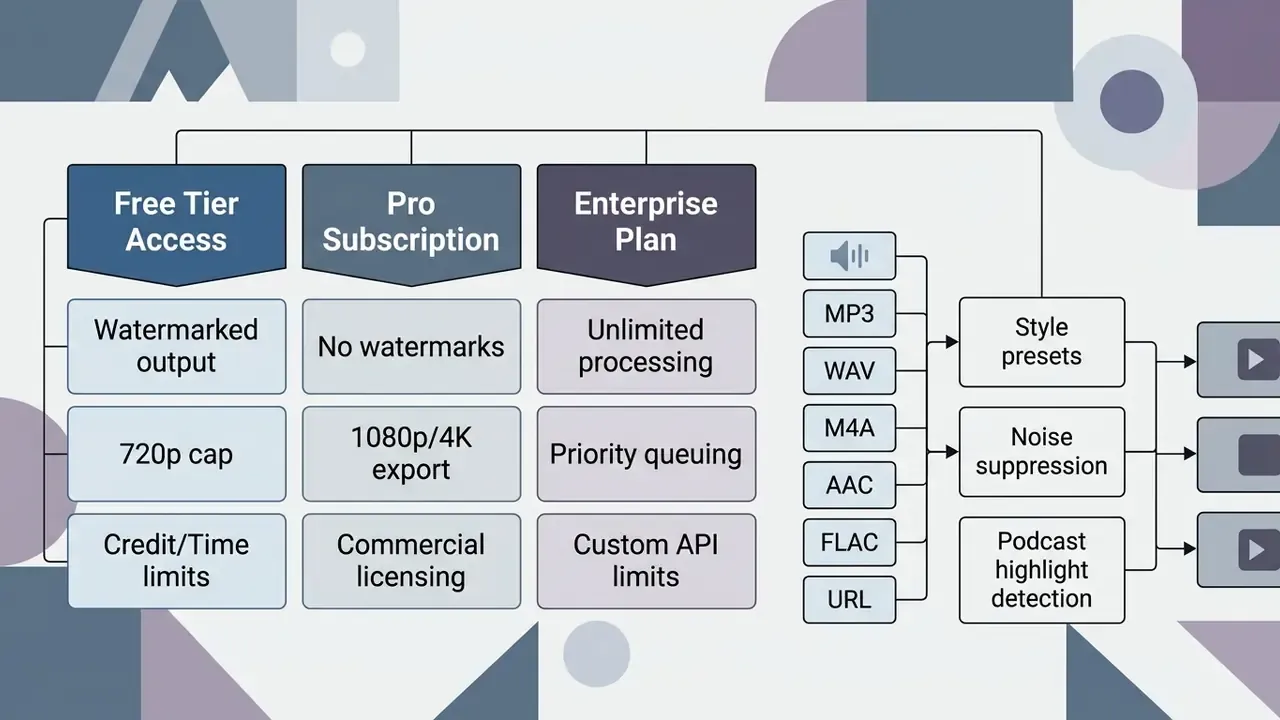
| Service Tier Level | Maximum Input Duration | Maximum Export Resolution | Watermark Status |
|---|---|---|---|
| Free Tier Access | 1 to 10 minutes per file | 720p HD | Embedded platform watermark |
| Standard Subscriber Tier | 30 to 60 minutes per month | 1080p Full HD | Watermark removed |
| Enterprise / Pro Tier | 1 to 3 hours per upload | 2K / 4K Ultra HD | Watermark removed + priority queue |
«LeapTalk is the first approach to deliver stable real-time streaming talking-head generation, reaching high-quality video at up to 200 frames per second.»
Free Access, Sign-Up Requirements, and Watermarks
Free access options usually require an account, impose monthly credit caps, and embed a visible watermark on downloaded files.
Kapwing and VEED offer free tiers restricted to 720p and 10-minute video limits, with watermarks on export (Kapwing Pricing Terms, 2026; VEED Free Plan Limits, 2026). Runway offers a free trial tier with 125 non-renewable credits, roughly 25 seconds of video generation and 5 GB of storage, with watermarked 720p downloads (Runway Credit Policy, 2026). Music-video engines take a different route: some grant three renders per day from a song link at 720p with no signup, then gate 1080p, 2K, and commercial rights behind Plus or Pro tiers. If you want a genuine audio to video AI free online path, that no-signup daily allowance is usually the closest thing available, and it is deliberately narrow. A side-by-side breakdown is available in our comparison of free AI video generators.
Watermark policy is not always stable across a vendor's product line. Microsoft Clipchamp documentation states that free exports are watermark-free, while secondary coverage reports that some AI-generated outputs may still carry marks. Confirm behaviour on the specific feature you intend to use. Note too that EU transparency guidance now requires machine-readable marking of AI-generated or manipulated audio and video regardless of tier.
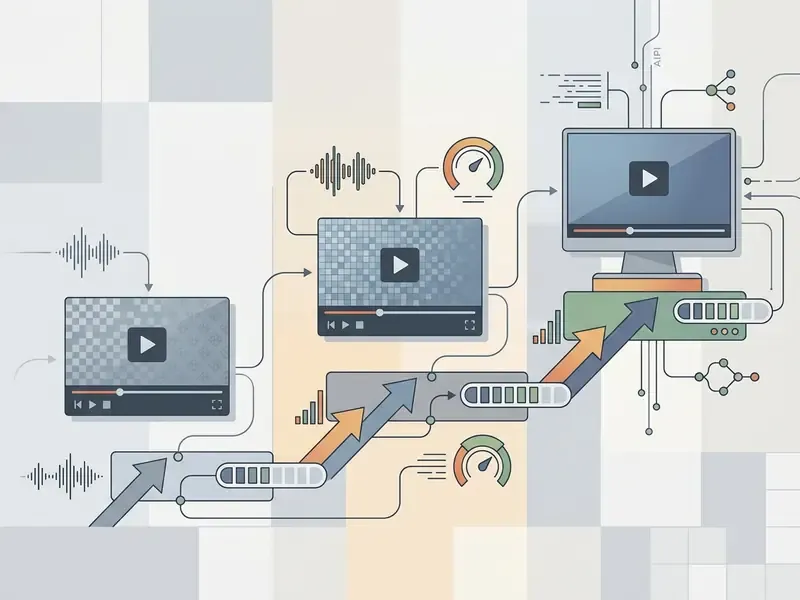
Pricing, Generation Limits, and Export Access
Paid subscriptions use credit-based or minute-capped pricing, unlocking faster processing, higher resolutions, and unwatermarked downloads.
Enterprise Data Governance, Security, and Audit Trail
Audio is often more sensitive than the video derived from it. Board calls, customer service recordings, incident bridges, and internal compliance briefs regularly contain personal data, material non-public information, or privileged discussion. So any audio-to-video deployment inside a regulated organization needs vendor controls plus internal evidence. A good render proves nothing.
Vendor control requirements to confirm in writing:
| Control Domain | Minimum Requirement | Evidence to Request |
|---|---|---|
| Certification | ISO 27001, SOC 2 Type II, GDPR alignment | Current audit report / bridge letter |
| Zero Data Retention | Input audio and outputs deleted after processing; no training reuse | Contractual ZDR clause + retention window in days |
| Encryption | TLS 1.3 in transit, AES-256 at rest | Architecture / security whitepaper |
| Data residency | Region pinning for EU/UK/US processing | DPA schedule listing sub-processors and regions |
| Sub-processors | Full list of model and storage providers | Named sub-processor register with change notice |
| Output transparency | Machine-readable marking of AI-generated media | Watermark / provenance metadata specification |
| Deletion and export | Verifiable deletion API and asset export | API reference and deletion confirmation logs |
Audit evidence pack per generated asset. To make renders reproducible for internal audit and supervisory review, log a fixed record for every job:
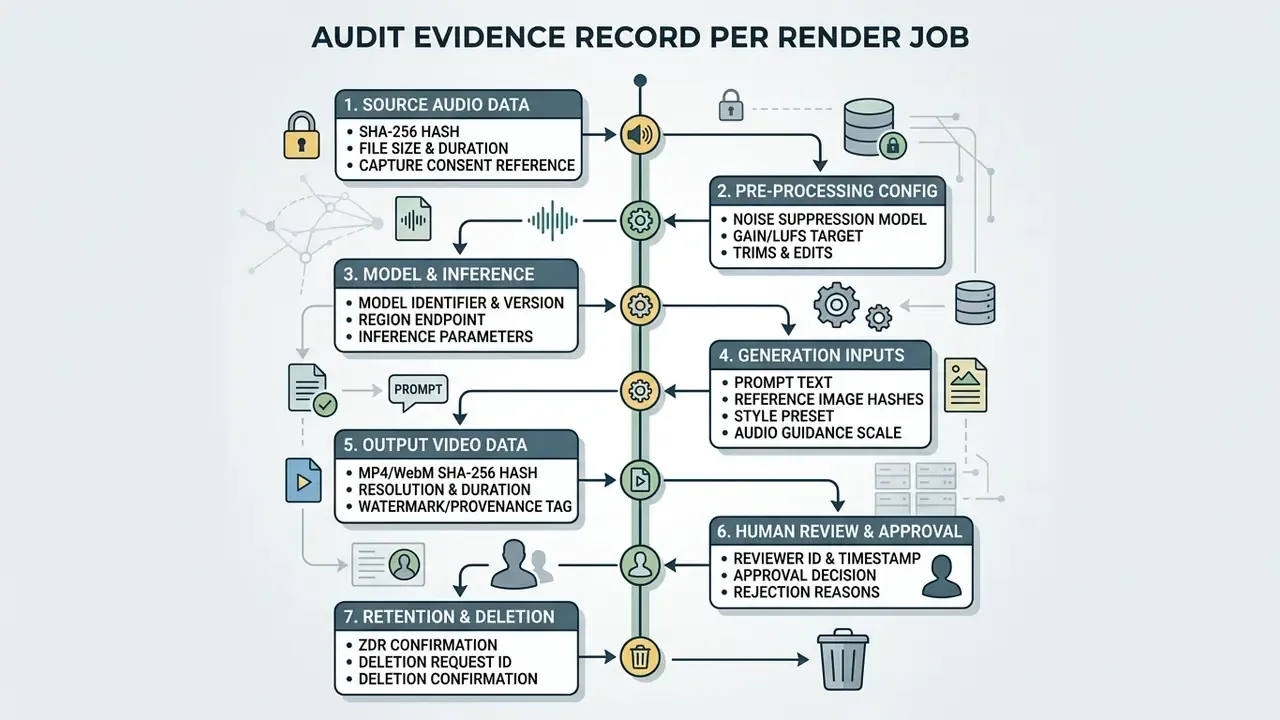
This record supports model-risk expectations familiar to banks and insurers: documented model inventory, versioning, effective challenge, and evidence of ongoing monitoring in line with the NIST AI Risk Management Framework and supervisory model-risk guidance such as Federal Reserve SR 11-7 and comparable OCC bulletins. Where a generated asset features a real person's likeness or a cloned voice, retain the written consent artefact alongside the render record. Consent that lives only in someone's inbox is not evidence.
This material is general in nature and does not replace advice from a qualified legal, security, or compliance specialist.
Model Risk Validation Checklist and Shadow AI Controls
Moving an audio-to-video pilot into production requires acceptance criteria that are testable rather than aesthetic. "It looks good" is not a control.
Checklist0 / 10
Shadow AI controls. The most common real-world failure is not model quality. It is uncontrolled tool use: staff uploading confidential recordings into consumer free tiers that watermark output, retain data, and grant only non-commercial rights. Mitigations worth funding include network and DLP rules for known consumer generative endpoints, an approved-tool allowlist with an easy internal request path, mandatory routing of confidential audio through enterprise ZDR endpoints, periodic discovery scans for unsanctioned SaaS spend, and training that explains why a watermarked 720p export is also a data-governance incident, not just a quality problem.
Ownership matters as much as tooling. Name one accountable owner per pipeline, define the escalation path when a render fails review, and document how the pipeline gets switched off. No evidence, no autonomy.
Can You Use AI-Generated Videos From Audio Commercially?
This material is general in nature and does not replace advice from a qualified legal specialist.
Commercial use of AI-generated videos depends on vendor subscription agreements, input audio ownership, copyright constraints, and the extent of human creative oversight.
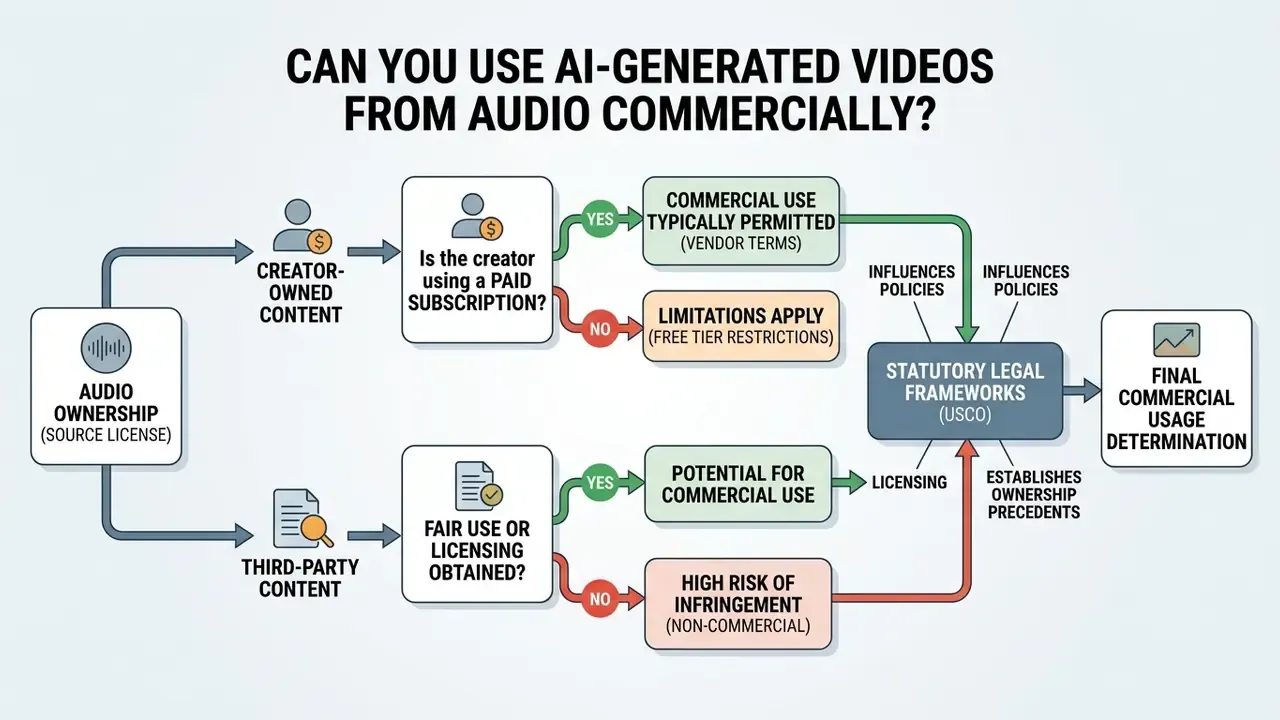
Guidance from the U.S. Copyright Office states that purely AI-generated visual elements lacking human creative input cannot be registered, and that AI-generated material beyond a de minimis threshold must be disclosed and excluded from a registration claim (US Copyright Office AI Policy Guidance, effective 16 March 2023). A 2025 European Parliament study reaches a parallel conclusion from the other direction: outputs without meaningful human creative input do not attract copyright at all. Commercial protection therefore attaches mainly to human-authored elements, such as underlying scripts, customized editing compositions, and original audio tracks.
«The 2026 survey confirms that ethical questions, including deepfakes, consent, and the use of synthetic avatars, remain without rigorous empirical evaluation in the academic literature.»
Organizations navigating intellectual property questions can compare options in our legal policy framework hub, and review adjacent precedent on the commercial use of AI image generators where similar authorship tests apply.
Audio Rights, Music, Voice, and Visual Asset Permissions
Monetization requires explicit commercial licences for every input asset: voice recordings, background music tracks, and stock image elements.
[Source Audio Clearance] + [Paid Vendor License] + [Human Creative Oversight] = Commercial Usage Rights
Vendor terms separate free-tier non-commercial output from paid commercial rights. ElevenLabs, for example, grants commercial usage rights exclusively to paid subscribers, restricting free-tier outputs to non-commercial use (ElevenLabs Licensing Policy, 2026). Licence scope also varies by media type: some audio vendors grant commercial rights for generated music and sound effects while explicitly declining to certify generated video, image, or text output. A single "commercial licence" may therefore cover only part of your finished asset. Using copyrighted music or unauthorized voice clones without permission exposes you to liability regardless of which AI video generator produced the frames. For strategies on managing generative AI content monetization, explore the ai wealth framework.
Illustrative scenario (hypothetical). A corporate communications team audited its internal training video library before an external campaign. Three clips had been rendered on free-tier AI accounts, carrying watermarks and non-commercial audio assets. The team upgraded to paid enterprise licences, re-rendered with licensed voice tracks, and secured clean commercial rights before release. The audit cost two weeks. The alternative cost was unbounded.
AI Audio to Video Generator FAQ
Do You Need a Prompt or Can AI Generate Video From Sound Alone?
AI tools can generate synchronized video driven purely by acoustic features, though adding a text prompt gives the model clearer visual and stylistic direction. Documentation for models such as LTX-Video confirms that audio energy and vocal cadence can drive motion automatically, while an optional text prompt helps establish scene setting, lighting, and style (LTX Model Documentation, 2026). Conversely, Google Veo 3.1 requires a text prompt or reference image alongside processing parameters, and Google's enterprise documentation lists audio as an unsupported input modality for that model (Google AI Developer Documentation, 2026).
«SpA2V is the first framework to exploit spatial auditory cues to generate video with high semantic and spatial correspondence to the input audio without text prompts.» — SpA2V: Harnessing Spatial Auditory Cues for Audio-driven Spatially-aware Video Generation, arXiv:2508.00782v1 (2025). https://arxiv.org/abs/2508.00782 Descriptive prompts still yield more predictable results. Predictability is the point.
What Audio Formats and Sources Are Supported?
Mainstream engines accept MP3, WAV, M4A, AAC, and FLAC uploads. Several also accept a pasted URL from YouTube, SoundCloud, or a podcast RSS feed and extract the audio stream server-side. Lossless FLAC and uncompressed WAV give feature extractors the cleanest signal; MP3 and AAC trade fidelity for upload speed. Confirm per-endpoint ceilings before batch processing: documented limits range from 25 MB (OpenAI transcriptions) to 500 MB and one hour (voice isolation).
How Do Teams Reduce Deepfake and Voice-Cloning Risk?
Treat likeness and voice as controlled assets. Require written consent for every cloned voice and every avatar based on a real person, restrict avatar libraries to an approved internal register, and prohibit generation using executive voices outside an authorized workflow. Publish only assets carrying machine-readable AI-generation marking, retain the audit evidence record described above, and route external-facing renders through a named human approver. The 2026 talking-head survey notes that consent and deepfake ethics remain under-evaluated in the literature, so internal controls carry the weight, not model safeguards alone.
How Is Confidential Audio Protected During Processing?
Use enterprise endpoints with a contractual Zero Data Retention clause, verify TLS 1.3 in transit and AES-256 at rest, pin data residency to the required region, and confirm the sub-processor register. Never upload privileged or personal-data-bearing recordings to consumer free tiers, which typically reserve broad content rights, retain uploads, watermark exports, and grant only non-commercial use.
How Long Does Generation Take, and What Resolution Should I Target?
Consumer platforms report one to five minutes per clip; research systems demonstrate real-time streaming at 141 to 200 frames per second on a single GPU. For distribution, target 1080p at 9:16 for Reels, Shorts, and TikTok, 1080p at 16:9 for YouTube and LMS delivery, and reserve 2K or 4K for broadcast and archival masters where your paid tier allows it.
Can Long Podcasts Be Turned Into Multiple Short Clips Automatically?
Yes. Highlight-detection models combine NLP summarization with acoustic energy analysis to nominate 30-to-90-second segments, and diarization assigns per-speaker captions or avatars. Most vendors gate long-file processing behind enterprise plans, so confirm maximum input duration before committing to an archive migration.
What Is a Safe First Step for a Regulated Institution?
Start narrow. Pick one low-sensitivity audio source, such as a published marketing podcast, run ten renders through an approved enterprise endpoint, and complete the full validation checklist and audit evidence record for each one. Then review the results with model risk and internal audit before widening scope. If the evidence pack cannot be produced for ten clips, it will not survive a hundred. For technical assistance and platform operational guidance, visit AI Media Support and Troubleshooting.
Appendix A: Superseded and Corrected Passages
Retained for editorial transparency; the main text above carries the corrected versions.
- Superseded citation (music visualisers)"These vectors guide frame interpolation between keyframes, ensuring visual scene intensity matches the underlying musical track (Pina & Li, 2024)." Replaced with a quantified AVS finding and a direct arXiv reference.
- Superseded citation (lyric animation)"Academic experiments on automated lyric animation show that coupling audio pitch shifts and vocal dynamics with text-styling models produces readable, animated lyric videos (Lin, 2026)." Replaced with the titled 2026 study and its documented stylization mechanics.
- Removed unverifiable vendor paragrapha passage discussing a non-resolving domain and a hypothetical feature set was removed, replaced by the vendor due diligence and fraud warning callout, which generalizes the same caution into an actionable procurement control.
- Removed production artifactsan internal specification block and a media-placeholder marker were removed from the pricing and captions sections; the underlying verification note was rewritten as reader-facing prose.
- Deduplicated tier tablethe Free / Standard / Enterprise resolution table now appears once, in the pricing section; the formats section instead carries a per-platform input-limit table.
- Removed anchor-based table of contentsreplaced with a short reader-orientation section, since duplicate navigation added no informational value.
Social Clips, Learning Content, and Team Updates
Short-form channels demand that corporate communications, training guides, and executive voice memos be reshaped into vertical video.
Modern avatar systems translate training videos into over 140 languages while holding lip-sync alignment, which lets global Learning & Development (L&D) teams deploy updates fast (Synthesia Enterprise Documentation, 2026; HeyGen Translation Guides, 2026, which documents 175+ languages with voice cloning and direct LMS or intranet export). Localization vendors such as LanguageLine and Taia document the same pipeline for corporate communications and webinars across 189 languages, accepting MP3, WAV, and AAC sources alongside subtitle and script files.
To speed up short-form production, creators often pair synthetic audio tools with distribution templates; relevant options are covered in the tiktok ai voice generator guide and the accompanying tiktok templates resource.
Illustrative scenario (hypothetical). A fintech training department needed to convert 50 internal compliance audio briefs into multilingual video modules for overseas staff. Using an enterprise avatar generator, the team uploaded the audio files, selected approved local voice clones, and rendered localized vertical videos in 12 languages. Regional recording sessions disappeared from the budget; unified audit documentation stayed intact.
This material is general in nature and does not replace advice from a qualified specialist.