An AI playlist generator is a software system that uses machine learning methods, including collaborative filtering, energy-valence mood scoring, and large language models (LLMs), to convert natural-language prompts, genres, or listener histories into ordered song sequences. These systems connect directly to streaming platforms like Spotify and Apple Music through application programming interfaces (APIs) to build, refine, and save custom audio collections.
Why does a governance-minded reader care about a music tool? Because a consumer playlist ai generator is one of the cleanest live examples of an AI system that writes to a real account, holds an OAuth token, and produces output someone may publish or broadcast. Small stakes, same control questions.
Executive Summary
- What it is An AI playlist generator maps text prompts, mood tags, seed artists, or non-text inputs (images, video audio) to ranked track sequences, then writes them into a streaming library through authenticated APIs.
- Native vs third-party Spotify’s Prompted Playlists (Premium, English-only at rollout, US and Canada) and Apple Music’s Playlist Playground (beta, 25-track output) work inside their own ecosystems. Third-party tools such as PlaylistAI, Playlistable, Soundiiz, and TuneMyMusic add cross-platform export, seed-based discovery, and recurring synchronization.
- Time economics Manual curation of a 50-track playlist commonly consumes 7 or more hours across browsing, sequencing, and reshuffling. Prompt-based generation returns a comparable draft in under 60 seconds.
- Algorithmic core Generative retrieval, energy-valence affect mapping, uncertainty-driven exploration (SNGP), and reinforcement-learning sequencing drive both relevance and novelty.
- Governance risk Third-party generators request write scopes such as
user-library-modifyon corporate or personal accounts. Shadow AI exposure, token storage, and vendor data-retention policies deserve formal review before any organization tolerates them. - Legal ceiling AI generation confers no public performance rights. Consumer subscriptions explicitly prohibit commercial playback. Venues need PRO or B2B licensing (ASCAP, BMI, SESAC, or a service such as Soundtrack Your Brand).
This guide walks the full chain: what these systems create, which prompts actually work, how much manual labor they replace, how to connect Spotify or Apple Music safely, how to schedule daily or weekly refreshes, how free and paid tiers differ, what an OAuth review should ask, and where commercial playback stops being legal.
What Is an AI Playlist Generator and What Can It Create?
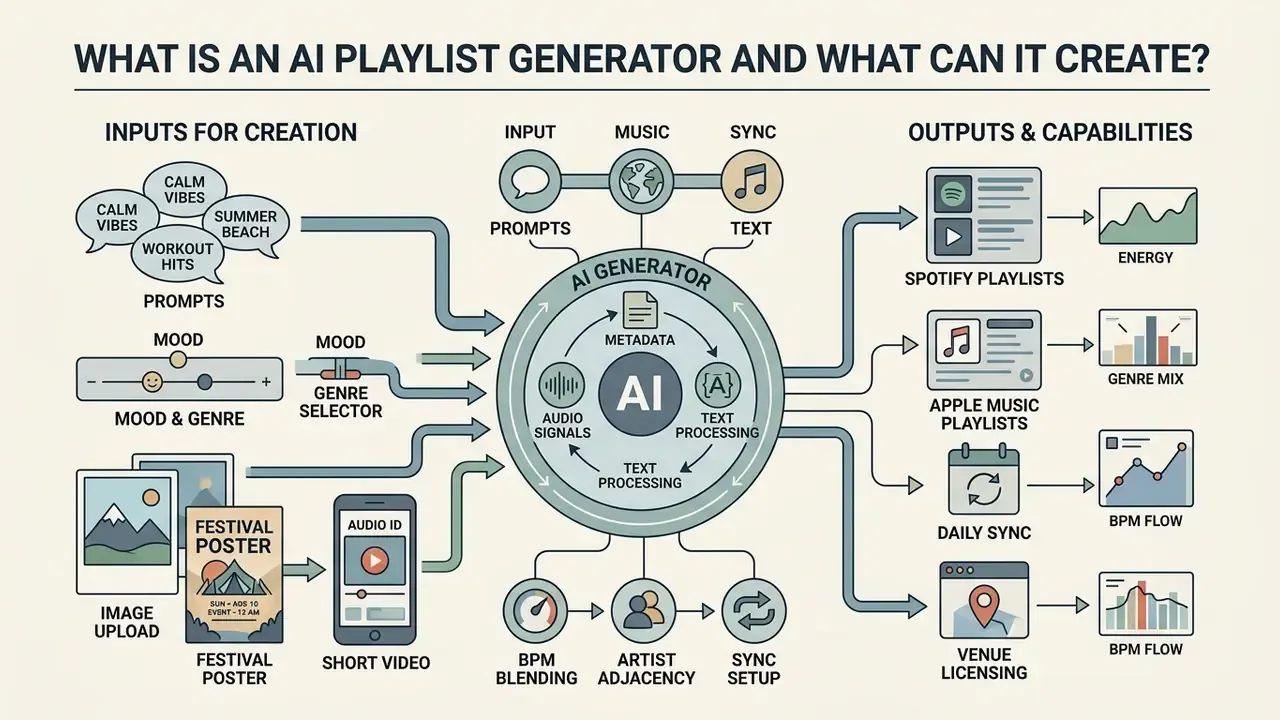
An AI playlist generator processes structured metadata, audio signals, and textual prompts to synthesize cohesive track listings tailored to a specific listening session. Unlike traditional search that relies on exact string matching, an ai music playlist generator models transitions, tempo continuity, and thematic coherence across a whole run of songs.
Modern systems behave less like search boxes and more like intent interpreters.
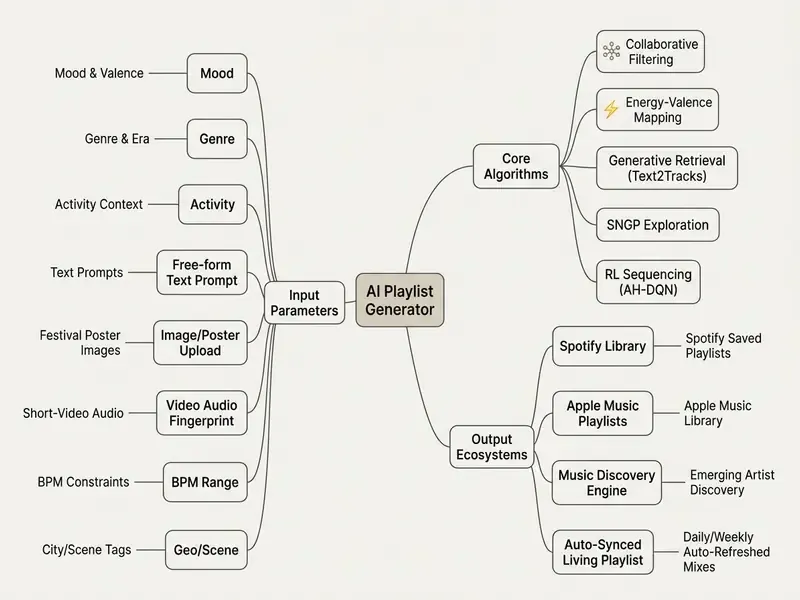
They analyze acoustic features such as loudness, danceability, and timbre alongside listening logs to build thematic mixes. Research on generative retrieval shows that mapping natural-language prompts directly to learned semantic track identifiers improves retrieval accuracy by 48% over simple title-matching baselines, and the same architecture cuts inference cost:
“Semantic IDs learned from collaborative filtering embeddings reduce decoding steps by approximately 7.5 times, improving real-time generation efficiency.”
Foundational surveys frame the mechanism in three parts: a track pool, a background knowledge database (audio signal, metadata, social web data, usage logs), and target characteristics supplied by the user (Automated Generation of Music Playlists: Survey and Experiments, ACM Computing Surveys, 2015). Later taxonomies classify generators into seven families: similarity-based, collaborative filtering, frequent pattern mining, statistical models, case-based reasoning, discrete optimization, and hybrid (From Manual to Assisted Playlist Creation: A Survey, 2017). The practical result is that users can generate playlist collections reflecting complex emotional states, narrow historical eras, or niche subgenres with very little manual effort.
Turn a Mood, Genre, or Moment Into a Playlist
To turn an abstract moment into a sequence of songs, an ai playlist creator translates human emotion into measurable audio characteristics. Algorithms operationalize mood by projecting user input onto a two-dimensional affective plane: energy (arousal) and valence (positiveness).
“The Words to Waves system encodes free-form user text into valence and arousal coordinates through a transformer, enabling personalized track selection.”
When someone requests a sequence for a late-night study session or a high-intensity workout, the system filters candidates against target energy-valence coordinates. Studies on mood-aware frameworks confirm that conditioning selection on these two dimensions raises perceived recommendation quality above plain similarity matching:
“In a single-blind experiment, mood-conditioned playlists received statistically significantly higher perceived-quality ratings than baseline recommendations.”
By scoring track transitions, the system avoids jarring jumps in tempo or volume, so playlists with ai keep a consistent atmospheric flow. Personalization adds a second layer on top of generic affect mapping:
“The HDBN model accounts for four sources of emotional heterogeneity, between users and within a single user, and outperforms baselines on Hit Rate and NDCG.”
Newer prompt interfaces also parse life-situation text into structured slots (favorite genre or artist, year, and a short memory or context description) before candidate retrieval begins (A Music Recommendation System for Constructed Music-Evoked Memories, 2026). One small observation from testing: the memory slot changes results more than the genre slot. Ask for “the summer I learned to drive” and you get a different playlist than “2000s pop,” even when the underlying era is identical.
Practical AI Playlist Prompts by Mood and Activity
A prompt performs best when it fuses four signal types: activity or setting, genre or era, an affective descriptor, and a numeric or structural constraint (BPM, instrumental only, track count). The prompts below are copy-ready and match common generator behavior.
| Scenario | Copy-Ready Prompt | Signals Encoded |
|---|---|---|
| Deep work / coding | “Instrumental synthwave around 120 BPM, no lyrics, ambient focus, 40 tracks” | Activity + genre + BPM + lyric constraint |
| Late-night study | “Low-arousal lo-fi and neo-soul for 1 a.m. revision, warm and hazy, nothing above 90 BPM” | Time context + valence + tempo ceiling |
| Gym / HIIT | “High-energy hip hop and EDM for interval training, rising intensity, explicit allowed” | Arousal ramp + genre blend |
| Post-workout cooldown | “Calm downtempo electronica for stretching after strength training, 70 to 95 BPM” | Recovery context + BPM window |
| Nostalgic travel | “2000s indie rock that feels like a rainy train ride home” | Era + metaphorical scene |
| Road trip | “Sing-along classics from the 70s, 80s and 90s, upbeat, family-friendly” | Era span + valence + filter |
| Dinner party | “Relaxed jazz and bossa nova for a dinner party, conversational volume, no vocal solos” | Venue + instrumentation constraint |
| Heartbreak | “Emotional healing songs, sad to hopeful arc, singer-songwriter and slowcore” | Valence trajectory |
| Family compromise | “Mix my kid’s favorite pop hits with a few indie tracks I actually enjoy” | Multi-profile blending |
| Discovery mode | “Fresh releases that match my taste but exclude anything I already saved” | Novelty + exclusion filter |
| Morning routine | “Bright, mid-tempo music for getting ready in the morning, 100 to 115 BPM” | Time + tempo band |
| Board games | “Playing board games on a rainy day, cozy, playful, mostly instrumental” | Situational metaphor |
Refinement pattern: generate first, then issue a follow-up instruction instead of restarting. Refinements that reliably work: “replace the three loudest tracks with quieter alternatives,” “remove anything released before 2015,” and “keep the mood but swap English vocals for instrumentals.” Spotify’s documentation confirms that a Refine playlist action edits the underlying prompt and regenerates the track set, before or after saving (Spotify Support, 2026, https://support.spotify.com/us/article/ai-playlist/).
Advanced AI Input Methods: From Festival Posters to Short-Form Video
Text is no longer the only door in. Vision-language models read line-up text from festival poster images and reconstruct a setlist from the performing artists, turning a photograph into a pre-festival playlist. Audio-fingerprinting models extract background audio from short-form videos, identify the track, and expand it into a full Spotify or Apple Music playlist with matching BPM constraints.
Four advanced input modes are now common across leading tools:
- Poster and image uploadoptical character recognition extracts artist names from a festival line-up or a gig flyer, then ranks each artist’s highest-affinity tracks against your listening history.
- Short-video audio identificationthe tool scans a saved TikTok, Reels, or Shorts clip, resolves the song via acoustic fingerprint, and seeds a similarity search around it.
- Artist adjacency, or “friends of the artist”instead of pure acoustic similarity, the model traverses collaboration graphs, shared producers, label rosters, and co-listening data to surface genuinely adjacent artists.
- Multi-genre blending with BPM filterspick two or more genres plus a BPM range (house and afrobeats at 118 to 124 BPM, for example), and the optimizer enforces both constraints during sequencing so transitions stay mixable.
Listening-history modes complete the picture. Many generators build “your top tracks and artists” playlists across rolling windows of four weeks, six months, or all time, plus time-of-day suggestions that predict what you usually play on a Tuesday morning versus a Friday night. For readers comparing generative tooling across media types, our index of AI art and image generation tools documents how prompt engineering principles carry over between audio and visual models.
Music Discovery and New Artist Recommendations
AI-driven curation actively surfaces unfamiliar tracks by combining content-based audio filtering with algorithmic exploration. Rather than leaning on popularity metrics alone, an ai playlist maker scores acoustic similarity to pull lesser-known artists into a listener’s feed.
Popularity bias in traditional recommenders narrows exposure to top-charting tracks. To counter it, advanced platforms deploy uncertainty-driven exploration models such as Spectral-normalized Neural Gaussian Process (SNGP) heads, documented in industrial deployment at YouTube Music. Large-scale evaluations show that this approach expands bottom-tier catalog impressions and lifts artist diversity by nearly 1%:
“Combining architectural debiasing with SNGP-based exploration reduces top-1% impression share and expands the bottom-20% catalog share more than either method alone.”
Long-tail retrieval pipelines follow a reproducible pattern: assemble a candidate pool restricted to low-popularity artists, compute artist similarity from play logs and tag co-occurrence, then rank by weighted similarity against the user profile. Fairness-aware research treats niche artists as weakly connected nodes in artist graphs and applies structure-aware ranking to raise their exposure. Through these mechanisms, building playlists with ai becomes a workable strategy for exploring obscure subgenres and supporting emerging musicians. A 1% diversity gain sounds trivial. At catalog scale it is thousands of artists who otherwise get zero impressions.
Geographic and Scene-Based Curation
Location signals add a curation axis that pure taste vectors miss. Systems combine geo-IP or account region, local streaming velocity, venue calendars, and scene tags to assemble regionally grounded collections: Chicago house classics, Houston hits from local Texas artists, Nashville country staples, Miami reggaeton and salsa, or Seattle grunge throwbacks. Location-aware recommendation research labels tracks by venue type (gym, restaurant, mall, office, bar) to enable atmosphere matching, and the same labelling underpins city-scoped discovery feeds (On Effective Location-Aware Music Recommendation).
Predictive, user-specific variants push this further. “Your weekend” mixes shift by day of week and travel status, while trending modules separate globally viral tracks from locally rising ones. For B2B curators the implication is concrete: a chain can hold one brand sound profile while varying 20% to 30% of each location’s rotation by regional scene.
To see how foundational AI models interpret broader creative inputs, read what is ai in our technical glossary, or trace the milestones that shaped modern generative tools in when did ai. Readers evaluating adjacent audio tooling can also review our guide to AI voice generators for licensing and quality benchmarks.
Manual Curation vs AI Generation: The Time Savings Matrix
The measurable value of automation is time compression. Manual curation of a single 50-track themed playlist breaks into predictable labor blocks. Prompt-based generation collapses those blocks into one retrieval and sequencing pass.
| Task Block | Manual Curation | AI Generation |
|---|---|---|
| Browsing for candidate songs | ~1.5 hours | Included in retrieval pass |
| Matching tracks to mood or vibe | ~1.0 hour | Energy-valence vector filtering |
| Researching an artist’s best tracks | ~1.0 hour | Collaborative-filtering embeddings |
| Fixing mismatched genres | ~0.5 hour | Constraint enforcement at generation |
| Reading blogs for recommendations | ~1.0 hour | Long-tail exploration heads |
| Reshuffling and refining order | ~1.0 hour | Automated BPM and transition alignment |
| Second-guessing selections | ~1.0 hour | Iterative refinement prompt |
| Total | 7+ hours | Under 60 seconds to a reviewable draft |
Two caveats keep this honest. First, AI output is a draft: human review still removes off-brief tracks, and that review usually costs 2 to 5 minutes. Second, professional curation tooling reports workload reduction, not elimination. Vendor documentation for catalog-scale systems claims at least a 90% cut in manual curator workload, never 100%. The fair framing is 7 hours of assembly replaced by minutes of editorial supervision. That supervision step is also, conveniently, the control point an auditor would ask about.
How to Create a Spotify or Apple Music Playlist With AI
Creating an AI-generated playlist means picking a streaming platform, supplying an intent-based prompt, evaluating the generated track list, and exporting the sequence to your library. The workflow depends on secure API connections between the AI engine and the target music service.
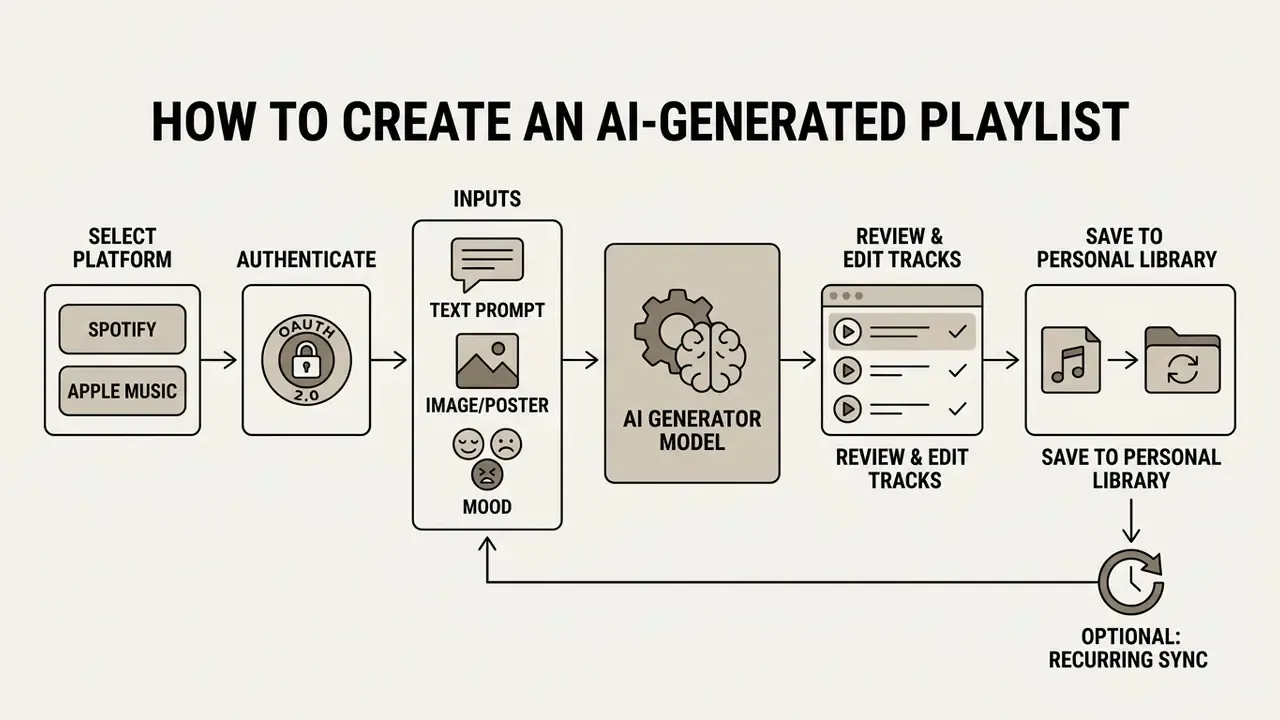
Native paths for reference. In Spotify, open Your Library, tap +, select AI Playlist, enter or pick a prompt, add or remove suggested tracks, then tap Create to save (Spotify Support, 2026, https://support.spotify.com/us/article/ai-playlist/). In Apple Music, open the app, go to Library, tap Create New Playlist, enter a mood, genre, activity, or era in Playlist Playground, then edit the title, rearrange songs, accept suggested additions, and save. Sync Library must be enabled (Apple Support, 2026, https://support.apple.com/en-us/118289).
- Select platform
- choose Spotify or Apple Music inside the generator interface.
- Authenticate access
- authorize the application through OAuth 2.0 to grant library modification permissions.
- Input prompt
- enter a descriptive text prompt, upload an image, select mood dimensions, or define genre and BPM boundaries.
- Generate sequence
- the engine computes track similarity and sequence flow, then outputs a candidate playlist.
- Review tracks
- inspect the suggestions, remove weak entries, or adjust target parameters.
- Save to library
- export the finalized selection into your streaming library.
Connect Spotify or Apple Music
Connecting a playlist generator to a streaming provider requires explicit user consent through standardized authentication protocols. Third-party applications use OAuth 2.0 to request restricted access without storing user credentials.
For a spotify ai playlist generator or an ai playlist creator spotify, the authorization scope splits cleanly into read and write permissions, such as user-library-read and user-library-modify. Playlist writes additionally need playlist-modify-private or playlist-modify-public. Spotify supports the authorization code flow, authorization code with PKCE, and client credentials. Only the first two reach user resources, so any tool claiming library access through client credentials alone is misconfigured, full stop. On Apple Music, connection needs a developer token paired with a user-specific token managed through the native MusicAuthorization API, and informed consent is mandatory before any personal music data is read. These boundaries protect account integrity while letting an external tool write new playlists straight to the cloud storage layer.
To inspect how enterprise systems manage API endpoints and secure authentication, view the guide for complete technical documentation. If setup errors appear during token exchange, open the hub for step-by-step troubleshooting.
Generate, Review, and Save the Playlist
Once authenticated, the user types a descriptive prompt into the spotify playlist ai generator or the native platform tool. The generator processes the request, builds a sequence of track identifiers, and presents an interactive draft for evaluation.
In native deployments such as Spotify’s Prompted Playlists or Apple Music’s Playlist Playground, results can be refined before saving. If a track breaks the intended atmosphere, remove it or issue a follow-up refinement prompt to shift tempo or genre balance. Third-party services expose the same loop plus length control: defaults usually land at 30 to 50 tracks and can be shortened or extended before generation. Pressing save fires an API call that creates a named container in your library and commits the sequence. That review loop is what keeps automated curation tied to actual preference rather than model confidence.
Configuring Automated Daily and Weekly Syncing
A static playlist decays. Releases pile up, rotation breeds fatigue, and the mix that felt perfect in March feels tired by June. Recurring synchronization turns a one-off generation into a living playlist that regenerates on a schedule from the original query.
- Save the source query.Generate the playlist, then store the prompt or tag combination as a reusable recipe rather than a one-time request.
- Enable recurring sync.In the generator dashboard, check
Enable Recurring Cron Sync(labelled Synchronize in some tools) and choose the destination service. - Set the refresh window.Define cadence and timezone: daily at 06:00 local time, or every Monday at 08:00 UTC. Daily suits discovery feeds, weekly suits venue rotations.
- Choose the update action.
Overwrite Existing Trackskeeps the playlist tightly on-brief,Append New Discoveriespreserves history and grows the container,Replace Stale Onlydrops tracks unplayed or skipped in the last cycle. - Set guardrails.Cap playlist length, exclude previously rejected tracks, and lock a share of “anchor” songs so the playlist keeps its identity through each refresh.
- Confirm platform prerequisites.Apple Music requires Sync Library enabled and the same Apple Account across devices, and sync progress appears as Updating Cloud Library. Spotify accepts batch add and remove operations against the Web API playlist endpoints.
- Verify the first cycle.Check that the scheduled job actually fired, that token refresh succeeded, and that duplicates were removed before you trust the automation. Unverified automation is just optimism with a cron expression.
How to Choose the Best AI Playlist Generator
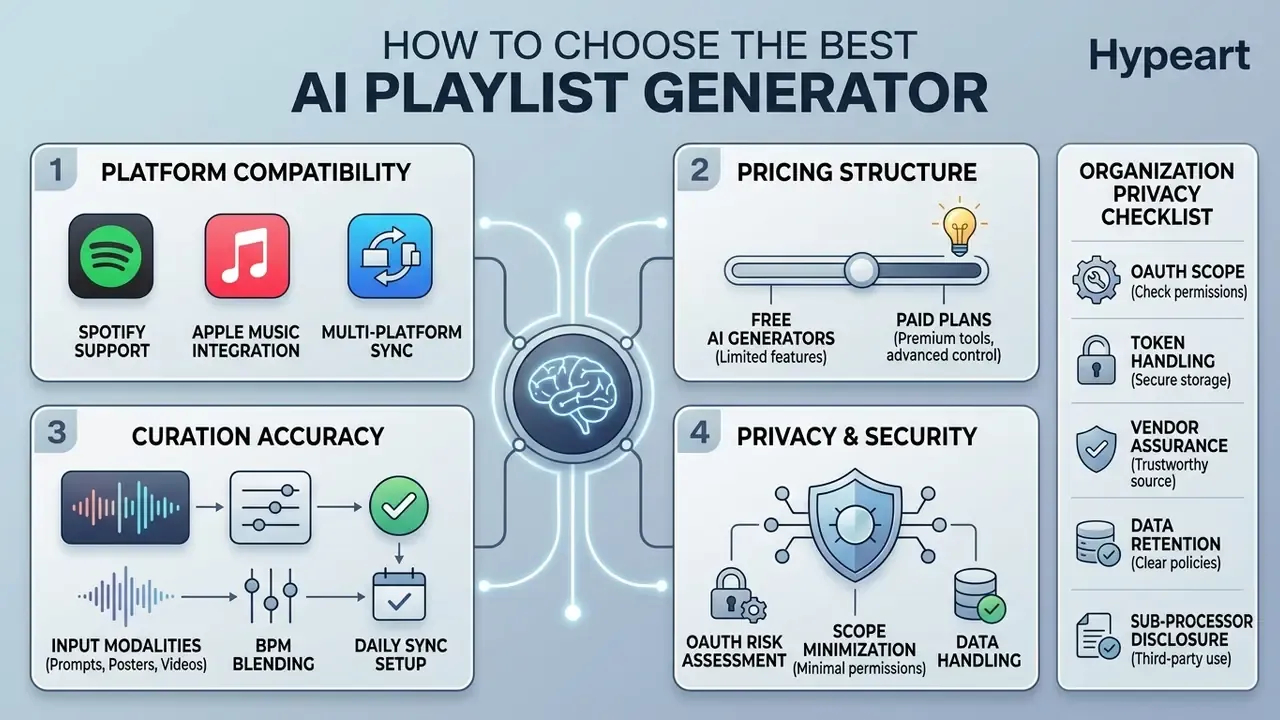
Choosing the best ai playlist generator means weighing platform compatibility, curation accuracy, pricing structure, and privacy controls. Draw a hard line between native features built into streaming apps and third-party web services that operate across ecosystems.
Spotify and Apple Music Compatibility
Compatibility varies sharply between native integrations and third-party tools. A dedicated spotify ai playlist maker or spotify playlist creator ai leans on deep API access to modify user libraries in seconds.
| Feature / Criteria | Free AI Playlist Plans | Paid Subscription Plans | Native Platform Features |
|---|---|---|---|
| Platform Support | Spotify or Apple Music (Web API) | Multi-platform sync (Spotify + Apple) | Platform specific, in-app only |
| Generation Limits | 10 to 20 credits per month (some tools: 20/day, 100/month, or 10 signup credits) | Unlimited AI generations | Included with Premium or subscription |
| Curation Control | Basic mood and genre filters | Advanced prompt tuning, BPM ranges, track replacement | Iterative natural-language prompts |
| Multi-modal Input | Text only | Text, image or poster upload, short-video audio ID | Text and preset ideas |
| Recurring Sync | Manual regeneration | Daily or weekly automated cron sync | Manual re-prompt |
| Export Options | Manual single-playlist export | Automatic background sync | Direct saving to native library |
| Pricing Model | $0 free tier | $2.99/week, $6.99/month, or $49.99/year | Included in base streaming fee |
Native tools give you seamless UI integration, but they stay inside their own ecosystem. Spotify additionally publishes an OpenAPI schema for machine-readable integration, which gives developers and AI coding assistants a documented surface that Apple Music does not currently match in public. Third-party applications such as PlaylistAI or Soundiiz bridge the gap by exporting identical track lists to Spotify and Apple Music at once. Worth noting: unlike pure transfer utilities, generative tools create new playlists instead of migrating existing ones. To compare alternative generative media software and workflow models, see the overview in our software index, or check how the same evaluation criteria apply to free AI video generators.
Free AI Playlist Generator vs Paid Plans
Judging a free ai playlist generator against premium alternatives comes down to credit limits, generation speed, and export rights. Most independent providers run freemium models to keep compute overhead manageable.
A free ai playlist maker typically grants a limited allocation of monthly credits, roughly 10 to 100 generations, or caps output track counts. Credit accounting is not standardized, and that inconsistency trips people up: some services refresh daily (20 credits per day), some monthly with no rollover, some annually (30 credits per year), and some issue a fixed signup grant of 10 credits with no refill at all. Paid plans span weekly passes ($2.99), monthly tiers ($6.99), and annual subscriptions ($49.99). They remove generation caps and unlock dynamic library synchronization plus automated playlist name generation. Annual billing is often discounted, or releases the full credit balance upfront at purchase.
Before subscribing, verify three items in the vendor’s terms: whether unused credits roll over, whether free-tier output is licensed for personal evaluation only, and how long prompts and connected-account data are retained. To review complete cost structures and subscription tiers across creative tools, see the overview in our centralized pricing breakdown. Readers hunting cost-effective media production alternatives can also check our guide on whiteboard animation free software.
Shadow AI and OAuth Risk Checklist for Organizations
Consumer playlist generators are a common Shadow AI entry point. An employee grants a third-party web app write access to an account on a managed device, and the organization quietly inherits an unreviewed data flow. Nobody filed a request. Run this checklist before approving or tolerating such tools.
- Scope minimization. Confirm the tool requests only the scopes it needs. Write access (
user-library-modify,playlist-modify-private) must be justified. Read-only access is preferable for analytics use cases. - Token handling. Verify PKCE for public clients, encrypted token storage at rest, refresh-token rotation, and a documented revocation path. Users can revoke access from the streaming account’s connected-apps panel.
- Vendor assurance. Request SOC 2 Type II or ISO/IEC 27001 status. Absence of either is not automatically disqualifying for low-sensitivity use, but it should be recorded as an accepted risk with a named owner.
- Data retention. Ask exactly what is stored: prompt text, listening history exports, account identifiers. Confirm deletion SLAs and whether prompts train vendor models.
- Sub-processor disclosure. Determine whether prompts are forwarded to third-party LLM providers, and in which jurisdictions inference happens.
- Device boundary. Restrict OAuth grants from corporate identities. Require personal accounts on unmanaged devices for personal-listening tools.
- Model risk documentation. For organizations under model-risk governance expectations, including supervisory guidance on model risk management, record intended use, input data, known limitations such as popularity bias and generative drift, and the human review step that precedes any published output.
- Audit trail. Log prompt, model version, generation timestamp, and reviewer identity for any playlist published under a brand identity. Auditors apply the same evidentiary standard to other generative outputs, so consistency helps.
- Licensing verification. Before any public playback, confirm a valid commercial music licence exists. A generation log is not a licence.
This checklist is operational guidance, not legal or compliance advice. Align it with your own internal control framework.
Can You Use AI-Generated Playlists for a Business or Venue?
Two separate legal questions get conflated constantly. The first is the copyright status of AI output: a purely machine-generated arrangement may attract little or no protection, and a 2025 Austrian legal review notes that even unprotected AI music can still carry contractual usage restrictions from the provider. The second is public performance rights in the recorded tracks the AI selected, which stay fully with rightsholders no matter how the sequence was assembled. Outside the United States the principle holds: Hong Kong’s Intellectual Property Department states that playing copyright works in public generally infringes unless authorized, and that venues need licences from copyright owners or licensing bodies. Commercial venues therefore need streaming, storage, on-demand, and public performance rights bundled together, which is exactly the combination B2B services license directly from rightsholders. Business leaders planning commercial audio deployments can open the hub for enterprise licensing frameworks, and readers assessing usage rights for adjacent generative tools may consult our analysis of commercial-use terms for Google’s AI generators.
Playlist Creation for Venue Atmosphere and Music Discovery
Commercial venues need playlists structured around customer activity across the day. An AI generator can build tailored schedules by pairing target energy profiles with brand identity parameters.
A fitness center might run high-tempo, high-valence sequences during peak morning hours to match exertion, then shift to lower-BPM ambient tracks for late-evening recovery sessions. Ambient-intelligence research in gym settings proposes adapting the soundtrack to physical effort in real time (Expert Systems with Applications, 2021, see Appendix A note). Sequencing quality itself can be optimized against long-horizon outcomes rather than single-track relevance:
“An AH-DQN agent trained in a simulated environment on streaming data achieves higher user-satisfaction metrics in A/B tests than collaborative filtering.”
Retail spaces apply demographic, geographic, and psychographic targeting to shape background atmosphere around the expected customer profile. Recommendation surveys treat these three profiling dimensions as standard inputs, and venue-type labelling (gym, restaurant, mall, office, bar) supports location-appropriate filtering. Claims that such curation directly lengthens dwell time are common in vendor marketing but were not verified against peer-reviewed evidence for this article. Treat them as unconfirmed pending measured in-store testing.
Managers still need to route AI-selected sequences through fully licensed commercial playback systems rather than personal streaming accounts. Practical controls: keep a written licence inventory per location, map each scheduled playlist to its licensed source, restrict playback devices to the B2B app, and re-check regional PRO obligations whenever a new site opens. To inspect legal frameworks around digital media intellectual property, review the AI Litigation and Case Timelines resource hub.
AI Playlist Generator FAQ
Can AI Find Songs Similar to an Artist or Track?
An ai playlist creator finds similar songs by computing vector distances across audio features and listening logs. Systems analyze acoustic characteristics such as spectral centroid, tempo, key, and harmonic progression, alongside co-occurrence data from millions of sessions.
Seeded with a single track or artist, the generator builds a candidate pool ranked by similarity score. Contemporary production systems favour hybrid retrieval at catalogue scale:
“Bendada et al.’s scalable playlist continuation framework combines collaborative filtering with content features to process millions of tracks in real time.” Source: Scalable Automatic Playlist Continuation Framework, Bendada et al. (2023).
Classical sequencing research remains the conceptual base. Steerable generation computes transition probabilities from a seed track, keeps the top candidates, and picks each next song by tag-cloud similarity (Steerable Playlist Generation by Learning Song Similarity, ISMIR 2009). Start-and-end-song methods filter by divergence from both anchors and then match ideal divergence ratios along the playlist (OFAI technical report, 2008). Two adjacent micro-tools sit on the same machinery:
- Similar song finder and seed-based discovery: supply one track, artist, or album as a reference, and the engine returns a playlist ranked by cosine distance between embeddings, expanding a favourite into an hour of comparable material.
- Random song generator and song randomizer: deliberately samples outside your dominant clusters to inject variety, which is the fastest route to hidden gems when recommendations start feeling stale.
The net effect: an ai song playlist generator preserves the stylistic essence of the seed artist while introducing fresh, contextually relevant material.
Can an AI Playlist Maker Generate Playlist Names?
Modern generators use natural language processing to read the thematic content of a track list and produce matching titles. By evaluating song metadata, dominant genres, lyrical themes, and energy levels, the system synthesizes evocative names.
“LLM components in systems such as Text2Playlist interpret user queries and can produce contextually accurate titles based on track mood and genre.” Source: Music Recommendation with Large Language Models (2025).
Research-grade approaches include encoder-decoder models that generate a title directly from a track sequence (2023) and embedding-plus-cosine-similarity matching of new titles against existing playlist titles (2025). Commercial naming tools expose several controllable modes:
- Mood, genre and purpose input: pick a mood, a genre, and a short purpose string (workout, party, revision) to constrain output.
- Length control: short punchy titles versus long descriptive ones.
- Gen Z slang mode: biases the model toward current youth vernacular and internet-native phrasing.
- Emoji-only mode: returns titles built purely from emoji sequences that encode the vibe.
- Personalization loop: saving preferred names builds a preference set, and after roughly five saved titles the model conditions future suggestions on your naming style, following a generate, save, better-names cycle.
- Randomize or “surprise me”: picks mood and genre at random to break habitual naming patterns.
Cover art runs the same pipeline. Third-party graphic tools generate square artwork from track energy, tempo (BPM), and visual mood tags, optionally overlaying the playlist name. YouTube Music shipped AI playlist artwork that analyses a playlist and generates imagery from thematic categories such as nature, humour, and animals. If you are exploring visual generation alongside audio curation, read about weird ai images in our digital media section, compare options in our roundup of AI art generators for playlist covers, or review guidelines on where to sell digital assets.
Can a Generated Playlist Stay Synced With a Music Service?
Yes, through automated background API tasks. When enabled, the generator periodically runs new recommendation cycles and updates the remote container in your library.
Platforms supporting cloud library synchronization, such as Apple Music’s Sync Library plus the Apple Music API playlist add and update operations, accept batch updates. Apple surfaces the process state as Updating Cloud Library, which confirms cloud-mediated background synchronization rather than manual export only. Spotify’s Web API exposes equivalent playlist item add and remove endpoints. These workflows let an ai spotify playlist generator refresh dynamic mixes daily or weekly, dropping stale entries and inserting new releases as taste shifts.
Operational caveats matter more than the marketing does. Refresh tokens expire or get revoked, rate limits throttle large batch writes, deduplication must run before insertion, and locked “anchor” tracks need explicit exclusion from the overwrite step. To estimate API compute overhead or storage requirements for a custom implementation, see the overview of our interactive developer estimators.
For a look at high-end synthetic media generation beyond audio, explore what is sora in our advanced model guides.
Limitations, Open Questions, and a Safe Next Step
Three honest gaps remain in this space. First, native beta features move fast: names, regions, track caps, and language support all changed at least once in the last twelve months, so any comparison table ages quickly. Second, published evidence on business outcomes is thin. Diversity lift and satisfaction metrics are documented, dwell-time uplift is not. Third, generative drift is real. The same prompt run in January and in August may return materially different sequences, which is fine for personal listening and awkward for brand-controlled rotation.
A safe next step, whether you are a listener or a governance lead, looks the same in shape. Run one prompt, save one playlist, then check three things: which scopes you granted, where the prompt is stored, and whether the output would be legal if it played in public. If any of the three is unclear, stop before you scale. Small test, documented answers, then a decision.
Appendix A: Source Notes and Revisions
Transparency on sourcing is part of the editorial standard applied to this page. The claims below appeared in earlier revisions and have been refreshed, qualified, or retained with explicit status labels.
| Original claim (retained for the record) | Status | Current treatment |
|---|---|---|
| “Advanced algorithms utilize steerable transition matrices to ensure smooth progression between consecutive tracks (ISMIR, 2009).” | Valid but dated | Retained as conceptual foundation; primary support updated to Bendada et al. (2023) scalable playlist continuation. |
| “These models process track metadata into textual representations and apply sequence-to-sequence transformers to output concise titles (Journal of Information Processing, 2023).” | Not independently verified in our source set | Retained; primary support replaced with Music Recommendation with Large Language Models (2025) and 2023 to 2025 title-generation research. |
| “A fitness center might deploy high-tempo, high-valence sequences… (Expert Systems with Applications, 2021).” | Partially supported | Retained; the 2021 gym ambient-intelligence proposal supports effort-adaptive music, not the specific scheduling figures. |
| “Retail spaces utilize… targeting to curate background atmospheres that lengthen store dwell times.” | Unconfirmed | Retained with an explicit note that dwell-time uplift is a vendor claim awaiting measured evidence. |
| “Spotify Prompted Playlists (Beta, US/Canada Premium) and Apple Music Playlist Playground (iOS 26.4 Beta).” | Needs periodic re-verification | Retained with a verification note; beta names and regions change between releases. |