If you sit in risk, compliance, or finance transformation at a US bank, a text-to-video model looks like a marketing toy. It is not. It is a third-party model that ingests your prompts, produces publishable artifacts, and creates disclosure duties. That is why this page reads less like a product review and more like a pre-pilot file.
| Target Persona | Operational Verdict | Recommended Alternative |
|---|---|---|
| Ad Agencies & Marketers | Recommended for rapid pitch animatics and pre-vis mood boards. | Runway Gen-3 / Runway 4.5 |
| Indie Filmmakers | Conditional: Excellent visual quality, but lacks frame-accurate timeline control. | Kling 3.0 / Seedance 2.0 |
| Enterprise API Developers | Not Recommended: API deprecation scheduled for Sept 24, 2026. | Luma Dream Machine API, Google Veo |
| Regulated Industries (Banking, Insurance, Health) | Pilot only under documented model-risk controls and human review. | Vendor with SOC 2 + enterprise data isolation |
Key takeaways for enterprise AI governance
- Lifecycle risk is now the dominant variable.OpenAI retired the standalone Sora consumer experience on April 26, 2026, and scheduled the Sora 2 Videos API sunset for September 24, 2026. Any pipeline built on Sora endpoints requires a documented exit plan.
- Provenance is built in, ownership is not.Every render carries visible watermarking and C2PA metadata, but platform terms, not the watermark, determine what your organization may publish, monetize, or attest to.
- Output is non-deterministic.Sora exposes no user-facing seed lock, so identical prompts yield different renders. For audit-driven environments, reproducibility must be achieved by archiving prompt, parameters, and the rendered artifact together.
- Independent leaderboards no longer rank Sora first.Third-party benchmarks place Seedance 2.0, Runway 4.5, and Kling 3.0 above Sora 2 Pro on visual quality, which changes the vendor-selection calculus for 2026 procurement.
Sora represents a significant shift in generative artificial intelligence, moving AI capability from static images to dynamic, multi-shot temporal media. Developed by OpenAI, the model generates complex video content from natural language descriptions, static imagery, and existing video clips. Understanding what is Sora video generation requires analyzing its underlying diffusion transformer architecture, its capabilities in production, the safety guardrails around it, and the enterprise deployment constraints that outlived the product itself.
What is sora video generation by OpenAI?
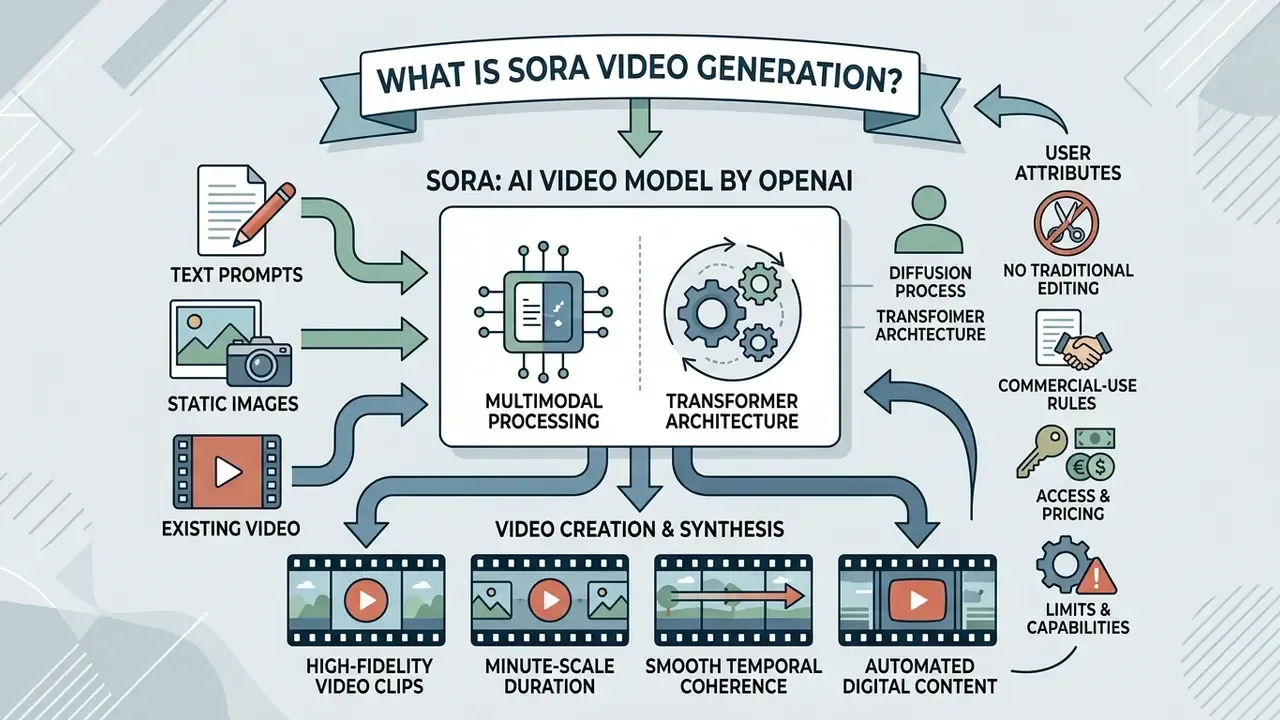
That is the short model description. The longer one matters more for buyers, and it starts with training data.
«Sora is a generalist model of visual data, jointly trained on videos and images of variable durations, resolutions and aspect ratios.»
«Sora stands out as a milestone: it generates minute-scale video at high resolution with smooth temporal quality.» Survey on text-to-video generation models (2024 to 2025). https://arxiv.org/abs/2403.05131
Sora as an AI video model for video creation
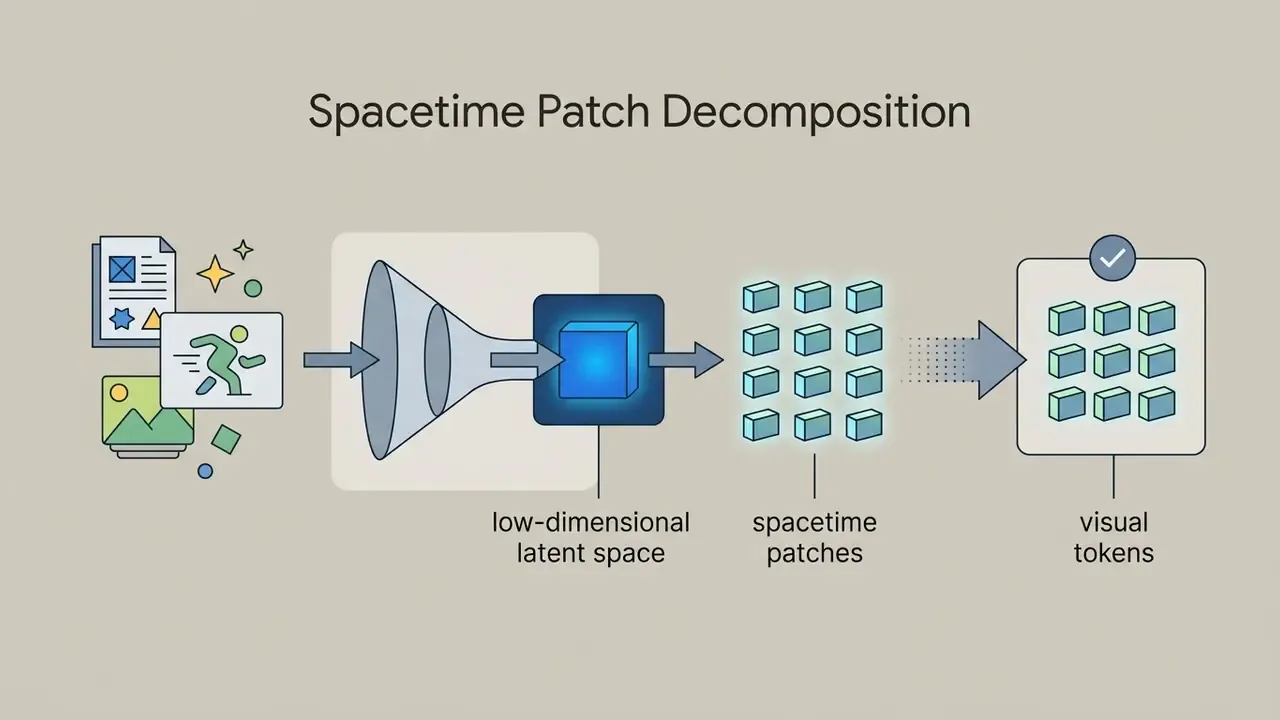
Sora operates as a multimodal visual generation AI model designed for automated video creation and digital asset synthesis across flexible aspect ratios. Unlike traditional video editors and manual animation tooling that rely on keyframing, this AI video model generates new footage directly from visual data representations. It treats video frames as sequences of spacetime patches, allowing the system to maintain subject identity, lighting, and environmental continuity across dynamic camera cuts.
One practical consequence: you do not "edit" a Sora clip in the traditional sense. You re-generate it, then curate. Teams used to a timeline find that uncomfortable at first.
Organizations analyzing automated media workflows can review our AI Media Commercial-Use Hub for strategic frameworks on asset rights. Teams assembling end-to-end synthetic media pipelines typically pair generative video with narration systems documented in our guide to AI voice generators and with publishing workflows described in our YouTube video editor workflow guide.
What users can generate with text prompts and visual input
Users can input natural language text prompts, static photographs, or pre-existing video files to produce tailored video clips and multi-shot visual sequences. The model interprets detailed descriptions to construct realistic or stylized environments with active camera movements, complex lighting, and background motion. When supplied with an image input, Sora animates the still frame while preserving original character details and visual composition. Microsoft's Azure documentation splits these modes explicitly into text to video, image to video, and video to video, with the reference image acting as a first-frame visual anchor that must match the target render resolution in JPEG, PNG, or WebP format.
In other words: three inputs, one latent pipeline, and a hard ceiling on length. Most disappointment in early pilots came from ignoring that ceiling, not from the model quality.
Sora AI video generation capabilities
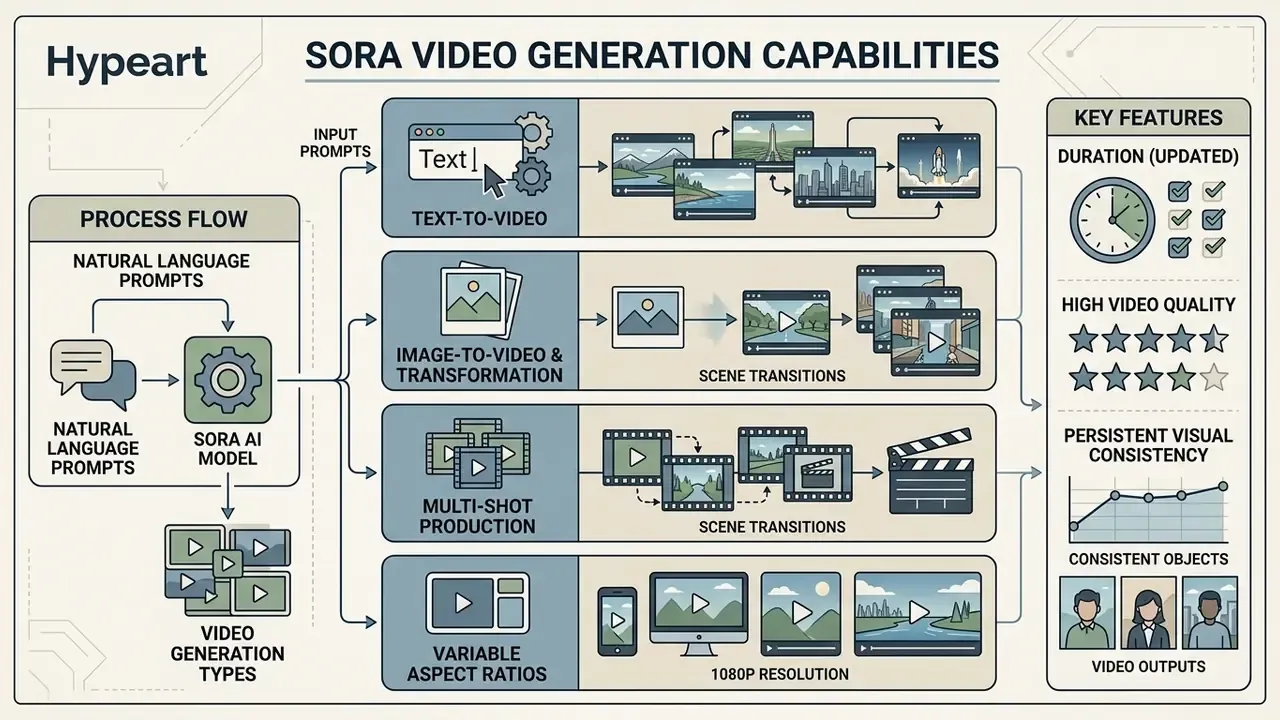
Sora AI video generation capabilities encompass multi-shot video production, variable aspect ratios up to 1080p resolution, and persistent visual consistency. The underlying model was trained to generate clips up to 60 seconds long, though active product interfaces capped rendering at 20 seconds. Its core strengths include modeling 3D spatial geometry, executing realistic camera pans, and retaining subject appearance across sequential frames.
| Feature / Capability | Supported Specifications | Operational Detail | Primary Use Case |
|---|---|---|---|
| Input Modalities | Text, Image (JPEG, PNG, WebP), Video | Accepts text prompts, initial image anchors, or video extensions | Multi-modal clip generation |
| Max Render Resolution | Up to 1080p (1920x1080 or 1080x1920) | Supports widescreen (16:9), vertical (9:16), and square (1:1) | Cross-platform video creation |
| Clip Duration | 4, 8, 12, 16, or 20 seconds | Capped at 20s in production; research model supports up to 60s | Short-form media production |
| Temporal Consistency | Latent spacetime tracking | Maintains character details and environmental continuity | Multi-shot scene storytelling |
| Audio Integration | Synchronized dialogue and sound (Sora 2) | Generates native audio paired with visual motion dynamics | Complete clip creation |
| Frame Rate | Not published in official documentation | OpenAI and Azure docs specify resolution and duration only | Requires empirical verification per export |
Duration fact-check (Updated). Several third-party reviews still advertise "60-second clips in Sora." That figure originates from the 2024 research report describing the underlying model, not from shipped interfaces. Official OpenAI and Microsoft documentation from 2024 to 2026 caps production renders at 20 seconds (Pro tier) and 5 to 10 seconds (Plus tier). Treat any longer claim as legacy marketing copy.
Text-to-video generation from natural language prompts
Text-to-video generation in Sora translates natural language instructions into rendered visual sequences using synthetic recaptioning models. During training, OpenAI applied descriptive captions to video datasets, enabling the diffusion network to parse specific prompt instructions accurately.
«Recaptioning, inherited from DALL·E 3, improves the model's ability to map nuanced text prompts to the intended visual content.»
As a result, creators working with text-to-video AI can specify fine details including lens choices, lighting angles, subject movements, and overall artistic aesthetics. Short, vague prompts generate short, vague results, so most teams settle on a template: subject, action, lens, light, camera move. Readers comparing prompt behaviour across modalities can cross-reference our analysis of ChatGPT image generation versus alternative tools.
Image-to-video and existing video transformation
Image-to-video functionality uses a static image as a first-frame visual anchor, generating motion that extends naturally from the source graphic. In video transformation modes, the model can extend existing footage backward or forward in time, fill missing frames, or alter visual elements while preserving overall composition. These capabilities allow creative teams to animate graphic design assets or re-render existing footage without re-shooting physical scenes. Teams preparing source stills often normalise them first with a photo editor so that reference resolution exactly matches the render target.
Teams optimizing media delivery across web pipelines often combine video transformation with specialized compression tools. Detailed metrics on format conversion and quality preservation are available in our guide to video compressors.
Video quality, duration and visual consistency
Sora produces high quality videos at higher resolutions up to 1080p, avoiding the visual distortion common in earlier generative video systems. The model preserves visual consistency by tracking subjects through a compressed latent space rather than calculating pixel adjustments frame-by-frame. This structural tracking allows subjects to pass behind obstacles or exit the camera frame and reappear without losing facial features or clothing details.
Is that professional grade? For a 12-second background plate, usually yes. For a hero shot with hands, text, or reflective surfaces, plan on manual review.
How OpenAI Sora video generation works
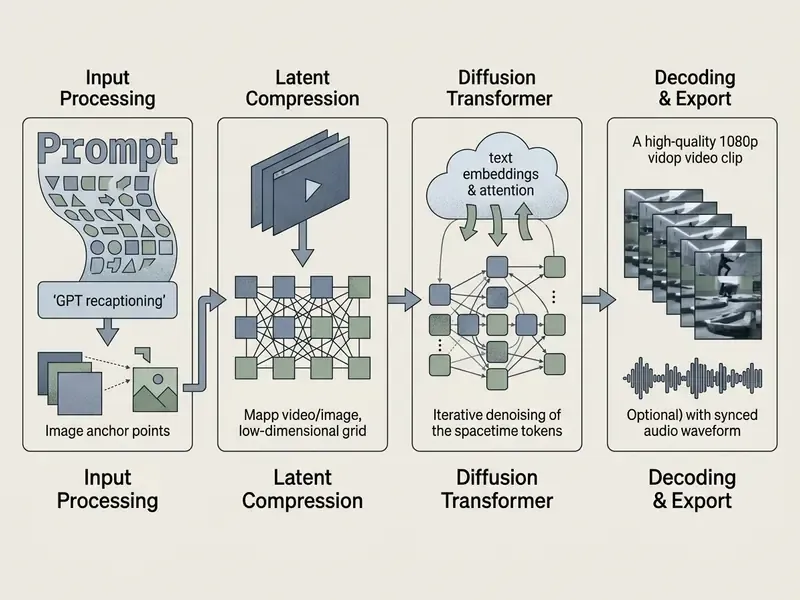
OpenAI Sora video generation works by compressing visual media into latent spacetime patches and processing them through a diffusion transformer network. The model receives noisy visual data tokens and iteratively removes noise under the guidance of text embeddings. This unified framework allows Sora to train on diverse visual data across varying resolutions, aspect ratios, and durations without cropping source files.
«The diffusion component trains the model to remove noise from random inputs, iteratively approaching the target frames; the transformer provides scaling and flexible conditioning.»

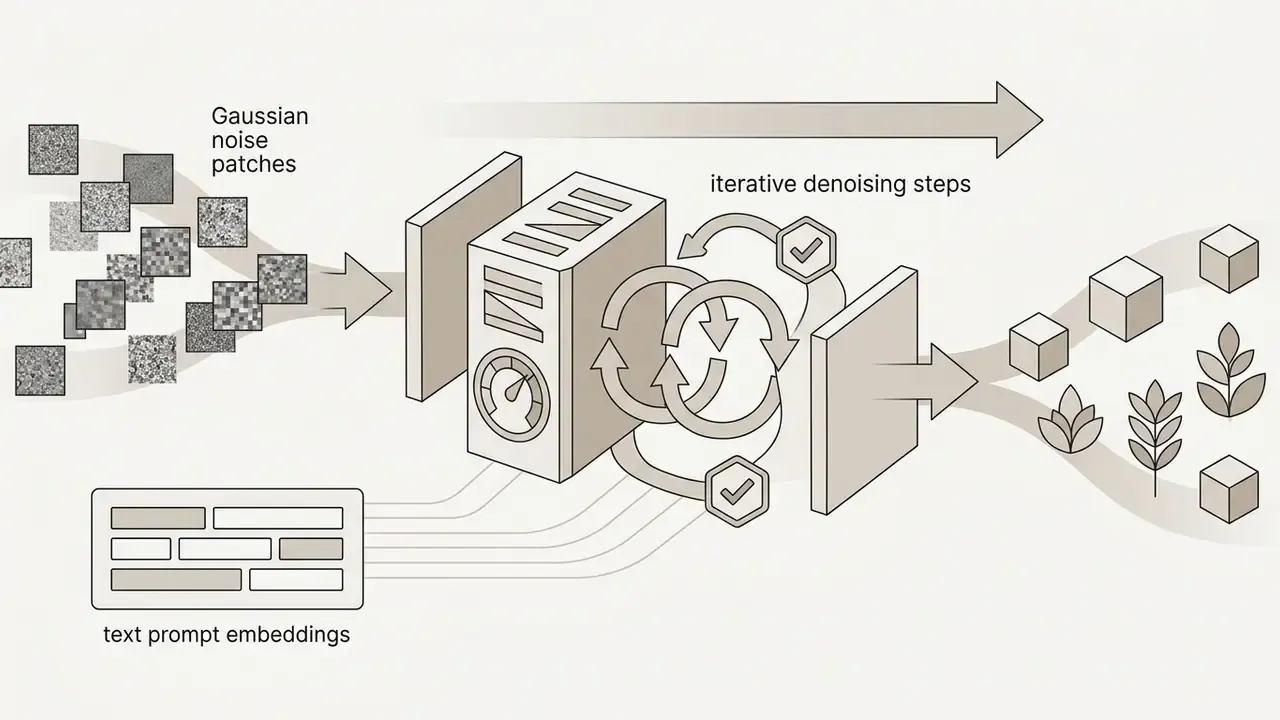

From prompts to generated video sequences
The generation pipeline maps text prompts into conditioning vectors that steer the diffusion transformer at every denoising step. Because the architecture treats time and space as a continuous grid of visual patches, the network generates full video sequences simultaneously rather than predicting footage frame-by-frame. This global attention mechanism prevents sudden structural jumps between adjacent frames.
Step-by-step rendering workflow
- Define aspect ratio & resolution: Select
16:9(1920x1080) for cinematic landscape or9:16(1080x1920) for mobile vertical and short form formats. - Draft a descriptive prompt: Specify lens length (for example, 35mm anamorphic), lighting (for example, volumetric golden hour), and subject motion, including explicit camera directions such as slow dolly-in or wide establishing shot.
- Anchor a first-frame image (optional): Upload a 1080p PNG, JPEG, or WebP reference graphic, matched to the output resolution, to lock character traits.
- Execute a draft render: Generate a 4-second preview to verify physical interaction consistency before spending credits on long takes.
- Apply timeline extension: Use Recut or Storyboard cards to extend successful drafts up to 20 seconds.
- Log the artifact: Archive prompt text, parameters, model version, and output file together, because Sora exposes no user-facing seed lock for exact reproduction.
How Sora models motion, scenes and the real world
Sora models dynamic camera shifts and 3D spatial geometry by learning statistical correlations from vast visual datasets. When the virtual camera rotates, objects retain their relative distance and scale, simulating physical world awareness. However, Sora relies on pattern recognition rather than a dedicated physics engine. Consequently, it can exhibit failures on complex physical interactions, such as glass shattering, incorrect cause-and-effect sequences, state changes like food being eaten, or confusing left and right. OpenAI itself acknowledged these limits at launch.
The generation workflow: create, review and refine video clips
Is Sora suitable for commercial video production?
Sora provides substantial utility for rapid concept visualization, pre-production mood boards, and social media content creation, but operational updates affect its long-term enterprise adoption. OpenAI retired the standalone Sora consumer interface on April 26, 2026, and scheduled the deprecation of the Sora 2 Videos API for September 24, 2026. Independent reporting linked the decision to shut down the app to compute shortages, cost pressure (Sora was estimated to cost roughly $1 million per day to operate), and a strategic pivot toward core enterprise products, after worldwide usage peaked near one million users and then declined. Consequently, organizations must evaluate platform longevity alongside safety and legal risks before embedding Sora into core production pipelines.
| Commercial Criteria | High Suitability Scenarios | Unsuitable / Restricted Scenarios | Key Risk Factor |
|---|---|---|---|
| Pre-Visualization & Pitching | Agency pitch decks, animatics, visual mood boards | Final national broadcast commercial delivery | Render unpredictability |
| Social Media Content | Short-form social clips, background motion graphics | Likeness-based marketing or celebrity ads | Content Policy filters |
| Brand Protection | Fully synthetic abstract landscapes and objects | Replicating protected corporate trademarks | Copyright infringement |
| Regulatory Compliance | Internal conceptual testing | Unlabeled synthetic media in public advertising | C2PA provenance rules |
| Platform Continuity | One-off campaign assets with no re-render need | Always-on product pipelines and scheduled batch jobs | API sunset Sept 24, 2026 |
Read the table as a rule of thumb: use Sora where the asset is disposable and internal, avoid it where the asset must be reproducible, branded, or legally defensible.
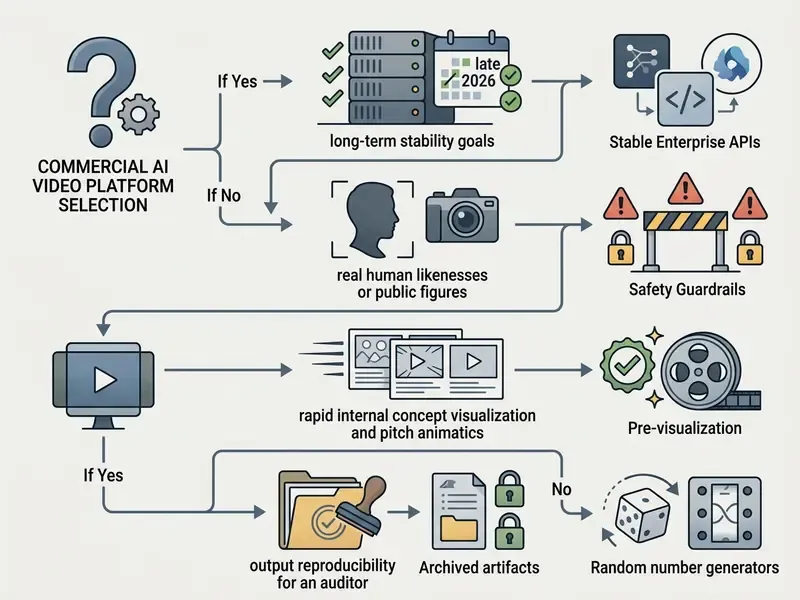
Use cases for content creators, brands and creative teams
Creative agencies and marketing teams utilize Sora primarily during pre-production to accelerate client approvals and visualize campaign concepts. By rendering high-fidelity animatics and background assets prior to physical camera shoots, production houses reduce initial design overhead. Independent creators also leverage AI video generators for short-form digital marketing campaigns and web graphics, which is where the creative potential of these ai tools shows up fastest.
This pattern is documented rather than assumed. OpenAI's own launch materials describe collaboration with visual artists, designers, creative directors, and filmmakers, and cite the Emmy-nominated Los Angeles agency Native Foreign using Sora "to visualize concepts and rapidly iterate on creative for brand partners" (OpenAI, 2024, https://openai.com/index/sora/). Microsoft's 2026 customer story on WPP's T&Pm similarly describes the agency using Sora on Azure OpenAI to "pre-vision" campaigns and build fully animated examples early in the process. Regulated-sector teams should note both cases sit in concepting, not final broadcast delivery.
Teams building promotional audio-visual assets frequently combine generative video tools with narration and score. Guidance on synthetic audio workflows can be found in our guide to AI voice generators, while budget-constrained teams can compare capacity limits in our roundup of free AI video generators.
Commercial-use limitations, safety and realistic video risks
Commercial deployment must comply with OpenAI's strict usage policies, which prohibit creating deceptive media, non-consensual likenesses, or copyrighted characters. Sora embeds invisible C2PA metadata and visible watermarks into generated media to establish provenance and verify digital origin. Organizations deploying AI-generated media must adhere to advertising disclosure mandates, ensuring synthetic assets are clearly labeled to prevent consumer deception. The IAB AI Transparency and Disclosure Framework recommends that synthetic-video labels appear on the first frame and remain visible.
«The OpenAI system card describes layered content filtering, strict limits on depictions of real people, and mandatory provenance labelling through C2PA.»
Two practical caveats emerged during testing. First, provenance signalling traces origin but does not prevent downstream reuse, cropping, or re-encoding: within a week of Sora 2's release, third-party tools capable of stripping the visible watermark were widely reported. Second, watermark presence differs by plan. Pro-tier downloads produced videos without a visible mark in several product configurations, which shifts the disclosure obligation entirely onto the publisher. That single detail has caught more than one marketing team off guard.
Risk leaders evaluating digital safety mandates across creative media should consult our trackers on AI Litigation and Case Timelines, and compliance teams verifying whether a synthetic asset has already circulated publicly can apply the techniques in our comparison of AI reverse-image-search tools. For likeness-adjacent workflows where consent documentation matters most, see our guide to AI headshot generators.
When to consider Sora alternatives such as Runway Gen
Enterprise teams should consider market alternatives like Runway Gen-3 Alpha, Pika, or Luma Dream Machine when precise camera trajectory controls or guaranteed long-term API availability are required. Runway Gen-3 Alpha provides specialized Director Mode controls, Motion Brush, and advanced camera panning parameters, with direction and intensity control for pan, tilt, zoom, dolly, and orbit moves, tailored for traditional film workflows, plus commercial use and watermark-free exports on paid tiers. Note that Runway retired Gen-3 Alpha on July 8, 2026, so lifecycle diligence applies across every vendor in this category, not just OpenAI.
According to global performance benchmarks published by Artificial Analysis, Sora 2 Pro ranks behind several competitive video generation architectures in prompt adherence, motion consistency, and rendering speed. So "best ai video model" is a moving target, and any procurement memo should date-stamp its ranking.
| AI Video Model | Developer / Origin | Comparative Quality Rank | Max Clip Native Render | Key Architectural Focus |
|---|---|---|---|---|
| Seedance 2.0 | ByteDance | #1 (Tier 1 Leader) | 15 seconds | Complex multi-subject dynamics |
| Runway 4.5 | Runway AI | #2 (Tier 1 Leader) | 10 seconds | Cinematic camera trajectory & Director Mode |
| Kling 3.0 | Kuaishou / Kling AI | #3 (Tier 1 Leader) | 12 seconds | Photorealistic human motion & physics |
| Sora 2 Pro | OpenAI | #4 (Tier 2 Contender) | 20 seconds | Spacetime patch consistency & audio sync |
Enterprise governance comparison matrix
| Evaluation Axis | Sora / Sora 2 | Runway Gen-3 & later | Luma Dream Machine | Google Veo |
|---|---|---|---|---|
| API lifecycle status (2026) | Deprecated; sunset Sept 24, 2026 | Active; Gen-3 Alpha retired Jul 8, 2026 | Active API | Active API with cloud tenancy options |
| Enterprise deployment path | Consumer plans + Azure preview | Direct SaaS + API | Direct API | Cloud-platform integration |
| Provenance signalling | Visible watermark + C2PA metadata | Plan-dependent watermarking | Vendor-dependent | Platform-managed provenance |
| Camera/timeline control depth | Prompt + storyboard cards | Director Mode, Motion Brush | Keyframe-style controls | Prompt + camera hints |
| Likeness restrictions | Real people and public figures blocked | Policy-restricted | Policy-restricted | Policy-restricted |
| Best fit | Rapid pre-vis, short social assets | Film-style controlled shots | Cinematic motion tests | Long-horizon enterprise pipelines |
Organizations comparing AI video platforms can review detailed feature matrices in our AI Media Comparison Matrices, developer implementation requirements in our AI Media API Guides, and a concrete integration walkthrough in our Google Veo implementation guide covering API access, costs, and rate limits. Teams also evaluating still-image pipelines alongside video can cross-reference our comparisons of the best AI art generators and Midjourney versus competing tools.
Data privacy, model risk and audit trail controls
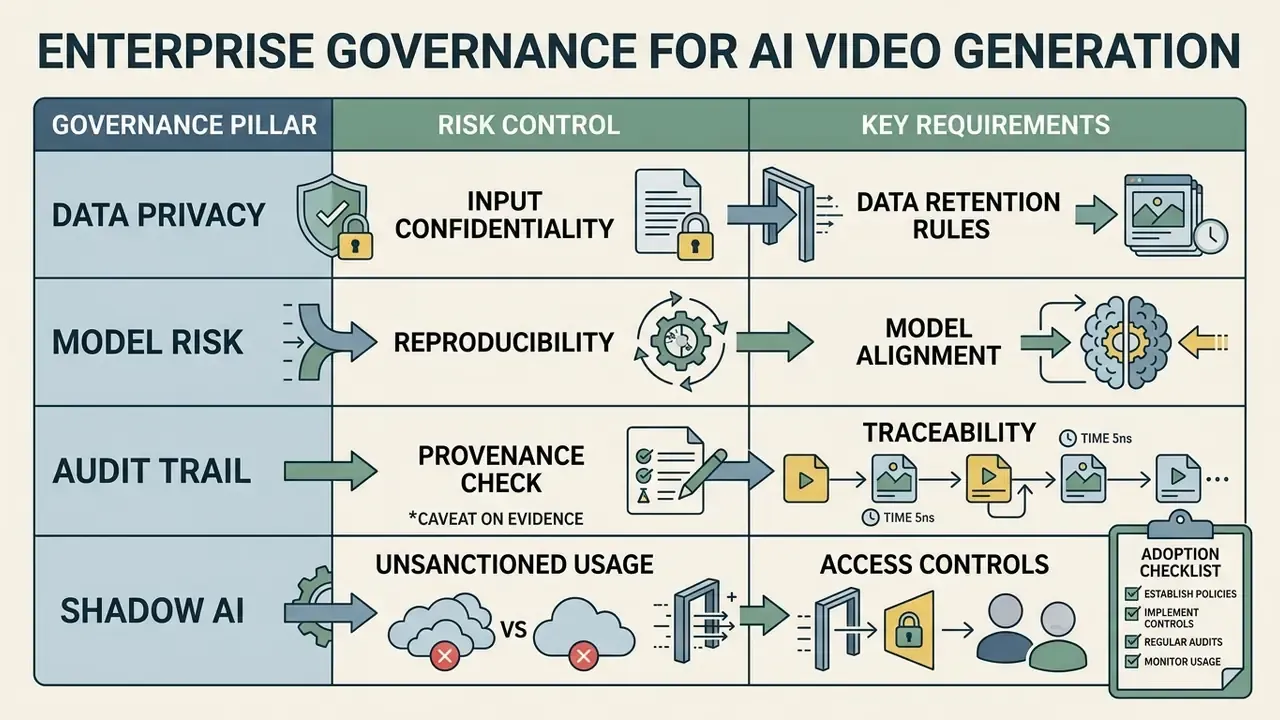
AI video governance & adoption checklist
Checklist0 / 11
Key Sora AI features for creating and editing videos
Key Sora AI features include integrated tools designed for precise clip assembly, style modification, and post-generation timeline editing. Rather than limiting users to single-pass rendering, OpenAI incorporated interface controls that allow creators to manipulate generated clips directly. The OpenAI Sora AI video generation features that mattered most in practice were Storyboard, Remix, Recut, Loop, and Blend, which together provide fine-grained command over scene structure and visual transitions. Readers weighing these video maker features against rival toolsets can consult our ranking of the best AI video generators and their free tiers.
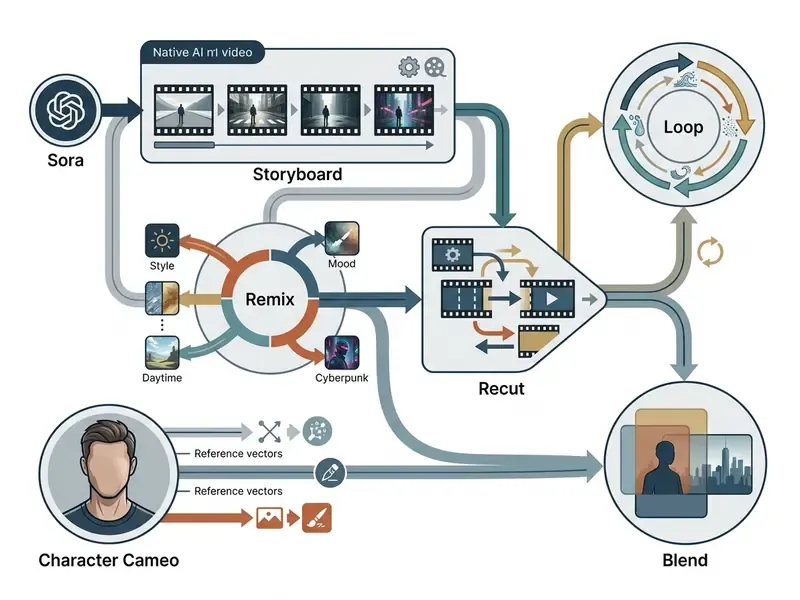
Storyboard, remix and style controls
Storyboard allows creators to construct linear scenes by arranging timestamped image, text, or video cards along an editing timeline. Cards can be dragged to adjust pacing, converted to text, captioned, or deleted, and the panel can be opened either directly or from Recut. For Sora 2, Storyboards shipped in beta with second-by-second sketching, either from scratch or by describing a scene and then editing the generated storyboard. Remix enables users to modify an existing video generation by editing its text prompt, allowing them to replace, remove, or re-imagine elements: swapping background elements, adjusting weather conditions, or changing character clothing while maintaining camera placement. Style controls rely on explicit prompt descriptions to apply specific color palettes, cinematic lighting schemes, or artistic rendering styles, a prompt-driven approach shared with modern AI art generators.
Recut, loop and blend for video editing
Recut allows creators to trim a generated video clip and extend the timeline forward or backward using a new storyboard prompt. Loop analyzes a selected portion of a video and renders a seamless repetition, ideal for ambient social media backgrounds. Blend merges visual elements from two distinct video inputs into a single composite sequence, smoothing visual transitions between disparate scenes, which helps when mixing synthetic footage with real-world plates.
None of this replaces a conventional video editor. Think of it as staging, not finishing.
Character Cameo and digital identity verification
Sora 2 introduced the Character Cameo feature, enabling creators to generate persistent digital avatars across multi-shot sequences. By verifying identity through a facial scan and photo ID prompt, users anchor their physical likeness into the latent space. The diffusion model then renders the verified persona across disparate environments, lighting setups, and camera angles while preventing unauthorized third-party deepfakes.
Two governance notes apply. First, verification binds the cameo to a consenting individual, so inserting anyone else's likeness without explicit permission violates both platform policy and, in many jurisdictions, publicity and data-protection law. Second, for regulated employers, a verified executive cameo is biometric data by definition. Treat enrolment as a privacy-impact-assessment trigger, not a product feature toggle.
How to access Sora and understand OpenAI Sora pricing
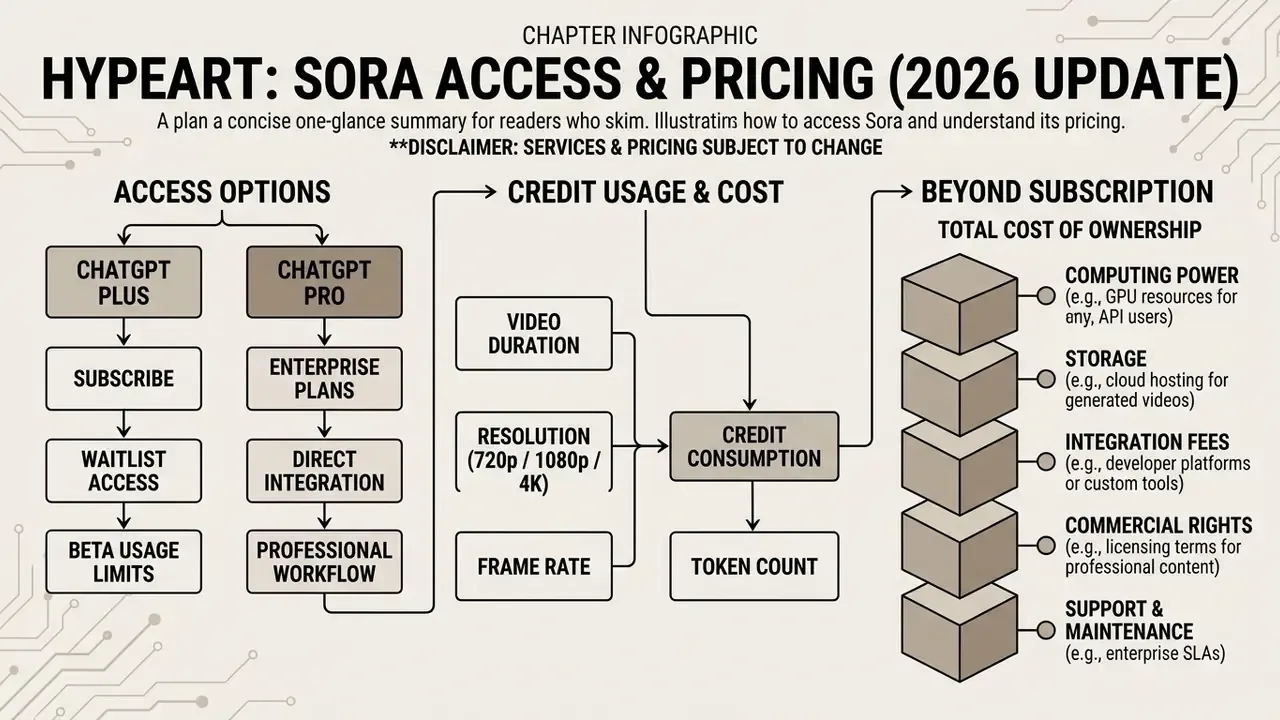
Accessing Sora historically required an active subscription to ChatGPT Plus or ChatGPT Pro, which granted monthly generation credits. OpenAI Sora pricing operated on a credit-deduction model, where credit burn scaled according to render resolution, clip duration, and processing priority. Subscribers accessed the service through sora.com, the dedicated Sora mobile app, or integrated ChatGPT interface modules. Teams on a tighter budget can benchmark this against the capacity ceilings documented in our guide to free AI video generators and, for still assets, free AI art generators.
| Subscription Plan | Monthly Cost | Included Credit Allocation | Max Supported Resolution | Max Render Duration | Queue Priority |
|---|---|---|---|---|---|
| ChatGPT Plus | $20 / month | ~1,000 credits (~50 videos at 480p) | 480p / 720p | 5 to 10 seconds | Standard Queue |
| ChatGPT Pro | $200 / month | 10,000 credits + Relaxed Mode | Up to 1080p | Up to 20 seconds | Priority Queue |
| Direct / API Access | Pay-per-second | Deprecated (Shutdown Sept 2026) | 1080p | 20 seconds | Dedicated API |
ChatGPT Plus and ChatGPT Pro access options
The ChatGPT Plus plan ($20 per month) provided entry-level access, capping video generation at lower resolutions such as 480p or 720p with strict monthly quotas. The ChatGPT Pro plan ($200 per month) catered to professional workflows by offering ten times higher credit allowances, priority render queues, 1080p resolution exports, generation lengths up to 20 seconds, up to five concurrent generations, and watermark-free downloads. Importantly for enterprise buyers, Sora was not bundled with ChatGPT Team, Enterprise, or Edu at launch, and was unavailable to users under 18. Most corporate adoption therefore ran through individually billed consumer plans, which is precisely the Shadow AI vector described above.
Detailed breakdowns of subscription structures across creative software tools can be reviewed in our AI Media Pricing Guides.
What affects Sora video generation cost and credit usage
Video generation costs depend directly on target resolution and total clip duration. Rendering a 20-second clip at 1080p resolution consumes significantly more credits than generating a 5-second clip at 480p, because of the computational overhead of the diffusion transformer. Selecting priority queue processing or applying complex multi-shot storyboard extensions accelerates monthly credit consumption further. Frame rate is not documented as an independent billing variable, and editing features such as Remix or Loop were not billed as separate line items. Each re-generation, however, consumes a fresh credit allocation, which is where budgets quietly leak.
Total cost of ownership beyond the subscription line
Sticker price is the smallest component of risk-adjusted cost. In testing, the credit fee represented a minority of true spend once the following were counted:
| TCO Component | Typical Driver | Practical Note |
|---|---|---|
| Subscription / credits | $20 to $200 per seat per month | Scales with resolution and duration, not seat count alone |
| Re-render waste | 3 to 6 discarded takes per usable asset | Draft at 4 seconds before committing to 20-second renders |
| Human QA & frame review | 15 to 45 minutes per published asset | Physics and hand/face artifacts require manual inspection |
| Legal & IP clearance | Per campaign | Highest variable cost in regulated sectors |
| Provenance & disclosure workflow | Per publication channel | Label placement and metadata verification |
| Migration reserve | One-time | Mandatory given the Sept 24, 2026 API sunset |
Interactive cost modelling for these components is available through our digital calculators.
A safe next step for risk and finance owners
No heroics required. The point is to convert curiosity into a controlled decision, with dated evidence attached. Secondary audiences, including CFOs and finance transformation leads looking at payables, receivables, and close automation, can reuse the same five steps. The control logic does not change when the model changes. Only the materiality does.
- Inventory first. Search expense data for consumer AI subscriptions billed to individuals. That list is your real starting position, whatever policy says.
- Pick one low-materiality use case. Internal training b-roll or interface concept demos are good candidates. No customer data, no likenesses, no external distribution in phase one.
- Write the boundaries before the prompts. Approved vocabulary, prohibited inputs, named owner, escalation path, and a shutdown trigger.
- Run a 30-day evidence pilot. Archive every artifact with prompt, parameters, model version, job ID, and reviewer sign-off. Measure hours saved against QA and clearance hours added.
- Decide with numbers, not demos. If risk-adjusted value is negative, stop. If positive, extend the control set to a second use case and schedule re-validation.
FAQ: frequently asked questions about Sora AI video generation
Frequently asked questions regarding Sora center on its public availability, geographical access rules, account requirements, data handling, and preparation steps. Addressing these technical parameters helps enterprise leaders and content creators establish compliant workflows.
Is Sora publicly available and where can users access it?
Public access to Sora was introduced across a defined set of supported markets via sora.com and ChatGPT subscriptions. OpenAI's December 9, 2024 launch post stated that Sora was publicly available everywhere ChatGPT was available except the United Kingdom, Switzerland, and the European Economic Area. By January 29, 2026, OpenAI's help documentation listed a narrower set of roughly 16 supported countries and territories, including the United States, Canada, Japan, Korea, Taiwan, Thailand, Mexico, Argentina, Chile, Colombia, Costa Rica, the Dominican Republic, Panama, Paraguay, Peru, Uruguay, and Vietnam, and warned that accessing or reselling access outside those markets could result in account blocking or suspension. Following product updates in 2026, standalone consumer web access was discontinued as OpenAI shifted focus toward broader multimodal model endpoints.
What should users prepare before they start creating videos?
Before generating video content, users should prepare structured natural language prompts, define visual style guidelines, and select appropriate aspect ratio settings. If utilizing image-to-video features, creators must ensure initial reference graphics match the target render resolution in JPEG, PNG, or WebP formats. Azure and OpenAI documentation both specify that the reference image functions as a first-frame anchor and must match output resolution. Cleaning and resizing source stills in a free photo editor before upload avoids the most common rejection cause. System operators seeking technical help or billing resolution can access our dedicated AI Media Support and Troubleshooting portal.
Who owns the copyright to a video generated in Sora?
Ownership of generative output is governed by platform terms and by the copyright law of your jurisdiction, not by the watermark. OpenAI's public Sora materials emphasise provenance signalling rather than a blanket transfer of copyright ownership, and several jurisdictions decline protection for works lacking sufficient human authorship. Additionally, generating protected characters or trademarks may infringe third-party rights even where the platform technically permits the render. Obtain written clearance from counsel before commercial publication.
Can the same prompt be reproduced exactly for an audit?
No. Sora exposes no user-facing seed parameter, so repeated generations from an identical prompt differ. Reproducibility for audit purposes must be achieved by archiving the rendered artifact together with its prompt, model version, parameters, job ID, and timestamp, rather than by attempting to re-generate the asset on demand.
Does Sora train on prompts and uploaded assets?
Data handling depends on the contract tier and the enterprise privacy commitments that apply to it. Consumer plans and enterprise agreements differ materially on retention and training opt-out. Before any regulated pilot, obtain the applicable data-processing terms in writing and confirm sub-processor locations, retention windows, and deletion mechanisms. Do not assume that consumer-tier behaviour matches an enterprise agreement.
What are the hard technical limits creators hit most often?
The three most common ceilings observed in testing were the 20-second maximum clip duration, the absence of frame-accurate timeline editing, and physics failures on interactions such as shattering, pouring, or object-state changes. Long-form narrative work still requires conventional editing pipelines. Sora output is best treated as generated source footage, not a finished deliverable.
Which alternative should a team migrate to before the API sunset?
Selection depends on the binding constraint. Choose Runway for camera-trajectory control and Director Mode, Kling 3.0 or Seedance 2.0 for photorealistic human motion, Luma Dream Machine for cinematic motion tests, and a cloud-platform model such as Google Veo where tenancy, contracting, and long-horizon API stability dominate the decision. Compare specifications side by side in our AI Media Comparison Matrices.
Appendix A: revision notes
- Duration claim (Updated) Earlier drafts and several third-party reviews cite 60-second Sora clips. Retained here for traceability; production interfaces were capped at 20 seconds (Pro) and 5 to 10 seconds (Plus) per official documentation.
- Quality ranking (Updated) Claims positioning Sora 2 Pro as the top-ranked video model are unsupported; Artificial Analysis leaderboards place Seedance 2.0, Runway 4.5, and Kling 3.0 above it.
- Link profile (Updated) Off-topic and adult-adjacent glossary references present in the prior version were replaced with governance, comparison, and implementation resources appropriate to an enterprise readership.
- Structure (Updated) Commercial suitability, legal exposure, and governance controls now precede subscription pricing, matching the evaluation order used by risk and compliance reviewers.
- Author note Marcus Hale wrote the governance commentary.
- Frame rate Not published in OpenAI or Microsoft documentation; requires empirical measurement per export. Data needed.