Automated speech recognition (ASR) and natural language processing have reshaped enterprise media workflows, and the modern ai subtitle generator is now a standing component of video infrastructure rather than a nice-to-have. For decision-makers evaluating automated content pipelines, captioning tools compress production cycles from hours to seconds while widening accessibility across global distribution channels. Staying informed on video generation ai developments helps enterprise teams keep model risk management aligned with automated media generation.
One caveat before the details. Speed is easy to buy. Evidence is not.
Executive Summary for Risk, Compliance, and Content Leads
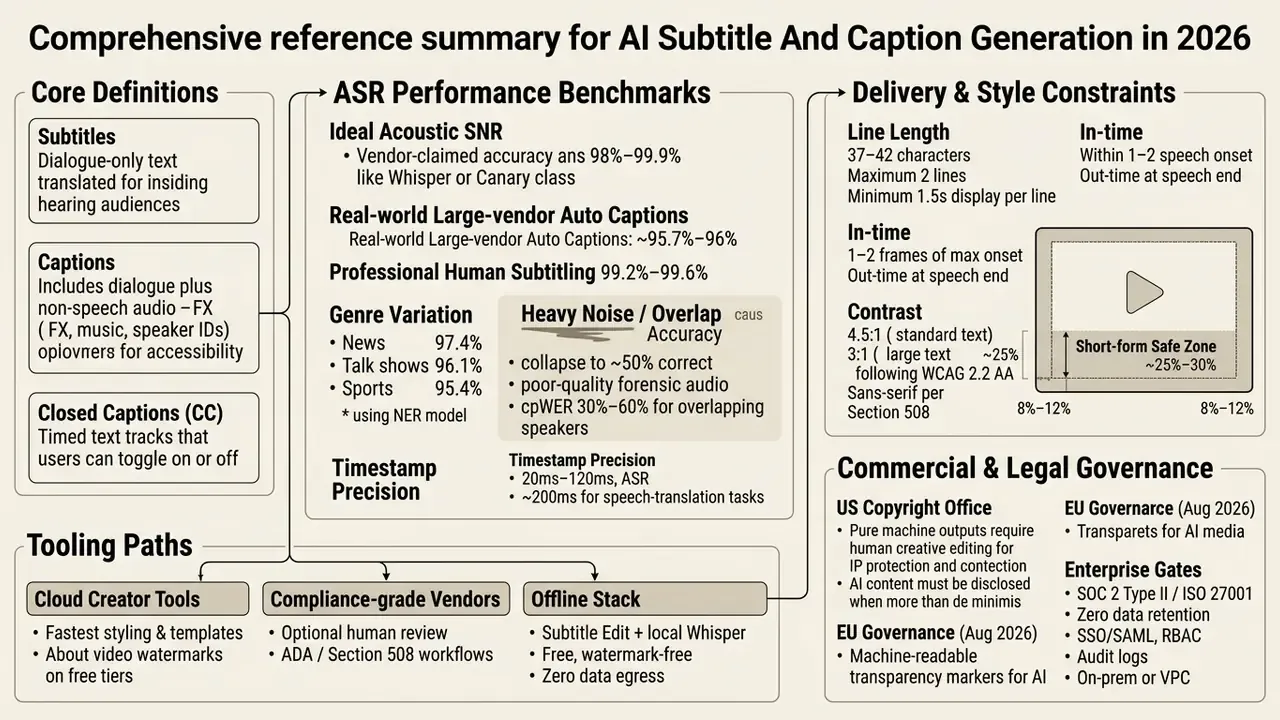
- Automation is a baseline, not a control. Real-world evaluations place large-vendor automatic captions at roughly 95.7 to 96% accuracy versus 99.2 to 99.6% for professional human subtitling. Human-in-the-loop review therefore stays mandatory in compliance-monitored channels.
- Terminology drives obligations. Subtitles (translated dialogue), captions (speech plus non-speech audio), and closed captions (user-toggleable tracks) map to different accessibility duties under WCAG 2.2 Level AA and US Section 508.
- Timing is measurable. Baseline ASR timestamp errors fall between 20 and 120 milliseconds; translation pipelines drift closer to 200 ms, so frame-accurate review still needs a human editor.
- Vendor selection splits into two tracks. Creator tooling optimises speed, animation, and social presets. Enterprise tooling must add SOC 2 or ISO 27001 attestations, zero-data-retention terms, SSO/SAML, RBAC, audit logs, and on-premises or private-cloud deployment.
- Confidential media has a free, offline path. Subtitle Edit paired with a local OpenAI Whisper model produces watermark-free
.SRToutput without transmitting audio to any cloud service.
.SRT / .VTT.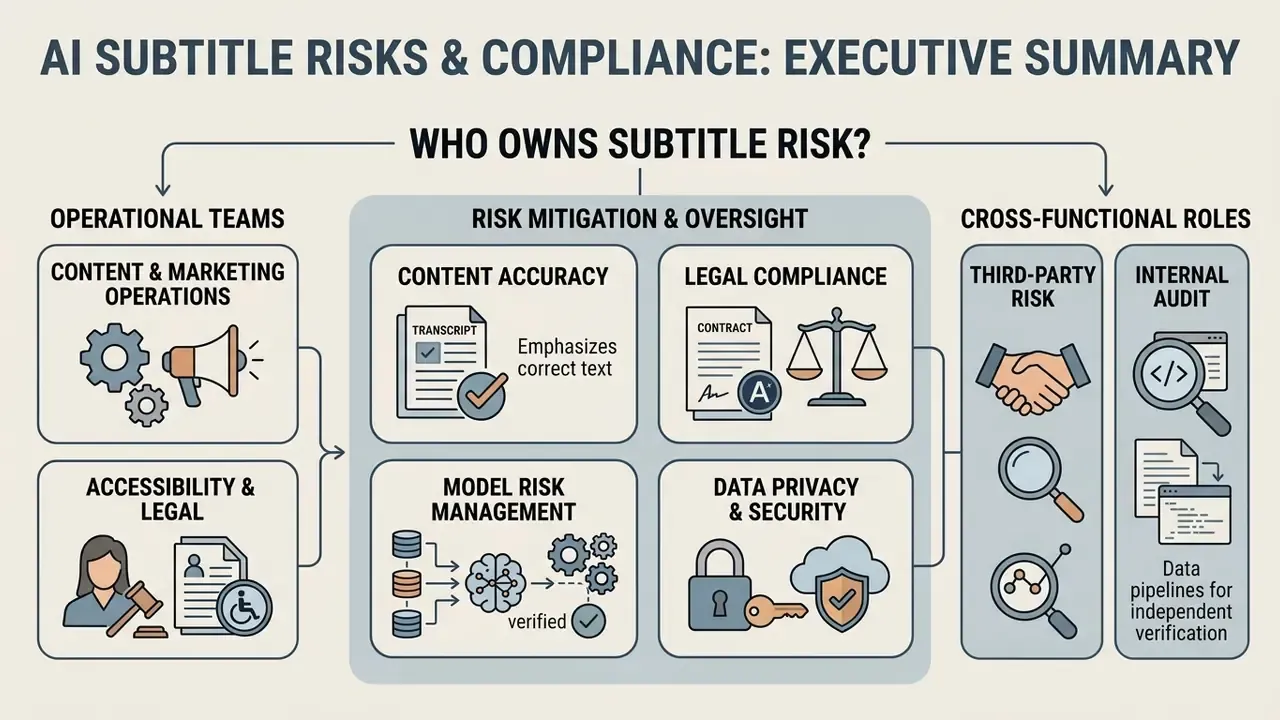
Who Owns Subtitle Risk Inside the Organisation
What an AI Subtitle Generator Does and How Subtitles Differ From Captions
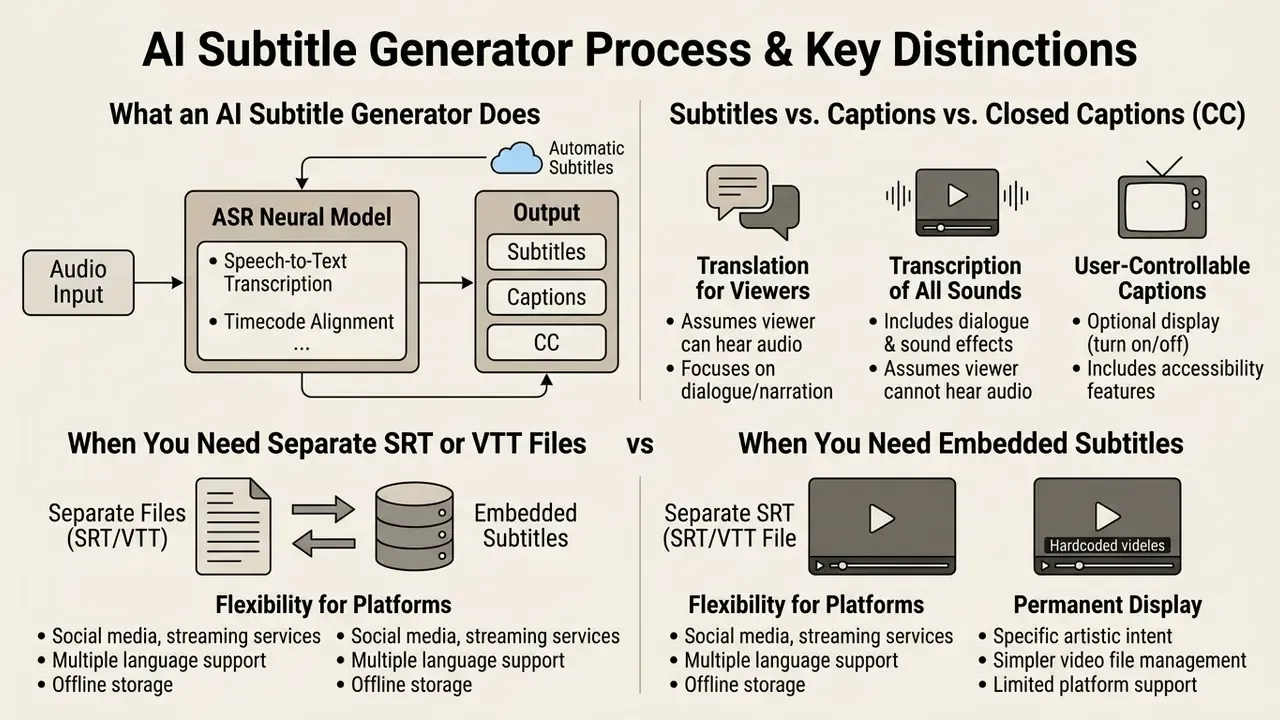
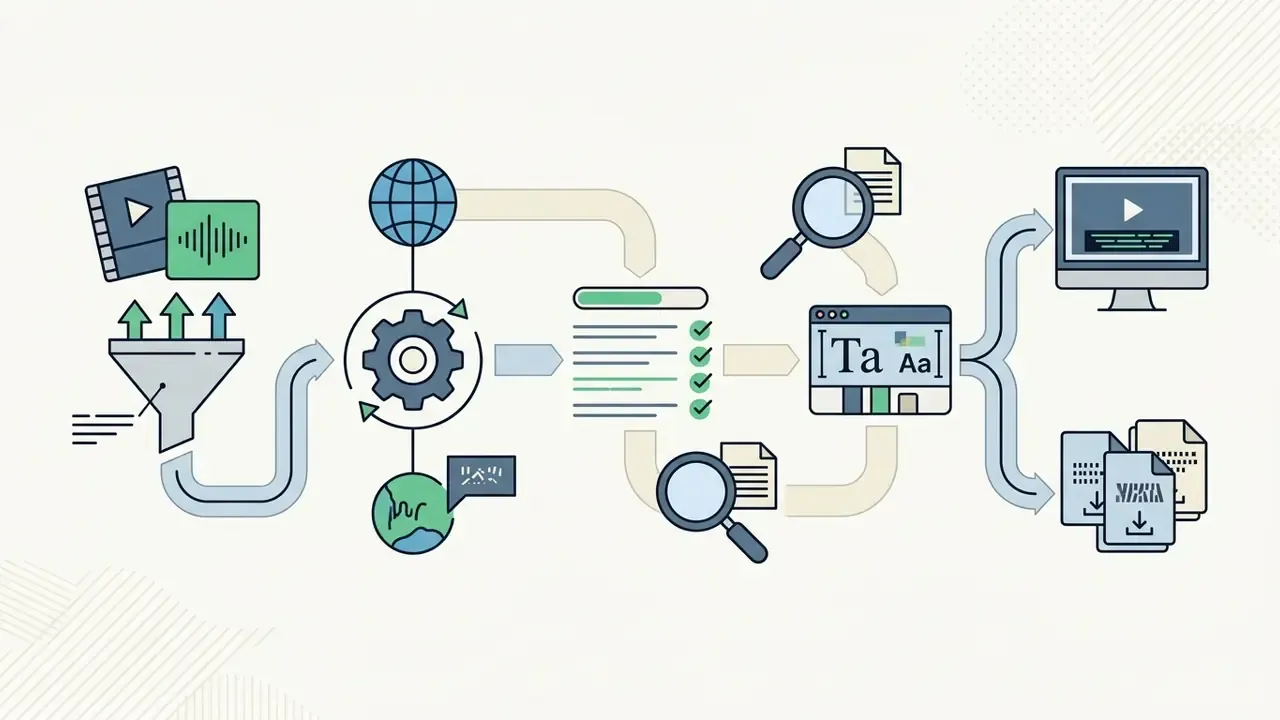
An ai subtitle generator is an automated software system powered by ASR neural models that transcribes spoken audio, aligns text with precise timecodes, and outputs formatted overlays or external sidecar files. It absorbs the video captioning and localisation work that previously required manual stenography or post-production alignment.
The distinction between subtitles, captions, and closed captions (CC) sits in audience intent and audio coverage:
Using a dedicated subtitle generator ai keeps localisation requirements and accessibility mandates (WCAG 2.2 and US Section 508) satisfied across an enterprise video library rather than one campaign at a time.
- Subtitles
- spoken dialogue translated or transcribed for viewers who can hear the audio but do not speak the source language. Subtitles generally exclude non-speech audio descriptions.
- Captions
- textual representations of dialogue plus critical non-speech cues such as sound effects, speaker identifications, tone, and ambient music, designed primarily for deaf and hard-of-hearing viewers.
- Closed Captions (CC)
- timed caption tracks stored as separate data streams or files, letting the viewer toggle display on or off inside the player interface.
«Automatic captions from Microsoft and Google reach 95.7–96% average accuracy in real conditions, while professional human subtitles reach 99.2–99.6%.»
Three to four percentage points look trivial in a marketing deck and substantial in an audit. At 96% accuracy, a 10,000-word quarterly earnings transcript carries roughly 400 errors, and several of them will land on a number, a name, or a disclaimer. That is where the exposure lives.
Subtitles, Captions, and AI CC Generators: Use Cases
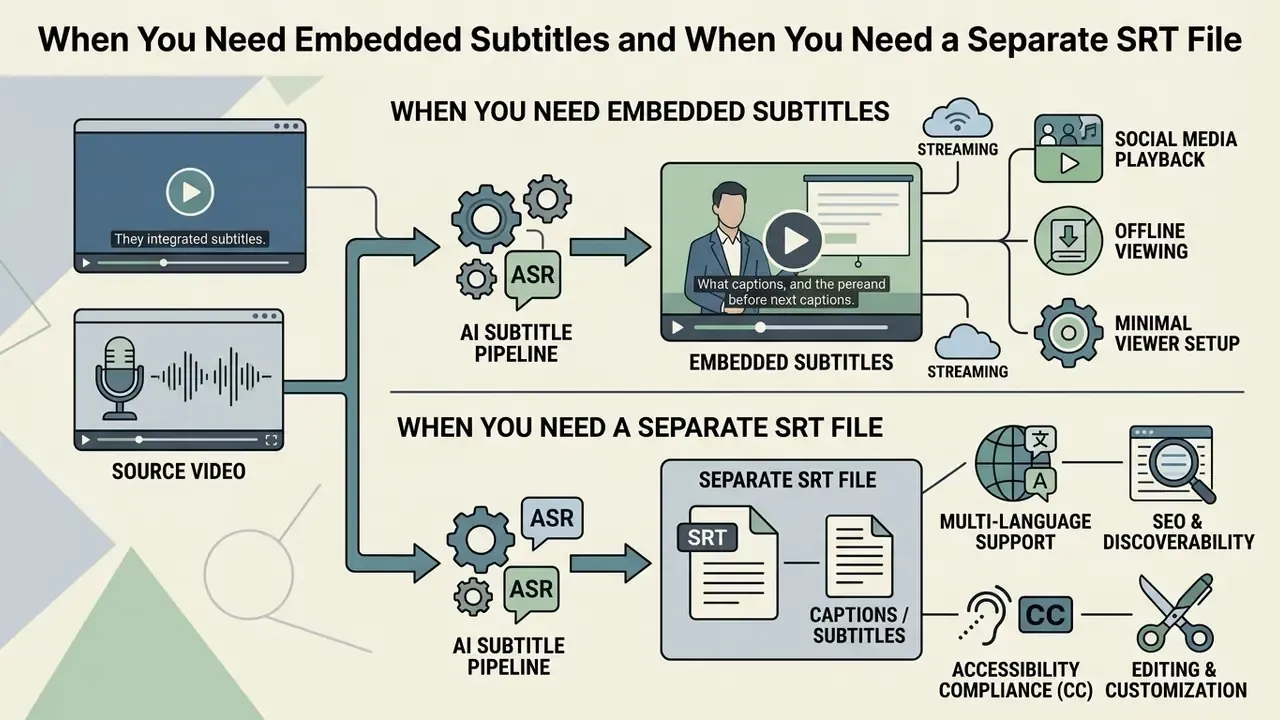
When You Need Embedded Subtitles and When You Need a Separate SRT File
Embedded (hardcoded or open) subtitles are rendered permanently into the video pixels at final render, guaranteeing display on any playback hardware or social feed without player dependencies. Standalone subtitle files such as .SRT or .VTT live as independent text sidecars holding sequence numbers, start and end timestamps, and formatted text, leaving the video stream untouched.
| Parameter | Subtitles (Dialogue Only) | Captions (Accessibility) | Closed Captions (CC) | Standalone SRT File |
|---|---|---|---|---|
| Primary Purpose | Foreign-language translation and dialogue display | Full accessibility for deaf and hard-of-hearing viewers | Switchable user accessibility overlay | Modular text track storage and search indexing |
| Audio Coverage | Spoken speech only | Speech plus non-speech cues (music, FX) | Speech plus non-speech cues | Plain text with sequence and timecodes |
| Display Mode | Hardcoded or selectable | Open overlay or toggleable track | Toggleable on/off in the media player | Parsed by the player into a screen overlay |
| User Control | None if burned-in; toggleable as a soft track | None if open; full if closed | Full end-user toggle control | Depends on media player capabilities |
| Editing & Reuse | Requires re-rendering if burned-in | Requires re-rendering if hardcoded | Non-destructive; editable as plain text | Fully editable in any text editor |
Choosing between embedded overlays and sidecar files depends on platform architecture. Embedded captions prevent rendering errors on mobile feeds such as TikTok or Instagram, while sidecar files let search engines index transcript text, improving visibility and allowing dynamic multi-language toggling. Burned-in text also destroys machine readability: recovering it later means OCR, which is exactly why archival and audit-driven workflows keep a plain-text sidecar even when the published version is hardcoded.
How AI Automatically Generates Subtitles for Video
Speech, Language, and Multi-Speaker Recognition
Transformer-based ASR engines detect spoken language by matching the opening audio frames against multilingual pre-trained embeddings. Instead of an unverified «90+ languages» claim, use vendor-documented coverage: OpenAI documents that whisper-1 supports 98 languages with accuracy varying by language, while Google Cloud Speech-to-Text V2 publishes a supported-language matrix and limits multilingual recognition to its global, US, and EU endpoints. Validate coverage for your specific dialects before signing anything.
Multi-speaker handling relies on speaker diarization, which partitions audio into homogeneous segments by voice acoustic characteristics. Diarization assigns tags (Speaker 1, Speaker 2) so conversational back-and-forth splits into legible, alternating subtitle blocks instead of one undifferentiated wall of text.
«Diarization systems built on audio-visual embeddings can identify characters without face detection, using centroids of voice samples.»
NIST's 2024 Speaker Recognition Evaluation Plan includes diarization files for multi-speaker audio drawn from video segments, which confirms speaker attribution is an actively benchmarked capability rather than a vendor convenience. Content creators building narrative assets with a video game maker use diarization to keep character lines distinct across rapid interactive dialogue. Compliance teams use the same mechanism to attribute statements in recorded advisory calls, which is a very different stake on the same feature.
What Affects Accurate Subtitles and Timing
Textual accuracy and timecode precision depend on input signal-to-noise ratio (SNR), microphone placement, room reverberation, and background audio. Secondary factors: speaker accents, domain-specific terminology, and overlapping conversation.
Timecode drift appears when ASR tokenizers mis-measure silent intervals, or when continuous speech offers no clear pause for sentence segmentation. Empirical evaluations put baseline ASR timestamp prediction error between 20 and 120 milliseconds under standard conditions.
«The Canary model achieves 80–90% timestamp prediction accuracy, with 20–120 ms error for ASR and roughly 200 ms for translation tasks.»
Independent industrial tests report average alignment shifts of 60.3 to 71.0 ms, and Whisper-based pipelines are documented as prone to inaccurate utterance boundaries without word-level alignment post-processing. Post-generation review and manual edits therefore stay in the workflow, both to remove semantic errors and to reach frame-accurate sync.
Fact Check & Accuracy Verification:
Illustrative case (model risk control, composite and hypothetical):
A tier-one US financial institution deployed automated voice captioning for archived compliance video calls. Initial unmonitored ASR runs produced severe transcript errors on regional accents and financial jargon. The model risk group introduced a human-in-the-loop review protocol with domain-specific lexicon tuning, lifting caption accuracy from 82% to 98.6% and clearing internal audit validation. The lesson is unglamorous: the lexicon file did more work than the model upgrade.
Risk-Adjusted ROI for Human-in-the-Loop Captioning
Before approving a captioning stack, model the true cost of accuracy rather than the per-minute processing fee:
Risk-Adjusted ROI = ( Baseline manual cost − [ ASR processing cost + HITL review cost ] − Expected error cost ) ÷ Total AI program cost
Where:
  Baseline manual cost   = manual transcription hours × loaded hourly rate
  HITL review cost       = review minutes per media minute × reviewer rate
  Expected error cost    = P(compliance/accessibility failure) × average remediation + penalty exposure
A practical planning heuristic: clean studio audio typically needs 0.3 to 0.5 review minutes per media minute, while accented, jargon-heavy, or multi-speaker audio can demand 1.5 to 3.0. Any business case assuming zero review time is not a business case. It is an unmitigated model risk wearing a spreadsheet.
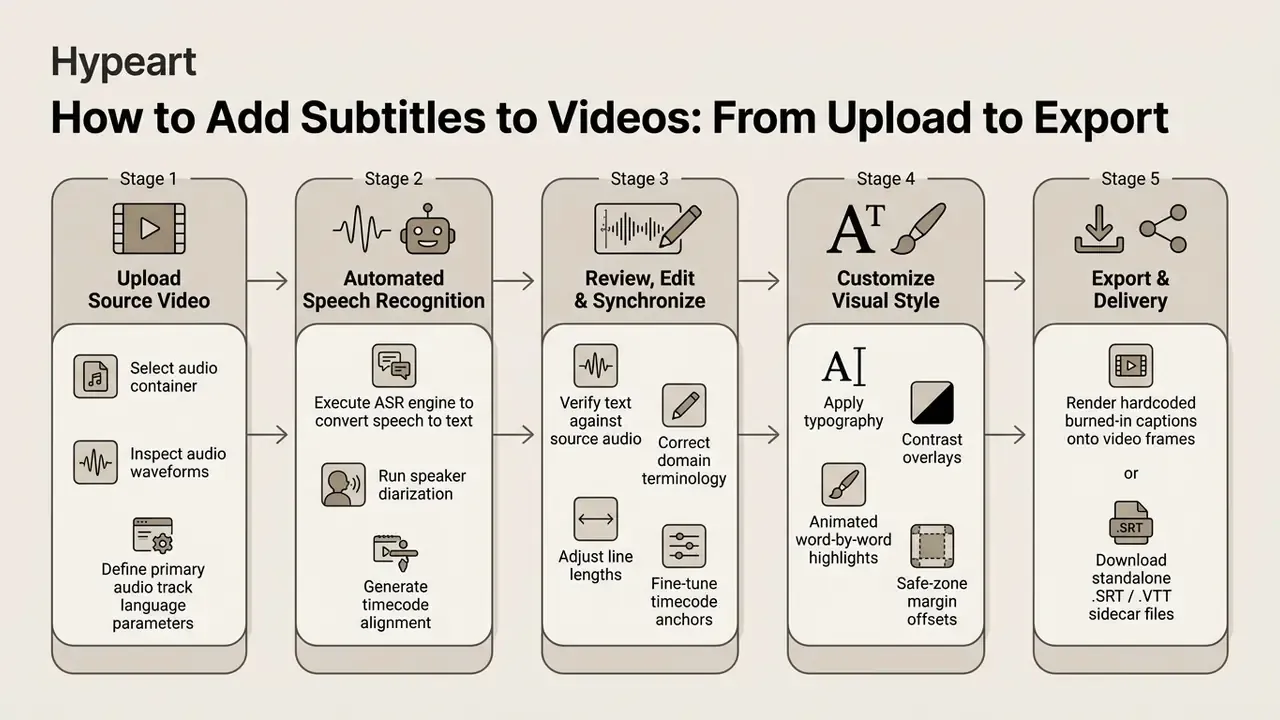
How to Add Subtitles to Videos: From Upload to Export
Adding subtitles to video assets follows a controlled workflow built for visual quality, text accuracy, and platform compatibility.
Upload Your Video and Select the Language
The pipeline starts when you upload your video into the generator workspace. Input validation checks container compatibility (MP4, MOV, MKV, WebM, and in most cloud tools AVI) and confirms the audio codec (AAC, PCM, MP3) decodes cleanly.
File-size ceilings vary sharply by service class. OpenAI's legacy audio transcription endpoint caps requests at 25 MiB, while Azure AI Video Indexer accepts uploads up to 30 GB from a URL and decodes AVC/H.264, HEVC/H.265, VP9, AAC, MP3, and PCM streams. Plan your chunking strategy for long-form archives accordingly, because a 90-minute board recording will not fit through the narrow door.
Selecting the primary audio language before recognition runs suppresses model hallucination and trims processing latency. Picking the regional dialect parameter (en-US versus en-GB, say) reweights the ASR language model toward the right vocabulary. Teams building promotional assets with a video invitation maker should clean the voiceover track before the initial file upload rather than fixing it in review.
Generating Subtitles From Audio-Only Files (MP3, WAV, Voice Memos)
AI subtitle generators are not limited to video containers. They also accept pure audio: MP3, WAV, AAC, M4A, FLAC, WebM. That path carries podcast text versions, recorded interviews, RSS show notes, and audio-only compliance call archives.
Working process:
- Audio pre-processing: apply noise suppression and voice isolation to separate speech from music and ambience before recognition runs.
- Load into the ASR model: the stream is split into chunks using Voice Activity Detection (VAD), keeping segment boundaries on natural pauses.
- Time formatting: the model maps words to timecodes and produces a standardised
.SRTor.VTTready for a podcast platform, an LMS, or a website player. - Speaker labelling: for interviews and roundtables, enable diarization so the transcript carries
Speaker 1 / Speaker 2attribution before publication.
For long podcasts, run a transcript-first workflow. Generate the full transcript, fix punctuation, speaker labels, and terminology, then segment into subtitle blocks and chapters. Editorial control over reading speed survives, and you keep a single source of truth for show notes, blog repurposing, and search indexing.
Review, Edit, and Synchronize Subtitle Text
Automated transcripts need systematic human review inside an interactive subtitle editor. Teams comparing options can start with video editors for subtitle synchronization before standardising a review environment. Editors check text alignment against the visual waveform and adjust line breaks so no line exceeds 37 to 42 characters, with a maximum of two lines on screen.
Timing synchronisation means aligning in-time codes with speech onset, usually within one to two audio frames, holding out-time codes until speech ceases, and respecting minimum display duration of roughly 1.5 seconds per line so viewers are not flash-reading (Netflix Timings Guidelines).
«V-SAT automatically detects subtitle inconsistencies in timing, formatting, positioning, and reading speed within a single pipeline.»
Point sync tools let editors stretch timecode markers across the timeline: mark the first sync point on a selected line, mark a second point later in the file, and the editor redistributes intermediate timings proportionally. Visual sync, matching the first and last subtitle lines to the opening and closing scenes, remains the fastest fix for a globally offset file.
Export Video and Download SRT Subtitles
The final stage offers two paths: render a hardcoded video, or export standalone sidecars. Downloads typically support SubRip (.SRT), WebVTT (.VTT), Advanced SubStation Alpha (.ASS), plain text (.TXT), and in professional pipelines TTML, SCC, FCPXML, or AVID markers.
1
00:00:01,500 --> 00:00:04,200
Welcome to our annual financial outlook.
2
00:00:04,350 --> 00:00:07,800
Today we will review controlled AI deployment strategies.
Enterprise developers can wire automated subtitle export straight into internal publishing pipelines using the AI Media API Guides, and benchmark surrounding tooling through AI video generators for publishing when captions form one module of a broader synthetic-media stack.
Editing Subtitle Styles: Fonts, Animation, and Brand Style
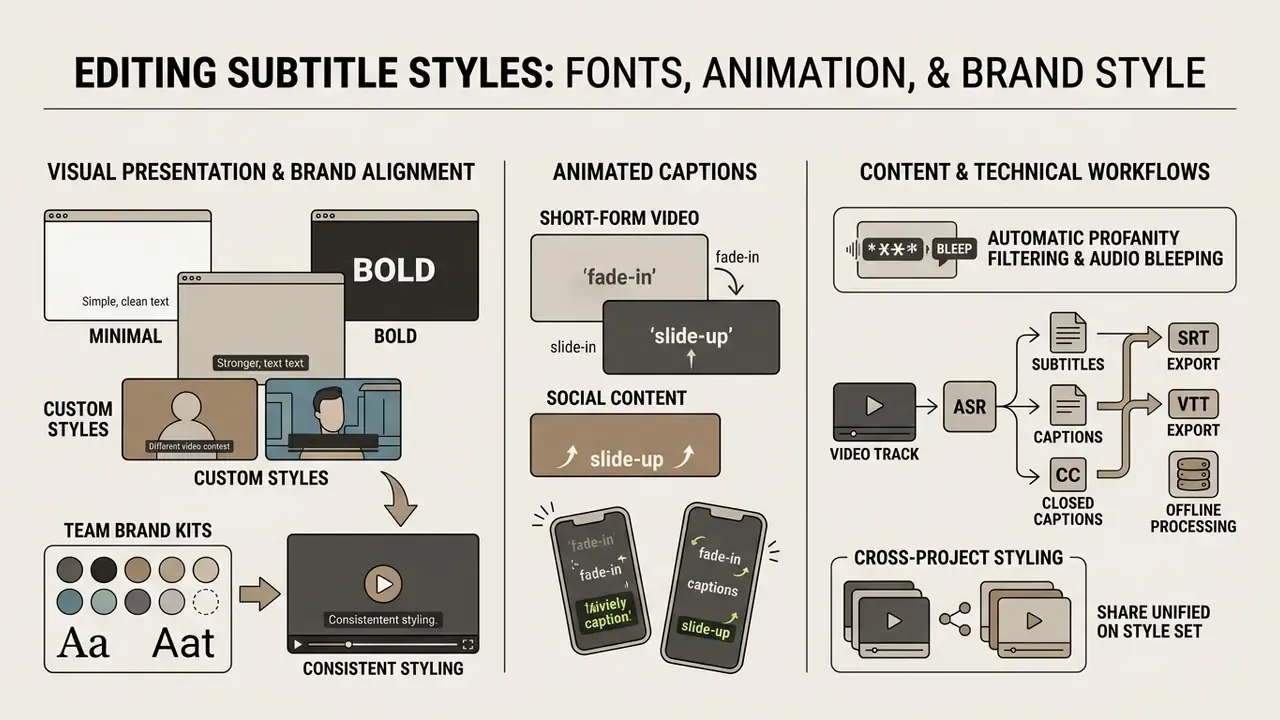
Visual presentation decides caption readability and brand alignment. Modern subtitle editors expose typography controls: font family, size scaling, line spacing, alignment, and edge outline shadows.
Advanced formats such as Advanced SubStation Alpha (.ASS) allow pixel-precise placement and custom styling tags. Programmatic video APIs like VideoDB expose SubtitleStyle objects, letting developers define text colours, background bounding boxes, and border strokes in code. Font name, font size, spacing, bold, italic, underline, strike-out, transformations, borders, and shadows are all addressable parameters.
Automatic Profanity Filtering and Audio Bleeping
Several generators, Choppity among them, include text filters that flag profanity in the ASR transcript. The system can:
- Replace explicit words in the subtitle track with
*, redaction blocks, or partial masking; - Overlay an audio tone (a «bleep») onto the waveform precisely at the word-level timecode;
- Maintain a customisable blocklist and allowlist so domain terms are not censored by accident.
Podcasters repurposing long-form audio into clips lose a manual editing pass. Corporate communications gain something more useful: a documented, repeatable control for brand-safe publishing, with the blocklist itself acting as evidence.
Team Brand Kits and Cross-Project Styling
To hold visual identity across a corporate video library, platforms such as Kapwing and VEED use a shared Brand Kit that applies by default:
- Uploaded corporate fonts (
.TTF/.OTF); - A fixed HEX palette for text and the background box (ghost box);
- Safe-zone presets per target platform (YouTube versus TikTok versus an internal LMS player);
- Reusable subtitle templates so every editor ships identical typography without manual setup.
Corel VideoStudio applies the same idea on the desktop: font type, size, colour, backdrop or shadow, and alignment save as a reusable subtitle template.
Minimal, Bold, and Custom Styles for Different Videos
Long-form editorial, corporate presentations, and educational webinars need understated subtitle styles that put legibility ahead of graphic flair. Standard guidance points to sans-serif typefaces (Helvetica, Arial, Roboto) in clean white or yellow. Broadcast delivery specifications go further, for example Arial 30 pt, white text, centred bottom placement, maximum two lines at 42 characters per line.
For readability against shifting backgrounds, set text on a semi-transparent black rectangle (a «ghost box») with a minimum contrast ratio of 4.5:1 for standard text and at least 3:1 for large-scale text, which satisfies WCAG 2.2 Level AA (W3C WCAG 2.2 Rules). Section 508 guidance additionally asks for sans-serif characters that contrast with the background.
«Preference studies with deaf and hard-of-hearing viewers show that inconsistent caption placement and low contrast significantly reduce perceived quality even when textual accuracy is high.»
Worth stressing: accuracy alone does not buy perceived quality. Placement does part of the work.
Languages, Translation, and SRT for Global Content
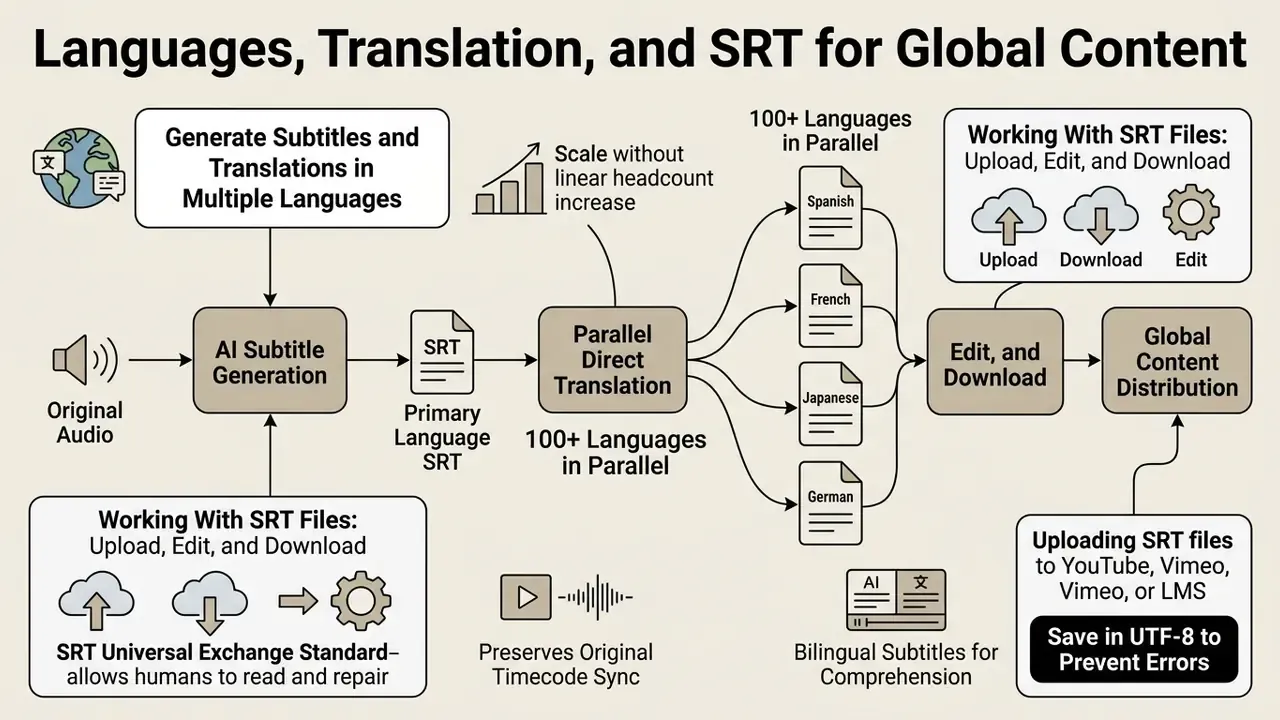
An ai srt generator used for multi-language work lets organisations scale localised media across markets without a linear headcount increase. Automated speech translation (AST) pipelines skip intermediate manual translation, converting spoken source audio directly into target-language subtitle tracks.
An ai subtitles generator built for localisation preserves original timecode sync while emitting secondary SRT tracks per locale. Global teams tracking macro shifts can monitor video generation model news when selecting translation engines.
Generate Subtitles and Translations in Multiple Languages
Current AST models support direct translation across 100+ languages in parallel. Processing context at sentence level, neural translation engines preserve idioms, syntax, and natural line breaks in the localised output. Vendor documentation consistently shows translation workflows leaving source timing untouched while replacing caption text, then exporting to SRT, VTT, TXT, DOCX, PDF, JSON, or HTML.
Audience reception studies show bilingual or translated subtitles improving comprehension for non-native viewers, though effects vary by viewer group and language pairing. The same research reports a measurable engagement gap between post-edited and raw machine-translated subtitles, which is why machine translation needs a light post-editing pass for cultural nuance and domain terminology. Teams weighing budget options can review free AI tools for video before committing to paid localisation tiers.
«End-to-end automatic speech translation models generate segmented, time-stamped subtitles directly, skipping the intermediate transcript and reducing accumulated errors.»
Working With SRT Files: Upload, Edit, and Download
SubRip (.SRT) remains the universal exchange standard, largely because a human can read and repair it:
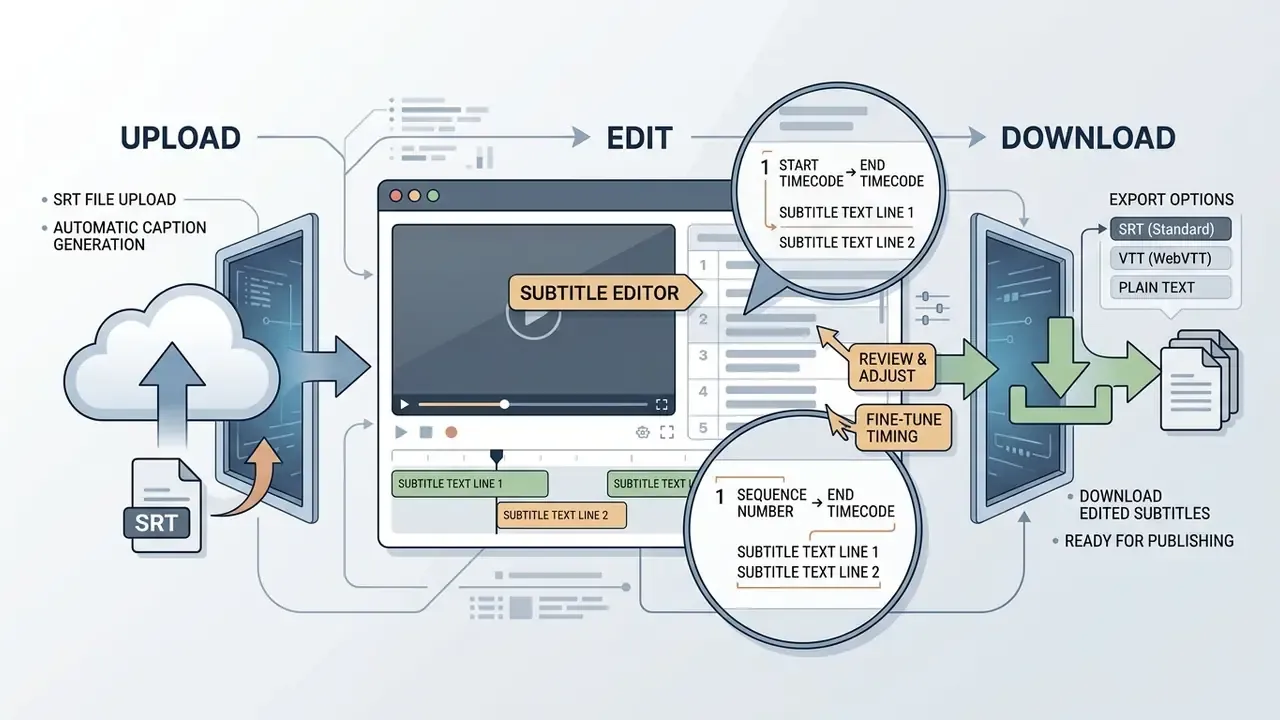
When uploading SRT files to YouTube, Vimeo, or a learning management system, save them in UTF-8 to prevent character corruption. Vimeo documentation explicitly requires UTF-8 for both .srt and .vtt uploads, with millisecond values comma-separated (00:00:07,751). YouTube supports manual caption upload per language in YouTube Studio and lists Scenarist Closed Caption (.scc) as the preferred format when captions rely on CEA-608 features. Sidecar SRT files also let platforms index spoken content for internal search and recommendation systems, which is a quiet SEO benefit teams routinely forget to claim.
How to Choose the Best AI Subtitle Generator for Creators and Teams
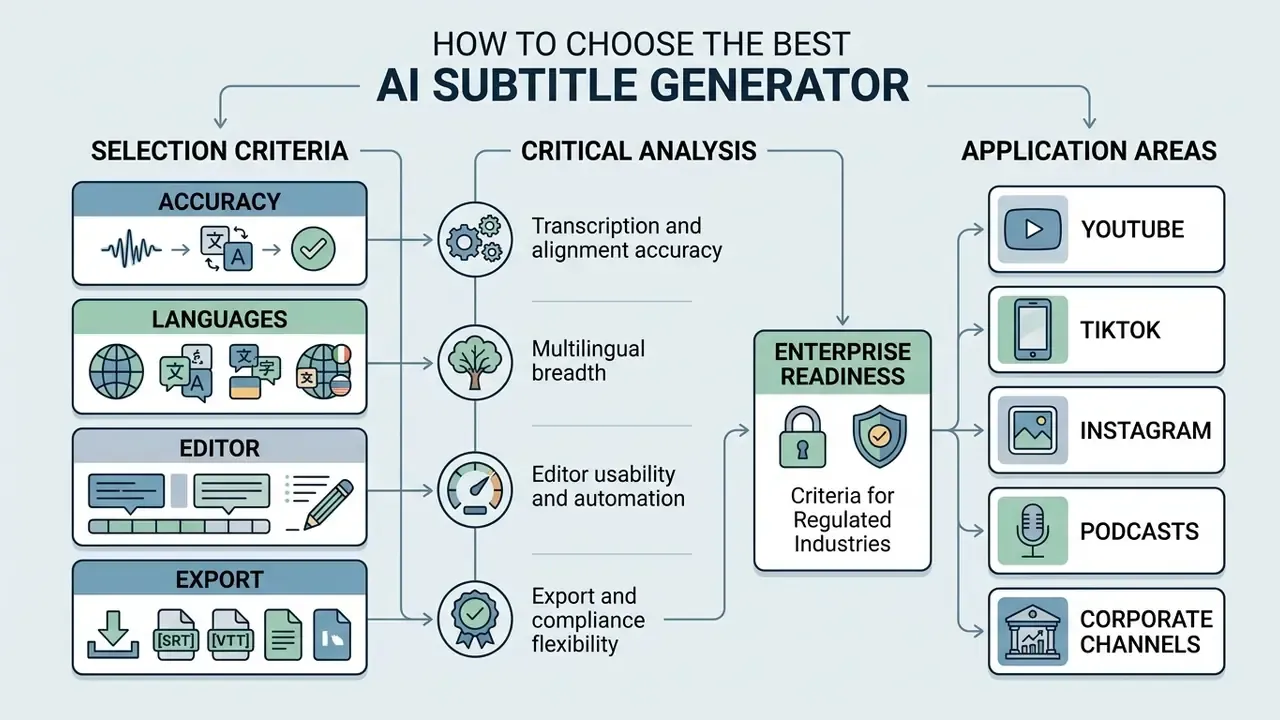
Evaluating the best ai subtitle generator means analysing model accuracy, supported languages, editor capability, security posture, and export flexibility. A structured comparison of AI video generators helps baseline adjacent capabilities when captioning is one module inside a larger media stack. Buying committees have to balance speed against control, and the two rarely peak at the same vendor.
To compare ecosystem pricing structures across competing media platforms, consult the AI Media Pricing Guides before signing annual contracts. Organisations running competitive evaluations can use the structured AI Media Comparison Matrices to baseline features, while finance modelling teams can apply dedicated calculators to estimate per-minute processing costs at real volume.
Selection Criteria: Accuracy, Languages, Editor, and Export
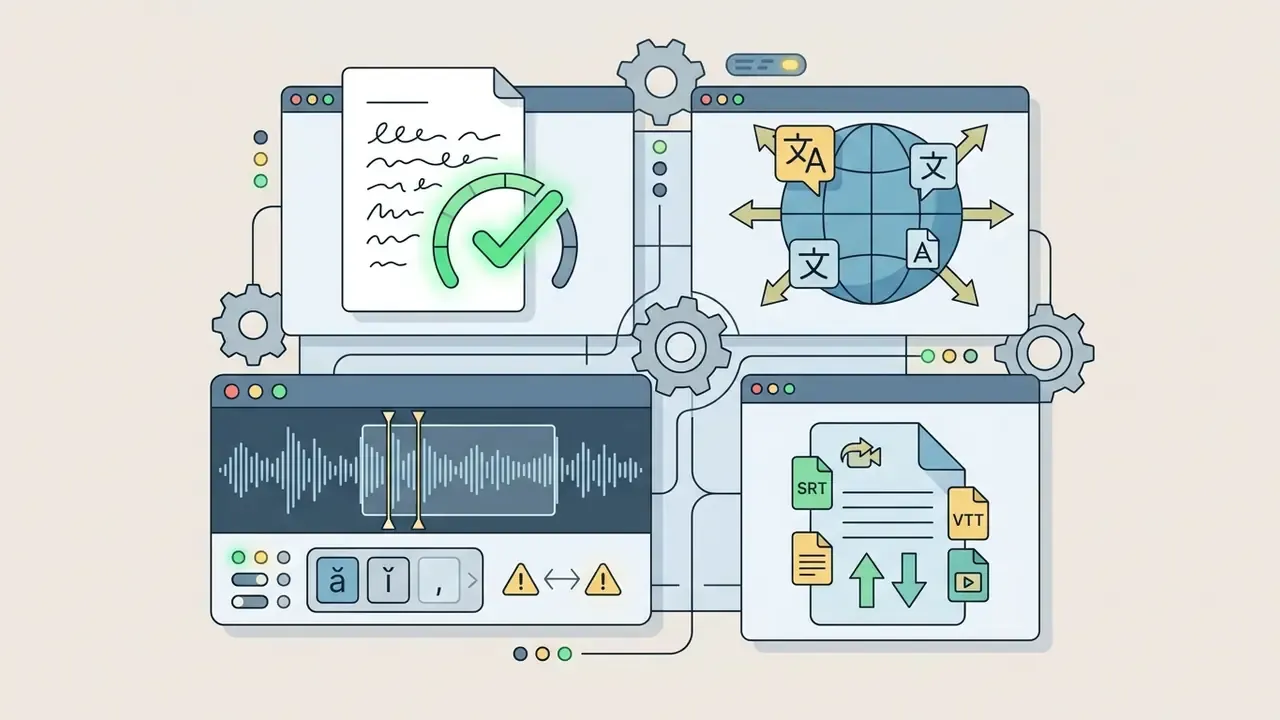
Choosing among the best automatic subtitle generation tools video teams actually use comes down to four technical pillars:
Accuracy claims deserve genre adjustment rather than acceptance at face value:



.SRT, .VTT, .ASS, .JSON) and regulatory AI content tagging, including the EU AI labelling obligations arriving in August 2026.«Automatic subtitle accuracy varies by genre: news 97.4%, talk shows 96.1%, sports 95.4%, no sample reached the 98% threshold in early testing.»
W3C WAI is blunt on the point: automatically generated captions do not satisfy accessibility requirements unless confirmed fully accurate. Read vendor accuracy percentages as an input to your validation plan, never a replacement for it.
Enterprise Readiness Criteria for Regulated Industries
Creator-oriented feature lists rarely survive procurement in banking, insurance, healthcare, or legal environments. Add these gates to any RFP:
| Criterion | What to require | Why it matters |
|---|---|---|
| Security attestation | SOC 2 Type II, ISO 27001; GLBA or HIPAA alignment where applicable | Evidence for third-party risk reviews |
| Data retention | Contractual zero data retention; no training on customer media | Keeps confidential audio out of public model training |
| Deployment model | On-premises, VPC, or private-cloud option | Holds regulated media inside the control boundary |
| Identity and access | SSO/SAML, SCIM provisioning, RBAC by project and role | Segregation of duties across editor, reviewer, approver |
| Audit trail | Immutable logs of edits, approvals, exports, and model versions | Supports accessibility audit trails and internal validation |
| Model governance | Model and version disclosure, changelog, WER benchmarks on your data | Required for model risk documentation and revalidation |
| Retention and eDiscovery | Configurable retention, export of originals plus transcripts | Aligns with records-retention duties (SEC Rule 17a-4, FINRA guidance) |
| Human review workflow | QA queues, four-eyes approval, sign-off records | Turns HITL from informal practice into an evidenced control |
Pilot on your own worst-case audio: accented multi-party calls, jargon-dense earnings material, low-bitrate archives. Record WER by genre and keep the raw output. Vendor demos run on clean audio; your risk lives in the tail.
Tooling for YouTube, TikTok, Instagram, Podcasts, and Corporate Channels
Publishing platforms impose distinct caption specifications and delivery mechanics:
| Platform Channel | Primary Format | Visual Style | Distribution Mechanism | Key Operational Constraint |
|---|---|---|---|---|
| YouTube | Standalone SRT / VTT (SCC for CEA-608) | Standard clean overlay | Uploaded sidecar track | Closed captions indexed by search algorithms |
| TikTok / Reels | Hardcoded (burned-in) | Animated, word by word | Baked into the video frame | Must stay inside mobile UI safe zones |
| Corporate / LMS | VTT / interactive JSON | Minimal ghost-box style | Embedded HTML5 player track | Full WCAG 2.2 AA conformance |
| Podcasts | Plain text / WebVTT | Chaptered transcript | Show notes and RSS | Speaker-attributed transcript text |
| Regulated archives | SRT plus immutable transcript | Neutral, high contrast | Secure archive or eDiscovery store | Retention, audit logs, speaker attribution |
Comparative Analysis of Leading AI Subtitle Generators (2026)
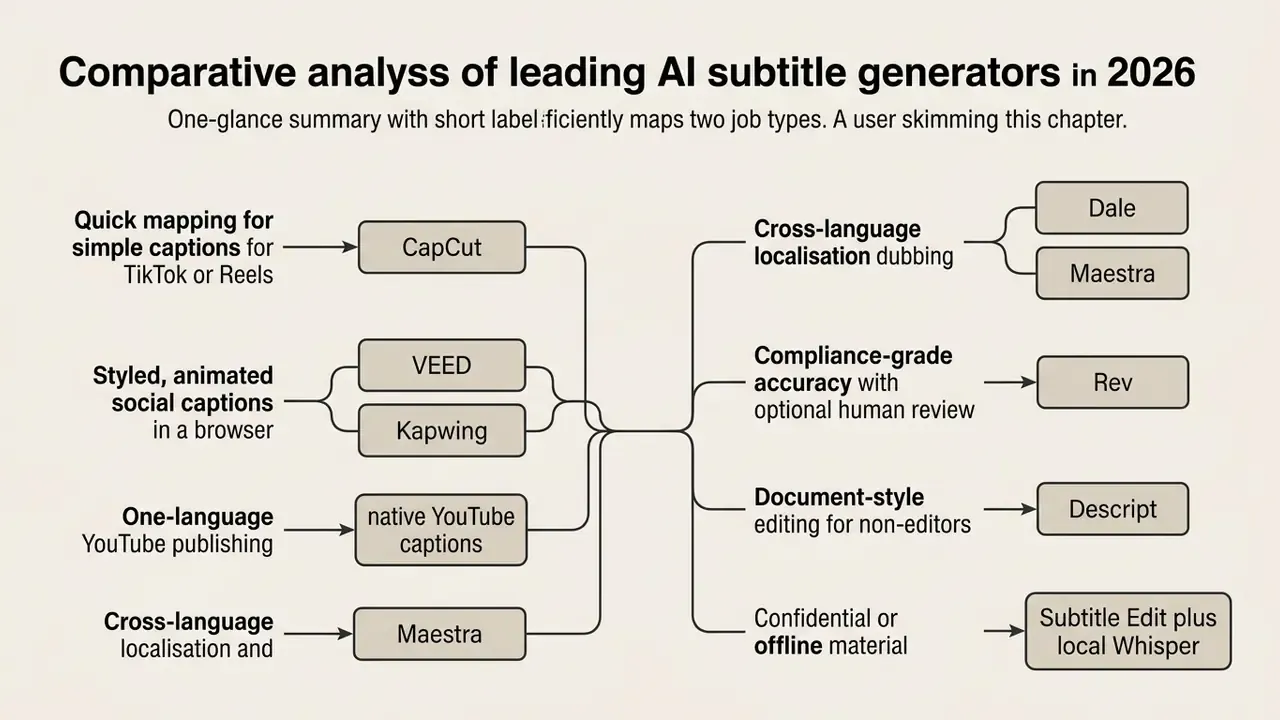
To pick a stack for your workload, start from a consolidated capability matrix. Watermark behaviour is the single most common surprise: several platforms export a clean .SRT on free plans while stamping the rendered video.
| Service / Tool | Video watermark (Free) | Free-tier limits | Languages | SRT/VTT export without watermark | Primary use case |
|---|---|---|---|---|---|
| Maestra | No (trial) | Limited trial | 125+ | Yes | Multilingual translation, dubbing, subtitles |
| CapCut | No | Unlimited basic captions | 20+ | Desktop only | Short-form video (TikTok, Reels) |
| Subtitle Edit (open-source) | Never | Fully free, offline | 100+ (via Whisper) | Yes | Local processing of confidential media |
| VEED.io | Yes (on video) | Limited minutes | 100+ | Yes (clean SRT) | Fast browser video, animated templates |
| Descript | Yes (on video) | About 1 hour per month | 23+ | Yes | Text-based video and podcast editing |
| Rev AI | No | Paid trial | 37+ | Yes | High accuracy, ADA and Section 508 workflows |
| Kapwing | Yes (on video) | Up to about 10 minutes | 70+ | Yes (clean SRT) | Team collaboration, Brand Kit, templates |
| Choppity | Yes (on video) | Up to about 30 minutes | 30+ | Yes | Podcast auto-clipping, profanity bleeping |
| YouTube auto-captions | No | Unlimited on uploads | Auto-detect | SBV / SRT download | Single-language YouTube publishing |
Free, Paid, and Commercial Use of AI Subtitles
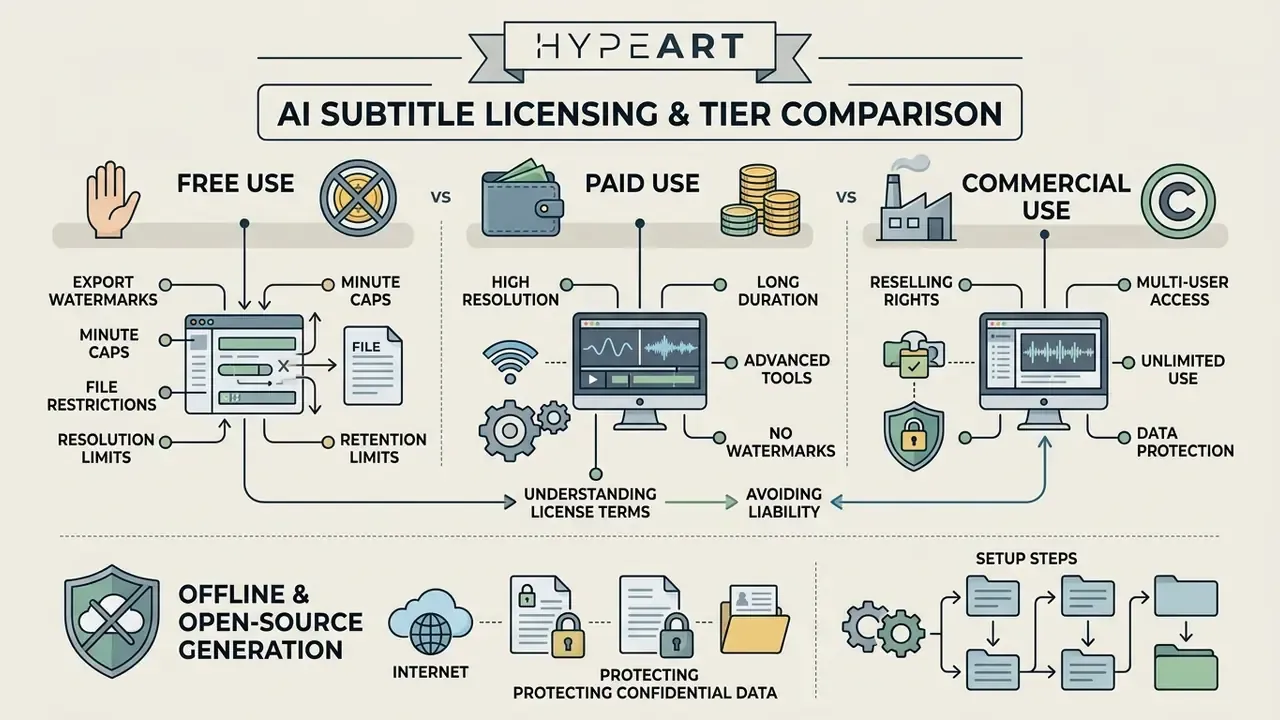
Understanding licence terms and tier restrictions prevents copyright liability and operational bottlenecks mid-campaign.
Organisations working through commercial deployment questions can consult the AI Media Commercial-Use Hub for usage framework analysis. Legal teams monitoring platform exposure should follow the updated AI Litigation and Case Timelines to track emerging copyright developments.
What to Check in a Free AI Subtitle Generator
Free tiers of web-based caption tools carry constraints that quietly block enterprise use. See the documented limitations of free AI video tools for comparable export restrictions:
- Export watermarks logos burned onto rendered video, removable only by upgrading. Many services still allow a clean
.SRTdownload, which is often the whole workaround you need. - Processing minute caps monthly quotas, commonly 10 to 30 minutes per video or 30 to 120 minutes per month.
- Export file restrictions blocked
.SRTor.VTTdownloads, forcing reliance on platform rendering. - Resolution limits export capped at 720p, or clip duration limited to a single minute.
- Retention limits short project-retention windows, sometimes seven days, deleting source media and transcripts before a review cycle finishes.
Offline and Open-Source Generation: Protecting Confidential Data
For organisations under strict NDA or security requirements (legal tech, medical, enterprise R&D, internal investigations), shipping video to a public cloud service is simply off the table. The answer is a local open-source stack:
- Setup steps:
Initial setup runs about ten minutes. After that, subtitles can be generated for any file on an air-gapped workstation. Accuracy on clear speech is broadly comparable to paid web tools, though diarization and noisy-audio handling still need review. Related note for narration pipelines: an ai voice caption generator applied to synthetic voiceover tracks tends to score better WER than the same model on live room audio, because the input has no reverberation to fight.
- Tooling
- Subtitle Edit plus a local OpenAI Whisper model (Tiny, Base, Medium, or Large).
- Advantages
- free, no watermarks, zero network transmission, functional with no internet connection at all.
- Download and install Subtitle Edit.
- Open
Options→Settings→Video playerand select the MPV engine. - Open
Auto-translate/Speech to textand chooseWhisper. - Download the model weights, for example
Whisper mediumfor a reasonable speed and WER balance. - Run generation. The resulting
.SRTis produced entirely on local GPU or CPU capacity.
What to Verify Before Using Subtitles in Commercial Content
Commercial deployment of AI-generated captions requires checking platform Terms of Service on intellectual property ownership. Under US Copyright Office guidance, purely machine-generated output lacking human creative direction cannot be registered (US Copyright Office Guidance). The Office also requires applicants to disclose AI-generated content that is more than de minimis and to describe the human contribution. Statements from 2025 confirm that AI-assisted creation remains registrable when a human controls sufficient expressive elements, but prompts alone do not clear the bar.
«Automatic captions frequently contain recognition errors, fail to indicate speaker changes, lack punctuation, and omit non-speech sounds, they cannot be considered equivalent to professional captioning.»
Enterprise agreements must state explicitly that input video data is not used to train public foundation models. Licence scope also differs sharply between vendors: some free tiers permit limited commercial use with attribution, others restrict output strictly to personal, non-commercial use, and paid tiers more often grant full ownership including rights to modify, sublicense, and resell. For ongoing operational questions, teams can reach AI Media Support.
Legal & Licensing Disclaimer:
Illustrative case (licensing compliance audit, composite and hypothetical):
A mid-sized digital marketing agency ran a national campaign using captions generated on a free web tier. A compliance audit found that the free tier restricted output to non-commercial use, creating direct legal exposure. The agency executed an enterprise licence, re-licensed the media, and added automated terms-of-service verification rules to its asset intake workflow. Cost of the fix: modest. Cost of finding out during a dispute: not modest.
FAQ About AI Subtitle Generators
Can AI create subtitles over background music and sound effects?
Yes, modern ASR engines transcribe speech over background audio, but heavy music or loud sound effects degrade accuracy noticeably. The evidence here is specific rather than general. NIST's Audio Collection Guideline (2018) instructs collectors to avoid background music, white noise, or other audio at any level during speech capture. Peer-reviewed listening research found that full songs impair open-set sentence recognition more than isolated vocals or instrumentals at roughly −5 dB SNR (Psychomusicology, 2022). The mitigation is unchanged: isolate the voice track before ASR runs, or apply automated voice-isolation filters to strip music and ambience first.
«Automatic captions often fail to describe non-speech audio information, machinery, fire alarms, which is critical for deaf and hard-of-hearing viewers.» Source: U.S. Section 508 Synchronized Media Guidance. https://www.digitizationguidelines.gov/guidelines/AV-Accessibility-v1-20220902.pdf Teams working across the whole audio chain often pair captioning with AI voice generators for video narration, since clean synthetic tracks measurably raise downstream ASR accuracy.
How do I fix subtitles that are out of sync with the video?
If a finished SRT lags behind the speech, apply a global time offset. Subtitle editors accept a millisecond shift, for example +200ms, across all lines, and point sync lets you set two anchor points so intermediate timings redistribute proportionally. Drift that grows across the file usually means variable frame rate (VFR) in the source: convert to a constant frame rate (30 fps, say) before processing, then regenerate or re-align the track.
Can generated subtitles be translated into other languages automatically?
Yes. Most systems combine ASR with neural machine translation. After the source-language transcript exists, choose «Add Translation», select the target language (Spanish, Chinese, whichever), and the service produces a second subtitle track inheriting the original timecodes. Budget a light post-editing pass for idioms, brand terms, and regulated terminology, because reception studies keep showing quality gaps between raw and post-edited machine translation.
Can I generate subtitles from audio only?
Yes. Upload MP3, WAV, M4A, FLAC, podcast recordings, interview audio, or voice memos. The workflow matches video: select the language, generate, review, then download .SRT, .VTT, or .TXT. Enable diarization on multi-speaker recordings so speaker changes are labelled.
How long does automatic subtitle generation take?
Processing time scales with duration and audio quality. Clips under 30 seconds usually return captions in seconds, short-form videos take one to two minutes, and hour-long recordings typically finish within several minutes on cloud services. Local Whisper runs depend on model size and available GPU or CPU capacity.
Are automatic captions enough for accessibility compliance?
No, not by default. W3C WAI states that automatically generated captions do not meet accessibility requirements unless confirmed fully accurate, and Section 508 guidance notes that raw auto-captions typically omit speaker changes, punctuation, and non-speech audio. Automatic generation plus documented human review is the compliant pattern.
What evidence should we keep for an audit?
At minimum: the source media hash, the model and version used, the raw ASR output, the reviewed version, reviewer identity, approval timestamp, and the published caption file. Reproducibility is the test. If you cannot rebuild the decision trail for a caption track published a year ago, the control exists on paper only.
Technical & Commercial Reference Summary