If your team publishes video into regulated customer channels, captions are not a cosmetic layer. They are a record. Automated media processing in corporate communications, digital marketing and client-facing education has to balance turnaround speed against governance: who approved the text, what the model got wrong, and whether the exported file can be used commercially at all. An AI video subtitle generator turns spoken audio tracks into structured, time-aligned text assets. That removes transcription bottlenecks, lifts engagement in muted feeds, and supports institutional accessibility mandates. It does not remove accountability.
That one sentence from the W3C defines the operating model for every workflow below. Automated speech recognition (ASR) is a drafting engine. Human review is the control that turns a draft into a compliant, publishable caption track. Nothing in the last three years of model progress has changed that division of labour.
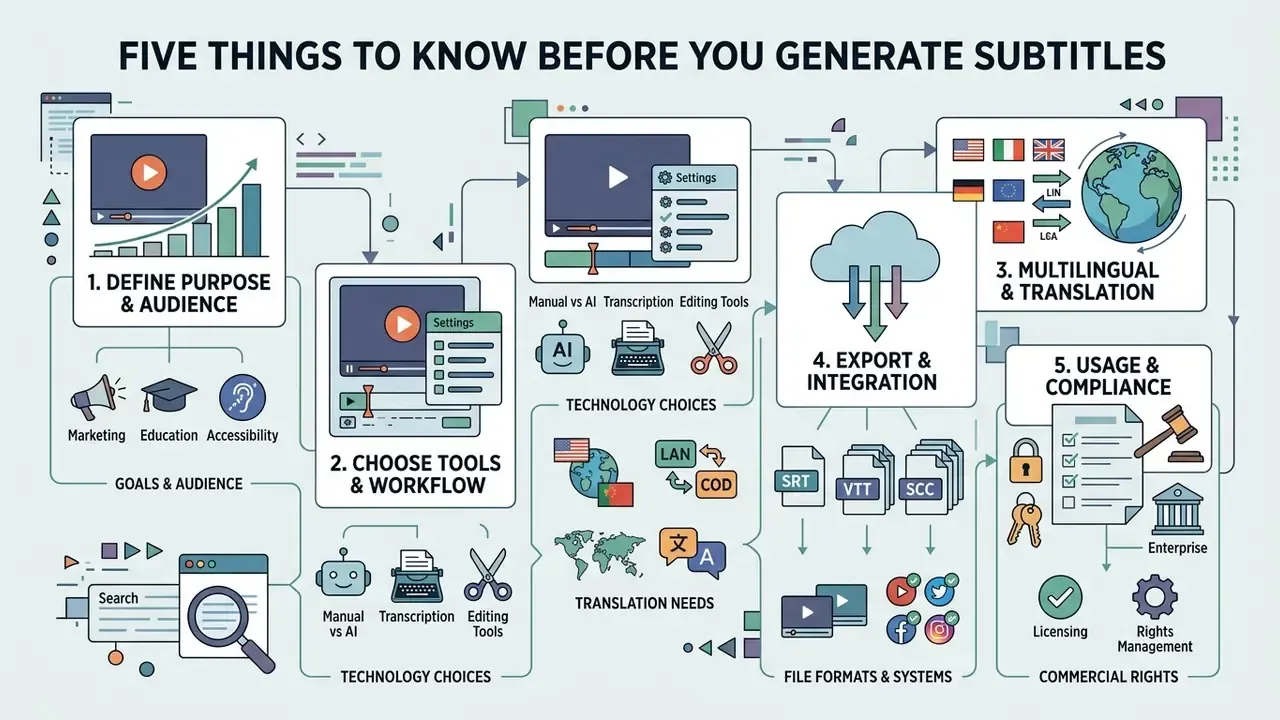
Five things to know before you generate subtitles
- The pipeline is always the sameingest media, select the spoken language, run ASR with word-level timestamps, review by a human, style, then export as a sidecar file or a burned-in video.
- Accuracy is conditional, not absolute.Vendors advertise up to 99% on clean speech. Documented real-world ranges fall to 85–95% with multiple speakers or background noise, and roughly 70–85% in heavy music or crosstalk. Professional subtitling treats 98.0% accuracy as the minimum acceptable threshold.
- Formats matter more than features.Web and social publishing runs on
.srtand.vtt. Broadcast and OTT delivery requires.scc,.stl,.ttml. Good tools convert between them without re-uploading the video. - Readability is measurable.Target 12–15 characters per second (150–180 wpm), never exceed about 17 cps, cap at two lines per cue, and keep 4.5:1 text contrast under WCAG 2.2.
- Free tiers are structurally limited.Expect minute caps (1 to 10 minutes), watermarks, blocked
.srtand.vttdownloads, and, most importantly, unclear commercial-use and data-retention rights.
Who this guide is for, and how to read it
Three reader profiles tend to land on a page about an ai subtitle generator for videos, and each needs a different slice of it.
- Communications and marketing owners publishing short-form video want the styling, burn-in and social specification sections. Skip to the application matrix.
- Learning, HR and internal-comms teams producing longer videos, lectures and product demos need the accuracy thresholds, the WCAG criteria and the glossary discipline.
- Risk, procurement and compliance reviewers care about two things only: the data-retention terms of the tool and the evidence trail behind the published file. Those live in the commercial-use section and the QC checklist.
One practical note before you compare tools. The question is rarely «which auto subtitle generator is best». It is «which tool produces an auditable file my channel accepts, at a cost I can defend». That reframing removes about half the shortlist.
What is an AI video subtitle generator and why use it?
An AI video subtitle generator is an automated application that uses Automatic Speech Recognition to convert spoken dialogue from audio and video files into synchronized text. Modern tools add natural language processing to segment continuous speech into readable caption lines, assign timestamps, and produce downloadable sidecar files or burned-in video outputs.
Organizations deploy automated subtitling to expand audience reach, increase video completion metrics and satisfy accessibility guidelines. As consumption shifts to mobile, silent playback has become the default state of a feed, not the exception. Captioned video assets let institutions deliver a message that survives a muted phone in a lobby, an open-plan office, or a commuter train.
There is a second, quieter benefit. A reviewed transcript is a reusable asset: search-indexable text, a source for show notes, a compliance record of what was actually said on a webinar. Teams that treat the transcript as a deliverable rather than a by-product get more out of the same processing minutes.
Subtitles, captions and closed captions: what is the difference?
Subtitles, captions and closed captions serve distinct technical and operational functions across broadcast and digital channels:
- Subtitles render spoken dialogue into text, primarily for viewers who can hear the audio but need textual translation or reading support.
- Captions transcribe both spoken dialogue and essential non-speech audio cues, such as speaker identification, sound effects and ambient context.
- Closed captions (CC) are hidden caption tracks embedded in the media container that viewers toggle on or off inside the player interface.
According to regulatory frameworks established by the U.S. Federal Communications Commission (FCC), captions must provide a synchronized text alternative for speech and non-speech audio so that Deaf and hard-of-hearing audiences get equal access. Regional terminology differs. The W3C notes that in several countries the word «subtitles» is used where U.S. standards say «captions», so delivery specifications should always be read against the target market's regulator, not against habit.
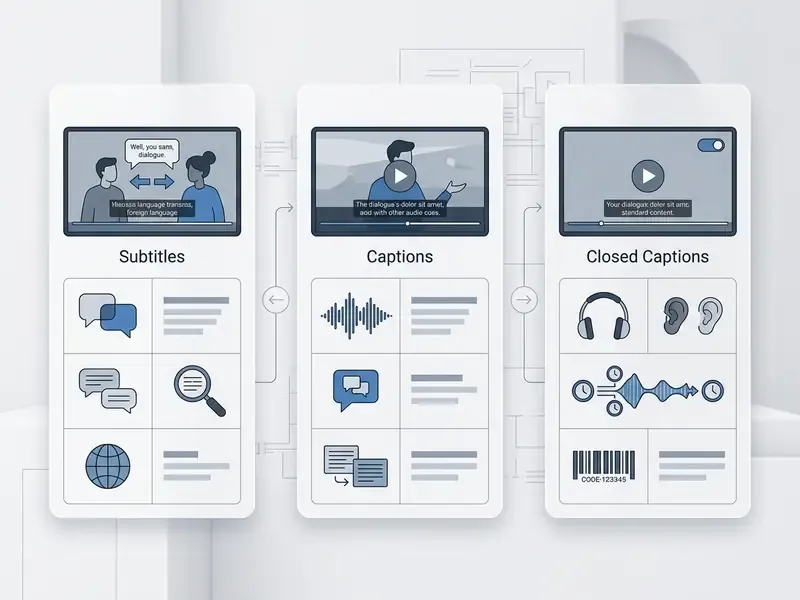
Subtitles
- Primary purpose: help viewers follow spoken dialogue across a language barrier or in clear-dialogue contexts.
- Content coverage: spoken dialogue only; background noise and sound-effect descriptions excluded.
- Display mechanism: typically open (burned-in), or optional soft subtitles selected in player settings.
- Primary use case: interlingual translation, global media distribution, language learning.
Captions (open captions)
- Primary purpose: deliver full auditory context for accessibility and silent viewing environments.
- Content coverage: spoken words, speaker labels, sound effects (for example [door slams]) and audio context.
- Display mechanism: permanently rendered onto video frames; the viewer cannot turn them off.
- Primary use case: social media feeds, mobile advertising, public display monitors.
Closed captions (CC)
- Primary purpose: provide compliant, toggleable accessibility options in broadcast and digital players.
- Content coverage: comprehensive transcription of speech, sound effects, music cues and speaker shifts.
- Display mechanism: encoded as an independent metadata track; enabled or disabled by the viewer.
- Primary use case: broadcast television, corporate training portals, educational platforms.
How subtitles improve reach, retention and accessibility
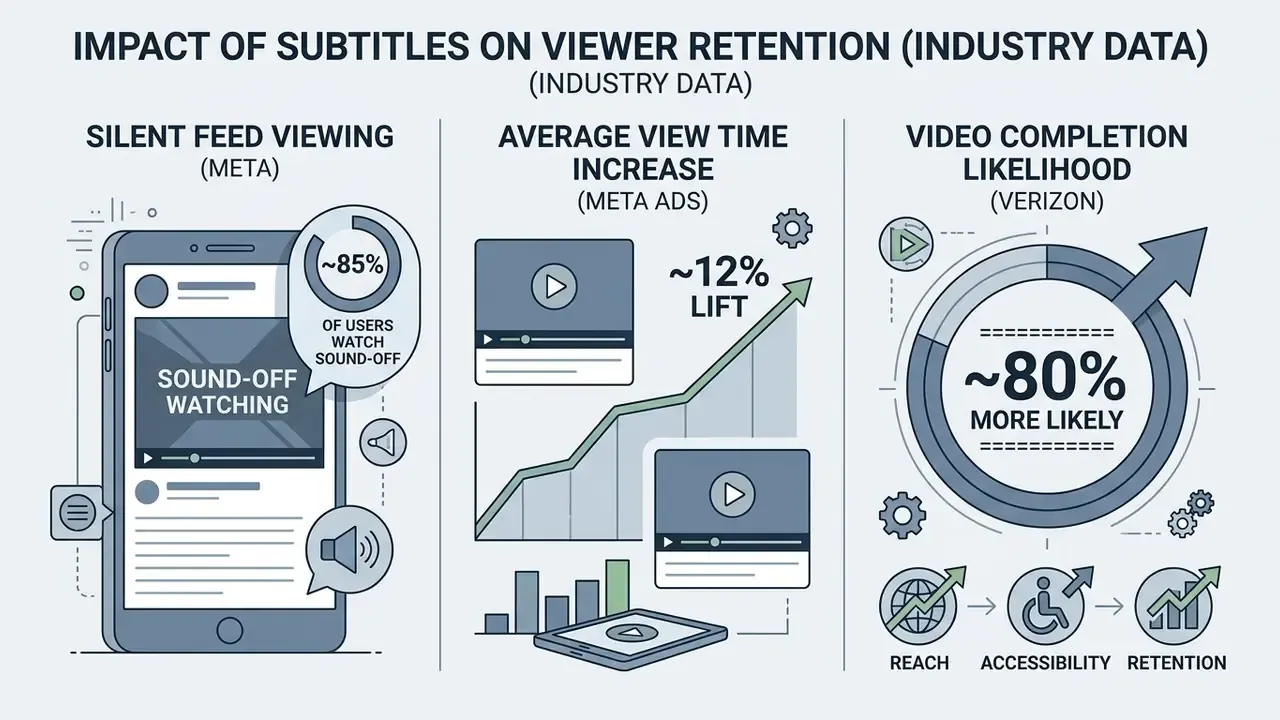
Adding timed text tracks increases viewer retention, improves recall and satisfies accessibility mandates. Platform-side figures widely quoted in industry whitepapers indicate that roughly 85% of feed video views happen with sound off, and that adding captions to video ads lifts average view time by about 12%. Those numbers originate from Meta (Facebook) internal behavioural research reproduced in vendor materials, so treat them as directional benchmarks rather than independently audited statistics. The same caveat applies to the frequently cited finding from Verizon Media and Publicis Media that 80% of consumers are more likely to watch a video to completion when captions are available. It is an industry study without published methodology or sample disclosure: useful for planning, weak as a compliance argument.
Academic evidence is stronger in the learning domain. In educational and corporate training environments, synchronized captions demonstrably improve information processing, and the effect interacts with speech rate:
For teams building a broader media stack, captions rarely exist in isolation. Readers evaluating adjacent automation can review how AI video generators and AI voice generators fit into the same production pipeline, and where each one introduces its own review step.
How does an AI auto subtitle generator work?
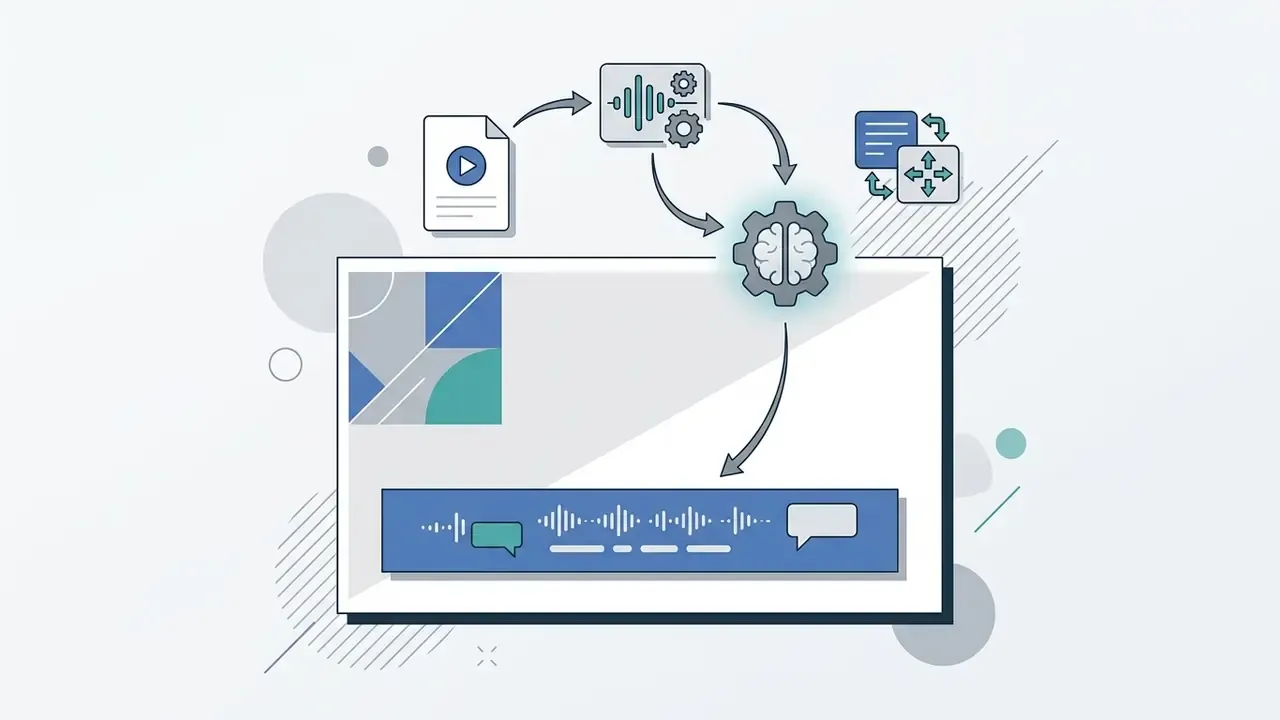
An ai auto subtitle generator processes digital audio through a multi-stage pipeline: acoustic feature extraction, neural speech recognition, text segmentation, timestamp synchronization.
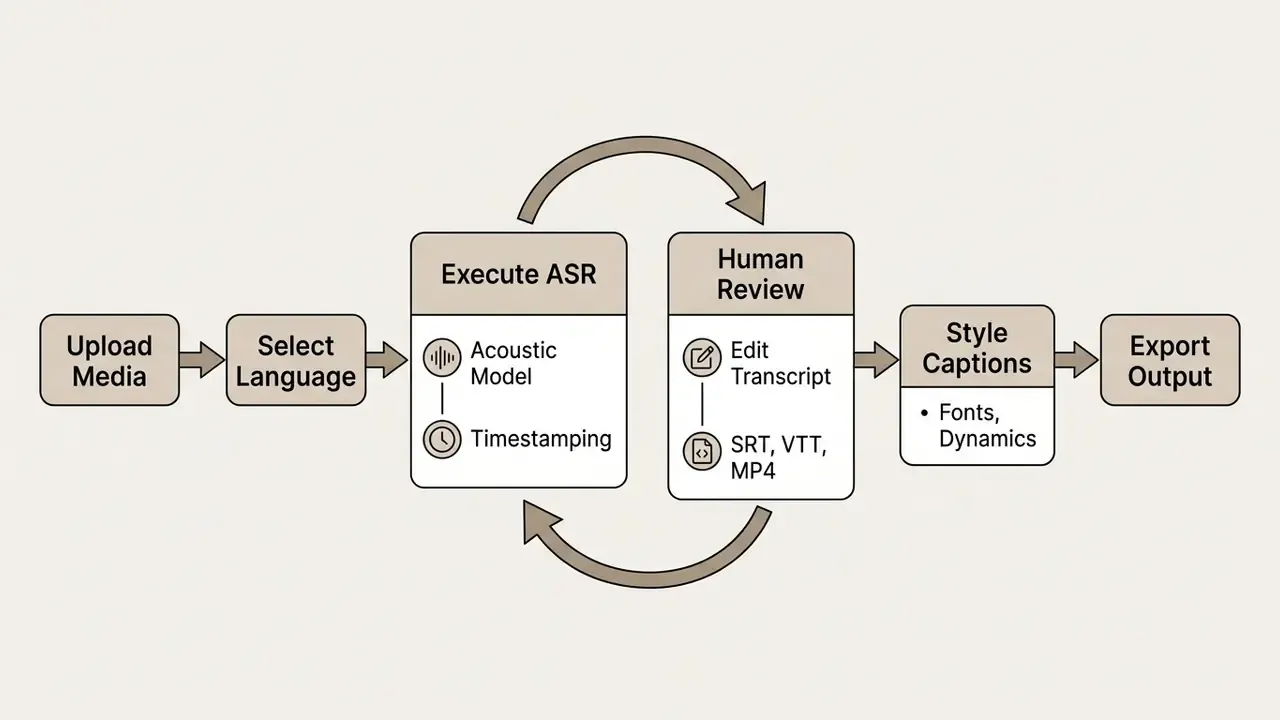
The underlying system uses deep neural networks, typically transformer-based ASR engines, to convert acoustic signals into textual tokens. Advanced pipelines add forced alignment and dynamic programming to map recognized words to precise start and end frames on the video timeline. Newer systems no longer rely on raw ASR timing alone. They add punctuation restoration, sentence segmentation and a forced-alignment pass, because word-level timing on its own is often too coarse for broadcast-grade cue boundaries.
Upload a video or audio file and select the language
The process begins when an operator uploads an audio file or video file into the ai subtitle generator online interface. The system ingests the asset, extracts the linear PCM audio stream and normalizes signal amplitudes.
To maximize transcription accuracy, enterprise documentation from Google Cloud Speech-to-Text recommends lossless audio formats such as FLAC or LINEAR16 sampled at a minimum of 16,000 Hz. If 16 kHz capture is impossible, use the native source rate rather than resampling. Keep the microphone close to the speaker, avoid clipping, and disable automatic gain control and pre-processing noise reduction. Background noise, reverberation and clipping all inflate word error rates (WER). Specifying the primary source language before execution lets the engine load language-specific acoustic and language models, which sharpens word recognition; recognition across multiple languages is usually configured with a list of candidate alternative language codes.
A small field observation, worth more than a spec sheet: a lapel mic on a quiet speaker beats a premium ASR model fed by a laptop microphone in a glass meeting room. Fix the room first.
Multi-source media ingestion: direct uploads, cloud storage and video URLs
Enterprise subtitle generators support several input methods, and the choice affects both turnaround time and data-governance exposure:
- Direct file upload
- local media files (
.mp4,.mov,.avi,.mkv,.webm,.m4v,.wav,.mp3,.m4a,.aac,.flac,.ogg). - Cloud storage integration
- native connectors to Dropbox, Google Drive, OneDrive and AWS S3 buckets for batch processing of large libraries without local downloads.
- Public video URL parsing
- ingestion by pasting a link (YouTube, Vimeo, Google Drive, Wistia, or any direct media URL). The ASR pipeline streams the audio track straight into the transcription engine, which removes the download-and-re-upload step entirely. It is the fastest route for subtitling an already-published video or a competitor reference clip.
- Live microphone or screen recording
- in-browser capture that transcribes as you speak, used for quick voice memos, internal updates and webinar rehearsals.
Advanced audio pre-processing: profanity filtering and noise cancellation
Before neural feature extraction begins, production pipelines run secondary audio and lexical filters that improve speech clarity and enforce content safety:
- Automated profanity and offensive-language filtering a one-click lexical filter cross-references transcribed tokens against a customizable dictionary. Operators can mute the offending audio range, substitute the word with designated characters (
[profanity],), or delete explicit terms. This is the standard control for keeping brand, gaming and UGC content monetizable on YouTube and TikTok while staying inclusive. - Acoustic noise isolation and volume normalization hum reduction, vocal isolation from dense music beds, de-reverberation, loudness normalization of quiet passages. Each of these suppresses WER expansion before the model ever sees the waveform.
- Filler-word and stutter cleanup optional removal of «um», «uh» and repeated words to cut on-screen character density and keep reading speed inside accessibility limits.
Generate, review and correct the subtitle transcript
Once the recognition engine finishes, it returns a raw transcript with word-level timestamps. Unedited ASR output regularly misreads specialized jargon, technical acronyms and proper nouns, so human-in-the-loop review is mandatory for professional deployment.
Operators use an online subtitle editor to audit text against source audio, resolve ambiguous phrases and correct names. Modern platforms support custom vocabulary dictionaries, letting editorial and risk teams upload approved domain terminology (financial instruments, drug names, product SKUs, regulatory frameworks) to prevent systematic errors. The documented workflow across Amazon Transcribe, Rev AI and Trint is identical in shape: fix the word in the transcript, then add the corrected form to the glossary so later uploads inherit it.
A representative pattern shows why the review step is non-negotiable. In a reported internal training deployment, a team processed roughly 45 hours of technical video lectures through an ai create subtitles from video workflow. The baseline automated transcript mis-rendered domain acronyms in a double-digit share of speech instances. After loading a custom domain dictionary and running one structured editorial pass, terminology errors were resolved before internal distribution. Those figures illustrate the class of problem rather than an audited benchmark. Measure your own error rate on a ten-minute sample before scaling anything. What generalizes is the control sequence: sample, measure WER, build the dictionary, re-run, then review.
Adjust timing for readable and synchronized subtitles
Synchronizing captions means refining frame timestamps so that entry and exit points align with natural speech pauses and visual shot cuts. Subtitles that drift out of sync increase cognitive effort and reduce comprehension. Viewers rarely complain about it. They just stop watching.
Professional standards published in the SUBTLE Recommended Quality Criteria for Subtitling (2023), the current revision of the Netflix Timed Text Style Guide and the BBC Subtitle Guidelines specify key timing parameters:
- In-time (onset)text must appear on the exact frame of speech onset, or within one to three frames, using the audio waveform as the reference.
- Out-time (offset)text should remain on screen until speech ceases, or extend by up to 1.0 second afterwards to help reading.
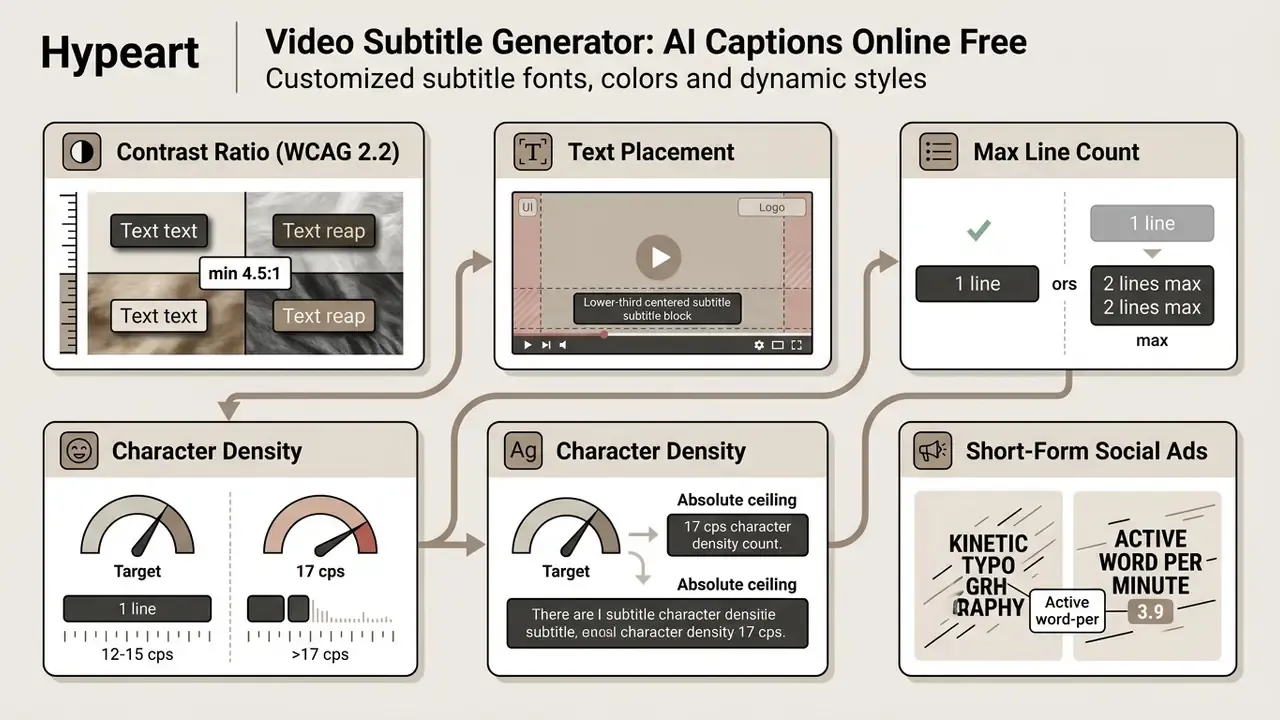
- Reading speedon-screen density capped between 12 and 15 characters per second (150 to 180 words per minute), with an absolute ceiling of 17 cps, roughly 190 to 200 wpm.
- Inter-cue gapleave a minimum gap of about 1 second, preferably 1.5 seconds, between consecutive blocks so the eye registers a new cue.
- Shot changesavoid letting a cue cross a hard cut whenever the edit allows it.
Edit, style and export AI-generated subtitles
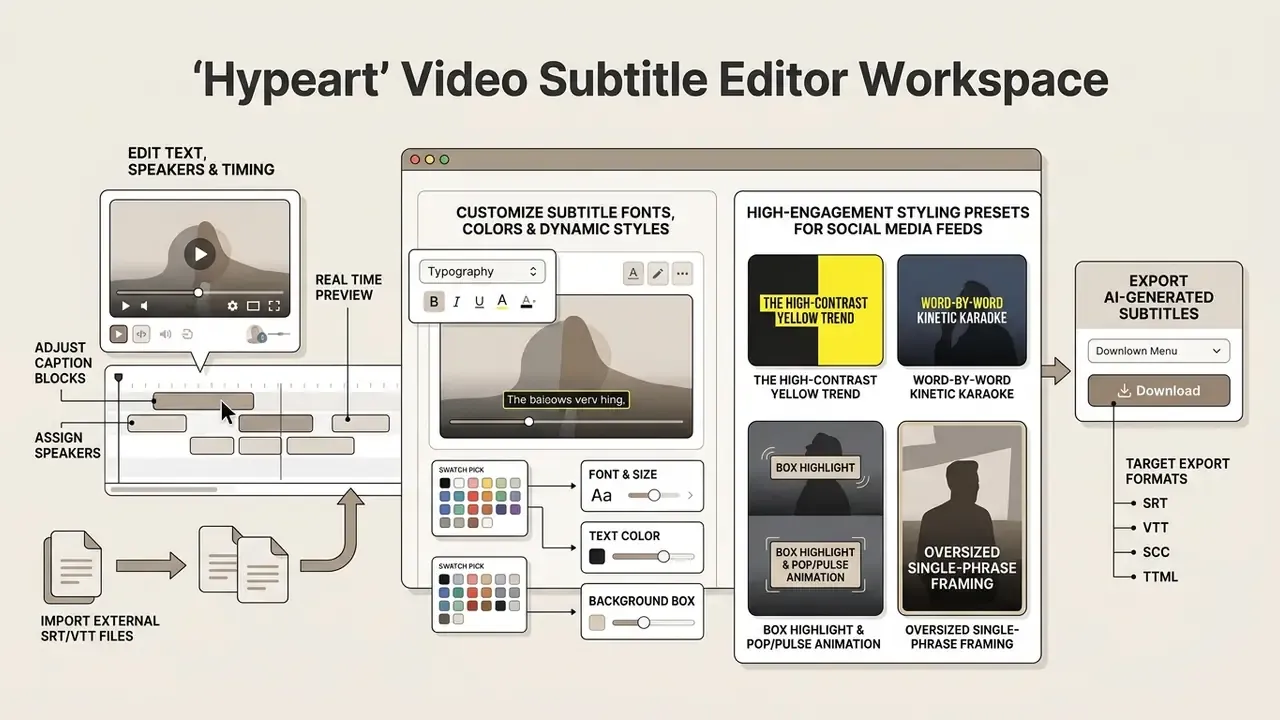
Once text accuracy and baseline timing are settled, operators configure typography, positioning and target export formats inside the subtitle editor workspace.
Edit text, speakers and subtitle timing
Advanced editors support multi-track editing, speaker attribution and frame-accurate timestamp adjustment. Speaker diarization detects voice transitions automatically, assigning colour codes or text tags (Speaker 1, Speaker 2) to distinguish turns in panel discussions or interviews. Diarized output normally exposes utterance start and end times plus optional word-level timing and speaker IDs, which is what makes «who said what, when» auditing possible.
Operators then fine-tune cue boundaries by hand, merge short rephrased lines, or split long sentences so that subtitles do not cover critical visual elements. That step sits inside broader video editing workflows rather than standing alone, and it is usually where an hour of work quietly disappears on a long-form recording.
Importing external SRT/VTT files for custom re-styling
If a transcript or subtitle file already exists, delivered by a vendor, exported from a previous edit, or downloaded from a publishing platform, there is no reason to re-transcribe it. Legacy sidecars go straight into the editor timeline:
- Upload the raw video asset into the editor workspace.
- Open the Subtitles panel, choose Upload existing subtitle file, then select your
.srt,.vtt,.sbvor.assfile. - The editor synchronizes text blocks against the visual timeline and the audio waveform, which unlocks typography customization, animation presets, speaker colour-coding, timing nudges and single-click translation into 100+ target languages.
- Re-export as a styled burned-in video, or as a converted sidecar in a different format.
This path is also the fastest fix for out-of-sync imported subtitles: shift the whole track by a fixed offset, or edit individual start and end columns until waveform and text agree.
Customize subtitle fonts, colors and dynamic styles
Visual customization adapts subtitle tracks to brand standards and channel-specific formats. According to W3C Web Content Accessibility Guidelines (WCAG 2.2), visual captions must keep a minimum luminosity contrast ratio of 4.5:1 against video background elements, colour must never be the only carrier of meaning, and text must survive resizing up to 200% without losing content. Draft WCAG 3.0 guidance goes further, explicitly listing user-controllable font size, weight, style, text colour, background colour, background transparency and placement as caption requirements.
Export captions as burned-in text or a subtitle file
The final phase requires a choice between sidecar subtitle files and hardcoded video exports:
- Sidecar subtitle files (soft subtitles) subtitles exported as standalone text documents such as
.srtor.vtt, holding text strings and timestamp coordinates. Platforms render them dynamically, the text stays editable and convertible into other deliverables, and search engines can index the transcript content. - Burned-in subtitles (hardcoded subtitles) subtitles rendered directly into the pixel layers of the frame during encoding. Burn-in guarantees identical rendering in every video player and eliminates compatibility issues. But hardcoded text cannot be toggled off, edited after export, or crawled by search engines. Archive and theatrical delivery specifications, for example Screen Ireland's DCP/DCDM instructions, explicitly discourage burned-in subtitles and require a clean master plus separate subtitle assets, with burn-in accepted only as an exception for multilingual titles.
A simple rule of thumb: burn in for feeds, ship sidecars for platforms and archives. When in doubt, produce both from the same approved transcript. Teams comparing editors for this final render step can review our roundup of free video editing software before committing to a paid export pipeline.
Translate subtitles to reach global audiences
Automated subtitle translation lets organizations repurpose core video assets for international markets by converting native transcript tracks into multiple languages. Interoperability rests on W3C timed-text standards, TTML/IMSC profiles and WebVTT, which define how subtitle and caption documents are exchanged and rendered worldwide.
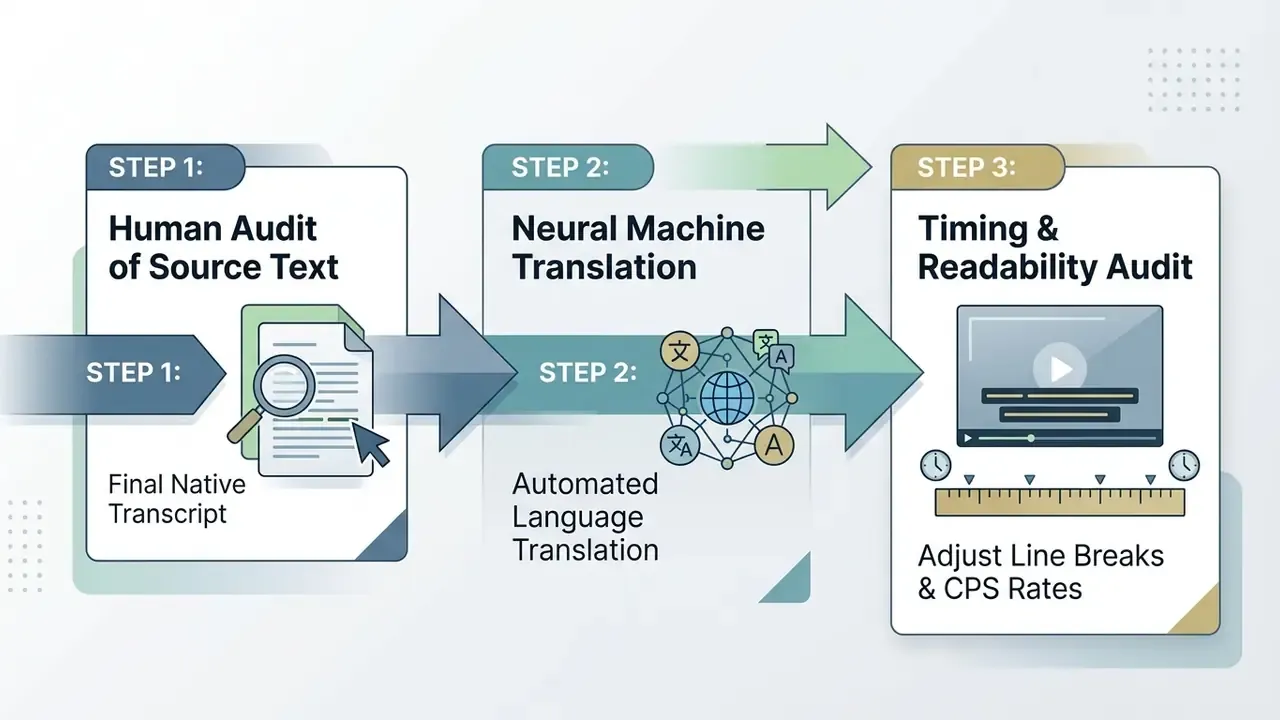
Modern translation pipelines use specialized Large Language Models to preserve contextual meaning, idiom and technical domain terms during conversion. Commercial tooling now advertises 100 to 150+ target languages and accepts subtitle files (.srt, .vtt, .sub, .ass, .stl, .txt) as direct inputs, so an existing caption asset can be localized without touching the video at all.
Generate subtitles in the original language first
Translating straight from raw audio compounds error rates: a misheard product name becomes a mistranslated product name in twelve markets. Operational best practice is to generate, audit and finalize an accurate transcript in the source language before machine translation starts. Pre-translation cleanup, meaning normalized punctuation, casing, filler words and speaker labels, measurably reduces structural errors downstream, and translation-quality guidance consistently requires the source text to be final before translation begins. A validated base transcript also stops transcription hallucinations from propagating into every target language. Teams building multilingual libraries from scratch may want to review adjacent text-to-video AI tools that generate source assets already structured for localization.
Review translated captions for context and timing
Translation changes character length. English into German routinely expands text by 20% to 30%, which can push reading speed past accessibility limits even when the translation itself is perfect.
Operators using a subtitle translator engine must run post-translation checks. Reviewers adjust line segmentation, keep linguistic wholes together when breaking lines, split extended blocks, compress text above the reading-speed ceiling, and extend out-time so that global audiences read comfortably without breaking overall synchronization.
Supported video formats, subtitle files and platforms
Choosing compatible file formats keeps ingestion smooth and rendering reliable on external publishing platforms.
Video upload formats: MP4, MOV and audio files
Enterprise subtitle platforms accept common video and audio containers:
- Video containers:
.mp4(H.264/AAC),.mov(ProRes or H.264),.webm,.mkv,.m4vand.avi. - Audio inputs:
.mp3,.wav(uncompressed PCM),.m4a,.aac,.ogg/.oga,.opusand.flac.
Uploading high-bitrate media with clean, uncompressed audio channels yields higher baseline recognition accuracy than heavily compressed web media. Support varies by vendor. Some services list only the core set (MP4, MOV, MP3, WAV), while others accept the full container range plus a hard cap on file size, commonly 2 GB on free tiers. If a source file is oversized, a video compressor can shrink the container without degrading the audio track that the ASR engine actually reads.
Subtitle export formats: SRT, VTT and captions in video
Subtitle data ships in distinct text standards tailored to web, broadcast or archiving environments:
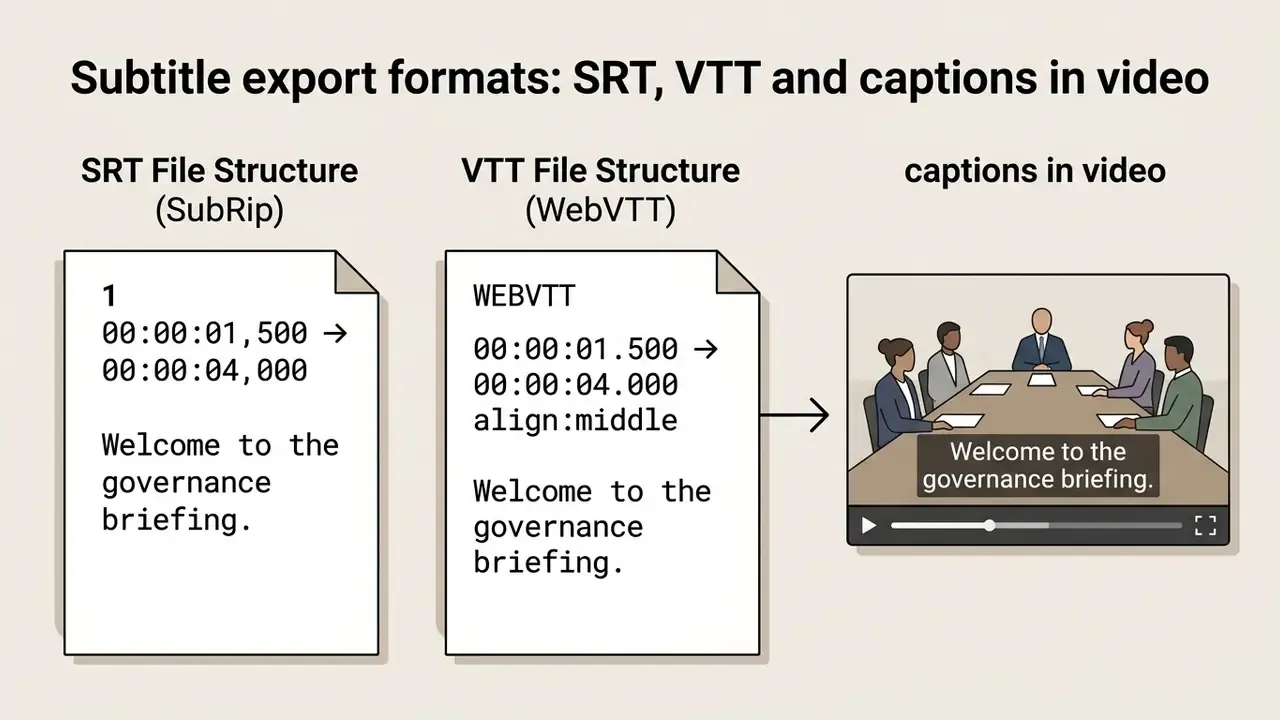
- SRT (SubRip Subtitle) the legacy interchange standard for text-based subtitles. Comma separators for milliseconds (
00:00:01,500), plain UTF-8 encoding, raw unstyled text blocks. Every platform reads an srt file. - VTT (WebVTT) the W3C text-track format for HTML5
videoelements. Requires theWEBVTTheader, uses dot separators for milliseconds (00:00:01.500), supports UTF-8, and carries inline CSS styling and cue positioning metadata. The Library of Congress records WebVTT as a timed-text format derived from SRT, which is why the two look similar yet are not interchangeable byte-for-byte.
Supported subtitle export formats and conversion matrix
Modern workflows need subtitle assets compatible with broadcasting, streaming and web playback standards at once. A generator that exports only .srt will eventually block a delivery, usually on a Friday.
| Output Format | Extension | Specs & Compatibility | Primary Use Case |
|---|---|---|---|
| SubRip Subtitle | .srt | Unstyled, comma-separated milliseconds (00:00:01,500), UTF-8 | YouTube, Facebook, LinkedIn, desktop players |
| WebVTT | .vtt | HTML5 native, dot-separated milliseconds, CSS styling and cue positioning | Web applications, Vimeo, LMS platforms |
| Plain Text | .txt | Timestamps removed, clean narrative script | Article repurposing, blog posts, show notes, SEO copy |
| Scenarist Closed Caption | .scc | 29.97 fps broadcast frame rates, CEA-608/708 encoding | US broadcast TV, Amazon Prime, iTunes delivery |
| EBU STL | .stl | European Broadcasting Union binary timed-text standard | European TV broadcast, VOD encoding, DCP sidecars |
| Timed Text Markup | .ttml / .xml / IMSC | Extensible XML with deep inline formatting, W3C IMSC profiles | Netflix delivery packages, smart-TV apps, OTT platforms |
| SubStation Alpha | .ass / .ssa | Full style block: font, outline, shadow, alignment, margins | Fansub-grade styling, karaoke effects, anime localization |
| SubViewer / Cheetah CAP | .sbv / .cap | Legacy NLE and captioning formats | Archival systems, YouTube legacy uploads, older editing suites |
| NLE interchange | .fcpxml / AVID markers | Round-trip of timed text into professional editors | Final Cut Pro and Avid finishing workflows |
| Output Format | File Extension | Toggleable by Viewer? | Search Indexable? | Best Used For |
|---|---|---|---|---|
| Burned-In Video | .mp4 / .mov | No (permanent pixels) | No | Instagram Reels, TikTok, muted video ads, mobile feeds |
| SubRip File | .srt | Yes (player dependent) | Yes | YouTube videos, Facebook uploads, desktop players |
| WebVTT File | .vtt | Yes (HTML5 native) | Yes | Web applications, HTML5 players, enterprise LMS portals |
| Broadcast Sidecar | .scc / .stl / .ttml | Yes (player/encoder) | Depends on platform | Broadcast TV, OTT and theatrical or archive delivery |
Platform requirements differ in ways that break uploads if ignored. YouTube accepts SRT, SBV/SUB, MPSUB, LRC, CAP, SCC, STL, TDS, CIN and ASC, and prefers SCC for CEA-608-based captions. WebVTT is native to HTML5 players and widely supported by YouTube and Vimeo, yet historically inconsistent on some social networks. For vertical social exports the practical baseline remains MP4 (H.264 video, AAC audio) at 1080×1920, 9:16, with captions burned in. Export errors, missing headers and encoding mismatches are the most common support tickets in this workflow; our AI Media Support and Troubleshooting notes cover the recurring ones.
AI subtitles for social media, ads, courses and work videos
Deploying an ai subtitle creator means adapting subtitle density, styling and delivery format to the audience and the publishing environment. One preset does not cover a TikTok hook and a compliance training module.
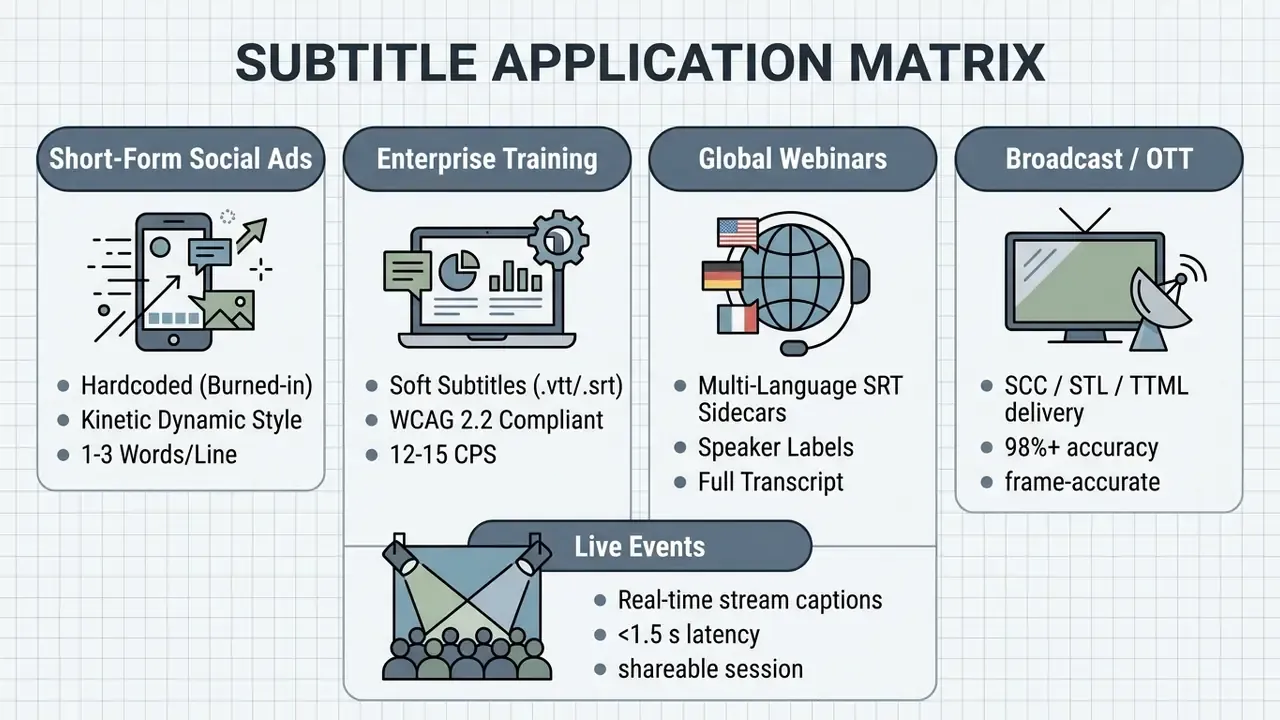
Subtitles for tutorials, lectures and business communication
Longer educational courses, executive announcements and technical tutorials prioritize complete readability and regulatory compliance over aggressive animation. Under WCAG 2.2 Success Criterion 1.2.2, prerecorded educational and business media must provide full synchronized captions. SC 1.2.4 extends the same requirement to live audio in synchronized media, which is what pulls live lectures and all-hands broadcasts into scope. Captions must not obscure relevant on-screen information, and university accessibility policies generally treat auto captions as a draft that must be proofread before publication.
A representative compliance pattern: an accessibility review of a client-facing instructional video library found that unverified auto captions contained missing domain terms and incorrect speaker attribution. The remediation workflow paired an ai generated subtitles for videos pipeline with a mandatory human verification gate, a locked domain glossary and a two-reviewer sign-off for regulated content. That is a described control framework, not an audited case study. The transferable lesson is blunt: the verification gate, not the model, produces compliance.
Real-time live captioning for events and streams
For live corporate broadcasts, virtual webinars, hybrid conferences and online lectures, AI subtitle generators run continuous stream-processing engines. Live captioning tools ingest RTMP/WebRTC audio in real time and deliver synchronized, multilingual subtitles with latency typically under 1.5 seconds, helped by lightweight punctuation-restoration models that add only a few words of delay. Typical deployment options:

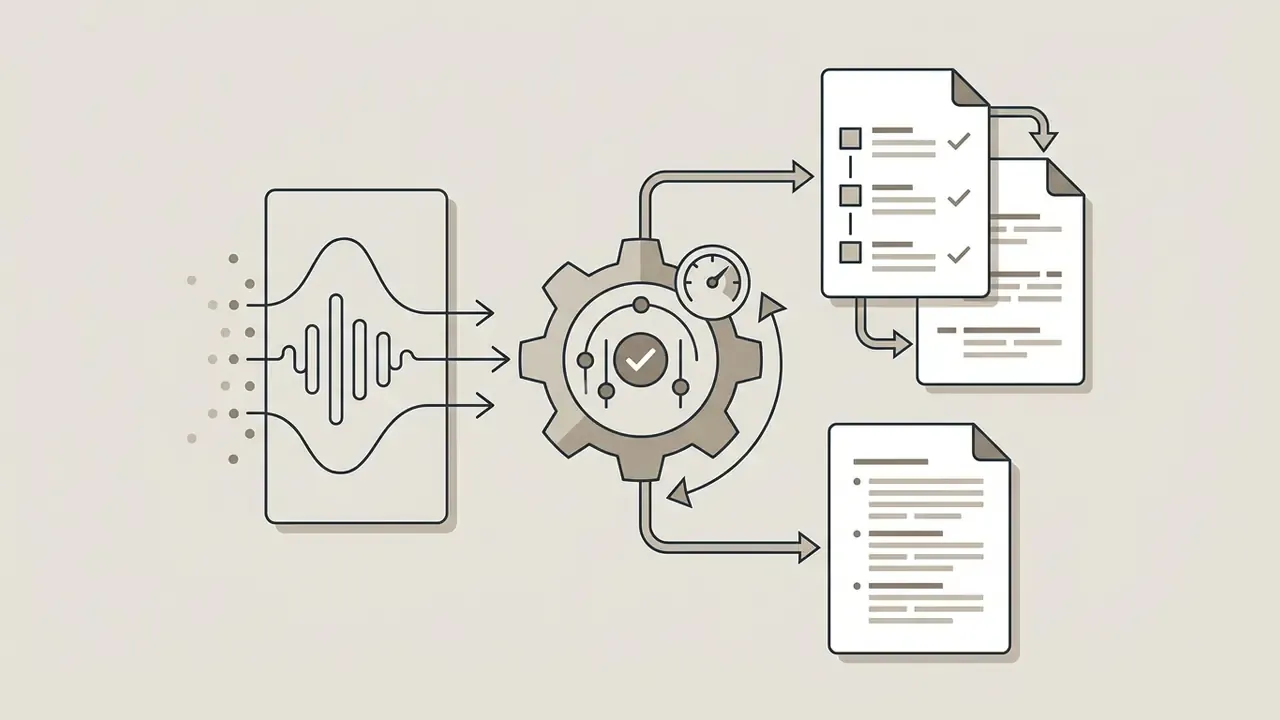
.srt or .vtt sidecar plus a clean .txt recap.Because live output cannot be proofread before air, WCAG 2.2 SC 1.2.4 compliance for high-stakes events is usually paired with a human re-speaker or an editor monitoring the stream. Budget for that person. The tool does not replace them.
Operators seeking further detail on enterprise media pipelines can consult our AI Media Glossary, review resource options via AI Media Pricing Guides, or inspect technical integrations using AI Media API Guides. Publishers focused on one channel can also follow our YouTube video editing workflows for caption upload and description-level transcript SEO.
Real subtitle tools compared: free limits, formats and pricing
Documented vendor conditions change quickly. The table below summarizes publicly stated capabilities and limits as of early 2026. Verify current terms on each vendor's pricing page before purchase, because free-tier caps and commercial-use language are the two fields that change most often.
| Tool | Stated accuracy / languages | Free-tier limits (as documented) | Export formats | Notable capability |
|---|---|---|---|---|
| VEED | up to 99.9% claimed | ~10-minute max video length, watermark on export, ~30 auto-subtitle minutes/month; Creator plan from ~$20/month | SRT, VTT, TXT, burned-in MP4 | Box highlight and karaoke-style animated subtitles, brand kit |
| Maestra | 99% claimed, 125+ languages | 1-minute trial without signup, export gated behind account | SRT, VTT, SCC, STL, CAP, TXT, TTML, SBV | 8-format converter without re-upload; live caption sessions; URL/Dropbox/record ingestion |
| Kapwing | 99% claimed, 100+ translation languages | ~10 subtitle minutes, watermark on export, sidecar download restricted | SRT, VTT, TXT, burned-in MP4 | Upload your own SRT/VTT for restyling; 100+ caption presets |
| Clipchamp (Microsoft) | single-language detection per pass | autocaptions free for all users; no stated length limit | SRT only | One-click profanity filter, audio enhancement, speaker colour coding |
| Descript | editor-centric workflow | up to ~1 hour of transcription/month, watermark-free export | SRT, VTT, plus editor exports | Transcript-as-timeline editing, filler-word removal |
| Sonix | up to 99% on clear audio | trial-based | SRT, VTT, TTML, FCPXML, AVID markers | NLE round-trip for professional finishing |
| Happy Scribe | up to 99% clear audio; 85–95% with noise or multiple speakers; 150+ languages | trial minutes | SRT, VTT and text formats | Large language matrix for localization |
| Simplified | not stated | 10 minutes/day, no watermark, commercial use permitted | SRT, VTT, TXT | Generous no-watermark free allowance |
| FlowSub | not stated | 5 credits/month, all features unlocked; Pro ~$4.99/month for 100 credits | SRT, VTT | Lowest documented paid entry point |
| LumaCaption / SubtitleKit | not stated | 2 minutes per video (Luma), no watermark; SubtitleKit: no watermark, 2 GB cap | SRT, VTT, TXT | No-watermark free sidecar export |
| ElevenLabs Subtitle Translator | not stated | trial-based | accepts SRT, VTT, SUB, ASS, STL, TXT | Translation of existing subtitle files without re-transcription |
Practical pricing bracket: documented consumer and prosumer subtitle plans in 2026 cluster between roughly $5 and $30 per month, with usage metered as minutes, credits or tokens. Token pricing behaves differently from minute pricing. On Free.ai, for example, subtitles are billed at 12 tokens per second, so a 60-second clip costs about 720 tokens for an SRT export but about 1,920 tokens for a burned-in export, because the video has to be re-encoded. Always check whether burn-in costs more than sidecar export before budgeting a large library. Readers comparing adjacent free tooling can also review our breakdown of free AI video generators, and model total cost per published minute with our AI Media Calculators.
Free AI subtitle generator pricing and commercial-use checks
Selecting an ai subtitle generator free online tool means evaluating four things: usage limits, export watermarks, data privacy policy and commercial licensing rights. The order matters less than the fact that nobody checks the last two until something goes wrong.
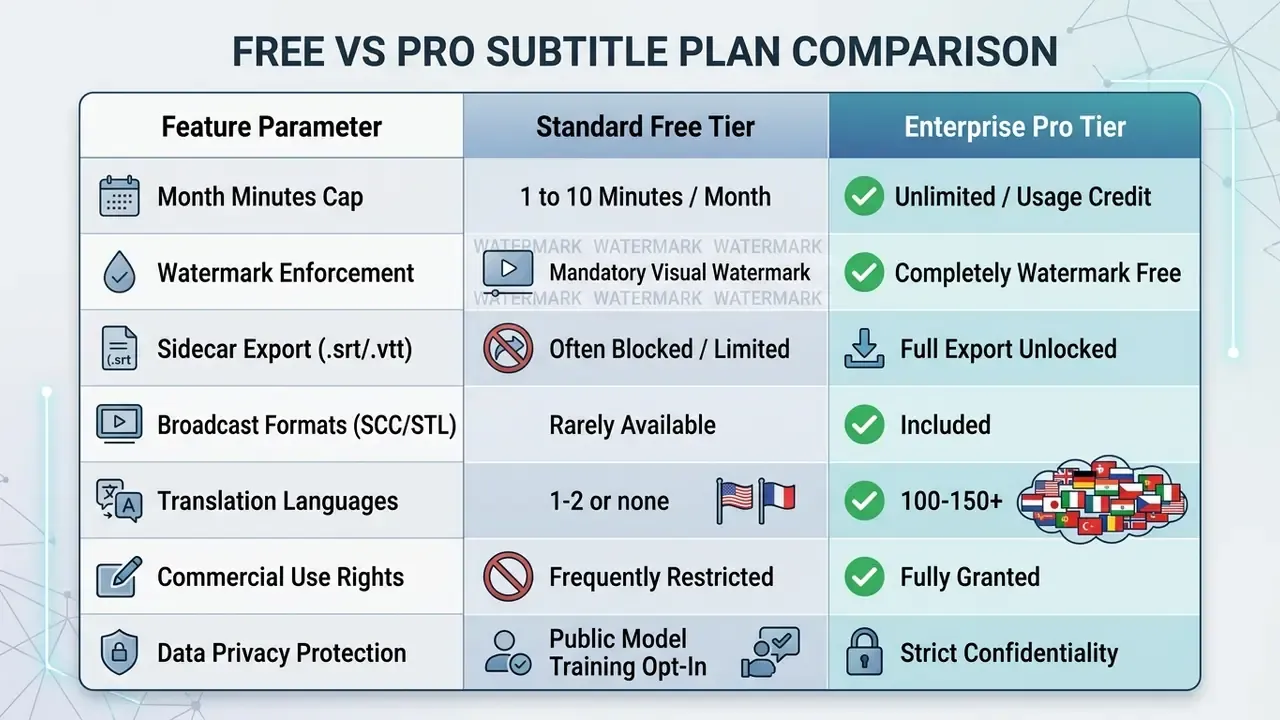
What free plans usually limit: duration, exports and watermark
Free versions of an ai subtitle generator free service impose structural limits designed to convert casual users into subscribers:
- Duration capsprocessing is frequently capped at one to ten minutes per file, or throttled by low monthly allowances, credits or tokens. Longer videos are the first thing a free plan refuses.
- Visual watermarksexports are stamped with vendor branding, which rules them out for professional use. Several services document watermark-free free exports, including Simplified, SubtitleKit, LumaCaption and Descript.
- Export format lockoutsdownloading a standalone
.srtor.vttsidecar is routinely disabled on free tiers, leaving users with watermarked MP4 exports. Broadcast formats are almost always paid-only. - Feature gatingtranslation, speaker diarization, live captioning, API access and team collaboration are the five capabilities most commonly reserved for paid plans.
What to verify before using subtitles in commercial content
Before putting automatically generated subtitles into commercial campaigns or public corporate communications, risk managers should audit vendor terms:
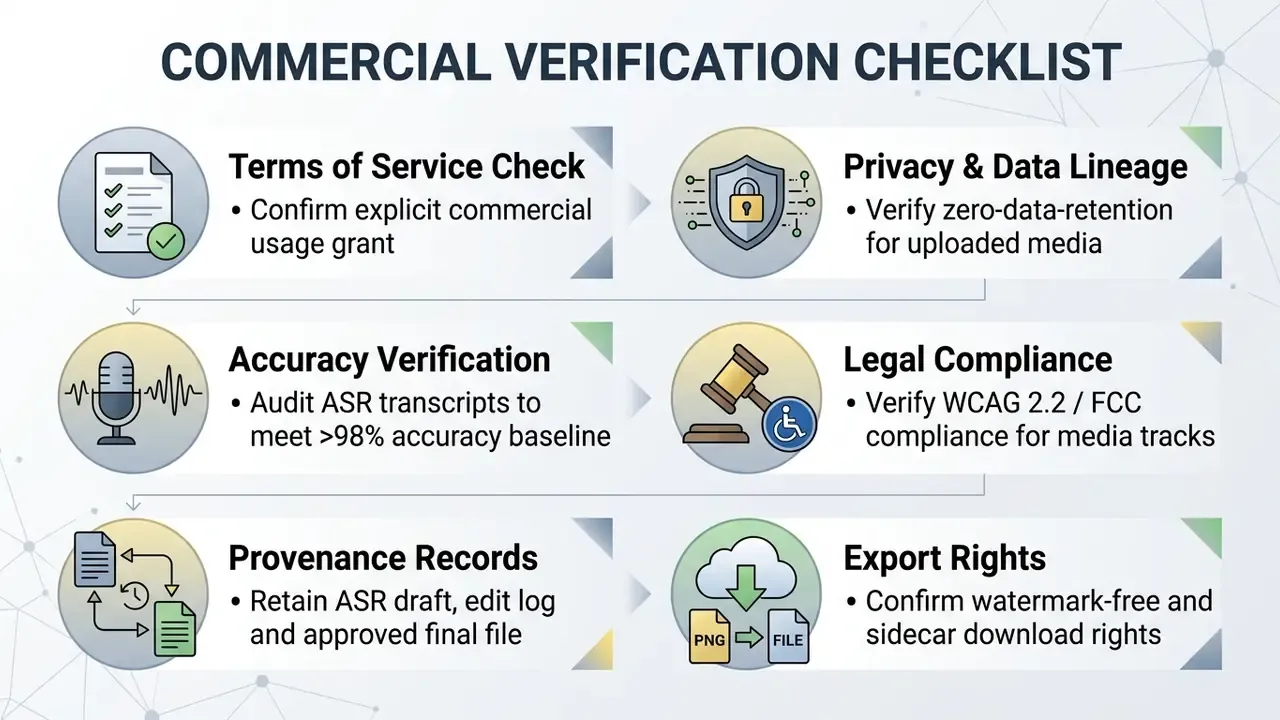
Readers evaluating commercial rights, tools and pricing models can explore our AI Media Commercial-Use Hub or inspect tool variations across AI Media Comparison Matrices.
Limitations and open questions
Pre-publish subtitle QC checklist
Run this list before every export. It takes under five minutes per short video and catches the errors that force re-uploads.
Checklist0 / 14
Video subtitle generator FAQ
Disclaimer: the answers below are general in nature and do not replace consultation with an accessibility, legal or technical specialist for your specific deployment.
How accurate are AI-generated subtitles on standard video files?
Under optimal conditions, meaning clear speech, minimal background noise and standard accents, modern speech recognition engines reach word accuracy up to 99%. Acoustic noise, overlapping speech, strong accents or specialized terminology can pull that down to somewhere between 70% and 85%, with vendor documentation citing 85% to 95% for multi-speaker or noisy recordings. Human editorial review is the difference between those two worlds.
«In professional subtitling, the minimum acceptable accuracy threshold is 98.0%; subtitles below this level are considered unsatisfactory.» Source: NERLE quality-assessment model for intralingual subtitling (2023–2024). https://doi.org/10.1080/0907676X.2023
Can an AI subtitle generator process videos with heavy background music?
Background music and sound effects interfere with acoustic feature extraction and raise word error rates. Advanced ASR engines apply noise suppression to isolate voice frequencies, but severe masking still needs manual transcript editing to restore missing words. Some tools will also transcribe song lyrics and dialogue-bearing sound effects, which may need removal or re-tagging as [music] for accessibility compliance.
Does an automated subtitle generator identify multiple speakers?
Yes. Enterprise platforms use speaker diarization to analyze voice profiles, detect transitions automatically and assign text labels or colour coding to separate dialogue turns. Diarized exports normally include utterance-level start and end times plus per-word speaker IDs, which is exactly what interview and panel workflows depend on.
How are code-switching and multiple languages handled in one video file?
Modern multilingual models can detect mid-sentence language switches, but accuracy drops when transitions come fast, and several consumer tools detect only one language per pass. Best practice is to select the dominant source language for the initial transcription, then correct code-switched phrases manually in the editor.
«Modern ASR systems support multilingual transcription, yet systematic accuracy evaluations of real-world code-switching remain rare.» Source: Automatic Speech Recognition: A survey of deep learning approaches (2023–2024). https://doi.org/10.1016/j.neucom.2023
Can I generate subtitles from a YouTube or Vimeo link instead of a file?
Yes. URL-based ingestion accepts public links from YouTube, Vimeo, Google Drive and direct media URLs. The engine streams the audio track and returns a timed transcript without a local download. It is the fastest route for captioning already-published content, and it also supports YouTube integrations that push the finished track back to the video.
Can I upload an existing SRT file and just restyle it?
Yes. Upload the video, open the subtitles panel, choose Upload SRT/VTT, and the editor maps the imported cues onto the timeline. From there you proofread, fix timing, apply animation presets, colour-code speakers, translate, then export either a burned-in video or a converted sidecar.
Can I convert subtitles between formats without re-processing the video?
Yes. Sidecar files hold only text and timecodes, so conversion between .srt, .vtt, .scc, .stl, .ttml, .sbv and .txt is a text transformation, not a render. Converting in seconds, and in batch, is the standard way to serve several distribution partners from one approved transcript.
Can AI filter profanity out of subtitles automatically?
Yes. A lexical filter compares each transcribed token against a profanity dictionary and can mute the audio range, mask the word (, [profanity]) or delete it. Gaming, UGC and brand channels use this routinely to stay eligible for monetization on TikTok and YouTube while remaining inclusive.
What colour should social media subtitles be?
Yellow (#FFD700) is the current default for short-form social captions because it reads well on both bright and dark footage while staying eye-catching. Pair it with a black outline or a semi-transparent box. White bold type with a hard outline is the safer choice for corporate and educational content. In all cases keep contrast at or above 4.5:1, and never let colour alone carry meaning.
Can AI generate live captions for webinars and streams?
Yes. Live captioning engines process RTMP/WebRTC audio continuously and output captions with latency typically under 1.5 seconds, optionally translated into the viewer's language and delivered via a shareable session link or a player overlay. For WCAG 2.2 SC 1.2.4 compliance on high-stakes events, pair live ASR with a human monitor.
What is the maximum video file length supported for automated subtitling?
Most web-based subtitle editors cap uploads at 2 GB or 60 minutes to prevent server timeouts, while some editors, notably Clipchamp, state no length limit for autocaptions. Multi-hour conference recordings and academic lectures should be split into segments or processed through an API pipeline. Publishers handling long-form uploads can follow our YouTube video editing workflows for chaptering and transcript publishing.
Do free plans allow commercial use of the exported subtitles?
It depends entirely on vendor terms. Some free tiers explicitly permit commercial use with no watermark (Simplified), some grant it only during a limited trial (ScreenApp), and many restrict it outright or enforce a watermark that makes commercial use impractical. Read the terms of service, and remember that purely AI-generated text without substantial human authorship is not protectable under U.S. Copyright Office guidance.
Footer navigation and authority hubs
- AI Media Glossary — index of media engineering, AI transcription and accessibility terminology.
- AI Media Pricing Guides — pricing breakdowns and commercial licensing reviews.
- AI Media Comparison Matrices — side-by-side evaluations of automated media processing engines.
- AI Media Support and Troubleshooting — enterprise media workflows, export error handling and formatting guides.
- AI Media Calculators — cost-per-minute and usage-credit modelling for media pipelines.
- AI Media API Guides — batch and pipeline integration documentation.
- AI Media Commercial-Use Hub — licensing, rights and data-retention checks by tool category.
- AI Litigation and Case Timelines — regulatory tracking of AI intellectual property and commercial copyright decisions.
- YouTube Video Editor Workflows — publishing, chaptering and caption-upload workflows for long-form video.