«Deploying generative visual models without strict parameter boundaries creates brand and audit risks. Control over prompt syntax, image seeds, and output validation is mandatory before moving any synthetic asset into production.»
— Marcus Hale, author
Executive Summary for Decision-Makers
- What it is: Midjourney is a closed-source, subscription-based latent diffusion service. It converts natural-language prompts into synthetic imagery through the midjourney.com web interface or the official Discord bot. That, in short, is the honest midjourney ai image generation tool description.
- Current default model: Model Version 7 (released 3 April 2025, default since 17 June 2025) renders 20-30% faster than v6.1, handles anatomy better, adds Omni Reference consistency, and parses abstract prompts more reliably.
- Resolution reality check: The base 2×2 grid renders at
1024 × 1024 pxper tile at--ar 1:1. Upscaling reaches2048 × 2048 px, and--ar 16:9lands near2912 × 1632 pxafter upscale. Arbitrary custom pixel dimensions are not supported. Full stop. - Control surface:
--ar,--v,--stylize,--q,--no,--seed,--sref,--cref,--cw,--iw,--oref,--ow. - Reproducibility for audit: Fixing
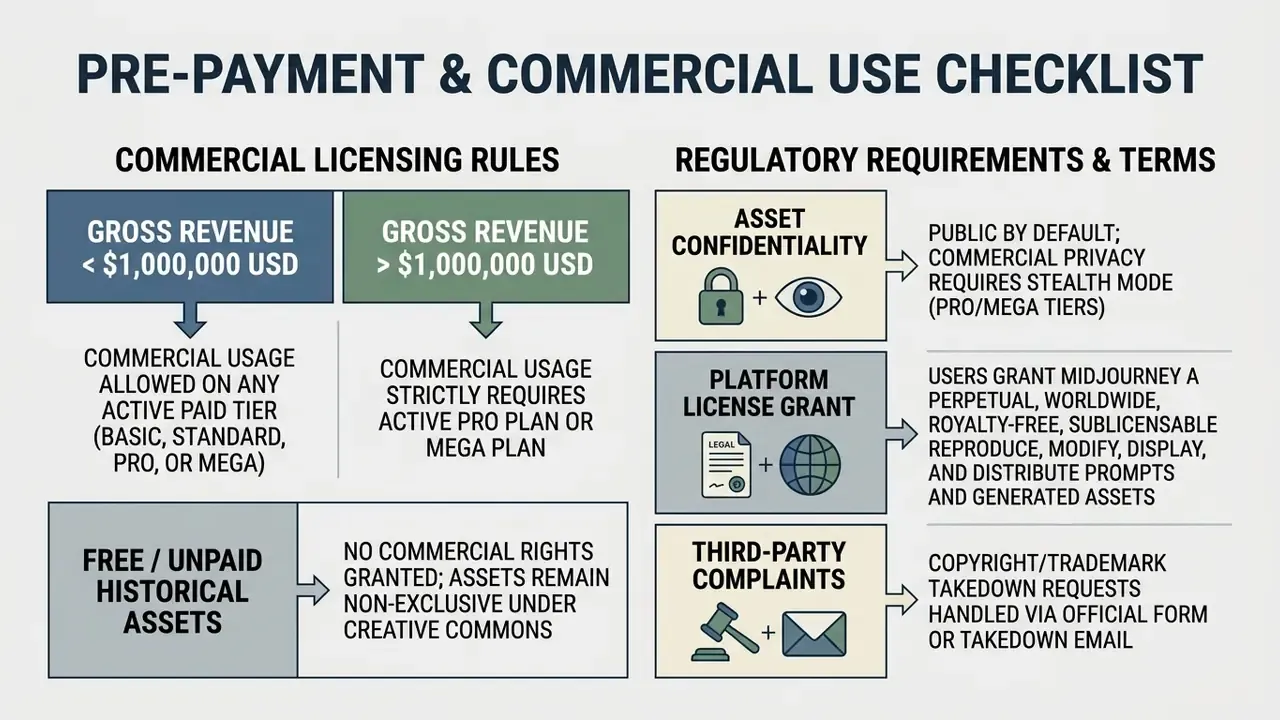
--seedplus a frozen--vvalue is the only practical way to reproduce a generation for model-risk documentation. - Commercial licensing: Commercial rights require an active paid plan at creation time. Entities above $1,000,000 USD gross annual revenue must hold a Pro or Mega plan. Asset privacy (Stealth Mode) starts at Pro.
- Primary residual risks: no dedicated compliance-isolated enterprise tenant, prompts and uploads processed inside a third-party SaaS, documented demographic bias in generated professional imagery, and recurring anatomy or typography defects that demand a pre-publication audit.
What Is the Midjourney AI Image Generator and How Does It Create Images
A midjourney ai image generator definition describes a proprietary, closed-source generative AI system that turns natural language text descriptions into high-resolution synthetic imagery. The platform runs on a latent diffusion model architecture. It iteratively strips Gaussian noise from a compressed representation space until a coherent image appears.
Because Midjourney publishes no model card, no training-data inventory, and no parameter count, validation teams cannot perform white-box testing. So the pipeline below is not an academic curiosity. It is the minimum conceptual model you need to define input controls, explain output variance to reviewers, and document compensating controls for a vendor model nobody outside the company can inspect.
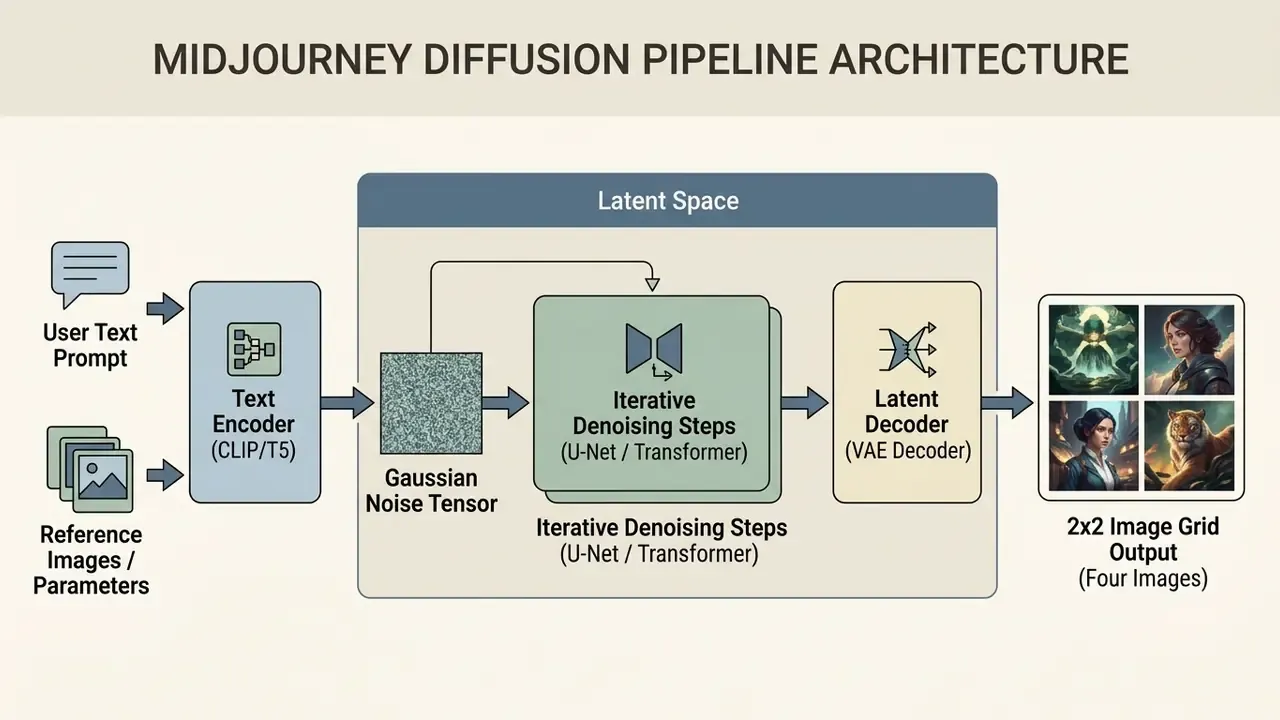
From an operational standpoint, this midjourney ai image generator description shows how conditioned embeddings steer the image generation process. Artificial intelligence does the sampling; your prompt and parameters set the guardrails. According to comparative benchmark studies on text-to-image diffusion models, Midjourney v6 scored 0.7208 in world-knowledge alignment, ahead of open-source baselines such as SDXL and SD3-M.
How Midjourney Turns Text Prompts into AI Generated Images
Midjourney converts text prompts into AI generated images by mapping tokens into a multidimensional vector space that conditions the diffusion sampling loop. The system initializes a latent noise grid, then applies iterative denoising steps conditioned on the user prompt to assemble a 2x2 grid of four candidate images.
The text-to-image pipeline leans on joint text-image embeddings to score prompt alignment at each denoising iteration. A single prompt submission triggers parallel sampling threads and returns four varied visual interpretations of the requested scene. In reference implementations of latent diffusion, the grid geometry is explicit: samples-per-row multiplied by iterations-per-column produces that familiar four-image output block. Machine learning models handle the sampler steps; you handle the brief.
When team members hit unexpected quota deductions during generation tests, reviewing operational logs for failed generation charged errors makes reconciliation quick instead of painful.
What Images and Styles You Can Create in Midjourney
Midjourney synthesizes a wide range of visual formats: photorealistic portraiture, vector illustrations, architectural renderings, cinematic concept art, brand assets. You control artistic style by naming mediums, camera angles, lighting conditions, or historical art movements directly in the prompt. Want digital art that reads as a 1970s film still? Say so, and say it early.
Empirical evaluation of that narrative illustration dataset shows Midjourney v6.1 holds visual coherence across multi-scene story prompts more reliably than keyword-driven pipelines. The model adapts to hyper-realistic photographic aesthetics about as well as it adapts to stylized ai generated art, which makes it a flexible base for corporate design and marketing collateral. Teams benchmarking artistic breadth across vendors can scan a broader landscape of AI art generators before standardizing on one platform, or test niche style engines such as Ghibli-style AI image generators when a specific aesthetic is the deliverable.
E-E-A-T Verification and Official Documentation
Feature Comparison: Midjourney v6.1 vs Model Version 7
Version selection is a governance decision, not only an aesthetic one. Rendering speed drives GPU-hour burn, and reference features decide whether brand consistency can be enforced without bolt-on tooling.
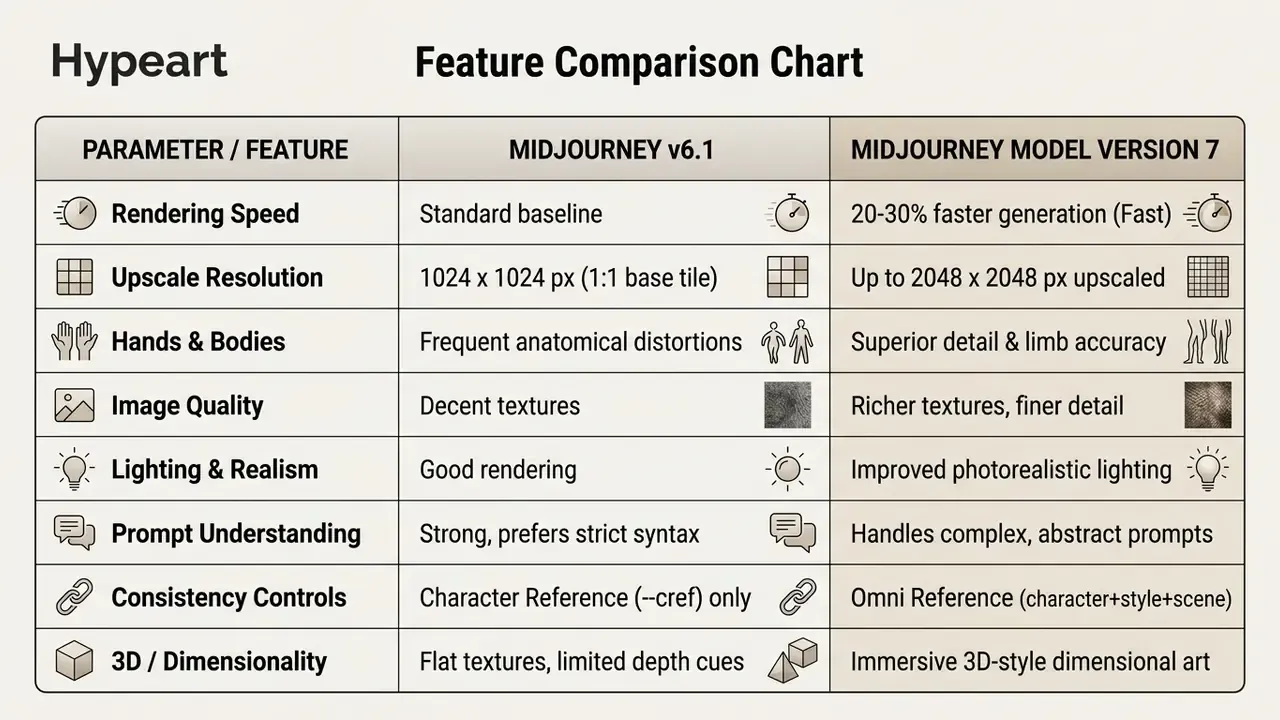
Practical takeaway: v7 cuts retouching labor on human subjects and reduces paid Fast-mode retries. Omni Reference (--oref with the --ow adherence weight) replaces the multi-parameter juggling v6.1 required for character continuity. For a side-by-side against rival engines, see the dedicated breakdown of Midjourney versus competing image generators.
How to Start Using Midjourney for Your First Image Generation
To begin using Midjourney for your first image generation, set up an active account subscription, pick your primary workspace interface, and issue an initial generation command. The platform accepts requests through both its dedicated web interface and its official Discord server.
That comparison matters at onboarding. Teams choosing a first platform have to weigh out-of-the-box quality against configurability, and a structured review of the best AI art generators clarifies where hosted diffusion beats a self-hosted pipeline.
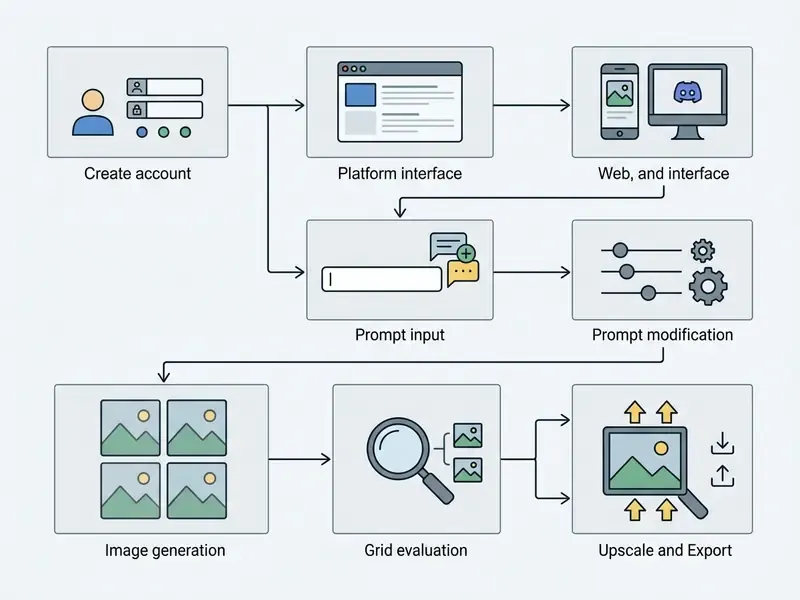
Step-by-Step User Journey
- Account Activation: Authenticate at midjourney.com and bind an active payment tier.
- Interface Selection: Choose the browser-based Midjourney web interface or join the official Midjourney Discord server.
- Prompt Submission: Type your descriptive prompt into the Imagine bar, or run the
/imaginecommand. - Grid Review: Evaluate the generated 2x2 grid with its four initial image variations.
- Refinement and Export: Apply upscale (
U1-U4) or variation (V1-V4) controls, then download the final asset ("Download Image") or push it to the gallery ("Upscale to Gallery").
Midjourney Web Interface vs Midjourney Discord: Where to Create Images
You can create images either through the standalone Midjourney web interface at midjourney.com or through the official Midjourney server on Discord. The web interface offers a centralized canvas with integrated editing controls. Discord offers community channels and command-line style parameter management, which some operators still prefer.
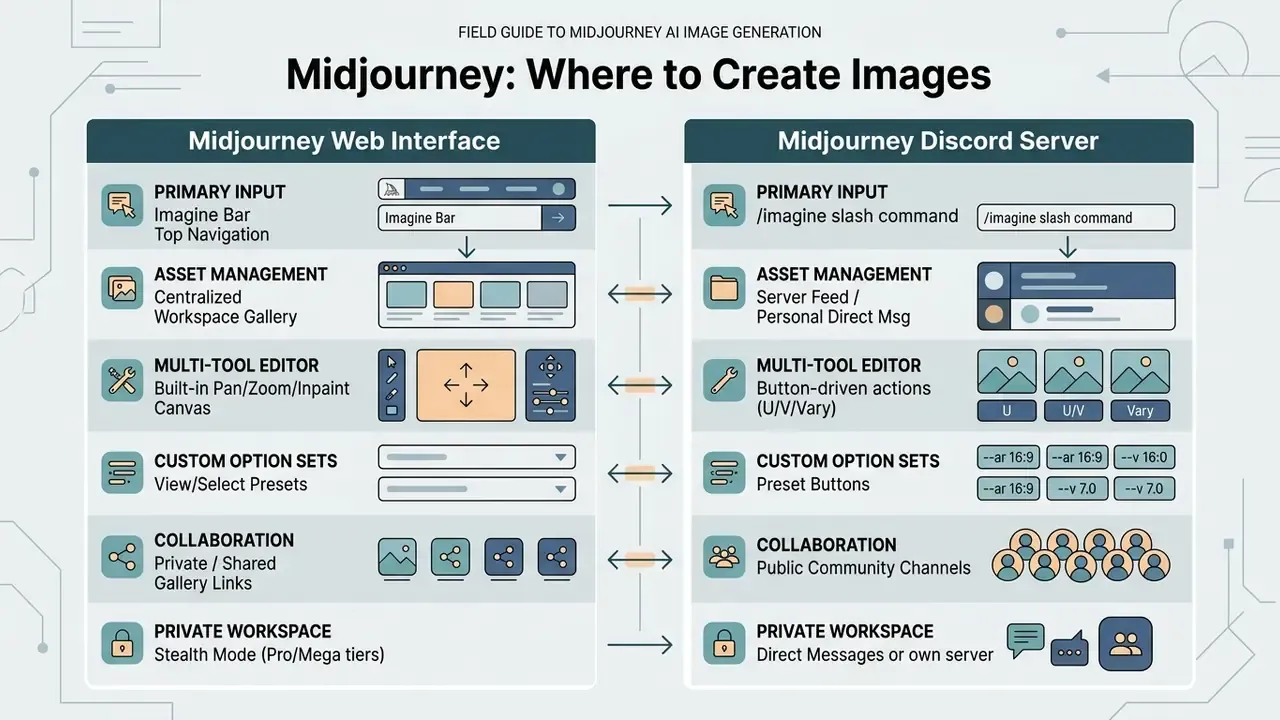
Both environments share the same underlying model versions and compute allocations. Official documentation notes one asymmetry: option sets are created and managed only in Discord. Teams assembling multi-tool content stacks often compare these interfaces against external generative workflows, for example checking whether can perplexity ai cover standalone visual creation, or whether a dedicated diffusion platform is still required.
How to Add the Midjourney Bot to Your Own Discord Server
Generating in shared #newbies channels exposes prompts and outputs to thousands of unrelated users. For pre-release product visuals or client work, that is simply unacceptable. Running the bot on a controlled server cuts the exposure and keeps job history in one place.
- Open the official Midjourney Discord server while signed in to your Discord account.
- In the member list on the right, find Midjourney Bot.
- Click the bot name and select Add to Server / Add to App.
- Pick your own server from the dropdown and grant the permissions needed to read and post messages in the target channel.
- Switch to your server and run
/imagine. Jobs render in an isolated channel, with no public-channel flooding.
Important scope note: adding the bot to a private server isolates the channel, not the platform. Asset visibility in the public Midjourney web gallery is governed by Stealth Mode (Pro/Mega), never by Discord permissions.
How to Write Your Request and Get the First Four Images
To formulate a prompt and receive your first four images, type a clear visual description into the Imagine bar or the /imagine field and submit. Midjourney processes the text string and returns a 2x2 initial grid holding four distinct visual interpretations.
While scoping an enterprise asset creation project, our editorial team tested Midjourney's initial grid generation against standardized brand guidelines. We submitted structured prompts specifying subject, background, and lighting across 50 production runs. In that internal, non-peer-reviewed test, the systematic input structure noticeably cut the number of grid re-rolls before a usable candidate appeared, roughly a one-third reduction against our unstructured baseline, while giving us clean baseline seeds for downstream editing. Treat the number as a directional internal observation, not a benchmarked metric. Honestly, the sample is too small for anything else.
Evaluating the four images means checking subject placement, background coherence, and stray artifacts. The standard selection rule is simple: pick the strongest quadrant, press U1-U4 to upscale it, or V1-V4 to branch four new variations from it. If an account shows balance discrepancies during onboarding, checking whether credits disappeared verifies tier allocations before you run large batch tests.
How to Write Prompts for Accurate, High-Quality Midjourney Results
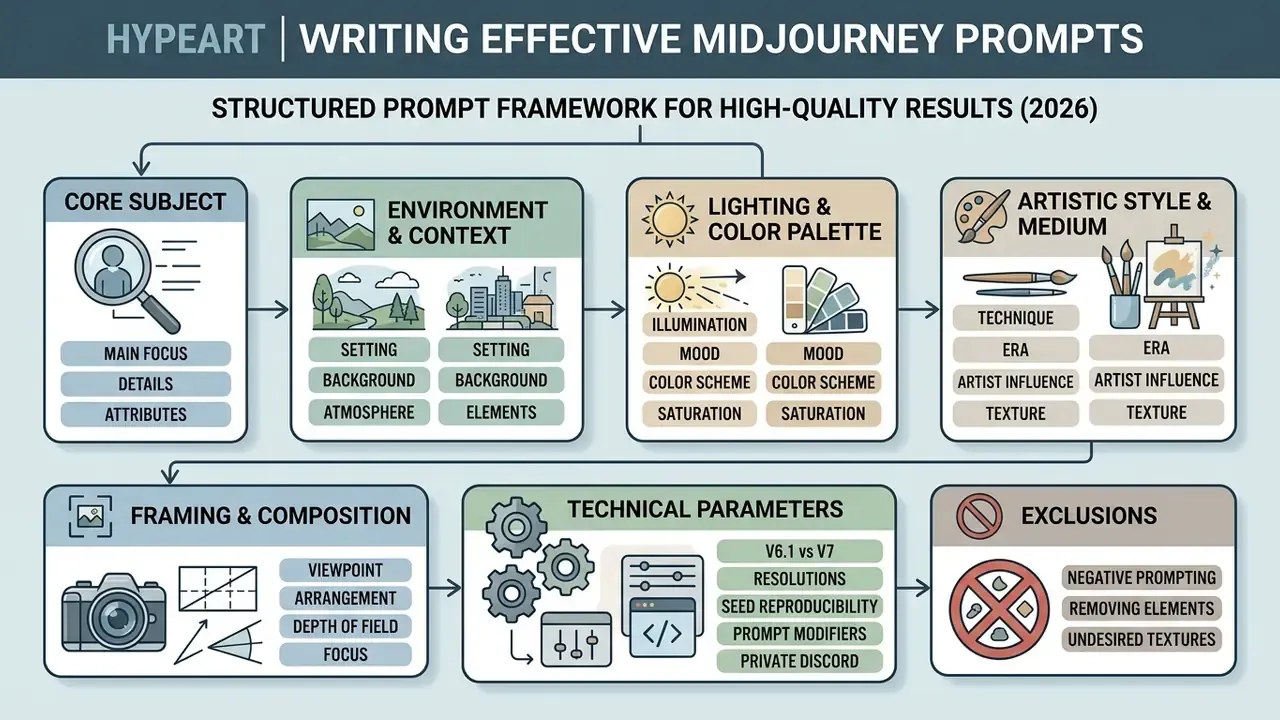
Writing effective prompts for accurate, high quality images means structuring your input into ordered semantic blocks: subject, environment, lighting, artistic style, technical parameters. In that order, roughly.
Structured Prompt Framework for Midjourney
Checklist0 / 7
What a Clear Midjourney Text Prompt Consists Of
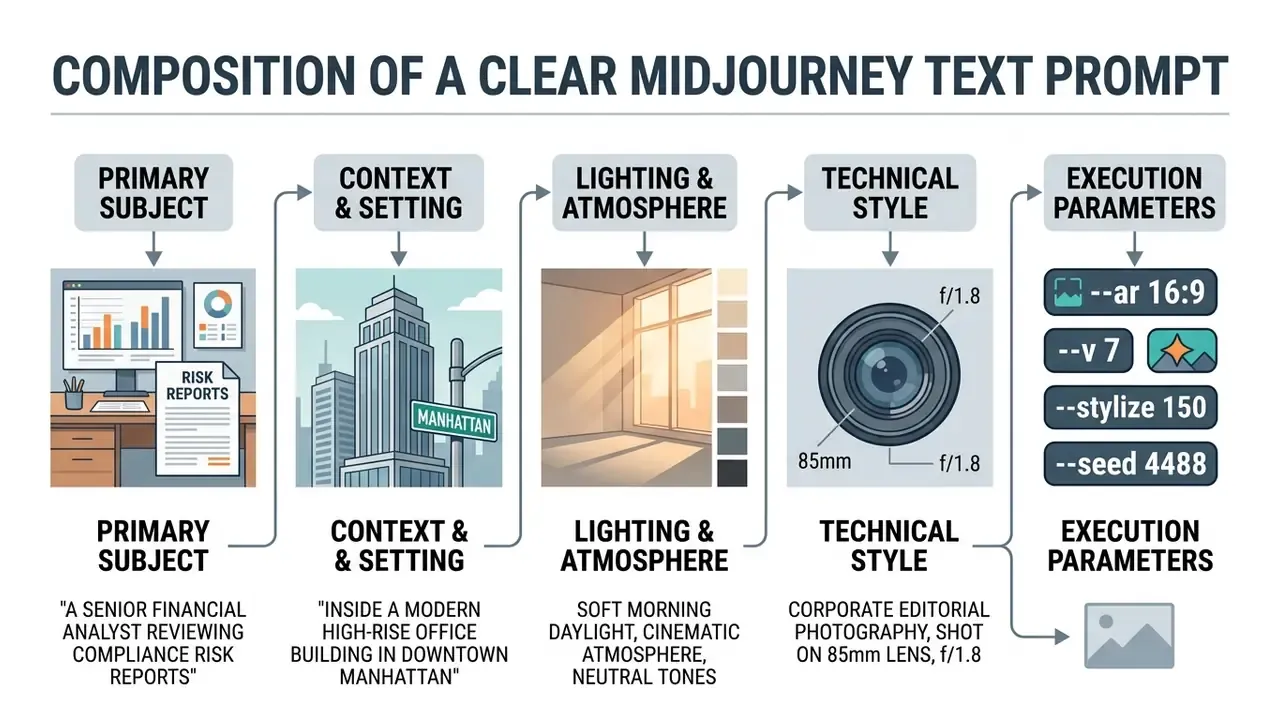
A clear text prompt for Midjourney opens with a concise subject description, then adds contextual details, lighting definitions, and artistic descriptors. Critical terms placed near the beginning carry higher attention weight during the first latent denoising phases. Official guidance is blunt about economy: short and simple prompts usually generate the best images. Concepts are separated with the :: divider and can be weighted (sky::2 city::1), as long as the sum of weights stays positive.
That finding explains a very common enterprise failure. Invented product names, internal codenames, and niche jargon sit outside model vocabulary, so the system quietly substitutes generic fallback imagery instead of raising an error. No warning, no log entry. Just a wrong midjourney ai picture that looks confident.
Modifier Bank: ready-to-use prompt keywords. Categories alone do not move the model. Specific trigger vocabulary does. Use the table below as a copy-paste library.
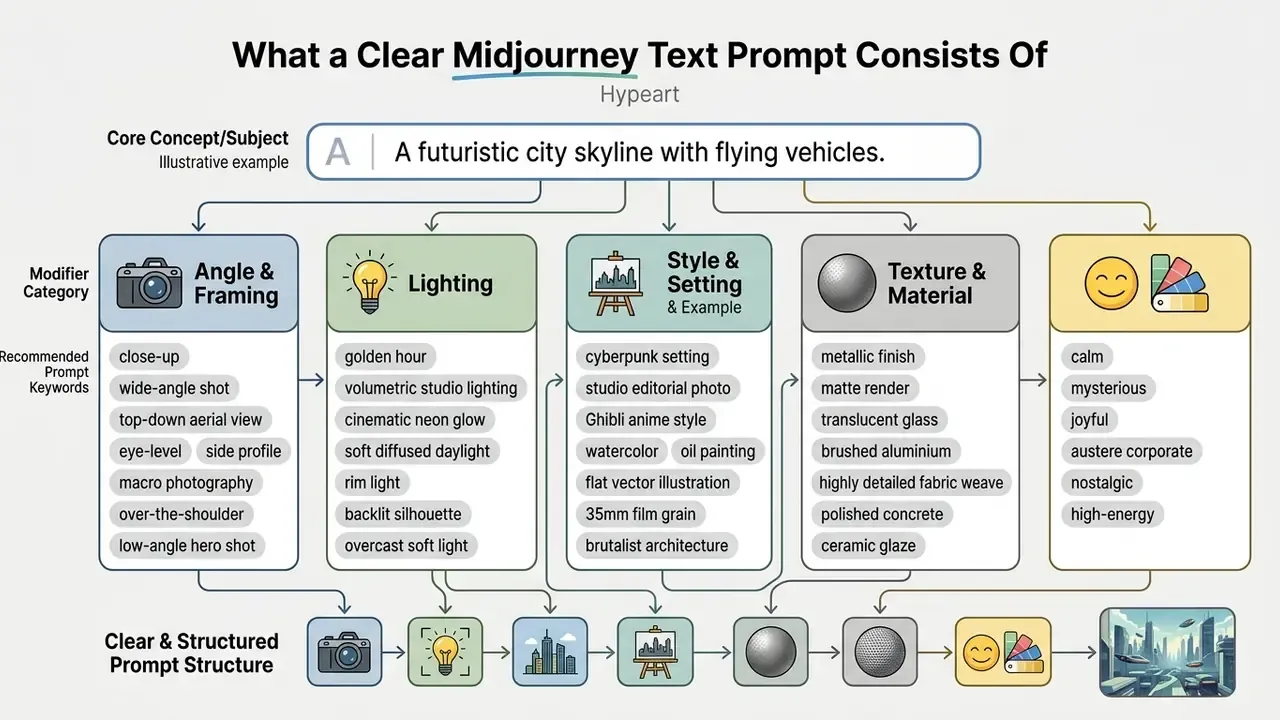
Plain natural language beats stacked keyword lists for consistency. For narrow production tasks, such as isolated brand marks, teams often test an ai logo generator alongside general-purpose diffusion prompts to gauge asset precision. For people-focused work, a dedicated AI headshot generator may beat general diffusion on facial fidelity.
How to Use Style, Format, and Aspect Ratio
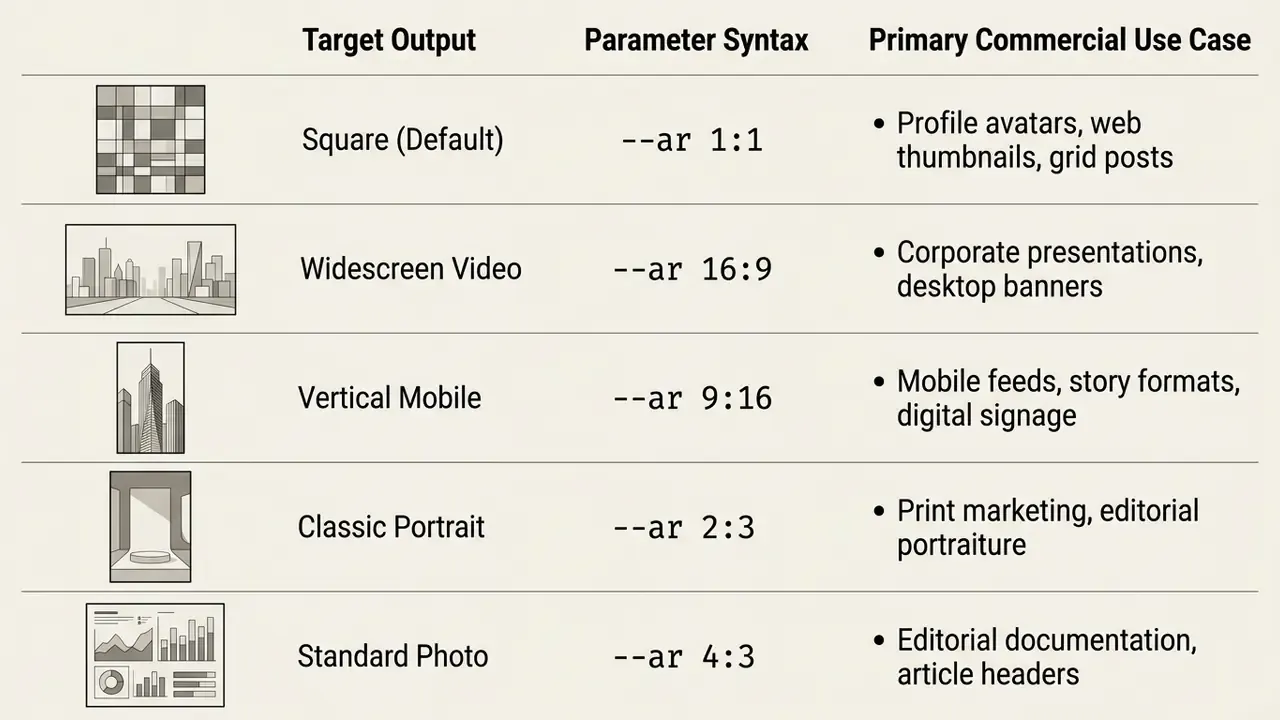
Controlling style, format, and aspect ratio means pairing descriptive text cues with technical parameter flags at the end of the prompt string. The --aspect or --ar parameter sets width-to-height dimensions for your target media format. Parameters always go after the prompt text, separated by spaces, with no trailing punctuation.
System parameters such as --stylize (or --s, range 0 to 1000, default 100) change how hard Midjourney pushes its native aesthetic. Low values (say --s 50) force strict adherence to prompt text. High values (--s 750) hand the model more artistic latitude. The --q (quality) flag governs GPU time spent on the first four images: in v7 the default is 1, while 2 and 4 burn 2× and 4× GPU time and do not affect later variations, inpainting, or upscales.
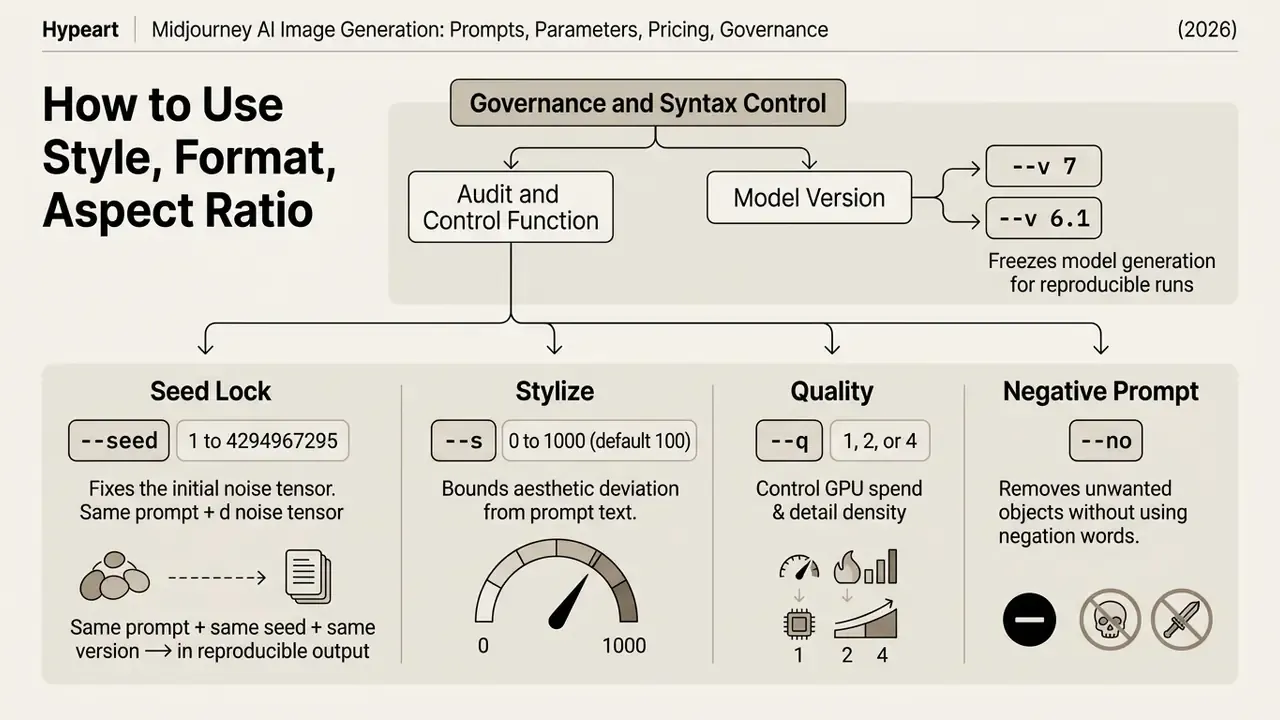
For model-risk documentation, record the full generation string in the asset register: prompt text, --v, --seed, --s, --q, and every reference URL. Without a captured seed, a generation is effectively unreproducible, and that weakens any later claim that an approved asset matches the reviewed artifact. Auditors notice. Teams standardizing parameter policy across platforms can align conventions using guidance on ai image generation from text description.
How to Apply Style Reference, Character Reference, Omni Reference, and Image Weight
Style Reference (--sref), Character Reference (--cref), Omni Reference (--oref), and Image Weight (--iw) let creators transfer aesthetic vibe, hold character continuity, and tune how strongly an existing image influences new generations.
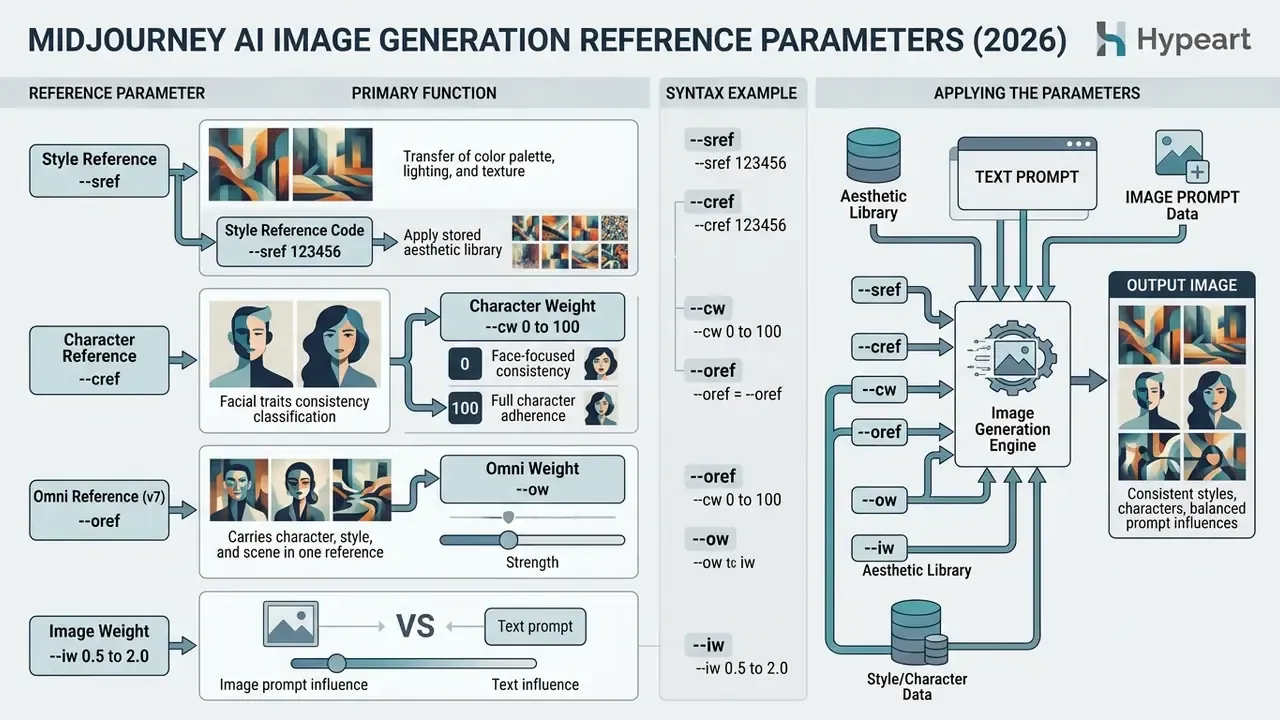
Style Reference is documented for versions 6, 7, and Niji 6. It transfers vibe (colors, medium, texture, lighting) rather than copying specific objects or people. Character Reference accepts several URLs separated by spaces. Omni Reference, new in v7, folds character, style, and scene continuity into a single reference channel, which is why v7 is the practical minimum for campaign-level consistency work.
When you build consistent corporate assets, pairing --sref with precise text descriptions keeps visual harmony across brand campaigns. The dataset finding above is the empirical argument for locking references rather than re-describing a character in prose every single time. Since Style and Character Reference are effectively constrained image-to-image workflows, teams needing broader conditioning can also assess general image-to-image generators and map parameter conventions across both stacks.
How to Improve Midjourney Images and Fix Failed Results
Improving a Midjourney image, or rescuing a bad one, involves variation controls, upscaling, Vary (Region) for localized inpainting, and sharper prompt inputs.
Variations, Upscale, and Vary (Region): Refinement Tooling
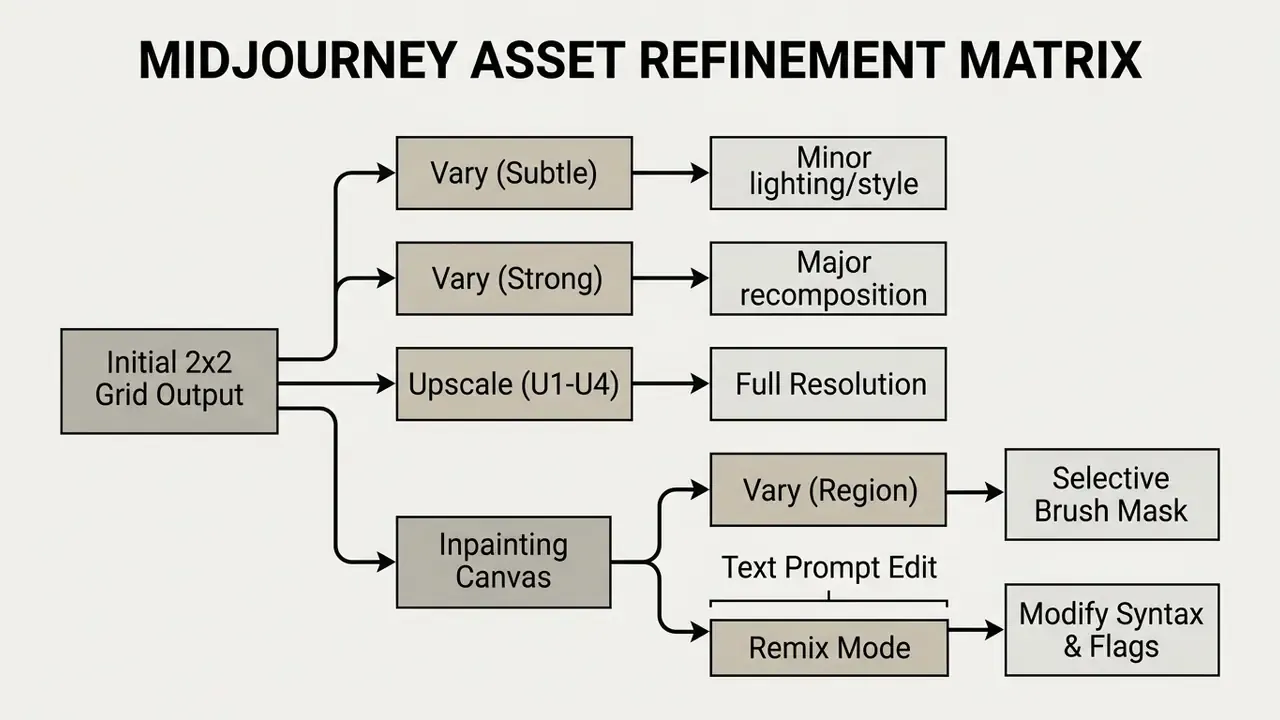
The core refinement tools are Vary (Subtle/Strong) for global adjustments, the Upscale buttons for resolution, and Vary (Region) for targeted inpainting.
- Vary (Subtle) Creates four new variations while holding overall composition and subject geometry.
- Vary (Strong) Pushes structural changes across lighting, subject pose, and background layout.
- Upscale (Subtle/Creative) Raises pixel dimensions, with Creative mode inventing small extra details. When required output exceeds Midjourney's native ceiling of
2048 × 2048 px, route the asset through a dedicated AI image upscaler or outpainting tool. - Vary (Region) Opens an inpainting canvas where you mask sub-regions and regenerate them with modified prompt text. Documented support covers Midjourney version 5 and later.
- Editor (web) Combines Pan, Zoom Out, and Vary Region in one interface, and also edits user-uploaded images.
Using Vary (Region) with Remix Mode active lets you swap or modify specific visual elements without disturbing surrounding background layers. Remix Mode has to be enabled in settings first, otherwise the prompt-edit window never appears on a variation action. Final polish, meaning grading, sharpening, and artifact cleanup, usually happens outside the platform in a conventional photo editor or free photo editor.
Why Midjourney Generates the Wrong Result and How to Fix It
Midjourney produces inaccurate results mostly for four reasons: ambiguous phrasing, conflicting parameter flags, unhandled negation terms, and vocabulary gaps.
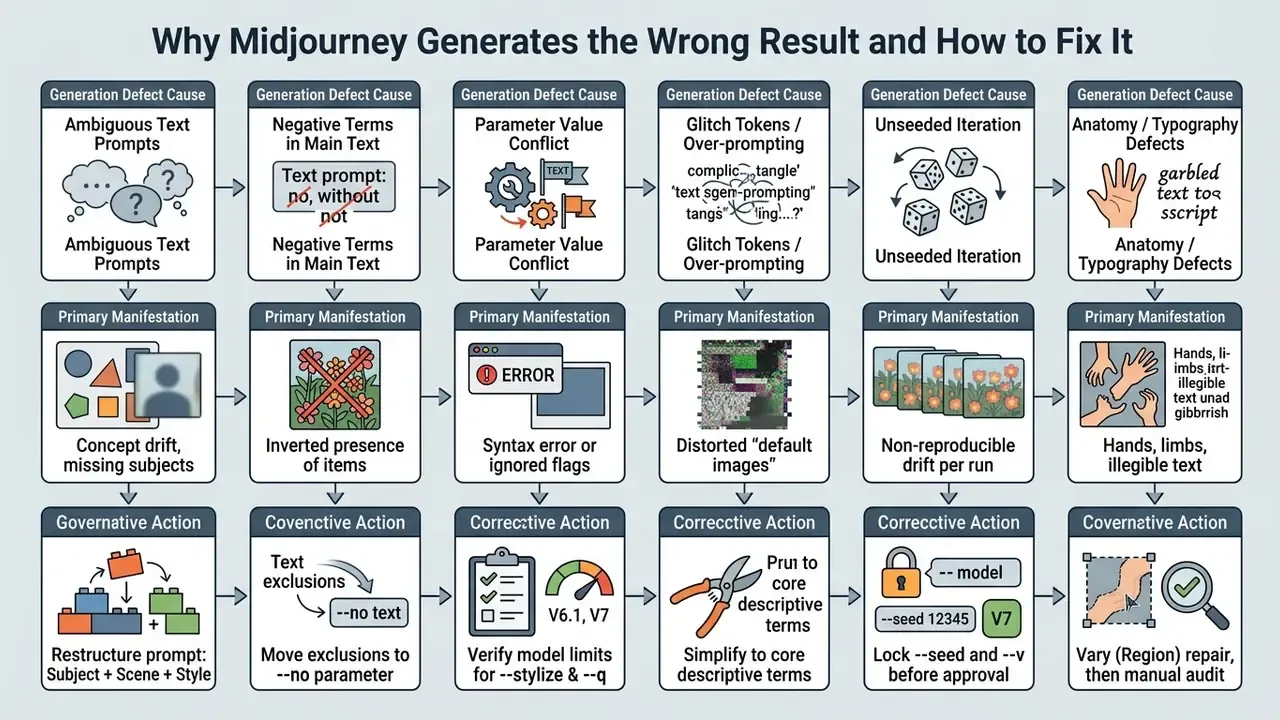
That measured drop in user satisfaction is the business case for prompt hygiene. Divergence is not just an aesthetic annoyance; it eats paid GPU hours and reviewer attention. Negation handling remains the most common self-inflicted defect. Vendor guidance across the industry agrees that words like "no," "not," and "without" can invert intent, so exclusions belong in the dedicated negative field (--no), never in prose.
After diagnosing defects, artifact cleanup is often faster outside the platform. A comparison of AI photo editing workflows helps you decide when to repair and when to regenerate.
E-E-A-T Alert Box: Pre-Publication Quality Audit (moved, see the commercial-use section for the full control)
Data Privacy, Governance, and Model Risk Controls for Midjourney
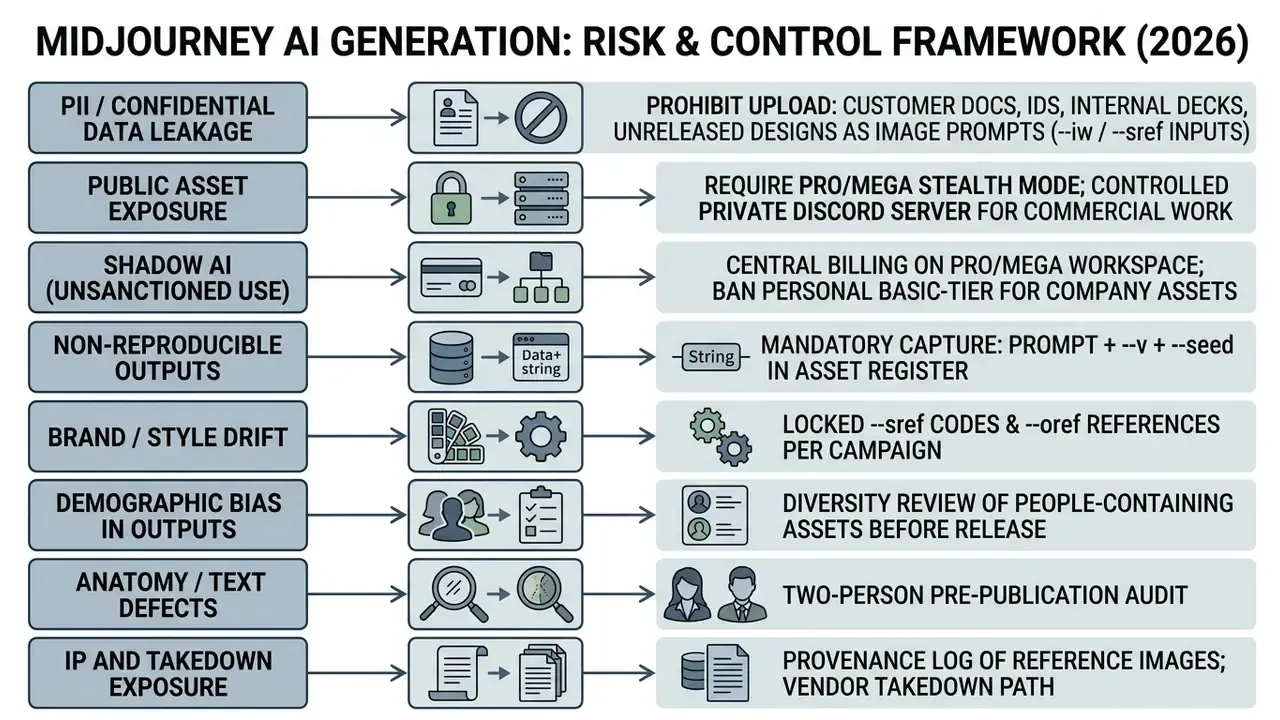
Midjourney is a commercial, closed-source SaaS service. Prompts, uploaded reference images, and generated assets are processed on vendor infrastructure. As of this review, Midjourney publishes no dedicated compliance-isolated enterprise tenant, and its documentation advertises no HIPAA-, FINRA-, or PCI-scoped processing environment. Teams in regulated sectors should treat the platform as an external processor and design controls on that assumption.
Midjourney Pricing: How to Evaluate Cost and Choose a Plan
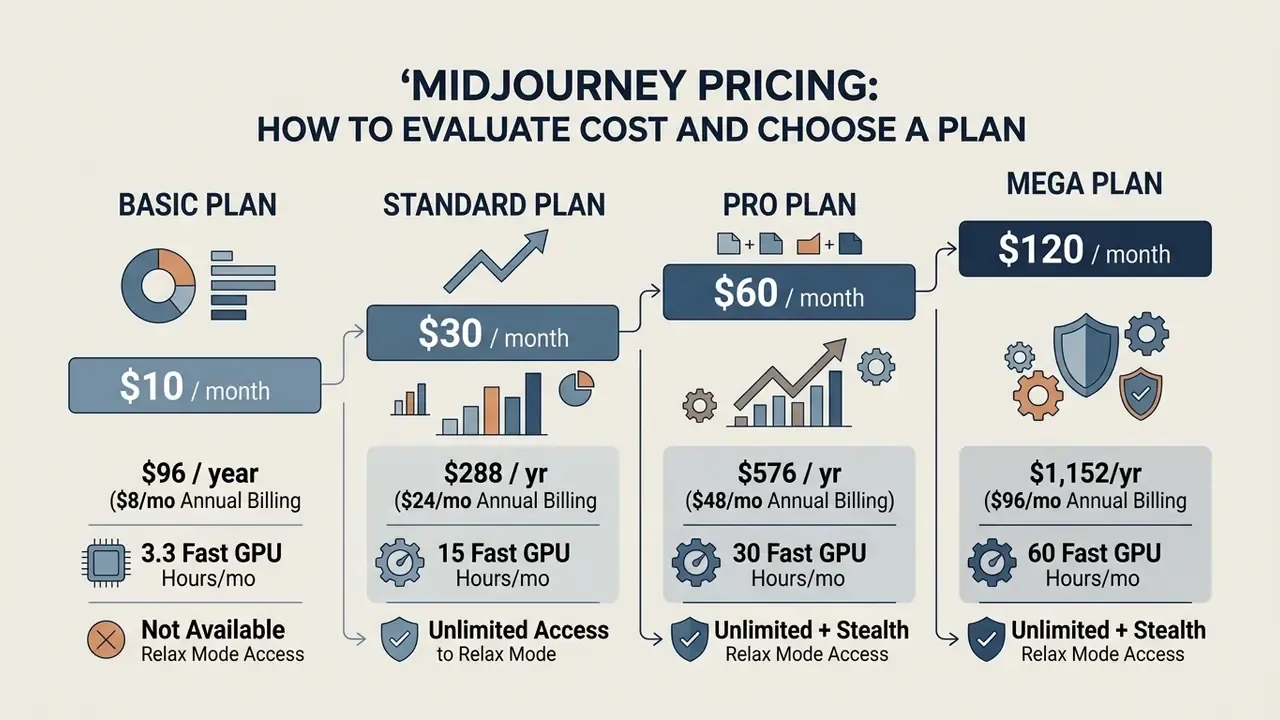
Midjourney runs on monthly and annual tier-based subscriptions. Each tier defines a compute allocation measured in Fast GPU hours, plus unlimited Relax GPU generation on higher plans.
How to Choose a Plan for Personal, Creative, and Professional Work
Plan choice comes down to three variables: generation volume, privacy requirements, and whether you need background queue processing through Relax mode.
- Personal testing and learning The Basic Plan ($10/mo) gives roughly 200 generation jobs per month. Fine for casual experimentation, no queueing features.
- Freelance and design projects The Standard Plan ($30/mo) includes 15 Fast GPU hours plus unlimited Relax GPU usage, so background batches stop eating fast hours.
- Commercial design and privacy The Pro Plan ($60/mo) adds Stealth Mode, which hides generated assets from the public Midjourney web gallery. For proprietary business assets, that is not a nice-to-have.
- High-volume production The Mega Plan ($120/mo) offers 60 Fast GPU hours plus concurrent queue capacity for enterprise design teams. Documented concurrency is 3 jobs on Basic and Standard, up to 12 fast jobs on Pro and Mega, with about 10 jobs allowed in queue before a "queue full" response.
Tracking software spend across several asset tools gets messy fast. Finance managers can use dedicated cost calculators to model annual license overhead, or review platform-specific pricing schedules when scaling a visual production team. For teams testing zero-cost options before committing budget, a survey of free AI art generators shows which limits (watermarks, resolution caps, licensing) make free tiers unusable for commercial delivery.
What to Check Before Paying and Before Commercial Use
Before you subscribe for commercial usage, verify revenue thresholds, privacy settings, and the licensing terms set out in Midjourney's Terms of Service.
For commercial campaigns this is direct brand and compliance exposure. A recruitment banner or a financial-services hero image built from a neutral prompt can skew demographically with zero operator intent. Build a representation review into asset sign-off, and where representation is material, state it explicitly in the prompt instead of trusting model defaults.
E-E-A-T Alert Box: Pre-Publication Quality and Compliance Audit (Updated)
When reviewing corporate software stacks, teams should check guidance on how to Cancel, Downgrade, or Switch AI Tools so subscription management stays aligned with project lifecycles.
E-E-A-T Source Verification: Legal Terms and Pricing
How to Migrate to Midjourney from Other AI Image Generation Tools
Moving to Midjourney from Stable Diffusion, Flux, or DALL-E means trading node-based workflows and keyword-heavy prompts for structured natural language plus parameter flags. Before committing, a structured comparison of AI image generators helps quantify the configurability you give up in exchange for out-of-the-box quality.
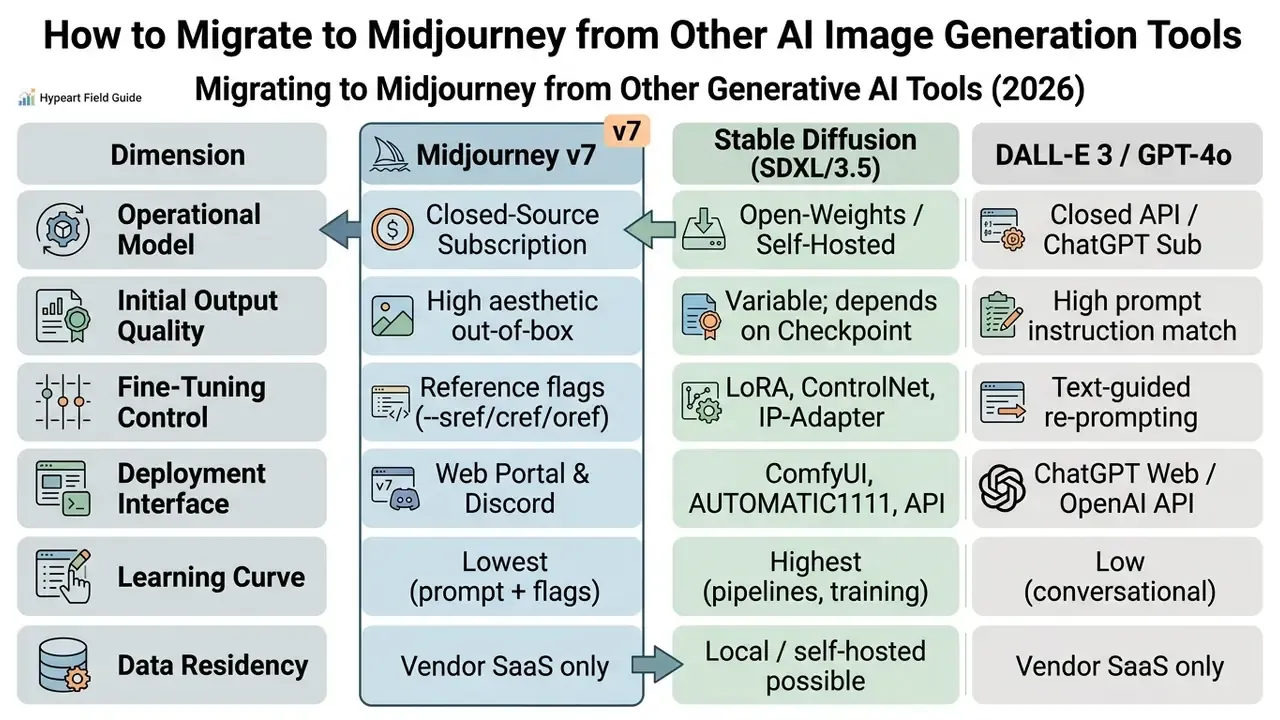
How Midjourney Differs from Stable Diffusion and Other AI Tools
Midjourney differs from Stable Diffusion by shipping higher aesthetic quality out of the box, with no custom checkpoint loading and no local GPU installation. Stable Diffusion answers with open-source flexibility, local deployment, and precise fine-tuning through LoRA adapters, which train only added low-rank matrices over frozen pretrained weights. Flux documentation goes further, exposing full fine-tuning with explicit hyperparameters, trigger words, and dataset rules. So depth of adjustment runs Flux and SD ahead of Midjourney, while speed-to-first-usable-asset runs Midjourney ahead of DALL·E, and both ahead of SD or Flux.
In one commercial migration project, our team moved an internal creative desk from a self-hosted Stable Diffusion setup to Midjourney Pro. Replacing complex ControlNet pipelines with native Style Reference (--sref) and Character Reference (--cref) commands collapsed per-campaign visual setup from roughly half a working day to under an hour in our internal tracking, and brand style consistency held across deliverables. These figures come from a single engagement with no controlled baseline. Read them as an illustrative order of magnitude, not a benchmark.
Migration planning should therefore treat bias controls as a permanent workflow element, not a vendor-selection checkbox. For organizations still weighing options, an analysis of AI Media Alternatives by Reason adds context on balancing open-source flexibility against hosted diffusion platforms.
How to Adapt Prompts and References When Migrating
Adapting prompts from other generators to Midjourney starts with deleting platform-specific negative weight brackets, such as (worst quality:1.4), and converting them into the clean --no parameter syntax.
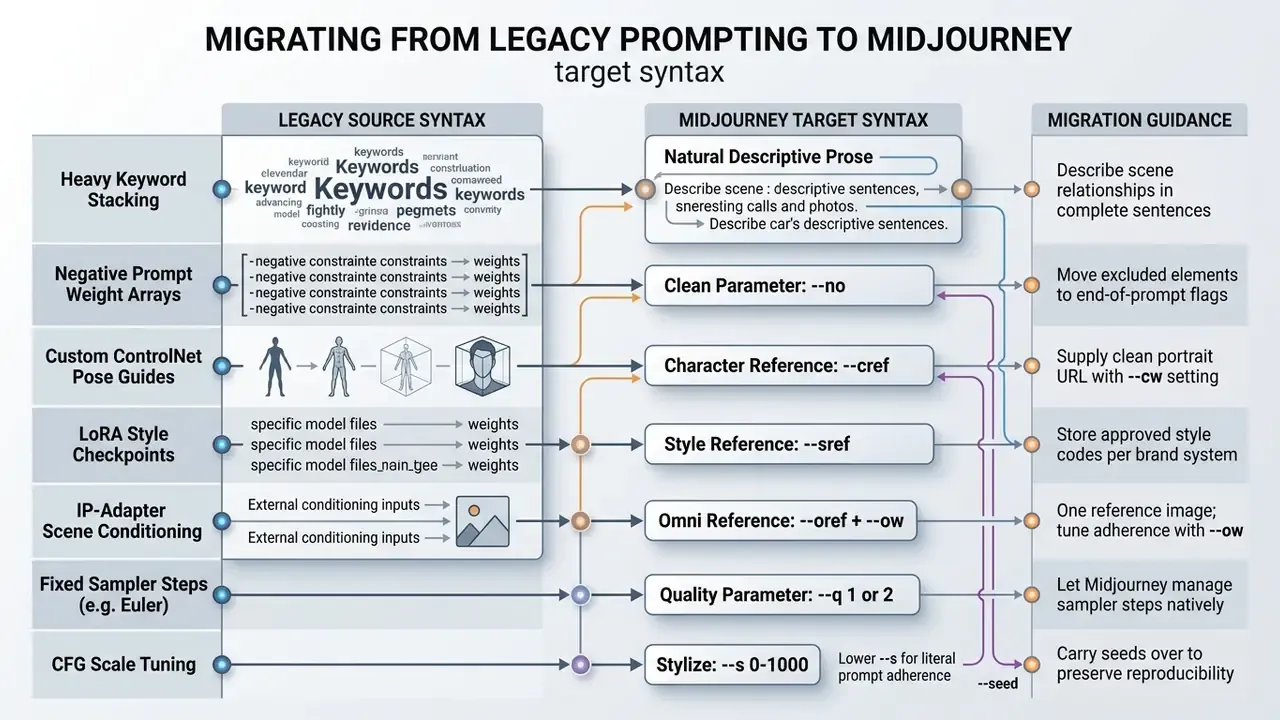
After mapping the syntax, re-validate a representative sample of legacy prompts. Identical wording rarely produces identical framing across engines, and reference-based consistency has to be rebuilt with --sref and --oref rather than assumed. Teams finalizing tool selection after a migration test can revisit the wider field of best AI art generators to confirm the decision against current data.
FAQ on Midjourney AI Image Generation
Do I need technical skills to use Midjourney AI?
No advanced coding or engineering skill is required. You interact with the platform through natural language prompts submitted in the midjourney.com web interface or through simple Discord slash commands such as /imagine. Parameter controls are plain text flags like --ar 16:9. Official onboarding documentation reduces first use to two steps, subscribe and then make your first image, and states no prerequisite design or engineering background.
What determines image generation speed?
Speed depends mostly on processing mode (Fast GPU, Relax GPU, or Turbo), current server load, model version, and the Quality setting (--q). Fast Mode processes jobs immediately against tier hours. Relax Mode drops jobs into a dynamic queue with a 0 to 30 minute wait, depending on peak traffic. Turbo is documented as up to 4× faster than Fast. Raising --q to 2 or 4 multiplies GPU time by 2× or 4× on the first grid, and Model Version 7 renders roughly 20-30% faster than v6.1 at comparable settings.
What is the maximum output resolution?
Base grid tiles render at 1024 × 1024 px at --ar 1:1, and upscaling produces 2048 × 2048 px. At --ar 16:9, upscaled output reaches about 2912 × 1632 px. Midjourney does not accept arbitrary custom pixel dimensions, since size follows aspect ratio, model version, and upscale path. Large-format print work needs an external upscaling or outpainting pass.
How do I reproduce the same image twice for audit purposes?
Reproducibility needs three frozen inputs: identical prompt text, an explicit model version (--v 7), and a fixed seed (--seed ). Record all three plus any reference URLs and weights (--sref, --cref, --cw, --oref, --ow, --iw) in your asset register. Without a captured seed, later runs drift, and you cannot show that a published asset matches the reviewed artifact.
Can I keep my prompts and outputs private?
Partially, and the nuance matters. Stealth Mode (Pro and Mega) hides generated assets from the public Midjourney gallery, and running the bot on your own Discord server or in direct messages keeps jobs out of public channels. Even so, Midjourney stays a third-party SaaS processor, its Terms grant the company a broad license over prompts and generated assets, and no compliance-isolated enterprise tenant is advertised. Do not upload confidential documents, customer data, personal identifiers, or unreleased designs as image prompts.
What limitations should I account for when creating AI generated images?
Midjourney enforces automated content moderation that blocks adult or NSFW content, violence, explicit gore, and sensitive personal depictions. Community guidelines state that some text and image inputs are blocked automatically, and that violations can trigger a moderator warning, a time-out, or an account block. Repeated attempts to bypass moderation with blocked keywords can lead to temporary suspension or a permanent ban. Commercial usage is restricted on unpaid tiers and requires specific plans for larger enterprises. Beyond content rules, current evaluation practice treats concept coverage and fairness of demographic representation as first-class quality criteria alongside visual fidelity (Evaluating Text-to-Image Generative Models for Human Image Synthesis, March 2024), so plan a representation review on top of the moderation check.
Technical Appendix and Resources
- AI Media Support and Troubleshooting
- Midjourney vs competing image generators
- Comparison of the best AI art generators
- Align Beyond Prompts Benchmark (ABP), Empirical T2I World-Knowledge Evaluation, 2024.
- An Initial Exploration of Default Images in Text-to-Image Generation, Computer Vision Research Series, 2024.
- SCENEILLUSTRATIONS Dataset, Narrative Illustration Consistency Evaluation, 2024.
- Comparative Computer Vision Study: Stable Diffusion vs Midjourney vs DALL-E 3, April 2024.
- Bias Study: Gender and Racial Representation in AI Image Generators, 2024.
- Evaluating Text-to-Image Generative Models for Human Image Synthesis, March 2024.
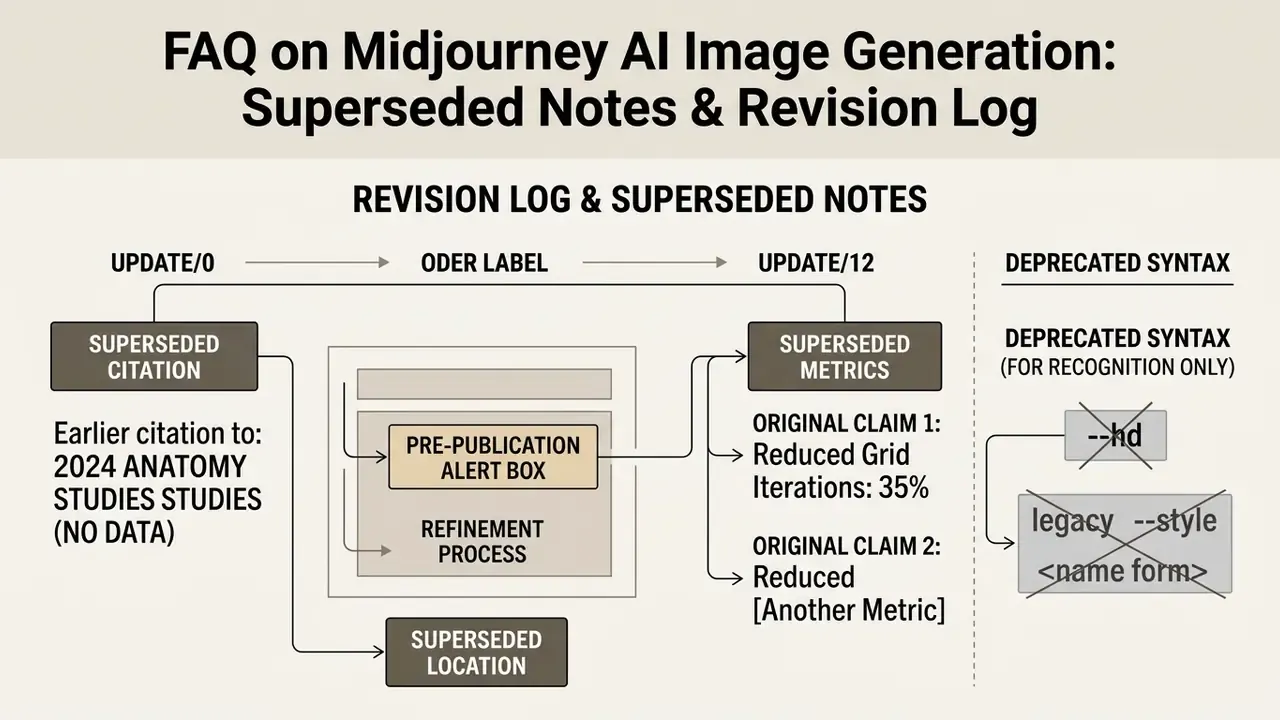
Appendix A: Superseded Notes and Revision Log