Executive Summary: What Matters Before You Upload
- What it is: An AI text remover from images runs a two-stage pipeline. First comes text localization (OCR plus segmentation), then generative inpainting rebuilds the background pixels underneath the erased characters.
- How to run it: Upload a PNG, JPG, JPEG, or WEBP file, choose Auto detection, Brush, Box Select, or a natural-language prompt, execute removal, compare in split-screen, export at native resolution.
- Which mode to pick: Auto mode is fastest on high-contrast text over uniform backgrounds. Manual brush or box masking wins on handwriting, decorative type, and textured surfaces where selective erasure matters.
- Quality drivers: Even lighting, no glare, high native resolution, lossless PNG input, tight masks, and a denoise, then super-resolution, then local color and contrast correction finishing chain.
- Risk drivers: Free tiers cap daily volume and export resolution. Server-side tools retain files temporarily. Removing copyright management information may create statutory liability under 17 U.S.C. §1202(b). And research shows erased text regions remain detectable after processing.
- Who should read the compliance sections: Model risk, security, and compliance owners deciding whether employees may route customer documents, receipts, or contracts through public "free" editors. Start with the Shadow AI and PII checklist below.
How to Use This Guide (Three Reader Paths)
Not everyone needs the whole document. Pick a path.
Path one: the operator. If you simply need a clean file today, read the step-by-step workflow, the auto versus manual comparison, and the input-preparation checklist. Roughly fifteen minutes of reading, and you will know why your first attempt left a smudge where the caption used to be.
Path two: the buyer. If you are shortlisting AI tools for a team, focus on the free-tier limits table, the section on formats, mobile access, bulk editing, and privacy, plus the cost modelling pointer in our calculators. Ask vendors for written retention terms before you compare feature lists.
Path three: the control owner. If you sit in risk, compliance, or internal audit, the sections that matter are the Shadow AI and PII checklist, the document integrity caution on financial records, and the legal notice on watermarks. Those three blocks contain the parts that create liability, not the parts that create pretty pictures.
What Is an AI Text Remover from Images?
An AI text remover from images is an automated software system that detects textual overlays and reconstructs the underlying visual background using deep learning architectures. These systems remove the need for manual cloning or hand-painted pixels by pairing optical character recognition with generative neural networks.
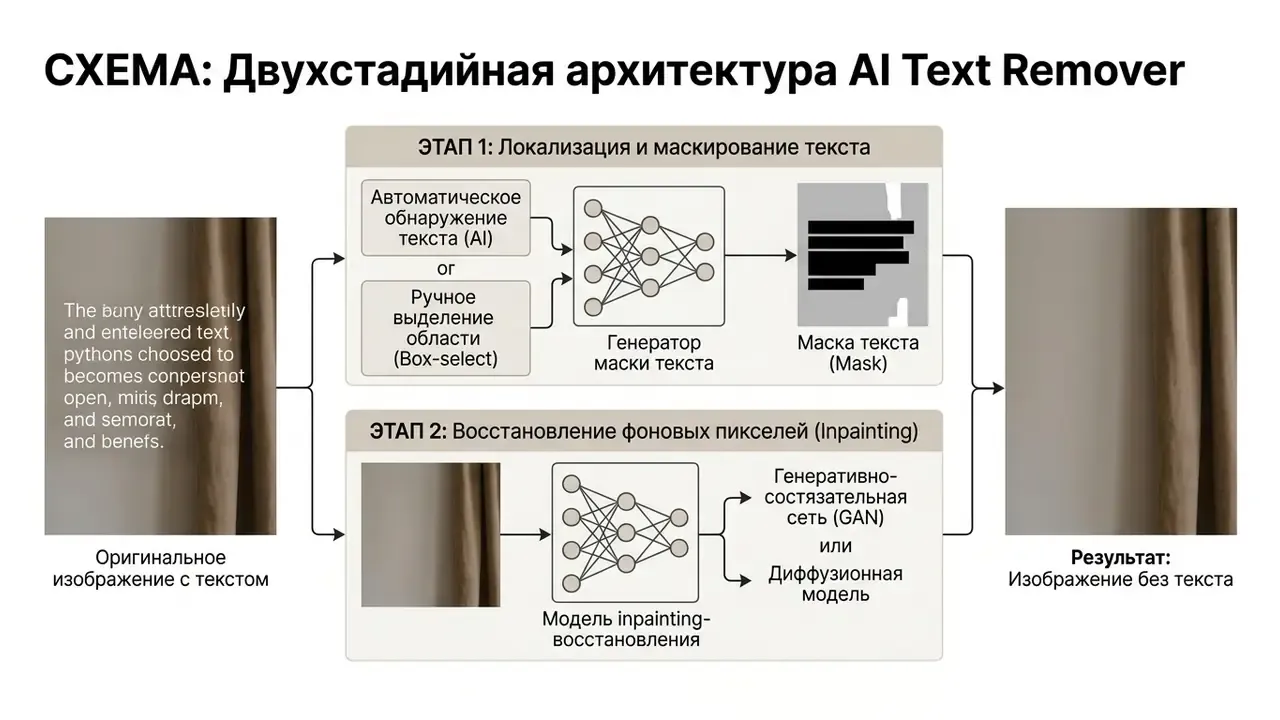
Modern image editing pipelines rely on an ai text remover from images to process scene typography, promotional overlays, and document watermarks. Teams that compare removal features alongside cropping, retouching, and background tools usually start from a broader review of AI photo editors before committing to a single vendor. When a user uploads a graphic, an ai picture text remover isolates character geometry from adjacent visual structures. The model then executes overlay text inpainting to remove unwanted text while maintaining texture continuity across the image background. The algorithm can automatically detect character boundaries and produce a natural looking output without manual intervention.
Academic reviews describe the task with the same two-part definition used by commercial vendors:
«Scene text removal consists of two subtasks: text localization and background reconstruction.»
Worth noting: the same underlying machinery powers adjacent features you have probably already used. A magic eraser, an object remover, a watermark remover, and a background remover are largely the same inpainting engine pointed at a different mask. That is why one vendor can ship "remove background" and "remove text" as two buttons on one model. To evaluate visual asset workflows across different media types, teams can consult our AI Media Comparison resources.
In an illustrative asset modernization project for digital marketing collateral, a team processed 450 legacy promotional banners containing expired product pricing. By deploying an automated segmentation network, the pipeline identified and masked all typographic elements across the batch. The system reconstructed complex background gradients without human intervention, which compressed a multi-week manual retouching queue into a single automated run while preserving source asset resolution. That time saving is an internal operational observation, not a published benchmark, so treat it as directional. Comparable public measurements report roughly 450 ms per automated removal in Photoroom's own 2026 comparison and about 2 s for Clipdrop, which indicates the order of magnitude achievable at scale rather than a guaranteed percentage gain.
How AI detects and removes unwanted text
AI text detection works by generating pixel-level binary masks through optical character recognition and deep segmentation networks. PSENet-class detectors first produce a binary segmentation map of text regions, and that mask is then handed to the inpainting stage. Feature Erasing and Transferring Networks take the integration one step further:
«FETNet unifies text detection and background restoration inside a single encoder-decoder architecture, removing the need for separate models.»
The detection architecture analyzes spatial features to distinguish character shapes from surrounding visual noise. Systems trained on scene-text corpora handle complex geometry, including rotated, curved, or perspective-distorted text. Progressive architectures improve localization by looping over their own output:
«PSSTRNet iteratively refines segmentation masks and removal results, improving text localization on complex backgrounds.»
Once character boundaries are isolated, the model strips text overlays, captions, date stamps, and camera watermarks from the target image layer. Enterprise OCR services add explicit geometric handling: Google Cloud Document AI's Enterprise Document OCR detects blocks, paragraphs, lines, words, and symbols, applies rotation correction to document images, and extracts text from native PDFs even when characters are rotated, extremely large or small, or partially hidden (Google Cloud Document AI documentation, 2026).
Modern multimodal vision architectures also accept natural language prompts. Ask for "remove the red price tag in the top right corner" and the model converts that instruction into a binary segmentation mask automatically, with nothing highlighted on the canvas. Prompt-driven removal helps when the target is easy to describe in words but awkward to trace with a cursor, such as a single caption line buried inside a dense collage.
How AI rebuilds the image background after text removal
Background reconstruction replaces masked character regions by synthesizing surrounding pixel textures, colors, and structural vectors. Generative inpainting models read the non-masked context and project plausible visual continuity across the erased region.
Advanced frameworks use specialized modules, such as the Feature Erasing Module (FEM) and the Feature Transferring Module (FTM):
«FEM suppresses text activations inside encoded features, while FTM transfers background features across layers to prevent ghosting artifacts.»
These components suppress residual text features in neural layers to prevent ghosting or halo artifacts. The system matches lighting gradients and edge vectors, rebuilding the background without hurting surrounding image quality or resolution. Benchmark corpora quantify how hard that reconstruction really is:
«The OTR dataset includes 5,538 easy and 9,055 hard evaluation samples for measuring background restoration across diverse scenes.»
Where an export step downsamples the canvas, AI image upscalers restore pixel dimensions after the removal pass. That matters for print collateral and marketplace listings that enforce minimum image sizes.
How to Remove Text from an Image Online in Simple Steps
To remove text from an image online, users follow a structured digital workflow that runs from asset ingest to final export. Browser-based editors automate text isolation and pixel synthesis, and most finish processing within seconds.
When using an ai remove text from image online free tool, the operation needs almost no technical configuration. Anyone asking how to remove text from image using online tool platforms can upload the file, select character regions, and run the generative fill engine. You just upload your visual asset, follow these simple steps, and receive a cleaned image in a few seconds. The same path answers the adjacent questions people actually type: how to delete text from an image, how to erase text from image, and how to remove text from a jpeg image.
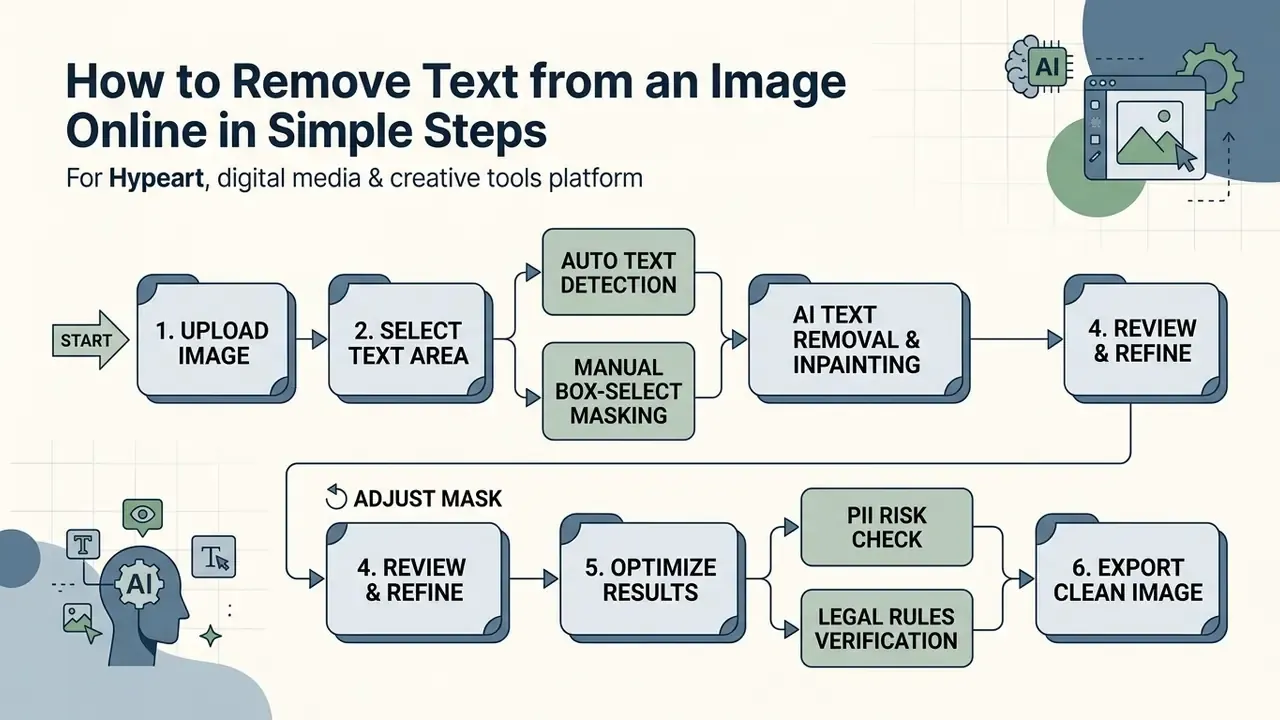
- Upload File: Open the editor interface and drag your PNG, JPG, JPEG, or WEBP file into the upload zone.
- Select Mode: Choose automated AI detection, a manual brush, a rectangular Box Select tool, or a natural-language prompt.
- Isolate Text: Highlight target character strokes, captions, or watermarks to generate the processing mask.
- Execute Removal: Click the erase button to run neural background inpainting across the masked region.
- Download Output: Review the side-by-side comparison and export the finalized high-resolution file.
Upload a PNG, JPG, JPEG, or WEBP image
Online editing tools support the standard web raster formats: PNG, JPG, JPEG, and WEBP. Input processing engines validate file structures and dimensions before passing visual data to the neural segmentation model. Most generative APIs align on the same format list. OpenAI's image endpoints accept PNG, JPEG/JPG, WEBP, and non-animated GIF (OpenAI API documentation, 2026).
Free web platforms enforce specific payload boundaries for server stability. Google Cloud Vision supports JPEG, PNG8, and PNG24 with a hard 20 MB per-file cap, Perplexity accepts base64 image uploads up to 50 MB per image, and OpenAI applies a request-level payload ceiling of 512 MB rather than a per-file limit (Google Cloud Vision, Perplexity, and OpenAI API documentation, 2026). Consumer-facing editors are stricter still: several popular free tools cap uploads at 10 MB. Handling large image files also needs adequate client memory, otherwise the browser stalls before the upload even starts.
Format choice affects mask precision, not just file size:
«OTR stores every sample in PNG format to avoid JPEG compression degradation during model training and background-restoration evaluation.»
PNG preserves crisp pixel boundaries around character strokes, which lets segmentation networks generate accurate binary masks instead of fighting blocking artifacts introduced by lossy compression. A re-saved JPEG from a group chat is the hardest possible starting point.
Select the text area with auto or manual removal
Users can isolate typographic elements through automated AI detection or targeted manual selection. Auto mode scans the image matrix for standard text layers. Manual tools allow custom masking of specific character clusters.
In manual eraser mode, you can switch between a variable Brush Tool for organic character shapes and a Box Select Tool for rapid rectangular masking of structured text blocks, captions, subtitles, and multi-line paragraphs. The box marquee is dramatically faster on right-angled layouts (price tables, legal footers, address lines) because a single drag replaces dozens of brush strokes. Some document editors implement the same idea as column-aware selection: Adobe Acrobat's selection tool can toggle between rectangle, column, and multi-column text selection modes (Adobe Acrobat Help, 2024).
Manual brush controls permit precise size adjustments near delicate visual subjects. Dedicated detection modes handle complex character layouts, including curved, rotated, or perspective-distorted text on non-flat surfaces. Aspose OCR, for example, exposes a specific CURVED_TEXT area-detection mode together with automatic dewarping, and OCR literature treats curved text-line segmentation as a distinct preprocessing problem caused by curvature and camera perspective (Aspose OCR documentation; Text Line Segmentation of Curved Document Images, 2014). You can highlight single or multiple text areas across the canvas in one operational pass.
Preview the result and download the cleaned image
Interactive editing interfaces offer split-screen or side-by-side preview tools so you can compare the original image against the reconstructed output. The display uses responsive browser rendering to show pixel continuity before final export. Draggable dividers, vertical and horizontal split toggles, and true side-by-side panes are the three documented comparison patterns.
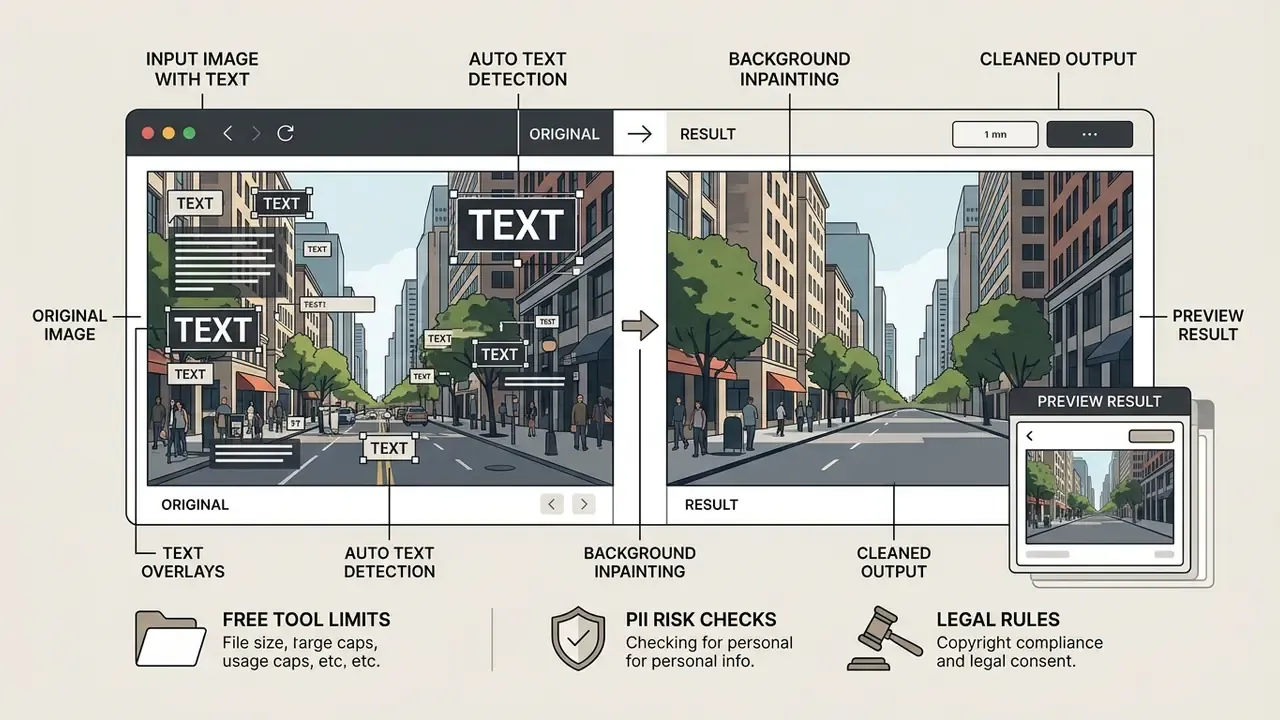
Downloading the final asset preserves source dimensions when export settings match input specifications. Preview size and saved file dimensions are separate settings, which trips up a lot of first-time users. An interactive preview may be scaled to the browser viewport while the download writes a fixed composite canvas such as 1080×1080 pixels (product export documentation, 2026). Keeping HD or 4K resolution means selecting native source parameters during export. Check one test file at 100% zoom before you commit a full batch.
Auto Text Removal vs Manual Text Eraser: Which Mode to Use?
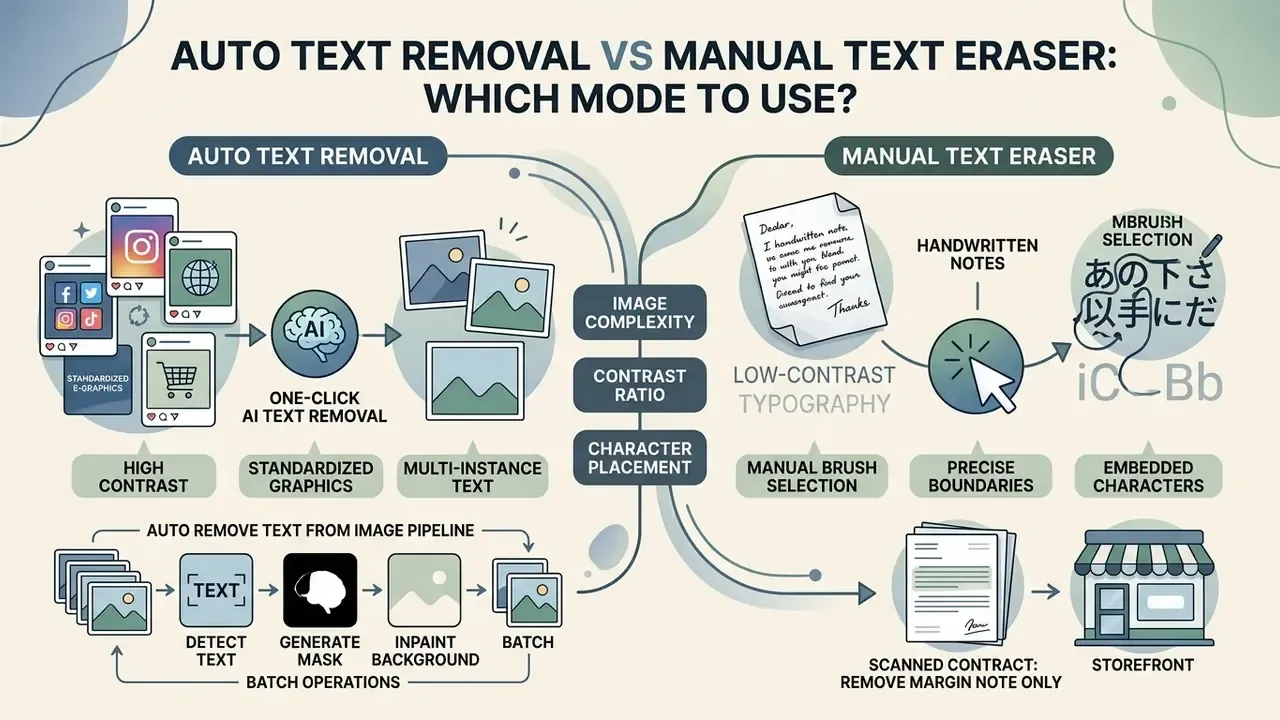
Choosing between automated removal and manual erasing depends on image complexity, contrast ratio, and character placement. Automated processing maximizes speed on standard overlays. Manual masking gives granular control near critical detail.
An Auto Remove Text from Image pipeline processes multi-instance text through one click batch operations. When users Manually Erase Text from Image assets, they rely instead on a targeted text eraser, a Box Select marquee, or a specialized removal tool to isolate non-standard characters. Picking the right mode lets teams remove multiple texts efficiently without introducing visual artifacts. For underlying media pipelines, review our guide on AI Media Workflows.
«Automatic STR models perform strongly on high-contrast backgrounds, while manual diffusion-mask modes deliver precision on complex scenes.»
| Feature / Criteria | Auto Text Removal Mode | Manual Text Eraser Mode (Brush + Box Select) |
|---|---|---|
| Processing Speed | Fast (~450 ms processing time in vendor benchmarks) | Variable (depends on user brush and marquee precision) |
| Detection Target | Automated OCR scanning of standard character strokes; optional prompt-driven masking | User-defined brush mask or rectangular box selection |
| Complex Background Handling | Moderate; best on uniform textures and high contrast | High; precise masking avoids surrounding details |
| Multi-Text Instances | Simultaneously detects and erases all visible text | Requires sequential highlighting; box marquee accelerates block text |
| Post-Removal Adjustments | May require secondary touch-ups on complex patterns | Minimal touch-ups needed due to controlled masking |
| Selective Erasure (keep some words) | Limited; removes all detected text by default | Full control; supports word-level selective removal |
Read the table in one line: auto mode buys speed, manual mode buys certainty. On a catalog of 500 clean product shots, auto wins outright. On a single scanned contract where one handwritten note must vanish and everything else must survive, manual is the only defensible choice.
When one-click AI text removal works best
One-click automated removal gives the best results when there is high contrast between text strokes and the background beneath them. Vendor guidance and practical testing agree that it performs most reliably on uniform surfaces, simple color gradients, and clean, evenly lit product photography, because the masked region is easy to reconstruct from neighbouring pixels (Pixelbin AI Tools guidance, last updated 2026-08-25; PicTranslate AI Text Remover guidance, last updated 2026-08-11).
Automated execution handles social media posts and standardized e-commerce graphics quickly. When overlays are visually distinct from background structures, a single pass erases captions without disturbing adjacent elements, often near enough to instantly. Published work notes the opposite case too: scene-text removal models degrade on document images with dense, heavily textured backgrounds (DiffEraser, 2026). That is precisely where manual control earns its keep.
When to manually erase text from an image
Manual erasing becomes necessary with handwritten notes, low-contrast typography, or characters embedded in intricate patterns. OCR accuracy drops measurably when scans are dark, skewed, low-resolution, or set in decorative and handwritten fonts, and recognition engines ignore graphics they cannot classify as text (Adobe Acrobat OCR troubleshooting, 2026; Litera Support, 2026).
Manual brush selection lets you draw precise boundaries around target characters without masking adjacent focal points. This controlled approach prevents accidental erasure of critical detail when text overlaps complex visual content, such as textured apparel or detailed architectural elements. Research also formalizes the "keep some words, erase others" requirement:
«Selective Scene Text Removal erases specific target words while preserving all other text, thanks to OCR-aware model conditioning.»
Typical manual cases: a scanned contract where only a handwritten margin note must disappear; a storefront photo where the street sign stays but the promotional sticker goes; partially overlapping letters where only the top layer should be repainted.
How to Remove Text Without Affecting Image Quality or Background
High-fidelity removal depends on isolating character masks tightly while preserving surrounding source pixels. Advanced inpainting models reconstruct background textures without introducing regional blur or global compression.
To remove text without affecting the background, editing algorithms balance structural continuity against local color distribution. Maintaining image quality means using Keep Original Resolution settings during export. Where an export path already reduced dimensions, AI image enhancers can recover perceived sharpness before publication. The result should be a high resolution, natural looking asset produced without losing quality or visible distortion. For detailed technical evaluations, consult our analysis on AI Media Benchmarks and Review Proof.
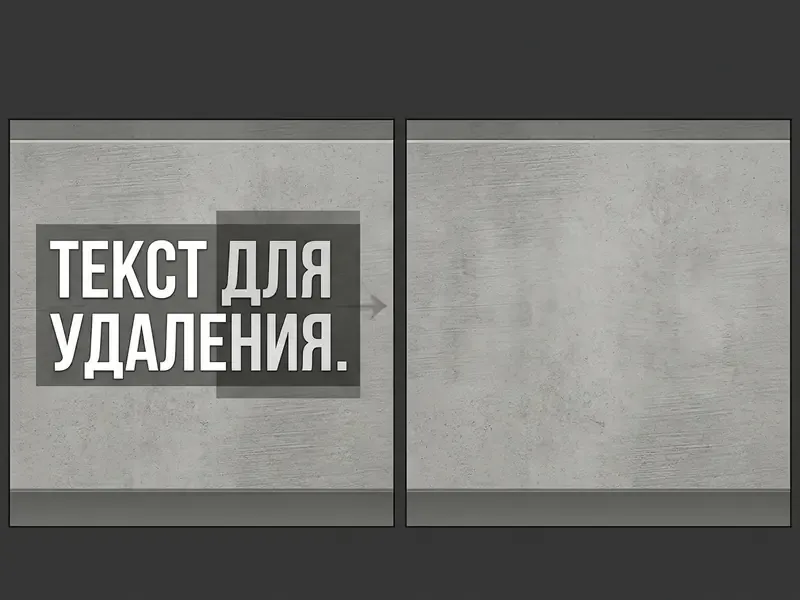
Text removal on plain, textured, and detailed backgrounds
Reconstructing plain backgrounds means calculating regional color values and maintaining boundary gradients across the erased region. The inpainting network blends missing pixels into surrounding solid color fields, and honestly, this is the easy tier.
Textured and highly detailed backgrounds need advanced structural modeling that combines local texture matching with global context reasoning. That is the design principle behind CTRNet-class architectures, which pair low-level structure cues with high-level discriminative context to guide erasure and restoration. Benchmark composition shows how demanding the hard tier is:
«The OTR-hard split contains 9,055 samples drawn from Open Images V7, with complex scenes where texture restoration is especially difficult.»
Evaluating models on benchmark datasets like OTR (5,538 easy samples, 9,055 hard samples, and roughly 74,716 training samples stored as PNG images with word-level JSON annotations) shows that generative fill can preserve fabric weaves, wood grains, and complex outdoor scenery (OTR Dataset Study, 2025). Can, not always will. Expect a refinement pass on the hard tier.
Best practices for input image preparation
Reconstruction quality is decided before the mask is drawn. To get the most out of neural background reconstruction, make sure input assets meet these conditions before masking:
- Uniform lighting.Avoid high-contrast directional shadows that cut across character boundaries. A shadow edge crossing a letter confuses the segmentation model into extending the mask into real scene content.
- Glare reduction.Remove or reshoot specular reflections on glossy product surfaces before running edge detection, since blown-out highlights carry no texture information for the inpainting stage to copy.
- Native contrast and resolution.Keep a clear luminosity separation between overlay typography and the background, and start from the highest-resolution original you have. Downscaled thumbnails give the model fewer context pixels to work with.
- Lossless capture where possible.Prefer PNG or an unprocessed camera export over a re-saved JPEG. Compression blocks around letters translate directly into ragged mask edges.
- Flat geometry first.For curved surfaces, labels, or photographed pages, apply dewarping or perspective correction before removal so the text line becomes locally straight.
How to Choose a Free Online Tool to Remove Text from Images
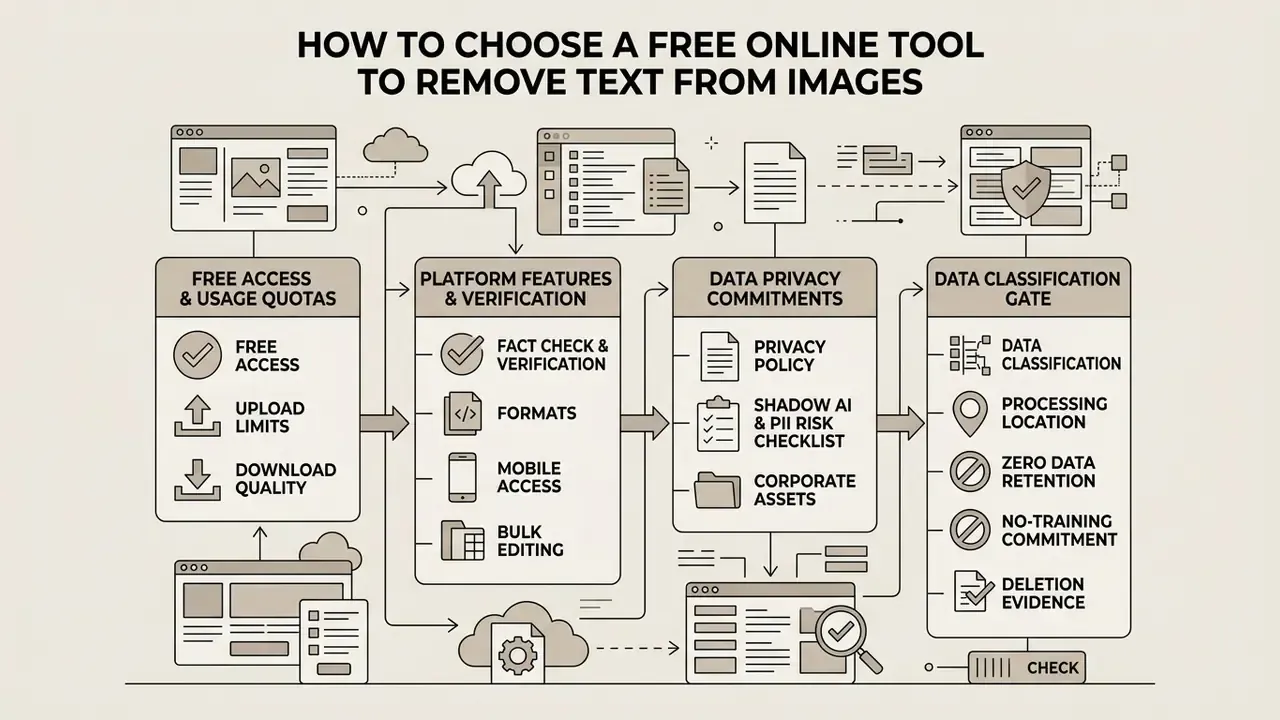
Selecting a free online tool to remove text from image assets means reviewing platform limitations, daily usage quotas, and data privacy commitments. Checking operational terms up front keeps your chosen tools aligned with organizational security and output quality standards.
An enterprise team evaluating an ai remove text from image online free interface must confirm the vendor actually provides a reliable free text remover. Platforms advertised as Completely Free to Use may still enforce export caps or restrict batch text removal. Review the service's privacy policy to verify that uploaded assets are not retained for external model training. Teams that need to extract copy rather than erase it should compare dedicated image-to-text tools alongside removal engines, and budget owners can model per-asset costs with our interactive calculators. If cost is the binding constraint, our overview of free photo editors maps which capabilities normally sit behind a paywall, including how to remove text from image for free without losing export resolution.
Free access, upload limits, and download quality
Free tiers vary widely across public AI image processing services. Many impose restrictive daily generation quotas or cap exports to low resolutions such as 540p, 720p, or a 1024-pixel long edge. Several also apply per-feature daily task counters rather than one global allowance (vendor pricing and help pages, verification dates below).
| Platform / Tool | Daily Free Allowance | Maximum Output Resolution | Registration Required | Enterprise API / Batch Mode | Source Verification Date |
|---|---|---|---|---|---|
| Photoroom | Usage-based credit allowance; monthly export cap shared across export methods | Standard export limit | Yes | Yes, API plans; team Spaces share credits (up to 49 additional members) | 2026-09-12 |
| Clipdrop | 50 Text Remover tasks / 24 hours | Standard web resolution | Yes | Yes, per-feature API endpoints | 2026-08-23 |
| Gemini App | ~20 image generations / day | 1024 px longest side | Yes (Google Account) | Yes, via Google AI API tiers | 2026-09-01 |
| Runway | Tiered trial credits | 720p max export (watermarked on free tier) | Yes | Yes, commercial API tiers | 2026-08-15 |
| Pixelbin | ~3 free text-removal runs / month without an account; 10 credits after sign-up | Native input resolution, up to 10 MB uploads | Optional for first runs | Yes, bulk-editing API processes up to 11 images simultaneously (premium plans) | 2026-08-25 |
Free-tier document tools follow the same pattern. LightPDF advertises one file under 10 MB on its free version, DocuClean allows 15 MB and three guest operations, and Sejda throttles to roughly three tasks per hour, while larger pipelines such as Pilio accept PDFs up to 100 MB (vendor documentation, 2026). One practical implication for procurement: a "free" quota that resets daily is fine for ad-hoc work and useless for a 2,000-image catalog refresh.
Formats, mobile access, bulk editing, and privacy
Enterprise image editing requires cross-platform compatibility across desktop browsers and mobile interfaces. Production workflows benefit from bulk editing, such as asynchronous API endpoints that process multiple files in a single submission. Anthropic's Claude platform documentation, for instance, exposes a /v1/messages/batches endpoint with 29-day batch retention, while Pixelbin documents a bulk-editing API handling 11 images per call on premium plans (vendor API documentation, 2026).
Data retention policy is the critical security factor when handling proprietary visual assets. Browser-only tools process files locally in client memory without server transmission. Server-based platforms should publish automatic deletion schedules; documented windows across vendors range from immediate deletion to two hours or 24 hours, executed under HTTPS transport encryption. File APIs that retain content "until explicitly deleted" require an active cleanup routine on your side (vendor terms and API documentation, 2026). For technical integrations, review our AI Media API Guides.
Shadow AI and PII risk checklist before uploading corporate assets
Free online editors are one of the most common entry points for Shadow AI inside regulated organizations. A single employee can move a customer document into a third-party pipeline in two clicks. Before approving any tool for business assets, walk this checklist:
- Data classification gate.Confirm the asset contains no PII, account numbers, cardholder data, health information, or privileged legal content. If it does, route it to an approved internal or contractually covered service instead.
- Processing location.Verify whether the tool runs client-side in the browser or uploads to vendor servers, and in which jurisdiction those servers sit (data residency).
- Zero data retention and no-training commitment.Require written terms stating that uploads are not retained beyond a defined window and are never used to train or fine-tune vendor models.
- Deletion evidence.Ask for the documented retention window (immediate, 2 hours, 24 hours) and whether deletion is automatic or requires an API call.
- Security attestations.For production use, request SOC 2 Type II or equivalent, plus applicable sector commitments (for example GLBA safeguards for financial data or HIPAA BAAs for health data).
- Access and audit.Prefer accounts under corporate SSO with logging, not personal logins. Batch API keys should be scoped and rotatable.
- Output integrity controls.Record who edited which asset and why. Generative reconstruction changes pixels, so edited files should never silently replace originals in a system of record.
An extra note for model risk owners: add image editors to your AI inventory even when they look like harmless utilities. They accept unstructured customer data, they run generative models, and they produce outputs that can end up in a client-facing document. Unlisted tools are exactly the gap that inventory reviews are supposed to close.
What Text Can You Remove from Photos, Screenshots, and Product Images?
AI text removal software handles diverse content categories across commercial and corporate communications. Neural inpainting models adapt to varied typography styles embedded in physical scenes or digital graphic layers.
Marketing teams process product photos and social media assets to strip obsolete messaging or outdated branding layers. Compliance managers clean scanned documents and screenshot captures to eliminate sensitive personal data, text watermarks, or camera date stamps. Generative fill algorithms strip unwanted objects and typographic overlays while leaving essential visual subjects intact. For commercial usage parameters, consult our AI Media Commercial-Use portal.
Remove text from product photos, mockups, and marketing visuals
E-commerce managers and real estate professionals refresh visual catalogs constantly by stripping outdated promotional badges, price tags, contact overlays, and competitor watermarks from listing and product photos. Published work confirms this is a studied production problem rather than an anecdote: a BMVC 2024 paper compares inpainting methods specifically for text removal in real e-commerce images, and vendor guidance for property listings describes deleting unwanted text, labels, and watermarks from photos online.
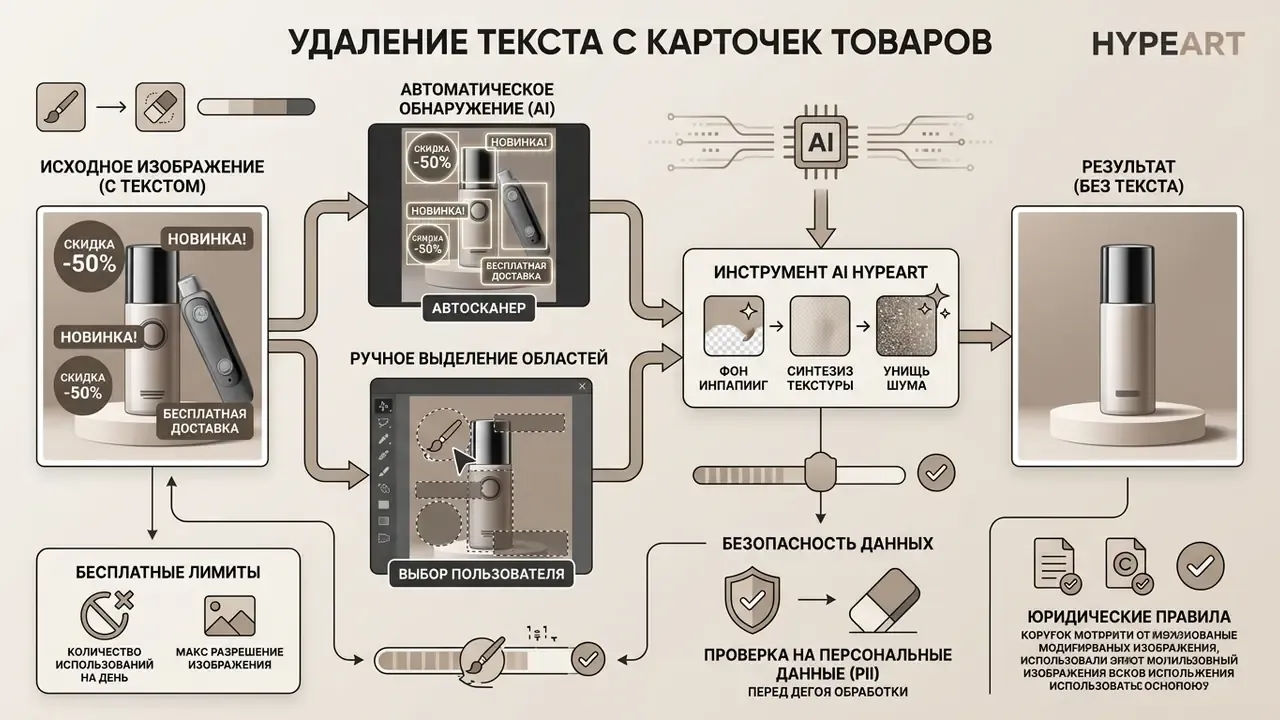
«OmniText-Bench includes 150 mockups across apparel, packaging, and device surfaces for evaluating text removal that preserves reflections and lighting.»
Using datasets like OmniText-Bench, researchers show that diffusion-based models can clear overlays while preserving surface reflections and background lighting. OmniText itself is described as the first unified approach supporting insertion, editing, removal, repositioning, and rescaling of text without task-specific retraining, which lets designers reuse marketing assets instead of re-photographing physical items. Teams refreshing entire catalogs often pair removal with AI outpainting to expand images so one cleaned photo can be re-cropped for several marketplace aspect ratios.
Erase captions, timestamps, notes, and text in screenshots
Documentation workflows often need camera timestamps, system overlays, or handwritten marginal notes gone from image files. Isolating annotations through pixel masking enables clean background reconstruction without distorting surrounding graphic lines, because the fill is synthesized from immediately adjacent context rather than smeared across the region.
Removing overlays from software screenshots or scanned documents requires precise boundary isolation. Neural inpainting fills erased text lines using adjacent background values, producing clean captures suitable for technical documentation and public presentations. One caveat matters enormously for anyone using removal as a privacy measure:
«ISTR research shows that text-removal processing is detectable and erased text regions can be localized with high accuracy.»
In plain terms: erasing a caption improves presentation quality, but it is not forensic-grade redaction. Google's own search documentation warns that OCR can convert image text into searchable text, and that black rectangles alone are not reliable redaction. Sensitive content belongs in a dedicated redaction and flattening workflow.
Apparel graphics and meme templates
Generative removal lets creators clear typography from apparel photography, including slogan prints, brand wordmarks, and screen-printed t-shirt overlays, so the same garment shot can be reused for a new design or a blank mockup. Fabric has strong directional texture, so these cases benefit from manual brush masking plus a second refinement pass along seam lines and folds.
The same capability produces reusable meme templates. Stripping burned-in top and bottom captions from a viral graphic returns a clean base layer that creators can re-caption in their own voice. Practically, meme sources are usually heavily recompressed JPEGs, so expect visible blocking around former letter edges and plan a denoise step before adding new type.
Financial records and scanned receipts
Compliance and back-office teams use localized pixel masking to obscure sensitive transactional entries, account fragments, serial numbers, signatures, and background stamps from scanned contracts, invoices, and paper receipts. Removing a stray watermark from a scanned receipt, or clearing handwritten margin notes from an archived contract, makes a document legible and presentable without retyping it.
Editing After Text Removal: Replace Text and Improve the Image
Once removal is complete, content creators usually move straight into secondary editing. A cleaned background layer is a fresh canvas for updated typography, graphic inserts, and resolution enhancements.
When designers edit image to delete text overlays, the goal is often to replace text with modernized copy. Applying integrated image enhancements or an automated photo enhancer lifts visual quality after the character layer is gone. Modern platforms let teams edit image to remove text and remove object elements inside one production environment, and template-driven suites such as those covered in our Canva AI Generator overview keep removal, retyping, and export inside a single file. If you work primarily with compressed photo formats, our walkthrough on how to edit text in a JPEG image online covers the same chain with JPEG-specific caveats.
Add replacement text after removing old words
Inserting replacement text over a cleaned area means matching typographic parameters to the surrounding graphics. Align font family, size, color tone, baseline angle, letter spacing, and perspective distortion to the original design structure. Documented editor behavior supports this approach: Acrobat lets replaced text inherit and be reformatted by font, size, color, and alignment, while NIST SP 800-63A's legibility guidance notes that readability depends on font style, size, color, and contrast, recommends sans-serif faces for electronic materials and serif for print, and sets a 12 pt minimum where the display allows (Adobe Acrobat Help, 2026; NIST SP 800-63A, 2026). WHO publication guidance adds that body copy should be left-aligned or justified rather than centered or right-aligned (WHO, Designing publications, 2025).
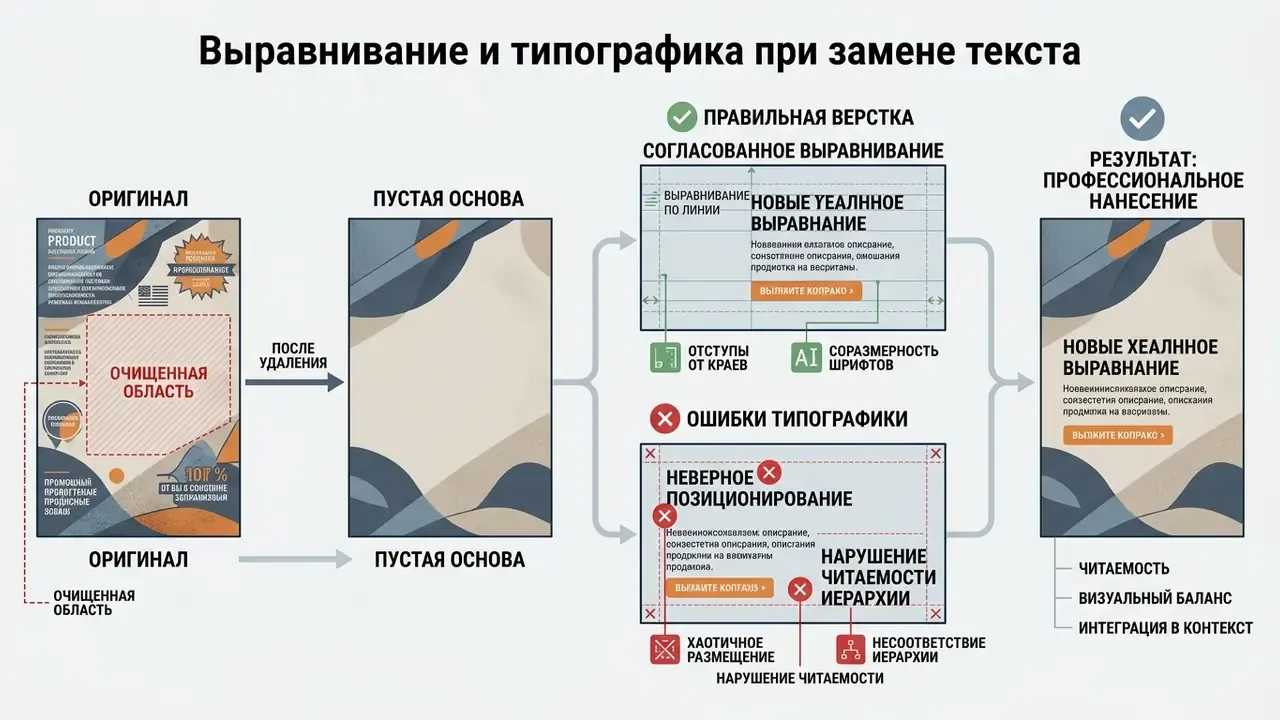
Diffusion-based text image manipulation frameworks, such as OmniText, provide style-controlled insertion:
«OmniText uses style reference images to render new text with matching texture, lighting, and color tones on design mockups.»
These models sample style references from adjacent graphics to render new typography with matching texture, lighting, and color tones. When the replacement needs a different scene rather than different words, image-to-image generators can re-render the asset while retaining composition. That is a different capability class from AI image generation from scratch, and it usually preserves brand-critical geometry better.
Refine AI results and apply image enhancements for a polished final result
Finalizing an edited asset is one continuous refinement chain: fix residual artifacts first, then restore global quality.
When initial inpainting leaves minor artifacts, run secondary refinement passes over the affected sub-regions only. Repainting specific boundary seams guides the generative model to recalculate local pixel transitions, and progressive architectures formalize that loop:
«PSSTRNet iteratively refines masks and removal results, feeding the source image and prior outputs into each subsequent iteration.»
Post-processing can also incorporate mask dilation or erosion to smooth edge blending along erased paths. Mask-guided removal research from CVPR 2025 describes erosion and dilation explicitly as boundary-artifact controls. Editors that allow adding to or subtracting from an existing mask support exactly this iterative correction of small leftover defects.
Once seams are clean, run the restoration chain in order: targeted noise reduction, then super-resolution upscaling, then light edge sharpening.
Recent literature integrates denoising modules directly into super-resolution pipelines rather than treating them as unrelated steps, which is exactly why order matters. Sharpen before you denoise and you amplify the artifacts you were trying to hide.
Following AI super-resolution upscaling, fine-tune regional color saturation, contrast curves, exposure, and luminance along the erased seams. Adjusting these values eliminates the subtle tone discrepancies that betray reconstructed patches against the native canvas. Reconstruction can be geometrically perfect and still read as "edited" if the repaired patch sits half a stop brighter than its neighbourhood. Acrobat's own image-editing panel exposes the same parameter set (contrast, brightness, highlights, shadows, saturation), which confirms these are the standard finishing controls (Adobe Acrobat Help, 2026).

Targeted feature denoising cleans boundary seams along erased text paths. Subsequent AI super-resolution upscaling expands canvas dimensions, while subtle edge sharpening restores crisp detail, delivering a graphic ready for commercial publication.
A Safe Next Step for Regulated Teams
If you are deciding whether to allow these tools at all, resist the binary. Two lighter moves work better than a blanket ban.
First, publish a one-page rule: marketing and brand assets may go through approved public editors, while anything containing customer, employee, or transactional data may not. Ban lists fail quietly; clear categories survive.
Second, run a two-week pilot with a single named owner, one approved tool, corporate SSO, logged access, and a fixed review date. Measure three things: assets processed, rework rate after removal, and incidents where a restricted file reached a public service. That evidence turns an argument about AI policy into a decision about a control that either holds or does not.
FAQ: Removing Text from Images Online
Below are the frequently asked questions we hear most often from operators, buyers, and control owners.
Is it safe and legal to remove watermarks or copyright text?
Legal disclaimer: The following is general information and does not replace advice from a qualified attorney on copyright, licensing, or intellectual property matters in your jurisdiction.
Removing copyright management information or protective watermarks from third-party media without authorization is restricted under US law (17 U.S.C. §1202(b)). Statutory liability applies when watermarks function as copyright management information and removal is carried out with knowledge, or reasonable grounds to know, that it will induce, enable, facilitate, or conceal copyright infringement. Technical capability to erase text does not grant intellectual property rights or ownership over third-party assets. The U.S. Copyright Office has cited removal of protective watermarks and copyright notices as affirmative conduct indicating intentional infringement, and its guidance states that reproducing or distributing copyrighted works without the owner's authority infringes those rights unless a statutory defense applies.
Forensic detectability matters in any dispute:
«ISTR confirms that text-removal processing is detectable and that erased text regions can be localized, which matters for legal examination.» Inverse Scene Text Removal (ISTR) (2025), arXiv.org
CRITICAL LEGAL NOTICE: Removing protective watermarks, digital signatures, or copyright notices from third-party media without explicit authorization from the rightsholder may violate federal law. Organizations and individual users must verify copyright ownership or licensing permissions before editing visual assets. Removing copyright management information does not transfer asset ownership.
On the research side, irreversibility is being studied as a privacy feature rather than a circumvention tool:
«TextDestroyer is the first training-free, annotation-free method for text destruction, preventing recognition of even residual character patterns.» TextDestroyer (2024-2025), arXiv.org
What visual file formats yield the best background reconstruction results?
Lossless formats such as PNG beat lossy compressed formats. PNG preserves crisp pixel boundaries around character strokes, letting neural segmentation models generate precise binary masks without interference from JPEG compression artifacts (OTR Dataset Study, 2025). WEBP in lossless mode behaves similarly. Heavily recompressed JPEGs are the worst case, because blocking artifacts around glyphs propagate into the mask and then into the fill.
Can AI text removers completely destroy hidden image metadata?
No. Standard visual text removal erases pixel-level typography but does not automatically alter embedded file metadata (EXIF or IPTC headers). Scrubbing metadata properly requires dedicated redaction tools or security workflows before public distribution:
«TextDestroyer destroys text at pixel and latent level, yet EXIF/IPTC file metadata remains outside its scope of effect.» TextDestroyer (2024-2025), arXiv.org
Metadata may carry location, capture date, author, device, and copyright fields, and NIST's synthetic-content risk report warns that metadata written by creation and editing tools can leak sensitive information without explicit controls (NIST AI 100-4, 2024; EU Publications Office metadata guidance, 2025; Adobe Acrobat metadata guidance, 2026). Downstream, AI image detectors can flag that an asset was machine-edited even when the visible result looks clean.
Does AI text removal work on video frames or documents with selectable text?
Not interchangeably. Several mainstream editors restrict text-grab features to still images. Canva, for example, explicitly states that Magic Grab and Grab Text are not available in Videos, Docs, or the Photo Editor. Video needs frame-consistent inpainting to avoid flicker between frames. Likewise, a PDF with a real selectable text layer should be handled through editing or redaction tools rather than image inpainting. Only scanned, image-only pages behave like photographs.
Can I remove several separate captions in one pass?
Yes. Auto mode detects and erases all recognized text instances at once, and manual mode supports multiple selections before a single execution, combining Box Select for block paragraphs with the brush for stray characters. On busy layouts, running removal in two passes (large blocks first, fine detail second) usually produces cleaner seams than one oversized mask.
Does removing text reduce the resolution of my image?
It should not. The inpainting operation writes into the existing pixel grid, so resolution loss almost always comes from the export step rather than the model. Choose "keep original resolution" or native dimensions on download, and verify a test file's pixel dimensions before batching.
Can it handle handwriting and curved text?
Handwriting and curved or perspective-distorted text are the two classic hard cases. Detection engines lose accuracy on cursive, decorative, and skewed characters, so use manual masking, enable dewarping or curved-text detection where available, and expect a refinement pass along strokes that overlap detailed background.
Does it work on mobile?
Browser-based removers run on mobile and tablet browsers without installation. The practical constraints are client memory on very large files and the smaller touch target for precise brush work. That is exactly where the Box Select marquee is easier to use on a phone than a fine brush.
Appendix A: Source Verification and Citation Notes
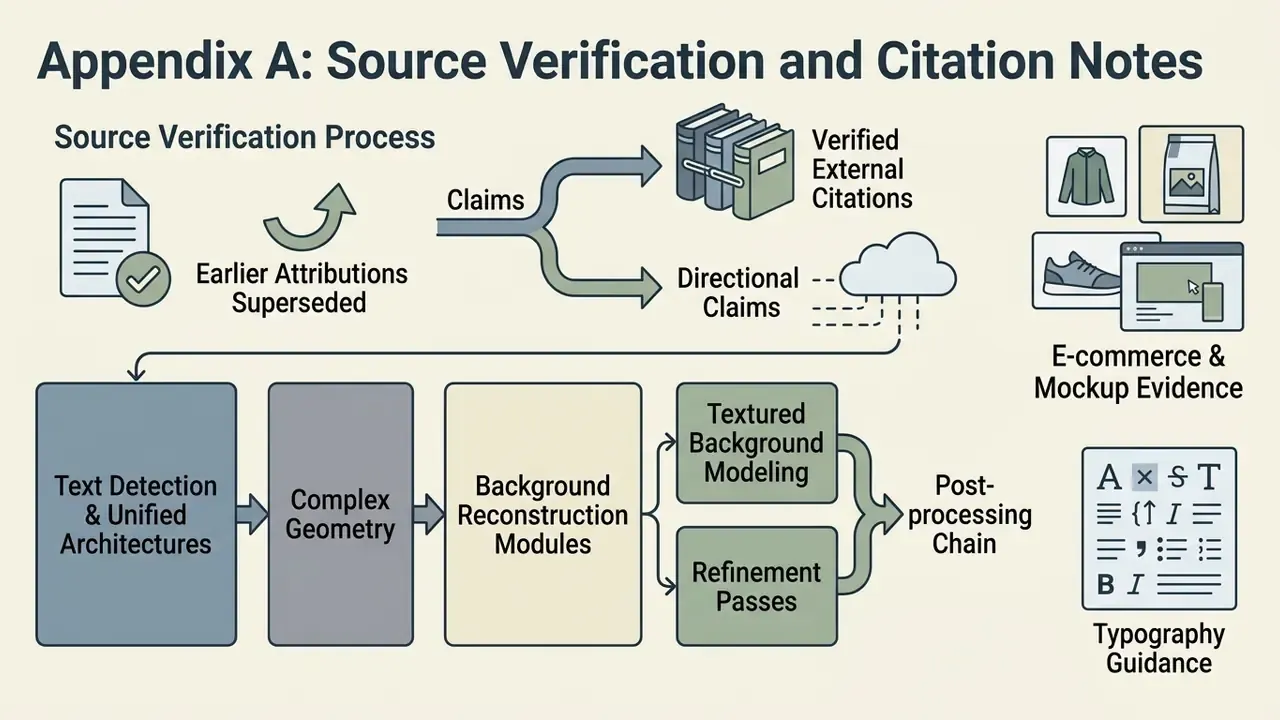
This appendix records how citations in this guide were verified, which earlier attributions were superseded, and where claims remain directional rather than externally benchmarked. It exists so readers in regulated environments can audit the evidence chain.
- Text detection and unified architectures. The earlier general attribution of boundary-box detection to Pattern Recognition, 2023 is superseded by an explicit description of the FETNet encoder-decoder architecture that unifies detection and background restoration (FETNet, Pattern Recognition, 2023).
- Complex geometry. The earlier ECCV, 2022 attribution for rotated, curved, and perspective-distorted text is supplemented and superseded by PSSTRNet (2023), which documents iterative mask-and-result refinement, and by OCR preprocessing literature on curved text-line segmentation.
- Background reconstruction modules. The FEM/FTM claim now specifies mechanism, namely suppression of text activations and cross-layer transfer of background features, rather than citing the venue alone.
- Textured background modeling. The earlier ECCV, 2022 citation is now paired with quantified benchmark composition from the OTR Dataset Study (2025): 5,538 easy samples, 9,055 hard samples sourced from Open Images V7, and roughly 74,716 training samples in PNG with word-level JSON annotations.
- Refinement passes. The prior generic CVPR, 2025 reference is now expressed through the documented PSSTRNet iteration mechanism, with mask erosion and dilation attributed to CVPR 2025 mask-guided removal work.
- Post-processing chain. The prior CV Research Review, 2025 reference is replaced by TextDestroyer (2024-2025) for self-attention-based background texture restoration, alongside 2024-2025 literature integrating denoising into super-resolution pipelines.
- E-commerce and mockup evidence. The prior LightPDF E-Commerce Study, 2026 attribution is replaced by peer-reviewed and benchmark sources: the BMVC 2024 text-removal comparison on real e-commerce imagery, and OmniText-Bench (2025) with 150 apparel, packaging, and device mockups.
- Typography guidance. NIST SP 800-63A is cited only for its legibility guidance (font style, size, color, contrast, 12 pt minimum), not as a typography standard for design layout. Alignment guidance is attributed to WHO publication design guidance (2025).
- Screenshot and metadata claims. The prior NASA Imagery Standards, 2024 reference for pixel masking is retained only where NASA's actual position applies, namely that adding or removing image elements constitutes misrepresentation outside narrow exceptions. Metadata claims are attributed to NIST AI 100-4 (2024), EU Publications Office guidance (2025), Adobe metadata guidance (2026), and Google Search redaction guidance.
- Upload limits. File-size figures are attributed to official API documentation: Google Cloud Vision (20 MB per file, JPEG/PNG8/PNG24), Perplexity (50 MB per base64 image), and OpenAI (512 MB request-level payload; PNG/JPEG/WEBP/non-animated GIF).
- Unverified platform entries. Official current public terms were confirmed for Photoroom (2026-09-12) and Clipdrop (2026-08-23). Magic Studio and CleanUp.pictures could not be verified against official current pages, so they are excluded from the limits table rather than estimated.
- Directional internal figure. The 450-banner modernization result is an internal operational observation, not a published benchmark. Comparable public timing figures (~450 ms per automated removal for Photoroom, ~2 s for Clipdrop, vendor comparison 2026) are provided for order-of-magnitude context only. Published benchmarks use different datasets and task definitions, so cross-tool speed and accuracy numbers are not directly comparable.
- Video scope. No claim in this guide extends text-grab capability to video or document editors. Canva's documentation explicitly states Grab Text and Magic Grab are unavailable in Videos, Docs, and the Photo Editor.
- Author note. Marcus Hale, author.
AI Media Workflows and Related Guides
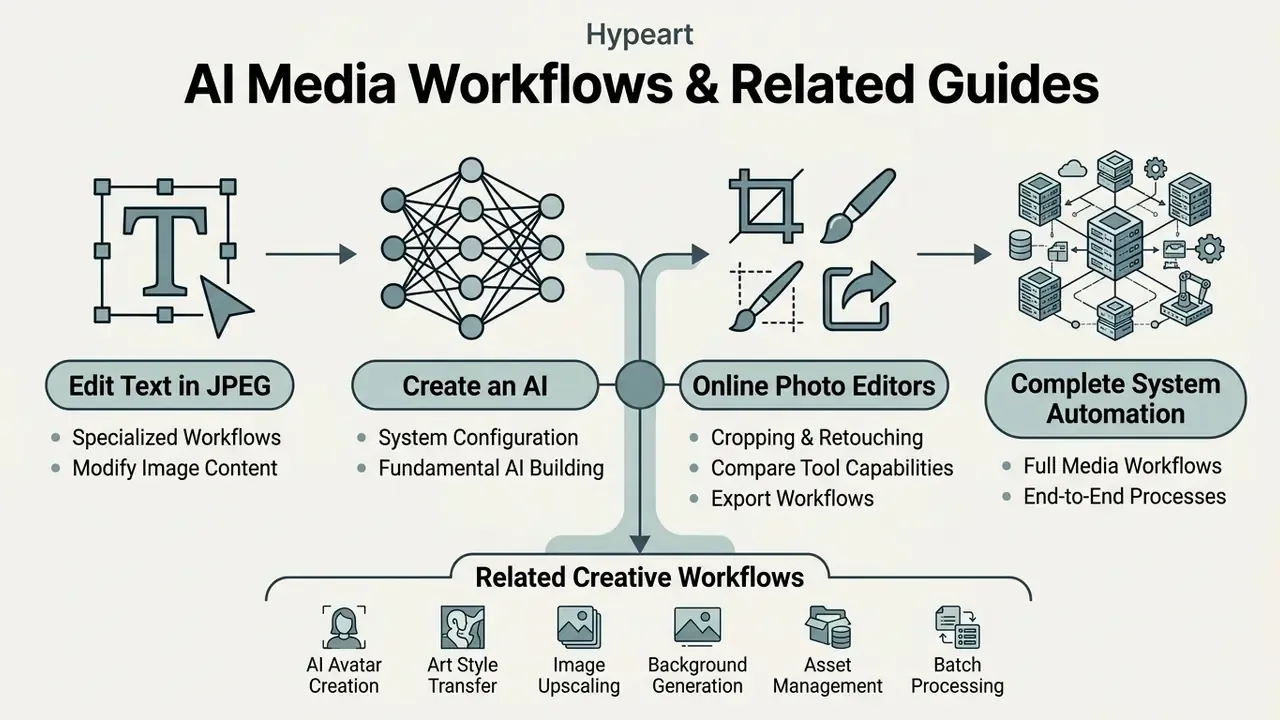
For additional technical frameworks, media production workflows, and platform analyses, explore our hub navigation resources:
- Explore specialized editing workflows in our guide on how to edit text in a JPEG image online.
- Learn fundamental neural system configurations in our tutorial on how to create an AI.
- Compare cropping, retouching, and export capabilities in our overview of online photo editors.
- Access our core directory for complete system automation at AI Media Workflows.
Related creative workflows (adjacent topics, not required for text removal): how to create an AI avatar · how to build an art portfolio · how to create an AI model · how to create NFT art