Executive Summary
An ai image colorizer predicts plausible chrominance channels () from a grayscale luminance signal () using transformer, GAN, or diffusion backbones. The output is a statistically probable interpretation. It is never a recovery of original historical wavelengths.
- Technology Dual-decoder architectures such as DDColor separate structural reconstruction from color prediction, reaching a Fréchet Inception Distance (FID) of 3.92 on ImageNet.
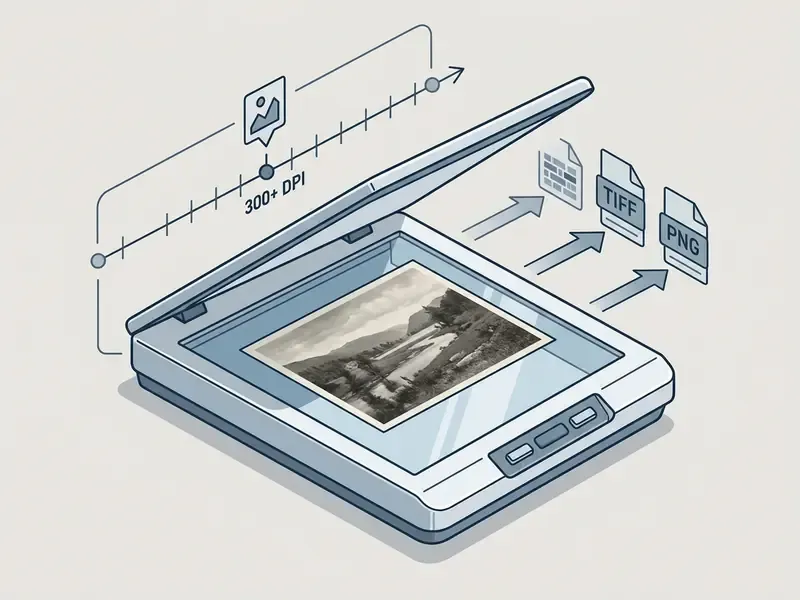
- Workflow Scan at 300 to 600 DPI, upload (file, URL, or
CTRL+Vclipboard paste), run inference, tune palette variants and colorization strength, then export uncompressed. - Quality drivers Source resolution, contrast, grain, physical damage, and face-specific component parsing decide whether skin tones look natural or turn "waxy."
- Governance Before commercial or archival publication, verify data-retention SLAs (6 to 24 hour purge), encryption (TLS 1.3), zero-retraining clauses, SOC 2 or ISO 27001 posture, and keep a reproducible audit trail (model version, seed, parameters, operator).
- Archival rule Retain the untouched monochrome master as the primary record under FADGI guidance. Publish colorized files as clearly labeled interpretive derivatives.
What an AI Image Colorizer Does
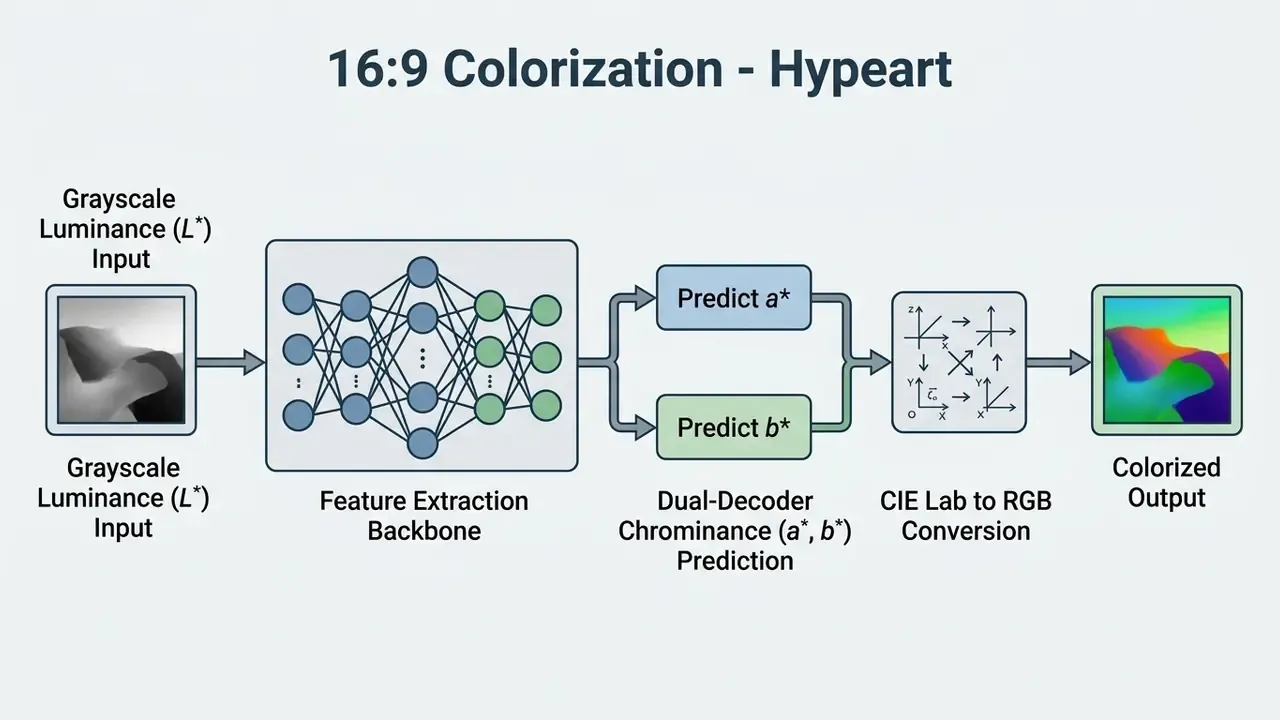
An ai image colorizer converts grayscale luminance values into plausible chrominance channels using trained deep neural networks. It reads high-level visual features inside a frame and predicts realistic color distributions for object categories, textures, and background elements.
Modern algorithms do not simply flood shapes with flat tones. Systems like DDColor use ConvNeXt backbones and dual-decoder transformer architectures to correlate semantic queries with spatial resolution (DDColor: Towards Photo-Realistic Image Colorization via Dual Decoders, arXiv, 2023).
«DDColor reaches FID 3.92 on ImageNet by separating structural reconstruction from color prediction through a cross-attention mechanism.»
This process lets the network ai colorize image assets while preserving original lighting, shadow gradients, and structural contrast.
When you convert an ai black and white photo to color, the system predicts chrominance values ( and channels in CIE Lab space) while keeping the original luminance () intact. The colorized result delivers realistic colors and vibrant colors without distorting the underlying monochrome geometry. In plain terms: brightness stays documentary, color becomes inference.
From Black and White Photo to Natural Color
Turning a white photo or monochrome scan into a natural color image requires deep contextual evaluation of light distribution and material texture. The neural network reads subtle grayscale gradients to tell foliage from human skin, atmospheric sky from painted plaster, wool from polished stone.
Early colorization pipelines relied on manual pixel mapping, which often produced muted or bleeding tones. Contemporary models apply class-balanced cross-entropy losses so tone transitions stay natural across complex scene boundaries. Reviews published in 2025 place class-balanced objectives among the core techniques that enforce semantic consistency in color transitions (A comprehensive review of modern image colorization, Frontiers in Computer Science, 2025. https://www.frontiersin.org/journals/computer-science). That architecture is what lets a service colorize photo files and bring old photos back with authentic visual depth, including fragile family photos that nobody wants to risk twice.
Contemporary research also groups production systems into seven active method families: classification-based, adversarial (GAN), diffusion, transformer and dual-decoder, exemplar-based and temporal, multimodal or text-guided, and semantic-fusion networks. Knowing which family a vendor deploys explains why two services can return radically different palettes for the same monochrome upload. Same input, different priors, different history.
Colorization Is a Plausible Reconstruction
AI colorization is a statistical hypothesis about plausible colors, not an exact recovery of original wavelengths. A single grayscale input maps to many valid color solutions, which makes the output a probabilistic reconstruction built on learned dataset priors (Colorful Image Colorization, ECCV, 2016).
Unconditional models guess colors from training datasets such as ImageNet and COCO-Stuff. An ai color image generator, by contrast, builds entirely synthetic visuals from text or noise prompts without any obligation to an input photograph. Readers comparing both categories can review how AI image generators differ from conditional restoration pipelines that must respect an existing luminance map. That distinction matters when you evaluate ai generated artwork, family portraits, or historical media archives, because only one of the two is anchored to physical evidence.
Probabilistic colorization research reinforces the point: stochastic sampling deliberately produces multiple vivid, mutually exclusive colorizations from one grayscale frame (Probabilistic Image Colorization, Royer, Kolesnikov & Lampert, 2017. https://arxiv.org/pdf/1705.04258v1). Two runs of the same model can return different shirt colors, and neither run is technically wrong. That is exactly why seed logging matters later in this guide.
How to Colorize a Photo Online with AI
To add color to photo ai platforms, users follow a standardized browser workflow built for throughput. Most web services automate the heavy feature extraction and return processed assets within a few seconds.
These AI powered tools remove the need for manual layer masks or desktop editing suites. You can ai colorize black and white photo online free through cloud-hosted models that run inference in a few clicks, which is also why so many first uploads happen before anyone reads the retention policy.
Upload a Black and White or Vintage Photo
The process begins when you just upload a monochrome or faded picture to the web platform. High-resolution input yields better feature recognition and cleaner edge separation, and it forgives a lot of downstream sins.
«High resolution and low noise in the source image directly improve the accuracy of spectral reconstruction during colorization.»
Let AI Add Color and Process Details
Once the image is ingested, the ai photo engine analyzes foreground subjects and background architecture at the same time. The model assigns chrominance from contextual scene recognition, so sky reads as plausible blue and foliage as plausible green rather than a single averaged wash.
Advanced diffusion and dual-branch networks suppress color bleeding between adjacent objects. To ai add color to black and white photo assets convincingly, the algorithm evaluates lighting contours and keeps original contrast dynamics intact across busy scenes. Parallel foreground and background GAN branches, the ParaColorizer family described in the 2025 Frontiers review, colorize subject and backdrop independently before fusion. That is precisely the mechanism that suppresses halo bleeding around shoulders, hats, and hairlines.
Fine-Tuning Palette Options and Color Strength
Professional colorizers give you manual control over chrominance saturation and temperature instead of forcing one deterministic answer:
- Multi-palette generation: Produce up to four probabilistic color profiles (Warm, Cool, Neutral, Historical Vivid) in a single inference pass and compare interpretations side by side.
- Colorization strength slider: Adjust the blend ratio (0% to 100%) between original monochrome luminance and predicted chrominance to calm over-saturated backgrounds or soften an aggressive sepia bias.
- Face enhancement toggle: Route portraits through component-level facial refinement so eyes, lips, and hairlines are handled by a dedicated sub-network instead of the global scene model.
- Direct clipboard ingestion: Paste image URLs or raw image data with
CTRL+Vand skip manual file selection entirely. - Scene presets: Category selectors such as Family, Historical, Fashion, and Scenery bias the model prior toward era-appropriate textiles, uniforms, or vegetation instead of generic ImageNet distributions.
Review, Edit and Download the Colorized Result
After processing finishes, platforms show the output through interactive preview interfaces. You can compare colorized versions against the original monochrome source and check how color is distributed, not just whether it looks pleasant.
Most services offer sliders for global saturation, color temperature, and contrast before export. When the interpretation holds up, download the finalized high quality file for digital sharing or physical printing. Export targets typically include JPG, PNG, and WebP for web delivery, with TIFF or full-resolution PNG reserved for print masters. Soft-proofing a PDF derivative through Output Preview, with Simulate Paper Color and Simulate Black Ink enabled, exposes hue shifts before plates are cut.
What Affects AI Photo Colorization Quality
Source Detail, Contrast and Damage in Old Photos
Physical damage, low contrast, and focus blur all reduce the network's ability to identify individual objects. When an algorithm cannot see where one object ends, it applies muddy or inconsistent color patches.
«ColorFLUX shows that decoupling structure from color overcomes old-photo degradation and outperforms commercial models on quality.»
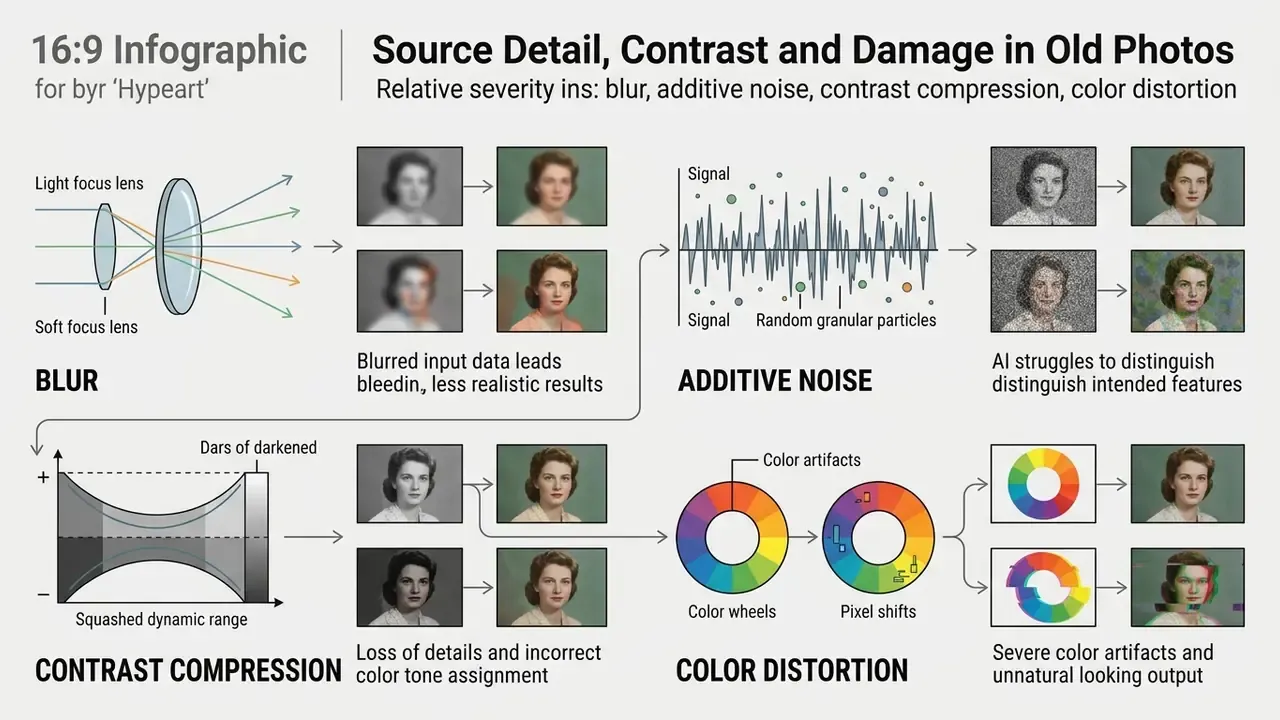
Repairing damaged old photos and restoring structural detail before colorization produces visibly better fidelity. Updated: Rather than quoting a single unverified percentage, note the direction confirmed across distortion-robustness studies. Blur and additive noise cause the largest accuracy losses in convolutional recognition. Contrast compression causes measurable but smaller degradation. Color distortions are comparatively benign. Practical cleanup therefore starts with denoising, dust and scratch repair, median or edge-preserving filtering, and CLAHE-style local contrast recovery, all before any chrominance prediction runs. Report improvements with named metrics such as PSNR, SSIM, or LPIPS on a stated dataset, not with unqualified percentage claims.
Skin Tones, Faces and Fine Details
https://arxiv.org/
Historical Images Need Color Verification
Colorization models are trained mostly on modern digital photographic datasets. That single fact carries most of the risk in archival work.
Validation Standards Before Commercial Deployment
Between technical evaluation and rollout sits a validation layer that consumer tutorials skip entirely. Before a colorized asset enters a paid campaign, a publication, or an institutional catalog, set measurable acceptance criteria:
- Quantitative check: Where paired ground truth exists, score candidates with PSNR, SSIM, LPIPS, and FID instead of subjective preference.
- Perceptual check: Review at 100% zoom for color bleeding across edges, hue inversion on translucent materials, and desaturated dead zones.
- Domain check: Confirm era-specific items (uniforms, insignia, signage, vehicle liveries) against documentary references.
- Human-in-the-loop sign-off: Record reviewer, date, and decision so the asset carries an accountable approval, not just a model output.
Audit Trail and Model Risk Management Template
Teams working under model-risk or AI-governance frameworks need reproducibility, not only a pretty result. Log these fields for every colorized derivative so a reviewer can reconstruct the output a year later.
| Audit field | Example value | Why it matters |
|---|---|---|
| Source master ID | ARCH-1934-0182_TIFF_600dpi | Links the derivative to the untouched monochrome record |
| Model and version | DDColor v2 / diffusion refiner 1.3 | Different weights produce different palettes |
| Random seed | 48211 | Enables regeneration of an identical result |
| Parameters / prompt | strength 65%, preset "Historical", face enhance on | Documents operator intent |
| Operator and date | J. Ruiz, 2026-02-14 | Accountability for interpretive decisions |
| Output ID and format | ARCH-1934-0182_COLOR_v3.png | Prevents silent overwriting of masters |
| Review status | Approved with caption "Digitally colorized interpretation" | Enforces labeling policy |
| Retention action | Cloud copy purged 2026-02-15 | Evidences data-handling compliance |
Storing this metadata beside the file covers two separate needs at once: reproducibility for model-risk review, and provenance for archival integrity.
How to Choose an AI Colorization Tool for Commercial Use
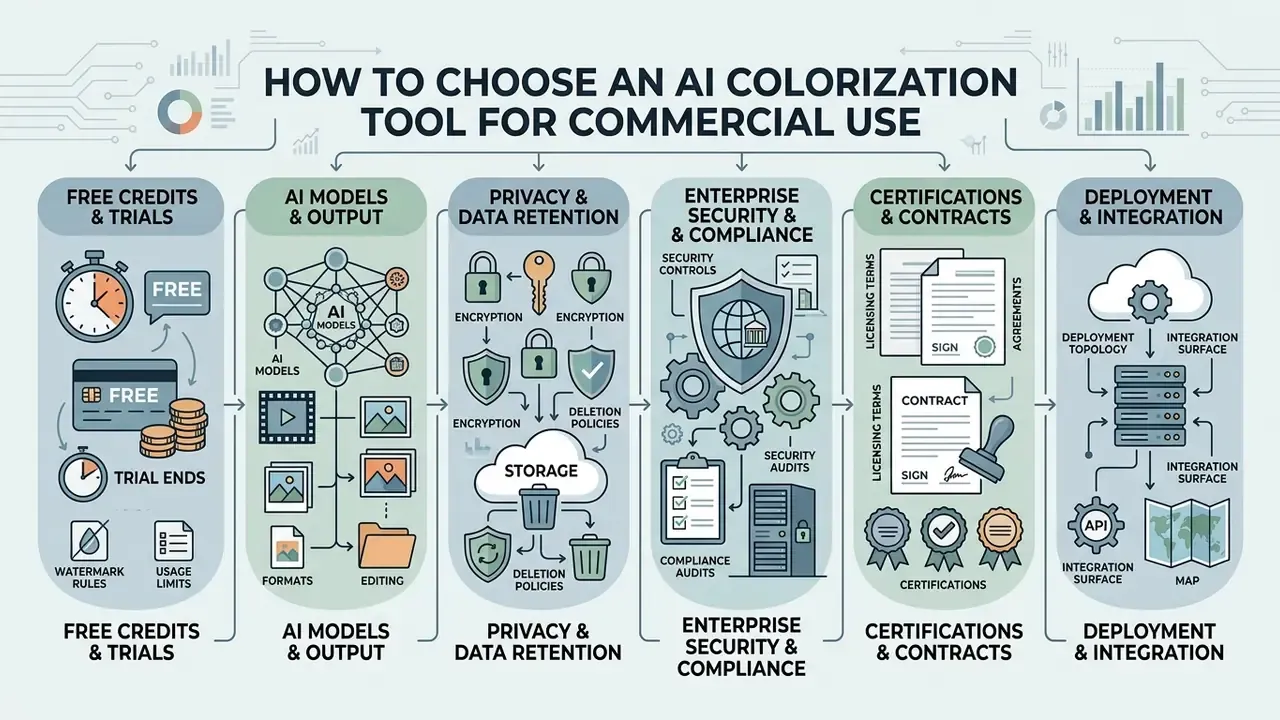
Selecting an ai colorization tool for black and white photos for enterprise publishing means reading licensing terms, processing limits, and output rights before the trial ends. Commercial assets must be legally cleared and free of restrictive platform watermarks.
Evaluating ai colorization tools for black and white photos also means testing model behavior against real media workflows, not demo images. Buyers assembling a broader stack usually benchmark colorizers next to AI image enhancers so one vendor decision covers restoration, enhancement, and color prediction. Core criteria: batch processing, high-resolution export formats, and clean integration with the photo editor software your team already uses.
«Academic evaluations rely on FID, PSNR, SSIM and LPIPS; DDColor reaches FID 3.92 on ImageNet, outperforming earlier models quantitatively and qualitatively.»
Company note: no verified information is available about hypeart.ai platform capabilities, so this guide makes no performance claims on its behalf.
Free Credits, Free Trial and Watermark Rules
Freemium platforms usually cap free users at lower-resolution output carrying a visible brand watermark. Palette.fm, for instance, offers limited trial credits for full-resolution testing while keeping free previews small, typically unlimited watermarked previews at 500 by 500 pixels plus a single free trial credit for one clean render.
Services like Kolorize run on credit systems where previews cost nothing, but each high-resolution unwatermarked download consumes a credit. Those free credits commonly stay valid for about two years, and one credit may also cover a fixed number of video frames. Other vendors gate free output behind non-commercial Creative Commons terms, or embed invisible watermarks even when no logo is visible. Before a campaign launches, confirm whether the paid tier grants permanent usage clearance without recurring licensing fees, and whether a revenue threshold silently pushes you into a higher plan.
AI Models, Formats and Output Editing
Professional platforms expose multiple neural backbones, so you can choose between fast GAN inference and slower, higher-fidelity diffusion transformers. The right architecture depends on the asset: a natural landscape, an architectural print, and a studio portrait each reward different priors.
Robust services export to both lossy and lossless formats including JPG, PNG, and WebP, with aspect ratio selection and custom color correction available before download. Built-in post-processing lets designers fine-tune color balance and crop boundaries without opening external software, while a full-featured AI photo editor closes the loop when local retouching is required after inference. To weigh platform differences across creative workflows, you can compare feature sets across current market alternatives.
Privacy Policies, Encryption, and Data Retention
Enterprise Security, Compliance and Deployment Models
Institutional buyers evaluate colorizers as vendors, not widgets. A defensible procurement review covers four layers:
- Certifications and contractsSOC 2 Type II or ISO/IEC 27001 attestation, a signed Data Processing Agreement, documented sub-processor lists, and breach-notification timelines.
- Regulatory alignmentGDPR and CCPA duties for biometric-adjacent facial data, EU AI Act transparency and labeling obligations for synthetically altered media distributed in the EU, plus your own records-retention policy for regulated archives.
- Deployment topologyPublic SaaS for low-sensitivity content, private cloud or VPC-isolated inference for confidential assets, on-premise SDK or container deployment where corporate scans must never leave the network perimeter.
- Integration surfaceREST or batch API with documented rate limits, webhook callbacks, idempotency keys, throughput SLA, uptime commitment, and a sandbox key for pre-contract benchmarking.
Platform independence matters as much as raw output quality. Prefer vendors that expose model version pinning and standard formats, so an archive of 50,000 colorized derivatives is not hostage to one proprietary endpoint.
Total Cost of Ownership and Risk-Adjusted ROI
Per-image pricing is the smallest line in an enterprise colorization budget. Model total cost of ownership as:
TCO = (credits or API calls × unit price) + (validator hours × loaded hourly rate) + integration and engineering effort + storage of masters and derivatives + compliance and legal review
Then convert it into a risk-adjusted return:
Risk-adjusted ROI = [(manual hours saved × blended rate) − TCO − (probability of rework or IP incident × expected cost)] ÷ TCO
Two practical notes. First, human review usually dominates the equation. An operator checking 40 portraits an hour is the throughput ceiling, not the GPU. Second, the risk term is not decorative. Mislabeled colorized archive material, uncleared commercial rights, or a privacy incident involving uploaded personal photographs can erase the savings from an entire batch. Budget validator time and legal sign-off explicitly rather than filing them under overhead.
Quality Control Before Commercial Use
Before colorized media reaches print or paid distribution, run preflight. That means verifying color gamut compatibility, checking effective resolution at final print dimensions, and inspecting focal regions for chromatic artifacts.
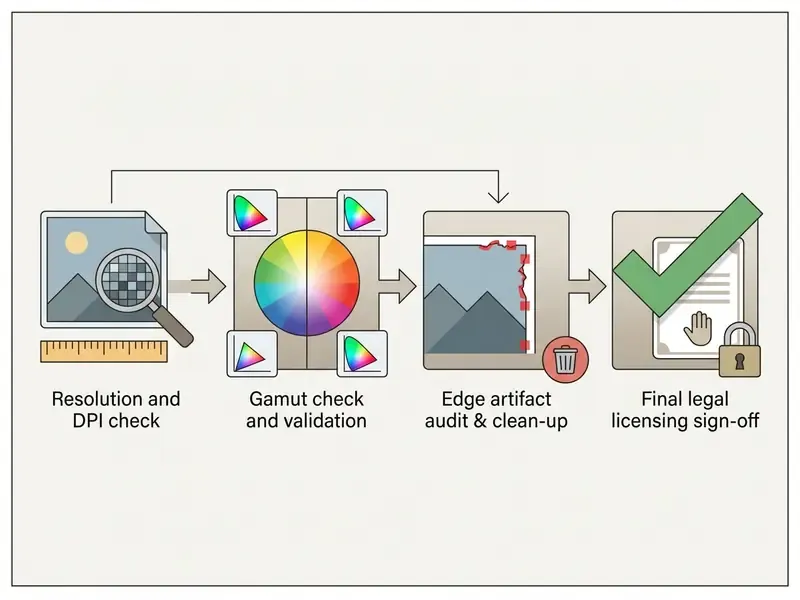
Delivering files compliant with ISO 15930-7 (PDF/X) keeps reproduction consistent across commercial presses. Automated preflight should flag color mode, embedded fonts, transparency, effective image resolution, total ink coverage, and PDF structure version before release. Reviewing soft-proofs under the target lighting condition prevents the unpleasant surprise of a hue shift between screen and paper. Organizations reviewing policy exposure around AI media generation can also consult dedicated resources on litigation trends in copyright and synthetic content.
Best Uses for AI Colorized Images
AI colorization earns its keep across personal archives, educational publishing, media production, and digital marketing. Turning monochrome media into color lifts engagement and makes historical content legible to audiences raised on color.
Whether you are restoring a private archive or producing promotional graphics for social media, automation cuts editing overhead sharply. Marketing teams needing derivative visuals from one frame can pair colorization with an AI image generator from image to spin campaign variants from a single restored master. You can colorize old prints in minutes and turn black and white images into assets people actually stop to look at.
Restore Old Family Photos and Portraits
Restoring old family photos preserves heritage by making ancestors feel present rather than abstract. Converting faded monochrome prints into color portraits also turns fragile physical albums into durable digital archives, which is often the real motivation: getting old photos back before the paper gives out.
When digitizing private collections, follow national preservation guidance and save uncompressed master scans in Adobe RGB 1998 or 24-bit RGB before applying any automated adjustment. Untouched masters keep original data available for future restoration technology. In practice: scan once at the highest practical resolution, colorize a duplicate rather than the master, clean dust and scratches first, keep saturation moderate, then compare the colorized copy against the black-and-white original at full size. Check faces, hands, hairlines, clothing edges, and small props, since artifacts surface there first.
Colorize Historical Photos and Archives
Museums, documentary producers, and historical publishers use colorizers to build engaging educational displays. Color helps viewers read architectural detail, weather conditions, and period clothing texture that a grayscale print flattens.
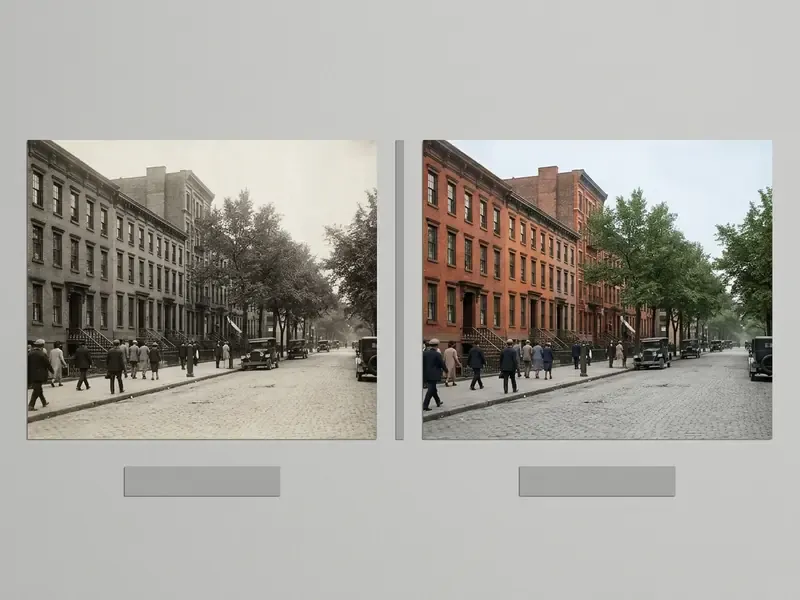
Under Federal Agencies Digital Guidelines Initiative (FADGI) standards, institutions must keep original monochrome scans as the official primary record.
Derivatives belong in separate storage, published with explicit captions such as "Digitally Colorized Interpretation." FADGI guidance additionally calls for color-managed digitization with custom device profiles and a wide-gamut working space, so tonal values in the master stay measurable instead of display-dependent.
Recolor Classic Movie Screenshots and Vintage Media Clips
Restoring black-and-white film stills, classic movie screenshots, and retro promotional material demands precise edge control. Diffusion-based colorizers handle cinematic frames by matching grain profiles across sequential shots, preserving directorial contrast while introducing natural hue to costumes, sets, and period lighting. For moving footage and AI video restoration, temporally stabilized modes exist specifically to stop per-frame palette flicker. "Artistic" modes push saturation on purpose and should stay reserved for single stills, never continuous sequences.
Material-Specific Texture Recognition: Silk, Wood, and Metal
Advanced engines differentiate surface materials and apply believable reflectivity:
- Organic textiles Wool, cotton, and silk receive accurate light-scattering tones without bleeding across seams or pleats.
- Hard surfaces Polished metal, brickwork, and aged wood keep natural specular highlights and authentic patina.
- Natural skin tones Facial decoupling avoids desaturated grey patches and artificial orange shifts, which is what separates a portrait from the "waxy" look common in single-pass GAN models.
- Era-specific fabrics Wool uniforms, leather goods, and enamelled car bodywork each carry distinct reflectance signatures that domain-tuned models read far better than generic scene colorizers.
Improve a Colorized Image with Related AI Tools
Production-ready quality usually needs an ai image colorizer plus complementary tooling. Combining color prediction with super-resolution, background extraction, and digital retouching creates a full restoration pipeline, and a final pass through an AI image upscaler is what turns a screen-ready file into a print-ready one.
Modern media workflows run these operations in sequence to avoid amplifying artifacts. To study structured automation across enterprise media assets, technical leaders can review established digital workflows.
Upscale, Enhance and Restore Old Photos
Running photo restoration and noise cleanup before color inference stops structural damage from distorting predicted hues. After colorization, a specialized image upscaler raises spatial resolution for large-format printing.
Integrated architectures like Pik-Fix separate structural restoration from chrominance transfer, feeding clean luminance into the colorization subnet (Pik-Fix: Restoring and Colorizing Old Photos, WACV, 2023. https://arxiv.org/). Pik-Fix splits the task into restoration, similarity matching, and reference-guided colorization, passing restored luminance plus reference color features into the final subnet. Following colorization with an ai sharpen image pass restores crisp focus in facial detail and garment texture.
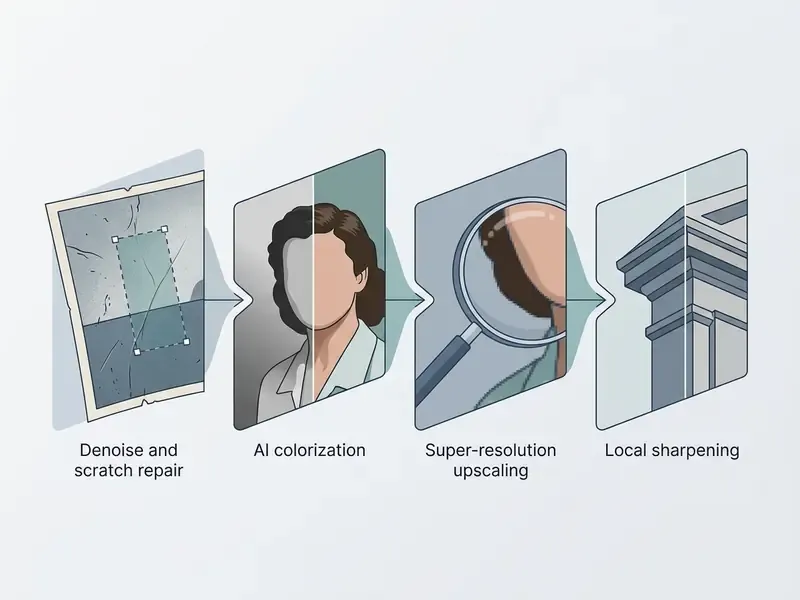
Stage order is not arbitrary. Interactive restoration research sequences major damage removal, noise reduction, facial restoration, and colorization in that order, on the reasoning that structure must settle before color is assigned. Other pipelines invert part of the sequence, upsampling luminance first and propagating chrominance afterward, which works when the source is soft but structurally intact. Pick the order by dominant defect: damage-first for cracked prints, resolution-first for small but clean negatives.
Remove Backgrounds and Edit the Final Image
Isolating colorized subjects from their original backdrop lets designers drop historical figures or vintage products into modern layouts. A modern background remover segments the foreground cleanly, with no manual bezier masking required.
To isolate subjects for commercial graphics, use an ai remove background from image tool to generate clean alpha channels. An ai remove text utility then clears unwanted historical watermarks, publisher stamps, or surface scratches from the finished asset. Residual fringe pixels along hair or lace edges respond best to a soft brush on the mask itself, then export as PNG with transparency, or as a layered PDF for reuse in layout.
FAQ: Frequently Asked Questions About AI Image Colorizer
Can I Colorize a Blurry or Physically Damaged Black and White Photo?
Yes. Modern restoration pipelines run pre-processing passes to repair scratches, reduce film grain, and firm up soft edges before chrominance prediction, which keeps predicted color from bleeding across blurry borders. Expect diminishing returns on severely degraded originals. Heavy blur and noise remain the two distortions that damage feature recognition most.
Is Batch Processing Available for Large Photo Archives?
Enterprise and professional colorizers support bulk ingestion, usually 2 to 50 monochrome assets per run. The server executes parallel cloud inference and applies consistent color profiles across a whole album. Above a few thousand items, move from the web UI to a batch API so model version, palette preset, and strength value stay identical across the collection. Visual consistency inside an album matters more than per-image perfection.
How Does AI Colorization Differ from Traditional Photoshop Manual Layer Masking?
Manual colorization in Photoshop means painting individual adjustment layers, hand-tuning blending modes, and masking each region, which can take hours per photo. AI colorization automates feature recognition and CIE Lab channel prediction and returns plausible chrominance in a few seconds. Hybrid workflows combine both: run the neural pass first, then correct only the regions that documentary evidence contradicts.
Can Colorization Run Inside Our Own Infrastructure via API?
Yes. Vendors serving regulated buyers expose REST or batch endpoints, containerized SDKs, and in some cases on-premise or VPC-isolated deployment so corporate scans never cross the public internet. During evaluation, request documented rate limits, throughput and uptime SLAs, model version pinning, sandbox credentials for benchmarking, and a Data Processing Agreement covering sub-processors.
How Long Are Uploaded Photos Stored, and Are They Used for Training?
Reputable platforms publish an explicit retention window, commonly a six-hour automatic purge on consumer tiers and configurable or zero retention on enterprise contracts, with transfers over TLS-encrypted connections. Get written confirmation that uploads are excluded from public training datasets before you process family archives, medical imagery, or proprietary media.
Can I Use an AI Photo Colorizer on iPhone or Android?
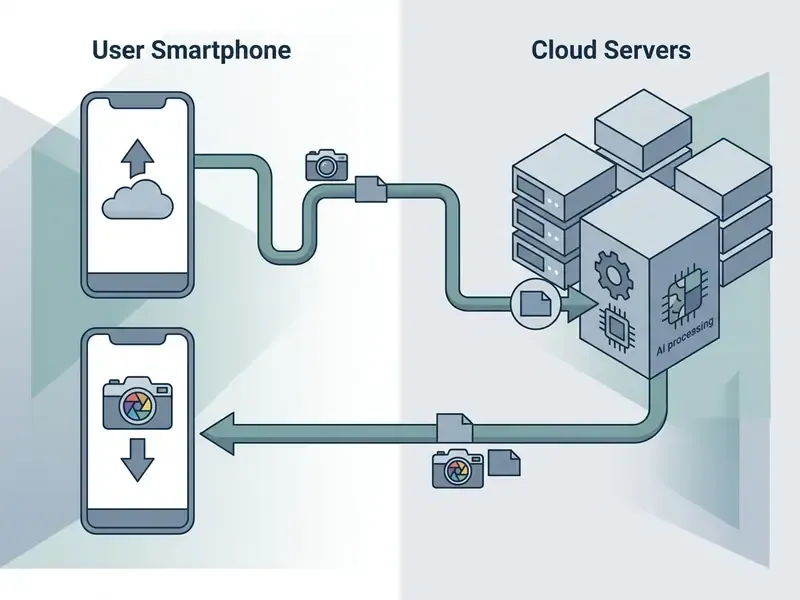
Yes. You can reach an ai photo colorizer through dedicated iOS and Android applications or straight from a mobile browser. Colorizer apps such as ImageColorizer, Photomyne Colorize, YouCam Enhance, Lift, and Nero Lens offer interfaces tuned for small screens. Mobile workflows rely on cloud inference, so a phone can ai color image assets without burning local compute. You can photograph a physical print with the phone camera, ai color picture files instantly, and save high-resolution results straight to the photo library. Anyone needing local retouching afterward can continue in a mobile-compatible AI photo editor. For terminology and system definitions, open the hub, or return to the main platform page to open the hub.
Limitations and Open Questions
A few things stay genuinely unresolved, and pretending otherwise would be dishonest.
Benchmarks such as FID and LPIPS measure perceptual plausibility, not historical correctness. A model can win on every metric and still dress a 1943 uniform in the wrong shade. There is currently no accepted standard for scoring historical fidelity, because the ground truth is gone.
Skin-tone equity claims from vendors also remain unverified in public literature. Sample sizes, demographic coverage, and evaluation protocols are rarely published, so buyers are left to test on their own reference sets. Do that before committing an archive.
Labeling obligations are moving too. EU AI Act transparency duties for synthetically altered media, alongside evolving US state rules, mean today's captioning policy may need revision within a year. Build the caption field into your metadata schema now, not later.
Commercial Licensing and Enterprise Resources
For teams evaluating enterprise media pipelines, integration options, and usage rights across commercial generative models, our master directory is the place to explore the hub.
Before signing a colorization contract, compress the decision into one checklist: output rights on the intended plan, watermark and resolution caps, retention SLA and encryption, certification evidence (SOC 2 or ISO 27001) plus a DPA, deployment option (SaaS, private cloud, on-premise), batch API limits and uptime SLA, audit-trail fields captured per asset, preflight compliance with ISO 15930-7 for print, and an archival labeling policy under FADGI for any historical material. Related buying guides on photo editors and free photo editors cover the adjacent licensing and export-restriction questions that tend to surface in the same procurement cycle.
General disclaimer: This article is informational and does not constitute legal, archival, or compliance advice. Licensing terms, retention policies, and regulatory obligations change frequently and vary by jurisdiction and vendor plan. Verify current terms with the provider and with qualified counsel before commercial or institutional deployment.