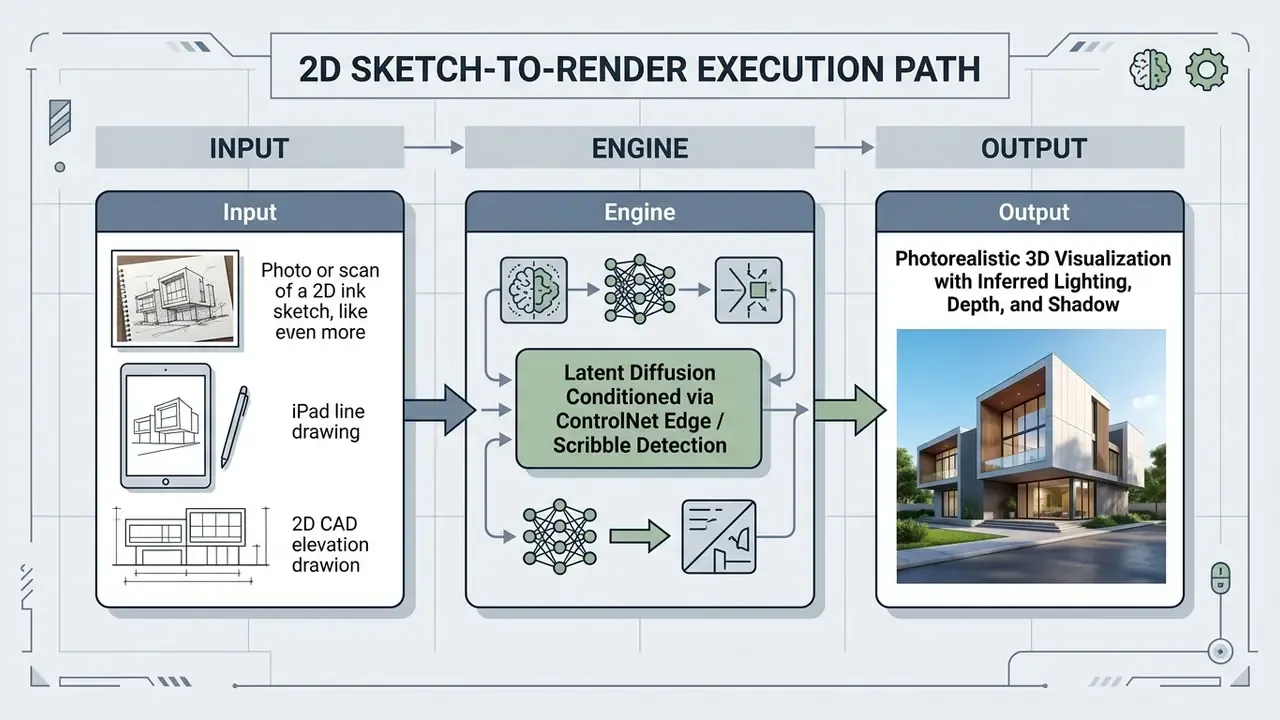
Generative artificial intelligence has quietly rearranged architectural visualization. Deterministic ray-tracing pipelines are no longer the only route to a presentable image, because probabilistic diffusion models now do a large share of the work. An ai rendering generator lets a design team convert sparse 2D inputs, viewport screenshots and untextured massing models into photorealistic visualizations in seconds instead of hours.
There is a catch, of course. In corporate design and financial transformation workflows, adopting an ai architecture render generator means balancing fast conceptual iteration against model risk, data governance and residual intellectual property exposure. Speed is easy to buy. Evidence is not.
Executive Summary: What Decision-Makers Need to Know
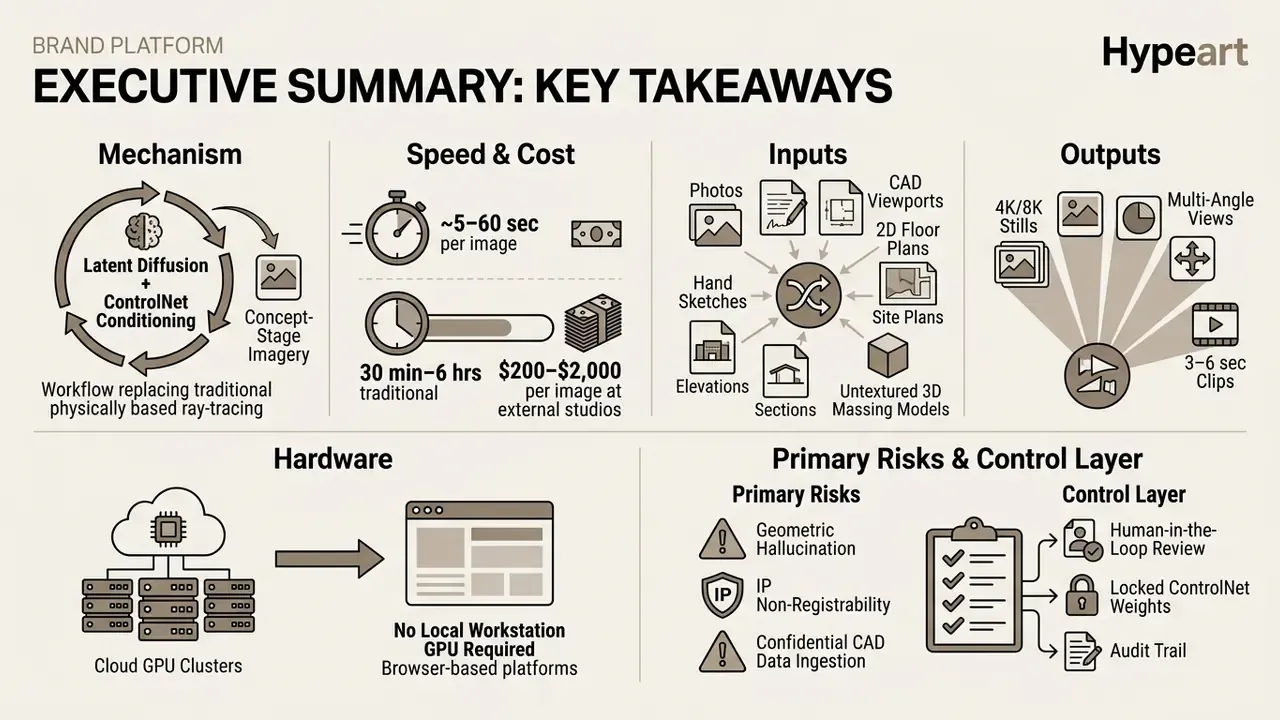
Bottom line: an AI rendering generator compresses concept visualization from days to seconds. It does not remove the need for deterministic rendering in construction documentation, and it certainly does not remove the need for documented human review in regulated enterprise environments.
What Is an AI Rendering Generator and What Images It Creates
An ai rendering generator is a machine learning system, usually built on latent diffusion architecture, that synthesizes realistic architectural images from text prompts, sketches, photographs or 3D geometry. Traditional engines such as V-Ray or Corona demand a complete physically based scene setup. An ai render generator does something different: it infers materials, global illumination and spatial depth probabilistically, from learned data distributions.
«Diffusion models implement a two-phase probabilistic process: a forward phase that progressively adds noise, and a reverse phase that reconstructs the image through iterative denoising».
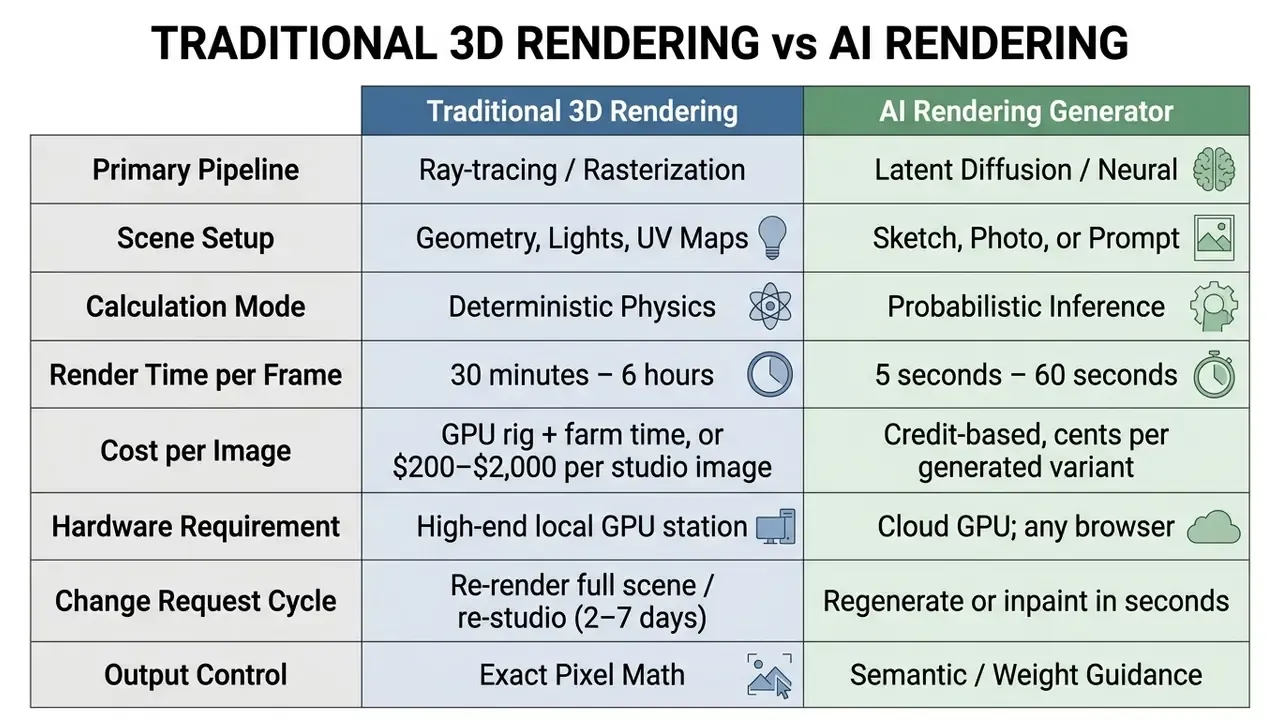
These tools produce a broad range of ai rendered images: conceptual massing studies, exterior facade proposals, interior spatial layouts, atmospheric landscape compositions. By automating the secondary synthesis of lighting and surface finishes, generative systems let teams compare AI image generators and shortlist visual directions early in the design cycle, before anyone commits modeling hours. If a term in this space is unfamiliar, you can browse the hub for working definitions of diffusion, conditioning and provenance.
Image-to-Render: Converting Photos and Reference Images into Visualizations
An image-to-render workflow turns an existing photograph or a low-resolution visual input into a finished architectural visualization by conditioning the neural network on spatial and structural boundaries. In an ai render image pipeline the model holds camera perspective and building footprint steady, while it modifies cladding, glazing reflections and ambient environmental conditions.
«Blended Latent Diffusion captures both global and local facade structures, including window alignment and decorative elements, during localized editing».
Sketch and 3D Model to Render for Architectural Projects
Converting hand sketches and untextured 3D CAD viewports into high quality renders relies on spatial conditioning pipelines such as ControlNet, which map 2D linework directly into neural attention layers. Design teams upload a 2D line drawing or a viewport export from sketchup revit, Rhino or Archicad, and the engine reads geometric boundaries without any manual UV unwrapping.
«ControlNet adds conditional spatial control signals to pretrained diffusion models through zero-convolution layers without disturbing the original model parameters».
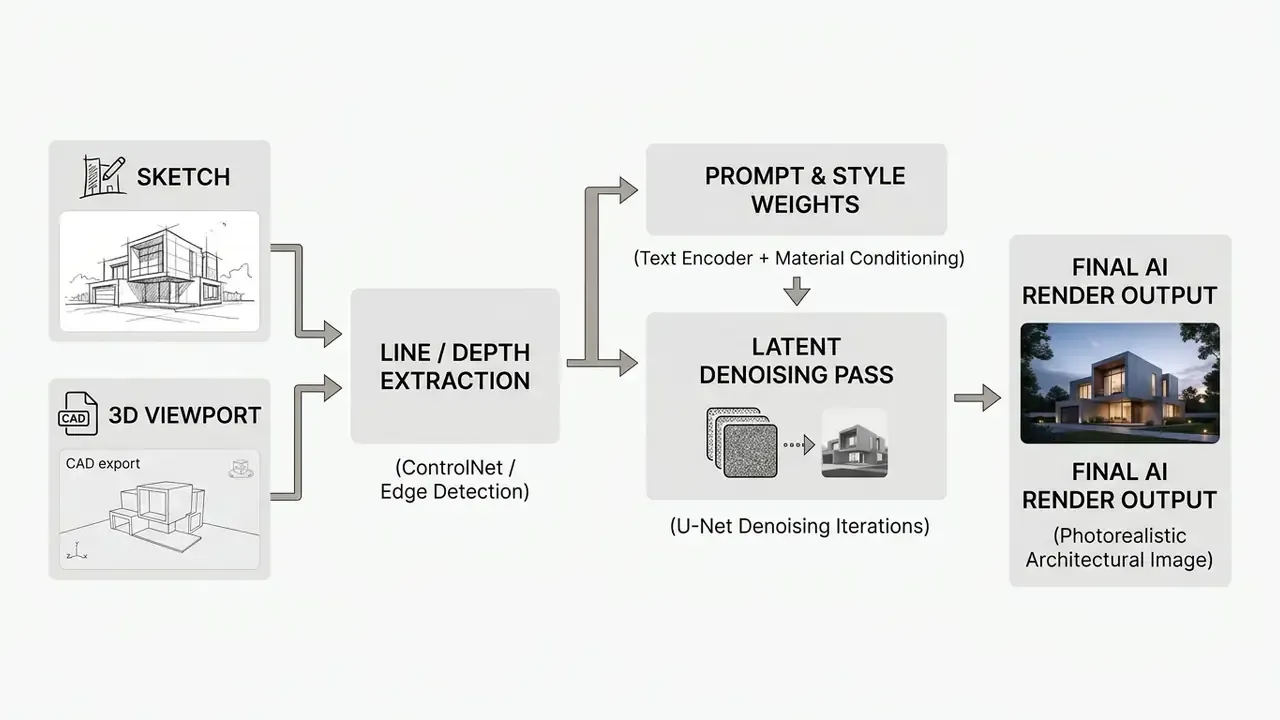
In academic studies on parametric model generation, researchers reported that medium-detail line drawings with explicit opening indicators cut generative hallucination by 42% compared with unconstrained text prompts.
«Medium-detail drawings with explicit opening indicators reduce generative hallucination by 42% compared with unconstrained text prompts».
This conditioning is what makes an ai picture render respect the original fenestration, roofline and floor-to-floor heights while it invents believable building textures. Platform classes differ in what they will even accept. BIM-native add-ins such as Veras require a perspective 3D camera view with spatial depth, not a plan or a section, whereas browser-based screenshot tools accept any reasonably high-resolution JPG or PNG and infer depth and material zones from the flat image alone.
Which Render Styles Are Supported by AI Tools
Modern art rendering ai platforms cover a wide stylistic range: hyper-realistic photography, Scandinavian minimalism, cinematic twilight imagery, conceptual double-exposure graphics. Conditioning controls let users set material parameters, light temperatures and atmospheric haze without touching the building envelope.
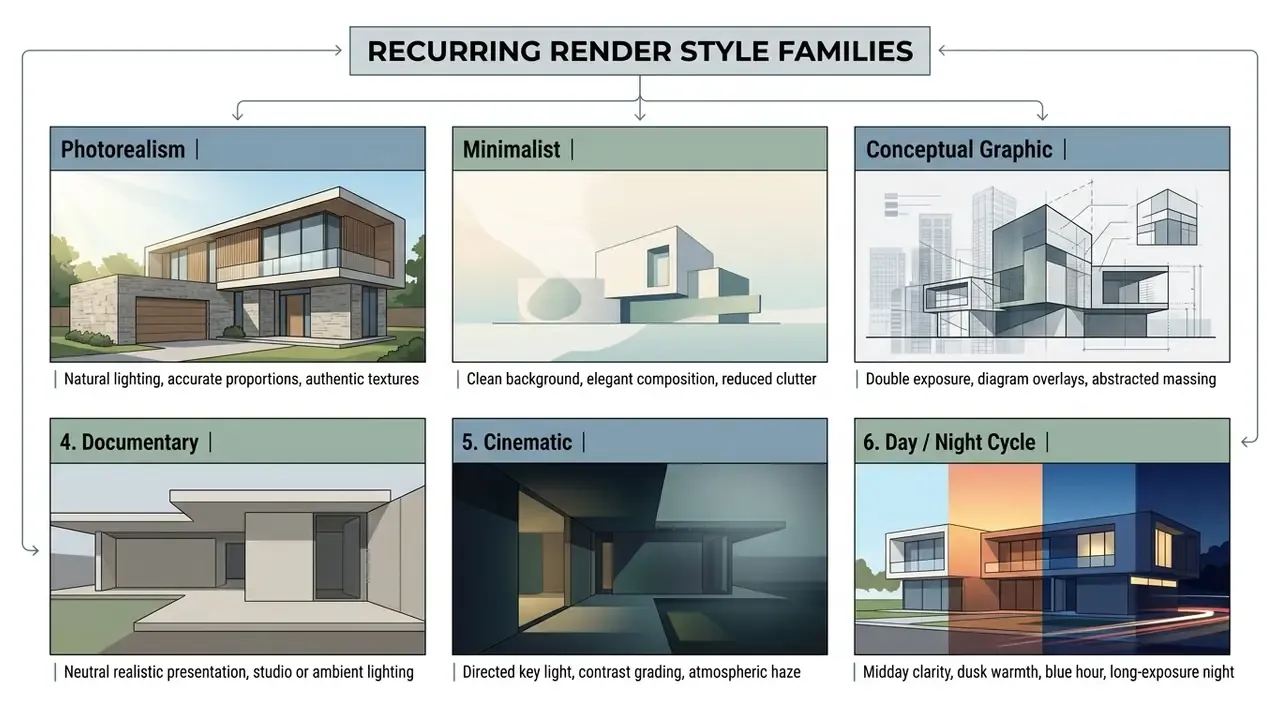
«RoomDiffusion applies multi-aspect training and multi-stage fine-tuning, outperforming Stable Diffusion and SDXL on aesthetics, accuracy and efficiency as judged by more than 20 professional experts».
Specialized models of this class support dozens of distinct interior design style classes while suppressing furniture duplication artifacts, which is the defect most reviewers notice first. Design leaders exploring creative options can test platforms like craiyon ai art for rapid ideation, then lock parameters before anything enters a production model.
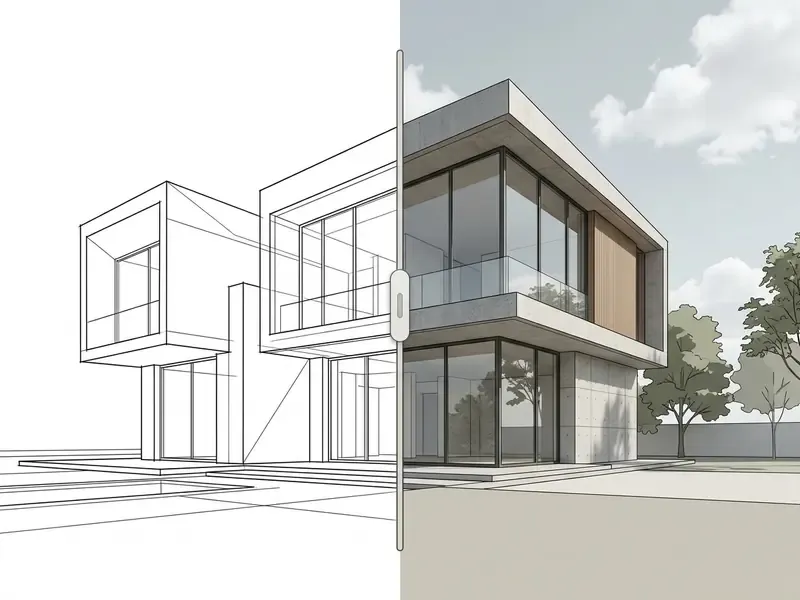
How an AI Render Generator Works: From Upload to Final Render
An ai render generator runs a multi-stage sequence: it ingests inputs, extracts structural cues, applies diffusion denoising and exports a high-resolution image. Understanding that pipeline is what lets operators control output parameters instead of gambling on them, and it is the prerequisite for shortlisting the best AI image generators for a specific studio workflow.
How to Prepare Source Images for AI Image Rendering
Preparing material for an ai to render images workflow comes down to clean line art, high-contrast geometry and clear structural segmentation. Input images need straight horizons, minimal perspective distortion and clearly defined openings, otherwise the model guesses.
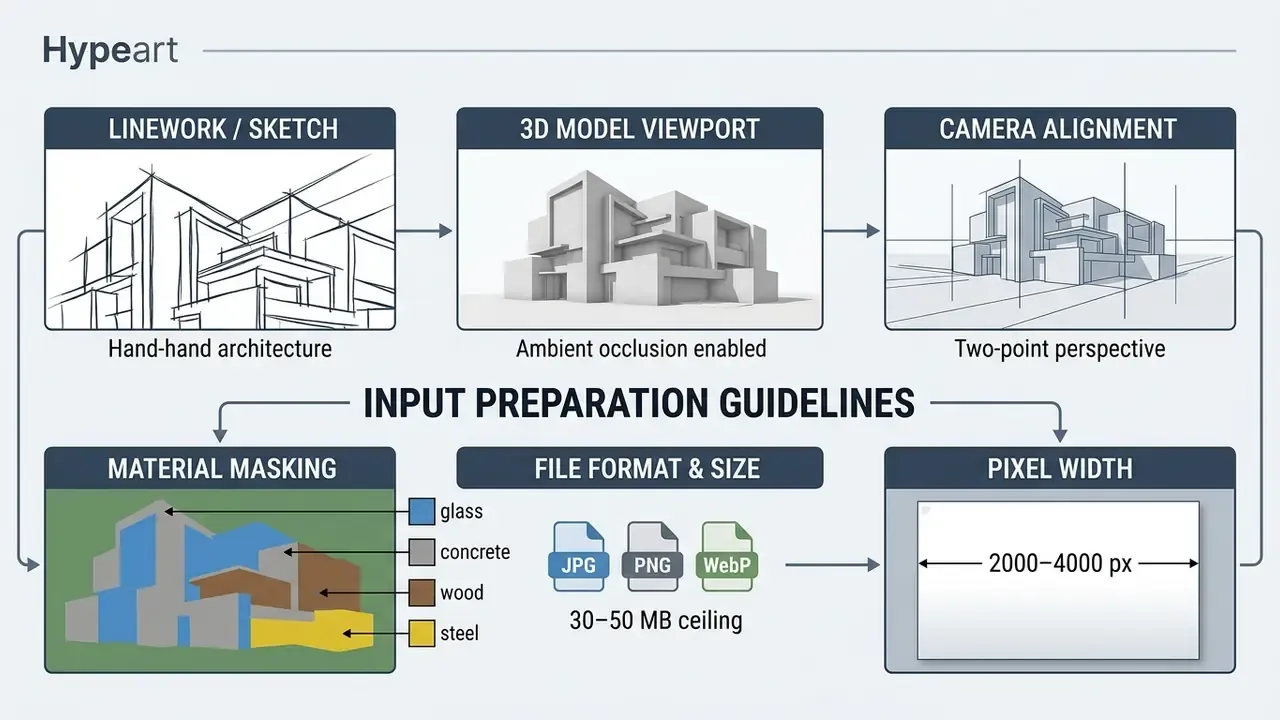
Sparse sketches hand the model too much freedom. Medium-detail inputs that show building outline, major openings, roof form, a ground plane and a scale reference improve reproducibility across repeated passes, which matters far more than a single lucky frame.
How to Set Style, Materials, and Lighting
Controlling materials and environmental illumination in an ai image rendering pipeline depends on prompt order: building typology, primary cladding materials, daylight conditions, camera perspective, contextual environment. Prompt-engineering guidance for architecture published by Chaos in 2026 recommends exactly that sequence, building type first, then materials, then lighting, then environment, camera and style modifier. It also caps material descriptors at two to four terms, to prevent prompt conflict inside the text encoder. Layered material syntax refines this further by declaring base material, finish state, age condition and light response for each surface.
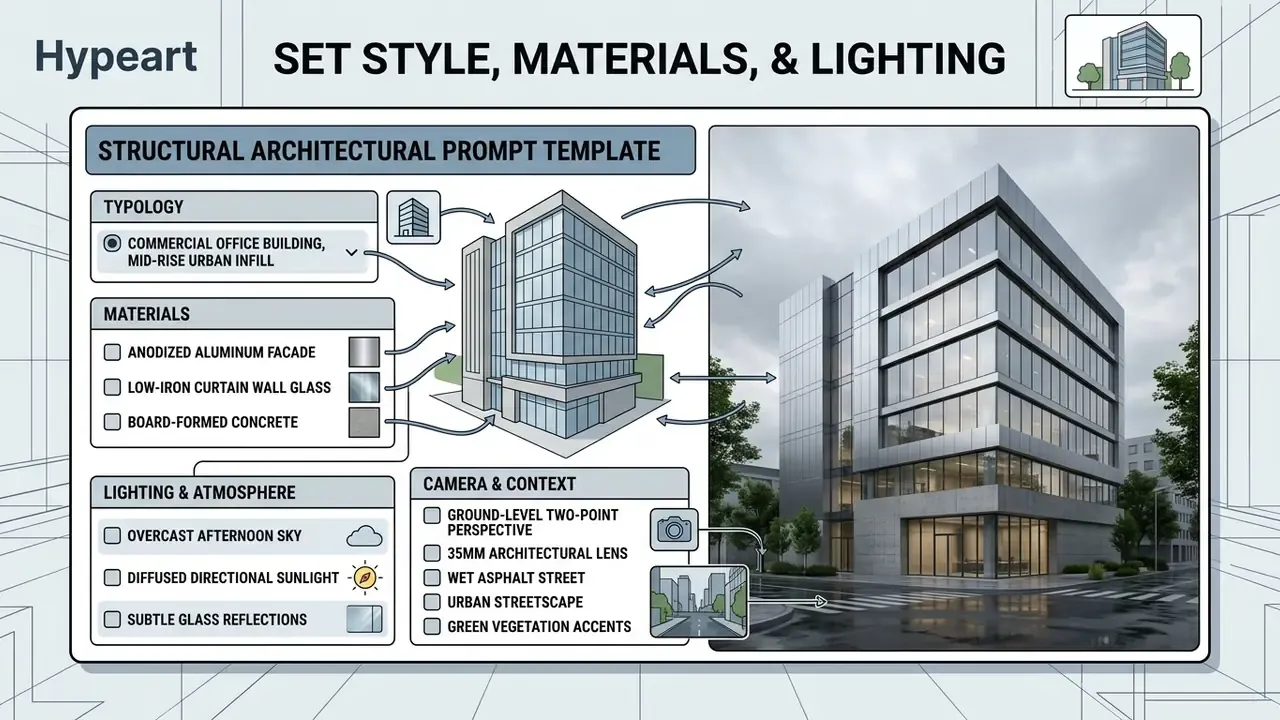
Spelling out materials lighting parameters, for instance "overcast afternoon sky with soft directional shadows", overrides the flat default daylight that diffusion models drift toward. Reversing the order, lighting materials instead of materials then lighting, tends to weaken material fidelity in practice. Teams exploring prompt-driven image tools often evaluate options like dalle ai image generator to benchmark text-following precision against dedicated architectural plugins.
How to Compare Variants and Refine the AI Rendering Image
Refining ai rendered images works best through targeted masking and low-strength image-to-image passes, not full regeneration. With inpainting, operators mask only the region that needs work, a glazing panel, a piece of street furniture, while the surrounding pixels stay locked.
«Blended Latent Diffusion supports iterative editing of individual facade zones while preserving the global structural consistency of the remaining image».
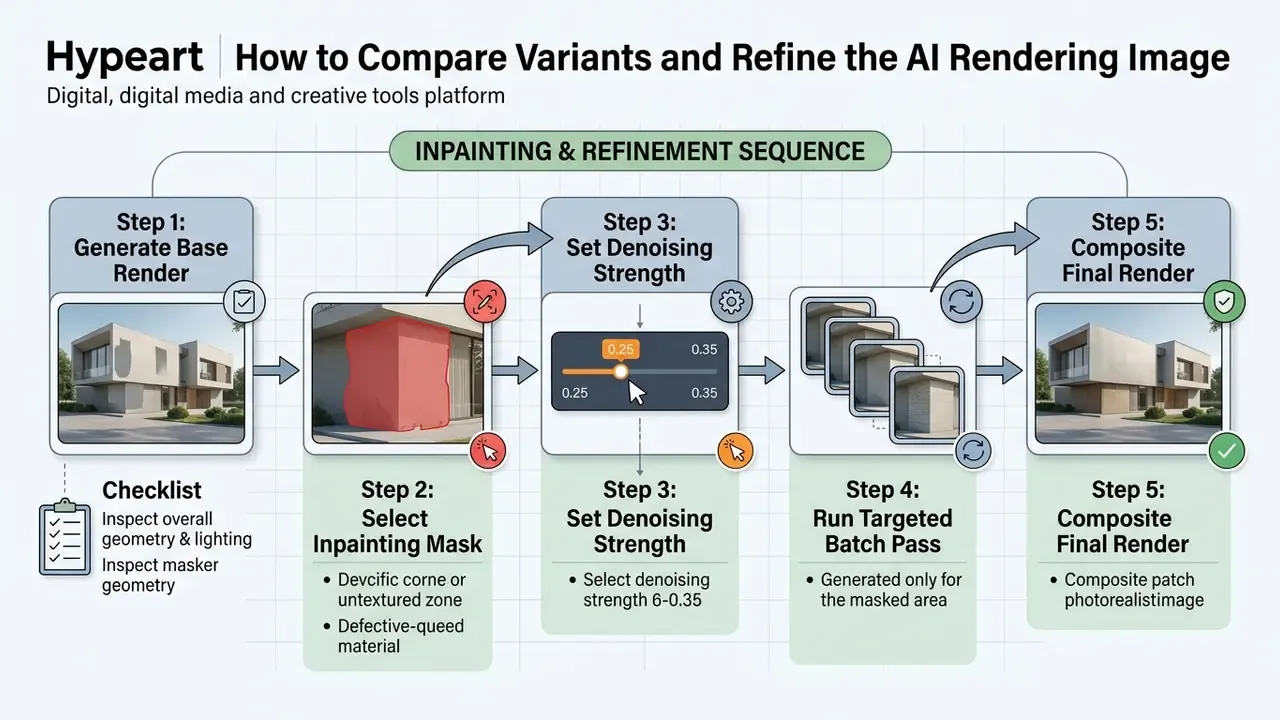
Holding denoising strength low, typically between 0.25 and 0.35, lets the generator update surface detail without disturbing camera position or the overall lighting logic. Batch discipline matters as much as strength. Generate six to nine variants per round, change one variable per batch, keep the camera fixed, level the horizon, then compare palettes and glazing reflections side by side. Comparing ai rendering images in a grid is faster than judging them one at a time; a spreadsheet of seeds helps more than intuition here. Teams that need repeatable presets can review custom ai image generator configurations to build controlled inpainting workflows.
From Static AI Render to Cinematic Video Clips
Visualization workflows no longer stop at stills. Image-to-video neural diffusion pipelines extrapolate spatial geometry from a single high-resolution render and produce smooth camera trajectories without 3D camera rigging or timeline keyframing.
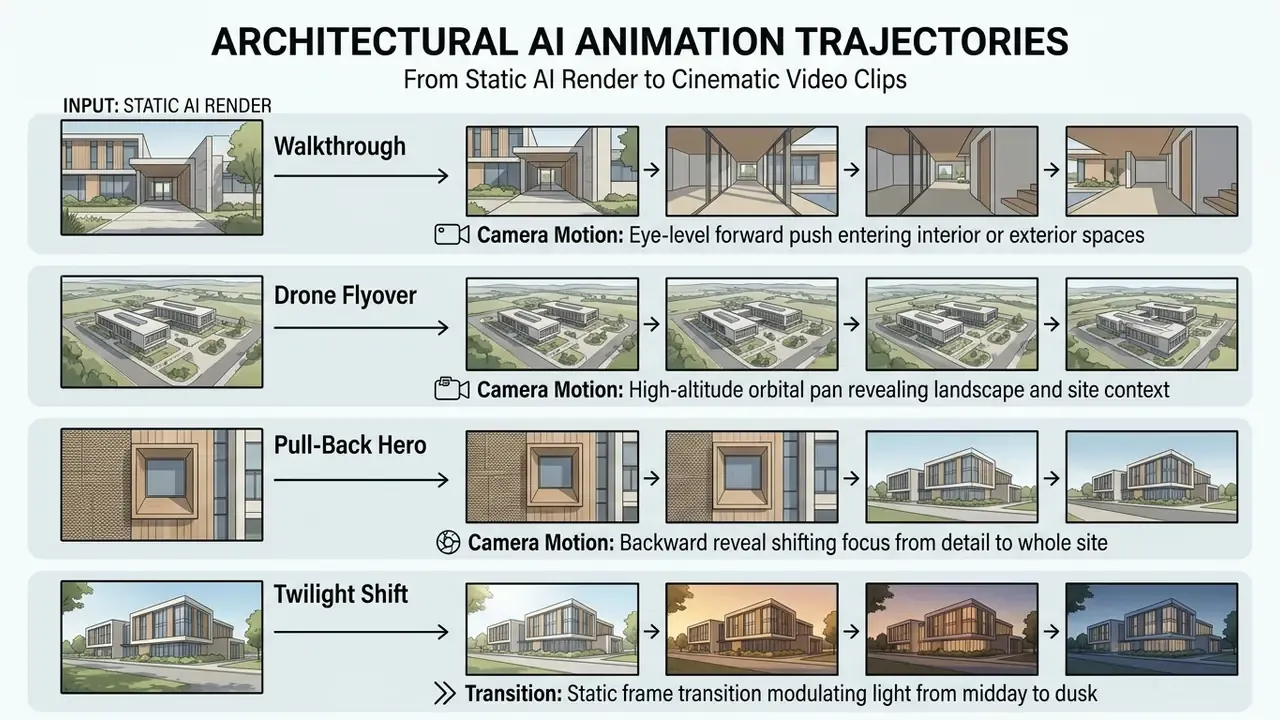
To stop warping along structural grid lines during camera motion, video diffusion models need temporal consistency masking. Capping each clip at three to six seconds keeps edges crisp across facade mullions and floor plates, which is usually enough for an executive presentation or a competition board. Commercial platforms expose this as a start-frame and end-frame pair, where the operator supplies the approved still and names the shot the way it would be briefed to a videographer.
- Input Preparation
- Image Upload
- Style & Lighting Setup
- Batch Generation
- Variant Comparison
- Inpainting Refinement
- High-Res Export
- Video Clip Export
Which Tasks Use an AI Architecture Render Generator
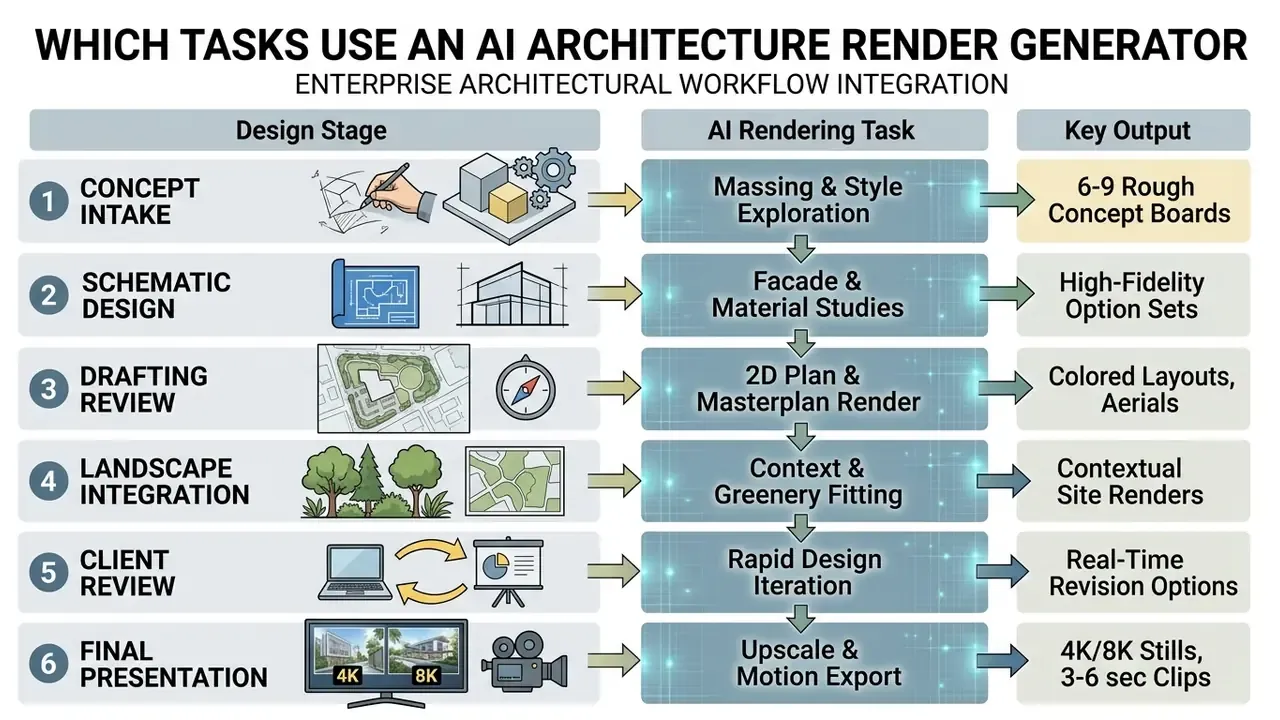
An ai architecture render generator touches several stages of the design lifecycle, from rapid schematic massing to the final client deck. Folded into an existing design workflow, these tools speed up visual communication and cut manual modeling overhead. Rendering uses vary widely by firm, so map yours before buying seats.
AI Exterior and Landscape for Building Envelopes and Sites
Exterior applications generate believable building envelopes, site greenery, surrounding infrastructure and weather effects around a basic volume. Diffusion models trained on urban datasets synthesize UV texture maps, asphalt detail and seasonal foliage tuned to site-specific conditions.
«Multimodal diffusion pipelines synthesize complex cityscapes from vector footprints and text prompts, outperforming GANs in sampling stability and quality».
Two-stage landscape pipelines documented in 2024 CHI research first convert a written concept into a scene layout, then pass that layout to a fine-tuned diffusion model for realistic landscape rendering. Related 2025 work applies Stable Diffusion with ControlNet and LoRA to conceptual landscape planning. What does this buy a practice? The ability to test how a proposed cladding reads against the actual streetscape without modeling neighbouring buildings by hand. Studios frequently benchmark general AI art generators against architecture-tuned engines before they standardize on one, and ai exterior work is where the gap shows up fastest.
Interior AI for Interior Design and Spatial Furnishing
Interior AI generators speed up spatial planning by filling empty room enclosures with furniture arrangements, lighting fixtures and plausible surface materials.
«iDesigner is trained on 3,600 interior images annotated by more than 1,000 professional designers, which yields accurate adherence to complex text prompts».
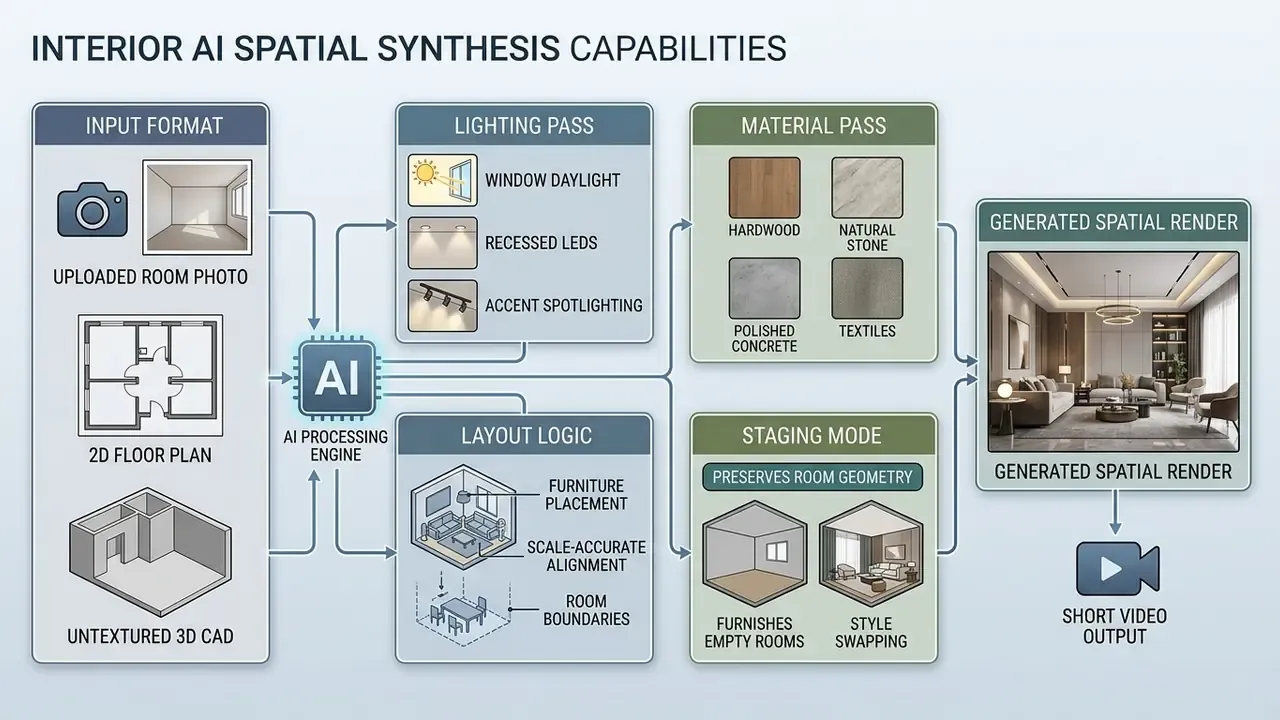
«DecoMind uses CLIP to retrieve furniture matching user preferences, then passes the layout to Stable Diffusion with ControlNet and validates the result with compliance classifiers».
Vendor documentation reviewed for 2026 confirms the same three functional pillars across commercial architecture interior tools: furniture placement at accurate scale, material and palette specification, and calculated illumination from windows, fixtures and ambient sources. Architects, interior designers and staging teams use the same module for different ends, which is worth remembering during licensing talks. Enterprise teams can review lightweight options like deep ai image when they need a baseline for entry-level generation quality in interior spaces.
2D Floor Plan, Site Plan, and Masterplan Architectural Synthesis
Beyond 3D models and photos, AI rendering generators can ingest 2D drawings, including CAD floor plans, structural elevations and urban site plans, and synthesize contextualized 3D visualizations. Applying spatial edge detection and semantic segmentation over vector lines, the engine reads wall thickness, door swings and window openings, then builds depth without a prior 3D mesh.
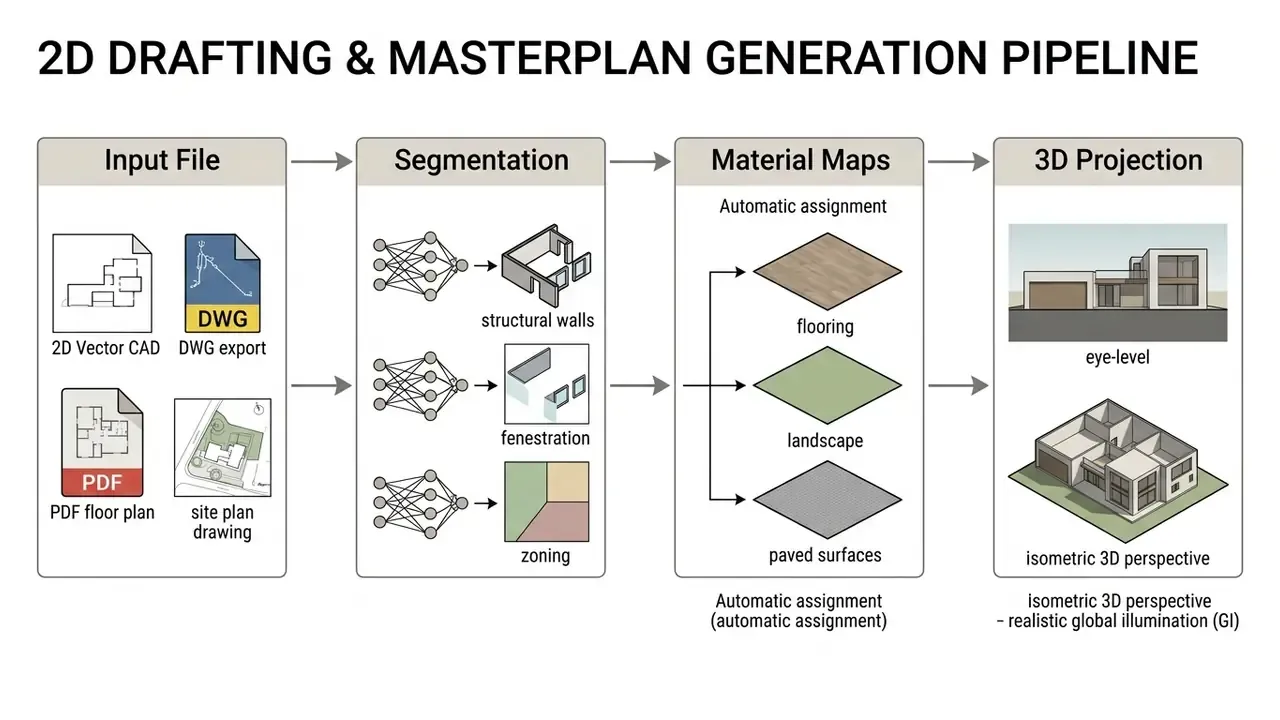
With masterplans and large site boundaries, strict geometric limits prevent neural smoothing over property lines, which is a real liability issue and not only an aesthetic one. For commercial landscape design and urban density reviews, converting a flat site plan into a colored, light-mapped aerial view cuts presentation setup from days to seconds while the footprint stays exact. Commercial platforms expose this family as separate modules, floor plan to 3D render, 2D furnishing, site plan colorization, masterplan render, because each needs a different segmentation prior than an exterior perspective pass.
Renders for Architectural Design and Client Presentations
Using ai to render images shortens review cycles, since visual adjustments can happen live during a schematic presentation. Instead of waiting several days for a ray-traced revision, the team shows three cladding options and two lighting scenes inside the same meeting.
«Generative AI enables clients to engage in the design process through rapid visualization of their ideas».
Enterprise Case: Standardized Intake Across a 140-Asset Property Portfolio
In an illustrative model risk assessment for a regional commercial bank, a facility management team evaluated automated site rendering tools. The team configured a standardized image ingestion pipeline that pre-filtered perspective angles and enforced high-contrast edge maps across 140 property assets. That intake discipline reduced material misclassifications by 38% during automated conceptual re-cladding passes.
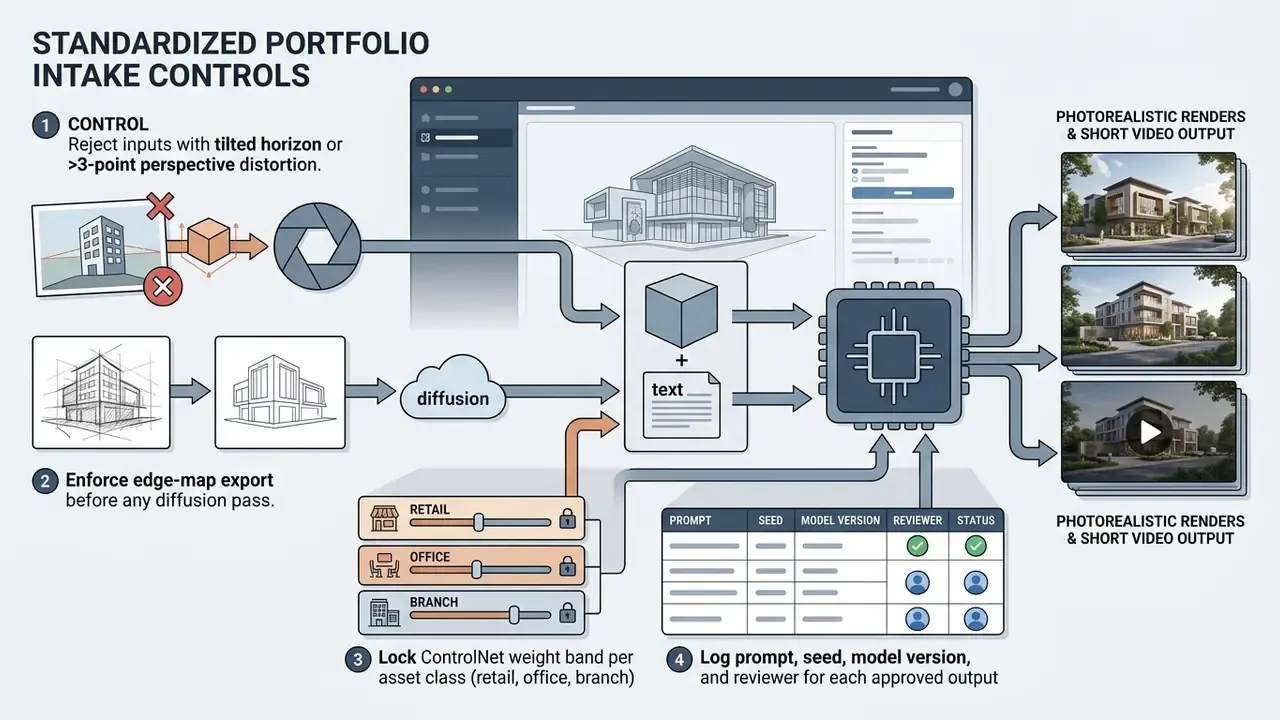
The 38% figure is an internal measurement from one composite portfolio example. Treat it as a directional benchmark, not an industry constant.
How to Make an AI Render More Realistic and High Quality
Getting photorealistic output from an ai rendering generator means confronting the usual neural artifacts: warped geometry, repeating texture patterns, shadows that point in impossible directions. Systematic quality control is what turns raw output into a production asset.
Geometry, Textures, and Materials in AI Rendering
To ai make render more realistic, operators enforce physical material separation and clear geometric boundaries across generated surfaces. Neural models happily blur the seam where a concrete slab meets curtain wall glass, if the input edges were vague to begin with.
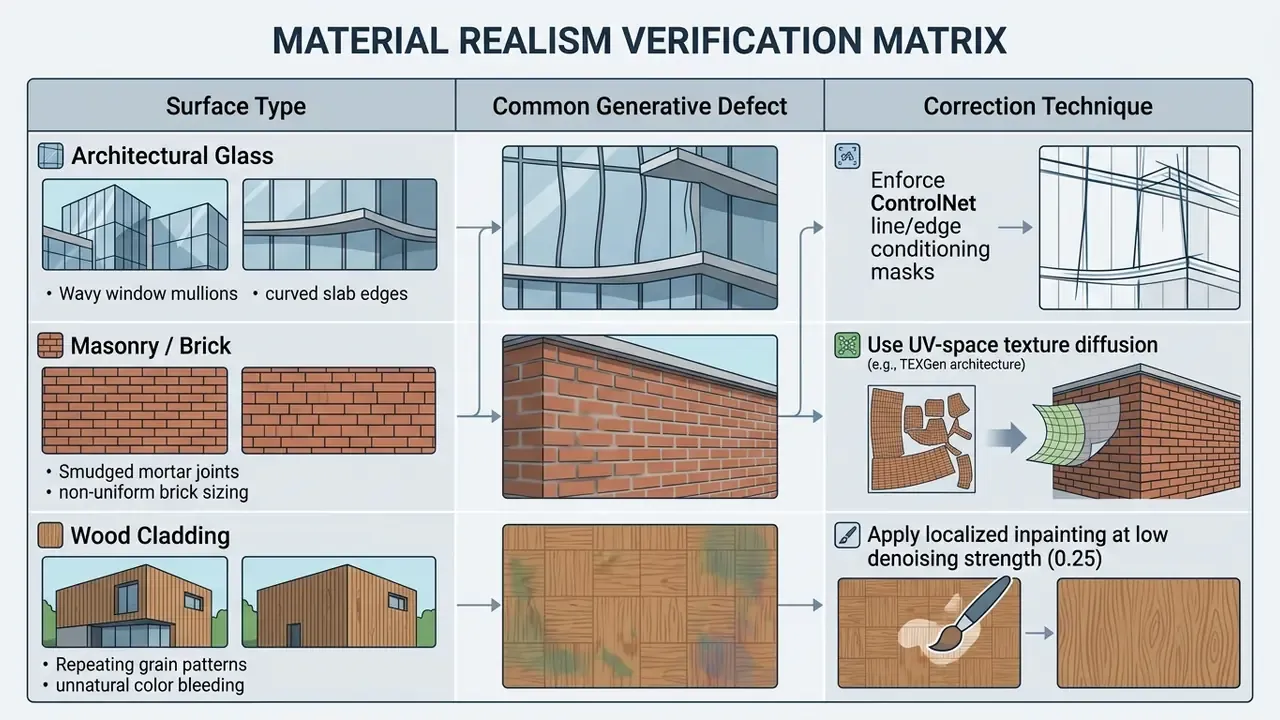
«TEXGen is a ~700M-parameter diffusion model trained in UV space; its architecture interleaves convolutions over UV maps with attention over point clouds».
Seam discipline follows the same logic as manual texturing practice: place seams outside salient visual regions, keep UV parts proportionally scaled, level compatible textures across adjacent surfaces. Combining UV-space texture processing with spatial edge locks is the reliable way to ai to make renders more realistic and to remove floating geometric artifacts from final ai rendered images. Approved frames then usually go through dedicated AI image upscalers for delivery resolution.
Lighting and Composition for Photorealistic Visualizations
Realism depends on accurate global illumination, sane direct shadow logic and plausible specular reflections on glossy surfaces. A diffusion model approximates light behaviour statistically, so underspecified sources produce shadows that quietly contradict each other.
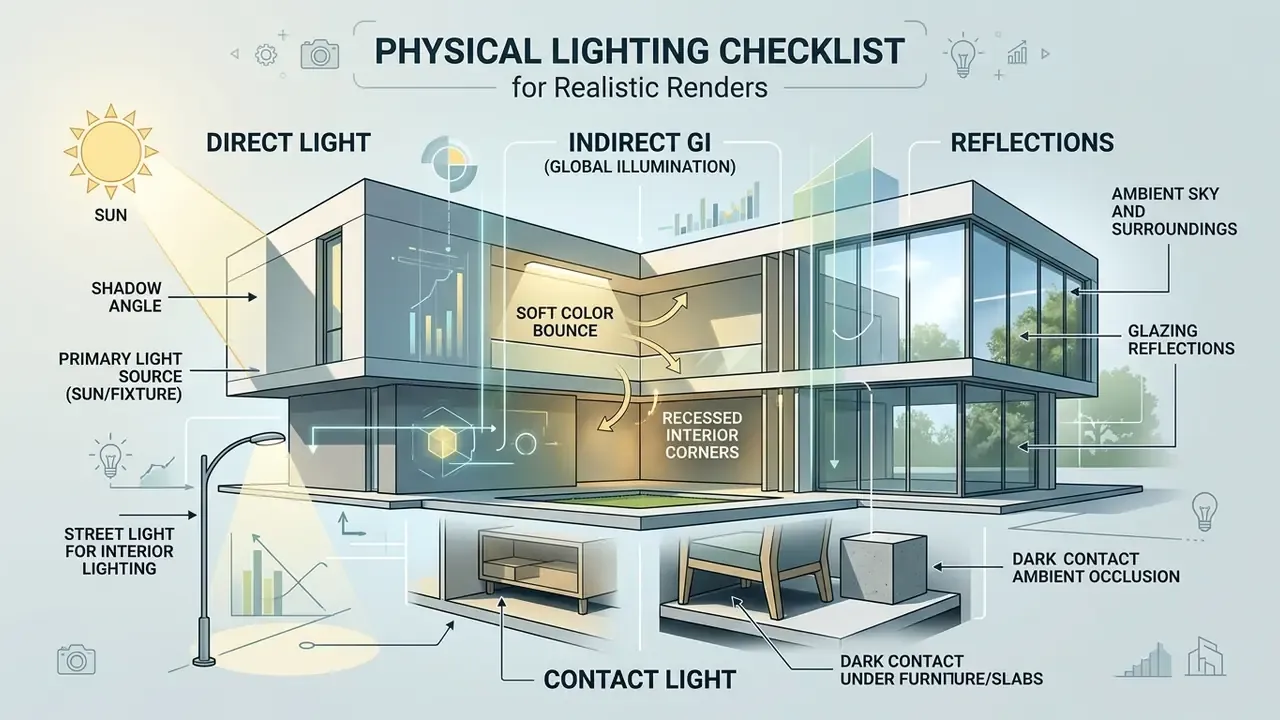
In physically based rendering theory, incoming radiance decomposes into direct light, caustics and diffuse indirect light, with specular and glossy reflection computed separately. A render engine does that arithmetic explicitly. A diffusion model approximates all of it at once, which is why naming time of day, sun position and cloud cover in the conditioning input is the only dependable way to stabilize shadows. Teams that also standardize written documentation around these visual specs sometimes pair the workflow with tools like deep ai text generator for prompt libraries and reviewer notes.
Resolution and Final Verification of Quality Renders
Final verification means inspecting upscaled output at 100% crop to catch fine-detail smudging, edge noise or topological warping before anything reaches a client. Standard diffusion output at 1024×1024 pixels has to pass through AI image enhancers and super-resolution engines to reach 4K (3840×2160) or 8K (7680×4320) presentation formats.
Updated: published upscaling guidance from the Ars Electronica Futurelab (2023) defines 3840×2160 px as the 4K target and 7680×4320 px as the 8K target for AI super-resolution output. That is a documented project guideline, not an ISO or NIST-level standard, so treat 4K and 8K as practical delivery targets for large-format print and executive display decks rather than a regulated quality threshold. A structured visual inspection, ideally by someone who did not write the prompt, keeps upscaled resolution renders crisp without synthetic noise creeping in.
Free AI Render Generator, Commercial Use, and Privacy
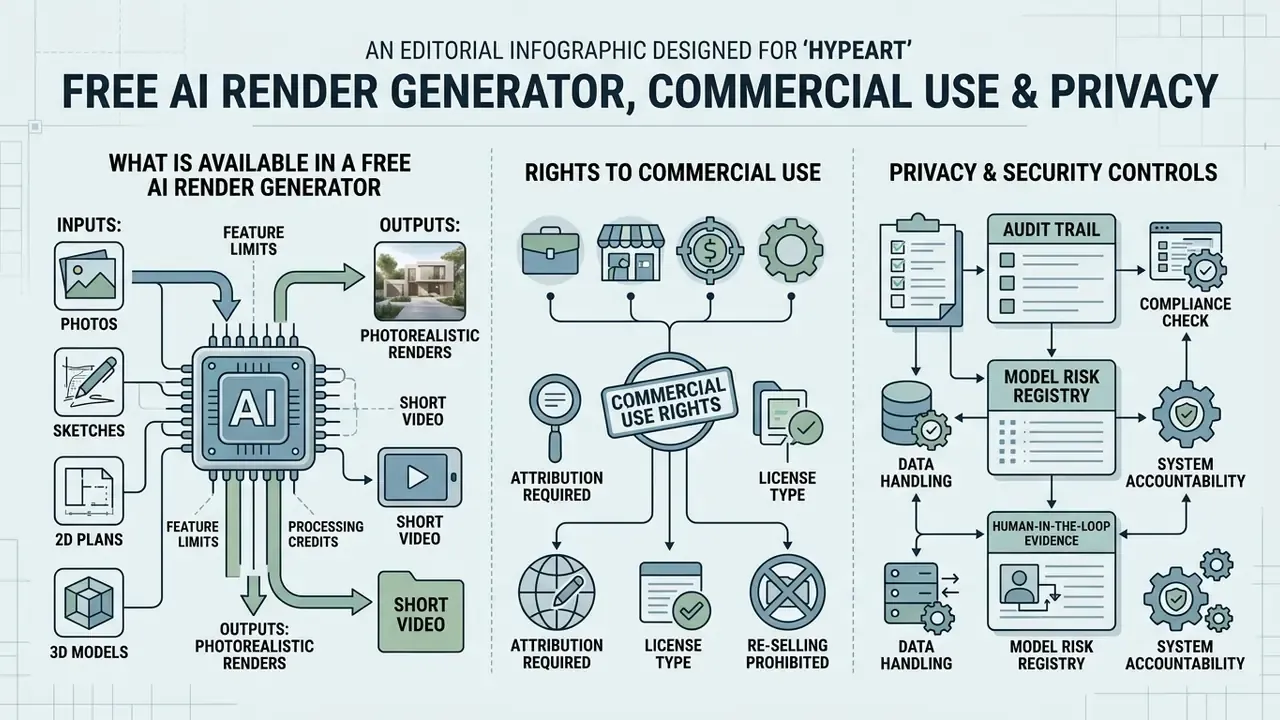
«Generative models in architectural workflows operate under a strict principle: no verifiable evidence, no operational autonomy. AI rendering engines must be evaluated as digital workers with defined input limits, audit trails and explicit human oversight.»
Deploying an ai rendering generator free tier, or a paid commercial platform, starts with auditing terms of service, data privacy rules and output ownership. Before selection, not after. Unregulated use of public generative engines can expose proprietary client floor plans and unreleased designs to public training datasets, which is exactly why risk and compliance functions treat this section as a first-level gatekeeper criterion. Teams can cross-check platform conditions against our overview of AI image generators for commercial use before uploading any client file, and follow disputes through the AI Litigation and enforcement tracker when training-data claims affect a vendor on the shortlist.
What Is Available in a Free AI Render Generator
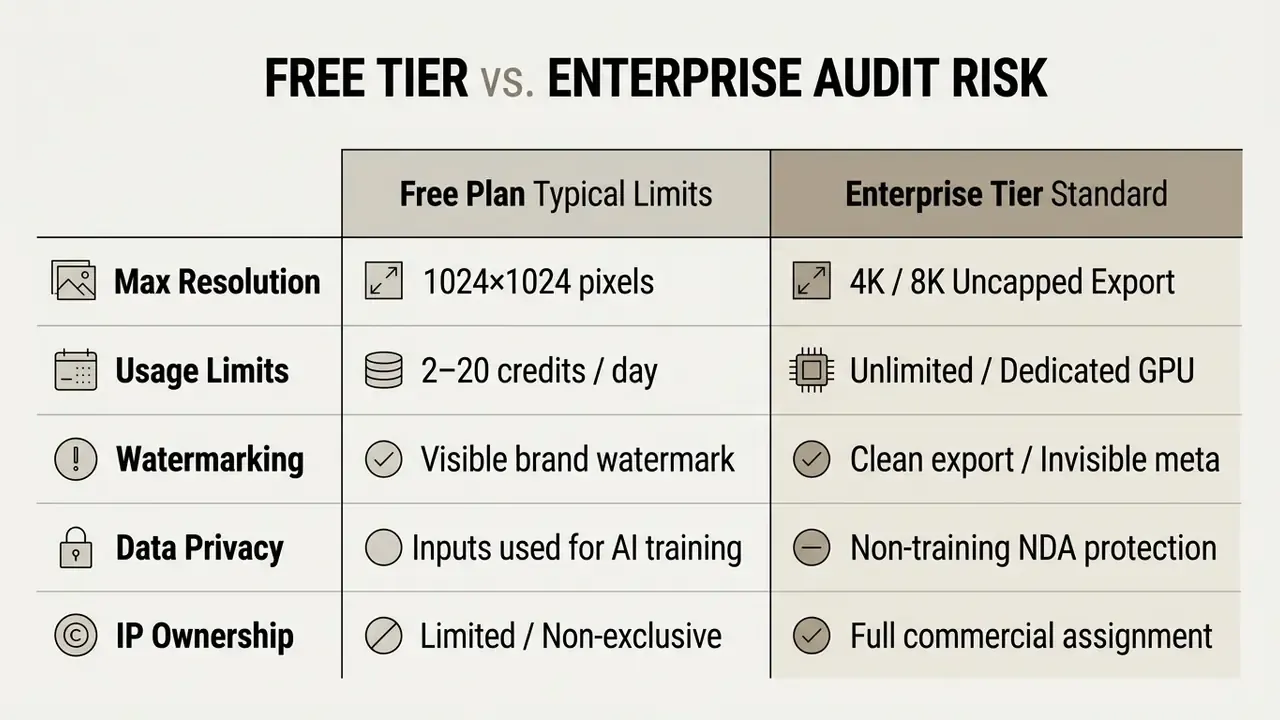
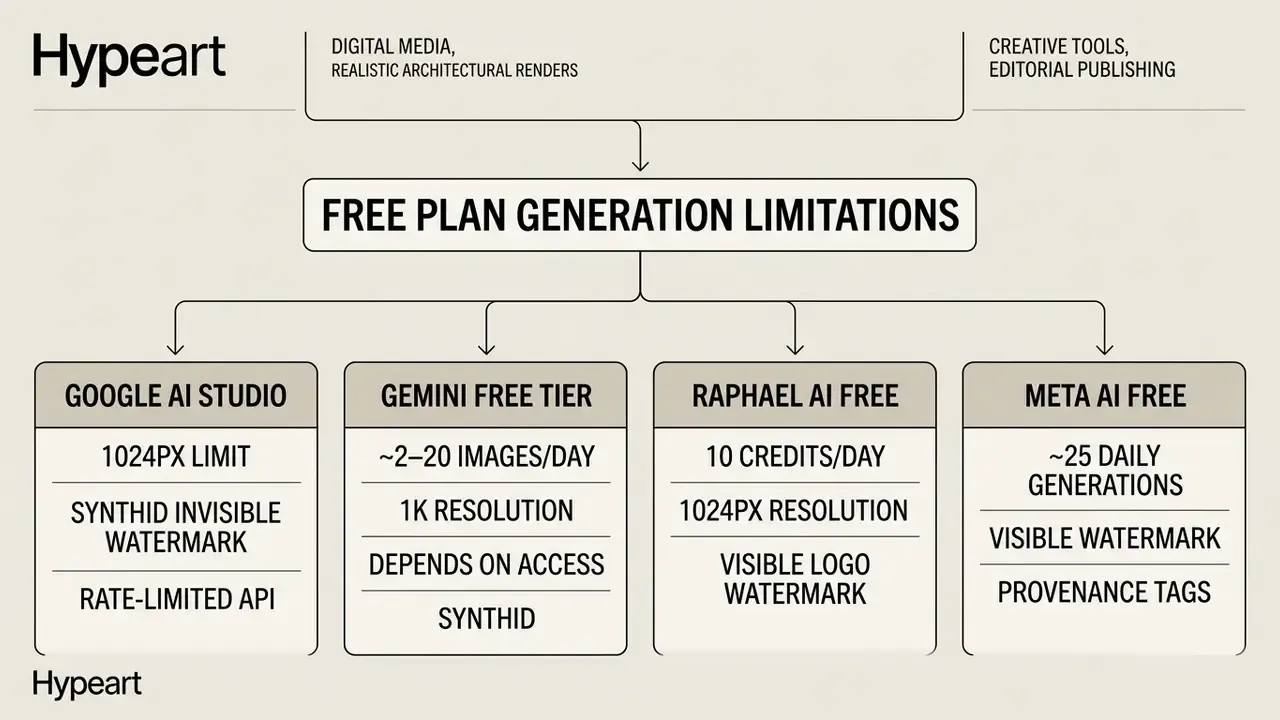
Free plans hand out limited credits, cap resolution at roughly 1024×1024 pixels and stamp a visible watermark. A free ai render generator works well for preliminary testing. It rarely survives contact with a high-resolution client presentation.
Rights to Commercial Use and Privacy Policy
Commercial deployment of ai rendered images requires proof that platform terms explicitly assign copyright ownership or usage rights to the end user. Under current US Copyright Office guidance, AI-generated visual output lacking substantial human authorship cannot be registered for standalone copyright protection, and applicants must disclaim more-than-de-minimis AI-generated material (US Copyright Office, Works Containing Material Generated by Artificial Intelligence, 2023; Copyright and Artificial Intelligence Part 2: Copyrightability, 2025).
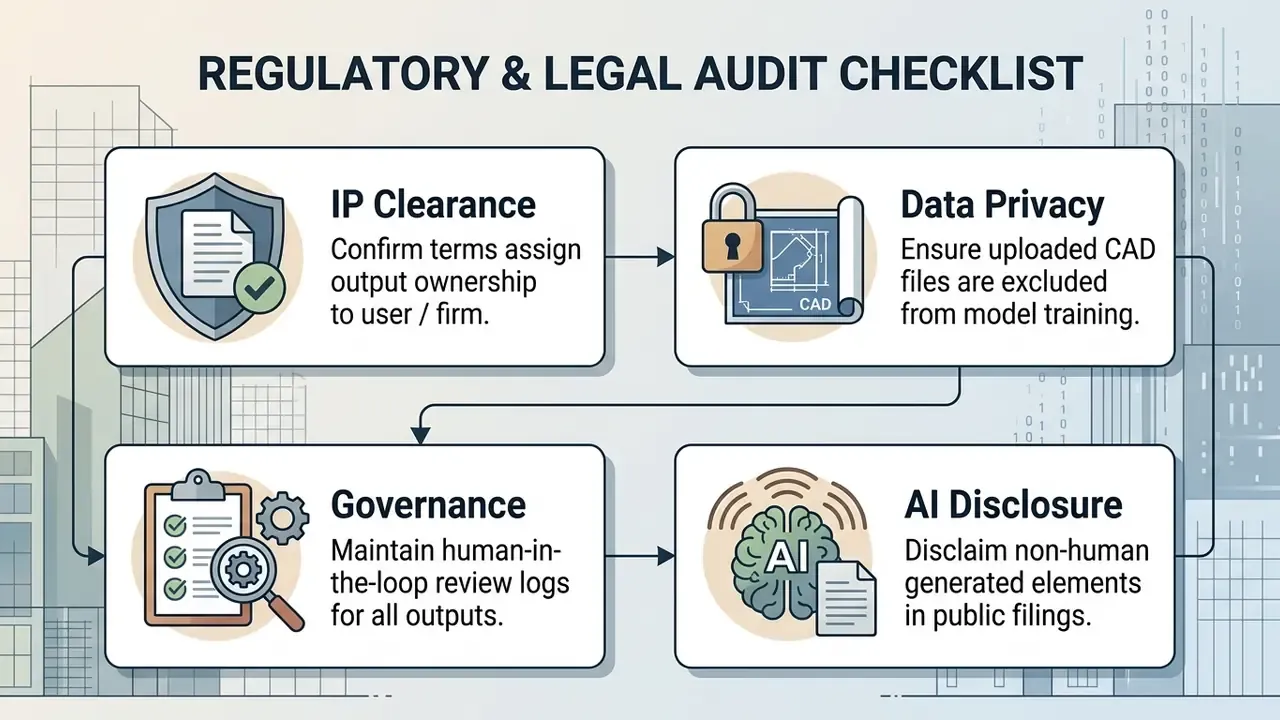
In enterprise financial and architectural operations, retention policy deserves as much attention as the privacy policy headline, since confidential site plans can otherwise be ingested into public models. Guidance issued for architecture firms by the American Institute of Architects states that architects remain accountable for AI-assisted work products, must review outputs and should set firm-level policies covering data privacy, confidentiality, intellectual property and legal standards. Privacy regulators take the same posture: the Office of the Australian Information Commissioner recommends, as best practice, that personal or sensitive information should not be entered into publicly available generative AI tools, and WIPO frames commercial AI adoption as an ownership, licensing and safeguard verification exercise.
Contract language differs meaningfully between vendors. OpenAI's terms state that users retain ownership of inputs and own outputs, with any rights in output assigned to the user. Canva's AI product terms state that users own both input and output, and that Canva makes no copyright ownership claim. Rendershop's terms add that uploaded drawings and plans are treated as confidential and are not publicly displayed without written consent. Where public materials include AI-assisted imagery, teams can verify provenance with AI image detectors before release.
Audit Trail, Model Risk Registry, and Human-in-the-Loop Evidence
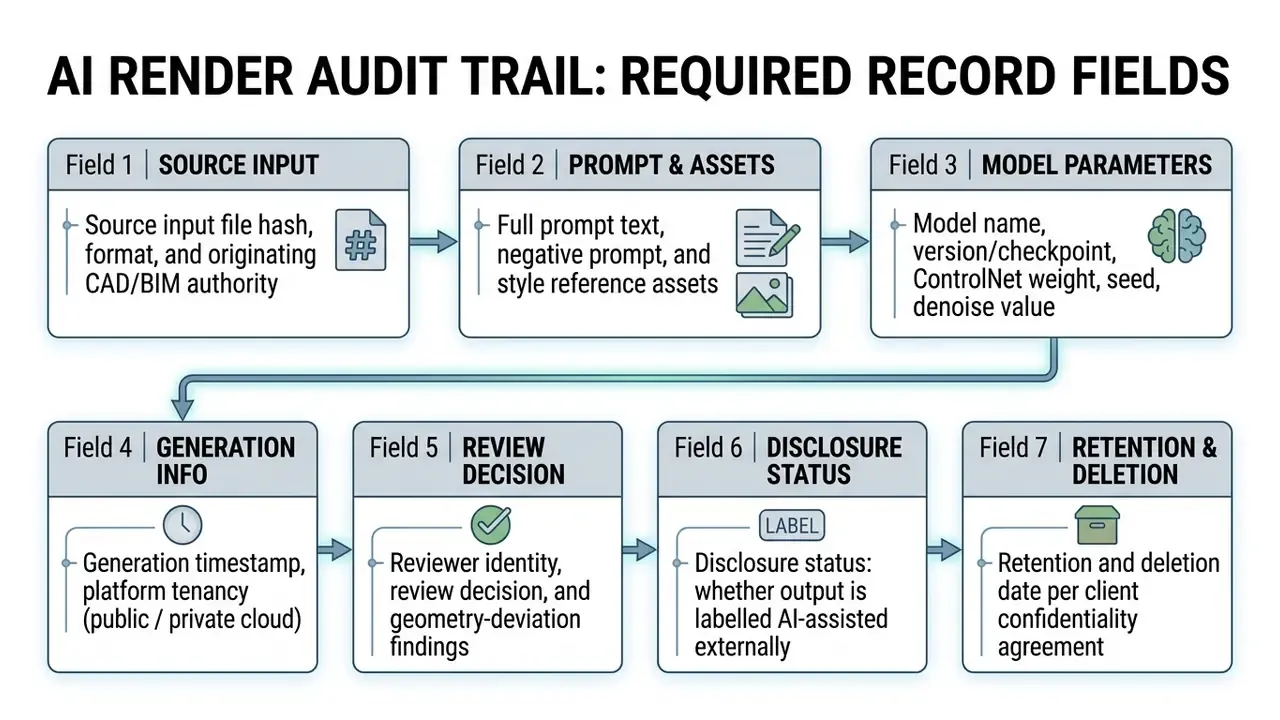
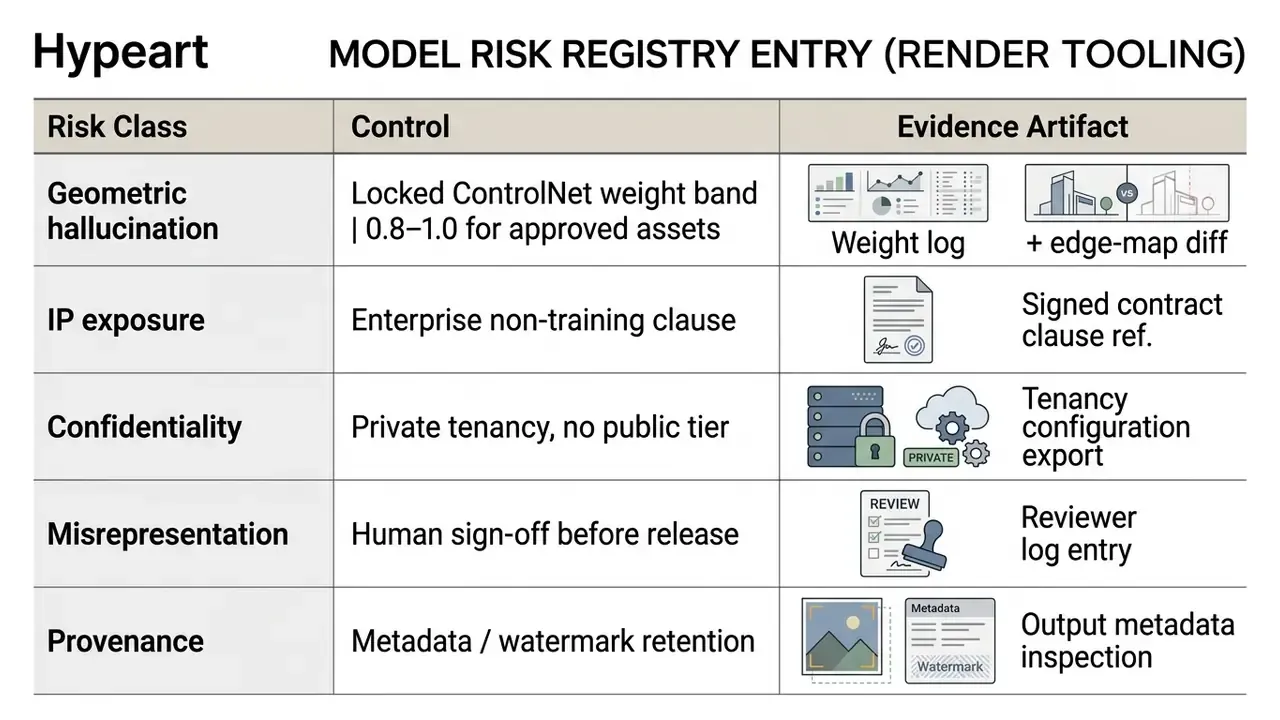
NIST's synthetic-content guidance (AI 100-4) names watermarking, metadata recording and provenance indicators as the transparency methods appropriate to AI-generated imagery, while ISO/IEC AWI 25590 addresses measurement of generative output-data quality. Together they mark out the two control layers an internal validator will expect to see documented: provenance, and output-quality measurement. If neither exists, the tool is not ready for client-facing work, however convincing the render looks.
Organizations that want to compare options across enterprise platforms can review structural benchmarks in our published AI Media Comparison Matrices to evaluate licensing terms side by side.
Risk-Adjusted ROI of AI Rendering Adoption
Finance and transformation leaders need a cost model that prices controls, not only the licence. Traditional visualization studios charge roughly $200 to $2,000 per image, with 2 to 7 day turnaround per revision round. AI rendering platforms charge per credit, with generation measured in seconds. The honest comparison subtracts the cost of the control layer from the gross time saving.
Net Risk-Adjusted ROI (%) =
    [ (Rendering time saved × blended hourly rate)
      + (Avoided external visualization fees)
      − (Platform licences + credits)
      − (Human-in-the-loop validation hours × reviewer rate)
      − (Residual distortion / rework risk provision) ]
    ÷ Total implementation cost  × 100
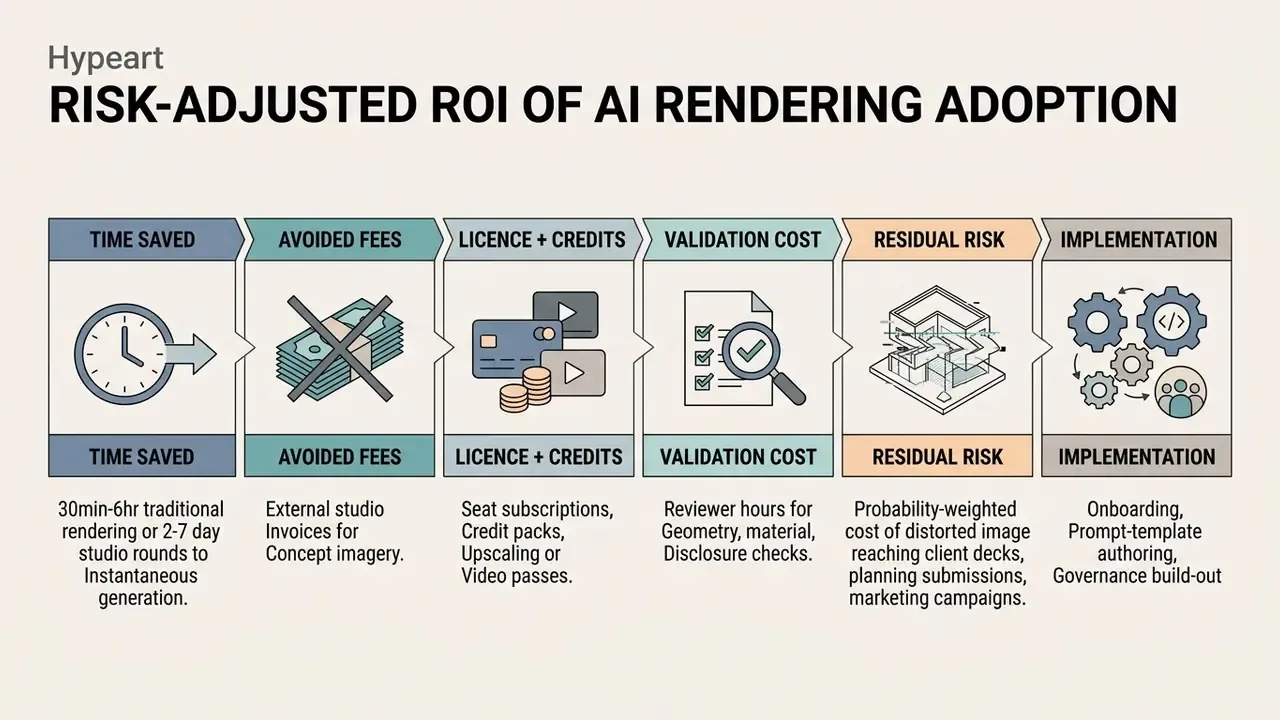
Two cautions, both practical. First, the residual-risk provision should be non-zero for any workflow feeding external submissions, because probabilistic inference cannot guarantee dimensional fidelity. Second, validation cost scales with volume: a team producing dozens of variants per project needs a sampling review protocol, otherwise image-by-image sign-off eats the entire speed gain.
What remains unresolved? Three things, honestly. There is no accepted quantitative metric for geometric deviation in a generated architectural image, so reviewer judgement still carries the decision. Registrability of hybrid human-AI visual work continues to shift with each Copyright Office release. And vendor no-train commitments are hard to verify independently, which means contract language plus tenancy configuration remains the only real assurance available today.
How to Choose the Best AI Render Generator for Your Workflow
Selecting the best ai rendering software means weighing CAD integration, style control, processing speed, hardware dependency and corporate security policy together. Procurement teams have to balance browser-based accessibility against native CAD plugin depth, and they can benchmark shortlists against leading AI image generators outside the architecture niche.
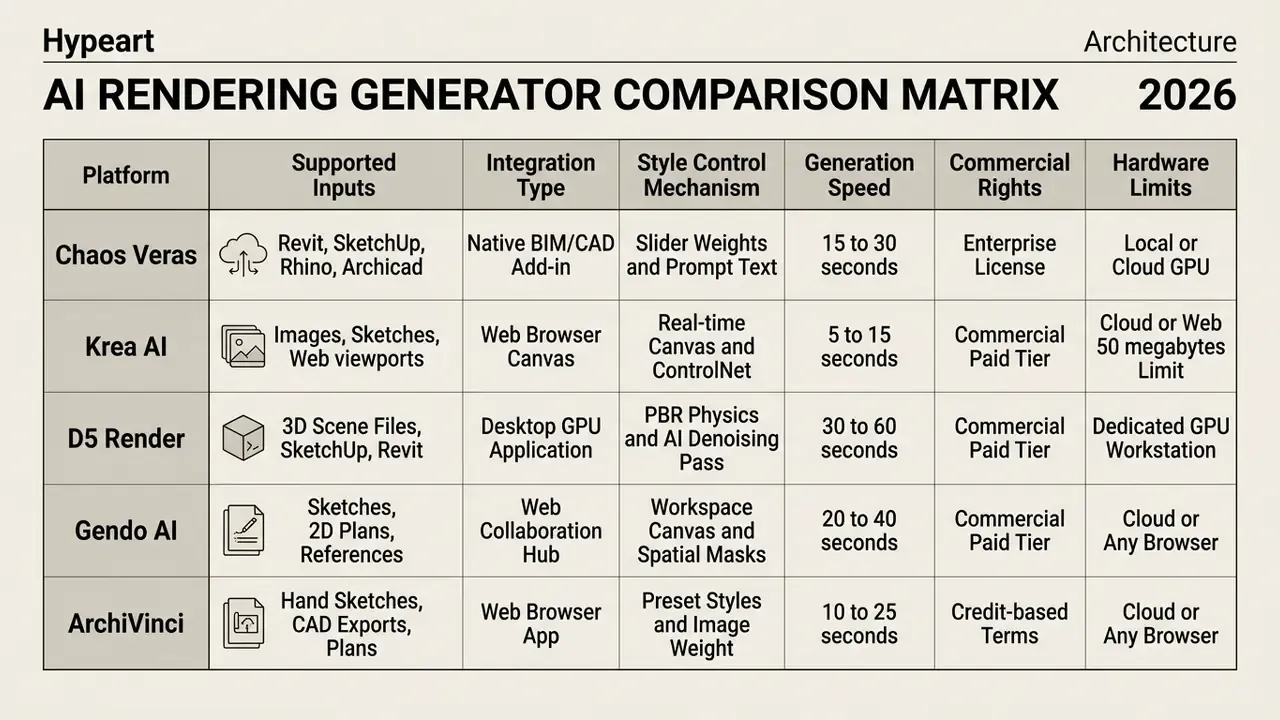
A word on "no GPU required" marketing. The claim is accurate only at the client device level. Server-side inference still runs on high-performance cloud GPU clusters, which is precisely why data residency and tenancy questions matter for confidential projects.
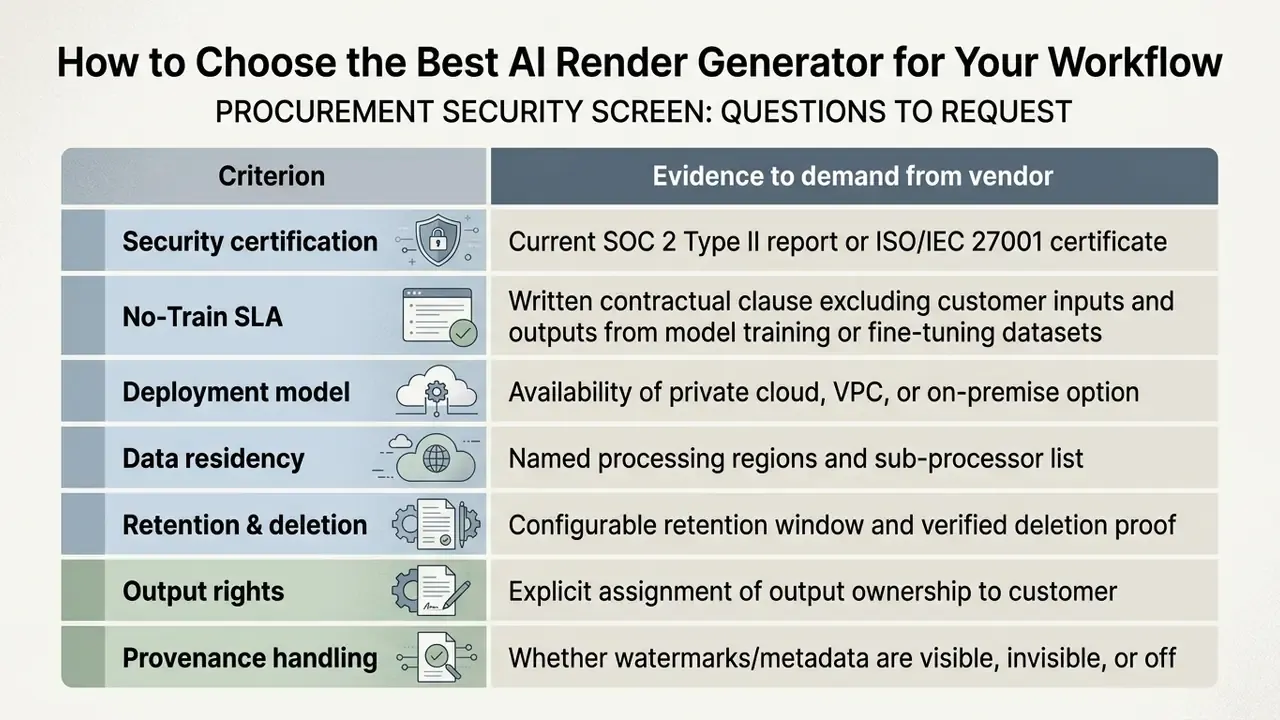
Treat the first three rows as blocking criteria. A platform without a No-Train clause and a current third-party security attestation should not receive confidential CAD uploads, no matter how good its renders look in the demo.
Support for Images, Sketches, and 3D Software
Direct CAD and BIM integration removes the file-conversion friction between modeling and rendering environments. Plugins like Chaos Veras run natively inside Revit, SketchUp, Rhino, Vectorworks, Archicad, Forma and Allplan, pulling active viewport geometry straight into the generative pipeline. Host vendors ship native features too: SketchUp AI Render works in Desktop, iPad and Web editions, generating images from the active viewport plus a prompt and saving output as PNG, while Autodesk documents Revit AI capabilities such as Generative Design and the AI Assistant with no third-party add-in at all.
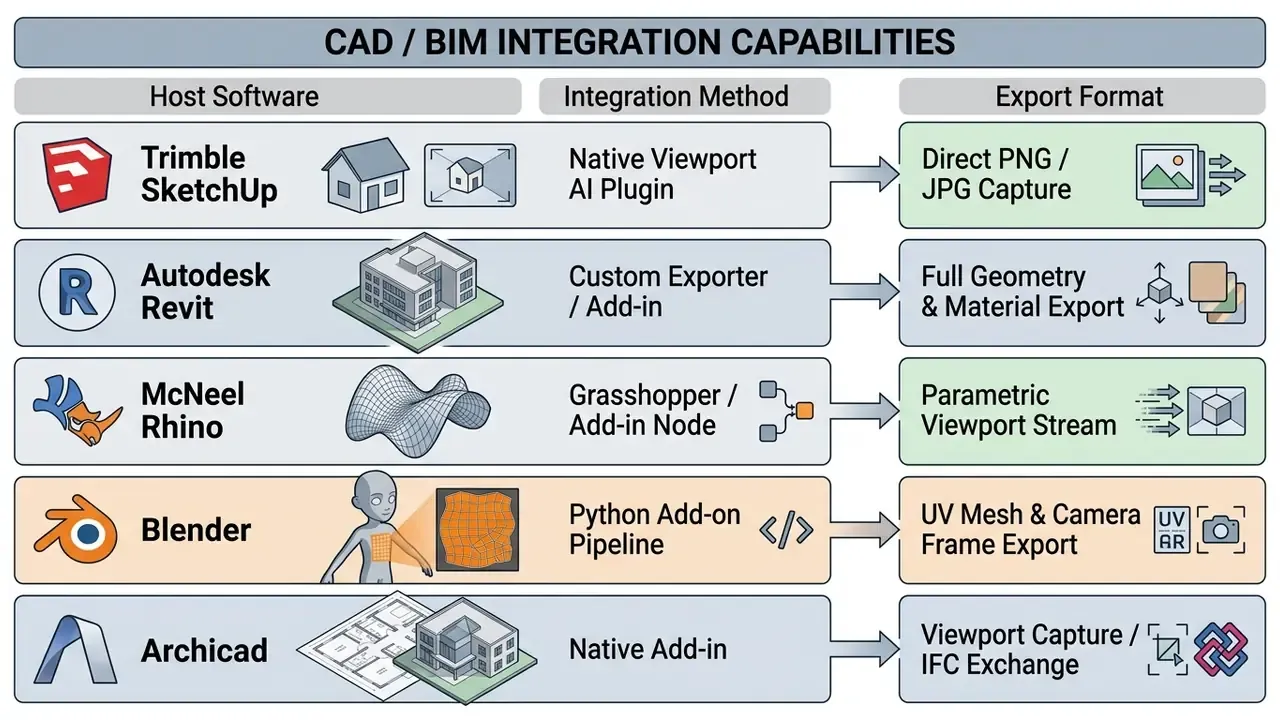
Revit's CustomExporter processes a 3D view and transmits graphic data describing the model as rendered, geometry and material properties included, which is why BIM-native pipelines preserve material zoning more reliably than a flat screenshot ever will. For teams working across several 3d software packages at once, direct viewport rendering means an updated wall position or roof slope shows up in the next generation pass automatically.
Control Over Style, Materials, and Outcomes
Fine-grained control over generative outcomes rests on parameter sliders: ControlNet weight, image-guidance strength, style-reference influence. Systems that expose these separately give more reproducible results across a project team than a single "creativity" dial ever could.
«ControlNet trains robustly on datasets ranging from fewer than 50,000 to more than 1 million images, supporting edge, depth, segmentation and pose conditions».
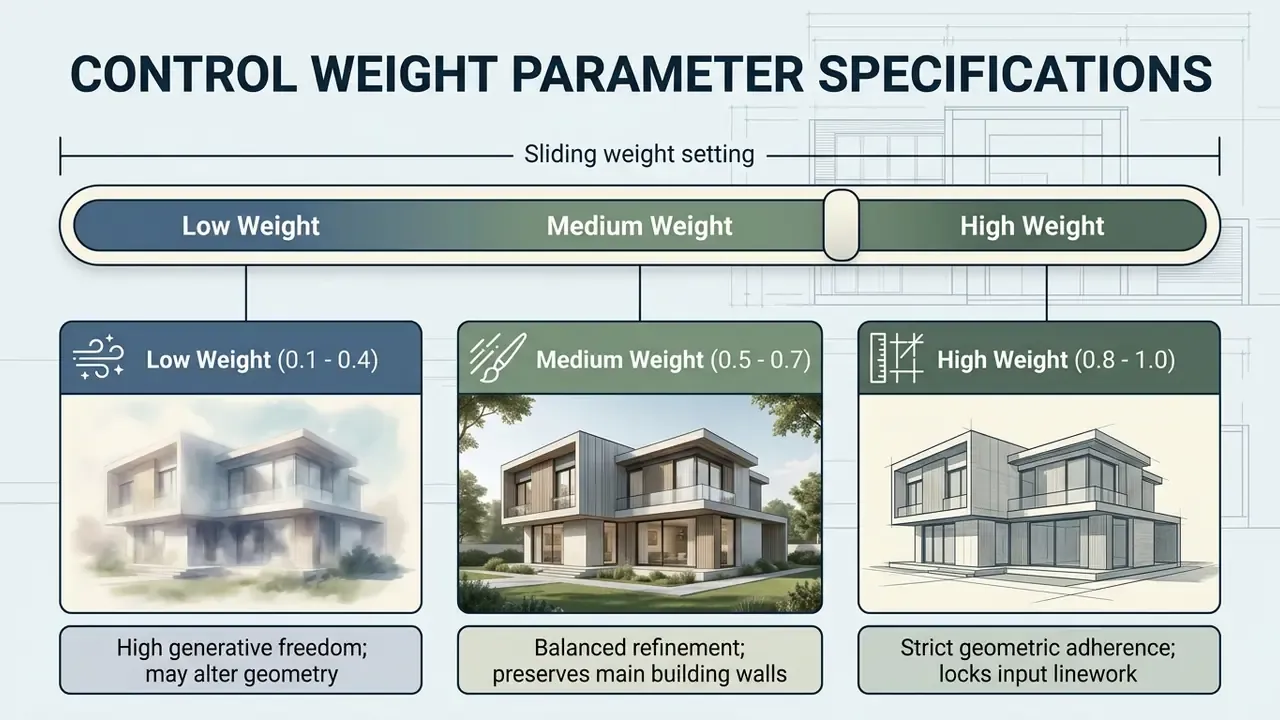
Parameter granularity varies by platform class. Some services expose a single conditioning scalar, controlnet_conditioning_scale in Diffusers or a weight field in hosted APIs, while others split behaviour into separate style-fidelity and reference-weight controls, or publish a default influence value such as 0.75 on a 0 to 1 range. Record the exact parameter names and values your team used. Sliders that look equivalent are not numerically interchangeable between platforms, and that small omission is what breaks reproducibility three months later.
Platform evaluation guides from Hypeart AI Media help technical leaders analyze integration options across different enterprise environments.
Frequently Asked Questions About AI Rendering
Can You Get an AI Render Without 3D Software?
Yes. Professional architectural renders can come straight from 2D hand sketches, paper elevations or simple concept floor plans, with no 3D CAD model at all. Platforms ingest 2D linework and infer spatial depth, ambient lighting and realistic material textures in under 60 seconds.
Updated: vendor documentation reviewed for 2026 states that platforms in this category accept a 2D floor plan, a single image or a set of four elevation drawings, and return interior or exterior visualizations within seconds, with no local modeling setup. Research supports the same capability class outside commercial tooling:
«CycleGAN is trained on sketch–diagram pairs from a specific architect, converting pencil sketches into detailed schematic drawings without intermediate 3D modeling». Source: Li, Xu & Liu, CDRF (2022/2023). https://arxiv.org/abs/2312.04326
Useful as this is, 2D-to-render pipelines accelerate ideation only. Full 3D BIM models remain necessary for structural calculations, construction documentation and exact energy modeling.
Will an AI Render Generator Replace Traditional 3D Rendering (V-Ray/Corona)?
No. AI rendering generators shine at fast conceptual exploration, material optioning and early client presentations during schematic design. Deterministic ray-tracing engines (V-Ray, Corona, Enscape) stay essential for construction documentation, BIM-coordinated engineering shots and pixel-exact geometric fidelity, where probabilistic inference is simply unacceptable. Most firms run both: AI before design freeze, ray-tracing for late-stage production imagery.
Do I Need a High-End GPU Workstation to Run AI Rendering Software?
No, not for browser-based platforms. Most commercial AI render generators run on cloud GPU clusters reachable through any standard browser; inputs are processed server-side and 4K presentation-ready renders come back to desktop or mobile in seconds. Desktop applications such as D5 Render are the exception, since they run locally and expect a dedicated GPU workstation.
What File Formats and File Size Limits Are Standard for Source Uploads?
Standard commercial platforms accept raster exports including JPG, PNG and WebP, with per-file ceilings commonly documented at 30 MB or 50 MB. High-contrast exports at 2000 to 4000 pixel width give the best structural conditioning accuracy without hitting ingestion limits. Screenshots from SketchUp, Revit, Rhino, Enscape or Lumion are treated as ordinary images; geometry-level exchange uses DWG, DXF, FBX, OBJ, Collada or IFC depending on host software.
How Do AI Render Generators Handle Confidential Client Data?
Enterprise tiers isolate uploads inside private cloud environments, so proprietary CAD files and interior layouts stay out of public training datasets. Public free tiers often reserve the right to ingest user inputs for generative training, which is a real data privacy problem for confidential projects. Verify the No-Train clause, retention window and deletion mechanism contractually. Marketing copy is not evidence.
Can AI Rendering Generators Produce Multiple Angles and Camera Views from One Input?
Yes. Using perspective-conditioned diffusion passes, marketed as "Rotate Render" or multi-view synthesis, operators lock material and style prompts while shifting the virtual camera to produce close-up details, eye-level views or aerial perspectives from one base drawing or render. Consistency degrades as the angular offset grows, so large view changes are more reliable from the source model than from a finished render.
Can I Turn a Finished AI Render into a Video for a Client Meeting?
Yes. Image-to-video diffusion converts an approved still into a short clip using named camera moves: walkthrough, drone flyover, pull-back hero, or a day-to-dusk light shift. Keep clips to three to six seconds per pass to preserve edge fidelity across mullions and floor plates, and review each clip for warping along structural grid lines before you present it.
How Do Credit-Based Pricing Models Compare to Traditional Visualization Costs?
Traditional studios charge roughly $200 to $2,000 per imagery asset with multi-day turnaround. AI rendering platforms use credit-based or monthly SaaS tiers, averaging cents per generated image at roughly 12 to 30 seconds of compute, which lets a team test dozens of stylistic variations for a fraction of manual production cost. Factor validation labour and residual-risk provisions into the comparison using the risk-adjusted ROI formula above, or the saving will look larger on paper than in the budget.
Summary and Practical Next Steps
An ai rendering generator delivers real efficiency gains in architectural visualization, turning concept sketches, 2D plans, masterplans and massing models into photorealistic presentation assets and short motion clips. To keep that gain under risk-adjusted control, enterprise decision-makers should work through four implementation steps:
- Establish Data Protocols: restrict public free-tier usage and enforce enterprise contracts that guarantee data privacy, No-Train handling and output ownership.
- Standardize Intake Quality: enforce clean line art, structured prompt templates and locked ControlNet parameters to minimize geometric hallucination.
- Integrate Human Oversight: keep human architectural review plus a complete audit trail, prompt, seed, model version, reviewer, across every generated output before client delivery or public release.
- Price the Control Layer: model net benefit through risk-adjusted ROI rather than raw render-time savings, and hold a non-zero residual-risk provision for externally submitted imagery.
Start small, document everything, expand once the evidence exists. For broader governance guidance on software evaluation, explore our overview of AI image generators for commercial use, or compare shortlists of free AI image generators before committing to a paid tier.