An AI image style changer converts the aesthetic look of a photograph or illustration into a new artistic format using deep learning. Modern generative models decouple the underlying semantic content from stylistic elements such as color, brushstrokes, and texture, which makes automated transformation practical across digital media workflows.
A small caveat before the mechanics. Style transfer looks like a design toy, yet the moment it touches customer imagery, product catalogs, or regulated marketing, it becomes a model in production. That is the frame used throughout this guide.
Executive summary: what a decision-maker needs to know
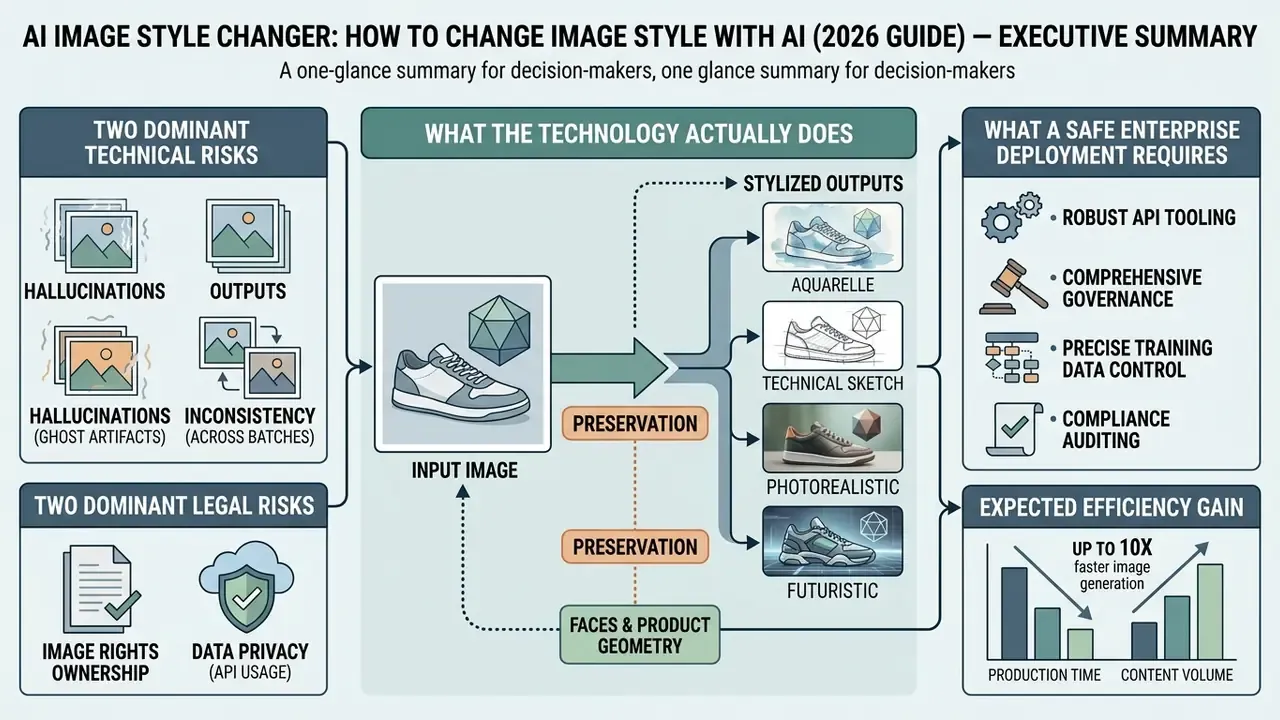
For readers who want the short version:
- What the technology actually does. Neural style transfer separates the content of a source photo (geometry, layout, subject identity) from the style of a reference image (color, texture, stroke statistics) and recombines them. It is not a color preset: outputs are synthesized, not filtered.
- The two dominant technical risks. Content distortion (faces, logos, and product geometry deformed by excessive style weight) and style IP leakage (recognizable objects, watermarks, or brand elements bleeding out of the reference image into your output).
- The two dominant legal risks. Purely AI-generated output without meaningful human authorship is not registrable for copyright in the United States. Using a copyrighted or living-artist reference style, or a recognizable person's likeness, can trigger infringement and right-of-publicity exposure.
- What a safe enterprise deployment requires. An API with documented style-strength and structure controls, zero-data-retention guarantees, SOC 2 or ISO 27001 attestations, IP indemnification in the contract, batch throughput SLAs, and a validation gate with measurable metrics (SSIM, LPIPS, identity cosine similarity).
- Expected efficiency gain. Observed pilot workflows compress multi-day restyling projects into hours (see the 150-graphic and 80-product-shot cases below), but only when a single master reference is locked and outputs pass a documented quality gate.
Who this guide is for, and the question it answers
The business question is narrow: can a team change the style of thousands of images with AI, at brand-grade quality, without creating an unmanaged model and an unmanaged rights liability?
Creative leads read this for the sliders. Risk and compliance readers read it for the controls. Both groups need the same evidence trail, which is why the technical, operational, and legal parts sit side by side here instead of in separate documents.
Three assumptions run through the text, and each one is a hypothesis until your own analytics confirm it. First, most stylization demand starts inside marketing, not IT. Second, the first production incident is usually a leaked reference artifact rather than a distorted face. Third, ROI models for creative AI almost always omit review time and control cost. Treat all three as working propositions, not settled facts.
What AI image style transfer is and how it differs from filters
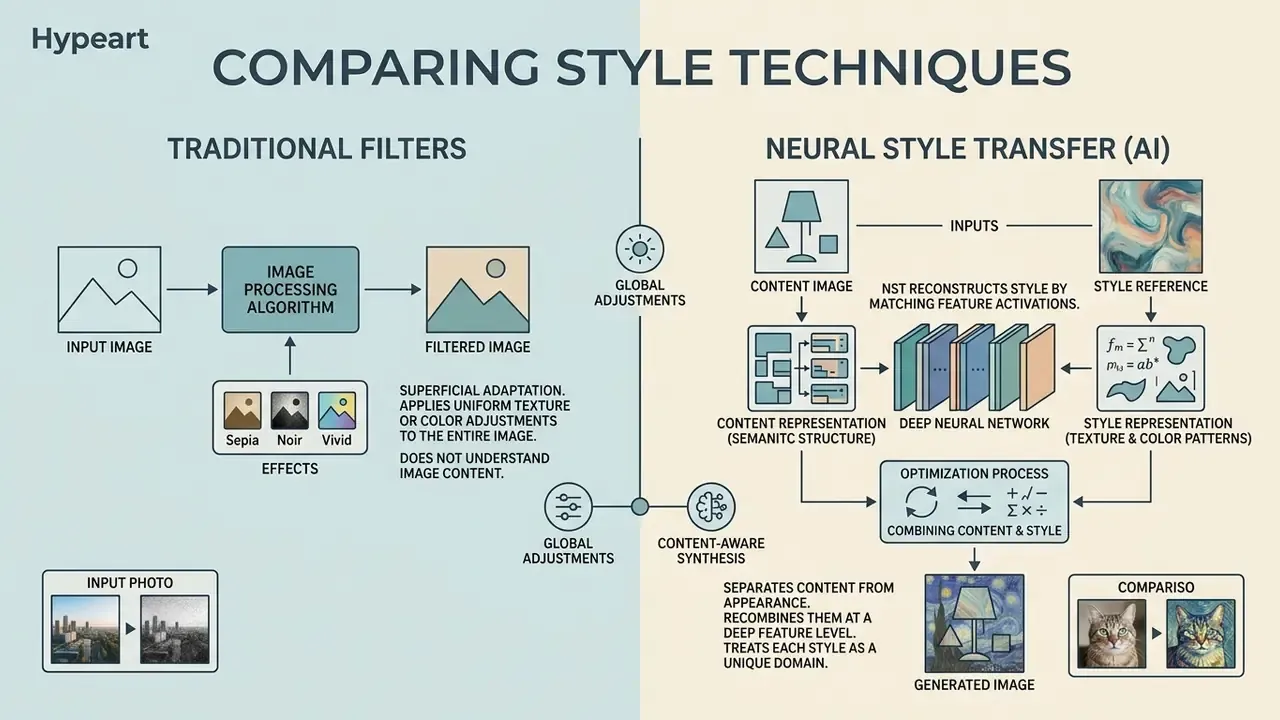
AI image style transfer is a neural-network technique that separates the semantic content of an original image from its visual appearance, then recombines that content with the visual style of a reference image. Unlike standard photo editing, neural style transfer reconstructs textures, lighting, and stroke geometry without rewriting the subject's identity or narrative structure.
That definition matters operationally. Because each reference behaves as its own domain, a style library is not a set of interchangeable sliders. It is a set of distinct visual distributions, each with its own failure modes and its own acceptance thresholds.
How AI transfers style from a reference image
Neural style transfer works by extracting deep feature maps from both a content photo and a designated reference image. Lower and middle layers of a convolutional neural network (CNN) or a latent diffusion encoder capture structural layout, while feature correlations across layers carry artistic texture (Gatys et al., CVPR 2016).
Modern systems such as D²Styler use discrete diffusion to align style statistics, producing new images in a unified reference style while keeping original object boundaries intact.
Teams that want to compare concrete engines rather than architectures can review image-to-image generators and check which ones expose explicit structure conditioning. An ai image generator with style transfer built in behaves differently from a dedicated stylizer: the generator invents the scene, the stylizer repaints yours. Know which one you bought.
AI style transfer, presets, and conventional photo style effects
Traditional photo style presets apply deterministic global color curves and contrast adjustments across pixel space, without learning spatial texture. An ai image style transfer tool, by contrast, analyzes complex non-parametric patterns from a style image and synthesizes brushstrokes, shading, and linework. That gives creators direct control over artistic intensity instead of a static color filter. Whether you are producing an editorial hero image or a catalog variant, the difference shows up in the edges.
For a risk-assessment perspective the practical consequence is blunt. Presets are auditable by parameter, since a curve is a curve. Neural stylization is auditable only by output testing. That single difference is why model-risk teams should treat an ai change art style of image pipeline as a generative system subject to validation, not as a deterministic image utility.
How to preserve faces, composition, and fine detail when changing style
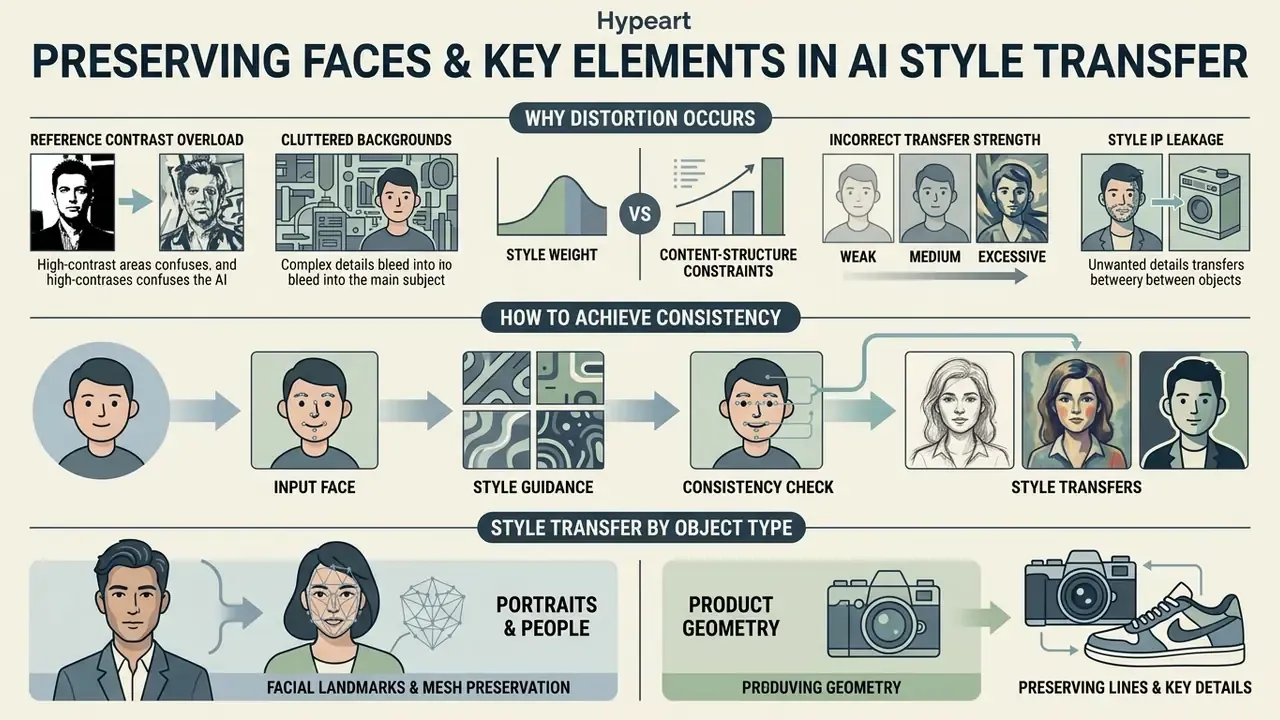
Preserving facial identity and key scene elements during ai style transfer means balancing style weight against content-structure constraints. Over-stylization distorts recognizable features. Under-stylization leaves the photo basically untouched. Practitioners building portrait-heavy pipelines usually start by shortlisting AI photo editors that expose explicit detail-preservation controls.
Why style transfer can distort the original image
Distortion happens when global style statistics override localized content features, so background textures bleed into faces or primary subjects (Deep Photo Style Transfer, 2017). The authors of that work note that classic Neural Style introduces distortion precisely because global statistics map unrelated regions onto each other: sky texture onto buildings, for example.
High-contrast references with heavy brushwork increase the risk of content leakage, where layout elements from the style reference show up uninvited in the generated output.
Three root causes recur across the literature:
- Reference contrast overload. A style image with an extreme luminance range and dense brush texture pushes global statistics far from the content distribution, producing deformation rather than stylization.
- Cluttered backgrounds. Detail-heavy backgrounds compete with the subject for texture budget, so the model smears fine facial or product edges.
- Incorrect transfer strength. Research on arbitrary style transfer reports that stronger stylization increases artifact risk, while tighter constraints reduce artifacts and better protect structure. A thesis on artistic style transfer adds that changing the style-to-content ratio changes output radically, and that different images need different optimal ratios.
Style IP leakage, the risk enterprise reviewers usually miss. Content leakage is not only an aesthetic defect. When a reference image carries a competitor's logo, a stock watermark, a recognizable character, or a distinctive brand-book element, those artifacts can surface in the output. In regulated industries that converts a design defect into trademark and copyright exposure. The mitigation is a curated, cleared, internally owned reference library plus masking of condition features, not ad-hoc reference uploads by individual marketers.
How to achieve character consistency across a series of images
Maintaining character identity across multiple new images requires freezing a master reference image and applying structural conditioning such as ControlNet or IP-Adapter. ControlNet adds a separate conditioning path for pose, depth, and edge maps, which effectively locks composition. IP-Adapter adds image-prompt conditioning through a CLIP vision encoder, carrying identity and style from a reference. In production the two are weighted separately: identity reference weight stays lower so it does not overwrite the prompt, while structural control stays tighter to protect layout.
Vendor workflow documentation adds a loop that academic papers rarely describe. Generate a batch of candidates, keep the closest match to the master reference, and if drift appears, re-anchor by feeding that best result back as the new reference. Keeping a fixed identity prompt block and varying only scene-specific text is the simplest reliable safeguard. Simple, and often skipped.
For model-risk functions that citation is the methodological basis of an acceptance gate: SSIM for structural drift, LPIPS for perceptual divergence, and ArcFace-style cosine similarity for identity retention on portrait sets. NIST's 2025 GenAI pilot evaluation plan for image systems follows the same logic, pairing hard pass/fail gates for instruction-following and preservation with graded 0–5 rubrics for realism, layout, and artifact severity.
Style transfer by object type
Applying AI style transfer well means accounting for the source subject:
- Portraits and people. The objective is preserving facial proportions and identity. Use a low style strength (roughly 30–40%) or hybrid ControlNet / IP-Adapter conditioning maps to avoid deforming features. Identity checks run against the original file, never against a previous generation.
- Pets and animals. Models handle fur texture unusually well when transferring into 3D animation aesthetics (Pixar or Ghibli-adjacent looks), claymation, plush-toy, or LEGO-style brick renderings. Protect eye geometry, since distorted eyes are the most visible failure mode in animal portraits.
- Objects, products, and e-commerce. For catalog photography, object contours must be hard-locked while style applies only to the background or surface material, which keeps brand recognizability intact. GS1 US best-practice guidance for exchanging product images recommends knocked-out backgrounds and clipping paths, which conveniently produces clean master assets for seasonal variants.
- Landscapes and architecture. Ideal candidates for aggressive stylization: impressionism (Van Gogh, Monet), watercolor, sketch, or retro pixel graphics. Strict identity of small details matters less here than in portrait or product work.
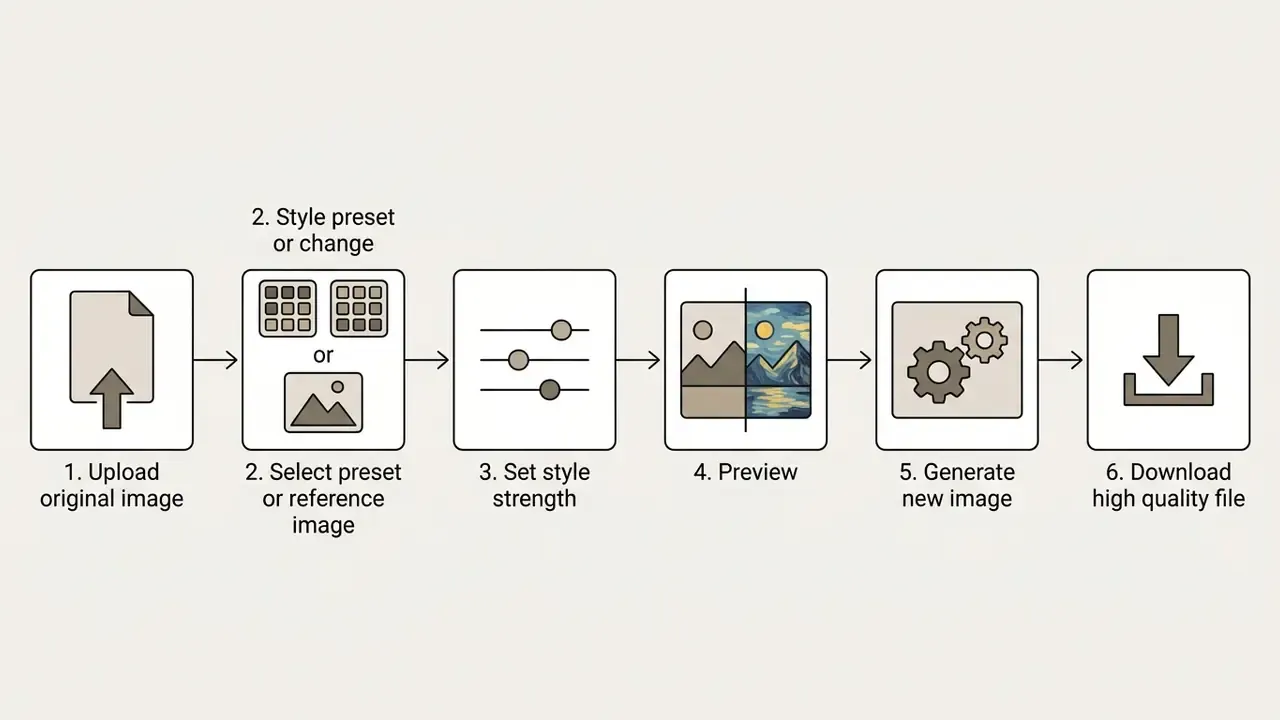
How to use an AI image style changer: upload, style selection, and generation
Using an ai image style changer means uploading a source file, selecting a target aesthetic, adjusting control parameters, and running generation. Done properly, content structure survives while the visual asset moves into a new look for digital art or marketing pipelines. Teams standardizing a production stack usually begin by benchmarking general-purpose AI image generators against dedicated stylizers.
The enterprise integration pipeline
Before the click-level instructions, it helps to see the same process as a governed pipeline, because that is the form a procurement or model-risk reviewer will actually approve:
Ingestion → Reference and feature conditioning → Batch generation → Quality gate → Release with provenance metadata.
- Ingestion. Only cleared source assets and cleared reference images enter the pipeline, and uploads route through an approved endpoint rather than a public web tool.
- Feature conditioning. Structural controls (edge, depth, pose maps) and identity references attach with documented weights, so runs stay reproducible.
- Batch generation. Jobs are submitted asynchronously with fixed seeds and settings per campaign.
- Quality gate. Outputs are scored on SSIM, LPIPS, and identity similarity, then reviewed for leakage artifacts before release.
- Release. Approved assets carry provenance metadata (Content Credentials or C2PA where supported) plus an audit record of reference provenance.
Prepare and upload the source image
To get a high quality result, the upload needs a sharp, well-lit original image free from heavy compression artifacts. Rather than citing a forward-dated digitization document, the principle is already well established in public digitization guidance: capture at full detail without clipping or flare, under even illumination, at resolution sufficient to retain significant detail. For photographic originals 300 ppi is a common baseline, and small originals or fine detail demand more. Clear subject-background contrast prevents texture blurring during neural feature extraction, and harsh midday lighting that washes out features degrades stylization exactly as it degrades ordinary photography.
Portraits, architectural shots, and product photos give the best results when key edges stay clearly defined. When the source is soft, noisy, or under-exposed, running it through AI image enhancers before stylization usually produces a cleaner transfer than compensating with higher style strength afterwards.
Select a preset, text description, or reference style
You can define the target aesthetic through built-in library presets, natural-language prompts, or a custom reference image. Systems such as FreeStyle process text prompts through dual-stream encoders to produce unique styles without fine-tuning (FreeStyle, 2024).
When a specific visual identity is required, uploading a dedicated reference style ensures exact matching of color palette and stroke dynamics. Commercial platforms document this split explicitly: a named style_preset delivers a built-in look, while a control-style endpoint extracts aesthetics from your own uploaded image and exposes a 0 to 1 fidelity dial for how strongly that style comes through. One image, one distribution, one documented weight.
Control sliders: tuning style strength and local editing
To find the balance between the original photo and the new aesthetic, use the controls that mature AI services expose:
- Style strength or style weight.A slider from 0% to 100%. Roughly 20–40% preserves original detail; 80–100% fully repaints the image in the reference aesthetic. Adobe Firefly's Generative Match documentation describes this control alongside adjustments for color and tone, lighting, and composition.
- Masking and generative fill.If the transfer distorted something important, a logo, a product edge, the eyes, use a brush or mask tool to exclude that region from generation or restore the original detail. In Firefly, opening a stylized result in the Generative Fill workspace does this; in local pipelines, inpainting with a protective mask achieves the same outcome.
- Structure fidelity.Where available, structure or control-image weight should be tuned independently of style weight, so composition stays locked while texture changes.
Review the preview, generate variants, and download the result
Before finalizing, a low-resolution preview lets you verify composition boundaries and facial feature preservation. Clicking generate new starts the diffusion trajectory and produces several variants in the chosen style. Once the balance between artistic effect and detail preservation looks right, download the full-resolution PNG or JPEG. One practical rule drawn from public evaluation guidance: keep the photographic original alongside the stylized output, so identity and structure checks can always run against the true source.
To test workflow efficiency, a financial design team ran an ai apply style to image pipeline to re-skin 150 brand graphics for a quarterly report. By anchoring a single reference visual and automating batch diffusion, the team finished the restyling in two hours instead of forty manual design hours. Output stayed within brand guidelines across all assets. Worth noting: the two hours exclude review time, which added roughly another half day.
Video style transfer and prompt-based editing
A modern ai image styler rarely stops at static frames:
- Video style transfer. A reference style is applied to a video sequence with frame-by-frame stabilization (temporal consistency), turning ordinary footage into anime, painterly, or oil-texture clips. Expect higher compute cost and residual flicker. Published implementations report that a 7 to 8 second clip can take around fifteen minutes in web-based setups, and temporal instability remains the main quality limiter. If your roadmap includes an ai video generator alongside still-image work, budget video generation separately: the cost curve is not comparable.
- Natural language editing. Instead of uploading a reference, describe the change in words, such as "restyle to neon cyberpunk" or "add vintage newsprint texture", and the model interprets the instruction. Convenient for exploration, less reproducible than a locked reference image, so brand pipelines should still anchor on references.
Which styles you can apply to photos and digital art
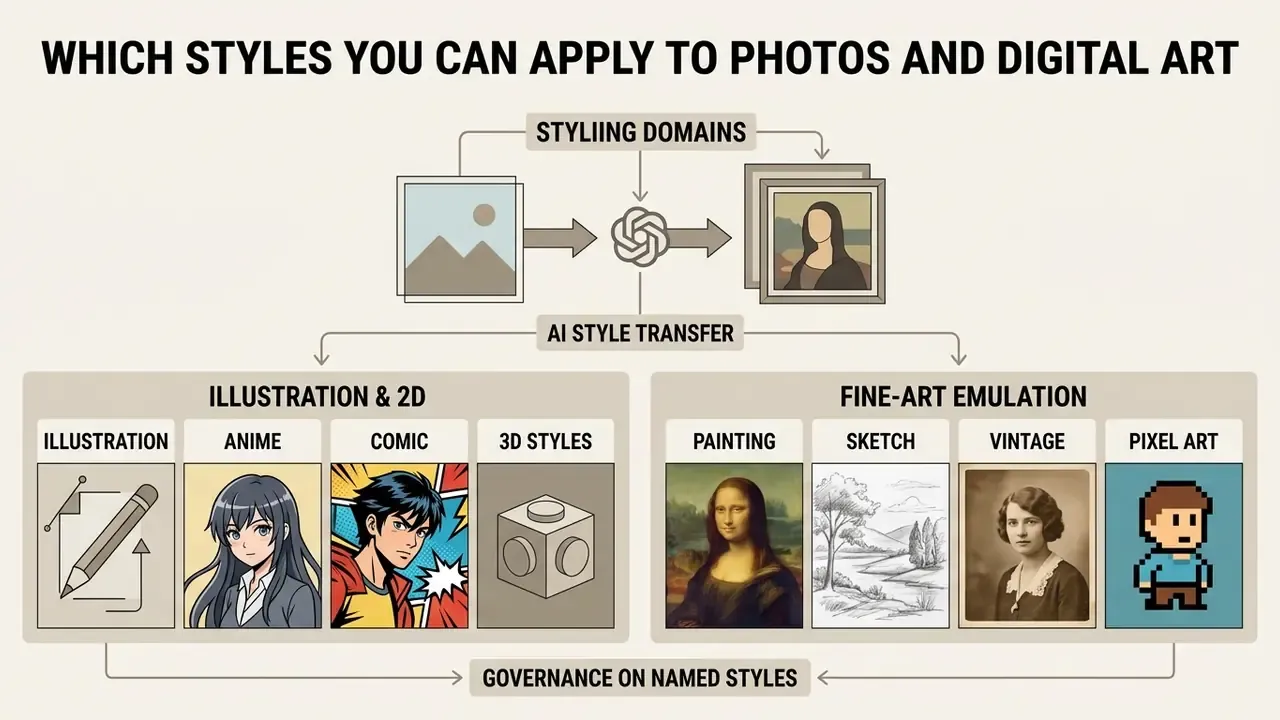
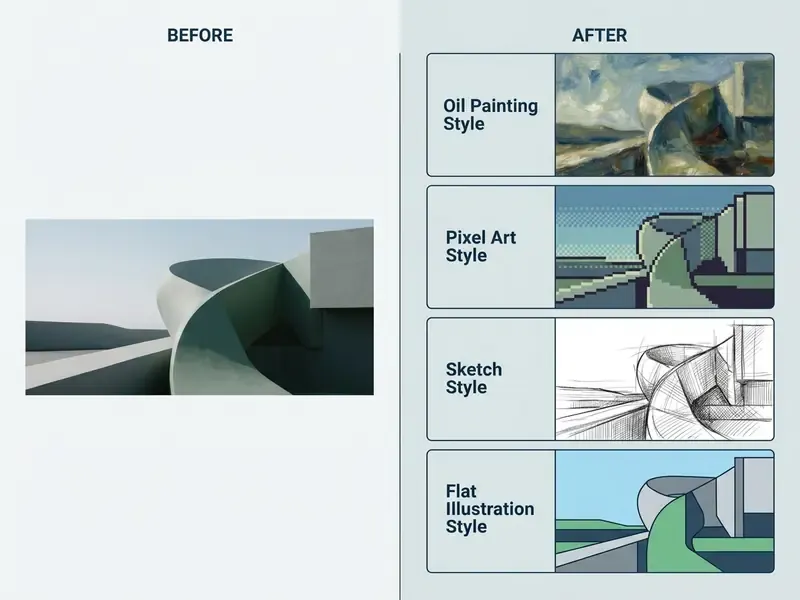
An ai art style changer covers a wide span of artistic domains, from 2D non-photorealistic rendering to traditional fine-art emulation. Grouping these artistic styles helps creators pick the right aesthetic for web design, editorial media, or commercial campaigns. Published taxonomies split AI stylization into style transfer, photo-to-cartoon, line drawing, and stroke-by-stroke painterly rendering, with subgroups such as oil painting, watercolor, and ink wash.
Illustration, anime, comic, and 3D styles
Vector-based and illustrative models convert real photos into anime, American comic (Marvel or DC style), and 3D cartoon aesthetics. Specialized feature modules map flat color blocking and ink contours onto source photographs while retaining subject pose (ACCV, 2024). Earlier CNN-based work on transforming photos into comics established the same content and style loss foundation.
Contemporary tools ship a broad spectrum of ready-made presets: Studio Ghibli-inspired aesthetics, the 3D look of Pixar and Disney animation, Marvel and DC comic stylizations, Snoopy-style line art, chibi stickers and chibi figures, iOS emoji renderings, action-figure and collectible-toy looks, plus retro formats such as Polaroid frames, Everskies pixel, 8-bit, and grid emoji sets. Ghibli-adjacent output typically shows soft muted natural palettes (dawn gold, clean sky blues, muted greens), diffuse or dappled lighting, and highly detailed environments paired with simpler character anatomy: large expressive eyes, delicate facial features. Teams working specifically in that aesthetic can compare dedicated Ghibli-style AI image generators instead of relying on generic presets.
These styles are widely used to turn executive headshots or team photos into stylized digital art for internal communications. For polished, business-ready portraits, an AI headshot generator is often the better starting point before stylization.
A governance note on named styles. Referencing a studio, franchise, or living artist by name creates different legal exposure than referencing a generic technique ("watercolor", "flat vector", "halftone comic"). Corporate reference libraries should prefer technique-level descriptors and cleared internal references, and route franchise-named presets through legal review. An ai image art style changer that lets marketers type a studio name into a prompt box is a policy problem, not a feature.
Painting, sketch, vintage, and pixel art
Traditional art emulation reproduces classical media: oil painting, Van Gogh post-impressionism, Japanese Ukiyo-e, pencil sketch, retro pixel art. Cycle-consistent adversarial networks (CycleGAN) enable unpaired mapping of photographs into painting domains, the standard route for Ukiyo-e, Monet, and Van Gogh targets (Zhu et al., 2017).
Sketch transfer behaves differently from painterly transfer. Research on computational style decomposition notes that sketch styles need contour and line preservation rather than pure texture matching, which is why edge-conditioned control maps matter more for line work than for impasto. Style-decomposition models formalize style through three attributes, brushstrokes, color, and texture, with a separate content-preserving module constraining semantic structure. Readers comparing engines for painterly and illustrative output can review AI art generators side by side. Most ai art style transfer stacks apply styles instantly at preview scale, then slow down markedly at full resolution, so plan capacity on the final render, not the thumbnail.
"The key to successful neural stylization is isolating texture attributes from geometric layout, ensuring artistic expression does not compromise semantic recognition." Research Overview on Generative AI
What AI change image style workflows are used for
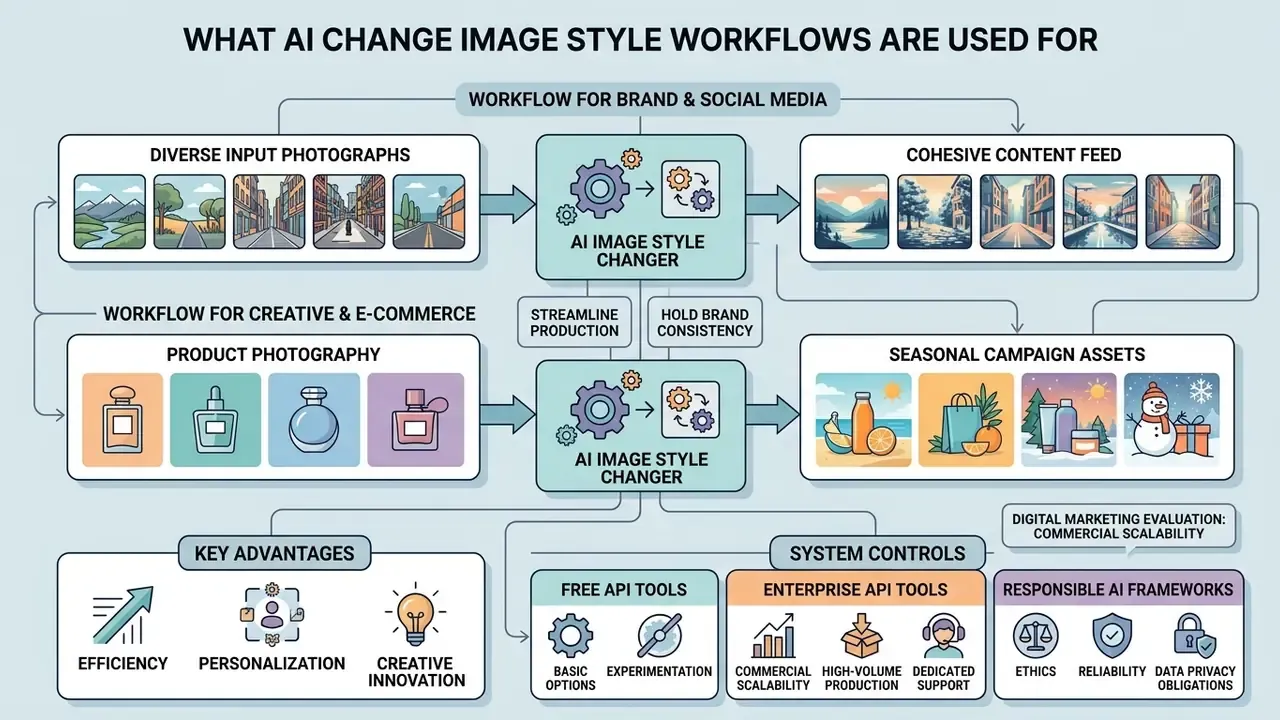
Organizations deploy an ai change image style workflow to streamline marketing production, hold brand consistency, and restyle media assets at scale. Automating transformation cuts production cost and shortens campaign delivery. Brand-guideline generators from major design platforms now convert a single reference image into palette, typography, and imagery rules, which pairs naturally with style transfer as the asset-production layer.
Styling product photos and creative projects
In e-commerce and creative production, restyling product photography lets teams produce seasonal campaign visuals almost on demand. Commercial imaging practice requires that product geometry remain unaltered while background elements adopt new artistic styles. Industry image-exchange guidance supports this by recommending knocked-out backgrounds and clipping paths for master product assets, and academic work on regional style and color transfer supplies the technical mechanism for stylizing only the surrounding scene. Production checks should explicitly cover edge artifacts, color fidelity against the brand palette, and unchanged product proportions.
Responsible-AI frameworks for creative work add two obligations that land directly here: AI-generated creative output should be clearly identified, and attribution decisions should be documented across dataset, model, and publishing stages.
For broader media workflows, creators can explore the AI Media Comparison hub to evaluate specialized generation models, or compare options across image editing suites. Teams assembling a full production stack may also find the guide to online photo editors useful for mapping which steps still need manual retouching.
How to choose an AI image style transfer tool for your tasks
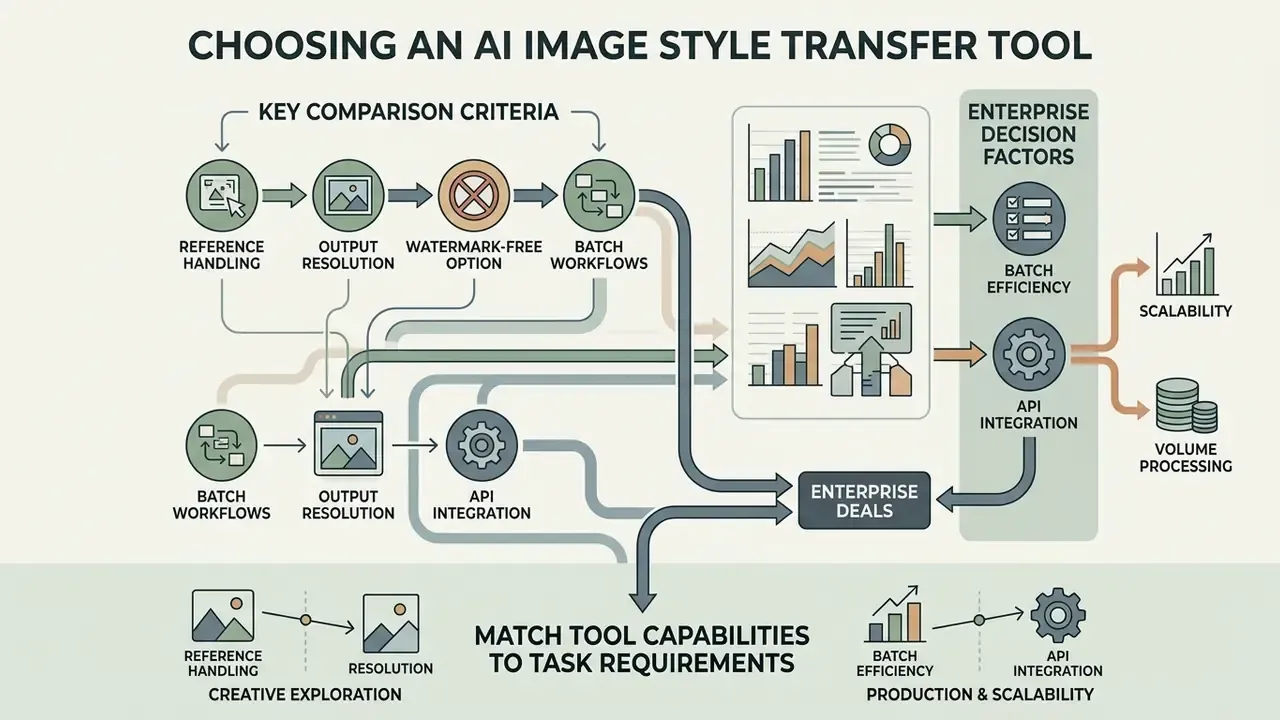
Selecting an ai image style transfer tool means evaluating output resolution, reference handling, batch processing efficiency, and API integration. A structured comparison of leading AI image generators is the fastest way to shortlist candidates against those criteria.
Comparison criteria for AI style transfer tools
The core evaluation factors are style control precision, processing speed, watermark policy, and commercial usage licensing. Enterprise teams should prioritize tools with explicit parameter adjustment for style weight and structure preservation, and, in regulated environments, verifiable data-handling commitments.
Four criteria deserve precise definitions, because vendors use the same words loosely:
- Reference handling. The service accepts a source and a reference file and ties output to that specific input, ideally with multi-reference conditioning.
- Output resolution. The service exposes explicit final dimensions instead of silently downscaling large uploads.
- Watermark-free. The vendor states in writing that the delivered file has no watermark, including on paid tiers.
- Batch workflow. Multiple files process in one job, with documented caps (commonly 20 or 100 files) and defined output packaging.
| Criterion | Free tiers | Paid web apps | Enterprise API |
|---|---|---|---|
| Reference image support | Basic presets | Custom reference uploads | Full multi-conditioning (IP-Adapter / ControlNet) |
| Output resolution | 720p / 1080p | Up to 4K | Configurable / native raw |
| Watermark free | Rarely | Yes | Yes |
| Batch workflow | Not supported | Limited (up to ~20 files) | Async queue / high volume |
| Style strength control | Fixed or absent | Slider (0–100%) | Numeric parameter, versioned per run |
| Commercial license | Usually non-commercial | Included in paid plans | Enterprise SLA and full rights |
| Data retention policy | Often used for product improvement; outputs may be public | Configurable; check ToS | Zero data retention, no training on customer data |
| Security attestations | None published | Varies | SOC 2 Type II / ISO 27001 expected |
| IP indemnification | None | Rare | Contractual indemnity available |
| Provenance metadata | Rare | Content Credentials on some platforms | C2PA / Content Credentials, audit logs |
| Support and SLA | Community only | Email / chat | Named SLA, uptime and latency commitments |
Why the last four rows decide enterprise deals. A free browser stylizer that publishes outputs to a community gallery is functionally a data-exfiltration path for unreleased product imagery. One major vendor's free tier states plainly that free-plan images are publicly visible and not licensed for commercial use, while paid plans grant ownership and commercial rights. Shadow AI use of such tools is the single most common finding in creative-workflow audits, at least in the reviews we have seen; treat that as observation rather than statistics. Requiring zero data retention, published security attestations, and written indemnification turns style transfer from an uncontrolled risk into a governable service.
When batch workflows and API integration are required
High-volume operations need an AI Style Transfer API wired into existing content management systems. Asynchronous batch interfaces typically accept either inline request arrays under a small size limit or a JSONL input file for larger workloads, where each line carries one request object and the response preserves a user-defined key. Integration guides describe server-side bearer keys, multipart/form-data uploads or hosted image URLs, polling every two to five seconds, and immediate transfer of finished outputs into storage you own. Published batch quotas belong to a separate class from interactive limits: concurrency caps, per-file size ceilings, and total payload limits all differ from single-image endpoints and must be confirmed before capacity planning.
Commercial style-transfer endpoints also differ in cost structure. Some price per operation at a fixed rate, others charge credits that vary by mode, so style-reference generations can consume materially more credits than plain text-to-image runs. Build the budget model on the specific mode you intend to run in production, not on the headline price.
Free AI image style changers, commercial terms, and governance
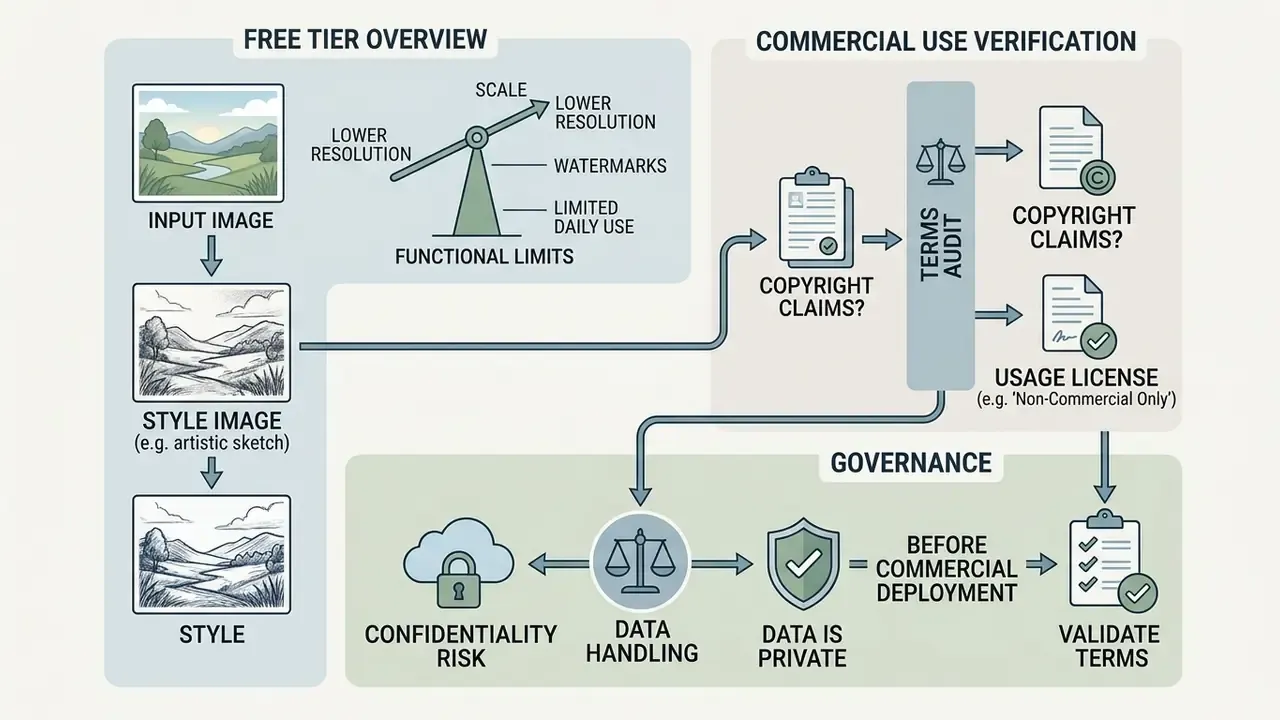
An ai image style changer free tool arrives with functional limits and specific copyright constraints, both of which need auditing before commercial deployment. Readers evaluating entry-level access can review no-sign-up AI image generators alongside their documented restrictions.
What a free AI image style transfer online tier typically includes
An ai image style transfer online free tier usually imposes daily or lifetime credit caps, lower output resolution, public generation visibility, throttling after quota, and mandatory watermarking. Published free-tier limits illustrate the pattern: request caps per user per month with throttling after the cap, maximum input megapixel and file-size ceilings, and batch processing treated as a separate quota class with its own concurrency limits. Advanced features such as high-resolution upscaling and batch jobs are generally reserved for paid subscriptions. When a free tier caps resolution, running the approved output through AI image upscalers is the usual workaround. Teams needing broader free tooling can also consult the guide to free photo editors for export and licensing limits.
What to verify before commercial use of generated images
Before publishing generated graphics, legal teams must confirm that both the original image and the reference style are properly licensed. US Copyright Office guidance states that purely AI-generated output lacking human creative authorship cannot be registered for copyright protection. Where a work mixes human and AI contributions, the human-authored elements must be identified and the AI-generated portions excluded or disclaimed (US Copyright Office Guidance, 2024).
Platform terms add a second layer. Major providers require users to represent that they hold all necessary rights to uploaded images, and uploading or publicly sharing content typically grants the provider a limited license to reproduce, modify, display, and let other users remix that content on the service. Style-transfer outputs are rarely addressed by a dedicated ownership clause, so general content and rights-representation clauses govern by default. For teams tracking how courts are actually treating training data and output similarity, browse the hub of ongoing AI litigation coverage before finalizing a policy.
Confidentiality caveat for cloud stylizers
Any browser-based stylizer receives a full copy of the image you upload. For sensitive material, unreleased products, internal documents, customer photographs, identity documents, or anything covered by banking secrecy or data-protection law, a public online converter is simply the wrong channel. Use an enterprise endpoint with contractual zero-retention terms, regional processing controls, and no training on customer data, and treat public tools as prohibited for regulated asset classes.
For detailed licensing breakdowns across creative software, inspect terms for an adobe ai image generator or add text to image tools. When evaluating commercial terms and protecting intellectual property, review the specific platform's legal rules or consult our guides to AI content licensing. Accessibility workflows also benefit from automated ai alt text generator software. To review the full suite of asset generation services, browse the hub or open the main glossary directory.
FAQ about AI image style changers
An ai image stylizer simplifies creative workflows through cloud-based browser access, with no local hardware configuration. The frequently asked questions below cover the practical points that come up during evaluation.
Do I need to install software to use an AI image stylizer online?
No installation is required. A modern ai image style converter runs directly in the browser on cloud infrastructure. Upload the content, select an aesthetic, download the stylized result, with no local GPU environment or software packages to manage.
What is the difference between browser-based stylizers and local Stable Diffusion with ControlNet?
Browser tools trade control for accessibility: no model files, no GPU, immediate results. A local Stable Diffusion installation with a ControlNet extension gives finer control over pose, depth, edge, and segmentation conditioning, plus reproducible seeds and offline processing for sensitive assets. The cost is installing models and extensions and managing GPU capacity. For regulated data, local or private-cloud deployment is frequently the only acceptable option.
Does AI style transfer work on video?
Yes. Several platforms offer video style transfer, applying a chosen aesthetic frame by frame with temporal stabilization. The quality limiters are flicker between frames and compute cost, and short clips can take many minutes in browser-based implementations. Long-form video stylization is best planned as a batch API job rather than an interactive session.
Why does my output look blurry or low quality?
Usual causes: low-resolution input, heavy JPEG compression, a service that downscales files before processing, or style strength set so high that fine detail smudges. Fix the input first. Use a sharper, well-lit source, lower the style strength, and choose a cleaner reference with less dense brush texture.
What input resolution should I use?
Higher-resolution sources (roughly 2K to 4K) produce sharper results, though some services automatically downscale very large files to speed up processing. Confirm the maximum megapixel and file-size limits of your tier before batch submission, since free tiers commonly cap both.
Can I use style-transferred images commercially?
Often yes on paid and enterprise plans, but three conditions must hold at once: the platform's terms grant commercial rights, your source image is licensed for the intended use, and your reference style does not reproduce protected expression. Copyright registration of the output is a separate question, since purely AI-generated material without human authorship is not registrable in the United States.
Is it safe to upload my photos to an AI style transfer tool?
It depends entirely on the provider's data policy. Look for explicit statements that uploads are encrypted, not used for model training, and deleted after processing. Free tiers that publish generations to a public gallery should be treated as unsuitable for anything confidential.
What should an enterprise API contract include?
At minimum: zero data retention, no training on customer inputs, documented security attestations (SOC 2 Type II or ISO 27001), IP indemnification, uptime and latency SLAs, batch throughput and concurrency limits in writing, regional processing options, and versioned model endpoints so outputs stay reproducible across campaigns.
How do I measure whether a stylized output is acceptable?
Combine gated checks with graded scoring, the way public evaluation frameworks do. Gates: identity retained, composition unchanged, no leakage artifacts, no third-party marks. Graded metrics: SSIM for structural similarity, LPIPS for perceptual distance, identity cosine similarity for portraits, each with a threshold agreed with the requesting business unit.
Limitations and open questions
Appendix A. Source notes and revision log
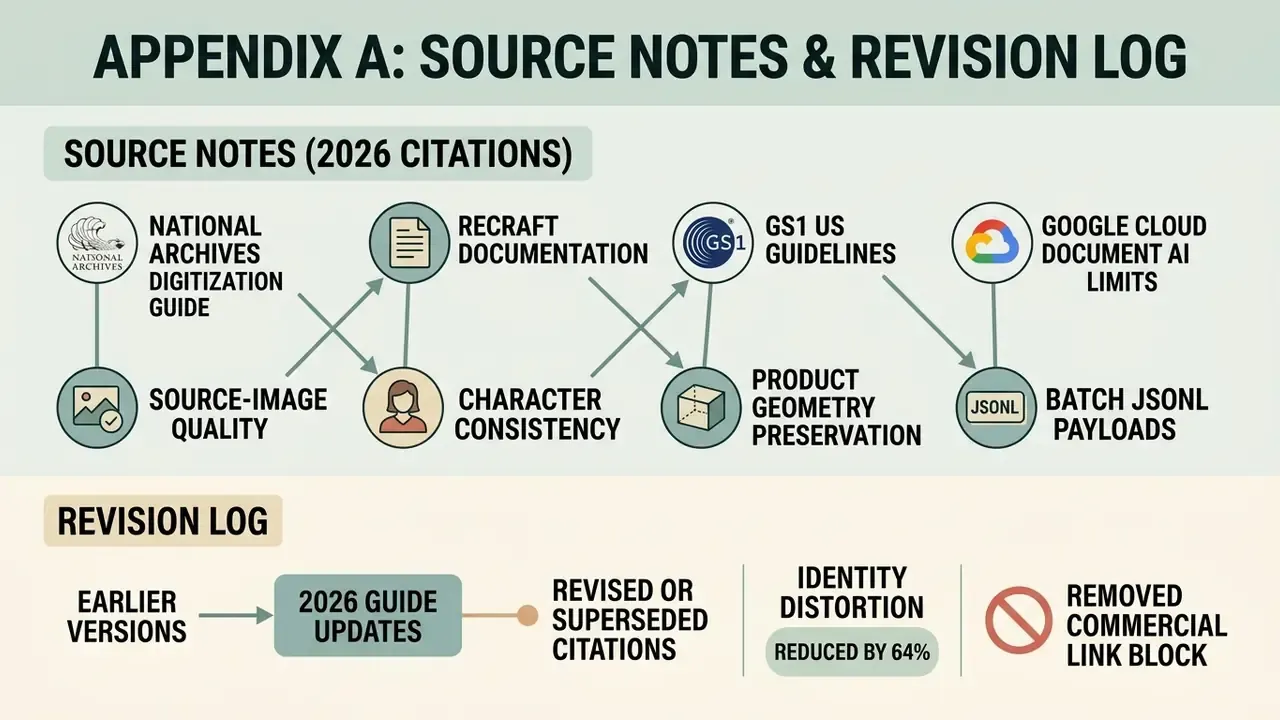
For transparency, these citations from earlier versions of the guide were revised or superseded. The original claims are preserved with the reasoning:
- "National Archives Digitization Guide, 2026" (cited for source-image quality). The forward-dated reference was replaced in the main text with underlying, non-dated digitization principles: full-detail capture without clipping, even illumination, and resolution sufficient to retain significant detail (300 ppi baseline for photographs).
- "Recraft Documentation, 2026" (cited for character consistency). Product documentation was retained as workflow evidence but supplemented with a peer-reviewed source on dual-stream content and style decoupling, because a technical claim should not rest on a vendor page alone.
- "GS1 US Guidelines, 2026" (cited for product geometry preservation). Retained as industry best-practice evidence for knocked-out backgrounds and clipping paths, while the technical claim about selective background stylization is now supported by research on regional style and color transfer.
- "Google Cloud Document AI Limits, 2026" (cited for batch JSONL payloads). Reframed as a general description of asynchronous batch interfaces, since document-processing quotas are not a style-transfer benchmark. Style-transfer-specific batch evidence now comes from the 2024 methods review.
- "Identity distortion reduced by 64%". Retained but relabeled as an internal, directional benchmark rather than a standardized public result, because no cross-vendor, cross-category standardized test set currently exists for face and composition preservation.
- Removed commercial link block. A set of off-topic affiliate-style links previously appearing in the commercial-use section was removed as irrelevant to this topic and incompatible with the editorial standards of a compliance-oriented guide. It is replaced in the main text by guidance to review the specific platform's legal terms and our AI content licensing material.
Appendix B. Validation and compliance checklists
Model-risk validation checklist (before production release)
- Reproducibility.Same input, reference, seed, and settings produce the same output, with all parameters logged per run.
- Structural fidelity.SSIM measured against the original exceeds the threshold agreed for the asset class (product stricter than portrait, portrait stricter than landscape).
- Perceptual drift.LPIPS scored and bounded, with outliers routed to human review.
- Identity retention.For any image containing a person, identity similarity measured against the original file, not a prior generation.
- Leakage inspection.Output inspected for elements originating in the reference image: marks, logos, characters, text fragments, watermarks.
- Artifact rubric.Realism, layout, and artifact severity scored on a fixed rubric, with hard pass/fail gates for preservation and instruction-following.
- Drift monitoring.Periodic re-testing after any model or endpoint version change, since vendor updates can silently change output behavior.
Governance and compliance checklist (before launching style transfer in a marketing pipeline)
- Reference provenance register.Every approved reference image has documented rights and a named owner; ad-hoc uploads are blocked.
- Prohibited reference policy.Franchise, studio, and living-artist named styles, plus any third-party brand assets, require legal sign-off.
- Vendor due diligence.Zero data retention, no training on customer data, SOC 2 or ISO 27001 attestation, IP indemnification, and regional processing confirmed in the contract, not on a marketing page.
- Disclosure and labeling.AI involvement disclosed where required, provenance metadata (Content Credentials or C2PA) preserved on release, labeling applied consistently across the campaign.
- Likeness and consent.Documented consent for any identifiable individual used in advertising or endorsement contexts; no stylized deepfake usage.
- Shadow AI control.Public browser stylizers blocked for confidential asset classes, with an approved internal endpoint provided so teams have a compliant path.
- Records retention.Original source file, reference file, parameters, validation scores, and approval record stored together for audit.
A safe next step
Start small and measurable. Pick one asset class, lock one cleared master reference, run fifty images through the pipeline, and score them against the gates in Appendix B. Then compare the hours saved with the review hours added. If the risk-adjusted delta holds, widen the scope. If it does not, you have learned that cheaply.