Updated for the Google Labs ecosystem of 2026 (Imagen 4, Google Flow AI, Veo 3.1), with an added data-governance section.
Executive summary for risk and governance leaders
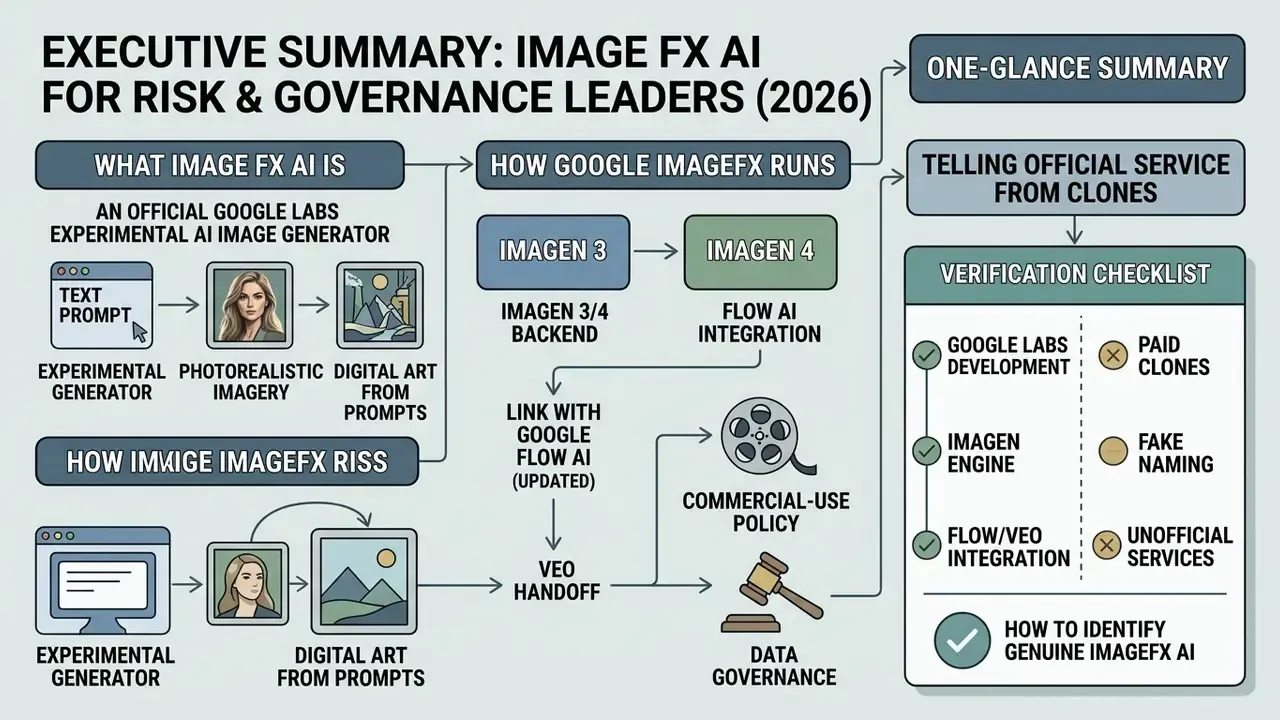
- Tool status. Google ImageFX is an official free Google Labs experiment running on the Imagen engine (Imagen 3 moving to Imagen 4), reachable only at
labs.google/fxthrough a personal Google account. Every third-party site selling "ImageFX Pro credits", "Nano Banana Pro", or "Z-Image" access has no relationship with Google DeepMind. - IP risk level. Medium. Google does not claim ownership of your outputs under its generative AI terms. Still, ImageFX is an experimental Labs product: there is no explicit commercial licence and no IP indemnification (financial protection against third-party claims) of the kind offered in Vertex AI. Human-in-the-loop review and IP clearance are mandatory.
- Fitness for regulated industries. Limited. The public Google Labs interface is not a protected corporate perimeter. Do not type PII, banking secrecy data, or proprietary client information into prompts. For an enterprise perimeter with audit logs and contractual data-processing guarantees, use Vertex AI Imagen instead.
What Image FX AI is and how Google ImageFX differs from same-named services
Google ImageFX as an AI image generation tool
As an advanced AI image generation tool, Google ImageFX translates natural language input into detailed raster graphics using latent diffusion technology. The underlying AI model compresses generation into a latent space, systematically removes noise based on prompt conditioning, and then decodes the result into a final 1024x1024 grid. According to the Google DeepMind Imagen 3 Technical Report (2024), this architecture delivers stronger text-image alignment, higher photographic fidelity, and fewer anatomical artifacts than earlier diffusion iterations.
"Imagen 3 is preferred over other state-of-the-art models in human evaluations at the time of writing."
From Imagen 3 to Imagen 4 and the link with Google Flow AI (updated)
Why search results show different ImageFX AI generators
Queries for "Image FX AI" or "fx ai image generator" return a mixture of official Google tools, mobile utility apps, and third-party web wrappers. Independent developers often use the generic suffix "FX" (visual effects) to market online image editors, canvas tools, or open-source Stable Diffusion front-ends. The official Google ImageFX is identifiable by direct Google account sign-in, zero subscription fees, native Google Labs integration, and automatic SynthID provenance tagging. Third-party alternatives have no access to proprietary Imagen model weights and operate under their own commercial licensing terms. If your goal is a legitimate free alternative rather than a clone, start with the review of free AI image generators.
How to tell the official service from a paid clone:
| Parameter | Official Google ImageFX | Third-party wrapper sites (clones) |
|---|---|---|
| Access URL | labs.google/fx (or labs.google/fx/tools/imagefx) | Unrelated domains (.dev, .net, .org, .app, .me) |
| Payment / credits | 100% free; daily limit refreshes automatically | Paid "credit" packs, subscriptions, "Launch Offer -50%" |
| Model | Google DeepMind Imagen 3 / Imagen 4 | Unknown external APIs (Z-Image, Seedream, Qwen Image, Flux) |
| Watermark | Built-in SynthID (DeepMind), invisible | Absent, or a custom service logo |
| Authentication | Personal Gmail plus Google Labs enrollment | Google sign-in used mainly as a lead-generation gate |
| Terms of use | Google Generative AI Additional Terms plus Labs rules | Operator's own ToS, no Google guarantees |
| Enterprise guarantees | None (experimental Labs product) | None; "enterprise-grade security" claims are unverifiable |
How to access Google ImageFX and start generating
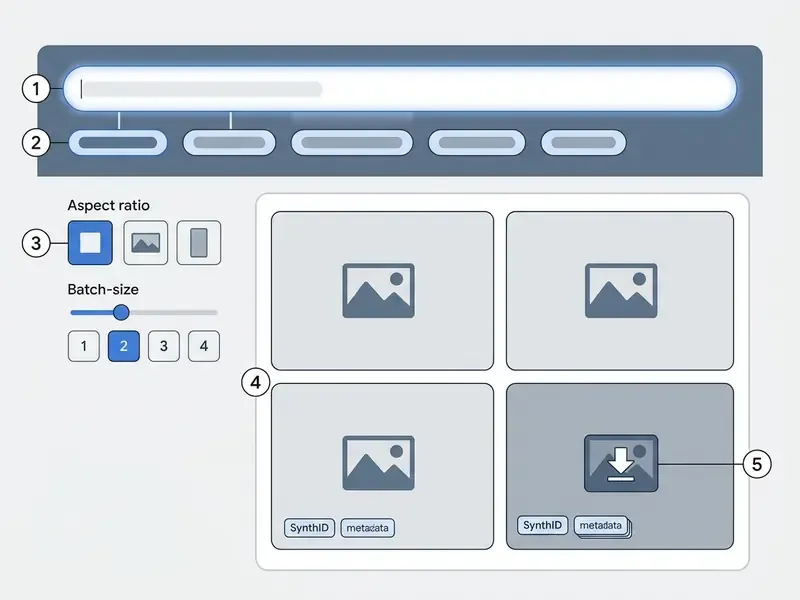
Accessing Google ImageFX means opening the official Google Labs platform, authenticating with an eligible Google account, and submitting a text prompt into the primary generation bar. The workflow skips software installation entirely and runs inside modern web browsers on desktop and mobile.
Sign-in and availability conditions
Google ImageFX access is managed through standard Google account authentication for verified users aged 18 and over. As of late 2024, Google expanded availability to more than 100 countries and territories, including the United States, United Kingdom, Canada, Australia, Japan, India, Pakistan, South Africa, Mexico, Brazil, and Türkiye. That is a significant expansion from the original February 2024 rollout, which covered only the U.S., New Zealand, Kenya, and Australia.
Access requires a personal Gmail account. Enterprise Google Workspace, school, and managed accounts frequently enforce administrative policy blocks on experimental Labs features, and that single fact explains most "ImageFX not working" complaints. No paid subscription, API key, or third-party middleware is needed. Some third-party guides recommend a VPN for restricted regions; official Google materials state no such requirement, and circumventing geoblocking may breach the terms of service. One practical debugging tip: if the canvas loads empty, open labs.google/fx in a Chrome incognito window, which disables extensions that break rendering.
From a text description to a finished picture
Turning a simple text description into a finished image runs through a four-step real-time pipeline inside the ImageFX interface.
- Prompt submission the user types a descriptive natural language prompt into the central bar and clicks generate.
- Latent synthesis the Imagen model processes text tokens and returns a candidate set of up to four image variations within seconds.
- Interactive chip refinement the interface identifies key descriptive terms and offers drop-down "Expressive Chips" to swap adjacent visual dimensions such as style, lighting, or medium.
- Output selection and canvas control (updated) the user picks the preferred variation from the candidate grid for preview, light editing, or export.
Controlling output before generation. ImageFX supports batch generation of 1 to 4 variations per prompt, a direct analogue of the numberOfImages parameter (1 to 4) in the Gemini API. Before sending the request, you can lock the output aspect ratio: 1:1 (square, for grids and previews), 16:9 (horizontal banners and slides), 9:16 (Stories, Reels, and mobile screens), plus the classic photographic 4:3 and 3:4. Practical rule: a batch of four at a fixed aspect ratio maximises selection speed, while a batch of one conserves your daily quota during fine prompt tuning.
Free access, daily limits, and credit card questions
Google ImageFX works as a free AI image generator with no credit card registration and no subscription tiers. Usage is governed by dynamic daily account quotas rather than per-generation billing. Official Google Labs documentation publishes no fixed cap, and empirical testing suggests standard accounts get roughly 40 to 80 image generations per rolling 24-hour window depending on server capacity.
Worth knowing: public reviews quote different numbers, 30, 40 to 80, or "soft throttling with no hard ceiling". The spread exists because no official cap was ever published, and Google manages the quota dynamically. Organisations that need enterprise-grade batch access without daily throttling, plus a predictable SLA, use the commercial Imagen endpoints in Vertex AI. The Labs versus Vertex AI choice, however, is driven less by limits than by data-processing mode, so the full comparison sits in the data governance section below.
What ImageFX can do for creating and refining images
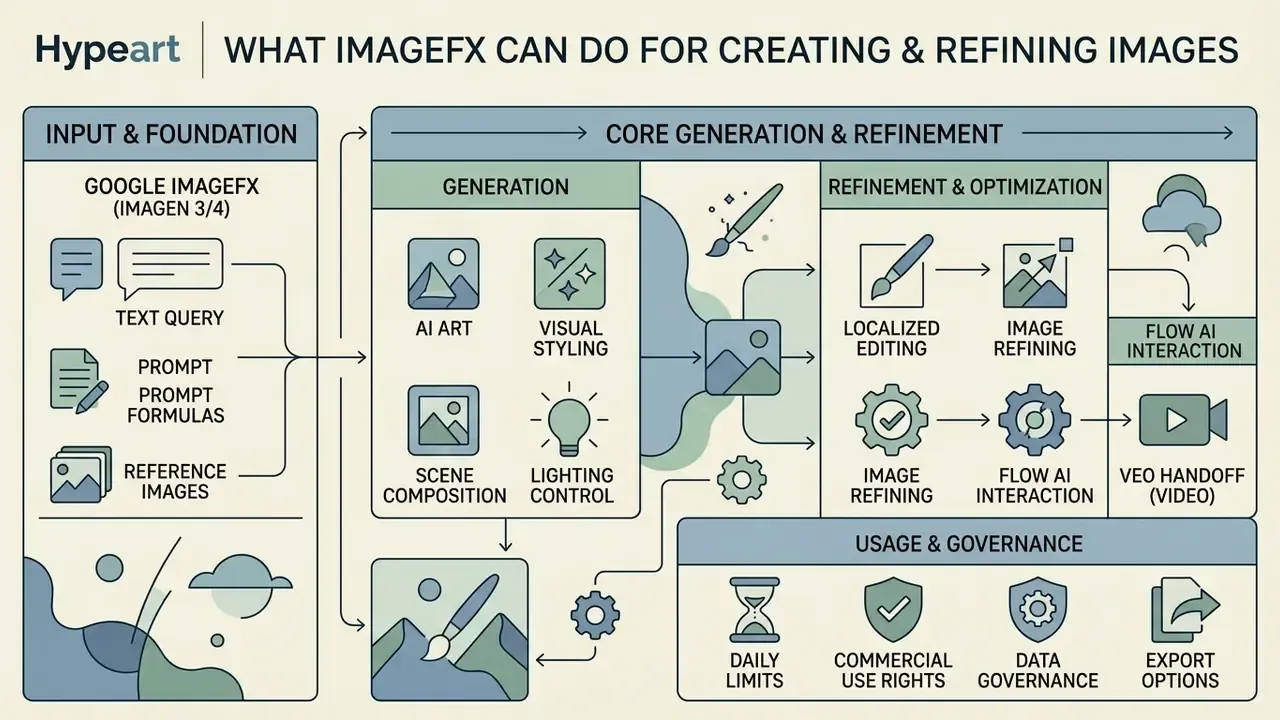
Google ImageFX gives you meaningful control over visual styling, lighting, scene composition, and localized output editing. It balances automated diffusion quality with interactive controls built for fast visual exploration.
Generating AI art from a text query
The core engine of Google ImageFX is strong at interpreting nuanced natural language instructions and rendering complex visual concepts and digital AI art. Users can describe abstract ideas, historical art movements, multi-character interactions, or detailed environments without technical shorthand or syntax parameters. Because up to four candidates return per prompt, the tool behaves less like a single-shot renderer and more like a divergent ideation engine. The operator's real skill is selection and iteration, not one perfect sentence.
That is why ImageFX usually covers the first-pass visual generation stage: turning a written brief into a set of visual hypotheses. Academic observation of design practice supports that pattern:
"Designers use AI tools for ideation, exploring alternative styles and rapidly visualising concepts, rather than only for final asset production."
Style, lighting, and the visual delivery of the result
Visual presentation in ImageFX is tuned by naming the artistic medium, camera optics, and lighting conditions inside the text prompt. The tool natively supports diverse directions: photorealistic portraiture, watercolour illustration, cyberpunk concept art, oil painting aesthetics, and minimalist vector design.
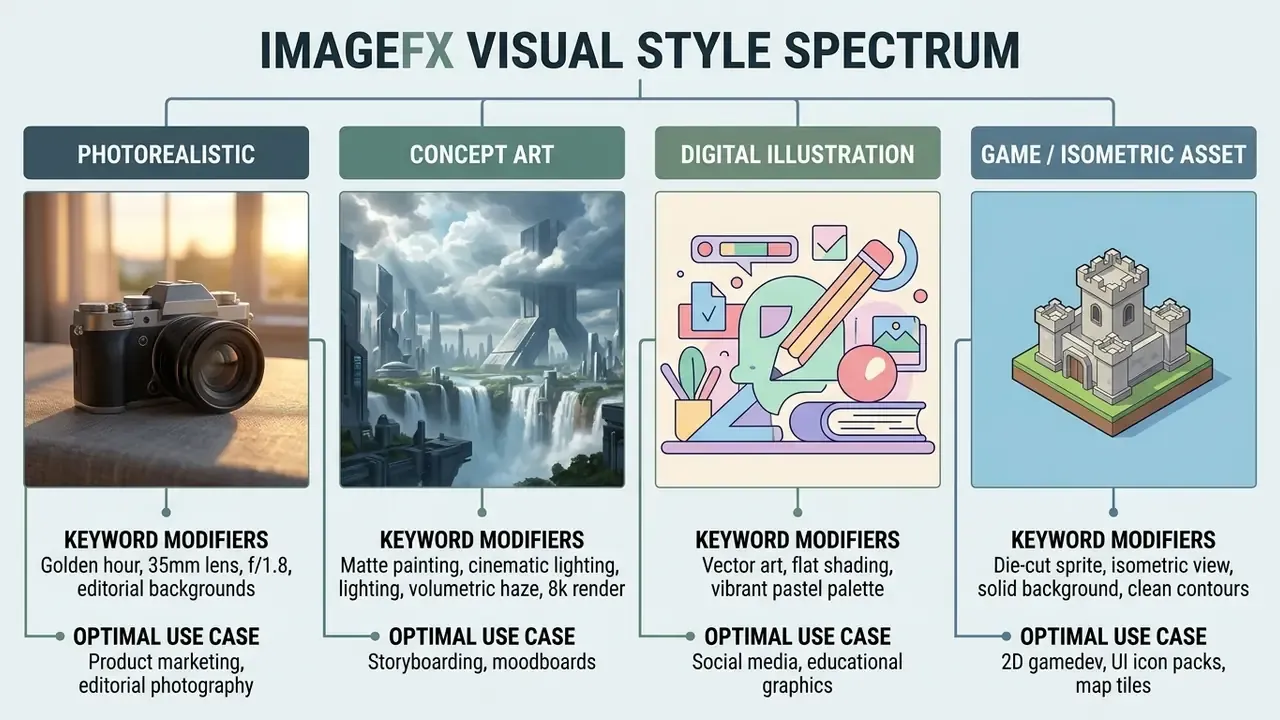
Academic research published in the NordiCHI 2024 Study on Visual Cognition in Design stresses that creative professionals hit friction when translating visual concepts into rigid text. ImageFX softens that friction through Expressive Chips, letting users toggle lighting variables such as "dramatic shadows" or "soft studio light" without rewriting the core prompt.
"We are visual thinkers, not verbal thinkers: professional designers struggle to translate visual ideas into text prompts and need multimodal interfaces with visual input."
Reference images, image editing, and export
Google ImageFX includes targeted image editing tools, so creators can modify generated outputs inside the browser. An integrated brush applies inpainting and outpainting masks over specific regions to add, remove, or alter elements using updated text descriptions. For heavier post-production, layers, precise masks, colour correction, pair generation with conventional photo editors.
Outputs export as high-resolution PNG files on a native 1024x1024 canvas, with landscape (16:9) and portrait (9:16) support plus the 4:3 and 3:4 photographic framings. Every exported file carries an invisible SynthID watermark that preserves content provenance across digital channels. When working with references, keep the architectural difference in mind: commercial Imagen and Gemini endpoints document intake of up to 14 reference images and PNG, JPEG, WebP, HEIC, and HEIF formats, while free ImageFX exposes a simplified set of remix controls.
How to write prompts for Image FX AI
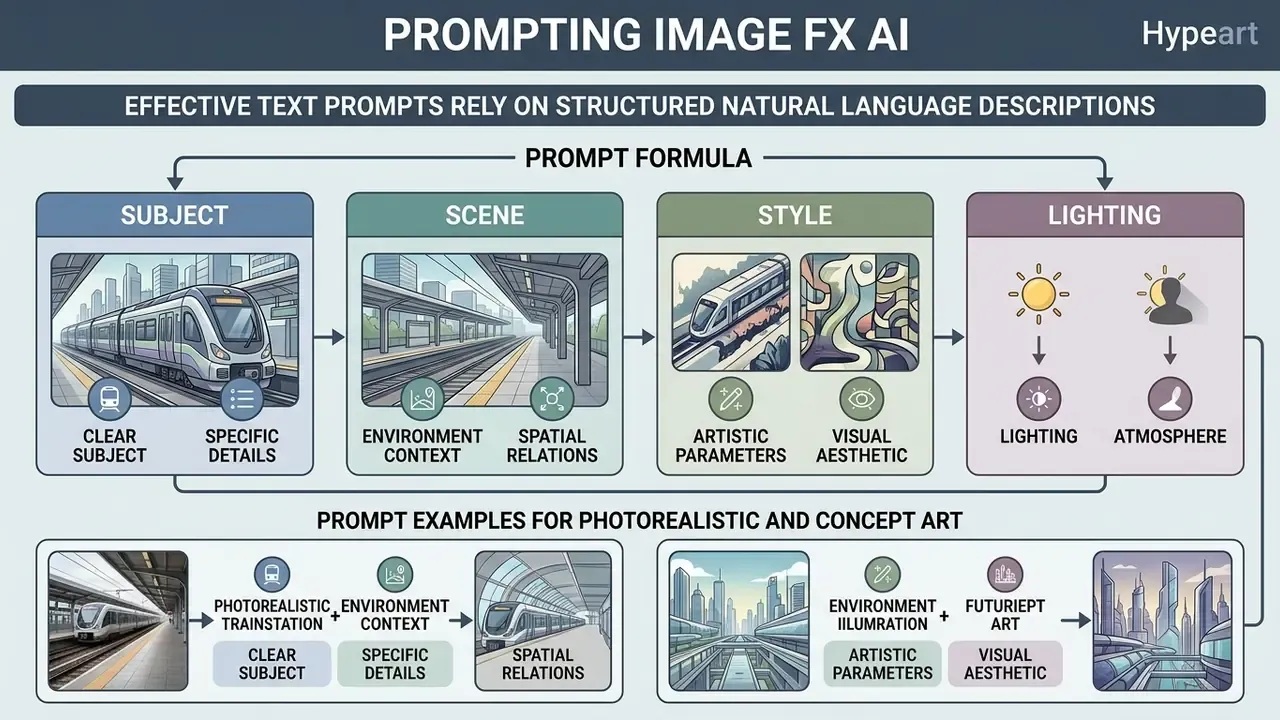
Effective text prompts for Image FX AI rely on structured natural language descriptions that put subject clarity, environmental context, and artistic parameters ahead of disorganized keyword lists.
Prompt formula: subject, scene, style, and lighting
Quick start: the three-ingredient method (subject plus scene plus style). Prototyping does not need the full formula. Three modules are enough:
- Subjectthe hero object or character, for example "matte black ceramic mug".
- Scenelocation and light, for example "on a rustic wooden table in a sunlit Scandinavian cafe".
- Styleartistic medium and optics, for example "editorial magazine photography, 35mm lens".
Combining these three blocks gets you roughly 90% of the result without overloading the model with contradictory tags. After that, micro-adjustments through Expressive Chips are usually enough. The same three-part principle underpins the ingredients panel in Google Flow AI, where the Labs remix functions were moved, so the skill transfers between tools with no relearning.
The full production formula. The universal structure for an ImageFX prompt follows a clear sequence of descriptive blocks:
Diffusion models process structured natural language sentences noticeably better than disconnected comma-separated tags, and placing the primary subject at the start ensures the model allocates initial latent attention to the main object before rendering background detail. This matches the official Vertex AI prompt guide, where the recommended order runs subject, then attributes, then style and lighting, then composition. If you prefer a repeatable team template, view the guide to prompt workflows and sign-off steps.
"Structured prompts with explicit style and lighting specification improve conceptual coverage accuracy compared with baseline prompts."
Prompt examples for photorealistic and concept art
How to evaluate the quality of generated images and improve results
Evaluating generated images means checking semantic accuracy, aesthetic realism, structural coherence, and text rendering accuracy against the original prompt. Professional practice pairs human ratings (prompt adherence plus perceptual quality) with metrics such as FID, KID, LPIPS, SSIM, and CLIP alignment. No single metric is treated as sufficient on its own.
Why the result does not match your intent
Gaps between intent and output come mostly from ambiguous descriptions, conflicting style modifiers, or dataset conditioning boundaries. Polysemous words, words carrying several meanings, frequently push the model toward unexpected visual elements.
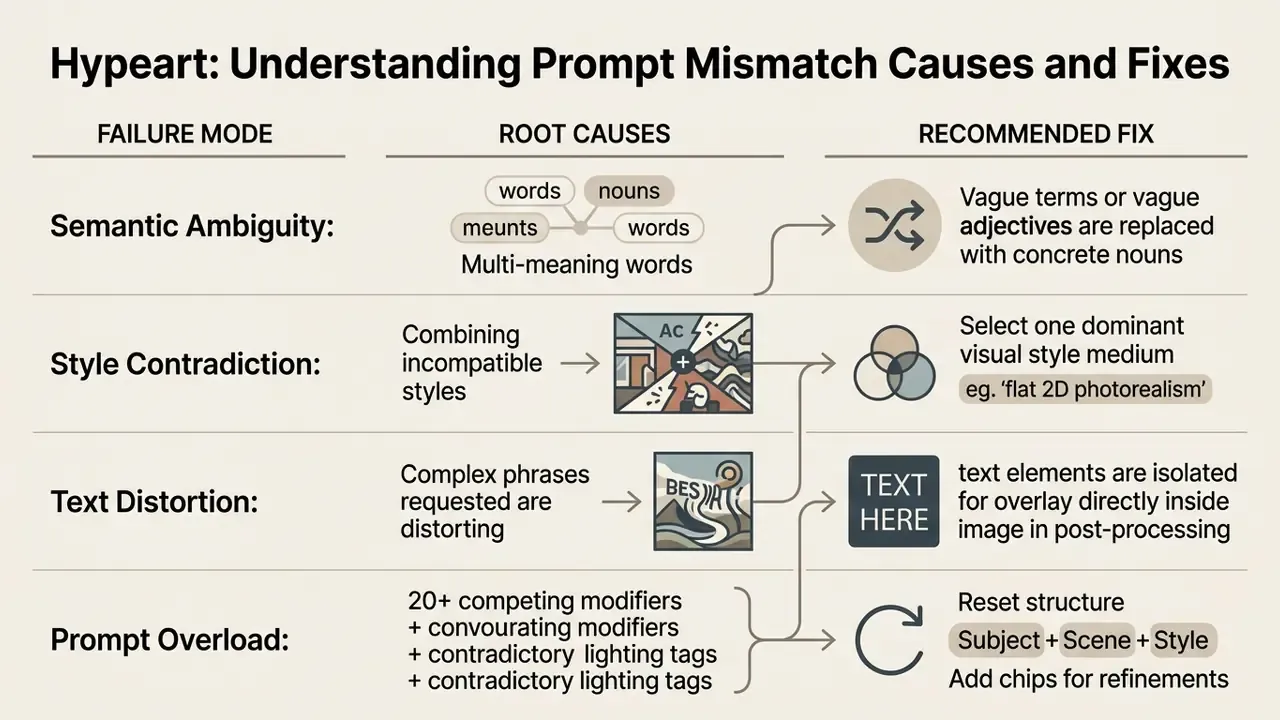
As documented in the AIGIQA-20K Image Quality Assessment Benchmark, human evaluators separate prompt fidelity from visual realism. When an image fails to reflect the prompt, simplify the sentence structure, strip contradictory descriptors, and use Expressive Chips to adjust lighting or style step by step.
"Human raters treat prompt-correspondence accuracy and visual realism as independent dimensions of image quality."
High resolution, format, and downloading images
Google ImageFX exports files at a native 1024x1024 resolution, with upsampling options arriving through model updates (Imagen documentation records 2x, 4x, and 8x upsampling, while newer revisions add 1K and 2K class output modes). Aspect ratios are set before generation to match platform requirements, such as 16:9 for landscape presentations or 9:16 for mobile social channels.
Imagen shows clear gains in rendering embedded characters compared with older generators. Independent testing from the STRICT Benchmark (2025) still finds spelling artifacts in complex text overlays across general-purpose diffusion models.
"Leading diffusion models, including Imagen 3, still produce character errors and distortions when rendering complex text inside images."
For enterprise graphic design workflows, the practical rule is to use ImageFX for background and subject generation, then add precise typography in vector software. If a finished frame lacks margin or resolution for a banner, AI image expansion tools built on outpainting usually solve it.
Commercial use: can ImageFX images go into commercial projects?
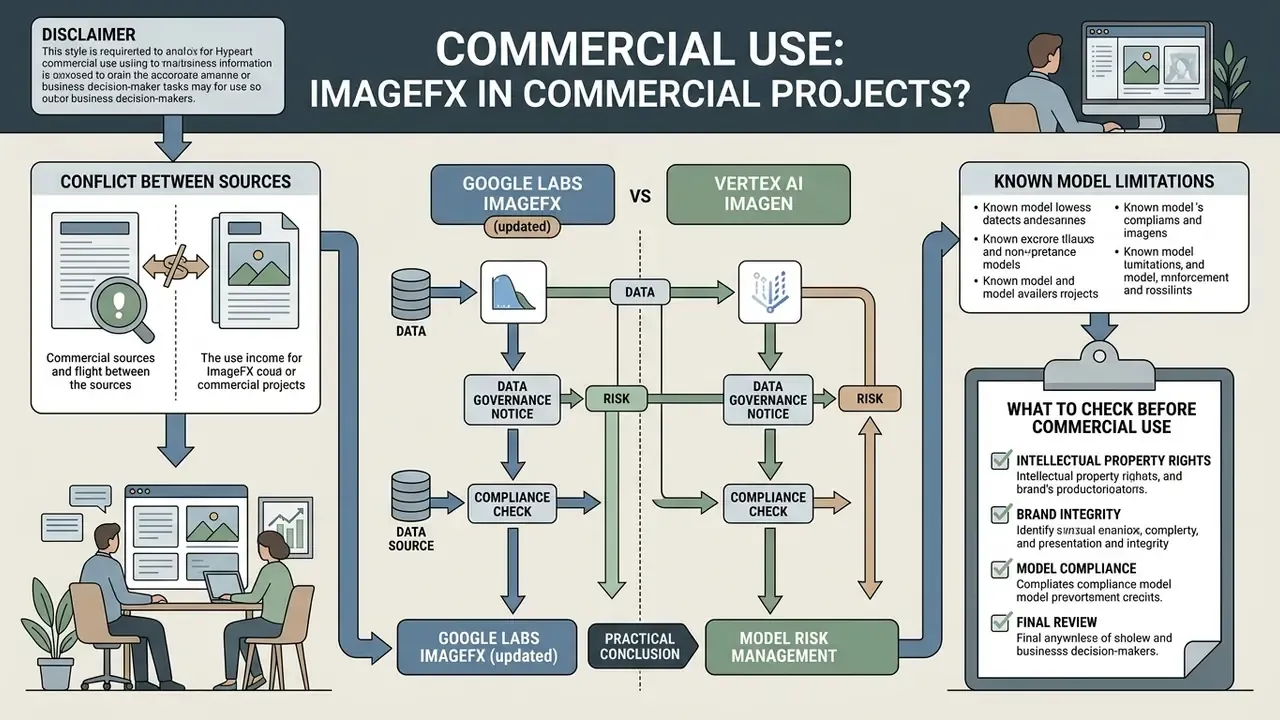
Deciding whether Google ImageFX images can be used commercially means working through Google's Terms of Service, copyright office guidance, and digital provenance standards.
On the conflict between sources. Some publications argue commercial use is permitted under Google's general generative terms, where the user keeps rights to their own content. Others note that ImageFX documentation never explicitly granted a commercial licence. Neither version changes the baseline conclusion for a risk function: an experimental Labs product provides no contractual guarantees at Cloud-platform level. One more detail matters. For preview products, Google's generative terms expressly prohibit commercial and production use, so the status of the specific tool must be recorded on the date your project launches. Trend lines in AI copyright disputes are worth tracking too; see AI Litigation and Case Timelines for how claims are evolving.
Data governance and model risk: Google Labs ImageFX versus Vertex AI Imagen (updated)
For a CRO, a Head of Model Risk, or an AI governance lead, the decisive question is not picture quality. It is the data processing perimeter. Here are the two access modes to the same model family:
| Control parameter | Google Labs ImageFX (consumer / free) | Vertex AI Imagen (enterprise) |
|---|---|---|
| Contractual status | Experimental Labs product, consumer ToS | Commercial Google Cloud service, contract plus DPA |
| Data privacy perimeter | Public; no corporate agreement | Enterprise perimeter with project isolation |
| Prompt retention | Governed by consumer policies, limited transparency | Configurable at project or organisation level |
| Training on user data | Not excluded; human review possible | Contractually restricted by Cloud terms |
| Audit logging | None (no exportable logs) | Cloud Audit Logs, export to SIEM or GRC |
| Access management | Personal Gmail; no RBAC | IAM, roles, service accounts, VPC-SC |
| SLA and model versioning | No SLA; the model may change without notice | Versioned endpoints, GA and deprecation dates |
| IP indemnification | Not provided | Available for covered Cloud services |
| Fitness for MRM (SR 11-7 / GRC) | Sandbox and ideation only | Suitable for controlled production |
What to check before commercial use
Before ImageFX visuals go into commercial campaigns, product packaging, or client deliverables, run a four-point compliance review:
- Platform licensing verification: review the governing Google Terms of Service to confirm that experimental Labs outputs are permitted for external commercial distribution in your jurisdiction, and record the date of the check.
- Copyright registrability: align with U.S. Copyright Office guidance (2023-2026), which requires disclosure of AI-generated content when registering creative works and proof of significant human creative input.
"Applicants must disclose AI-generated material that is more than de minimis and identify the human author's contribution." - U.S. Copyright Office, Guidance on AI-Generated Works (2023-2024). https://www.copyright.gov/ai/
- Intellectual property and likeness clearance: confirm the generated images contain no protected brand logos, proprietary product designs, or recognizable public figure likenesses. A useful control step is similarity checking through AI reverse image search.
- Provenance and SynthID verification: retain original PNG files with intact SynthID watermarks to satisfy emerging regulatory mandates on transparent AI media labelling. Important caveat: SynthID is a provenance marker, not a licence. It resolves nothing about trademark rights, personal likeness, or reference image ownership.
In a model-risk review for a fintech platform (illustrative composite, not a documented client engagement), the governance team assessed ImageFX outputs intended for digital client onboarding materials. By adding a mandatory human-in-the-loop step that logged prompt history, checked IP databases, and confirmed SynthID metadata, the organisation reduced residual legal risk while keeping creative velocity intact. A fuller overview of rights and licences across Google tools sits in the material on commercial use of the Google AI Image Generator. Unfamiliar terms? View the guide in the glossary for definitions used throughout this site.
Tasks for marketing, product, and social media
Generated images from Google ImageFX offer real utility across corporate communication channels, provided human oversight stays in place.
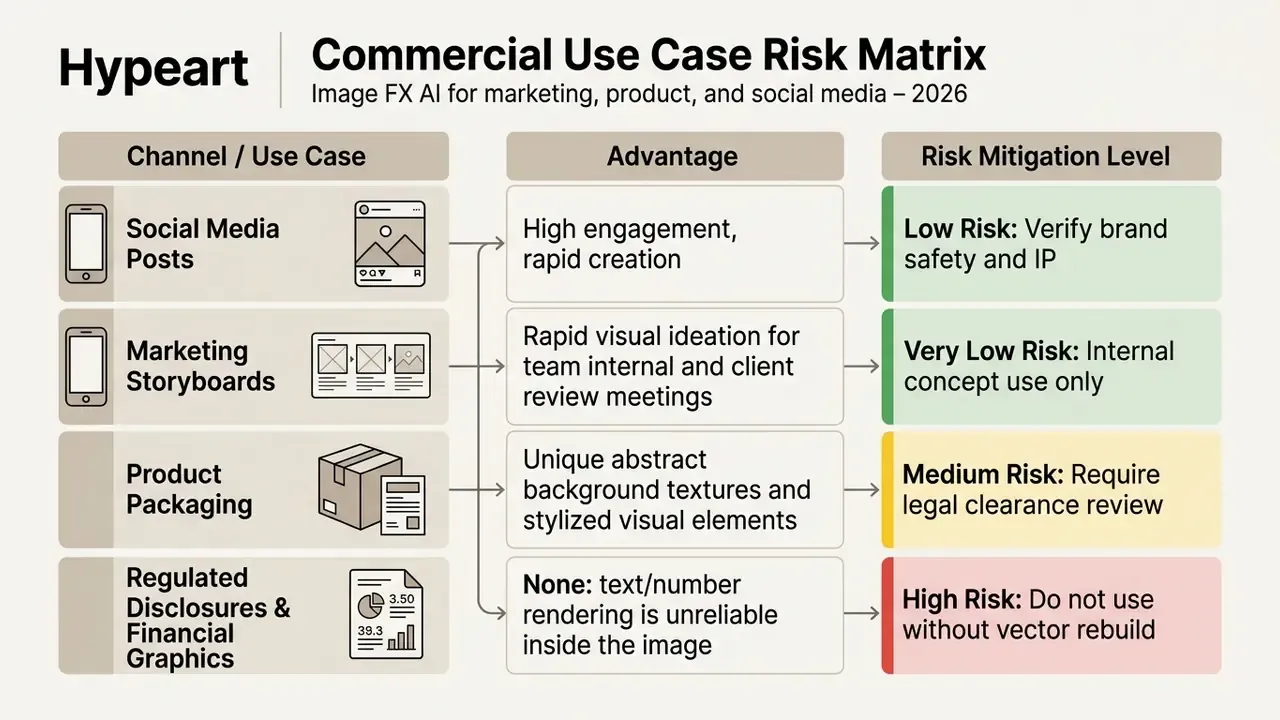
Verifying the AI origin of published material is a separate compliance step, handled with detection tooling and reverse image search. Empirical research comparing AI and traditional promotional visuals gives a measured picture of performance:
"Semi-realistic AI images achieved the highest reach and engagement in organic 2023 campaigns, while AI images reached high interaction rates in paid campaigns."
Strengths and limitations of ImageFX AI for tool selection
Choosing the right generative tool means weighing performance strengths against technical boundaries.
| Evaluation Parameter | Google ImageFX Capabilities | Operational Limitations |
|---|---|---|
| Image Generation Quality | Powered by DeepMind Imagen 3 / Imagen 4; highly realistic lighting, texture, and composition. | Occasional artifacts in complex multi-subject interactions. |
| Natural Language Processing | Superior interpretation of detailed English sentence descriptions. | Reduced prompt adherence for highly complex non-English phrasing. |
| Interactive Prompt Editing | Unique "Expressive Chips" enable rapid single-keyword variation testing. | Cannot manually input custom slider values for model weights. |
| Canvas Control | Aspect ratio selector (1:1, 16:9, 9:16, 4:3, 3:4) and batch generation of 1 to 4 variants. | No custom pixel dimensions; no native SVG or vector export. |
| Inpainting & Outpainting | Native brush tool allows localized element modification. | Lacks advanced multi-layer vector editing tools. |
| Access Cost & Limits | 100% free with a Google account; no subscription or credit card needed. | Soft daily generation quota (roughly 40 to 80 images) per account. |
| Commercial Use Terms | Generative terms grant the user usage rights subject to Labs policy rules. | Experimental product status subject to terms updates; requires IP audit; no IP indemnification. |
| Data Governance | Zero setup, instant access for ideation. | Public consumer environment: no DPA, no audit logs, no RBAC. |
| Native Video Support | Generation limited strictly to static raster images. | Video synthesis requires separate tools such as Google Veo via Google Flow AI (AI Plus plan). |
No matching rows Clear one or more filters to restore the matrix.
In short: excellent free ideation engine, weak enterprise control surface. That split drives almost every adoption decision we see discussed in governance forums.
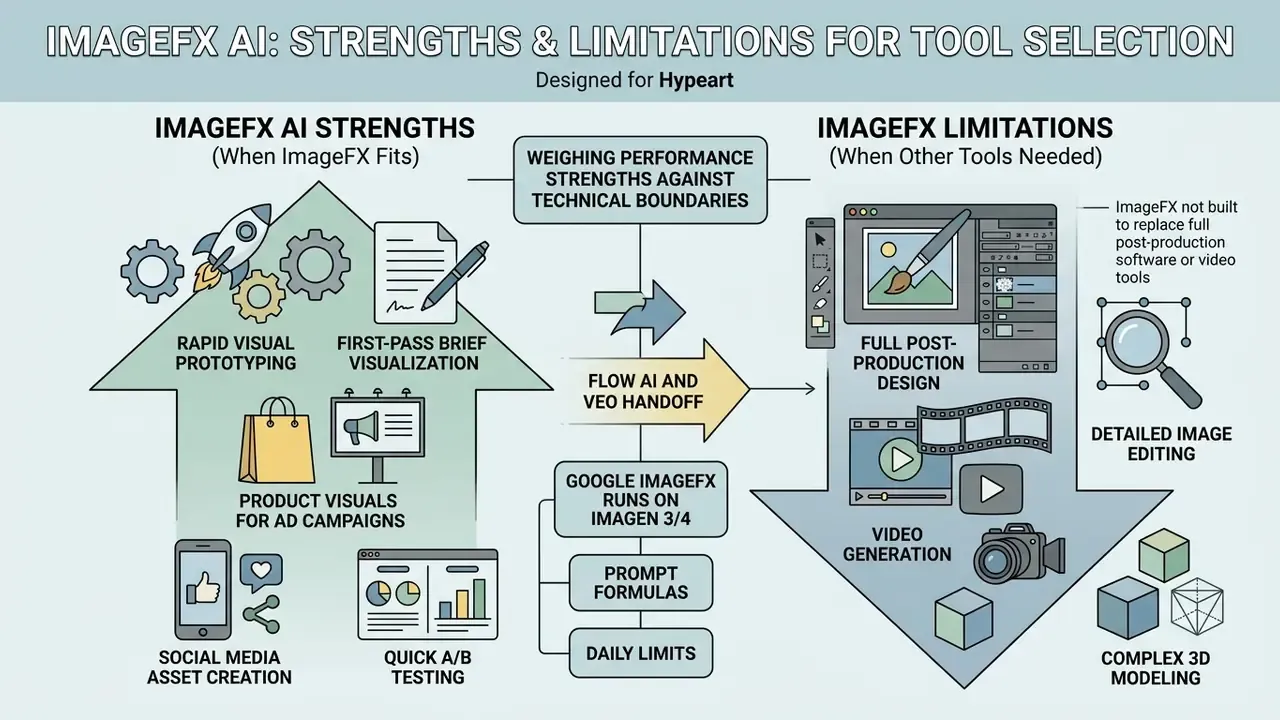
When ImageFX fits a creative workflow
Google ImageFX suits creative workflows centred on rapid visual prototyping, social media asset creation, moodboard building, and digital art exploration. Its mix of natural language handling, zero subscription cost, and interactive Expressive Chips lets teams iterate on concepts without heavy software overhead. If artistic aesthetics and style control matter more than prompt precision, evaluate Midjourney alongside it: Imagen 3 benchmarks showed an advantage in prompt alignment but trailed Midjourney on visual appeal, so the answer depends on what your brand values more.
The most durable scenarios: product visuals for ad campaigns, first-pass brief visualisation, quick A/B background variants, and storyboards. For team workflows with templates and brand books, the tool is often paired with platforms such as Canva AI or the microsoft designer ai image generator, while corporate portraits go through dedicated AI headshot generators.
When you need image editing, video generation, or other AI tools
ImageFX is not built to replace full post-production design software or video generation tools. When a project demands precise vector manipulation, advanced multi-layer masks, strict mask-based inpainting, exact typographic alignment, or native motion, complement ImageFX with specialised editors or video models such as Google Veo. Strict mask-based inpainting, where content is removed exactly along a supplied mask, is documented for Imagen in Vertex AI rather than for the free Labs interface, and that is an important fork when designing a pipeline. Alternative free entry points include Bing AI image, the Microsoft AI Image Generator, the community-driven nightcafe ai image generator, and novel ai image generation, all of which differ in licensing terms.
Practical use cases for Image FX AI
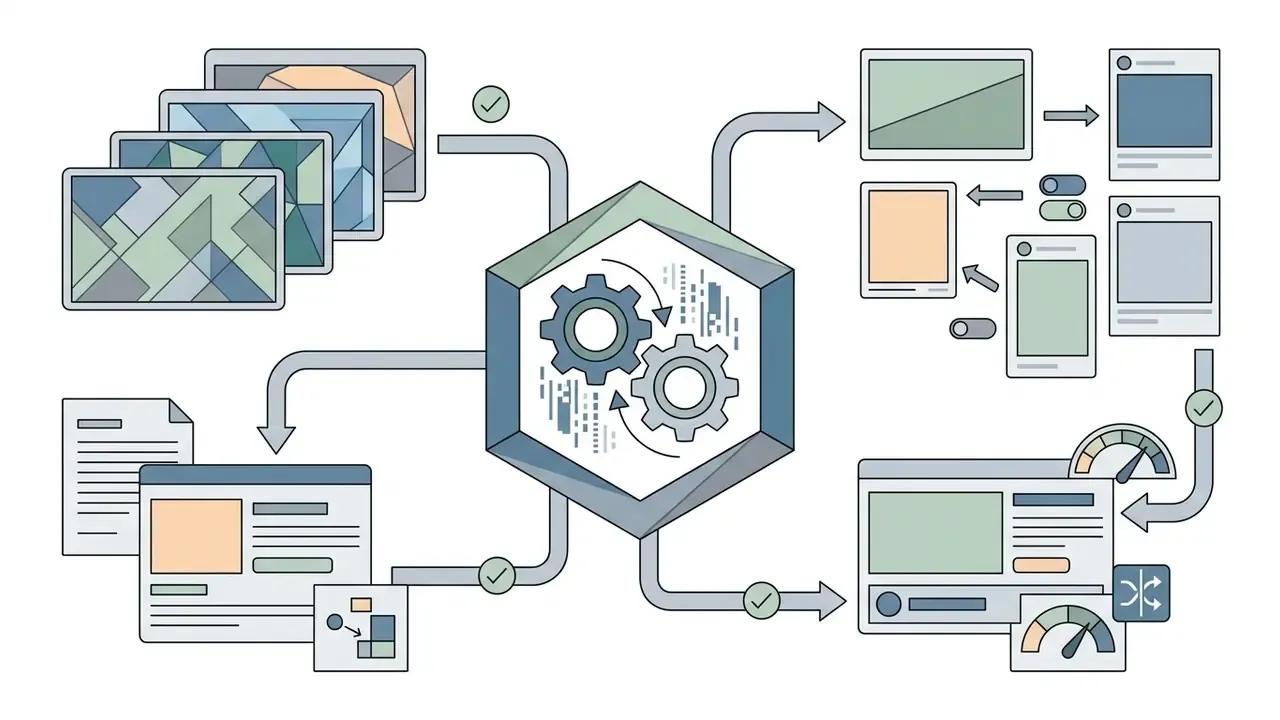
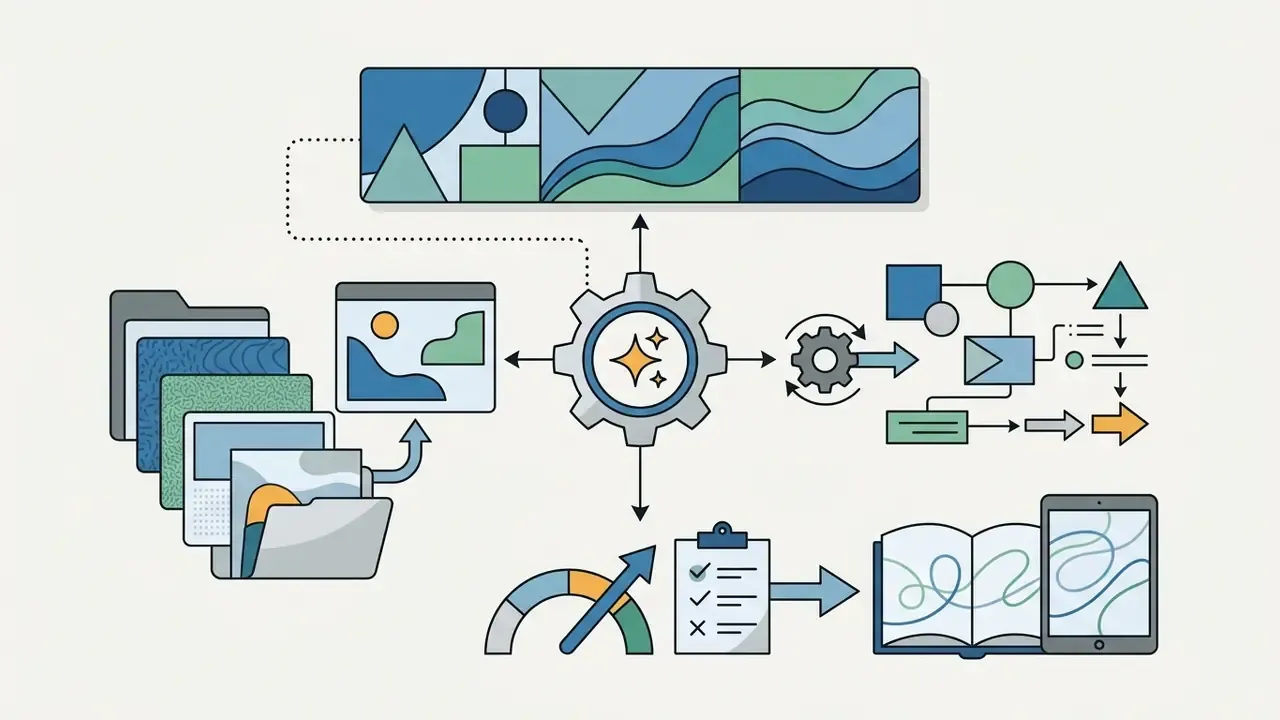
Practical deployment of Image FX AI spans four operational domains:
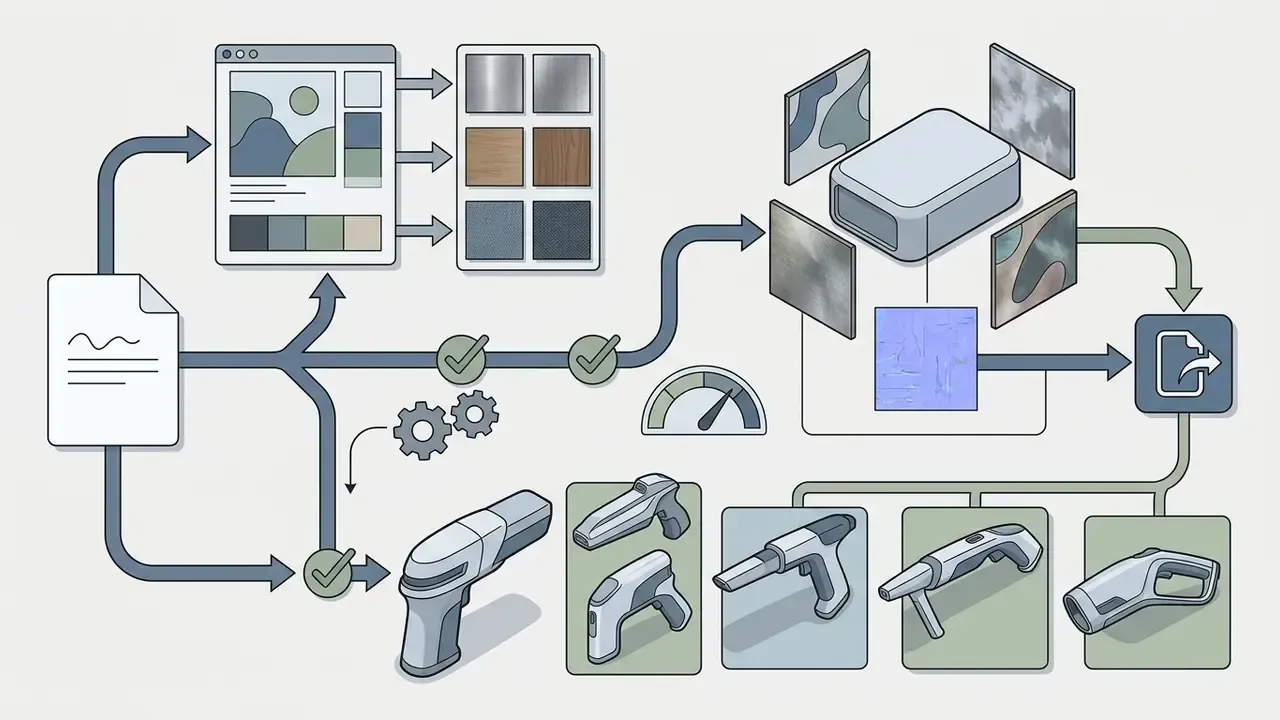
Pipeline for gamedev. Prompt structure for isometric sprites: "Die-cut 2D game asset of a magical potion bottle, isolated on a solid white background, isometric view, vibrant color palette, clean vector contours". After generation, the flat background is removed through the built-in inpainting mask or an external background remover, producing a PNG sprite ready for Unity or Unreal Engine import. Practical limits: ImageFX returns raster, not vector, so UI icons that must scale get their final contour redrawn as SVG. Character consistency across sprites comes from repeating the identical subject description and style wording across every prompt in the batch.
Video handoff. The selected still frame can be passed into Google Veo 3.1 through the Google Flow AI interface as a keyframe. This is the standard "static to animated" route inside the Google Labs ecosystem: image generation stays free, video generation requires the Google AI Plus plan.
Case study and an honest ROI calculation (updated). In a brand transformation project at a US financial technology firm (illustrative composite), the marketing operations group replaced part of its traditional stock imagery sourcing with an ImageFX generation pipeline. By standardising prompt guidelines for brand colours, corporate lighting, and subject framing, the team produced a batch of custom editorial banner images for its digital portal while keeping SynthID transparency logging across all published assets. By the team's own estimate, direct savings on stock licensing in the first quarter landed in the low tens of thousands of US dollars. Exact figures depend on the previous stock provider tariff and are not a reproducible benchmark; treat them as an order of magnitude, not a guaranteed outcome.
The key correction for risk-adjusted ROI: licence savings are not the final benefit. Control costs come out of that number: (1) designer time for selection and rework, (2) legal and IP hours for trademark and likeness clearance, (3) risk officer time verifying SynthID metadata and maintaining a prompt log, and (4) the cost of keeping the approved AI tool inventory current. The working formula: Risk-adjusted ROI = (stock savings + campaign speed) - (HITL review + IP clearance + provenance control + residual legal risk). In projects that need a complete audit trail, control costs can absorb between a quarter and half of the nominal saving. That calculation, not the headline saving, belongs in the business case.
A smaller ideation-stage example, same caveat: during an internal review of creative production automation, a transformation team tested ImageFX for rapid concept development. Using a controlled prompt template, the team assembled a standardised set of training visuals in a single working session and, by its own estimate, cut concepting time noticeably while logging every output. Those numbers are an internal estimate, not independently verified research. Use them for planning direction, not as a metric.

FAQ on Image FX AI (frequently asked questions)
Is it free?
Yes. The official Google ImageFX is free: you need only a personal Google account and Google Labs enrollment. No credit card is required. Any site asking you to pay for "ImageFX credits" is a third-party service.
How many images per day?
There is no officially published cap. Empirical observation suggests roughly 40 to 80 generations per account per day, and the limit is dynamic. A batch of 1 to 4 variations consumes quota proportionally.
Can the images be used commercially?
Google's general generative terms do not claim ownership of your content, but ImageFX is an experimental Labs product with no explicit commercial licence and no IP indemnification. Before a commercial release, run the four-point checklist from the pre-commercial-use section above.
Does ImageFX work with a corporate Workspace account?
Often it does not. Administrators commonly block experimental Labs features, so a personal Gmail account is usually required.
Does ImageFX generate video?
No. ImageFX produces static raster images only. Video comes from passing a frame into Google Veo 3.1 through Google Flow AI, which requires the Google AI Plus plan.
Does ImageFX export SVG?
No. Output is PNG (1024x1024 natively, with upscaling). Vectors are redrawn by hand.
What are "Nano Banana Pro" and "Z-Image"?
They are names used by third-party services and external models, and they do not belong to official Google DeepMind nomenclature (Imagen 3/4, Gemini image generation). Seeing those names on a page is a strong sign of a wrapper site.
Can client data go into a prompt?
No. Google Labs is a public experimental environment with no corporate DPA. For sensitive data, use Vertex AI.
Appendix A. Editorial revision log and original wording
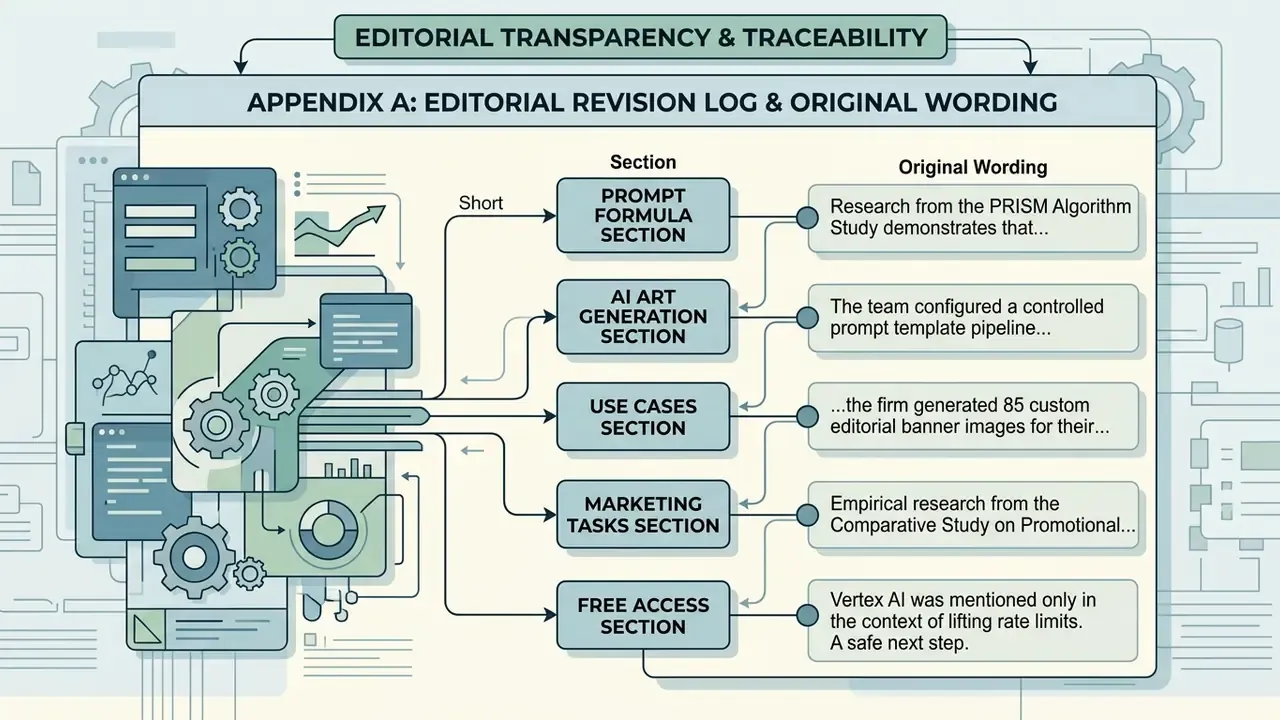
The original wording of fragments refined in the main text is preserved below, for editorial transparency and traceability.
- Original wording (prompt formula section): "Research from the PRISM Algorithm Study (2024) demonstrates that diffusion models process structured natural language sentences significantly better than disconnected comma-separated tags." Updated: a direct quotation with the study's finding and a URL was added.
- Original wording (AI art generation section): "The team configured a controlled prompt template pipeline that produced 120 standardized training assets in under two hours, cutting asset concepting time by 60% while maintaining compliance logging across all outputs." Updated: the case moved into practical use cases and was reframed as an internal estimate not verified by external research.
- Original wording (use cases section): "…the firm generated 85 custom editorial banner images for their digital portal, reducing stock licensing costs by $14,000 in the first quarter…" Updated: figures converted to an order of magnitude and paired with a risk-adjusted ROI calculation that includes control costs.
- Original wording (marketing tasks section): "Empirical research from the Comparative Study on Promotional Effectiveness of AI Images (2025) revealed that semi-realistic AI visuals achieved exceptional performance in digital ad campaigns, driving higher interaction rates than standard stock photography." Updated: replaced with a quotation that separates organic from paid campaigns, plus a primary source link.
- Original wording (free access section): Vertex AI was mentioned only in the context of lifting rate limits. Updated: retained and expanded into a standalone data governance section comparing data processing perimeters.
A safe next step. If ImageFX is already in use somewhere in your organisation, and it usually is, start small: add the tool to the AI inventory, publish a one-page prompt hygiene rule banning confidential input, and decide which outputs require IP clearance before publication. Then, and only then, discuss production pipelines. For rights, licensing, and provenance questions across image, audio, and video models, see the AI Media Commercial-Use Hub.