Why does this matter to a bank or a mature fintech? Because the marketing team is already generating images. The only open question is whether that activity happens inside a logged, licensed environment or in a personal browser profile nobody can audit.
Executive Summary for Decision-Makers
| Decision point | What you need to know |
|---|---|
| Where it lives | One engine (DALL-E 3 plus Microsoft's own image models) surfaced through three entry points: Microsoft Designer (designer.microsoft.com), Microsoft Copilot (web, mobile, Microsoft 365 apps), and the Microsoft Edge sidebar. No installation required. |
| How you generate | Prompt, four candidate variants, select one, inline edit on the Designer canvas, export PNG / JPEG / PDF. Projects auto-save to My projects in the cloud. |
| Native output ceiling | Standard generation returns roughly 1024x1024 px at 96 DPI. Print-grade or large-format web work requires Designer's AI upscale step before export. |
| Free tier | A free Microsoft account gets a fixed allowance of fast-generation credits (historically 15 daily boosts, later documented by Microsoft as 15 credits per month). After exhaustion, generation continues at reduced priority rather than stopping. |
| Paid tier | Microsoft 365 Personal / Family / Premium subscriptions are documented at 60 AI credits per month for the subscription owner, with "extensive usage" tiers above that. Copilot Pro is no longer sold to new customers. |
| Commercial use | Designer's consumer preview terms state personal use only. Commercial rights and the Copilot Copyright Commitment attach to paid commercial Microsoft 365 / Copilot services with safety filters enabled. |
| Copyright status | Purely machine-generated output without identifiable human authorship is not registrable in the US and may fall into the public domain under EU analysis. Document your human contribution. |
| Governance gaps to close | Retention windows (90 days in Bing Image Creator, up to 18 months for Copilot images, Copilot Library for Microsoft 365), tenant-level data isolation, Purview audit export, and Shadow AI use of the Edge sidebar. |
This guide moves from access points and Edge sidebar setup, through the generation and prompting workflow, into editing, background removal and upscaling, then into free versus paid credits, enterprise data protection, the commercial-use question, and finally the boundary between static graphics and video. Read the operational sections if you produce assets; read the governance sections if you approve them.
What Is Microsoft AI Image Generator and Where to Access It
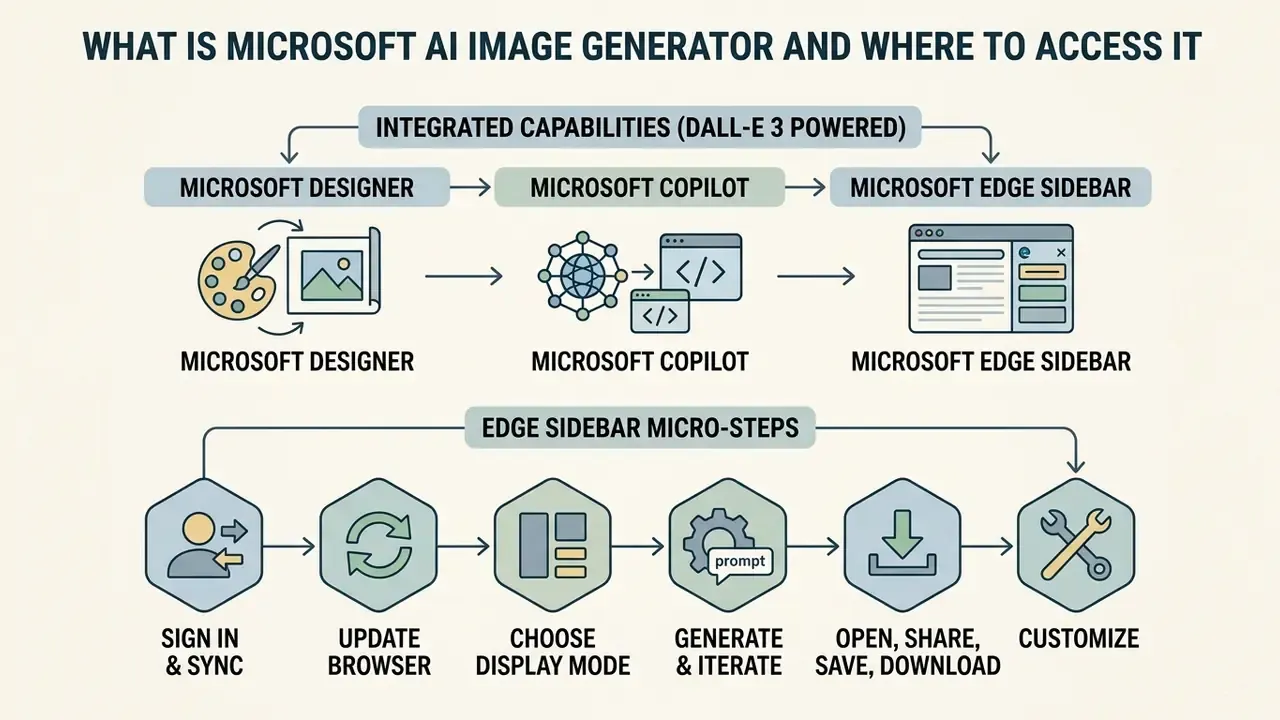
The microsoft ai image generator is an integrated suite of text-to-image capabilities powered by DALL-E 3 and embedded across Microsoft Designer, Microsoft Copilot, and the Microsoft Edge browser sidebar. Readers who want market context before committing to one vendor can review our broader overview of AI image generators and how licensing models differ across providers. Users can input natural language descriptions to produce custom graphics, photorealistic images, and marketing visuals without leaving their existing workflow environment.
Microsoft Designer, Copilot and Edge: How the AI Tools Connect
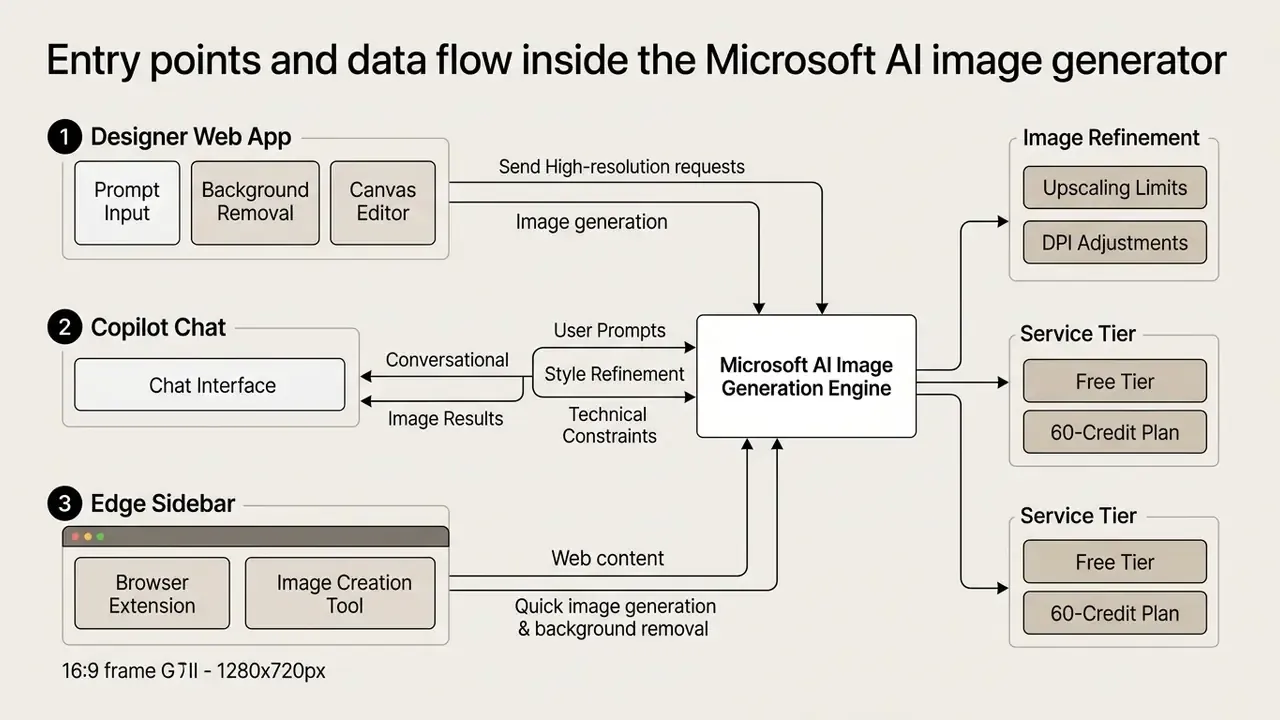
Microsoft connects its ai tools through a unified backend infrastructure, enabling users to invoke the ai image generator microsoft designer engine from multiple entry points. In Microsoft Edge, users access the tool via the Copilot sidebar or by pinning the Designer app directly, allowing instant creation based on active web content (Microsoft Learn Answers, 2024). Within Microsoft Copilot web and mobile apps, selecting Create → Create an image (or simply prompting "create an image") opens an inline generation canvas that passes prompt parameters, that is description, style, brand colour, and square / portrait / wide aspect ratio, directly into Microsoft Designer (Microsoft Support, 2026).
Enterprise environments running Microsoft 365 Copilot push these generative ai capabilities across Word, PowerPoint, Outlook, OneNote, and Teams. Microsoft Learn states that the image generator capability "uses the existing Designer functionality" and is available to Copilot Chat users without metered usage or a separate Microsoft 365 Copilot licence (Microsoft Learn, 2026). The result is a cohesive visual creation network rather than four unrelated products. One engine, several doors. Teams benchmarking this stack against other platforms can consult our comparison of the leading AI image generators by output quality, control surface, and licensing terms.
Image Generation, Design and Editing in One Place
How to Generate Images in Microsoft Designer: Step-by-Step Workflow
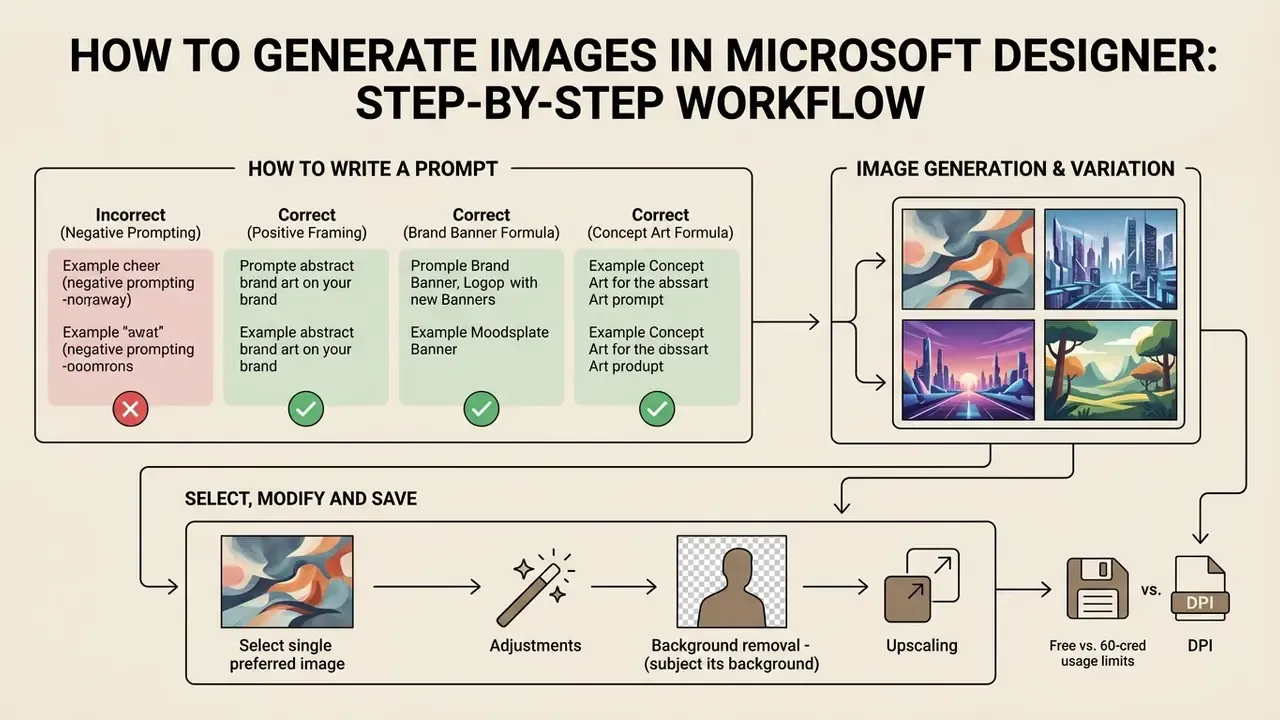
Generating visual assets in Microsoft Designer requires a structured workflow starting from initial prompt entry, moving through visual selection, and concluding with canvas-level refining. Following a disciplined procedure ensures that generated outputs match institutional quality guidelines and intent.
How to Write a Prompt for the AI Image Generator
An effective prompt for the ai drawing generator microsoft engine must detail the subject, environmental context, lighting, framing, and visual style rather than relying on brief descriptions. Microsoft's own "Image Prompting 101" guidance lists the components of a strong prompt as image type, subject, context, details, lighting, framing, lens or camera, and style, and Microsoft Learn training recommends mood adjectives and directive detail instead of one-word inputs. Technical evaluation frameworks agree: DALL-E 3 responds best to structured inputs specifying framing (wide-angle, macro), lighting (soft studio lighting, cinematic dusk), and render style (photorealistic, watercolour, vector graphic) (Microsoft Copilot Prompting Guide, 2026).
Model choice matters for factual reliability as much as aesthetics:
"On SKCM (concept-reproduction accuracy) DALL-E 3 scores 55.5, ahead of SD XL (45.8) and Flux.1 dev (35.6)."
When requesting detailed scenes, avoid complex logical negations such as "a desk without a computer":
"With negative prompts ('a desk without a computer'), image-to-description agreement does not exceed 12-45%."
"DALL-E 3 significantly outperforms DALL-E 2 on relational scenes (t(49)=8.55, p<0.001), but with more than five objects results approach chance." Source: Evaluating Compositional Scene Understanding in Multimodal Generative Models (2024). https://arxiv.org/abs/2403.00000
Translated into production practice, that means two rules: describe what should be present, and cap the object count per scene at four or five. Use these paired templates:
Incorrect (negative prompting):
"A modern office desk with no laptop, no paper, and no coffee cups". Failure rate roughly 55%; the excluded objects frequently appear anyway.
Correct (positive framing):
"A minimalistic clean wooden desk featuring only a single green plant in a ceramic pot, soft morning sunlight, macro shot, 85mm lens, photorealistic"
Correct (brand banner formula):
"[Subject] + [action] + [setting] + [lighting] + [lens/framing] + [render style] + [colour palette]"
Example: "A smiling female financial advisor reviewing a tablet in a bright glass-walled meeting room, soft diffused daylight, medium shot at eye level, editorial photography, navy and warm grey palette"
Correct (concept art formula):
"[Art movement or medium] + [subject] + [composition] + [mood adjective] + [detail level]"
Example: "Watercolour illustration of a coastal lighthouse at dusk, rule-of-thirds composition, calm and nostalgic mood, fine ink linework"
One more habit worth adopting: keep a shared prompt library per brand. It shortens onboarding and, more usefully, gives reviewers something concrete to compare a questionable asset against.
How to Select, Modify and Save the Generated Image
After processing a prompt, the ai picture generator microsoft system returns multiple visual variations that can be inspected, altered, or exported. Users select their preferred candidate to launch inline editing tools, allowing direct adjustment of exposure, colour balance, and compositional cropping. The final asset can then be copied to the system clipboard, saved automatically to Microsoft cloud storage under My projects, or downloaded in high-resolution raster formats suitable for immediate publishing: PNG for transparency, JPEG for web delivery, and PDF for layout hand-off. Where the exported file has to survive enlargement, review our guide to AI image upscaling before sending anything to print production.
Technical output limits (updated). Native generation through Microsoft Designer returns approximately 1024x1024 pixels at 96 DPI, which is fine for feed posts and standard web placements but well below the 300 DPI required for commercial print. For print or high-resolution banners, run Designer's built-in AI upscale control (available from the Frame & Canvas menu) prior to export. It expands the raster canvas up to roughly 4096x4096 pixels without visible pixelation. Practical rule of thumb: a 4096 px asset supports a clean 34 cm (13.6 in) print edge at 300 DPI. Anything larger should be rebuilt as a hybrid design, with vector logotype and typography layered over the raster background.
Checklist: generation and editing workflow in Microsoft Designer
- Open
designer.microsoft.comin a browser, or activate the Copilot / Designer pane in the Microsoft Edge sidebar. - Enter your text description in the ai generator microsoft prompt field, specifying subject, style, lighting, and camera framing. Optionally attach a reference image and set brand colour plus aspect ratio.
- Press Generate and wait for the four ai generated images microsoft candidates to render.
- Select the strongest variant and click Edit to open the Designer graphics canvas.
- Apply the required photo editing operations: background removal, generative erase, crop, filters, text and shape overlays.
- Run AI upscale if the asset is destined for print or large-format placement.
- Export the finished file as PNG / JPEG / PDF, or leave it to auto-save into the cloud My projects area for later reuse and version history.
- Log the prompt, the seed asset, and the editing steps in your asset register. This is the evidence trail for both brand review and copyright authorship claims.
AI Image Editing Tools in Microsoft Designer
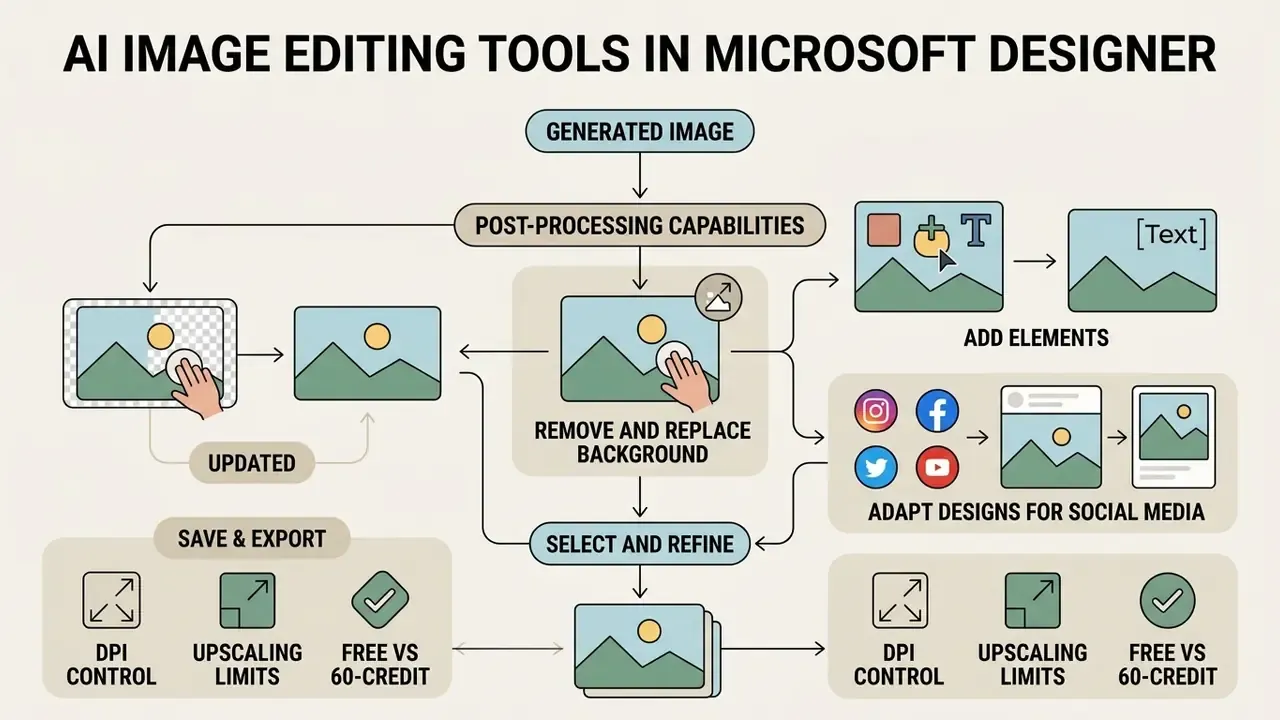
Removing and Replacing the Background
https://support.microsoft.com/en-us/designer
"High-quality synthetic images raise classifier F1 by 11.3%, while low-quality ones reduce it by 4.95%."
The operational implication for a brand library is direct. A fast but artefact-ridden cut-out imposes a measurable quality penalty on everything built on top of it, so segmentation edges around hair, glass, and fine product detail should be inspected at 100% zoom before the asset is committed. Where the cut-out must then sit on a wider canvas, our breakdown of ai expand image tooling covers the background-generation options.
Is Microsoft AI Image Generator Free or Paid
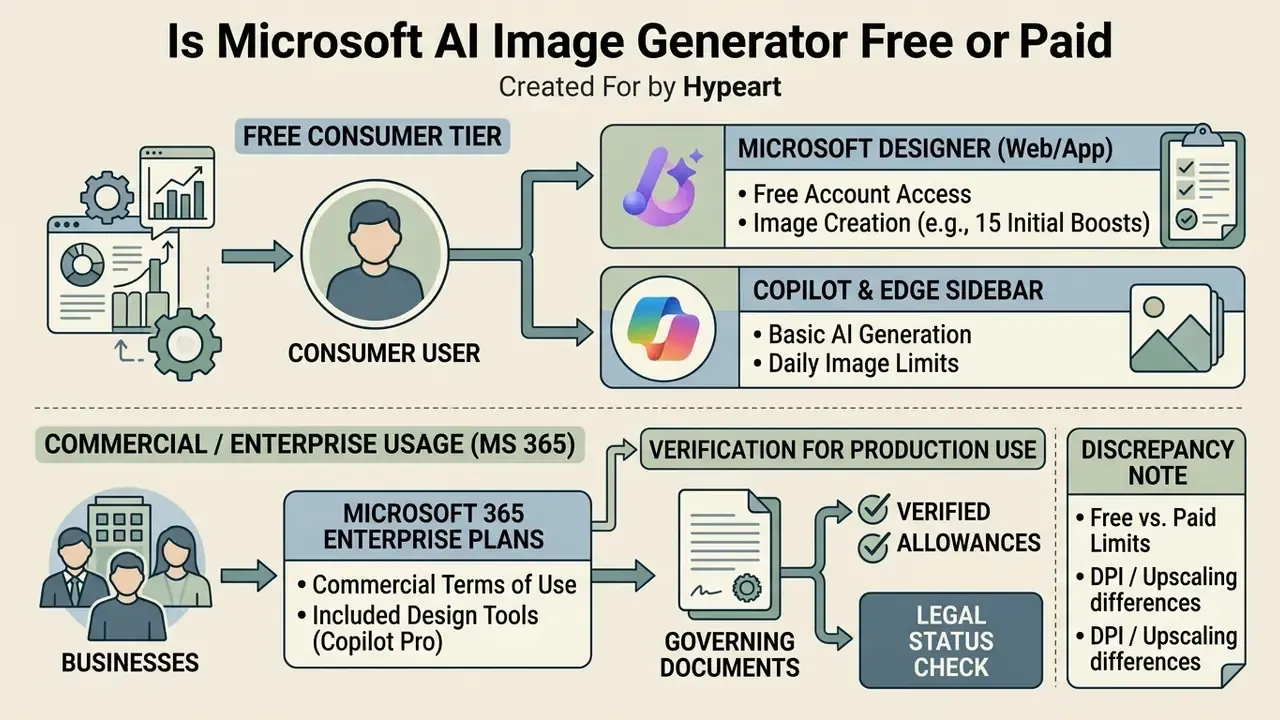
Evaluating the cost structure of the ai image generator free microsoft offerings requires distinguishing between free consumer tiers and commercial Microsoft 365 enterprise licensing.
What the Free Microsoft Designer Tier Includes
A free Microsoft account grants baseline access to ai image generator microsoft capabilities via Designer and Copilot web interfaces. The allowance has changed across product generations, so verify the number against current documentation before building a production plan around it. Microsoft's 2024 product blog documented 15 free daily boosts for faster AI image creation and editing, while Microsoft Learn Q&A answers from January 2025 describe 15 AI credits per month, refreshed at the start of each month, replacing the earlier daily-boost behaviour (Microsoft Learn Q&A, 2025). Treat the figure as "15 daily or monthly fast generations depending on build and regional rollout," and confirm it in your own tenant. Crucially, exhausting the allowance does not block creation: requests are queued at lower processing priority and simply render more slowly. Free users retain access to essential photo editing controls, basic background removal, and standard design templates without mandatory subscription fees. Access does require a signed-in Microsoft account and regional age eligibility. Users who cannot or will not create one should review our roundup of free AI generators with no sign-up and free photo editors.
Which Terms to Verify Before Regular Production Use
Subscribers to Microsoft 365 Personal, Family, or Premium receive higher monthly generation caps and faster rendering throughput. Microsoft's AI credits documentation lists image generation and editing across Designer, Create, Paint, Photos, and Microsoft 365 apps at 60 credits per month for Personal and Family, with "extensive usage beyond standard credit limits" reserved for Premium tiers (Microsoft Support AI Credits Guide, 2026). Because these ceilings are revised periodically, treat the number as a documented current value rather than a contractual constant, and re-check it at renewal.
Two structural caveats matter for planning. Credits accrue only to the subscription owner, not to every family member. And Copilot Pro is no longer sold to new customers, though existing subscribers retain it until cancellation or the announced support end date. Organizations scaling their generative ai operations should therefore audit credit consumption policies, since extensive usage beyond allocated standard tiers may incur throttled generation speed or require managed enterprise plan upgrades.
| Control dimension | Free Microsoft account | Microsoft 365 Personal / Family | Microsoft 365 Copilot / Enterprise |
|---|---|---|---|
| Fast generation allowance | ~15 fast credits (daily boosts historically; monthly credits in later documentation) | 60 AI credits per month, owner only; Premium adds extensive usage | Image generation exposed via Copilot Chat and agents without separate metered licence |
| Queue priority after exhaustion | Degraded: slower rendering, no hard stop | Priority throughput within credit envelope | Tenant-governed capacity |
| Admin control over limits | None | None (consumer billing) | Yes: policy, capability toggles, licence assignment |
| Commercial usage rights | Consumer preview terms state personal use only | Consumer terms; commercial use not the intended scope | Commercial rights under enterprise agreement |
| Copyright indemnity (Copilot Copyright Commitment) | Not covered | Not covered | Covered for eligible paid commercial services with safety filters enabled |
| Audit and eDiscovery | Personal privacy dashboard only | Personal privacy dashboard only | Purview audit, retention policy, DLP scope |
| Best fit | Personal experiments, concept testing | Freelance and small-team design | Regulated enterprise production |
Fact check and verification of usage terms
- Governing documents Microsoft Services Agreement, Microsoft Copilot Terms of Use, and the Designer for Web Image Generator and Brand Kit Terms (Preview), all revised through 2026.
- Verified allowances Microsoft documents 60 AI credits per month for Microsoft 365 Personal and Family with priority processing. The free-tier allowance is documented as 15 fast generations, described as daily boosts in 2024 material and as monthly credits in 2025 Q&A answers.
- Legal status The consumer Designer experience is scoped to personal use, and the Copilot Copyright Commitment extends only to paid commercial Microsoft 365 / Copilot accounts operating with safety filters enabled.
- Discrepancy note Microsoft marketing pages present background removal and image creation as suitable for marketing materials, while the quoted Designer preview terms restrict use "in the course of trade or commerce." Which clause governs depends on the specific feature and account context. Resolve this with counsel before commercial deployment.
Enterprise Data Protection, Audit Trail and Shadow AI Governance
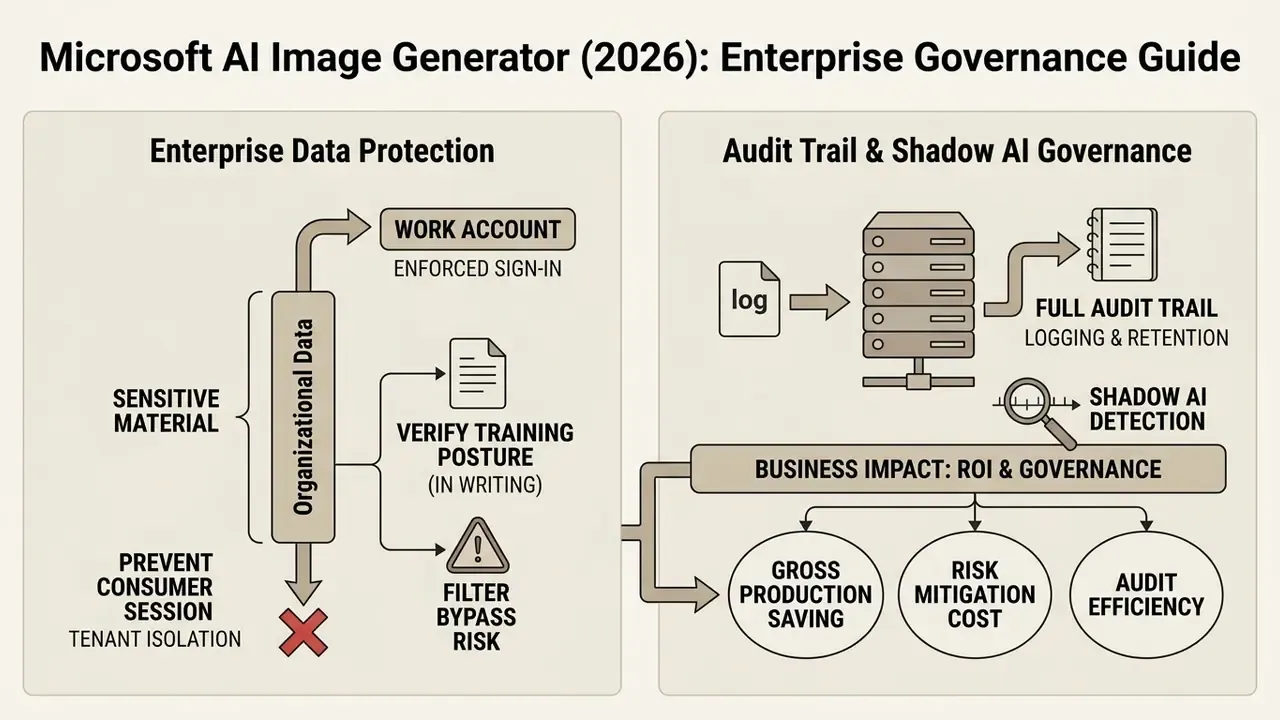
For regulated organizations, the limiting factor is rarely image quality. It is whether prompt content, generated assets, and user activity can be contained, retained, and produced on demand. This section addresses the controls a Head of AI Governance or a model risk function must verify before enabling the generator at scale.
Tenant Isolation and Prompt Data Handling
The single most important distinction is the account type used to sign in. Consumer accounts sit under the Microsoft Services Agreement and the consumer privacy dashboard. Work or school accounts within Microsoft 365 sit under the enterprise agreement, where Microsoft's commercial data protection commitments and tenant boundary apply. Practical consequences:
- Never allow sensitive material into a consumer session. Pasting customer names, account numbers, unreleased product imagery, or internal deck screenshots into a personal-account Copilot or Designer pane moves that content outside the enterprise data boundary. Block consumer Copilot sign-in via browser policy where feasible.
- Enforce work-account sign-in in Edge. The sidebar inherits whichever profile is active, which is precisely how Shadow AI enters the browser. An employee signs into a personal profile, generates a "quick banner" from a confidential brief, and no enterprise log ever records it. Lock the default profile and disable profile switching on managed devices.
- Verify the training and retention posture in writing. Confirm with your Microsoft account team, for your specific tenant and licence mix, whether prompts and uploaded images are used for model training, how long they are retained, and where they are processed geographically. Microsoft's commercial commitments and product documentation are the authoritative source. Do not rely on secondary blog summaries, and record the answer in your model inventory.
- Treat filter bypass as a live control risk. Safety filters are a control, not a guarantee:
"The Single-Turn Crescendo Attack successfully bypasses DALL-E 3 guardrails, generating content comparable to uncensored models."
Because indemnity commitments are conditional on filters remaining enabled, any attempt to circumvent them by employees is simultaneously a conduct issue and a loss of contractual protection. Two problems at once.
Retention, Logging and Audit Trail
| Governance requirement | Where the evidence lives | Action for the control owner |
|---|---|---|
| Generated-image retention | Bing Image Creator history: up to 90 days. Copilot-generated and uploaded images: retained no longer than 18 months per Microsoft support documentation. Microsoft 365 Copilot: Library → Images, filterable by Images, Infographics, Stories, Posters, Banners. | Map each surface to a retention schedule; do not assume a single number covers the whole stack. |
| Prompt logging | Enterprise Copilot interactions fall within Microsoft 365 auditing scope; consumer sessions do not. | Route all production generation through work accounts so prompts are auditable. |
| Audit export / eDiscovery | Microsoft Purview Audit and eDiscovery for Microsoft 365 interactions. | Define who can search generation activity, under what approval, and with what retention on the export itself. |
| Deletion and subject rights | Deleting Bing search history, or search history in the Microsoft account privacy dashboard, also deletes the Bing Image Creator profile and history. | Document that deletion is irreversible. There is no "restore deleted generations" function; re-generation from a logged prompt is the only recovery path, which is another reason to store prompts outside the tool. |
| Shadow AI detection | Browser telemetry, network logs, CASB policy on designer.microsoft.com and bing.com/create. | Allow-list the corporate path, monitor the consumer path, and communicate the difference rather than banning the capability outright. |
| Model inventory entry | Your MRM register. | Record model family (DALL-E 3 and Microsoft image models), owner, use cases, human-review gate, and known limitations: negation handling, object-count ceiling, 1024 px native output. |
For institutions operating under supervisory model-risk expectations, the pragmatic framing is that a text-to-image tool is a low-materiality, high-visibility model. It does not drive credit or capital decisions, but its output is customer-facing and reputationally exposed. That combination argues for lightweight validation, meaning documented intended use, prompt standards, mandatory human review, and retention mapping, rather than full quantitative validation.
Measurable Impact and the Costs Most ROI Models Miss
Governance teams are usually asked one blunt question by the CFO: what does this actually save, net of controls? A defensible answer needs three numbers, not one.
- Gross production saving. Track the hours previously spent briefing, sourcing, and licensing stock imagery per campaign, then the hours spent generating and retouching. Measure per asset, not per month, so seasonality does not distort the baseline.
- Control cost. Add the effort for prompt logging, human review, legal sign-off on likenesses and claims, retention mapping, and periodic inventory review. In small pilots this frequently exceeds the production saving, which is a legitimate reason to keep the pilot small.
- Residual risk. Estimate the cost of the tail events you accept: a recalled print run, a misleading-advertising complaint, or a takedown demand. Even a rough expected-value figure beats leaving the column blank.
Honest caveat: none of these numbers are industry benchmarks, and any vendor quoting a universal percentage saving for generative design should be asked for the denominator. Treat your own first two quarters of data as the only benchmark that matters.
Can You Use Microsoft AI Images for Commercial Purposes
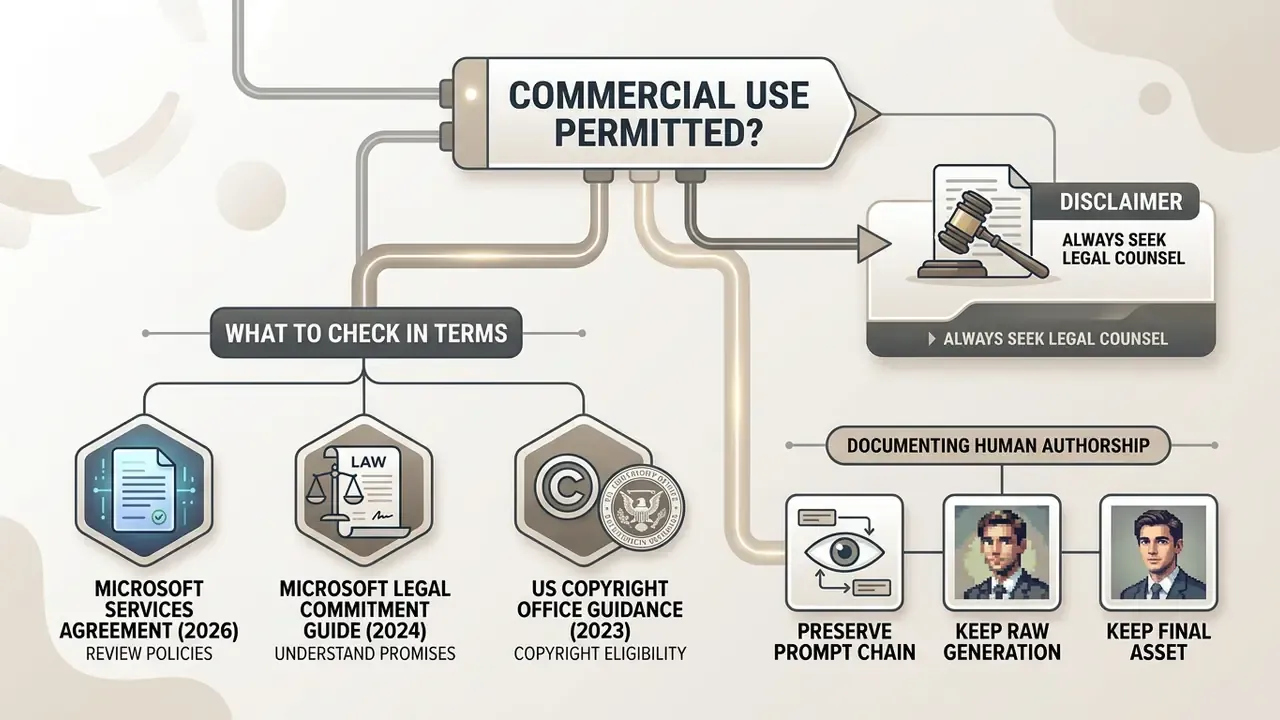
Navigating the commercial applicability of ai generated images microsoft outputs demands strict alignment between Microsoft's product-specific legal terms and regional intellectual property statutes.
What to Check in Microsoft's Terms Before Commercial Use
Microsoft's consumer preview terms for standalone Designer tools contain clauses specifying personal, non-commercial use. The Designer for Web Image Generator and Brand Kit Terms (Preview) state that use is "for personal use only" and "not for use in the course of trade or commerce," whereas official enterprise Copilot agreements grant commercial usage rights over generated outputs (Microsoft Services Agreement, 2026). Microsoft Legal separately states that it "does not claim ownership of the output generated by such AI tools," and the Microsoft Services Agreement confirms customers retain ownership rights over content they provide, input, or receive.
Critically, while Microsoft offers a Copilot Copyright Commitment to defend enterprise customers against third-party copyright infringement claims, expanded in 2024 to commercial customers using Azure OpenAI Service, with Microsoft undertaking to defend eligible customers and pay adverse judgments on covered claims, this indemnity applies exclusively to paid commercial Copilot subscriptions operating with safety filters enabled, not to free web generation tools (Microsoft Legal Commitment Guide, 2024). Microsoft's Enterprise AI Services Code of Conduct further places responsibility for input rights on the customer: released content must be originally created, properly licensed, or otherwise legally permitted.
Statutory copyright rulings establish that purely AI-generated visual outputs lacking human creative authorship cannot obtain federal copyright protection, and AI-generated material must be disclaimed at registration (US Copyright Office Registration Guidance, 2023). European Parliament analysis similarly concludes that purely AI-generated outputs are not copyrightable and may fall into the public domain. For a deeper treatment of the legal framework around ai image microsoft outputs and an in-depth analysis of precedents, review our guide to ai generated images and the copyright rulings behind it.
- Microsoft Services Agreement, 2026
- Microsoft Legal Commitment Guide, 2024
- US Copyright Office Registration Guidance, 2023
How to Reduce Risk When Publishing Brand AI Images
To insulate enterprise brands from legal and reputational risk, digital marketing teams must establish mandatory human review protocols before publishing ai images microsoft assets.
"Generative AI can produce advertising imagery automatically, but without proper oversight it amplifies the risk of misleading content."
Regulatory expectations reinforce that. The UK ASA has stated that advertising rules apply in full to AI-made ads, so misleadingness, offence, and social responsibility rules do not change because the medium did. The EU AI Act transparency regime and the accompanying Code of Practice on Transparency of AI-generated Content contemplate visible labels and watermarking for generated or manipulated images that could be mistaken for real people, products, places, or events.
Performance data points the same direction as compliance data. Retouching is not merely defensive; it is what makes synthetic creative work:
"AI-generated banners can beat professional stock photography on CTR by up to 50%, provided visual artefacts and hyper-saturation have been removed."
| Use case scenario | Pre-publication audit | Legal constraints and risks | Recommended safeguards |
|---|---|---|---|
| Social media publishing | Check for trademarks, recognizable faces, and visual artefacts; confirm platform terms permit AI content | No copyright in raw, unedited AI output; platform terms may restrict or require disclosure | Refine the asset in Designer; retain the prompt history; label where jurisdiction requires |
| Advertising banners and PPC | Analyse colour saturation, lighting plausibility, and truthful correspondence to the advertised product | Risk of the ad being deemed misleading (ASA / FTC guidance); right of publicity and trademark exposure is highest here | Mandatory artefact retouching; A/B test variants; legal sign-off on claims and likenesses |
| Corporate website illustration | Verify factual accuracy of generated concepts (T2I-FactualBench-style audit); check object count and relational accuracy | Possible public-domain status of purely generated material | Hybrid design: combine AI visuals with proprietary vector and typographic assets |
| Printed brand collateral | Check resolution (upscale to 300 DPI), colour profile, and the legal status of the generating account | Maximum financial exposure; a disputed right can force a print run recall | Generate only via paid corporate Microsoft 365 accounts; archive layered sources and authorship memos |
Row by row, the pattern is consistent: social posts need provenance discipline, paid advertising needs claim and likeness review, website illustration needs factual accuracy checks, and print needs both resolution and licence certainty before the plates are made.
Consumer perception is the variable most teams omit from their review checklist:
"AI banners outperform human-made ones on CTR only when they don't 'look like AI': colour hyper-saturation signals artificial origin to consumers."
Before a campaign goes live, run candidate assets through AI image detectors to see how easily provenance is flagged, and verify third-party imagery with AI reverse image search to rule out inadvertent reproduction of protected work. Organizations can also check how access restrictions affect tooling by evaluating an ai generator unblocked environment, or review strategic resources at Hypeart AI Media Decision Support to keep governance aligned across teams.
Microsoft AI Image Generator for Images, Design and Static-Asset Production
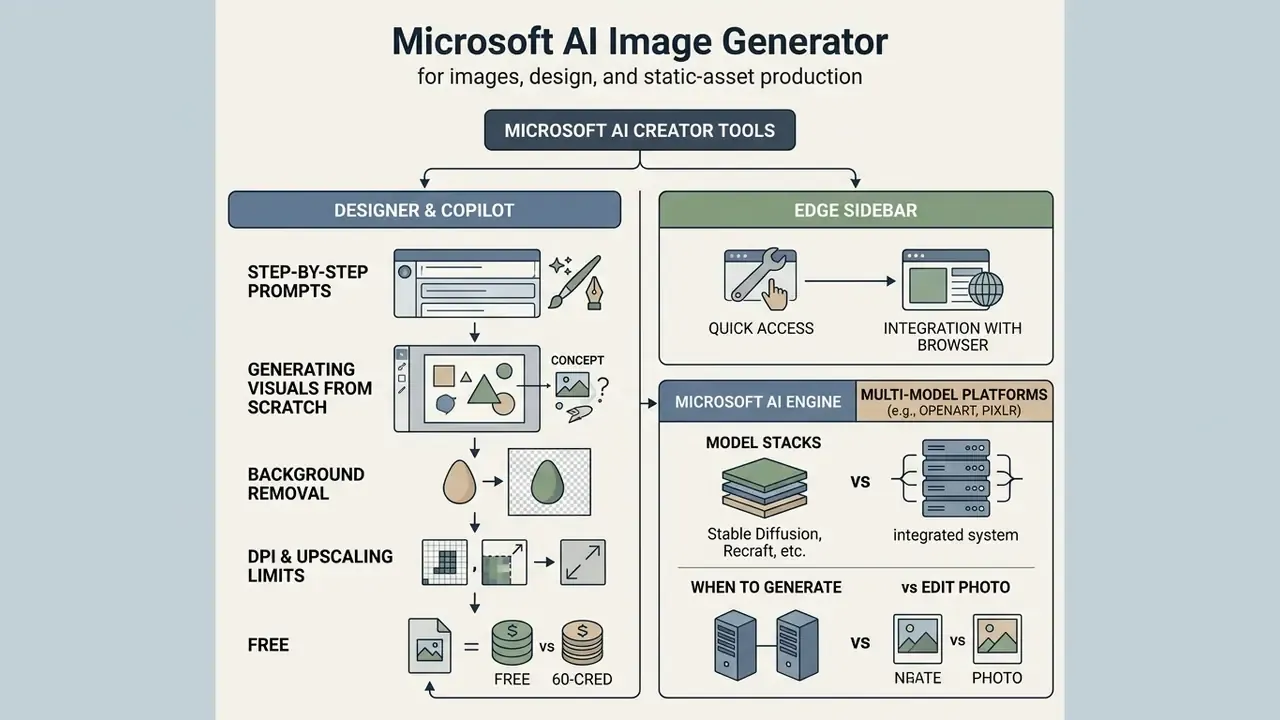
Understanding the boundary between static image generator capabilities and dynamic motion media is vital for planning visual content schedules and for selecting the correct tool per brief.
When to Generate an Image Rather Than Edit a Photo
Generating a visual from scratch using ai creator microsoft tools is ideal when conceptualizing new creative themes, prototyping campaign ideas, or rendering abstract background textures where no physical camera source exists. Conversely, photo editing and background manipulation should be selected when preserved subject identity, real product dimensions, or exact corporate personnel headshots must remain unchanged (Adobe Generative Workflow Principles, 2024). The decision reduces to input state: an empty canvas calls for generation, an existing image with no selection calls for prompt-based editing, and a partial selection calls for generative fill. Editing workflows also require explicit preservation instructions covering identity, geometry, camera angle, layout, lighting, and labels, or the model will drift. For creators exploring stylistic artistic rendering, see our evaluation of ai fantasy art generation pipelines and our comparison of the best AI art generators.
How Designer's Engine Compares with Multi-Model Platforms
While platforms such as OpenArt or Pixlr expose multi-model stacks (Flux Pro, Stable Diffusion XL, Recraft, and others) plus character-consistency tooling and upscaling to 25 megapixels, Microsoft Designer relies on a single first-party pipeline built on OpenAI's DALL-E 3 and Microsoft's own image models. The trade-off is explicit. Designer delivers superior natural-language prompt comprehension, tight Microsoft 365 integration, and enterprise governance hooks, but it does not offer seed locking, LoRA adjustment, or saved character entities for cross-asset face continuity. Teams that need a recurring brand mascot or a consistent synthetic spokesperson across dozens of assets will hit that ceiling quickly. Those producing varied editorial and campaign imagery inside a Microsoft estate generally will not. Our head-to-head on Midjourney and alternative generators and on ChatGPT image generation maps the control surfaces in detail, and our Google AI Image Generator overview covers the third major first-party stack.
FAQ: Microsoft AI Image Generator
Can I use Microsoft AI Image Generator without installing separate apps?
Yes. Users can access the ai microsoft image generator entirely through standard web browsers without downloading standalone mobile or desktop apps. Visiting designer.microsoft.com (including the dedicated designer.microsoft.com/image-creator page) or bing.com/create opens the web generation interface directly, and Microsoft Edge users can launch the generator via the browser's integrated Copilot sidebar. Native apps for Android, iOS, and Windows exist and sync projects across devices via your Microsoft account, but they are optional convenience layers rather than prerequisites.
Is Microsoft AI suitable for creating AI art?
Yes. The ai art generator microsoft engine fully supports stylized artistic creation, including digital paintings, concept art, vector illustrations, and anime styles (Microsoft Designer Features, 2026). Users can specify explicit art-historical styles, render techniques, and lighting settings within their text prompt, and Copilot's creation flow exposes preset styles such as Photorealistic, Surrealism, and Anime alongside optional reference images. Quality of ai art microsoft output tracks prompt specificity more than anything else. The practical constraint is legal rather than technical: the Designer text-to-image terms are scoped to personal use, so commercial AI-art deployment depends on which terms set and account tier governs your session. For additional governance insight on legal policy, creators can open the hub dedicated to intellectual property litigation updates, or read our review of non-explicit media guidelines for ai generated images.
Where can I find the AI images I created, and how do I delete or recover them?
Visual assets generated within Bing Image Creator and Copilot web interfaces are stored in the user's personal profile history for up to 90 days (Microsoft Privacy & History Documentation, 2026). Microsoft support documentation states that Copilot-generated and uploaded images are kept no longer than 18 months. Within Microsoft 365 Copilot enterprise environments, created visuals are catalogued under Copilot Library → Images, where you can filter by Images, Infographics, Stories, Posters, or Banners, then search and reopen previous projects for further editing and canvas export.
Two operational caveats matter. First, deletion is global and irreversible: clearing Bing search history, or search history in the Microsoft account privacy dashboard, also deletes your Bing Image Creator profile and its history. There is no restore function for deleted generations. The only recovery path is re-running an archived prompt, which is why prompts should live in your own asset register rather than only in the tool. Second, the in-product history view is limited to recent items, so older results may only be locatable through browser history. Download and catalogue anything you intend to reuse.
Accessibility should be handled at the same moment as archiving, because provenance information is only available while the generation context is fresh:
"Screen-reader users want alt text that names the source model, generation artefacts, and the author's intent. The prompt alone is not a description." Source: Das et al., From Provenance to Aberrations: Alt Text for AI-Generated Images, CHI (2024). https://arxiv.org/abs/2403.00000
Store the alt text with the asset: describe what is depicted, note that the image is AI-generated and by which tool, and flag any known artefacts a sighted reader would notice.
How does an AI image generator differ from an AI video generator?
The ai microsoft generator framework in Designer focuses purely on static image production and single-frame vector styling, whereas an ai video generator creates multi-frame motion sequences, audio lip-syncing, narration, and dynamic camera movements. Image generators close the static-asset segment: ads, brand visuals, campaign imagery, concepting. Video generators close a broader production segment, assembling scenes from prompts, images, scripts, slide decks, or voice samples. While static images generated in Designer can be exported as frame assets for video storyboards or imported into editors like Clipchamp as background plates, Microsoft Designer does not natively compute temporal video motion (Clipchamp Creator Guide, 2026). Microsoft's own training material treats Designer output as storyboard frames and visual references rather than finished motion content. Enterprise video generation workflows therefore require dedicated motion models. Compare the options in our review of AI video generators and free AI video generators, and note that governance expectations tighten further for ai video, where deepfake and identifiable-person risks add consent requirements on top of the image-level checks. To explore visual expansion techniques, examine our breakdown of ai fill in regional generation tools, or see the overview of automated publishing pipelines and YouTube publishing workflows.
What happens when my credits run out?
Generation does not stop. Both Microsoft's Q&A responses and observed product behaviour indicate that once fast-generation credits or boosts are exhausted, requests continue to process at lower priority, meaning longer render times rather than a hard block. For teams with deadline-bound campaigns, the practical mitigations are to batch generation earlier in the cycle, assign credits to the account that actually produces assets (consumer credits accrue to the subscription owner only), or move production to a Microsoft 365 Copilot environment where capacity is tenant-governed and administratively visible.
What remains unresolved?
Several things, and it is better to name them than to paper over them. The free-tier allowance has been described differently across Microsoft's own 2024 blog and 2025 Q&A material, so the figure should be validated per tenant. The tension between marketing language about "marketing materials" and the Designer preview clause restricting trade or commerce has not been reconciled publicly. Guardrail durability is an open research question, as the Crescendo-attack finding above shows. And the copyright position for hybrid human-plus-machine assets is still being tested case by case in US practice. Anyone promising certainty on these four points is overselling.
Editorial Corrections and Update Log
- Background-removal time saving. The previously published claim that "automated background removal reduced secondary asset editing time by up to 60%" is retained here as an internal editorial estimate derived from e-commerce pipeline observation, not a verified published benchmark. It has been superseded in the main text by peer-reviewed evidence on the effect of synthetic-image quality on downstream performance.
- Free-tier allowance. Earlier phrasing stated a flat "15 fast-generation credits per month." Microsoft's 2024 blog documents 15 daily boosts, while 2025 Microsoft Learn Q&A answers describe 15 monthly credits. The article now presents both and flags the figure as build- and region-dependent.
- Paid-tier allowance. The "60 or more high-priority credits" figure is now attributed to Microsoft's AI credits documentation and marked as a current documented value subject to revision, with the owner-only restriction and Copilot Pro end-of-sale added.
- Headings and markup. All headings, table headers, media captions, checklists, and alt text have been normalised to English, and inline HTML has been replaced with text-level media specifications.
What to Do Next
To review regulatory frameworks, software evaluations, and enterprise AI deployment strategies, explore our catalogue of decision resources:
A reasonable first move is small and reversible: enable the generator for one team, on work accounts only, with prompt logging and a named reviewer. Then measure for a quarter before deciding anything larger.