Executive Summary
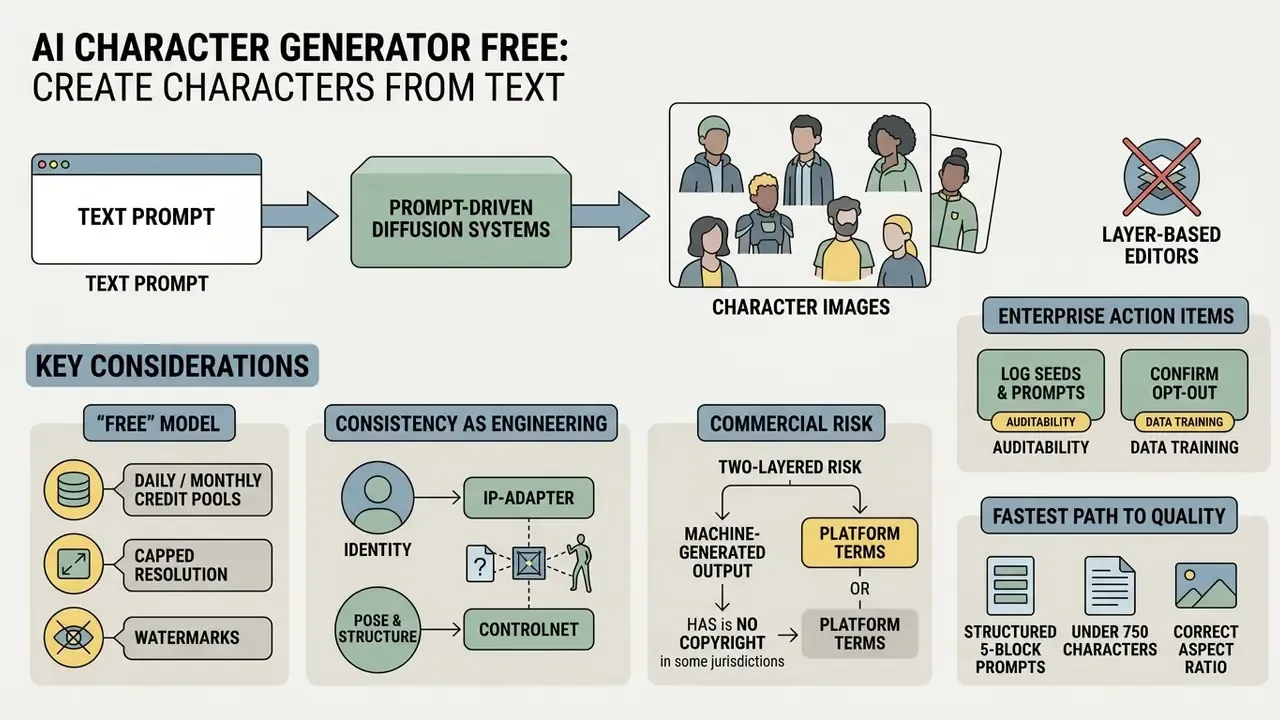
What This Review Decides for You
Most readers arrive with one of five decisions pending, and the sections below are ordered to close them in sequence.
- Category fit.Is a character generator the right tool, or does the job actually call for an avatar builder or a rigged 3D pipeline?
- Cost truth.How many usable images does a free tier really produce before a paywall, watermark, or download block appears?
- Output quality.Which prompt structure, sampler, and aspect ratio combination gets a shippable asset in the fewest attempts?
- Identity stability.What holds one character recognizable across 8, 20, or 50 images without manual repainting?
- Commercial clearance.Can the file ship in a paid campaign, and what evidence must exist before it does?
The last one is where money is lost. A watermarked draft costs an hour. A campaign asset pulled after legal review costs a launch window.
What Is a Free AI Character Generator?
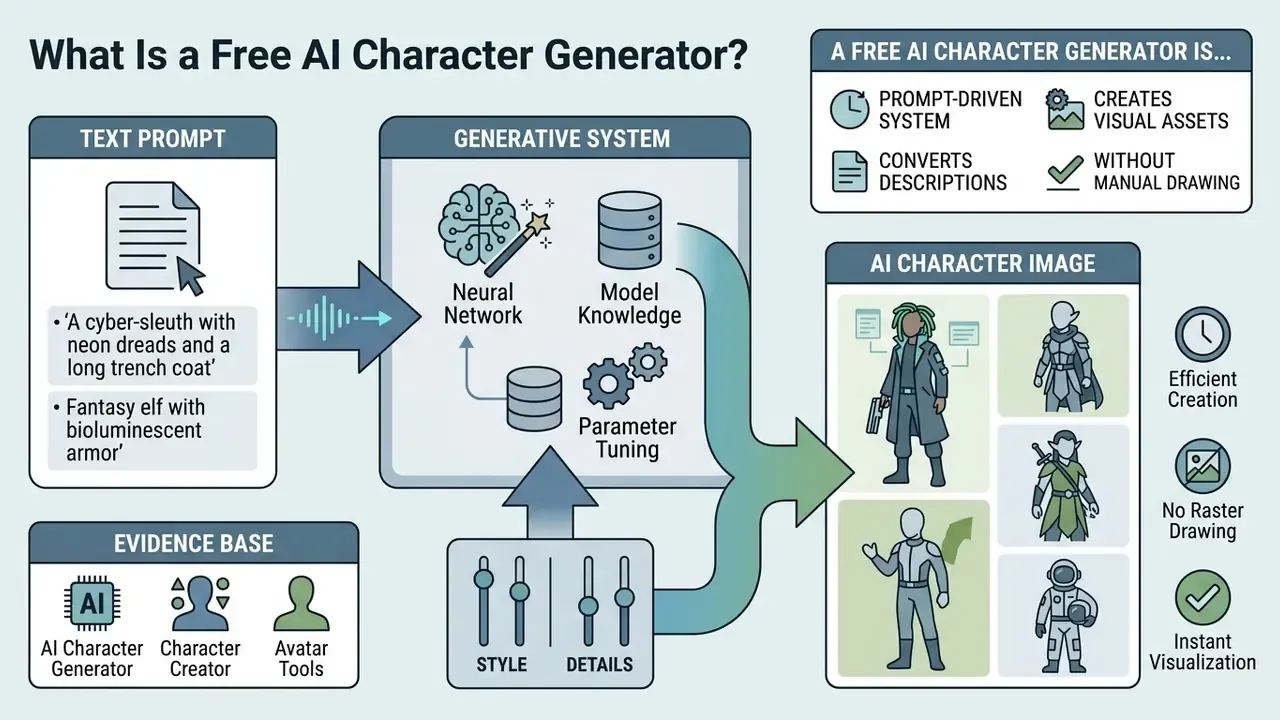
Functionally, the category sits between three neighboring product classes. Traditional graphic editors demand manual composition, retouching, and vector or raster work. Standard avatar builders limit users to preset face, hair, and wardrobe layers. General-purpose text-to-image systems will render any subject, from landscapes to packaging to architecture, while a character generator narrows latent sampling toward human and humanoid subjects. Adobe positions its character tool as a feature inside a broader generative suite, whereas Character.AI treats image generation as a capability attached to a persistent character profile.
From Text Prompt to AI Character Image
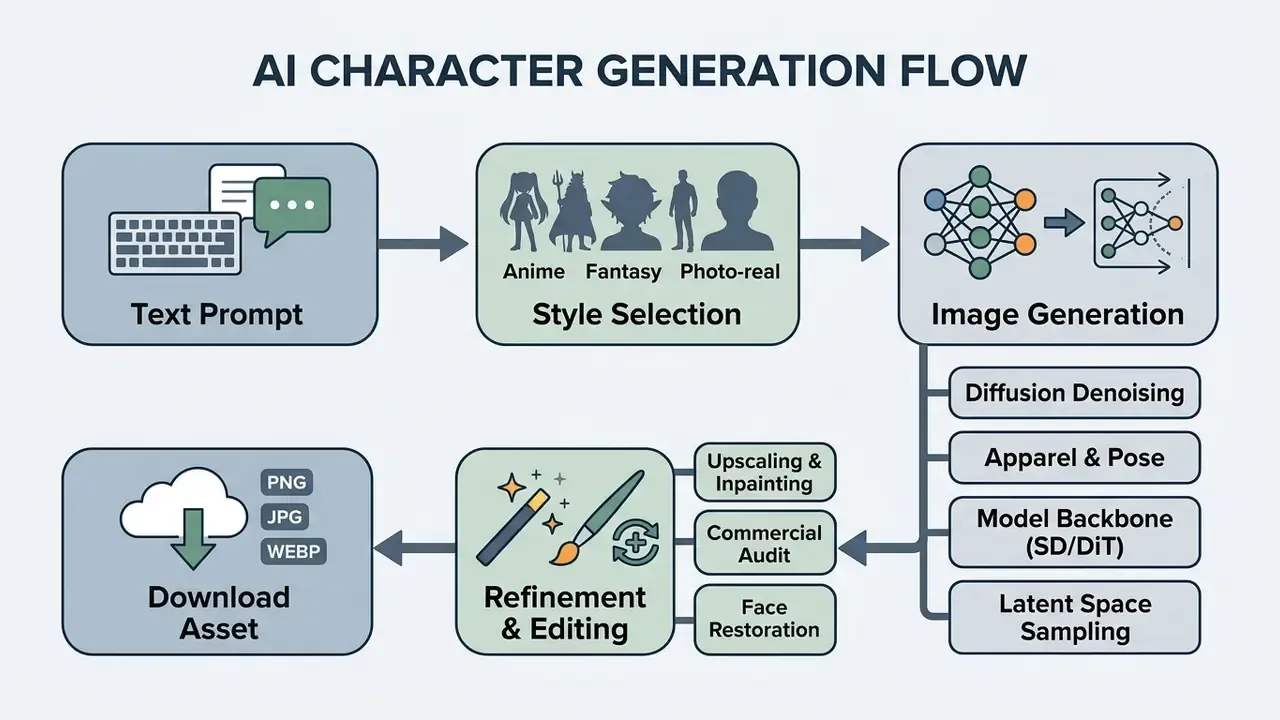
Text prompts act as conditioning inputs that guide text-to-image diffusion models through an iterative denoising process. Modern frameworks transform natural language into mathematical embeddings using text encoders such as CLIP. Those embeddings steer latent diffusion models toward detailed outputs, anything from a fantasy mage to a photorealistic corporate portrait.
Evidence base:
That benchmark study evaluated roughly 15,000 generated images, including dedicated face and motion subsets, against COCO and Flickr30k prompt sets. Which is why its FID and R-Precision figures still work as a defensible reference point for character fidelity rather than a marketing claim.
Structured prompt decomposition, meaning the separation of body traits, clothing, and environment into distinct conditioning paths, is the approach used by current research pipelines. They map body sub-prompts to shape parameters and garment sub-prompts to clothing templates instead of relying on one undifferentiated text string. Spatial controls such as ControlNet pose conditioning formalize that separation by decoupling textual description from layout constraints. (Note: the NIST GenAI Evaluation Plan referenced in earlier drafts is an evaluation protocol, not an accuracy study. See Appendix A.)
For teams building internal benchmarks, that finding has an operational edge: a compact, well-structured prompt suite can rank checkpoints as reliably as an exhaustive one. Validation gets cheaper before rollout, not after.
AI Character Generator, Character Creator, and Avatar Tools
While a general image generator ai produces arbitrary landscapes, architecture, or objects, a dedicated ai character design generator free tool optimizes latent space sampling for human and humanoid anatomy. A specialized character generator ai free tool centers processing on facial symmetry, body proportions, and expressive features. In short, the character generator is a narrowed sampler, not a different technology.
Interactive avatar builders work differently. They rely on pre-rendered 2D layers or structured 3D rigging meshes. Research into agentic frameworks such as SmartAvatar shows how multi-agent language models convert text inputs into fully rigged 3D human avatars (SmartAvatar Study, 2024).
«SmartAvatar coordinates four LLM agents, Descriptor, Generator, Evaluator, and Refiner, to iteratively produce fully rigged 3D avatars from text or a single photograph.»
Choosing between a text-based ai character creator free tool and a 3D avatar engine depends on one question: does the project need rapid 2D concept rendering, or interactive skeletal animation? For 2D concept work, output review is immediate. For rigged 3D assets, the evaluation loop must also cover mesh topology, weight painting, and animation compatibility.
Is an AI Character Generator Really Free?
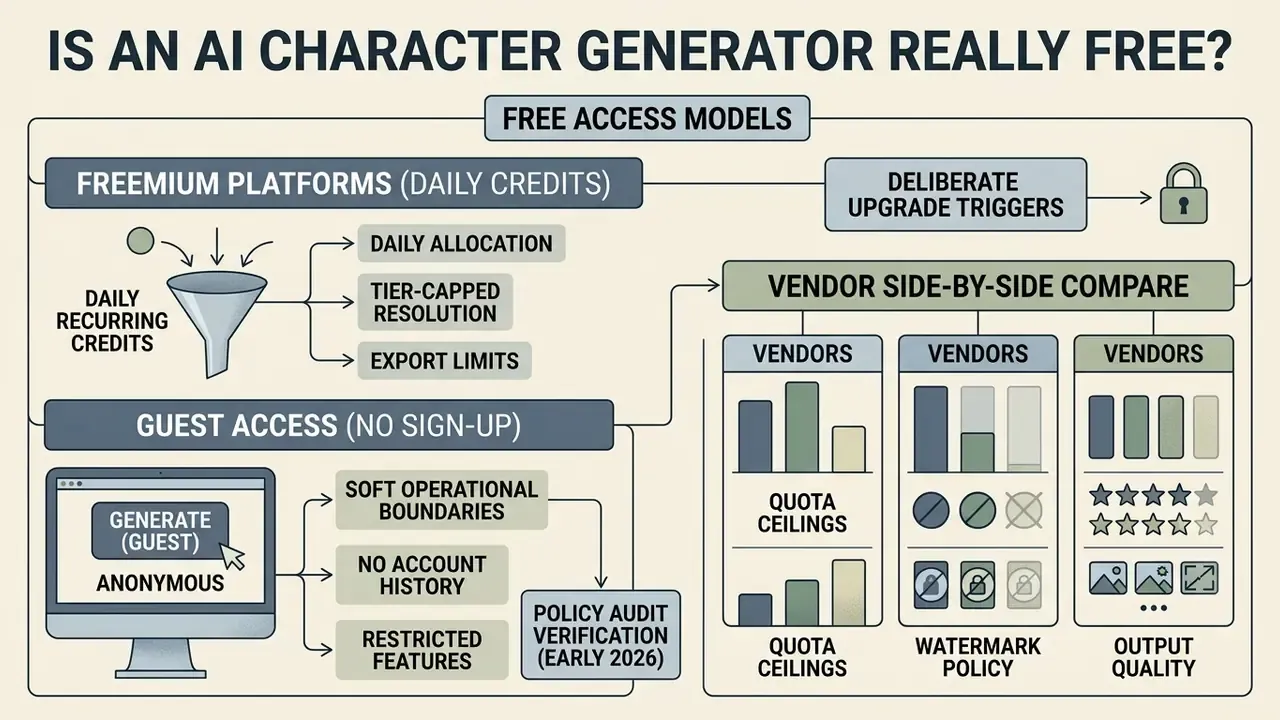
Most free AI character generators run on freemium models with daily recurring credits, tier-capped export resolutions, or guest access carrying deliberate upgrade triggers. Knowing those constraints in advance prevents workflow interruptions halfway through asset production.
Free Access, Credits, and Generation Limits
Platforms advertising ai character generator free unlimited access usually apply soft operational boundaries rather than a hard paywall. Vendors manage compute load through daily credit refreshes, queued rendering priority, or output watermarks.
- Adobe Firefly allocates monthly generative credits to free account holders, refreshing on a recurring billing cycle; credits expire one month after allocation and do not roll over (Adobe Help Center, 2026).
- Meshy provides 100 recurring monthly credits on the free plan (resetting at 00:00 UTC on the 1st), but restricts direct mesh and asset downloads for non-paying users (Meshy Help Center, 2026).
- Venice AI offers a $0 tier granting 15 image generations per day on baseline architectures, reserving high-volume execution for paid tiers (Venice AI, 2026).
- Credit-metered generators some tools price per generation rather than per day. A common pattern grants 10 one-time starter credits while each render consumes 4, which exhausts a free account after two attempts. Two attempts. That is the whole trial.
For a side-by-side look at quota ceilings, watermark policy, and output quality across vendors, compare the field before standardizing on one platform, and review the broader roundup of free AI image generators. Teams modeling per-asset cost at volume can see the overview of usage math, then open the hub to weigh infrastructure spend against budget allocations.
Can You Create Characters Without Sign-Up?
Some platforms let creators create ai character no sign up required, enabling instant guest generation in the browser. Perchance and GenMago both offer anonymous guest sessions for testing prompt variations without registration (Perchance, 2024; GenMago, 2026). A wider roundup of free image generators with no sign-up requirement maps which anonymous tools preserve download rights. The trade-off is real, though: anonymous tiers rarely preserve generation history, store reusable character seeds, or offer canvas editing. They also rarely produce the audit trail an enterprise review will ask for.
| Access Tier Mode | Registration Required | Generation Quota | Download Rights & Features | Editing & History Support | Prompt / Reference Data Used for Training | Opt-Out Availability |
|---|---|---|---|---|---|---|
| Guest Mode | No | 10 to 15 outputs per day or session | Standard resolution (720p/1K), watermarks possible | Session lost on browser refresh; no cloud save | Commonly unstated in anonymous sessions; assume inputs may be retained | Usually none, since there is no account to configure |
| Freemium Account | Yes (free email or SSO) | Daily or monthly credit reset pool | Full web resolution (1K to 2K), standard exports | Saved generation history, basic prompt re-use | Varies by vendor; several consumer tiers permit product-improvement use of prompts | Sometimes available in account privacy settings |
| Paid Subscription | Yes (active billing) | High-volume or unlimited priority | High-resolution (4K to 8K), commercial license | Advanced ControlNet, inpainting, canvas editing | Business and enterprise tiers more frequently exclude inputs from training | Typically contractual, via DPA or enterprise terms |
How to Create an AI Character Free Online
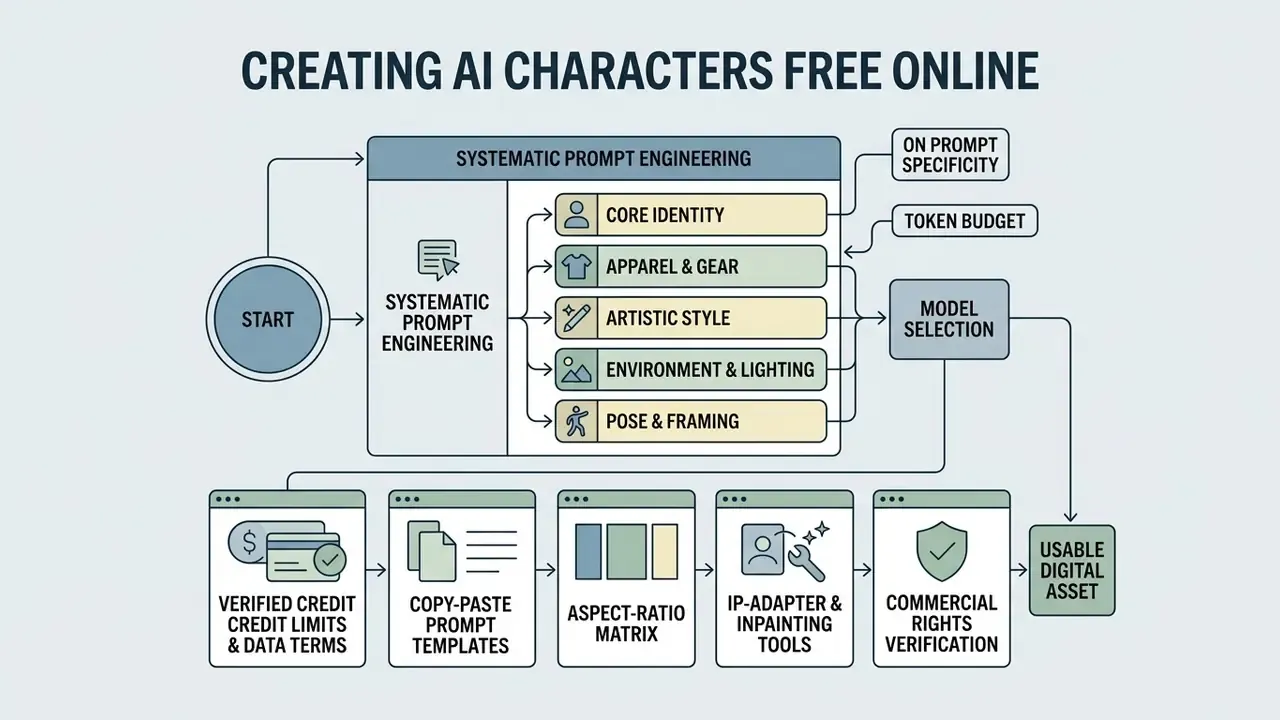
Producing a usable asset through an ai character generator online free workflow takes three things: systematic prompt engineering, appropriate model selection, and post-processing refinement. Skip the third and outputs stay at draft quality.
Describe the Character with a Clear Prompt
Output quality from an ai character generator from text free tool tracks prompt clarity almost linearly. Effective prompts structure descriptors across five categories:
- Core Identityage, gender, ethnicity, hair style, facial structure.
- Apparel and Gearclothing layers, fabric texture, armor, accessories.
- Artistic Styledigital painting, photorealistic, anime cel-shading, oil portrait.
- Environment and Lightingvolumetric lighting, studio background, cinematic backlighting.
- Pose and Framingmedium close-up portrait, full-body action stance, orthographic view.
On prompt specificity: vendor documentation converges on one practical rule. Name the exact lighting condition, wardrobe material, and camera framing instead of stacking generic intensifiers such as "hyperrealistic" or "masterpiece." OpenAI's guidance orders prompts as background and scene, then subject, then key details, then constraints. Google's Vertex AI guidance structures them as subject, context, and style. These are product documents, not peer-reviewed studies, so treat them as engineering convention rather than measured effect size (OpenAI GPT Image Guide, 2026).
Token budget note: keep prompts under 750 characters, roughly 75 CLIP tokens. Adobe Firefly enforces a hard 750-character ceiling, and most CLIP-conditioned pipelines silently truncate anything past the encoder window. Extra keywords beyond that limit are dropped by the text encoder without touching the latent image. Place core identity tokens inside the first 20 words to preserve conditioning priority.
Choose a Model, Style, and Image Settings
The underlying diffusion model shapes composition and texture. Stable Diffusion 1.5 favors rapid iteration, while SDXL and Diffusion Transformer (DiT) backbones handle fine text rendering and anatomical coherence better. Creators comparing checkpoint families for a specific deliverable can review the best AI image generators before spending credits. Specialized fine-tuned checkpoints steer outputs toward anime or cinematic looks without elaborate prompt gymnastics.
Practically, exotic sampler or guidance tricks are rarely the highest-leverage change. Tune guidance scale and step count first, swap checkpoints second, and consider specialized guidance schedulers only after both.
To match visual composition to distribution channel, configure sampler settings against this export matrix:
| Target Platform & Use Case | Aspect Ratio | Native Resolution | Recommended Sampler & Steps | Primary Focus / Framing |
|---|---|---|---|---|
| TikTok / Reels / Shorts | 9:16 | 1024x1820 px (upscaled to 4K) | DPM++ 2M Karras (25 to 30 steps) | Vertical full-body or upper-torso portrait |
| YouTube / Desktop Games | 16:9 | 1920x1080 px | Euler a (30 steps) | Environmental wide shot, action scene |
| Instagram Grid / Avatars | 1:1 | 1024x1024 px | UniPC (20 to 25 steps) | Centered close-up face portrait |
| Character Concept Sheets | 3:4 or 2:3 | 1536x2048 px | DPM++ SDE Karras (35 steps) | Orthographic full-body turnaround |
| Print / High-Res Artbooks | 4:3 or 3:2 | 2048x1536 px (upscaled to 8K) | DDIM (40 steps) | Complex multi-element cinematic composition |
Technical note: when prompt length passes 750 characters (about 75 CLIP tokens), text encoders truncate the remaining descriptors. Most consumer platforms expose six to eight of the ratios above. If a required ratio is missing, generate at the nearest supported ratio and outpaint, rather than cropping identity features out of frame.
Generate, Refine, and Download the Result
Once a base image exists, iterative post-processing turns a raw draft into a production-ready asset.
- Draft generation: execute 4 initial variations from a structured prompt.
- Model selection: choose the appropriate diffusion checkpoint, for example SDXL or a fine-tuned anime model.
- Style and parameter configuration: set aspect ratio, sampler steps (20 to 30), and guidance scale (CFG 7.0 to 9.0).
- Variant selection: pick the candidate with the cleanest anatomical composition.
- Targeted refinement: apply localized inpainting to fix hands or eyes, then run face restoration. Teams needing broader retouching can move the file into dedicated AI photo editors for color grading and blemish cleanup.
- Export and download: upscale to 2K or 4K and export as PNG or JPG.
- Log the run: record the seed, checkpoint hash, sampler, CFG value, and full prompt string alongside the exported file. That is the minimum metadata needed to reproduce an asset during a model-risk or copyright audit.
Refinement research supports this staging. Inpainting quality improves when the masked region is regenerated at higher resolution and downscaled back to target size, and identity-preserving face inpainting benefits from mask-aware refinement rather than a single full-image regeneration pass.
Create Full-Body, Anime, Fantasy, and Realistic Characters
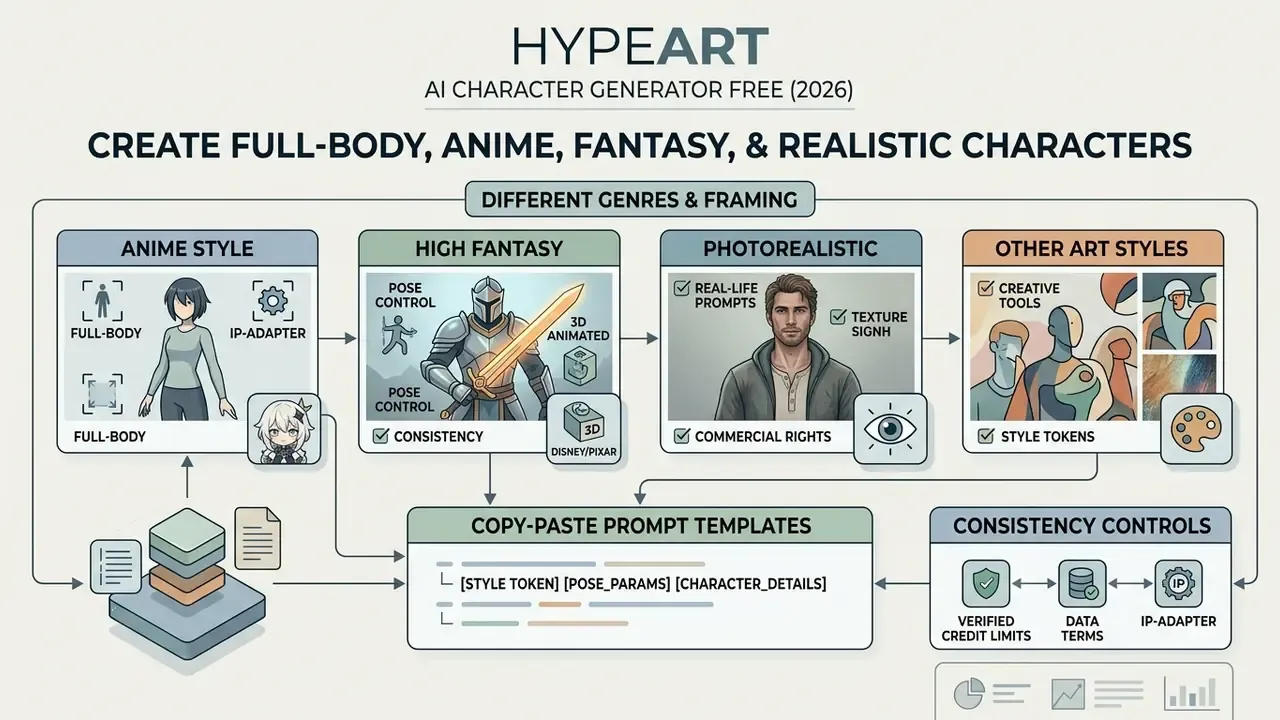
Different visual genres need specific framing parameters and style tokens to render cleanly, without anatomical distortion or unwanted cropping.
Full-Body Characters, Portraits, and Poses
Full-body generation behaves differently from close-up portraiture. Default diffusion setups tend to crop around the chest or shoulders. To force a full-body view in an ai character generator free full body setup, apply explicit framing descriptors and wider aspect ratios.
Descriptors such as "full-body standing pose," "feet visible on ground," and "orthographic model sheet" push the model to distribute spatial composition across the entire subject (SCAD Character Sheet Guidelines). Professional character-sheet practice reinforces that structure: one large full-body full-color illustration in a relaxed pose, at least two secondary full-body poses, three to six expression studies, and front, side, and back turnarounds to lock proportions before any scene work begins.
Close-up portraits invert those requirements. Tight framing guidance, meaning shoulders square to the camera, eye-level camera height, and subject gaze toward the lens, produces the most consistent facial geometry. That is also why headshot pipelines behave differently from full-body ones. Creators building professional portrait sets can compare purpose-built AI headshot generators against general character tools. Downstream, clean full-body proportions remain essential for asset extraction, rigging, and sprite slicing.
Anime, Fantasy, Realistic, and Other Art Styles
Style selection changes how the model renders lighting, linework, and texture, and it is the single highest-impact variable in perceived output quality, ahead of prompt rephrasing. Creators exploring the wider stylistic range can review how AI art generators handle style tokens and presets.
- Anime style bold line art, cel-shading, vibrant palettes, expressive eyes. Game-metadata taxonomies classify this as a comic-book style defined by accentuated character features and broad line strokes.
- High fantasy intricate metalwork, glowing runes, layered fabrics, dramatic atmospheric lighting.
- Photorealistic realistic skin pores, subsurface scattering, natural hair strands, precise camera focal depth. A clarification here: photorealism in game and media contexts is better described as conventionalized realism, meaning visual parity with real-world references calibrated for believability rather than absolute physical accuracy. (The 2014 game-metadata citation previously attached to this bullet has been retired as non-representative of 2024 to 2026 diffusion behavior. See Appendix A.)
That result matters because early consistency methods flattened style. Locking a face often forced every output toward the same rendering look. Value-matrix manipulation decouples the two, so one character can appear in cel-shaded, painterly, and photographic treatments without identity drift.
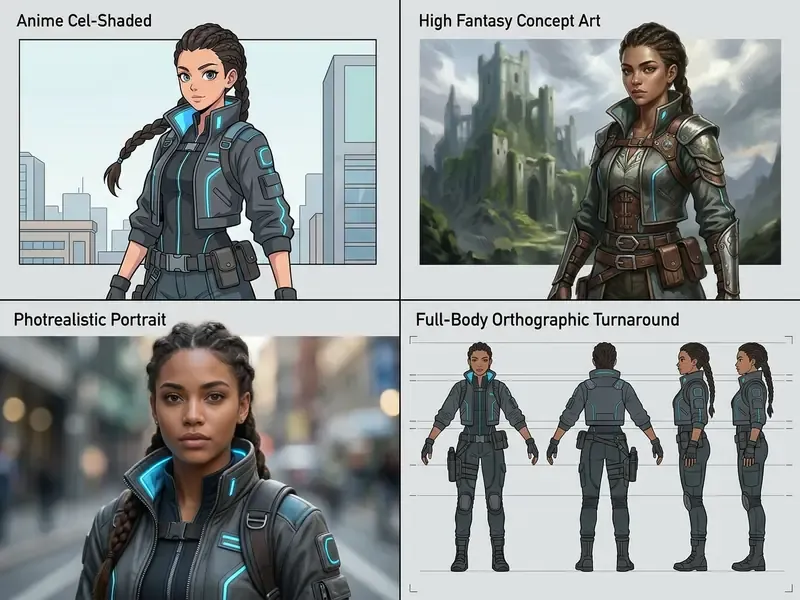
Copy-and-Paste AI Character Prompt Templates
To reach professional aesthetic alignment without endless trial and error, use these pre-tested prompt structures with proven modifier tokens. Each template keeps identity descriptors in the opening clause and pushes render modifiers to the tail, which preserves conditioning priority inside the CLIP token window.
3D animated feature style (Pixar or Disney aesthetic):
Character design of an adventurous young engineer with large expressive hazel eyes, messy auburn hair in a bun, wearing a distressed leather aviator jacket, soft smile, volumetric studio lighting, vibrant color palette, highly detailed 3D render in the style of Pixar and Atey Ghailan, 8k resolution, clean background.Anime or gaming concept (Genshin Impact aesthetic):
Full-body character design of a male spellcaster with silver hair and glowing violet eyes, wearing ornate black and gold layered robes, holding an ancient rune-carved staff, dynamic action stance, anime key art visual style reminiscent of Genshin Impact, sharp linework, cel-shaded lighting, trending on Pixiv.Dark fantasy digital painting (Greg Rutkowski or Artgerm style):
Cinematic portrait of a battle-hardened knight with scars across the cheek, obsidian armor with silver filigree, dark moody atmosphere, volumetric fog, dramatic rim lighting, digital oil painting, highly detailed brushwork in the style of Greg Rutkowski and Artgerm, Dungeons & Dragons character sheet aesthetic.Monochrome ink concept art (Yoji Shinkawa aesthetic):
Full-body tactical operative in futuristic stealth suit, standing pose, high-contrast monochrome ink wash style, visible calligraphy brush strokes, minimalist background, epic composition in the style of Yoji Shinkawa and Yoshitaka Amano, sharp focus.Photorealistic cinematic portrait (Unreal Engine 5):
Ultra-realistic close-up portrait of a 30-year-old female post-apocalyptic explorer, natural skin texture with visible pores and subtle freckles, blue eyes, messy braid, wearing a weathered canvas collar, natural sunlight, shot on 85mm f/1.4 lens, photorealistic render generated in Unreal Engine 5 engine.Painterly illustration (storybook or editorial aesthetic):
Illustration of a curious child with red braided hair, pale freckled skin, large blue eyes, wearing a linen shirt, soft painterly brush strokes, warm ambient light, concept art in the style of Ismail Inceoglu, high detail, 2:3 vertical framing.
How to Keep AI Characters Consistent Across Images
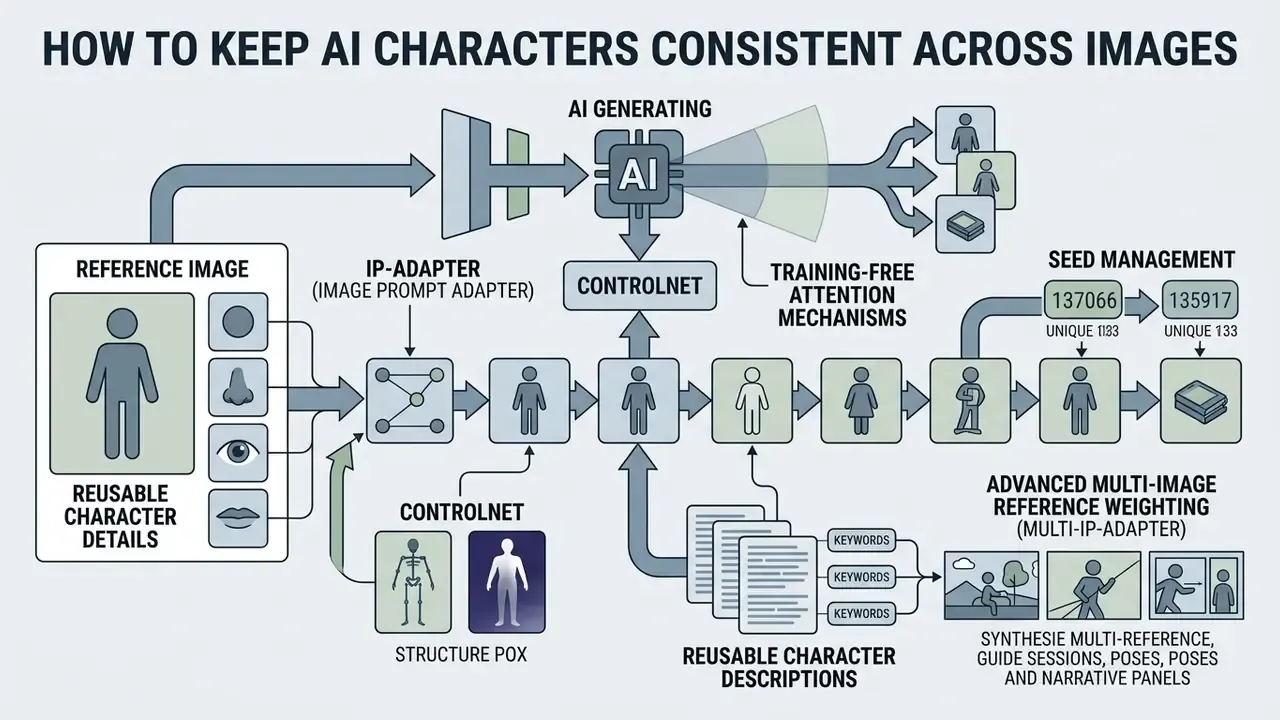
Holding one visual identity for ai characters across multiple scenes, poses, and narrative panels is the hardest part of any generative workflow. Without structural controls, sequential generations drift: facial geometry shifts, hair color changes, clothing details mutate between images.
Use a Reference Image and Reusable Character Details
Consistency across generations comes from combining image-conditioning controls with text prompts:
- IP-Adapter (Image Prompt Adapter): extracts identity features from a source image and feeds them into the diffusion model's cross-attention layers, decoupling identity from environmental prompts. The FaceID variant is trained specifically for facial identity retention across generations (Morphic IP-Adapter Guide, 2026).
- ControlNet
- uses depth maps, openpose skeletons, or line-art extractions to enforce structural pose constraints without altering face or apparel. In production graphs, identity input (IP-Adapter) and structure input (ControlNet) arrive as two separate images, not one.
- Training-free attention mechanisms
- frameworks such as ConsiStory and CharaConsist manipulate cross-image self-attention layers at inference time, letting tokens in one image reference identity features from another (ConsiStory, 2024; CharaConsist, 2025). CharaConsist explicitly targets both continuous shots within one scene and discrete shots across different scenes.
- Seed management
- a fixed seed reproduces a prior result exactly when prompt, checkpoint, and control inputs are unchanged. It is a reproducibility and audit control, not a drift-prevention mechanism. Change the scene text and the seed alone will not hold identity.
- Reusable character descriptions
- canonical text blocks covering face shape, hair, palette, and signature accessories act as prompt-level anchors. Sources consistently rate them weaker than image-conditioned identity methods, so use them alongside a fixed canonical reference file rather than instead of one.
Pose-transfer research marks the current identity ceiling in adjacent territory: alignment-free character animation and image pose transfer methods have been benchmarked at CSIM 0.8172, the highest published identity-consistency figure in that class as of 2026.
Advanced Multi-Image Reference Weighting (Multi-IP-Adapter)
Single-image conditioning tends to degrade identity under novel lighting. Supplying up to 5 multi-angle reference images tightens facial feature retention noticeably. Several consumer platforms already expose this as a plain "upload up to 5 images" control, without explaining the weighting behavior underneath.
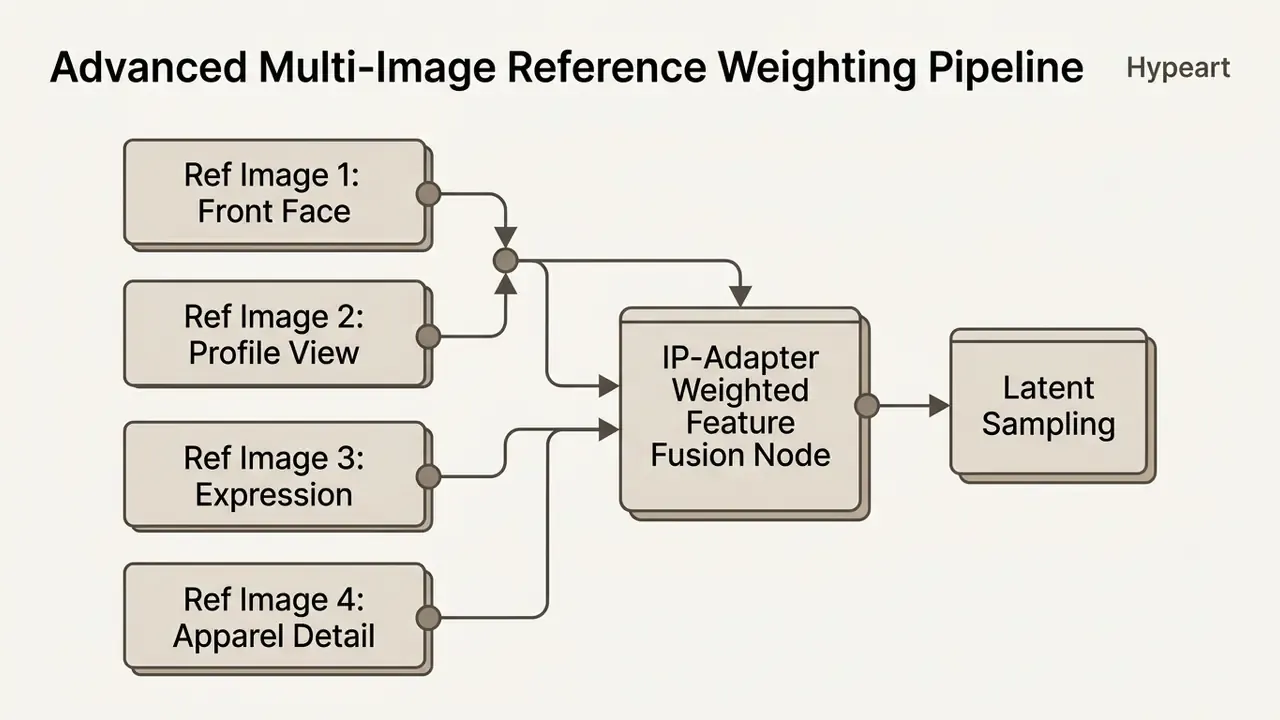
Feed a front portrait, a 45-degree profile shot, an expression study, and a lighting or apparel detail image simultaneously into a Multi-IP-Adapter node pipeline, and facial identity separates cleanly from ambient lighting. Set identity extraction weights between 0.65 and 0.80. Weights above 0.85 cause pose rigidity and artifact bleed, where reference lighting and background contaminate the new scene.
Case framing (illustrative): during an evaluation of generative visual pipelines for enterprise visual assets, a media team integrated IP-Adapter FaceID nodes alongside ControlNet pose maps. The team held character identity across 50 distinct narrative scenes with no visible feature drift. Manual touch-up time fell by roughly 40% against the team's prior baseline. That is a single-team internal measurement, not a published benchmark, so treat it as an indicative scenario pending independent replication. The reproducible part is procedural rather than numeric: a locked canonical reference sheet, fixed seeds per shot, logged prompt strings.
Final polish usually depends on resolution recovery, so pair the consistency stack with AI image upscalers before delivery to print or 4K video pipelines.
Animating Static Characters into Talking Avatars and Lip-Sync Video
Turning a 2D character asset into a dynamic media asset means bridging image generation with temporal audio-driven facial animation. This is where most character workflows stall. The image is finished, but the deliverable is a video.
- Face prep auditmake sure the rendered portrait has a direct front-facing camera angle, an unobscured mouth region, and clear facial symmetry from the initial diffusion step. Hair over the lips, heavy helmets, and extreme three-quarter angles cause most animation failures.
- Audio script integrationupload a clean WAV or MP3 voice recording, or generate synthetic speech with a text-to-speech neural voice model. Match voice to the character's apparent age and register, since mismatch reads as an animation artifact even when lip motion is accurate.
- Facial landmark riggingimport the character PNG into a motion-driven avatar engine such as SadTalker, LivePortrait, or a hosted lip-sync pipeline. The system maps 3D facial mesh points onto the 2D image.
- Temporal lip-sync generationthe engine drives phoneme-to-viseme mapping, animating mouth movement, subtle eyelid blinks, and head tilts in sync with the audio track without distorting character identity.
- Continuity checkrender a 5-second test clip before committing full-length audio. Verify that identity holds at frame boundaries and that jaw geometry does not deform on plosive consonants.
This handoff is what turns a static character library into tutorial video, explainer, and social-series output. It is also the step where free tiers most often impose watermarks or duration caps.
Can You Use Free AI Characters for Commercial Projects?
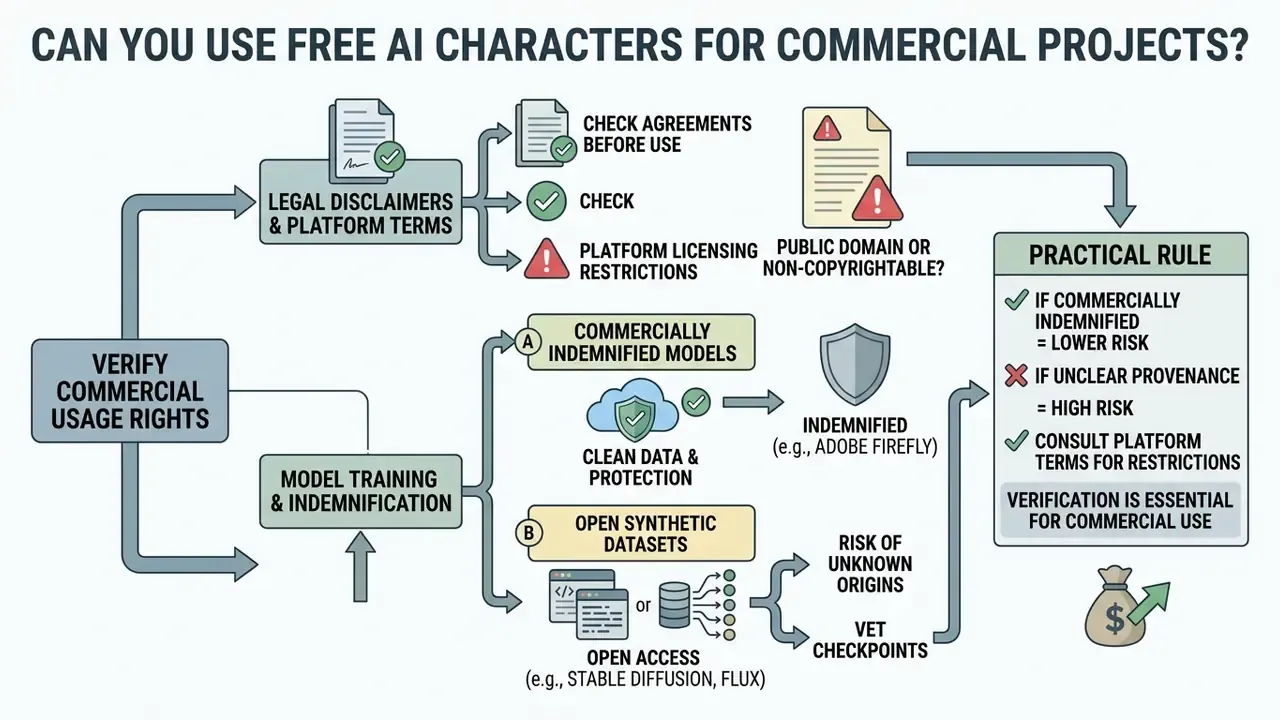
Deciding whether AI-generated characters can ship in commercial media requires reading platform terms of service alongside current intellectual property frameworks. Two independent layers apply: whether the output is protectable, and whether the vendor permits commercial reuse. Fail either layer and commercial deployment stops.
Check Usage Rights Before Downloading Images
Commercial usage rights vary sharply across generative platform tiers.
- Public domain and non-copyrightability: the United States Copyright Office maintains that works created entirely by machine algorithms, without human authorship, cannot be copyrighted.
«In March 2023 the USCO confirmed that wholly AI-generated works are not protected by copyright; mixed works are protected only to the extent of identifiable human authorship.»
The Office's registration guidance requires applicants to identify and disclaim AI-generated portions of a submitted work (USCO Guidance, 2023). EU policy research reaches a parallel conclusion from the other direction: purely AI-generated output with no meaningful human creative input is treated as public domain, while human-authored contributions stay protectable.
- Platform licensing restrictions: even when an output lacks copyright protection, vendor contracts still regulate commercial usage. Recraft restricts free-tier outputs to personal, non-commercial use, and states that free-plan images are public and owned by Recraft, reserving commercial rights for paid subscribers (Recraft Terms, 2026). Character.AI, by contrast, permits commercial reuse across both free and paid plans, subject to baseline terms (Character.AI Pricing, 2026). Other vendors sit between those poles: Scenario limits free-tier output to personal and evaluation use while granting a full commercial license on every paid plan, and Focal restricts its free plan to personal use only. For a structured comparison of licensing language across tools, review commercial use of AI image generators.
Model Training Provenance and Commercial Indemnification
Commercial legal safety depends heavily on the dataset behind the diffusion model.
To evaluate commercial boundaries across platforms, creators can review the AI Media Commercial-Use Hub or compare options on intellectual property policy and active disputes.
Commercial Use for Content, Branding, and Creative Projects
When AI-generated visual assets enter corporate branding, digital publishing, or social campaigns, an IP risk assessment stops being optional.
Beyond copyright, three exposure classes recur in commercial deployment. Trademark: AI-generated names, logos, slogans, and costume insignia need clearance searches before use in commerce. Trade dress: outputs can trigger infringement risk even when training inputs were lawfully used, because similarity is judged on the output. Likeness and digital replica rules: 2026 US policy materials address unauthorized commercial use of AI-generated replicas of a real person's likeness, with carve-outs for parody, satire, and news reporting. Teams converting existing photography into stylized characters should read the image-to-image generator commercial-use guidance before shipping derivative assets.
One illustrative pattern: a corporate design team reviewed 300 AI-generated assets intended for campaign material. By requiring a pre-export term audit and disclaiming non-human generative elements in copyright filings, the group reduced trademark exposure before publication. The operative artifact was not a policy memo but a per-asset record: vendor, tier, license text version, prompt, seed, and human-edit description.
Enterprise Governance, Shadow AI, and Vendor Verification
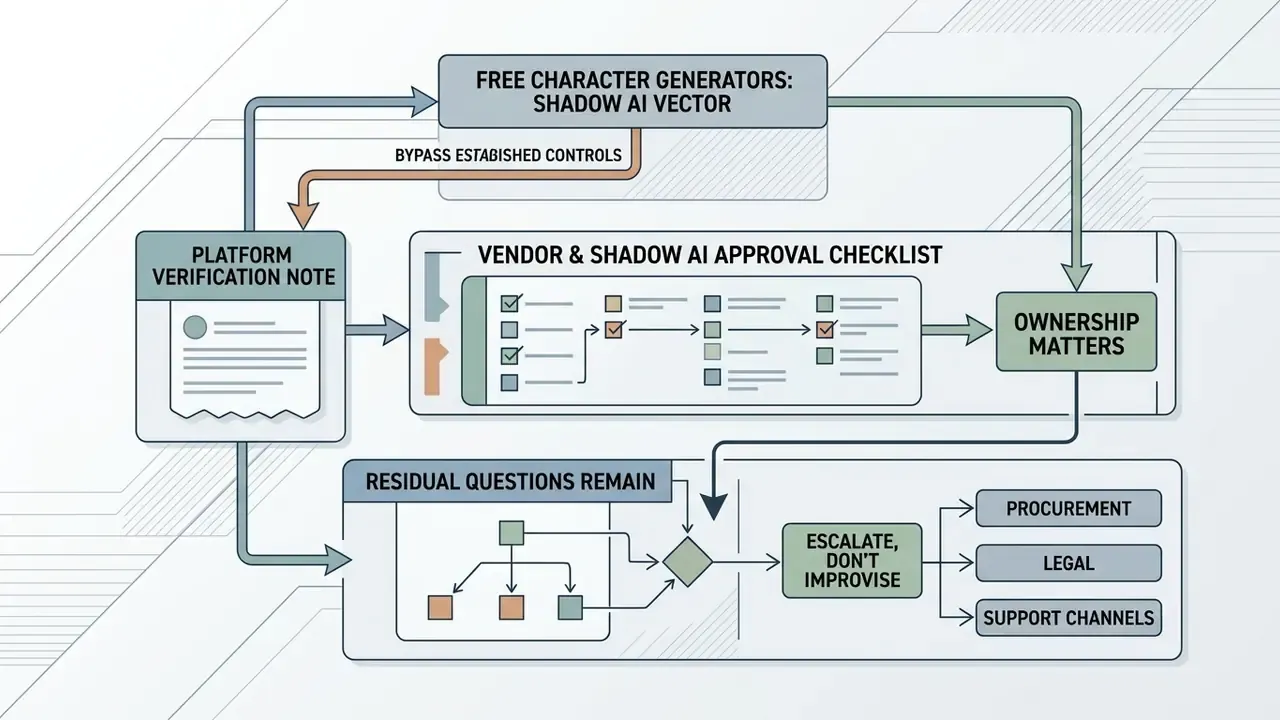
Free character generators are a textbook Shadow AI vector. No procurement, no ticket, one browser tab, and a file upload that may contain unreleased character designs or customer photography. Governance here focuses less on output quality and more on input handling, license provenance, and reproducibility.
Vendor and Shadow AI approval checklist
| # | Control | Pass condition |
|---|---|---|
| 1 | Legal entity verification | Vendor has verifiable registration, working domain records, and published terms of service. |
| 2 | Commercial license clarity | Terms explicitly state whether free-tier output may be used commercially, and who owns it. |
| 3 | Training-data handling | Published statement on whether prompts and uploaded references train models; opt-out or enterprise exclusion available. |
| 4 | Data residency and retention | Documented retention period for uploaded reference images and generated assets. |
| 5 | Reproducibility | Platform exposes seed, model version, and prompt history sufficient for audit reconstruction. |
| 6 | Indemnification posture | Vendor either offers IP indemnification or clearly disclaims it, so residual risk can be priced. |
| 7 | Watermark and export limits | Export resolution and watermark policy documented per tier, preventing late-stage delivery failures. |
| 8 | Human-authorship workflow | Internal process requires and records substantive human editing before copyright filing. |
| 9 | Prohibited-prompt policy | Internal rules bar franchise names, real-person likenesses, and competitor brand assets in prompts. |
| 10 | Asset register | Every shipped asset logged with vendor, tier, license version, prompt, seed, and editor. |
Ownership matters as much as the checklist. Each approved generator should have a named owner, an approved use case, an access boundary, an escalation path for policy exceptions, and a documented way to turn it off. No evidence, no autonomy: a tool that cannot produce a reproducible record of how an asset was made does not belong in a regulated delivery pipeline.
Platform verification note. Company query: hypeart.ai. Verification status: no verified information available regarding commercial operation, active DNS records, or legal registration as of 2026. Any proposed integration scenario remains hypothetical, and the vendor should be treated as unapproved until items 1 to 4 above can be evidenced.
Where residual questions remain, escalate rather than improvise; procurement, legal, and support channels should agree on the exception path before an asset ships. Comparative reviews of the best AI art generators help build a shortlist, but shortlist entries still face the checklist above before employee rollout.
FAQ About Free AI Character Generators
Do You Need Design Skills to Create an AI Character?
No formal illustration or graphic design skill is required. Modern AI character generators run on natural language description. Understanding basic prompt structure, meaning lighting, apparel, and composition, is enough to produce high-quality character art. Peer-reviewed research on prompt journeys reaches the same conclusion: iterative textual refinement, not drawing ability, is the operative skill. Beginners can start with a shortlist of the best free AI art generators and move to controlled pipelines once prompt structure feels routine.
Can You Turn a Photo into an AI Character?
Yes. Using image-to-image (Img2Img) diffusion or inversion-based style transfer, you can upload an existing photograph as a structural reference. The model preserves facial geometry from the photo while applying stylized texture, such as anime cel-shading or fantasy digital paint. On sourcing: the mechanism is documented across a cluster of 2023 to 2025 papers rather than one conference page. Inversion-based style transfer with diffusion models (CVPR 2023) preserves source content while importing a reference style; DiffStyler (2024) applies style locally rather than globally; RB-Modulation (ICLR 2025) performs training-free reference-driven stylization; and 2025 identity-preserving stylization work stabilizes character features across edits. (The generic CVPR landing-page citation used in earlier drafts is retained in Appendix A.)
«ImageRepainter uses GPT-4V to iteratively refine prompts during image regeneration, improving fidelity when reconstructing character identity from a photograph.» Image Regeneration (ImageRepainter, 2024, preprint). https://arxiv.org/abs/2407.09483
Can You Generate Multiple Characters in One Image?
Yes, although multiple distinct characters in a single frame require structured prompting.
«Standard cross-frame self-attention methods lose effectiveness with multiple characters; dedicated multi-subject consistency techniques are required to preserve separate identities.» Storybooth, Training-Free Multi-Subject Consistency (2025, preprint). https://arxiv.org/abs/2501.03689 To prevent visual attribute bleed, where hair color or clothing swaps between characters, use regional prompting tools or assign explicit separate descriptors to each character (NovelAI Documentation, 2026). Documented practice keeps scene and style in a base prompt, moves each character's appearance into its own character prompt, and leaves group count tags (
2girls, 2boys) in the base prompt only, since repeating numbers inside individual character blocks increases cross-character confusion. Narrative-generation research adds a second control: give each character a unique name plus a repeated dedicated seed to hold identity across panels.
What File Can You Download After Generation?
Free AI character generators typically export raster images as PNG, JPG, or WEBP. PNG and JPG are near-universal; WEBP shows up less consistently in character-specific exports than in general image workflows. Free-tier export resolution generally runs from 1080p (1024x1024 pixels) to 2K, with 4K and 8K upscaling reserved for paid accounts. Some platforms advertise up to 8K on paid tiers, others expose 1K, 2K, and 4K selectors with scale factors between 0.5x and 4x. One more thing worth checking: some free plans permit generation but block the download itself, which is a separate restriction from resolution capping.
How Long Can a Prompt Be Before It Gets Cut?
Keep prompts under roughly 750 characters, about 75 CLIP tokens. Anything past the encoder window is truncated silently, which means the model never sees your carefully placed final adjective. Front-load identity descriptors and treat style modifiers as tail content.
Can a Generated Character Be Animated into a Talking Video?
Yes. Export a front-facing portrait with an unobscured mouth region, then drive it through an audio-conditioned lip-sync or talking-photo engine. Render a short test clip first, since free tiers often add watermarks or duration caps that only surface at export.
What Evidence Should a Team Keep for Each Shipped Asset?
Six fields cover most audit requests: vendor and tier, license text version at download date, full prompt string, seed and checkpoint version, description of human editing, and approver name. If a reviewer cannot reconstruct the asset from that record, the asset is not audit-ready.
Appendix A: Superseded Notes and Editorial Revisions
Retained for transparency and version traceability. Each entry records a statement or citation that appeared in an earlier revision, plus the reason it was replaced.
- Superseded citation (text-to-image evidence): "Research demonstrates that diffusion models like Stable Diffusion achieve high text-to-image alignment and low Fréchet Inception Distance (FID) scores when evaluating facial fidelity (Borji, 2023)." Replaced because it omitted numeric metrics and sample methodology. Current text cites the same source with FID and R-Precision findings plus the evaluation corpus.
- Superseded citation (prompt decomposition): "Structured prompt decomposition ... yields higher accuracy than unstructured text strings (NIST GenAI Evaluation Plan, 2025)." Reformulated; the NIST document is an evaluation protocol for image generators, not an accuracy measurement of prompt decomposition.
- Superseded framing (prompt specificity): "Guidance from official prompt engineering frameworks emphasizes specifying exact environmental lighting and subject details rather than using generic buzzwords like 'hyperrealistic'." Retained as engineering convention and relabeled as vendor documentation rather than peer-reviewed measurement.
- Retired citation (art styles): "(SIMM Game Metadata Taxonomy, 2014)" attached to the photorealistic style bullet. Withdrawn as a technical reference for 2024 to 2026 diffusion behavior; the taxonomy remains cited only for its style-category definitions in the anime bullet.
- Requalified metric (consistency case): "This dropped manual touch-up costs by 40% while preserving strict visual compliance." Retained as a single-team internal evaluation result. No published benchmark independently confirms the figure, so it is presented as indicative rather than generalizable.
- Superseded citation (photo to character): "(CVPR Style Transfer Study, 2023)" replaced because the URL resolved to a proceedings index rather than a specific paper. Current text names four dated works covering inversion-based, localized, reference-modulated, and identity-preserving stylization.
- Relocated section: the enterprise governance and platform-verification block previously appeared after the FAQ as a postscript. It now precedes the FAQ, adjacent to the legal and commercial-risk analysis it supports, and has been expanded with a ten-item vendor approval checklist plus ownership requirements.
- Removed anchors: several off-topic internal anchors (game-specific pixel art, parkour video, filter-effect glossary entries) were replaced with topically adjacent references on image generation, upscaling, editing, video generation, and commercial licensing, to preserve analytical tone.
- Removed duplication: the collapsible FAQ summary that restated four earlier answers has been retired. Its two unique items, prompt length and talking-avatar animation, now appear as full FAQ entries, joined by a new question on per-asset audit evidence.
To browse additional technical breakdowns and asset workflows, view the guide.