"In high-stakes video editing and compliance workflows, unverified automation is a liability. Applying a blur effect requires verifiable execution: a defined scope, precise motion tracking, deterministic processing, and complete data auditability."
Modern web-based editing lets teams blur video online directly in the browser, with no desktop install and no procurement ticket for new endpoint software. Standards such as WebCodecs and the W3C WebGPU specification enable client-side frame processing. That means instant redaction of faces, confidential text, license plates, and background elements, while the source file stays on the operator's own device.
Executive Summary
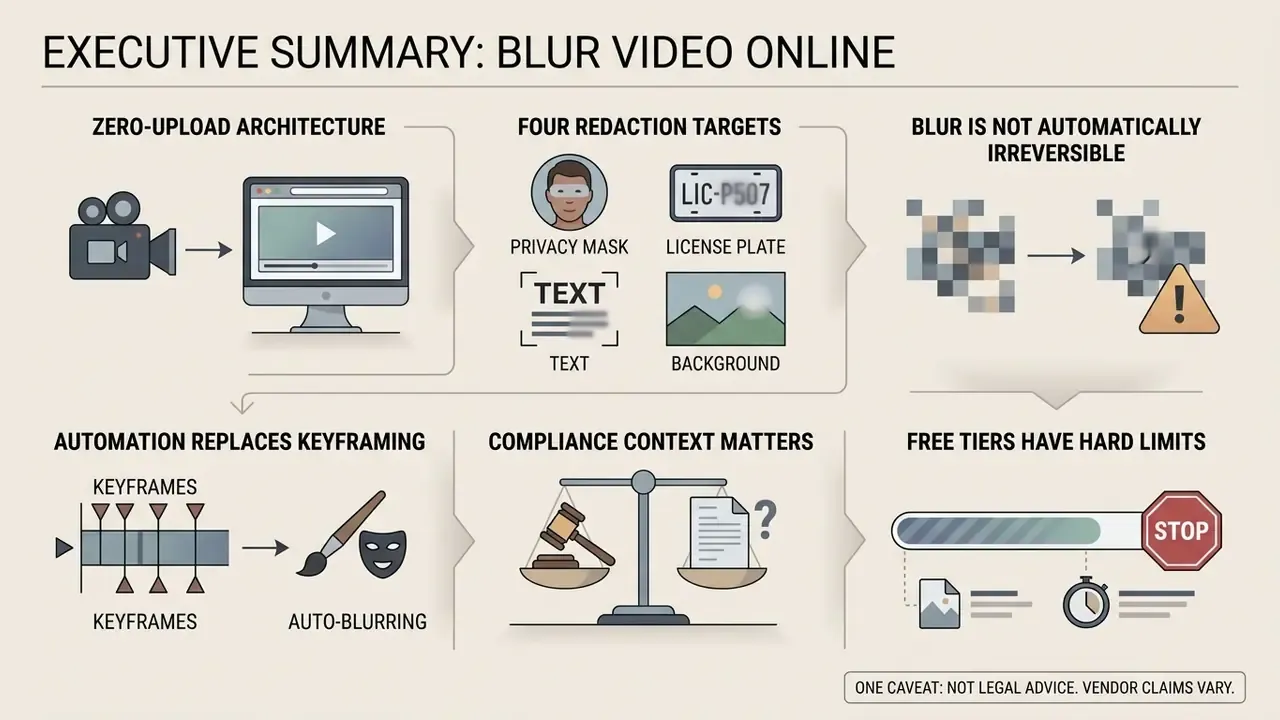
- Zero-upload architecture. Browser editors built on the WebCodecs API, WebAssembly (
ffmpeg.wasm), and MediaPipe decode and re-encode frames locally, so raw footage never has to reach a third-party server. You can verify this yourself in the browser Network panel, which is exactly the sort of evidence a vendor-assessment file needs. - Four redaction targets. Faces, on-screen text and documents, license plates, and arbitrary objects or background regions. Each one has its own recommended effect: Gaussian blur, pixelation, or a solid redaction mask.
- Blur is not automatically irreversible. Low-radius Gaussian blur and coarse pixelation can be partially reversed. Solid opaque masks remain the only non-reversible option for high-sensitivity alphanumeric data such as account or card numbers.
- Automation replaces keyframing. Motion-aware tracking follows subjects through pans, occlusion, and lighting changes. That removes most manual frame-by-frame masking on long-form corporate archives.
- Compliance context matters. Under the GDPR and EDPB guidance, blurring a copy of footage before disclosure is an accepted anonymisation measure, but only if re-identification is no longer possible by reasonably likely means.
- Free tiers have hard limits. Typical caps are 500 MB and 5 minutes per clip on free plans, 1 GB and 10 minutes on paid plans, plus possible watermarks and 720p or 1080p resolution ceilings.
One caveat before the detail: nothing below is legal advice, and every claim about a specific vendor should be re-verified against that vendor's current terms.
What an Online Video Blur Editor Can Do
A browser-based blur video editor online lets users anonymize sensitive information, hide background distractions, and prepare footage for public or commercial distribution. Modern web tools process media frames locally through WebAssembly or GPU acceleration, which reduces processing latency and removes unnecessary server uploads. Interchange stays standards-anchored: the ISO base media file format (ISO/IEC 14496-12) defines the MP4 and MOV container structures that browser pipelines demux and remux.
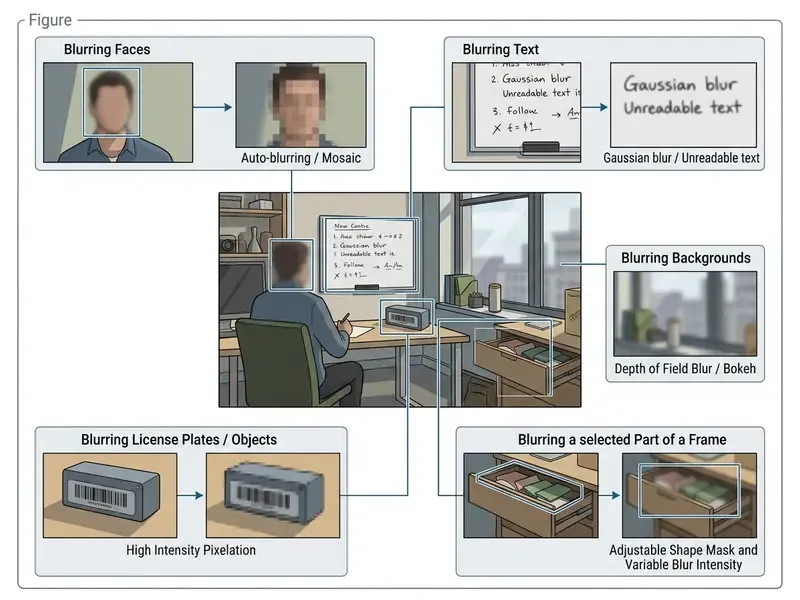
Blurring Faces, Text, Background, and Selected Regions
Selective blurring targets specific spatial regions inside a video frame. The goal is to obscure personally identifiable information (PII) or direct viewer focus. A specialized blur video and photo editor provides tools to isolate faces, license plates, on-screen documents, and background environments.
De-identification research separates two families of techniques: masking (Gaussian blur, pixelation, solid overlays) and replacement (synthetic faces that preserve pose and motion). The distinction matters, because the two carry different residual risk.
Vendor documentation confirms that detection quality, not the blur filter itself, is the limiting factor:
Automatic Tracking of Moving Objects
Modern web applications use AI-driven object detection and correlation tracking to follow moving targets across successive frames. With moving subjects, per-frame detector passes combined with optical flow algorithms keep the blur mask aligned with the target object. Classic implementations run the detector on every frame, then fall back to a correlation-based or colour-based tracker when detection temporarily fails.
A note on savings claims. In enterprise redaction programmes, replacing manual keyframing with motion-aware automatic detection removes the dominant cost driver: per-frame mask correction on long archives. The exact saving depends on shot length, crowd density, and review policy. So treat published percentages as workload-specific rather than universal. Measure your own baseline on a 10-minute representative sample before committing to a volume rollout. A quantified comparison model appears in the ROI table further down.
Automatic License Plate and Dashcam Blurring
When publishing road footage, car reviews, street-view captures, or dashcam recordings, vehicle registration plates must be obscured alongside faces. Computer-vision models identify the rectangular contour and high-contrast character grid of a plate across varying angles, motion blur, and lighting, then apply a tracked mask that stays locked to the plate even at highway speed.
- Dashcam and driving footage automatic plate detection removes the need to scrub thousands of frames of continuous road capture.
- Fleet and transport compliance transport operators and delivery fleets redact plates and driver faces before sharing incident clips with insurers or legal teams.
- Street-view and real-estate video parked vehicles in the frame are anonymized in bulk rather than mask-by-mask.
Research on driving datasets confirms that plate and face anonymization must be calibrated, not maximal:
Plates are small, high-frequency targets. Use a rectangular mask with a slightly enlarged bounding box (5 to 10 percent padding) plus a high blur radius, or a solid mask. A low-radius blur can leave enough residual character structure for automated plate readers to reconstruct the sequence.
Working in the Browser on Desktop and Mobile Devices
Processing video inside the browser removes platform-specific installations and works across Windows, macOS, iOS, and Android. Readers comparing tool categories can review the broader landscape of browser-based video editors before choosing a redaction workflow.
According to the W3C WebGPU specification, modern browsers expose client-side GPU hardware, so matrix operations execute directly on the user's device.
Measured frame-processing throughput sets realistic expectations for mobile users:
Regulatory guidance in the EU points in the same direction as the engineering choice. Client-side processing aligns better with data minimisation and Privacy by Design than server-side upload, because no additional copy of the personal data is created outside the data subject's device.
This architecture means that when you upload your video, the raw frames stay isolated inside local browser memory workers (ffmpeg.wasm or a WebCodecs pipeline). Bandwidth use drops, and rendering speed stays close to native on both desktop and mobile viewports.
Data Handling, Browser Security, and System Requirements
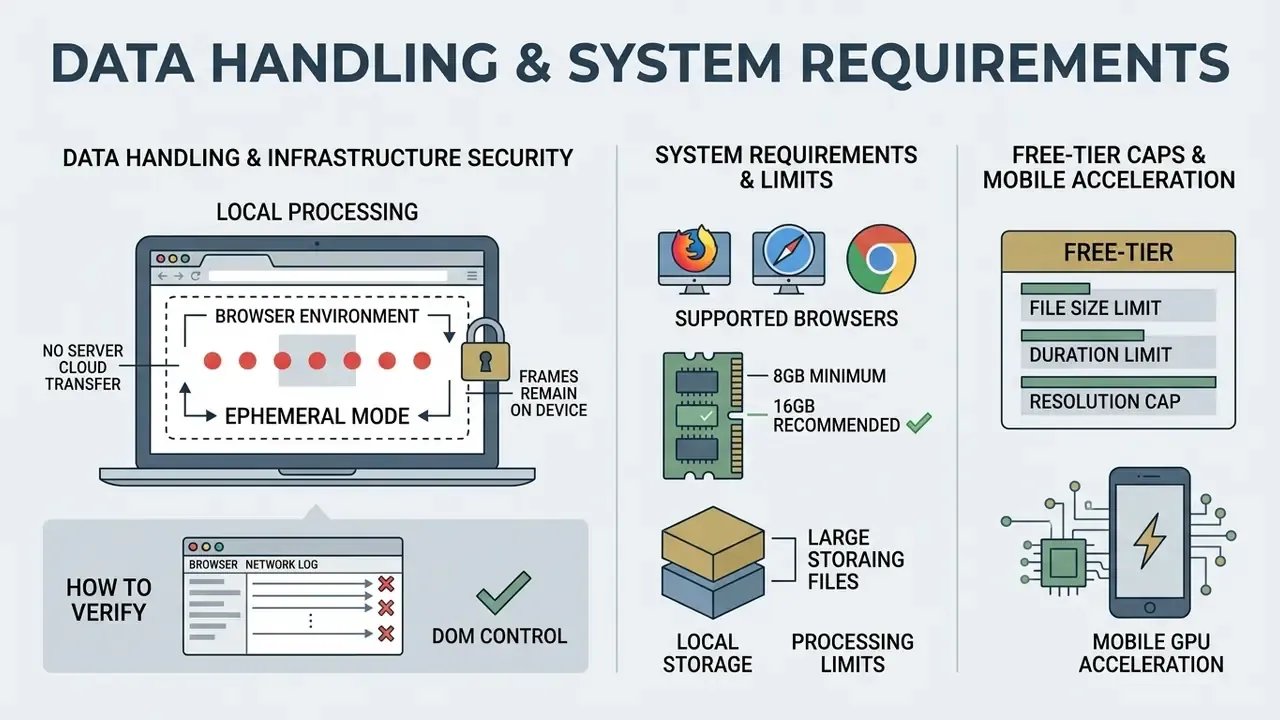
Before a compliance, legal, or model-risk team approves any web tool for confidential footage, two questions need answers: where the frames are processed, and what the device must be capable of. Everything else is secondary.
How to Verify That Nothing Leaves the Device
- Open the browser DevTools Network panel before importing the file.
- Import a short test clip and run the full detect, blur, export cycle.
- Confirm that no multipart upload or
POSTrequest carries the video payload. Only static assets, model weights, and WASM binaries should be fetched. - Repeat the export with the network throttled to Offline after the page has loaded. A genuinely client-side pipeline still completes.
- Document the test with a screenshot for your model-risk or vendor-assessment file.
Five minutes of work. It converts a marketing claim into evidence you can put in front of internal audit, which is usually the difference between a pilot and an approved tool.
Infrastructure Security and Ephemeral Mode
For organizations under strict confidentiality policies, hybrid tools that use cloud microservices for heavy renders should offer an ephemeral mode: session caches, temporary renders, and metadata destroyed immediately after the tab closes or the export completes, with no reuse of files for model training. Transport should be protected with TLS 1.3. Hosting should sit on infrastructure certified to ISO/IEC 27001 for information security management. European hosting plus documented deletion rights is the baseline expected by GDPR-driven procurement, and US banks with EU subsidiaries tend to inherit that bar.
System Requirements and Local Processing Limits
Because frames are processed on your own hardware through WebAssembly, WebGPU, and Web Workers, device capability replaces server capacity as the bottleneck:
- Supported browsers Chrome 94+, Edge 94+, Safari 16.4+, Firefox 130+ (WebCodecs-capable builds). Older browsers fall back to slower canvas pipelines or fail to decode entirely.
- Recommended RAM 8 GB or more for 1080p projects, 16 GB or more for 4K footage.
- Large files for clips over 100 MB, keep the tab active and in the foreground for the whole render. Background tabs are throttled and Web Workers may be suspended.
- Typical free-tier caps up to 500 MB and 5 minutes per video on free plans, up to 1 GB and 10 minutes on paid plans. Because processing is local, there is no fixed server upload limit, only a device-memory limit.
- Mobile GPU acceleration WebGPU shipped on desktop Chrome in M113 and on Android in M121, with Safari and Firefox following in preview channels, so on-device neural tracking is viable on recent smartphones.
How to Blur a Video Online: Upload, Adjust, and Export
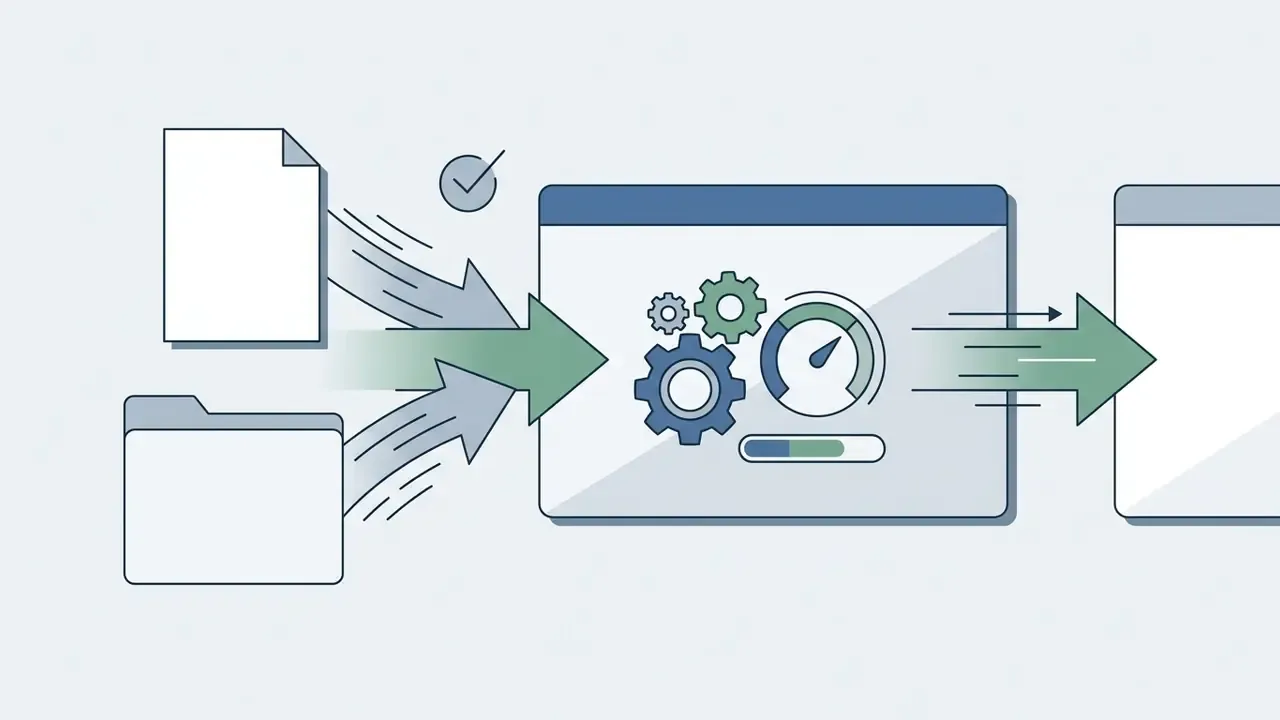
To blur a video online, users follow a structured pipeline: local file ingestion, region mask definition, filter intensity tuning, client-side rendering. A free online video blur tool keeps execution fast while preserving frame fidelity.
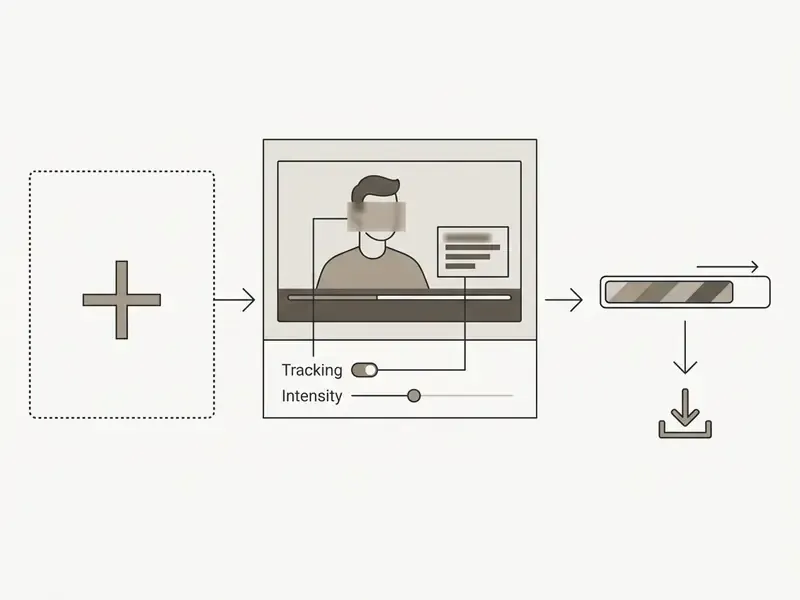
Upload Your Video and Select the Blur Region
The process starts by importing source media into the browser editor interface. Most web tools support standard containers including MP4, WebM, and MOV.
- Click Choose Video or Upload, or drag and drop your media file onto the editor canvas.
- Pause playback on a representative frame containing the target element.
- Select the masking tool (Rectangle, Ellipse, or Custom polygon) and position it over the target area.
- Choose Auto-track for moving subjects or Manual keyframing for static regions, then press Process Video.
Native iPhone and iPad support (MOV and HEVC H.265). Unlike cloud converters that require Apple footage to be transcoded first, a browser editor with a WebCodecs pipeline decodes MOV containers and HEVC (H.265) recordings from iPhone and iPad directly. You import original clips without quality loss and without installing any App Store utility, alongside standard H.264 MP4 files. If your device records in HEVC by default (Settings, Camera, Formats, High Efficiency), no conversion step is needed.
For additional media reference materials, consult the AI Media Glossary.
Adjust Blur Strength and Tracking
Once the mask is placed, adjust the video blur effect parameters to reach the required level of obfuscation. Standard controls include kernel radius (blur strength), edge feathering, and tracking sensitivity.
Consumer editors expose blur intensity as explicit numeric parameters. The Apple Motion user guide documents Amount, Horizontal, Vertical, Inner Radius, Outer Radius, and Mix for blur filters, which lets editors balance privacy protection against visual distortion artifacts (Apple Motion User Guide, https://support.apple.com/guide/motion/motn169f8130/mac). Redaction-specific guidance is stricter about tracking discipline:
| Parameter | Function | Recommended value for privacy |
|---|---|---|
| Blur intensity / Amount | Sets the Gaussian kernel spread | 15px to 30px |
| Feathering / Smoothness | Blends mask edges into adjacent pixels | 10% to 20% |
| Tracking interval | Detection frequency across frames | Every frame (1:1) |
| Mask shape | Boundary contour | Ellipse for faces, rectangle for text and plates |
| Detection sensitivity | Trade-off between misses and false positives | 70% to 80% (raise for crowds) |
| Block size (pixelate) | Quantization grid coarseness | Medium to Large for documents |
SWGDE also notes that subjects closer to the camera may need increased filter intensity, because a fixed radius covers proportionally fewer facial features on a large face. Research on driving datasets reaches the same conclusion from the data-utility side: blur must be strong enough to make features unrecognizable, while keeping the analytical value of the scene.
Export and Download the Processed File
After previewing the applied blur across the timeline, start the export render. The WebCodecs API decodes, modifies, and encodes frames sequentially into an MP4 container using H.264 or AV1, or into WebM using VP9 or AV1.
MDN documents H.264 as the standard codec for MP4 and VP9 or AV1 for WebM, with WebCodecs codec strings such as avc1, vp09, and av01 (Web video codec guide, MDN, https://developer.mozilla.org/en-US/docs/Web/Media/Formats/Video_codecs). Published browser-encoding benchmarks on a 2023 MacBook Pro (M2) at 1080×1080, 30 FPS report roughly 2 seconds to encode a 3-second clip, 6 seconds for 10 seconds, and 18 seconds for 30 seconds. Output resolution is set by the configured encoder, not by the source.
When rendering completes, click Download to save the finalized video to local storage. Then verify the exported file, not just the preview. Preview canvases can mask encoder-level differences, and that gap has embarrassed more than one release process.
How to Blur Faces in Video Online for Free
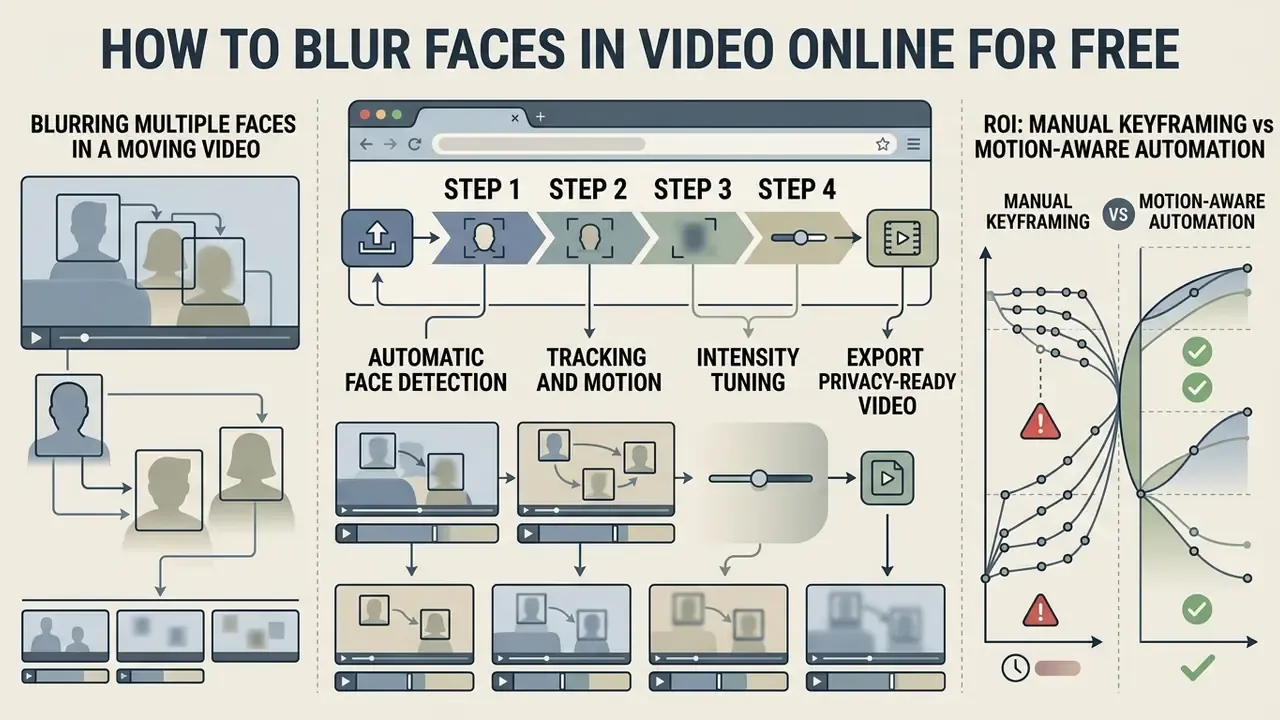
Anonymizing identities in recordings is critical for legal compliance, journalistic protection, and personal privacy. A free online face blur video tool lets creators and compliance teams automatically locate and obscure facial features across complex scenes.
Automatic Face Detection and Selection
Automated AI detectors scan video frames to locate facial landmarks regardless of lighting or angle. To blur face in video online free, algorithms use Convolutional Neural Networks (CNNs) that output bounding boxes around detected heads.
NIST's Face In Video Evaluation quantifies how sharply video accuracy varies with scene difficulty. Rank-1 identification failure ranged from below 1 percent on the easiest dataset to above 40 percent on harder sets, depending on gallery size and capture conditions (NIST IR 8173, Face In Video Evaluation (FIVE), NIST, 2017, https://nvlpubs.nist.gov/nistpubs/ir/2017/nist.ir.8173.pdf). The practical implication for redaction is the mirror image: detection reliability degrades with low target resolution, extreme pose, and occlusion. Human review stays mandatory.
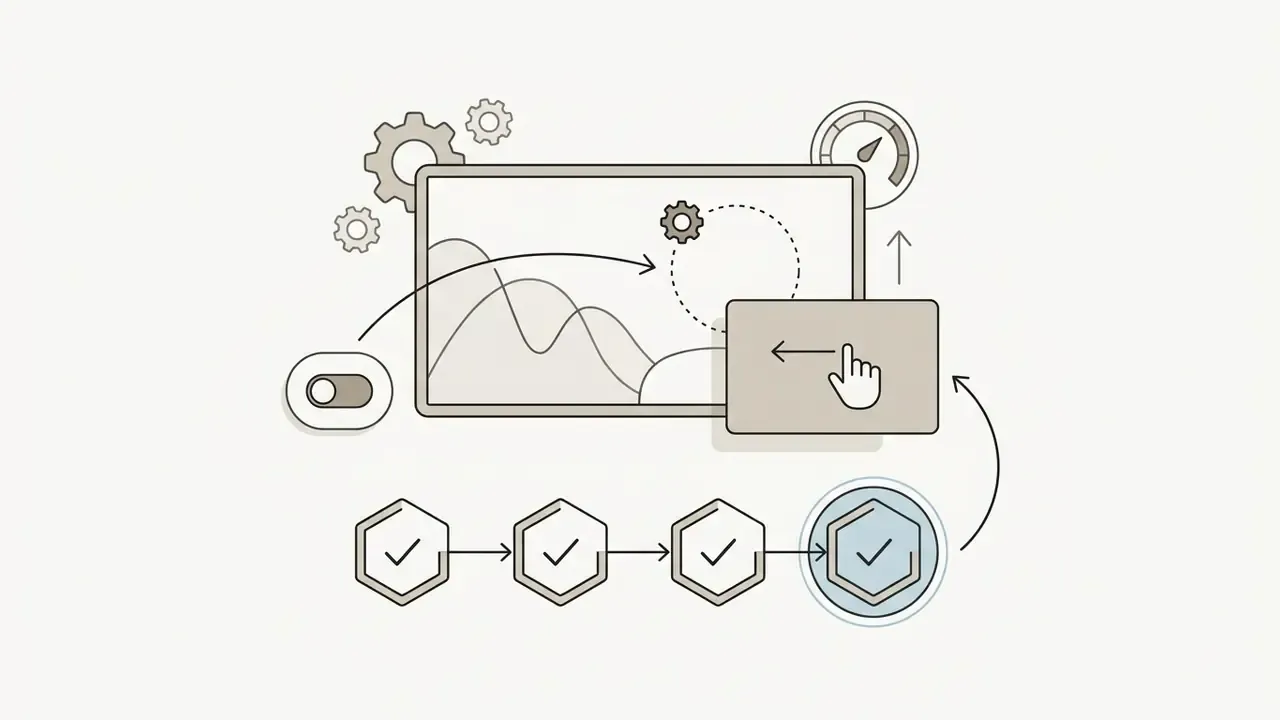
That fourth step is where most teams learn how good their detector really is.


Blurring Multiple Faces in a Moving Video
In crowded scenes, multiple subjects move unpredictably, cross paths, and temporarily disappear behind objects. A robust blur face video online utility maintains independent motion vectors for every isolated target, so you can blur faces in video online free without re-drawing masks after each pan.
The recurring failure modes in dense footage are documented in the multi-object tracking literature: occlusion from crowding, abrupt appearance change between adjacent frames during viewpoint shifts, and identity switches under dynamic camera motion. Recent methods counter these with occlusion-aware association and Kalman-filter updating (CVPR, 2026) and with camera-motion compensation plus pseudo-depth cues to reduce ambiguous matches (arXiv, 2025). For a review workflow, that translates into three concrete controls: check every shot boundary, check every frame where two tracked subjects overlap, and check the first and last 10 frames of each subject's appearance.
To evaluate additional workflows and automation options, explore AI Media Pricing structures, review options in AI Media Comparison Matrices, or compare free video editing software with tracking support.
ROI: Manual Keyframing vs Motion-Aware Automation
For large archives (branch CCTV, training libraries, bodycam exports) the cost model is driven by review minutes per footage minute, not by licence price. Executives who skip that distinction tend to under-budget the review headcount by a wide margin.
| Workload factor | Manual keyframing | AI detection + motion tracking | Notes |
|---|---|---|---|
| Mask creation | Per subject, per shot, per frame | One pass per clip | Detector produces all initial boxes |
| Editor time per footage minute | High (multi-minute) | Low (review-only) | Measure on a 10-minute sample |
| Consistency across shots | Operator-dependent | Deterministic per model version | Log model version for audit |
| Failure mode | Missed frames from fatigue | Missed detections under occlusion | Both require frame-level QA |
| Scaling to 100+ hours | Linear headcount growth | Linear compute, flat headcount | Batch or API path recommended |
| Auditability | Manual notes | Detection logs + settings export | Store settings with the render |
For integrating automated redaction into an existing pipeline, refer to the AI Media API Guides, and use AI Media Calculators to model per-hour processing cost before a volume rollout.
How to Blur Part of a Video, Text, or an Object
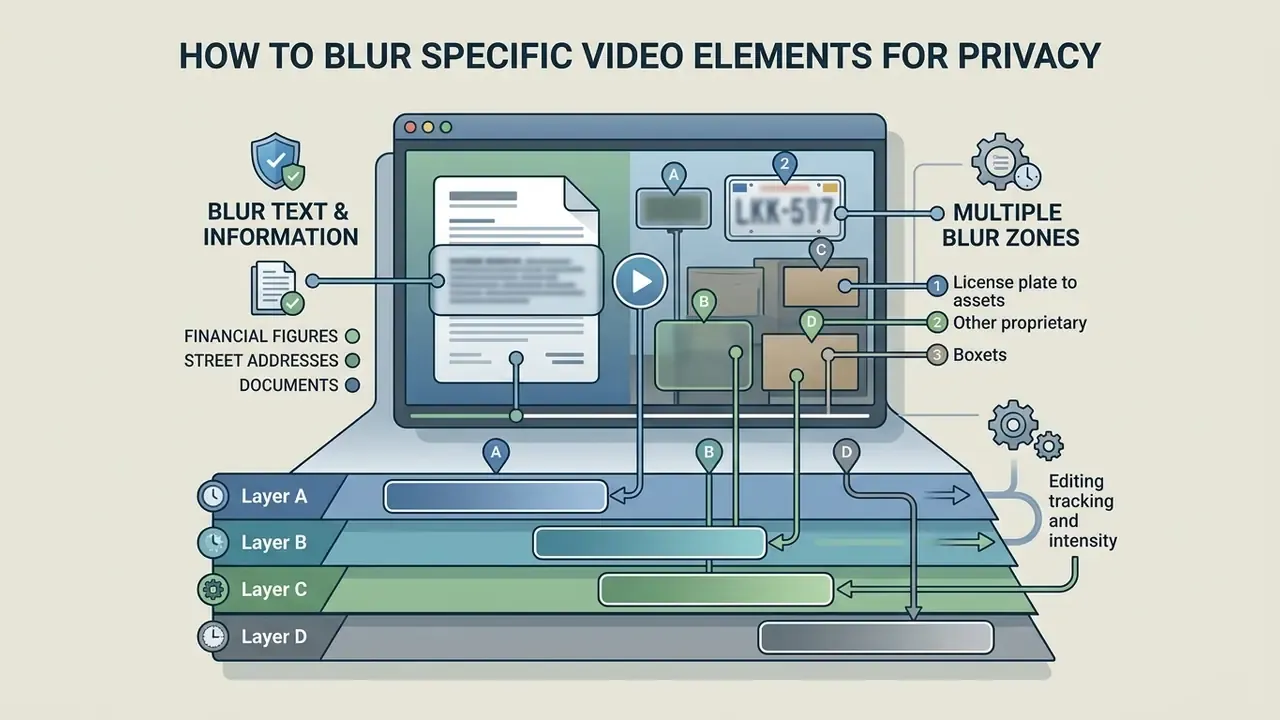
Obscuring specific frame coordinates is required when handling documents, financial figures, street addresses, or proprietary assets. Options to blur part of video online ensure that sensitive data is permanently redacted before sharing, and a blur part of video online free tier is usually enough for short evidence clips.
Blurring Text and Confidential Information
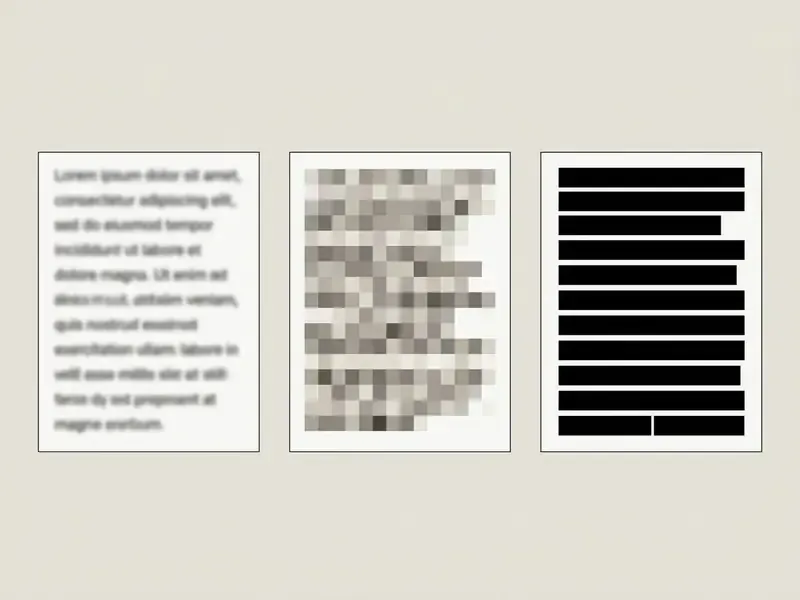
Text redaction demands precise edge containment, otherwise OCR (Optical Character Recognition) tools can reconstruct the characters. To blur text in video online free, apply solid shape overlays or high-density pixelation filters over the text-box boundaries, with a padding margin so ascenders and descenders are not exposed at the mask edge.
Vendor documentation is even blunter: some third-party tools can reverse blur and pixelation, so solid shapes remain the most secure redaction primitive (Snagit redaction tutorial, TechSmith, 2026, https://www.techsmith.com/blog/). Treat blur as a visual control and solid masks as a security control. The two are not interchangeable, whatever the interface suggests.
Multiple Blur Zones for Different Parts of the Frame
When footage contains several sensitive areas at once, editors can blur parts of video online using multiple independent layers. Modern browser editors allow separate, independently tracked blur layers inside a single clip timeline, each with its own effect type and intensity.
- Layer A tracked facial blur on the primary presenter.
- Layer B static rectangular blur over a laptop screen.
- Layer C motion-tracked blur over a background vehicle license plate.
- Layer D solid mask over a badge, signature, or account number.
Professional redaction suites confirm the model: multiple masks can be added, each adjusted separately with its own blur level per segment before extraction, and editors can duplicate the video layer to apply different treatments to different regions of the same frame.
Blur, Pixelate, or Motion Blur: Which Effect to Choose
The right visual transformation depends on whether the goal is regulatory privacy compliance or creative styling. Editors can add blur to video online or pick alternative distortion filters based on project requirements.
Soft Blur and Pixelate for Privacy
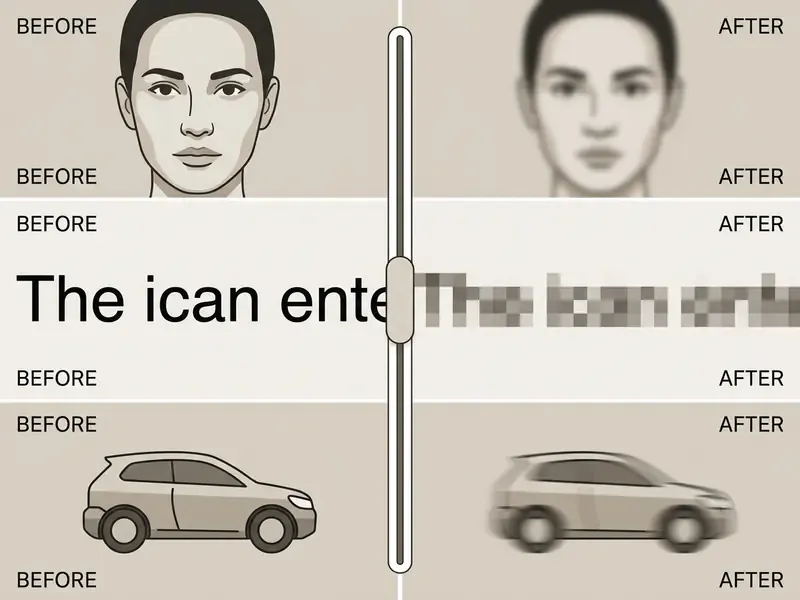
Soft Gaussian blur and pixelation (mosaic) are the primary choices for privacy protection. Soft blur gives a natural, smooth transition that blends into the surrounding picture, which suits casual content and interviews. Pixelation downsamples the target area into coarse grid blocks (commonly 3×3, 5×5, or 7×7 sampling). It is visually loud, but that is sometimes an advantage: it signals to viewers that content was intentionally redacted for compliance purposes.
User intuition about which method is «safer» is frequently wrong:
| Effect type | Visual characteristic | Security level | Best use case |
|---|---|---|---|
| Soft Gaussian blur | Smooth, continuous gradient dispersion | Moderate (requires high radius) | Faces, background aesthetic blur |
| Pixelate / Mosaic | Discrete, blocky quantization grid | Moderate to high | On-screen documents, badges, logos |
| Solid shape mask | Opaque single-colour vector overlay | Maximum (non-reversible) | Highly confidential financial PII |
| Synthetic face replacement | Surrogate identity, pose preserved | High (identity removed) | Research datasets, therapy recordings |
To explore the wider category of tools for editing video, including non-privacy effects and timeline features, review the glossary entry before committing to a single-purpose tool.
Motion Blur for a Dynamic Visual Effect
Unlike privacy masks, a motion blur effect video online is a stylized editing technique used to convey velocity and smooth out high-speed action. Users who want to add motion blur to video online free apply directional velocity vectors to fast-moving subjects.
Linear motion blur is modelled as a line-segment point-spread function defined by blur length and angle. Pixels stretch along the direction of travel to simulate shutter exposure over time (OpenCV motion deblur tutorial, https://docs.opencv.org/4.x/d1/dfd/tutorial_motion_deblur_filter.html). Adobe documents the editorial workflow: apply Directional Blur, mask the moving subject, track the mask, and increase feathering for softer edges. Blender frames it as a render-stage property tied to exposure time, with physics simulations baked before render for consistency.
Motion blur must never be treated as an anonymisation tool. Ever.
To review tools that convert static images into dynamic motion clips, see turn picture into ai video and the broader category of image-to-video generators.
Which Videos Benefit from Online Blurring
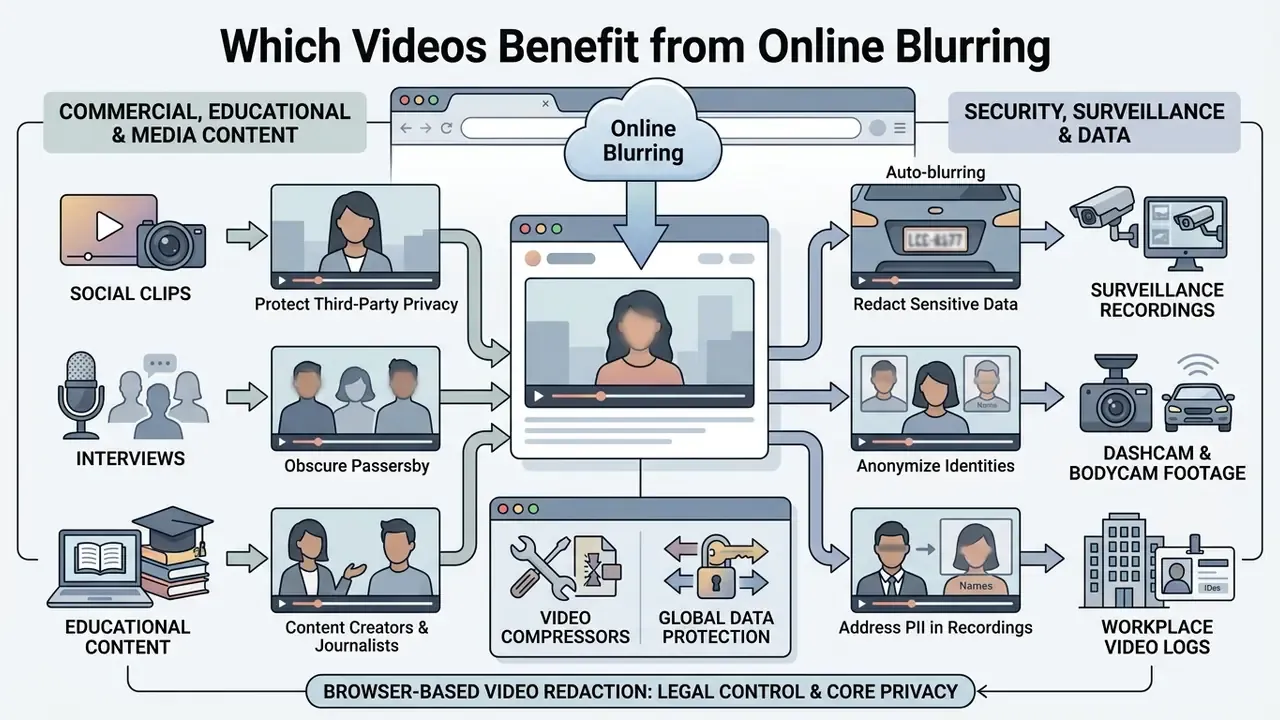
Browser-based video redaction shows up across commercial, educational, and security environments. Choosing to blur video free online gives teams a fast, accessible way to meet distribution compliance standards without a new software rollout.
Security Footage and Videos Containing Sensitive Data
Surveillance recordings, dashcam footage, bodycam exports, and workplace video logs frequently contain confidential material. Before transmitting CCTV files to external parties or legal teams, operators must anonymize non-relevant individuals.
European Data Protection Board guidance states that video footage released to data subjects or external third parties must have non-subject personal data redacted, and it explicitly names blurring the copy or parts of it as an acceptable method (EDPB Guidelines 3/2019 on processing of personal data through video devices, https://www.edpb.europa.eu/). The threshold, though, is strict:
EDPB anonymisation guidance frames the test as three criteria (isolation, no further linkage, no inference) and stresses that effectiveness must be tested rather than assumed. The UK ICO similarly requires a very robust approach for public release, with periodic review and re-assessment before disclosure when risks change. Applying client-side video blur supports compliance with these standards without exposing raw footage to cloud servers.
Sector-specific limits apply. Canadian body-worn camera guidance recommends blurring faces and identifying marks of third parties and distorting voices before public sharing. US HHS guidance states that blurring patient faces after filming does not substitute for prior written authorization in healthcare settings. Blurring is a control, not a consent mechanism. In financial services the same logic holds for GLBA-covered customer information: redaction reduces exposure, it does not create a lawful basis for sharing.
To evaluate broader compliance considerations across automated tools, visit the AI Media Commercial-Use Hub, review updates on AI Litigation and Case Timelines, and consider AI content detectors for verification when authenticating third-party footage. Policy teams drafting acceptable-use rules for generative tooling often pair this with guidance on an uncensored ai text generator, because shadow AI rarely stays inside one media type.
Free Use, Watermarks, Privacy, and Commercial Licensing
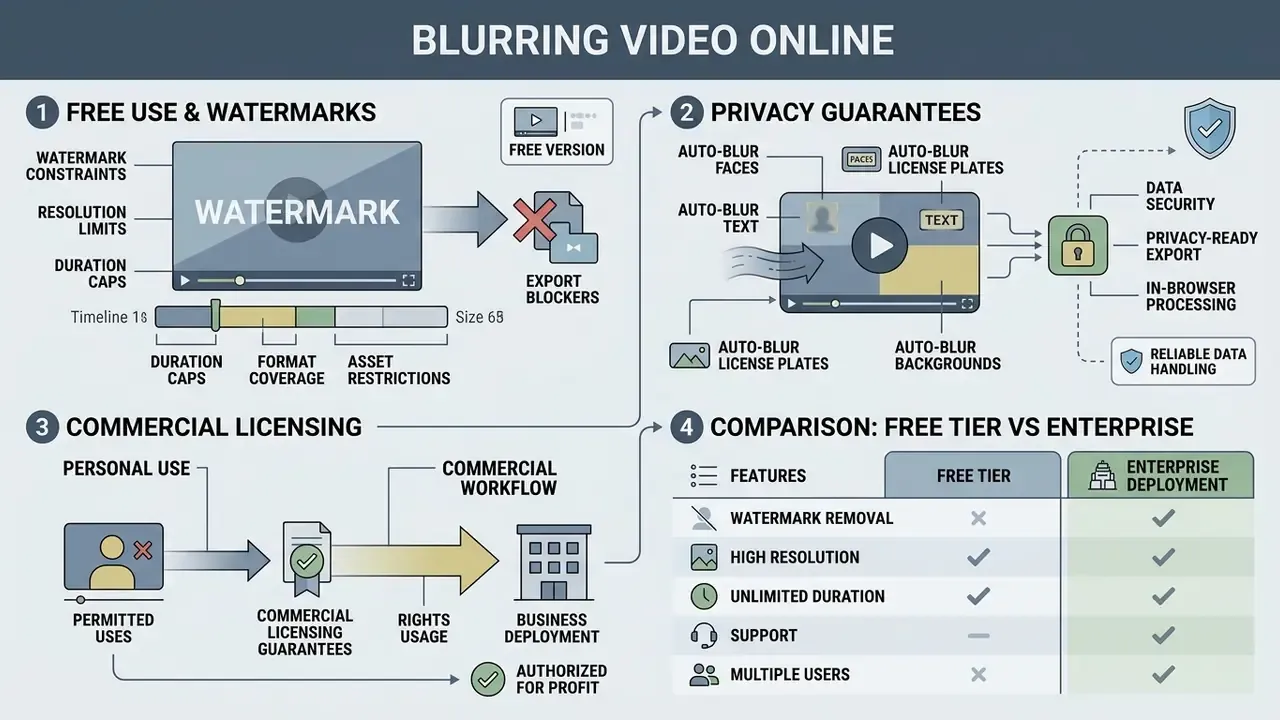
Pricing terms, watermarking policies, and licensing guarantees deserve a read before any web tool enters a business workflow. Finding a solution to blur video online free no watermark means reviewing platform service agreements, not just the landing page.
What to Check in the Free Version Before Export
Free tiers vary widely in export constraints and output parameters. Before committing to an online editor, evaluate these attributes:
For cost estimation models on media processing tools, consult AI Media Calculators, compare free editors and their export restrictions, and review free photo editor options for still-image redaction.
Free Tier vs Enterprise Deployment
| Criterion | Free / self-serve tier | Enterprise SaaS or on-premise |
|---|---|---|
| File and duration limits | ~500 MB, 5 min per clip | 1 GB+ per clip, batch queues |
| Watermark | Possible on export | Contractually removed |
| Export resolution | 720p / 1080p ceiling | Source resolution, up to 4K |
| Processing location | Browser, device-bound | Browser, private cloud, or air-gapped install |
| Data retention | Session-only or unstated | Documented schedule, ephemeral mode |
| Security attestations | Usually none published | ISO/IEC 27001 hosting, TLS 1.3, DPA |
| Commercial licence | Often limited or unstated | Explicit commercial and redistribution rights |
| SLA and support | Community or none | Contractual uptime and response targets |
| Audit artefacts | Manual screenshots | Processing logs, model versioning, API records |
Privacy, File Processing, and Commercial Usage Rights
Data privacy standards dictate how uploaded media files are handled, stored, and deleted. Compliant browser editors process media locally, or enforce encrypted TLS 1.3 transport with automatic server-side deletion once the render completes. Vendor policies span a wide range. Some tools state that standard video, audio, image, and PDF tasks are processed locally in the browser and files are never intentionally sent to their servers. Others delete uploaded and processed files after task completion while retaining metadata for up to 90 days for debugging or compliance.
Under Article 13 of the General Data Protection Regulation, platforms processing personal data must state explicit retention schedules, user deletion rights, and commercial usage permissions:
Organizations publishing marketing or corporate media must verify that output licences permit commercial monetization. A practical vendor-verification checklist mirrors the ICO's own list: lawful basis, purposes, recipients, third-country transfers, retention, data-subject rights, consent withdrawal, complaint route, source of data, and automated decision-making (Checklists, UK Information Commissioner's Office, https://ico.org.uk/for-organisations/).
For troubleshooting technical issues or browser processing errors, consult AI Media Support and Troubleshooting.
Redaction Audit Checklist
Use this checklist as the final gate before any anonymized clip leaves your organization.
Checklist0 / 12
FAQ About Blurring Video Online
Which video formats are supported for online blurring?
Most modern browser editors support the main containers and codecs: MP4 (H.264 or AV1), WebM (VP9 or AV1), and MOV, including native iPhone and iPad HEVC and H.265 recordings. Files are decoded directly in the browser through the WebCodecs API, so no pre-conversion is required. Some tools additionally accept AVI, MKV, MPG, WMV, and 3GP by transcoding through WebAssembly.
Is it safe to upload videos with confidential data into an online editor?
Safety depends on the architecture. Tools built on WebAssembly, Web Workers, and WebGPU process video locally on your device without sending source frames to external servers, and you can confirm that in the browser Network panel during a test session. For hybrid services, check for TLS 1.3 transport, ISO/IEC 27001-certified hosting, an ephemeral mode that deletes session data after export, and an explicit statement that files are not reused for model training.
Can I blur a face in a video for free without a watermark?
Yes. Several services provide basic face blurring with no watermark on the output file, which answers the common how to blur face in video online free question. Free plans often cap export resolution (720p or 1080p), file size (around 500 MB), and duration (5 minutes per clip). Watermarks may also be triggered by premium assets rather than by the blur feature itself, so check the export panel before rendering.
Can blurred text or a blurred face be recovered?
Low-radius soft blur can be partially reversed by deconvolution algorithms, and coarse pixelation of text is sometimes recoverable. That is why vendor and forensic guidance recommends solid opaque masks for sensitive alphanumeric data. For practical irreversibility, combine high-density pixelation with a solid shape overlay, then verify by running OCR against the exported frame.
Does automatic face tracking work on mobile phones?
Yes. Modern mobile browsers on iOS and Android support GPU acceleration (WebGPU shipped on Android Chrome from M121, with Safari and Firefox following), so neural face-tracking models run directly on smartphones. Expect roughly double the per-frame processing time compared with desktop. Automatic tracking is not infallible: a 2026 study of temporal consistency in video anonymization found that generative, diffusion-based anonymization can cause identity flickering between frames, which reduces tracking stability. Review the render frame by frame.
What is the difference between blurring a video and unblurring tools?
Blurring adds controlled distortion to protect privacy. If you instead need to restore clarity in low-quality footage, that requires specialized deblurring algorithms. See unblur video online free for that direction of the problem.
Can license plates in dashcam footage be blurred automatically?
Yes. Detection models trained on driving footage locate plates in dashcam, street-view, and vehicle-review clips, then track them across frames, including at high speed and at oblique angles. Because plates are small and high-contrast, use a padded rectangular mask with a high blur radius or a solid mask. A light blur can leave enough character structure for automated plate readers.
Does the editor work without an internet connection?
Yes, in a genuinely client-side tool. Once the page or its PWA shell has loaded, MediaPipe models and the WebCodecs and WebAssembly pipeline execute locally, so you can disconnect the network and still complete detection, blurring, and export. This is the recommended mode for footage that must never touch a network.
Which browsers and hardware are required?
Chrome 94+, Edge 94+, Safari 16.4+, or Firefox 130+. Plan on 8 GB of RAM for 1080p projects and 16 GB for 4K. Files over 100 MB take noticeably longer on memory-constrained devices, so keep the tab in the foreground for the entire render, since background tabs are throttled.
Is there a hard file-size limit?
With local processing there is no server-side upload limit. The ceiling is your device memory and hardware acceleration. Free plans commonly impose their own caps (around 500 MB and 5 minutes), and paid plans typically extend these to about 1 GB and 10 minutes per clip.
Appendix: Redaction Control Mapping for Regulated Environments
Blurring is a technical step. Governance is what makes it defensible. The mapping below is illustrative, not a compliance certification, and it should be adapted to your own model-risk and records policies.
| Control | What it means in a redaction workflow | Owner (typical) | Evidence to retain |
|---|---|---|---|
| Inventory | Every redaction tool and model version registered alongside other AI assets | AI governance lead | Tool register entry, model version string |
| Purpose limitation | Written scope of what is redacted and why, per footage category | Business owner | Scope memo attached to the request |
| Validation | Detection recall tested on a representative sample before rollout | Model risk | Sample results, miss log, sign-off |
| Human accountability | Named reviewer approves each release; no unattended publication | Records or legal | Reviewer name, date, checklist |
| Data residency | Confirmation that frames were processed client-side or in an approved environment | Security | DevTools capture, architecture note |
| Escalation | Defined path when a detector misses a face or a plate in a released file | Incident response | Ticket, root cause, remediation |
| Retention | Deletion schedule for source, intermediate, and redacted copies | Records management | Retention policy reference |
| Re-assessment | Periodic review as re-identification techniques improve | AI governance lead | Review date and outcome |
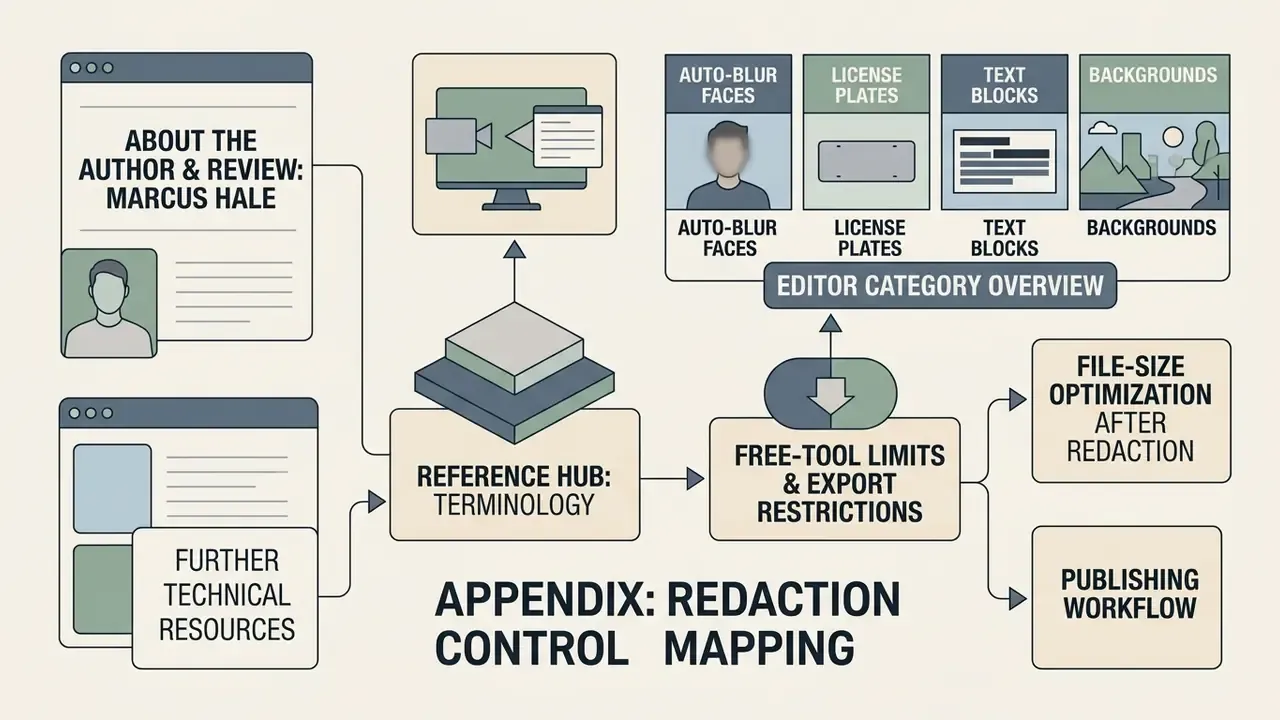
Open questions worth keeping on the agenda: how much residual risk a high-radius blur really carries against 2026-era recognition models, whether synthetic face replacement is acceptable to your regulators for evidence-grade material, and how to price the review labour honestly in the business case. Nobody has fully settled these. Pretending otherwise is the actual risk.
A safe next step, if you are early in this: run a single 10-minute pilot clip end to end, document the network test, and record the review time. That gives you a baseline before anyone signs a volume contract.
Further Technical Resources
For related guides on redaction workflows, tooling economics, and publishing pipelines, explore the following entry points:
- Reference hub for terminology AI Media Glossary
- Editor category overview video editor glossary
- Free-tool limits and export restrictions best free video editing software
- File-size optimization after redaction video compressor guide
- Publishing workflow YouTube video editor guide
- Verification and provenance tooling AI image detector
- Automation and batch redaction AI Media API Guides
- Cost modelling for volume processing AI Media Calculators
- Compliance context Commercial-Use Hub and AI Litigation Timelines
Social Clips, Interviews, and Educational Content
Content creators, online educators, and journalists routinely process media to protect third-party privacy. When publishing user-generated content or public interviews, a free online video blur tool prevents unauthorized disclosure of identity. Official privacy guidance supports the practice: a person's image is a protected personality attribute, and images may be blurred before publication where consent was not obtained.