The Google AI Podcast Generator is an informal name for the Audio Overview feature inside Google NotebookLM, a source-grounded research assistant that turns uploaded documents into two-host, conversational audio discussions. Enterprise risk leaders and financial services executives evaluate this tool to transform dense regulatory guidance, internal audit files, and market research into structured, listenable audio briefs. Two AI voices summarize the material, connect topics across sources, and hold a podcast-style dialogue built strictly from the documents you uploaded.
Why does a Head of Model Risk care about a podcast feature? Because the moment an analyst uploads a client file into a personal Google account, you have a shadow AI problem, not a content problem.
«Audio Overviews are deep-dive discussions between two AI hosts that summarize your sources and make connections between topics.»
Executive Summary
- What it is
- "Google AI Podcast Generator" is not a standalone product. It is the Audio Overview function inside Google NotebookLM, launched 11 September 2024 and expanded through 2025-2026 to long-form output in 80+ languages.
- How it works
- You upload up to 50 sources per notebook (500,000 words or 200 MB per source), optionally enter a focus prompt, and the model renders a two-host conversation grounded exclusively in that corpus. No independent web search occurs during generation.
- Free tier reality
- Free Google accounts get up to 100 notebooks, 50 sources per notebook, and 3 Audio Overviews per day. Paid Workspace and Google AI tiers raise those quotas.
- Governance verdict
- Output is a study aid, not an authoritative record. It can contain inaccuracies, carries no automatic copyright protection under US law, and requires human factual review plus source-rights clearance before public or commercial distribution.
- Where it wins
- Document-grounded briefings such as 10-K risk sections, AML guidance, audit findings, technical manuals, and lecture series.
- Where it loses
- Branded shows that need voice cloning, line-by-line script edits, music beds, sound effects, or native RSS distribution. For those, use a specialized AI podcast platform or a programmable open-source stack (Podcastfy, Open Notebook, Gemini TTS, ElevenLabs API).
- Time to first episode
- Roughly 5-10 minutes for setup and generation. Large notebooks may take several minutes longer to render.
Who Should Read This and What Decision It Supports
This guide is written for three overlapping roles, and each one reads it differently.
- Chief Risk and Compliance Officers. Your question is not "does it sound good?" It is "which account tier governs the data, and can I evidence the source chain afterwards?" Sections on data privacy and audit traceability answer that.
- Heads of Model Risk and AI Governance. You need to slot a generative summarization tool into an existing inventory, define an owner, and decide whether validation applies to a non-decisioning system. Our stance: inventory it, classify it as low-autonomy assistive AI, and gate it on document classification rather than on model performance metrics.
- CFOs, COOs, and Finance Transformation leads. You are testing whether AI audio shortens the distance between a 180-page standard and a team that must apply it next Monday.
Treat every audience assumption here as a hypothesis until your own interviews, analytics, or CRM data confirm it. That caveat is deliberate, not decorative.
What Is the Google AI Podcast Generator and How It Connects to NotebookLM
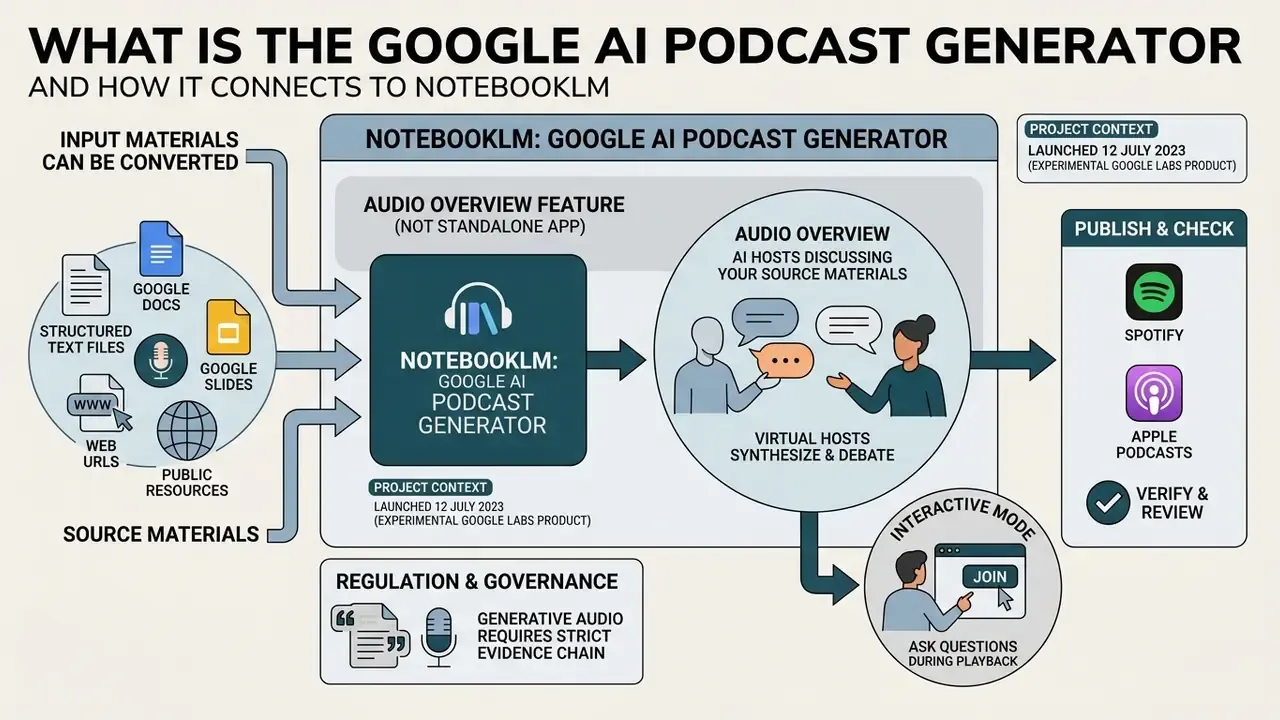
Google AI Podcast Generator refers directly to the Audio Overview feature hosted within Google NotebookLM, rather than a standalone audio engineering application. NotebookLM acts as an umbrella research workspace where users aggregate text files, documents, and web links into an isolated corpus. The system then applies generative AI model logic to synthesize those specific inputs into a two-host conversational discussion.
NotebookLM itself launched on 12 July 2023 as an experimental Google Labs product. Audio Overview arrived on 11 September 2024, expanded to 50+ languages in beta on 29 April 2025, and moved from short-form clips to full-length discussions across 80+ languages in August 2025.
«Audio Overview is a "lively deep dive" between two AI hosts that summarizes your sources, draws connections between ideas, and presents them conversationally.»
"Generative audio in regulated environments requires a strict evidence chain. No evidence, no autonomy. If an AI agent or voice summary cannot be traced directly back to vetted primary documentation, it presents an unquantified operational risk to enterprise oversight."
- Marcus Hale, author
Audio Overview: AI Hosts Discussing Your Source Materials
Audio Overview is an AI-generated dialogue where two virtual hosts synthesize, debate, and explain the core topics found within your uploaded documents. Rather than functioning as a standard text-to-speech reader that vocalizes static sentences, the system creates a dynamic script that simulates natural banter, interpretive bridges, and contextual framing. That is what separates engaging audio content from a robotic document reading.
«Audio Overviews function as dynamic discussions in which AI voices summarize key claims, connect ideas, and offer contextual interpretation.»
NotebookLM also offers an Interactive mode, where a listener can tap "Join" during playback and ask a question aloud. The hosts pause, answer verbally using notebook context, and then resume the original discussion. Interactive mode remained English-only in beta at the time of Google's 2025 language expansion.
What Input Materials Can Be Converted Into AI Audio
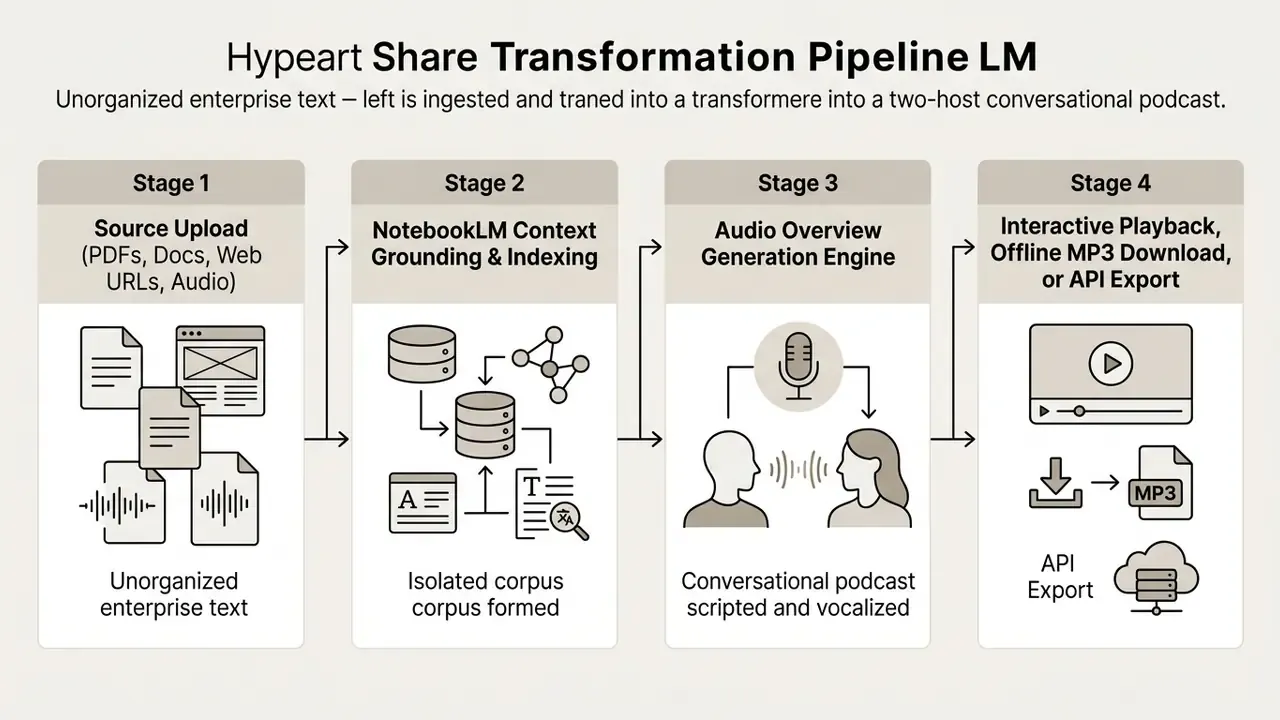
NotebookLM allows users to upload structured text files, Google Docs, Google Slides, web URLs, public YouTube links, a blog post saved as text, and spoken audio files. Each individual source can contain up to 500,000 words or 200 MB for direct file uploads. The system extracts the text layer from these inputs to form the grounded knowledge base used for audio generation.
Supported audio containers include MP3, WAV, M4A, OGG, OPUS, AAC, and AIFF. Uploaded audio is transcribed on import and stored as text, which means audio without speech is not supported. Google also notes that images, embedded videos, and nested webpages are not imported from web sources. Only the extractable text layer of the page you supply makes it into the corpus.
A small but common failure: a scanned board pack, no OCR layer, zero words ingested. The notebook looks full. It is empty.
Key Technical Parameters and Architectural Boundaries
Reviewing the operating envelope before you upload prevents wasted generation quota and failed ingestion attempts.
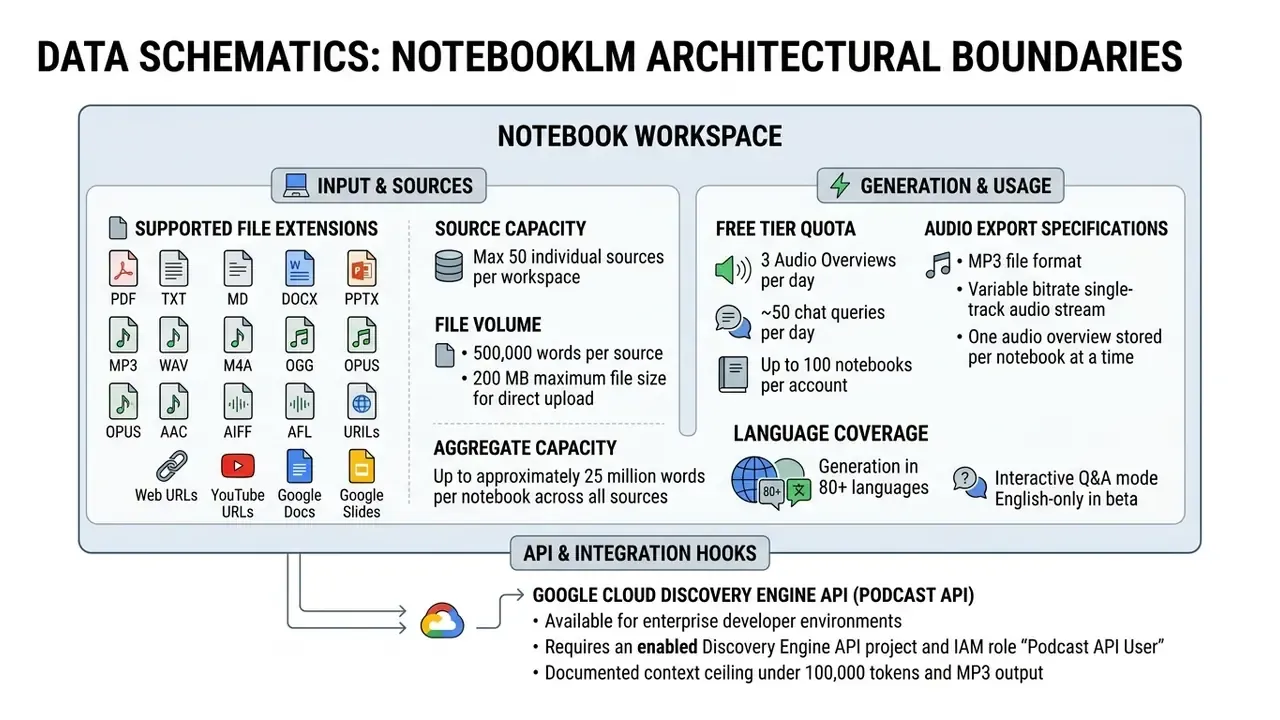
| Constraint | Value | Practical implication |
|---|---|---|
| Sources per notebook | 50 | Split large document libraries into topic-scoped notebooks |
| Words per source | 500,000 | Long regulatory codices usually fit in one file |
| File size per upload | 200 MB | Compress or split scanned archives |
| Audio generations per day (free) | 3 | Draft prompts carefully before burning quota |
| Audio overviews stored per notebook | 1 at a time | Download each episode before regenerating |
One consequence of the last row is easy to miss. Regenerate without downloading and the previous episode is gone. Build a naming convention and an export step into your process before anyone starts experimenting.
How to Create an AI Podcast in Google NotebookLM: Step-by-Step Process
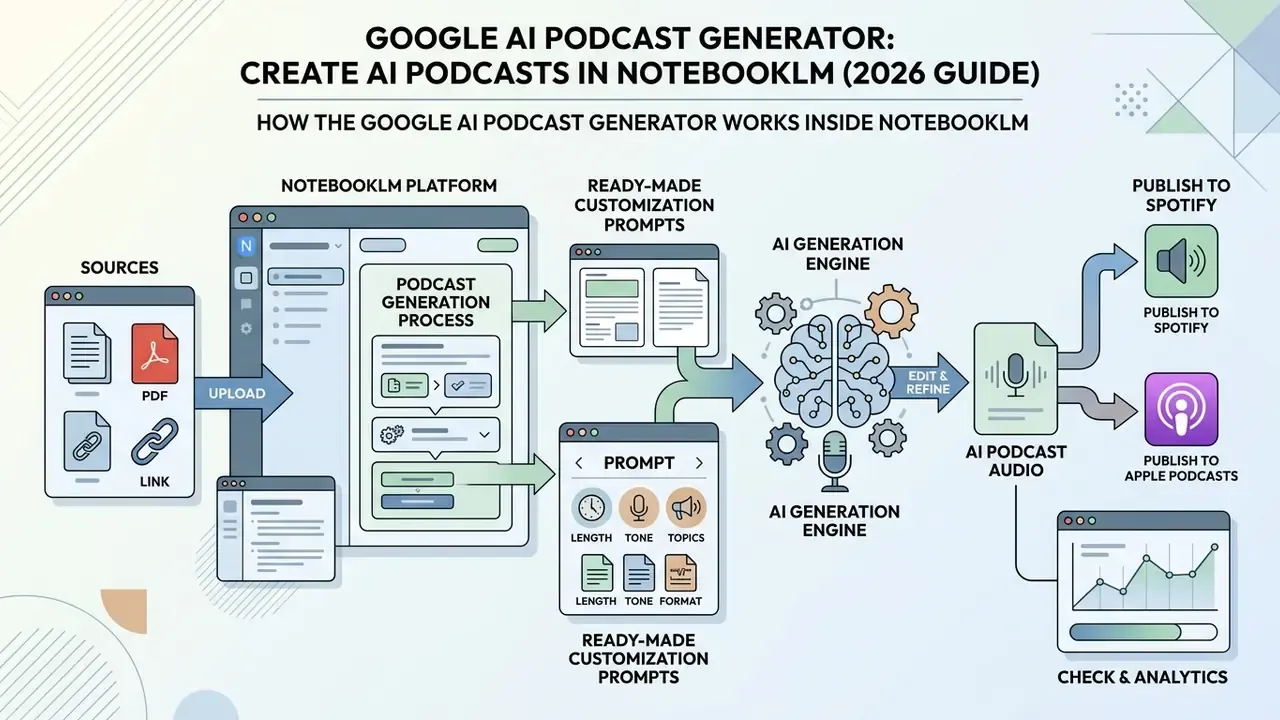
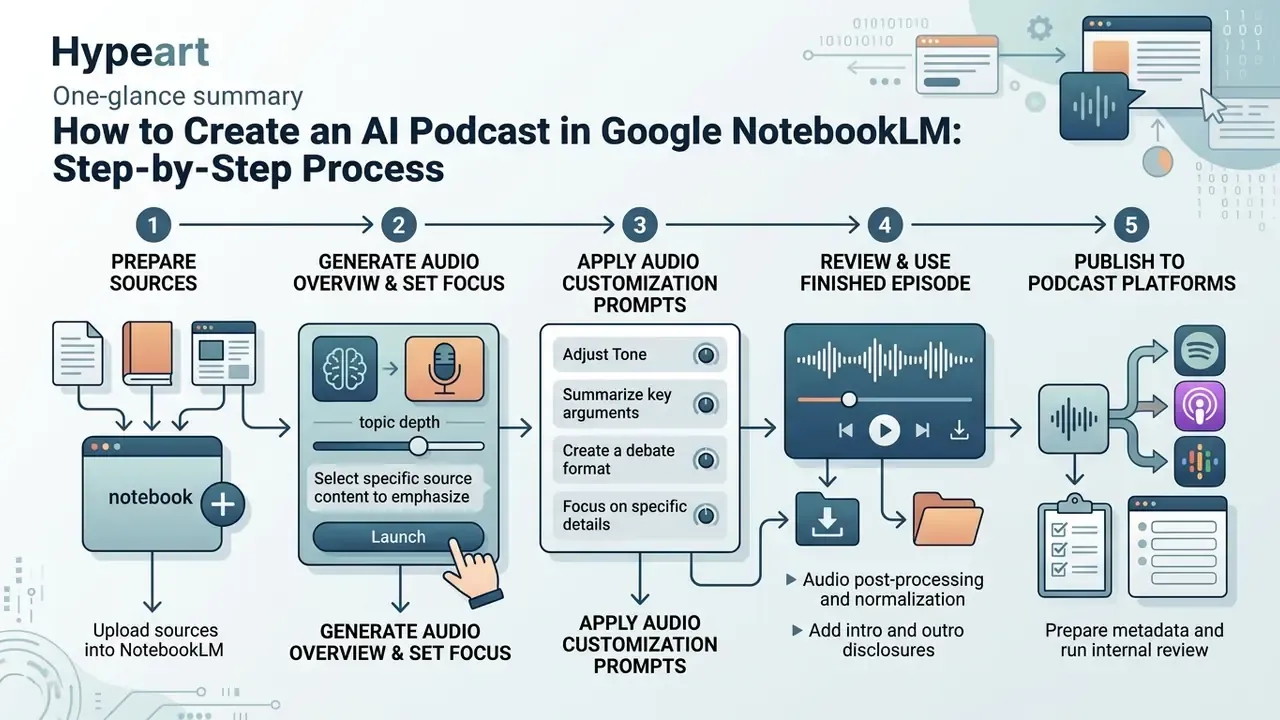
Creating an AI podcast in NotebookLM requires setting up a workspace notebook, uploading verified source materials, configuring optional generation instructions, and exporting the resulting audio file. The whole process runs in the cloud interface and needs no local audio editing software. Teams that want custom voices, cloned narration, or emotional delivery control typically pair NotebookLM with dedicated AI voice generators in a second production pass.
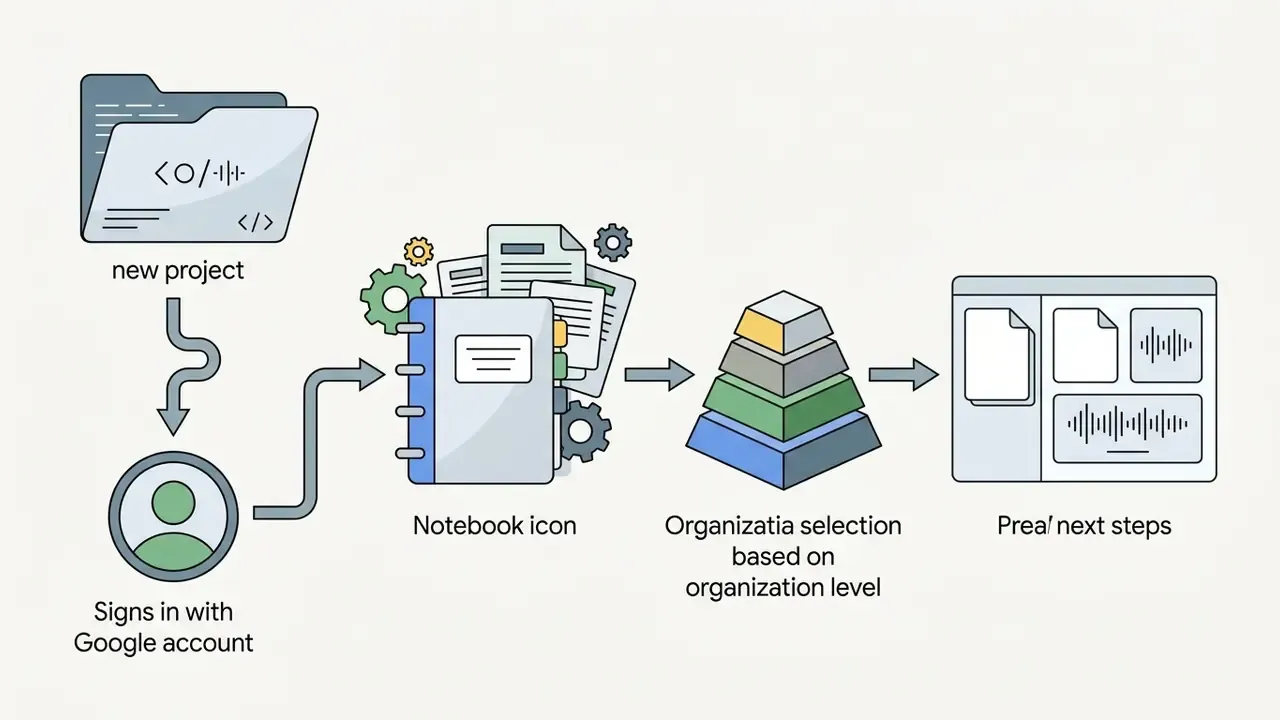
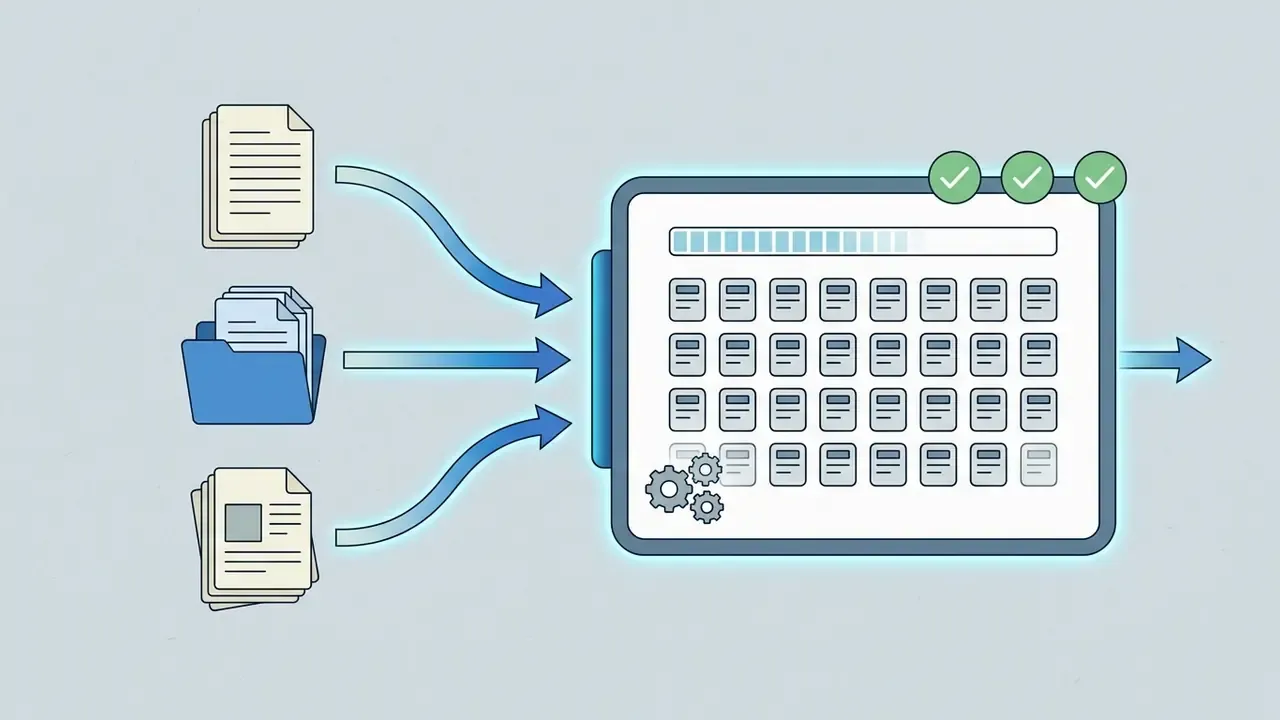
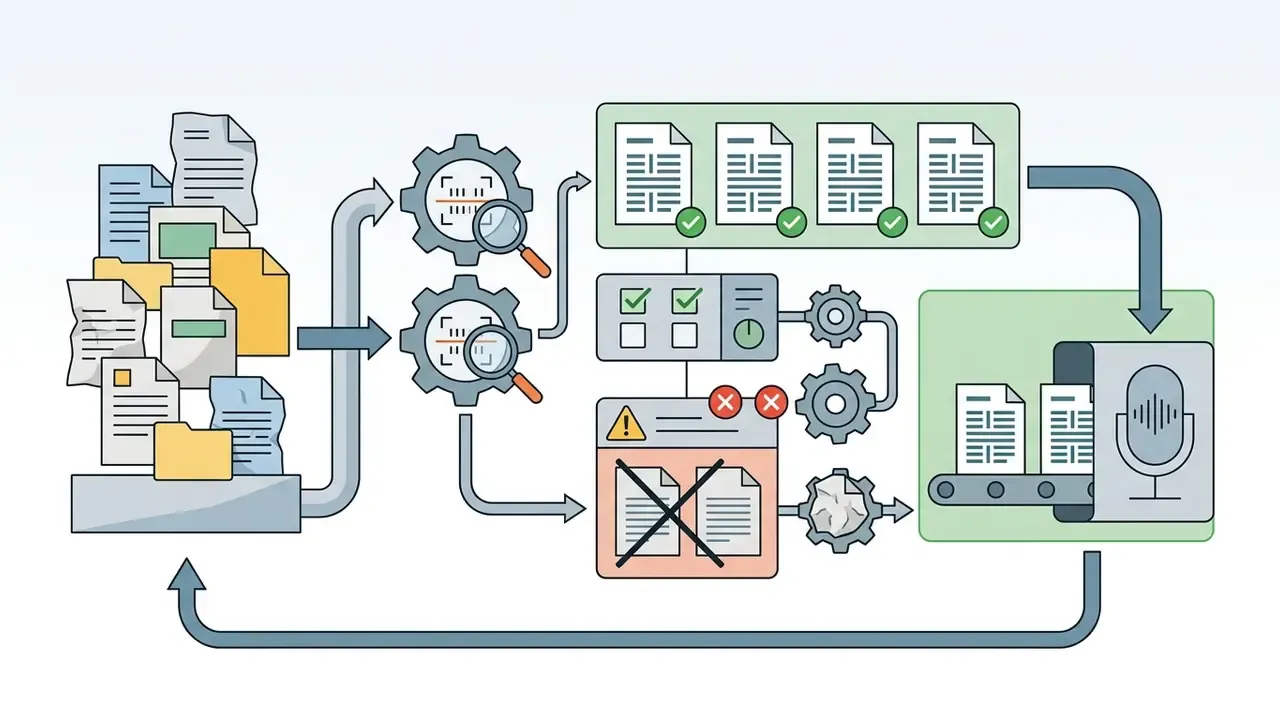
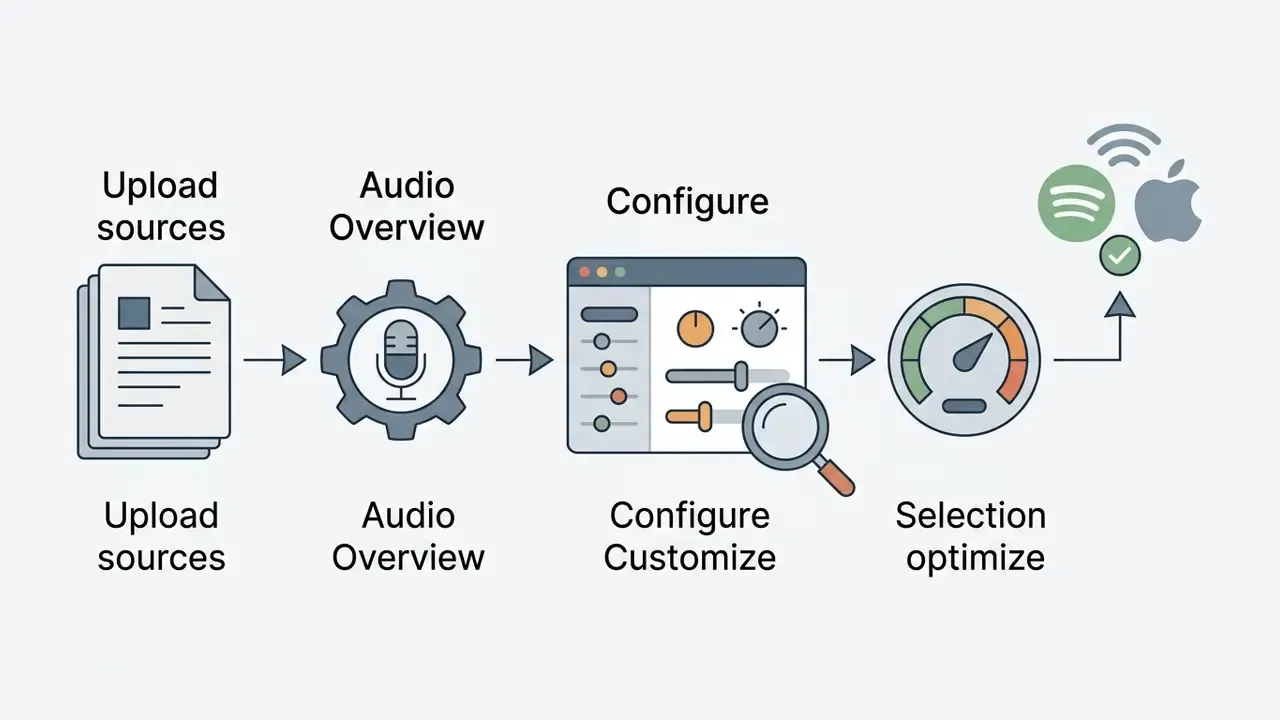
Prepare Your Sources and Add Them to Your Notebook
Source preparation is the single biggest driver of accuracy and depth in your generated podcast. To maximize factual precision, strip web navigation menus, cookie notices, and unformatted tables from your files before uploading. Clean text-layer PDFs and well-structured Markdown files yield noticeably better synthesis than scanned image documents without optical character recognition.
«Even high-quality academic PDFs are summarized with uneven fidelity; nuances and stated limitations are frequently lost in the audio rendering.»
Pre-flight source checklist
| Source type | Recommended format | Remove before upload |
|---|---|---|
| PDF documents | Text-layer PDF (OCR completed) | Running headers, page numbers, advertising, repeated legal footers |
| Web pages | Extracted body text or Markdown | Navigation menus, cookie scripts, banner ads, comment threads |
| Audio / video | MP3, WAV, or public YouTube URL | Long intros, sponsor reads, background-music-only segments |
| Spreadsheets & tables | Flattened text summary or exported PDF | Hidden sheets, pivot artifacts, unlabeled columns |
| Internal decks | Google Slides or PPTX with speaker notes | Draft slides, duplicated appendix decks |
A further practical rule: group sources by the question you want answered, not by broad topic. A notebook holding four filings that all discuss liquidity risk produces a sharper conversation than a notebook holding twenty mixed documents. Pick your context narrowly, and the hosts stop hedging.
Launch Audio Overview Generation and Set Your Desired Focus
To steer the direction of the hosts' conversation, open the Studio panel and use the "Customize" option before you generate. You can instruct the AI hosts to emphasize particular technical sections, adopt an executive summary tone, or skip introductory background entirely. Google's own field prompt asks plainly: "What should the AI hosts focus on?" The API exposes the same control as an episodeFocus parameter alongside languageCode.
«Personalized AI-generated podcasts, adapted to a student's discipline and learning style, significantly improved learning outcomes across several subject areas.»
An asset management team reviewing quarterly earnings reports needed a fast way to brief investment committees on risk disclosures. They uploaded four 10-K filings into NotebookLM, entered a target prompt telling the hosts to cover liquidity risk and debt maturities only, and generated a 10-minute briefing. The resulting audio helped senior analysts flag reporting anomalies before the formal committee meeting. Illustrative composite, not a documented client engagement.
Ready-to-Use NotebookLM Audio Customization Prompts
Copy these into the "Customize" field before pressing Generate. Each one constrains scope, tone, and duration, the three variables that drift most in raw output.
[PROMPT TEMPLATE 1: Executive Briefing]
"Act as two senior industry analysts. Discuss the uploaded documents focusing
exclusively on key financial risks, regulatory compliance obligations, and
action items for the C-suite. Skip introductory small talk and technical
jargon. Maintain a concise, professional tone. Target duration: 8 minutes."
[PROMPT TEMPLATE 2: Technical Debate / Critique]
"Host A is a proponent of the technology outlined in the document, while Host B
is a skeptical risk auditor. Have Host B challenge the assumptions in Section 3,
while Host A defends them using direct data from the sources. Ensure a balanced,
analytical debate and cite figures exactly as written in the sources."
[PROMPT TEMPLATE 3: Educational Deep-Dive]
"Explain the complex concepts in this document to a junior analyst. Use clear
analogies, break down multi-step workflows, and highlight 3 major takeaways at
the end of the conversation."
[PROMPT TEMPLATE 4: Regulatory Change Briefing]
"Compare the previous and updated versions of the uploaded standard. Identify
every changed obligation, its effective date, and the internal control owner
implied by the text. Flag any requirement where the sources are silent or
ambiguous instead of guessing."
[PROMPT TEMPLATE 5: Board-Level Neutral Summary]
"Summarize only what the sources state, with no interpretation or speculation.
When the documents disagree, say so explicitly and name the conflicting source.
Close with a list of open questions for management."
Beyond free-form prompts, NotebookLM exposes selectable format templates, namely Deep Dive, Brief, Critique, and Debate, which set overall pacing and rhetorical structure before your custom instructions are applied. Template plus prompt beats prompt alone, in our reading of the current interface.
Listen to, Save, and Use the Finished Episode
Once generation completes, the episode appears in the Studio player where you can play, pause, or change playback speed. Users with edit permissions can download the conversation to a local device as an audio file for offline listening or team distribution. Sharing runs through notebook-level access settings or a shared link. Google's documentation covers download to a local device and link sharing, but does not document a one-click "save to Google Drive" action for the audio asset itself.
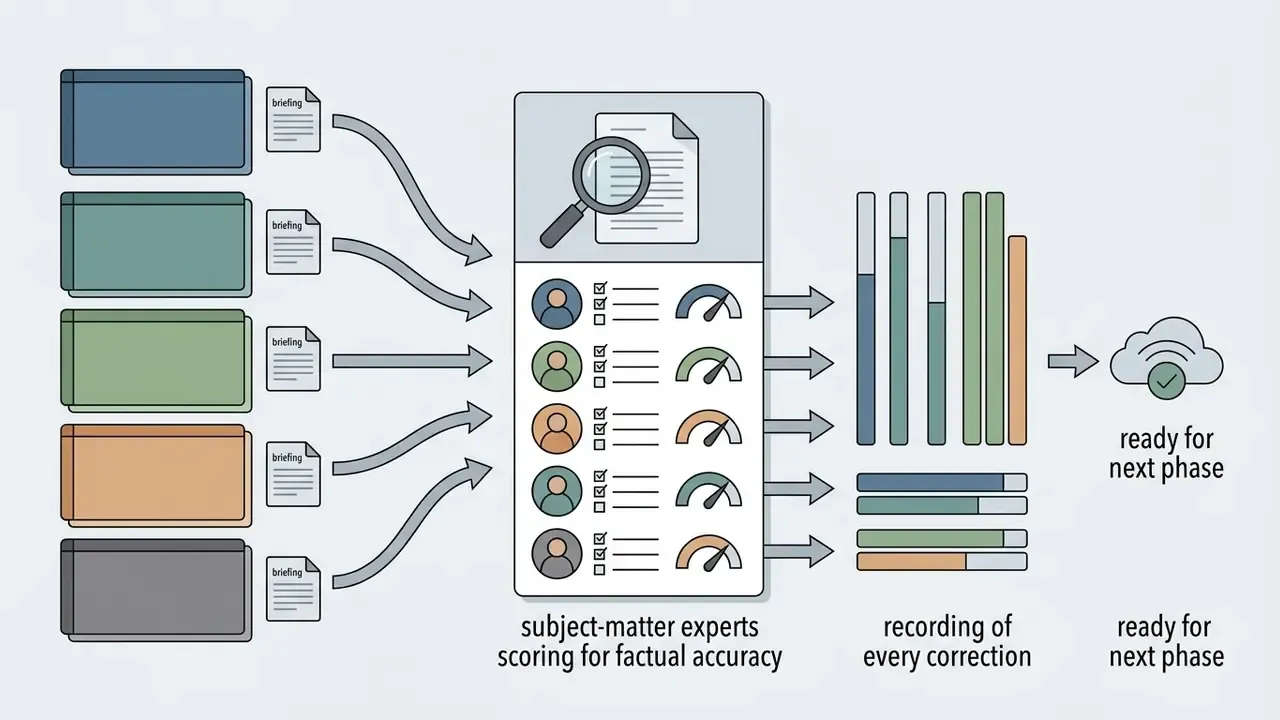
Listen once at normal speed with the source open beside you. That single habit catches most of the confident-but-wrong claims before they reach a distribution list.
«Effective use of AI podcasts requires careful editing, ethical review, and an understanding of how AI systems shape content.»
How to Publish NotebookLM Audio Overviews to Spotify and Apple Podcasts
NotebookLM produces an audio file, not a podcast channel. To turn a raw MP3 download into a distribution-ready episode on Spotify, Apple Podcasts, and YouTube, follow this workflow:
- Audio post-processing and normalization.Open the exported MP3 in a free audio tool such as Audacity. Apply a limiter and normalizer targeting approximately -16 LUFS integrated loudness for stereo podcasts (about -19 LUFS for mono), which is the loudness range recommended in mainstream podcast delivery guidance including Apple-style specifications. Trim dead air at the head and tail, and remove noise artifacts introduced during export.
- Add intro and outro disclosures.Stitch a 10-second human or synthesized disclaimer to the front of the file: "Welcome to [Show Name]. This episode was AI-synthesized from verified research documents using Google NotebookLM." An outro pointing listeners to the primary source documents strengthens transparency and evidence traceability.
- Prepare metadata and run internal review.Write the episode title, description, and show notes; add chapter markers derived from your notebook summary; and route the file through a factual-accuracy review before release. Public-sector podcast production guidance treats metadata preparation and internal review as mandatory post-production stages, not optional polish.
- Upload to a podcast hosting platform.Push the final MP3 to a host such as Spotify for Podcasters, Buzzsprout, Podbean, or Transistor. Export MP3 for audio-only platforms and an H.264 MP4 if you also want a YouTube version.
- Generate and submit the RSS feed.Copy the RSS feed URL your host generates and submit it to Apple Podcasts Connect and Spotify for Podcasters. From that point, every new episode you upload propagates automatically to all subscribed directories.
What Determines the Quality of an AI Podcast in NotebookLM
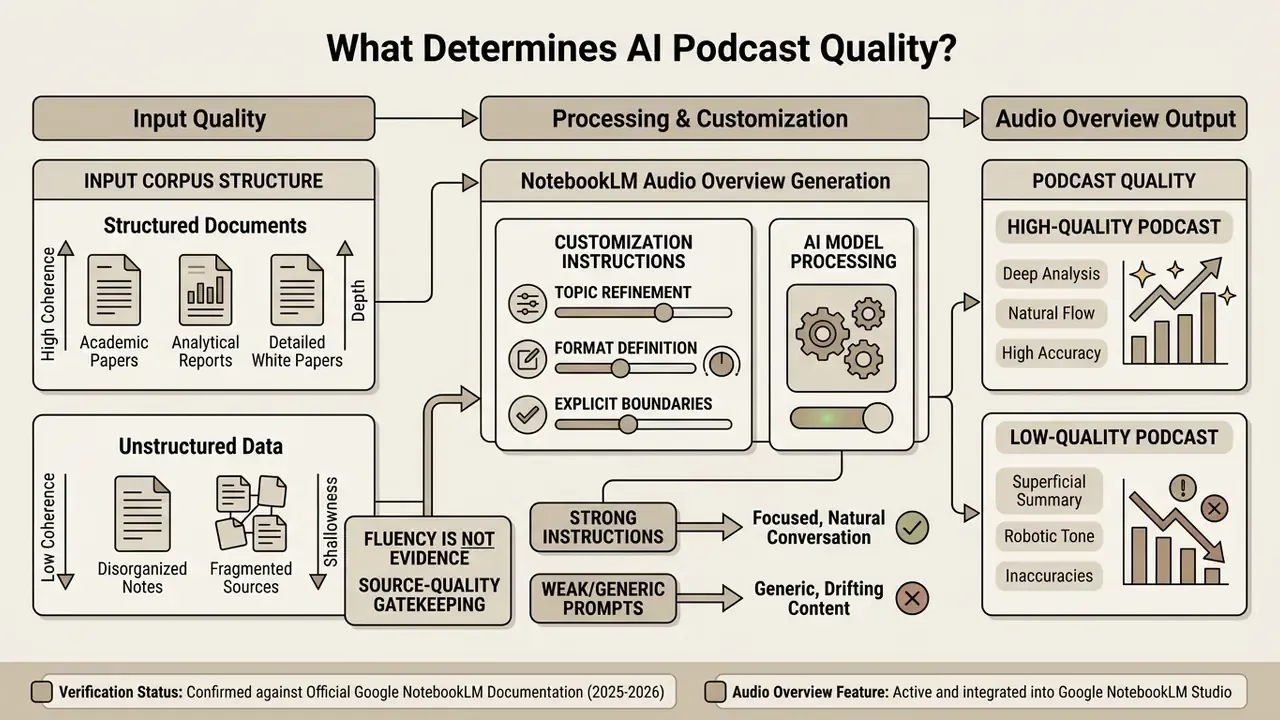
The depth, naturalness, and accuracy of a NotebookLM Audio Overview depend directly on the structural quality of the input corpus and the precision of the generation instructions. Weak text inputs produce superficial host banter. Well-edited primary research files produce nuanced analytical discussion. Quality audio starts upstream of the model.
«The dataset includes a podcast generated from an empty PDF: the system still produced a plausible-sounding dialogue entirely detached from any substantive material.»
That single finding is the clearest argument for source-quality gatekeeping: fluency is not evidence. Generation time also scales with corpus size. Google notes that large notebooks can take several minutes to render, and the feature remains labeled experimental with a documented risk of inaccuracies.
Which Sources Work Best for Conversational Audio
Peer-reviewed academic papers, structured analytical reports, and detailed white papers yield the highest-quality audio overviews.
«Structured scientific articles allow the AI hosts to convey central arguments and methodology more accurately than unstructured text.»
Ranking of source reliability for conversational audio:
| Source class | Grounding strength | Typical failure mode |
|---|---|---|
| Peer-reviewed papers, regulatory standards, filings | High | Nuance and stated limitations get compressed |
| Analyst reports, technical manuals, internal SOPs | High | Hosts over-generalize undefined internal acronyms |
| Structured long-form articles and white papers | Medium | Marketing framing carried into the dialogue |
| Opinion blogs, forum threads, transcript fragments | Low | Confident narrative with weak factual anchoring |
| Empty, scanned-without-OCR, or image-only files | None | Fully fabricated but fluent conversation |
Grounding research supports the same hierarchy: retrieval-augmented and grounded generation improves factual consistency relative to reliance on memorized parametric knowledge, and claim-level verification pipelines further reduce unsupported statements. For an AML or KYC briefing, that means one thing in practice. Upload the standard itself, not a vendor blog summarizing the standard.
How to Refine the Topic and Format of the AI Conversation
Setting explicit boundaries in the customization prompt keeps the AI hosts from drifting into generic conversational filler. Specify the audience's technical level, define required focus areas, and pick a format template such as Deep Dive, Brief, Critique, or Debate to align the output with your operational objective. If your workflow includes a video version, budget time for downstream trimming and captioning in free video editing software after export.
What Podcast Creation Features Google NotebookLM Provides
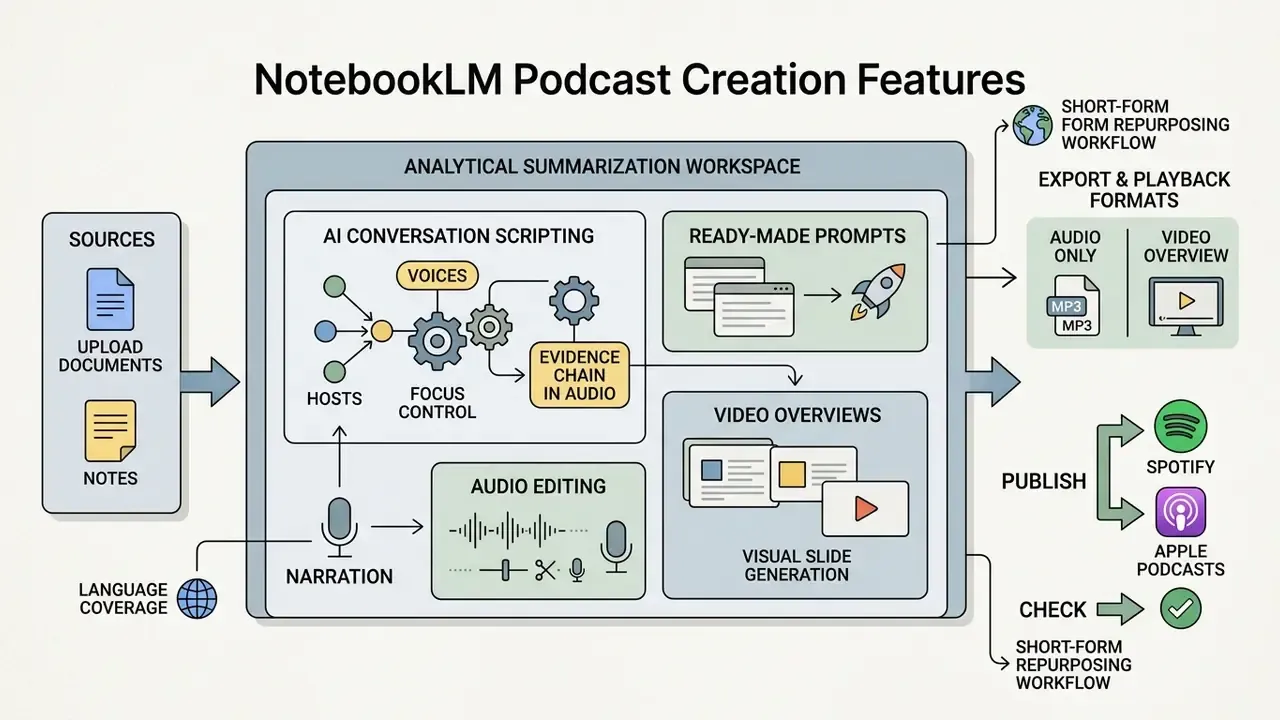
NotebookLM is engineered as an analytical summarization workspace, not a digital audio workstation. It automates conversation drafting and voice synthesis, but it omits manual timeline editing, multi-track mixing, and custom sound engineering.
Voices, Hosts, and AI Conversation Scripting Controls
NotebookLM generates a fixed two-host dynamic with one male-sounding and one female-sounding synthetic voice. The system writes the dialogue script behind the scenes from your context. Google does not currently provide native controls to swap individual host personas, edit the script line by line, or select specific voice models inside the interface. You cannot upload your own voice here, and you cannot clone anyone else's.
Evidence chain in audio format, and what auditors need to know. In the NotebookLM chat and note interface, answers carry inline citation chips that jump to the exact passage in the source. The Audio Overview, by contrast, is delivered as a single continuous audio track without per-claim timecoded citations. Practically, an audio brief cannot serve as its own audit artifact. Model risk teams that require a traceable evidence chain should distribute the audio file alongside (a) the notebook link containing the citation-linked chat answers, and (b) a frozen list of the exact source documents and versions ingested. Treat the audio as a derived, non-authoritative summary layer over an auditable text corpus.
One more governance detail worth writing into policy: name an owner for every notebook that holds regulated material. An unowned notebook is an unowned control.
Creating Video Overviews and Visual Presentations in NotebookLM
NotebookLM expanded its modal capabilities in 2025 to include Video Overviews alongside Audio Overviews, letting users generate visual summary presentations from notebook sources. Rather than producing synthetic human avatars, the tool assembles presentation decks synchronized with conversational AI narration. Creators comparing this to avatar-driven platforms should also review dedicated AI video generators, which take a fundamentally different approach to audio to video conversion.
- Visual slide generation. The engine extracts key diagrams, bullet points, figures, and direct source quotations from your notebook and renders them as structured slides that advance in step with the narration.
- Narration and focus control. Video Overviews accept the same style of focus prompt as Audio Overviews, so you can request an executive-level deck, a training walkthrough, or a critique-format explainer.
- Export and playback formats. Users can stream the presentation inside the Studio player or export the asset as a video file suitable for YouTube distribution and internal LMS hosting.
- Language coverage. Google extended Video Overview language support alongside Audio Overviews during the 2025 rollout, so localized decks follow the notebook output-language setting.
- Short-form repurposing workflow. To repurpose a Video Overview for TikTok, Instagram Reels, or YouTube Shorts, import the exported file into an editor such as CapCut or Descript, apply vertical 9:16 auto-reframing, add animated captions, and cut to the 30-60 second segment carrying the single strongest claim.
However, the native tool does not include background music libraries, custom sound effects, or automated voice cloning. Creators who need advanced post-production must export the raw MP3 or video file into external software, or explore specialized AI tools listed in the AI Media Glossary.
When to Choose NotebookLM vs Another AI Podcast Generator
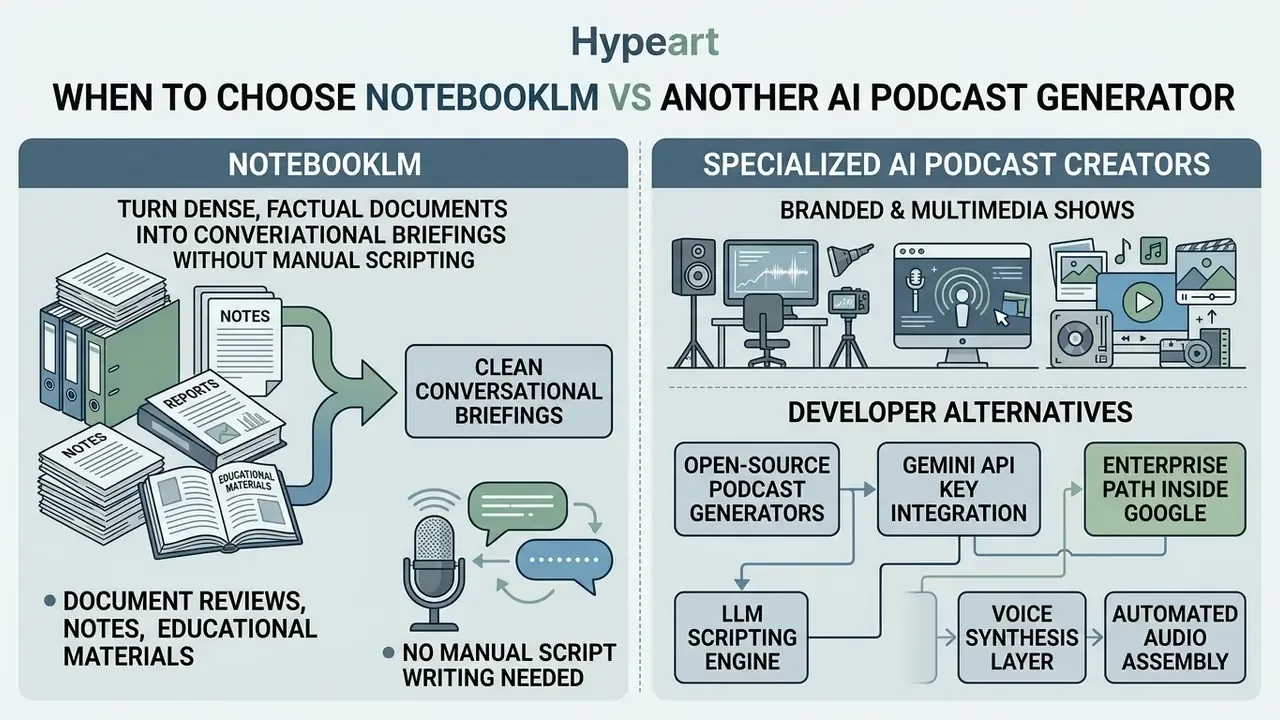
NotebookLM is the right call when you need to turn dense, factual documents into clean conversational briefings without manual scriptwriting. Specialized podcast creation platforms fit better when the goal is a branded media asset with custom voice actors, music beds, and precise sound design.
NotebookLM for Document Reviews, Notes, and Educational Materials
NotebookLM excels at turning complex technical manuals, lecture series, legal briefs, and corporate compliance documents into digestible audio overviews.
«Students found AI podcasts more engaging than textbooks, and personalized versions significantly improved learning outcomes across several disciplines (3x3 design, 180 participants).»
Specialized AI Podcast Creators for Branded and Multimedia Shows
When a project requires custom brand voices, voice cloning of an executive, or multi-track audio engineering, specialized platforms give more creative control. Tools in this category typically add instant and professional voice cloning, voice design from text prompts, timeline or text-based editing, royalty-free music and sound-effect libraries, avatar hosts for video episodes, multilingual dubbing across 170+ languages, and explicit commercial licenses on paid tiers starting around $6 per month. Teams building commercial media products can consult the AI Media Comparison Matrices and the roundup of the best AI video generators to evaluate workstations that support full script editing, sound effects integration, and direct RSS feed distribution.
Adjacent generative-media terminology sits in the same reference cluster, including the ai art generator, ai art app, ai art maker, and ai art critic entries, useful when your show needs cover art and episode thumbnails produced under the same licensing review as the audio.
Developer Alternatives: Open-Source Podcast Generators and Gemini API
Organizations that need full programmatic control over podcast scripting, custom voice models, or local data processing can deploy open-source alternatives to NotebookLM, most notably Open Notebook and Podcastfy, the library that powers Open Notebook's podcast module.
Key integration architecture:
- LLM scripting engine. A Gemini or GPT-class model generates a structured multi-speaker dialogue script (typically JSON) from raw documents, with template-level control over podcast name, tagline, per-speaker role and tone of voice, conversation style, engagement techniques, dialogue structure, output language, and target episode length.
- Voice synthesis layer. The script is routed to the ElevenLabs API, Gemini Text-to-Speech, or OpenAI voices to assign custom voice clones, per-speaker emotion markers, and language settings. Using Gemini TTS requires enabling the Text-to-Speech API on your Google Cloud project and attaching it to your API key.
- Automated audio assembly. Generated speech buffers are merged, background beds and intro or outro stings are inserted, and the result is exported as WAV or MP3, without the free-tier cap of three generations per day.
- Enterprise path inside Google. For teams that want to stay in the Google stack, the Cloud Discovery Engine Podcast API generates MP3 output programmatically from text, image, audio, and video inputs, requires an enabled Discovery Engine API project plus the "Podcast API User" IAM role, and operates under a documented context ceiling below 100,000 tokens. Implementation patterns and cost modeling for adjacent Google generative media APIs are covered in the AI Media API Guides.
Trade-off: open-source stacks give you voice identity, script editing, and data locality, but you take on prompt engineering, TTS billing, voice-consent documentation, and output QA that NotebookLM handles opaquely on your behalf. Control has a headcount cost. Budget for it honestly.
Google AI Podcast Generator Free Access: Limits and Commercial Use
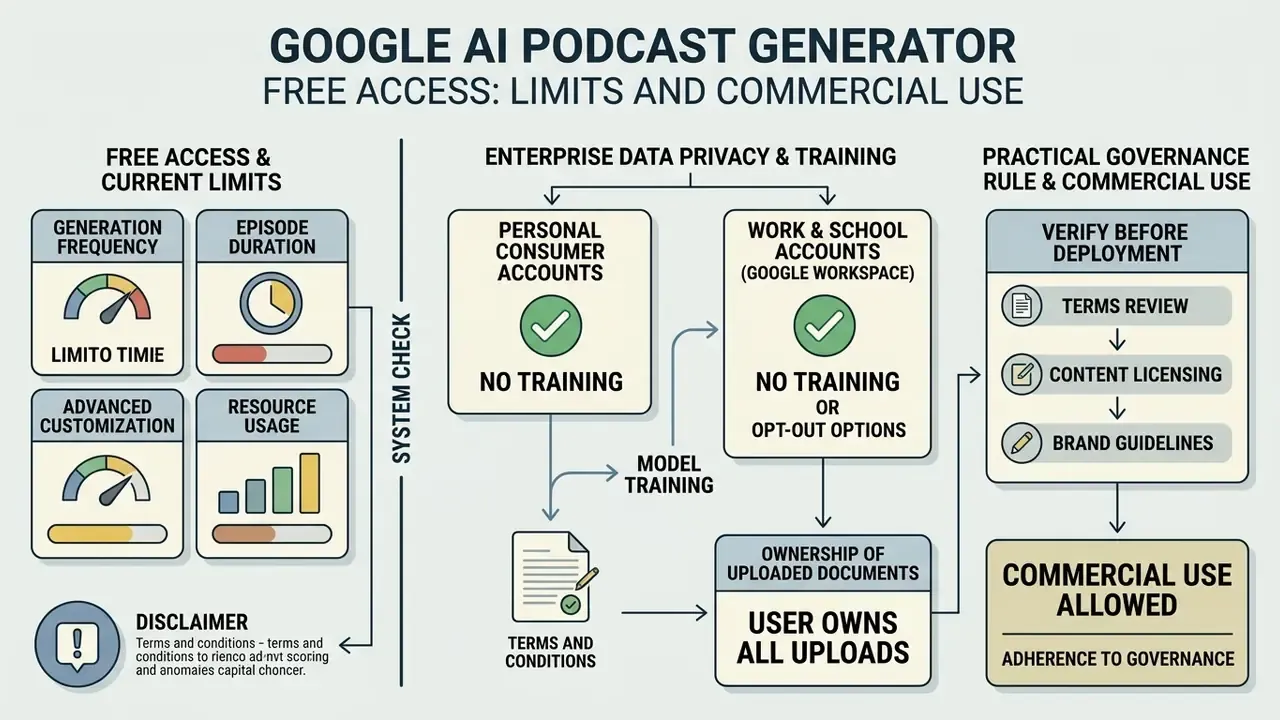
Google offers access to NotebookLM and Audio Overview generation on its free tier, subject to daily usage quotas and account platform terms. Commercial deployment of generated audio files requires a careful review of Google's terms of service and the copyright status of every uploaded input.
What Is Included in Free Access and Current System Limits
Free Google account users can keep up to 100 notebooks, upload 50 sources per notebook, and generate up to 3 Audio Overviews per calendar day. Chat interaction on the free tier is capped at roughly 50 queries per day. Tiered enterprise accounts and Google Workspace plans raise those daily generation limits, as outlined in the AI Media Pricing guide. NotebookLM Plus is bundled into Workspace Business and Enterprise Standard plans and can also be purchased standalone through Google Cloud. Readers benchmarking how generous this generator free allocation really is can compare AI video generator pricing and access tiers across the wider market, and model control overhead with the AI Media Calculators.
Enterprise Data Privacy: Are Your Uploaded Documents Used for Training?
This is the single most consequential question for banks, insurers, and healthcare organizations, and the answer depends entirely on which account tier you use:
- Work and school accounts (Google Workspace / Google Cloud). Access through a work account is governed by the Google Cloud Terms of Service and the Workspace data-protection commitments that apply to your domain, not consumer terms. Enterprise-tier usage is where organizations should look for contractual assurances on data handling, retention, and human review.
- Personal consumer accounts. Consumer Google terms differ from Cloud terms, and reviewers may access some consumer AI interactions for quality purposes. This is the wrong tier for confidential filings, client data, PII, or PHI.
- Ownership of uploads. Google states it does not claim ownership of content you upload, share, or store, including text, data, information, and files.
- What to verify before deployment. Confirm with your Workspace or Cloud administrator: (1) which terms of service govern your domain, (2) whether your contract covers the specific regulatory framework you operate under, (3) retention and deletion behavior for notebooks and generated audio, and (4) regional data-residency commitments.
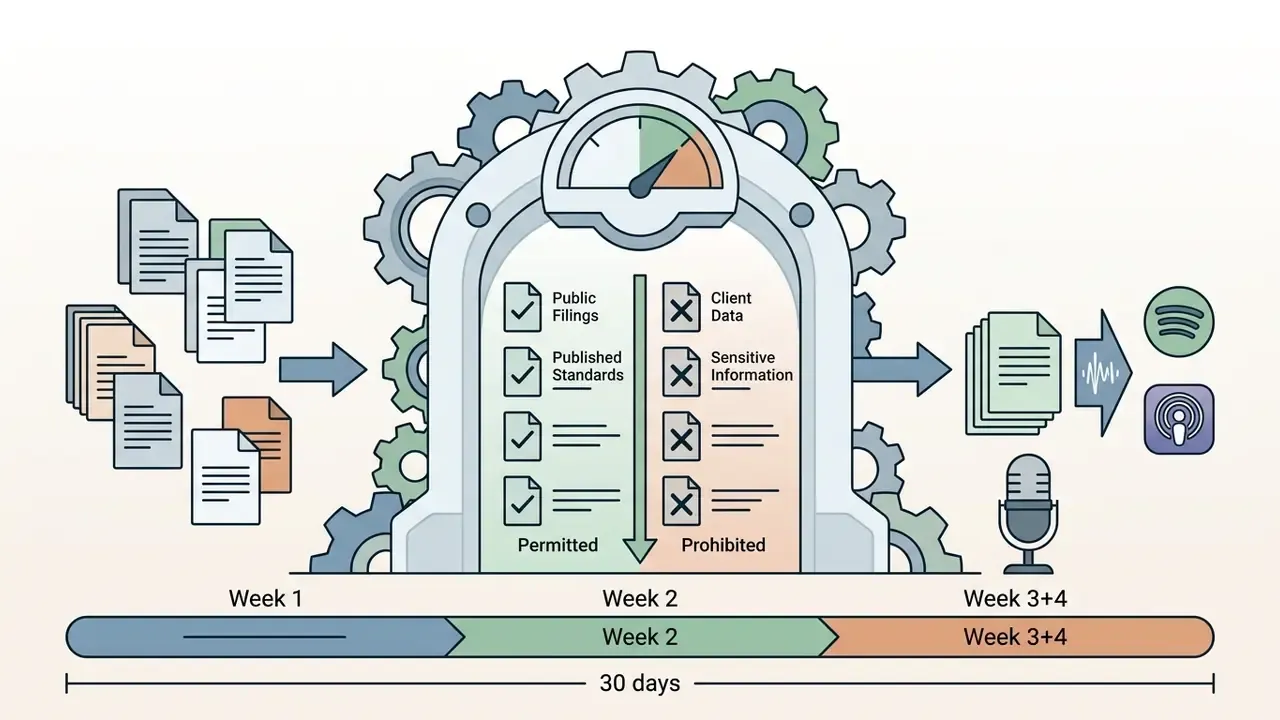
Practical governance rule: approve NotebookLM only on an enterprise-contracted tier, publish an internal list of document classifications that may and may not be uploaded, and log which notebooks contain client-identifiable material. Unmanaged personal-account usage of an AI tool with corporate documents is the textbook definition of shadow AI risk.
What to Verify Before Commercial Publication of AI Audio
Before publishing an AI-generated Audio Overview as a public commercial podcast episode, compliance officers should verify three things: source copyright ownership, platform usage policy compliance, and factual accuracy through human review.
Google's generative-AI prohibited-use policy separately bans harmful and deceptive applications, and Google's Search guidance treats AI-assisted content as acceptable only when it is original and genuinely useful rather than produced to manipulate rankings. Organizations should also review the broader framework for commercial use rights for AI-generated content and the wider AI Media Commercial-Use Hub before monetizing synthetic media assets.
| Feature / Capability | Google NotebookLM Audio Overview | Specialized AI Podcast Generator |
|---|---|---|
| Primary Ingestion Model | Direct document upload (PDFs, Docs, Web URLs, Audio) | Text prompts, manual scripts, or outline inputs |
| Source Grounding | Strictly bound to user-uploaded notebook corpus | Variable; often uses broad LLM internal parametric memory |
| Voice Customization | Fixed two-host synthetic voice system | Wide selection of custom voices and instant voice cloning |
| Script Editing | Prompt-guided customization; no direct line editing | Full manual line-by-line text script editing |
| Sound Design & FX | None; pure conversational audio | Integrated background music, intros, outros, and sound effects |
| Video Generation | Video Overview slide decks with synced narration | Advanced audio-to-video visualizers and AI avatars |
| Distribution | Manual MP3 download; no native RSS | Built-in hosting, embeds, and RSS to Spotify and Apple |
| Entry Cost Tier | Free tier available (3 audio generations per day) | Freemium or monthly subscription tiers (roughly $6-$30 per month) |
| Commercial Rights | Subject to Google Terms of Service and source rights | Explicit commercial license grants on paid plans |
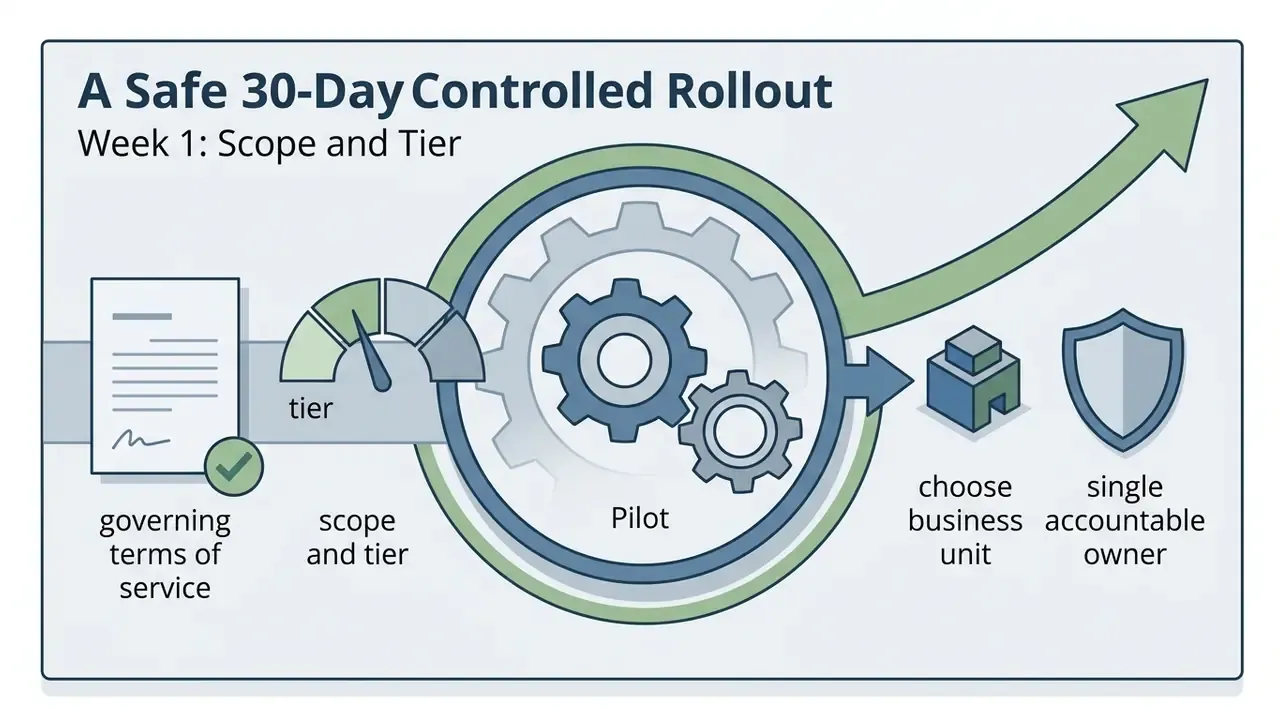
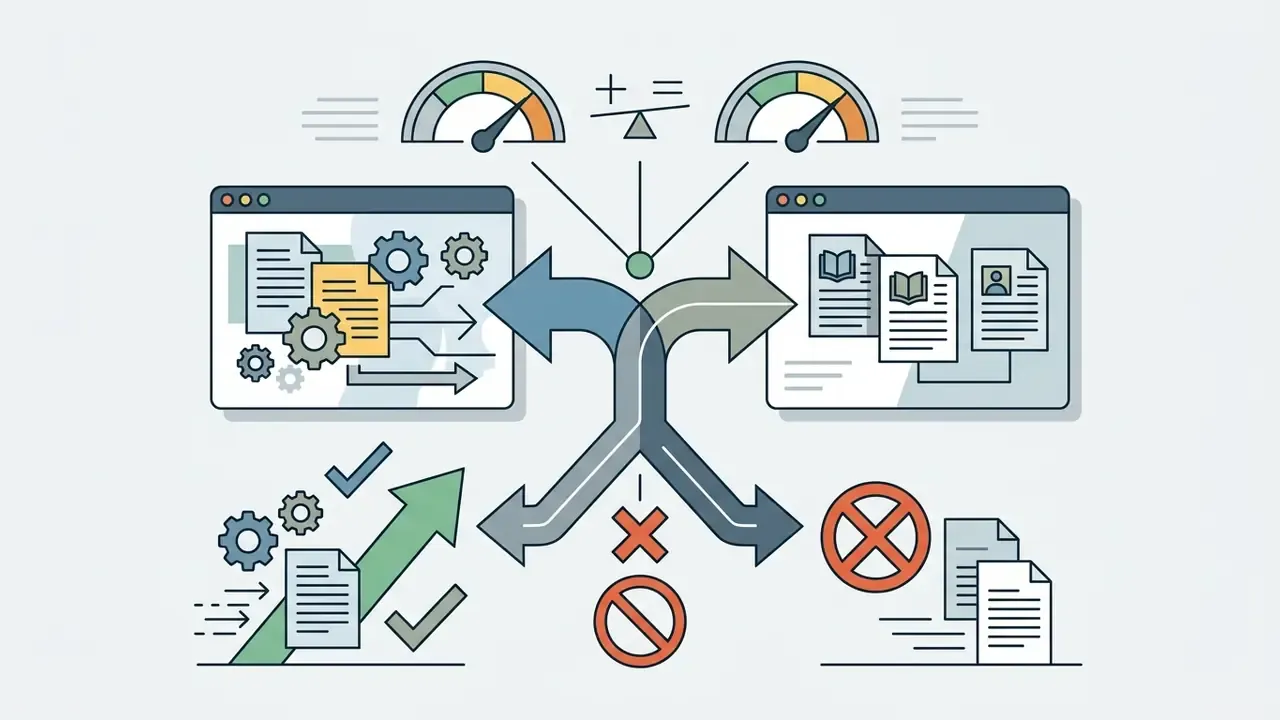
A Safe 30-Day Controlled Rollout
If you want a next step that does not require a committee, keep it small and reversible.
FAQ: Google AI Podcast Generator
Can You Create an AI Podcast If Your Source Materials Are Not in English?
Yes. Google NotebookLM supports audio generation in over 80 languages, including Spanish, French, German, and Russian. You can upload primary source documents written in one language and set your preferred output language in the notebook settings to generate localized audio conversations.
«In 2025-2026 Google expanded Audio and Video Overviews to 80+ languages, moving non-English output from short-form clips to full-length discussions that synthesize ideas from the sources.» - Google, NotebookLM language support update (2025-2026). https://support.google.com/notebooklm/
Two caveats matter for non-English deployments. First, interactive mode remained English-only in beta while generation coverage expanded. Second, Google has not published per-language quality benchmarks for accent, comprehension accuracy, or naturalness, so localized output should be spot-checked by a native-speaking reviewer.
«Rettberg documents cases of "cultural mistranslation," where AI hosts projected culture-specific narrative frames onto material that did not fit them.» - Rettberg, AI-generated podcasts: Synthetic Intimacy and Cultural Mistranslation in Audio Overviews from Google's NotebookLM, Dataverse (2026). https://dataverse.no/
Can You Use a Raw Audio Overview as a Full Podcast Episode?
Technically yes, you can export and publish the file as it is. Industry practice says run post-production first. Review the raw output for hallucinated claims, normalize loudness toward the levels recommended in mainstream podcast delivery guidance (commonly cited as roughly -16 LUFS integrated for stereo and -19 LUFS for mono, though platform recommendations vary), and add human-recorded intro and outro disclosures before public release. Public-sector and university post-production guides describe the same sequence: clean the audio, adjust levels, remove unwanted noise, prepare metadata, run internal review, then export for distribution.
«AI-generated journal-club podcasts were positively received and successfully conveyed educational content, as confirmed by knowledge assessment results.» - Lareau et al., AI-Generated Podcasts for Wilderness Medicine Education, Wilderness Medical Society (2025). https://wms.org/
How Long Does Generation Take, and Can I Interrupt the Hosts?
A typical notebook renders in a few minutes, and Google notes that large notebooks can take several minutes longer. You cannot interrupt the pre-rendered script at will, but Interactive mode lets you tap "Join," ask a question aloud, receive a spoken answer grounded in your sources, and then return to the original overview.
Can NotebookLM Clone My Voice or Add Background Music?
No. Official Google documentation does not describe voice cloning, background-music libraries, or sound-effect insertion inside NotebookLM. Third-party tutorials that demonstrate "NotebookLM voice cloning" are in practice chaining the exported MP3 through an external TTS or editing platform. If a branded voice is a hard requirement, plan for a specialized platform or an open-source stack from the outset.
Does NotebookLM Search the Web While Generating My Podcast?
No. Audio Overview generation is bound to the notebook corpus you supplied. That grounding is the feature's main governance advantage, and also the reason an incomplete or one-sided source set produces a confidently one-sided episode.
What Should Go Into an AI Inventory Entry for This Tool?
At minimum: system name and tier, business owner, permitted document classifications, the notebooks in scope, retention behavior, review procedure before external distribution, and the shutdown path (who revokes access, and how fast). Low-risk assistive systems still belong in the inventory. Unlisted tools are the ones that surprise you during an exam.
Appendix A: Revision and Verification Notes
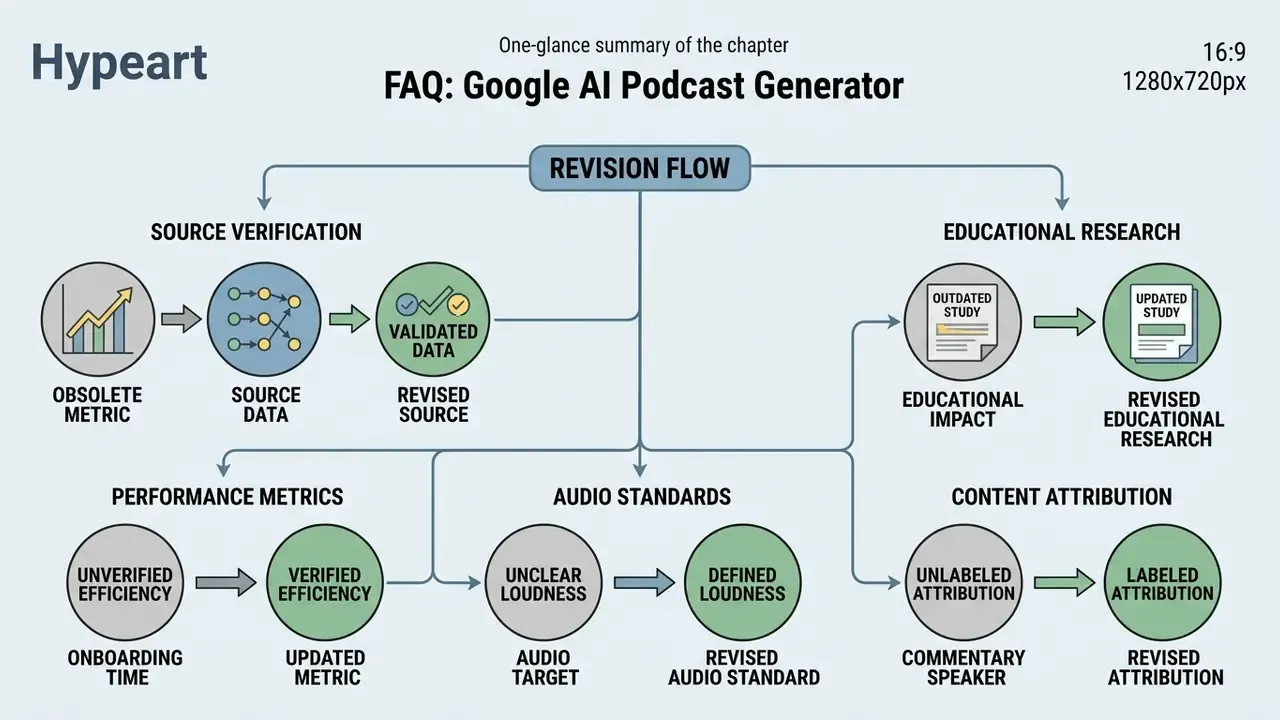
Internal and External Ecosystem Resources
For additional technical implementation guides, operational frameworks, and pricing structures across the generative audio landscape, review these hub resources:
- Calculators and ROI estimation Measure control overhead and resource allocation with the AI Media Calculators.
- API guidance and integration Review enterprise pipeline configurations in the AI Media API Guides.
- Commercial licensing Evaluate copyright considerations across platforms in the AI Media Commercial-Use Hub.
- Voice technology reference Compare synthesis quality, language coverage, and licensing in the guide to AI voice generators.
- Technical troubleshooting Find setup resolution steps in AI Media Support and Troubleshooting.
- Legal and regulatory tracking Monitor intellectual property developments in ongoing litigation documentation.
- Adjacent visual tooling Cover art, thumbnails, and deck visuals sit in the ai art ai and ai art generator reference entries.
Explore full terminology, model definitions, and audio framework specifications in the AI Media Glossary.