Why should a risk or finance leader care about a consumer utility? Because the same pipe that saves a marketing clip also carries unvetted binaries and client-confidential URLs out of your perimeter.
Executive summary
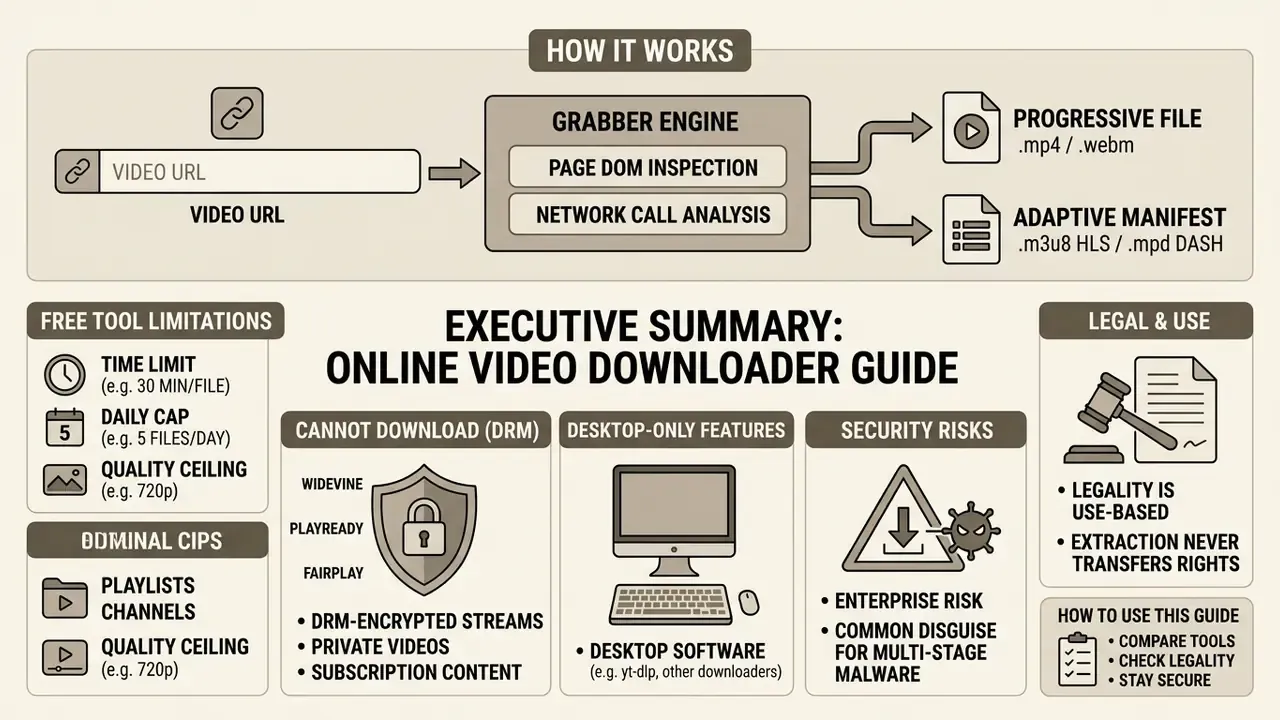
- How it works: A grabber takes your URL, inspects the page DOM and network calls, locates either a progressive
.mp4/.webmfile or an adaptive manifest (.m3u8for HLS,.mpdfor MPEG-DASH), then downloads and multiplexes the referenced segments into one container. - Hard technical ceiling of free web tools: roughly 30 minutes per file, ~5 files per day per IP, and 720p pre-muxed output. Anything above 720p usually needs local or server-side muxing with FFmpeg, which is why "HD downloads" so often arrive silent.
- What web tools cannot do at all: DRM-encrypted streams (Widevine, PlayReady, FairPlay), private or login-gated posts, and live streams saved as a single static file.
- Playlists, channels and subtitles are effectively desktop-only territory:
yt-dlp, 4K Video Downloader Plus, Stacher and JDownloader 2 parse index lists, pull.srt/.vtttracks, and can embed them into the MP4 container. - Security is the real enterprise risk: "downloader" is one of the most common disguises for multi-stage malware delivery, and even reputable open-source tooling carries CVEs (
yt-dlpshortcut-injection CVE-2026-55404, fixed in 2026.7.4). - Legality is use-based, not capability-based: extraction never transfers rights. Statutory damages in the U.S. reach $30,000 per work, up to $150,000 for proven willful infringement.
How to use this guide. Read the first two sections if you only need one public clip. Read the tool comparison and the security section before you standardise anything for a team. Read the legal section before a single frame reaches an ad, a deck, or a training corpus. The sequence is deliberate: capability first, controls second, rights last, because that is the order in which teams usually discover their mistakes.
What an online video grabber is and which videos it can download
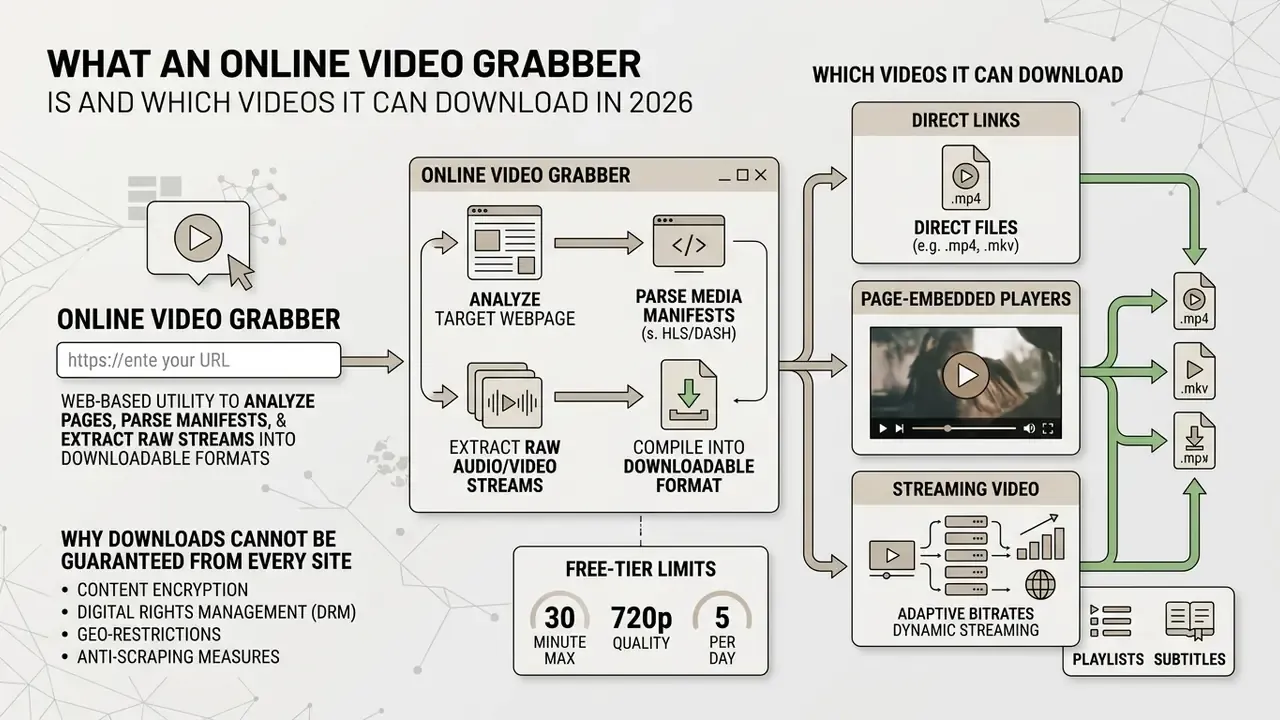
An online video grabber is a web-based utility designed to analyze a target webpage, parse media manifests, and extract raw audio and video streams into a downloadable format. It processes a user-supplied video link or URL to extract direct media files or reconstruct fragmented streams without requiring local executable installations.
An online grabber operates as an intermediary client. It emulates browser network requests to inspect the target host's Document Object Model (DOM) and network calls. While marketing claims often promote the ability to download any video from online, technical capabilities are strictly defined by the host site's architecture, authentication requirements, and digital rights enforcement.
Put bluntly: an "any url video downloader online" is a promise about the input field, not about the outcome.
Direct links, page-embedded players, and streaming video
Direct file URLs represent the simplest media delivery model, pointing directly to continuous container files such as .mp4 or .webm. When supplied with a direct link, a video downloader online issues an HTTP GET request to stream bytes directly to local storage via progressive download.
Most modern platforms instead use streaming protocols: HTTP Live Streaming (HLS) and Dynamic Adaptive Streaming over HTTP (MPEG-DASH). Rather than serving a single file, these protocols deliver manifest files (.m3u8 or .mpd) that reference short, segmented media fragments. To download streaming video online, a grabber must fetch the manifest, retrieve each indexed segment sequentially, and assemble them into a cohesive video file.
«Modern video delivery over HTTP adaptive streaming spans DASH and HLS on top of HTTP/2 and HTTP/3, including QUIC, especially in mobile networks.»
Two structural consequences follow. First, high-resolution renditions are usually video-only adaptation sets, with audio delivered as a separate track. MPEG's own DASH documentation describes client-side selection and combination of separate audio and video Adaptation Sets, not a server-prebuilt file. Second, HTML5 players increasingly build their playback source at runtime through Media Source Extensions, so no static file URL exists in the page markup at all: a grabber must reconstruct it from network telemetry.
Command-line tooling makes the protocol matrix explicit. yt-dlp exposes downloader classes for http, ftp, m3u8, dash, rtsp, rtmp and mms, which is precisely why a console utility succeeds where a browser-only page fails. Same URL, different depth of parsing.
Why downloads cannot be guaranteed from every site
No service can technically guarantee the ability to download any video across supported and unsupported platforms alike. Advanced security controls, including dynamic tokenization, session-based authentication, and anti-bot verification, frequently obscure media manifests from automated scrapers. Sites may also enforce crawl politeness rules (robots.txt, Crawl-Delay), IP-level rate limits and bans, and asynchronous JavaScript rendering that hides the media URL from a plain HTML request.
Furthermore, Digital Rights Management technologies (Widevine, FairPlay, and PlayReady) apply Common Encryption (ISO/IEC 23001-7:2023) to media fragments. Decryption keys are served only to authenticated player environments operating within Trusted Execution Environments (TEEs). Without valid decryption credentials, generic web tools cannot unpack or reconstruct encrypted media streams.
Platform policy compounds the technical barrier. YouTube's own transparency documentation states that users may not "download, distribute, transmit" content except as expressly authorized by the service or the rights holders. That is a policy limit no parser can engineer around, however clever the extractor code becomes.
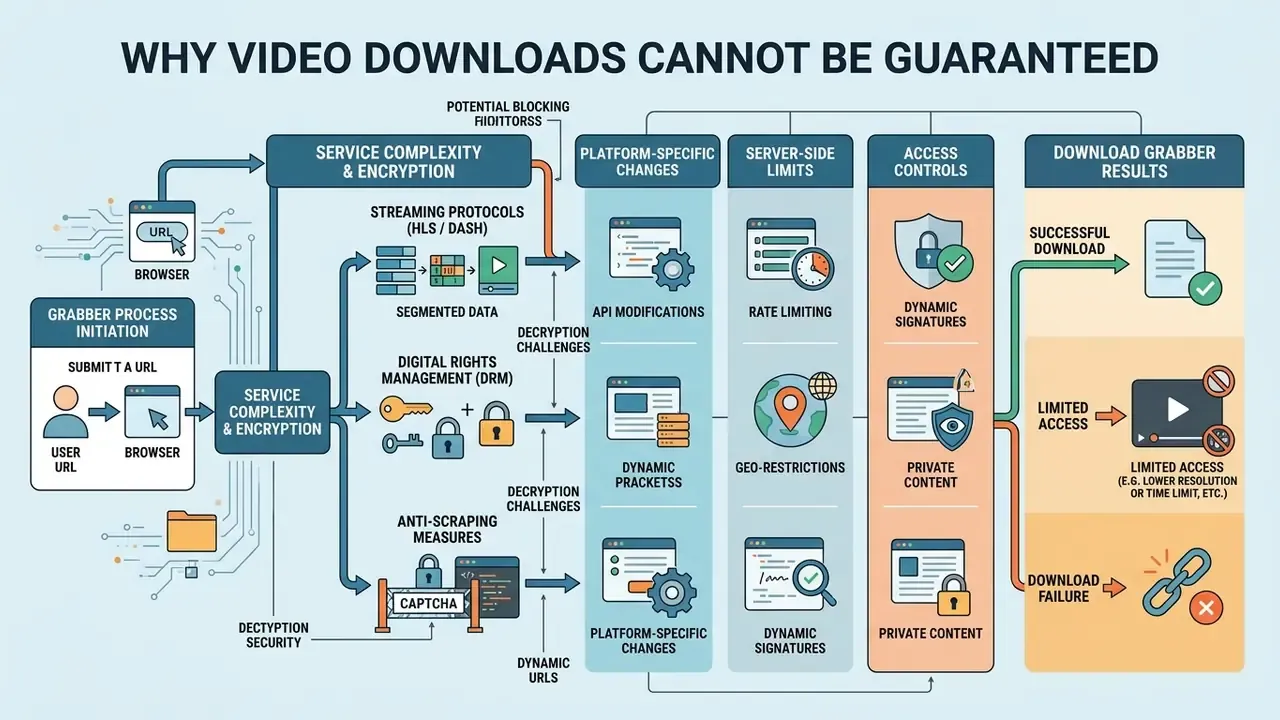
Text description of the diagram: Processing begins with URL input. The service inspects the page DOM and network calls. If the stream is DRM-protected or authentication-gated, the system returns an "unsupported link" message. If an open HLS or DASH manifest is detected, the grabber extracts the segments, multiplexes video and audio, and produces a final MP4 file. Five nodes in sequence: (1) input URL, (2) parse page and DOM, (3) detect streams or DRM, (4) extract manifest, (5) mux and download MP4, with a side branch labelled "encrypted or blocked" leading to a dead end.
How to download online video from a link: 3 steps
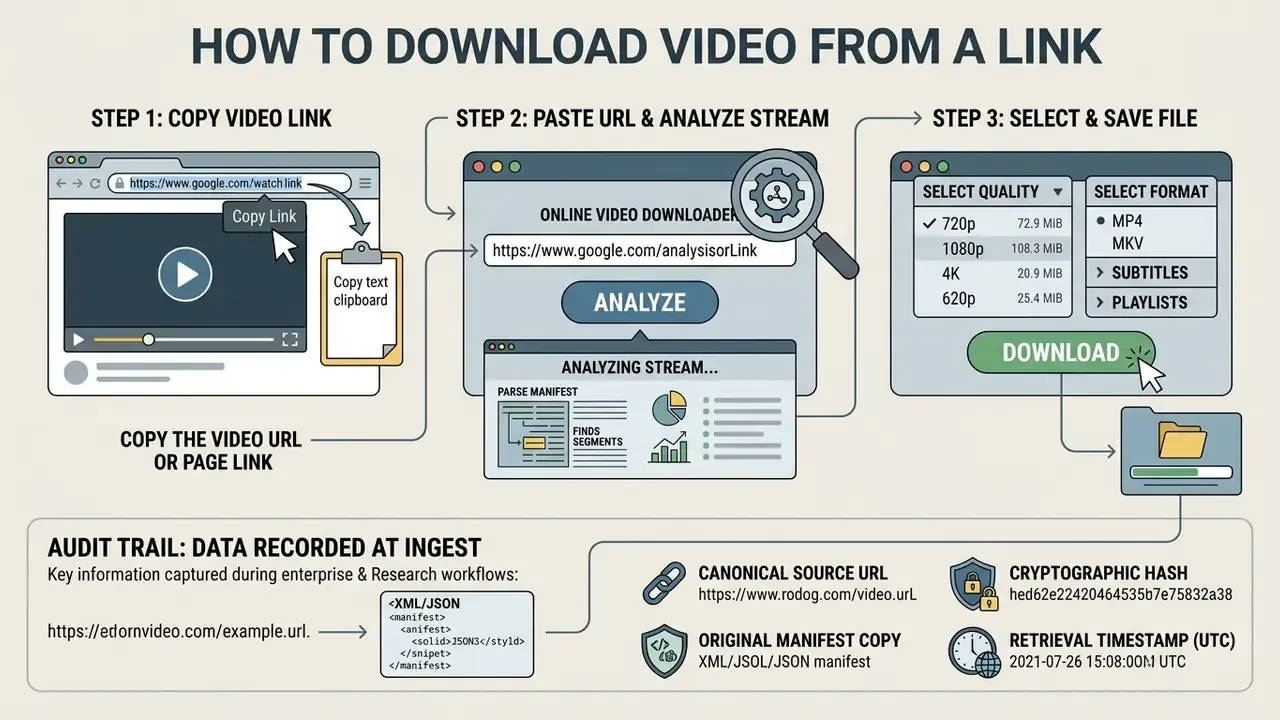
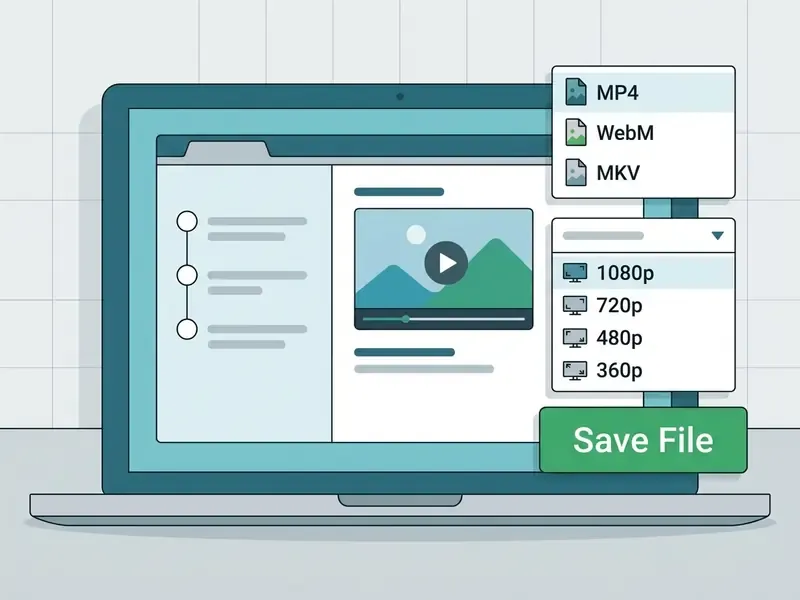
To download online video from a link, copy the target URL, paste it into the analysis field of an online free video downloader, select the preferred format, and execute the download command. This client-side procedure requires no local software installation.
Executing a successful media extraction depends on supplying a clean, unshortened web address that resolves directly to the host publication page.
Step 1. Copy the link to the video or the page containing it
The extraction workflow begins by capturing the precise video link from your web browser or mobile application. On desktop browsers, copy the complete URL string directly from the address bar while viewing the specific media page.
In mobile applications (TikTok, Instagram, YouTube), open the native "Share" menu and select "Copy link." Some platforms expose a dedicated "Copy video link" item in the video's context menu; prefer it when available. Avoid tracking-heavy shortlinks or secondary redirect parameters. Clean canonical URLs yield materially higher parsing success rates, because extractors match the URL against site-specific patterns before any network request is issued.
Step 2. Paste the URL and wait for stream analysis
Navigate to the video downloader interface and paste the copied URL into the primary input box. The backend parser automatically evaluates the target link against its supported host definitions.
If the submitted link points to a supported media resource, the tool parses the underlying manifest to extract available resolution ladders and bitrate streams. If the site enforces strict anti-scraping rules or relies on unsupported DRM protocols, the system returns an "unsupported URL" warning. Validation happens at the client or edge layer: security guidance such as the OWASP Mobile Application Security Testing Guide requires URL destinations to be parsed and checked against a strict allowlist of schemes, hosts and paths rather than forwarded verbatim. That is the same principle that makes file:// or ftp:// inputs silently fail in browser contexts.
Step 3. Select quality, format, and save the file
Review the generated list of available file options, which typically categorizes outputs by quality (720p, 1080p, 4K), container format (usually MP4), and standalone audio tracks.
To complete the extraction, click the corresponding download button to save the video directly to your device's local storage. This action prompts the browser to handle the incoming binary stream as a local file transfer. If you plan to reuse the clip, the next step is usually video editing: trimming, captioning, or re-framing before publication.
Practical parameter guidance, aligned with platform documentation: MP4 container, H.264 video, AAC-LC audio at 48 kHz stereo (YouTube's published upload specification), 1920×1080 for HD and 3840×2160 for 4K. Target bitrates around 8 Mbps for 1080p and 35–45 Mbps for 4K SDR keep files portable without visible re-encode damage. Need thumbnails or overlays for the same asset? A lightweight graphic maker handles that faster than a full editing suite.
Audit trail: what to record at ingest (enterprise and research workflows)
URL shortcuts and prefix tricks
Several services expose URL-manipulation shortcuts that skip the paste step entirely. Inserting a service prefix before a video address (for example savefrom.net/ or sfrom.net/ in front of the full URL) redirects straight to that service's download page. The best-known variant is the ss trick: turning youtube.com/watch?v=X into ssyoutube.com/watch?v=X opens SaveFrom's download page for that exact video.
Technically this is not a separate engine. It is the same backend wearing a URL as a costume. Convenient, yes. It carries exactly the same DRM, quality, and legal limits as the regular interface, and it sends the same URL to the same third party.
Comparative analysis of the best video download tools (2026)
Abstract descriptions of "an online grabber" are useless at decision time. Below are the tools that actually carry the traffic in 2026, with their real ceilings rather than their marketing claims. Rankings from "best online video downloader websites 2025" round-ups age fast, so treat any list, including this one, as a snapshot.
| Tool | Type | Max quality | Playlist download | Subtitle download | Key limitation / note |
|---|---|---|---|---|---|
| yt-dlp | Console (open source) | Up to 8K | Yes (entire channels) | Yes (all languages / auto) | Requires basic CLI skills; ~1,800+ site extractors, releases every ~2 weeks |
| SaveFrom.net | Web / extension | 720p free, 1080p+ via helper | No | No | Heavy ad load; full HD and 4K require the browser helper |
| 4K Video Downloader Plus | Desktop app | 8K | Yes (channels, playlists) | Yes (muxed or separate) | Free tier caps daily items; built-in browser enables login-gated personal content |
| Stacher | Desktop GUI over yt-dlp | 4K / 8K | Yes | Yes | Files above 1 GB in 8K can hit socket/proxy timeouts and fail with a log error |
| Video DownloadHelper | Browser extension | Source-dependent (HLS, DASH, MP4) | No | No | Needs a local companion app for HLS/DASH muxing; YouTube capture is blocked in Chrome |
| JDownloader 2 | Desktop app (Java) | Source original | Yes (via LinkGrabber) | Yes | Cluttered UI; installer bundles optional adware, so use custom install |
| AceThinker Aqua Clip | Web / desktop | 720p web, 4K desktop | Desktop only | Desktop only | Web tier limited to 30 min per clip and 5 files per day |
| Internet Download Manager (IDM) | Desktop app (Windows) | Source original | Yes (by interception) | No | Paid; an HTTP accelerator that happens to grab video, with the best raw multithreaded speed |
Two honourable mentions round out the field. ClipGrab (macOS, Windows, Linux) is a friendly yt-dlp front end with built-in search and manual ID3 tagging for extracted MP3s, but it does not handle batch jobs, playlists, or live streams, and its installer has historically bundled adware. Downlodr offers an ad-free grid interface with FFmpeg plugin support, yet frequently trips over multiplexing on standard YouTube items and lacks native audio extraction.
How to read this table. If you need one public clip once, use a web tool. If you need a course, a channel, a subtitle track, or anything over 30 minutes, install a desktop client, because no web interface will finish the job. If you need reproducibility and logs, use yt-dlp and keep the version pinned. For side-by-side scoring against your own criteria, our AI Media Comparison Matrices use the same column logic.
Supported sites and browsers for downloading video
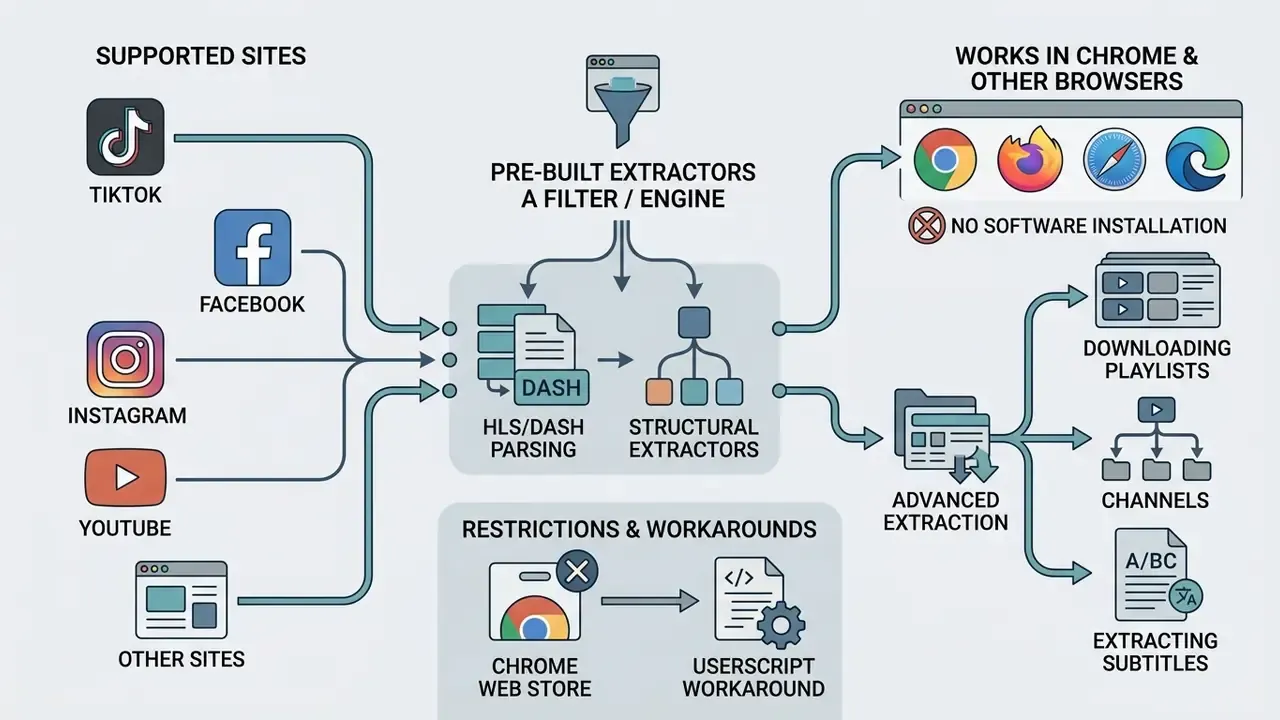
An any-website video downloader relies on pre-built extractors tailored to the structural layouts of specific hosting platforms. Browser compatibility depends on standard HTTP handling, cross-origin resource sharing (CORS) rules, and HTML5 media standards.
While many tools claim universal compatibility, operational success varies significantly based on platform policies, account privacy settings, and active browser controls. The variance is measurable, not anecdotal.
«An empirical analysis of 7,621 live broadcasts on YouNow, Periscope and Ustream identified widespread music and video copyright infringements.»
TikTok, Facebook, Instagram, YouTube and other popular sites
Public social platforms employ distinct media packaging models. Content on TikTok, Facebook, and Instagram often uses platform-specific delivery wrappers, where public posts can be parsed if creator permissions allow public viewing. TikTok makes this explicit: saving is a creator-controlled setting, and when downloads are switched off, users cannot save the file, convert it to a GIF or live photo, or forward it to certain third-party destinations. Accounts that are private, or belong to users under 16, have downloads disabled by default.
Platforms like YouTube use complex HLS and DASH manifests with adaptive bitrate ladders. Third-party utilities parse these public manifests to reassemble media streams, a common preparation step for YouTube video editing, provided the content is not restricted by age limits, region locks, or copyright protection mechanisms. YouTube's own supported path is narrower still: you may download only videos you uploaded yourself, and the attempt fails if the video was removed, carries a copyright or Community Guidelines strike, uses a pre-approved audio track, or has already been downloaded five times within 24 hours.
Shorts and Reels follow the same logic as their parent platforms. Shorts are treated as ordinary uploads under YouTube's rules, while Reels saving is governed by Instagram's permissions and the creator's settings, not by open bulk access.
Working in Chrome and other browsers without installing software
Modern web-based utilities function across any contemporary browser (Chrome, Firefox, Edge, Safari) without requiring users to install third-party software. Native web execution avoids executable security risks and eliminates system-level administrative requirements. That is the main appeal of any "all video downloader online chrome free" search: no installer, no admin password.
Running an all-in-one video downloader online in Chrome leverages browser-level network handling to process raw file streams. Users operating within managed enterprise networks can analyze media parameters while remaining fully compliant with corporate acceptable use policies, assuming the policy actually permits third-party processing of internal links.
Two browser-level behaviours are worth knowing. Chrome's built-in download manager supports automatic and manual resume of interrupted transfers directly in the downloads bar. And since Chrome 88, all mixed-content downloads initiated from HTTPS pages are blocked outright; video, audio, image and text were the last categories to move from warning to hard block. A grabber that hands you an http:// file link from an https:// page will therefore fail silently in a modern browser.
Content Security Policy adds a second layer. W3C CSP Level 3 defines media-src as the directive controlling which URLs audio, video and text-track resources may be loaded from. On locked-down corporate portals, that directive alone can prevent an in-page grabber from ever touching the stream.
Downloading playlists, channels, and extracting subtitles
Bulk content capture (training courses, conference tracks, multi-part playlists) is essentially unavailable in standard online grabbers because of the server load it creates. These jobs belong to desktop clients such as yt-dlp, 4K Video Downloader Plus, Stacher, or JDownloader 2. They parse playlist index lists, walk channel pagination, extract metadata tags (including ID3 fields for audio exports), and download text tracks in .srt or .vtt format with the option to embed them directly into the MP4 container as a soft-subtitle stream.
Practical notes from real runs: request the subtitle language explicitly rather than relying on defaults, and distinguish author-provided tracks from auto-generated ASR captions. The latter carry no punctuation model in many languages and are unsuitable for publication. When a playlist parser "drops" random items, it is usually a private, region-locked, or deleted entry inside the list, not a tool failure. And for very large batches, throttle deliberately: politeness rules such as robots.txt Crawl-Delay exist precisely to keep automated retrieval from behaving like an attack.
Chrome Web Store restrictions and the userscript workaround
Google's Chrome Web Store program policies prohibit extensions that enable downloading video from YouTube. This is a store-level rule, not a technical impossibility, which is why the same extension may support YouTube in Firefox and refuse to in Chrome. Video DownloadHelper is the textbook example.
The common workaround for legitimate cases (your own uploads, licensed material) is a script manager: users install Tampermonkey and then load a userscript that hooks the HTML5 player calls directly in the DOM. Two cautions belong with that instruction. First, a userscript executes with page-level privileges on every site it matches, so it is a genuine attack surface. Read the source or do not run it. Second, in managed environments a userscript is textbook Shadow IT: it moves media handling outside anything your security team can inventory.
| Source type | Example platforms | What to paste | Likely result | Support limitations |
|---|---|---|---|---|
| Progressive HTTP | Blogs, independent sites, CDNs | Direct .mp4 / .webm URL | Direct MP4 download | Requires public read access |
| HLS / DASH manifest | YouTube, Vimeo, OTT portals | Canonical video page URL | Multi-resolution MP4 options | High-bitrate renditions require muxing (FFmpeg or server-side) |
| Social video | TikTok, Instagram, Facebook | Public post / share link | Single-resolution MP4 or audio | Private posts and DRM content strictly inaccessible; creator settings apply |
| Playlist / channel | YouTube, Vimeo showcases, Bilibili | Playlist or channel URL | Batch of MP4 files + .srt/.vtt | Desktop tools only; web services return partial or empty results |
| Live stream | Twitch, live broadcasts | Channel / live event link | Segmented clip capture | Active live streams cannot be saved as one static file |
| DRM-protected | Subscription OTT services | Any player URL | Nothing, because the key request fails | Common Encryption (ISO/IEC 23001-7) blocks generic clients |
Support depends on the specific URL and on the source site's own rules, not on the tool's marketing page. Re-test quarterly.
Formats and quality: MP4, audio, HD, and 4K
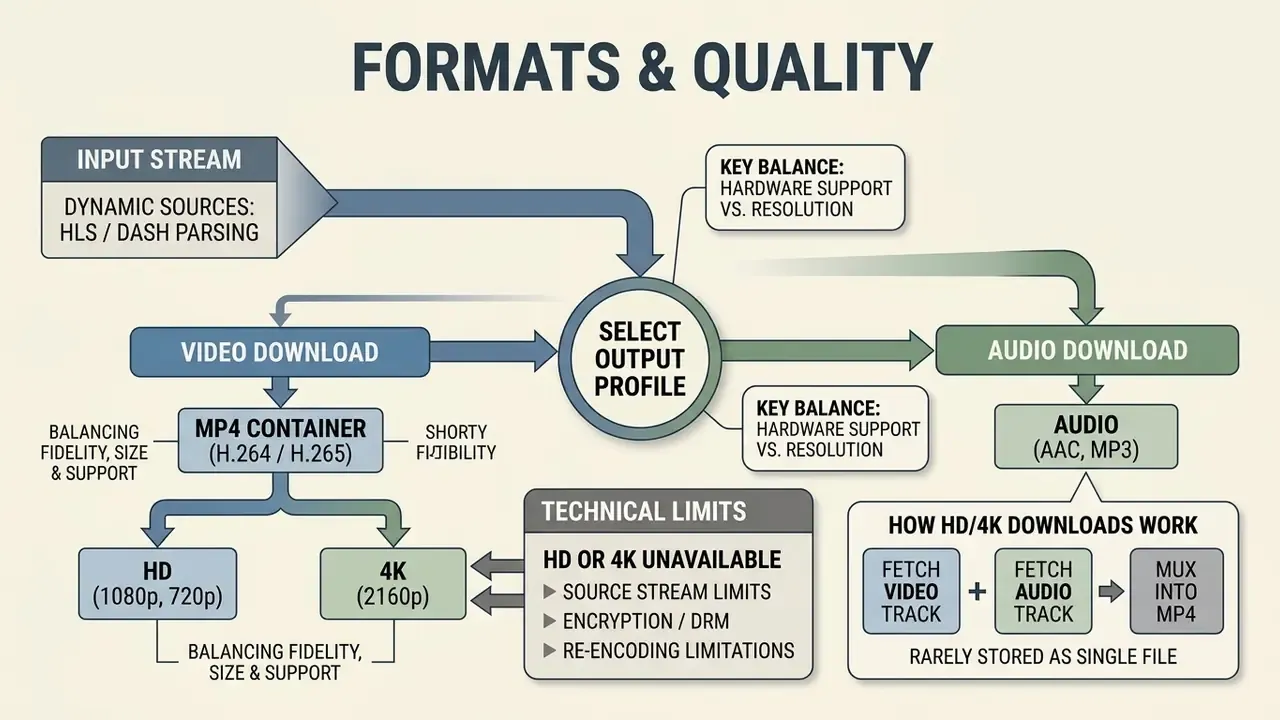
To download online video to MP4 successfully, users must select an output profile that balances visual fidelity, file size, and hardware playback support. Available selections depend entirely on the source platform's original encoding settings.
When evaluating generated file streams, technical specifications like resolution, bitrate, and container packaging dictate cross-device playback performance.
When to choose MP4 for saving video
The MP4 container (MPEG-4 Part 14, ISO/IEC 14496-14) is the industry standard for digital media distribution due to its universal cross-platform compatibility. Choosing MP4 ensures native playback across desktop operating systems, mobile devices, and standalone hardware media players. Android's official supported-media list, for instance, includes .mp4 and .m4a natively, and the Library of Congress preservation record describes MP4 as designed for web, online, and mobile delivery.
MP4 containers typically encapsulate H.264 or H.265 (HEVC) video streams paired with Advanced Audio Coding (AAC) tracks. This structure provides optimal compression efficiency without sacrificing baseline playback compatibility across legacy and modern web environments. WebM with VP9 or AV1 is smaller at equal quality but noticeably less forgiving on older players and TV hardware.
Free online video downloader or desktop software: what to choose
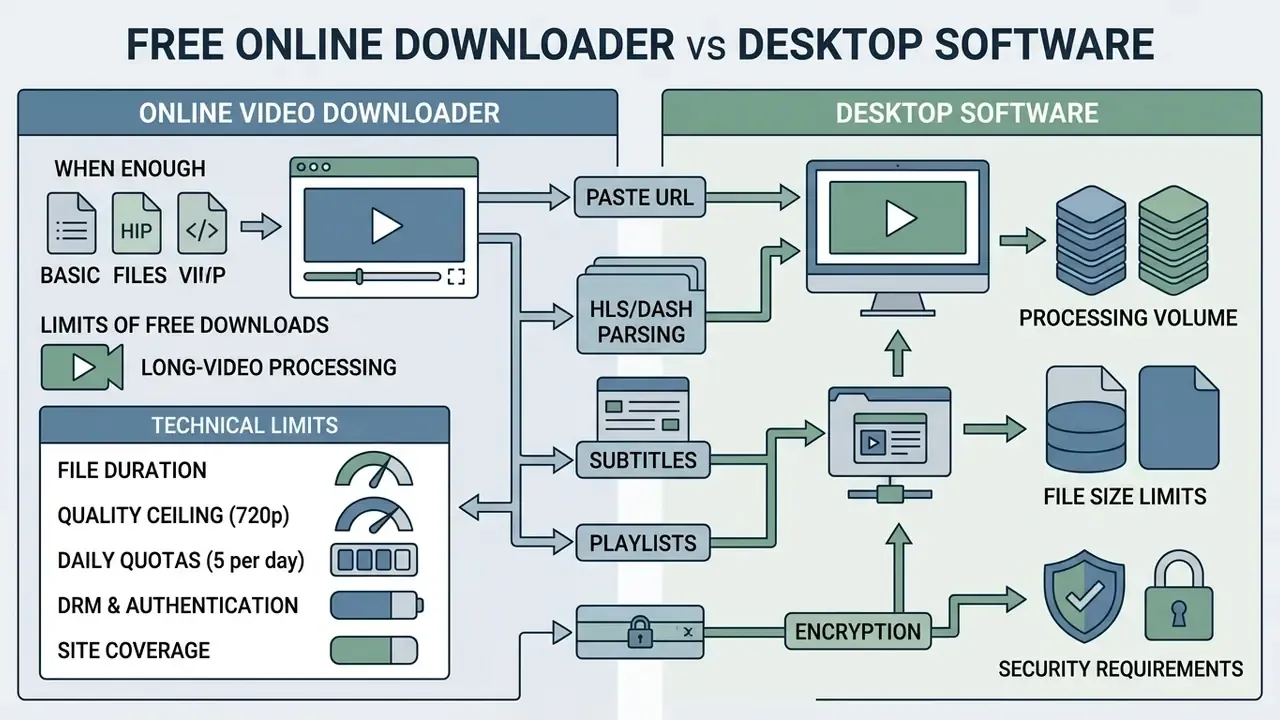
Choosing between the best free online video downloader and local desktop software depends on processing volume, file size limits, and security requirements. Web tools offer quick, installation-free access for occasional single-file tasks.
For high-volume operations, batch processing, or long-form video archives, standalone software applications provide greater throughput and advanced stream manipulation capabilities.
When a free online downloader is enough
An online free video downloader is fully sufficient for simple, single-file capture tasks involving public short-form content. Web utilities require no local storage overhead and execute entirely within browser sandboxes. If you are assembling a lightweight creative stack, it is worth pairing them with free video editing software rather than a heavier suite.
When users need to extract a quick promotional clip or a short audio file without elevated administrative privileges, web-based tools provide an immediate, friction-free workflow. Concretely: a public TikTok clip, a 90-second Instagram Reel from your own account, a 10-minute conference excerpt in 720p, or an MP3 rip of a podcast segment you have rights to. Anything larger, and you will meet the limits below within minutes.
Limits of free downloads and long-video processing
Free web tools enforce structural operational boundaries to manage bandwidth costs and server load. Published limits from major services cluster tightly: up to 30 minutes per file, up to 5 files per day, 720p video and 128 kbps audio, support for roughly 20 sites rather than 1,000+, and no playlist or batch capability at all. Speed caps on free tiers have been documented as low as ~95 KB/s, with ~1 MB/s on entry-paid tiers. Tier structures shift often, so cross-check current terms and our AI Media Pricing Guides before you commit a workflow.
Processing long-form high-definition media through a free web interface frequently results in server timeout errors (HTTP 504 Gateway Timeout) or dropped multiplexing jobs, leaving users with incomplete files or missing audio tracks. Exact thresholds vary by provider and change without notice. Treat the numbers above as the observed market norm in 2026, not as a guarantee, and verify the current terms of the specific service you use.
When a desktop solution is more practical
Security, malware, and Shadow IT risk
This is the section most consumer guides omit, and the one that matters most inside an organization.
Three concrete risk vectors:
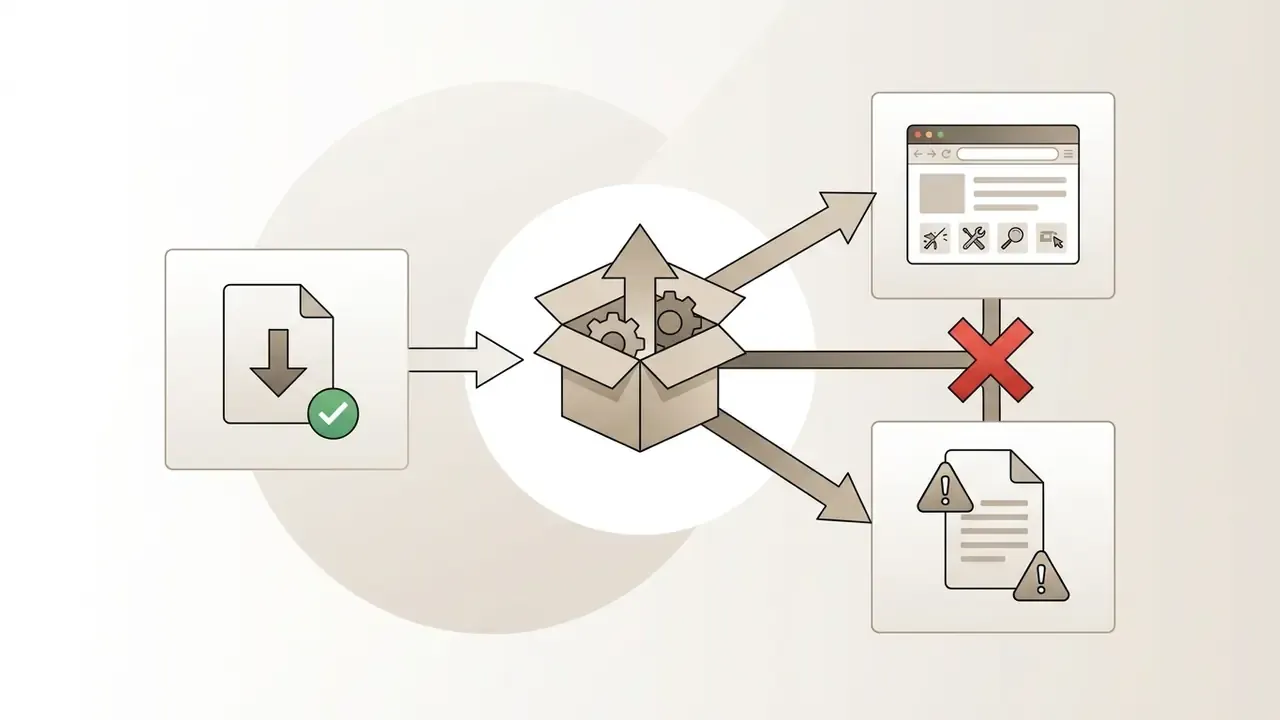
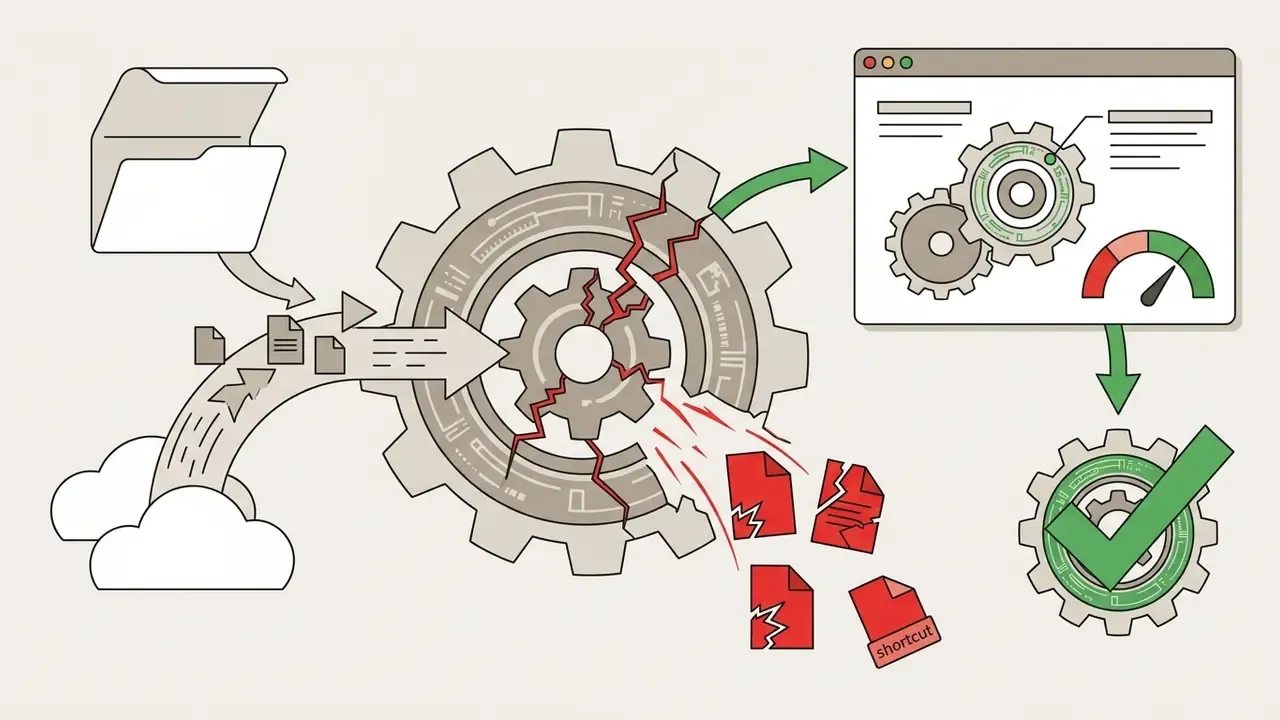
yt-dlp and youtube-dl carried CVE-2026-55404, in which attacker-controlled metadata could write malicious .url or .desktop shortcut files. The U.S. National Vulnerability Database records the fix in version 2026.7.4. Pin versions, and patch on a schedule.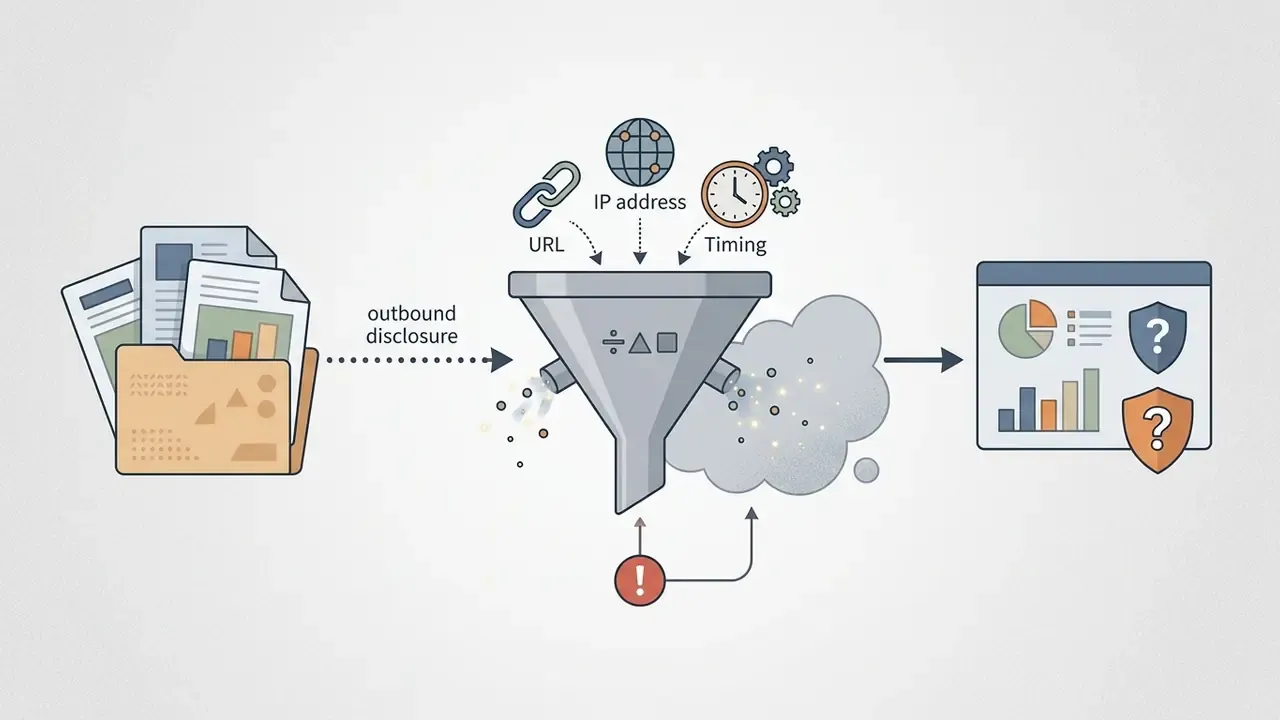
Enterprise evaluation criteria for a media ingestion tool
For teams that must justify a tool choice to security, legal, or model-risk review, capability is only half the assessment. Use the criteria below as a vendor scorecard.
| Criterion | What to verify | Why it matters |
|---|---|---|
| Processing locality | Does extraction run locally, on your VPC, or on a shared third-party server? | Determines whether URLs and cookies leave your perimeter |
| Manifest retention | Can the tool save the source .m3u8 / .mpd and rendition ID? | Prerequisite for reproducible datasets and audits |
| Integrity evidence | Native hash output (SHA-256), byte-size logs, per-segment status | Enables tamper detection and re-verification |
| Logging and export | Machine-readable job logs (JSON/CSV) exportable to GRC or SIEM | Required for audit trails and incident review |
| Version discipline | Public release cadence, changelog, CVE history, pinnable versions | Extractor churn silently changes outputs |
| Rights controls | Blocklists, DRM refusal, permission-attestation fields at ingest | Keeps unlicensed material out of training corpora |
| Bundle hygiene | No adware, no optional toolbars, verifiable checksums for installers | Removes the most common malware entry point |
| Concurrency controls | Configurable rate limits, retries, and politeness delays | Prevents your traffic from resembling an attack |
| Supply-chain posture | Open source, signed binaries, SBOM availability | Basis for security sign-off |
| Cost transparency | Per-seat vs per-volume, free-tier caps in writing | Predictable scale economics |
Ingestion checklist (10 items): canonical URL captured · rights evidence attached · manifest archived · SHA-256 recorded · tool version pinned · file antivirus-scanned · storage location classified · retention period set · access list defined · deletion path documented.
Where does ownership sit? Name one accountable owner per pipeline, with an escalation path and a documented shutdown step. A media ingestion job is a small digital worker, and unowned workers drift. If you are wiring extraction into an internal service, our AI Media API Guides cover authentication, rate limiting, and log export patterns; anything unclear can go to support.
What to do with the video after downloading: formats and editing
A downloaded file is rarely the deliverable. Four post-processing steps cover almost every real use case.
- Container and codec conversion (MP4 / WebM / MP3).If the downloaded file is encoded with VP9 or AV1, older media players and TV hardware may play video without sound, or refuse the file entirely. Re-encode to the H.264 plus AAC baseline for maximum compatibility, and remux rather than transcode whenever the codecs are already supported, to avoid a second generation of quality loss.
- Vertical reformatting (9:16).To publish excerpts of a long horizontal video on TikTok, YouTube Shorts, or Instagram Reels, crop to the central action area, or use a 1:1 or 16:9 intermediate for feed placements. Re-check subtitle position after cropping, because burned-in captions are the first thing a crop destroys.
- Audio extraction.If you only need voice or music, export the audio stream without re-encoding the video part: MP3 at 128–320 kbps, or M4A/AAC at 48 kHz stereo for the cleanest passthrough from a YouTube-sourced file.
- Trimming, merging, and GIF export.Cut dead air at the head and tail, merge multi-part recordings from a playlist download into a single timeline, or convert a short segment into an animated GIF for documentation and support tickets. A standard video editor covers all four; for repeatable batch jobs, an FFmpeg script is faster and reproducible.
If the clip you actually needed turns out to be unlicensable, generating a replacement is often the shortest legal path. See our comparison of free AI video generators for tools that produce usable stock-style footage without third-party rights exposure.
Is it legal to download video from the internet?
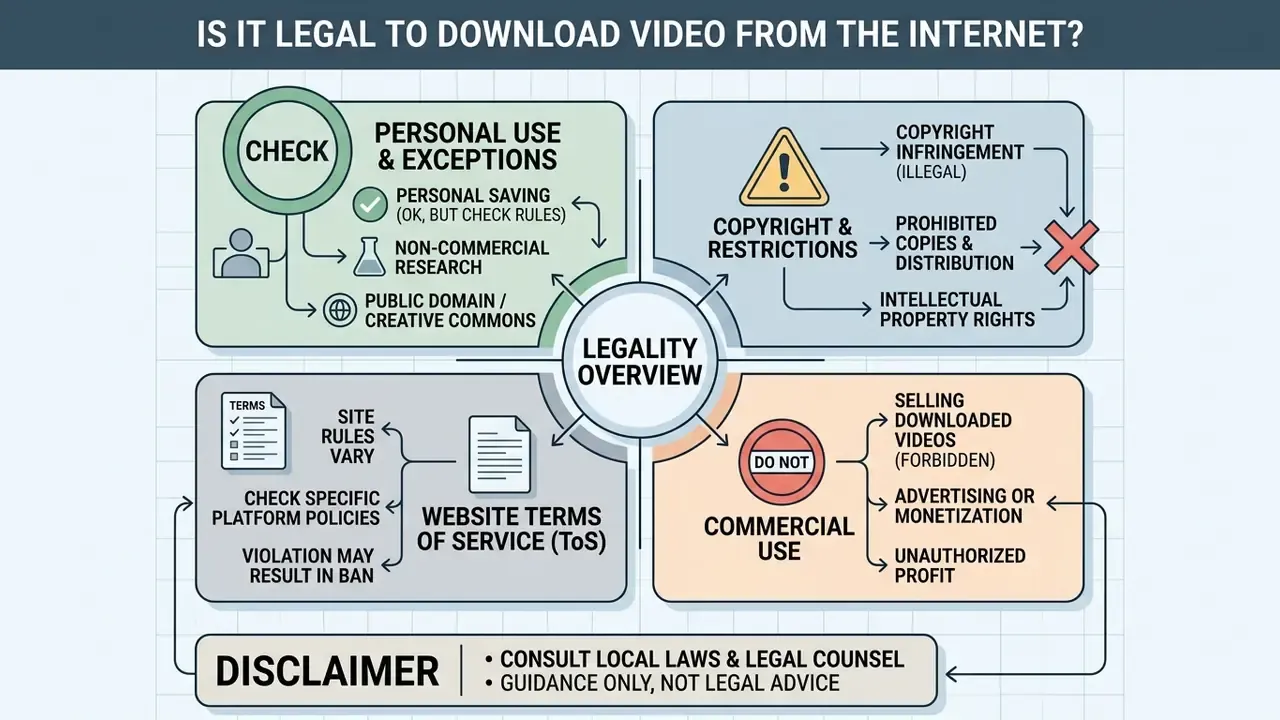
The legality of downloading videos depends on intellectual property law, host platform terms of service, and the intended end use of the extracted file. Technical ability to extract a media stream does not grant legal authorization to store or redistribute copyrighted content.
Organizations and individual operators must evaluate regulatory requirements, copyright protections, and contractual boundaries prior to capturing web content.
Personal saving, copyright, and site rules
Under United States copyright law (Title 17, U.S. Code), unauthorized reproduction or distribution of copyrighted material constitutes infringement unless explicitly protected under a doctrine such as fair use (17 U.S.C. §107). The U.S. Copyright Office is explicit that uploading or downloading protected works without the owner's authority infringes the reproduction and distribution rights, and that fair use is a case-by-case defense rather than a blanket permission.
While personal offline viewing may fall under fair use arguments in narrow contexts, host platform Terms of Service frequently prohibit downloading media without express permission. Hulu's terms, for example, forbid copying, downloading, stream capture, archiving, or retransmission absent written consent, and Vimeo's terms prohibit uploading infringing material. Bypassing technical access controls can breach contractual agreements even when a non-commercial fair-use defense is asserted.
The distinction between watching and keeping is also doctrinally significant:
One useful practical exception: works of the U.S. federal government are generally not eligible for copyright in the United States and are treated as public domain, which is why NARA and agency archives are the safest starting point for freely reusable footage.
Commercial use of downloaded video
Commercial utilization of downloaded media (advertising, commercial redistribution, AI model training, or public display) strictly requires explicit written licensing from the copyright holder. Commercial purpose also weakens any fair-use argument, because it cuts against the first statutory factor.
Unauthorized commercial exploitation exposes operators to statutory damages reaching up to $30,000 per work, or up to $150,000 per work in cases of proven willful infringement under U.S. copyright law. Comparable exclusivity rules apply elsewhere: Article 1270 of the Russian Civil Code grants the rights holder exclusive control over use "in any form and by any lawful means," and use in advertising or for profit is not treated as permissible citation.
Detection is no longer the bottleneck it once was:
For AI teams the practical rule is blunt: a clip's presence in a training set is a reproduction event, and "we downloaded it from a public page" is not a license. Record rights evidence per asset at ingest, or expect to remove the asset, and possibly retrain, later. That second option is the expensive one.
Troubleshooting and FAQ about online video grabbers
Technical issues during online video capture typically stem from HTTP response headers, browser media rendering rules, separated adaptive audio and video tracks, or platform-side access controls. Below are direct solutions to the primary operational edge cases.
Why the browser opens the video instead of downloading it
Browsers display video inline within a new tab when the host server sends a Content-Type: video/mp4 header without a Content-Disposition: attachment directive. Per RFC 6266 and MDN, inline instructs the user agent to render the resource in the browser, while attachment instructs it to save the payload locally. The header, not the file extension, decides the behaviour.
To force a direct file save, right-click the video player and select "Save Video As…", use your browser's "Save link as" action on the media URL, or, if you control the server, send Content-Disposition: attachment with the response. Note that Chrome will refuse the download entirely if it is served over plain HTTP from an HTTPS page (mixed-content blocking, Chrome 88 and later).
Why a downloaded file may have no audio or fail to open
A downloaded MP4 lacks audio when the grabber extracted a high-resolution video-only stream without fetching and multiplexing the corresponding separate audio adaptation set from the HLS or DASH manifest. This is a structural property of adaptive streaming, not a bug in the file.
Playback failures have three common causes: the file genuinely contains no audio stream; the player does not support the audio codec used (Microsoft's own guidance points to codec and player mismatch); or audio was dropped during remuxing because the output container did not support the selected audio codec, as documented in the FFmpeg cookbook. Re-encoding to H.264 plus AAC in an MP4 container, or switching to an up-to-date player with HEVC and AV1 support, resolves nearly all of these. If the source is unrecoverable, producing a clean replacement with a free AI video generator is often faster than fighting a broken file.
Why large files fail: timeouts and error codes
Three patterns account for most failed jobs. HTTP 504 Gateway Timeout on a web service usually means the clip exceeded the provider's processing window, typically anything over ~30 minutes, or an HD job that required server-side muxing. Socket or proxy timeouts in desktop GUIs appear predictably on 8K files above 1 GB, ending in a failed progress bar and a log error; reduce concurrent fragments, enable retries and resumable downloads, or step down one rendition. Structured error payloads are the modern standard for machine-readable diagnostics (RFC 9457, Problem Details for HTTP APIs, 2023). If your tool surfaces them, log them. They name the failing stage far more precisely than a red banner.
Why does my browser play the video in a player instead of downloading it?
The server sent the file with Content-Disposition: inline, or with no disposition header at all, so the browser renders it. Right-click the player and choose "Save Video As…", use "Save link as" on the direct media URL, or set Content-Disposition: attachment if you control the host.
Why is there no sound in my downloaded MP4?
In DASH and HLS, high-quality video and audio travel as separate streams. If the service did not multiplex (mux) them before delivery, you receive a silent video-only track. Download the audio rendition separately and merge with FFmpeg, or use a desktop client that muxes automatically.
What should I do about an "Unsupported URL" error?
The most likely causes: the stream is DRM-encrypted, the content sits behind a login or a private account, the platform requires a session token, or the site uses dynamic anti-scraping protection. Verify the URL is canonical and unshortened. If it still fails, the barrier is policy or encryption, not formatting.
Can I download an entire playlist or channel with subtitles?
Not with a free web grabber. Use a desktop client (yt-dlp, 4K Video Downloader Plus, Stacher or JDownloader 2), which parse playlist and channel indexes and can fetch .srt or .vtt subtitle tracks, either as sidecar files or embedded into the MP4 container. Expect private, deleted or region-locked items to be skipped.
Why can't I find a YouTube downloader extension in the Chrome Web Store?
Chrome Web Store program policies prohibit extensions that download YouTube content, which is why the same extension may support YouTube in Firefox but not in Chrome. Users work around it with a script manager such as Tampermonkey plus a userscript, a route that carries real security risk, since the script runs with page-level privileges on every matching site.
Why is 4K not offered for this video?
Either the grabber cannot mux separate high-bitrate tracks, so it falls back to pre-muxed 720p, or the publisher's content-adaptive bitrate ladder never encoded a 4K rendition for that title. Check the resolution menu in the source player first. If 4K is absent there, no tool can create it.
Is downloading video safe?
The file itself is an untrusted binary and the tool may be a delivery vehicle. Research on malicious file distribution identifies "downloaders" as a frequent disguise for multi-stage malware, several popular installers bundle adware, and even yt-dlp has carried a documented vulnerability (CVE-2026-55404, fixed in 2026.7.4). Download from official project pages, choose custom installation, pin versions, and scan every file before opening it.
Does downloading a video give me the right to use it?
No. Owning a copy is legally distinct from owning the copyright. Personal offline viewing may sometimes qualify as fair use, but platform terms often prohibit downloading regardless, and any commercial use (advertising, redistribution, public display, AI training) requires written permission from the rights holder.
About this guide
This guide was written and reviewed by our media engineering and AI governance editorial team, drawing on hands-on testing of console, desktop, extension and web-based extraction tools against progressive HTTP, HLS and DASH sources. Technical claims are anchored to primary specifications (ISO/IEC 23001-7, MPEG-DASH, RFC 6266, RFC 9457, W3C CSP Level 3), vendor documentation (YouTube, TikTok, Chrome, yt-dlp), the U.S. National Vulnerability Database, and peer-reviewed streaming and copyright research published in 2023–2026. Legal statements reference the U.S. Copyright Office and Title 17 of the U.S. Code and are informational only.
Last updated: 2026. Tool limits, free-tier quotas, and extractor coverage change frequently, so verify current terms with each provider before relying on them.