Executive Summary
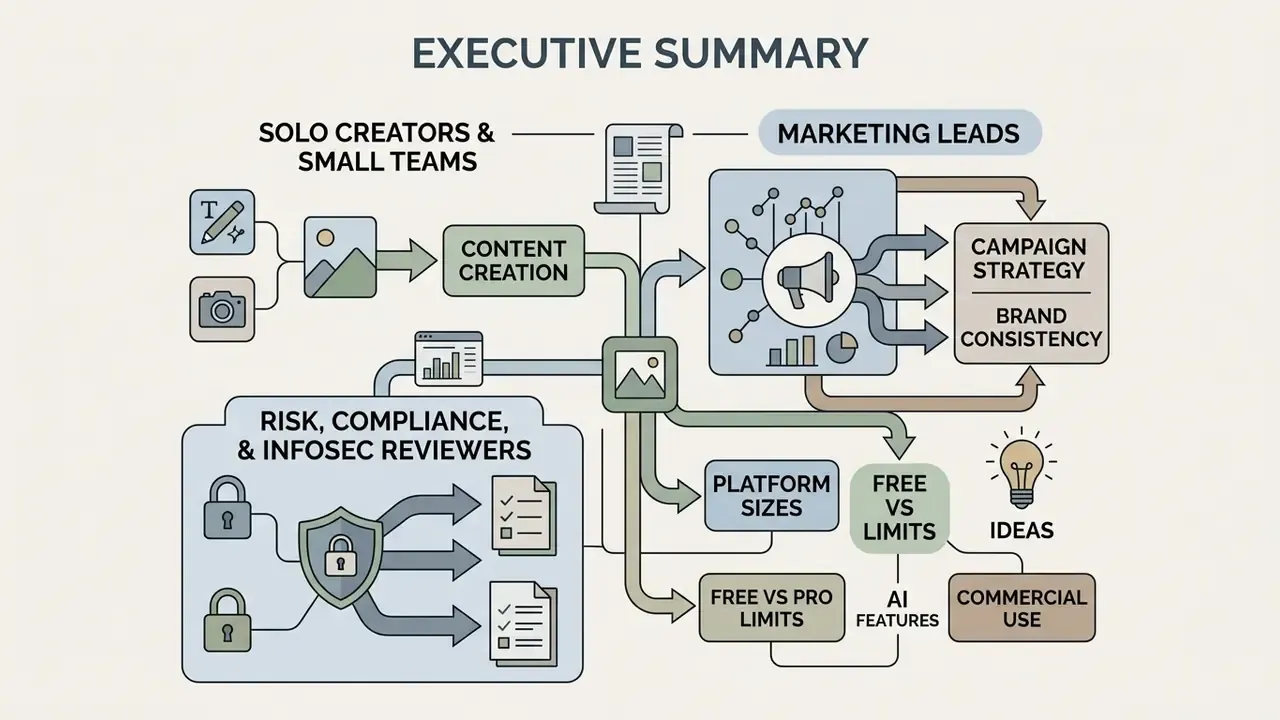
For decision-makers who need the conclusions before the detail:
- What it is. A browser-native design environment: templates, drag-and-drop canvas, stock libraries, AI editing, and multi-format export. No desktop installation, no per-seat rollout of specialist software.
- Who it serves. Non-designers, marketing and SMM teams, small businesses, and, increasingly, regulated enterprises that must produce high-frequency visuals inside brand and compliance guardrails.
- What it accelerates. Template-driven production removes layout guesswork. One-click resize adapts a single concept to 10+ channel formats. AI background removal or upscaling compresses multi-step manual edits into seconds.
- Where the risk sits. Licensing scope (stock, fonts, AI-generated assets), trademark exposure, personal data uploaded to third-party clouds, Shadow AI adoption outside IT review, and unlogged edits to brand assets.
- What to control. SSO/SAML, role-based permissions, locked brand kits, audit trails, provenance metadata (C2PA / Content Credentials), no-training-on-customer-data terms, and a documented approval workflow before publication.
- Bottom line. Free tiers cover most small-business and creator workloads. Enterprise tiers are justified by governance features, not by extra clip art.
How to read this guide
What a graphic maker is and which tasks it solves
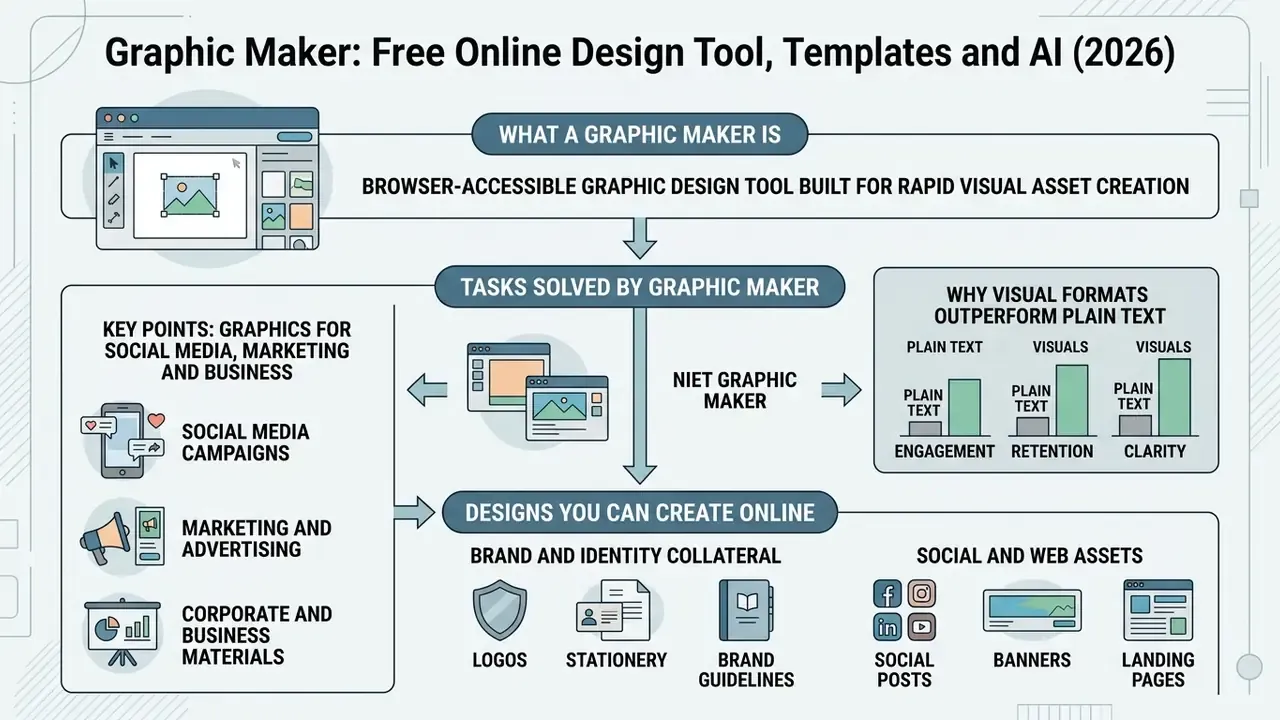
A graphic maker is a browser-accessible graphic design tool built for rapid visual asset creation. Users compose graphics from pre-designed frameworks, vector elements, and structured layouts. Modern online graphic design maker software works as a central hub where non-specialists and marketing teams produce graphic design assets for social media, operational business communications, and promotional campaigns without technical overhead.
Web-based design platforms combine perception tasks, such as automated layout analysis and asset recognition, with generative capabilities. The point is compression of production time while compositional hierarchy stays intact.
«Modern platforms combine perception tasks, layout analysis, asset recognition, with generative capabilities to compress production time.»
By replacing a resource-heavy software stack with an intuitive online interface, a graphic design maker lowers operational friction for any organization that needs continuous visual output. Weekly output, in most cases. Sometimes daily.
Graphics for social media, marketing and business
Visual content for social media, corporate marketing, and internal business operations needs two things at once: multi-format flexibility and brand consistency. A versatile editor supplies structured design templates built for daily social media engagement, campaign advertising, and official corporate communications.
Organizations lean on an online graphic design maker to balance speed with visual discipline. Teams that also generate original imagery frequently pair the editor with AI image generators for campaign concepts. For core editing capabilities, see our guide on photo editor solutions for enterprise workflows.
Which designs you can create online
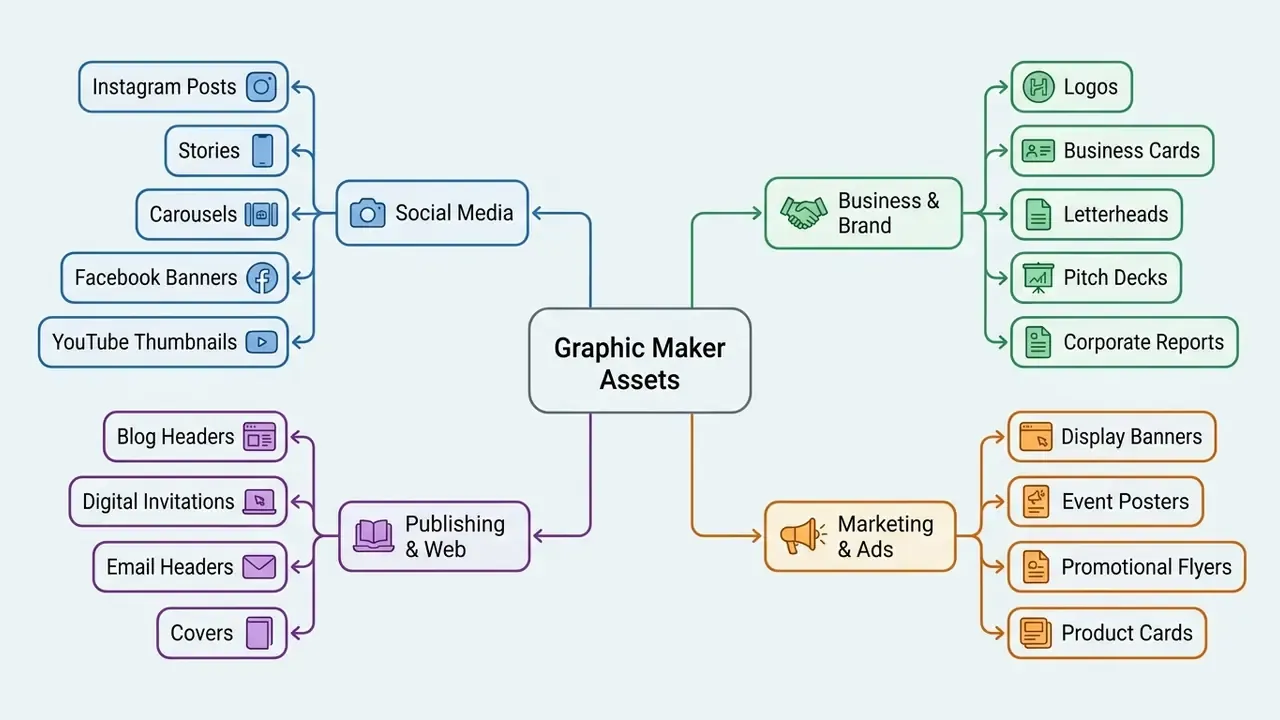
Online design platforms handle a wide variety of static and multi-page formats. Users start from predefined dimensions or build a custom canvas from scratch.
To evaluate media compression and performance trade-offs in digital publishing, consult our breakdown on video compressor utilities.
- Brand and identity collateral logo assets, digital business cards, letterheads, and brand guidelines. Teams that need mark variants quickly often start with AI logo generators and then refine typography by hand.
- Social and web assets custom banner graphics, blog header images, website hero sections, and event promotions.
- Product and event graphics digital invitations, e-commerce product show-cards, event flyers, and display posters.
Commercial use, licensing and enterprise governance
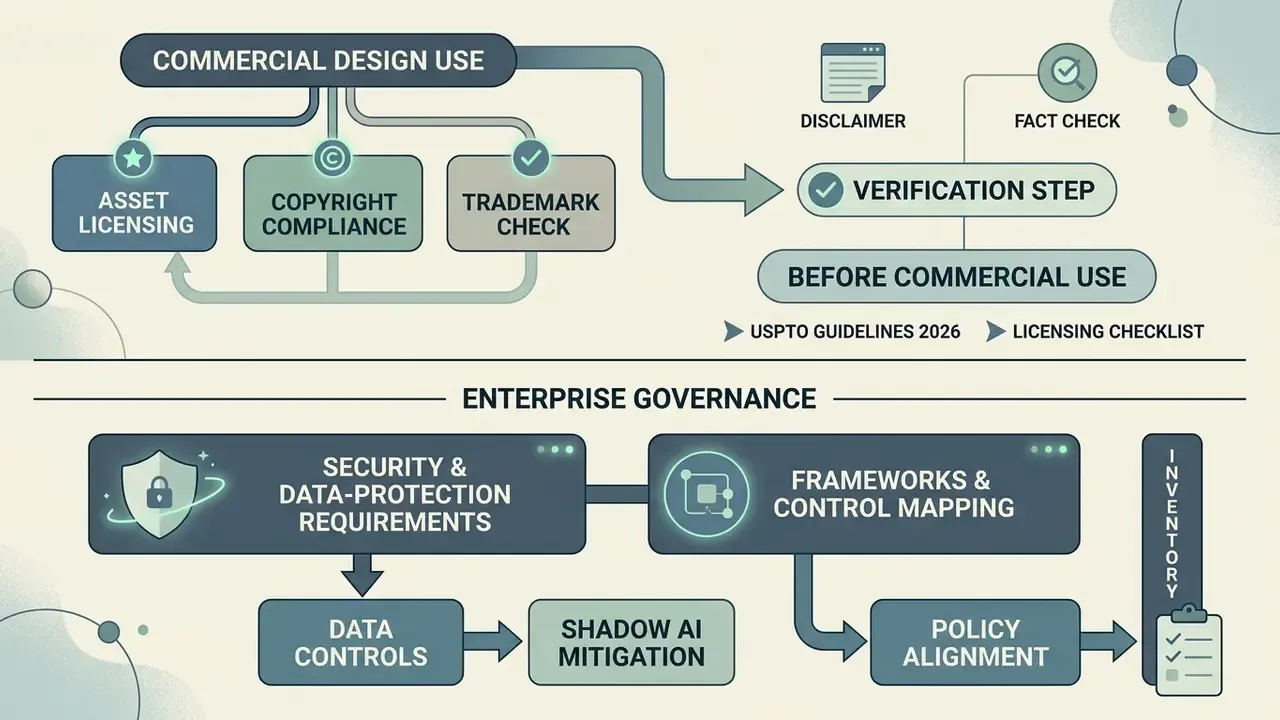
Using a graphic maker free tool for commercial marketing, product packaging, or client collateral requires verification of asset licensing, copyright compliance, and trademark restrictions. For institutional readers this section belongs before any production workflow decision. License scope and data-handling terms decide which platform is even eligible for evaluation.
Fact check and commercial licensing verification
Commercial design use is governed by individual platform terms and asset license models:
- Stock photography: free stock photos generally permit commercial distribution but prohibit standalone resale, trademark usage, or editorial misuse (iStock License Terms, 2026).
- Public domain and CC assets: works in the public domain or under CC0 carry no copyright restriction, whereas CC BY requires attribution (US Copyright Office Guide, 2026).
- Font licensing: web fonts embedded in online editors are licensed for digital rendering. Desktop installation for commercial merchandise may require a secondary licence.
- CC0 is not blanket clearance: even a CC0 photograph containing a recognizable person, private property, or a registered logo needs a model or property release for promotional use.
«Practitioners report limited control over fine detail, typography difficulties, and unresolved originality and authorship questions in commercial deployment.» What's Next? Exploring Utilization, Challenges, and Future Directions of AI-Generated Image Tools in Graphic Design, arXiv:2406.13436 (2024). https://arxiv.org/abs/2406.13436
What to verify before commercial design use
Before launching a campaign built inside a free graphic maker, the team lead should finish a three-point licensing audit. It takes an hour. It has saved companies far more.
- Asset license scope: confirm that stock images, vector icons, and font families allow commercial monetization without attribution. Where source imagery must be upscaled or cleaned before print, check the terms of the AI image enhancement tools you apply as well.
- Trademark risks: ensure that pre-made templates or decorative icons do not infringe registered corporate logos or identity marks (USPTO Guidelines, 2026).
- Editorial restrictions: confirm that stock photography featuring recognizable people or private property carries signed model and property releases for promotional use.
Enterprise security and data-protection requirements
For regulated organizations, banks, insurers, fintechs, healthcare operators, the design tool is a third-party data processor, not merely a creative utility. Confidential figures, unreleased product names, customer photographs, or account screenshots pasted onto a canvas become uploads to an external cloud. That is the part people forget.
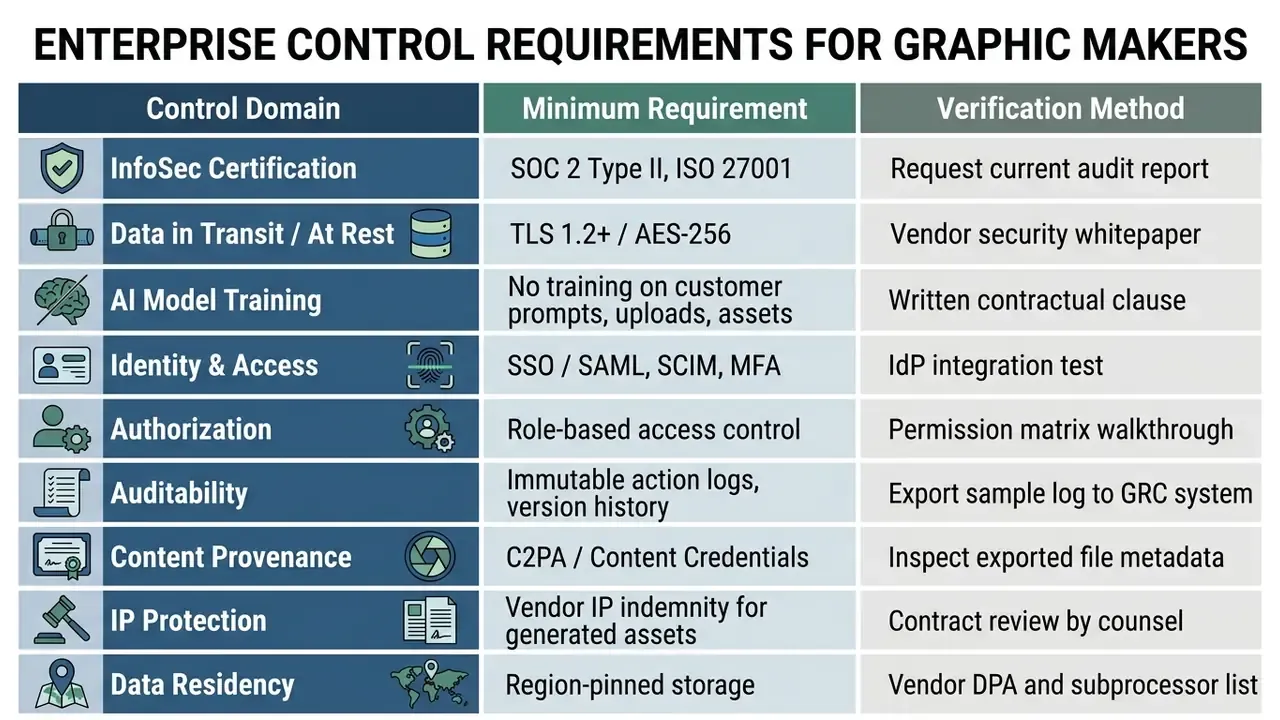
Reference frameworks to map controls against: ISO/IEC 42001 (AI management systems), the NIST AI Risk Management Framework, ISO 27001 (information security), and, for US financial marketing, advertising and communications review expectations from the SEC, FINRA, and the CFPB. Generative assets additionally require review against current US Copyright Office guidance on authorship of AI-assisted works.
Countering Shadow AI in visual production
Uncontrolled adoption is the dominant institutional risk. A single team signing up for a free consumer tier can move brand assets and customer imagery outside sanctioned systems within an afternoon.
- Inventory existing design-tool usage across marketing, HR, and regional units before you write a policy.
- Sanction one primary platform with enterprise terms, then block or restrict competing consumer tiers.
- Publish an allowed-data list: state plainly what may never be uploaded (personal data, account data, unreleased financials, internal screenshots).
- Lock brand kits so logos, typefaces, disclaimers, and color values cannot be altered by contributors.
- Route publication through approval: no asset leaves the workspace without a logged reviewer decision.
- Retain evidence: export approval records and version history for internal audit and regulator inquiries.
Compliance approval workflow for regulated communications
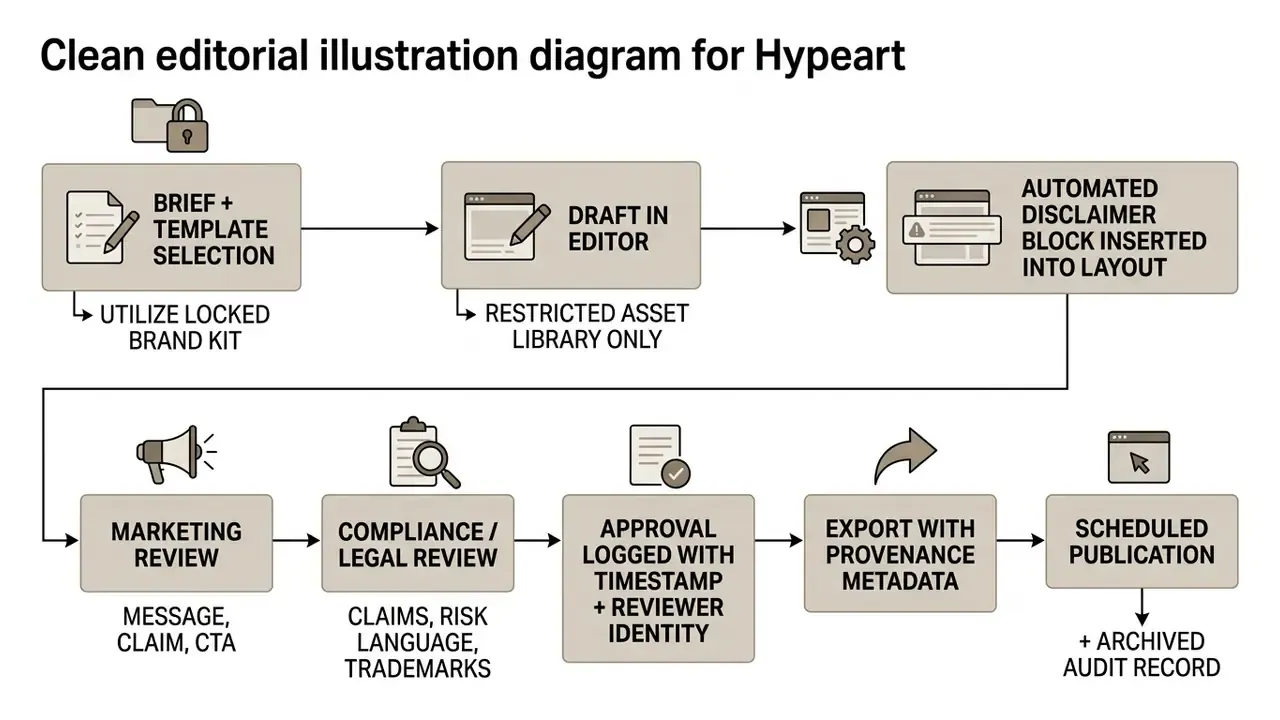
Illustrative institutional example (hypothetical). In a representative regional-bank scenario, a marketing unit consolidated 40 contributors into one governed workspace with locked disclaimer blocks, SSO enrollment, and mandatory compliance sign-off. The operational effect described in deployments of this kind is fewer ad-hoc, unreviewed assets plus a single exportable audit trail. Note the framing: the control objective justifies the spend, not the design speed. Figures of this type should be validated internally before anyone treats them as a benchmark.
When free graphic design is sufficient for business
For early-stage startups, local businesses, and small marketing teams, a free graphic design platform covers daily visual requirements without capital expenditure.
Illustrative example (directional, unverified third-party data): a digital marketing consultancy standardized on free-tier online graphic makers across its client management team and reported roughly 150 monthly social campaigns, client decks, and event graphics with consistent visuals and zero software licensing overhead. Treat that as a scenario, not a measured result. Comparable outcomes depend on template discipline and licensing hygiene, both of which are easy to lose.
Free tiers are usually adequate when all of the following hold:
- Output is digital only, with no CMYK print production or spot-color matching.
- One or two people produce the assets, and no formal approval chain is required.
- No confidential or personally identifiable data touches the canvas.
- Exports are PNG, JPG, or PDF, not vector SVG for large-format fabrication.
- Brand rules can be maintained manually, without a locked brand kit.
For creators developing long-form video content, review our operational guide on YouTube video editor tools. If a clip needs its audio stripped before publication, our note on how to mute video online covers that narrow but frequent task.
Why an easy graphic maker suits beginners
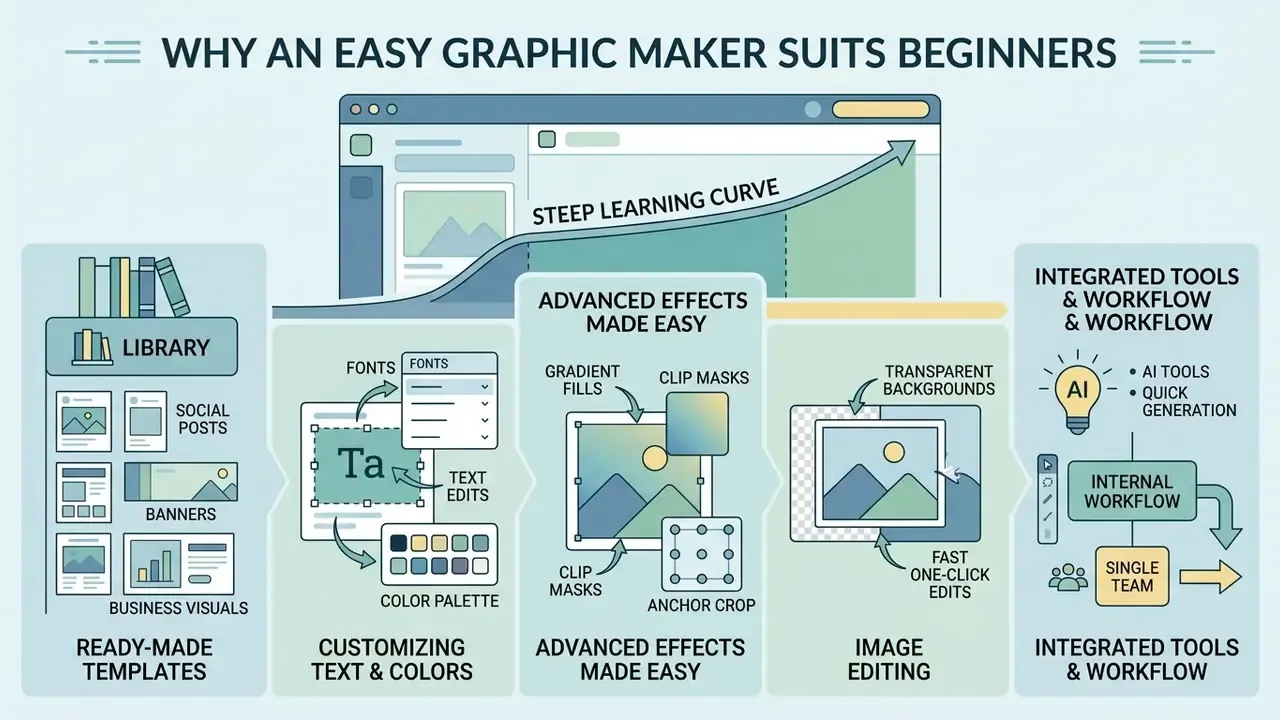
An easy graphic maker removes the steep learning curve. Pre-configured design systems, a drag-and-drop editor, and automated styling controls let novice creators and operational staff produce polished visuals without formal training in desktop graphic software.
Ready-made templates and professionally designed layouts
Curated design templates and pre designed layouts hand novices a structurally sound starting point. Instead of building a composition on an empty canvas, the user picks a template matched to the channel requirement.
«Structured templates significantly reduce cognitive load during initial composition, yet users need flexibility to adapt layouts without feeling constrained.»
With professionally engineered design tools, typographic hierarchy and alignment balance hold automatically. To compare automated creation with dynamic voice technologies, read our analysis on AI voice generator applications.
Internal workflow observation (directional, single team). In one internal test across regional marketing teams, replacing raw canvas work with pre-approved layout templates was associated with approval cycles dropping from roughly 48 hours to under 4, and font-misalignment defects disappearing across a batch of 120 promotional posts. To be precise, this was a practitioner observation without a controlled sample or published methodology. Independent measurement is needed before anyone quotes it as a general benchmark.
Customizing text, colors, fonts and images
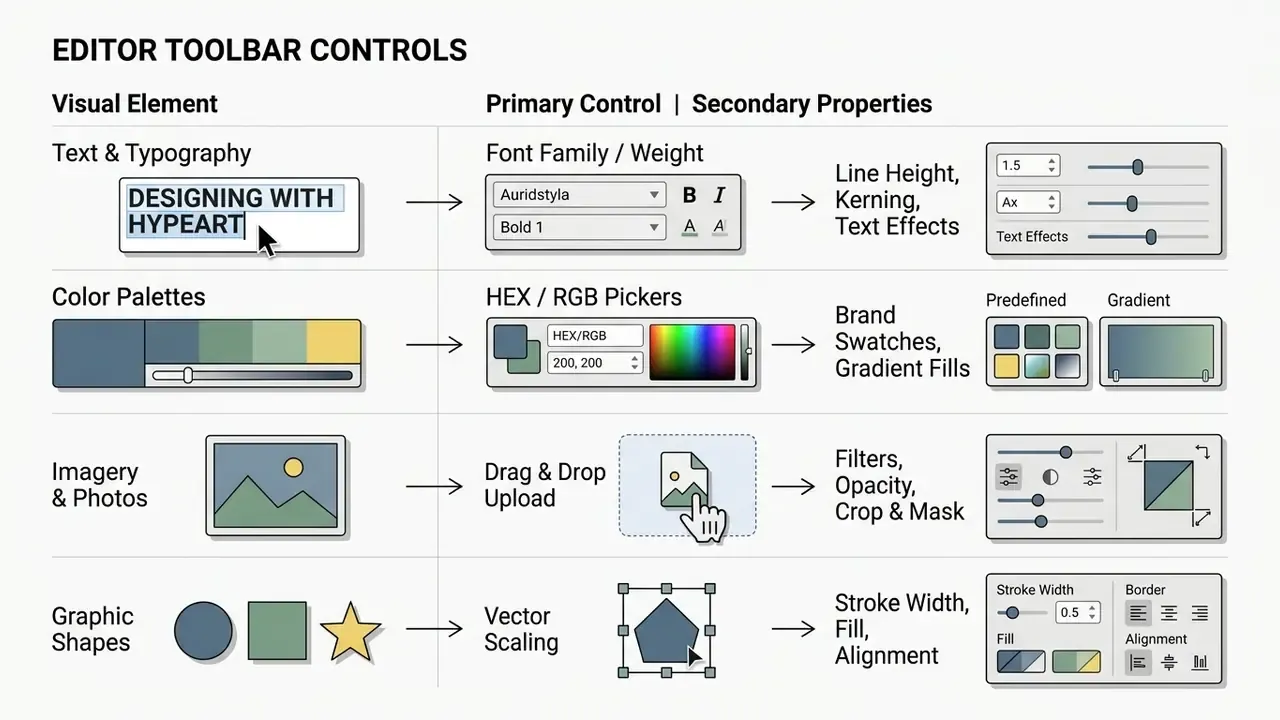
Adjusting core visual parameters inside a free graphic design maker happens through contextual toolbars that apply changes across the layout. Users edit text elements, apply custom colors, configure paired fonts, and place branded photos or custom images. For deeper retouching before placement, many teams pre-process assets in dedicated AI photo editors.
«Structured iterative feedback helps novices systematically improve alignment, color, and typography, increasing both confidence and output quality.»
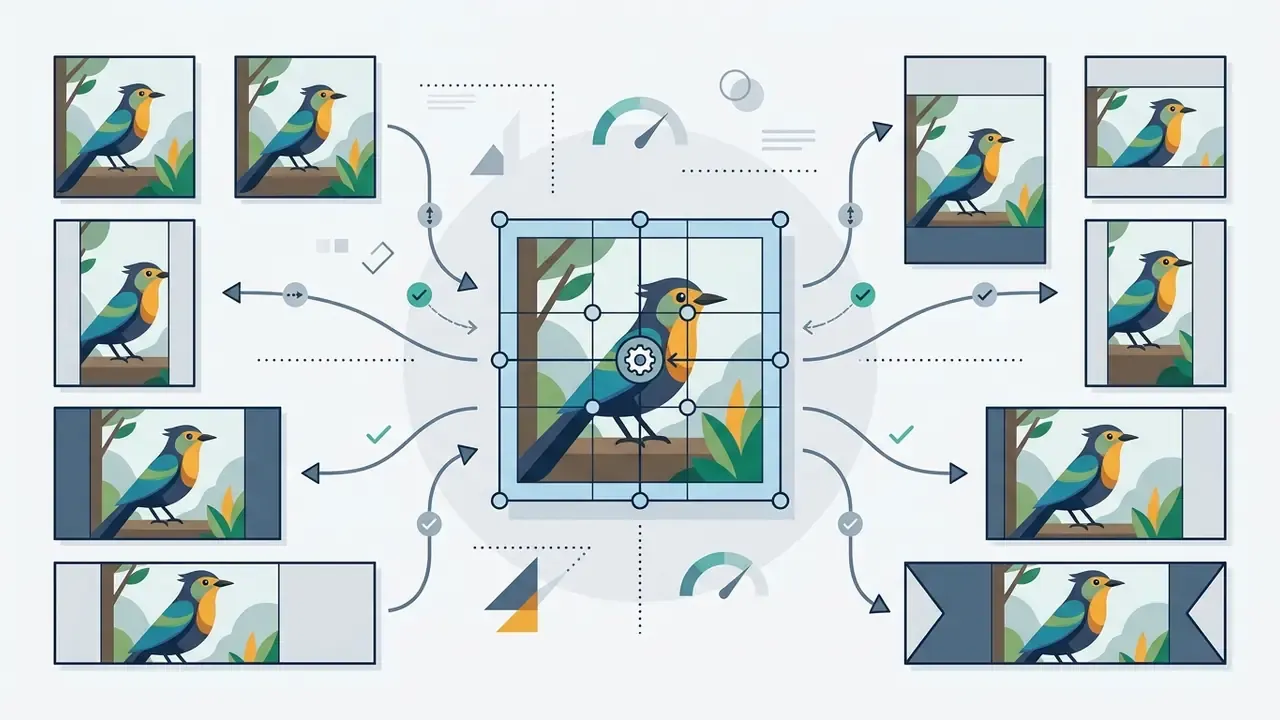
Precision controls worth learning early:
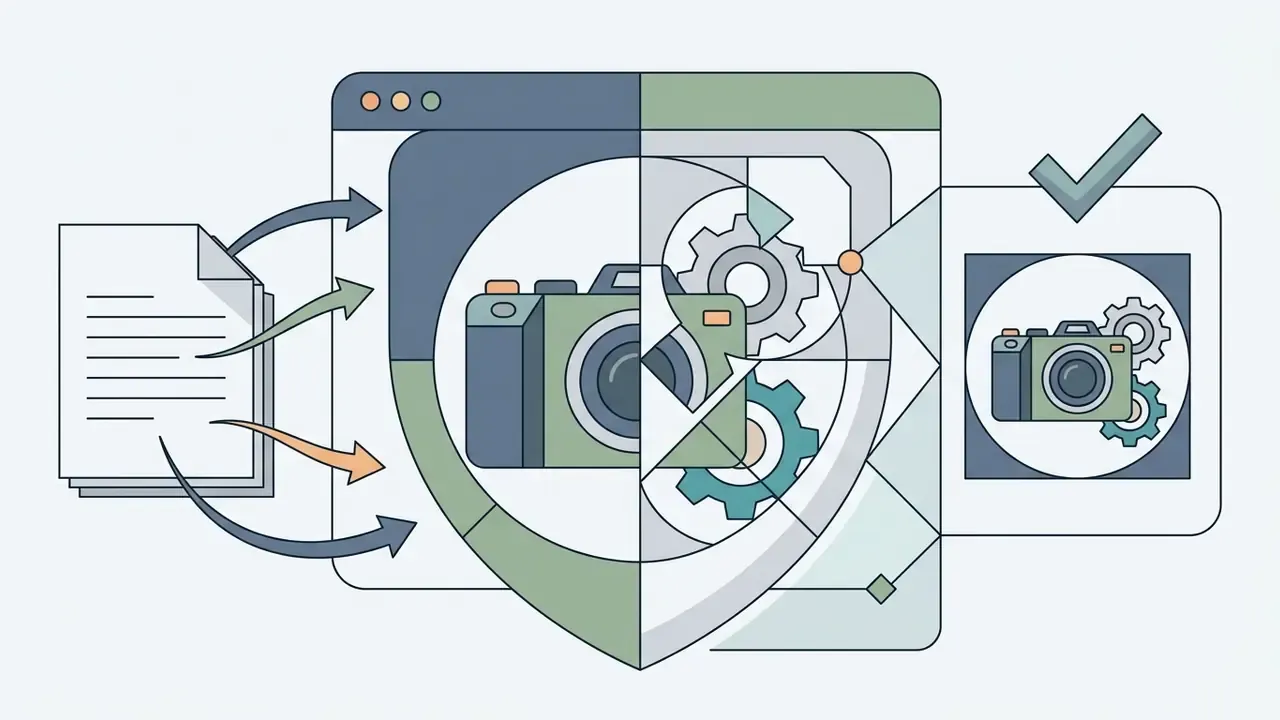
AI tools and fast one-click edits
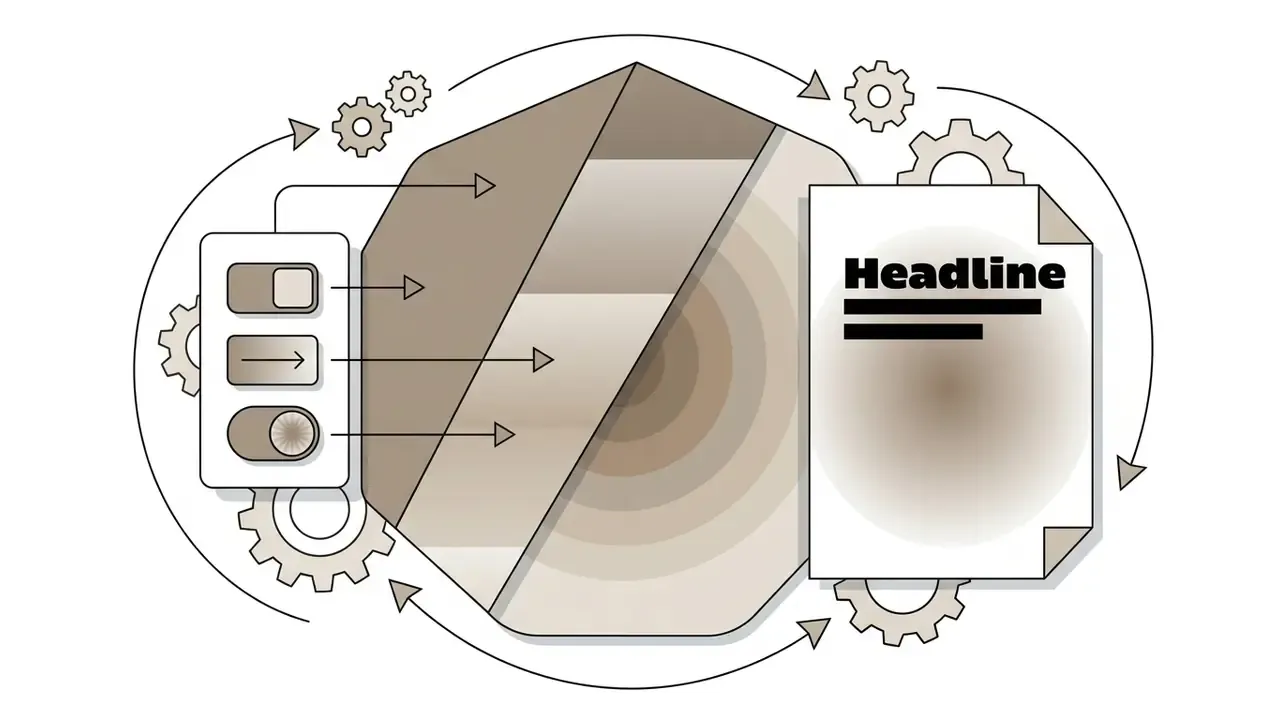
Integrated AI capabilities inside modern free graphic design platforms automate repetitive image processing: one-click background removal, generative fill, smart resizing. These tools turn multi-step manual edits into background operations that finish before you switch tabs.
«AI tools act as creative partners in design, amplifying human creativity, offering strategic ideas, and supporting team collaboration.»
For comparisons of zero-cost visual editing platforms, see our evaluation of free photo editor solutions.
A word of caution for regulated teams. Every one of these features sends content to a vendor model. Which features are permitted, on which data, should be written down before rollout, not after an incident.
- One-click background removal
- isolates the primary subject from a complex background.
- Smart content resize
- adapts one layout across multiple aspect ratios while protecting the focal point.
- AI image upscaling and enhancement
- raises resolution and balances color contrast in uploaded photographs. See how dedicated AI image upscalers compare on artifact control.
- Generative fill and expand
- extends a background to a new aspect ratio instead of re-shooting or re-cropping.
- Generative remove
- deletes unwanted objects, reflections, or bystanders from source photography.
- Copy assistance
- drafts or trims headline text inside the layout so the line length matches the reserved text box.
Top 7 free online graphic makers in 2026
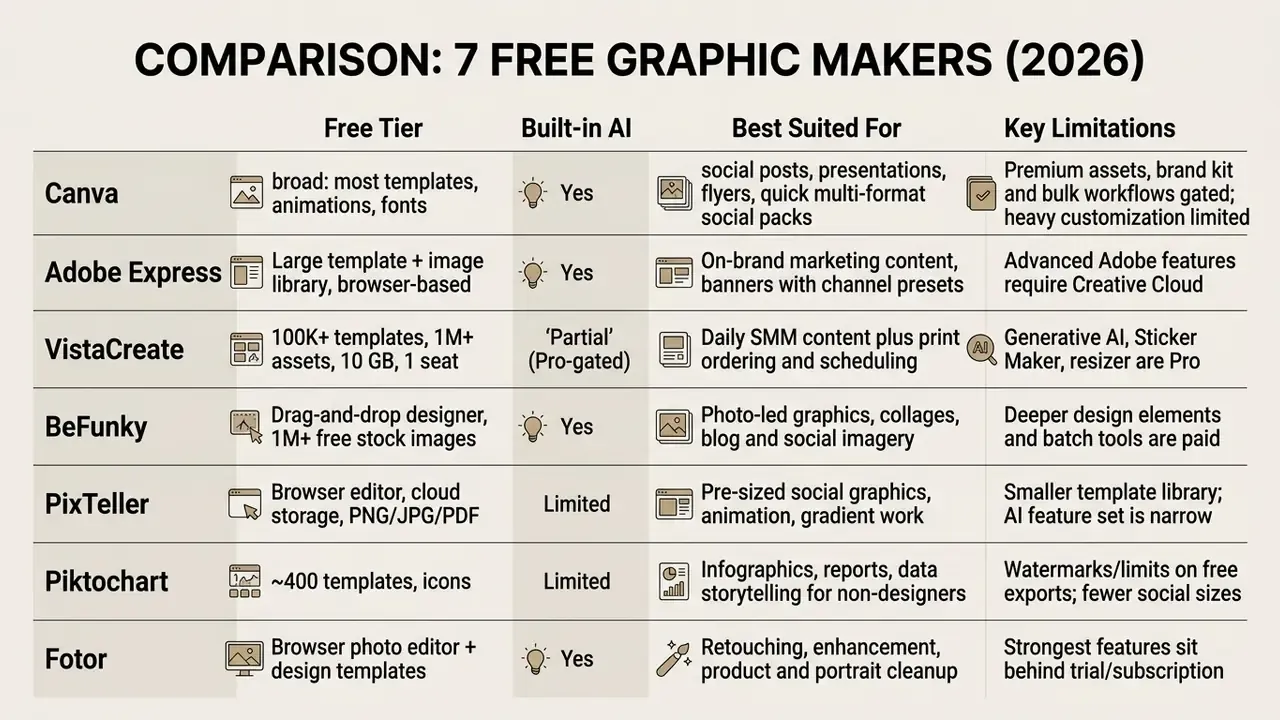
Feature theory matters less than tool fit. The seven platforms below cover the realistic range of no-cost visual production, from template-first social design to advanced raster editing.
Also worth knowing:
Selection logic in one line: choose Canva or Adobe Express for template breadth and channel presets, VistaCreate when print delivery and scheduling matter, Piktochart for data-driven infographics, Fotor, Pixlr or BeFunky for photo-first work, and GIMP only when raster depth outweighs speed.
For high-end generative asset comparison, consult our analysis of the best AI art generator tools, and our review of the best free AI art generator options for zero-budget teams.
Free vs Pro: what you actually pay for
Paid tiers in this category rarely sell "more clip art". They sell governance, automation, and output fidelity. The table uses publicly documented tier structures (VistaCreate Starter at $0 versus Pro at $10 per month, up to 10 seats) as a representative market model.
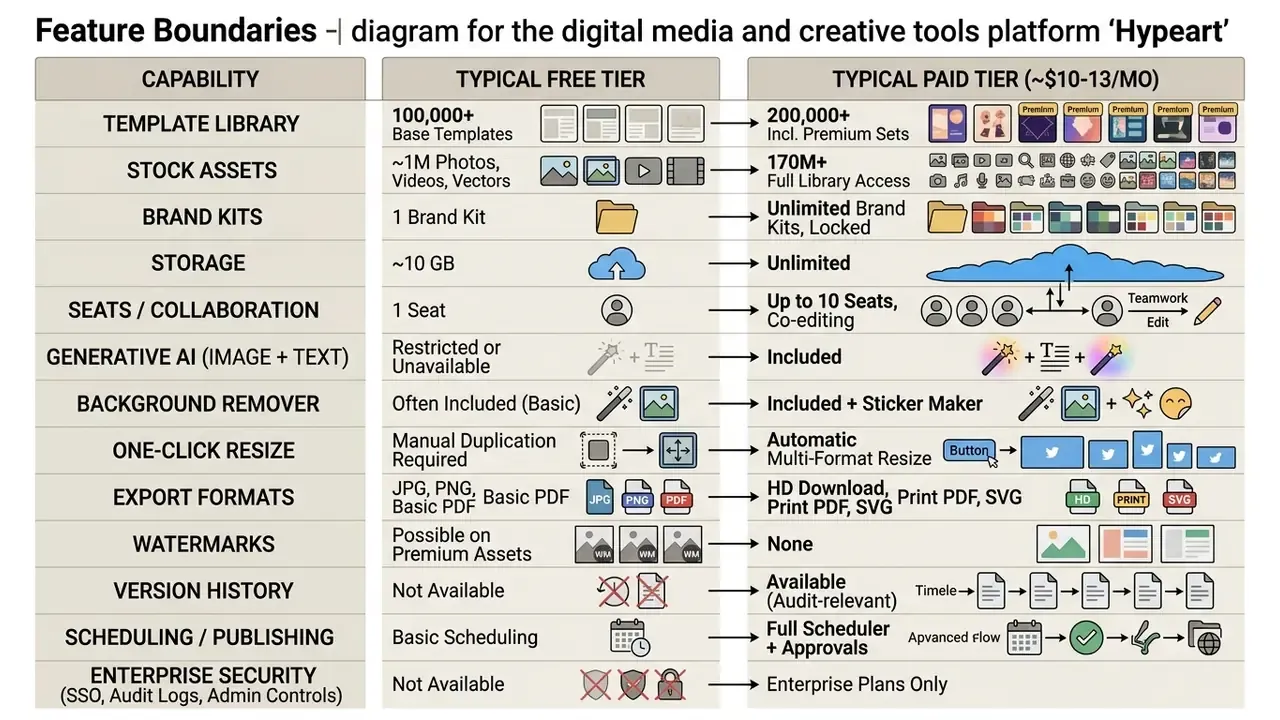
Cost logic for institutional buyers. Compare tiers on risk-adjusted total cost of ownership, not sticker price: licence cost plus implementation plus control operation (SSO, log review, approval labor), minus the avoided cost of unreviewed publications, rework, and asset re-licensing. A free tier that forces staff to assemble approval evidence by hand is often more expensive than a paid tier that logs it automatically. Model the numbers with our calculators and the AI Media Pricing Guides before committing.
How to create a graphic design online: step-by-step
Working in a free online graphic design maker follows a predictable sequence: pick the canvas, upload brand assets, customize styling, verify platform compliance, export.
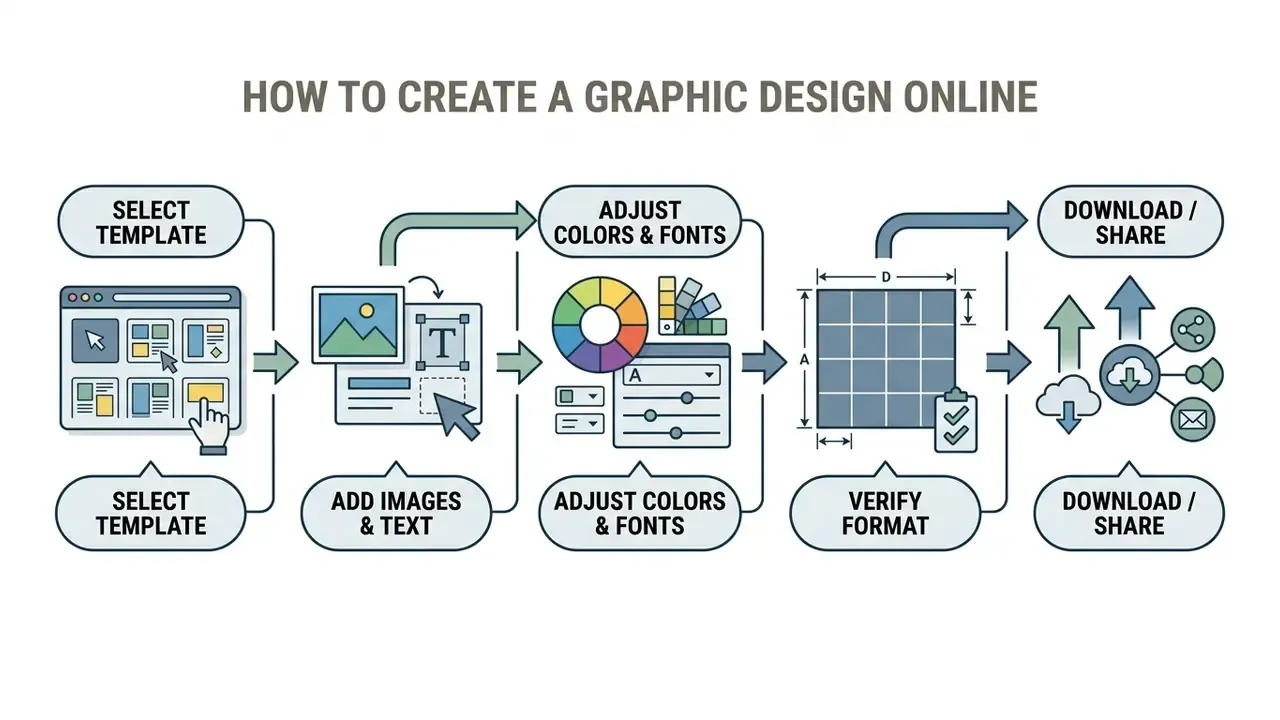
Step 1. Select a template matched to the publication format
Choosing an optimized template means matching the distribution channel to its technical dimensions. Any capable online graphic design maker ships presets for the major platforms.
- Open the template library in your graphic maker online free platform.
- Filter layouts by category, for example Instagram post, Facebook banner, or event cards.
- Pick a structure that fits your messaging density and image count.
- For print or journal-grade output, prefer vector-capable templates. Professional publishing guidance requires vector EPS or PDF, or raster files that resolve to at least 300 DPI on the final page.
Step 2. Add photos, images and brand elements
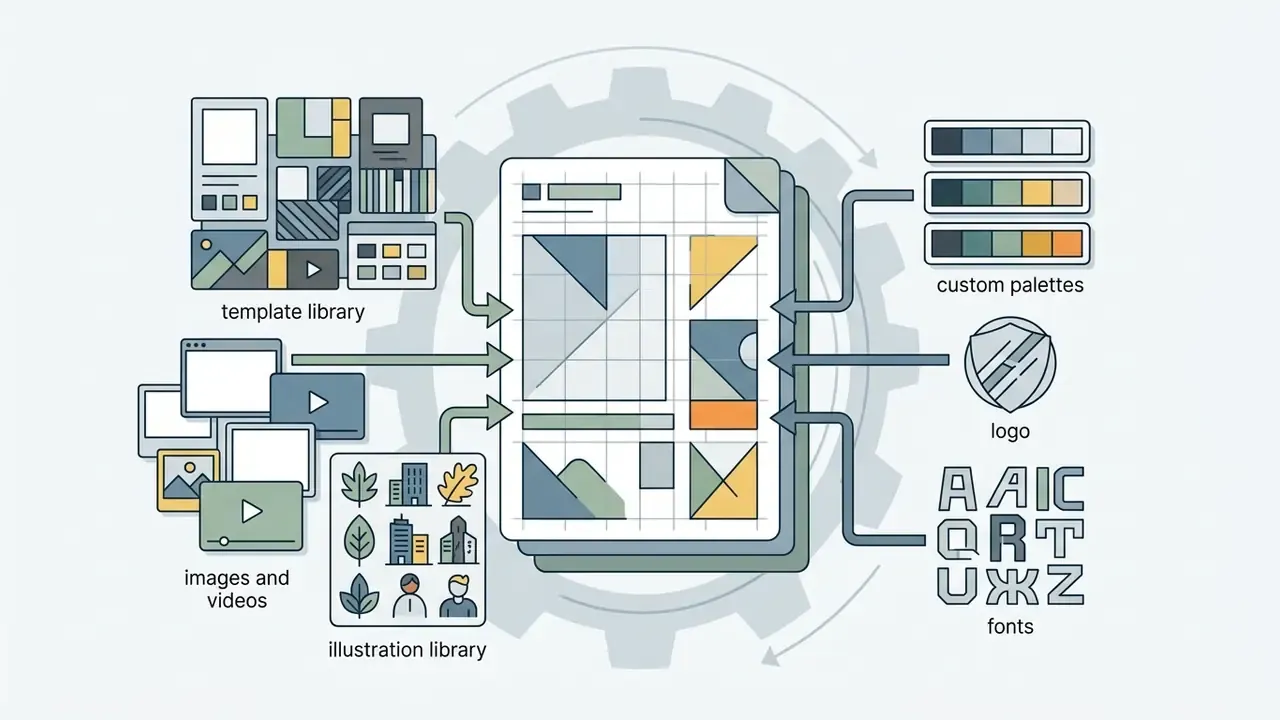
Authentic brand assets turn a generic layout into official collateral. Creators add proprietary photos, high-resolution images, approved logo marks, and corporate color swatch definitions.
Illustrative example (directional, unverified third-party data): during a corporate rebranding roll-out, an enterprise team centralized identity assets in a shared design library, and roughly 50 regional contributors produced 300+ on-brand pieces with no unauthorized logo modifications recorded. The mechanism, a locked and centrally governed asset library, is the transferable insight. The volumes are situational.
Brand integration rules that reduce rework:
- Use approved logo variants only. Never re-color, stretch, or add effects to the mark.
- Define a typographic hierarchy (display, headline, body, caption) plus a fallback font.
- Keep imagery inside a restrained palette so photographs reinforce the identity instead of fighting it.
To review advanced asset generation, check our guide on Canva AI Generator integration options.
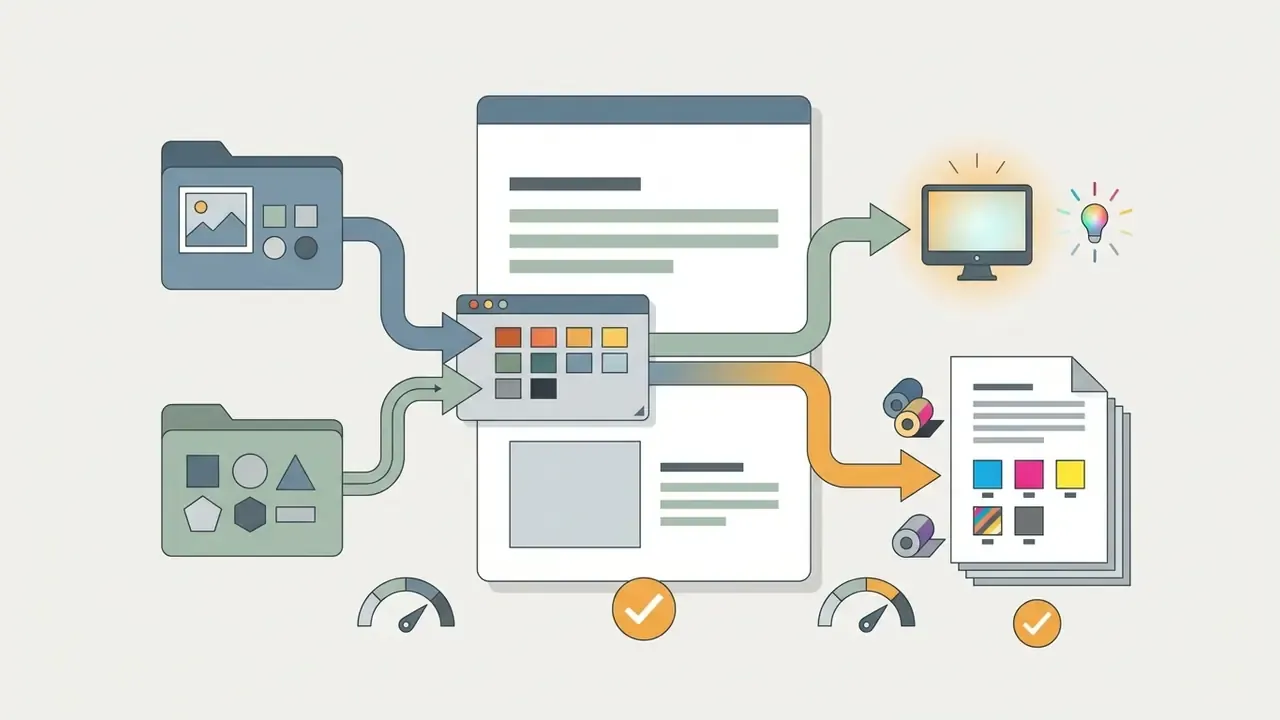
Step 3. Save, download and share the finished graphic
Final output depends on where the asset goes: web display, high-resolution print, or vector scaling.
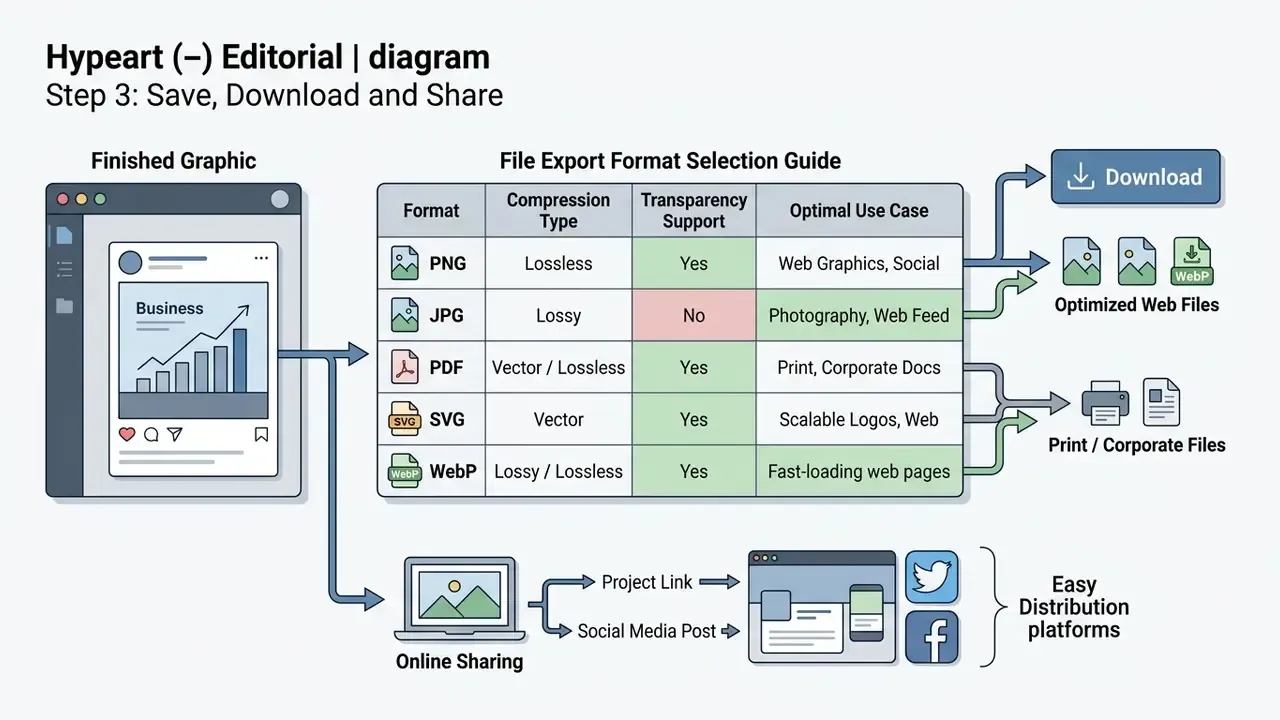
Once exported, users download the artwork or use direct-to-platform share options. Scheduling normally runs through the editor's own planner: the design is pushed to a connected social account, routed through approval where required, then queued for a local-time slot. For specialized AI visual workflows, review our analysis of Microsoft AI Image Generator tools.
Templates and exact sizes for Instagram, Facebook, YouTube, Pinterest, Twitch, X and LinkedIn
Platform-specific templates keep published content inside aspect ratio requirements, safe zones, and display resolutions across the major social media networks.
According to Meta's technical documentation (Meta Business Help Centre, 2026, a platform reference rather than peer-reviewed research), respecting exact aspect ratios prevents automatic cropping artifacts and improves rendering in mobile feeds.
«Consistency in color, complexity, composition and content across posts relates positively to engagement; stories benefit from balancing consistency with variation.»
Master size reference table
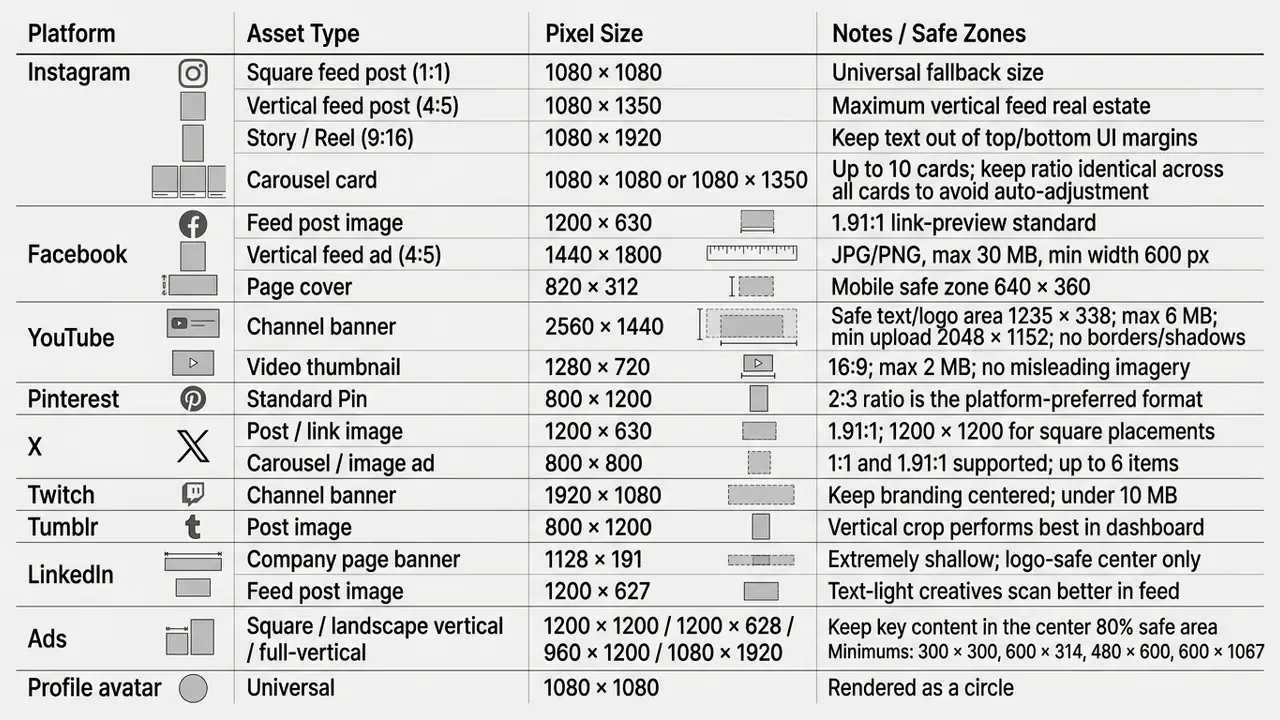
Need one universal starting point? 1080 × 1080 px renders acceptably on nearly every network. Build there, then use smart resize to derive channel-specific variants.
Instagram posts, stories and carousel content
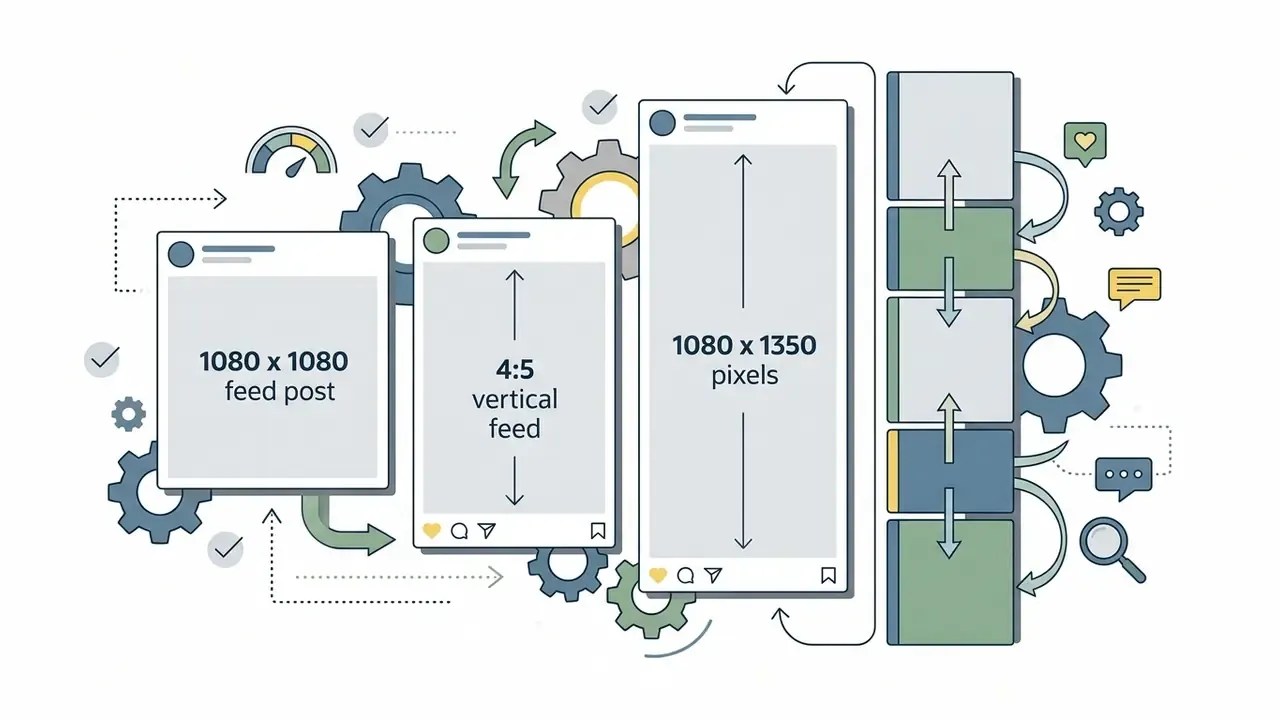
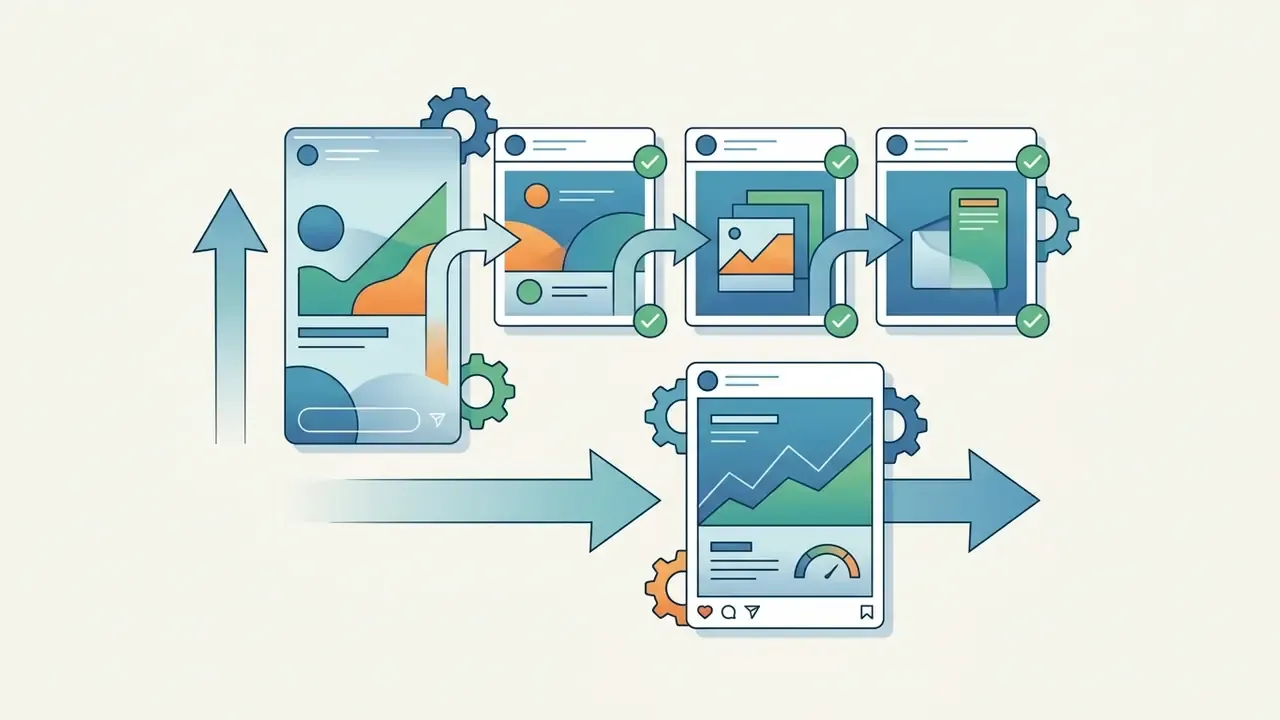
Instagram formats reward strict aspect ratio discipline: more screen area, sharper rendering, fewer surprise crops.

Facebook posts and graphics for business pages
Facebook business pages rely on structured cover banners, event graphics, and link-preview images that read cleanly on both desktop and mobile.
- Feed post images 1200 × 630 px, or 1440 × 1800 px (4:5) for stronger mobile feed presence.
- Business page covers 820 × 312 px on desktop, with key text inside the mobile safe zone of 640 × 360 px.
- Ad creatives high-contrast visuals built for one-second scanning, delivered as JPG or PNG under a 30 MB ceiling.
YouTube banners and thumbnails
YouTube assets carry channel branding and drive click-through, which makes them the highest-leverage graphics most creators produce.
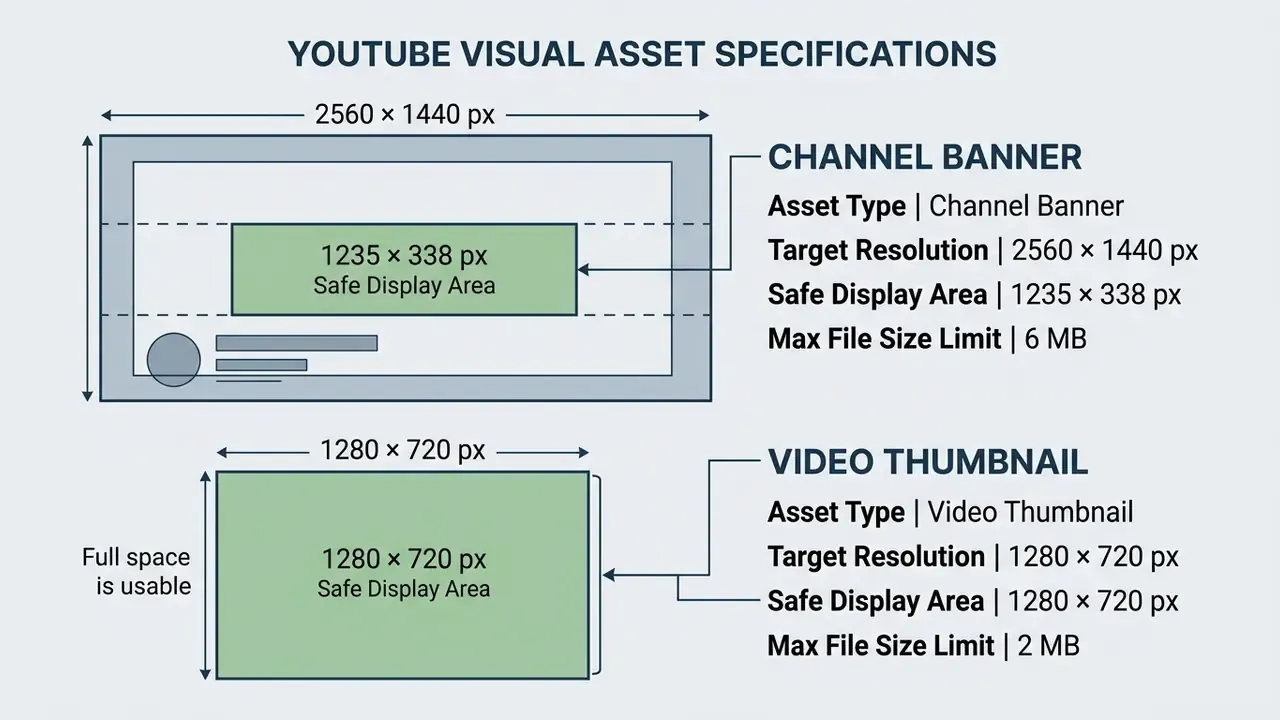
Place all critical text and logos inside the banner safe area. The outer canvas is cropped on phones and expanded only on TV and large desktop displays. Thumbnails must also satisfy platform policy: misleading imagery implying content that is not in the video is prohibited.
Creators looking for dynamic video creation tools can explore our analysis of animation maker software.
How to raise engagement (ER) with graphics: 5 rules
Technical compliance gets an asset published. Composition decides whether it performs. Five practices surface repeatedly in platform guidance and practitioner playbooks: A sixth, softer rule from practitioner experience: not every post has to be formal. Personality-driven visuals get remembered, and memory is the precondition for engagement.
- Keep the message single and short.One idea, one call to action. Hold copy to roughly 20 percent of the banner area so the visual is scannable in under two seconds.
- Make it simple, not sparse.Simple graphics carrying a powerful, relevant message beat dense compositions. Clarity outperforms decoration in a feed.
- Ask for input.Polls, opinion prompts, and "which one would you pick" templates generate replies and shares at almost no production cost.
- Use storytelling carousels.Break one argument across 3 to 5 slides: hook, problem, evidence, resolution, call to action. Sequential cards hold attention longer than a single static frame.
- Stay consistent, but not monotonous.Hold color, typography, and composition steady across feed posts to build recognition, then allow controlled variation in stories, where variety sustains attention.
Which features a free graphic maker must include
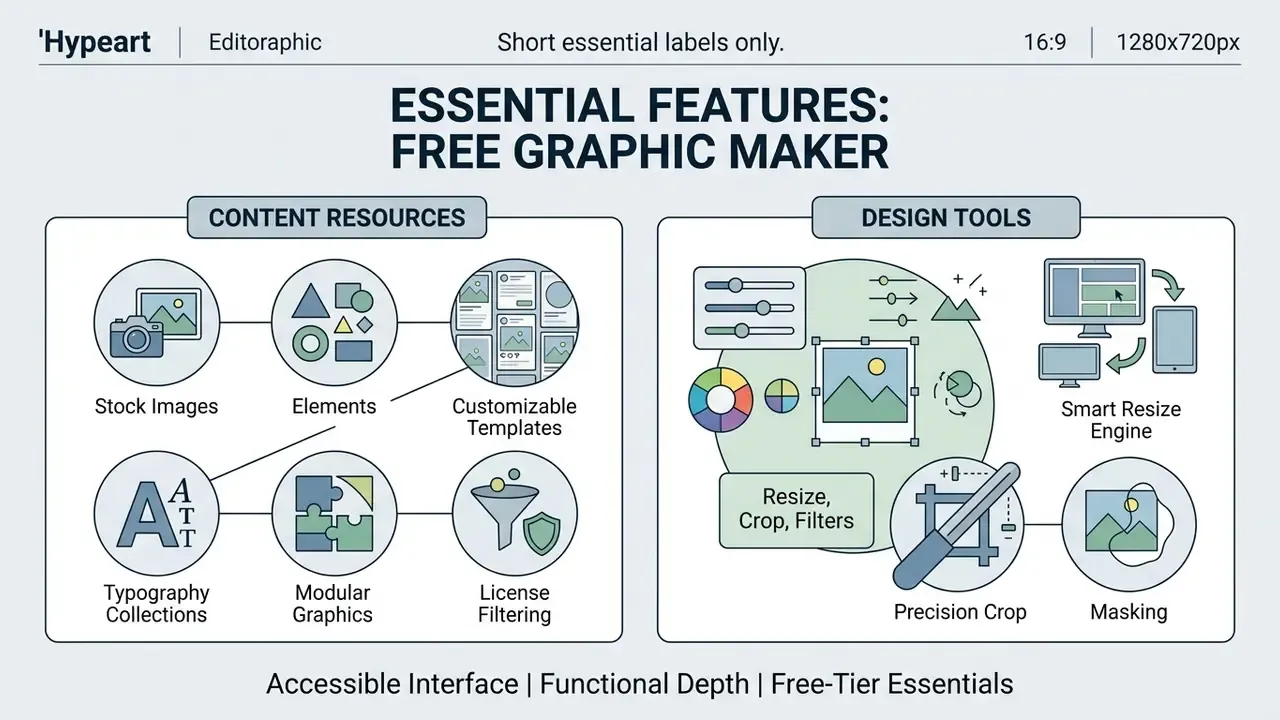
A full-featured free graphic maker balances an accessible editing interface with real functional depth: quality asset libraries, precise layout manipulation, and cloud collaboration.
«User retention in browser editors depends heavily on asset library breadth, layout rendering fidelity, and cross-device availability.»
Stock images, elements and customizable templates
A capable graphic maker free online environment offers broad stock libraries: vector icons, background patterns, royalty-free photos, and modular components.
- Stock media libraries millions of searchable, royalty-free photography assets and vector graphics.
- Typography collections curated font pairs with support for custom web font uploads.
- Modular graphics scalable shapes, frames, and background illustrations for custom composition.
- License filtering the ability to restrict search results by license type, CC0-only for instance, is a governance feature rather than a convenience. Icon libraries frequently require attribution for free users, and nobody notices until legal asks.
Resize, crop, filters and animation
Layout modification features let one visual concept become a full multi-channel campaign.
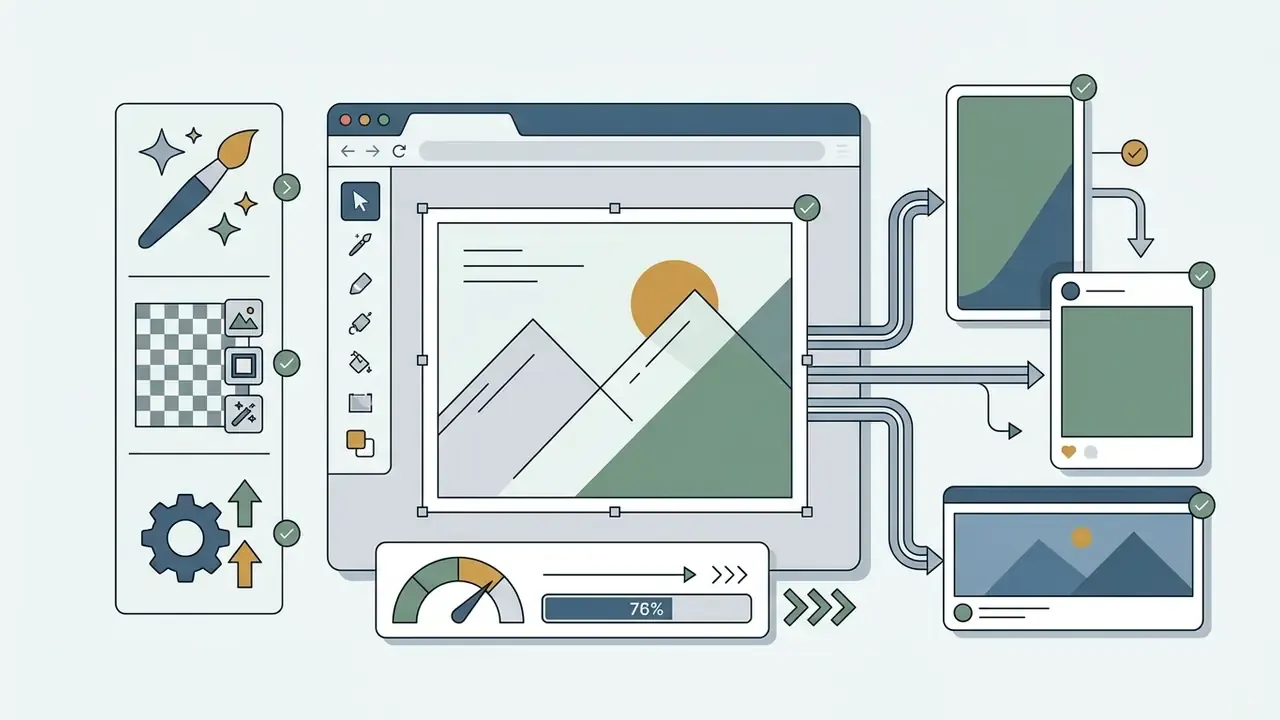
- Smart resize engine transforms layout dimensions between square, vertical, and horizontal banners. Content-aware cropping keeps faces and focal subjects proportioned instead of slicing them.
- Precision crop and masking frames image subjects inside custom geometric masks. Masks hide or reveal parts of an effect, so adjustments stay non-destructive.
- Gradient and transparency control solid, linear, and radial gradients plus transparent backgrounds for overlays and logo placement.
- Photo filters non-destructive, adjustable color and effect transformations applied per layer.
- Basic motion and animation entry, exit, and emphasis keyframe transitions for exported video content.
For creators layering audio over motion assets, our music video maker guide covers the adjacent workflow.
Collaboration, sharing and content publishing
Team-oriented graphic maker online platforms add real-time co-editing, granular permissions, shared brand kits, and publishing pipelines.
«Designers use AI tools for collaboration: visual artefacts act as a shared starting point for discussion, critique and refinement.»
To explore automated profile imagery, check our operational guide on AI headshot generator technology.
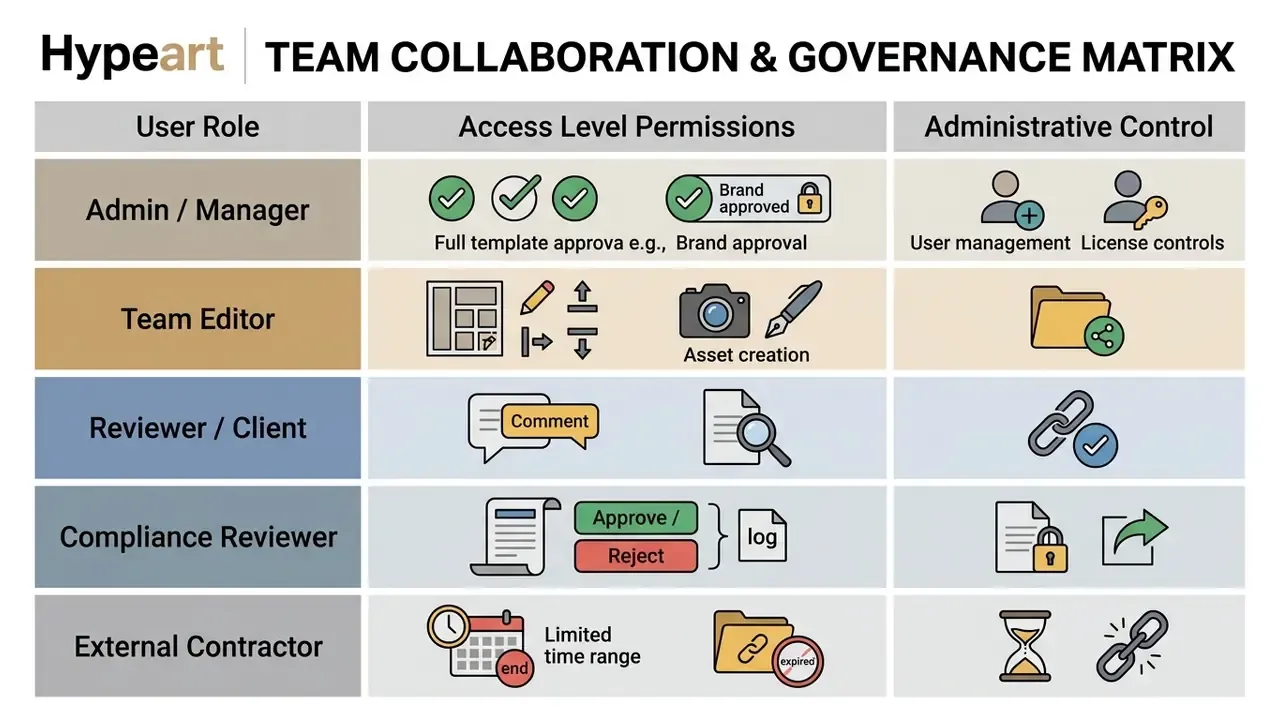
Brand lock as an error-prevention control. Beyond role permissions, mature workspaces lock individual layout elements: logo position, disclaimer text, mandatory legal footers, and color values become non-editable for contributors. That converts brand compliance from a review burden into a structural constraint, which remains the most reliable defence against well-intentioned staff mistakes.
Shared review links should stay manageable after creation as well: collaborators added or removed, access levels changed, expiry dates adjusted, and the updated link re-issued.
Print-on-demand, stickers and CMYK preparation
Digital-first editors increasingly bridge into physical output: business cards, posters, flyers, packaging inserts, sticker sheets. Either through built-in print ordering or by exporting a print-ready file.
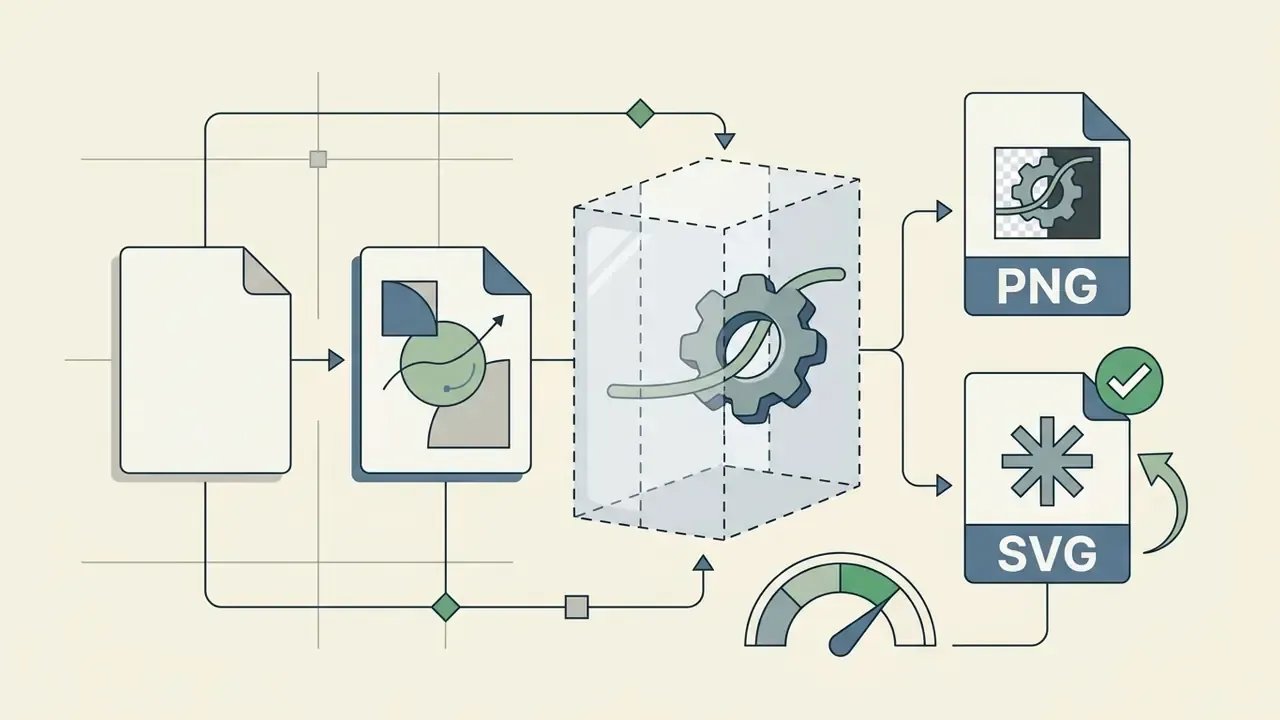
Sticker maker workflows normally chain two AI operations. Background removal isolates the subject, then an automatic contour and outline make the shape read as a sticker. Exported as PNG with a transparent background, that single asset doubles as a messaging sticker, a Story overlay, and a die-cut print file.
Converting a digital layout into a print-ready file:
For higher-resolution source material before print, compare options in our review of AI image upscalers and AI outpainting tools for extending backgrounds to a new trim ratio.
How to choose an online graphic maker for your task
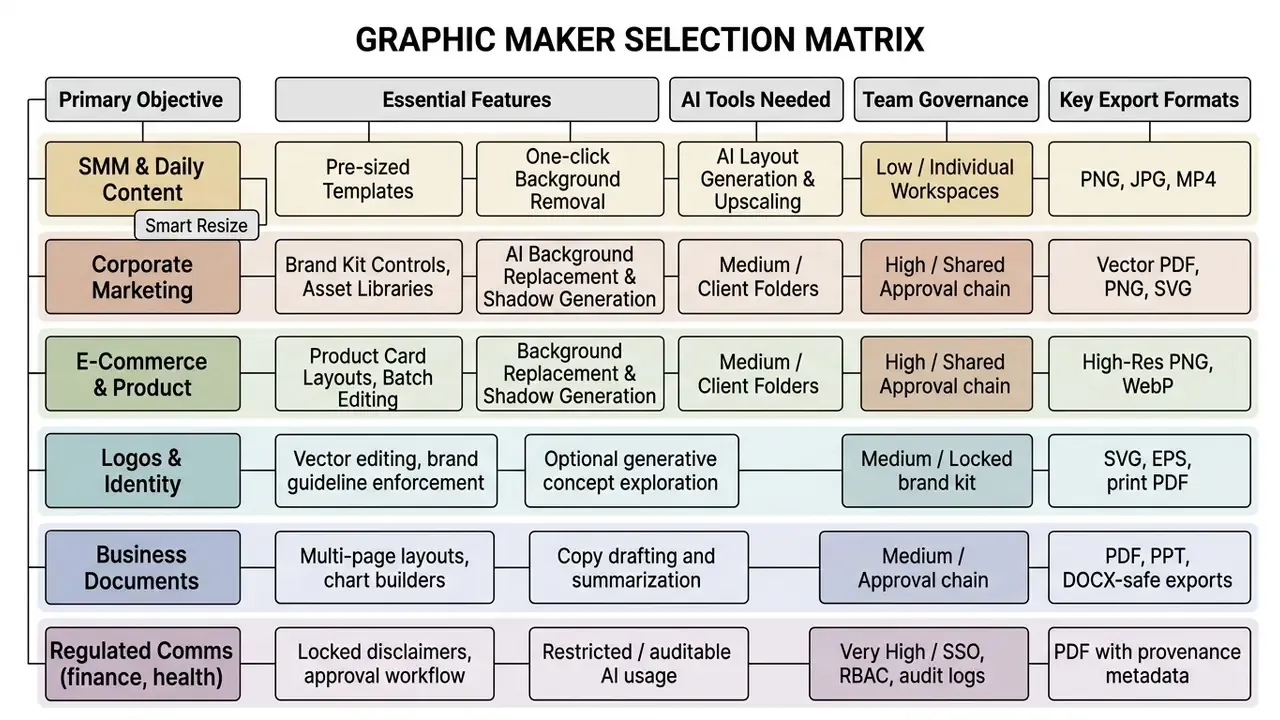
Selecting the right online graphic maker free platform means matching organizational requirements, AI automation, brand governance, collaboration, export formats, against what each platform actually delivers.
«Current AI models struggle with typographically accurate text rendering, vector graphics, and animation reasoning, tasks critical to professional design.»
Following the matrix, smaller teams should prioritize template breadth and ease of use, while enterprise organizations must insist on brand kit controls and central workspace governance. Teams whose bottleneck is imagery rather than layout should also review the best AI image generators before standardizing on one suite, and verify asset originality with AI reverse image search where provenance is uncertain.

Checklists: design readiness and institutional readiness
Pre-launch design checklist
Work through this before a new browser-based editor enters your workflow:
Checklist0 / 8
Institutional readiness checklist (InfoSec, privacy, model risk)
Checklist0 / 13
FAQ
What are social media graphics?
Visual assets used in digital marketing, personal or commercial, distributed on Facebook, Instagram, X, Pinterest, YouTube, LinkedIn and similar networks to build awareness, attract views, and drive engagement. Audiences remember brands they have seen visually, and they reshare visuals they find distinctive.
What is the best size for social media graphics?
Each network publishes its own recommendation, but 1080 × 1080 px works almost everywhere as a fallback. For channel-specific precision use the master size table above: Instagram feed 1080 × 1080 or 1080 × 1350, Stories 1080 × 1920, Facebook feed 1200 × 630, YouTube banner 2560 × 1440, thumbnail 1280 × 720, Pinterest 800 × 1200, Twitch banner 1920 × 1080, X post 1200 × 630, LinkedIn company banner 1128 × 191.
Which export format should I choose?
PNG for anything needing transparency or crisp text. JPG when file weight matters and transparency does not. PDF for print and corporate documents. SVG for logos and anything that must scale without quality loss. WebP for page-speed-sensitive web placements.
Can designs made in a free graphic maker be used commercially?
Usually yes for assets from the platform's own library, but only within that platform's licence terms. Uploads you supply stay your responsibility, editorial-use-only stock cannot appear in advertising, CC BY requires attribution, and no licence lets you register stock content as your trademark or logo without a separate agreement.
Can I produce promotional graphics and ads?
Yes. Every mainstream editor supports promotional formats in ad-ready sizes. Keep key content inside the center 80 percent safe area, and confirm minimum dimensions (300 × 300, 600 × 314, 480 × 600, 600 × 1067) for programmatic delivery.
Is a free tier enough for a small business?
Frequently yes, provided output is digital, one or two people produce it, no confidential data is uploaded, and exports stay within JPG, PNG, and PDF. Paid tiers become necessary for brand-kit locking, SVG and HD export, version history, one-click resize, generative AI, and team governance.
What should regulated organizations verify first?
Data handling and auditability, before creative features. Certification reports, no-training clauses, SSO and role-based access control, immutable logs, provenance metadata, and a documented approval path for advertising and client-facing communications.
Additional recommended resources
- Explore detailed terminology in our AI Media Glossary hub.
- Need specialized audio overlays? See our music video maker guide.
- Comparing generators before committing budget: best free AI art generator and best free AI video generator.
- Evaluating specific engines: ChatGPT picture generator, Midjourney AI image generator, Google AI Image Generator, and Bing AI image.
- Style-specific and editing workflows: Ghibli-style AI image generators and AI outpainting tools.
- Verifying asset provenance and originality: AI reverse image search.
- Building video pipelines with an API: Google Veo implementation guide.
- Planning your budget? Use our interactive calculators, review the AI Media Pricing Guides, or contact support.
- Compare platforms with our AI Media Comparison Matrices, or read policy documentation in the AI Media Commercial-Use Hub.