Generative artificial intelligence platforms rely heavily on watermarking and export restrictions to manage server loads, control monetization, and fulfil regulatory obligations. For enterprise teams, model risk managers, and commercial content creators, an unexpected export cap or a persistent brand mark can stall a campaign, break an audit trail, and create licensing exposure. Understanding how platforms enforce these controls lets institutions build risk-adjusted workflows and evaluate vendors on evidence rather than marketing copy.
Why should a CRO care about a logo in the corner of a video? Because in a regulated bank, that logo is a disclosure artefact, and the metadata behind it is audit evidence.
Last updated: Q1 2026. Reviewed by the AI Governance & Model Risk editorial desk.
Executive briefing: key takeaways
- Distinguish visible overlays from provenance metadataPaid subscriptions remove visible brand logos ("no watermark"), but machine-readable provenance metadata (C2PA, SynthID) remains embedded to meet regulatory compliance requirements.
- Resolve persistent watermarks via master filesIf a visual watermark remains after upgrading your subscription, clear your browser cache and run a fresh export from the editable master project file rather than re-downloading previously rendered outputs.
- Verify commercial licensing termsFree-tier outputs are frequently restricted to personal use and retain licensing limitations even if the account is upgraded later. Always verify commercial terms prior to asset publication.
- Avoid automated watermark removersThird-party removal tools degrade structural image quality (dropping PSNR metrics) and leave distinct forensic artefacts that remain detectable by audit tools.
- Leverage API workflows for clean outputEnterprise operations requiring high-volume, unbranded media should use direct API endpoints, which generate clean, unbranded frames per transaction while preserving full auditability.
- Paid tiers are not universal unlocksCertain consumer editors, including CapCut, continue to stamp mandatory "AI Generated" labels on Pro accounts. Pro plans reduce, but do not eliminate, AI-content tagging.
- Log provenance, do not strip itExtract the C2PA manifest at export time and attach it to the model inventory record. Provenance metadata is audit evidence, not clutter.
Decision checklist: which action fits your situation?
| If your situation is… | Then do this | Skip this |
|---|---|---|
| Watermark appears after payment | Re-export from the master project, clear cache, verify tier entitlement | Third-party removers |
| Free-tier caps block 1080p/4K delivery | Upgrade the tier or switch to a natively clean editor (VN, DaVinci Resolve) | Upscaling a 720p watermarked file |
| "Made with Gamma" badge on a client deck | Buy Gamma Plus, apply for the education/nonprofit tier, or migrate to a watermark-free slide tool | Manual cropping that breaks layout |
| Export returns HTTP 429 / 409 | Check credit balance, rate limits, and concurrent job tokens | Retry loops that deepen throttling |
| Legacy asset with no project file, rights you own | Documented inpainting with quality QA and a retained audit note | Publishing without a rights check |
| Asset owned by a third party | Obtain written authorization or license the asset | Any removal workflow |
Who this guide is written for
Three roles get the most value here. First, model risk and AI governance leads who must explain, in an audit memo, how a synthetic asset was produced and marked. Second, marketing and training operations teams inside banks and insurers who hit 720p ceilings and weekly export caps mid-campaign. Third, finance transformation leads pricing an upgrade against measurable output quality rather than optics. If you only need the practical fix, jump to the diagnostic tree in the troubleshooting section and come back to the governance detail later.
What AI watermarks and export limits mean
AI watermarks and export limits are operational controls enforced by generative AI platforms to establish content provenance, signal copyright status, and manage server compute allocation. A watermark marks an asset to identify its origin. Export limits define the maximum resolution, bit rate, clip duration, and file transfer volume permitted during download.
Visible watermarks and AI-generated content watermarks
Visible overlays and invisible provenance markings serve entirely different regulatory and functional roles within synthetic media production. Visible watermarks consist of translucent logos, text labels, or brand badges rendered directly into output pixels to signal platform attribution and nudge users toward paid plans.
In contrast, AI-generated content watermarks embed imperceptible machine-readable signals or cryptographically signed metadata into file structures. Under guidelines established by the NIST Synthetic Content Risk Management Framework (NIST AI 100-4, 2024) and Article 50 of the European Union AI Act (2024), machine-readable provenance tracking is increasingly required for synthetic audio, video, image, and text content. Technical approaches differ across modalities:
- Invisible steganographic embeddings: Systems like Google SynthID apply subtle mathematical adjustments to pixel distributions or latent representations during tensor generation. Research published in Nature (2024) shows that SynthID retains high statistical detection confidence even after downsampling, cropping, or lossy JPEG compression, without altering visible media quality.
«In a live experiment spanning nearly twenty million Gemini responses, human quality ratings remained unchanged between watermarked and unwatermarked text.» , SynthID-Text, Nature (2024). https://www.nature.com/articles/s41586-024-08025-4
- Cryptographic provenance metadata: Standards developed by the Coalition for Content Provenance and Authenticity (C2PA) insert signed manifest headers directly into PNG, JPEG, SVG, and MP4 containers. According to official C2PA Technical Specifications (2025), these markers create a tamper-evident audit trail detailing model version, creation timestamp, and edit lineage.
«C2PA standards embed signed manifests into PNG, JPEG, SVG and MP4, producing an immutable provenance chain with model version and edit history.» , C2PA Technical Specifications (2025). https://c2pa.org/specifications/
C2PA also permits "soft binding" of a manifest to an invisible watermark (
c2pa.watermarked.bound), meaning a single downloaded file can carry signed metadata and an embedded hidden signal at the same time. Practically, marks can still be lost through format conversion, re-saving, or screenshots, a caveat Anthropic documents explicitly for Claude file outputs.
- Statistical token biasing: In text generation, algorithms such as those analysed by Kirchenbauer et al. (NeurIPS 2023) partition vocabulary lists into pseudo-random "green" and "red" token sets during inference. The model preferentially selects green tokens, embedding an imperceptible statistical signal detectable through hypothesis testing.
«The watermark is embedded with negligible impact on text quality; detection works reliably across varied sampling conditions.» , Kirchenbauer et al., A Watermark for Large Language Models, NeurIPS 2023. https://arxiv.org/abs/2301.10226
Unlike visible brand overlays, machine-detectable provenance signals persist within exported media regardless of whether the user subscribes to a paid tier. Enterprise teams must separate cosmetic logos designed for vendor marketing from structural provenance metadata intended for model risk validation and regulatory compliance. Those two things sit in different columns of a control matrix, and confusing them is how a governance gap opens.
Export limits for quality, format, and processing
Export limits define technical restrictions applied to generated output assets upon download or streaming transfer. Platforms restrict resolution ceilings, frame rates, file formats, and server processing queues to segment pricing tiers and protect GPU infrastructure capacity.
In video workflows, technical limits directly dictate output utility. Standard API configurations for advanced video models, such as Google Veo AI video generator, cap high-resolution output (1080p or 4K) at a maximum duration of 8 seconds at 24 frames per second (Google AI for Developers, 2026). Standard consumer web interfaces, by contrast, cap free exports at 720p with mono audio encoding and low bit rates. Ingest-side services impose parallel constraints: Azure AI Content Understanding accepts MP4, M4V, FLV, WMV, ASF, AVI, MKV and MOV files up to 20 GB, with a maximum resolution of 1920×1080 and a four-hour duration ceiling (Microsoft Learn, 2025).
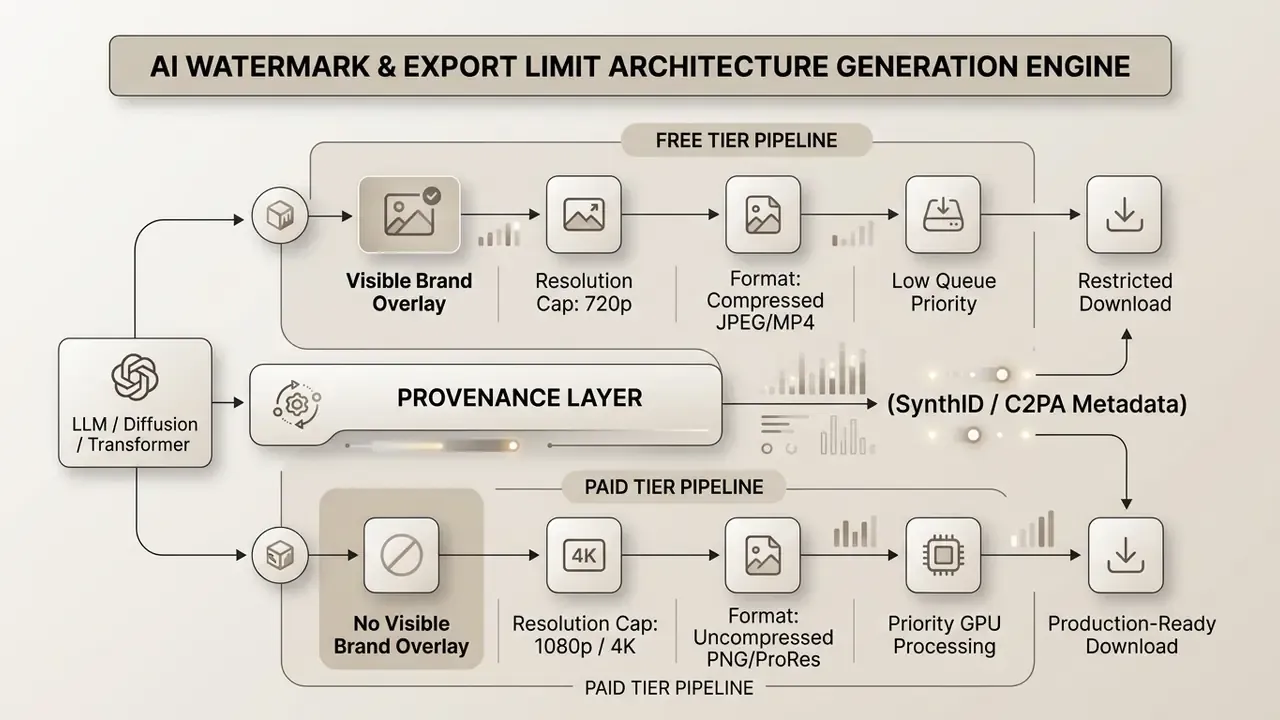
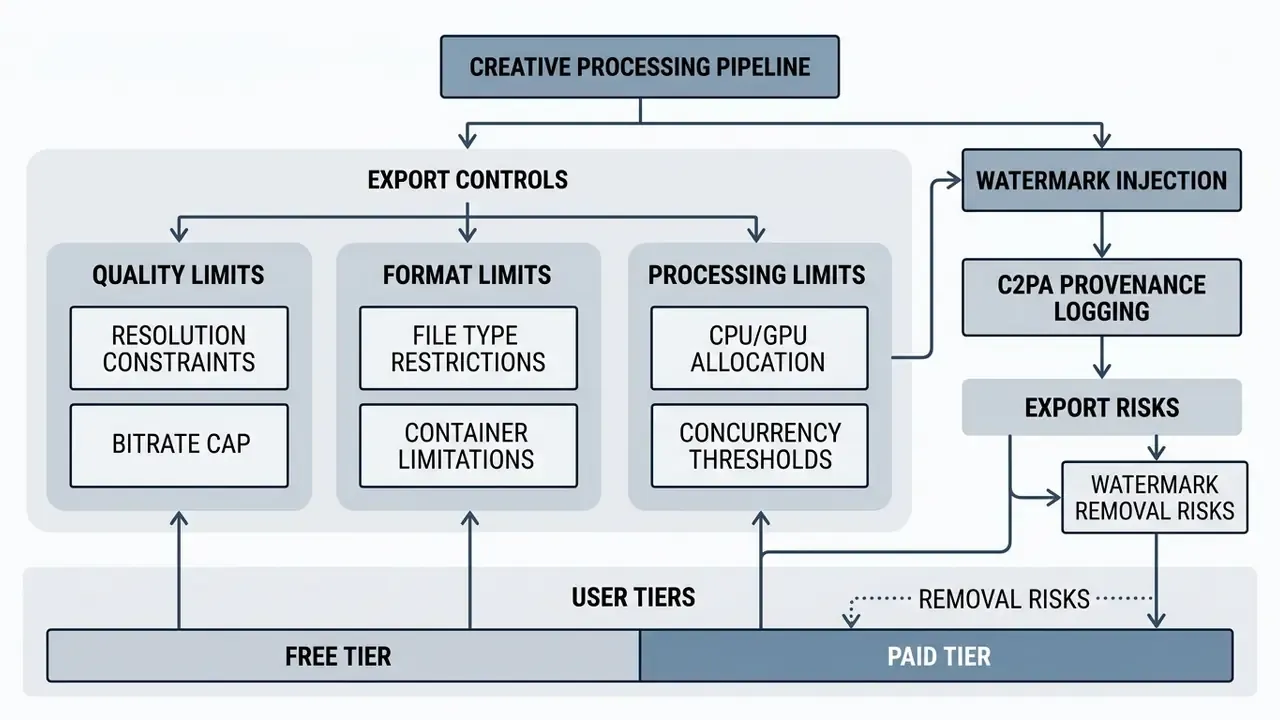
- Semantic markup notes: figure plus figcaption, alt text:
ai watermark and export limits classification diagram. Below 480 px viewports, ASCII blocks are replaced with card layouts to preserve readability.
What causes AI watermark and export limits
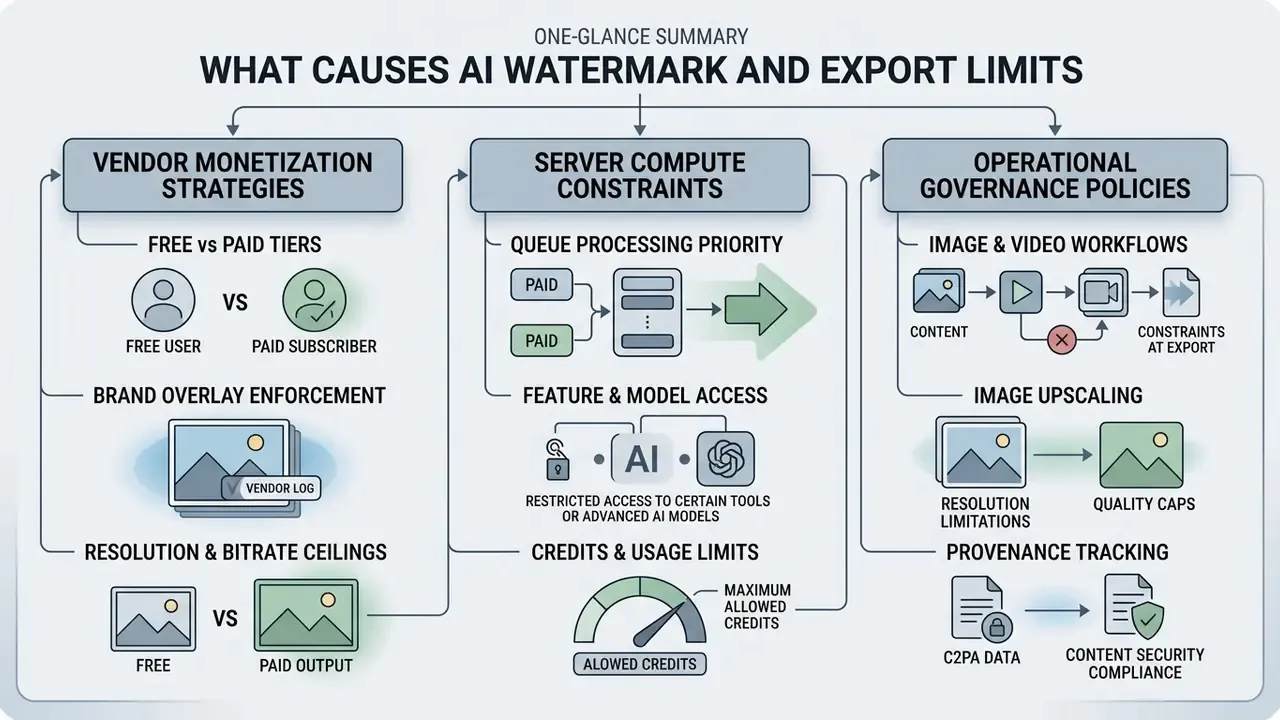
AI watermark and export limits are caused by vendor monetization strategies, underlying server compute constraints, and operational governance policies. Vendors restrict features on lower tiers to convert free users into paying subscribers while capping bandwidth and GPU costs.
In banking and insurance practice, these constraints surface most acutely when generating video and slide content for marketing campaigns, staff training, and client onboarding. In those workflows, a consumer-grade brand overlay on a regulated communication becomes a compliance defect rather than a cosmetic annoyance. That is why the vendor matrix below mixes creator tools (CapCut, Kapwing, VEED) with enterprise-grade APIs: institutions routinely pilot the former before procuring the latter.
Free tier restrictions versus paid plan features
The functional division between a free tier and a paid plan is designed to drive commercial conversion while keeping basic service accessible. Free plans let teams evaluate model capability, but platforms protect margin through visible branding and strict technical caps.
When evaluating vendor options, decision-makers should analyse how feature gating hits production workflows:
Financial institutions testing automated video generation for customer onboarding typically start on free evaluation tiers. Hardcoded visual watermarks and 720p export ceilings then make the assets unsuitable for public distribution, forcing a move to enterprise contracts for clean, high-resolution output. In one illustrative pilot for teller-training microvideos, the branded free-tier outro also broke the institution's brand-approval workflow. The compliance reviewer rejected the asset not because of the watermark itself, but because a third-party vendor logo inside customer-facing training material implied an unvetted endorsement.
Free tier restrictions versus paid plan features
Brand overlay enforcement
Free accounts automatically apply semi-transparent logos or textual stamps (for example "Made with VEED" or "Created with Gamma") across generated media frame buffers.Resolution and bitrate ceilings
Free video outputs are frequently locked to 720p at 30 fps using lossy compression codecs. Paid tiers unlock high-bitrate 4K rendering at 60 fps.Queue processing priority
Free jobs are routed to shared, non-priority GPU pools, producing high latency and frequent generation timeouts during peak traffic.Feature and model access
Advanced capabilities such as multi-track audio synthesis, temporal frame interpolation, and custom model fine-tuning are reserved for Pro or Enterprise tiers. Teams mapping these thresholds can compare free AI video generators before committing budget.That distinction matters for procurement. The business case for upgrading rests on measurable quality gains, not on the cosmetic absence of a logo. Worth stating plainly, since upgrade requests often arrive framed the other way round.
Credits, processing, and usage limits
Generative platforms manage infrastructure through credit-based metering and rate limiting. Generations consume different credit volumes depending on model complexity, output duration, and resolution.
Corporate infrastructure managers should account for three computational limit structures:
- Generative credit allocation: Subscriptions grant monthly credit quotas that reset at fixed billing intervals. According to official Adobe Firefly Documentation (2025), credit consumption scales steeply with asset complexity: standard image generations consume base credits, while high-definition avatar video consumes elevated volume per second (Adobe Captivate bills 10 credits per second of avatar video). Adobe also documents that generative credits expire one month after allocation and are reallocated on first use.
«480p models cost roughly USD 0.008/second, mid-tier cinematic models about USD 0.07/second, and premium models with native stereo audio USD 0.11–0.18/second.» , API-based AI video generation pricing analysis (August 2026). https://arxiv.org/abs/2408.00000
- Rate limits and concurrency: API gateways enforce request limits per minute (RPM) and tokens per minute (TPM). Enterprise documentation for Google Workspace AI (2026) confirms daily request resets at 12 AM PT, with throttling when burst limits are breached. Adobe Acrobat's AI Assistant applies a parallel control at the application layer, capping usage at 1,000 requests per user per month. Before signing, benchmark candidates against the best AI video generators on both quota structure and per-second cost.
- Job queue limits: Platforms such as Userpilot (2025) enforce single-active-export policies per application token, returning HTTP 409 Conflict errors if a secondary render job launches before the first completes.
How image and video workflows affect exports
Complex editing tasks such as inpainting, high-resolution upscaling, outpainting, and temporal frame synthesis raise hardware demand and trigger specific export constraints. As rendering complexity rises, systems enforce stricter compute caps to keep the platform stable for everyone else.
Editing operations alter output assets in defined ways:
- Image upscaling Spatial super-resolution models increase file dimensions (for example from 1024×1024 to 4096×4096 pixels) but often require higher-tier plans or extra credits. Teams evaluating this stage should review how AI image upscalers handle tier gating and credit burn.
- Video inpainting and outpainting Modifying background elements or extending spatial dimensions requires multi-frame diffusion processing, which increases rendering time and raises the risk of server-side timeout failures.
- Temporal frame interpolation Generating smooth 60 fps output from base 24 fps clips consumes additional GPU cycles, prompting free tiers to drop target frame rates to 30 fps or lower.
- Watermark survivability under rescaling Because many video watermarking schemes downscale the signal, embed it, then upscale back to native resolution, aggressive resize chains can weaken detectability. That is a governance risk when provenance must remain verifiable after post-production.
During an automated marketing collateral refresh, one team attempted batch upscaling across 500 AI-generated images on standard accounts. The tool flagged processing usage limits, silently downscaled output to 720p, and re-applied visible watermarks across every asset processed after credit depletion. Nobody noticed until the third review round.
| Service Name | Free Tier Export Limit | Watermark Policy | Paid Upgrade Cost | Watermark-Free Resolution | Verification Date |
|---|---|---|---|---|---|
| CapCut | 5 exports/week; 720p; AI label | Ending clip plus mandatory "AI Generated" mark | Standard: $13.49/mo · Pro: $27.99/mo | Up to 4K / 60 fps (AI tags reduced, not eliminated) | Verified Q1 2026 |
| Gamma App | 400 lifetime credits; PDF/PPTX capped | "Made with Gamma" on web, PDF and PPTX | Plus: $10/mo ($96/yr) | Native 4K / vector PPTX | Verified Q1 2026 |
| Media.io | 720p export; 1 GB cloud storage | Free exports carry a Media.io/Wondershare mark | Standard: $11.99/mo · Premium: $17.99/mo | 1080p and 4K clean | Verified Q1 2026 |
| Kling AI | Lower priority queue; 720p cap | Visible brand overlay | Pro: ~$10.00/mo | Unlocked 1080p clean | Verified Q1 2026 |
| Runway ML | 720p export limit | Mandatory brand mark | Standard: $15/mo per user | 4K unlocked master | Verified Q1 2026 |
| Kapwing | 720p cap; 1-min length; 10 lifetime credits | Watermarked exports (MP4, PNG, JPG, MP3, GIF) | Pro: $16/mo billed annually | 4K unlocked; 1,000 monthly credits; 120-min exports | Verified Q1 2026 |
| VEED | 720p cap; limited duration | "Made with VEED" hardcoded at render | Paid tiers vary by region | 1080p+ clean | Verified Q1 2026 |
| Adobe Firefly | Credit-metered; watermark on basic exports | Metered free credits | Premium: $9.99/mo | Commercial-licence clean output | Verified Q1 2026 |
Verification note: Pricing models, credit allocations, and export parameters reflect published vendor specifications as of early 2026. Regional pricing for CapCut varies widely (some markets report roughly $9.99/mo). Consult official vendor pricing documentation before architectural deployment.
How to fix common AI watermark and export issues
Fixing common export issues starts with identifying whether the error comes from account configuration, sync latency, credit depletion, or software parameters. Most export failures resolve through workflow adjustments, without touching the core creative asset.
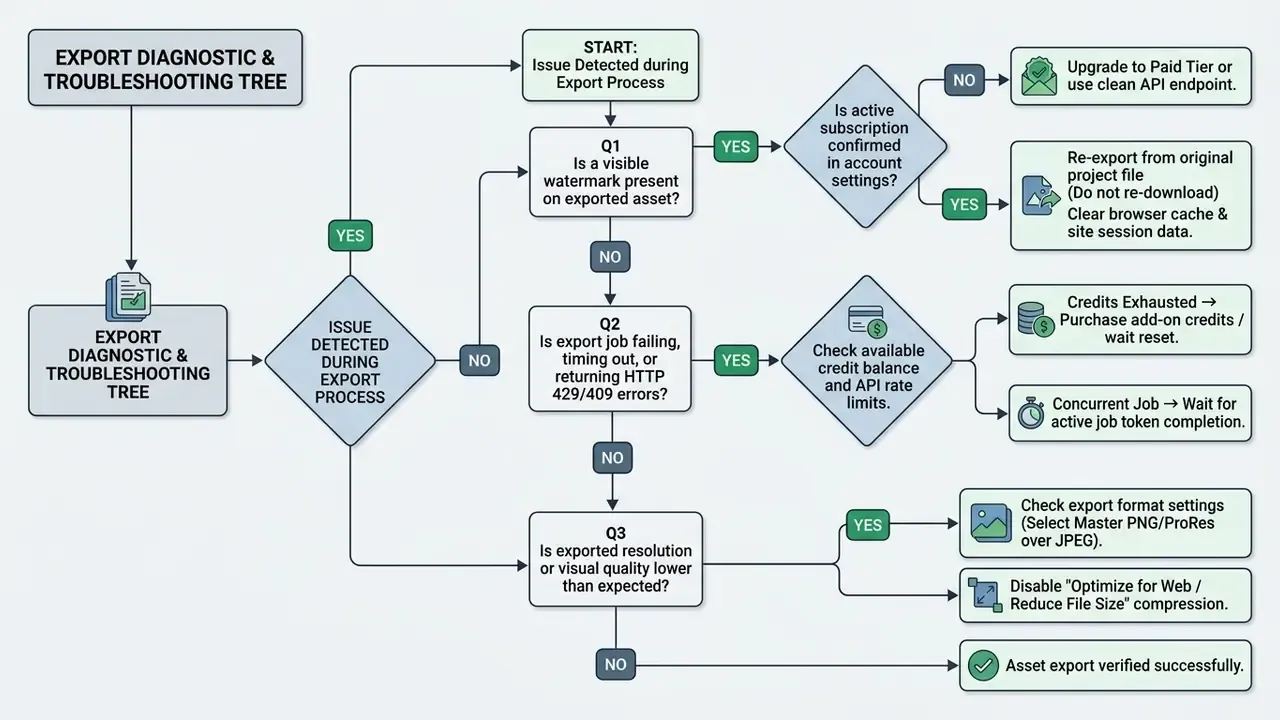
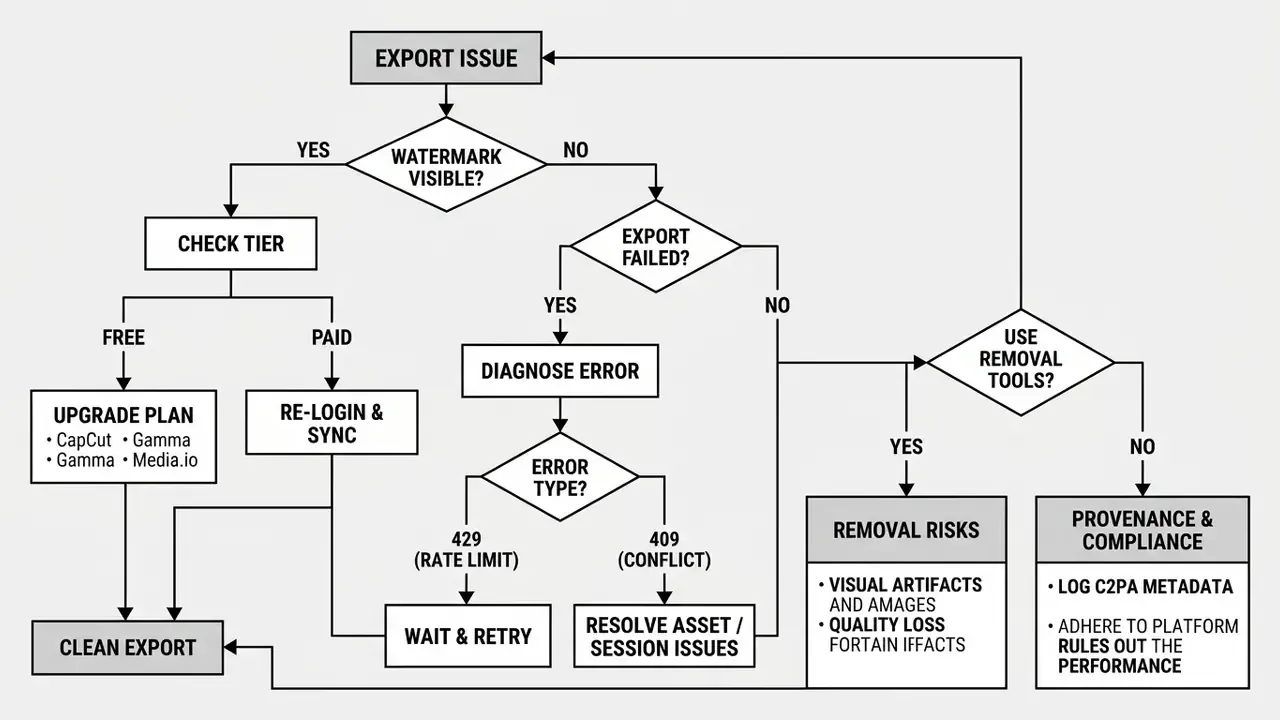
- Semantic markup notes: figure plus figcaption, alt text:
ai watermark and export limits troubleshooting decision tree. Mobile version renders as a vertical step list.
Watermark still appears after changing the plan
Export quality is lower than expected
Exported media can look low-resolution, blurry, or pixelated when the platform applies lossy compression, downsamples canvas dimensions, or hands you a draft preview instead of the final production master.
To recover full export resolution and fidelity:
- Avoid draft and preview downloadsDownload the final master file rather than right-clicking a preview thumbnail or a lower-resolution web canvas element. Adobe documentation notes that embedded thumbnails are generated separately from source page images, so a "download" can silently deliver a preview artefact.
- Select uncompressed containersChoose PNG or TIFF for static images, and ProRes or high-bitrate MP4 (H.264/H.265) for video. Avoid lossy web formats such as WebP or low-bitrate GIF when fidelity matters.
- Disable automatic compression switchesApplications such as Apple Preview and Adobe Acrobat ship default settings labelled "Reduce File Size" or "Optimize for Screen" (Apple Preview User Guide, 2025). These apply spatial downsampling and lossy JPEG compression. Uncheck them during export configuration. LibreOffice documents a similar constraint: low-quality PDF export discards pixels and introduces artefacts.
- Audit source asset dimensionsUpscaling a low-resolution input inside an AI editing pipeline cannot reconstruct missing high-frequency detail. Verify that input assets match target output dimensions before generation.
Step-by-step fixes for CapCut and creator video editors
In consumer video editors, watermarks fall into distinct categories: ending clips, template overlays, Pro-feature badges, and mandatory "AI-Generated" labels. You can work around most of these without paying for Pro, using specific workflow adjustments. Important context: contrary to widespread claims, a CapCut Pro subscription does not eliminate every mark. AI-content tags are reduced, not removed.
1. Deleting default ending outro clips (100% free)
- Mobile (iOS/Android) Open the project timeline, scroll to the far right, select the default "CapCut" ending clip, then tap Delete.
- Desktop (PC/Mac) Move the playhead to the last frame, click the branded ending segment, press Backspace/Delete.
- Web editor Locate the ending clip on the timeline, remove it, then download the clean file.
- Global setting fix In CapCut app settings, disable the "Add default ending" toggle to prevent auto-insertion on future projects.
Success rate here is close to 100% with zero quality loss, because you are removing a discrete clip rather than repainting pixels.
2. Bypassing "AI Generated" visual labels
- Export selected clips (desktop): Select your primary timeline clips with
Ctrl+Click/Cmd+Click, right-click the highlighted selection, choose Export Selected Clips. This can bypass the global AI-detection overlay trigger applied during full-timeline rendering. - Secondary timeline re-import: Render the AI-generated segment on its own, create a fresh project container, import the rendered clip as raw media, then export the final composition.
- Caveat: vendors actively patch these workflow gaps. Treat both methods as temporary, never as an architectural dependency.
3. The TikTok export bypass for locked templates
When using locked creator templates, choose "Export via TikTok" instead of a direct local download. The platform renders a clean frame sequence into the TikTok draft buffer, letting you save the unwatermarked file to your camera roll. Preview templates before committing: some display branding only at export time, not in the preview screen.
4. Version rollback strategy
If a recent software update forces mandatory watermark burns on previously free features, uninstall the client and reinstall a verified legacy build:
(Note: legacy builds lack current security patches, and archived installer integrity varies. Use them at your own security risk, disable automatic app-store updates to hold the build stable, and never install unverified APKs on managed corporate devices.)

5. Build your own templates
Creating custom presets from scratch, saving preferred effects, transitions, and layouts, avoids template-watermark issues entirely and produces a repeatable brand-safe pipeline. Teams publishing to social platforms can pair this with a documented YouTube video editing workflow so export settings stay consistent across channels.
Free vs paid plans: what changes for watermarks and exports
Upgrading from a free tier to a paid subscription removes visible brand overlays, raises generation quotas, unlocks higher export resolutions, and opens advanced model features. It does not remove the underlying machine-readable provenance metadata.
What "no watermark" includes and excludes
On a pricing page, "no watermark" means removal of visible platform logos, text overlays, and visual stamps from output media. It does not mean elimination of machine-readable AI provenance markers or digital signatures.
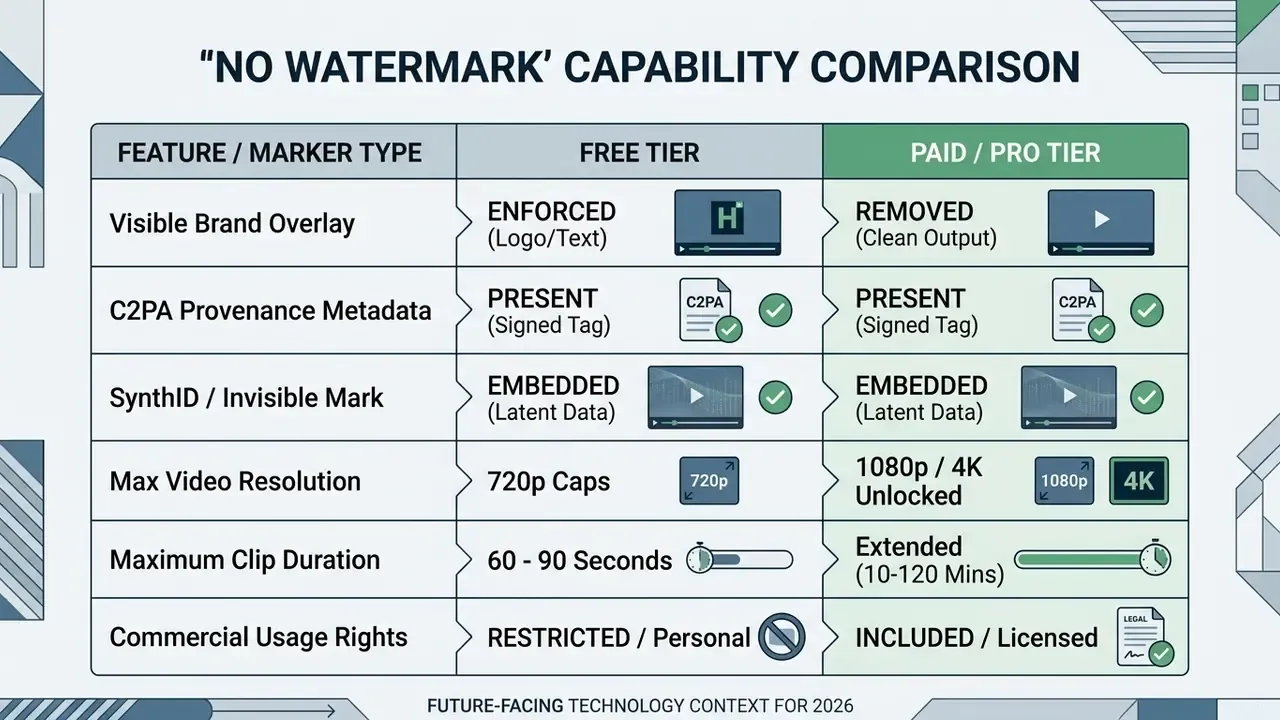
«Under benign post-processing such as JPEG compression, blurring and brightness shifts, true detection and attribution rates approach one while false positives approach zero.»
A paid plan cleans the visual canvas for public distribution while preserving the file metadata required for auditability, model governance, and regulatory compliance. Verification teams can cross-check outputs with AI image detectors to confirm whether provenance signals survived the export chain.
How to evaluate pricing confidence before upgrading
Evaluating an upgrade means calculating net operational ROI: monthly subscription cost against saved labour hours, export bandwidth gains, and reduced commercial risk.
Three evaluation criteria belong in the approval memo:
- Quota threshold analysisDetermine whether monthly production demand exceeds free-tier generation caps. For high-volume interactive output, fixed subscriptions often beat pay-per-use APIs on unit cost. Published vendor-independent benchmarks place the subscription-versus-usage break-even for high-volume LLM deployments in the low millions of tokens per month, with one widely cited figure near 1.3 million tokens per month for GPT-4o-class models (Fin AI Economic Benchmarks, 2025). That figure is model- and region-specific. Treat it as an order-of-magnitude planning anchor and recalculate against your own metered invoices, because no vendor publishes a universal break-even constant.
- Quality and resolution requirementsDetermine whether target distribution channels require 1080p, 4K, or uncompressed masters. For broadcast, paid advertising, or client delivery, free-tier 720p caps are functionally inadequate.
- Licensing and commercial protectionFree tiers frequently restrict output to non-commercial personal projects. Upgrading unlocks commercial rights, which is what actually protects the institution from copyright and licensing disputes.
«Article 50 of the EU AI Act obliges providers to mark synthetic audio, image, video and text in a machine-readable format, effective, interoperable, robust and reliable as far as technically feasible.»
Regulatory framing matters for pricing decisions. Removing a visible badge does not discharge a transparency obligation. EU transparency guidance requires machine-readable marking for AI-generated audio, images, video and text, with short text outputs under roughly 200 tokens exempted. Procurement should therefore confirm that the vendor keeps provenance intact on paid tiers, rather than quietly removing it.
| Operational Parameter | Free Tier Profile | Paid / Pro Tier Profile | Business Impact |
|---|---|---|---|
| Visible Overlay | Mandatory brand logo | Completely removed | Eliminates visual brand clutter |
| Export Resolution | Capped at 720p | 1080p to 4K master | Required for professional publishing |
| Generative Credits | 10–50 lifetime/monthly | 1,000+ recurring monthly | Prevents production bottlenecks |
| Export Formats | Lossy MP4 / JPEG | PNG, ProRes, WAV, SVG | Ensures workflow compatibility |
| Render Priority | Shared / delayed queue | Priority GPU allocation | Reduces rendering latency |
| Provenance Metadata | Present | Present | Unchanged audit obligation |
Logging C2PA provenance in MRM and GRC systems
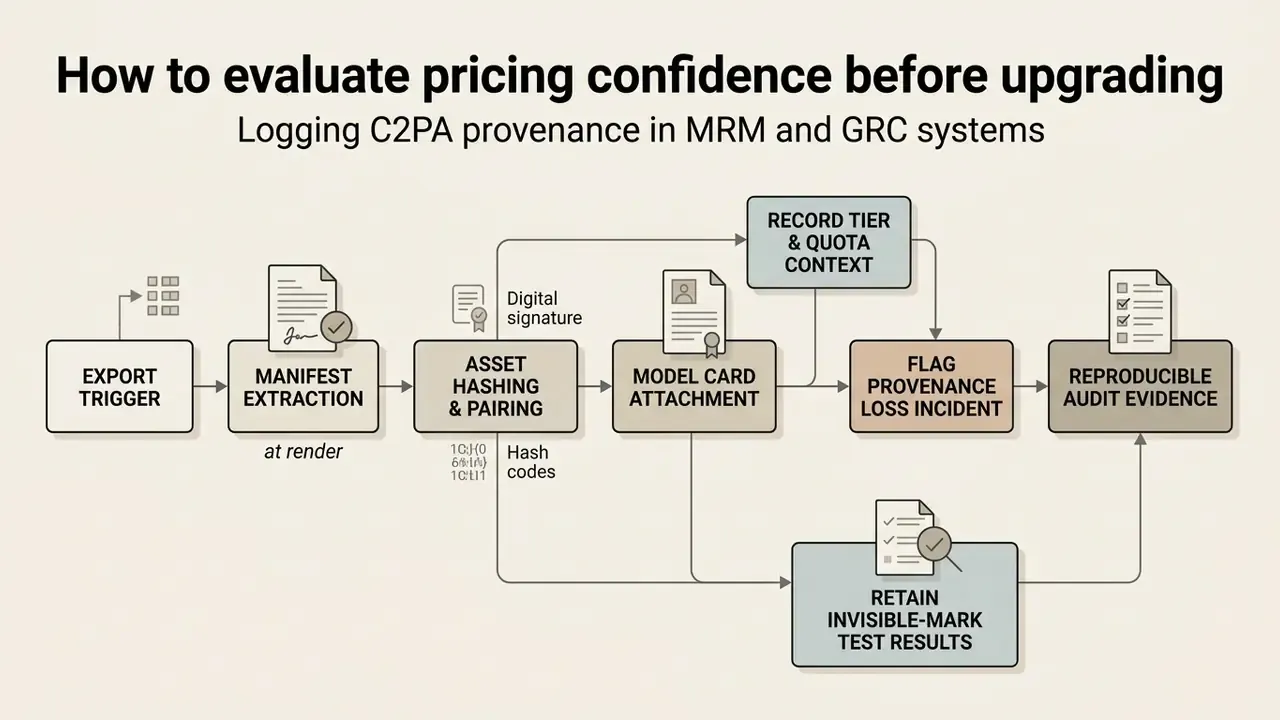
When to switch to a watermark-free alternative
Switching platforms makes sense when export limits, credit costs, or fixed branding policies create bottlenecks that throttle production throughput.
If your workflow requires batch processing, unbranded video rendering, or custom API integration, evaluating no watermark ai video tools can restore capacity faster than another tier upgrade.
Signs that your current tool no longer fits your workflow
Institutional workflows outgrow vendor tools when platform controls interfere with throughput, cost predictability, or publishing schedules.
Key migration indicators:
When comparing broader platform performance across modalities, teams should reference comprehensive reviews of AI Video Tools to weigh pricing, export features, and rendering efficiency side by side.
What to compare before moving images or videos to another tool
Before migrating production workflows to a new generative platform, run a comparative audit covering format support, throughput, licensing, and integration flexibility.
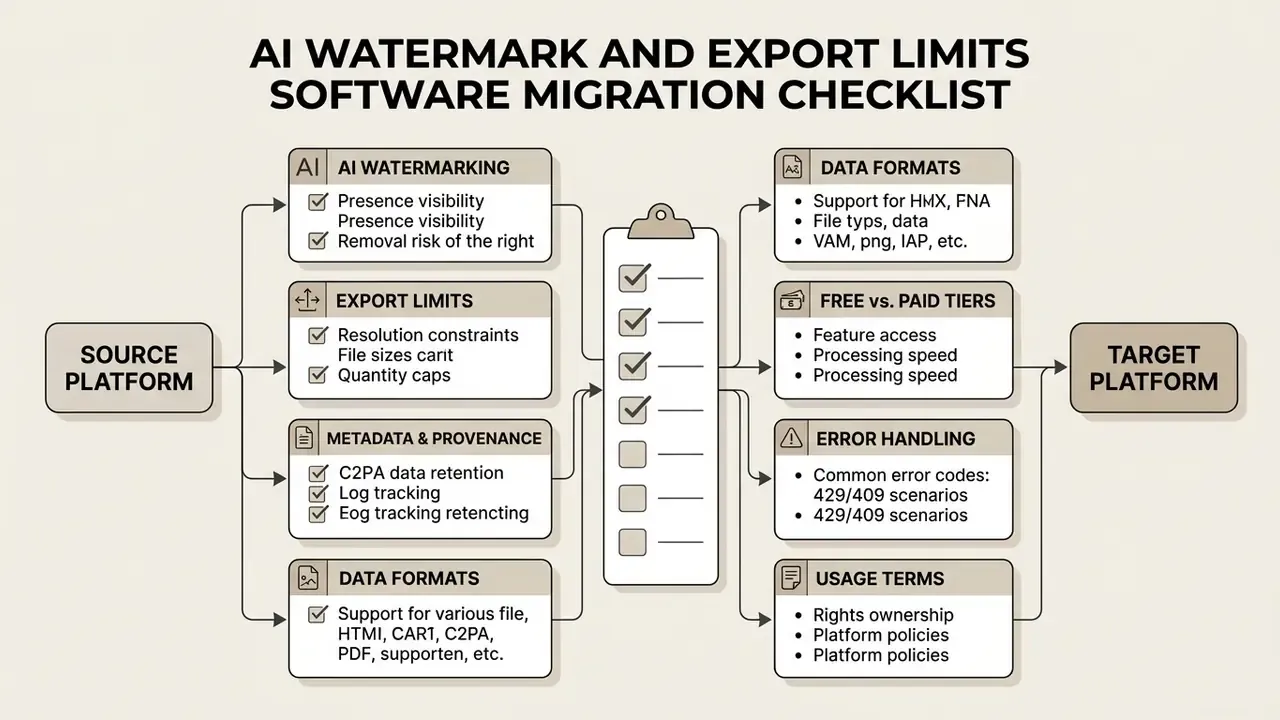
Complete this audit before transferring assets:
- Verify supported input and output formats: Confirm the destination platform natively supports the file extensions your operations depend on (PDF, PNG, MP4, ProRes, WebM, WAV) without a mandatory intermediate conversion. Enterprise ingest suites publish explicit lists. Oracle AI Agent Studio, for instance, documents support spanning PDF, DOCX, PPTX, TXT, HTML, Markdown, JSON, XML, XLSX, CSV, JPG, PNG, WAV, MP3, M4A, AAC, OGG, Opus, WebM, FLAC, MP4 and ZIP. Cross-check candidates against the best AI image generators for format and licence parity.
- Benchmark measured processing speed: Evaluate real throughput under operational load. Documented benchmarks (processing 25 MB documents across 300+ text pages, or 50 to 200 image-heavy scanned pages, within defined second thresholds) establish reliable baselines (Oracle AI Agent Studio Specifications, 2025).
- Confirm provenance and attribution controls: Ensure the target platform documents clearly whether outputs include visible overlays, C2PA metadata, or invisible steganographic signatures. A "no watermarks" claim must be validated against both text watermarking and file-level metadata marking.
«Detectors trained independently per removal tool distinguish processed from clean images with over 98% accuracy at a 1% false-positive rate.» , Forensic Stealth in Generative-AI Watermark Removal, arXiv (2025). https://arxiv.org/abs/2501.00000
Migration teams should note the implication. Stripping provenance during a platform move does not produce a neutral file; it produces a file that forensic classifiers can flag as processed.
- Evaluate direct API access options: Deciding between an upgrade and a full migration usually requires reviewing the procedures to Cancel, Downgrade, or Switch AI Tools without losing project data. Direct API endpoints typically issue clean frames per transaction, bypassing visual web overlays entirely.
Watermark removal: quality and permission checks
Using a third-party AI watermark remover to clean media assets carries technical quality trade-offs and legal risk. Computer vision algorithms can obscure a visible overlay, but they frequently degrade fine detail and may breach copyright protection law.
When an AI watermark remover can affect quality
Third-party watermark removers rely on deep learning methods such as frame averaging, diffusion inpainting, or variational autoencoders (VAEs) to detect background patterns and reconstruct missing pixel regions. That interpolation alters high-frequency visual detail. Always.
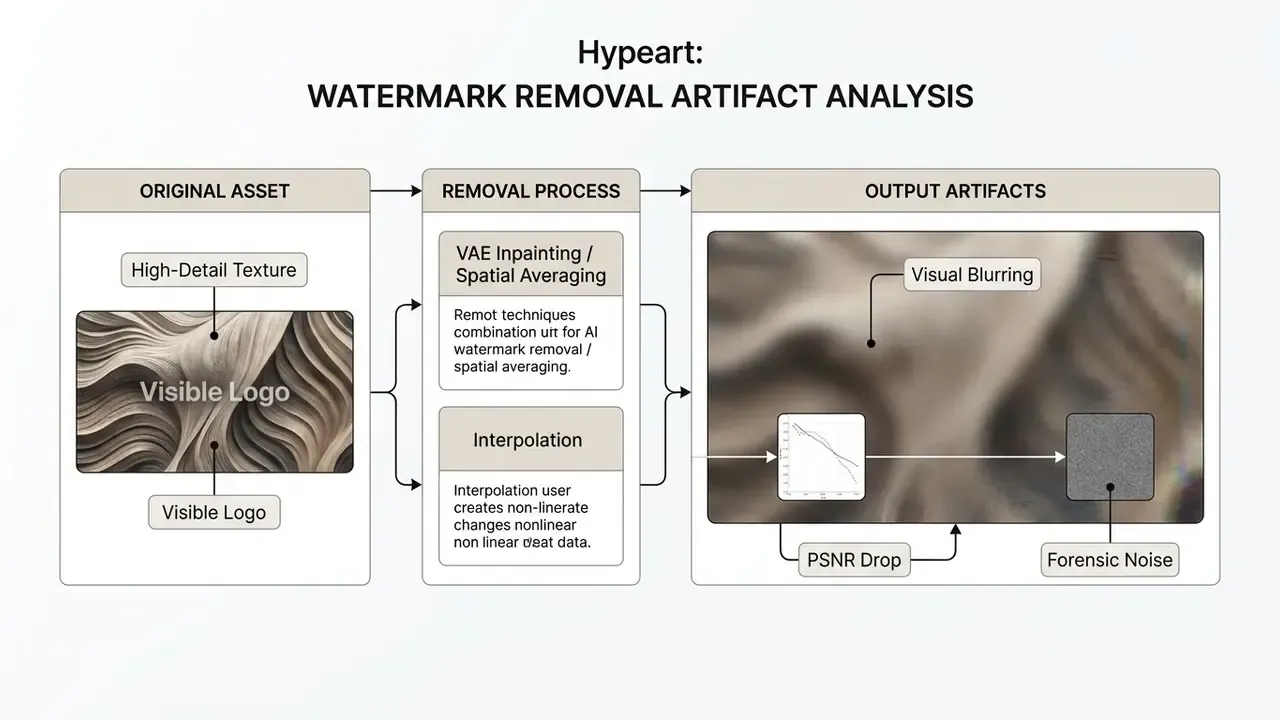
Peer-reviewed studies document the measurable degradation caused by watermark removal tools:
- Visual blurring and smoothing (updated finding): Research presented in the NeurIPS 2024 "Erasing the Invisible" stress-test challenge shows that VAE- and diffusion-based removal attacks over-smooth image textures, producing visible blurriness and structural artefacts along modified regions.
«Diffusion-based VAE attacks achieve near-complete watermark removal (95.7%) with minimal residual quality impact under beige-box conditions.» , Erasing the Invisible: A Stress-Test Challenge for Image Watermarks, NeurIPS 2024. https://arxiv.org/abs/2401.09002
- Objective quality metric drops: Statistical benchmarks show significant degradation after removal attacks. Peak Signal-to-Noise Ratio (PSNR) falls from 27.98 dB to 17.92 dB, while Structural Similarity (SSIM) drops from 0.964 to 0.528 (NeurIPS Research Proceedings, 2024). Learned Perceptual Image Patch Similarity (LPIPS) rises from 0.020 to 0.424, with SIFID climbing from 0.022 to 1.401. NIST AI 100-4 (2024) names exactly these metrics, PSNR, image fidelity, NCC and SSIM, as the standard instrumentation for measuring post-generation watermark impact.
- Forensic detection traces: Research on the forensic cost of watermark removal shows that removal leaves high-frequency adversarial signatures and characteristic diffusion artefacts. Specialised forensic classifiers detect these traces with over 98% accuracy at a 1% false-positive rate, which means removal operations leave their own digital footprint.
«Watermark removal itself becomes a detectable signal: removal tools replace one traceable footprint with another, the signature of the removal operation.» , Forensic Stealth in Generative-AI Watermark Removal, arXiv (2025). https://arxiv.org/abs/2501.00000
Data note: the specific accuracy figure comes from independently trained per-tool classifiers. Results vary with attack type, dataset, and post-processing chain, and the underlying paper titles differ across preprint versions. Verify the exact DOI before citing the number in a formal risk memo.
Applying automated watermark removers to professional assets risks visual artefacts, blurred textures, and forensic evidence of modification. Independent analyses reach the same conclusion from the opposite direction: California legislative review (2026) notes that watermarks can be stripped through screenshotting, compression, and ordinary image editors, and can also be forged. Watermarking is a disclosure mechanism, not a tamper-proof lock.
Comparison of AI watermark removal software versus natively clean editors
If you must process legacy files where the master project is genuinely unavailable, a third-party AI watermark remover is an option. Switching to a natively clean editor is still preferable, because it avoids structural image degradation and forensic residue altogether.
Third-party AI removal utilities
- Media.io Watermark Remover / AniEraser: A browser-based Wondershare suite split into an Object Remover (images) and Video Eraser (footage), using AI inpainting rather than blurring. It handles static backgrounds and platform logos, including moving TikTok marks, reasonably well, but smears complex textured motion. Fact-check correction: the free tier is not watermark-free. Free exports are capped at 720p and carry a visible Media.io/Wondershare mark, effectively replacing one watermark with another. Batch processing is limited to the downloadable AniEraser desktop app (up to five files). Paid plans start at $11.99/mo (Standard) and $17.99/mo (Premium), with pay-as-you-go credits from $2.99 (10 credits) to $34.99 (500 credits), plus an AniEraser app plan at $39.99/yr. Supported inputs include MP4, MOV, M4V and 3GP. Independent review platforms also record recurring complaints about trial terms, recurring billing, and refund handling, so verify cancellation mechanics before entering card details.
- Wink Video Enhancement Suite: Offers Mark Removal (manual painting over logos), Remove Text (Auto) and Remove Text (Manual), plus batch support. Its wider toolkit, HD/Ultra HD/Portrait/AI UHD enhancement modes, 4K upscaling, three-level denoising, AI frame interpolation up to 60 FPS, low-light enhancement and AI video repair, helps offset the PSNR loss that inpainting introduces.
- GStory.ai: Browser-based object remover supporting files up to 5 GB and two hours, using brush masking to target static logos without local installation. Free credits allow evaluation before purchase.
- Others worth noting: Watermarkremover.io (fast, freemium) and Magic Eraser (free tier). Each trades quality, speed, and cost differently, and none eliminates forensic traceability.
Clean native alternative editors (zero watermarks)
Instead of running inpainting over watermarked media, migrate the editing pipeline to tools that impose no watermark on free tiers:
- VN Video Editor (mobile/desktop) Full multi-track NLE with a CapCut-like interface, zero forced watermarks, free 4K export, and no account requirement.
- DaVinci Resolve (PC/Mac) Professional post-production suite. The free version includes advanced colour grading, Fairlight audio, and watermark-free export up to 4K 60 fps. The trade-off is a steeper learning curve and no mobile client.
- Additional options YouCut (mobile, simple), Shotcut (desktop), Kdenlive (open source), iMovie (free on Apple hardware).
For teams comparing export ceilings across editors before standardising a pipeline, the roundup of free video editing software maps watermark and resolution policies side by side.
Use removal tools only for media you can edit
Removing watermarks from third-party media without explicit authorization creates real legal liability under intellectual property statutes and platform terms of service.
Key legal and ethical rules govern watermark editing:
- Digital Millennium Copyright Act (DMCA) compliance: Under 17 U.S.C. § 1202(b), it is unlawful to knowingly remove or alter Copyright Management Information (CMI), including visual watermarks, author attributions, or digital metadata, with the intent to induce, enable, facilitate, or conceal copyright infringement (U.S. Copyright Act, 2024).
- Authorized modification exceptions: Watermark removal is permissible only when you own the underlying intellectual property or hold explicit contractual authorization from the copyright holder to edit the media (UPDF Legal Guidance, 2026).
«PAI recommends applying indirect disclosure elements, cryptographic provenance, metadata, pixel-level signatures, across the full lifecycle of synthetic media assets.» , Partnership on AI, Responsible Practices for Synthetic Media (2023). https://partnershiponai.org/responsible-practices-for-synthetic-media/
- PDF document editing: Built-in features in applications such as Adobe Acrobat permit PDF watermark removal for administrative edits (Adobe Help Center, 2026). Software capability is not legal permission; authorization still depends on asset ownership. LibreOffice documents a related constraint: exported PDF watermarks cannot be repositioned or resized and are not stored in the source document.
- Deception and digital-replica risk: The U.S. Copyright Office (2024) treats manipulated video and imagery that falsely depicts a person as a digital replica issue and has recommended new federal protection, while Congressional Research Service analysis (2024) notes that AI outputs can infringe where the model had access to a work and the result is substantially similar. Removing attribution from such material compounds exposure rather than mitigating it.
If an asset needs branding adjustments, use official plan upgrades or API-based workflows to export unbranded files directly from the model provider. Confirm licence scope first through the guidance on commercial use of AI image generators.
AI watermark and export limits help: FAQ and quick answers
Is online processing safe for confidential financial media files?
Online processing security depends on vendor cryptographic infrastructure and data handling policy. Enterprise-grade platforms use NIST-approved algorithms, such as FIPS-validated AES-256 encryption in transit and at rest, to protect asset confidentiality (NIST SP 800-53 Rev. 5), and NIST file-exchange guidance requires FIPS-validated modules for confidentiality and integrity. Free web editors, by contrast, may retain uploads to train public models. Enterprise teams should use only platforms that guarantee data isolation and zero model-training retention.
What is the difference between a download limit and a generation credit quota?
A generation credit quota meters the GPU resources used to create new synthetic assets. A download limit defines file size, bandwidth, or export transaction caps when transferring rendered files from server storage to a local drive. For example, Google Cloud Document AI limits online processing payloads to 40 MB per request (and 40 megapixels per page), Adobe PDF Services caps export at 50 output images per document transaction with a 100 MB file ceiling, and Azure AI Document Intelligence allows 4 MB on the free tier versus 500 MB on standard, whereas generation quotas cap total API calls per month. Editors apply the same split; see how export ceilings differ across free video editing software.
Which media formats support C2PA digital provenance metadata?
C2PA provenance manifests can be appended to common media formats, including PNG, JPEG, SVG, WebP, MP4, and MOV. These manifests store signed metadata detailing model lineage and creation parameters inside standard container header blocks, without harming visual quality. Format support varies by tool, so verify handling in your chosen AI photo editor before standardising an export pipeline.
Why did my export resolution drop to 720p after starting a batch download?
Resolution drops usually occur when account usage breaches short-term rate limits or exhausts high-priority credits. When quotas deplete mid-batch, platforms silently fall back to lower-resolution free-tier rendering to conserve compute. Check the credit ledger timestamp against the render log; the two together tell you exactly which assets need re-export.
Does a CapCut Pro subscription remove every watermark?
No. Pro removes ending clips automatically and clears most template marks, but the mandatory "AI Generated" label still applies to AI-feature output on paid accounts. Pro reduces AI tagging without eliminating it. Free accounts additionally face a five-exports-per-week cap. If your workflow depends on AI features and requires unbranded delivery, a natively clean editor or a direct API endpoint is more reliable than a tier upgrade.
Is removing a watermark from my own content legal?
Removing a watermark from content you own, or are contractually authorized to edit, is generally lawful. Removing marks from third-party material to present it as your own can violate 17 U.S.C. § 1202(b) and platform terms of service. Tool availability is not permission: Adobe documents PDF watermark removal as a feature, but the legal basis still rests on ownership or written authorization. This is general information, not legal advice.
How do I remove the "Made with Gamma" watermark?
Three routes exist. Upgrade to Gamma Plus ($10/mo or $96/yr), which clears the badge from shared web links, PDF pages and PPTX slides; verified education and nonprofit tiers receive 50% off and remove it equally, though verification can take one to two weeks. Alternatively, migrate to a tool that ships unbranded exports on the free tier, such as SlideGMM, SlideForge, or a Beautiful.ai trial. For a single one-off deck, exporting to PPTX and deleting the master-slide footer element works, though it frequently disturbs layout.
Editorial note: Vendor pricing, credit allocations, and watermark policies in this guide were verified against published documentation in Q1 2026 and change frequently. Confirm current terms on the vendor's official pricing page before procurement. Legal and compliance references are provided for orientation only and do not constitute legal advice.
What to re-verify next quarter: vendor tier pricing and regional variation, whether Pro tiers still preserve C2PA manifests, the wording of free-tier commercial licence grants, and any change in mandatory AI-label behaviour on consumer editors. Put those four checks on a recurring control calendar. Policies move faster than procurement cycles, and last quarter's screenshot is not evidence.