If you work in a regulated environment, treat every generated image link as a small asset with an owner and an expiry. A screenshot of a customer record pasted into a random uploader is not a convenience. It is an uncontrolled data transfer.
Author: Marcus Hale, Enterprise AI & Governance Specialist (media infrastructure, model-risk documentation, asset governance).
Last updated / fact-checked: February 2026
Executive summary
- Direct link is not a share page. A viewer page returns
Content-Type: text/htmland will not render inside<img src>, Slack unfurls, Notion embeds, or marketplace feeds. Only a raw image stream will. - Hosting choice decides longevity. Free hosts and temporary tools (1 hour to 30 days retention) are fine for bug reports and chat screenshots; permanent product catalogs, brand assets and e-commerce feeds belong on enterprise object storage or a specialized image CDN.
- Governance is the hidden risk. Public URLs have no access boundary: strip EXIF/GPS metadata, use presigned time-limited URLs for confidential attachments, and block unsanctioned third-party uploaders at the DLP or proxy layer to prevent Shadow AI data leakage.

Ctrl+V / Cmd+V), copy the direct link, then test it in an incognito window and confirm the server answers 200 OK with a Content-Type: image/* header.Who this guide is written for
Three groups usually land here with very different stakes.
Marketers and content creators need a shareable url instantly, with no friction and no login wall. Developers need a stable pointer they can drop into an img tag, a CI pipeline, or an API payload. Risk, compliance and operations leads need to know who can open that address, how long it lives, and whether the event was logged.
The instructions below are identical for all three. The hosting and retention decisions are not.
What an image URL is and when you need one
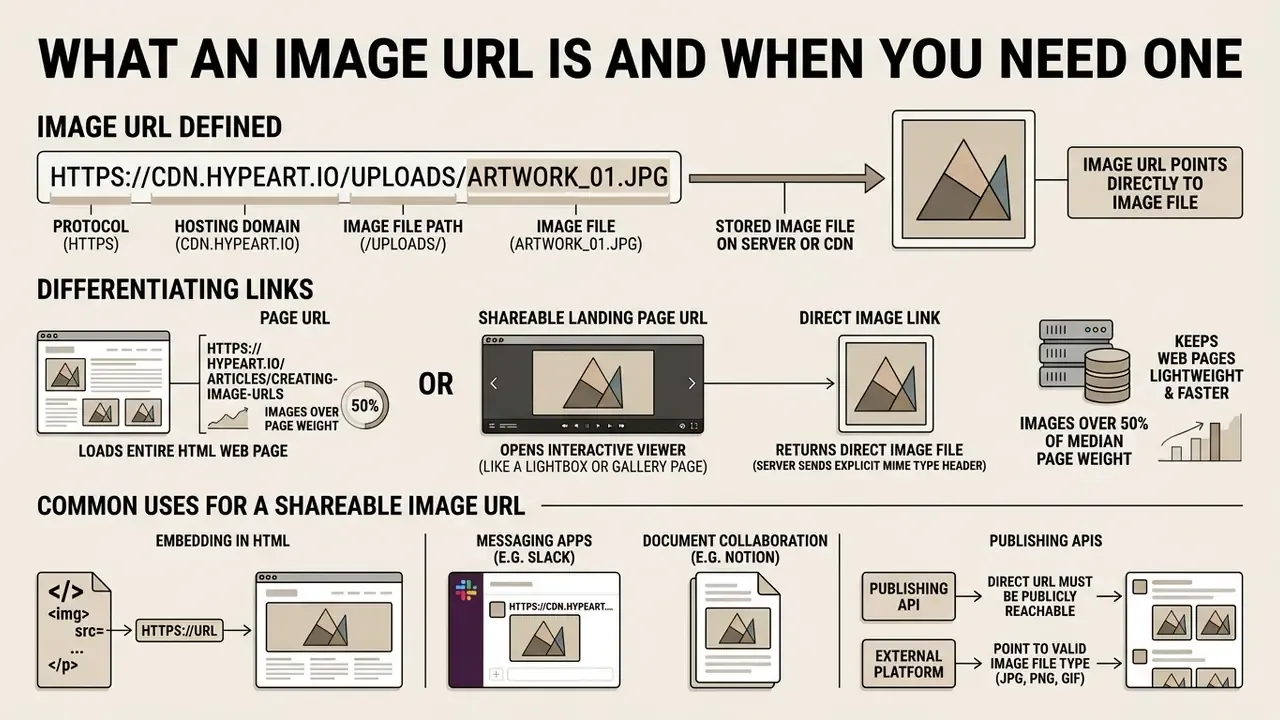
An image URL is a web address that points directly to a stored image file on a server or content delivery network (CDN). You need an image URL whenever you want to display an image in web pages, social media posts, email templates, or product listings without attaching physical files.
According to web performance research from the HTTP Archive, image files account for more than 50% of the total transfer weight of a standard web page, with median desktop page weight reaching roughly 2.6 MB.
Storing images on dedicated hosting infrastructure and referencing them via a shareable link keeps web pages fast across devices and networks. It also centralizes control: one file, one address, one owner.
Image URL, page URL and direct image link: what is the difference?
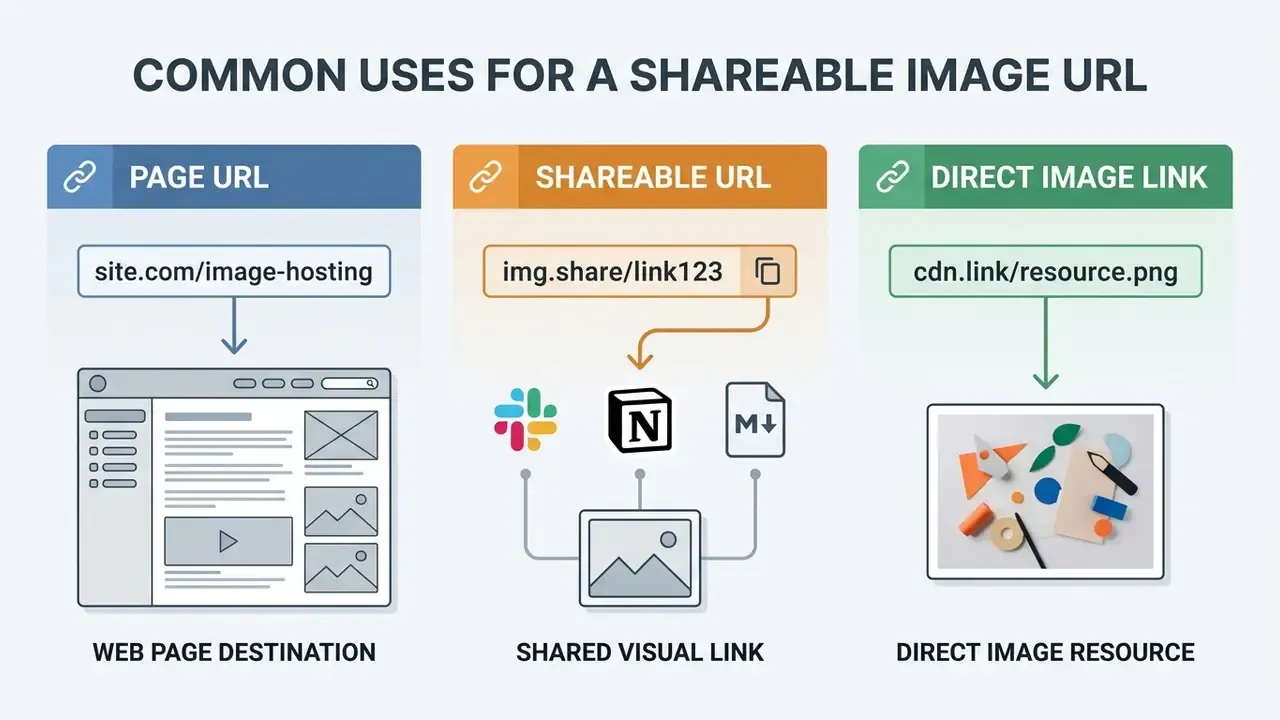
A page URL loads an entire HTML web page, a shareable landing page URL opens an interactive viewer interface, and a direct image link leads straight to the raw image file bytes. Knowing the difference decides whether your image file loads properly when embedded in external platforms or HTML <img src> tags.
When a web browser requests a direct image link, the server returns an HTTP header with an explicit MIME type, such as Content-Type: image/jpeg or Content-Type: image/png. A standard page URL, by contrast, returns Content-Type: text/html. Third-party services, automated APIs and HTML embedding code require a direct image link ending in an image extension or serving an image MIME type to render the asset correctly.
A practical rule used by publishing APIs: the address must be reachable over the public internet, must point straight at the file rather than a redirect or preview page, and must be accessible without authentication. Any URL that fails one of those three tests will break social previews, marketplace imports, and AI pipelines that fetch images by address.
Common uses for a shareable image URL
A shareable image URL is used to share images across social media posts, blog posts, product image listings on e-commerce platforms, and customer support tickets. It allows instant global access without overloading email servers or platform attachment limits.
Digital organizations lean on image links for social media previews using Open Graph metadata (og:image), where platforms require an absolute URL and recommend a 1200×630 preview asset. E-commerce marketplaces require direct image links to populate product catalogs reliably across multiple channels. Media teams managing structured content operations integrate hosted media addresses directly into AI Media Workflows so that cross-platform asset deployment stops depending on manual re-uploads.
One nuance worth naming early: quick sharing and long term publishing are different jobs. A Slack screenshot can vanish in a week and nobody suffers. A hero banner on a pricing page cannot.
How to create a URL for an image in three simple steps
To create a URL for an image, upload your image file to an image hosting service, copy the generated direct link, and test the link in an incognito browser window. These three simple steps convert a local photo on your computer into an accessible shareable url instantly.
So how do I create an image url without a developer? You use the image url generator that every mainstream hosting platform already exposes. Whether the question is phrased as how to make a url for an image, how to make an image a url link, or how do i make an image url, the mechanics are the same: upload, copy, verify.
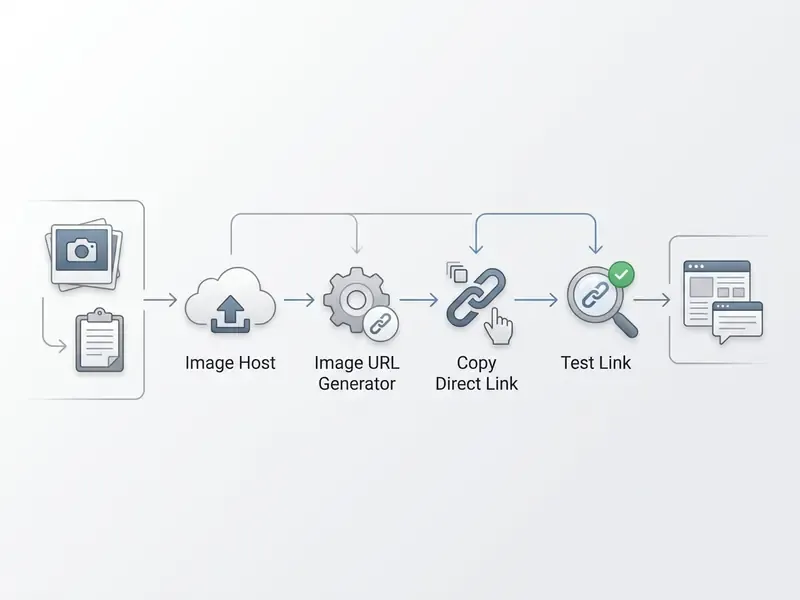
Step 1. Upload the image file to an image hosting service
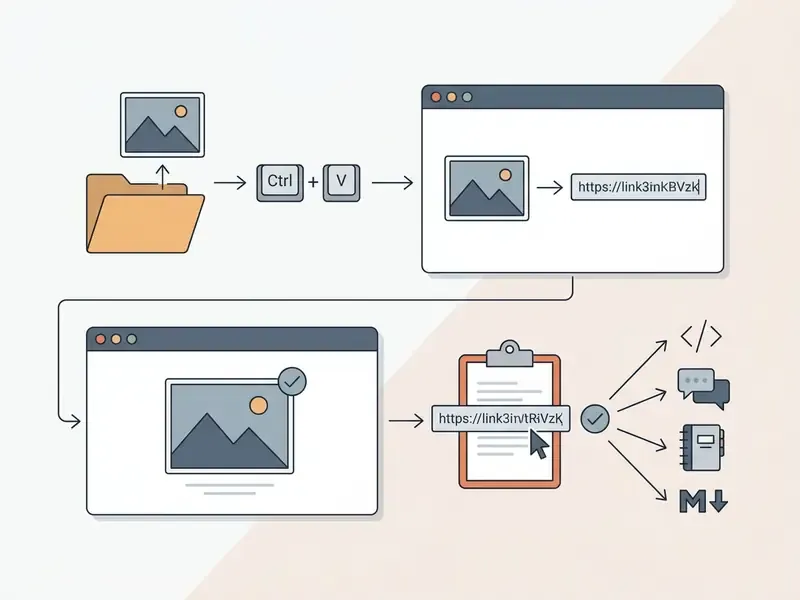
Start the upload process by selecting a local file from your device, or by pasting an image straight from your clipboard (Ctrl+V on Windows and Linux, Cmd+V on macOS). Modern hosting tools read raw image data from the system clipboard, so you never have to save a temporary screenshot file first. Drag-and-drop from a desktop folder behaves the same way and is the fastest route for bug reports, QA evidence and annotated screenshots.
Check the host's supported file formats and maximum file size before you start. Most hosting services accept standard raster image formats including JPG, PNG, GIF, WebP, AVIF and SVG. Standard free hosting providers restrict individual uploads to somewhere between 2 MB and 32 MB per file, while enterprise cloud platforms accept far larger media assets, up to 5 TB per object on major object-storage services. Also verify minimum dimensions for your destination: some publishing systems require at least 960×640 pixels at 72 DPI, and marketplaces demand considerably more.
Step 2. Generate and copy the image URL
Once the upload completes, the platform's url generator produces a direct link to your generated image asset. Select and copy the direct link or shareable url from the host interface, then use it anywhere the destination allows.
Image hosting tools routinely return several link variants at once: a raw web address, an HTML embed tag, Markdown syntax and a BBCode snippet. Picking the wrong one is the single most common cause of a broken embed. Marketers preparing promotional headers and campaign visuals often route generated addresses into a central asset library first; teams that retouch assets before publication can compare capabilities in this online photo editor guide to keep hosting and editing steps consistent, and teams building channel art can pair the same library with a banner maker for YouTube headers so that every published variant resolves from one hosted source.
Step 3. Test the link before sharing it
Test your image link by pasting the copied address into a new incognito browser tab, or by using an HTTP header checker to verify a 200 OK status. This confirms that the links work for external users without an account login.
Pursuant to RFC 9110, an HTTP 200 OK response code confirms that the server resolved the requested image resource and that the response content represents the target resource. Empirical research on web link integrity published by Couffin et al. (2024) reports that 35.2% of top-ranking homepages contain broken external resource links, largely because validation is skipped at deployment time.
«An analysis of 88,000 homepages from the Majestic Million list found that 35.2% contain at least one broken link to an external resource.»
Illustrative case (composite, not a client engagement). A marketing team publishes 200 product listings using unverified image previews. External platforms refuse to render them, because the URLs point at authenticated staging pages. Swapping in public direct links restores asset display and recovers the lost listing traffic inside a day. The control that prevents a repeat is almost embarrassingly cheap: a scripted HEAD request across every catalog URL, asserting both 200 OK and an image/* content type before publication.
How to get a direct image link and embed it anywhere
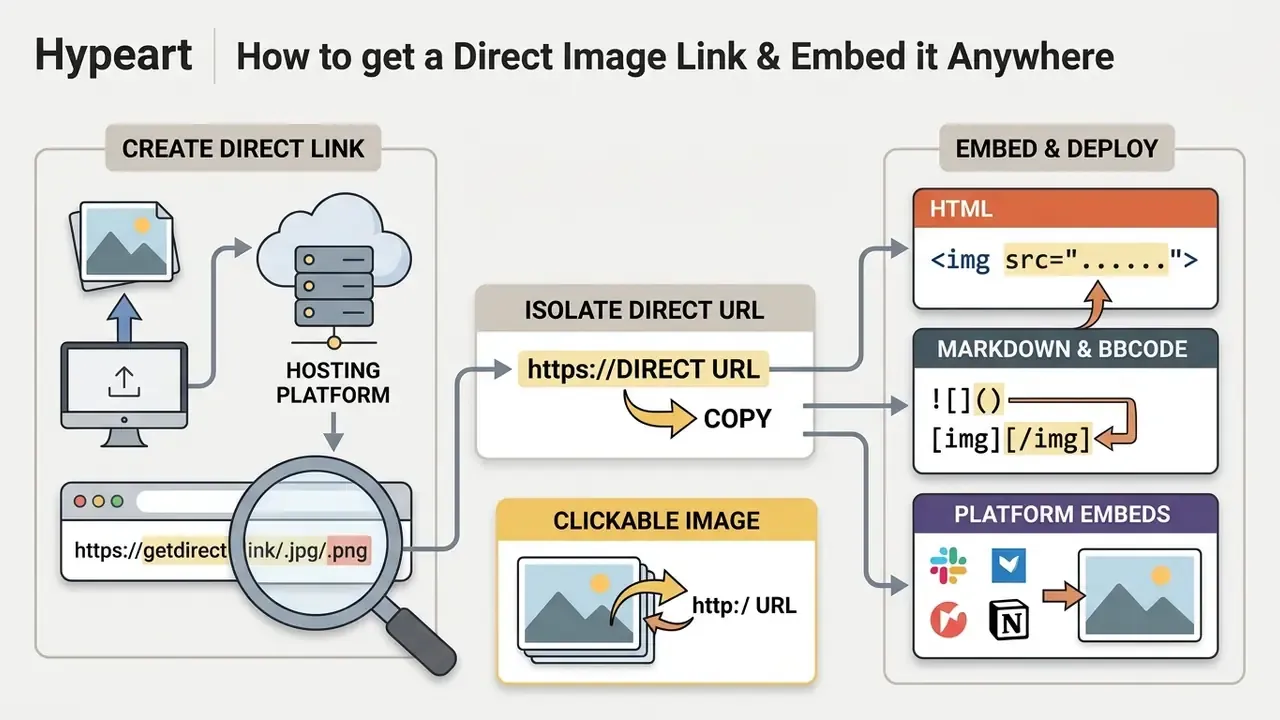
You get a direct image link by isolating the exact web address ending in an image file extension such as .jpg, .png, .webp or .avif from your hosting platform. That direct URL can then be embedded across websites, Markdown documentation and forum threads.
Whether the task is described as how to make a url of an image or how to create a url link for an image, the work is the same: extract the clean resource pointer, then wrap it in platform-native markup.
How to identify a direct image URL
A direct image URL is identified by its file extension at the end of the address and by an HTTP response header stating Content-Type: image/*. Pasted into a browser address bar, a direct image link shows only the visual asset on a plain background. No navigation, no share buttons, no cookie banner.
Direct Image URL:   https://cdn.example.com/assets/logo.png

Viewer Page URL:    https://example.com/view/share-id-98234
Browsers and crawlers parse resource requests by MIME type rather than by file extension alone, which is why a .jpg suffix on an HTML page still fails.
«HTTP Archive identifies external images by file extension (png, jpg, webp, svg) or by a MIME type containing “image”; every such URL counts as a separate network request.»
If a web address returns Content-Type: text/html instead of an image MIME type, rendering engines will not process the asset inside standard media tags. Same failure mode that breaks Slack unfurls and marketplace CSV imports.
Use an image URL in HTML, Markdown and BBCode
To embed an image URL in HTML, place it in an <img src="URL" alt="description"> tag; in Markdown, use ; in BBCode, wrap it with [img]URL[/img]. These markup formats tell the platform to render the image inside the content stream instead of linking to it.
<!-- HTML Embedding -->

<img src="https://cdn.example.com/images/sample.jpg" alt="Sample Display Image">
<!-- Markdown Embedding -->

; BBCode Embedding

[img]https://cdn.example.com/images/sample.jpg[/img]
For production websites, serve modern codecs first and keep a legacy fallback, so that every browser receives a renderable asset from the same set of hosted URLs:
<!-- Modern Responsive HTML Embedding with AVIF & WebP Fallback -->
<picture>
  <source srcset="https://cdn.example.com/images/sample.avif" type="image/avif">
  <source srcset="https://cdn.example.com/images/sample.webp" type="image/webp">
  <img src="https://cdn.example.com/images/sample.jpg" alt="Sample Display Image" loading="lazy">
</picture>
Markdown and BBCode parsers have no negotiation mechanism. They accept one URL, so an AVIF link pasted into an older forum engine may render as nothing at all. For documentation and forums, publish WebP or JPG; reserve AVIF for <picture> blocks and CDN-negotiated delivery. Teams that generate visuals programmatically, for example with tools reviewed in this AI art generator comparison, can embed the resulting asset URLs into blog posts and technical documentation using exactly these syntaxes.
Make an image clickable by linking it to another URL
You make an image clickable by wrapping its display tag inside a hyperlink tag pointing to a target destination. That is how a product image or banner becomes an interactive call to action.
<!-- Clickable Image in HTML -->
<a href="https://example.com/landing-page">
  <img src="https://cdn.example.com/images/banner.jpg" alt="Promotional Banner">
</a>
<!-- Clickable Image in Markdown -->
[](https://example.com/landing-page)
Keeping the image source URL (src) and the target navigation link (href) distinct prevents broken journeys in campaigns, and it is the step people confuse when they ask how to make an image have a url. W3C WAI guidance adds an accessibility requirement: when an image functions as a link or button, the alt attribute must describe the destination or action rather than the picture itself, while purely decorative images take an empty alt="".
How to choose image hosting for a public or permanent URL
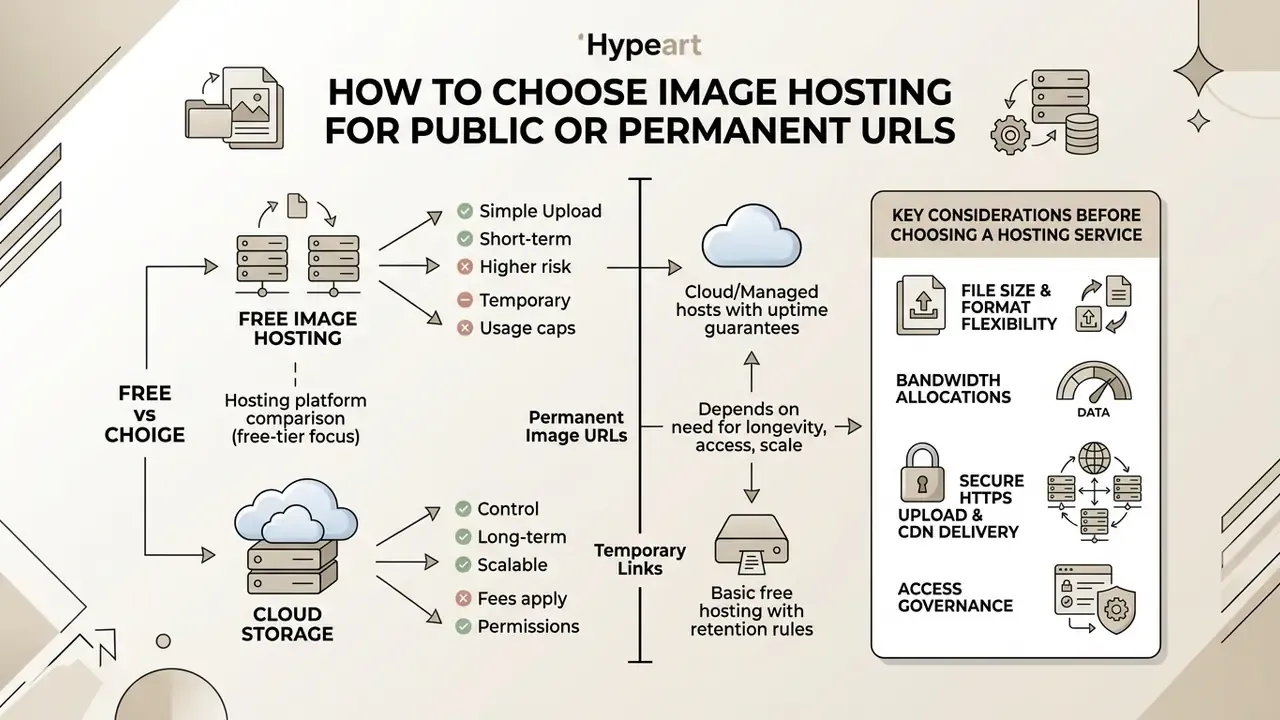
Choosing an image hosting service means weighing uptime, retention rules, file size limits and bandwidth caps against how long the asset must survive. High-uptime platforms are what keep broken links out of long-lived commercial material.
Independent CDN benchmarks show specialized image CDNs holding 100% uptime across extended monitoring windows, with global average response times in the tens of milliseconds.
«Img.vision averaged 67 ms response time at 100% uptime; Google Drive averaged 1,045 ms; three free hosts were excluded after multi-day outages.»
Unvetted free image hosting services, by contrast, go dark without warning, change policy, or shut down entirely, which makes every hosted URL permanently unreachable. The same benchmark had to drop hosts such as Imagefa.st and ImageBam mid-test for precisely that reason.
Free image hosting versus cloud storage
Free image hosting offers quick sharing without registration. Cloud storage offers managed access control, automated backups and much higher file size allowances. Free providers often inject advertisements or reserve the right to delete inactive files without notice.
Dedicated free hosts like ImgBB or Imgur are built for rapid asset distribution; ImgBB's free tier accepts up to 32 MB per image with user-selectable auto-deletion from five minutes to permanent retention. Imgur's official Terms of Use, however, explicitly prohibit using its infrastructure as a content delivery network for third-party websites or commercial image hosting, and the policy is enforced against hotlinking at scale. Treat that as a licensing constraint verified against the provider's published terms, not as a technical limit. Enterprise cloud storage such as Google Cloud Storage or Amazon S3 provides retention controls and policy enforcement, which makes it the defensible choice for core application media. Teams weighing infrastructure options can consult AI Media Comparison Matrices for storage cost and operational trade-offs.
Hosting platform comparison (free-tier and policy view):
| Hosting Platform / Type | Direct Link Support | Expiration / Retention | File Size Limit | Commercial Hotlinking | Best For |
|---|---|---|---|---|---|
| Dedicated Free Host (ImgBB) | Yes (.jpg / .png) | Permanent or 5 min to 6 months | 32 MB (free tier) | Allowed on free tier | Quick forums & casual sharing |
| Community Host (Imgur) | Yes (raw links) | Permanent while account active | 20 MB | Prohibited by Terms of Use | Social community threads |
| Consumer Cloud (Google Photos / Drive) | No (viewer HTML only) | Permanent | 200 MB | Not supported for <img src> | Personal backup / photo albums |
| Temporary Link Tools | Yes | 1 hour to 30 days | 2 MB to 5 MB (auto-compressed) | Temporary use only | QA bug reports, Slack screenshots |
| Enterprise Cloud (S3 / R2 / GCS) | Yes (public buckets) | Policy-driven / permanent | Up to 5 TB per object | Fully supported | Core apps, e-commerce, websites |
Permanent image URLs versus temporary links
Permanent image URLs are non-expiring addresses built for long-term website embedding and product catalogs. Temporary image links expire after a configured window, typically from 1 hour to 30 days. Temporary links protect confidential files; permanent urls sustain static web assets.
Temporary access mechanisms such as presigned URLs on Cloudflare R2 or Amazon S3 append authentication tokens that invalidate the address after a set duration. Vendor limits differ: Cloudflare R2 allows expiry from one second to seven days, some messaging platforms issue six-hour image links, and document APIs commonly pair a permanent public share link with a one-hour signed download URL. Lightweight consumer tools frequently cap retention at 30 days, which is fine for a bug report and unacceptable for a live listing.
In regulated environments, generate the short-lived link server-side so the object itself never becomes public:
# Generate a time-limited presigned image URL (AWS S3 / boto3)
import boto3
s3 = boto3.client("s3")
url = s3.generate_presigned_url(
    ClientMethod="get_object",
    Params={
        "Bucket": "corp-media-private",
        "Key": "tickets/2026/incident-4471/screenshot.png",
        "ResponseContentType": "image/png",
    },
    ExpiresIn=3600,  # TTL in seconds: 1 hour
)
print(url)  # share this address; it self-invalidates after the TTL
Permanent URLs rely on fixed bucket structures and immutable object keys, which is what keeps public marketing assets and brand logos reachable without manual link updates. For audit-grade pipelines, combine immutable keys with a content hash (for example, logo.a1b2c3.png) so that any change to the bytes produces a new URL. Cheap trick, real benefit: a documented model input or compliance screenshot can never be silently replaced.
What to compare before choosing a hosting service
Before you commit, compare supported file formats, maximum file size, monthly bandwidth quotas, HTTPS encryption and global CDN acceleration. Those five parameters decide whether multiple images load fast for users who are nowhere near your origin server.
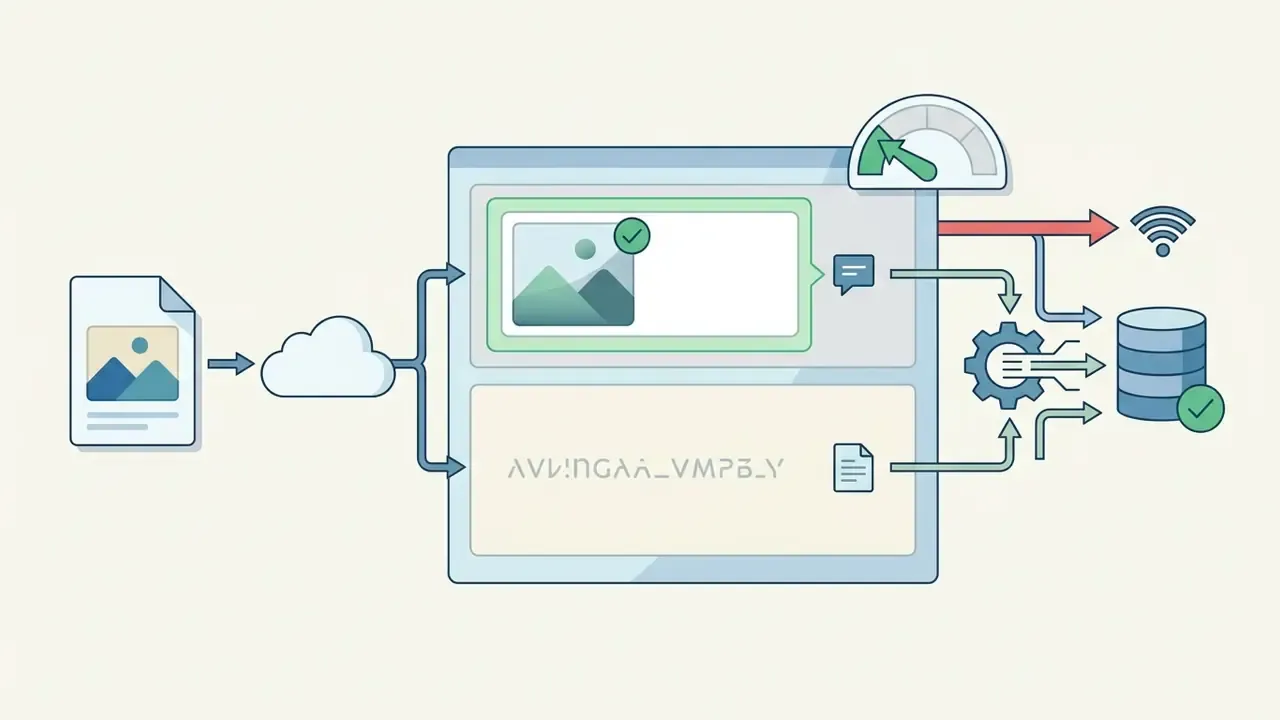
Engineering teams routinely test provider performance against published benchmarks to verify latency and uptime before an enterprise integration goes live.


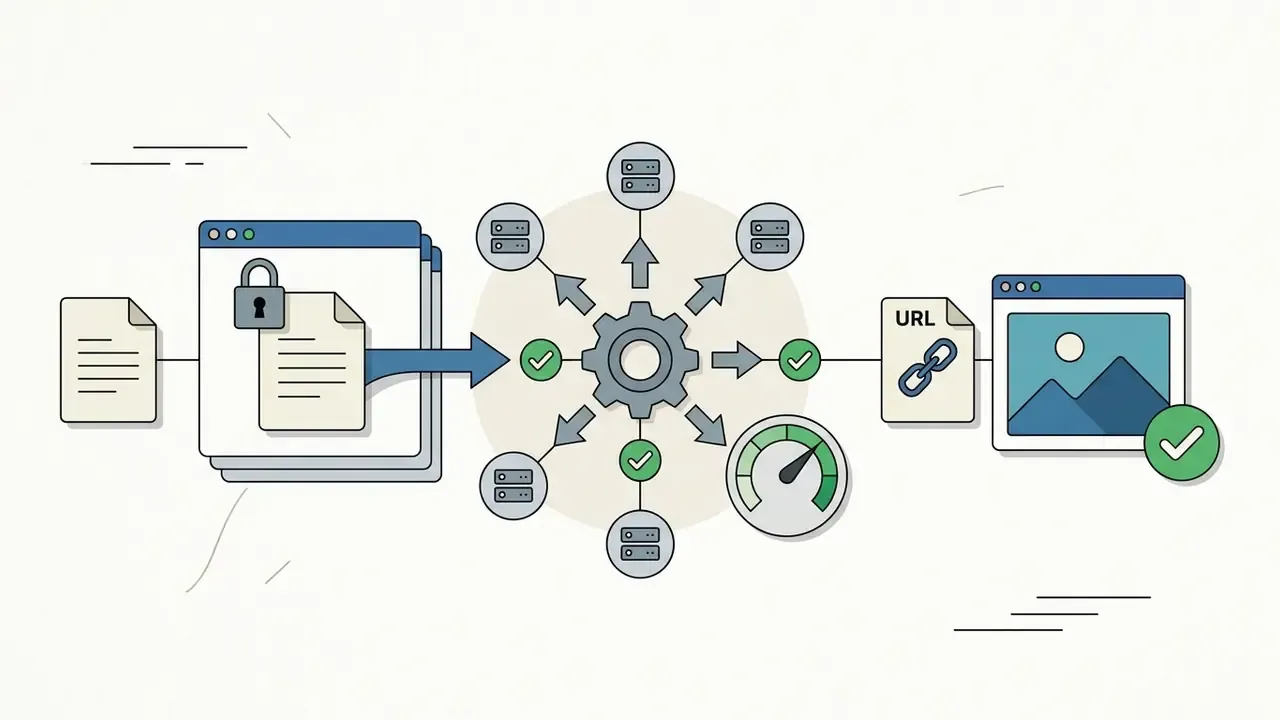
https:// and accelerated by a global edge network.
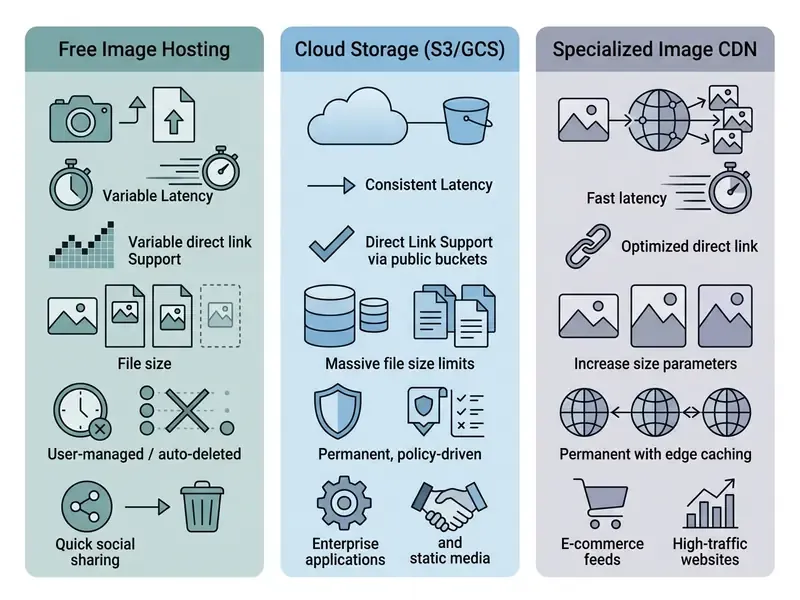
Image formats, file size and optimization before upload
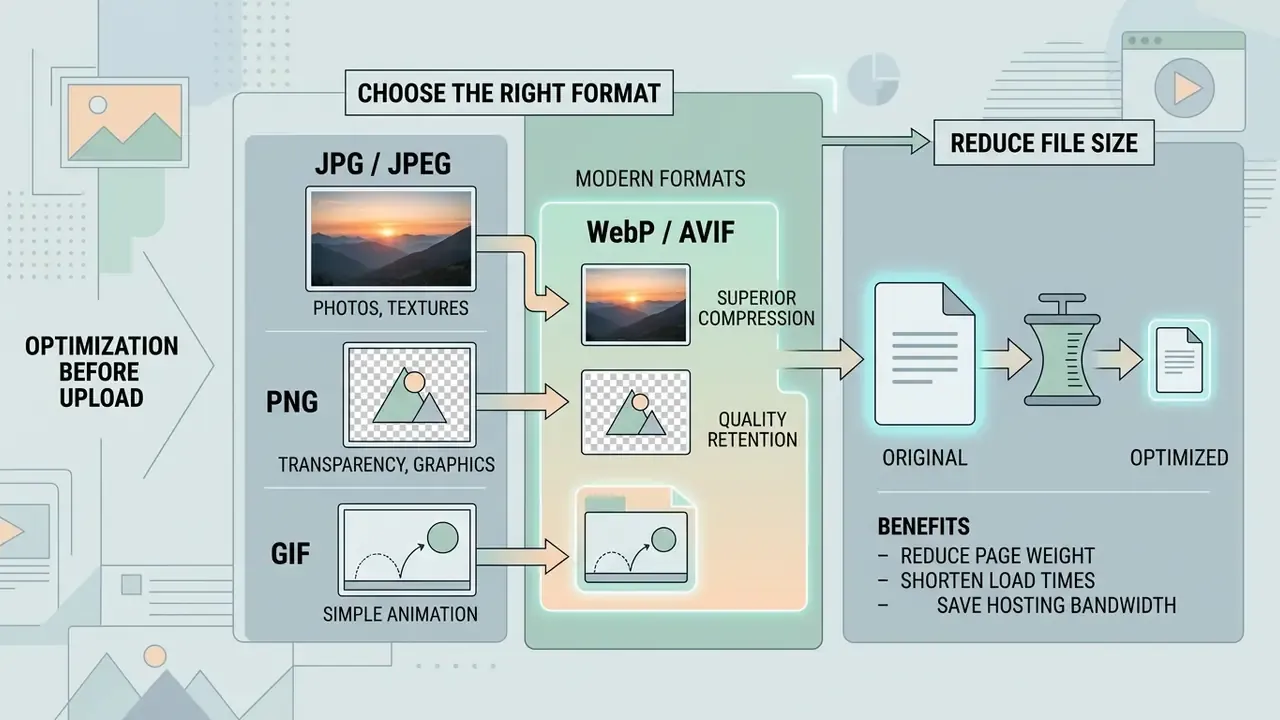
Optimizing file size and choosing modern image formats such as WebP or AVIF before upload reduces page weight, shortens load times and saves hosting bandwidth. Unoptimized media remains the leading cause of slow pages, year after year.
The W3C Web Sustainability Guidelines (2026) advise pre-compressing media, avoiding redundant re-compression of already sized files, and selecting efficient codecs prior to upload. Note the status: these are published recommendations, not a conformance standard. Fewer image bytes also improve Google's Largest Contentful Paint (LCP) metric, which is the part your marketing team will notice first.
«Weighted incremental HTTP/3 prioritization experiments improved LCP and Speed Index across eight popular websites under five α-parameter configurations.»
Choose the right format: JPG, PNG or GIF
Choose JPG for detailed photography, PNG for graphics that need transparency, and WebP or AVIF as modern replacements with better compression. The right format balances fidelity against transfer size.
- JPG / JPEG lossy compression tuned for photographs; no transparency support.
- PNG lossless compression with full alpha transparency; best for logos and sharp text graphics.
- GIF lossless but limited to 256 colors with 1-bit transparency; suitable for basic animation only.
- WebP / AVIF modern web formats supporting lossy and lossless modes with transparency. Google's WebP documentation reports lossy WebP files 25% to 34% smaller than comparable JPEG, and lossless WebP 26% smaller than PNG; AVIF usually compresses further, at the cost of slower encoding.
«Typical compression ratios: lossless from 2:1 to 6:1, lossy from 20:1 to 50:1 depending on source quality and image content.»
AVIF support is now broad in evergreen browsers and still inconsistent in older forum and email clients. So publish AVIF through <picture> negotiation or CDN format auto-selection, and keep a JPG or WebP URL as the canonical address you paste into chat and documentation. Teams enlarging or reframing assets before publication can review options in this AI outpainting and image-expansion comparison and avoid re-encoding the same file twice.
Reduce file size without losing usability
Reduce file size with smart auto compression and by scaling pixel dimensions to actual display requirements before upload. Compressors such as Squoosh (a browser-based tool from Google) or TinyPNG typically cut weight by 20% to 50% with no visible degradation.
Adobe web delivery guidance recommends JPEG export quality around 85 (fmt=jpg&qlt=85,0), which drops file size sharply while preserving visual quality. Where artifacts are unacceptable, in forensic, legal or analytical imagery, keep a lossless master in PNG, TIFF or PSD and publish a derivative. Resizing oversized camera uploads (say, 4000px wide) down to 1200px or 1920px removes bytes nobody was ever going to see.
Teams sizing bandwidth requirements can use online calculators to estimate monthly CDN transfer overhead, and organizations standardizing on no-cost tooling can check export limits in this free photo editor guide before locking a resizing workflow. In mixed libraries where stills sit beside footage, a video compressor applies the same byte-budget logic to motion assets, and teams that create youtube videos with ai usually need both pipelines governed by one retention policy.
Where to use a generated image URL
A generated image URL can be deployed across corporate websites, blog posts, e-commerce listings, marketing campaigns and technical support tickets. One hosted URL keeps visuals consistent across every customer touchpoint.
Centralizing assets behind hosted links also simplifies updates: replace the underlying file on the storage server and every published embed changes at once. Handy. Also dangerous, if nobody owns the file.
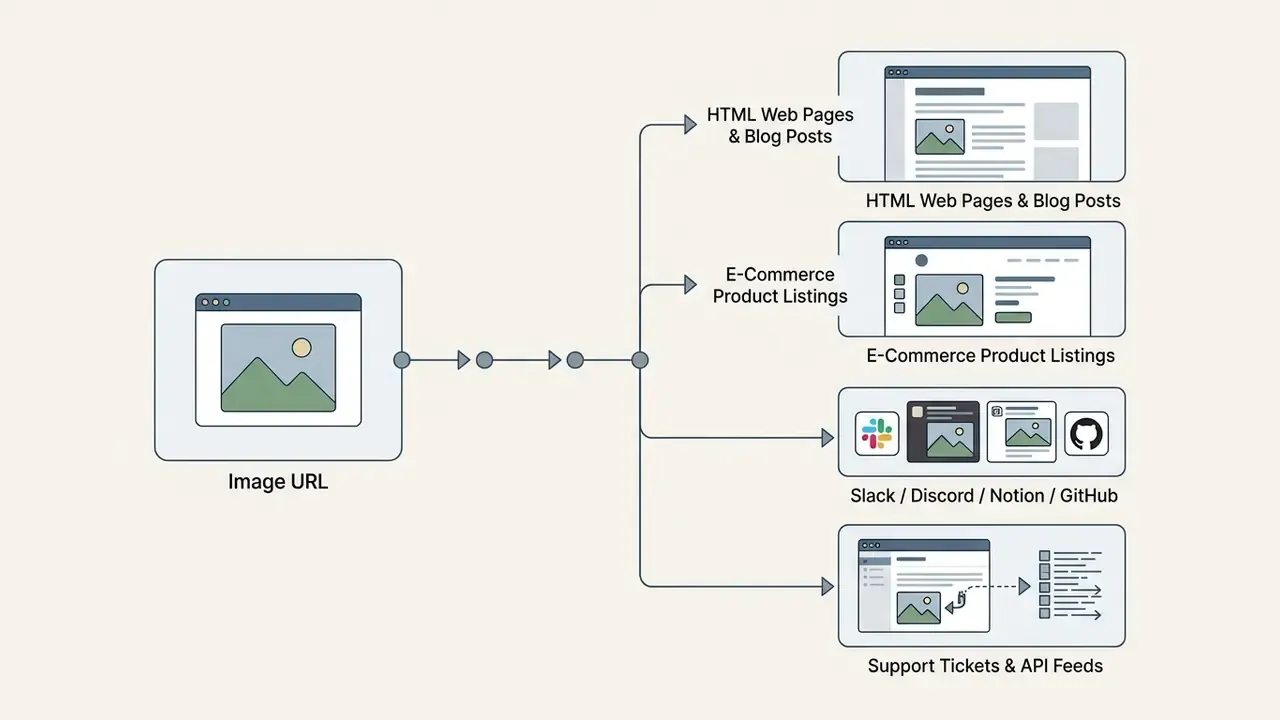
URLs for websites, blog posts and developer workflows
Developers and content creators use direct image URLs to embed lightweight visuals in web applications, CMS articles and documentation. Centralized addresses streamline maintenance and survive CMS migrations, because the asset address never depends on the publishing system.
Engineering teams automate this with APIs. Technical documentation in the AI Media API Guides shows how to generate, optimize and reference image URLs inside CI/CD pipelines, including pre-publication HEAD checks. Image CDNs extend the pattern by encoding transformation parameters, width, format, quality, directly in the URL, so one canonical asset can serve every breakpoint.
Direct image URLs in team collaboration and developer tools
Direct image links smooth out collaboration across workspace applications:
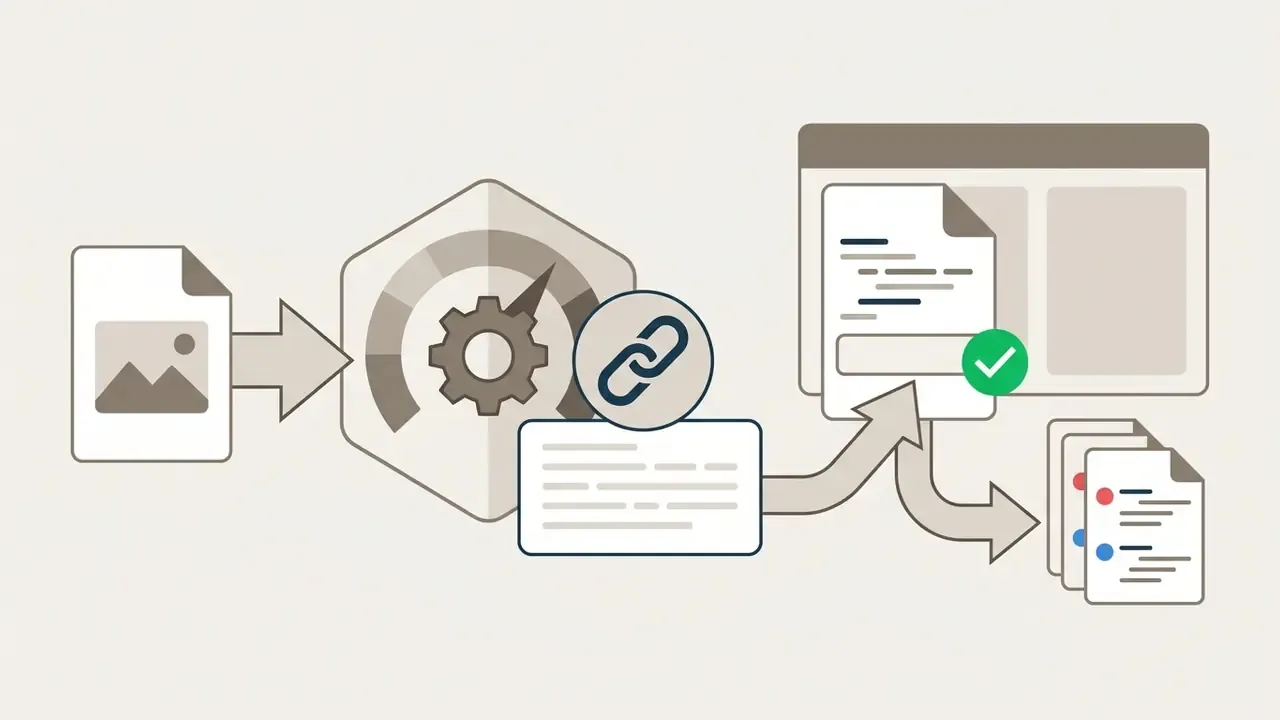
 to keep repository size and diffs manageable.

/image embed block with the direct link for reliable rendering across internal knowledge bases.
Creating image URLs for Amazon, eBay and marketplace listings
E-commerce platforms require public direct image links (https:// addresses ending in .jpg or .png) to bulk-import product catalogs via CSV or XML feeds. When generating image URLs for Amazon or eBay:
- Make sure the URL is permanent. Temporary 30-day host links break listings on expiry, and reinstating a suppressed listing costs far more than proper hosting ever would.
- Avoid hosts that wrap images in viewer HTML; listing parsers demand raw image streams with an explicit
Content-Type: image/jpegheader. - Verify resolution criteria. Amazon requires at least 1000 pixels on the longest side to enable zoom, so confirm the host does not re-compress uploads below that threshold.
- Confirm the host permits commercial hotlinking. Community platforms whose terms forbid CDN-style reuse can throttle feed traffic without notice.
Privacy, access and reliability of image URLs
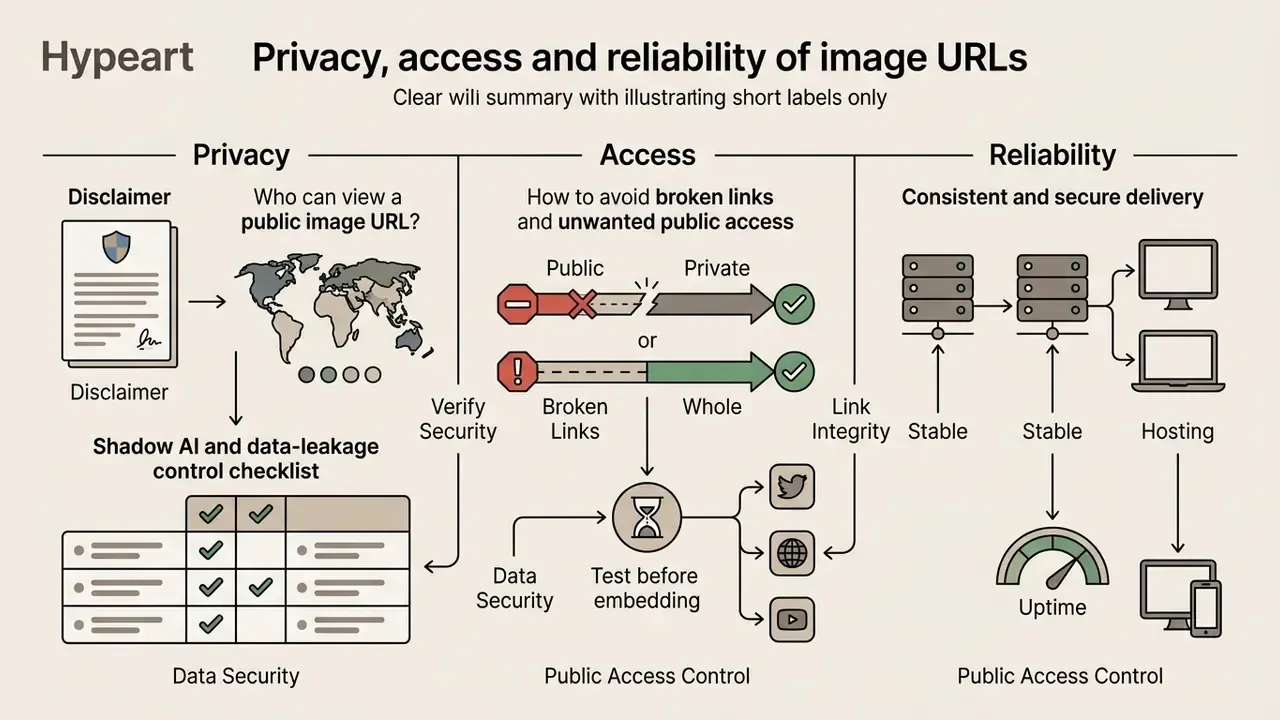
Public image URLs can be opened by anyone holding the address, which makes privacy settings and access controls central when the media is sensitive. Proper safeguards prevent leakage and protect long-term link reliability.
The Office of the Australian Information Commissioner (OAIC) and GovCERT.HK security frameworks stress the same point: public web links provide no access boundary. Once an image URL is distributed publicly, caching engines and archiving bots can store independent copies, and a host-side expiry date cannot retract them. That asymmetry deserves more attention than it usually gets.
Who can view a public image URL?
Anyone with a public image URL can view and download the underlying image file, because the address carries no authentication. Explicit privacy settings on cloud platforms restrict visibility to authorized users or internal networks. On some gallery platforms, switching an album from public to private rewrites the direct image URLs entirely, which is a useful reminder that the URL itself is part of the access model.
Review privacy settings before generating public links, and then look at the file. Raw photos often carry EXIF metadata with camera model, timestamps and exact GPS coordinates. Stripping EXIF before public upload protects organizational location data and prevents accidental disclosure of where an internal screenshot or site photo was captured.
Shadow AI and data-leakage control checklist
Uncontrolled use of consumer upload tools is a governance problem, not a convenience preference. Before an employee turns a file into a public link, these controls should already exist:
Checklist0 / 7
How to avoid broken links and unwanted public access
To avoid broken links and security exposure, host permanent assets on reliable infrastructure, run routine link audits, and strip sensitive EXIF metadata before publishing public URLs. Never upload confidential corporate documents or unverified customer data to free public image hosts.
- Implement permanent infrastructure: skip unverified free image hosts for core business assets; use enterprise cloud storage with SLA guarantees, stable identifiers and redirects for migrated paths.
- Sanitize data before upload: apply media sanitization controls aligned with NIST SP 800-88 Rev. 1, Guidelines for Media Sanitization (the current published revision) to govern secure disposal, and remove embedded metadata from public visual assets before publication.
- Perform automated audits: scan published pages regularly with link checkers, then fix broken image URLs before users or search engines find them.
- Treat broken links as a security issue, not only a UX issue:
«Broken links to external resources can be hijacked by attackers to eavesdrop on traffic or distribute malware through unregistered domains.»
Regulatory framing supports the same discipline. The ICO's integrity-and-confidentiality principle under UK GDPR requires appropriate security measures for personal data, while OAIC guidance requires reasonable steps against misuse, loss, and unauthorized access or disclosure.
Troubleshooting: why is my image URL not working?
- Image displays as a broken icon: confirm the URL returns
Content-Type: image/*and nottext/html. On cloud storage, check that bucket read permissions are public, or that your signed URL has not expired. - 403 Forbidden error: the host blocks direct hotlinking from external referrers, a common outcome with consumer drive links embedded on other sites. Move to a dedicated CDN or a public object-storage bucket.
- Link works for you but not for colleagues: you copied an authenticated viewer URL. Re-test in an incognito window with no session cookies before distributing it.
- Link stops working after 30 days: you used a temporary upload tool. Re-upload to permanent storage and update the references.
- Slack or Notion shows a link instead of a preview: the address points to a share page. Open the image, copy the true file URL ending in an image extension, paste that instead.
- Marketplace rejects the image: check minimum pixel dimensions, file size caps, and whether the host re-compresses uploads below the platform's zoom threshold.
- Image loads slowly on mobile: the file is oversized. Resize to display dimensions, export around
qlt=85, and serve AVIF or WebP via
FAQ: creating and sharing image URLs
How do I create a URL for an image without installing software?
Upload the file, or paste it from the clipboard, into a browser-based host, then copy the generated direct link. No local installation is required, and the whole thing usually takes a few seconds.
How do I make an image URL from a screenshot?
Capture the screenshot, then press Ctrl+V (Windows/Linux) or Cmd+V (macOS) inside the uploader. The tool reads raw clipboard image data, so you never save a temporary file.
Do generated image URLs expire?
It depends on the host. Temporary tools expire links between one hour and 30 days; dedicated hosts and enterprise buckets serve permanent URLs governed by retention policy.
Can I use a free image URL on a commercial website?
Only if the provider's terms allow commercial hotlinking. Several community hosts explicitly prohibit CDN-style reuse, so production assets belong on object storage or a paid image CDN.
Which format should I pick for a shareable link?
JPG or WebP for maximum compatibility in chat and documentation; AVIF for on-site delivery via ; PNG when transparency or pixel-exact text matters.
Is a public image URL private if nobody shares it?
No. A public URL has no authentication boundary, and caches or crawlers may copy the asset. Use presigned, time-limited links for anything confidential.
Can I host images for an internal audit trail on a free service?
Not advisable. Audit evidence needs stable identifiers, access logs and retention you control. Free hosts give you none of the three, and their terms can change without notice.
Limitations and open questions
A few things this guide cannot settle for you.
Vendor limits move. The file size caps, retention windows and hotlinking clauses cited above were checked in February 2026 against published provider documentation, and they change quietly. Re-verify before you standardize a workflow on any single number.
Benchmark data has boundaries too. Latency and uptime figures come from third-party monitoring over finite windows, not from continuous independent measurement, so treat them as directional rather than contractual.
Finally, the governance controls listed here reflect common practice in security and model-risk programs. They are not a legal opinion, and the appropriate configuration depends on your data classification, jurisdiction and risk appetite.
A safe next step
Start small and reversible. Pick one asset class, brand logos or support screenshots, and document three things for it: the approved host, the retention rule, the owner. Then add the HEAD check to your publishing pipeline. If that holds for a quarter, extend it to product catalogs and model-input imagery.
Explore complete production tools and media workflows through AI Media Workflows, compare providers in the AI Media Comparison Matrices, and validate delivery performance against published benchmarks.