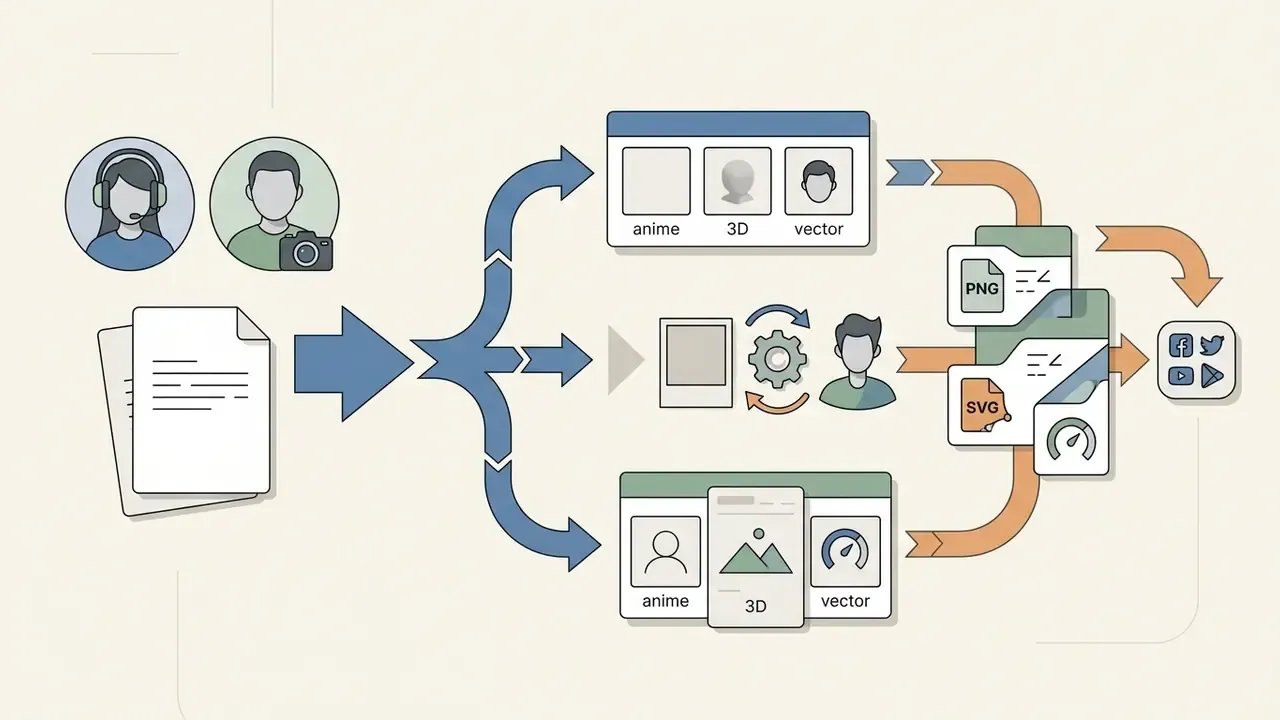
- For a photo-to-AI avatar: upload a direct, frontal portrait (NIST-style framing), select a style (3D, anime, vector), set the similarity scale to 0.55 to 0.75, export a 1024x1024 PNG.
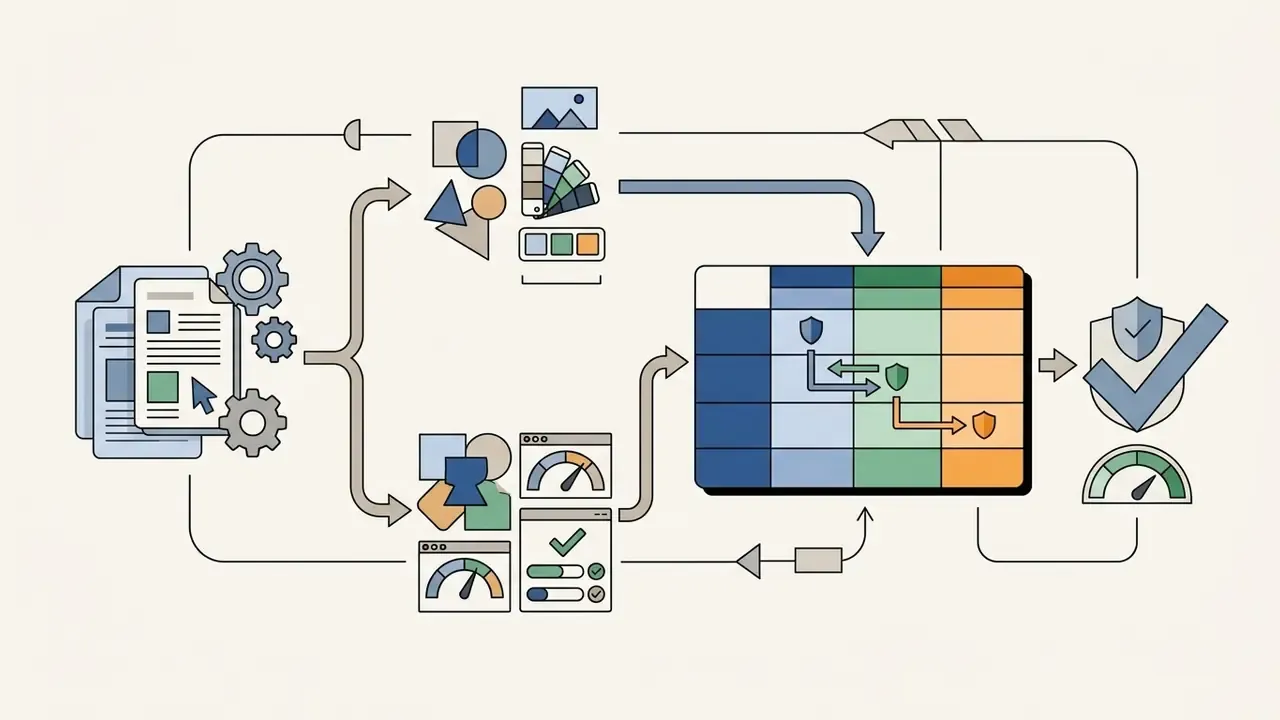
- For a no-photo privacy avatar: open a parametric vector maker, customize eye, hair, apparel and background layers, export a lossless SVG plus a PNG copy.
- For an AI talking video: import the 1024x1024 PNG avatar into HeyGen, D-ID or ElevenLabs, drive it with an audio file or text script, export 9:16 for Shorts, Reels and TikTok.
Executive Summary: The Decisions That Actually Matter
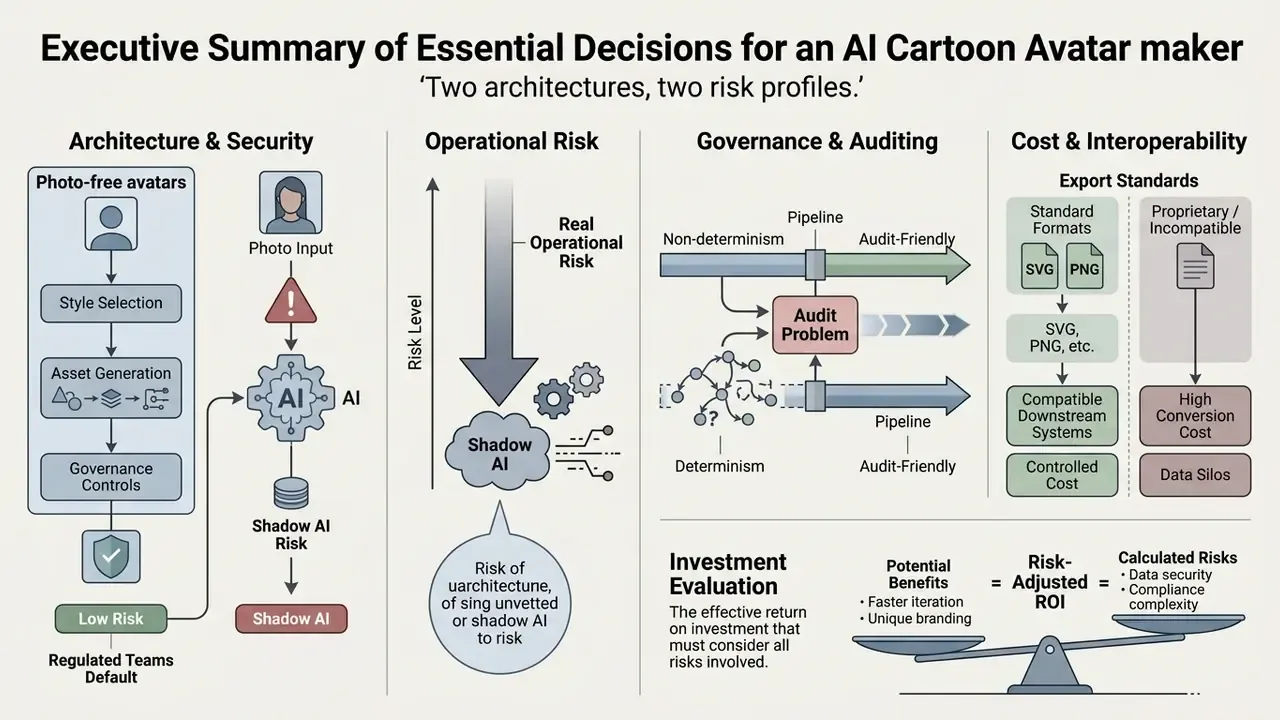
- Two architectures, two risk profiles. A cartoon avatar maker either restyles a photograph through a generative model (latent diffusion, GANs) or assembles a character from parametric vector assets. The first path touches facial landmark data and therefore triggers biometric review. The second path processes no photographic input at all and carries effectively zero biometric exposure.
- Photo-free avatars are the default safe option for regulated teams. Where explicit, specific consent for biometric processing cannot be documented, a parametric avatar cartoon creator delivers brand-safe identity assets without generating facial templates.
- Shadow AI is the real operational risk. Employees uploading personal headshots to unvetted consumer utilities is the failure mode that matters. Vendor vetting (data retention clauses, SOC 2 posture, commercial licence scope) must precede any tooling rollout.
- Non-determinism is an audit problem, not just an aesthetic one. Diffusion-based avatar generation is not bit-reproducible across runs. Model risk frameworks such as FRB SR 11-7, OCC 2011-12 and NIST AI RMF 1.0 expect documented inputs, seeds, prompts and human sign-off rather than reproducible outputs.
- Export standards decide downstream cost. Standardise on 1024x1024 PNG with alpha for raster channels and retain SVG for print, merchandise and recolourable brand assets.
- ROI must be risk-adjusted. Production savings from synthetic presenters are real, but the correct calculation nets out compliance review hours, legal sign-off, licence fees and residual risk. A worked formula is provided below.
Reading Paths by Role
Different readers need different slices of this guide, so here is the short routing note.

One honest caveat before we start. This is a consumer-grade tool category being pulled into enterprise use, and the governance literature has not caught up with it. Where evidence is thin, this guide says so.
A cartoon avatar maker is a digital software system that transforms photographs or parametric inputs into stylized, non-photorealistic visual representations. These tools operate either through parameter-based graphic rendering engines or through deep learning generative architectures such as Generative Adversarial Networks (GANs) and latent diffusion models. Financial institutions, media platforms, and enterprise teams use cartoon avatars to maintain digital privacy, establish brand-safe employee representations, and power synthetic media workflows.
Understanding the underlying architecture of a cartoon avatar creator helps organizations stay compliant with biometric privacy mandates while scaling digital identity assets across customer-facing and internal channels. Personalization is not cosmetic: how closely an avatar maps to a real person measurably changes how users relate to it.
What Is a Cartoon Avatar Maker and How Does It Work?
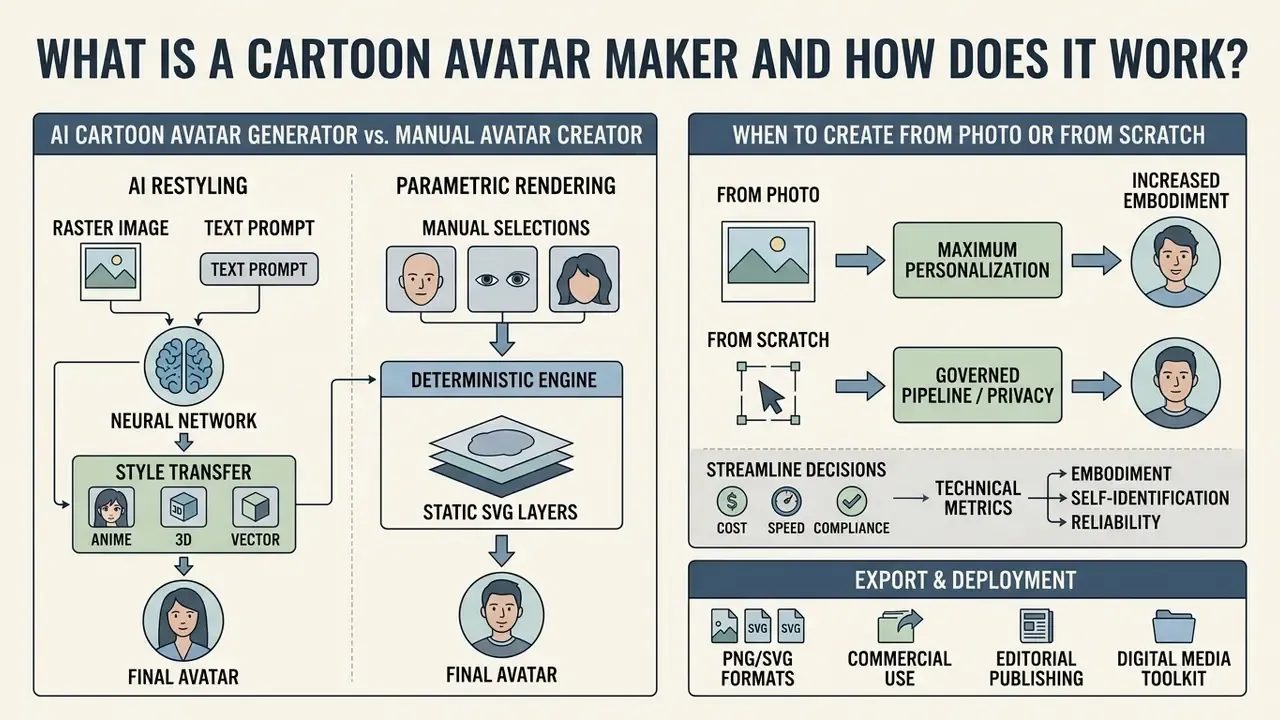
A cartoon avatar maker processes input data, either raster images or manual feature selections, to render a vector or raster graphic representing a personalized cartoon character. Modern platforms work through two primary mechanisms: rule-based parametric synthesis and generative AI inference. Parametric systems assemble predefined asset layers (eye shapes, hairstyles, apparel) over a structured coordinate grid. An ai avatar generator, by contrast, uses computer vision and neural networks to map facial topology, extract identity embeddings, and restyle the image into a target aesthetic.
Figure 1 - AI restyling versus parametric rendering. Two pipelines produce the same deliverable by different routes. Route A (generative): source photo, face detection and landmark extraction, identity embedding, conditioned latent diffusion pass, upscaling, PNG export. Route B (parametric): preset selection, layered SVG asset composition (face, eyes, brows, hair, apparel, background), colour token assignment, SVG/PNG export. Route A infers geometry it was never explicitly given. Route B renders only what the user selected. Research describing parameterized avatars formalises this distinction: an avatar can be represented as a vector of parameters, after which a graphics engine deterministically renders the image from that vector.
In high-governance environments, the choice between these architectures shapes data privacy risk, processing latency, and output reproducibility. Generative pipelines need robust data-lineage controls so that training sets do not violate intellectual property or process biometric markers without explicit user authorization. Teams evaluating restyling engines can review broader image-to-image generation pipelines before committing to a vendor.
AI Cartoon Avatar Generator vs. Manual Avatar Creator
An ai cartoon avatar generator uses neural networks to infer facial geometry from an uploaded image or text prompt, whereas a manual avatar cartoon creator requires direct user selection of parametric visual traits. Generative systems apply conditional latent diffusion to re-synthesize facial features into stylized artwork within seconds. This approach yields high visual fidelity and captures subtle personal expressions, but it introduces computational overhead and non-deterministic variation between runs.
Manual avatar tools rely on a deterministic avatar and cartoon maker engine that layers static SVG or vector assets. This manual method guarantees brand compliance and removes biometric processing risk, but it cannot automatically reconstruct unique real-world facial proportions without extensive hand adjustment. Parametric builders such as Cartoonify-class editors ship libraries of 300 or more interchangeable graphic parts, which is usually enough to avoid the "default random avatar" look while keeping every element individually editable after the fact.
To streamline commercial asset decisions, operational leaders compare tools across standard technical vectors using dedicated AI Media Comparison Matrices.
| Dimension | AI Cartoon Avatar Generator | Manual Avatar Creator |
|---|---|---|
| Primary Creation Method | Automated neural inference via latent diffusion or GANs | Manual selection and layering of predefined vector assets |
| Personalization Granularity | High implicit capture of facial topology and subtle expressions | High explicit control over discrete asset selections |
| Photo Upload Requirement | Required for photo-to-cartoon pipelines; optional for text-to-image | Not required; operates entirely on parametric input |
| Generation Speed | 5 to 40 seconds per batch inference run | 3 to 10 minutes of manual configuration |
| Reproducibility / Audit Trail | Non-deterministic; requires seed, prompt and model-version logging | Fully deterministic; parameter set fully reconstructs output |
| Biometric Privacy Risk | Medium to High (requires facial landmark extraction) | Zero (no biometric or photographic data processed) |
| Post-Generation Editability | Regeneration usually required to change one feature | Individual layers editable without regenerating the asset |
| Optimal Enterprise Use Cases | Synthetic media, executive video avatars, personalized messaging | Anonymous staff profiles, branded mascots, compliance-safe IDs |
After mapping the architectural trade-off, procurement teams usually shortlist vendors by comparing leading AI image generators on output quality, licence scope and retention policy.
When to Create an Avatar From a Photo or From Scratch
Creating an avatar from a photo is optimal when the objective is maintaining personal recognizability across digital touchpoints without displaying a raw photograph. An ai cartoon avatar generator online extracts facial landmarks such as interpupillary distance, jawline contours and eye shape to produce a recognizable digital representation. That capability supports executive branding, virtual presenter workflows, and customer service applications where visual authenticity establishes trust.
Building a cartoon character from scratch is the better route when strict data privacy standards prohibit the processing or storage of biometric facial data. Under frameworks like the EU GDPR, UK ICO guidance, and state-level US privacy statutes, extracting mathematical facial templates from photos requires explicit, opt-in consent and stringent retention limits. Canada's Office of the Privacy Commissioner has been explicit that consent to publish or share a photograph does not automatically authorise extracting biometric information from that photograph; biometric collection must be specified and consented to separately. Australia's OAIC applies a comparable test: facial-recognition uses that collect sensitive information require valid, current, specific and voluntary consent, plus a necessity and proportionality assessment. Manual construction lets users create avatar assets safely for anonymous forum participation, fictional brand mascots, and high-security enterprise roles without triggering a biometric compliance review.
The threat model is not hypothetical. Large-scale measurement of profile imagery shows that synthetic faces already circulate at meaningful absolute volume on mainstream platforms, and that they cluster around inauthentic behaviour rather than ordinary personal use.
Choose a Cartoon Avatar Style for Your Character
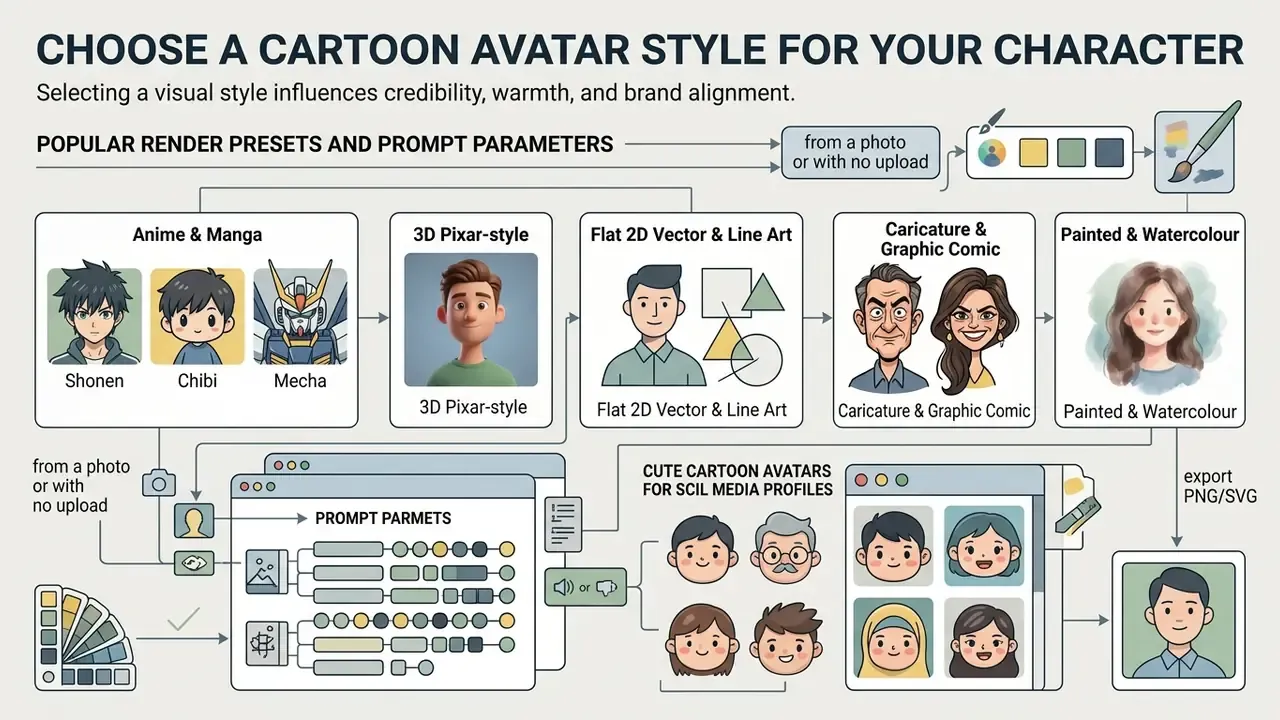
Selecting a visual style for a digital persona influences how audiences evaluate credibility, warmth, and brand alignment. Modern software libraries support aesthetics ranging from 3D stylized renders to 2D line art and anime-inspired graphics. Matching the rendering style to the operational environment keeps the synthetic identity reinforcing the message rather than competing with it.
Figure 2 - Visual style classification. A four-cell grid comparing the dominant 2026 render families side by side at both full size and 32x32 px thumbnail scale: 3D stylized (Pixar-adjacent), flat 2D vector, anime/manga, and comic/pop-art. The thumbnail row is the decisive test. Styles that read clearly at avatar scale survive platform cropping; heavily textured painterly styles do not.
Popular Render Presets and Prompt Parameters
- Anime and manga (shonen, chibi, mecha) emphasizes oversized ocular geometry, simplified nasal markers, and cel-shaded line work. Adobe Firefly exposes shonen, chibi and mecha as discrete selectable aesthetics. Ideal for VTubing, Discord, Steam, VRChat and streaming environments.
- 3D Pixar-style render uses soft subsurface scattering, realistic dynamic lighting, and depth-of-field volumetric rendering. Best for corporate slide decks, approachable product onboarding and conversational digital-person interfaces, where appearance variables (hair, skin texture, apparel) are tuned deliberately.
- Flat 2D vector and line art high-contrast minimal geometry using solid fills. Ensures readability at ultra-small UI sizes, for example 32x32 px comment avatars, and exports cleanly to SVG for recolouring.
- Caricature and graphic comic exaggerates distinct facial features (brows, jawline, silhouette) with heavy ink outlines and halftone pop-art textures. Effective for editorial commentary, opinion columns and personal branding where memorability beats neutrality.
- Painted and watercolour soft-edged illustrative treatment suited to long-form editorial headers and author bylines rather than small circular avatars.
Vendor libraries have widened considerably. Fotor advertises 54 or more anime style presets for photo-to-cartoon conversion, while Firefly layers Color and Tone, Lighting and Camera Angle controls on top of comic book, anime, illustrated and painted effects. Research pipelines mirror this: GenEAva describes a two-stage method that fine-tunes a text-to-image diffusion model across 135 facial-expression classes, then applies a stylization pass to convert photorealistic faces into cartoon avatars with fine-grained expressions.
When deploying digital workers across multi-channel campaigns, teams often refer to benchmarking data from the AI Media Benchmarks and Review Proof hub to verify model stability across style presets. Broader style capability can also be compared across AI art generators.
Stylized Characters for Gaming, Content and Creative Projects
Creative media production, live streaming, and interactive gaming rely on stylized 3D or cel-shaded avatars to sustain immersive digital experiences. Platforms like Twitch, Discord, and VRChat use character assets that integrate directly with real-time facial tracking engines. An avatar cartoon maker optimized for creative workflows exports textured 3D meshes or layered 2D assets equipped with facial blendshapes such as Apple ARKit visemes. Teams extending static avatars into motion can review animation maker workflows for rigging and export requirements. If a character is already locked into a chat interface with restrictive moderation defaults, the separate question of how to turn off character ai filter belongs to that platform's settings rather than to your image pipeline.
Qualitative research on virtual streaming identifies concrete, non-aesthetic reasons creators adopt stylized characters.
Platform content rules also constrain style choice directly. Discord's Community Guidelines forbid sexually explicit content in avatars, custom statuses, bios, server banners, icons, invite splashes, emoji and stickers. Twitch's guidelines bar sexualized framing of child-like imaginary characters. Anime and chibi presets therefore need deliberate art direction to stay inside policy, a governance point that consumer tools rarely surface.
Illustrative scenario (composite, not a verified vendor case). In a financial software firm's marketing pilot, the creative team evaluated synthetic avatars to anchor an educational video series on fraud prevention. By deploying a consistent ai character across short-form video modules, the organization maintained brand continuity without scheduling recurring studio recording sessions. The team's internal estimate was a materially shorter production cycle, driven by removing studio booking, talent scheduling and reshoot loops, while retaining full human review of script output and compliance messaging. Treat percentage savings of this kind as directional and specific to the baseline being replaced. The ROI framework later in this guide shows how to derive a defensible figure for your own cost base rather than importing someone else's.
How to Generate an AI Cartoon Avatar From a Photo
Transforming a photorealistic portrait into an AI-generated cartoon requires a structured, multi-stage processing pipeline. Cloud-based generators evaluate the input source image, extract topological keypoints, apply specified style weights, and render a high-resolution output file. Following a standardized workflow minimizes processing artifacts and preserves facial identity across generated iterations.
Figure 3 - End-to-end photo-to-cartoon execution pipeline. Four sequential stages with the decision each one owns: (1) Photo upload, is the source NIST-conformant? (2) Style prompting, which preset, and at what similarity weight? (3) Latent inference, how many candidate variants, at which seed? (4) Upscaling and export, which resolution and container for the target channel? Every stage should be logged. Stages 2 and 3 are where non-determinism enters, and therefore where audit metadata matters most.
Upload a Clear Photo for Better Cartoon Avatar Results
Neural image synthesis engines depend on clear visual data to map facial geometry accurately. Guidelines from the National Institute of Standards and Technology (NIST) for facial imagery stress that source photographs should maintain direct frontal positioning (within plus or minus 5 degrees of roll, pitch, and yaw), uniform lighting across facial planes, and zero obstruction of key landmarks from hair, eyewear, or deep shadows. NIST further specifies that the face be clearly visible from crown to chin and ear to ear, shadow-free, and in focus from nose to ears with sufficient depth of field to resolve better than 2 mm detail. US Department of State passport photo guidance applies the same practical rules in consumer language: look directly at the camera, keep the head centred, use uniform facial lighting, and ensure no hat, hair or eyewear obscures the face.
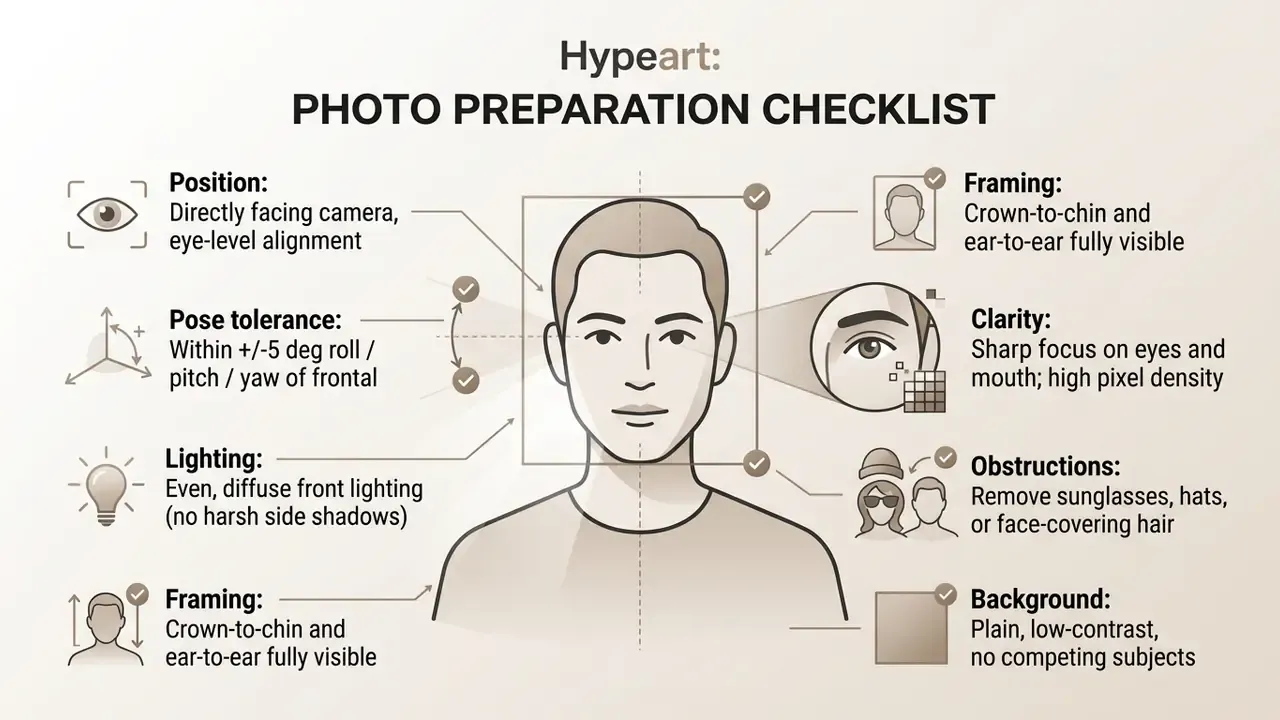
Uploading a high-resolution portrait helps the underlying ai avatar generator cartoon interpret interpupillary distance and lip contours correctly. That prevents structural distortion during the style transfer phase, so the resulting ai cartoon keeps a natural likeness to the subject. Where the source image needs cropping, exposure correction or background cleanup first, a standard AI photo editor handles the preprocessing without sending the file through an additional generative service. Multilingual teams working with captioned source assets sometimes also need to know how to translate embedded image text before reusing the same creative elsewhere.
Choose a Style, Generate and Download Your Avatar
After uploading the source photo, the user selects a target style preset, such as 3D digital twin, anime, or classic comic book, and configures inference parameters. Key controls include style strength, which balances photo retention against artistic abstraction, and sampling step counts. Once configured, the ai cartoon avatar generator online free or enterprise system runs the latent diffusion pipeline to render candidate images.
- Select rendering modelchoose between 2D vector, 3D animated, or stylized painting models.
- Adjust weight parametersset the image-to-image similarity scale, typically between 0.55 and 0.75 for identity preservation.
- Execute inferencetrigger the generator to yield multiple variant candidates. Log the seed, prompt string and model version at this step.
- Preview and refinecompare candidates at both full size and thumbnail scale before committing.
- Upscale and exportselect the preferred candidate image, apply spatial upscaling to at least 1024x1024 pixels, and save the file.
Consumer-scale implementations illustrate typical throughput and quota design:
«TikTok's AI profile picture tool requires three to ten photos, five style selections, and generates up to 30 avatars per daily session.»
Generation latency varies widely by vendor and model class. Published figures range from roughly four seconds per image on lightweight pipelines to two to five minutes for multi-pass avatar builds. If the exported candidate falls short of the resolution your print or video channel requires, run it through a dedicated AI image upscaler rather than regenerating at a higher step count and risking identity drift.
How to Create a Cartoon Avatar Without Uploading a Photo
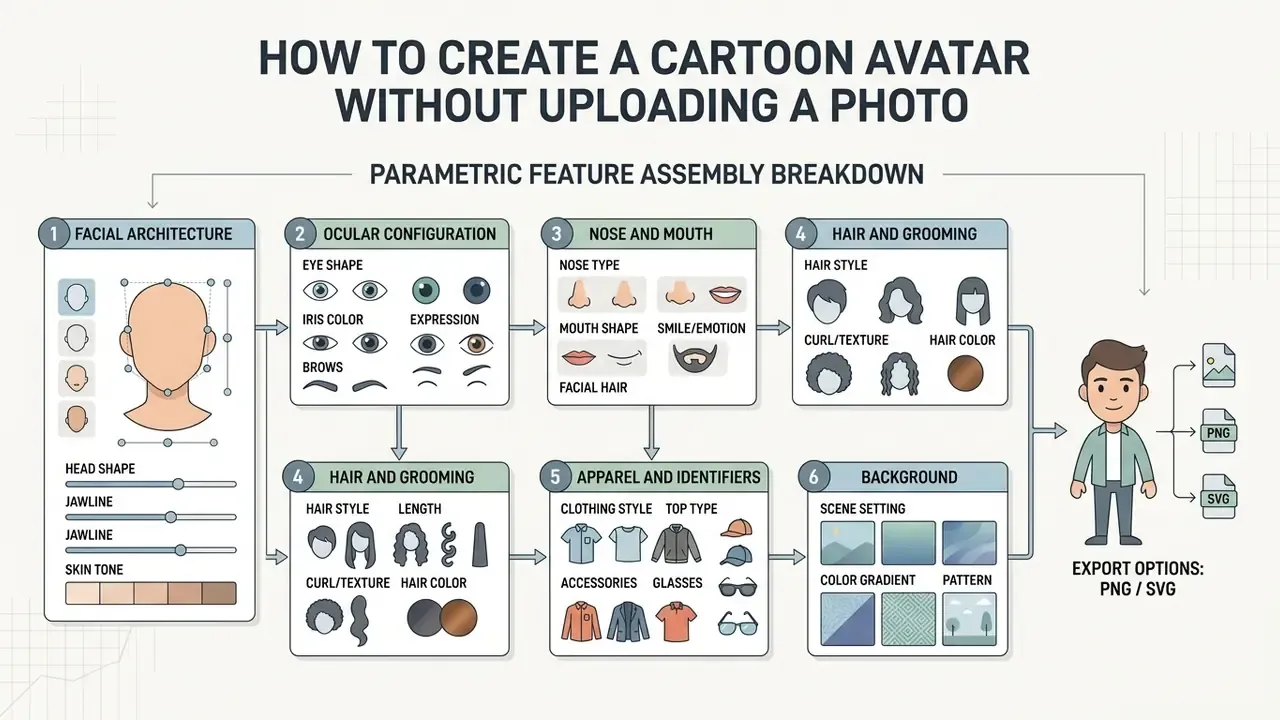
When organizational security policies or personal privacy preferences prohibit uploading personal photos, users can construct high-quality avatars using parametric manual editors or prompt-driven text-to-image models. This photo-free approach removes biometric data harvesting risk while granting complete creative freedom over character features. Where budget is the constraint rather than policy, comparisons of free AI image generators cover prompt-only routes that never require a face upload.
Figure 4 - Parametric feature assembly breakdown. An exploded-layer diagram showing each independently editable component of a photo-free avatar: background plate, apparel layer, head and skin base, hair, brows, eyes, nose, mouth, and accessories. Because the layers stay discrete, a hairstyle or clothing colour can be changed months later without regenerating the entire asset. That is the structural advantage parametric builders hold over single-pass diffusion output.
Customize Facial Features and Personal Details
A parametric free avatar maker enables systematic adjustment of individual facial components through a modular interface. Users configure foundational physical parameters before layering styling elements and accessories:
- Facial architecture select jawline structure, chin geometry, face shape, and base skin tone.
- Ocular configuration adjust eye shape, size, iris coloration, eyebrow archedness, and spacing.
- Nose and mouth choose nasal profile and lip shape, the two features most responsible for making a parametric avatar read as a specific person rather than a template.
- Hair and grooming apply specific hair textures, lengths, hair colours, and facial hair options.
- Apparel and identifiers outfit the character with professional clothing, eyewear, headsets, or corporate colour palettes.
- Background apply plain fills, gradients, or illustrated plates sized for circular platform crops.
Platform editors sequence these steps differently. Meta's flow starts with skin tone before hairstyles and outfits, while Synthesia separates avatar, outfit and space into three discrete choices. The underlying pattern is constant: pick a base character, adjust visible features, add clothing and accessories, preview, save.
This granular control lets users cartoon yourself conceptually, creating a professional digital representative that reflects personal style without transmitting actual physical biometric data to external servers. Practically, it is also the fastest route to an ai cartoon avatar maker online free workflow that no security team will object to, since nothing identifiable leaves the browser.
Build an Original Cartoon Character for a Profile Picture
Download and Use Your Cartoon Avatar
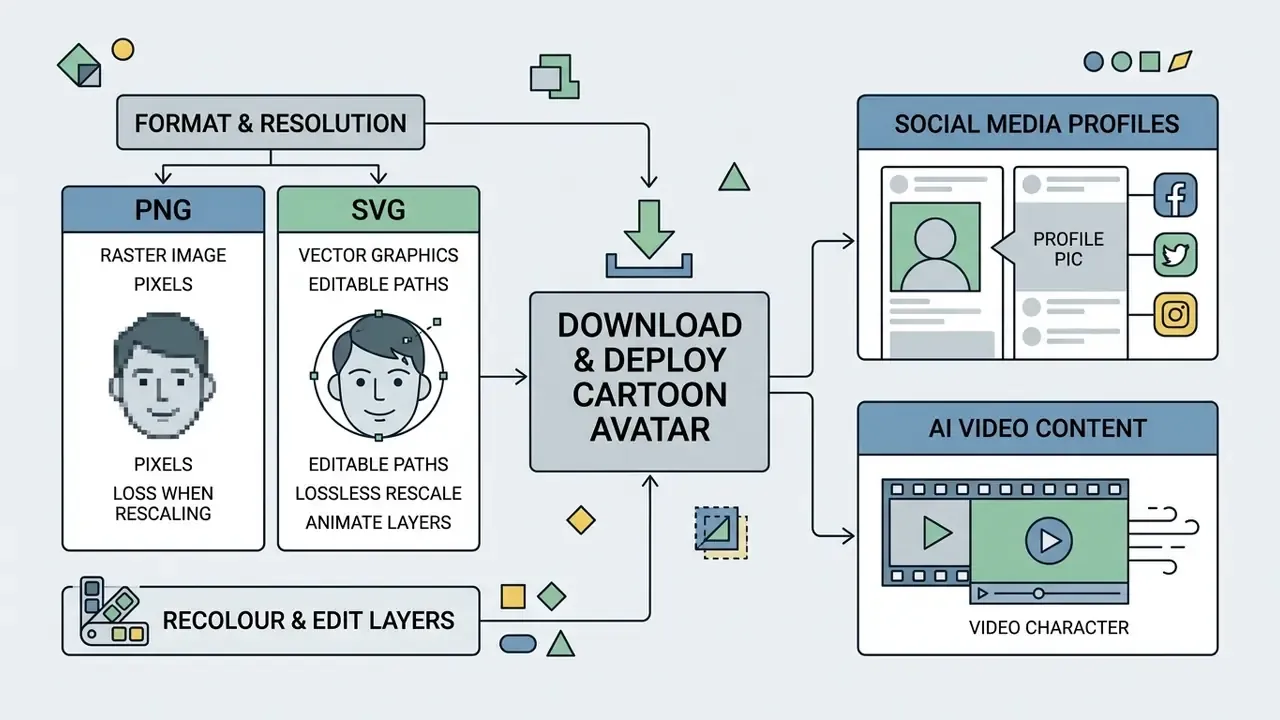
Deploying a generated avatar requires selecting the correct file format, resolution, and aspect ratio for target digital channels. Improper export settings produce unintended compression, blurriness, or awkward framing once platform UI elements crop the image.
Figure 5 - Cross-platform export and scaling matrix. A three-column reference mapping asset destination to specification. Web and social: square raster, 512 to 1024 px, PNG or WebP, circular-safe framing. Print and merchandise: vector SVG or EPS, resolution-independent, CMYK-convertible. Video and streaming: 1920x1080 or 3840x2160, PNG with alpha or ProRes 4444 for overlay compositing.
Choose Resolution and Image Format for Your Avatar
For optimal display quality across web and mobile applications, avatars should be exported in square (1:1) aspect ratios at appropriate pixel dimensions. Lossless file formats prevent compression artifacts around sharp line art and vector boundaries.
| Target Platform | Recommended Resolution | Preferred File Format | Key Technical Considerations |
|---|---|---|---|
| Standard Social Profiles | 512 x 512 px or 800 x 800 px | PNG or WebP | Keep key facial features centered within circular cropping masks. |
| High-DPI / Retina Web Displays | 1024 x 1024 px | PNG (24-bit with Alpha) | Preserves transparency for custom background integration. |
| Site / Comment Avatars | 64 to 128 px display, 256 px for 2x | PNG or WebP | Flat vector styles survive this scale; painterly styles do not. |
| Vector Graphics / Print / Merch | Scalable (SVG / EPS) | SVG | Ideal for manual parametric designs requiring unlimited scaling. |
| Video Production and Streaming | 1920 x 1080 px or 3840 x 2160 px | PNG / ProRes 4444 | Requires transparent background layers for overlay onto video timelines. |
| 3D / Engine Pipelines | Mesh export | GLB / FBX / glTF | Carries geometry, bones, blendshapes, materials and textures in one container. |
PNG or WebP keeps the presentation crisp, whereas standard JPEG compression introduces pixelation around high-contrast cartoon edges. WebP delivers better compression than both JPEG and PNG for web-optimised delivery, while PNG remains the correct choice wherever transparency is required.
Why Choose SVG Vector Exports Over PNG?
Standard PNGs are raster grids of pixels. When upscaled for print marketing, merchandise (stickers, t-shirts, badges), or high-resolution web headers, raster images blur. Stretching a 512 px social icon to poster size produces visible softening that no amount of sharpening recovers. Vector SVG files store math-based geometric paths instead of pixels, so the same file renders crisply at 32 px and at A1 poster scale. Exporting as SVG allows design teams to:
- Rescale without loss.Reuse a single master avatar across favicon, profile picture, presentation slide, sticker sheet, exhibition banner and printed merchandise, with no separate re-export per size.
- Recolour individual asset layers.Change clothing or background hex codes to match corporate brand updates directly inside Adobe Illustrator or Figma, rather than regenerating the avatar and risking identity drift.
- Animate individual face elements.Drive eyes, mouth or accessories with CSS or JavaScript for dynamic web interfaces, loading states and interactive onboarding.
- Edit parts, not pixels.Swap a hairstyle months later without re-running a generative model. This is the structural argument for parametric builders over one-shot AI restyling.
The practical rule: PNG is the right default for Discord, Twitch, WhatsApp, TikTok, Instagram, Facebook and most forums, because those platforms accept a normal raster image as a profile picture. Keep the SVG as well if there is any chance the same character will be reused at a different size, printed, or recoloured. If only one social icon is ever needed, PNG alone is enough.
Platform-Specific Upload Specifications
Generic resolution advice fails at the last mile. The following are the concrete interface paths and file constraints for the destinations that account for most avatar deployments.
- YouTube channel watermark open YouTube Studio > Customization > Branding. Upload a square 150x150 px PNG (maximum file size 1 MB) with a transparent background to overlay your avatar in the bottom-right corner of videos. The channel profile picture itself is set under Customization > Branding > Picture and should be supplied at 800x800 px minimum for high-DPI rendering.
- Twitch profile log in, click the profile icon in the upper right, choose Settings > Profile > Profile Picture. Upload a 256x256 px or 512x512 px PNG or JPEG, resize within the crop tool, then save. Twitch profile pictures are static images, so keep facial details centred and nothing will be clipped by the circular UI frame.
- Discord custom profiles accept PNG and GIF avatars; animated GIF avatars require Nitro. Server icons and avatars accept JPG, PNG and GIF. A 128x128 px asset is sufficient for the avatar slot, and avatar decorations or profile effects are separate add-ons layered over the image rather than baked into it. Avatar content is explicitly covered by Discord's Community Guidelines.
- Steam upload a square asset at 184x184 px or larger through profile edit. Simple, high-contrast designs stay legible in friends lists and chat.
- Instagram, TikTok, Facebook, WhatsApp a single 1024x1024 px PNG covers all four, with automatic downscaling. Keep the subject inside a centred circular safe zone.
- Telegram 512x512 px PNG is the practical optimum; the platform also accepts larger square uploads, commonly cited around 640x640 px.
- LinkedIn and corporate profiles use a consistent 400x400 px minimum square, centred and circular-safe. Institutional social media guidelines typically prescribe standardised avatars precisely because recognisability outranks novelty at organisational scale.
- WordPress, GitHub, Stack Overflow and developer forums (Gravatar) link your exported avatar PNG to your primary email address via Gravatar to populate author profiles across the WordPress ecosystem and many developer platforms from a single upload. The key point is that you leave the maker with your own file. Portability is what makes one export serve a dozen destinations.
- Game engines (Unity, Unreal) avatar SDKs expose plugin-based creation and loading. Ready Player Me's WebView creator targets Unreal Engine 5.0.1 and above (PC-only for that path), while Avaturn documents Unity WebGL plus Android and iOS, and Unreal Engine 5.0 and above with additional Android tuning. Confirm the engine-and-platform matrix before committing to an SDK.
How to Choose the Best Free Cartoon Avatar Maker Online
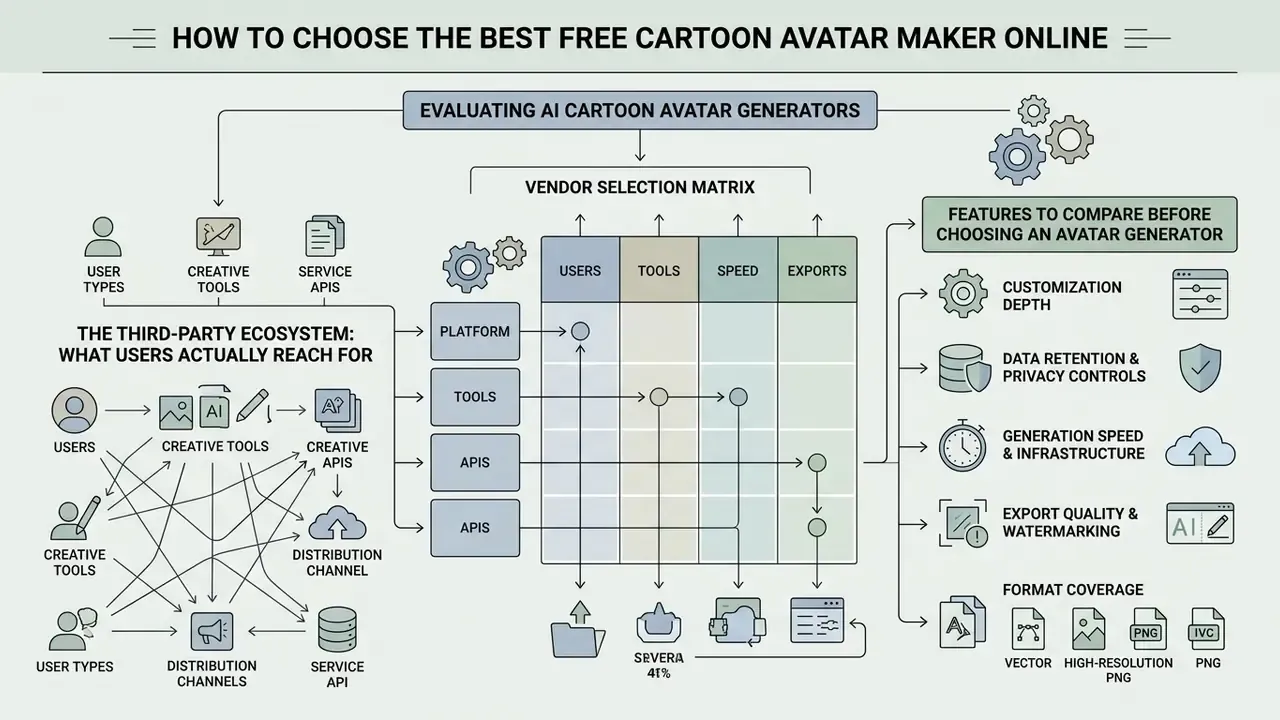
Evaluating an ai cartoon avatar generator free online means analysing software capabilities beyond surface-level visual styles. Technical decision-makers and privacy-conscious users should inspect licensing terms, data retention schedules, export resolution limits, and watermarking policies before selecting a vendor tool. In practice, the shortlist for cartoon avatar maker online free use narrows fast once retention clauses are read.
Figure 6 - Vendor selection matrix. A scored grid across four axes, privacy and retention posture, export resolution ceiling, licence scope, and true cost at expected volume, with each vendor rated 1 to 5 per axis. The matrix exists to prevent the most common procurement error: selecting on style library size, which is the axis least correlated with downstream risk.
The Third-Party Ecosystem: What Users Actually Reach For
| Tool / Ecosystem | Core Technology | Primary Export Format | Best For | Commercial Rights |
|---|---|---|---|---|
| Bitmoji Engine | Parametric vector assembly | PNG (app-linked) | Mobile messaging, personal social integration | Non-commercial personal use |
| Cartoonify-class vector builders | 300+ layered SVG parts, no photo upload | SVG + PNG | Privacy-first avatars, editable-later assets, merch | Varies; often personal-use unless written permission granted |
| Canva Character Builder / Pixton | Template layering | PNG / PDF / SVG | Educational slides, infographics, marketing collateral | Full commercial rights typically require a paid tier |
| Adobe Firefly / Fotor | Diffusion with style presets (comic, anime, illustrated, painted) | PNG / JPG | Photo-to-cartoon and text-to-cartoon at scale | Paid tiers; check per-plan terms |
| Local latent diffusion (AUTOMATIC1111 / ComfyUI) | Neural image synthesis, self-hosted | PNG (with embedded Exif metadata) | Full artistic control, custom LoRA training, zero third-party upload | Full ownership, subject to model licence |
| Headshot Pro and dedicated AI headshot generators | Photogrammetry and diffusion | High-resolution PNG | Professional corporate digital headshots | Included in paid tiers |
| HeyGen / D-ID / ElevenLabs / Synthesia | Talking-head synthesis, lip-sync | MP4 (up to 4K on some tiers) | Animated presenters, Shorts, Reels, TikTok, localisation | Commercial use generally paid-tier only |
For a wider view of no-cost options and their limits, see comparisons of free AI art generators and free AI image generators. Teams needing professional portrait output rather than stylised characters should start with the AI headshot generator category instead.
Features to Compare Before Choosing an Avatar Generator
When comparing platforms to identify the best cartoon avatar maker online, evaluate the following functional criteria:
- Customization depth.Does the tool support fine-grained post-generation feature editing (expression, lighting, background, style variation), or is output restricted strictly to single-pass model inference?
- Data retention and privacy controls.Are uploaded source photographs deleted immediately after inference, or retained to train proprietary weights? Where this matters, verify whether generated output can be distinguished from photography using an AI image detector before publication.
- Generation speed and infrastructure.Does the service deliver renders within 30 to 40 seconds, or queue requests behind paywalls? Published figures across the category span roughly four seconds per image to five minutes per multi-pass build.
- Export quality and watermarking.Can users download clean, unwatermarked HD renders (at least 512x512 pixels) on the free tier?
- Format coverage.Does export include SVG for print and PNG with alpha for video overlay, or raster only?
- Commercial licence scope.Is commercial use granted on the free tier, restricted to paid plans, or permission-only?
- Style library breadth.Vendors advertise anywhere from 20 or more presets to 54 or more anime substyles. Breadth matters less than whether the specific style you need is production-quality.
- Disclosure policy support.Does the tool embed provenance metadata, and can that metadata be retained or stripped as policy requires?
What "Free" Means in an AI Cartoon Avatar Generator
The term "free" in software marketing frequently covers several freemium monetization structures. Understanding these operational limits prevents project bottlenecks during production deployments, especially for teams that assumed a free ai cartoon avatar generator would also grant commercial rights.
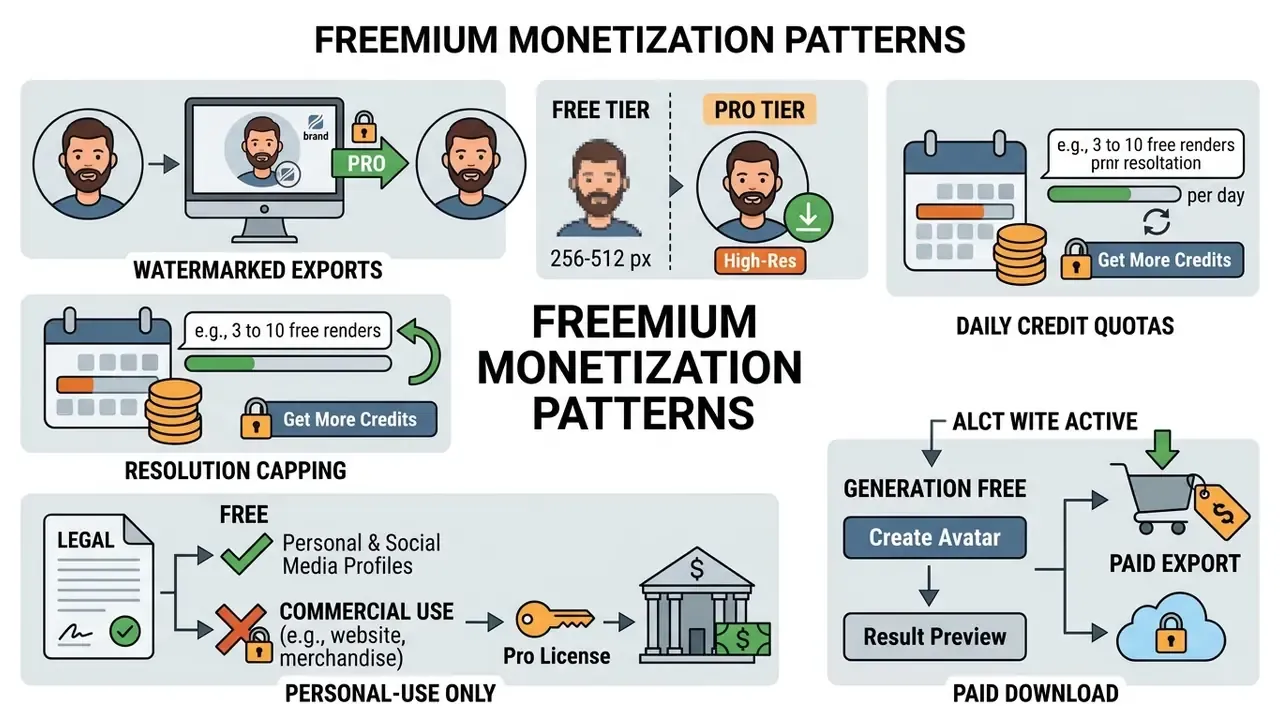
Observed examples across the category map cleanly onto these patterns. Free accounts on general editors export with a watermark that Pro removes, and avatar reuse is sometimes Pro-only. Some photo-to-cartoon tools cap free output at 512x512 JPG with a watermark and price one avatar at a single token watermarked or two tokens clean. Others cap free use at three avatars per month before switching to a ten-credit grant. Several advertise "no watermark" but meter output through daily token pools tied to render cost. Consumer platform quotas follow the same logic:
«TikTok's AI profile picture tool limits users to one generation session per day, producing up to 30 avatars, a usage cap typical of freemium AI tools.»
A legal review of popular consumer platforms highlights significant variance in usage rights. Some non-commercial utilities permit free avatar generation but explicitly prohibit commercial advertising or resale without written enterprise licensing. Open-source models deployed locally grant complete commercial rights but demand dedicated GPU hardware.
To project API costs for high-volume automated image pipelines, engineering leads use specialized calculators to model cloud compute expenditure.
Model Risk Governance for Generative Avatar Pipelines
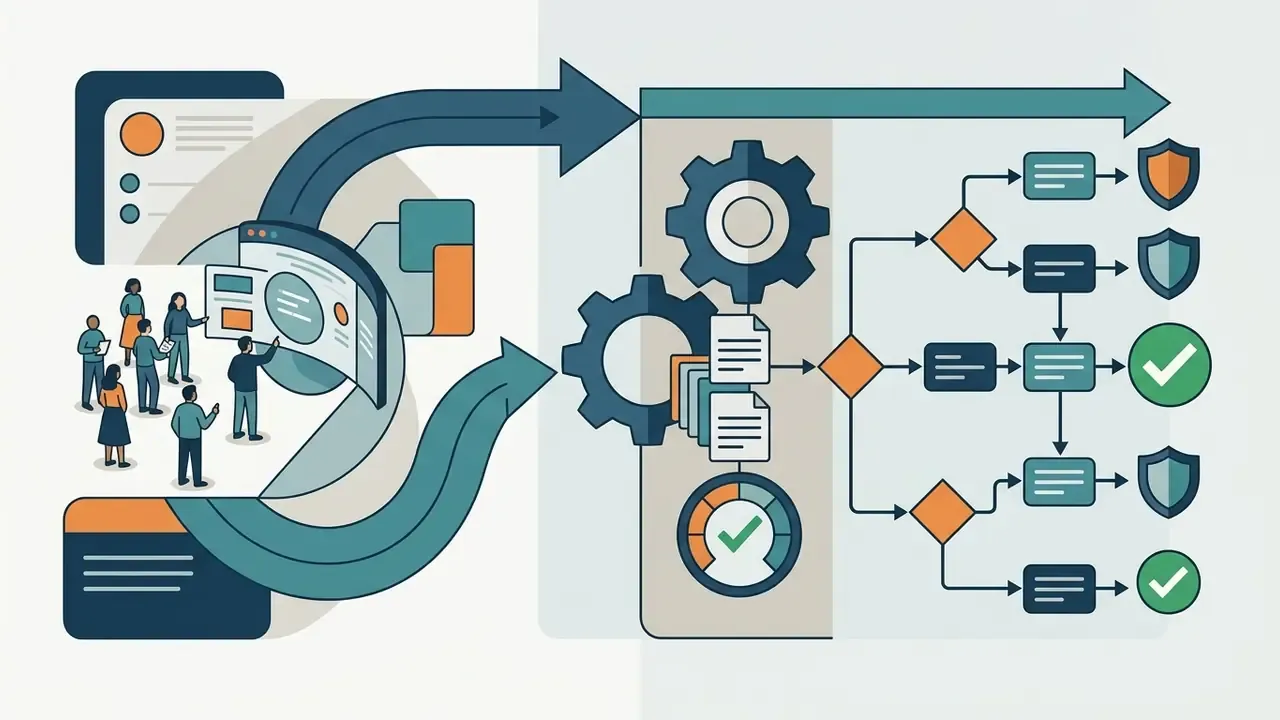
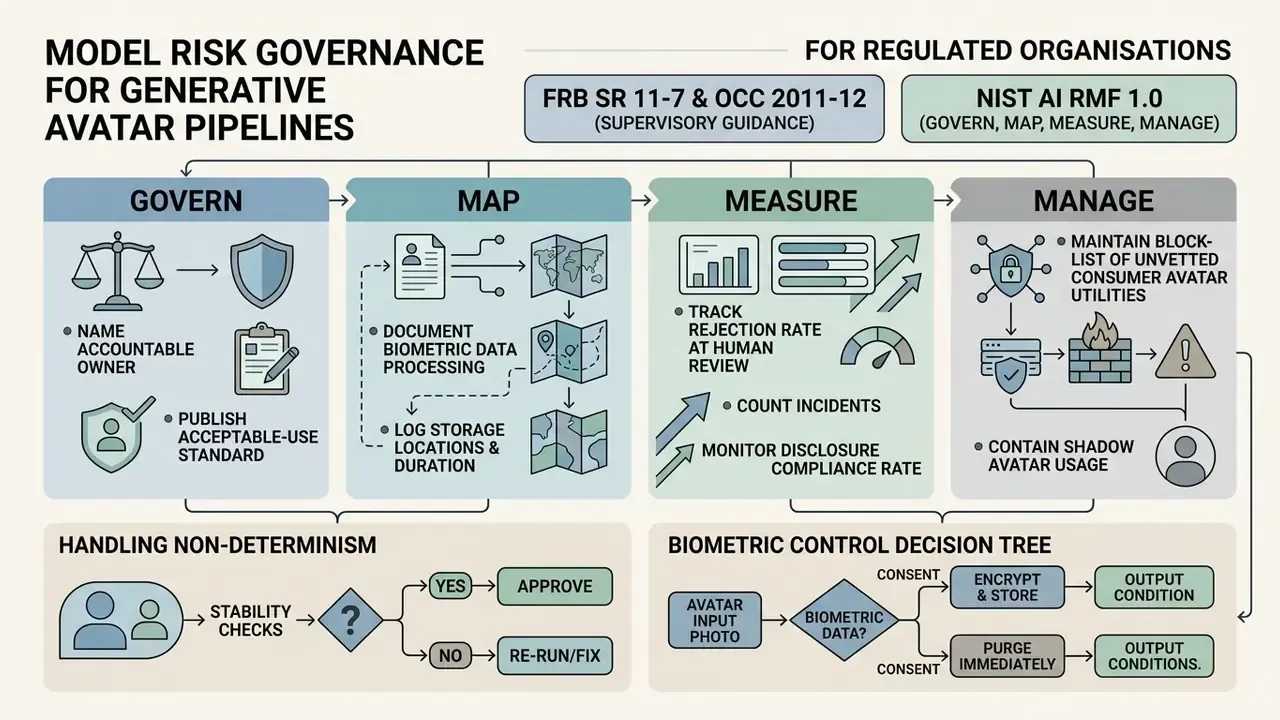
For regulated organisations, the hard question is not which style preset to use. It is how a non-deterministic image model fits inside an existing model risk management programme. Three reference frameworks apply directly.
FRB SR 11-7 and OCC 2011-12 (Supervisory Guidance on Model Risk Management). These expect conceptual soundness review, ongoing monitoring, and independent validation proportionate to model materiality. A generative avatar pipeline is low-materiality for capital purposes but non-trivial for reputational and conduct risk. The practical translation: treat the pipeline as a tool subject to inventory and control documentation rather than as a capital model, and record (a) intended use, (b) prohibited uses, (c) human review gate, (d) escalation path when output breaches brand or content policy.
NIST AI RMF 1.0 (Govern, Map, Measure, Manage). Apply each function concretely:
- Govern. Name an accountable owner for the avatar programme; publish an acceptable-use standard covering which tools may receive employee imagery.
- Map. Document whether each approved tool processes biometric data, where it stores uploads, and for how long.
- Measure. Track rejection rate at human review, incident count, and disclosure compliance rate rather than only throughput.
- Manage. Maintain a blocklist of unvetted consumer avatar utilities at the network layer to contain Shadow AI, and an allowlist of vetted alternatives so the control is enforceable rather than aspirational.
Handling non-determinism. Diffusion models do not reproduce outputs bit-for-bit across runs, versions or hardware. Validation therefore cannot rest on output reproducibility. Substitute process reproducibility: log model name and version, prompt string, negative prompt, seed, sampler, step count, similarity weight, source-image hash, operator identity and timestamp. With that record, an auditor can reconstruct how an asset came to exist even where the exact pixels cannot be regenerated. That is the accountability standard that actually matters.
Biometric control decision tree.
- Does the workflow ingest a photograph of an identifiable person? No, use the parametric path, no biometric review required.
- Yes. Is there documented, explicit, specific consent for biometric processing, separate from consent to use the photo? No, stop; switch to the parametric path.
- Yes. Does the vendor contractually exclude inputs from training sets and commit to a defined deletion window? No, stop or self-host.
- Yes. Proceed, log the processing activity, and set a retention expiry on the source image.
Risk-Adjusted ROI Framework for Avatar Programmes
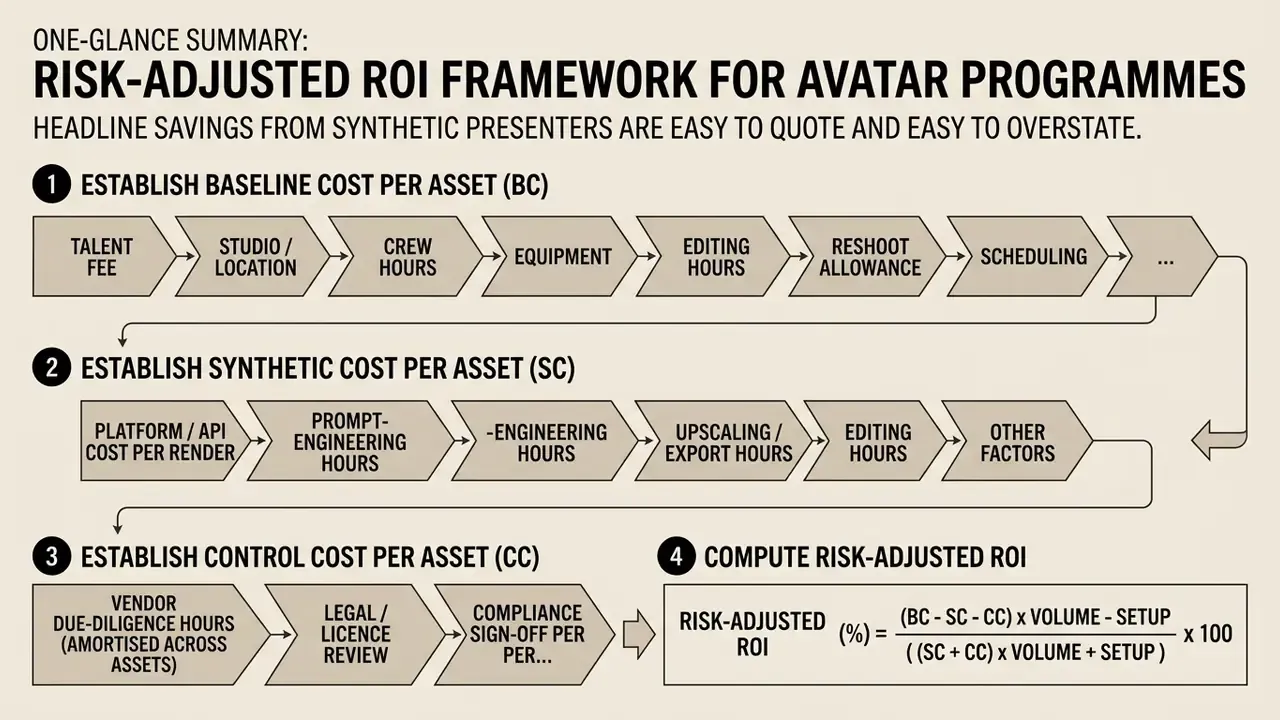
Headline savings from synthetic presenters are easy to quote and easy to overstate. The defensible calculation nets control costs against production savings.
Step 1: establish the baseline cost per asset (BC).
BC = talent fee + studio/location + crew hours + equipment + editing hours + reshoot allowance + scheduling overhead
Step 2: establish the synthetic cost per asset (SC).
SC = platform/API cost per render + prompt-engineering hours + upscaling/export hours + editing hours + licence amortisation
Step 3: establish the control cost per asset (CC). This is the line most ROI models omit.
CC = vendor due-diligence hours (amortised across assets) + legal/licence review + compliance sign-off per asset + disclosure metadata handling + incident remediation reserve
Step 4: compute risk-adjusted ROI.
Risk-Adjusted ROI (%) = [ (BC - SC - CC) x Volume - Setup ] / ( (SC + CC) x Volume + Setup ) x 100
Where Setup covers one-time costs: tool procurement, avatar asset creation, brand-standard authoring, and staff training.
Step 5: apply a residual risk haircut. Reduce the modelled benefit by an explicit factor reflecting unmitigated exposure: licence ambiguity, disclosure-driven perception loss (the AEJMC finding above quantifies one component of this), and platform policy change risk. A haircut of 10 to 25 percent is a common starting point pending internal loss data.
Interpretation guidance. Synthetic avatar programmes tend to show strongest returns where volume is high, scripts change frequently, localisation into multiple languages is required, and the presenter does not need to be a specific identifiable executive. They show weakest returns for low-volume, high-prestige assets where a single studio shoot amortises well and audience expectation favours a real face. Sensitivity-test volume first; it dominates the result.
FAQ About Cartoon Avatar Makers
Can I Create Cartoon Avatars in Different Art Styles?
Yes. Modern AI avatar generators and parametric editors support a broad spectrum of artistic styles, including 3D digital render, anime (shonen, chibi, mecha), comic book, watercolour, flat vector, pixel art, clay, cyberpunk, and realistic illustration presets. Adobe Firefly exposes explicit style controls alongside Color and Tone, Lighting and Camera Angle adjustments before generation, while HeyGen's avatar looks generator spans realistic, cartoon, 3D, anime and custom looks. Fotor advertises 54 or more anime style presets specifically for photo-to-cartoon conversion, and 3D-oriented tools add rigging and mesh export on top of anime character generation.
Can I Use a Cartoon Avatar for Discord, Twitch or Learning Content?
Yes. Cartoon avatars are widely deployed across streaming platforms, gaming servers, and e-learning systems. Discord accepts PNG and GIF avatars, with animated GIFs reserved for Nitro members. Twitch treats the profile picture as a standard static image upload. For educational video content, stylized avatars provide approachable, consistent visual narrators while protecting instructor privacy and reducing studio production overhead.
«Twitch affiliation functions as a rite of passage where visual branding and avatars form core components of digital identity construction.» - LeLaurin, Twitch Affiliation: A Rite to Cultivate Digital Identity and Community, Harvard (2023). https://dash.harvard.edu/handle/1/37375172
Three practical constraints apply. First, the avatar must stay recognisable when cropped to a circle and reduced to chat-list size, so test at 32 px before committing. Second, platform content rules govern avatar imagery directly, which makes sexualised or age-ambiguous designs non-compliant on both Discord and Twitch. Third, for e-learning, accessibility obligations apply: avatar images need alternative text, keyboard focus should not land on the avatar itself, moving elements must be pausable or hideable, and narrated avatar video needs captions, transcripts and audio description. Creators managing interactive community tooling can review animation maker workflows when moving from static avatars to animated course assets.
Can an AI Cartoon Avatar Be Used as an AI Video Character?
Yes. High-resolution static avatars exported from a cartoon avatar maker can be imported into an AI video generator such as HeyGen, ElevenLabs, D-ID or Synthesia. These systems use lip-sync algorithms and facial landmark driving models to turn the static avatar into an animated talking-head presenter driven by text scripts or pre-recorded audio. HeyGen documents quick avatar video in portrait 9:16 with a script limit around 2,520 characters and 4K output on certain avatar engines (photo-based avatars are capped lower, at 1080p). ElevenLabs describes avatars as persistent visual identities pairing a character with any voice. Research-level work on diffusion-based, speech-driven talking faces demonstrates temporally coherent, view-consistent lip synchronisation.
«Profile-inclusive evaluation of personalized image generation should capture both personalization quality and visual fidelity relative to input profiles.» - PIPBench: A Profile-Inclusive Framework for Personalized Image Generation Evaluation, arXiv (2026). https://arxiv.org/abs/2607.06440
Figure 7 - From static PNG to animated presenter (60-second demonstration). Sequence: 1024x1024 PNG avatar import, voice or audio track assignment, phoneme-to-viseme mapping (ARKit-compatible blendshapes), landmark-driven facial motion, 9:16 render for Shorts, Reels and TikTok. A full text transcript accompanies the demonstration for indexing and accessibility.
Do I Retain Commercial Rights to Avatars Generated Using Free Online Tools?
Commercial rights depend entirely on the platform's Terms of Service. Many free-tier tools grant licences restricted strictly to personal, non-commercial profile usage, and some explicitly forbid advertising, resale or business use without written permission. Commercial deployment across corporate marketing, monetized YouTube channels, or product packaging typically requires a paid subscription tier or explicit enterprise licensing. Locally hosted open-source models grant the broadest rights but shift hardware and model-licence responsibility to you.
Is Uploading My Personal Photo to an Online Avatar Generator Safe?
Security varies by vendor. Reputable enterprise platforms process images ephemerally in memory and delete source files within 24 hours under documented privacy policies. Unverified ad-supported tools may retain uploaded images or use them to train proprietary generative models. Always inspect the vendor's data retention policy, its effective date, and whether inputs are contractually excluded from training sets before uploading clear facial imagery.
What Is the Optimal Image Resolution for a Social Media Profile Avatar?
A square image rendered at 512 x 512 pixels or 1024 x 1024 pixels in PNG format gives optimal clarity across high-DPI mobile screens and desktop interfaces while staying well within standard platform file-size upload limits. Retain an SVG master if the character will ever be printed or resized.
Do I Have to Upload a Photo to Cartoon Myself?
No. Parametric builders assemble the cartoon face from vector graphic parts: face, eyes, brows, hair, clothes, background. This is slower than a one-click AI filter and considerably more editable afterwards, and it processes no biometric data at all. For most regulated teams, that is the deciding factor.
How Do I Set the Avatar as My Twitch Profile Picture?
Log in, click the profile icon in the top right, open Settings, then the Profile tab. Upload your 256x256 or 512x512 PNG under Profile Picture, resize inside the crop tool, and save.
Can I Watermark My Videos With My Avatar on YouTube?
Yes. Open YouTube Studio, go to Customization, then the Branding tab, and upload a 150x150 px image no larger than 1 MB. It renders in the lower-right corner of your videos.
Summary of Enterprise Execution Steps
Deploying cartoon avatars safely and effectively across enterprise digital operations means following a structured implementation sequence:
- Audit the vendor before the interface. Verify SOC 2 posture, privacy-policy effective date, retention and deletion windows, training-set exclusion clauses, and commercial licence scope. Vendor vetting precedes tool selection, not the reverse.
- Define governance and biometric risk tolerance. Determine whether input photo processing is permissible under current corporate privacy policies, or whether photo-free parametric avatars must be mandated. Apply the biometric decision tree above.
- Select the technical architecture. Choose automated AI diffusion inference for high visual personalization, or deterministic vector parametric editors for absolute brand compliance and post-hoc editability.
- Instrument for audit. Log model version, prompt, seed, sampler, similarity weight, source-image hash, operator and timestamp for every generated asset. Process reproducibility substitutes for output reproducibility.
- Establish asset export standards. Standardize output at 1024x1024 pixel PNG with alpha for raster channels, retain SVG masters for print and merchandise, and specify GLB or FBX where 3D pipelines are in scope.
- Publish platform upload specs. Distribute the YouTube (150x150, 1 MB watermark), Twitch (256x256 or 512x512), Discord (128x128, PNG or GIF), Steam (184x184) and Gravatar instructions to asset owners so the last mile is not improvised.
- Contain Shadow AI. Block unvetted consumer avatar utilities at the network layer and publish an allowlist of approved alternatives, so the policy is enforceable.
- Model risk-adjusted ROI before scaling. Run the BC, SC and CC formula against your own cost base, apply a residual-risk haircut, and sensitivity-test volume before committing to a programme.
Developers integrating programmatic image generation directly into custom software applications can access platform endpoints via the centralized api gateway directory.
Limitations and Open Questions
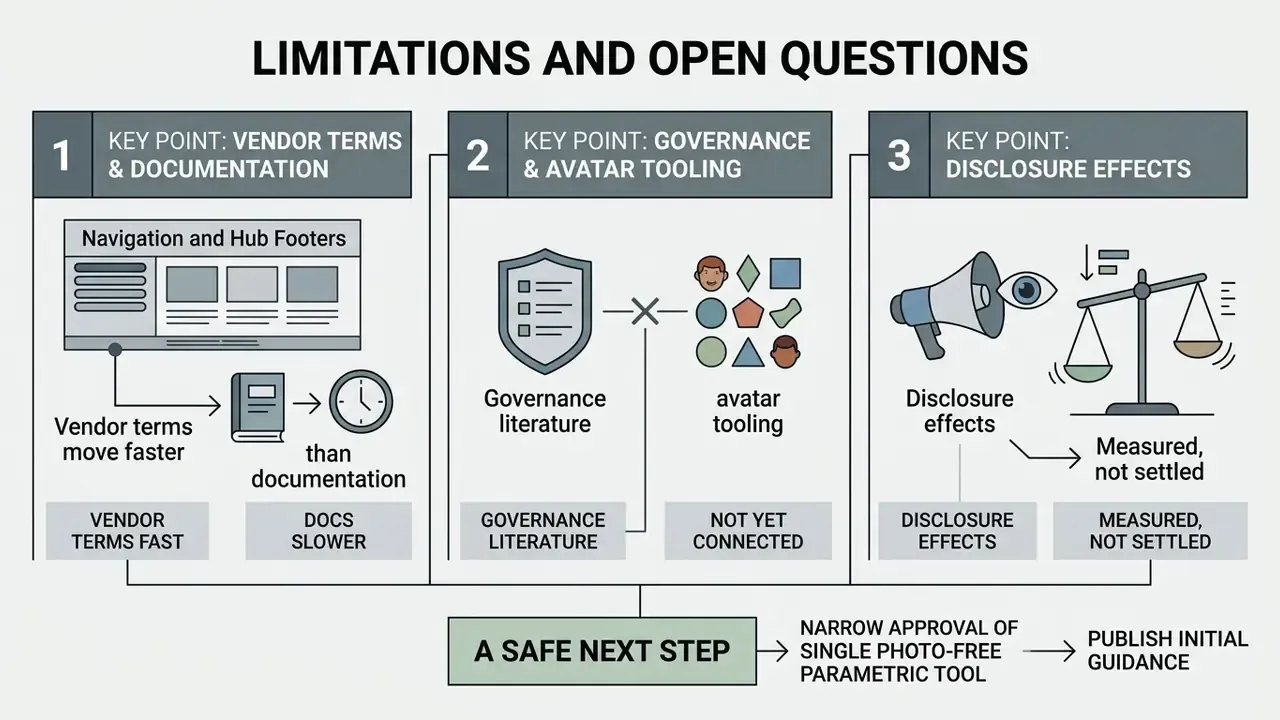
Three things in this guide are weaker than they look, and it is better to say so than to imply false precision.
Vendor terms move faster than documentation. Retention windows, watermark rules and licence scope in this category change quarterly. Every specification cited here should be re-verified against the vendor's current policy page before procurement sign-off, not treated as a standing fact.
The governance literature does not yet address avatar tooling directly. SR 11-7, OCC 2011-12 and NIST AI RMF 1.0 were written for models with measurable performance outputs. Mapping them onto a stylistic image generator is an act of interpretation, and different institutions will land in different places. Reasonable supervisors may disagree with the low-materiality classification proposed above.
Disclosure effects are measured, not settled. One study showing a perception penalty for AI disclosure is not a policy basis. Expect the evidence base to shift as provenance metadata standards mature and as audience familiarity with synthetic imagery grows.
A safe next step, then, is narrow rather than sweeping: approve a single photo-free parametric tool, publish the export standard, log the assets, and review after ninety days. That is enough to displace most Shadow AI usage without committing the institution to a biometric processing posture it has not yet decided on.