No installs. No pixel math on a notepad.
Key Specifications at a Glance
| Parameter | Required Value |
|---|---|
| Recommended canvas | 2560 × 1440 px (16:9) |
| Minimum upload size | 2048 × 1152 px |
| All-device safe zone | 1546 × 423 px centered (equals 1235 × 338 px if you design at the 2048 × 1152 minimum) |
| Maximum file size | 6 MB |
| Accepted formats | PNG, JPG, GIF (non-animated) |
| Export resolution | 72 DPI minimum, RGB color space |
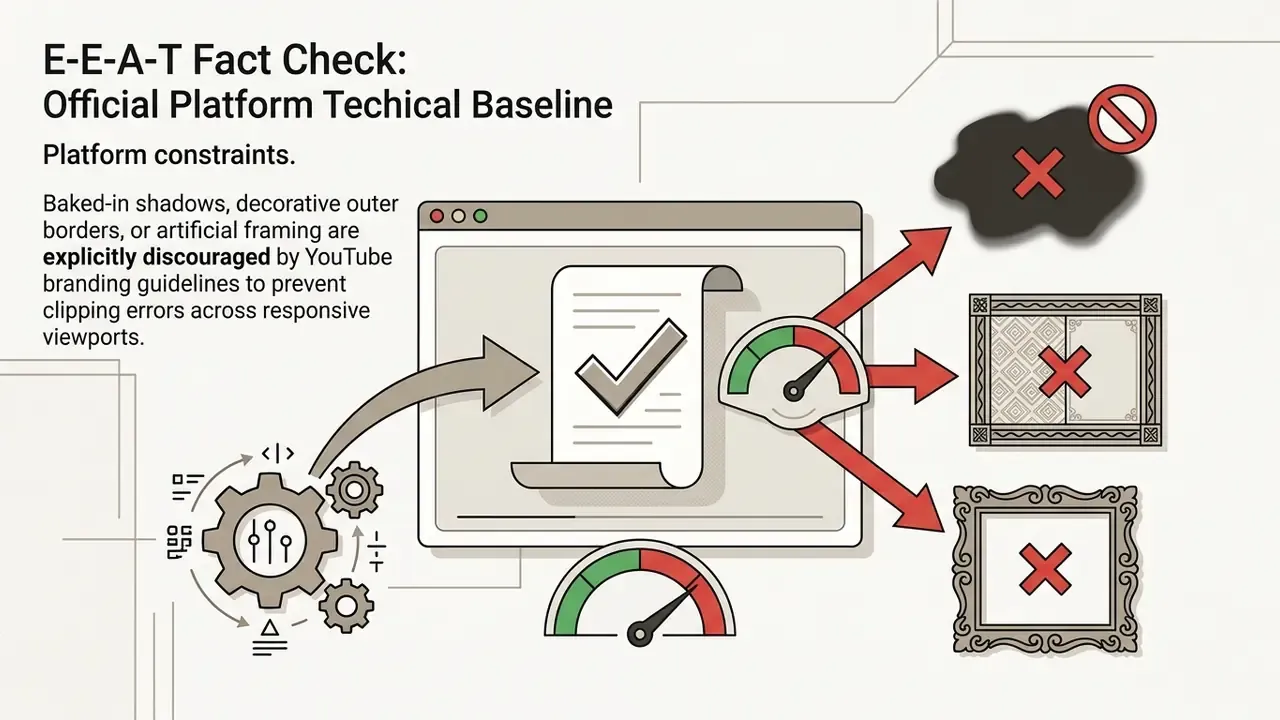
| Prohibited by YouTube | Baked-in shadows, decorative borders, artificial frames |
Fastest reliable route: open a 2560 × 1440 px template, drop in a transparent-PNG logo and locked brand HEX values, keep every word inside the 1546 × 423 px center box, preview TV, desktop, tablet, and mobile, then export a sub-6 MB PNG.
Who This Guide Is For, and What It Covers
Three groups tend to land on a page like this. Independent creators who need a header today. In-house marketing teams running several channels under one identity system. And brand or compliance leads who must approve the tool before anyone uploads a logo into it.
The guide covers all three angles: what an online editor can produce, how to evaluate a free tier honestly, the four-stage production workflow, exact device geometry, design decisions that lift subscriber conversion, niche template patterns, and the upload path inside YouTube Studio. Two definitions to set first, because most confusion starts here. Canvas is the full 2560 × 1440 px file you upload. Safe zone is the smaller centered rectangle that survives every crop, which is the only region where critical copy belongs.
Everything technical in this article is referenced against official platform documentation and cited research, with uncertainty flagged where evidence is thin or self-reported.
Banner Maker for YouTube: What You Can Create in the Editor
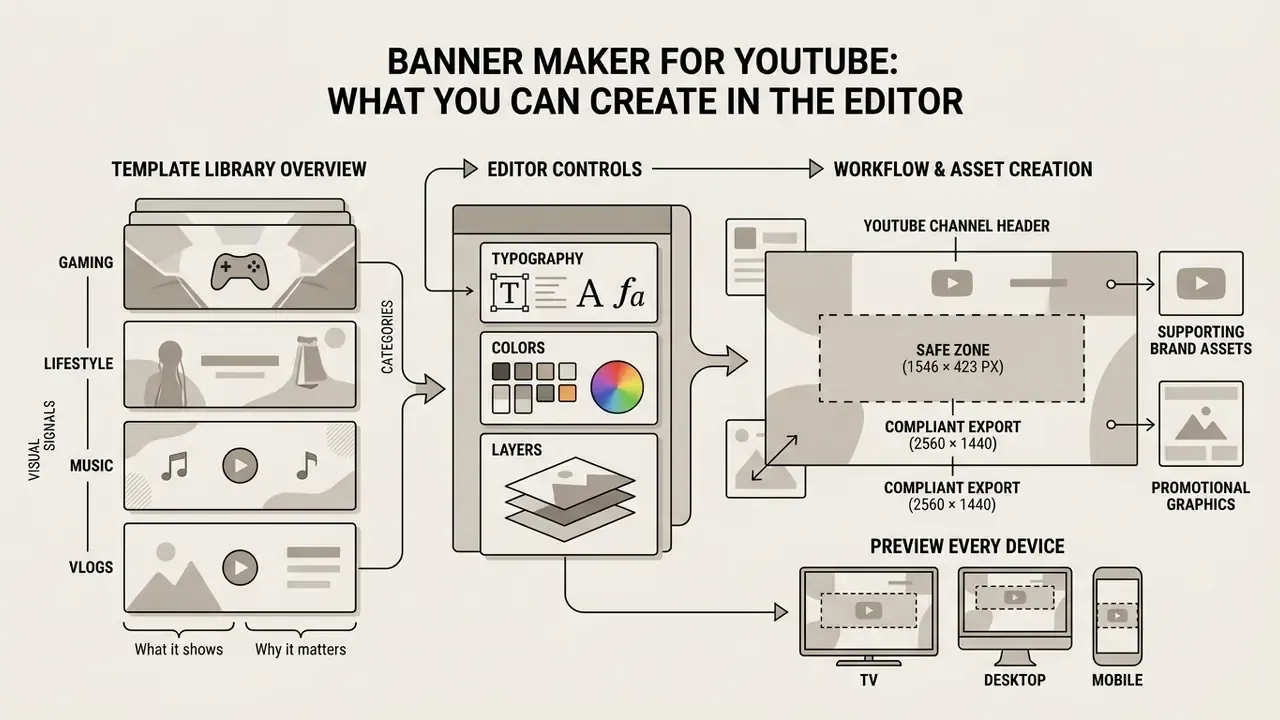
An online youtube banner maker builds complete, publication-ready channel headers, promotional graphics, and supporting brand assets without desktop design software. The core strength of a banner creator youtube platform is the pairing of fixed canvas geometry with flexible layer management, so typography, brand imagery, and color systems stay editable in real time. Teams that also want prompt-driven visuals can compare template editing with AI image generators before committing to a production route, and the broader question of how to create an ai asset pipeline is worth answering before you scale to dozens of channels.
Modern browser-based editors streamline youtube channel art production through three functional pillars: structured layout engines, searchable asset libraries, and automated device render previews.
"Template-driven editors reduce cognitive load for non-specialists while preserving professional visual standards."
That finding matters operationally. The constraint is rarely creative talent. It is the overhead of remembering canvas math, crop behaviour, and palette codes at 6 p.m. on a launch day. Whether you need a banner for youtube maker workflow for a corporate technology channel or a solo gaming stream, current editors give you enough control to finish channel art in minutes instead of hours.
Editor Controls for Typography, Colors, and Layers
The editing canvas provides granular banner design control over vector shapes, raster imagery, and text styling. Integrated design tools let operators apply exact brand colors through HEX or RGB inputs, match typography to corporate brand guidelines, and import official logo colors in one click. Editors that expose font-role mapping (heading versus body) and primary/secondary palette slots let you rebuild a compliant header without manual eyedropper work, and an online photo editor can pre-clean logo files before they reach the canvas.
For creative teams inside established brand ecosystems, advanced browser editors accept native vector layer ingestion. Designers import Adobe Photoshop (.PSD) or Adobe Illustrator (.AI) master files directly, and the editor parses individual text, shape, and masking layers instead of flattening the artwork. Real-time collaboration links then let stakeholders review draft headers, leave inline notes, and co-edit safe-zone positioning at the same time, with no exported intermediate renders and no versioned files bouncing through email.
Brand Kit locking is the governance layer that makes this safe at scale. When corporate HEX values, approved fonts, and logo lockups are locked at workspace level, non-designers can replace copy and imagery, yet cannot overwrite the palette by accident. That single control removes most of the rework in multi-channel programs.
Used together, these utilities produce high quality compositions that keep visual authority while respecting strict publication constraints.
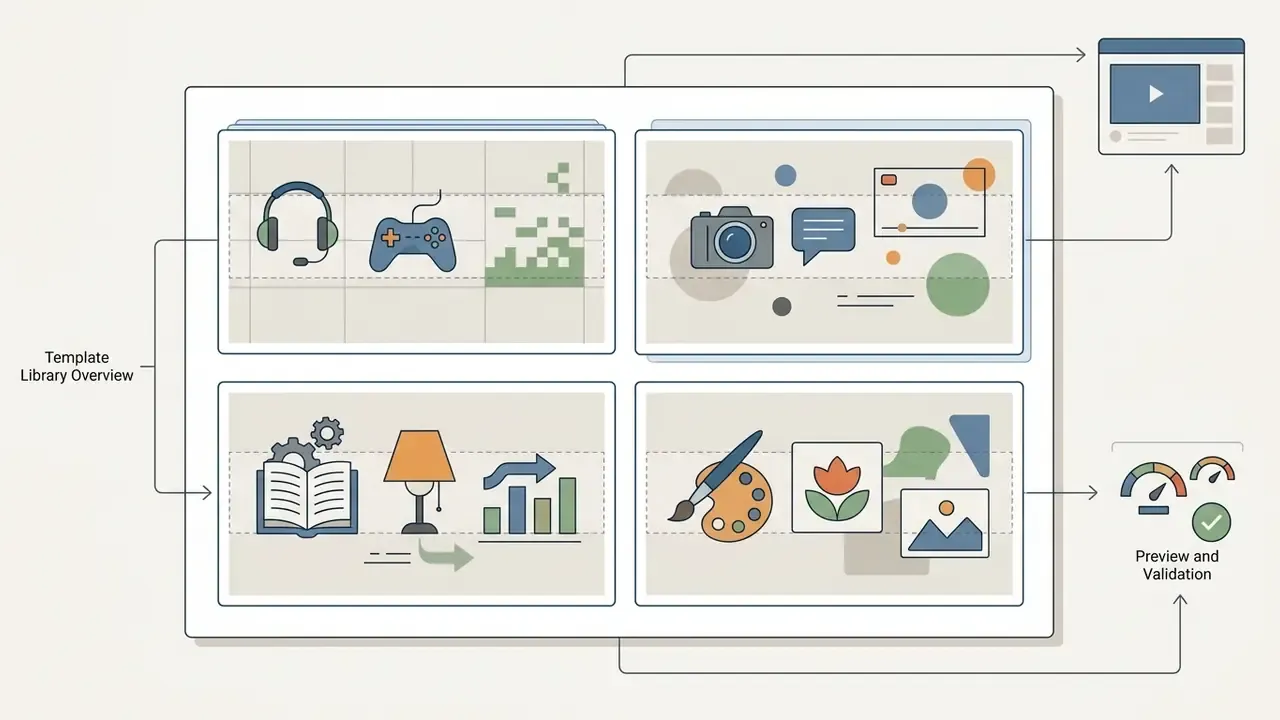
Template Library Overview: Categories and Visual Signals
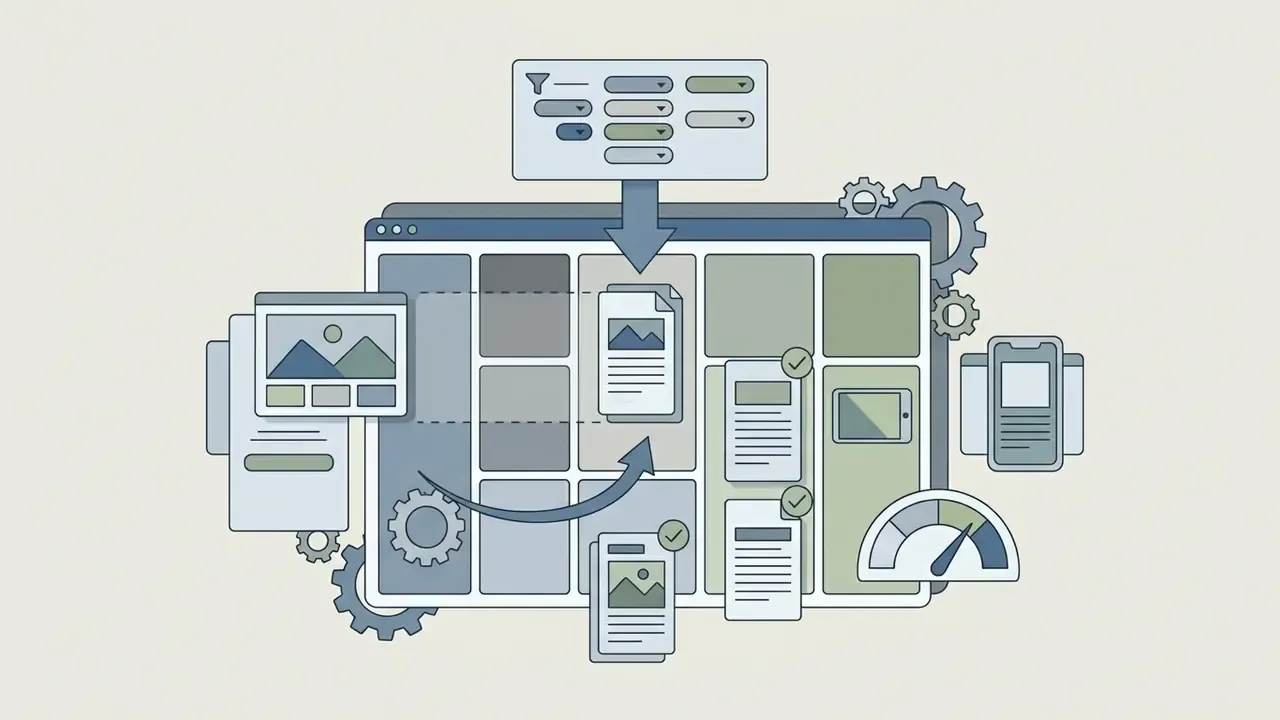
How to Choose a Free YouTube Banner Maker
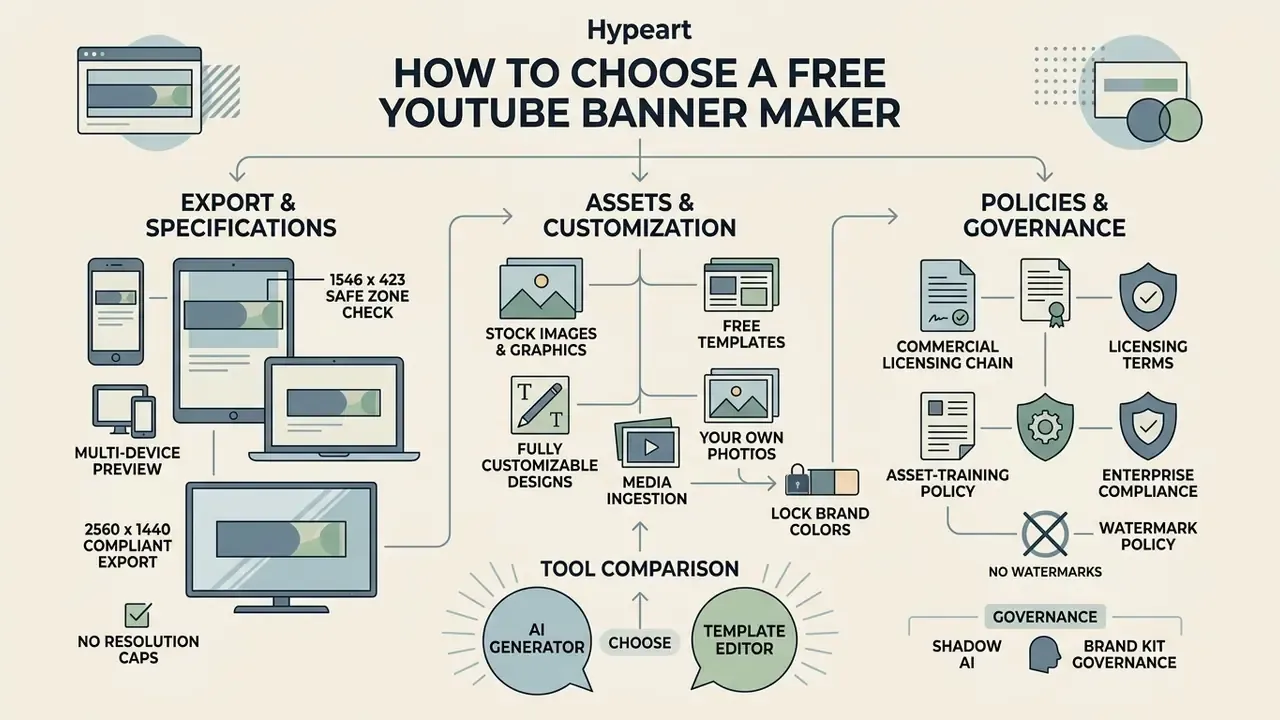
Choosing an effective free banner maker for youtube comes down to three unglamorous checks: export resolution caps, licensing terms for built-in assets, and watermark policy. Plenty of tools advertise zero-cost entry. Professional channel management still needs clean 2560 × 1440 px PNG exports with no forced platform branding burned into the corner.
Free tiers vary sharply in practice. Some platforms export watermark-free channel art at full resolution but limit Brand Kits to a single set. Others cap saved designs, restrict image uploads, or watermark every download until you upgrade. A ten-minute due-diligence pass on export rights, design quotas, and upload caps prevents meeting the paywall at the exact moment you need the file. A comparison of free AI art generators shows how widely watermark rules differ even within one pricing tier.
To settle on a dependable banner maker for youtube free workflow, or a banner maker free for youtube trial you can defend to finance, assess whether the platform offers genuinely accessible free templates, flexible asset import, and clear commercial usage rights. A credible banner youtube creator tool states all three in writing.
Free Templates and Fully Customizable Designs
A robust free banner creator for youtube supplies thousands of unique templates across broadcast themes and visual styles. These designed templates act as editable starting points where background vectors, overlay filters, and typography blocks can be modified without breaking the structure.
Full customization keeps you out of rigid visual boxes. You can change layer depth, apply drop shadows, adjust opacity, and test alternative channel art templates until the header matches your wider social presence. One platform caveat deserves attention: decorative shadows and frames should stay inside the composition logic, because YouTube explicitly discourages baked-in outer shadows, borders, and artificial framing on the uploaded file. A framed banner looks double-framed once the platform applies its own crop.
Stock Images, Graphics, and Your Own Photos
Professional banner workflows lean on strong visual elements: royalty free stock photography, vector icons, and custom media. Leading web editors integrate stock repositories such as Pixabay or Unsplash, so users search millions of licensed photographs from the editing sidebar.
"The license grants a worldwide, non-exclusive right to use, download, copy and modify images and videos, for commercial and non-commercial purposes, without attribution."
Uploaders stay responsible for rights to their own files. Stock platforms require contributors to own their content and hold any necessary model or property releases, and the same duty of care applies when your team pushes client photography or licensed illustration into a browser editor.
Beyond stock libraries, creators can upload pictures, brand logos, and custom photography. Verified company marks and high-resolution portraits, including assets produced with an AI headshot generator, keep the finished free youtube banner anchored to authentic brand identity at every viewer touchpoint. The same discipline applies whether you are learning how to create an avatar for a faceless channel or shooting a founder portrait properly.
Technical Media Ingestion and Format Specifications
| Asset / File Type | Supported Formats | Max File Weight | Dimension / Resolution Limits | Technical Ingestion Requirements |
|---|---|---|---|---|
| Raster Images | PNG, JPG, WebP (static) | 50 MB | Max 250 megapixels (W × H) | Lossless PNG recommended for text layers; only static WebP is supported |
| Vector Graphics | SVG | 3 MB | 150 px to 200 px baseline width | Must be saved with an SVG 1.1 profile |
| Raw Design Files | PSD, AI | 100 MB | N/A (rasterized to canvas) | Automatic layer separation on browser ingestion |
| Mobile Photos | HEIC, HEIF | 25 MB | Auto-converted to 72 DPI PNG | Direct browser decoding without pre-conversion |
| Video Backgrounds | MOV, MP4, MPEG, MKV, WEBM, GIF | 1 GB | Flattened to a still frame for banner export | Transparent clips should be supplied as GIF |
| Final Export | PNG, JPG | 6 MB | Exactly 2560 × 1440 px | 72 DPI minimum; RGB color space; non-animated |
If a source photograph arrives oversized, compress or resize it before upload rather than after. Equivalent file compression tools show how aggressive re-encoding degrades edge detail in precisely the zone where your typography sits.
AI Generator or Template Editor: Which to Choose
Generative AI design tools produce concepts from plain text prompts in seconds. They also carry trade-offs that template editors do not.
"Generative tools delivered greater aesthetic variety and covered a wider objective space than manual design."
"Participants supported by a generative AI image tool showed higher design fixation and lower idea originality than the control group." Wadinambiarachchi et al., The Effects of Generative AI on Design Fixation and Divergent Thinking, CHI Conference on Human Factors in Computing Systems (2024). N = 60, between-subjects experiment. https://doi.org/10.1145/3613904.3642919
In banner production the trade-off shows up fast. Unconstrained text-to-image output rarely lands typography inside a 1546 × 423 px rectangle, and generated "logos" almost never match a locked corporate HEX value. Automated brand validation loops are improving, and vendors now describe pipelines that generate an asset, score it against brand rules, then re-prompt until it passes. Even so, the final safe-zone check still belongs to a human operator.
| Feature / Dimension | Template-Based Editor (Browser Studio) | AI Banner Generator (Text-to-Image Engine) |
|---|---|---|
| Initial Creation Speed | 3 to 10 minutes via pre-built channel art templates | 30 to 60 seconds via automated text prompts |
| Safe-Zone Compliance | Built-in canvas overlays guarantee 1546 × 423 px centering | Requires manual post-generation cropping and re-scaling |
| Brand Color Precision | Exact HEX/RGB palette inputs for text and vector layers | Generative approximation; difficult to lock specific corporate HEX codes |
| Typography Legibility | Live font rendering, kerning, and line-height control | Text artifacts common; often needs a text layer added afterwards |
| Custom Asset Uploads | Seamless upload of transparent PNG logos and photography | Requires reference masking or multi-stage image-to-image editing |
| Iteration Control | Layer-level edits; version history per element | Full re-generation; partial edits harder to isolate |
| Export Formats & Rights | 2560 × 1440 px PNG/JPG export; clear commercial licensing | Raster output; commercial usage subject to model licensing terms |
Reading the table row by row: a template-driven approach gives exact layer positioning, locked palettes, and guaranteed safe-zone compliance in a few clicks, while an AI YouTube Banner Generator wins on speed of ideation and variety of background concepts. Operators using the generative route must inspect each file manually for logo contrast and text legibility. Teams evaluating specific engines can review the Canva AI Generator overview and the Google AI Image Generator commercial terms before standardizing on a vendor, and anyone planning a full generative stack should also read how to create and govern a model workflow end to end.
Enterprise Compliance, Shadow AI, and Brand Kit Governance
For regulated industries, banking, fintech, insurance, healthcare, tool selection is a control question rather than a design question. Unapproved browser generators used privately by team members, commonly called Shadow AI, create two exposures at once: brand assets leaving the perimeter, and published graphics whose provenance cannot be reconstructed during an audit. Ask any internal audit lead which of those two is harder to explain after the fact.
Use this checklist before approving a banner maker for youtube channel production on corporate accounts:
- Asset-training policy.Confirm in writing whether uploaded logos, unreleased product imagery, or executive photography may be used to train the vendor's models. Prefer providers offering an explicit opt-out or an enterprise no-training commitment.
- Commercial licensing chain.Verify the license covering built-in stock photos, icons, and fonts, and check whether it survives brand use, paid promotion, and merchandising.
- AI output rights.Document whether generated raster output may be used commercially, whether the provider indemnifies against third-party claims, and which jurisdictions are covered.
- Prompt and asset retention.For auditability, retain the prompt text, reference inputs, template version, and final exported file for every published header.
- Watermark and tier verification.Test a real export on the exact plan your team will use, since free-tier watermarks are sometimes applied only at download.
- Access segregation.Lock brand palettes, fonts, and logo lockups at workspace level, and grant editing rights per channel so a regional team cannot alter global identity assets.
- Provenance checks.Before publishing third-party or generated imagery, run a similarity or reverse-image search pass to reduce infringement and duplication risk.
How to Create YouTube Channel Art Banner Online
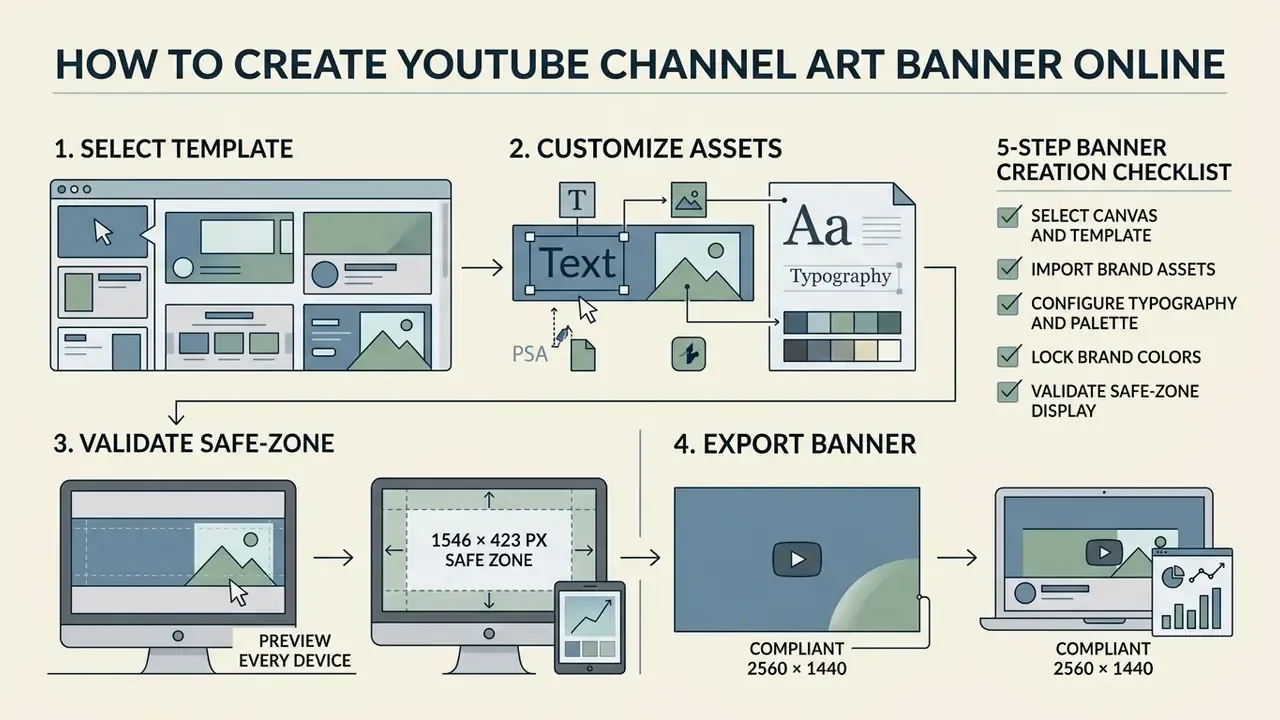
Learning how to create youtube channel art banner online means following a four-stage workflow: template selection, asset customization, safe-zone validation, and high-resolution export. A disciplined sequence prevents distortion and keeps key branding visible on every form factor.
To create online youtube channel art banner assets efficiently, prepare high-resolution logos, primary copy, and brand color codes before you open the editor. With those three inputs ready you can start creating immediately and finish in a few clicks, which is also the shortest path if you simply want to create youtube channel art free for a new channel.
Step 1: Choose a Template for Your YouTube Channel
Open the editor canvas calibrated to 2560 × 1440 pixels. Browse the repository of youtube banner templates and pick a layout that reflects your channel's core focus, whether that is tech tutorials, financial analysis, or gaming entertainment.
Filtering by category makes sure the composition matches your text volume. If your channel needs a prominent tagline plus a publication schedule, choose a template engineered with centered typography blocks built for legibility. Personality-led channels usually perform better with a portrait-forward layout. Subject-matter channels do better with a concept-led composition that signals the topic in a second or two. This is the same judgment call creators face when deciding how to create a portfolio that reads instantly.
Step 2: Customize Text, Images, and Brand Colors
Once the template loads, replace placeholder copy with your official channel name and value proposition. Use the typography panel to set font families, letter spacing, and line height so the header matches your wider identity. Assign one font role to headings and another to body copy, then stop adding fonts. Two is usually plenty.
Next, import your media. Upload transparent PNG versions of your corporate logo or personal headshot, retouched beforehand in a free photo editor if the source needs cropping or color correction, position them inside the central safe area, and apply your designated brand colors to background vectors and accent framing. If a background photograph is too tight for a 16:9 canvas, an AI image expansion tool can extend the peripheral area that mobile viewports crop away anyway. Editing copy that is already baked into a flat image is a different job entirely, covered in how to edit text in jpeg image online.
YouTube Banner Size and Safe Zone Across Devices
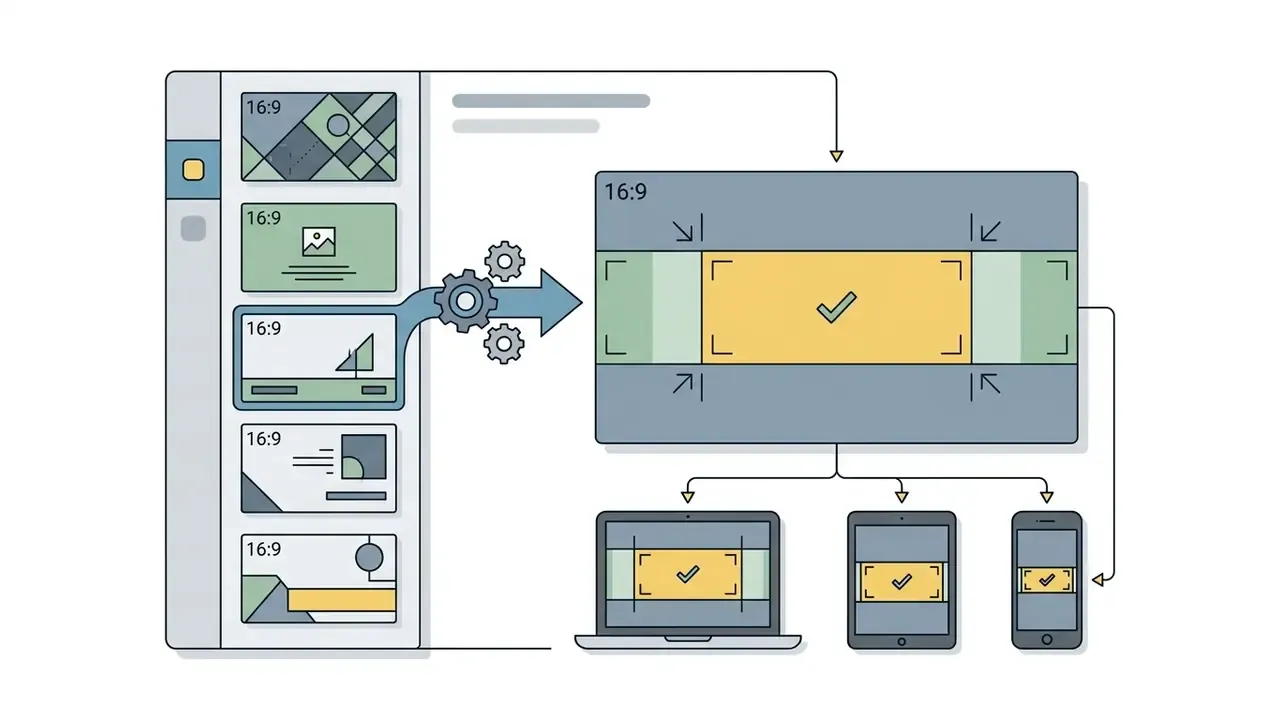
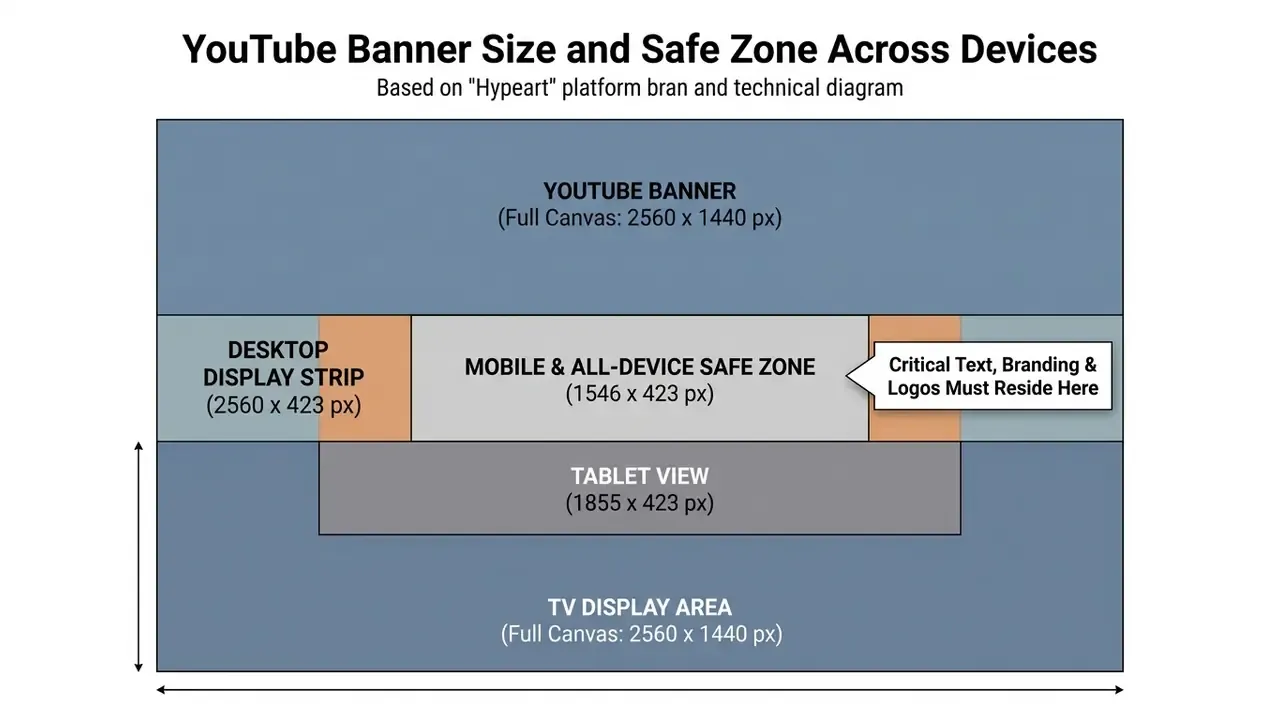
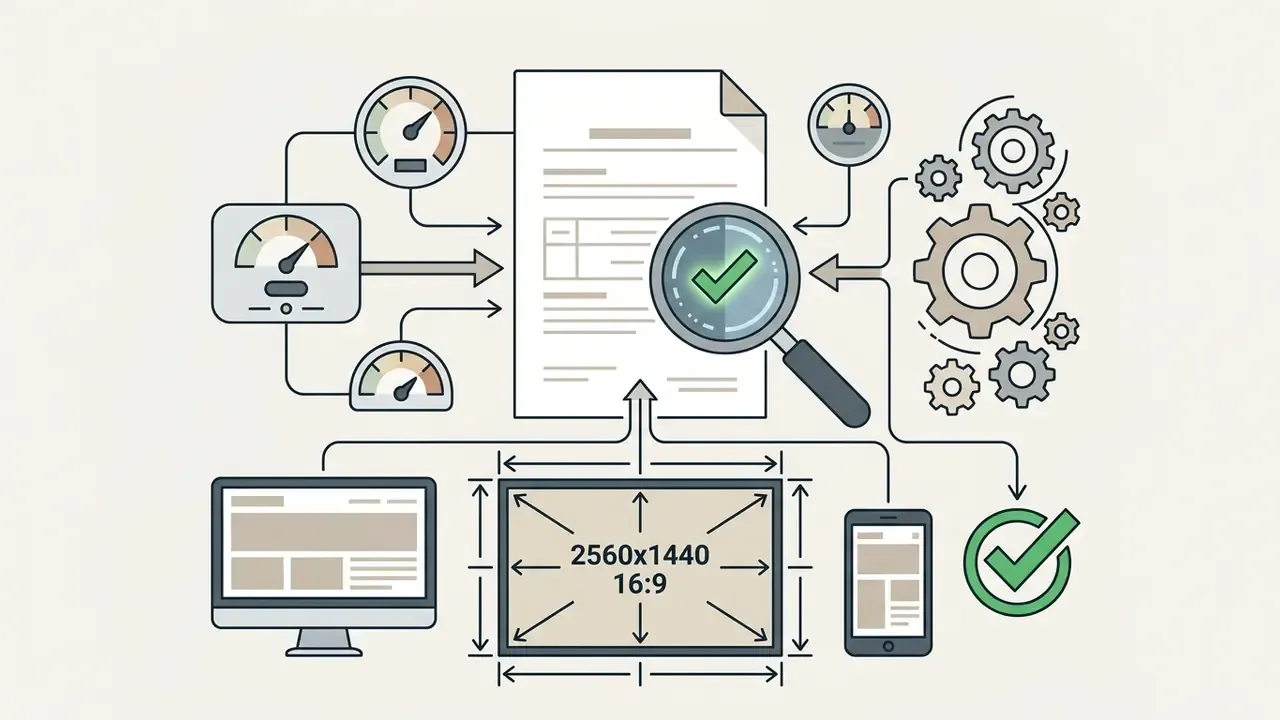
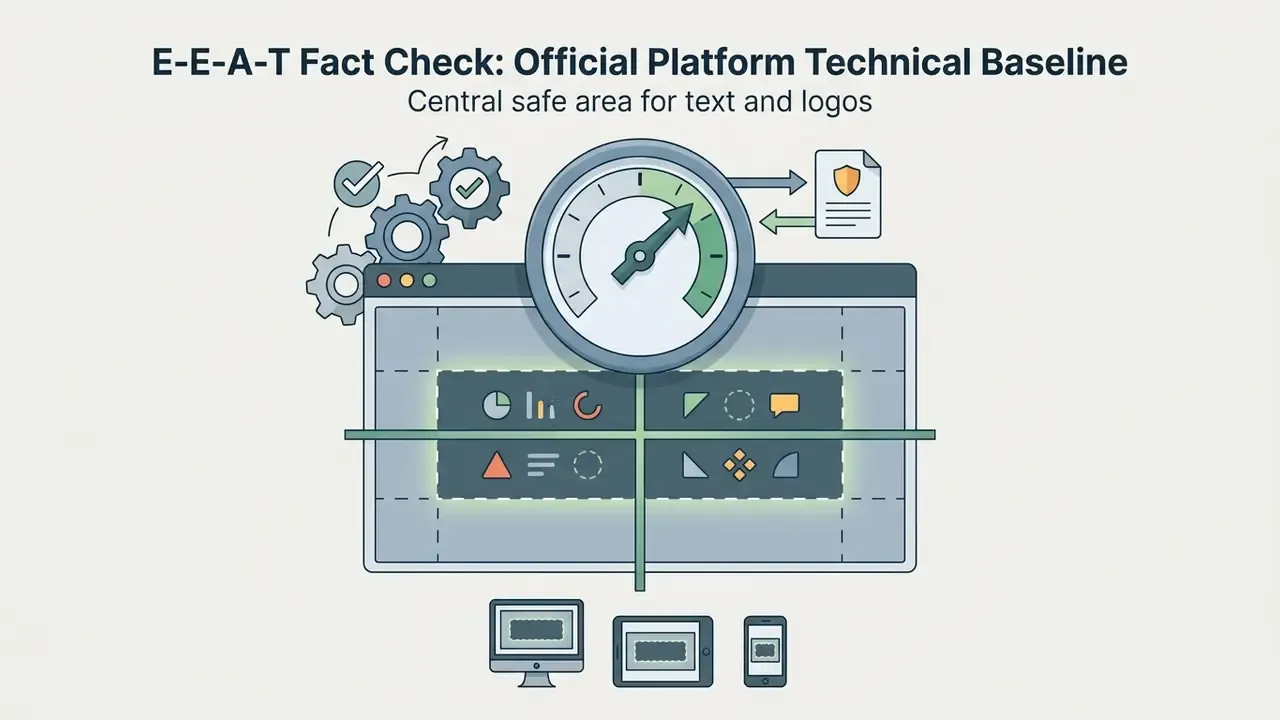
Understanding YouTube banner size geometry is what keeps visual integrity intact across consumer hardware. YouTube renders one uploaded 2560 × 1440 px image differently depending on whether the viewer arrives via smart TV, desktop browser, tablet, or smartphone.
Read that note precisely, because a lot of bad advice starts with a misreading. The 1235 × 338 px figure is the safe area measured on the minimum 2048 × 1152 px upload. Scaled to the recommended 2560 × 1440 px canvas, the identical region measures 1546 × 423 px, the figure used throughout this guide and in current design-tool documentation. Both numbers describe the same physical crop. They differ only in the canvas they are measured against.
For your channel banner to look intentional on every device, all critical copy, logos, and promotional schedules must sit inside that central safe zone. An editor with integrated safe-zone overlays gives you immediate visual verification, so the youtube channel art stays legible regardless of display aspect ratio.
How to Position Text and Logo in the Safe Area
For a perfect YouTube banner size presentation, center all essential typography, value propositions, and corporate marks inside the 1546 × 423 px box. The peripheral space, 507 pixels on each side, should carry secondary background texture, subtle gradients, or ambient artwork that can be cropped without losing meaning.
Visual hierarchy inside that central region depends on contrast. Use dark lettering on light background shapes, or reversed white type over dark fills.
"Text and images of text have a contrast ratio of at least 4.5:1; large-scale text requires at least 3:1."
Graphical elements and icons should hold a minimum 3:1 ratio against adjacent colors. Where a photographic background undermines that ratio, darken or blur the region beneath the type instead of shrinking the type. An AI photo editor can apply a localized gradient scrim without repainting the whole asset, and one click on a preset overlay is usually enough.
E-E-A-T Fact Check: Official Platform Technical Baseline
How to Build a YouTube Banner Design That Reflects Your Brand
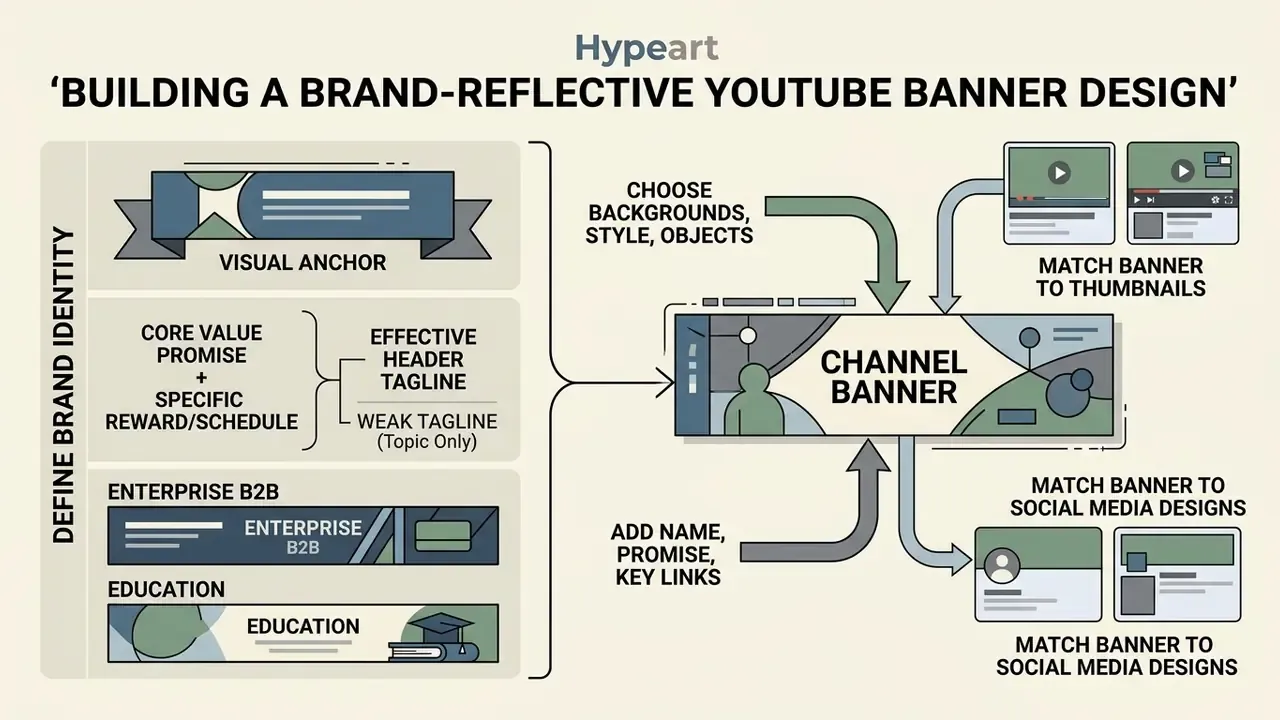
A successful youtube banner design works as a visual anchor. It tells a prospective subscriber who you are, what the channel covers, and what production quality to expect, all before a single video plays. Beyond dimensions, a strong header establishes a visual language that ties directly to your thumbnails and external social profiles.
Combine structured youtube banner backgrounds, consistent typography, and a clear call to action, and incoming traffic starts from trust rather than suspicion.
Aligning header styling with your broader publishing stack keeps the brand infrastructure adaptable. Pair the header with a documented Canva AI Generator workflow, a motion asset built in an animation maker, or even a collectible series if you are exploring how to create nft art around a channel identity.
Choose Backgrounds, Visual Style, and Design Objects
A compelling header starts with background media. Use high-resolution stock photography, clean vector patterns, or restrained geometric texture that supports the text overlay instead of fighting it.
Avoid cluttered graphics inside the safe area. A calm backdrop lets focal objects, product illustrations, or creator headshots read clearly and reinforce the subject matter. Clear-space discipline around the logo, the kind prescribed in most corporate identity systems, is the fastest way to make an amateur header look institutional. A stunning youtube banner is usually the quiet one in the room, not the busiest.
Add Channel Name, Content Promise, and Key Links
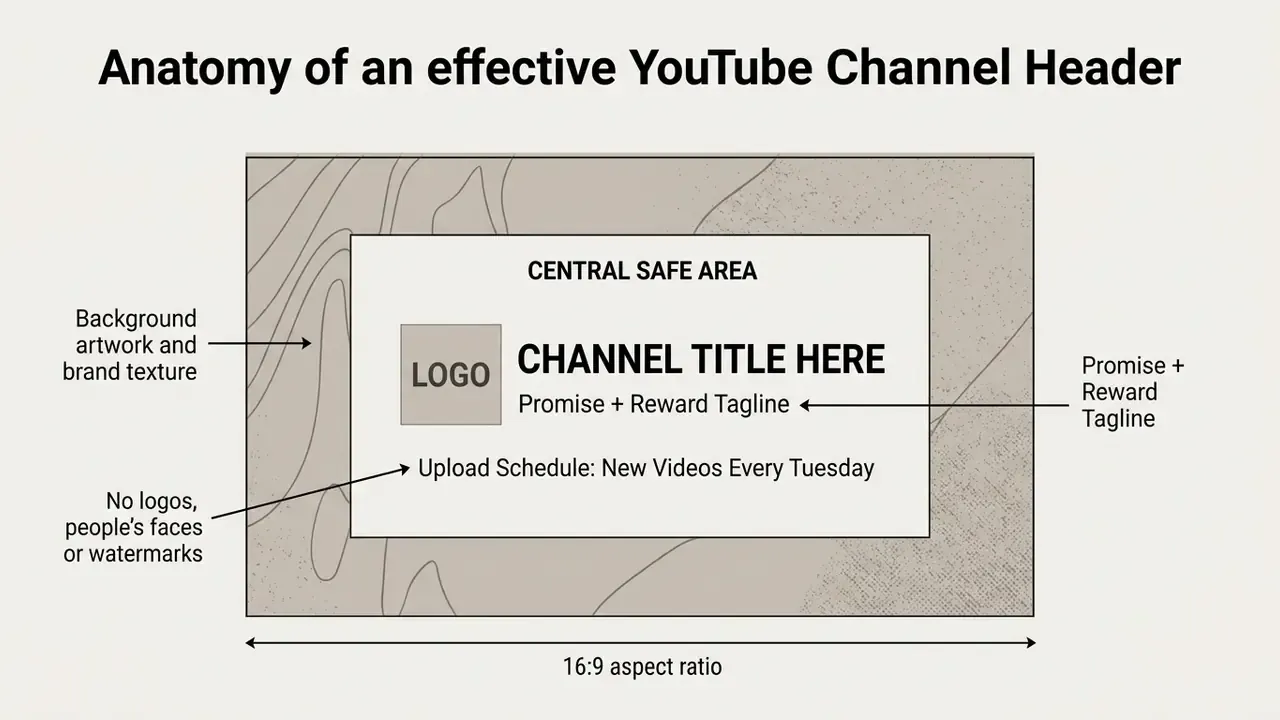
A header must answer three questions for a new viewer within two seconds. What is the channel called? What gets published? When does it appear?
To lift subscriber conversion, safe-zone copy should follow the Promise + Reward framework. Instead of naming a topic, state an explicit viewer outcome with a predictable cadence:
Effective header tagline = core value promise + specific reward or schedule
Anchor this copy in the center of the 1546 × 423 px safe area with a high-contrast font, and hold the promise line to six or seven words so it survives the narrowest crop. Placement rules from official brand systems transfer cleanly here: set the channel name in your heading typeface, put the promise line directly beneath it, and reserve a smaller supporting line for publication cadence.
YouTube renders external channel links as native overlays in the lower-right corner of the header on desktop browsers, so your design should support them rather than compete with them. Use subtle directional cues, or clear messaging in the channel description, to point viewers toward featured social profiles and your website. Add each destination as a full URL in the channel Links settings, and write descriptive link text so the purpose is obvious to every visitor, including those using assistive technology.
Templates for Gaming YouTube Channel and Other Niches
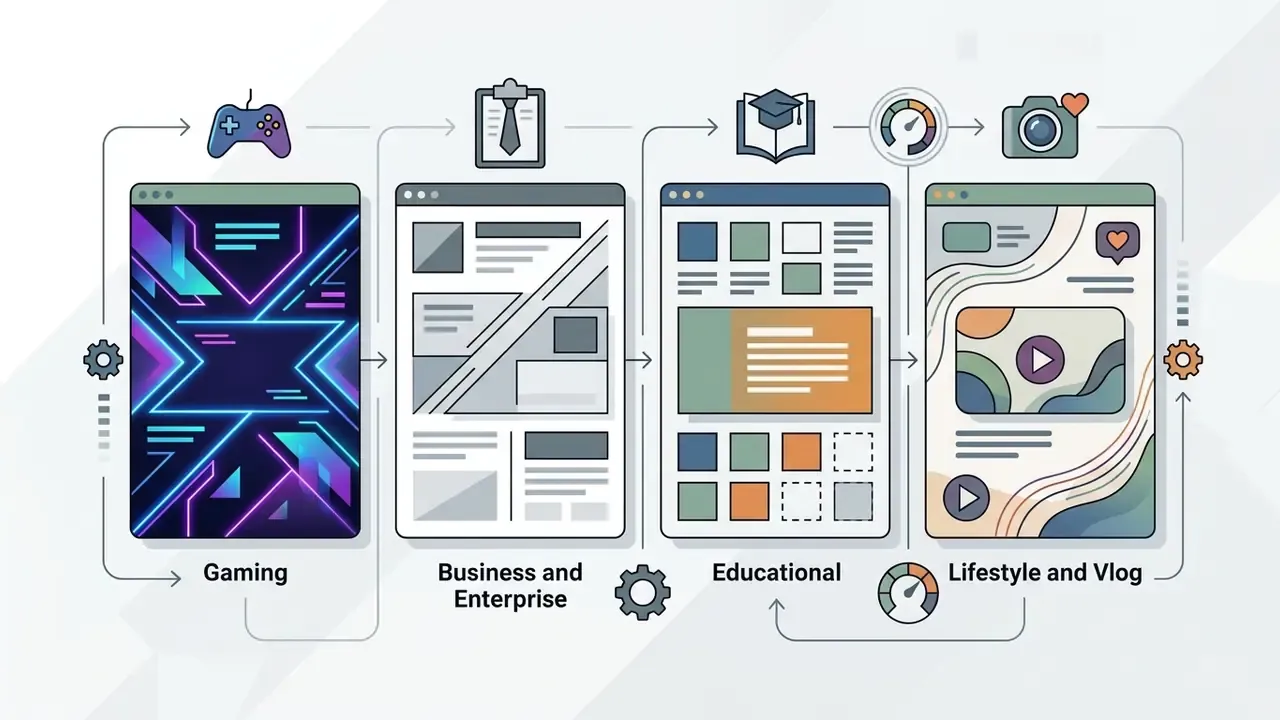
Different niches demand different visual strategies. A gaming youtube banner leans on high-contrast neon accents and kinetic imagery, while a corporate finance channel needs clean typography, restrained palettes, and structured layout. Same canvas, opposite instincts.
Choosing a template engineered for your vertical means your channel art meets category visual standards from the first upload.
"Generative AI improved novices' design performance by 0.58 standard deviations, but reduced their overall creative self-efficacy."
That trade-off argues for a hybrid production model. Use a niche-calibrated template as the structural spine, and reserve generative tools for background ideation and texture exploration. Teams expanding their media capability can also review our AI Media Benchmarks to evaluate complementary creation tools on measured output quality rather than marketing claims.
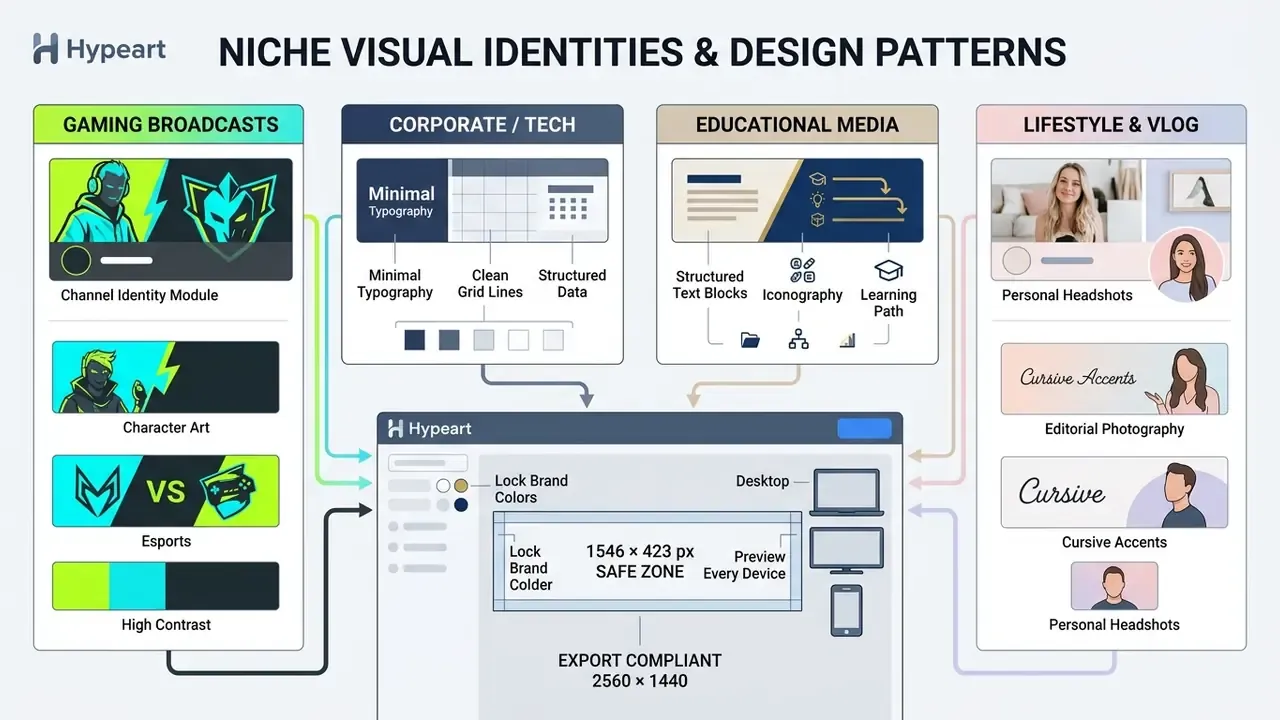
Inside those four broad verticals sit the micro-niches that actually drive template choice:
| Channel Micro-Vertical | Primary Visual Palette | Key Graphics & Layer Elements | Target Typography Style |
|---|---|---|---|
| Esports & Competitive | High-contrast neon cyan, crimson | Team emblems, sponsor brackets, character cutouts | Extended geometric sans-serif |
| Retro & 8-Bit Gaming | Magenta, pixel-art purple, yellow | Sprites, scanline overlays, arcade borders | Chunky pixel/bitmap typography |
| Anime & VTuber Streaming | Pastel pink, soft violet, white | Transparent avatar overlays, particle effects | Editorial serif with Japanese sub-text |
| Battle Royale (Fortnite, PUBG) | Desaturated khaki, orange alert accents | Weapon silhouettes, squad rosters, map fragments | Heavy condensed display type |
| MOBA & Fantasy Strategy | Deep indigo, gold, ember orange | Rune motifs, hero portraits, rank badges | Ornamental serif headline plus clean body |
| Corporate B2B & Finance | Navy blue, slate gray, emerald | Clean grid structures, subtle data charts | Minimalist, high-legibility grotesque |
| Lo-Fi & Study Channels | Warm sepia, muted amber, charcoal | Grain textures, ambient room art, minimal schedules | Soft humanist sans-serif |
| Minimalist Educational | Off-white, single accent hue | Icon rows, numbered module labels | Large-x-height geometric sans |
| Beauty & Fashion | Blush, ivory, muted gold | Editorial portrait crops, thin rules | High-contrast fashion serif |
| Music & Podcast | Black, electric violet, white | Waveform motifs, mic iconography, episode cadence | Bold uppercase sans with wide tracking |
Channel Art for Business, Educational, Lifestyle, and Vlog Channels
Non-gaming verticals prioritize clarity, professional authority, or personal connection. Business and enterprise channels use clean grid structures, generous white space, and corporate palettes to signal analytical rigor. Navy, slate, and one accent color is the default for finance and B2B SaaS, paired with a short value proposition instead of decorative imagery.
Educational channels benefit from structured layouts that surface core course topics and publication dates, with readable typography and a simple hierarchy across short text blocks. Lifestyle and vlog channels center the creator: high-quality portraits, warm natural light, warm typefaces. The hero image carries the message there, and text stays minimal, because phone cropping is unforgiving. If you want to create free youtube channel art banner assets for a personal channel, start with a portrait-forward template and resist adding a second headline.
How to Upload and Update Your YouTube Channel Banner
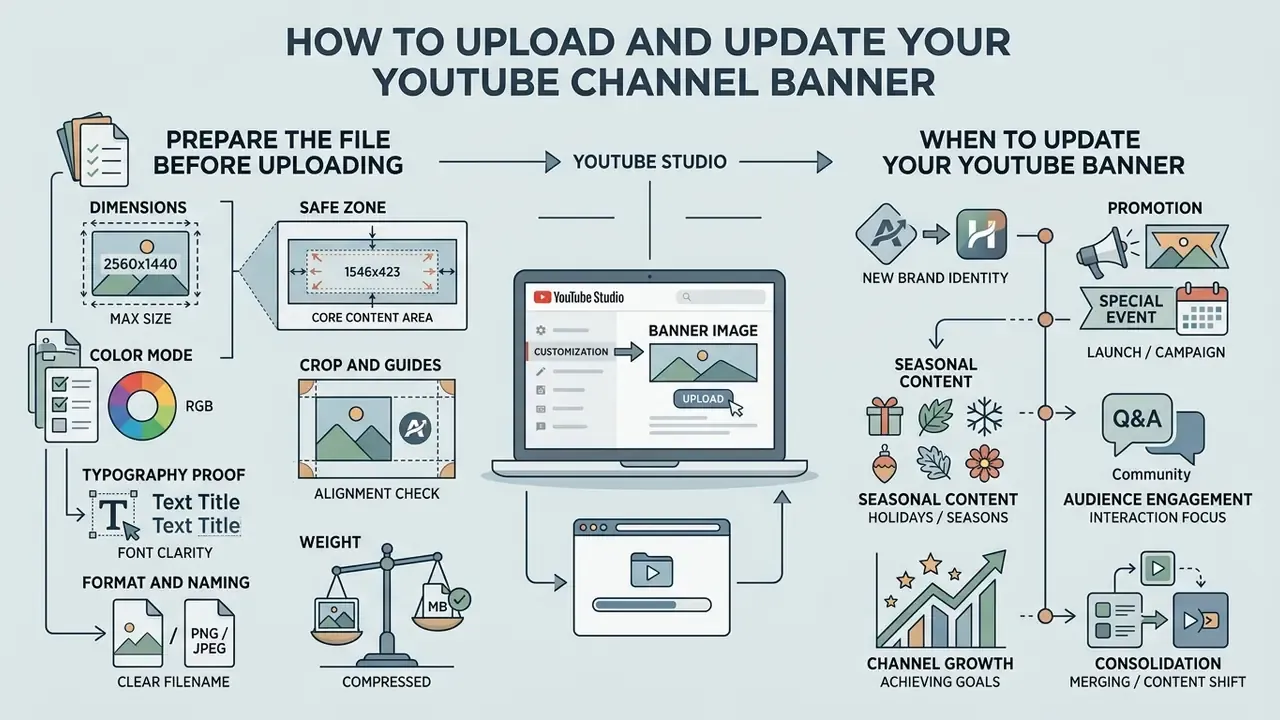
Publishing your artwork happens inside YouTube Studio. Sign in, open Customization → Branding, upload the banner image, review the automatic crop preview across device tabs, then publish. Keeping the banner current holds your channel branding in step with seasonal campaigns, product launches, and subscriber milestones, and it slots naturally into the rest of your production stack, including YouTube video editing workflows.
Before publishing, run a final technical audit. If your channel infrastructure leans on automation, our AI Media API Guides and AI Media Commercial-Use Hub help standardize asset deployment across corporate platforms, and the production estimators in our calculators section are useful for sizing asset workload per channel.
Prepare the File Before Uploading to YouTube
Verify that the exported graphic measures exactly 2560 × 1440 pixels and that total weight stays under 6 MB. Save as PNG to preserve crisp text edges and transparent logo layers without compression artifacts. If the PNG exceeds the cap, switch to a high-quality JPG rather than downscaling the canvas. Comparable file compression tools illustrate the trade-off curve between weight and edge fidelity.
Run this sequence in order before upload:
- Format and namingPNG or JPG, non-animated, descriptive file name.
- Dimensionsexactly 2560 × 1440 px, with no upscaled source material.
- Color modeRGB, 72 DPI or higher.
- Crop and guidesguide layers hidden, no baked-in borders or shadows.
- Typography proofinspect at 100% scale on a local monitor for legibility and background clarity.
- Weightconfirm the file is under 6 MB.
Confirming file integrity before upload is what prevents blurry rendering once YouTube applies server-side compression.
Frequently Asked Questions (FAQ)
What is the recommended YouTube banner size in 2026?
The official recommended YouTube banner size is 2560 × 1440 pixels at a 16:9 aspect ratio. Minimum allowed upload size is 2048 × 1152 pixels, and maximum file size is 6 MB.
What are the exact dimensions of the YouTube banner safe area?
The safe area for text and logos is 1546 × 423 pixels, centered inside the 2560 × 1440 px canvas, which leaves 507 px margins left and right plus 508.5 px top and bottom. Measured on the 2048 × 1152 px minimum upload, that same region equals 1235 × 338 px. Content inside this rectangle renders on phones, tablets, desktop browsers, and TVs.
Can I create a YouTube banner for free without a watermark?
Yes. Leading web editors let you create, customize, and export 2560 × 1440 px PNG channel banners free with no forced watermark, provided you use free stock assets and non-premium templates. Test one real export on the exact plan you intend to use, since some free tiers apply watermarks only at download.
Should I export my YouTube channel art as PNG or JPG?
PNG is the better default, because lossless compression preserves sharp typography edges, vector icons, and transparent logo layers. High-quality JPG is an acceptable fallback when your file exceeds the 6 MB platform limit.
Why does my YouTube banner look blurry on mobile or desktop?
Blurriness usually traces to an upload below the 2048 × 1152 px minimum, or to critical text placed outside the 1546 × 423 px safe zone and then subjected to responsive scaling. Design on a 2560 × 1440 px canvas and export at 72 DPI or higher.
Which file formats can I upload into an online banner editor?
Most professional browser editors accept PNG, JPG, static WebP, and HEIC/HEIF raster files up to roughly 50 MB and 250 megapixels, SVG vectors under 3 MB saved with an SVG 1.1 profile, and layered PSD or AI master files parsed into editable layers. Video backgrounds are typically accepted as MOV, MP4, MPEG, MKV, WEBM, and GIF, though channel art itself must be exported as a static image.
Can a team review and co-edit a banner before publishing?
Yes. Editors with real-time collaboration issue an editable share link, so brand managers leave inline comments, adjust safe-zone positioning, and approve the header without exchanging exported drafts. Combined with locked Brand Kits, this keeps palette and logo usage compliant while distributed teams work in parallel.
Is AI-generated banner artwork safe to use commercially?
It depends entirely on the provider's licensing terms. Some engines grant broad commercial rights, others restrict use by plan tier or region, and indemnification varies widely. Verify the licence, retain prompts and reference inputs for audit purposes, and confirm whether your uploaded brand assets may be used for model training before publishing generated artwork on a corporate channel.
How often should I change my channel banner?
Keep core identity stable and update on defined triggers: rebrands, new show or series launches, seasonal campaigns, subscriber milestones, and dated events. A saved master template turns each refresh into a copy-and-edit task rather than a redesign.
Disclaimer: This article is provided for general informational purposes and does not constitute legal, compliance, or financial advice. Stock-asset licences, AI output rights, data-retention policies, and platform specifications change over time. Verify current terms with the relevant provider and with your own legal or compliance function before publishing commercial assets.
SEO Metadata & Article Summary
- Title Tag Banner Maker for YouTube: Create Channel Art Online Free
- Meta Description Create professional YouTube channel art online. Pick templates, lock brand colors, verify the 1546 × 423 px mobile safe zone, and export compliant 2560 × 1440 px banners free.
- Primary Target Keyword banner maker for youtube
- Secondary Keywords youtube banner maker, youtube banner templates, youtube channel art, gaming youtube banner, youtube banner size
- Target Audience Digital media managers, content creators, enterprise growth teams, brand governance leads, and channel operators.
- Last Updated 2026