Last updated: February 2026 · Reviewed by: hypeart.ai editorial desk (AI media workflows, licensing and platform-policy coverage) · Company verification status for hypeart.ai: no third-party verification information was available at the time of publication. Every normative claim below points back to a primary source (YouTube Help, FTC, ISO, NIST, peer-reviewed papers) so you can check it yourself instead of trusting us.
What you actually need to know first
- Your model stack matters more than your platform. Use Google Veo 3.1 or OpenAI Sora 2 for cinematic photoreal B-roll, Kling 3.0 for complex subject motion, Seedance 2.0 for stylized passes, and Flux for consistent still frames and thumbnails.
- Prompts are engineering, not wishes. Structure every request as
[Scene Setup] + [Subject & Action] + [Camera Movement] + [Atmosphere/Lighting] + [Format/Duration] + [Negative Constraints], and name camera kinematics explicitly: dolly, push, orbit, crane, handheld, parallax, focal length. - Localization is the cheapest growth lever left. AI dubbing plus phoneme-level lip sync now covers 175+ languages and dialects without a reshoot.

Who this guide is for, and how to read it
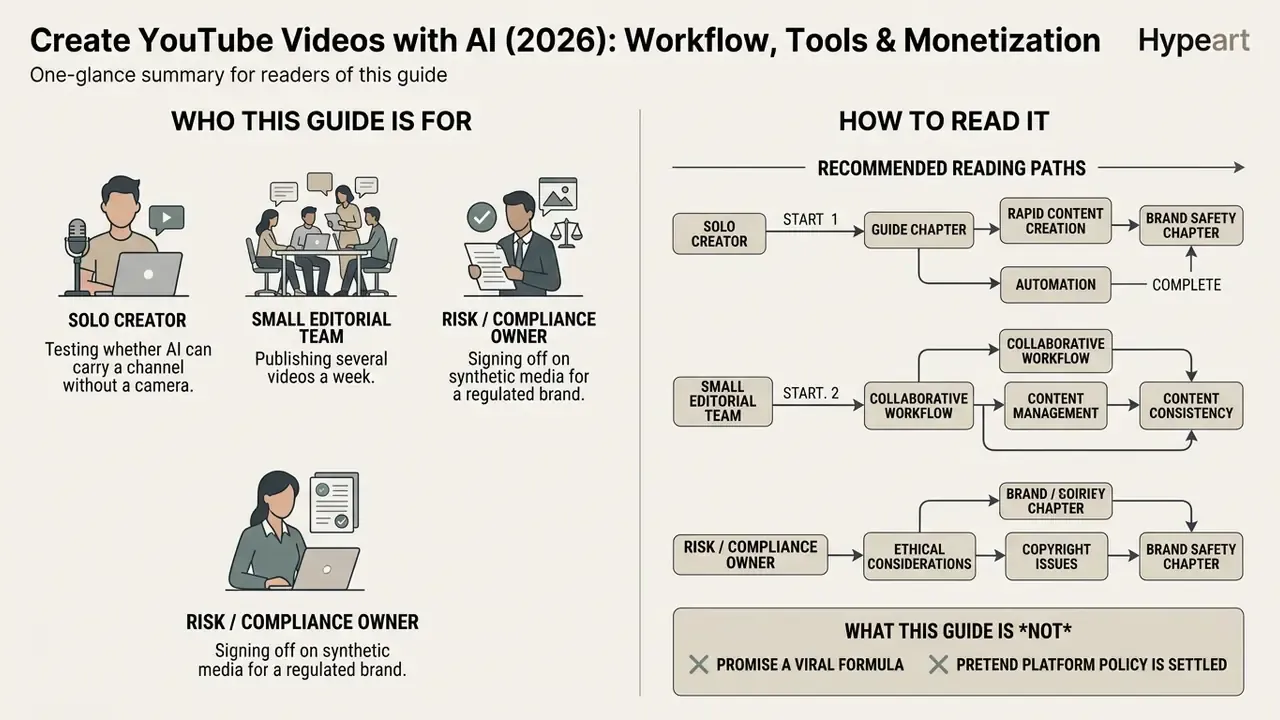
This is written for three kinds of operator, and they need different chapters.
The solo creator testing whether AI can carry a channel without a camera. Start with planning and the step-by-step pipeline, ignore the enterprise data-residency notes for now, and treat the pricing table as your ceiling rather than your plan.
The small editorial team publishing several videos a week. Your bottleneck is not generation, it is review capacity. Go straight to the quality gates, the brand kit discipline, and the repeatable format section.
The risk or compliance owner signing off on synthetic media for a regulated brand. Read the disclosure obligations, the consent requirements for voice cloning, and the review-log argument under monetization. Provenance beats detector confidence, and the evidence shows why.
What this guide does not do: it does not promise a viral formula, and it does not pretend platform policy is stable. Policies shifted twice in eighteen months. Build the workflow so a policy change costs you a checklist edit, not a rebuild.
What AI can do for YouTube video creation
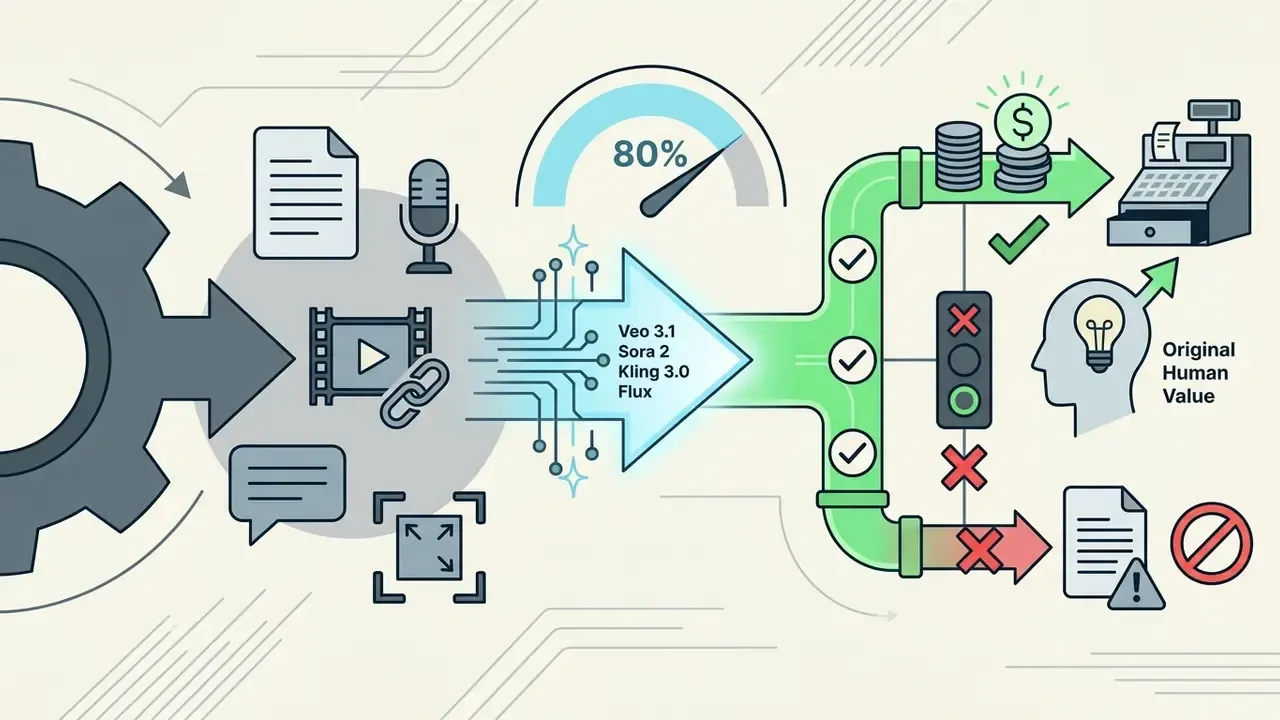
Generative artificial intelligence automates up to 80 percent of repetitive video production tasks: script drafting, voice synthesis, scene generation, captioning. Human oversight still carries accuracy and compliance. Modern ai tools for making youtube videos turn simple text prompts into a fully structured timeline, which is a genuine shift in where the work sits.
«LLMs and video processors appear in more than 40% of documented AI content-creation workflows.»
That same body of research shows generative models spanning the whole lifecycle, planning through production, editing and upload, rather than sitting in one isolated step. Platform rules draw a hard line around authenticity, though. YouTube policies updated in July 2025 and reaffirmed through 2026 require ai created youtube videos to retain original commentary, human value and authentic oversight to stay eligible for monetization. YouTube's own guidance treats script ideation, draft generation and automatic captions as productivity uses that need no disclosure. Realistic synthetic faces, cloned voices of real people and fabricated events need an explicit label.
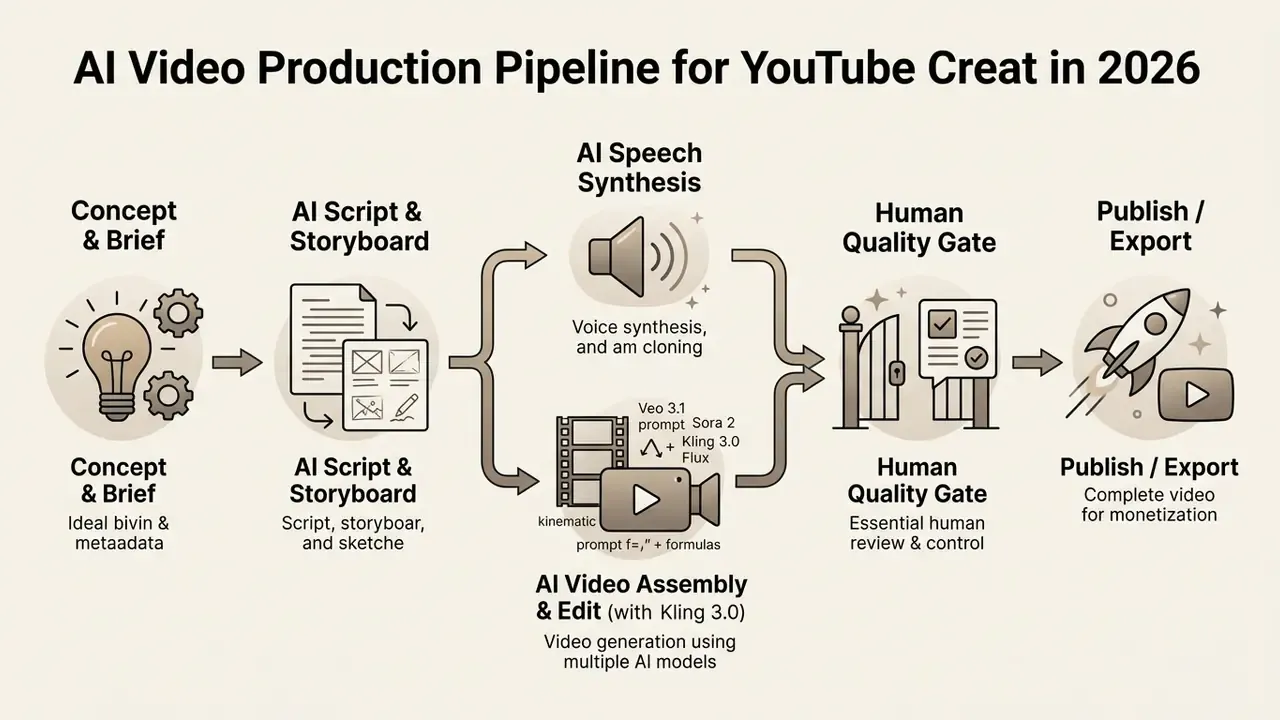
Figure 1: End-to-end production architecture for AI-generated YouTube content, highlighting the human verification gateway before publication. Alt text to publish with the diagram: "Workflow chart showing how to create youtube videos with ai from concept to publication."
Formats of AI-generated YouTube videos
AI video generation tools support both 16:9 long videos and 9:16 youtube shorts (1080×1920) across educational, commentary, product review and faceless channel structures. Readers who want the underlying taxonomy first can review how AI video generators differ by architecture and output length before committing to a stack.
Educational channels lean on synthetic presenters and structured visual slides to explain technical concepts. They also depend on template-driven cropping, so charts and on-screen text stay readable after reformatting. Commentary and product review channels use AI to generate dynamic B-roll, motion graphics and comparative overlays. A faceless youtube channel pairs ai voices from text-to-speech engines with stock video or synthetic video clips, which removes the need for on-camera talent entirely. Teams building recurring animated explainers can standardize output through an animation maker instead of regenerating every asset from scratch.
One small observation from watching these channels grow: the format that survives is rarely the prettiest. It is the one whose episodes look like siblings.
Which production tasks AI can automate
Production automation covers five operational layers: generate scripts, speech synthesis, B-roll matching, automated scene editing, and subtitle creation. AI scriptwriting tools turn a topic line into a full script with visual cues and timing markers. Synthetic speech engines convert written text into natural narration across dozens of languages, and modern text-to-video AI tools extend the same prompt into matching visual sequences.
Visual automation matches script lines with relevant stock footage, generated video clips or animated ai avatars. Automated editors assemble multi-track timelines, cut silence, balance background music and burn in dynamic subtitles. Documented product behaviour backs each layer: Clipchamp's auto-captions detect speech and export editable .SRT files, Adobe Firefly's video editor generates synchronized captions from spoken dialogue, Synthesia ties dynamic, closed and burned-in captions to the script, and script-to-video engines such as VideoGen read a script, select matching B-roll from stock libraries, then assemble voiceover, subtitles and music into a publish-ready timeline.
Where human control stays mandatory. Technical enhancement, meaning colour correction, stabilization, noise reduction, background removal, can be automated safely because it does not alter meaning. The moment output touches identity, voice or the depiction of real events, review and disclosure become obligatory. UN audiovisual standard operating procedures require human review of automated captions and translations, plus prior authorization when AI modifies a person's likeness or expression.
Plan an AI YouTube video before generating it
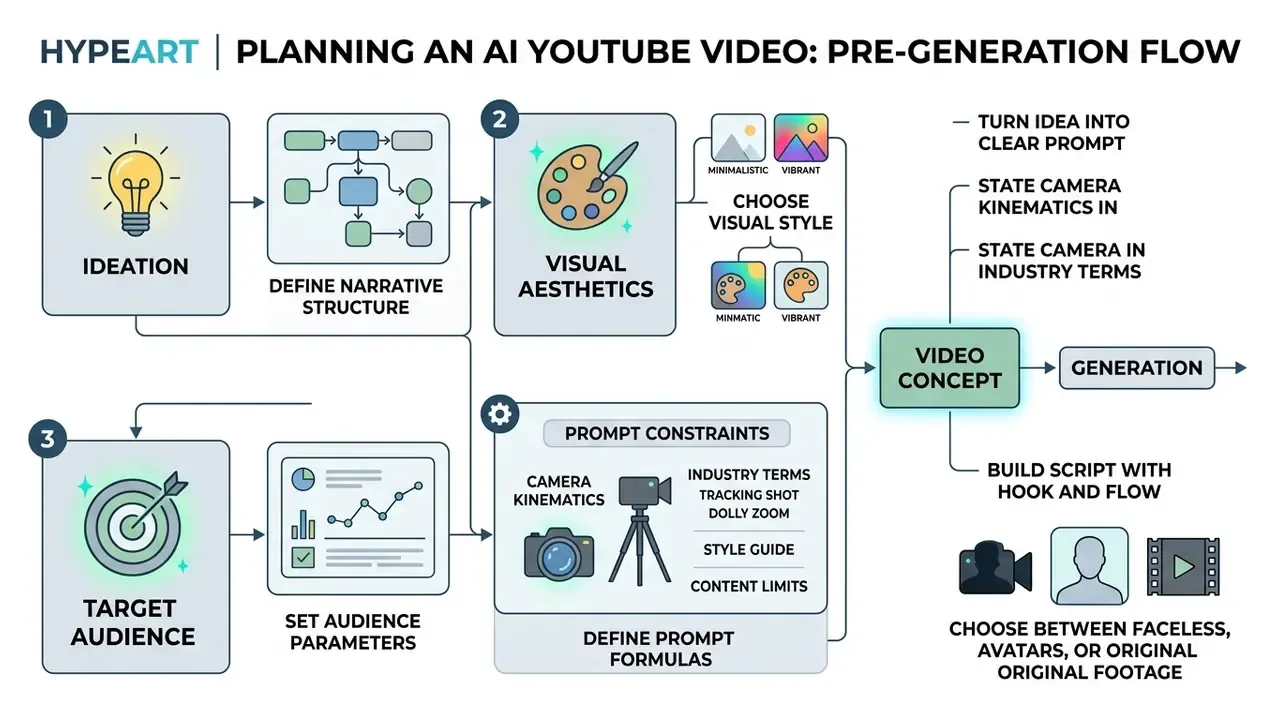
Pre-generation planning fixes the narrative structure, audience parameters, visual aesthetics and prompt constraints before a single synthetic asset exists. Unstructured prompting produces visual drift, hallucinated claims and pacing that wanders. Setting editorial parameters upfront cuts revision cycles and keeps output inside the channel's risk appetite.
Turn a video idea into a clear prompt
Effective prompts combine scene setup, subject action, camera dynamics, lighting tone and explicit negative constraints inside one structured input. According to Google's Video Gen Prompt Guide (2026) and Adobe Firefly's video framework, prompts must define what should not appear in frame alongside the positive descriptors. Adobe's recommended order is Shot Type + Character + Action + Location + Aesthetic.
«Generative models span the planning, production, editing and uploading stages of video work.»
A reliable construction formula follows this sequence:
[Scene Setup] + [Subject & Action] + [Camera Movement] + [Atmosphere/Lighting] + [Format/Duration] + [Negative Constraints]
State camera kinematics in industry terms. Abstract wording produces abstract motion. Instead of "nice camera move", write the operator's instruction: Camera Movement: slow dolly-in, 35mm lens, shallow optical depth of field, natural parallax, no digital zoom. The vocabulary worth reusing:
| Move | Prompt phrasing | Best used for |
|---|---|---|
| Dolly in / out | slow dolly in on subject, 50mm lens | Building intent, reveal of a product detail |
| Push / pull | steady push toward subject, tripod-locked horizon | Explainer emphasis beats |
| Orbit (arc) | 180° orbit around subject, constant radius | Product reviews, hardware showcases |
| Crane / boom | crane up from eye level to high angle | Scene establishing shots, intros |
| Handheld | handheld with subtle sway, natural parallax | Documentary and commentary authenticity |
| Static | locked-off static frame, 24fps, no camera move | Text overlays, data visualizations |
Add structural framing constraints (subject centred, headroom 10%, horizon level) to reduce temporal drift across multi-second renders. Define focal length and depth of field too, otherwise successive clips cut together with an optical mismatch that viewers feel without naming. Developers wiring these prompts into automated pipelines can review request schemas in the Google Veo implementation guide.
Build a script with a hook and watchable flow
A watchable script relies on a 0 to 3 second pattern-interrupt hook, then a structured problem-solution build, then an attention reset every 30 to 60 seconds. Updated: rather than attributing drop-off to information-seeking research, the practical rule from retention frameworks is explicit. The first 0 to 3 seconds carry the hook, 3 to 8 seconds establish curiosity, 8 to 25 seconds must deliver the first concrete value payoff. After that, the body changes register every 30 to 60 seconds before the final payoff.
«AI-generated titles increased views by 7.1% and watch duration by 4.1% when actively used.»
Those first three seconds must deliver a clear thesis or a visual surprise: movement, a power word, or a transformation promise with a number, name or claim attached. The body should alternate between core explanation, visual demonstration and takeaway to hold retention across a long runtime. One honest caveat here, or maybe a correction of my own earlier framing: a great hook on a thin script buys you attention you then waste. Fix the payoff first.
Choose between faceless videos, avatars and original footage
Creators pick between faceless youtube channels, synthetic ai avatars and hybrid creator footage based on production budget, the trust their audience demands, and monetization risk tolerance. Faceless channels are cheapest to operate, usually $20 to $60 a month for automated Shorts workflows, or roughly $100 per outsourced long-form video. Anyone testing the model on zero budget can start with free AI video generators before committing to paid credits.
Digital avatars from an ai avatar generator give you a consistent on-screen presenter at roughly $1 to $5 per generated minute, standard lip sync at the low end, high-fidelity phoneme-level sync at the top. That suits corporate training and structured explainers. Hybrid formats combine live-action human commentary with AI-generated B-roll and carry the highest audience trust and the strongest defensibility under YouTube monetization policy. They cost more than fully synthetic output, because filming still happens, yet they cut scripting and editing time substantially.
| Format | Typical cost | Trust ceiling | Monetization risk |
|---|---|---|---|
| Faceless (TTS + stock/synthetic B-roll) | $20–$60/mo; ~$100 per outsourced long-form | Low to medium | Highest (template/mass-production flags) |
| AI avatar presenter | $1–$5 per generated minute; ~$5–$15 per short video | Medium | Medium (disclosure required for realistic humans) |
| Hybrid (human A-roll + AI B-roll) | Filming cost + generation credits | High | Lowest |
Engagement uplift figures published by vendors are marketing estimates, not peer-reviewed comparisons. Treat them as directional only.
Choose AI tools for making YouTube videos
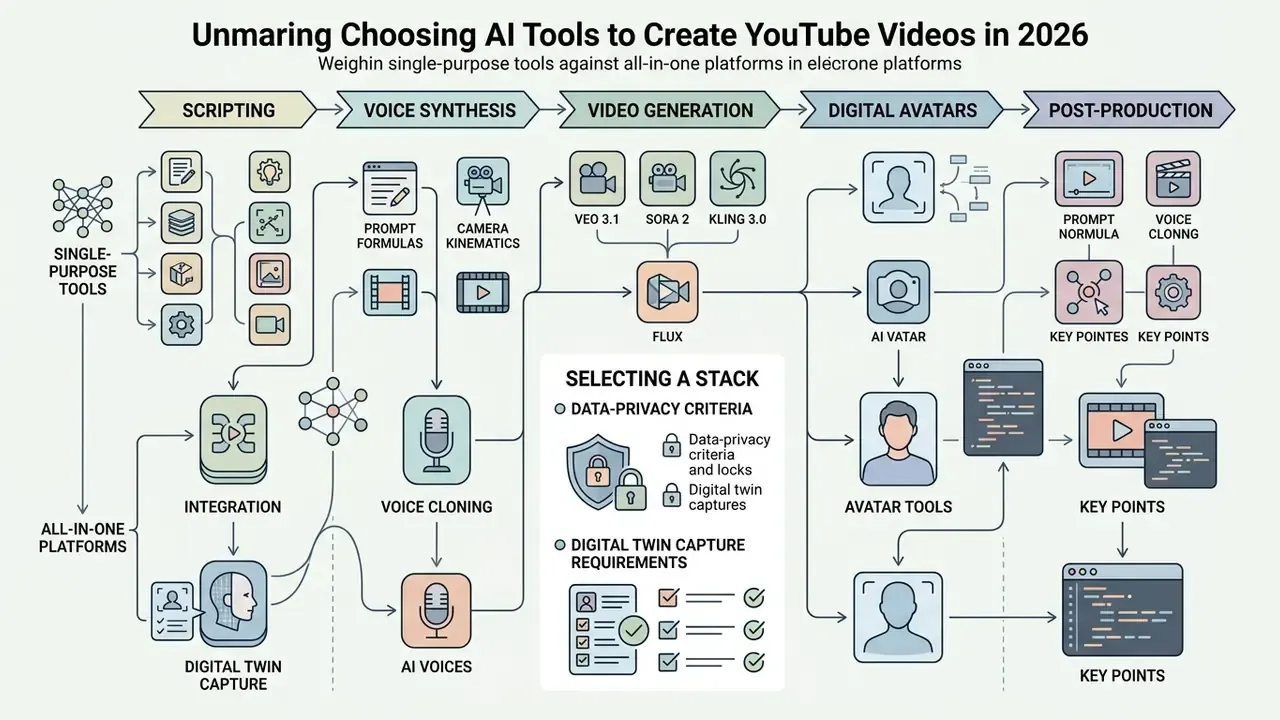
Selecting a stack means weighing single-purpose tools against all-in-one platforms across five functional tiers: scripting, voice synthesis, video generation, digital avatars, post-production editing. You can compare features across software categories using AI Media Comparison Matrices, and shortlist candidates through the roundup of best AI video generators.
| Tool Category | Representative tools (2026) | Typical entry price | Primary Capabilities | Key Strengths | Key Limitations |
|---|---|---|---|---|---|
| AI Video Generators | Runway, Pika, Kling, Luma, Veo-based apps | $12–$35/mo or credit packs | Text-to-video, image-to-video, prompt-based scene synthesis | Rapid clip generation, no physical set needed | Temporal drift, physics inconsistencies, short clip ceilings |
| Scripting LLMs | ChatGPT, Claude, Gemini | $0–$20/mo | Outline generation, script drafting, hook optimization | High-speed ideation, flexible formatting across niches | Factual errors, requires human verification |
| AI Voice Tools | ElevenLabs, Murf, Synthesia voices | $5–$30/mo | Text-to-speech, voice cloning, multi-language narration | Natural cadence, consistent voice branding | Plan-based quotas, mispronounced niche terms |
| Avatar Generators | HeyGen, Synthesia, D-ID | $0 free tier; $29–$49/mo | Photorealistic talking-head rendering, script lip-syncing | Reusable digital presenters, rapid localization | Occasional uncanny valley, rigid body gestures |
| AI Video Editors | Descript, CapCut, Opus Clip, Premiere Pro (AI), Wisecut, Vizard | $0–$23/mo | Silence removal, auto-captioning, scene detection, intelligent reframing | Cuts post-production assembly time sharply | Export limits, platform-specific editing constraints |
| Compression & delivery | Handbrake, cloud video compressors | Free–$10/mo | Bitrate and file-size optimization before upload | Faster uploads, fewer processing failures | Quality loss if over-compressed |
Short version of the table: generators give you footage, editors give you a publishable timeline, and nobody gives you accuracy. That stays yours.
Data-privacy selection criteria. Before you commit a channel to any stack, confirm four points in writing: (1) whether uploads and voice samples train vendor models, (2) the retention period for source media and cloned voice embeddings, (3) whether commercial rights attach on free tiers or only paid plans, and (4) whether enterprise plans offer regional data residency. Those four answers shape the compliance posture of the whole pipeline far more than any feature comparison does.
AI video generators and all-in-one video makers
All-in-one platforms convert simple text prompts or structured scripts straight into complete timelines with pre-matched stock assets, motion graphics and background tracks. Runway, Synthesia, Pictory and HeyGen combine script parsing, visual selection and voiceover rendering in one interface, and most expose several entry doors: prompt-to-video, template start, script import, document import, or slide-deck import. That flexibility is why an ai video maker youtube workflow can begin from a Google Doc you already wrote.
«Video processors appear in roughly 37% of analysed AI content-creation workflows on YouTube.»
Developers integrating synthetic media pipelines into automated enterprise tooling can consult AI Media API Guides for implementation standards, including avatar or image-based video creation from scripts and pre-recorded audio.
AI voices, voice cloning and avatar tools
AI voice generators and avatar platforms produce natural narration and lip-synced presenters using text-to-speech models plus voice cloning verified by explicit consent protocols. Modern cloning pipelines need only 30 to 60 seconds of reference audio for a custom voice model, though vendor requirements range from 30 seconds up to roughly 2 or 3 minutes of clean speech depending on the fidelity target. A category overview of AI voice generators covers language coverage, licensing scope and quota structures in more depth.
Digital twin (avatar) capture requirements. Creating a custom avatar needs a high-resolution 15 to 30 second webcam recording, and HeyGen's Avatar V pipeline documents 15 seconds as the working minimum. Shoot it in even frontal light, with natural head movement, varied speech phonemes and nothing moving behind you. That short pass lets neural models map gesture cadence and facial musculature, after which the avatar can perform in any outfit or setting with phoneme-level lip sync across 175+ languages and dialects. Practical capture checklist: 1080p or better, face filling 30 to 50% of frame, no hats or reflective glasses, continuous unscripted speech rather than reading, plus a second take with wider gestures for expressive presets.
Federal Trade Commission guidelines updated in 2025 mandate strict authorization and anti-impersonation safeguards for commercial voice cloning, and the FTC's Voice Cloning Challenge rules explicitly prohibit misleading uses of the technology.
«Deepfake-detection model performance dropped roughly 50% for video and 48% for audio on fresh real-world data.»
Read that number twice. Because automated detection degrades that sharply on new material, consent documentation and provenance metadata, not detector confidence, must carry the compliance burden. Teams evaluating commercial licensing rights for synthetic speech can review guidelines in the AI Media Commercial-Use Hub.
AI video editors for refining generated content
The 2026 generative model stack
When building a stack, match specific scene demands to dedicated models rather than forcing one engine to cover every shot. The 2026 configuration used by most production-grade platforms looks like this:
| Model | Best-fit task | Practical notes |
|---|---|---|
| Google Veo 3.1 | Photorealistic cinematic B-roll, native audio beds | Strong prompt adherence for lens and lighting language; ideal for establishing shots |
| OpenAI Sora 2 | Narrative multi-shot sequences, physics-heavy action | Better scene continuity across cuts; useful for storyboarded intros |
| Kling 3.0 (and 2.5 Turbo) | Complex subject motion, human movement, sports and action | Handles limb articulation and fast motion with fewer artifacts |
| Seedance 2.0 | Stylized motion passes, animated sequences | Good for branded stylized segments and loop-friendly Shorts |
| Flux | Ultra-consistent still frames, backgrounds, thumbnails | Generate the key frame first, then animate it image-to-video |
The practical workflow is a two-stage chain. Build locked key frames in an image model (Flux), then run image-to-video motion passes in whichever video model matches the shot's demands. First-frame and last-frame locks keep character identity stable between clips, which is the single biggest fix for the "my presenter changed faces" problem. Several editors now ship these engines side by side under one subscription, removing the export and re-upload tax of switching tools mid-edit. For still-frame consistency work, the same logic used in image-to-video AI tools applies to thumbnails and end cards.
Create a YouTube video with AI step by step
Producing a finished video with AI follows a disciplined pipeline: script generation, visual synthesis, voiceover, multi-track editing, export verification. A structured flow stops errors compounding across stages. Documented vendor flows converge on the same shape. Google Vids runs prompt or Doc, then storyboard, then scenes with AI voiceover, then edit, then export. Kapwing runs chat prompt, editable video plan, confirm, MP4 download. Script-to-video engines split narration, visuals, motion graphics and assembly into five discrete stages.
Budget-based stack assembly. Before you generate anything, lock the stack to a monthly ceiling. $0 to $10: free LLM for the script, free-tier TTS, stock B-roll, browser editor, watermark accepted. $30 to $60: paid LLM plus one avatar or voice subscription (about 600 credits, roughly 30 minutes of rendered video) plus an auto-clipping editor. $100 to $250: multi-model generation access at the Veo, Sora and Kling tier, 4K export, voice cloning, dubbing for two or three languages. Assign every pipeline stage below to exactly one paid tool, otherwise you burn credits twice for the same output.
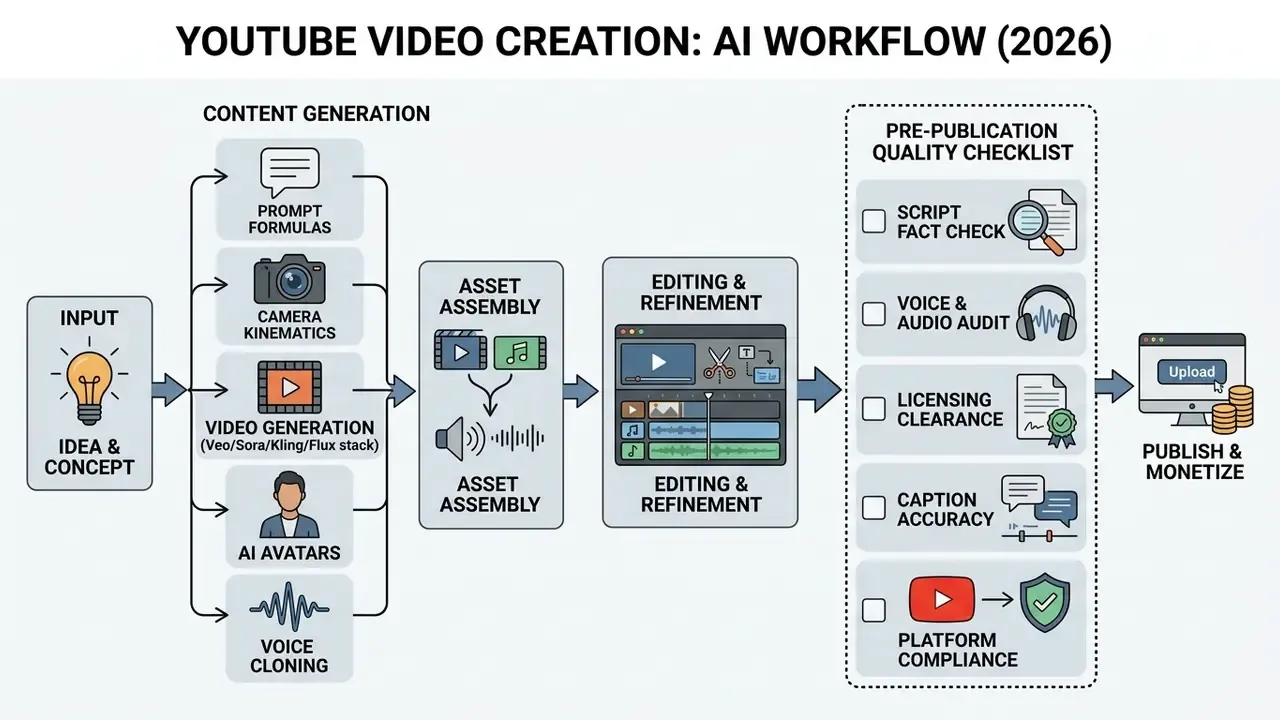
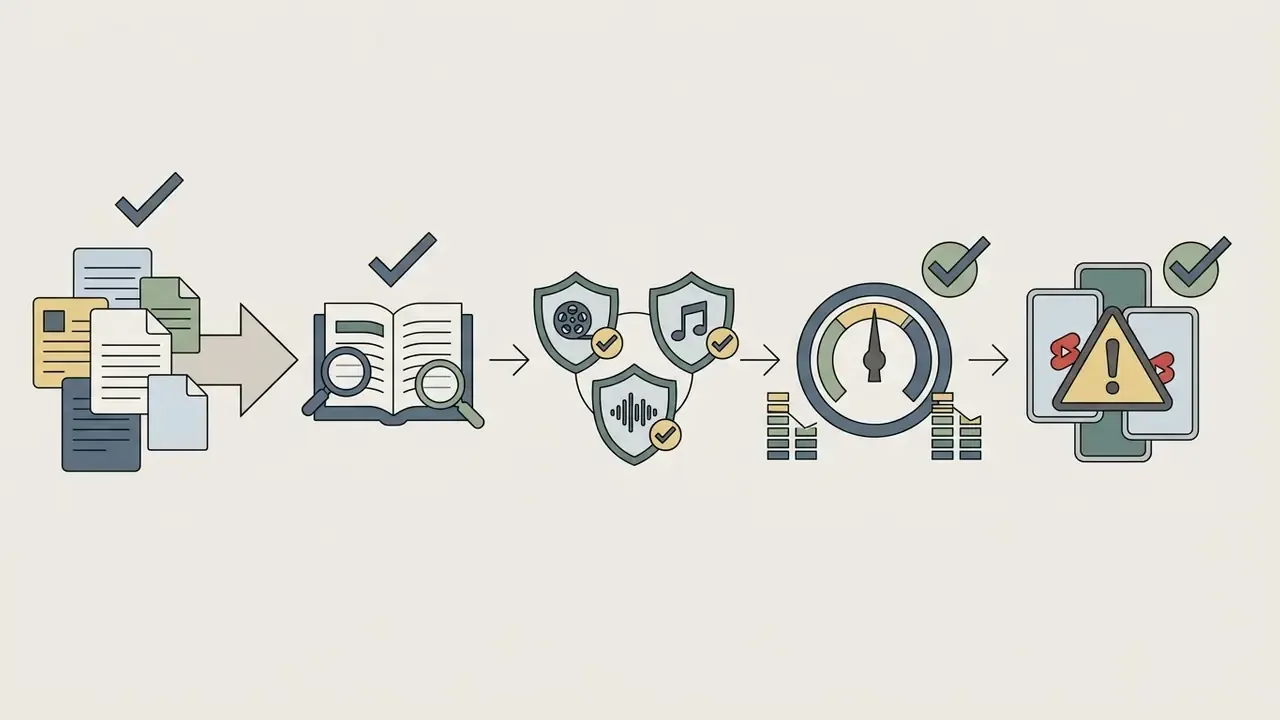
E-E-A-T quality verification method (apply immediately after the checklist above):
Generate the script, narration and scene plan
A production-ready script needs a two-column layout pairing spoken narration line by line with explicit visual prompts and audio cues. Georgetown University's Digital Storytelling Framework describes this structure, video directions left, audio and narration right, so scene-to-sound alignment stays explicit instead of implied. (Source status: this is an institutional teaching guide, not a peer-reviewed study. The underlying practice is independently corroborated by broadcast scripting guidance that recommends stating the story goal first, keeping language concise, reading aloud, and making each column shot-specific.)
«Creators use generative AI for script writing and topic selection during the video planning stage.»
Two-column script example (30-second opening):
| VISUAL DIRECTIONS (left) | AUDIO / NARRATION (right) |
|---|---|
| 0:00–0:03 — Static 35mm frame, hands closing a laptop, hard side light, cool grade. Text overlay: "4 hours → 22 minutes" | "This channel publishes five videos a week. Nobody films anything." |
| 0:03–0:08 — Slow dolly in on monitor showing a timeline filling with clips | "Here's the exact pipeline: script, voice, B-roll, captions, and where a human still has to intervene." |
| 0:08–0:16 — Screen capture: prompt typed, three clips render side by side | "Stage one is the prompt. Not a sentence. A six-part instruction." (SFX: single keyboard click, -22 dB) |
| 0:16–0:25 — Orbit around product on desk, warm grade, shallow DOF | "Stage two generates the visuals. The rule is one model per shot type." |
| 0:25–0:30 — Locked static, lower-third graphic with 5-step list | "Stage three is the part that keeps the channel monetized." (music swells to -18 dB under voice) |
Read the draft aloud, or push it through a speech synthesizer, to catch awkward phrasing, unnatural pauses and cadence mismatches before visual production starts. Keep character names, product spellings and numeric claims identical across every revision, and hold version control so the storyboard never drifts away from the approved script.
Generate visuals, B-roll and video clips
AI visual generation produces custom motion clips and B-roll that hold stylistic consistency through uniform colour temperature, lighting direction and camera movement parameters. Runway's B-roll prompting guidance recommends a four-part prompt structure, camera movement, scene, action, details, and insists B-roll inherit the A-roll's colour temperature, light direction, lens depth and camera energy so the cut never breaks stylistically. Prompt descriptors should therefore specify lens focal length, colour grading palette (warm cinematic versus cool corporate, for instance) and lighting sources in every scene request.
«The multimodal diffusion transformer MVDiT outperforms previous methods on text–video semantic alignment across extensive experiments.»
Edit, add captions and export for YouTube
Final editing integrates synchronized voiceovers, burned-in or sidecar SRT subtitles, background audio ducking, and 16:9 or 9:16 rendering. Choose the caption delivery model deliberately: burned-in for Shorts and silent autoplay feeds, sidecar .SRT or .WebVTT for long-form where viewers toggle languages. The full set of timeline, transition and export decisions sits in the overview of video editing tools.
Auto-captioning models transcribe dialogue with high accuracy, yet human review is required to fix proper nouns, technical terminology and punctuation. W3C/WAI defines captions as synchronized text for audio and visual content, so accuracy is an accessibility obligation rather than a stylistic preference. Balance voiceover at -14 LUFS (Integrated) for YouTube, with background music ducked by -18 dB during speech. Exceeding -14 LUFS simply triggers platform-side normalization and flattens your dynamic range, which is a loud mix that sounds smaller. Not the trade you wanted.
«AI assistants improved information-extraction accuracy from video by 27–35 percentage points when users had not watched the relevant segment.»
Because viewers increasingly consume video through summaries and captions rather than full playback, clean audio and accurate subtitle text now work as discovery assets, not polish. Export MP4 for video delivery with SRT or VTT sidecars for captions, and verify file size before upload. Anyone calculating compute requirements or export render costs can use the production calculators.
Copy-paste prompt templates
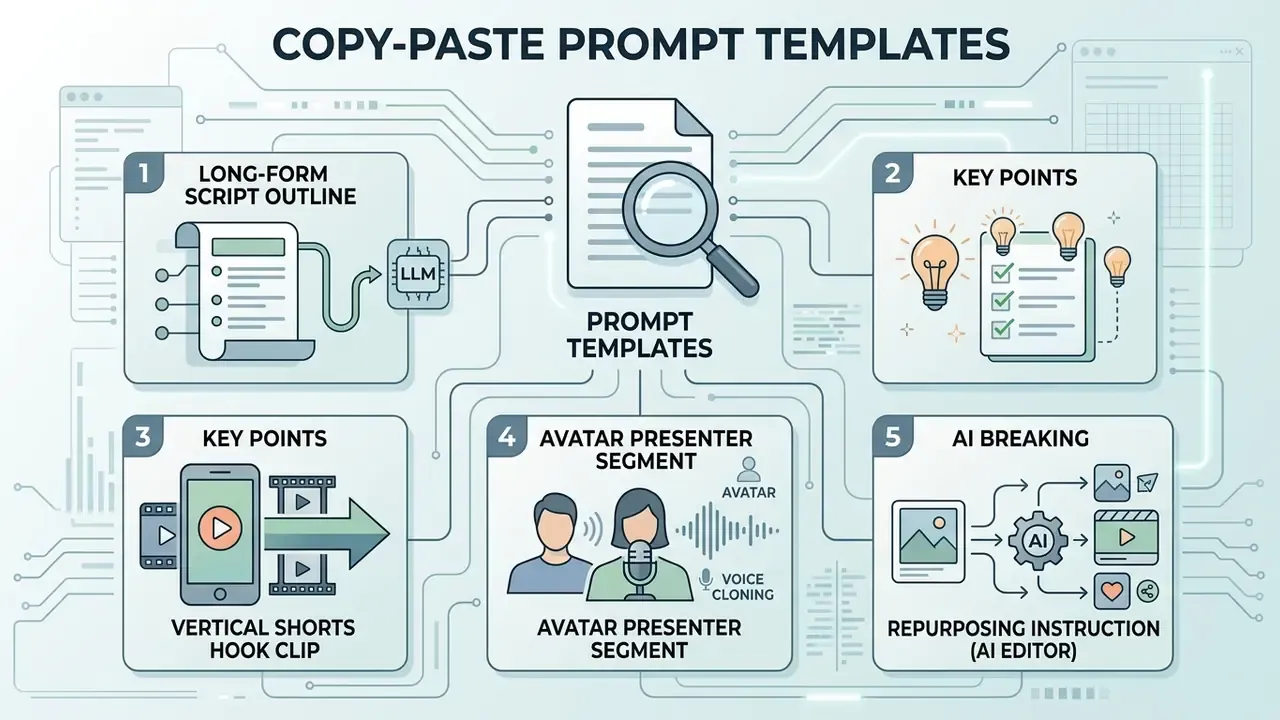
1. Long-form script outline (LLM)
Role: YouTube scriptwriter for a [niche] channel, audience [audience descriptor].
Task: Write a 10-minute two-column script (VISUAL | AUDIO).
Structure: 0–3s pattern-interrupt hook with a specific number; 3–8s curiosity gap;
8–25s first value payoff; then 30–60s attention resets; final payoff + single CTA.
Constraints: no unverifiable statistics; flag every factual claim with [VERIFY];
plain spoken English; max 14 words per narration line.
Output: markdown table, two columns, timecodes in the left column.
2. Cinematic B-roll clip (video model)
3. Vertical Shorts hook clip
4. Avatar presenter segment
Avatar: [custom twin ID], neutral navy shirt, plain studio background, medium shot.
Voice: cloned voice [ID], pace 0.95x, conversational, no dramatic pauses.
Script: [paste 120-word section].
Sync: phoneme-level lip sync, natural blink rate, subtle hand gesture on emphasis words.
Output: 16:9, 1080p, transparent background off, SRT sidecar on.
5. Repurposing instruction (AI editor)
Global video localization and AI dubbing
Scaling a channel globally no longer requires a reshoot. Modern AI dubbing workflows combine automatic transcript and SRT translation, voice-cloning pitch and timbre matching, and phoneme-level lip re-synthesis to re-render avatars and audio natively for foreign markets. Coverage now spans 50+ languages on general video makers and 175+ languages and dialects on avatar-first platforms, with YouTube itself rolling out auto-dubbing for eligible channels.
A production-grade localization pipeline runs in six steps:
- Lock the source master.Finalize the original edit first. Dubbing before the edit is locked doubles the cost of every later revision.
- Export a clean transcript.Separate dialogue from music and effects stems so only speech gets translated.
- Translate with post-editing, not raw machine output.ISO 18587:2017 defines full post-editing of machine-translated output and the competences required of the post-editor. Apply it to every subtitle track intended for public distribution.
- Re-synthesize voice.Use the cloned source voice where consent permits, matching pace to the original timing so cuts and on-screen text stay aligned.
- Re-render lip sync.Apply phoneme-level sync for avatar or talking-head footage. Otherwise leave the visual untouched and ship dubbed audio plus subtitles.
- Human review per language.UN audiovisual SOPs require human review of automated captions and translations. A native reviewer must confirm terminology, names, numbers and cultural framing before publication.
Practical constraints worth planning for. Idiomatic hooks rarely survive translation and usually need rewriting per market. Spoken duration expands 10 to 30% in several Romance and Slavic languages, so leave visual headroom in the edit. On-screen text baked into generated footage has to be regenerated per language, which is exactly why localized text belongs on an overlay track. Where a market justifies the effort, a separate localized channel outperforms multi-language audio tracks on one channel, because thumbnails, titles and descriptions can be localized too.
Improve quality and keep creative control over AI-generated videos
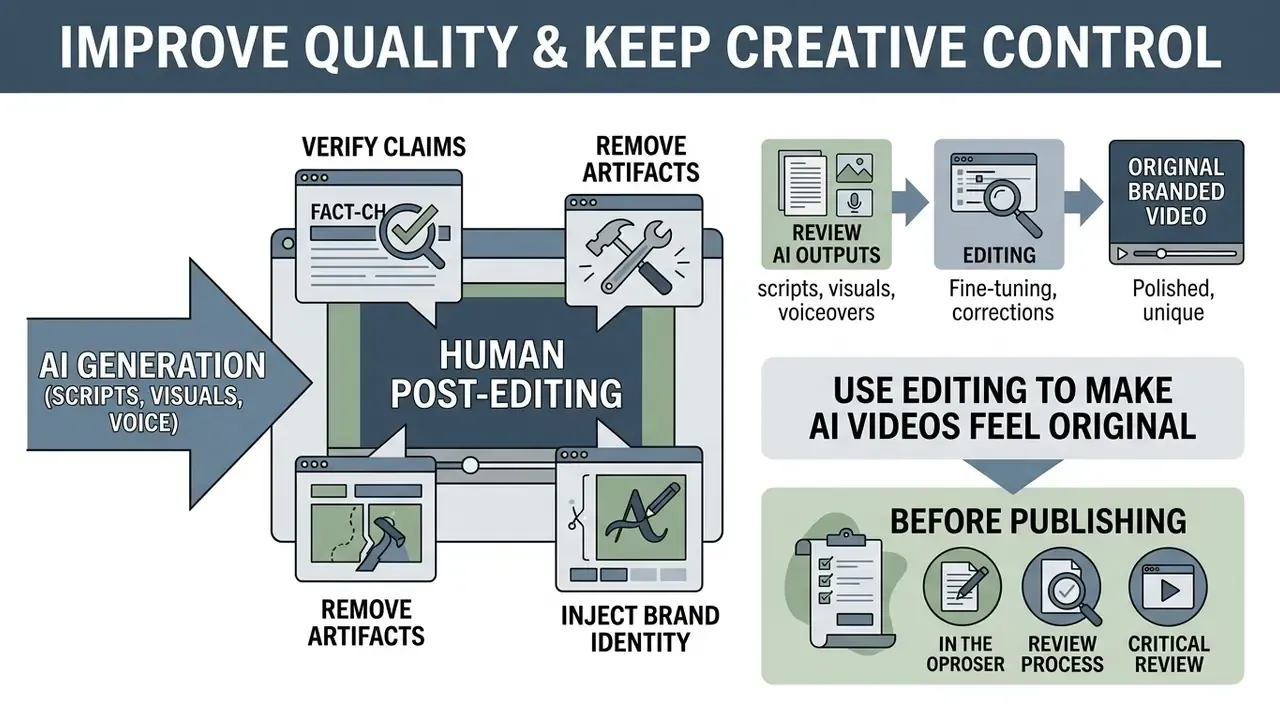
Keeping creative control over AI-generated videos requires human post-editing to verify claims, remove artifacts and inject brand identity. Unfiltered output tends toward generic phrasing, repetitive visual patterns and quietly hallucinated facts that erode channel authority. Human-in-the-loop review gates are what push published media up to professional broadcast standards.
Review AI scripts, visuals and voiceovers before publishing
Pre-publication verification means fact-checking scripts, validating text-to-speech pronunciation, and confirming visual assets infringe no trademarks and produce no deceptive deepfakes. ISO 18587:2017 defines full post-editing standards, establishing that machine-generated output must pass expert human review before public distribution. The NIH Generative AI Usage Toolkit (2025) goes further, requiring review by a qualified peer, supervisor or subject-matter expert to assess accuracy, relevance and ethical exposure before any output gets used.
«Deepfake-detection model performance fell roughly 50% on video with fresh real-world data compared with earlier benchmarks.»
Use editing to make AI videos feel original
Editing technique turns generic output into recognizable brand content: custom pacing, branded motion overlays, unique intro and outro bumpers, original audio mixes. Pacing itself is controlled by shot length, cut frequency, motion, audio energy, deliberate pauses and overall structure. Varying shot durations between roughly 1.5 and 4.0 seconds prevents visual monotony, and editing frameworks published by AI editors in 2026 expose Fast, Medium and Slow pacing presets built on exactly those variables. (Source status: the 1.5 to 4.0 second window comes from vendor editing guidance rather than peer-reviewed research. Treat it as a practitioner heuristic.)
«Synthetic instructional videos featuring an AI character produced learning outcomes comparable to traditional video (p = 0.80).»
That result matters for creative control. Audiences do not penalize synthetic delivery as such. They penalize sameness. Personal anecdotes, custom colour grading presets, lower-third callouts and multi-angle cuts separate a professional ai youtube content creator from low-quality automated spam. A three-pass workflow keeps it repeatable: pass 1 approve the story, pass 2 apply the brand layer (captions, lower thirds, logo rules, thumbnail frame, voiceover tone, background treatment), pass 3 apply the platform layer (aspect ratio, caption style, runtime, end cards). Store intro and outro masters, colour palette, fonts, B-roll style references, approved prompt examples and negative prompts in one brand kit, so reused source material stays on-brand across hundreds of uploads.
Scale a faceless YouTube channel with AI automation
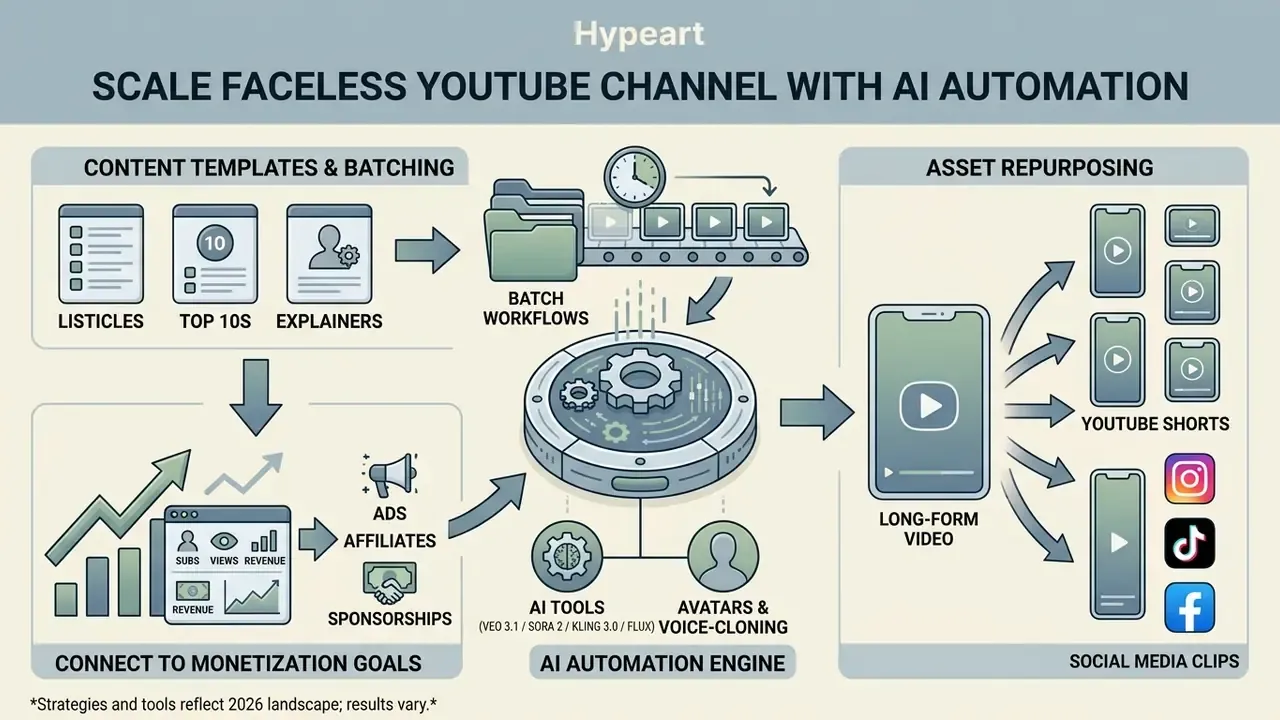
Scaling a faceless youtube channel requires repeatable content templates, batch workflows and asset repurposing across formats. Automation lets a small editorial team hold a daily publishing schedule without adding headcount or dropping quality. That is the promise, anyway. The constraint is review throughput, and it bites earlier than most operators expect.
Build repeatable content formats for a YouTube channel
Repeatable formats use standardized script templates, consistent AI voice profiles and fixed visual styling rules to raise cadence without compounding overhead. Fixed series structures, top-five listicles, weekly industry news breakdowns, step-by-step case studies, let generative models fill pre-approved narrative containers.
«Creators gravitate toward structured workflows and templates when using generative AI to scale production.»
Repurpose long videos into YouTube Shorts and social media clips
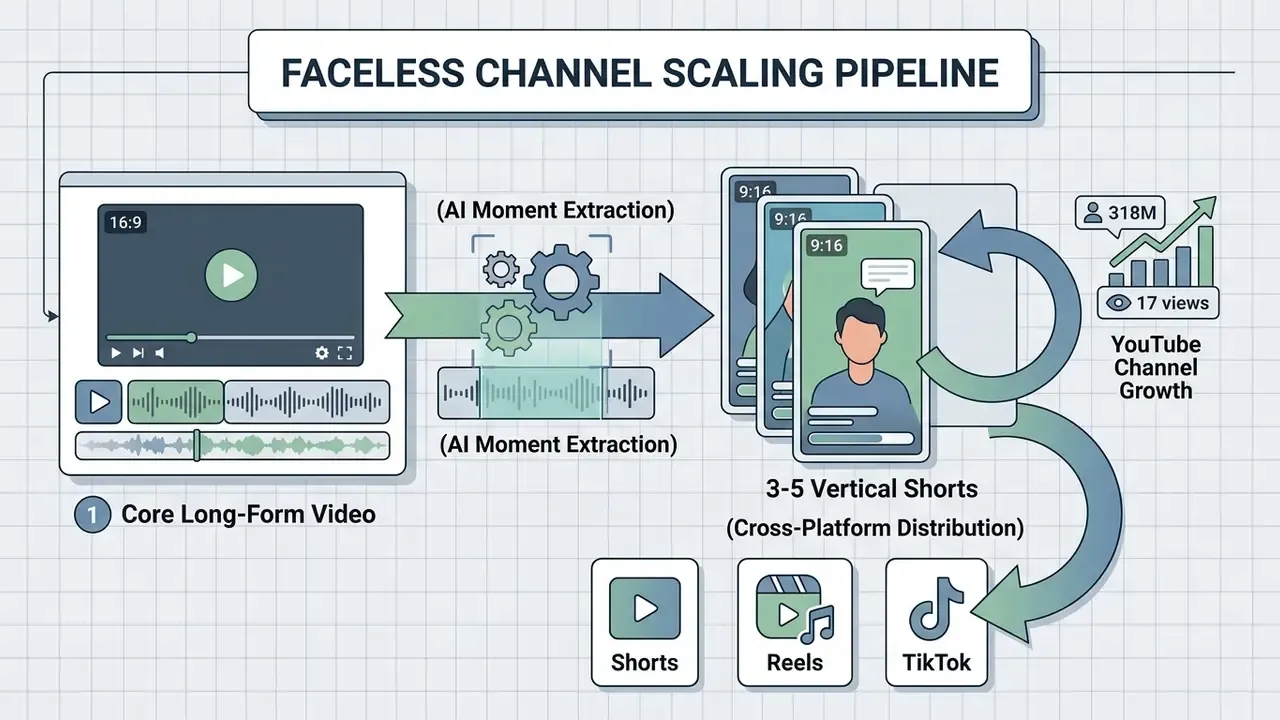
Automated repurposing ingests long videos, detects narrative highlights through transcript analysis, reframes to 9:16 and generates vertical social clips. Modern tools cut one recording into three to five verticals complete with dynamic captions, centre-subject tracking and auto-generated hook titles. Documented vendor behaviour supports zero to five AI-generated clips per recording from sources between 30 seconds and 2 hours, with output shorts typically 5 to 60 seconds, or 30 to 90 seconds for explainer cuts.
The pipeline looks the same regardless of tool: URL or file ingest, transcript-based moment detection, 9:16 reframe with subject tracking, auto-captions, then export or scheduled publish. Detailed editing and publishing mechanics for this stage are documented in the guide to YouTube video editing workflows, and the still-frame side, thumbnails, end cards, animated stills, sits in the overview of image-to-video AI tools. When the same clips travel off-platform, the format conventions differ enough to matter: see how to edit vertical clips for a TikTok audience, how to edit the same asset for Reels, and how to edit a cut on mobile when you are away from the desktop timeline. A tiktok video generator preset and an ai reel preset can share one source master, provided captions sit on an overlay track. Comparative software metrics across media processing platforms are collected in AI Media Benchmarks.
«The YouTube Shorts recommendation algorithm is systematically biased toward entertainment content with positive emotional tone, amplifying popularity bias.»
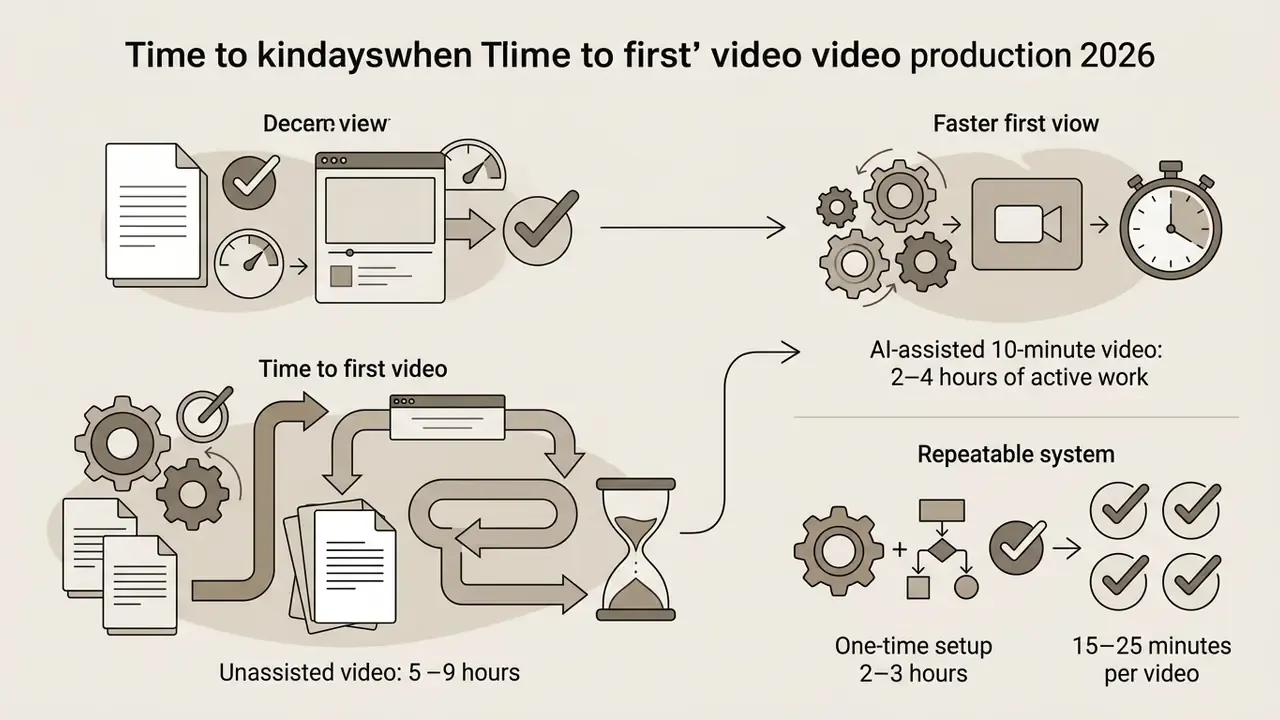
That platform incentive shapes repurposing strategy. Highlight-extraction models tend to surface the loudest moment, not the most useful one, so a human should pick which of the four or five generated clips actually ships. Working cadence benchmarks: one long-form video a week yielding three to five Shorts sustains a daily vertical rhythm; after a 2 to 3 hour system setup, per-video production time drops to roughly 15 to 25 minutes; a 10-minute AI-assisted long-form video takes 2 to 4 hours of active work against 5 to 9 hours unassisted.
Connect AI video creation with YouTube monetization goals
YouTube Partner Program monetization requires AI-generated content to show original commentary, distinct educational or entertainment value, and compliance with repetitious content policies. Updated channel monetization policies explicitly prohibit monetizing mass-produced, low-effort template channels where automated text-to-speech reads unedited public domain or AI-scraped text. The July 2025 update split inauthentic content into three monetization-blocking groups: generic or template-driven videos, off-putting content, and AI personas giving advice on sensitive topics. Reused content can still monetize, but only when viewers can perceive a meaningful difference from the original through significant original commentary or substantive modification.
«Generative AI lowers barriers for lower-ability creators but negatively affects their productivity, while highly skilled authors gain popularity.»
To secure and keep monetization eligibility, channels need substantive editorial value, original script synthesis, distinctive visual editing and transparent synthetic media disclosures in YouTube Studio.
«Creators collectively frame AI-generated content as authoritative, which enables simulated expertise to satisfy niche audience interests.»
That framing is the central risk in scaled monetization. Simulated authority converts well in the short term, then collapses channel trust the moment a factual error surfaces publicly. The EU AI Act's transparency obligations, applicable from 2 August 2026, add machine-readable marking and disclosure duties for deepfakes and certain AI-generated public-interest text unless meaningful human editorial control is documented. Which makes the human review log an asset rather than overhead. NIST's Generative AI Profile (July 2024) supplies the baseline control set: provenance, disclosure, misuse mitigation.
Pricing tiers, credits and generation limits
Typical SaaS consumption in this category runs from a free trial tier up to enterprise API quotas. Representative 2026 tiering on avatar and generation platforms looks like this:
| Tier | Price | Included volume | Typical limits |
|---|---|---|---|
| Free | $0/mo | ~3 videos per month, up to 1 minute each | Watermark, standard processing, 1 custom avatar, ~30 languages |
| Creator | $29/mo | ~600 credits ≈ 30 minutes of video | 1080p export, voice cloning, 175+ languages, credit rollover, watermark removed |
| Pro | $49/mo | ~1,000 credits | 4K export, faster processing, access to advanced models, translation script editing |
| Team / Enterprise | Custom | Pooled seats plus API quota | SSO, brand kits, data-residency options, commercial indemnity terms |
Budget the credit unit, not the subscription. Generative B-roll, avatar minutes and dubbing languages usually draw from the same pool, so a 10-minute localized video can consume several times the credits of a 10-minute monolingual avatar explainer. Free-tier output frequently excludes commercial rights, so confirm licensing before you monetize anything produced on a trial plan. A comparison of zero-cost options and their export caps sits in the roundup of free AI video generators.
FAQ about creating YouTube videos with AI
Do you need video editing skills to use AI video tools?
Basic prompt-to-video generators need zero editing experience. Studio quality needs foundational timeline skills to correct pacing, refine cuts and manage audio balance. One-click generators create entry-level drafts fine for quick social posts, a starting point compared in the overview of free AI video generators. Producing long-form monetizable content, though, demands semi-manual post-editing to remove visual artifacts, synchronize voice tracks, insert branded graphics and satisfy platform publishing guidelines. The realistic skill floor is basic montage literacy: prompt writing, clip review and iteration, trimming, caption correction, export settings.
How long does it take to make an AI YouTube video?
Expect 6 to 12 hours of active work on your very first 5 to 10 minute video, because you are building the system and the video at the same time. Once the pipeline exists, a 10-minute AI-assisted video takes roughly 2 to 4 hours against 5 to 9 hours without AI, and creators who templatize their format report 15 to 25 minutes per video after a 2 to 3 hour setup. Shorts repurposed from existing video take minutes.
Can AI-generated videos be monetized on YouTube?
Yes, provided the channel demonstrates original value. AI assistance itself is not disqualifying. What disqualifies a channel is mass-produced, templated or reused output with no significant original commentary, modification, or educational and entertainment value. Apply the "Altered or Synthetic Content" disclosure where realistic synthetic people or events appear, and keep a review log that evidences human editorial control.
Which AI video models should I use for which shots?
Veo 3.1 or Sora 2 for photoreal cinematic B-roll and multi-shot narrative sequences. Kling 3.0 for complex human or object motion. Seedance 2.0 for stylized animated passes. Flux to generate locked key frames and thumbnails that you then animate image-to-video.
How much reference material do I need to build an AI avatar and clone my voice?
A custom avatar needs a 15 to 30 second high-resolution webcam recording with even frontal lighting, natural head movement and varied phonemes. Voice cloning typically needs 30 to 60 seconds of clean reference audio, with some higher-fidelity pipelines asking for 2 to 3 minutes. Document consent for both, every time.
Do I have to disclose that a video was made with AI?
Disclosure is required when content is realistic and could mislead: synthetic depictions of real people, cloned voices of specific individuals, fabricated real-world events. Script ideation, drafting and automatic captions count as productivity uses that need no label. Where the EU AI Act applies, machine-readable marking plus disclosure obligations take effect from 2 August 2026.
What audio settings should AI-generated YouTube videos use?
Master integrated loudness of the full mix at -14 LUFS so YouTube does not normalize it down, keep true peak below -1 dBTP, and duck background music by -18 dB beneath spoken segments. Deliver MP4 video with SRT or WebVTT sidecar captions, or burn captions in for vertical Shorts.
Can AI translate my existing videos into other languages?
Yes. AI dubbing pipelines translate the transcript, re-synthesize narration (optionally in your cloned voice) and re-render lip sync at phoneme level across 50 to 175+ languages depending on platform. Human post-editing of every translated subtitle track remains mandatory under ISO 18587:2017 practice, and localized on-screen text should live on an overlay track rather than inside generated footage.
What is the minimum viable stack to start today?
One LLM for scripts. One TTS or avatar tool for narration. One generation model or stock library for visuals. One ai video editor for captions and reframing. One checklist for fact-checking and licensing. Everything else is optimization.
Limitations, open questions and a sensible next step
Three things in this guide are less settled than they look. First, vendor-published productivity and engagement figures are marketing claims, not controlled comparisons, so treat the 80% automation ceiling as an upper bound on task coverage rather than on total effort. Second, platform enforcement of inauthentic-content rules is inconsistent in practice, and channels with near-identical output have seen different outcomes. Third, nobody has a reliable public dataset on how audiences respond to disclosed synthetic presenters over long horizons.
So the safe next step is small. Produce one video end to end with the checklist above, log every human intervention, and time each stage. That single log tells you more about your real cost per video than any pricing table, including ours. Then decide whether to templatize.
Revision log and superseded fragments
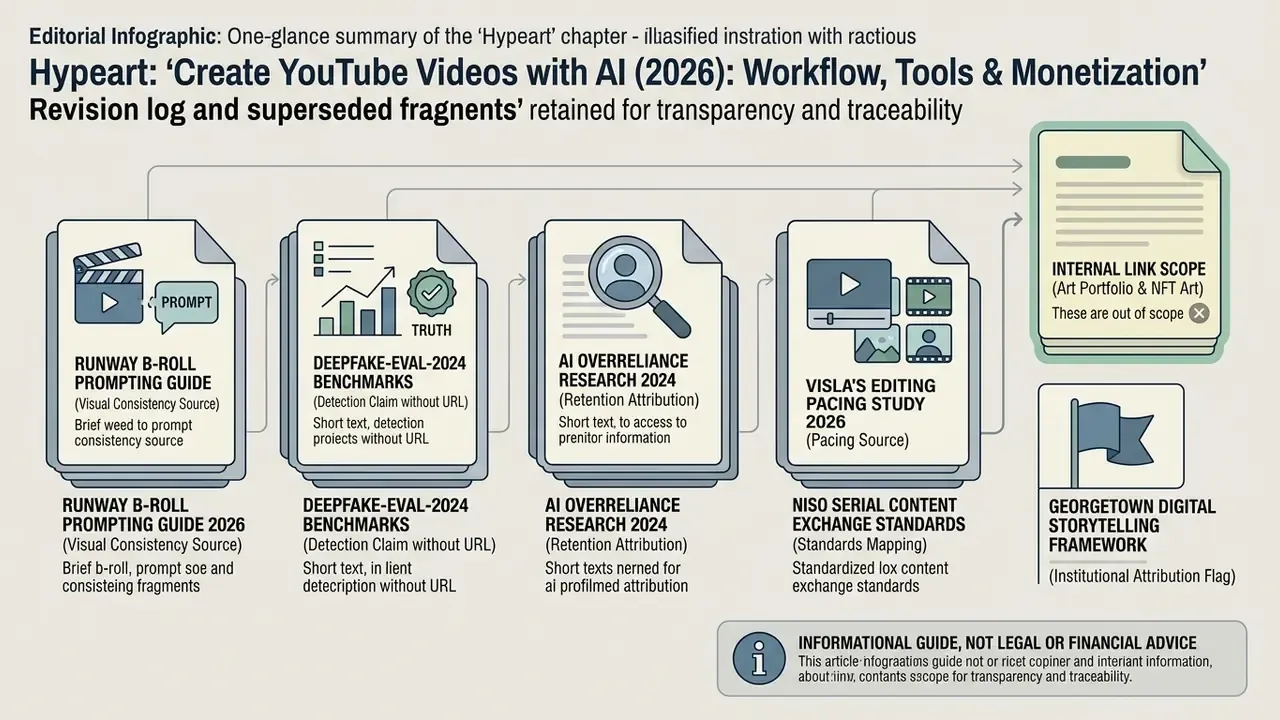
Retained for transparency and traceability. These fragments appeared in earlier versions of this guide and have been replaced in the main text by verified equivalents.
- Superseded (visual consistency source): "According to Runway's B-roll Prompting Guide (2026) and technical findings from StyleMaster (CVPR 2025), prompt descriptors should specify lens focal length, color grading palettes…" → Replaced with the verified MVDiT / OpenVid-1M (CVPR 2025) alignment result. Runway's four-part B-roll prompt structure and A-roll attribute matching are retained because they are vendor-documented.
- Superseded (detection claim without URL): "technical benchmarks from Deepfake-Eval-2024 demonstrate that automated detection tools fail to catch up to 50 percent of modern synthetic media artifacts." → Replaced with the sourced figure (roughly 50% video and 48% audio performance drop on fresh real-world data) including URL.
- Superseded (retention attribution): "Overreliance on AI in Information-seeking from Video Content (2024) indicates that viewers rapidly drop off if early visual and auditory cues fail to establish immediate relevance." → Reframed: that study measures information-extraction accuracy (+27 to 35 percentage points when users had not watched the relevant segment), not audience drop-off. Hook timing is now attributed to retention-structure frameworks (0–3s hook, 3–8s curiosity, 8–25s first payoff).
- Superseded (pacing source): "Research from Visla's Editing Pacing Study (2026) shows that varying shot durations between 1.5 and 4.0 seconds prevents visual monotony and boosts viewer retention." → Retained as a practitioner heuristic drawn from vendor editing guidance (shot length, cuts, motion, audio, pauses, structure; Fast/Medium/Slow presets), explicitly flagged as not peer-reviewed.
- Superseded (standards mapping): "Standardized asset packaging aligned with NISO Serial Content Exchange Standards ensures that thumbnails, script outlines, and visual presets remain uniform across recurring uploads." → Reframed: NISO's protocol governs packaging of serial publications. The transferable principle is a versioned per-episode asset bundle plus serial-publishing review discipline.
- Revised (internal link scope): references to art-portfolio creation and NFT art workflows remain out of scope for a YouTube production guide and stay removed. Format-specific editing guides for TikTok, Instagram Reels, iPhone and JPEG text overlays have been reinstated where cross-platform distribution or thumbnail work genuinely calls for them, alongside YouTube video editing workflows, free video editing software, AI voice generators, video compressors and animation makers.
- Attribution flag retained: Georgetown University's Digital Storytelling Framework is an institutional teaching guide, not peer-reviewed research. The two-column script practice is corroborated by broadcast scripting guidance and by 2024 research on how creators use generative AI for scripting and topic selection.
General disclaimer: This guide is informational and does not constitute legal, financial or compliance advice. Platform policies (YouTube Partner Program, synthetic-content disclosure), advertising rules (FTC) and AI transparency regulation (EU AI Act) change frequently and differ by jurisdiction. Verify current requirements with primary sources or a qualified professional before publishing or monetizing synthetic media.