About the editorial reviewer: this analysis was compiled and reviewed by the AI Governance & Model Risk editorial desk, led by Marcus Hale, author. His editorial focus covers model risk management, third-party AI vendor due diligence, and generative content licensing for regulated industries. Findings below are based on primary vendor documentation (DeepAI Docs, Terms of Service, pricing pages), peer-reviewed and preprint academic benchmarks, and official regulator guidance. Last updated: 2026.
Why should a CRO or Head of Model Risk care about a consumer text generator at all? Because your marketing team, your onboarding analysts, and quite possibly a contractor are already using one. A tool that needs no account, no SSO, and no procurement ticket is a governance problem before it is a productivity story. That is the lens applied here.
Executive Summary for Risk, Legal, and Content Leaders
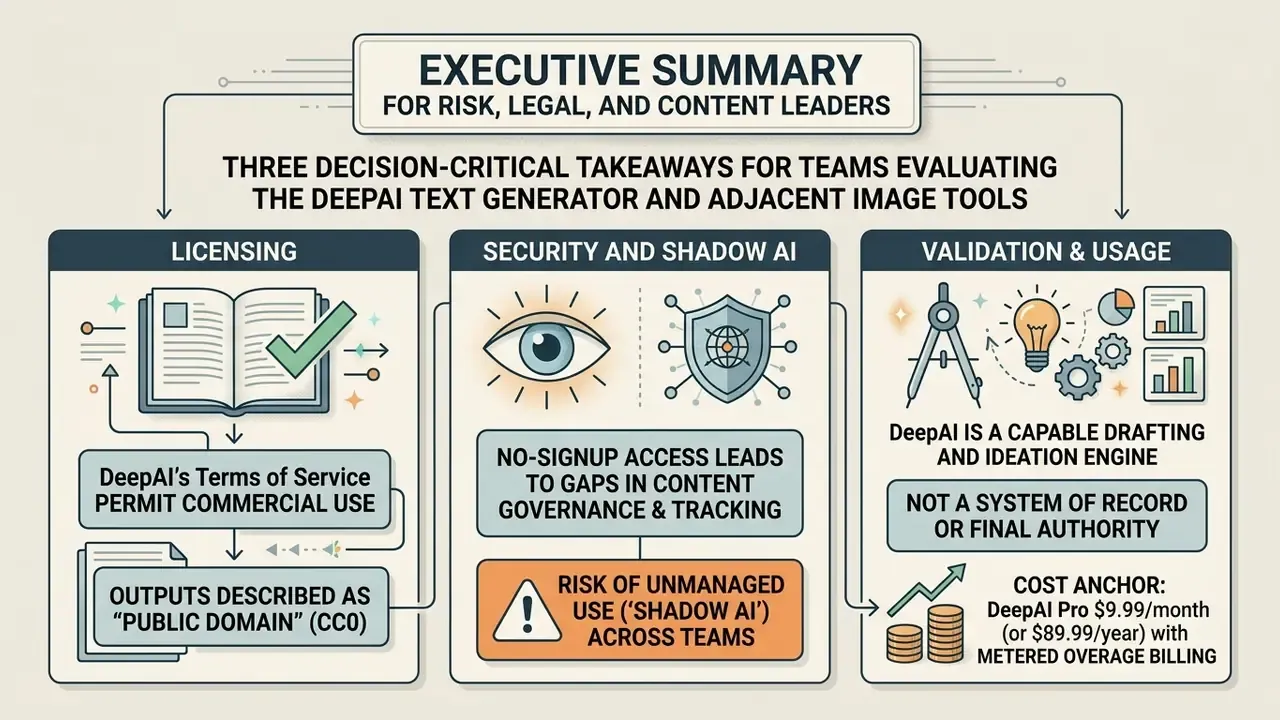
Three decision-critical takeaways for teams evaluating the DeepAI Text Generator and its adjacent image tools:
- Licensing. DeepAI's Terms of Service permit commercial use, and the platform describes outputs as "public domain" with "no owner." That waiver protects you from vendor royalty claims, but it does not create statutory copyright ownership for your business, and it does not include intellectual property indemnification.
- Security and Shadow AI. The free tier works without an account, which makes it a textbook Shadow AI vector. Default free generations are public rather than private, so an employee pasting confidential material, PII, or MNPI into an anonymous browser session opens an uncontrolled data egress path. Private generation requires DeepAI Pro.
- Validation. DeepAI is a capable drafting and ideation engine, not a system of record. Outputs are probabilistic, unversioned by default, and prone to factual hallucination and structural drift in long text. Human-in-the-loop review, documented audit trails, and prompt/version logging are mandatory before any regulated use.
Cost anchor: DeepAI Pro is $9.99/month (or $89.99/year), with metered overage billing after monthly allowances are consumed, from $0.01 per standard image up to $0.25 per Super Genius 2K image.
How to Use This Analysis by Role
Different functions need different parts of this review, so here is the short routing map before the detail begins.
| Role | Read first | Decision you are being asked to make |
|---|---|---|
| CRO / Head of Model Risk | Sections 19.1, 19.2 | Is this a non-model productivity tool or a model requiring validation? |
| CISO / Security architecture | Sections 19.1, 19.3 | Do we block the domain, gate it at the proxy, or allow it behind a logged gateway? |
| General Counsel / IP | Sections 20, 22 | Which asset classes may be generated here, and what must never be? |
| CMO / Content operations | Sections 4 to 16, 21 | Where does the tool actually save hours, and at what review cost? |
| CFO / Procurement | Section 19 budget model | Is the metered price predictable enough to forecast? |
| Internal audit | Section 19.2 log template | What evidence will exist six months from now? |
Three decision gates run through the whole document: data sensitivity, output consequence, and evidence retention. If an intended use fails any one of them, the tier or the workflow has to change, not the policy.
What Is DeepAI Text Generator and What Tasks Does It Solve?
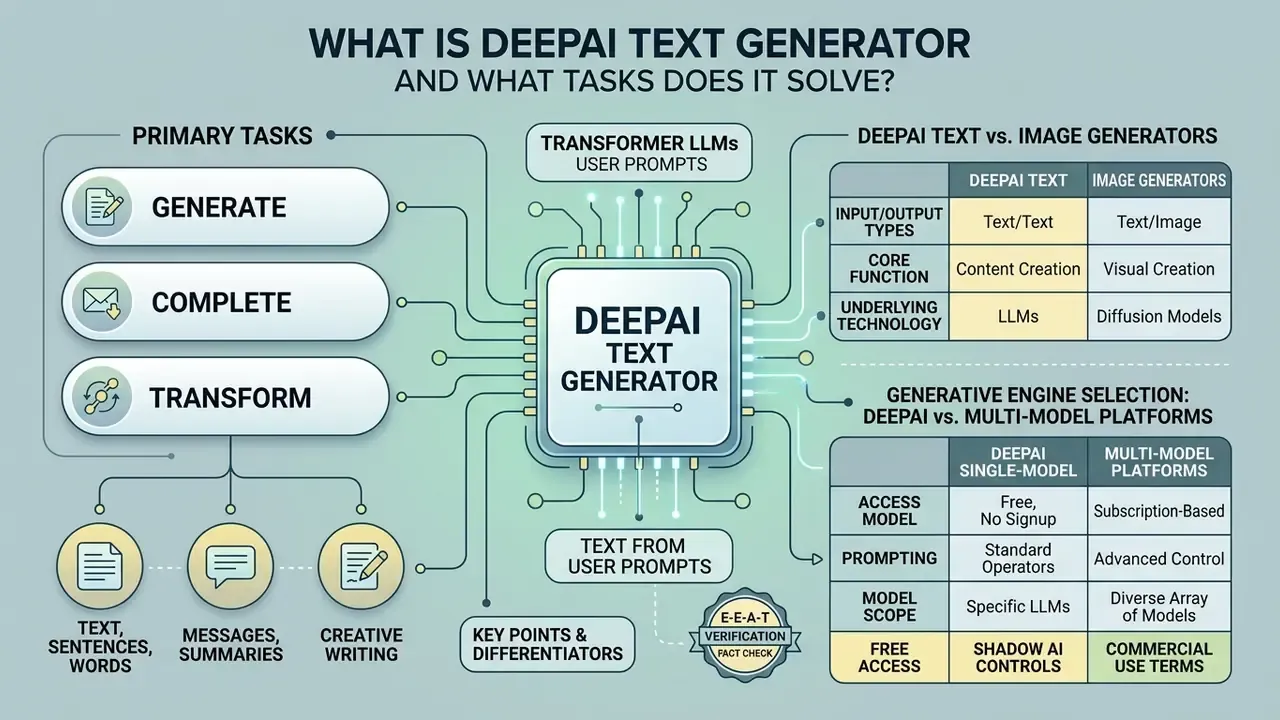
DeepAI Text Generator is an online artificial intelligence platform that uses transformer-based Large Language Models (LLMs) to generate, complete, and transform text from user prompts. The deep AI generator works as a general-purpose text engine while integrating visual generative models, so written and image-based content workflows sit in one interface.
For financial institutions, digital publishers, and enterprise teams, DeepAI offers an accessible entry point to evaluate generative AI capabilities. It processes simple text inputs to produce structured paragraphs, contextual sentence completions, draft messages, and conceptual image descriptions. The platform operates primarily through web-based interfaces and REST APIs, which lets teams test foundational AI text generator functions without complex infrastructure setup.
Historically, DeepAI positions itself as one of the earliest public generative platforms, stating that it launched the first browser-based text-to-image generator in late 2016. That longevity matters for vendor due diligence: the platform has a documented operating history, a published API surface, and a stable consumer pricing tier. It is still packaged as a prosumer service rather than a regulated enterprise suite, and that packaging shapes every risk conclusion in this analysis.
Text, Sentence, Word, and Message Generation
DeepAI Text Generator operates as a sequence model that predicts contextually relevant tokens from your instructions. It functions as a sentence generator, a deep AI word generator, and a message generator by reading the prompt's context and producing coherent natural language output.
Given an incomplete statement or a direct instruction, the system predicts the most statistically probable continuation. Operational teams can input a brief task description and receive draft customer communication templates, summarized notes, or an introductory article section. The tool builds fluent structure quickly. Long-form output, though, needs careful prompt structuring to hold topical focus and avoid semantic redundancy across paragraphs.
Two operational consequences follow from this architecture. First, fluency is not accuracy: the model optimizes for plausible token sequences, not verified facts, so numeric claims, regulatory references, and product terms must be validated externally. Second, output is non-deterministic by default. Identical prompts can yield different phrasings, which is why reproducibility controls (fixed prompt templates, stored prompt/response pairs, reviewer sign-off) become the practical substitute for model determinism.
Differences Between DeepAI Text Generator and DeepAI Image Generator
The primary difference between the DeepAI Text Generator and the DeepAI Image Generator sits in their model architectures, input types, and output modalities. The text generator processes textual instructions to output written language. The image generator uses prompt-conditioned visual synthesis to output raster graphics.
| Feature / Dimension | DeepAI Text Generator | DeepAI Image Generator |
|---|---|---|
| Model architecture | Autoregressive Transformer (LLM) | Diffusion-based / generative multimodal model |
| Primary input | Textual prompts, instructions, or incomplete sentences | Descriptive text prompts specifying subjects, styles, and settings |
| Primary output | Unstructured or structured text (paragraphs, code, messages) | Digital images (PNG/JPEG graphics, visual art, product concepts) |
| Core operational task | Contextual text completion and chat dialog | Text-to-image synthesis and visual asset creation |
| Primary failure mode | Factual hallucinations and structural redundancy | Compositional errors, incorrect object counts, attribute bleed |
The text model relies on token probability distributions to maintain dialogue and narrative continuity, while the image model maps text embeddings into a visual feature space. Understanding this split matters for teams building structured AI governance frameworks: validation for text outputs focuses on factual accuracy and tone, and validation for visual outputs centers on compositional fidelity and copyright alignment.
Generative Engine Selection Matrix: DeepAI vs. Multi-Model Platforms
DeepAI runs its own proprietary generation stack rather than aggregating third-party foundation models. Teams comparing vendors should therefore evaluate engine availability, reference-image handling, typography quality, and license posture side by side.
| Platform / Tool | Underlying models available | Multi-image fusion | Native text rendering quality | Commercial license model |
|---|---|---|---|---|
| DeepAI | Proprietary LLM / diffusion stack (Standard, HD, Genius, Super Genius) | No (single reference image editing) | Moderate (requires precise prompting) | Public domain framing, commercial use permitted, including the free plan |
| Fotor | Multi-model (FLUX, Midjourney, Nano Banana, GPT Image) | Yes (up to 8 reference images) | High (dedicated typography-capable models) | Freemium credit subscription |
| Adobe Firefly | Adobe Firefly models plus partner models (for example Gemini 2.5 Flash Image) | Yes (style and composition references) | High (vector and font alignment) | "Commercially safe" (trained on licensed stock and public domain) |
The practical read: DeepAI wins on frictionless access and unrestricted output licensing language, while multi-model platforms win on typography, reference fusion, and training-data provenance guarantees. If your brand-safety posture requires documented dataset provenance, weight that factor heavily. If you need fast, unrestricted ideation volume, DeepAI's cost structure is hard to beat. Note also how quickly this landscape shifts: model rosters such as Nano Banana Pro and GPT Image tiers change several times a year, so any engine matrix deserves a quarterly re-check.
E-E-A-T verification / fact check:
DeepAI Capabilities for Text and Content Creation
DeepAI provides practical tools for drafting, editing, and expanding written materials across marketing, internal communication, and social media channels. As a deep AI creator workspace, it lets content creators turn brief outlines into preliminary drafts and generate functional text variants for editorial review.
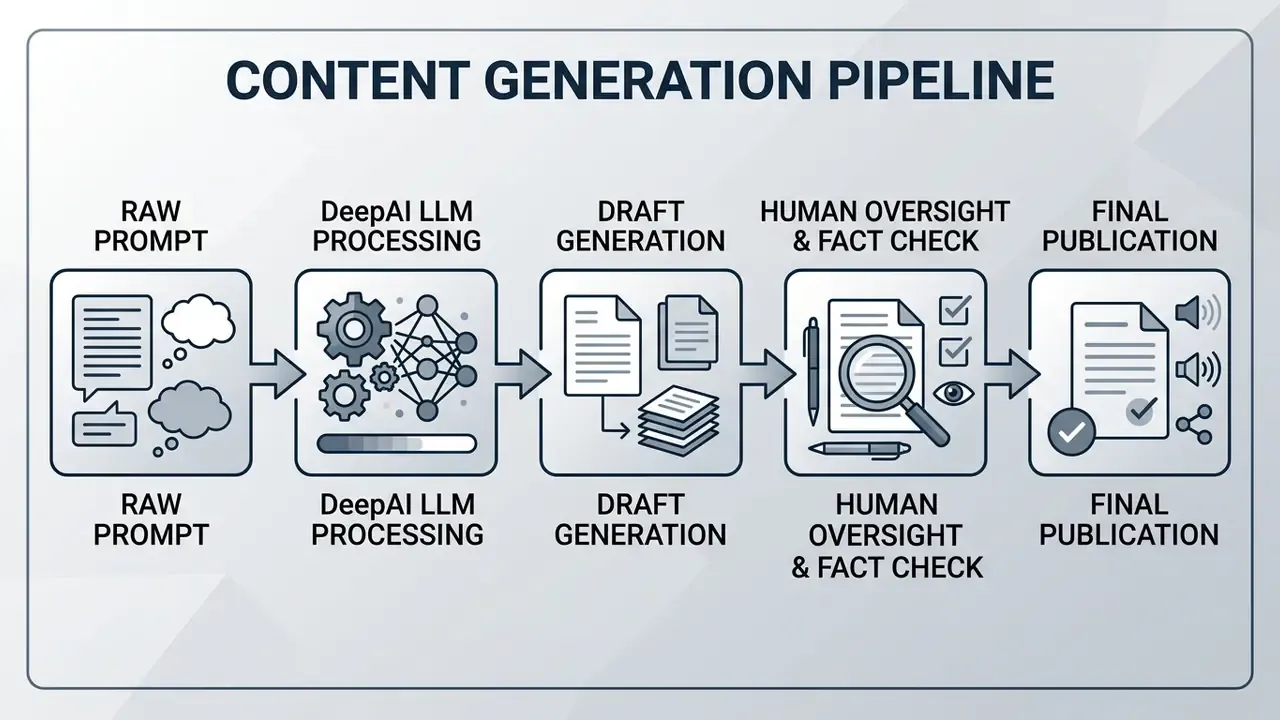
Enterprise content workflows often stall at the first draft. DeepAI accelerates that phase by producing short-form copy, blog posts outlines, and message templates. Because generative models synthesize patterns from training data rather than verified databases, every draft still needs human oversight before public distribution.
«Even advanced LLMs show degradation in structural coherence beyond roughly 2,000 words, requiring iterative, plan-based prompting.»
That degradation curve explains why "one prompt, one article" workflows collapse at scale. The longer the requested output, the more the model drifts from the original instruction set, repeats earlier arguments, and loses hierarchical structure. Teams evaluating adjacent visual tooling alongside text drafting can review our broader analysis of AI image generators to see where modality-specific risks diverge.
How to Use the AI Text Generator for Content Tasks
«Clearly labeled exemplars and a consistent prompt format improve prompt reliability and output consistency.»
Critically, every generated draft went through mandatory human-in-the-loop review to correct small factual hallucinations before distribution, and the team logged each prompt/output pair for internal audit purposes. Without that second step the time saving is borrowed, not earned.
AI Chat and Instruction-Based Text Generation
DeepAI AI Chat provides a conversational interface that retains context across turns, so you can refine text through iterative instructions. It handles multi-turn requests and adjusts tone, length, and formatting on the fly.
The chat assistant parses instructions to generate code snippets, rephrase existing copy, or shift editorial perspective.
«Plan-based generation, where the user first defines the structure, significantly improves the structural coherence of long texts.»
Apply that principle inside AI Chat: ask for an outline first, then instruct the assistant to write one section at a time, reviewing each block before moving on. DeepAI also documents a contextual mode in which the assistant can reference recent chat topics and search previous conversations. Convenient, yes, and also a governance implication: conversational memory means earlier prompts may persist and resurface, so sensitive inputs should never reach the chat channel in the first place.
DeepAI Text to Image: Creating Images from Text Prompts
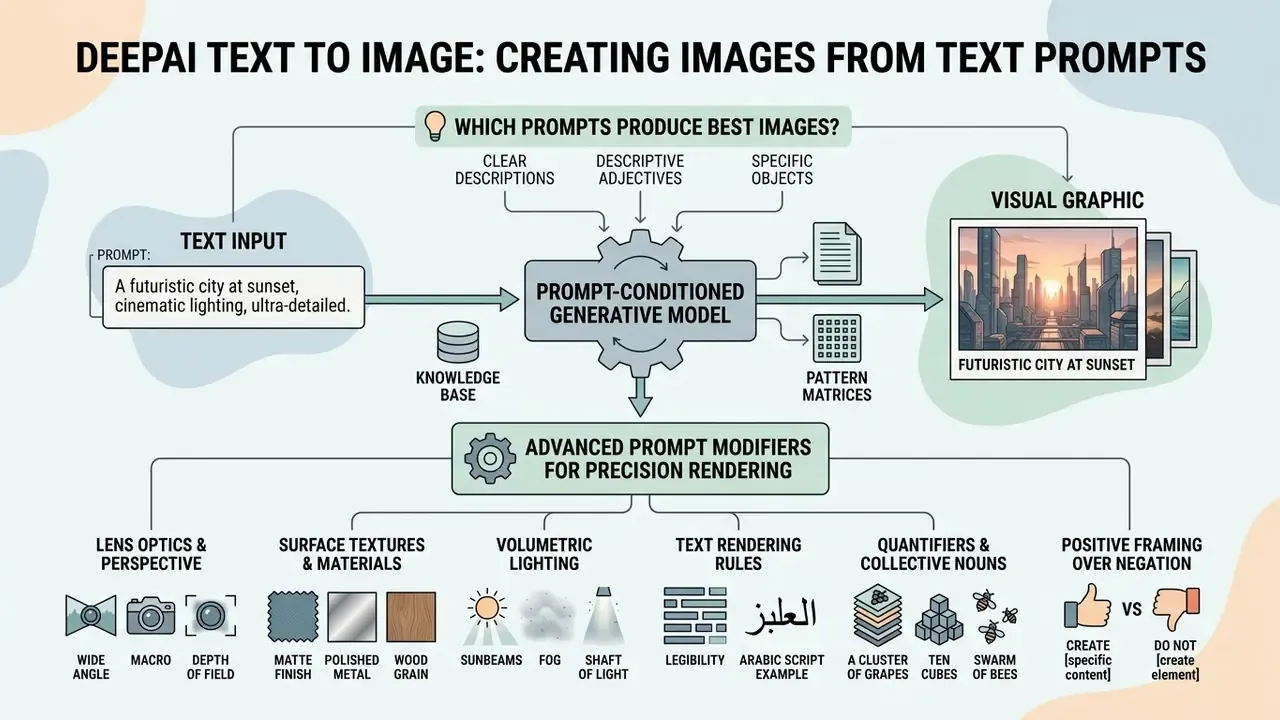
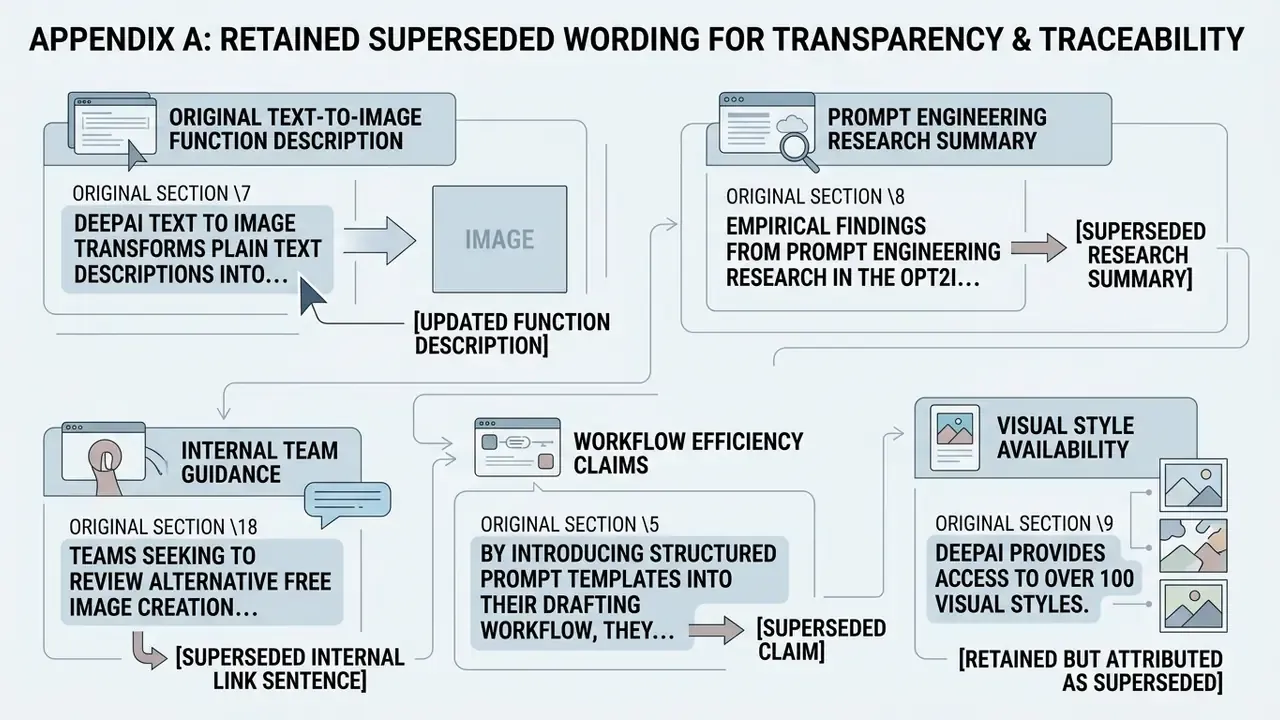
DeepAI Text to Image transforms plain text descriptions into visual graphics using prompt-conditioned generative models. (Updated: corrected duplicated wording; original phrasing preserved in Appendix A.) The system synthesizes digital artwork, background graphics, and conceptual product visuals directly from descriptive user prompts.
The tool supports rapid visual prototyping for design teams, social media managers, and digital marketers. By converting natural language into pixel-level visual features, DeepAI free text to image generation lets users create AI images and test artistic styles without specialized graphic design software. For quick exploration, deepai's text to image generator needs nothing more than a browser tab and one clear sentence.
Which Prompts Produce the Best AI-Generated Images?
The prompts that produce the best AI-generated images follow a repeatable pattern: Subject plus Setting plus Visual Style plus Lighting/Mood plus Composition. Precise phrasing removes ambiguity and steers the model toward accurate visual synthesis. Teams still choosing between platforms can review our comparison of the best AI image generators before standardizing a prompt library.
A vague prompt such as "a modern bank building" tends to yield generic, inconsistent graphics. A detailed one, "a photorealistic exterior shot of a modern glass bank branch at golden hour, architectural photography, symmetrical composition, sharp focus," gives the model clear visual anchors.
«Iterative prompt optimization raises text-to-image alignment by up to 24.9% on PartiPrompts without degrading overall image quality.»
Advanced Prompt Modifiers for Precision Rendering
To lift alignment and escape flat, default-lit rendering, work these parameter types into your prompt structure:
- Lens optics and perspective. Define focal length explicitly:
85mm f/1.4 lensfor shallow depth-of-field portraits,14mm ultra-wide lensfor architectural scale and interiors,100mm macrofor product detail. Asking for "a photo" leaves perspective and background blur to chance. - Surface textures and materials. Replace generic color words with tactile materials:
brushed anodized aluminum,distressed full-grain leather,translucent frosted glass,translucent silk. Material language drives realism far more than adjectives like "nice" or "premium." - Volumetric lighting. Mandate an atmospheric light source:
volumetric rim lighting,golden hour softbox,neon rim light,subsurface scattering. Diffusion models default to evenly lit scenes unless told otherwise. - Text rendering rules. Put exact typography targets in double quotation marks, for example a neon sign reading
"CYBER"in a bold serif script, and name the font family or weight on typography-capable models. Treating on-image copy as a quoted string sharply reduces garbled lettering. - Quantifiers and collective nouns. State exact counts (
three analysts at a desk) or collective nouns (a herd of zebras) instead of loose plurals. - Positive framing over negation. Describe what should appear, not what should not. Prompts containing "no buildings" frequently generate buildings; use a negative prompt field instead where the platform supports one.
- Synonym precision. Choose specific descriptors (
compact,miniature,mini) rather than broad ones (small) to narrow the interpretation space. - Composition and shot type. Specify framing:
symmetrical wide shot,three-quarter product angle,top-down flat lay,eye-level close-up. - Output intent. Name the deployment context (
print-ready poster,web hero banner,marketplace thumbnail) so the model biases toward the right detail density and negative space.
Small correction worth making here, since it trips up new users: simple prompts are fine for ideation, but "simple" should still mean specific. Short and vague are not the same thing.
Styles, Models, and Image Quality Settings
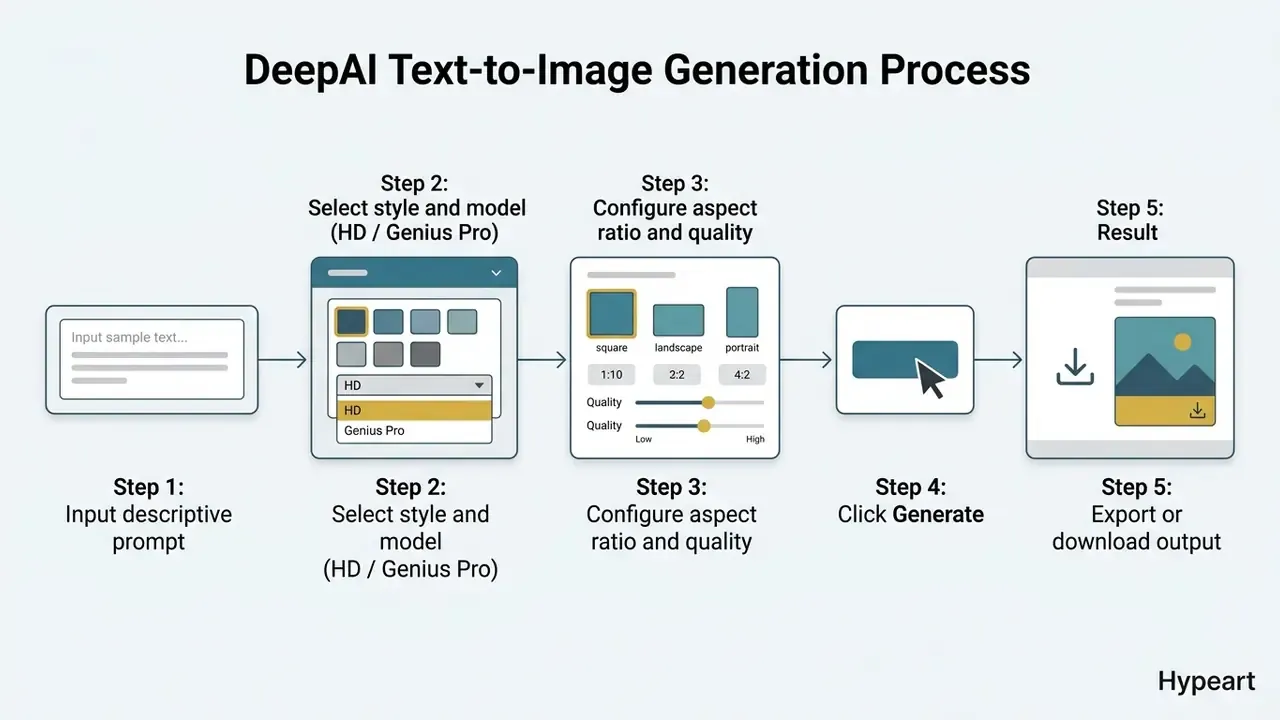
According to DeepAI's own documentation, the platform provides access to over 100 visual styles and shapes (a vendor-published figure, not an independently audited count), alongside generation modes including Standard, HD, Genius Pro, and Super Genius Pro. Higher tiers offer better prompt tracking, finer detail rendering, and resolutions up to 2K, with a resolution parameter accepting 2k or 4k when the generator version is set to Super Genius.
| Mode / model tier | Target resolution | Key capabilities | Recommended use case |
|---|---|---|---|
| Standard mode | 512×512 to 640×640 | Fast generation, basic style options | Initial visual brainstorming and draft concepts |
| HD mode | 1024×1024 | Enhanced detail, improved edge clarity | Blog post headers and social media graphics |
| Genius Pro | Up to 1024×1024 (custom ratios) | Superior prompt adherence, complex composition handling | Marketing materials and presentation visuals |
| Super Genius Pro | 2024×2024 (2K native) | Ultra-high resolution, print-ready output, minimal artifacts | High-fidelity digital displays and print media |
Choosing a style and resolution mode depends on the target channel. Basic social graphics perform adequately in HD mode, while commercial publications benefit from high-resolution settings and tighter style control. For quick, throwaway concept testing, teams often prefer generators without registration, including deepai text to image no signup access. Bear in mind that anonymous access is precisely the workflow governance teams must control (see section 19.1). Designers exploring broader asset pipelines can also use specialized tools to ai transform image attributes or apply custom filters across enterprise visual catalogs.
How to Use DeepAI: From Prompt to Final Result
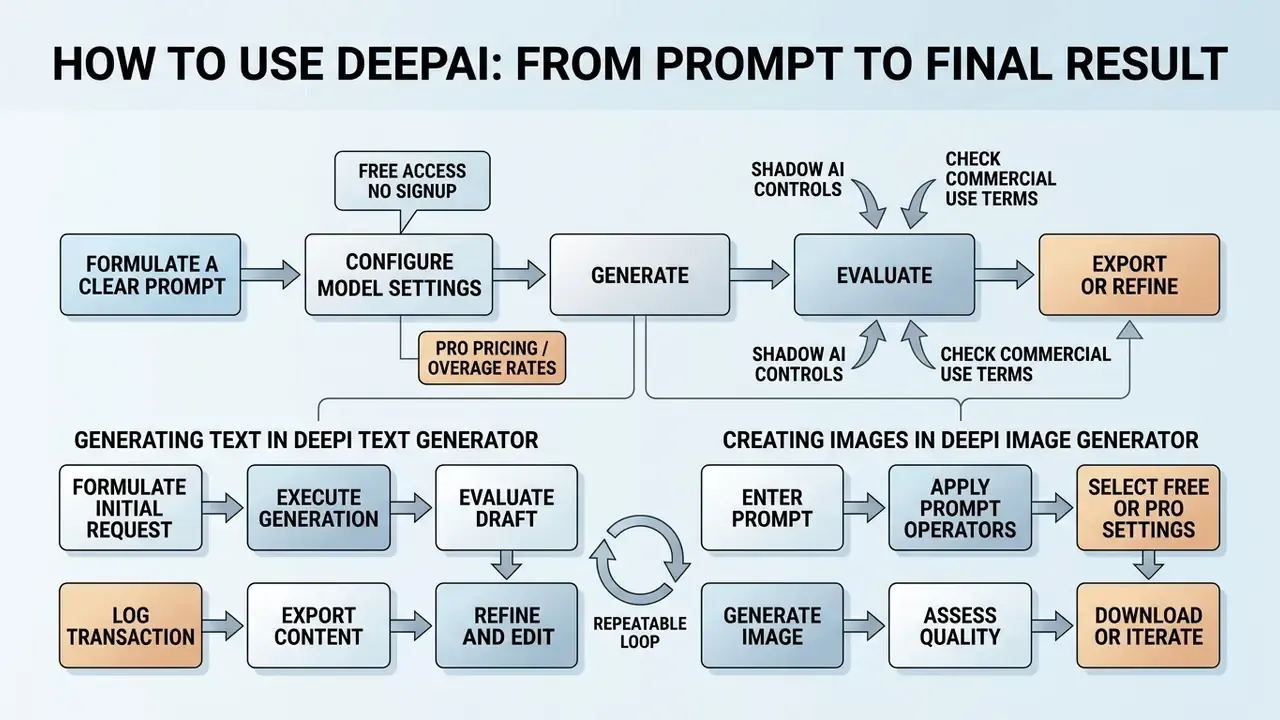
Working with DeepAI is a short, repeatable loop: formulate a clear prompt, configure model settings, generate, evaluate, then export or refine.
Whether you are producing written copy or visual graphics, a standardized workflow keeps quality consistent. It also reduces credit consumption, lowers generation errors, and keeps output aligned with enterprise publishing standards. In an online AI tool with per-image billing, discipline is a cost control, not just a style preference.
Generating Text in DeepAI Text Generator
To generate text, open the text tool interface, enter a detailed task description in the prompt field, click generate, and review the result for clarity and accuracy.
- Formulate the initial request.Write a clear prompt specifying topic, target length, and formatting.
- Execute generation.Click submit to run the model.
- Evaluate the draft.Inspect the output for factual correctness, logical flow, and tone consistency.
- Refine and edit.If the output misses key details, revise the prompt or use AI Chat for targeted edits.
- Export content.Copy the verified text into your editorial management system or document workflow.
- Log the transaction.Record the prompt, model mode, timestamp, reviewer, and edits applied. Optional for hobby use. Mandatory for regulated content (see the audit trail template in section 19.2).
Creating Images in DeepAI Image Generator
To create an image, enter a visual description in the prompt box, select a style or model mode, configure resolution, and click generate to retrieve the image instantly.
Prompt Preparation Checklist
Verify these components before generating, and treat the list as a control rather than a nicety:
Checklist0 / 10
«Structured checklist-based evaluation of generated text shows higher correlation with human judgment than G-Eval and GPTScore.»
That finding generalizes beyond text. Explicit, itemized criteria beat holistic "does this look good?" review for written drafts and visual assets alike.
After generation the system returns a hosted image URL. Download the file directly or move it into editing tools for post-processing. Enterprise design teams often pair generative creation with specialized tools to ai unblur image outputs or refine resolution parameters before commercial publication.
Editing and Enhancing AI Images
DeepAI provides an AI Photo Editor and dedicated background removal tools, so you can modify existing images through prompt-based instructions or automated image processing endpoints.
Upload a base graphic or reference image, enter a modification prompt ("add a blue vintage car to the background"), and call the edit endpoint. The model adjusts visual features while preserving the primary subject layout. When output resolution falls short of a publication requirement, pairing generation with AI image upscalers is more reliable than re-rolling the prompt at a higher tier and paying extra credits. For automated background isolation, the background remover endpoint produces clean cutouts with transparent alpha channels, which suits e-commerce product catalogs and marketing collateral.
The browser interface also exposes native post-processing controls under each generation: Enhance, Remove Background, Animate, Talk to Image, and a raster handoff via Edit in Photopea, plus Download and Share. These reduce tool-switching for small edits. They are consumer-grade, though: no version history, no layer-level non-destructive editing, no approval workflow. Brand-critical assets should still be finished in a managed design environment.
How to Improve the Quality of Text and Images Created by DeepAI
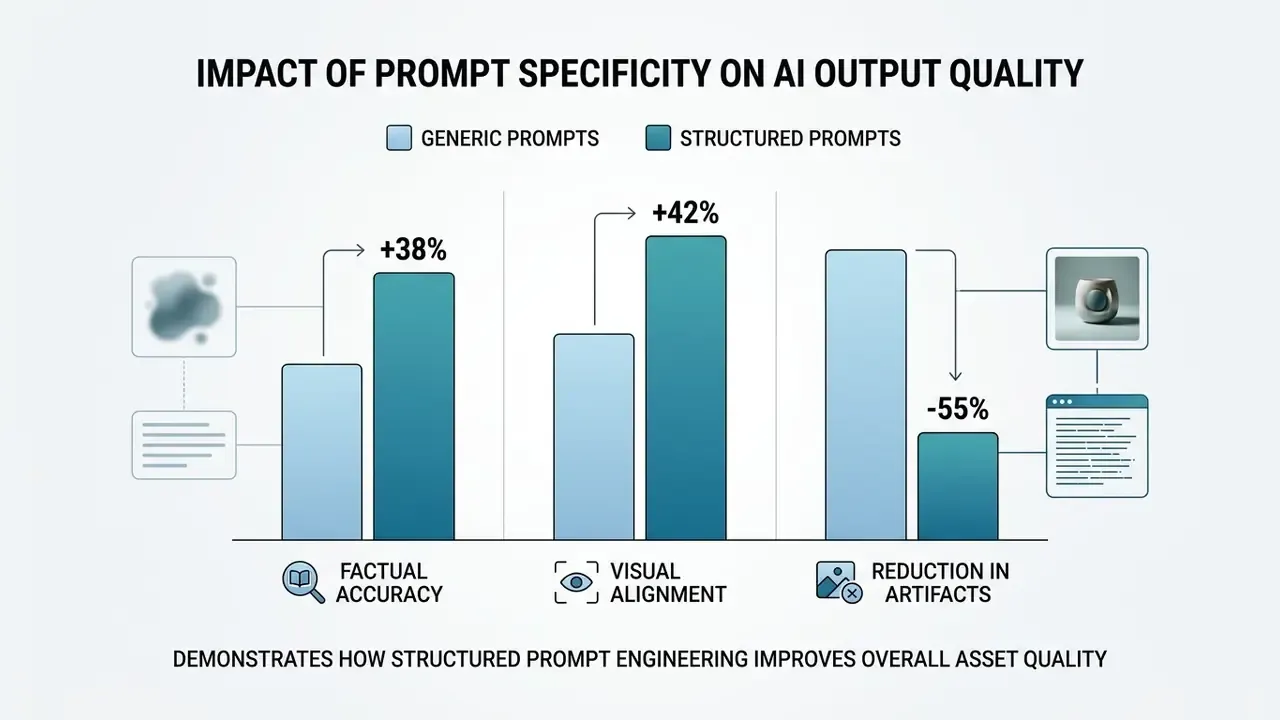
Better output comes from three habits: structured prompt engineering, deliberate parameter configuration, and iterative post-processing. Clear inputs and defined constraints directly reduce hallucinations and visual artifacts.
Generative models depend on explicit context. When inputs are vague, the model falls back on broad training priors, which raises the odds of generic text or compositional errors. Applying formal controls at the input stage is what turns experiments into production-grade results.
«Researchers distinguish compositional quality, how accurately an image reflects prompt details, from general visual image quality.»
That distinction gives teams a usable two-axis scorecard. Rate every asset separately for prompt fidelity (are the specified objects, counts, text, and relationships correct?) and aesthetic quality (is lighting, sharpness, and composition publication-grade?). An image can score high on one axis and fail the other, and only the first axis is reliably fixable by better prompting.
Why Output Accuracy Depends on Text Descriptions
Accuracy depends on text descriptions because the model uses input tokens as conditional constraints, narrowing probability distributions during synthesis. Detailed descriptions limit variance and tighten alignment with intent.
«Including explicit format constraints and domain context significantly increases the completeness and factual precision of generated text.»
In text generation, naming the audience, tone, and structural boundaries curbs off-topic rambling. In image generation, defining subjects, material textures, and background elements prevents random background artifacts. A practical heuristic: every prompt should answer five questions. Who is this for, what format, what must be included, what must be excluded, and how long or how large.
When to Use Styles, References, and Post-Editing
Reach for styles, reference images, and post-editing when assets require strict brand alignment, specific color palettes, or compositional fidelity that single-pass prompting cannot guarantee.
- Style selection. Apply predefined style tags ("flat vector," "3D isometric") at generation time to keep visual consistency across multi-asset campaigns.
- Reference images. Use image-to-image or editing modes when you need to hold spatial layouts or subject poses across several marketing graphics. Note that DeepAI's documented editor accepts one uploaded image plus an edit prompt; multi-image style fusion of the kind offered by multi-model platforms is not a documented DeepAI capability.
- Post-editing. Use the AI Photo Editor or external software to adjust color balance, crop compositions, or remove localized flaws. Our guide to AI photo editors compares retouching depth, batch support, and export controls, and our overview of online photo editors covers pricing and commercial workflow considerations.
When production moves beyond static graphics into motion, media managers can explore dedicated AI Video Generator Commercial Use frameworks to keep brand motion consistent across video channels.
DeepAI Free Access, No Signup, and Pro Subscription
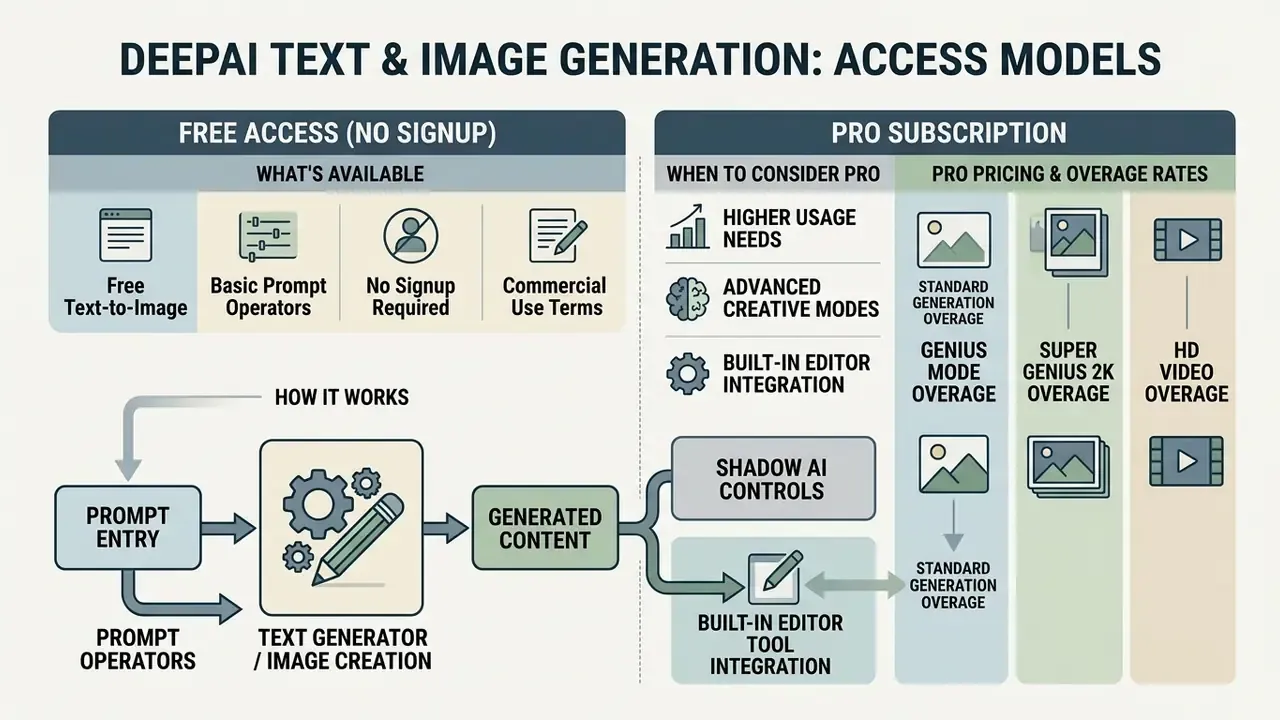
DeepAI runs a freemium model. Basic browser-based text and image generation works without registration, and paid tiers unlock higher limits, advanced models, and private processing.
That structure lets individual creators and enterprise evaluation teams test the platform before spending anything. Free tier usage carries real constraints, though: functional limits, public asset visibility, and queuing delays during peak load.
What Is Available in the Free Version of DeepAI?
The free version provides browser access to the AI Text Generator, AI Chat, and standard text-to-image tools without an account. In practice this is the deepai free text to image generator that most people meet first, and deepai text to image generator no signup is exactly how they find it.
Free image generation includes basic credits, standard resolution output (typically up to 640×640 pixels), public generation, and visible watermarks on certain modes. DeepAI's published pricing page has also listed a Free Plan with a small fixed credit allowance, a cap on simultaneous images, a single parallel task, and watermarked output. The vendor has changed these numbers over time, so verify current limits in your dashboard before planning volume. Anonymous access enables rapid testing; generation speeds may be throttled when platform traffic spikes.
«An analysis of 103 text-to-image models found that artistic and stylized models exhibit substantially greater bias than base foundation models.»
For teams generating people, professions, or customer personas, that finding is operationally important. Heavily stylized free presets are the most likely to skew demographic representation, so human review of casting, skin tone, gender, and age distribution belongs in the asset approval step, not in a retrospective.
Teams reviewing alternatives can compare free AI image generators on model accessibility, watermarking, and output parameters, look at vendor-specific options such as the akool ai image generator, and read our review of free AI art generators for output quality and licensing limits in the same category. (Updated: link targets expanded; the original single-link sentence is preserved in Appendix A.)
When to Consider DeepAI Pro
Consider DeepAI Pro when production workflows need high volume, high-resolution output (HD, 2K Super Genius), private generation, an ad-free interface, and dedicated API access.
DeepAI Pro pricing and pay-as-you-go overage rates
DeepAI Pro is priced at $9.99 per month (or $89.99 per year) and includes a base monthly quota of 500 standard images, 60 Genius Mode images, and 10 Super Genius 2K images. Past that threshold, usage bills as a pay-as-you-go credit drawdown:
- Standard generation overage $0.01 per image
- Genius Mode overage $0.08 per image
- Super Genius 2K overage $0.25 per image
- HD video overage $0.20 per second; Hollywood Mode 2K video overage: $0.30 per second
The membership also provides monthly renewing allowances covering:
- Up to 500 high-resolution AI image generations per month.
- Up to 1,750 AI Chat messages and 60 Genius Mode advanced responses per month.
- Roughly 25 seconds of HD video and 8 seconds of Hollywood Mode 2K video per month, plus a monthly music allowance.
- Private generation options that keep output out of public gallery indexing.
- Programmatic REST API access with credit drawdowns from a unified balance or prepaid wallet.
- Priority server processing and an ad-free interface.
Built-in editor tool integration: the browser panel connects outputs directly to native controls, including Remove Background, Enhance, Animate, Talk to Image, a raster handoff via Edit in Photopea, plus Download and Share.
Budget modeling example. A social team producing 40 HD graphics and 6 Genius assets weekly consumes roughly 184 images per month, comfortably inside the base quota, so the true cost is the flat $9.99. A performance-marketing team producing 900 standard variants plus 120 Genius assets per month would pay $9.99 + (400 × $0.01) + (60 × $0.08) = $18.79 per month. The metered model makes DeepAI unusually predictable at low-to-mid volume, and auto top-up keeps pipelines from stalling mid-campaign.
For enterprise teams wiring generative output into automated content pipelines, Pro provides capacity and operational headroom the free tier cannot. It does not convert the service into an enterprise-grade platform. Read the next three subsections before connecting DeepAI to anything that touches customer data.
Shadow AI and Data Confidentiality Controls
The largest governance risk in DeepAI is not output quality. It is unmanaged access. Because the free tier requires no account, any employee can paste text into a browser window and send it outside the perimeter with no SSO event, no DLP log, and no tenant boundary. By default, free-tier generations are treated as public, and private generation is a paid feature.
Shadow AI risk assessment checklist for free generative tools
| # | Control question | Why it matters | Recommended action |
|---|---|---|---|
| 1 | Can employees reach the tool without authentication? | Anonymous browser access bypasses SSO and audit logging entirely. | Gate the domain at the proxy or CASB; allow managed accounts only. |
| 2 | Are generations public by default on the tier in use? | Public generations may surface in platform galleries. | Require the paid tier's private generation mode for any business use. |
| 3 | Does the tier state that inputs are excluded from model training? | Absent an explicit written exclusion, assume inputs may be retained or reused. | Treat inputs as disclosed to a third party; prohibit confidential data. |
| 4 | Is customer PII, account data, or MNPI ever pasted into prompts? | Creates confidentiality, banking-secrecy, and privacy exposure. | Enforce a hard prohibition; provide an approved internal alternative. |
| 5 | Are prompts and outputs logged on your side? | Without logs there is no audit trail and no incident reconstruction. | Route usage through an API gateway that logs prompt/response metadata. |
| 6 | Is the vendor's data retention period documented and contractual? | Retention drives breach exposure and deletion obligations. | Obtain written retention terms before onboarding; otherwise restrict to non-sensitive use. |
| 7 | Is output watermarked or publicly attributable? | Watermarks and public galleries can leak campaign plans pre-launch. | Use private, unwatermarked tiers for unreleased creative. |
| 8 | Who owns the credit balance and billing identity? | Personal cards create untracked corporate spend and orphaned accounts. | Centralize billing under procurement with named owners. |
Baseline policy recommendation. Classify anonymous, free-tier generative tools as permitted for non-confidential ideation only: synthetic examples, public marketing language, stock-style visuals. Route everything else through an authenticated, logged integration path. Where the vendor publishes no explicit "we do not train on your inputs" commitment for your tier, the conservative operating assumption must be that any submitted text could persist.
DeepAI Controls vs. Model Risk Management (SR 11-7) Requirements
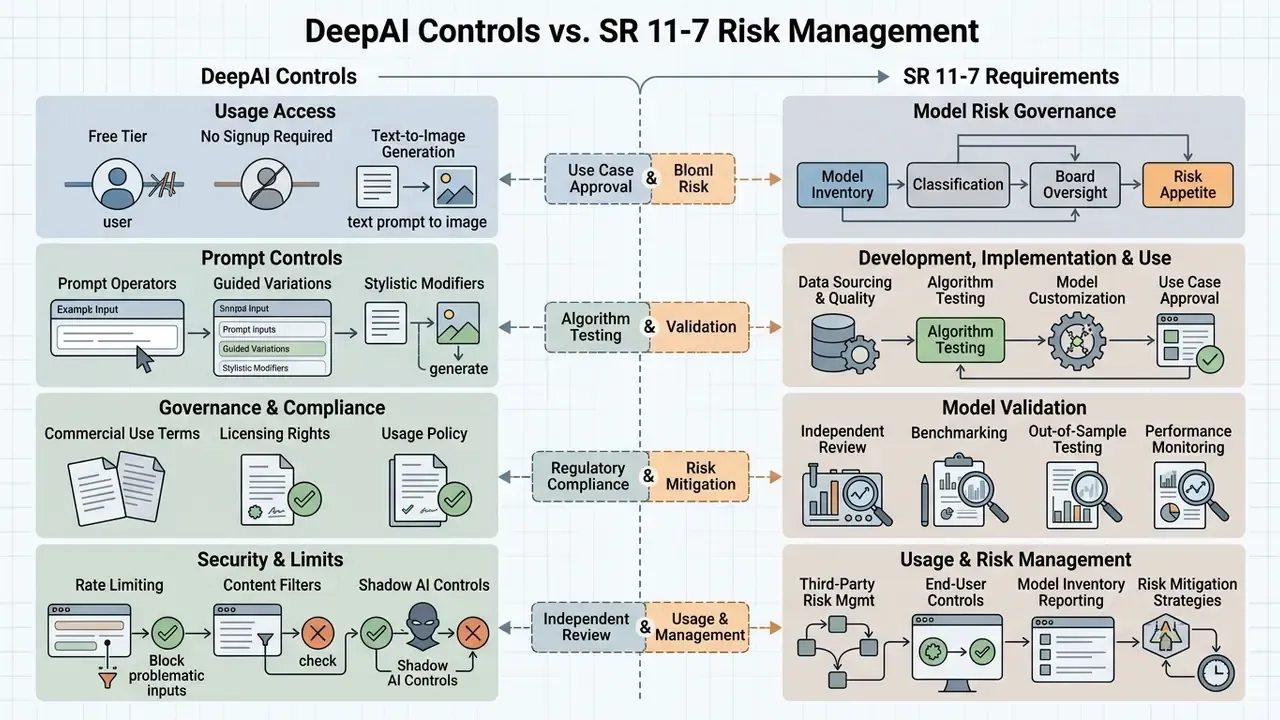
Institutions applying supervisory model risk expectations (such as the U.S. Federal Reserve and OCC SR 11-7 framework) need to map vendor capabilities to control requirements. DeepAI is best classified as a non-model productivity tool, an assistive drafting engine whose outputs are always human-reviewed, rather than a model whose outputs drive decisions. The moment outputs influence decisions, disclosures, or customer-facing regulated content, full validation applies.
| MRM requirement | What the framework expects | DeepAI capability (as documented) | Compensating control you must add |
|---|---|---|---|
| Conceptual soundness | Documented design, assumptions, intended use | Vendor does not publish production model lineage or training-data provenance | Restrict to assistive use; document the "no decisioning" boundary in policy |
| Reproducibility | Same inputs produce verifiable, repeatable outputs | Generation is probabilistic; model versions are not user-pinned | Store prompt, output, and timestamp; treat each output as a one-time artifact |
| Version control | Known model version per production run | No published version pinning or deprecation schedule | Record tier and mode used (Standard, HD, Genius, Super Genius) with each asset |
| Outcome analysis | Ongoing performance monitoring and error tracking | No built-in accuracy metrics or evaluation dashboards | Apply the two-axis scorecard from section 14; log reviewer corrections |
| Data lineage | Traceable inputs and controlled data handling | Inputs submitted to a third-party consumer service | Prohibit confidential inputs; use gateway-level logging |
| Audit trail | Evidence of human review and approval | Not provided natively | Maintain the audit log template below in your CMS or GRC tool |
| Independent validation | Effective challenge by a separate function | Not applicable to a consumer tool | Validate the workflow (prompting plus review controls), not the model |
| Change management | Notification of material model changes | Vendor may change quotas, modes, and models without notice | Re-test prompt libraries quarterly; monitor pricing and tier changes |
Audit trail log format (minimum viable fields):
The human_authorship_note field is not bureaucratic overhead. It is the evidentiary record you will lean on if you later need to assert protectable rights in a derived work (see sections 20 and 22).
API Security, Data Retention, and Enterprise Readiness
| Security / operations dimension | What to verify | Status based on public documentation |
|---|---|---|
| Authentication | Key-based access, key rotation, scoping | Documented: REST requests authenticate via an api-key header |
| Transport encryption | TLS on all endpoints | HTTPS endpoints (https://api.deepai.org/api/...) |
| Data retention period | Explicit retention window for prompts and outputs | Not publicly specified per tier; request in writing |
| Training-data exclusion | Written commitment that API inputs are not used for training | Not publicly specified; request in writing |
| Private generation | Outputs excluded from public galleries | Available as a Pro feature |
| Certifications | SOC 2 Type II, ISO/IEC 27001, penetration test summaries | Not publicly published; request during vendor onboarding |
| Regional data residency | EU, UK, and US processing options | Not publicly documented |
| DPA and sub-processors | Data processing agreement and sub-processor list | Not publicly published; request during onboarding |
| Rate limits and SLA | Documented throughput ceilings and uptime commitments | Quotas and overage rates published; formal uptime SLA not published |
| IP indemnification | Vendor defense against third-party infringement claims | Not offered in the consumer Pro terms (see section 20) |
| Content moderation | Prohibited-use enforcement and filter behavior | Terms prohibit unlawful, misleading, and infringing content |
| Billing controls | Spend caps, auto top-up, per-key attribution | Wallet and auto top-up available; per-key cost attribution must be built on your side |
Practical integration pattern. Place DeepAI behind your own internal API gateway rather than calling it directly from client applications. The gateway becomes your control point for prompt sanitization (stripping PII before egress), request logging, per-team cost attribution, rate limiting, and rapid vendor cut-off if terms or security posture change. One switch, one owner, one log. That is the whole point.
Commercial Use of DeepAI: Rights, Risks, and Tool Selection
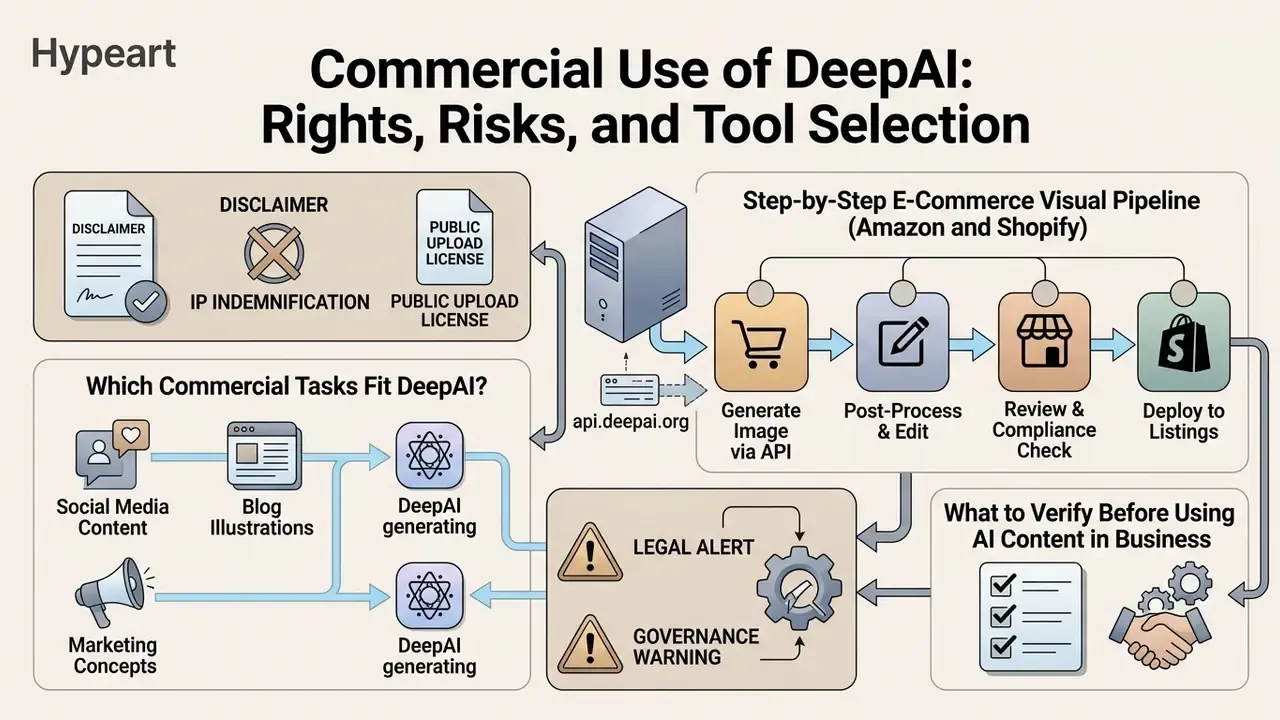
DeepAI's Terms of Service explicitly permit commercial use of generated content and describe outputs as provided free of copyright restrictions. The terms state that users own their generated user content and "may use your generated User Content broadly, including for commercial purposes," subject to compliance with the Terms, while DeepAI's own brand assets, interface, and site content remain the property of DeepAI. Commercial deployment still requires navigating statutory copyright requirements and third-party IP risk.
Legal conflict warning: ToS framing vs. statutory law
DeepAI's public documentation states that "the generated images are considered public domain and hence, they have no owner," and that "the images generated by the AI are not subject to copyright." This confirms DeepAI waives contractual royalty claims against the user. Enterprise legal teams should note the asymmetry: a vendor's public-domain classification does not grant statutory copyright protection to the user. Public domain assets cannot be registered for exclusive copyright enforcement, which leaves un-edited AI outputs open to lawful replication by competitors, including direct reuse of your campaign visuals. Note also the internal tension between the "you own all right, title, and interest" language and the "public domain, no owner" language. Where vendor terms conflict, assume the weaker protection for planning purposes and secure your position through human creative contribution.
Two further contractual realities to plan around:
- No IP indemnification.The consumer Pro tier includes no vendor commitment to defend or indemnify you against third-party infringement claims arising from generated output. Enterprises used to indemnified AI services should treat this as a material gap and factor it into which asset classes (concept art versus flagship brand marks) they are willing to generate here.
- Public upload license.Content set to public, or uploaded into public areas of the service, can carry a perpetual, non-exclusive, transferable, sublicensable, royalty-free, irrevocable worldwide license to the platform. Unreleased campaign creative therefore belongs in private mode only.
Contractual terms govern the relationship between you and the vendor. External legal frameworks decide whether AI-generated assets can receive copyright protection at all, or whether they risk infringing existing third-party works. Risk and legal officers should settle both questions before a campaign launches, not after.
«The U.S. Copyright Office's 2023 guidance confirms that purely machine-generated content lacking sufficient human contribution is not eligible for copyright registration.»
The Office also requires applicants to disclose AI-generated material that is more than de minimis and to describe the human author's specific contributions. Your documentation practice, in other words, directly determines what you can register.
Which Commercial Tasks Fit DeepAI?
DeepAI fits commercial tasks built on visual ideation, draft copywriting, social media graphics, background illustrations, and conceptual product shot work, where absolute exclusivity and statutory registration are not requirements.
| Commercial scenario | Recommended DeepAI tool | Key operational settings | Legal and governance controls |
|---|---|---|---|
| Social media campaigns | Text to Image, AI Text Generator | HD mode, brand tone guidelines | Verify no trademark overlap; inspect graphics for visual bias |
| Blog drafts and web content | AI Text Generator, AI Chat | Plan-based structured prompts | Mandatory human fact-check; edit copy for unique brand voice |
| Product shot concepts | Genius Pro, AI Photo Editor | Photorealistic style, clean background | Ensure images accurately represent physical product capabilities |
| Branding materials and logo ideation | Text to Image (vector styles) | High contrast, minimalist composition | Treat outputs as concepts; use human designers for final protectable vector files |
| Commercial advertising | Full suite via REST API | Super Genius Pro (2K), private mode | Legal review of final creative; retain a documented audit trail of human edits |
| Internal enablement docs | AI Text Generator | Structured outline-first prompting | No confidential inputs; SME review before circulation |
Key takeaway from the table: the further left the row sits on the "consequence" scale, the lighter the control set. Ideation needs a prompt library. Advertising needs legal review, private mode, and a log entry with a named reviewer.
For brand-identity work specifically, our guide to AI logo generators explains why machine-generated marks should be treated as directional concepts rather than final trademarks. Protectable brand assets generally require documented human authorship plus a clearance search.
«OpenBias identifies biases in generative models without a predefined list of categories, using VQA-based assessment on the Flickr30k and COCO datasets.»
For commercial campaigns, that means bias review cannot rest on a fixed checklist of protected attributes alone. Open-ended inspection of who appears, in what role, and with what visual treatment belongs in creative sign-off, particularly in financial services imagery, where depiction of customers and advisers carries reputational and fair-treatment implications.
Step-by-Step E-Commerce Visual Pipeline (Amazon and Shopify)
For merchants using DeepAI for product catalog work, this four-stage workflow turns raw product photography into marketplace-ready assets:
- Base asset isolation. Upload raw product photographs to the background remover endpoint (
POST https://api.deepai.org/api/background-remover) to extract transparent PNG cutouts with clean alpha edges. - Hero shot generation. Render studio backgrounds with structured prompts, for example
"a minimal white marble podium, soft directional shadow, neutral studio lighting, 100mm macro lens, 8k detail", to satisfy marketplace white-background and clean-background requirements. - Contextual lifestyle fusion. Composite product layers into ambient scenes using the AI Photo Editor endpoint (
POST https://api.deepai.org/api/image-editor) with descriptive prompts such as"place the bottle on a sunlit kitchen counter, golden hour side light, shallow depth of field". - Batch upscaling and QA. Pass final outputs through Super Genius mode or a super-resolution step to meet platform resolution requirements (roughly 1600×1600 px minimum to enable Amazon zoom), then run a compliance pass. Does the render accurately depict the physical product, its color, its scale, and its included accessories?
Critical compliance note for e-commerce: generative retouching must never create a materially inaccurate representation of the goods. Invented textures, added features, or altered proportions can constitute misleading advertising regardless of the image's licensing status. Generate the environment; photograph the product.
Multi-angle catalogs also reward consistency discipline. Fix one prompt template per SKU family, keep lens and lighting language identical across angles, and log the template version so a catalog refresh six months later reproduces the same look.
For teams producing dynamic visual campaigns, motion assets alongside static images can lift engagement. Creators can review workflows to animate image ai tools, explore options to animate photo ai assets within regulated marketing guidelines, and compare capabilities in our overview of animation makers.
What to Verify Before Using AI Content in Business
Before using AI-generated content commercially, verify the platform's terms of service, assess statutory copyright eligibility, inspect outputs for third-party IP conflicts, and review visual assets for demographic bias.
Legal alert and governance warning
«To date, U.S. courts have not recognized copyright in works created autonomously by AI without sufficient human creative contribution.»
If a model generates output substantially similar to copyrighted training data, commercial users may still face third-party infringement claims, and fair use analysis treats the commercial character of the use as one statutory factor. Document human creative selection, coordination, and editorial modification to establish protectable rights.
Checklist0 / 10
When evaluating tool deployment across broader media formats, decision-makers can consult the comprehensive AI Media Glossary or browse the hub for specialized analysis on model risk management and compliance frameworks.
FAQ About DeepAI Text Generator and DeepAI Image Generator
These are the frequently asked questions we see most often from risk, legal, and content teams.
What is the DeepAI Text Generator?
The DeepAI Text Generator is an online AI tool powered by Large Language Models that generates, completes, and transforms text from user-provided instructions. Same engine family, different interfaces: the deepai ai generator surface also covers AI Chat and text-to-image.
Is DeepAI free to use without signup?
Yes. DeepAI provides free access to its basic text generator, AI Chat, and standard text-to-image creation directly in the browser, with no account required. From a security standpoint that same convenience is what makes the free tier a Shadow AI risk in corporate environments (see section 19.1).
Can I use DeepAI images and text for commercial purposes?
Yes. DeepAI's Terms of Service state that generated content is free of copyright restrictions and may be used for lawful commercial purposes. Verify third-party trademark safety and document human editorial contributions if you want legal brand protection.
How does DeepAI Pro pricing work?
DeepAI Pro costs $9.99 per month (or $89.99 annually) and includes higher generation limits, Genius Mode access, private generations, an ad-free interface, and monthly API credits.
What happens when I exceed my monthly Pro limits?
Usage beyond the included allowance bills as metered overage: $0.01 per additional standard image, $0.08 per Genius Mode image, $0.25 per Super Genius 2K image, plus per-second rates for video. Credits draw from your wallet balance, and auto top-up prevents pipeline interruptions.
Does DeepAI offer intellectual property indemnification?
No. The publicly documented consumer and Pro terms include no vendor commitment to defend you against third-party infringement claims. Organizations that require indemnified generative AI should evaluate vendors that offer it contractually.
Does DeepAI train on my prompts, and how long is data retained?
Public documentation does not specify a per-tier retention window or an explicit commitment excluding user inputs from training. Until you have written terms, treat every submitted prompt as disclosed to a third party and prohibit confidential, personal, or material non-public information.
Are free-tier generations private?
No. Free generations are treated as public by default and may carry watermarks. Private generation is a paid Pro feature, which is why unreleased campaign creative should never be produced on the free tier.
Can DeepAI detect AI-generated images?
DeepAI offers an AI Image Detector endpoint that estimates the probability that a graphic was machine generated. Official documentation notes these are probabilistic estimates, not definitive legal proof. Teams needing higher confidence should cross-check multiple AI image detectors and combine detection with provenance metadata rather than trusting a single score.
Is DeepAI suitable for regulated financial content?
For internal ideation and first drafts under human review, yes. As a source of record for rates, disclosures, regulatory language, or customer communications, no, not without full verification, documented review, and an audit trail. And it should never receive confidential customer data.
Can You Connect DeepAI via API for Automated Content Generation?
Yes. Developers can connect DeepAI via REST APIs to automate text and image generation inside third-party applications, content management systems, and enterprise software pipelines.
The platform provides programmatic endpoints, including POST https://api.deepai.org/api/text2img for visual generation plus dedicated endpoints for text generation, photo editing, inpainting, super-resolution, background removal, and colorization. Pipelines that ingest existing documents or scanned assets often pair generation with text recognition tools for images to extract source content before rewriting or re-rendering it.
Requests authenticate with an api-key header, draw credits from your DeepAI Pro balance or prepaid API wallet, and return a generated output_url (or base64 payload) that your pipeline downloads and stores. Technical teams planning complex integrations can explore the hub or review developer documentation to evaluate API performance benchmarks and cost management frameworks. Route every call through an internal gateway that sanitizes prompts, logs metadata, and attributes spend per team.
Limitations, Open Questions, and a Safe Next Step
Three things in this analysis remain genuinely unresolved, and pretending otherwise would not help anyone. First, DeepAI does not publish per-tier data retention or a training-data exclusion commitment, so any confidentiality conclusion is an assumption until you have it in writing. Second, there is no published uptime SLA, which limits how deeply the API belongs in a time-critical pipeline. Third, quotas and model tiers have changed more than once, so cost models built today should be re-validated quarterly.
A reasonable next step for most institutions is narrow and reversible: approve the tool for non-confidential ideation only, gate the domain so anonymous use is blocked, pilot Pro behind an internal gateway with full prompt logging, and review the evidence after 60 days. No enterprise commitment required. Just a controlled, observable trial with a named owner and a documented shutdown path.
Additional Resource Navigation and Related Case Studies
Decision-makers, model risk managers, and editorial teams evaluating generative AI platforms can explore the hub for detailed tool evaluations, or see the overview of ongoing legal developments around generative AI intellectual property. For adjacent commercial-use assessments of specific vendors, see our analyses of the Microsoft AI image generator, the Google AI image generator, and the Canva AI generator. You can also compare options across the full commercial-use library.
For further comparative analysis on enterprise creative tools, model risk frameworks, and commercial licensing models, review our related technical analyses across the site repository.
Appendix A: Superseded and Updated Wording