Deploying generative artificial intelligence inside enterprise workflows demands a sober look at model behaviour, operating cost, and licensing exposure. The Deep AI Image Generator provides web-based and API-driven text-to-image creation for individual creators, software developers, and enterprise teams. Understanding how this platform handles text prompts, image editing, pricing tiers, and commercial usage rights lets decision-makers set controls before the first asset ships, rather than after a takedown letter arrives.
Executive Summary for Risk, Compliance, and Procurement
- Cost profile is low and predictable.DeepAI Pro costs $9.99/month or $89.99/year, bundling 500 standard, 60 Genius, and 10 Super Genius 2K generations per month, with transparent overage rates ($0.01 / $0.083 / $0.25 per image). API access is included with every Pro subscription.
- Output rights are permissive, but legal protection is thin.DeepAI's Terms of Service state that generated content is "free of copyright" and may be used for any legal purpose, including commercial use. However, DeepAI does not publish an intellectual-property indemnification commitment comparable to Adobe Firefly's enterprise terms. Residual IP risk stays with the licensee.
- Governance documentation is incomplete for regulated deployment.Publicly available DeepAI documentation does not enumerate SOC 2 / ISO 27001 certification, prompt-retention windows, enterprise SSO/RBAC, deterministic seed control, or model cards. Free-tier generations are public and discoverable by default, which is a direct Shadow AI and confidentiality exposure for banks and fintech firms.
- Verdict for regulated environmentsworkable for low-risk marketing prototyping, internal concepting, and developer automation behind a controlled API gateway. Not suitable for workflows touching PII/NPI, customer imagery, or unindemnified paid-media campaigns without human-in-the-loop review and a signed enterprise agreement.
What is DeepAI Image Generator and How It Creates Images
The DeepAI Image Generator is a cloud-based text-to-image model that converts written descriptive text into digital raster graphics. Operated through a web interface and REST API endpoints, the image tool samples synthetic images from trained neural network distributions. The platform has run a public browser-based text-to-image generator since 2016, and its 2025–2026 roadmap extended the same account and wallet system into video, music, and voice generation.
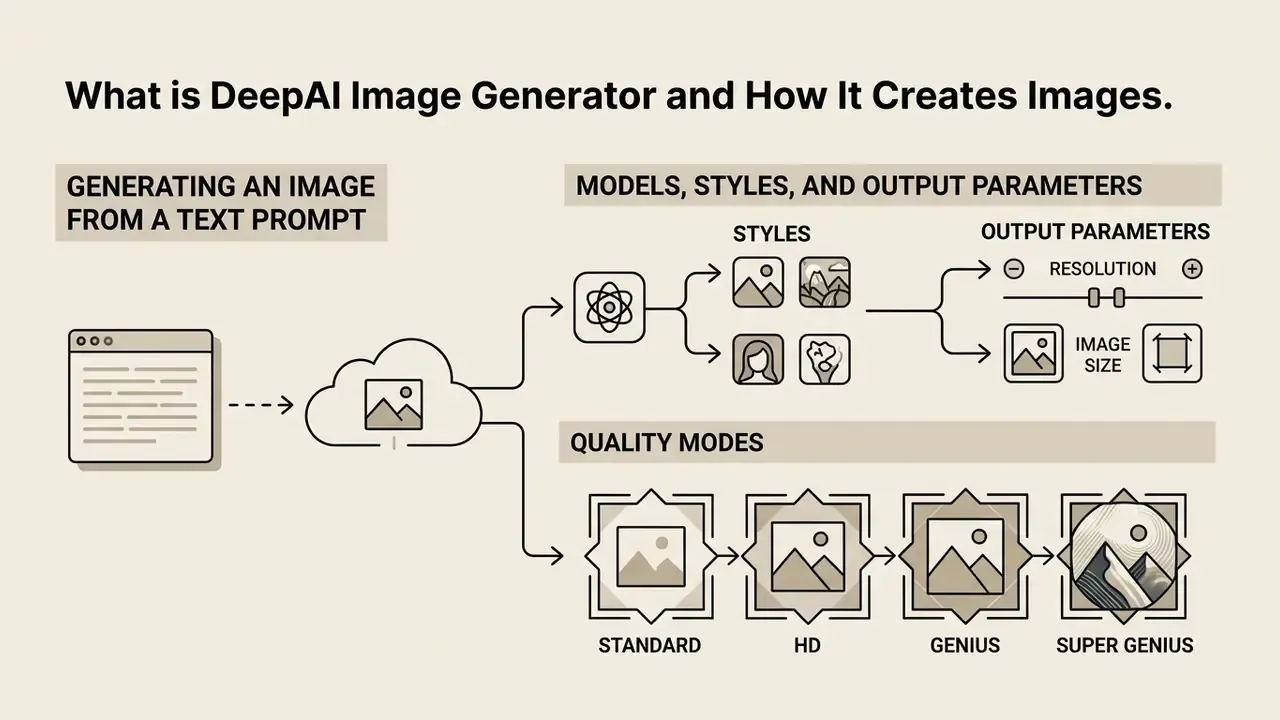
Generating an Image from a Text Prompt
Generating an image in DeepAI starts with a structured text description, the written prompt, that defines subject, composition, and visual context. The underlying neural network tokenises that simple text and uses attention mechanisms to align linguistic concepts with visual feature representations (DeepAI Docs, 2026).
«Diffusion models progressively remove noise from a random vector, using cross-attention to align text tokens with spatial regions of the image.»
POST https://api.deepai.org/api/text2img
Header: api-key: YOUR_API_KEY
Form Data: text="a clean corporate office building in low evening light, architectural photography"
The system evaluates the input string against its trained vision-language embeddings to construct latent visual features. Simple prompts accept plain text strings. Technical workflows lean on negative prompts (negative_prompt) to exclude unwanted visual elements such as blur, distortion, or specific background objects (deepai-js-client Documentation, 2026). DeepAI's own published research reinforces the same mechanism: its shifted-diffusion work describes improved image-embedding generation from input text, while its zero-shot transformer paper models text and image tokens as a single autoregressive stream.
One practical note from editorial testing: a prompt that names the medium first ("editorial photograph of…") tends to hold composition better than one that names mood first. Small thing. It shows up quickly across ten runs.
Models, Styles, and Output Parameters
Quality Modes: Standard, HD, Genius, and Super Genius
DeepAI exposes generation quality as a discrete model tier rather than a single slider. Each tier changes resolution, sampling depth, prompt adherence, and per-image cost, which makes tier selection a budgeting decision rather than a purely aesthetic one.
| Quality Mode | Native Resolution | Prompt Adherence | Typical Use Case | Overage Cost per Image |
|---|---|---|---|---|
| Standard | Baseline (fast sampling) | Moderate | Rapid ideation, thumbnails, internal concepting | $0.01 |
| HD | 640 × 640 | Moderate–Good | Blog headers, social thumbnails, drafts | $0.01 |
| Genius | 1024 × 1024 | High, follows detailed instructions | Client-facing visuals, ad creative, editorial art | $0.083 |
| Super Genius 2K | Ultra-HD 2K | Highest available | Print-adjacent assets, hero banners, pitch decks | $0.25 |
| Super Genius 4K | Ultra-HD 4K | Highest available | Large-format output, presentation backdrops | Billed at premium wallet rate |
A Preference toggle (Speed vs. Quality) sits next to the model selector. Speed mode trims sampling steps for faster iteration, while Quality mode spends extra steps to cut noise and resolve fine detail. Genius mode is documented as producing more detail, stronger artistic quality, and better instruction-following than the legacy standard generator. Super Genius modes are restricted to DeepAI Pro members.
Enterprise Governance, Data Privacy, and Shadow AI Risk
Before any generative image tool enters a regulated environment, the controlling question is not "how good are the pictures?" It is "what happens to the data we send, and can we prove what the model did?" This section consolidates the governance attributes a Model Risk or AI Governance function must clear before approval.
1. Default output visibility is a confidentiality control, not a cosmetic setting. DeepAI's free tier produces public, discoverable generations. Private generation is an explicit DeepAI Pro feature. Any employee pasting a product roadmap description, an unreleased campaign concept, or a customer scenario into the free web generator is publishing that prompt context into a public gallery. For banks and fintechs, this is the single highest-probability Shadow AI leakage path associated with the tool.
2. Prompt and upload retention is not fully documented publicly. Official DeepAI pages document how to send images (URL, multipart/form-data, or base64 JSON) but do not publish a granular retention schedule, a deletion SLA, or a statement on whether user prompts and uploaded reference images are excluded from future model training. Treat this as an open control gap requiring written vendor confirmation via a DPA addendum, not an assumed protection.
3. Certification evidence must be requested, not inferred. Public documentation reviewed for this article does not surface SOC 2 Type II, ISO 27001, or HIPAA attestations for DeepAI. Absence of published evidence is not proof of absence. But for third-party risk management purposes, unverified equals unapproved.
4. Reproducibility and auditability are limited. DeepAI's documented text-to-image parameters (text, negative_prompt, grid_size, width, height, image_generator_version) do not include a publicly documented deterministic seed field. Without seed control, an auditor cannot re-run a historical generation and obtain a byte-identical artifact. Model cards and versioned changelogs are likewise not published at the granularity MRM frameworks typically require.
Compensating controls that make deployment defensible:
Checklist0 / 8
One ownership point that gets skipped: name a single accountable owner for the tool, with an approved role description, access limits, an escalation path, and a documented shutdown mechanism. A generative image endpoint is a digital worker, and unowned digital workers are how shadow usage starts.
For a broader view of tool categories and the licensing questions each raises, review the hub overview of AI image generators.
How to Generate Images in DeepAI: Step-by-Step Process
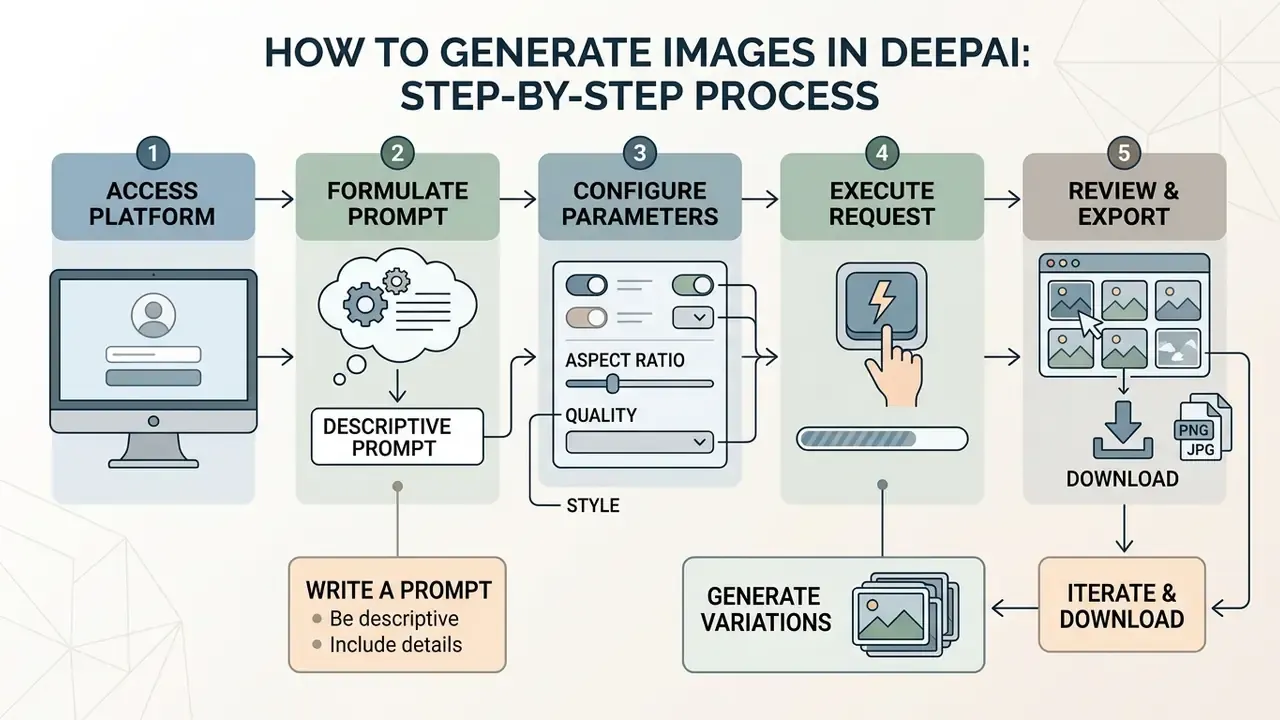
Creating synthetic imagery in DeepAI involves formulating a descriptive prompt, selecting style parameters, executing the generator request, and downloading the output file. A standardised procedure improves predictability across creative and business tasks.
How to Write a Prompt for an AI Image Generator
Writing an effective prompt for the ai generator deep ai workflow requires clear subject identification, environmental context, framing constraints, and explicit medium specification. Avoid vague terms like "high quality" or "realistic". Specify concrete elements instead: "35mm photograph, soft directional daylight, shallow depth of field" (OpenAI Developers Prompting Guide, 2026).
For complex business visuals, split written prompts into labelled segments: subject definition first, background details second, lighting or style attributes third (Google Cloud Vertex AI Prompt Guide, 2026). Where text must appear inside the frame, Google's guidance recommends keeping rendered strings to 25 characters or fewer.
Illustrative composite example, not a documented client result: a financial services marketing team needed consistent editorial visuals for quarterly reports. By fixing framing parameters and listing explicit exclusions, they removed recurring background artifacts across multiple generation runs and cut manual review cycles. Teams benchmarking similar business-visual workflows across vendors can consult a comparison of the best AI image generators before standardising on one platform.
Choosing Style, Aspect Ratio, and Image Quality
Picking the right style preset and output dimensions keeps generated visuals aligned with target publishing layouts. Aspect ratio drives composition density. Square formats (1:1 at 1080x1080) suit social media feeds, while landscape ratios (16:9 at 1024x576) fit web banners and presentation slides (DEKRA Social Media Styleguide, 2023). Vertical 9:16 output at a minimum of 1440×2560 is the documented target for Stories and Reels placements (Adsmurai Social Media Ad Specs Guide, 2022), and 4:5 at 1080×1350 remains the highest-density feed format for social posts and branding materials.
«Multi-criteria prompts combining feasibility and aesthetics correlate more strongly with design evaluation scores than prompt length or editing time.»
DeepAI exposes quality settings through standard, HD, Genius, and Super Genius processing modes. Higher modes allocate additional sampling steps to reduce noise and sharpen fine detail, though generation speed drops proportionally (DeepAI Docs, 2026). Documenting a fixed set of dimension presets across marketing teams keeps AI output aligned with established publication workflows.
Generating, Iterating Variations, and Exporting Files
Executing a generation request returns an output URL containing the rendered file. You review the generated picture in the web interface, or receive a direct JSON response through the API containing the asset location (DeepAI Docs, 2026).
{
  "id": "e6a4b12c-98d1-4f3b-8212-3a5c2b9a7101",
  "output_url": "https://api.deepai.org/job-out/e6a4b12c.../output.jpg"
}
Requesting variations lets you explore alternative interpretations without rewriting the primary text prompt. The grid_size parameter returns multiple candidates per request, and Undo/Redo controls in the web dashboard step back through edit states. Final assets download as JPG or lossless PNG. Lossless PNG preserves sharp vector-like text and clean background edges; compressed JPG keeps the storage footprint small for web publishing.
- Access the platform.Open DeepAI in a browser, or authenticate through the REST API with your assigned key.
- Formulate the prompt.Enter a structured text description specifying subject, background, lighting, and explicit exclusions.
- Configure parameters.Select style presets, choose a model tier (HD / Genius / Super Genius), define width and height, and set the Speed–Quality preference.
- Execute the request.Trigger generation to start diffusion sampling and produce candidate visuals.
- Review and export.Inspect the output image, generate secondary variations if needed, and download the final file in JPG or PNG.
- Log the asset.Record prompt text, model tier, timestamp, and output hash in your asset register before publication.
DeepAI Editing Tools and Work with Existing Images
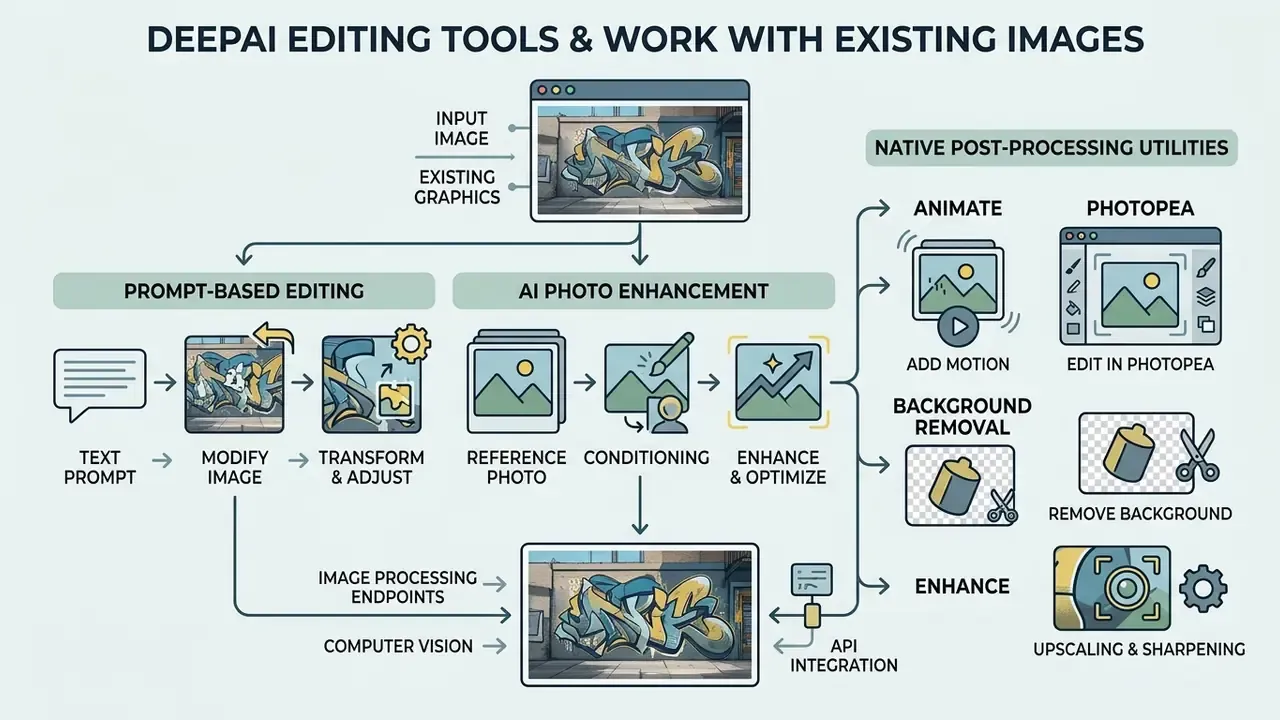
DeepAI includes dedicated computer vision and image processing endpoints that transform, enhance, or adjust existing graphics. These tools extend basic text-to-image capability into post-processing and asset maintenance pipelines.
Prompt-Based Editing and Changing Existing Images
Prompt-based editing lets you submit an existing image alongside text instructions to modify specific visual elements. Through the POST /api/image-editor endpoint, the model accepts a file or public URL and applies targeted changes based on the prompt (DeepAI Docs, 2026).
POST https://api.deepai.org/api/image-editor
Header: api-key: YOUR_API_KEY
Form Data:
  image: "https://example.com/source-photo.jpg"
  text: "add a subtle blue gradient to the background sky"
The system performs localised inpainting and object replacement, altering target regions while trying to hold overall composition and lighting consistent, much like a generative fill operation in a conventional editor (DeepAI Image Replace, 2026). The Image Replace tool also lets you draw a mask over the object to change and attach a short natural-language instruction, which suits product mockups, colour swaps, and merging elements from multiple source images. Organisations working heavily with overlay text and graphic modifications can evaluate specialised platforms like a photo text editor against pure neural editing endpoints, or review the general guide to online photo editors for feature parity checks.
AI Photo Enhancement and Reference Photo Conditioning
DeepAI provides enhancement algorithms that upscale low-resolution visuals and reduce compression noise. The platform includes super-resolution tools such as Waifu2x, which sharpen blurred edges and enlarge dimensions without distorting original graphic structures (DeepAI Waifu2x Model, 2026). Teams comparing resolution-recovery quality across vendors can review dedicated AI image upscalers before committing to one pipeline. Face-detail enhancement modes are documented for small, noisy, compressed, or blurred inputs, with separate output paths at 512×512 and 2048×2048.
For targeted photo editing, the AI Photo Editor interface accepts 1 to 3 reference images alongside text prompts to guide structural modifications (DeepAI Docs, 2026). A reference photo narrows the model's search space, which is usually the fastest route to repeatable output. Specialist alternatives are catalogued in the overview of AI photo editors. Turning existing photographs into stylised digital assets is also possible with tools built to convert a photo to ai art piece across artistic styles.
Deep AI Chat with Image Assistance and API Integration
The Deep AI Chat interface combines natural language conversation with on-demand image generation help. Inside a chat session you can request illustrative assets, test visual concepts, or refine prompt descriptions interactively (DeepAI Docs, 2026). For teams new to the deep ai chat image generator flow, this is the lowest-friction way to learn what the model actually responds to.
For engineering teams, API integration requires passing authentication keys in HTTP request headers. DeepAI endpoints accept payloads as multipart/form-data, URL-encoded forms, or JSON bodies containing base64-encoded image data (DeepAI Docs, 2026).
import requests
response = requests.post(
    "https://api.deepai.org/api/text2img",
    data={'text': 'modern technology server room, architectural photography'},
    headers={'api-key': 'YOUR_API_KEY'}
)
data = response.json()
print(data['output_url'])
For audit-ready deployments, wrap this call in a logging decorator that persists the prompt, model tier, requesting identity, response id, and a hash of the downloaded artifact. DeepAI does not offer an enterprise admin audit console, so the audit trail has to be built client-side before the tool is approved for business use.
Native Post-Processing Utilities: Animate, Photopea, Background Removal
Inside the web dashboard, DeepAI bundles several fast-action post-processing tools that keep you in the browser:
- Animate converts a static generated raster image into a short motion clip, useful for social placements and simple banner motion.
- Edit in Photopea hands the generated asset straight to Photopea, an in-browser layer-based raster editor, for manual fine-tuning, masking, and typography overlays.
- Remove Background one-click subject isolation for product cut-outs and composite layouts.
- Enhance native upscaling and sharpening for print readiness and higher-resolution reuse.
- Colorize restores colour to black-and-white source photography.
- Talk to Image / Share conversational interrogation of the generated asset plus direct distribution to X, Facebook, LinkedIn, and Reddit.
Teams building motion assets at volume should compare the broader category guides to animation makers and YouTube video editors, since Animate is deliberately lightweight rather than a full editing suite.
Wolfram Integration and Inbound AI Detection
DeepAI differentiates its architecture through a technical partnership with Wolfram Research. That collaboration strengthens prompt processing with algorithmic computation and real-time knowledge retrieval, which helps when the generator must render complex scenes, quantitative diagrams, or factually constrained subject matter.
DeepAI also provides an AI Image Detector for content verification. Enterprise workflows use it to inspect incoming visual assets, judge whether imagery is synthetic or human-created, and reduce risk from deepfakes or unauthorised AI generation before publishing. Typical applications include screening supplier product photos before marketplace listing, verifying profile images during onboarding, and reviewing visuals attached to reports or press material. For governance teams, the detector acts as an inbound control that complements the outbound provenance logging described above.
How to Improve the Quality of DeepAI Generated Images
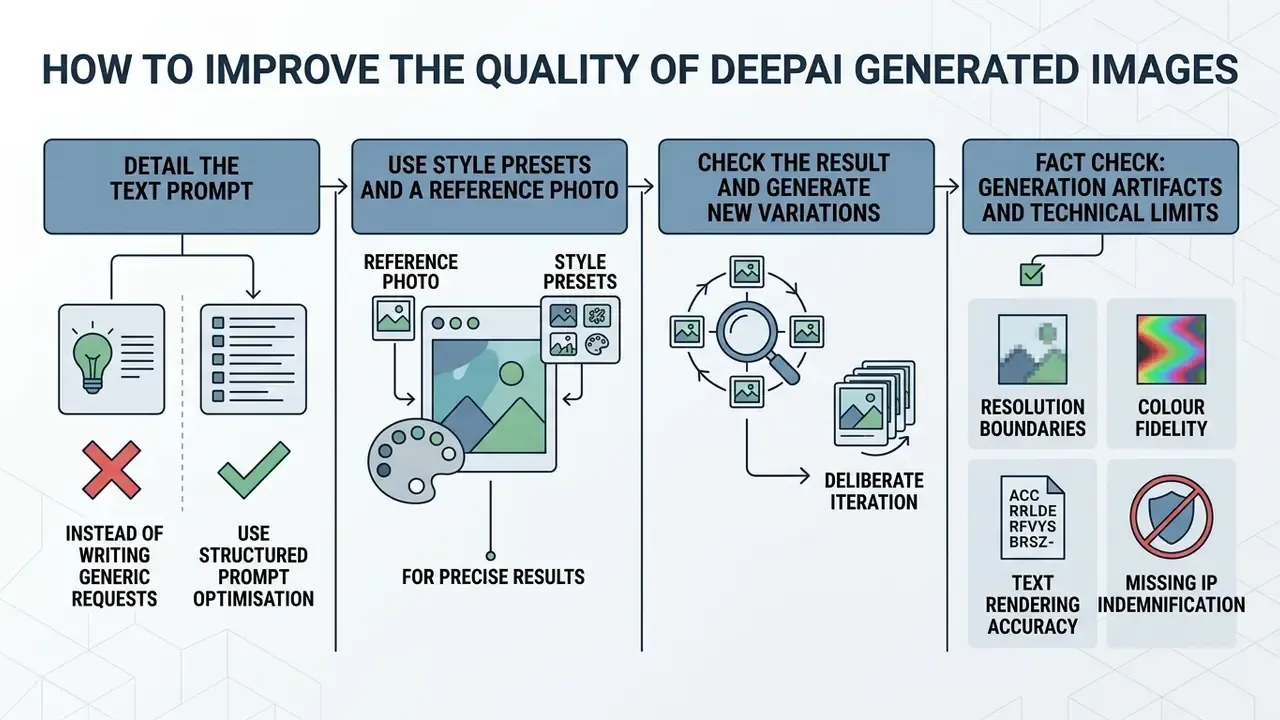
Getting higher quality out of DeepAI takes structured prompt optimisation, deliberate style application, and systematic output validation. Neural image generation stays probabilistic, so iterative quality control is not optional for professional assets.
Detail the Text Prompt Instead of Writing Generic Requests
Replacing brief keywords with structured, highly descriptive prompts improves composition and cuts artifact frequency. Research shows that language-model-guided prompt refinement lifts aesthetic evaluation scores while preserving user intent.
Evidence note: the published summary reports relative preference gains rather than a fixed absolute uplift, and does not disclose full annotator sample size. Treat it as methodological support for structured prompting, not a guaranteed score.
Unstructured Prompt: "a bank vault"

Structured Prompt: "a secure modern bank vault with a reinforced steel door, soft overhead LED lighting, metallic reflections, ultra-clean commercial photography, neutral tones"
Build spatial placement, material textures, camera angles, and colour palettes into the written prompt (PRISM Framework, 2025). Stating visual exclusions explicitly prevents the usual diffusion errors: unwanted text overlays, extra limbs, background clutter. DeepAI's own prompt-optimisation research frames this as a reward-driven process, where supervised fine-tuning plus reinforcement learning adapts prompts to maximise aesthetically pleasing output while preserving intent.
Use Style Presets and a Reference Photo for Precise Results
Pairing defined style presets with reference image conditioning constrains the model's search space and yields more predictable visuals. This is also where you fine tune brand-adjacent output without retraining anything.
Style Preset: "cyberpunk-generator"
Prompt: "financial trading desk with holographic data monitors, dark aesthetic, moody neon accents"
Parameter: width=1024, height=576
Where brand marks must appear accurately, dedicated tooling beats a general generator. Review the category guide to AI logo generators before attempting logotype rendering inside a diffusion prompt. When assessing specialised style engines across niche creative domains, creators often test platforms like the perchance ai image generator to contrast preset flexibility against DeepAI's API endpoints, or compare style-specific engines such as Ghibli-style AI image generators.
Check the Result and Generate New Variations
Iterative refinement means producing several candidates per prompt, inspecting them for technical defects, and selecting the most accurate variation.
«R2I-Bench evaluates 16 models across 3,068 reasoning-oriented prompts, showing that even leading models demonstrate limited reasoning accuracy.»
Hypothetical illustration: a digital publication team ran an automated review protocol that generated four variations per editorial prompt. Discarding outputs with anatomical defects or incorrect attribute bindings before final selection kept visual quality consistent across published articles. The practical loop is simple. Generate, evaluate against explicit acceptance criteria, feed the findings back into the prompt, regenerate, re-evaluate. Stop only when defect-free output reproduces across at least two runs.
Fact Check: Generation Artifacts and Technical Limits
Free DeepAI, DeepAI Pro, and the Real Cost of Generation
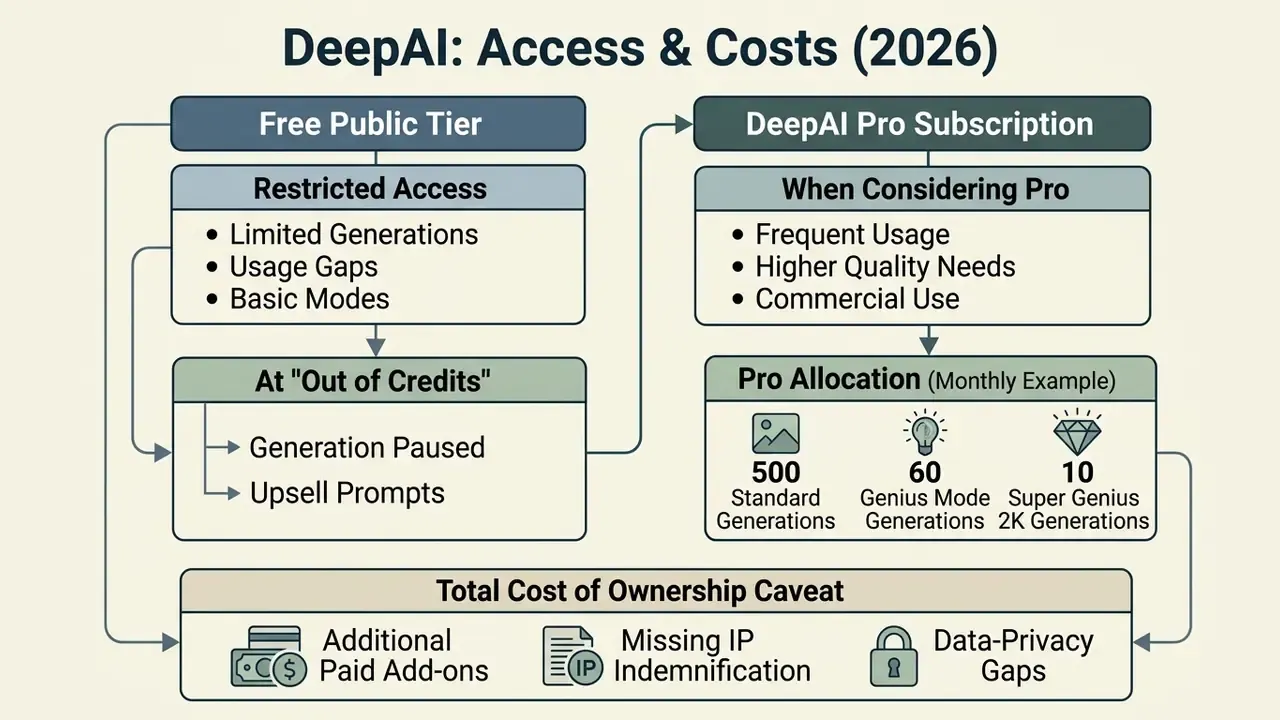
DeepAI runs a dual-tier commercial model: a restricted free public tier and a paid DeepAI Pro subscription. Understanding credit limits, processing priority, and overage charges lets finance teams budget generative spend accurately rather than discovering it in a wallet statement.
What You Get on Free AI and What Happens at "Out of Credits"
The free ai tier allows basic web-based text-to-image generation without immediate account creation (DeepAI Home, 2026). Free access operates under strict usage caps, standard processing priority, and public image visibility. Teams evaluating comparable low-friction entry points can review free AI generators with no sign-up requirement to see how access limits differ across vendors.
| Parameter | Free Tier | DeepAI Pro Subscription |
|---|---|---|
| Base Price | $0 / month | $9.99 / month (or $89.99 / year) |
| Included Standard Images | Limited daily/rolling cap | 500 per month |
| Included Genius (1024×1024) | Not included | 60 per month |
| Included Super Genius 2K | Not included | 10 per month |
| Generation Visibility | Public (discoverable) | Private generations enabled |
| Ad Experience | Ad-supported interface | Completely ad-free |
| Processing Priority | Standard queue | Priority generation queue |
| Video Generation Allowance | None | 25 HD video seconds per month (plus 8 Hollywood Mode seconds) |
| API & Tool Access | Basic endpoints | Full tool suite + API inclusion |
| Overage Billing | Throttled / blocked | Prepaid credit wallet overages |
| Watermarking | Applied on free outputs | Clean exports |
When free tier users hit daily thresholds or the "Out of credits" wall, generation requests queue or block until quotas reset. The wallet supports manual top-ups from $5 to $1,000 plus optional auto top-up when the balance runs low. Teams looking for alternative free tools during high-volume periods can compare options across service tiers, browse the hub to check feature availability, or read a ranked comparison of free AI art generators.
When DeepAI Pro Is Worth Considering
Moving to DeepAI Pro ($9.99 per month or $89.99 per year) makes sense for commercial teams, software developers, and high-volume content creators (DeepAI Pricing, 2026). Pro includes private generation, ad-free access, priority processing, and monthly allowances for advanced features such as HD video generation. Cost-sensitive teams should still benchmark against a curated comparison of free AI video generators before consolidating spend on one vendor.
A Pro subscription includes these monthly base quotas before usage-based billing applies:
- 500 Standard generations
- 60 Genius Mode generations (1024 × 1024)
- 10 Super Genius 2K generations (ultra-high resolution)
Once the included allowances are consumed, further generations bill against the prepaid wallet balance.
Base Subscription: $9.99 / month
Included Allowances: 500 standard, 60 Genius, 10 Super Genius 2K,
                     25 HD video seconds, full tool access,
                     private generation, ad-free UI
Overage Rates (from prepaid wallet):
  - Standard HD Image: $0.01 per generation
  - Genius Mode Image: $0.083 per generation
  - Super Genius 2K Image: $0.25 per generation
For developer operations, Pro includes API access, with usage beyond monthly base allowances billed against the prepaid wallet once charges reach $5 (DeepAI Docs, 2026).
Total cost of ownership caveat. In a regulated setting, the subscription line is the smallest number on the page. A realistic TCO model adds compliance overhead: human review time per published asset, reverse-image and trademark clearance, provenance logging, and the cost of residual IP risk that DeepAI does not indemnify. For a bank publishing 200 external assets per quarter, review labour typically exceeds the licence fee by an order of magnitude. That is precisely why indemnified alternatives can be cheaper on a risk-adjusted basis despite higher sticker prices.
Can DeepAI Images Be Used Commercially
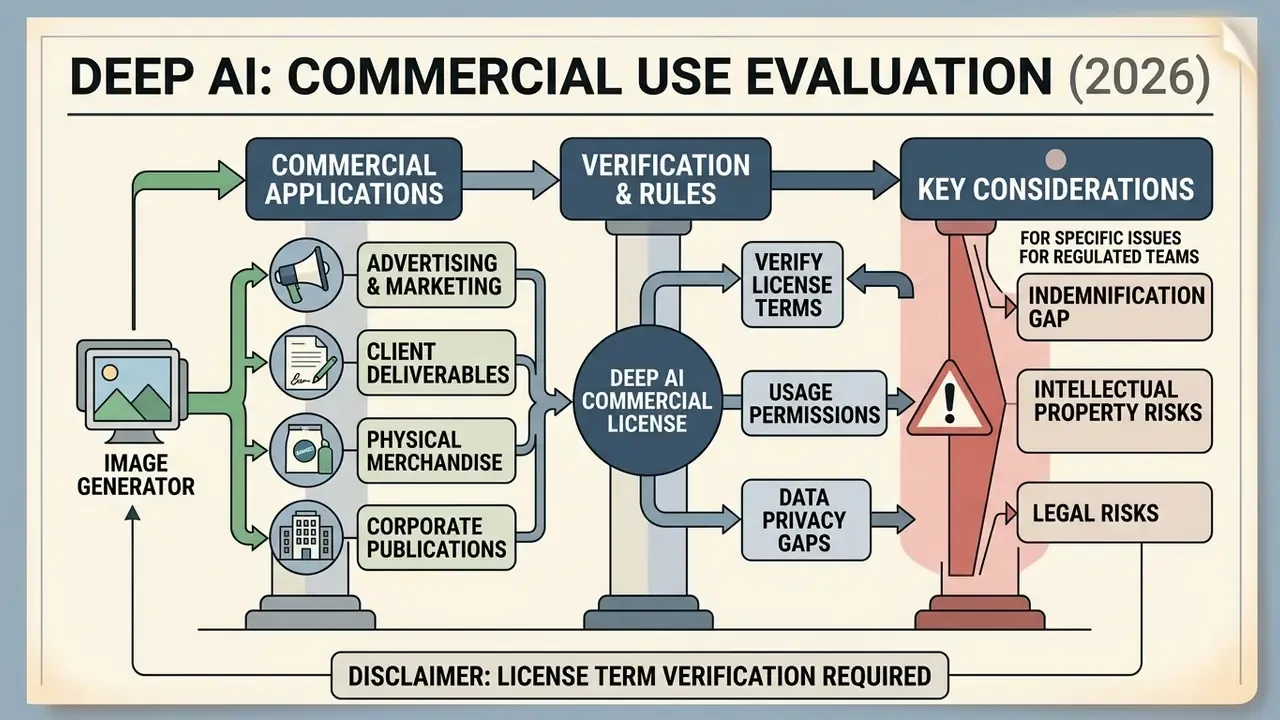
Commercial licensing rules decide whether synthetic imagery can legally appear in advertising, client deliverables, physical merchandise, and corporate publications. Reading the vendor Terms of Service before launch is the cheapest control available.
Using AI Images for Marketing and Content
AI generated content now runs across digital ad campaigns, social posts, blog posts, and product concepts. Academic and field studies show that AI-generated ad banners can match or beat human stock photography engagement, reaching up to 50% higher click-through rates in targeted display campaigns.
«AI-generated banner advertisements can achieve up to 50% higher click-through rates compared with stock photography in targeted campaigns.»
What to Verify Before Commercial Use
DeepAI's Terms of Service state that generated user content is "free of copyright" and may be used for any legal purpose, including commercial use, provided the user holds an active paid plan or complies with platform terms (DeepAI Terms of Service, updated Aug 24, 2026). The model pages go further, describing outputs as "considered public domain" with "no owner."
Checklist0 / 7
Verification tooling matters as much as the checklist itself. Teams routinely pair trademark screening with AI image detectors and AI reverse-image-search tools to confirm that an asset is neither a near-duplicate of protected work nor an unlabelled synthetic image entering a workflow that requires human-origin content.
Bias screening is a substantive legal exposure, not a style preference:
«AI advertising frequently reproduces racial and gender stereotypes inherited from biased training data, undermining consumer trust and brand integrity.»
«Copyright protects works of authorship, not personality as such: replicating a person's appearance is not by itself copyright infringement.»
In practice, a compliant-looking output can still trigger right-of-publicity, unfair-competition, or state digital-replica claims where no copyright issue exists at all. Those claims sit under separate statutes and are untouched by DeepAI's "free of copyright" language.
The indemnification gap. This is the decisive commercial distinction between DeepAI and enterprise-grade alternatives. Adobe states that Firefly's models are trained on licensed Adobe Stock and expired-copyright public-domain content, and Adobe's enterprise plans include contractual IP indemnification for select outputs. DeepAI's public terms transfer output rights to the user but do not publish an equivalent indemnification commitment. The practical consequence is blunt: if a third party alleges that a DeepAI-generated asset infringes their trademark, trade dress, or publicity rights, defence costs and any damages sit with your organisation, not the vendor.
Legal Disclaimer: License Term Verification
DeepAI vs Other AI Image Generators: Who It Suits
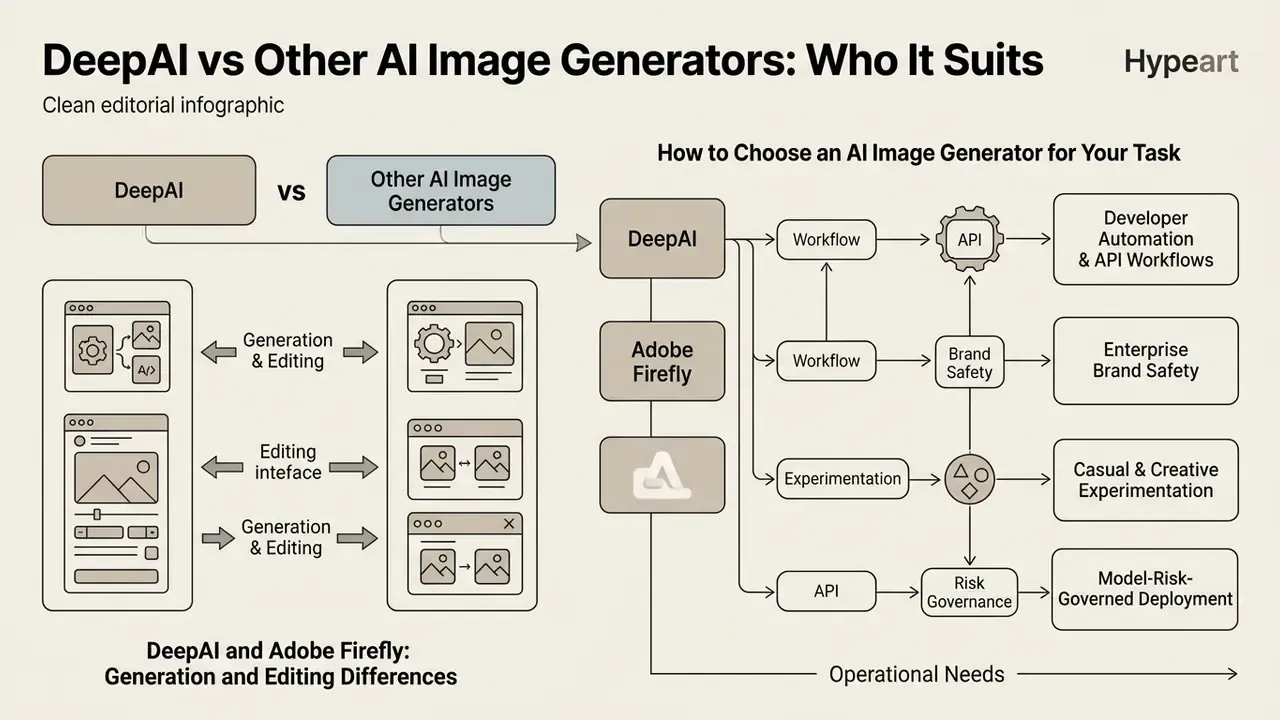
Choosing the right AI image generator means matching platform capability against operational requirements, technical budget, and legal risk tolerance. DeepAI competes against both lightweight web generators and enterprise design suites.
DeepAI and Adobe Firefly: Generation and Editing Differences
DeepAI offers lightweight web tools and a straightforward developer API focused on fast text-to-image rendering plus basic utility operations. Adobe Firefly, by contrast, targets professional design environments, with deep Creative Cloud integration, non-destructive editing layers, and commercially safe, indemnified output for enterprise customers (Adobe Firefly Overview, 2026).
«Generative Fill and Generative Expand in Photoshop complete common retouching tasks more than 10× faster on average than traditional methods.»
Model-level performance differences between proprietary and open-source generators are measurable too, which matters when prompt adherence drives rework cost:
«DALL·E 3 and gpt-image-1 outperform the strongest open-source model (SD3-medium) on R2I-Score by 57.8% and 71.1% respectively, yet overall reasoning accuracy remains far from satisfactory.»
| Feature / Metric | DeepAI Image Generator | Adobe Firefly / Photoshop AI |
|---|---|---|
| Primary Deployment | Web UI & REST API | Creative Cloud apps & web UI |
| Commercial Safety | User-owned / "free of copyright" terms | Trained on licensed Adobe Stock; IP indemnification available (enterprise) |
| IP Indemnification | Not published / not offered | Contractual indemnification for select outputs on enterprise plans |
| Editing Integration | REST API endpoints (image-editor, image-replace) | Native Generative Fill & Expand tools |
| Max Prompt Length | Uncapped in UI / soft API limits | Hard limit of 750 characters |
| Deterministic Seed Control | Not documented publicly | Not exposed as a user-level audit control |
| Prompt / Audit Logging for GRC | Client-side only (build your own) | Enterprise admin console logging on business plans |
| Published Model Cards | Not published at MRM granularity | Model and training-data disclosures published |
| Public API Availability | Yes, included with every Pro plan | Firefly Services API (enterprise tiering) |
| Native Output Ceiling | Super Genius 2K / 4K | Model-dependent, high-fidelity |
| Customization Depth | Style presets, negative prompts, dimension control | Layer-level control, brand kits, structure references |
| Target Audience | Developers, web creators, quick prototyping | Professional designers, enterprise brand teams |
| Pricing Structure | $9.99/mo Pro or pay-as-you-go API | Creative Cloud subscription / generative credit tiers |
Content-authenticity verification is becoming a parallel requirement, because downstream partners increasingly ask whether an asset is synthetic:
«AI-GenBench comprises 180,000 synthetic images from 36 generators, temporally organised to evaluate detectors against newly released models in realistic conditions.»
Organisations evaluating outpainting and canvas expansion can explore dedicated comparisons of photoshop ai expand features or the broader category of AI outpainting tools for expanding images to decide whether standalone APIs or integrated suites fit their editing pipeline better. To compare alternative platforms, you can also view the guide for detailed tool matrices, or read head-to-head evaluations such as Midjourney versus competing generators and ChatGPT image generation versus alternative tools.
How to Choose an AI Image Generator for Your Task
The right choice follows your primary organisational priority:
- Developer automation and API workflows.DeepAI gives you simple REST endpoints and predictable per-generation costs, which suits embedding synthetic image creation into custom web applications. Teams starting here should read the category overview of AI image generators first, to scope licensing before writing integration code.
- Enterprise brand safety.Platforms like Adobe Firefly provide indemnified training data and firmer copyright guarantees, appropriate for high-risk corporate advertising, regulated financial disclosures, and any paid media where a takedown would be materially damaging.
- Casual and creative experimentation.Accessible web generators such as the perchance ai image generator offer quick, unconstrained sandboxes for non-commercial concept exploration.
- Model-risk-governed deployment.Where reproducibility, audit logging, and model documentation are mandatory, prioritise vendors that publish model cards and offer enterprise SSO/RBAC. Treat any tool lacking seed determinism as unsuitable for evidence-generating workflows.
Scoring model performance against standardised criteria, image resolution, prompt adherence, API latency, and legal terms, keeps the selected tool aligned with the institution's risk appetite (NIST Generative AI Evaluation Plan, 2025). A structured comparison of AI image generators helps turn those criteria into a ranked shortlist. Legal and compliance leaders assessing intellectual property implications can browse the hub for regulatory updates and risk management resources.
Limitations and Open Questions
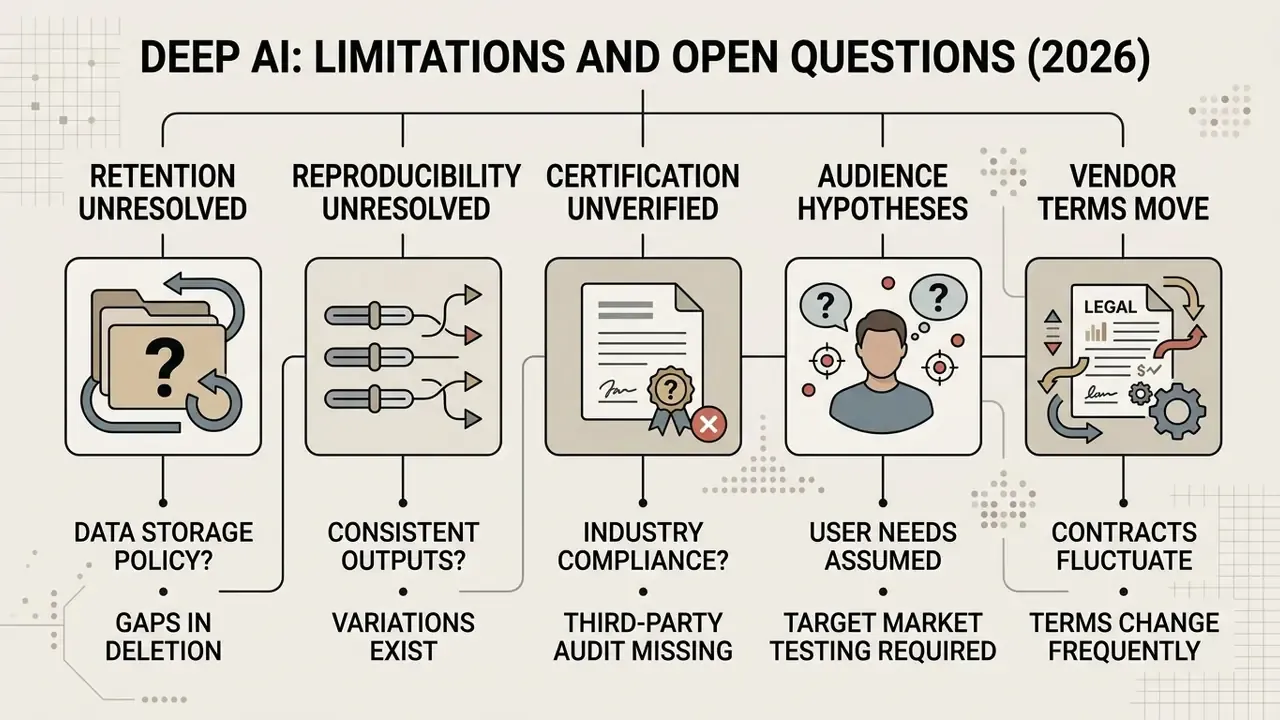
Honest gaps first, since procurement will find them anyway.
- Retention is unresolved. No public retention schedule or training-reuse statement exists for prompts and uploaded reference photos. Until a DPA addendum says otherwise, assume retention.
- Reproducibility is unresolved. Without a documented seed parameter, historical regeneration is not provable. Archive artifacts and hashes instead.
- Certification is unverified. Not absent, just unpublished in the material reviewed here. Ask for it in writing.
- Audience assumptions are hypotheses. Statements in this article about how CROs, CCOs, and model-risk leaders evaluate generative image tools remain hypotheses until supported by interviews, analytics, or verified customer research.
- Vendor terms move. The Terms of Service, pricing, and included quotas have each changed within the past twelve months.
FAQ: Risks, Errors, and Frequently Asked Questions
Is commercial use allowed with DeepAI?
Yes. DeepAI's Terms of Service state that generated content is free of copyright and may be used for any legal purpose, including commercial use, subject to the terms in force at the time of generation. Paid-plan status is the vendor's stated condition for commercial deployment.
Does DeepAI provide IP indemnification?
No published indemnification commitment exists in DeepAI's public terms. This is the primary legal difference versus Adobe Firefly's enterprise offering, and it must be documented as accepted residual risk.
Can DeepAI images be used for NFTs?
The vendor FAQ states that generated images may be used for NFTs. Jurisdiction-specific securities, consumer-protection, and publicity-rights analysis still applies.
Who owns the output, and is it copyrighted?
DeepAI describes generated images as public domain with no owner, and states that the images are not subject to copyright. Note the flip side: a lack of copyright also means you cannot stop a competitor from using a visually similar asset.
Are free-tier generations private?
No. Free-tier generations are public and discoverable. Private generation is a DeepAI Pro feature, and it is a decisive control for any business or confidential use.
Are prompts used to train DeepAI models?
Public documentation reviewed for this article does not answer this conclusively. Obtain written vendor confirmation through a data processing addendum before submitting any sensitive prompt content.
Can I reproduce an exact historical generation for audit purposes?
Not reliably. No deterministic seed parameter is documented publicly, so archive the output artifact and its hash rather than relying on regeneration.
Is there an API, and is it included?
Yes. Every model is available through the REST API, and API access comes with every Pro subscription, billed against the prepaid wallet beyond the included allowances.
Can I get higher resolution output?
Super Genius 2K and 4K modes provide the highest documented resolutions, restricted to Pro members. Legacy FAQ language about fixed resolution limits predates the Genius tiers.
Is DeepAI suitable for professional design work?
It performs well for fast visuals, prototyping, and developer automation. Third-party reviews consistently flag inconsistent output quality and unclear credit consumption on complex professional tasks, which makes it a weaker fit for production-level brand delivery than an integrated design suite.
Recommended Next Steps for Risk and Compliance Owners
- Classify the use case. Internal concepting, external unpaid content, and paid media carry materially different risk. Approve tiers separately.
- Request vendor documentation in writing. Ask specifically for the retention schedule, training-reuse policy, security attestations, and any indemnification position. Record the response date.
- Set the control baseline before rollout. Gateway-only access, secrets-managed API keys, prompt logging, DLP rules on PII/NPI, and mandatory human review.
- Price the residual risk. Where no indemnification exists, either cap exposure by restricting channels, or select an indemnified vendor for high-stakes placements.
- Schedule quarterly re-verification. Terms, pricing, and included quotas have all moved within the past year.
Navigation and Internal Hub Links
- For additional commercial use guides, compliance frameworks, and tool evaluations, browse the hub.
- To review technical terminology, platform definitions, and feature breakdowns, browse the hub.
- For structured vendor scoring across image quality, licensing, and pricing, see the comparison of AI image generators.
Editorial note: pricing, quota, and licensing figures reflect publicly available DeepAI documentation and interface data as of 2026. Material reviewed for governance accuracy by an editorial reviewer with model validation and AI safety responsibility. Marcus Hale, author. This article is informational and is not legal, financial, or security advice.