Last editorial review: February 2026.
Executive Summary for Risk, Compliance and Content Leads
Why should a bank's risk function care about picture software? Because generation is inference, and inference belongs in the model inventory. Four points worth holding on to:
- Architecture.A custom AI image generator is a diffusion or multimodal transformer engine (FLUX.1, GPT Image 2, Nano Banana / Gemini 2.5 Flash Image, Recraft V4, Adobe Firefly, Stable Diffusion XL) wrapped in a controlled pipeline that accepts text prompts, reference uploads and region-level edits. Deployment mode, whether public API, zero-data-retention enterprise API, private VPC, or self-hosted open weights, determines almost every downstream risk.
- Controllability equals auditability.Seed locking, fixed denoising strength, versioned prompts and stored model hashes convert generation from an unrepeatable creative act into a reproducible, loggable operation. That record is what you show internal audit or a supervisor under model-risk frameworks such as the U.S. Federal Reserve's SR 11-7 or the NIST AI Risk Management Framework.
- Rights, not features, drive vendor selection.Output ownership, indemnification against intellectual-property claims, training-data provenance and field-of-use bans differ per vendor and per plan tier. Free tiers frequently exclude commercial use, cap resolution and apply visible or invisible provenance watermarking.
- Highest-value workflows.Reference-conditioned editing on first-party assets (product photography, corporate brand systems, campaign adaptation across aspect ratios) delivers the best ratio of efficiency gain to control cost, because the input provenance is already owned and documented.
One caveat before we go further: nothing below is legal advice, and several vendor limits change quarterly. Verify current terms at the source.
What Is a Custom AI Image Generator?
A custom AI image generator is a specialized text-to-image and image-to-image architecture built on a foundational diffusion or transformer model, adapted to process textual prompts, upload reference photos, and execute targeted image edits. Generic general-purpose generators hand you a fixed output API. A custom system integrates specialized datasets, fine-tuned weights, and domain-specific editing controls to deliver consistent visual assets for enterprise workflows.
Architecturally, the customization sits at two layers: the model layer (fine-tuned weights, LoRA adapters, brand-specific subject training) and the pipeline layer (inference orchestration, prompt pre-processing, masking, logging and export). Documented reference architectures for hosting customized diffusion models separate the training stack from the inference stack entirely, so production rendering endpoints can be scaled, monitored and restricted independently of experimentation environments.
Put plainly: generative ai turns a description into pixels, and the pipeline around it turns pixels into an asset you can defend. Teams that skip the second half end up with a folder of pretty files and no lineage.
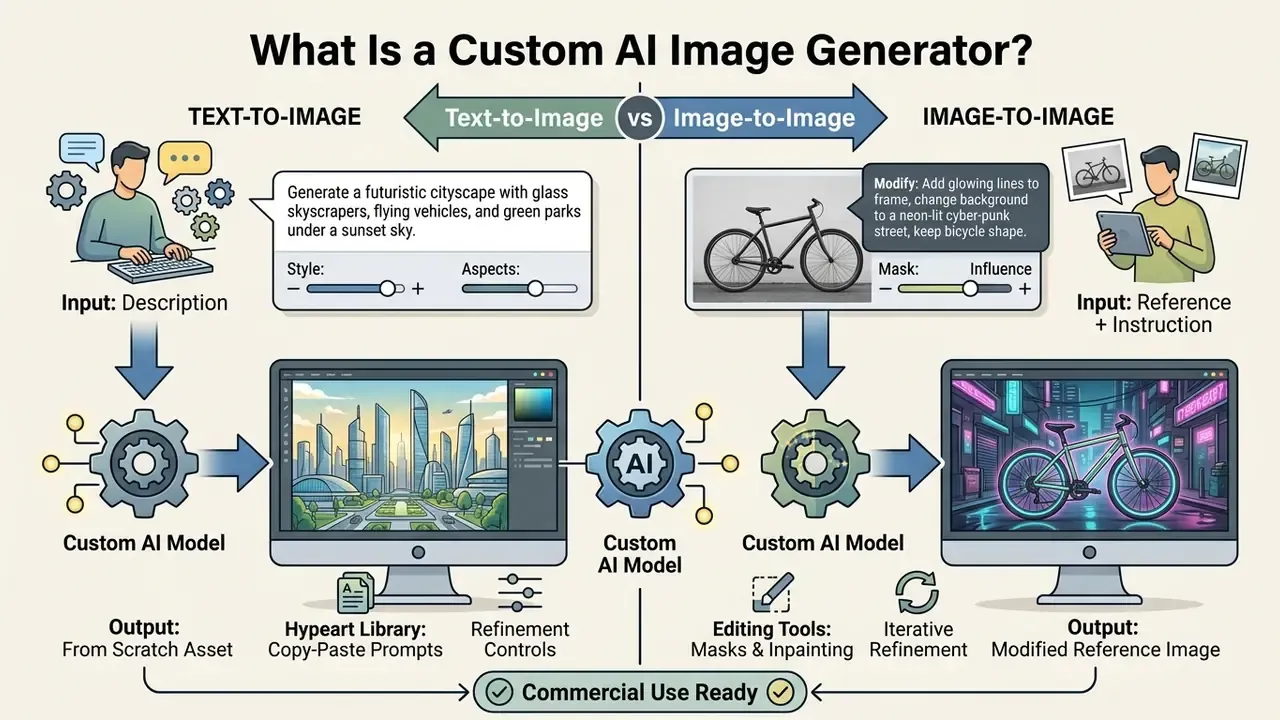
Text-to-image generation from simple prompts
«Diffusion models consistently outperform autoregressive architectures on image quality: Imagen reaches FID 7.27 on MS-COCO, while CogView reports only 27.10.»
The practical effect of model capability plus prompt discipline has now been measured under controlled conditions rather than merely asserted.
«Across 1,891 pre-registered participants, DALL·E 3 users produced images 0.20 standard deviations closer to the target than DALL·E 2 users (p < 10⁻⁷).»
Earlier design-guideline work on prompt engineering remains directionally useful. Focusing on core subject keywords, explicit style qualifiers and structured lighting descriptors yields measurable gains in prompt alignment, and sampling three to nine seeds is usually enough to characterize how a prompt behaves (Liu & Chilton, "Design Guidelines for Prompt Engineering Text-to-Image Generative Models", CHI 2022, https://arxiv.org/abs/2109.06977). When users ask whether non-dedicated platforms such as large language models can produce artwork, for example whether can claude ai or can deepseek generate native image files, the answer rests on one thing: does the platform include an integrated visual latent decoder, or does it only orchestrate an external API?
LEGAL AND COMPLIANCE ALERT: Intellectual Property and Upload Permissions
Image-to-image generation with a reference image
Image-to-image generation uses a reference image or existing photo as a structural and spatial constraint, while a secondary text prompt guides stylistic or semantic change. The system extracts spatial signals (edge maps, depth maps, pose skeletons) from the uploaded reference and conditions the denoising pass, so layout survives while surface textures, lighting or background elements shift. Teams evaluating dedicated image-to-image generators should note that vendor documentation increasingly describes structure matching as semantic rather than pixel-exact: the model preserves pose, depth and layout without copying the source pixel grid.
That structural guidance is exactly what keeps the composition of the original input intact instead of producing a random scene. An ai generator with photo input exposes explicit fidelity sliders, so a designer decides how strictly the output must follow the geometry of the uploaded reference photo versus how freely it may invent variations.
«The 2026 instruction-based image editing survey classifies object removal and background replacement as core operations that must preserve structural integrity while changing the scene.»
How to Create Custom AI Images from Text or a Photo
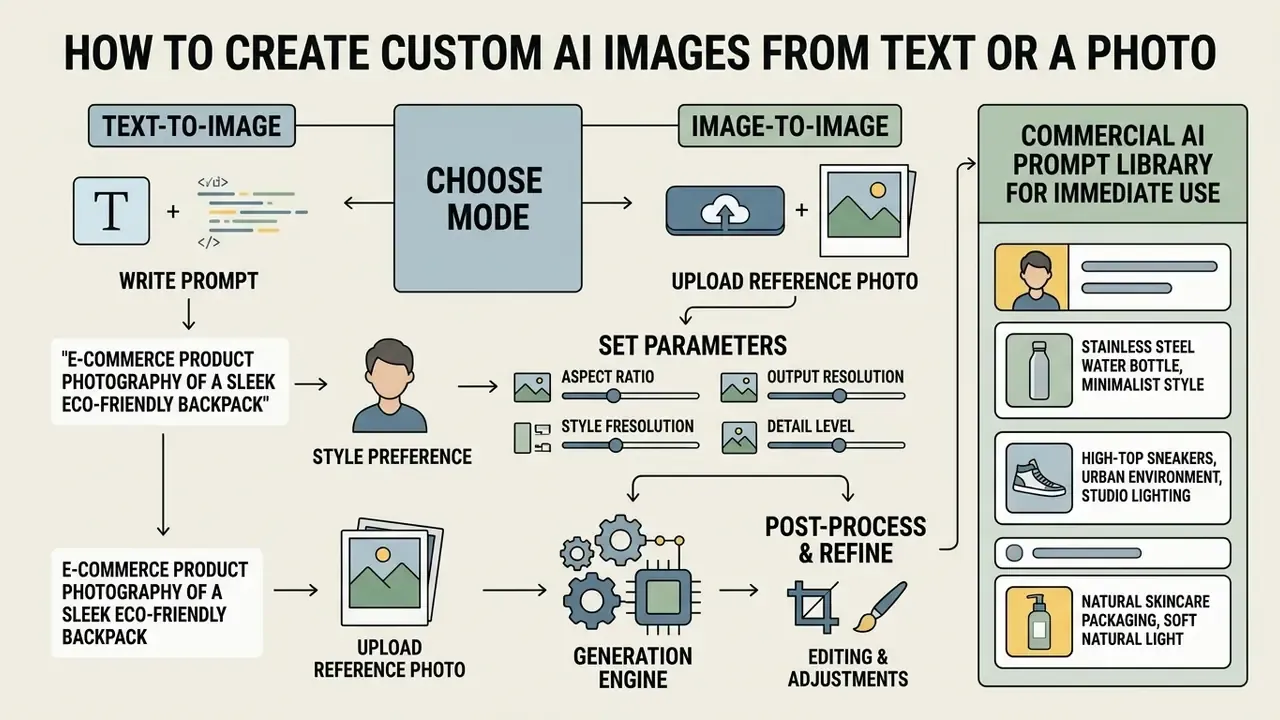
Creating custom AI images starts with one decision: build the asset from a written specification, or condition the generator on an uploaded reference photo. After that, adjust model parameters and render. Vendor documentation from Adobe, OpenAI and Ideogram converges on the same two-path workflow: prompt-first generation, or reference-first editing, then iterative refinement and export.
PLACEHOLDER - Step-by-step process for generating custom AI images
Checklist0 / 6
Write image prompts that describe the desired result
An effective image prompt structures descriptive attributes in a prioritized sequence: main subject, environmental context, visual style, camera framing, lighting conditions. Vague queries waste credits. Structuring prompts into explicit layers, for example "a matte ceramic product container on a smooth oak surface, warm studio key lighting, 85mm lens perspective, architectural minimalism", gives the diffusion model precise cross-attention tokens to work with.
Prompt quality is now assessed against formal metric taxonomies rather than gut feel.
«The 2024 metric survey separates image quality into compositional and overall dimensions: CLIP score and R-precision measure text-to-image alignment accuracy.»
Automated prompt adaptation follows the same logic: supervised fine-tuning on human-engineered prompts, then reinforcement learning against model-preferred phrasing, improves outputs while preserving user intent ("Optimizing Prompts for Text-to-Image Generation", NeurIPS 2023, https://arxiv.org/abs/2212.09611). Evaluating platforms through an AI Media Comparison shows that models built on large language model text encoders read complex, multi-sentence image prompts far more literally than earlier CLIP-based architectures. Side-by-side reviews of leading AI image generators make those differences measurable per use case, which matters when one engine nails legible in-image text and another only approximates letters.
Commercial AI Prompt Library for Immediate Use
To skip manual prompt structuring, use these tested templates. Each block is written to be copied straight into the prompt field, then adjusted for brand-specific materials and palettes.
E-commerce product photography:
[Copyable Prompt]"A high-end matte ceramic cosmetic bottle placed on a wet black slate tile, dramatic side key lighting, subtle water droplets, blurred tropical foliage in background, shot on 85mm lens, f/1.8, photorealistic studio setup --ar 1:1"Corporate and lifestyle editorial banner:
[Copyable Prompt]"Modern professional working on a laptop in a sunlit minimalist Scandinavian coffee shop, warm morning light, shallow depth of field, natural candid atmosphere, shot on 35mm film, soft color palette --ar 16:9"Vector graphic icon set (fintech / SaaS infrastructure):
[Copyable Prompt]"Flat vector illustration icon set of cloud computing infrastructure, clean geometric lines, vibrant corporate blue and purple gradients, isolated on pure white background, minimal design --ar 1:1"Concept art with style-transfer reference:
[Copyable Prompt]"Futuristic cyberpunk character portrait, wearing a reflective metallic jacket, neon cyan and magenta rim lighting, cinematic atmospheric smoke, hyper-detailed render, 8k resolution --ar 9:16"Financial-services campaign visual (brand-safe, no third-party marks):
[Copyable Prompt]"Abstract data-driven visual of layered translucent glass planes and soft light trails, deep navy and warm gold accent palette, no text, no logos, generous negative space on the left for typography overlay, studio gradient background --ar 16:9"
A small practical note from reviewing hundreds of these: the "no text, no logos" clause saves more legal review time than any other five words in the library.
Automating prompt optimization with AI prompt enhancers
Writing precise prompts by hand takes practice. Most modern generators now ship an LLM-based prompt enhancer (sometimes labelled a rewriter, sometimes a "Prompt Enhance" button). Enter something thin such as "modern office sofa", and the enhancer expands it into a detailed conditioning vector: camera framing, lighting ratios (for example, "soft ambient daylight, 3:1 key-to-fill"), architectural style, material textures. Then the request reaches the rendering engine. For non-technical users this closes a real skill gap, and it cuts the number of wasted generations per approved asset.
From a governance standpoint, enhancement must be logged. The rewritten prompt, not the operator's original phrase, is what actually conditions the model. Store both strings plus the enhancer model version, otherwise the generation cannot be reproduced later. Simple rule. Easy to forget.
Upload a photo and set the transformation goal
«PowerPaint is preferred in 62.6% of outpainting comparisons against SD-Inpainting's 22.8%, confirming the advantage of task-conditioned inpainting.»
To avoid unexpected distortion or cropping, match the aspect ratio of the upload to the target output dimensions. Blurry, low-resolution or heavily compressed references measurably degrade edge detection and depth extraction, and no slider recovers detail that was never captured. Write the prompt so it states both what must change and what must stay fixed: identity, geometry, camera angle, layout, labels, surrounding objects. Apply incremental edits rather than one overloaded instruction. When the output is commercial, unauthorized references to recognizable individuals, such as attempting to generate a celebrity ai image without a licence or signed release, create direct exposure under publicity rights and intellectual-property standards. The 2026 U.S. federal AI policy framework explicitly recommends prohibiting unauthorized commercial use of AI-generated digital replicas of a person's voice or likeness.
Controls That Make AI Images Match Your Vision
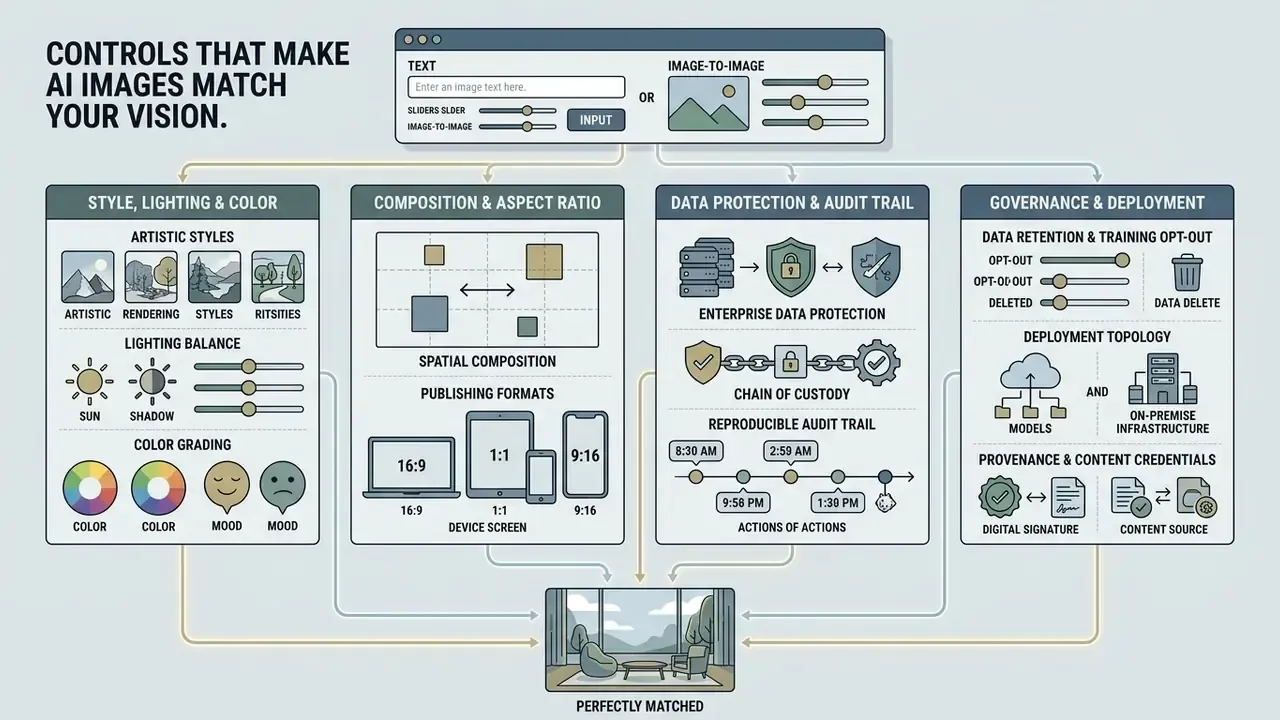
Precise customization depends on explicit control parameters that adjust artistic styles, lighting balance, aspect ratios and spatial composition without forcing a full regeneration. Creative control here is not a mood setting. It is a set of numbers you can write down.
Style, lighting and color for consistent visuals
Holding one visual identity across a campaign requires systematic control over style descriptors, light colour temperature and palette. Teams that still run manual retouching passes usually pair generation with online photo editors to finish colour grading. Enterprise design workflows lean on standardized grading frameworks and controlled lighting prompts, such as defined key-to-fill ratios and named palettes, to prevent visual drift across generation runs. Imaging standards give this a technical floor: FADGI guidance recommends room illumination below 32 lux at roughly 5000K with a colour rendering index above 90 for review environments, so perceived colour is not an artifact of the room.
Models that support deterministic seed numbers let teams lock the noise pattern, which keeps colour grading and texture consistent across sequential assets. Style consistency claims are also testable at scale now, not just asserted in marketing decks.
«A 2024 study collected more than 2 million annotations across 4,512 images to evaluate DALL·E 3, Flux.1, MidJourney and Stable Diffusion on style, coherence and text-to-image alignment.»
| Control Parameter | Technical Mechanism | Primary Impact on Visual Output | Recommended Workflow Range |
|---|---|---|---|
Aspect Ratio (--ar) | Canvas geometry bounding box | Sets canvas width-to-height proportion | 1:1 (feed), 16:9 (web banner), 9:16 (story) |
| Denoising Strength | Latent noise injection scale | Controls variation from the original image | 0.3 to 0.5 (subtle edit), 0.65 to 0.85 (major rework) |
| Style Weight / Reference | Cross-attention style mapping | Applies aesthetic texture without altering layout | 50% to 80% for brand consistency |
| Seed Locking | Initial Gaussian noise initialization | Guarantees reproducible visual outputs | Fixed integer for sequential asset matching |
| Chaos / Variance | Sampling diversity control | Widens or narrows the spread across the returned candidates | Low for brand systems, high for ideation sprints |
Composition and aspect ratio for each publishing format
Composition controls decide how subject elements sit inside the frame, so generated assets fit their digital or print placement without awkward cropping. Modern generators expose explicit aspect ratio settings: 1:1 for social feeds, 16:9 for landscape banners, 9:16 for vertical mobile video. The subject stays inside safe margins. When a format change needs more canvas instead of a tighter crop, AI outpainting tools extend the frame rather than stretching the subject.
Stating compositional constraints in the prompt ("centered subject, wide negative space on the left") means text overlays drop in naturally during post-processing. For print, plan composition from the final paper size first, then resolution and bleed, using ratios such as 2:3, 3:2, 4:3 or 3:4. On the web, intrinsic aspect ratio is a property of the image itself under the W3C CSS Images specification, so reserving the frame in layout prevents cumulative layout shift no matter how the asset was generated.
Enterprise data protection and audit trail requirements
For regulated organizations the decisive controls are not aesthetic at all. Three configuration questions determine whether a custom generator can enter the model inventory in the first place:
- Data retention and training opt-out. Confirm in writing whether prompts and uploaded reference images are retained, human-reviewed, or used to train future model versions. Enterprise tiers and private-cloud deployments typically offer zero-data-retention endpoints. Consumer free tiers usually do not.
- Deployment topology. Public multi-tenant API, dedicated enterprise API with contractual retention limits, private VPC deployment, and fully self-hosted open weights (FLUX.1, SDXL) carry materially different exposure profiles for confidential product imagery or unreleased campaign material.
- Reproducible audit trail. Store, per generated asset: original prompt, enhanced prompt, negative prompt, model name and version hash, seed, denoising strength, aspect ratio, reference-image hash, permission artifact, operator identity and timestamp, serialized as structured JSON next to the exported file. NIST's generative-AI profile recommends documenting generated-content instances with tamper-resistant history and provenance metadata (NIST AI 600-1, 2024, https://nvlpubs.nist.gov/nistpubs/ai/NIST.AI.600-1.pdf), and NIST AI 100-4 notes that provenance can be attached as metadata or watermarks at the moment of generation (https://nvlpubs.nist.gov/nistpubs/ai/NIST.AI.100-4.pdf).
- Provenance and content credentials. C2PA-style content credentials establish media lineage across the asset's lifecycle. That is the practical mechanism for demonstrating to an auditor or supervisor that a published visual was machine-generated under a documented, human-reviewed process.
Mapped onto model-risk practice, meaning the Federal Reserve's SR 11-7 expectations for inventory, validation and change control plus the NIST AI Risk Management Framework's Govern, Map, Measure and Manage functions, this metadata set is what turns "we generated a picture" into an auditable, repeatable control. Ownership matters as much as tooling: name the accountable owner for the generation pipeline, define who may approve publication, and specify the shutdown path if outputs start drifting off-brand or off-policy.
AI Image Generator and Editor Features for Photo Customization
Integrated post-generation editing lets creators modify specific regions, swap backgrounds and upscale resolution without re-rendering the whole canvas. Free tiers of an ai image generator and editor usually include the basics; the precision tools sit behind paid plans.
Replace, remove or add elements with generative fill
Generative fill combines localized masking with targeted inpainting to add, remove or replace elements while the surrounding pixels stay untouched. The algorithm isolates the masked region, samples adjacent texture and lighting data, then runs a localized diffusion pass under a localized prompt. Removing an unwanted background object, the system infers the missing structural pattern from neighbouring pixels and produces a seamless fill that keeps the scene believable. Vendor implementations render the result to a new layer, which keeps the edit non-destructive, and an empty prompt tells the model to fill purely from context. Background removal, in most suites, is now genuinely one click.
«FunEditor achieves 5 to 24 times inference speed-ups over baseline methods on complex edits such as object movement, while preserving object and background consistency.»
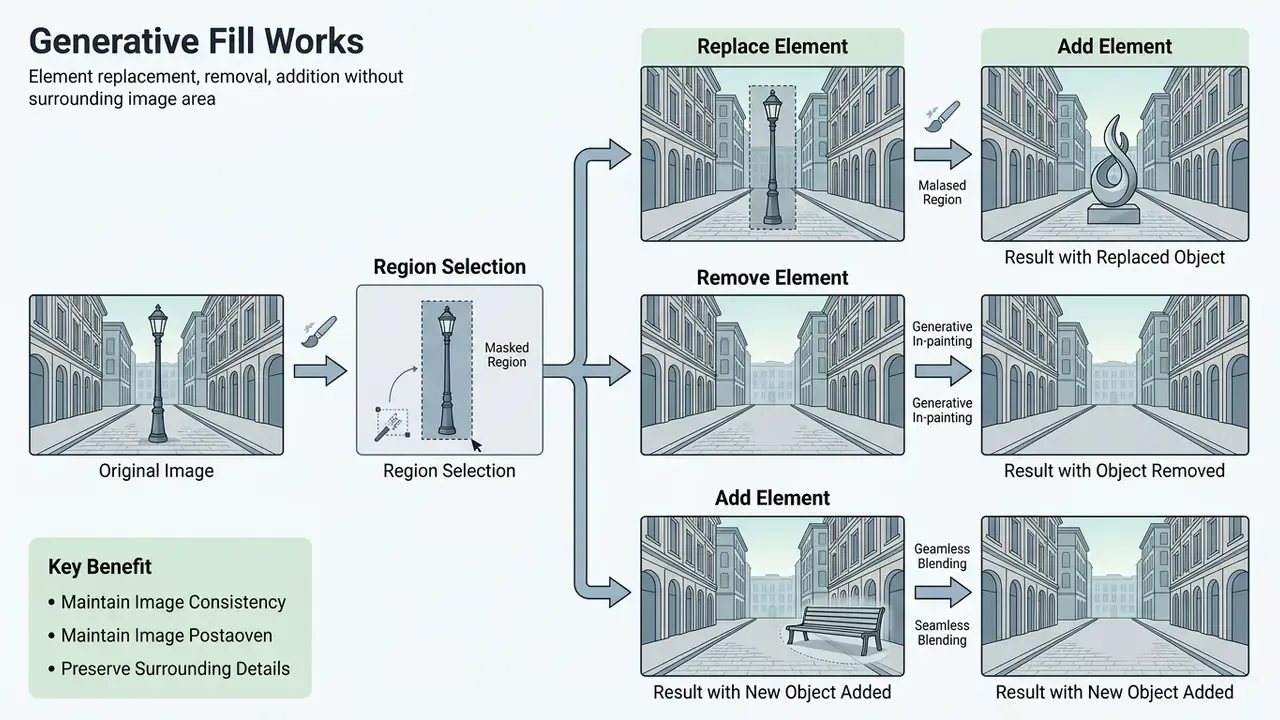
Advanced canvas manipulation: outpainting, layer decomposition and face swap
Beyond localized inpainting, advanced platforms expose specialized canvas capabilities:
- Generative outpainting (magic expand) extends image boundaries past the original framing. The model reads surrounding edge pixels, texture patterns and lighting vectors, then extrapolates coherent background, converting a 1:1 square asset into a 16:9 landscape banner without stretching. Standard fix for awkward framing or an over-zoomed source shot.
- Layer decomposition and segmentation computer-vision models split a flat raster image into editable layers (foreground subject, mid-ground elements, background). Designers then place typography behind the subject or swap the backdrop without manual masking.
- AI face swap and identity consistency replaces faces in reference photographs while keeping head pose, expression and ambient lighting, with frame-consistent variants available for video. Heavily used in personalized marketing and virtual modelling, and also the single highest-risk feature from a publicity-rights and deepfake-liability standpoint. Gate it behind documented consent records, or leave it switched off.
- Object move and relight moves, resizes or rotates a masked object while the model reconstructs the vacated region, plus prompt-driven relighting to match a new scene's key direction and colour temperature.
- AI sticker and transparent-asset generation produces prompt-based icons, stickers and cut-outs with native transparent backgrounds for UI, packaging and social overlays. Vector-native engines export editable SVG instead of raster approximations, which a graphic designer will appreciate at the layout stage.
Improve uploaded photos and generated images
Post-processing tools enhance both uploaded photos and generated images through generative upscaling, noise reduction and edge sharpening. Comparative reviews of AI image enhancers show the useful distinction is between faithful restoration and prompt-guided reinvention. Precision upscaling enlarges low-resolution files by factor multiples (2x, 4x, 8x, up to 16x in creative modes) while adding synthetic micro-texture, which restores clarity for print or 4K web display. Precision modes prioritise fidelity to the source. Creative modes accept a prompt and hallucinate extra detail, which is unacceptable for evidentiary or product-accuracy work and excellent for concept art and digital art experiments.
Folding these capabilities into structured AI Media Workflows lets production teams refine raw generations into print-ready or broadcast-ready files, and it saves time on repetitive format work. Side-by-side tests of AI image upscalers help set a house standard for enlargement factor versus artifact tolerance, which is the kind of decision you want made once, not per asset.
How to Choose the Best AI Image Model and Free Plan
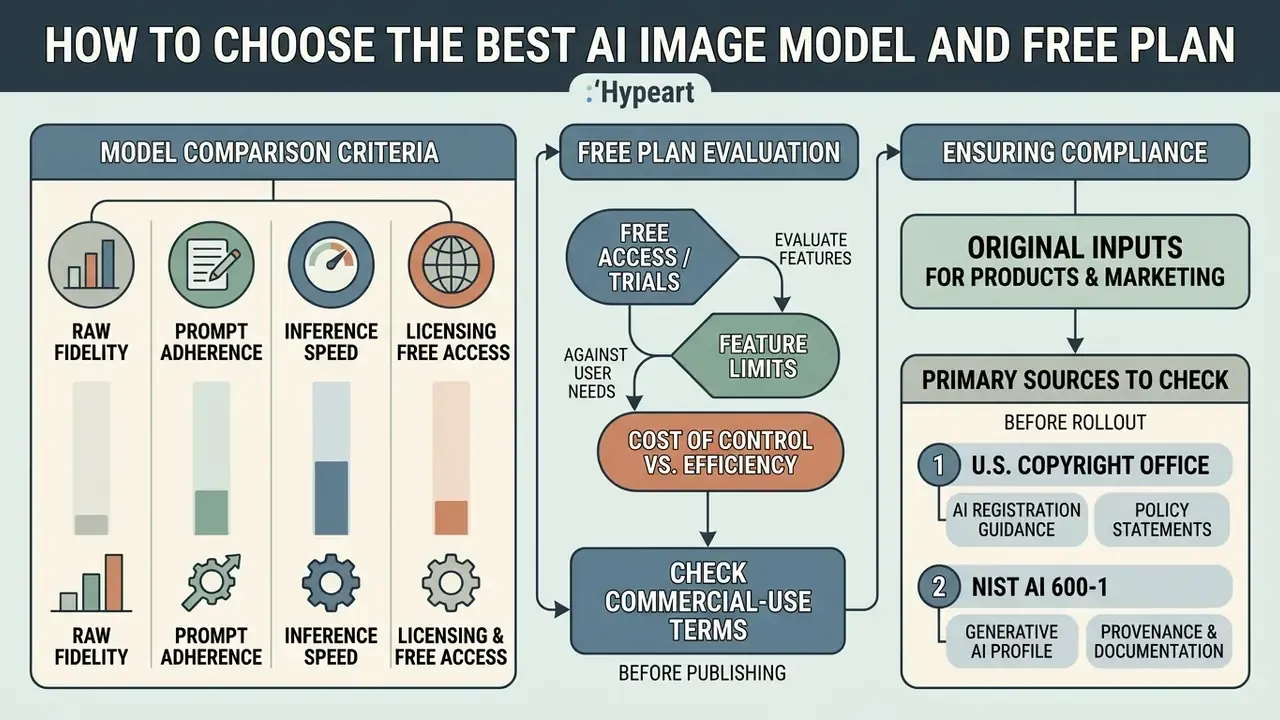
Selecting an image model means weighing raw fidelity, prompt adherence, inference speed and the licensing structure of free access tiers. Quality alone never settles it.
What to compare across AI models
When evaluating candidate ai models, teams compare quantitative metrics such as Fréchet Inception Distance (FID) alongside practical parameters like prompt compliance and rendering speed. NIST's benchmark-evaluation guidance frames comparison around objective selection, metrics, baselines and reproducible conditions, while NIST's AI metrology work defines prompt compliance, the share of input prompts a model complies with, and task duration as separate measurable quantities.
Base architectures diverge in character. FLUX models offer strong prompt alignment and open-weight flexibility. Midjourney excels at artistic photorealism and stylistic coherence, as head-to-head reviews of Midjourney image generation illustrate. DALL-E 3 and GPT Image 2 prioritize complex prompt comprehension and legible in-image text. Stable Diffusion provides open-source, self-hostable control. Comparing an integrated suite such as the canva ai generator against dedicated standalone engines exposes real differences in editing integration, processing latency and enterprise API scalability. Several aggregator workspaces also bundle a video generator next to the still-image engines, which changes the credit math.
«Per the 2024 survey, Imagen reaches FID 7.27 and ERNIE-ViLG 2.0 reaches 6.75, while DALL·E 2 scores 10.39 and Stable Diffusion 12.63 on MS-COCO.»
| AI Model / Engine | Core Architecture and Modalities | Targeted Use Case and Editing Capabilities | Commercial License and Usage Terms | Technical Input Limits |
|---|---|---|---|---|
| FLUX.1 [dev/schnell] | Open-weights latent diffusion (text + image) | High-precision prompt adherence; Flux Fill for inpainting; full self-hosting | Apache 2.0 [schnell]; non-commercial / dev licence [dev] | Local GPU VRAM-bound; unlimited volume |
| GPT Image 2 / DALL·E 3 | Native autoregressive / LLM decoder | Complex multi-sentence prompt comprehension; reliable in-image text rendering; precision editing variants | Full user ownership of outputs; reprint, sale and merchandising permitted per OpenAI terms | ~4,000-character prompt; image input via URL, Base64 or file ID |
| Nano Banana (Gemini 2.5 Flash Image) | Multimodal transformer partner model | High-speed iteration; contextual image-to-image restyling; conversational edits | Commercial use via partner and API terms; field-of-use bans apply (no competing-model development, no clinical use) | Up to 20 MB (JPG/PNG/WEBP); invisible SynthID provenance watermark |
| Recraft V4 | Vector and raster generative canvas | SVG output, brand iconography, clean vector graphics and icon sets | Commercial licence on paid tiers | Native vector export |
| Adobe Firefly | Licensed-stock diffusion architecture plus partner models | Commercial-safe asset creation; integrated generative fill; reference-image style control | Commercially safe positioning; trained on licensed Adobe Stock and public-domain content; beta features may be personal-use only | 750-character prompt cap; free tier with monthly generative credits |
| Stable Diffusion XL / Flux Kontext | Open-source latent diffusion | Full control via ControlNet, pose, depth, inpainting and outpainting | Permissive open licence (varies by weights and variant) | Local deployment dependent |
| Wan 2.7 / Seedream 4.5 (aggregator tiers) | Third-party partner engines exposed through multi-model workspaces | Style diversity and rapid A/B across engines without switching platforms | Governed by the aggregator's terms plus the upstream model licence | Platform-level caps, commonly 20 MB uploads |
| Canva AI Generator | Integrated design-suite generation | Magic Edit, Magic Expand, Magic Eraser; reference-image upload; direct layout integration | Subject to Canva commercial licence terms | Free plan with credit caps; 250 MP / 50 MB image ceiling |
Reading the table sideways is the useful move: the column that most often blocks a procurement decision is not capability, it is licence.
Free access, free trials and feature limits
Free tiers and promotional trials almost always impose operational constraints. Typical limits on a free online plan include daily generation caps (for example, 500 images per day at 1024×1024 in some managed studios), reduced output resolution, visible or invisible provenance watermarking such as SynthID, and no access to advanced image-to-image fine-tuning. A free trial of an app may also unlock premium models for a week, then silently drop you to a slower queue. And note the obvious trap: "free" and "commercially usable" are independent variables. Some open-weight releases are free to download yet non-commercial, while some paid APIs grant full output ownership.
To compare tiers, review curated breakdowns of the best free ai art generator tools and cross-check the same vendors against paid free AI image generator limits before committing to a subscription.
Cost of control versus efficiency gain
For a risk-adjusted view, model the total cost of a generated asset as three components: generation cost (credits or GPU hours), control cost (prompt and metadata logging, human review, legal clearance of references, provenance tooling), and residual risk (probability multiplied by impact of an IP, likeness or brand-safety incident).
Efficiency concentrates where the control cost is already sunk. Adapting an approved, owned master asset across aspect ratios and locales requires almost no incremental clearance. Generating a net-new brand-defining visual from an unvetted prompt loads the full clearance and review burden onto every single output. Organizations that keep a documented library of cleared reference inputs therefore see a materially better ratio than organizations that generate ad hoc. The magnitude of that gain is organization-specific, though, and it needs internal measurement rather than vendor benchmarks.
Commercial Use: Rights, Safety and Ownership of AI-Generated Images
Check the tool's commercial-use terms before publishing
Commercial usage rights are governed primarily by individual vendor service agreements, not by universal copyright law. Copyrightability of the output itself is a separate question, governed by statute and agency guidance.
«Where AI determines the expressive elements of its output, the generated material is not the product of human authorship and is not protected by copyright.»
«Prompts function as instructions conveying unprotectable ideas, and do not control how the AI system processes them in generating the output.» Source: Congressional Research Service, Generative Artificial Intelligence and Copyright Law (2023, updated 2024). https://crsreports.congress.gov/product/pdf/LSB/LSB10922
The Copyright Office's 2025 guidance keeps the door open for registration where a human contributes sufficiently creative selection, arrangement or modification, but applicants must disclaim the AI-generated portions. Practically, a purely prompt-derived campaign key visual may sit in the public domain, while a human-composited, substantially edited derivative may be protectable in part.
Platforms differ sharply. OpenAI grants full commercial usage and resale rights for DALL-E 3 and GPT Image outputs. Others restrict free-tier outputs to personal, non-commercial experimentation, or impose field-of-use limits: Google Cloud's service terms, for example, bar using generated output to build a competing product or for clinical purposes. Some vendors additionally offer commercial indemnification, contractually covering defence costs for enterprise customers facing third-party IP claims arising from model output. Capture the presence, scope and plan tier of that indemnity in the vendor risk assessment, because an indemnity that evaporates on the self-serve plan is not a control. Enterprise users should also track developments in AI Litigation and legal precedent on training-data copyright.
Use original inputs for product and marketing visuals
To hold legal exposure down, use proprietary, human-authored photos as reference inputs. Pairing custom product photography with AI background replacement carries far less infringement risk than generating brand imagery entirely from unvetted text prompts. Before publication, AI image detectors plus a reverse-image check help confirm that your "original" reference is not itself a scraped third-party asset. That check has caught more problems than most teams expect.
Third-party logos, packaging and recognizable product designs add a second, separate risk layer: trademark infringement and false-endorsement claims under the Lanham Act, plus unlawful use of another party's means of individualization under Russian civil law. Government logos and official insignia cannot be used in ways implying endorsement. Practical mitigation is blunt: prohibit third-party marks in prompts and reference uploads by policy, then run brand-safety review on the rendered output, not only on the prompt. For a broader view of licensing terms and platform capabilities, compare options across the software landscape.
Primary sources to check before a commercial rollout
Keep these open in a tab during vendor review, since terms change more often than feature pages do:
- U.S. Copyright Office, AI registration guidance and policy statements: https://www.copyright.gov/ai/
- NIST AI 600-1, Generative AI Profile (provenance and content documentation): https://nvlpubs.nist.gov/nistpubs/ai/NIST.AI.600-1.pdf
- NIST AI 100-4, Reducing Risks Posed by Synthetic Content: https://nvlpubs.nist.gov/nistpubs/ai/NIST.AI.100-4.pdf
- Federal Reserve SR 11-7, Guidance on Model Risk Management (inventory, validation, change control).
- C2PA specification for content credentials and media lineage.
- Vendor-side documents worth printing
- output ownership clause, data-retention and training opt-out clause, indemnification scope, field-of-use restrictions, free-plan commercial-use limits.
- U.S. Copyright Office, AI registration guidance and policy statements
- NIST AI 600-1, Generative AI Profile (provenance and content documentation)
- NIST AI 100-4, Reducing Risks Posed by Synthetic Content
Use Cases for Custom AI Images in Content and Design
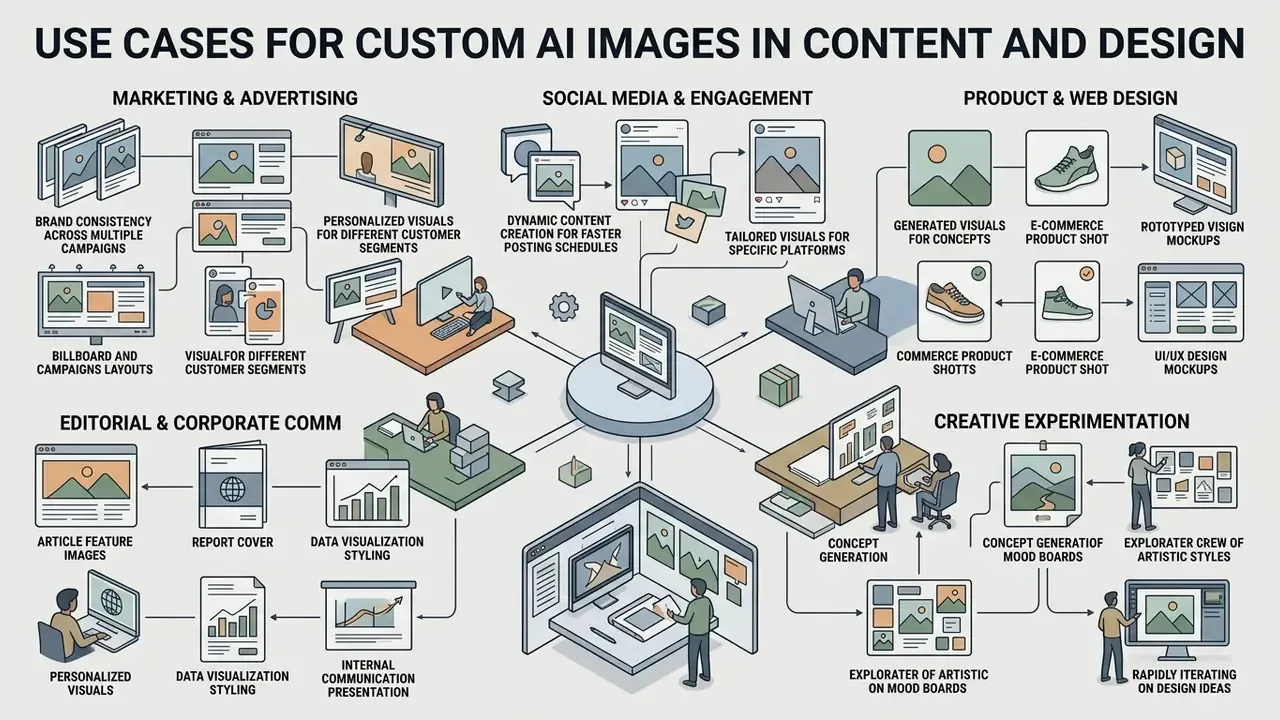
Custom generators compress content creation cycles across marketing, digital design and corporate communications by automating the repetitive part of visual production.
Product shots, design concepts and creative projects
In product design and e-commerce, custom generators produce studio-grade product shots and rapid concept iterations without commissioning a physical shoot for every variant. Designers upload clean product photos, apply background-swap prompts, and render photorealistic environmental context in minutes. Buyers comparing AI image generators for commercial use should weight licence terms as heavily as output quality, since a beautiful asset with murky rights is a liability on a billboard.
Rendering multiple design variations in parallel also shortens the concept-approval loop, because stakeholders review comparable options in one session instead of three sequential rounds. Any claim of reduced pre-production spend should be validated against your own baseline. Published vendor figures are not independently verified, so treat them as marketing until your own numbers agree.
Regulated and corporate communications scenarios
In financial services and fintech, the defensible use cases share one property: inputs are owned, outputs are reviewed. Typical patterns include abstract, non-representational campaign imagery for product launches; format adaptation of an approved master visual across web, in-app and print; internal training and onboarding illustration; investor-relations and annual-report graphics built from owned charts and photography; and consistent professional portraiture pipelines where an AI headshot generator works from employee photos captured under signed consent.
Prohibited-by-default patterns deserve equal space in policy: no synthetic imagery of identifiable customers or employees without consent, no third-party brand marks, no synthetic depiction of performance data, and no generated imagery in disclosures or product documentation without named human sign-off recorded in the audit trail. Write the exceptions process down too, otherwise shadow usage fills the gap.
FAQ: Frequently Asked Questions About Custom AI Image Generators
Can I download generated images in high quality?
Yes. Most professional generators export high-resolution files: uncompressed PNG, high-quality JPEG, WebP, TIFF for print, PDF, and vector SVG from vector-native engines. Available resolution depends on the model and plan tier, with standard outputs from 1024×1024 pixels up to 4K upscaled renders suitable for web, social and print. Documented ceilings vary: one major design suite caps images at 250 million total pixels and 50 MB with 4K export, while layout tools commonly export static assets at 72 DPI by default. Which is exactly why print workflows should target TIFF or PDF and set resolution explicitly instead of trusting defaults.
Can my prompts and uploaded reference images be used to train the vendor's model?
That depends entirely on the contract and tier. Consumer and free plans often reserve broad rights to retain and review inputs, whereas enterprise agreements and private deployments typically offer contractual zero-data-retention and a training opt-out. Before uploading unreleased product imagery, customer photography or confidential creative, get the retention clause in writing, confirm the data-residency region, and record the answer in the vendor risk assessment.
How do we make generation reproducible for internal audit or a regulator?
Lock the seed, fix denoising strength and aspect ratio, pin the model version (name plus weight hash), and persist both the original and the enhancer-rewritten prompt. Store that record as structured metadata beside the exported file, together with the reference-image hash, the permission artifact, the reviewer's identity and the timestamp. This satisfies the provenance-documentation expectations in NIST AI 600-1 and maps cleanly onto SR 11-7 inventory and change-control requirements.
Which deployment model fits a regulated environment?
Ranked by control: self-hosted open weights (FLUX.1 [schnell], SDXL) give maximum data isolation and licence clarity but demand GPU capacity and internal MLOps ownership; private VPC deployment of a managed model balances isolation against maintenance; an enterprise API with zero-data-retention terms is the common middle path; a public consumer tier is generally unsuitable for confidential inputs. Test latency and throughput under production concurrency, not on a single-image demo.
Do we need to disclose or watermark AI-generated visuals?
Increasingly, yes, whether by regulation, platform policy or internal standard. Several major engines already embed invisible provenance watermarks such as SynthID by default, and privacy regulators have issued guidance recommending that organizations tag AI-generated content, including watermarks on images and video. C2PA content credentials are the practical mechanism for carrying that lineage through the publishing chain. Treat disclosure as a policy decision made once, then enforced automatically at export.
Is a custom AI image generator suitable for beginners without design skills?
Mostly, with caveats. Modern generators offer plain-language prompt fields, drag-and-drop reference photo uploads, prompt enhancers and preset menus for style, lighting and aspect ratio, so non-specialists produce usable visuals without any experience in professional design tools. Peer-reviewed findings are more nuanced than vendor marketing: a 2025 evaluation of diffusion-based generation for Easy Language found outputs generally easy to understand, while abstract and emotional concepts stayed difficult. A 2026 accessibility review of co-creative AI systems catalogued recurring interface defects, including insufficient colour contrast, buttons without descriptive labels, images missing alt text, unlabelled form fields and empty links. The implication for enterprise rollout is practical: basic creation really is accessible, but interface accessibility must be tested before a tool is mandated across a workforce, and every output still needs human review before publication.
How fast is generation in practice?
Fast enough to change workflow habits, and slower than demos suggest under load. Lightweight distilled models return images fast, often in a few seconds per candidate, while high-fidelity engines with large prompt contexts take noticeably longer, especially at 4K or with reference conditioning. Measure throughput at your expected concurrency, then set internal expectations from that number rather than from a vendor landing page.
Limitations and Unresolved Questions
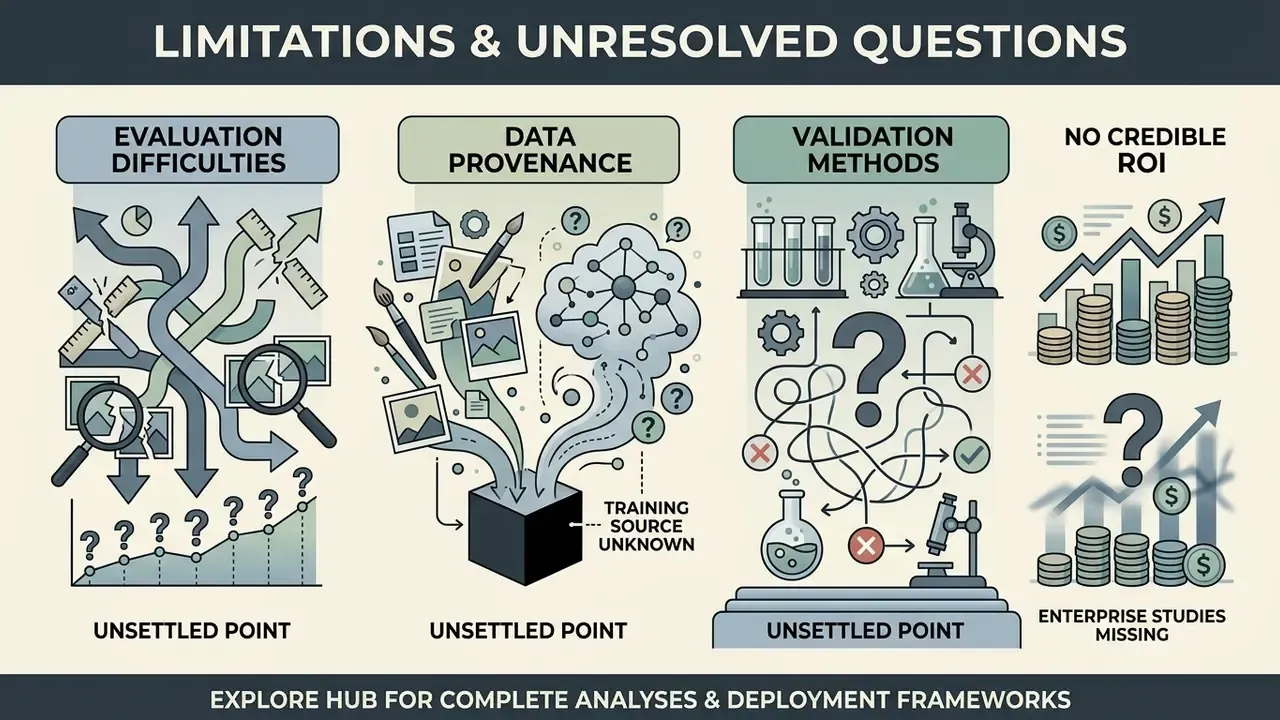
Three things are genuinely unsettled, and pretending otherwise would be dishonest.
First, evaluation. FID and CLIP score capture distribution similarity and text alignment, not brand fit or legal safety. There is still no accepted metric for "this asset matches our visual identity", which keeps human review in the loop for anything customer-facing.
Second, training-data provenance. Several vendors describe their corpora only in general terms. Where provenance is not documented, residual IP risk cannot be quantified, only transferred through contractual indemnity, and indemnities vary by tier and jurisdiction.
Third, validation method for generative systems. Traditional back-testing assumes a ground truth. Image generation does not supply one, so validation leans on reproducibility, input control, negative testing (prohibited prompts, likeness attempts, logo attempts) and documented human sign-off. That is a reasonable interim framework, not a finished one, and it will likely change as supervisory expectations mature.
A fourth, smaller point: nobody has published a credible independent ROI study for enterprise image generation. Vendor case studies are not that. Measure your own baseline for asset cycle time, rework rate and clearance effort, then compare after ninety days.
Social media posts and media content
Social and brand-communications teams use custom image generators to produce branded feed graphics, editorial banners and promotional assets at volume. Adoption is measurable now, not anecdotal.
With pre-set style templates, fixed aspect ratios and a documented style guide (locked lighting, composition, mood, exclusions, three to five reference images), teams turn out social media content that holds one aesthetic across every platform. Tools such as the canva ai art generator let creators combine AI-generated backgrounds with editable vector typography and brand elements, then attach content credentials before anything goes live.