Converting raster images into scalable vectors lets digital teams resize graphics without pixelation or visible degradation. An image to vector ai free tool uses machine learning to identify shape boundaries, continuous colors, and structural paths inside bitmap files such as PNG or JPG, then rewrites them as editable SVG vector files.
Sounds mundane. It rarely is, once the file leaves your network.
Executive summary for decision-makers
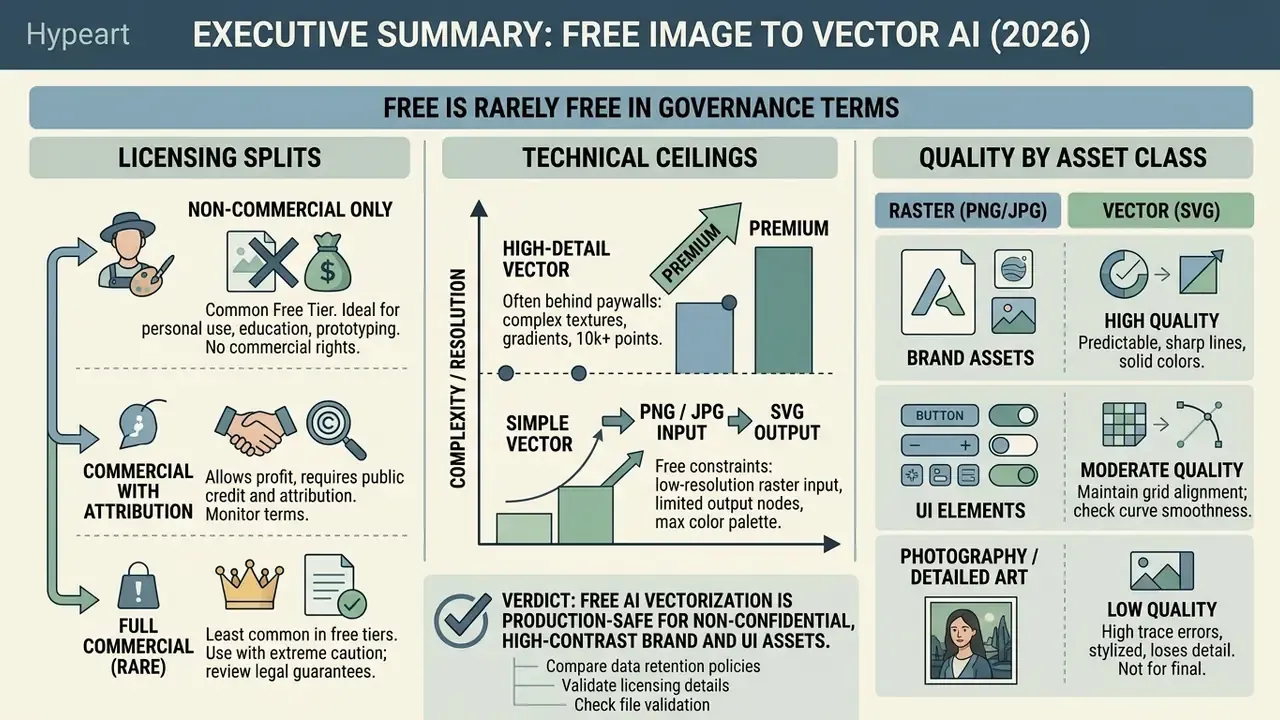
- Free is rarely free in governance terms. Most no-cost AI vectorizers are cloud SaaS, so your source raster leaves the perimeter. Retention windows in published policies range from roughly 5 seconds to 30 minutes to "until the user deletes it," and at least one major platform documents a 30-day file retention window for uploads. Treat every unsanctioned converter as a potential Shadow AI and DLP event.
- Licensing splits three ways. Some vendors grant full commercial rights on outputs, some restrict free tiers to personal or non-commercial use, and at least one explicitly prohibits using downloaded vector output to train machine-learning models without written consent.
- Technical ceilings decide feasibility. Free tiers cap resolution (commonly 1 to 3 megapixels), file size (4 to 30 MB), and color space (CMYK is silently converted to sRGB). These caps, not "AI quality," are the usual reason an enterprise batch job fails at 2 a.m.
- Quality is predictable by asset class. Logos, icons, typography, diagrams, and line art vectorize cleanly. Photographs, paintings, and gradient-heavy artwork degrade into thousands of micro-paths.
- Verdict: free AI vectorization is production-safe for non-confidential, high-contrast brand and UI assets processed through an approved tool with documented retention and licensing. Confidential schematics, unreleased packaging, and regulated disclosures should be vectorized with an open-source, locally executed engine (Inkscape's Trace Bitmap, VTracer, or the MIT-licensed Vecto) inside your own infrastructure.
Where vectorization touches regulated workflows
A graphics utility looks harmless next to a credit model. Then you look at what actually gets uploaded.
In banks and mature fintechs, the raster files queued for tracing are rarely just marketing art. Typical examples: statement and disclosure templates heading for print, branch and ATM signage packs, card-product mock-ups that have not been announced, scanned schematics from facilities or vendor due diligence, and diagram exhibits pulled from model validation documentation. Some of those images carry customer identifiers. Some carry an unreleased product roadmap. A few carry both.
That is why the tool choice belongs to a named owner, not to whoever had a deadline. The practical question for a CRO or Head of Model Risk is narrow: which classification of image may leave the perimeter, through which approved endpoint, under which retention clause, and with what evidence retained afterwards?
The rest of this guide answers the designer's question and the control question in parallel. Formats, free-tier limits, and trace quality sit alongside data retention, licensing tiers, and audit trail. Keep both columns in view. A vector file that renders beautifully and cannot be defended in an audit is still a finding.
1. What AI image to vector means and why you convert an image to vector
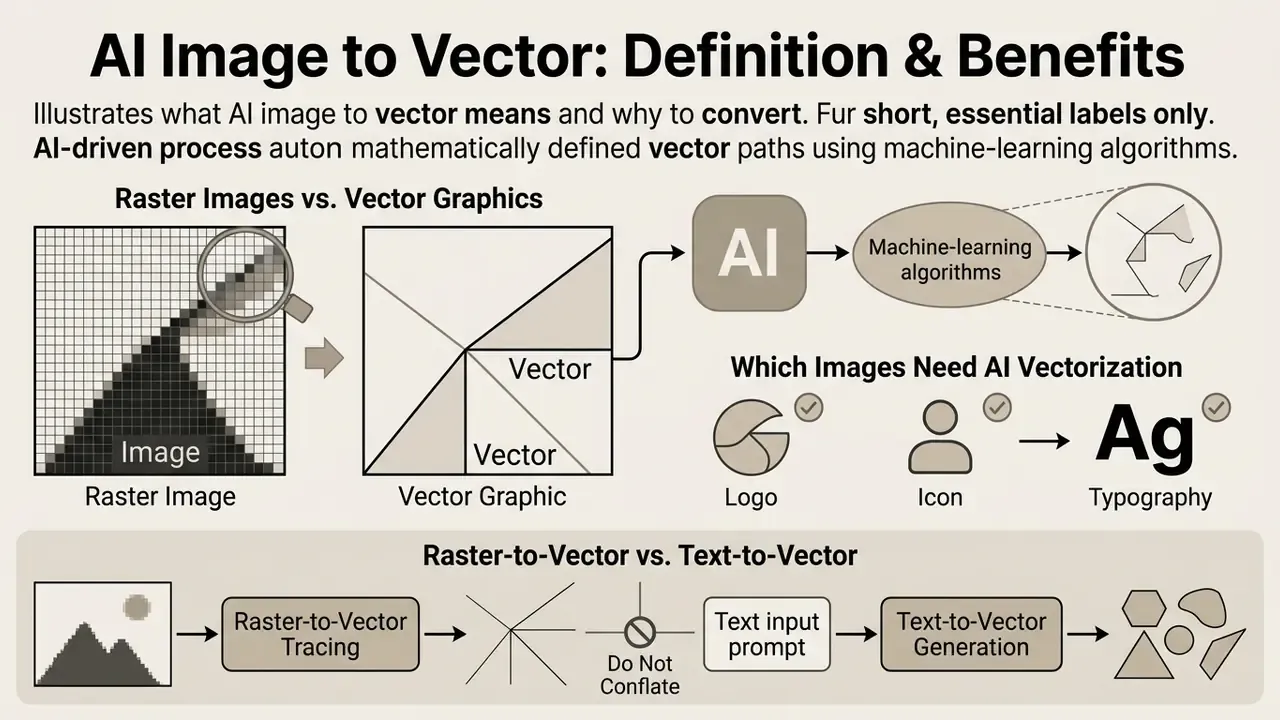
An ai image to vector tool automatically transforms grid-based raster graphics into mathematically defined vector paths using machine-learning algorithms. Converting an image to vector graphics matters when assets must scale across screen resolutions, responsive web interfaces, or physical print media without quality loss.
"Raster graphics are commonly used for complex images with many visual details, while vector graphics are suitable for object-level representations."
Table: comparison of raster images and vector graphics for AI image-to-vector workflows
| Aspect | Raster images (bitmap) | Vector graphics |
|---|---|---|
| Underlying representation | Grid of pixels with fixed resolution; each pixel stores a color or intensity value. | Set of geometric primitives (lines, curves, polygons) described by parametric equations. |
| Scaling behavior | Upscaling beyond original resolution causes blur, aliasing, and pixelation. | Resolution-independent; renders cleanly at any scale without loss of sharpness. |
| Editability | Edits operate on raw pixels; isolating individual elements requires manual selection. | Edits operate on explicit shapes and layers; paths can be recolored or reshaped directly. |
| Memory and file size behavior | Every pixel must be stored, so size grows with resolution and detail. | Only points and mathematical relationships are stored; smaller unless path complexity is extreme. |
| Typical formats | PNG, JPG/JPEG, GIF, BMP, WebP, TIFF. | SVG, AI, EPS, PDF, DXF. |
| Best-suited tasks | Complex photographs, photorealistic art, and continuous-tone imagery. | Logos, icons, typography, diagrams, charts, and technical line art. |
The short version of that table: pixels remember, vectors describe. That difference is why a traced logo survives a billboard and a scaled PNG does not.
1.1 Raster images and vector graphics: the key differences
"Raster representation is inefficient for geometric transformations; vectorization yields compact, resolution-free representations with numerous graphical applications."
Structurally, this is not a format swap. The W3C defines SVG as a language for two-dimensional vector and mixed vector/raster graphics, which means raster-to-vector conversion is a transformation of representation. The engine must infer geometry from sampled pixels rather than re-encode paths that already exist.
1.2 Which images actually need AI vectorization
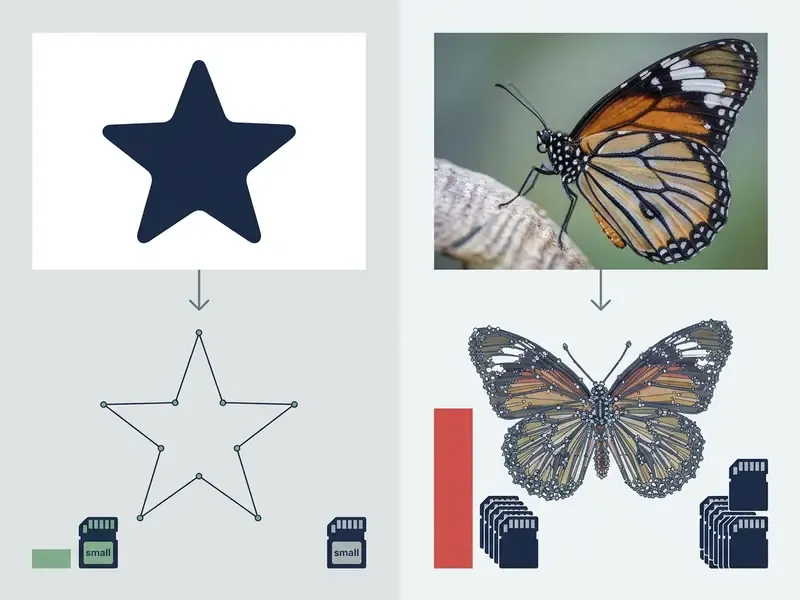
Automated AI vectorization works best on high-contrast graphics with distinct boundaries: logo designs, icons, typography, technical diagrams, and line drawings. A free ai image vectorizer will happily process a complex photograph, but multi-toned paintings produce thousands of micro-paths that inflate file size and complicate manual editing.
"Logos, icons, and simplified illustrations align with segmentation and curve-fitting assumptions due to discrete shapes and limited color palettes."
In one design asset migration project, a media firm needed to convert 450 legacy bitmap logos into responsive SVG formats for web deployment. By running the assets through an automated ai image tracer pipeline and adding node-simplification checks, the team cut average asset file sizes by 62% while keeping resolution-independent rendering across all breakpoints. (Internal project data; the methodology was not externally audited, so the 62% figure requires independent verification before being used as a planning benchmark.)
1.3 Raster-to-vector versus text-to-vector AI: do not conflate the two
Direct vectorization and generative vector creation (text-to-vector, as offered by tools such as Recraft or Vectr) solve different problems:
- Raster-to-vector tracing preserves the geometry of an existing image. Governance question: do we own the source raster?
- Text-to-vector generation builds a conceptually new vector drawing from a prompt. Governance question: is prompt-only output copyrightable, and does the model licence permit commercial use?
- Embedding neither traces nor generates. It wraps the original raster inside a vector container, leaving the asset resolution-dependent.
Confusing these three categories is the single most common cause of failed print, cutting, and embroidery handoffs. For prompt-driven creation paths, see our comparison of AI art and image generators.
2. How to choose a free AI image to vector converter online
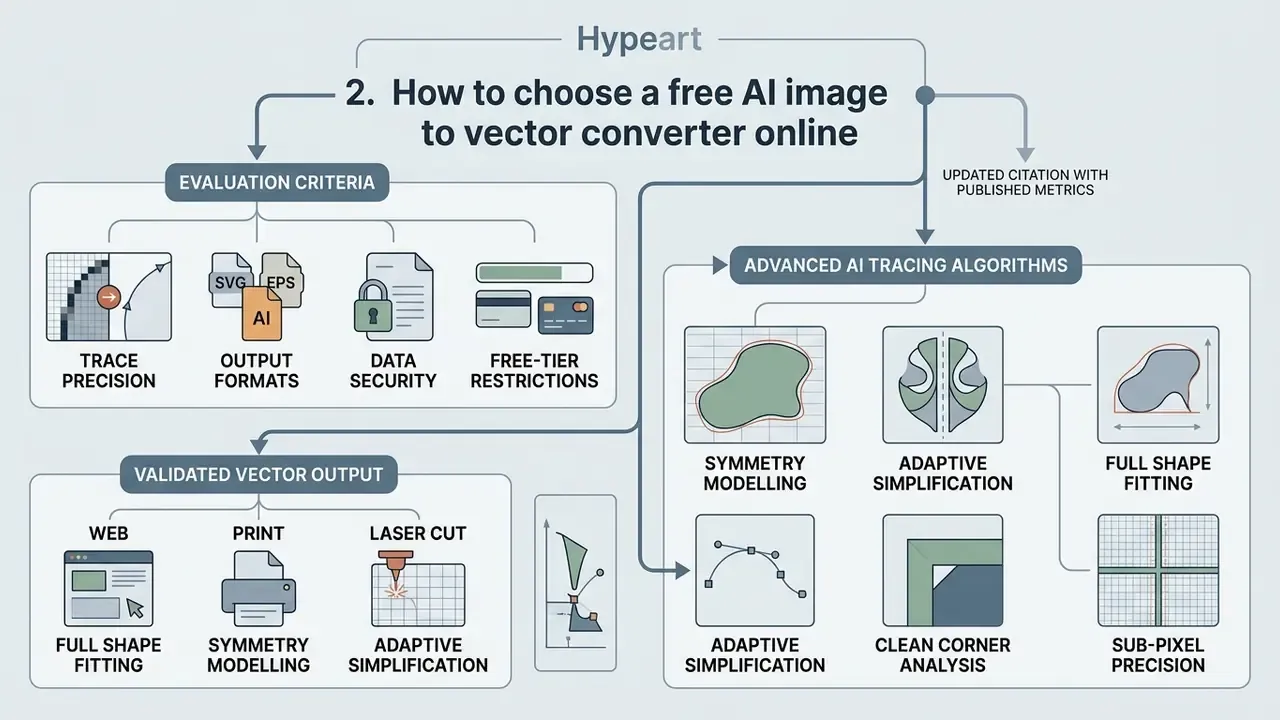
Selecting a free ai image to vector converter online means evaluating trace precision, output format options, data security, free-tier restrictions, and, in regulated environments, retention and model-training policies. Checking those parameters before you upload proprietary assets prevents workflow bottlenecks and licensing conflicts in commercial projects. It also spares you an awkward conversation with compliance.
"AI-enhanced vectorization achieves average quality scores of 94/100 across more than 10,000 test conversions."
Table: selection matrix for free AI image-to-vector converters, including governance criteria
| Service | Input formats | Output formats | Editing / workflow features | Free-tier limits | Data retention / training on uploads | Commercial rights on free tier | Local / on-prem execution |
|---|---|---|---|---|---|---|---|
| SVGAI.org AI SVG Creator | PNG, JPG, JPEG, GIF, WebP, BMP, TIFF (up to 5 MB) | SVG, PDF, AI, EPS | Auto path simplification, batch API | Free starting quota; some regions receive a daily free quota. Sub-second processing (~320 ms for simple icons) per the service's own test data | Not stated on the product page, so request it in writing before onboarding | Not stated on the product page; verify per account tier | No (cloud API) |
| Sci-draw Vectorize Image | JPG, PNG, WEBP (up to 10 MB) | SVG, PPTX | Text extraction versus full vectorization modes | Free web access with file size cap | Not published in the reviewed material | Requires verification of rights to source materials | No |
| Kittl Vectorizer AI | PNG, JPG | SVG, PDF | On-canvas recoloring and node adjustment | Free access inside workspace editor | Governed by platform policy | Subject to platform subscription terms | No |
| Vectorizer.AI | PNG, JPG, GIF, BMP, WEBP (max 3 MP / 30 MB) | SVG, EPS, DXF, PDF, cleaned PNG | Full 32-bit ARGB precision, full shape fitting, symmetry modelling, palette control, merge/split editor, pre-crop | Unlimited free uploads and previews; PNG previews are watermarked and consume ~0.200 credits; download requires tokens or a plan | Retention policy is vendor-controlled and may change over time; output may not be used for ML training without written consent | Download-gated; ML/AI use prohibited without express written consent | No |
| Vector Magic (Online) | JPG, PNG, BMP, GIF in sRGB (max 1 MP; CMYK converted to sRGB) | SVG, EPS, PDF (desktop adds AI, DXF) | Auto settings detection, sub-pixel precision, pixel-style in-browser editor (max 1,000 edits), custom palette | Online trial-style access; oversized images are shrunk to the 1 MP cap | Not published in the reviewed material | Verify plan terms before commercial print handoff | Yes, the desktop edition works offline |
| Vectorise.Me | Common raster formats | SVG, PDF, PNG, JPG, WEBP free; EPS/DXF on Pro | Basic vectorization | No watermark, no conversion limit on the free tier | Not published in the reviewed material | Free exports usable; EPS/DXF gated | No |
| WizVector | Common raster formats up to 4 MB | SVG | Credit-based high-resolution output (2048 px) | 10 vectorizations per day, no watermark | Not published in the reviewed material | Verify before commercial deployment | No |
| Recraft (vectorize) | PNG, JPG, WEBP (5 MB or less, under 16 MP, max 4096 px) | SVG, Lottie | Editor plus text-to-vector generation | Up to 30 generations per day on the free account | Governed by platform policy | Free version covers "most designer needs"; confirm plan terms | No |
| VectoSolve | PNG, JPG, JPEG, WEBP, GIF | SVG | Conversion history | First conversion free, then paid plans | Uploaded images deleted within roughly 5 seconds after conversion; converted SVGs stored in history until deleted | Paid and free full-quality conversions grant personal and commercial rights; watermarked previews are evaluation-only | No |
| Vectorization.org | Common raster formats | Vector output | Browser conversion | Free browser use | All inputs and outputs deleted automatically after half an hour; no backups | Verify per terms | No |
| Inkscape Trace Bitmap / VTracer / Vecto | PNG, JPG, BMP, WEBP | SVG, EPS, PDF, DXF | Open-source desktop engines, node-simplification algorithms, live trace preview | 100% free and open source (GPL / MIT engines) | No upload, so data never leaves the machine | Full commercial rights retained by the user | Yes, fully local or self-hosted |
No matching rows Clear one or more filters to restore the matrix.
Read that retention column twice. It is the one that decides whether a tool ever reaches your approved list.
2.1 Which technical features to check in an AI image tracer
"Average processing time of 320 ms, quality score of 98/100, and average SVG size of 2.1 KB for simple icons."
Advanced AI tracing algorithms: beyond Bézier curves
Modern neural vectorizers (Vectorizer.AI's Deep Vector Engine is the clearest documented example) go well past plain cubic-Bézier approximation:
- Full shape fitting.The engine identifies true circles, ellipses, rounded rectangles, and stars, with optional corner rounding and arbitrary rotation, then emits them as parameterized mathematical shapes rather than clusters of small curves.
- Full curve-type support.Straight lines, circular arcs, elliptical arcs, quadratic and cubic Bézier curves are all available, instead of forcing every contour into the cubic-Bézier approximation that legacy tracers rely on.
- Symmetry modelling.Mirror and rotational symmetry are detected and enforced, aligning opposing nodes for consistent glyph and logo geometry.
- Adaptive simplification.Faint or poorly supported boundaries are simplified automatically, reducing output complexity where the pixel data does not justify the detail.
- Clean corner analysis.Corners are modelled and optimized as discrete features separating smooth sections. This is what makes a traced logo look drawn rather than scanned.
- Sub-pixel precision.Anti-aliasing values are read to place boundaries and recover features narrower than one pixel.
- Vector graph representation.A computational-geometry graph keeps neighbouring shapes perfectly aligned during localized edits, which is the exact failure point of conventional path-only representations.
Research confirms the direction of travel:
"The framework progressively appends gradient-filled Bézier paths, optimizing them to minimize a novel loss function via differentiable rendering."
2.2 What "free" actually means for an AI image to vector converter
Free tiers among online AI vectorizers usually run on daily credit limits, watermarked previews, or restricted output options. Some platforms allow completely ai vectorize image free downloads in SVG; others reserve high-resolution EPS/DXF exports, or commercial rights, for paid plans. If you are mapping comprehensive asset workflows, you can explore the hub and compare tool performance across categories.
Documented free-tier patterns as of 2026:
- Free preview, paid export. Unlimited uploads and previews, payment required for the final file (Vectorizer.AI model; PNG previews carry a watermark and consume credits).
- Free but format-gated. SVG, PDF, PNG, JPG, and WEBP free with no watermark; EPS and DXF behind a Pro plan (Vectorise.Me model).
- Free but volume-gated. Ten vectorizations per day, 4 MB per file, no watermark; higher resolution consumes credits (WizVector model).
- Free but quantity-gated. Up to 30 generations per day on a free account (Recraft model).
- Free and unrestricted. A few services advertise no registration, no watermarks, no limits, and explicitly permit commercial use; open-source engines remove the question entirely.
Technical limits of free services: read this before batching
Most online AI vectorizers impose hard ceilings on free input:
- Resolution and file size. Vectorizer.AI caps free input at 3 megapixels and 30 MB. Vector Magic caps at 1 megapixel and silently shrinks anything larger (pixels, not bytes). Recraft's vectorize endpoint accepts 5 MB or less, under 16 MP, max 4096 px. Documented API endpoints impose comparable limits, for example 12,582,912 bytes and 4096 x 4096 pixels.
- Color profiles. Uploaded CMYK rasters are converted to sRGB automatically, which can shift tones when the asset is destined for print. Convert and soft-proof deliberately instead of relying on the converter.
- Transparency flattening. If the service does not support full 32-bit ARGB, an image with alpha may be flattened onto a white background before tracing, destroying the cutline you needed.
- Pre-crop. To avoid losing detail when you exceed the megapixel cap, crop to the target object before upload. On platforms with a pre-crop tool, only the cropped region counts against the resolution limit, which maximizes effective output quality.
- Edit ceilings. In-browser editors can be capped. Vector Magic documents a maximum of 1,000 edits, after which further edits are lost. Heavy cleanup belongs in a desktop vector editor.
3. Shadow AI risk checklist and governance controls
Free browser converters are the textbook Shadow AI vector: zero procurement friction, a file-upload field, and a third-party inference backend. Before any tool is approved for a design, marketing, or engineering workflow, run this seven-point assessment and record the result in your AI inventory.
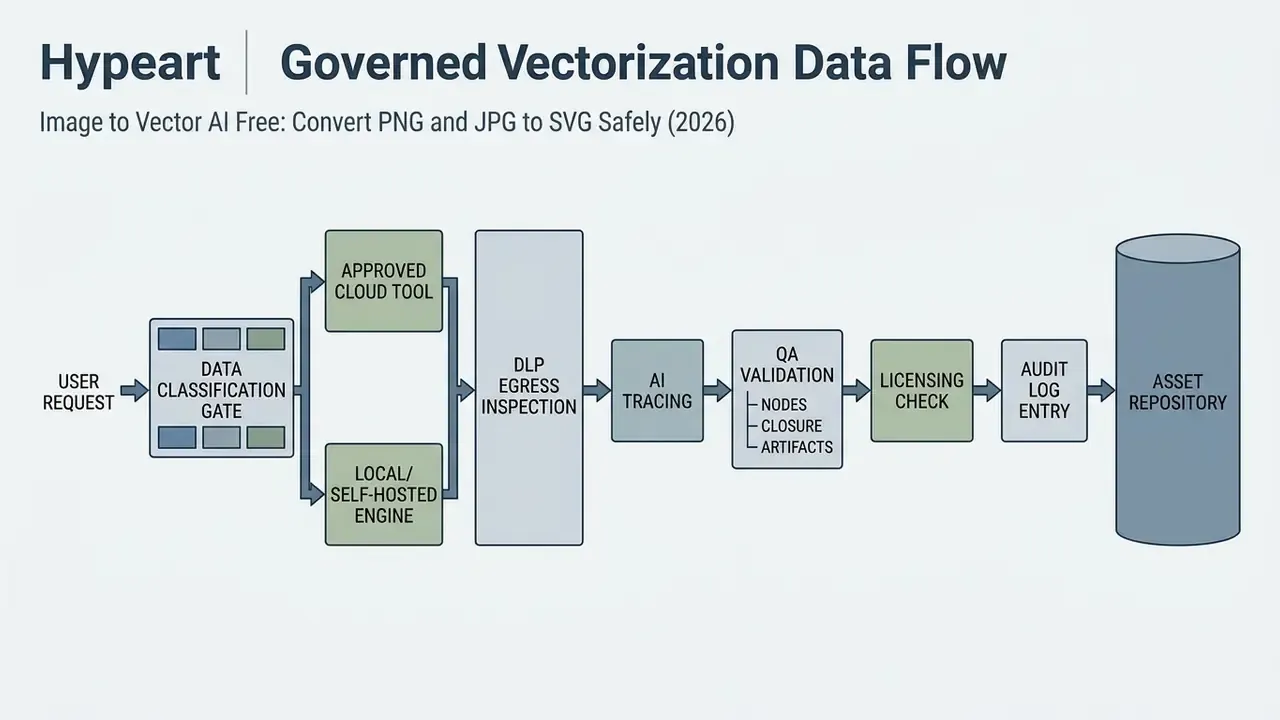
- Data classification gate.Is the source raster public brand material, internal, or confidential (schematics, unreleased packaging, regulated disclosures)? Confidential classes go to a locally executed open-source engine only.
- Retention policy in writing.Obtain a documented deletion window. Published windows in the reviewed market range from roughly 5 seconds (VectoSolve) to 30 minutes (Vectorization.org) to "until the user deletes it"; one major platform documents 30-day retention for uploaded files, and longer retention for flagged content. If a vendor cannot state a window, treat retention as indefinite.
- Training-on-uploads clause.Confirm whether uploads or outputs may be used to improve or train the vendor's models, and whether you are permitted to use outputs in your own ML pipelines. Vectorizer.AI prohibits the latter without written consent.
- Commercial rights on the tier actually in use.Free-tier rights differ from paid-tier rights at the same vendor. Record the tier, not just the vendor name.
- Egress control.Is the upload endpoint reachable from managed devices, and does your DLP policy inspect image uploads? Image files remain a common blind spot in content inspection.
- On-prem alternative registered.For every approved cloud tool, register a local fallback: Inkscape Trace Bitmap, VTracer, or Vecto, whose MIT-licensed engine is built on published methods such as Schneider curve fitting, k-means++, Kåsa circle fit, Oklab, and Douglas-Peucker. Vector Magic's desktop edition covers offline operation.
- Documentation and audit trail.Capture tool name, version or tier, date, source asset hash, operator, and licensing basis. NIST's draft Guidance and Templates for Public-Facing AI Documentation (AI 300-1, draft released 30 July 2026; DOI 10.6028/NIST.AI.300-1.ipd) is a usable template for standardizing that record.
One caveat, and it is not a small one. A checklist only works if someone owns it. Assign the tool to a named approver in the AI inventory, with an escalation path and a defined off switch, or the control exists on paper only.
4. Which formats an AI image to SVG converter supports
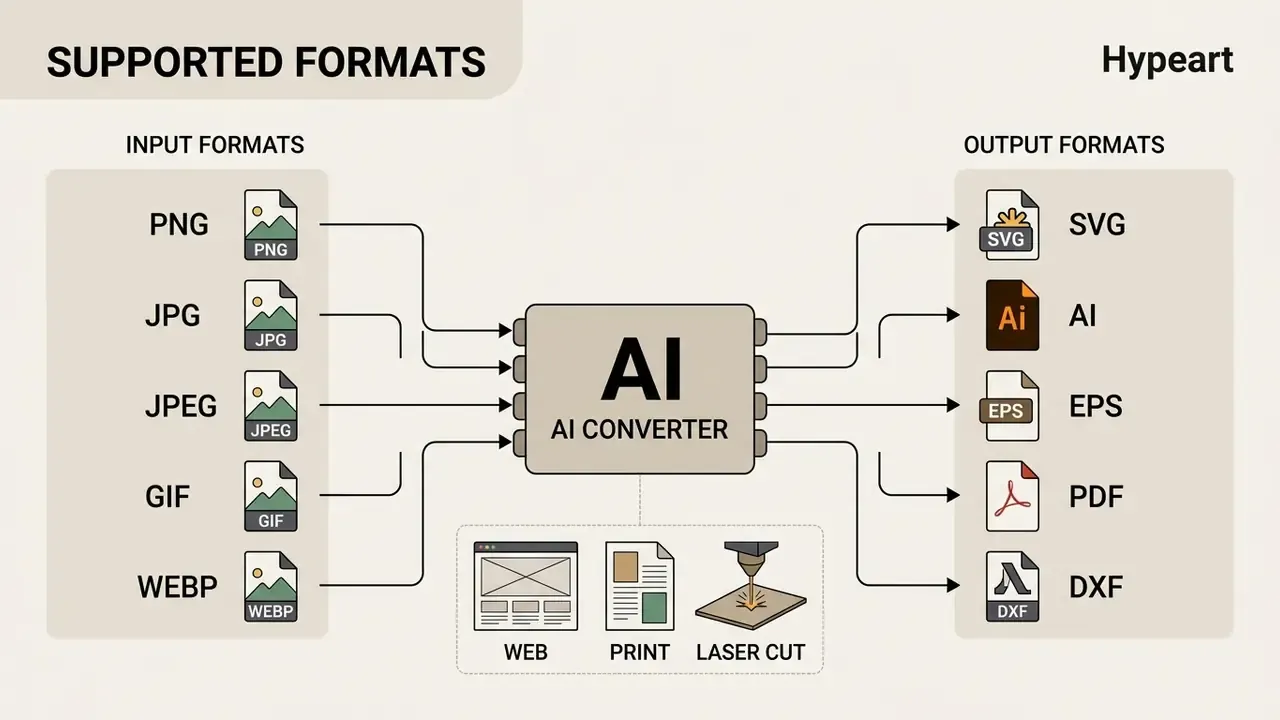
A robust ai image to svg converter accepts standard raster images as inputs and returns versatile vector formats suited to digital UI design, high-resolution print, or computer-aided manufacturing (CAM). Understanding format compatibility prevents data loss during file conversion.
"SVG is based on XML markup; graphical elements are described by XML tags, allowing editing via text editors and automated software."
4.1 Input formats: PNG, JPG, JPEG, GIF and WEBP
Practical input guidance:
- Prepare the raster at the intended output size or larger. Web graphics are typically produced at 72 dpi; print handoffs need 300 dpi or higher, and fine detail capture may require far more.
- Avoid JPEG for rasterized vector art. Compression artifacts near edges directly degrade trace quality.
- Keep alpha transparency intact rather than flattening it onto a solid background. The alpha edge is what the tracer uses to place sub-pixel boundaries.
- The officially supported color space is usually sRGB, and CMYK input is converted, so do not treat the converter as a color-management step.
4.2 Output formats: SVG, AI, EPS, PDF and DXF
The primary output vector file formats include:
- SVG the W3C open web standard for XML-based 2D graphics, designed to render cleanly at any size and to interoperate with CSS, the DOM, and JavaScript.
- AI Adobe Illustrator's native proprietary structure for professional graphic design.
- EPS legacy PostScript-based interchange format, still standard in print publishing workflows.
- PDF portable document format capable of embedding vector geometries; PDF/X for print handoff and PDF/E (ISO 24517-1:2008) for controlled engineering delivery.
- DXF AutoCAD interchange format used for laser cutting, CAD/CAM, and CNC plotters.
"SVG is a text-based, XML-derived format supporting CSS styling and compatible with browsers and vector editors."
The Library of Congress describes SVG as a final-state delivery format for vector graphics on the web. For printing or sharing, standalone SVG files are frequently converted to PDF or to PNG/JPEG.
4.3 How to choose a vector format for editing and export
Select SVG for web development, UI design, and online media. Choose AI or EPS when sending assets to adobe illustrator for complex graphic editing, PDF or PDF/X for print publishing handoffs, and DXF for CNC routing or plotter cutting. To see how automated image analysis fits broader asset management, review ai reverse image workflows.
Vectors in manufacturing, craft, and plotter cutting
Format choice is dictated by the machine at the end of the chain, not by preference:
- Laser engraving and vinyl cutting. Require clean, closed contours with no duplicated or overlapping paths, plus an explicit cut contour in every file. Use DXF or SVG; production guidance in the cutting-plotter trade also accepts EPS, AI, PDF provided the vector cut contour is present.
- Machine embroidery. Requires precise segmentation of color blocks and a minimal node count, because every superfluous node becomes a stitch-path decision. Reduce the palette before you reduce the nodes.
- Screen printing and silk-screen. Requires clean separation of spot colors and no blurred gradient pixels at shape borders. Posterization artifacts at edges print as visible banding.
- Pre-print and packaging. Vector masters shorten turnaround and remove pre-press rework; deliver PDF/X with outlined text.
- CAD and engineering documentation. DXF for machine paths, PDF/E when a controlled, page-faithful technical record is required.
- Web and high-DPI UI. SVG, minified, with grouped logical layers so components can be recolored by CSS.
This is precisely why tracing and embedding are not interchangeable. A file that merely embeds pixels stays blurry when scaled and cannot be used for cutting, sewing, or laser engraving at all.
5. How to convert an image to vector with AI: a controlled workflow
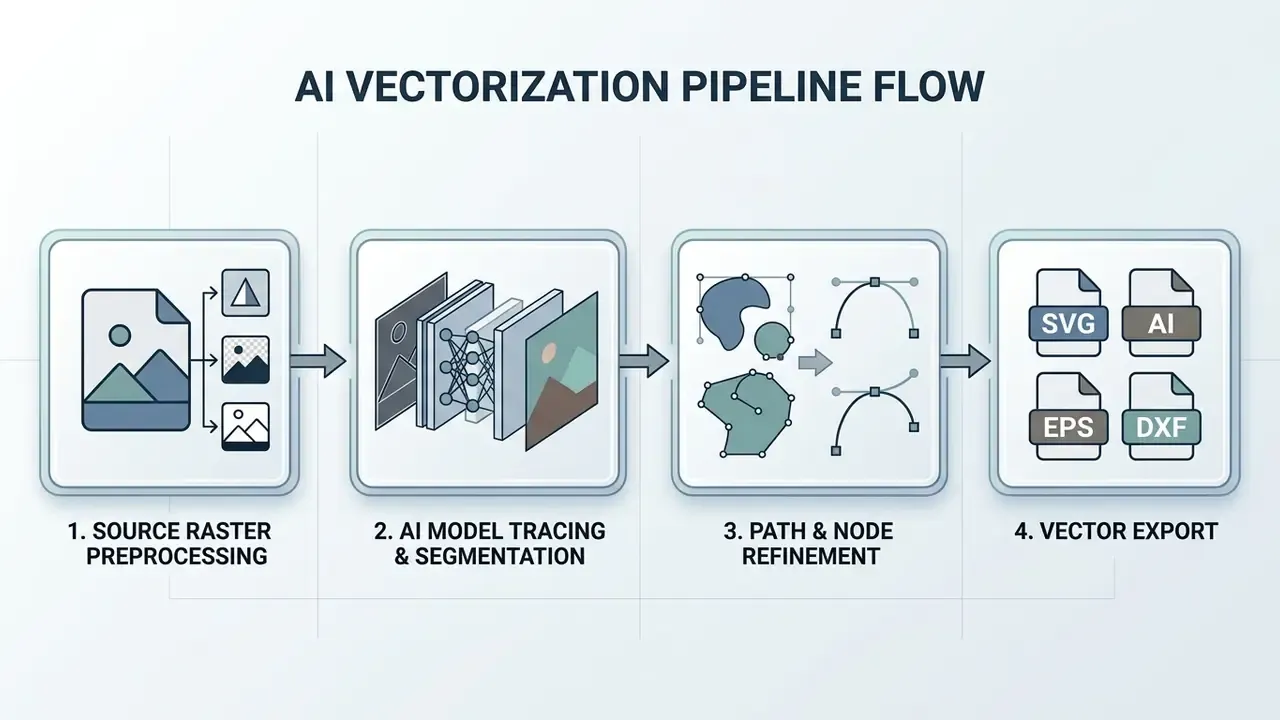
To convert image to vector ai, follow a structured workflow that pairs the four production stages, namely source preparation, AI-assisted tracing, path refinement, and vector export, with four governance gates. The designer steps and the control steps are the same workflow viewed from two angles.
Table: production steps mapped to governance gates
| Stage | Production action | Governance gate | Evidence retained |
|---|---|---|---|
| 1. Prepare | Crop, raise contrast, clean noise, remove background | Rights check on the source raster; data classification | Source hash, rights basis, classification label |
| 2. Trace | Upload to an approved tool or run a local engine | Approved-tool check; retention and training clause on file; DLP egress inspection | Tool name, tier, version, timestamp |
| 3. Refine | Simplify paths, verify closure, outline text | Quality validation: node count, contour integrity, artifact and hallucination review | QA checklist result, node counts before and after |
| 4. Export | Save SVG/AI/EPS/PDF/DXF for the target device | Licensing confirmation for the output tier; archival with audit trail | Export settings, licence basis, repository ID |
5.1 Prepare the image file before upload
Crop unnecessary margins, increase contrast between subject boundaries, and run a background remover if the source contains complex background texture. Clean source graphics cut tracing noise and artificial node generation dramatically. Where the source exceeds the platform's megapixel cap, use pre-crop so that only the region you actually need consumes the resolution budget.
Pre-processing practices documented for OCR and tracing pipelines transfer directly. Despeckle and median-filter to remove dust, scanner streaks, and background texture. Correct contrast histogram-wise when line art is faded or blends into the paper. Remove glare and gradients from photographed sketches. If the raster is genuinely too small, enhance it deliberately before tracing rather than asking the tracer to invent structure; related techniques are covered in our guide to expanding and reconstructing images with AI.
5.2 Upload the image and run AI processing
Upload the prepared file to the free ai image to vector converter. The underlying model decomposes the raster into color or luminance layers, segments color regions, detects contours, fits parametric Bézier curves and, in advanced engines, whole geometric primitives, then assigns fill attributes to the generated paths. Layer-decomposition approaches split the input into binary or grayscale layers, process each independently, and merge the processed layers back into a single vector result.
5.3 Validate the editable vector and download the file
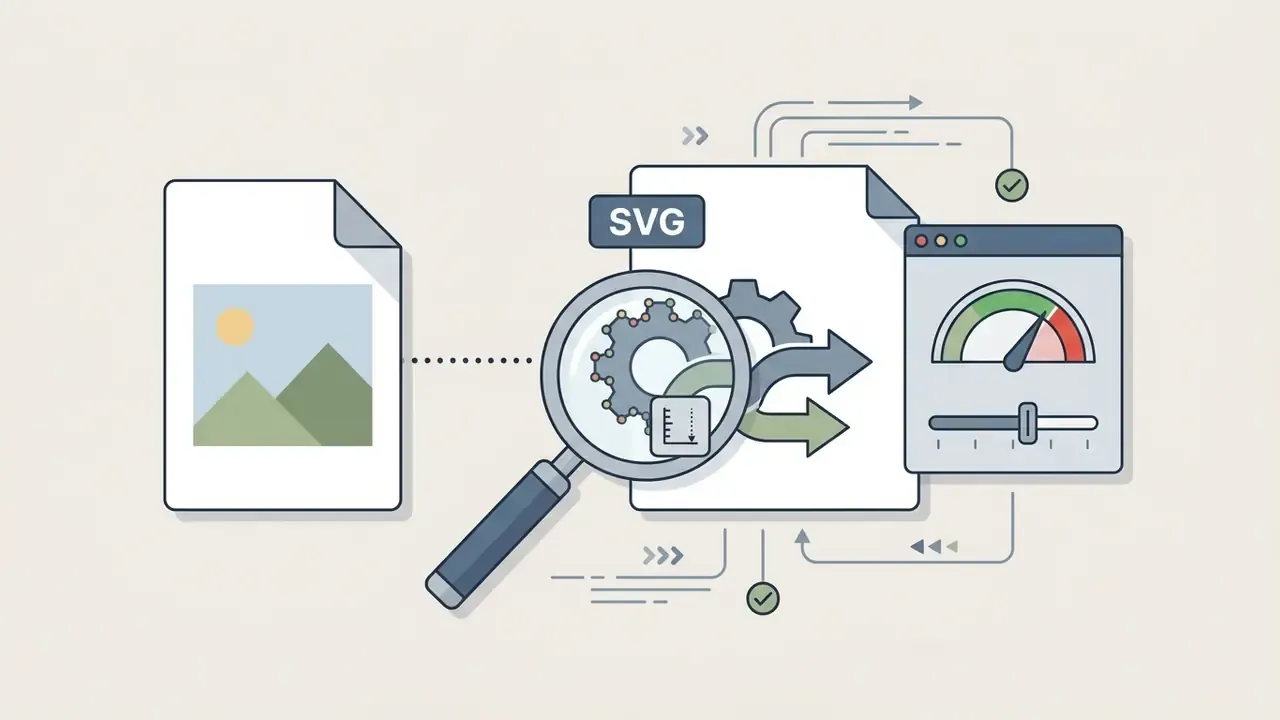
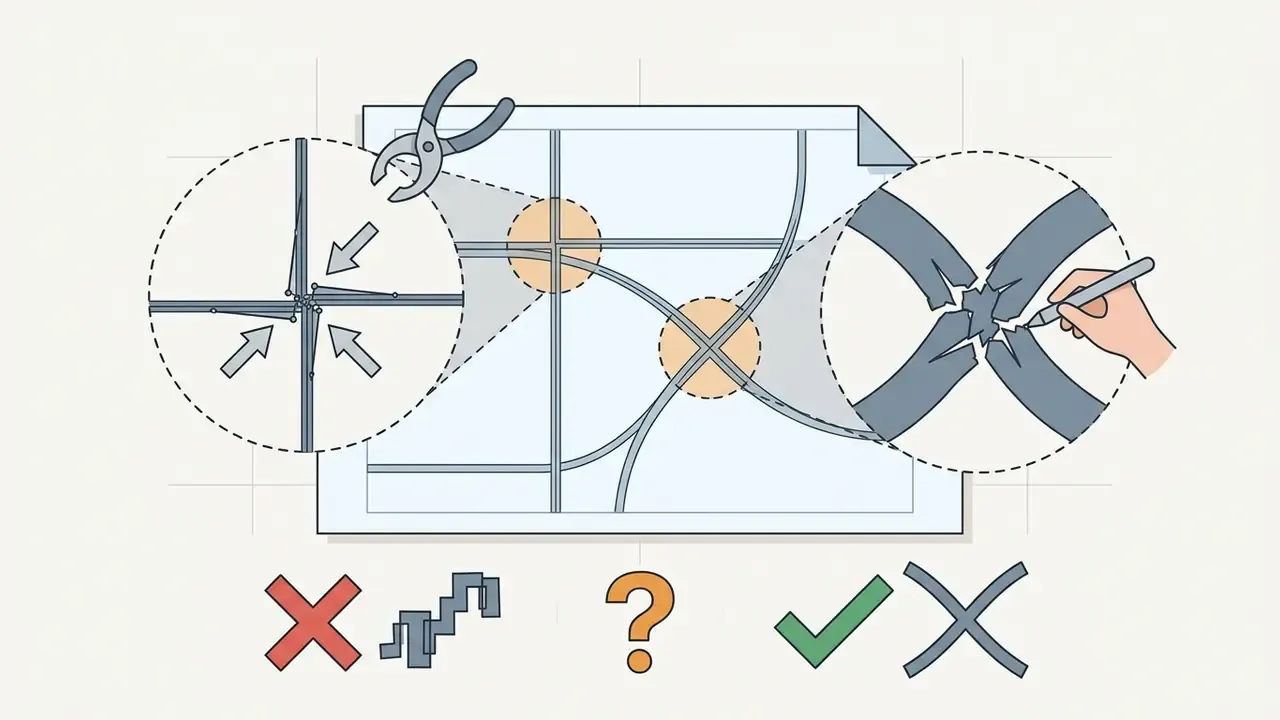
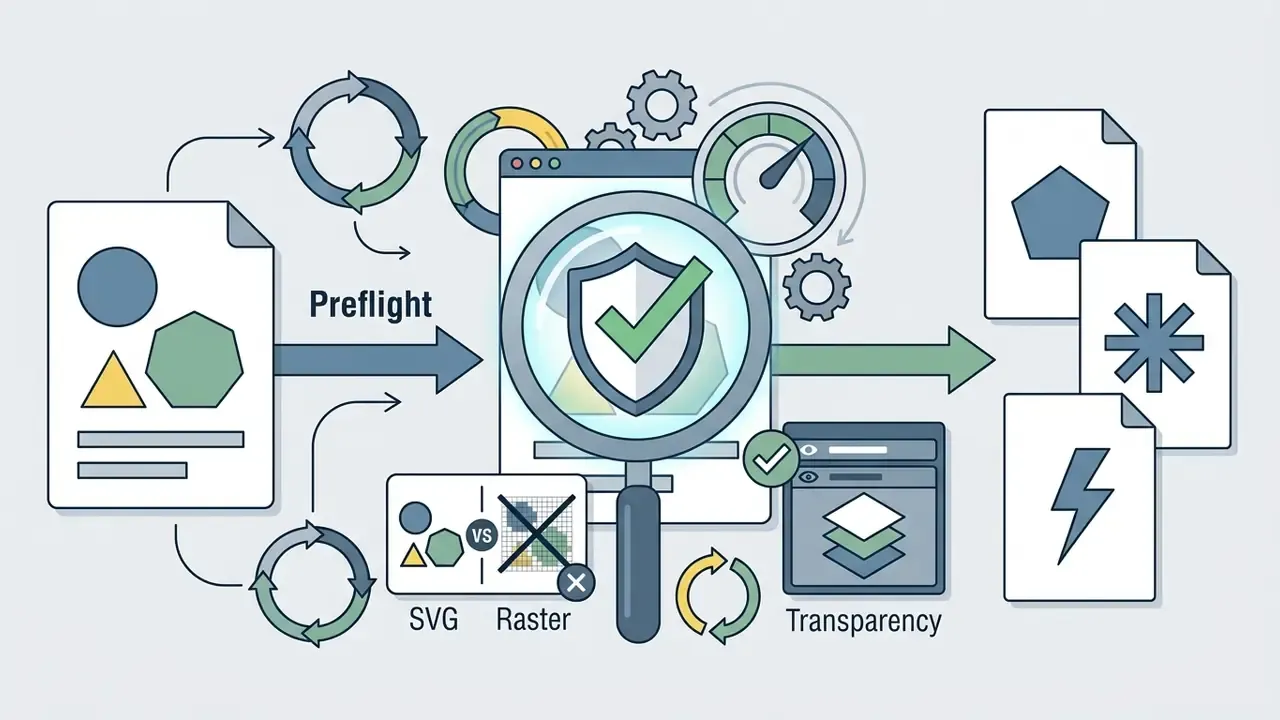
Inspect the generated preview for broken lines or excessive anchor points. Run path simplification if the tool supports it, then download the final editable vector file in SVG, PDF, EPS, AI, or DXF.
"Conventional pipelines can produce an abundance of shapes that limit editability and interpretability."
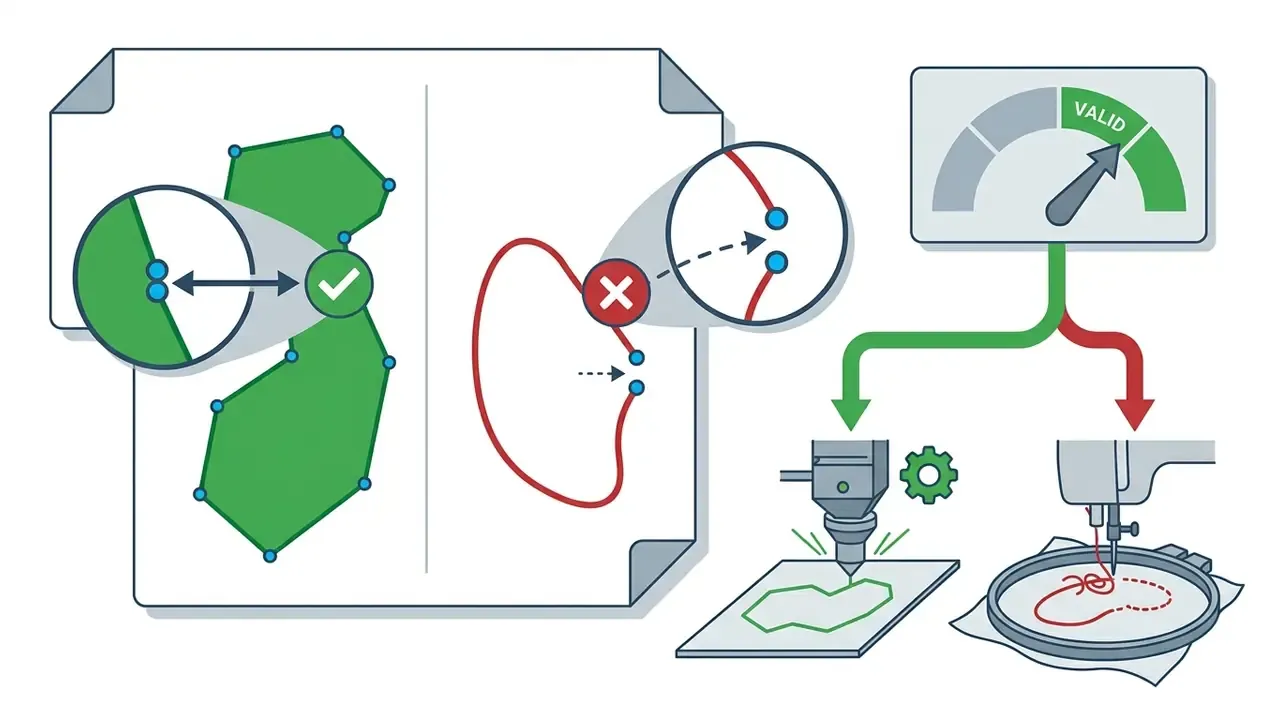
A practical validation routine, adapted from vector-map quality control:
Express correction inside the converter window (in-browser editing)
If artifacts show up in the preview, fix them before download using the service's built-in editor rather than reaching straight for Illustrator:
- Palette control.Reduce the color count, for example from 16 to 4, so near-identical parasitic pixels merge into single background fills. Good engines auto-detect palette size; override it when they guess wrong.
- Merge and split.Connect broken lines and separated shapes, and split shapes that should not be touching, using the pixel-style editing mode. Vector Magic's editor is the clearest documented implementation; Vectorizer.AI exposes equivalent merge/split and per-color editing.
- Remove background noise.Delete isolated color islands, the "junk nodes," by clicking them in the layer preview.
- Respect the edit ceiling.In-browser editors cap the number of operations, 1,000 in Vector Magic. If the result needs more than light touch-up, move to a desktop editor instead of over-editing in the browser.
During an automated design asset overhaul, an engineering team built an internal pre-processing pipeline for 200 technical diagrams. By cropping margins, adjusting threshold contrast, and running automated background cleanup before vectorization, they reduced vector node counts by 40% and removed manual path editing from the process. (Internal project data; the 40% figure is not externally audited and should be re-measured on your own asset mix.) If you need to improve low-resolution sources before tracing, review how to ai sharpen image assets effectively.
6. Quality of AI vectorize image output: what determines the result
"VectorArk achieves superior geometric completeness and artifact suppression across multiple datasets compared to previous methods."
Three documented failure modes are worth budgeting for:
- Fixed token or primitive budgets. Systems such as S2VG2 operate under a fixed token limit. On images with many elements this produces oversimplified SVG output and loss of nuanced detail.
- Segmentation dependence. A 2025 study reports that output quality tracks semantic segmentation quality. Inaccurate delineation of complex or overlapping objects yields missing details and artifacts.
- Extreme gradients. Adaptive-parameter vectorization improves complex images, yet still fails on extremely complex gradient processes (CVPR 2025).
6.1 Logos, icons and drawings: when the result is most accurate
"Logos, icons, and simplified illustrations align with segmentation and curve-fitting assumptions due to discrete shapes and limited color palettes."
A caution on vendor accuracy claims, and this one matters for procurement. The marketing figures circulating in this category, "90%+ accuracy" or "95% of the quality," are not comparable, because the test sets and error metrics stay undisclosed. The only explicit contour metric found in the reviewed material is an edge-accuracy score measured against the original outline within a two-pixel tolerance, where 1.00 denotes an exact match. No peer-reviewed benchmark for logo or icon vectorization accuracy exists in the reviewed source set, so validate on your own brand assets before standardizing a tool.
6.2 Photos and complex illustrations: limits of AI photo to vector
"Raster graphics excel at continuous-tone representation, whereas vector methods must approximate gradients with discrete shapes, potentially requiring many primitives."
Supporting evidence points the same way. Gradient-layer vectorization research (2023) encodes semi-transparent linear gradients as a dedicated decomposition step, which shows that gradients require special handling rather than direct contour tracing. A 2025 review of AI-driven graphic vectorization reports that conventional methods preserve detail but struggle with boundary alignment, lowering perceptual fidelity. Preservation guidance likewise notes that vector data is not always preferable for documentary drawings, and that fine detail may require raster capture above 600 ppi.
6.3 How to improve vector files after conversion
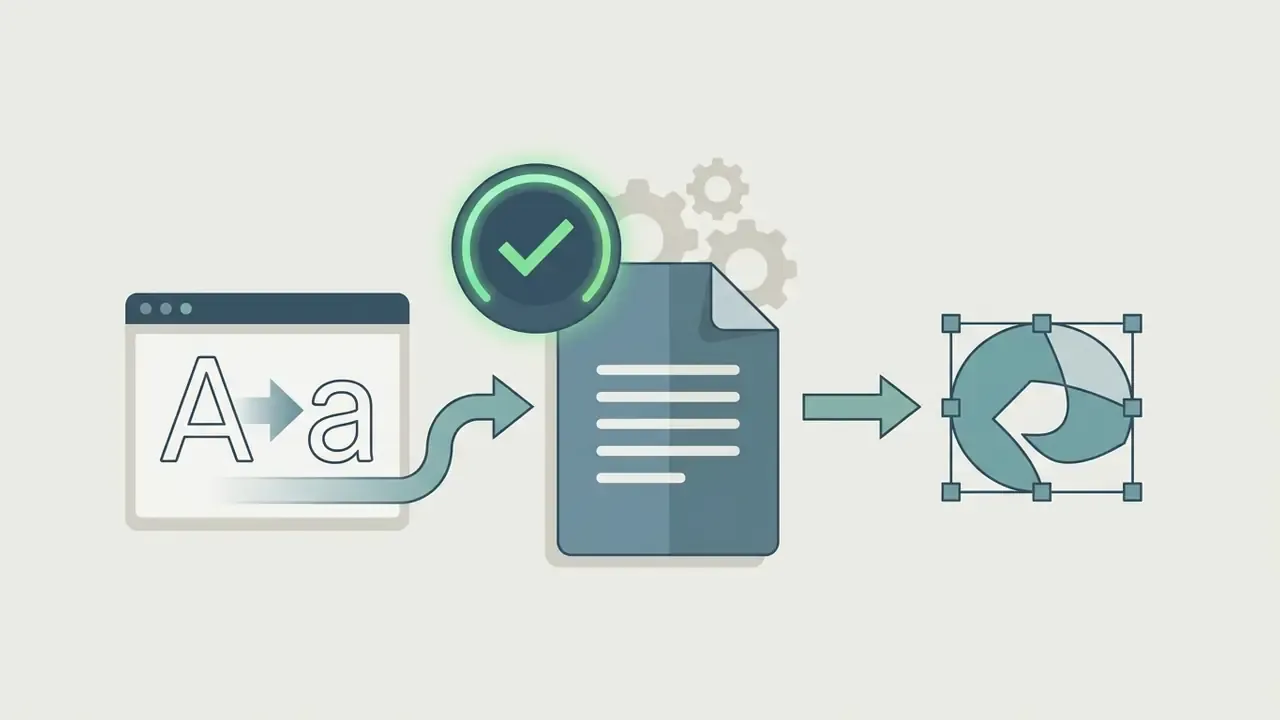
Post-processing in desktop editors such as Inkscape or Adobe Illustrator means running path simplification commands (Object > Path > Simplify), merging overlapping shapes, deleting stray nodes, and converting text primitives into outlined vector paths.
"Creating a shape for each pixel guarantees perfect reconstruction but lacks compactness and editability."
Five documented correction methods:
If you want to generate vector graphics directly from text prompts instead, check tools that let you create assets via ai that can create images, explore broader raster photo editor workflows for pre- and post-processing, or generate 3D assets with an ai stl generator.
- Expand the trace
- (Illustrator:
Object > Image Trace > Expand) to turn the trace result into genuinely editable vector paths. - Ungroup or enter Isolation Mode
- to edit individual paths inside the trace group without destroying the grouping.
- Direct-select anchor points
- and run
Object > Path > Simplifyto remove excess points while preserving silhouette fidelity. - In Inkscape
- , apply
Path > Trace Bitmap, move the traced vector away from the source image, then delete the original raster before cleanup. The dialog's live preview makes the step semi-automatic. - Release the trace
- (
Object > Image Trace > Release) when you need to return to the source raster and retry with different parameters. Tracing time scales with input resolution, so iterate on a cropped region.
7. Commercial use of AI-generated vector files
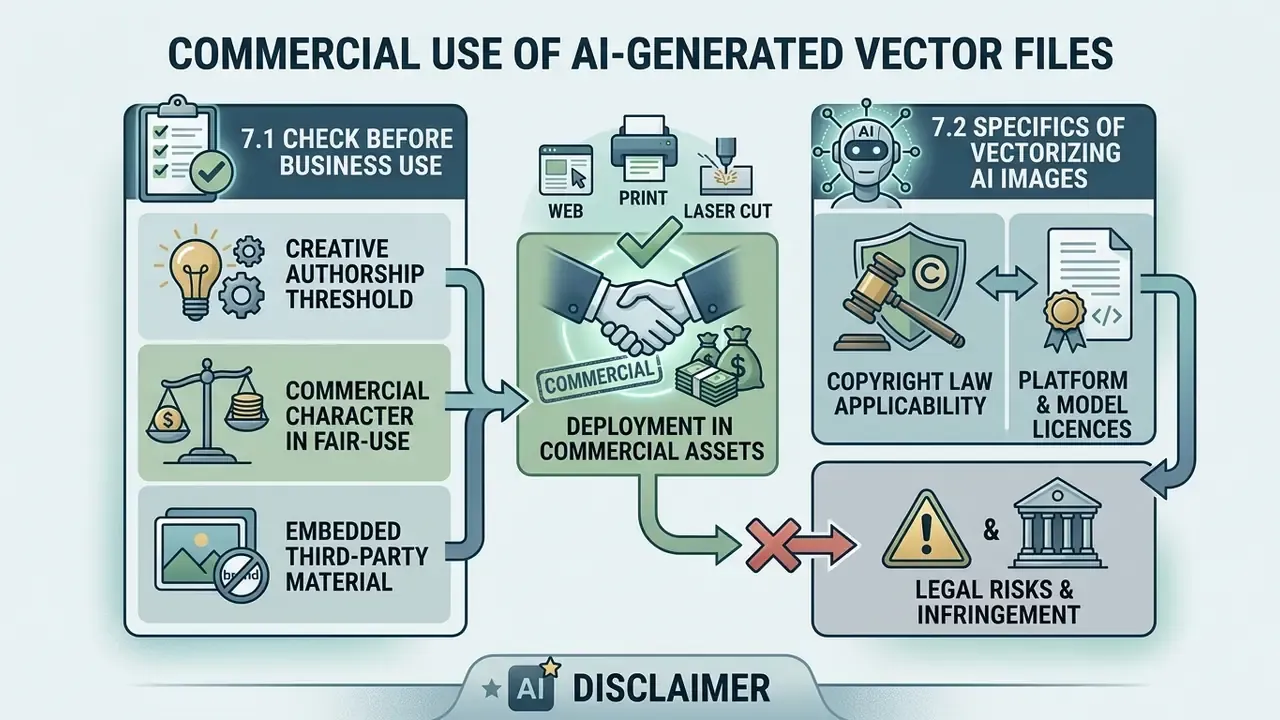
Deploying AI-vectorized graphics in commercial assets requires evaluating copyright law, source image ownership, and platform licensing terms. That applies equally to traced brand assets and to AI-generated raster images used as trace inputs.
7.1 What to check before using a vector in business
Make sure you hold explicit rights to the source bitmap before conversion. Under US law, converting a copyrighted raster file into a vector format creates a derivative work, which remains subject to the original copyright holder's permission (37 CFR § 202.10; US Copyright Office Guidance, 2025).
Three additional checks that regulated teams routinely miss:
- Creative authorship threshold. 37 CFR § 202.10 requires that a pictorial, graphic, or sculptural work embody "some creative authorship" to be registrable. A vector file with creative selection, arrangement, or substantive redrawing can therefore be protected as its own work; the traced geometry alone may not be.
- Commercial character in fair-use analysis. The US Copyright Office notes that commercial character weighs against fair use in the first factor, so "we only use it internally in marketing" is not a safe-harbour argument.
- Embedded third-party material. US federal works are not subject to copyright in the United States, yet agency publications can still contain restricted third-party images. Written permission is required for uses beyond fair use or a statutory exemption.
7.2 Specifics of vectorizing AI-generated images
Purely AI-generated raster images, for example from Midjourney or DALL·E 3, lack human authorship and are generally not eligible for copyright protection in the US (US Copyright Office, 2025). Vectorizing an AI-generated image grants protection only to human-authored vector edits or structural modifications added during post-processing.
Two regimes operate in parallel and both must be cleared:
- Copyright law.The Copyright Office's 2025 report (Copyright and Artificial Intelligence, Part 2: Copyrightability) holds that protection extends only to human creative contribution. Prompts alone do not create authorship, and more-than-de-minimis AI-generated material must be disclosed and disclaimed in registration. No separate rule exists for "AI-vectorized" content; it is assessed under the same human-authorship framework.
- Platform and model licences.Midjourney states users own outputs, but upscales of another user's image belong to the original creator, and businesses above USD 1,000,000 in revenue require Pro or Mega plans. OpenAI assigns output rights to the user. Flux licensing depends on the specific checkpoint, and some variants are non-commercial; vectorizing the image does not lift that restriction. Stock marketplaces add their own layer, since Adobe Stock's generative-AI content guidelines require contributors to hold all necessary rights to submit AI-generated vectors.
Alert box, legal risk in commercial vector usage:
8. FAQ: image to vector AI free, answered
How does vectorizing differ from embedding an image?
Vectorizing converts a bitmap pixel grid into independent, mathematically defined vector paths: Bézier curves and, in advanced engines, whole geometric primitives. Embedding simply wraps a raster PNG or JPG inside an SVG container tag, leaving the asset resolution-dependent and uneditable (W3C SVG 2 Specification, 2026 - https://www.w3.org/TR/SVG2/embedded.html). A third category, text-to-vector generation, produces new geometry from a prompt and never references a source raster at all. Only genuine tracing yields a file usable for cutting, sewing, or laser engraving.
Does the service retain my uploaded image file?
Data retention policies vary significantly by platform, and the range is wide enough to be decision-relevant. Published examples in the reviewed market: VectoSolve states uploaded images are deleted immediately after conversion, within roughly five seconds, while converted SVGs remain in conversion history until the user deletes them or closes the account. Vectorization.org states all submitted inputs and converted outputs are deleted automatically after half an hour with no backups. One major AI platform documents a 30-day retention window for uploaded files, with longer retention possible for flagged content. Other commercial cloud converters keep files for history logs or internal service evaluation until manually purged, and at least one vendor states plainly that its retention policy may change over time without requiring affirmative consent. (Vendor-published policies only; retention practice should be confirmed contractually rather than inferred from a web page.)
How should a free online vectorizer be classified under Model Risk Management?
In most frameworks a deterministic-output graphics utility is a low-materiality, high-exposure asset. The tool makes no financial or customer decision, so quantitative model risk is minimal, but the data-egress and licensing exposure is real. Practical treatment: register the tool in the AI inventory at a low materiality tier; attach the retention clause, training clause, and commercial-rights tier as evidence; require human QA sign-off on output (node count, contour closure, artifact review) as the effective control; and re-attest annually or on any change in vendor terms. NIST's draft AI 300-1 documentation templates (2026) provide a defensible structure for that record.
Can we run open-source vectorizers without GPL licence exposure?
Engine licensing differs from application licensing, so check both. Vecto's tracing engine is MIT-licensed, and VTracer is maintained as an open-source raster-to-vector converter; MIT terms are generally compatible with proprietary internal use. Inkscape's application is distributed under copyleft terms, and using the application to produce output files does not impose licence obligations on those output files, though bundling or redistributing the code does. Obtain a written open-source review before embedding any engine into a product build.
What is the safest workflow for confidential drawings?
Do not upload them. Use a locally executed engine: Inkscape Trace Bitmap, VTracer, Vecto, or Vector Magic's offline desktop edition, which additionally supports AI and DXF output and higher input resolution than the online tool. Keep the raster and the vector inside the managed perimeter, and log the conversion in your asset repository. Reserve cloud AI vectorizers for public-classification assets.
Why does my traced file look fine on screen but fail at the cutter?
Three usual causes: unclosed contours, where the first and last polygon points are not equal; duplicated overlapping paths that the machine reads as two cuts; and gradient or anti-aliased edges surviving as thin sliver shapes. Run the closure and node checks in section 5.3, flatten to spot colors, and export DXF or SVG rather than a PDF that may carry transparency.
Is there an official standard for "AI vectorization"?
No. The reviewed official sources split into two families: vector-graphics standards (W3C SVG 1.1 and SVG 2, which define both vector primitives and raster embedding) and AI documentation guidance (NIST draft AI 300-1, 2026). Peer-reviewed work on AI-guided vectorization exists, for instance in Discover Artificial Intelligence (2025), but no accuracy standard or certification scheme for vectorization output was identified. Vendor accuracy claims should therefore be treated as unvalidated marketing until reproduced on your own test set.
To compare alternative graphic production tools, you can compare options across our technical indexes, review asset workflow guides and open the hub, evaluate no-cost editing stacks in our free photo editor guide, or assess curated stock graphic workflows through ai stock image solutions. If you need advanced raster transformation techniques before vectorization, explore how to ai transform image files.
Appendix A: corrections log and superseded references
Kept for transparency and traceability. Each item below was replaced in the main text by a source drawn from the reviewed research set.
| Section | Superseded reference (as previously published) | Reason for replacement | Replacement in main text |
|---|---|---|---|
| 1.1 Raster versus vector | "(W3C SVG 2 Specification, 2026)" used as evidence for curve recalculation behaviour | Specification, not a study; no methodology or measured results | A Formalization of Image Vectorization by Region Merging (2024) |
| 2.1 Tracer features | "(SVGAI.org Technical Report, 2025)" cited without figures | Weak citation with no verifiable metrics | SVGAI.org Technical Comparison (2025), with 320 ms / 98-100 / 2.1 KB and 94/100 over 10,000+ conversions |
| 4.1 Input formats | "(National Archives UK Graphics Guidance, 2025)" | Not present in the reviewed research set for this specific claim | Sci-draw Vectorize Image Guide (2024 to 2025); National Archives UK retained only for the raster/vector memory-behaviour facts in the comparison table |
| 6 Quality factors | "(VectorArk Research, 2026)" cited without results | No dataset or metric disclosed | VectorArk: Learning Practical Image Vectorization with Rounded Polygon Representation (2026) |
| 6.1 Logos and icons | "(ACM Topology Vectorization Study, 2024)" | Source not identifiable in the reviewed set | Image Vectorization: a Review, Dziuba et al. (2023) |
| 6.2 Photo limits | "(Library of Congress FADGI Guidelines, 2025)" cited for vector bloat | Guideline covers raster capture resolution, not vector path counts | Image Vectorization: a Review (2023); FADGI retained only for the 600 ppi fine-detail point |
| FAQ retention answer | "(VectoSolve Privacy Documentation, 2026)" as sole basis for a market-wide claim | Single-vendor page generalized to all providers | Multi-vendor published retention windows (VectoSolve ~5 s; Vectorization.org 30 min; 30-day platform window) |
| Epigraph | Quote attributed to "Marcus Hale, author | Marcus Hale, author. | Reattributed as the editorial position of the AI Governance & Risk desk |
| Footer | "As of August 2026, hypeart.ai remains an unverified domain entity with no confirmed commercial deployment data available" | Generation artifact, not editorial content | Replaced by the editorial standards and methodology note below |