Last updated: February 2026
If you run risk, compliance, or marketing operations inside a regulated institution, image generation looks harmless until the first audit question arrives. Who wrote the prompt? Which model version produced the asset? Was a client photograph uploaded to a consumer account? Those questions are cheap to answer when parameters are logged, and expensive when they are not. This guide covers the technology, the tooling trade-offs, the prompt craft, and the licensing and security controls that make commercial deployment defensible.
Executive Summary for Decision Makers
- Technology maturity: Diffusion architectures now dominate text-to-image synthesis, outperforming autoregressive systems on MS-COCO benchmarks (FID 6.75 to 12.63 versus 17+), with inference speeds ranging from under one second to roughly 25 seconds per asset.
- Legal status: Purely machine-generated visuals are not copyrightable in the United States; commercial rights derive from vendor license tiers, and EU labeling obligations for synthetic media take effect in August 2026.
- Operational control: Repeatable output quality depends on structured prompts, negative prompts, locked seeds, character and style references, and documented model versions. These are the same artifacts required for internal audit trails.
- Security posture: Public generators must be screened for training-data opt-out, zero data retention (ZDR), enterprise instance availability, and provenance metadata before any confidential brief enters a prompt field.
- Cost reality: Per-image pricing spans roughly $0.004 to $0.15 in 2026 vendor catalogues, so the dominant cost at campaign scale is workflow and review time, not inference.
What Is AI That Can Create Images and How Does It Work?
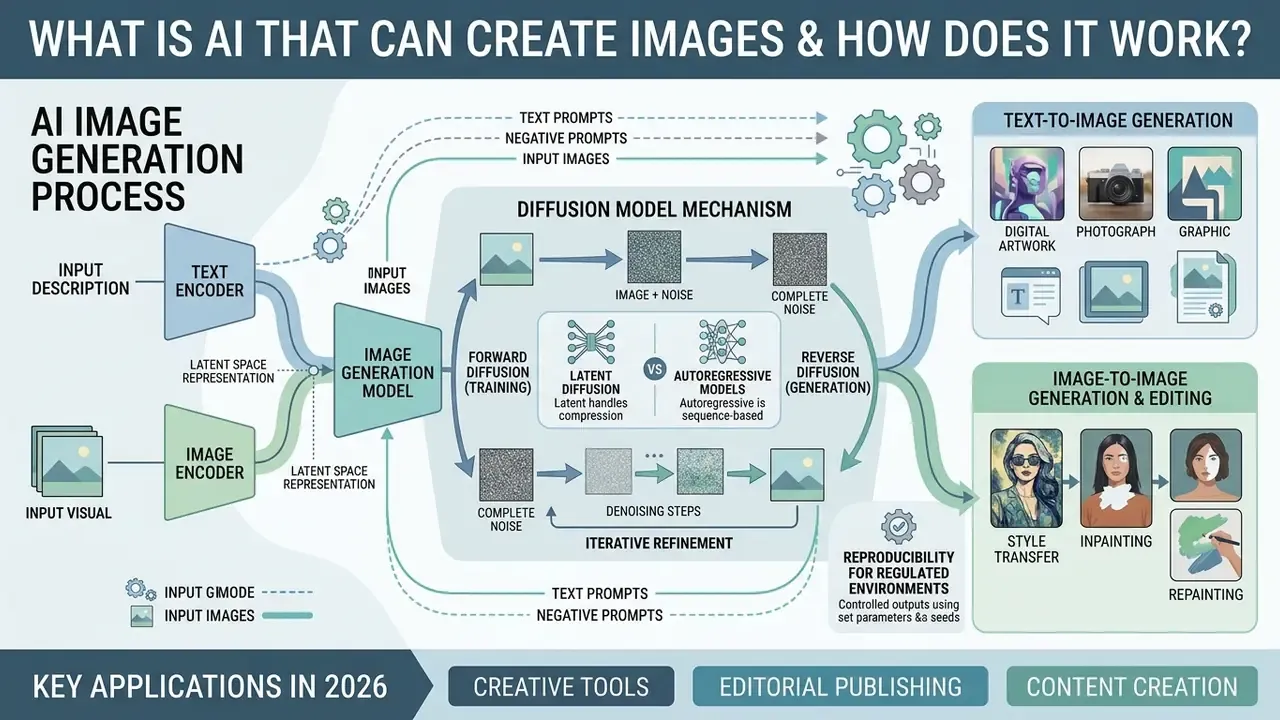
An ai that can create images is a machine learning system that converts natural language text descriptions or input visuals into new digital artwork, photographs, or graphics. These tools rely on generative AI architectures, primarily diffusion models, to reverse a controlled noise process and synthesize visual data from complex latent spaces.
Modern image generation rests on deep neural networks trained on billions of text-image pairs. Diffusion-based systems consistently outperform older autoregressive pipelines on standardized MS-COCO evaluation, and the measured gap appears in the academic literature rather than vendor marketing.
«Diffusion models (GLIDE, Imagen, Stable Diffusion) reach FID scores between 6.75 and 12.63 on MS-COCO, while autoregressive systems remain above 17.»
That architecture enables controlled text-to-image synthesis, stylistic transformation, and precise image editing inside a single software pipeline. It is also why machine learning terminology now shows up in creative procurement meetings.
How diffusion models build an image out of "noise"
Unlike autoregressive models, which predict image chunks sequentially in the way a language model predicts the next token, contemporary diffusion algorithms (Stable Diffusion, Midjourney, FLUX, Imagen) operate in two distinct phases:
Autoregressive image models take a different route. They generate the picture in ordered chunks, predicting each new region from what already exists. That approach tends to render legible text and spatial relationships more reliably, but it is usually slower and often returns a single candidate per request instead of a grid of four.
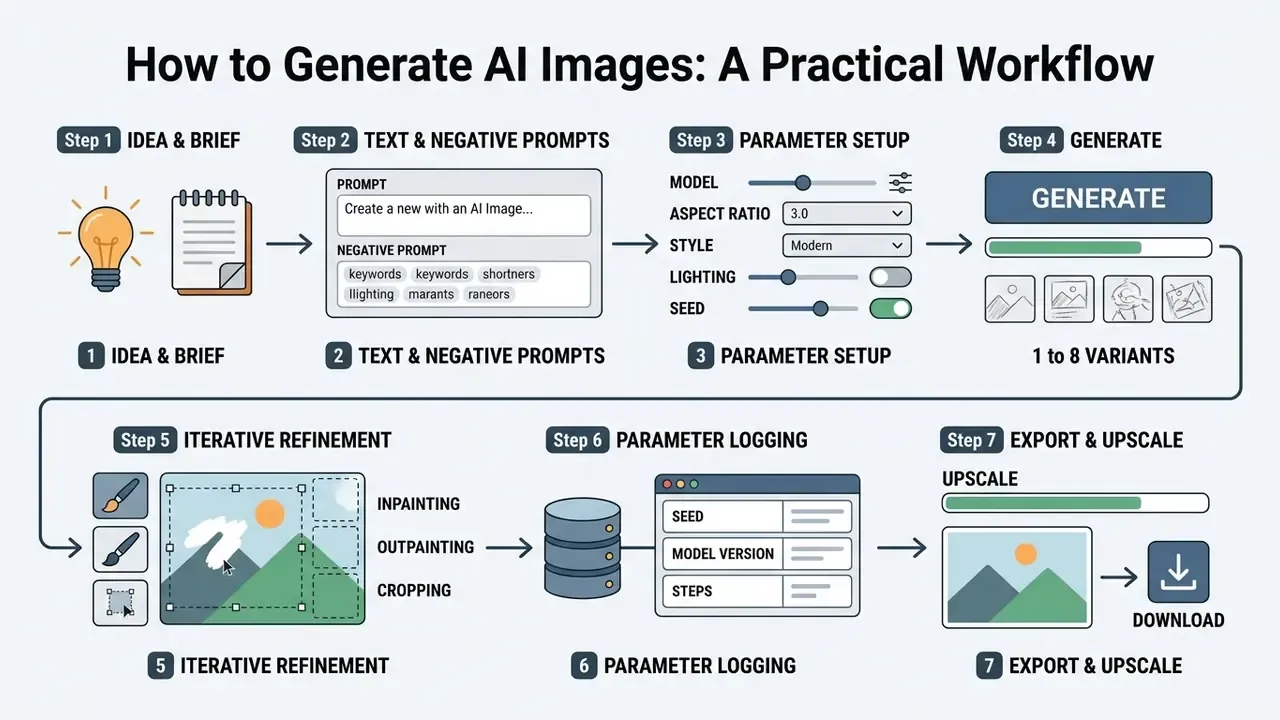
Reproducibility note for regulated environments. Because reverse diffusion starts from a pseudo-random noise field, output is deterministic only when the seed, sampler, step count, guidance scale, model version, and prompt string are all fixed. Enterprises operating under Model Risk Management (MRM) rules should log those six parameters with every published asset. Without them, a generated visual cannot be reproduced during an internal or regulatory audit. Teams building a wider media stack can align this logging discipline with adjacent tooling described in our online photo editor guide.
Forward diffusion (training)
A source image is progressively destroyed by adding Gaussian noise until it becomes a statistically random pixel field. The network learns, at every noise level, what was removed.
Reverse diffusion (generation)
Given your prompt, the model starts from pure mathematical noise and removes it across roughly 20 to 50 denoising steps, shaping structure, colour, and texture to match the token embeddings of your instruction.
Text-to-Image Generation From Text Descriptions
Text-to-image systems convert written text descriptions into high-resolution visuals by mapping text prompts through pretrained encoders into conditional diffusion models. The text encoder translates visual concepts into mathematical token embeddings, and those embeddings then guide the denoising process to form coherent subject features, backgrounds, and lighting structures.
Precision in generator text input directly influences output fidelity and layout alignment. In Stable Diffusion-class architectures, cross-attention layers carry object attribution data (which adjective belongs to which noun), while self-attention layers preserve spatial geometry during transformation. When a user inputs detailed text prompts, the model allocates token embeddings to specific visual regions, which reduces semantic ambiguity and off-target attribute bleeding.
«Analysis across a dataset of roughly 15,000 generated faces shows Stable Diffusion leading competing systems on FID for human subjects.»
Practical consequence: off-target prompt terms measurably increase misclassification into semantically adjacent classes. "A red leather chair beside a blue ceramic vase" holds attribution far better than "a stylish red and blue interior." One noun, one modifier, one place. That is the whole trick.
Image-to-Image Generation and AI Image Editing
An ai generator that uses images accepts an existing image as a structural or visual condition to guide the creation of a modified output asset. The process encodes the source image into a compressed latent space, which allows targeted edits under the guidance of new text instructions or region masks.
«Diffusion-based editing methods (inpainting, outpainting, and style transfer) surpass GAN approaches in realism and edit precision across surveyed benchmarks.»
How to Choose an AI Image Generator for Your Project
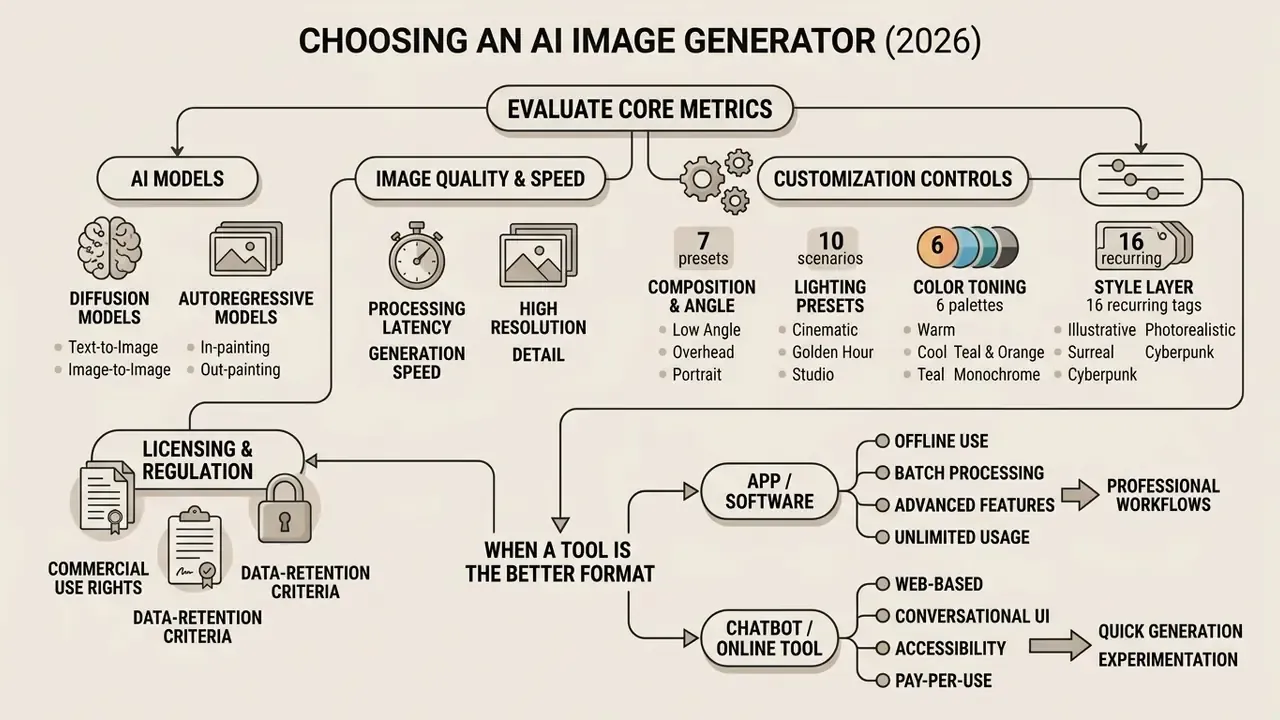
Selecting the best ai image generator means evaluating core performance metrics: model selection, processing latency, customization controls, licensing terms, and, for regulated organizations, data handling guarantees. Business teams must balance draft generation speed against visual fidelity to match their creative workflows and compliance requirements.
Organizations evaluating an ai app image generator or an ai generator application should align software capabilities with output volume and channel specifications. A comprehensive AI image generators comparison framework compares proprietary closed-source engines with open-weights models to verify brand alignment and deployment safety. Treat the choice as a vendor decision, not a creative preference.
Procurement decision gate: four questions before you shortlist a tool. Enterprise buyers in banking, insurance, healthcare, and the public sector usually answer these before looking at image quality at all. (1) Does the licence tier explicitly grant commercial distribution and indemnity at our revenue band? (2) Can prompts and reference uploads be excluded from model training by default? (3) Does the platform emit provenance metadata compatible with EU labeling obligations? (4) Can every published asset be reproduced from logged parameters? Detailed regulatory and licensing analysis follows in the commercial-use section below.
AI Models, Image Quality and Generation Speed
The choice of underlying AI models determines whether an ai generator machine produces photorealistic assets or stylized illustrations. Current enterprise models operate at 2K and 4K output resolutions, balancing granular texture rendering against operational throughput.
In 2026, benchmark testing shows inference speeds from sub-second execution to roughly 25 seconds per image, depending on model parameters and hardware. Published research examples include 1024×1024 generation in about 0.8 seconds for a fast autoregressive-hybrid model, and 1.2 to 2.3 seconds for on-device mobile generation at the same resolution. Vendor pricing in 2026 comparison catalogues spans roughly $0.004 per image for economy models to about $0.15 per image for premium creative engines. That is a 37-fold spread, and it dominates total cost at campaign volumes.
«A curated subset of 50 COCO annotations delivers evaluation quality comparable to 500 random samples, accelerating model comparison by roughly 10 times.»
Fast inference variants process 1024×1024 pixel grids in under 1.2 seconds, which lets marketing teams evaluate creative concepts quickly before they commit to full-resolution rendering in dedicated ai generator programs. A pragmatic two-tier setup is now standard: a cheap fast model for concept screening, a premium model for the final approved frame. That split alone tends to save time and cut per-campaign spend more than any prompt trick.
Customization: Style, Color, Lighting and Aspect Ratio
Commercial-grade visuals need granular control over framing, dynamic lighting, colour toning, and aspect ratio parameters. Enterprise tools expose technical settings so that visual consistency holds across multichannel assets, and that is what turns a lucky render into a repeatable one.
Platform APIs differ in how they expose framing. Vertex AI-class documentation lists a fixed aspect-ratio set (1:1, 3:4, 4:3, 16:9, 9:16), while OpenAI's image endpoints accept custom WIDTH×HEIGHT values where both edges are multiples of 16 and the ratio stays within 1:3 to 3:1. These are vendor-published API constraints, subject to change per release, so verify against current documentation before hard-coding pipelines. Explicitly defining lighting styles, such as soft diffuse studio lighting or high-contrast golden hour exposure, prevents unnatural rendering artifacts and keeps the brand palette intact.
Advanced control of angle, light and colour rendition
For predictable output, use explicit cinematographic and technical vocabulary instead of emotional adjectives:
- Composition and angle (7 working presets):
Shot from below: low angle, lends monumentality to a product or building.Shot from above: top-down, ideal for flat-lay and food.Narrow depth of field/bokeh: subject isolation against a softened background.Macro shot: extreme close-up for texture and material verification.Wide angle 24mm: environmental context, architecture, interiors.Close-up, eye-level: portrait and testimonial framing.Blurry background, 85mm f/1.8: editorial headshot look.
- Lighting presets (10 scenarios):
volumetric lighting,golden hour,studio softbox,studio rim lighting,dramatic chiaroscuro,backlight,hard sunlight,overcast diffuse,neon practical light,dimly lit moody interior. - Colour toning (6 palettes):
warm tone,cool tone,vibrant colours,muted tones(premium segment),pastel colours,black and white. For B2B and FinTech collateral,desaturated cool palettereliably matches corporate identity systems. - Style layer (16 recurring tags): photographic, cinematic, digital art, anime, comic book, fantasy art, neon punk, pixel art, low poly, origami, line art, craft clay, isometric, 3D model, analog film, enhanced.
Combining one item from each group (composition plus lighting plus palette plus style) produces the most repeatable results in different styles, and it is the fastest way to codify a house look into a reusable prompt template.
When an AI App, Chatbot or Online Tool Is the Better Format
How to Generate AI Images: A Practical Workflow
A structured production workflow moves from creative brief definition to prompt assembly, model parameter selection, generation, and post-rendering refinement. Following a standardized sequence reduces token waste and improves visual output accuracy.
How to Write Text Prompts for Better Results
Effective text prompts follow a structured ordering system: scene setting, primary subject, fine details, composition parameters, and technical constraints. Dropping vague buzzwords like "hyperrealistic" in favour of precise photographic terminology yields noticeably better visual quality.
Official prompting frameworks published by OpenAI and Google converge on the same skeleton: [Subject] + [Action] + [Context/Location] + [Composition/Lighting] + [Style], with complex requests split into labelled segments or line breaks and refined through single-change follow-ups rather than full rewrites. Specifying camera lens types, lighting sources, and exact colour hex codes produces unique images that hold up against professional design standards. These are vendor engineering guides, practical rather than peer-reviewed, which is why the academic counterpart below matters.
«PRISM automatically discovers human-interpretable prompts from reference images, improving text-image alignment on CLIP metrics and human preference scores.»
Using negative prompts
A negative prompt defines what the model must actively exclude during denoising. It is the cheapest defect filter available, removing anatomical errors, stray objects, and unwanted overlays before they reach a designer's queue.
Baseline negative prompt for photorealistic work:
ugly, deformed, bad anatomy, extra limbs, distorted fingers, blurry,
low resolution, duplicated elements, out of frame, watermark,
text overlay, logo artifacts, oversaturated, plastic skin, jpeg artifacts
Baseline negative prompt for product and packaging renders:
warped label, unreadable typography, melted edges, asymmetrical bottle,
reflection of photographer, dust, fingerprints, cropped product,
inconsistent shadow direction
Technical constraint: respect token and character limits. Several production interfaces, Adobe Firefly among them, cap prompt input at 750 characters; exceeding the ceiling silently truncates the tail of the instruction, which is usually where composition and constraint tags live. Place the non-negotiable elements first, decorative modifiers last.
How to Refine Generated Images With Reference Images and Editing Tools
Initial visual outputs often need targeted refinement to fix localized flaws or meet exact spatial constraints. Using an ai image alternator or masked inpainting lets designers alter selected regions without regenerating every image from scratch.
A practical enterprise refinement pipeline includes:
Coarse-to-refine outpainting pipelines documented in the literature combine earlier passes to improve boundary continuity. In practice that means running canvas extension in two smaller steps rather than one aggressive expansion. Small moves, fewer artifacts.
- Selecting the closest generated output candidate from the batch, then changing only the single element that is wrong: background, lighting, pose, or camera angle.
- Applying a localized mask over background elements or minor artifacts, with low denoising strength for retouching and high strength for full-region replacement.
- Using AI outpainting tools or an ai image extender to push the canvas bounds out to multi-platform aspect ratios without re-cropping the subject.
- Conditioning final output passes against brand reference images to enforce uniform visual identity, then upscaling before export when print or large-format delivery is required.
Automating Generation With APIs and No-Code Workflows
Manual prompting does not scale past a few dozen assets per week. Production teams increasingly wire generation directly into intake systems, so a filled form or a CRM record triggers an image request.
A typical no-code chain looks like this:
- Trigger: a new row in a product spreadsheet, a submitted Google Form, a HubSpot deal stage change, or a fresh CMS draft.
- Prompt assembly: a no-code step (Zapier, Make, n8n) merges field values into a stored prompt template:
{{product_name}},{{palette_hex}},{{aspect_ratio}}, plus the fixed negative prompt block. - Generation call: the image API returns one or more candidates with the seed and model version in the response payload.
- Storage and logging: assets land in a DAM folder while parameters are written to an audit table, which satisfies reproducibility requirements.
- Human approval gate: a reviewer approves or rejects before publication. Mandatory in regulated sectors, and recommended by industry advertising guidance everywhere else.
For developer-led implementations, cost per call and rate limits govern the architecture; our API implementation guide for Google's generative media stack documents the same economics for motion assets. One governance rule is absolute: automated pipelines must never inject customer records, account numbers, or unredacted PII into a public generation endpoint.
AI Generated Marketing Images for Content and Social Media
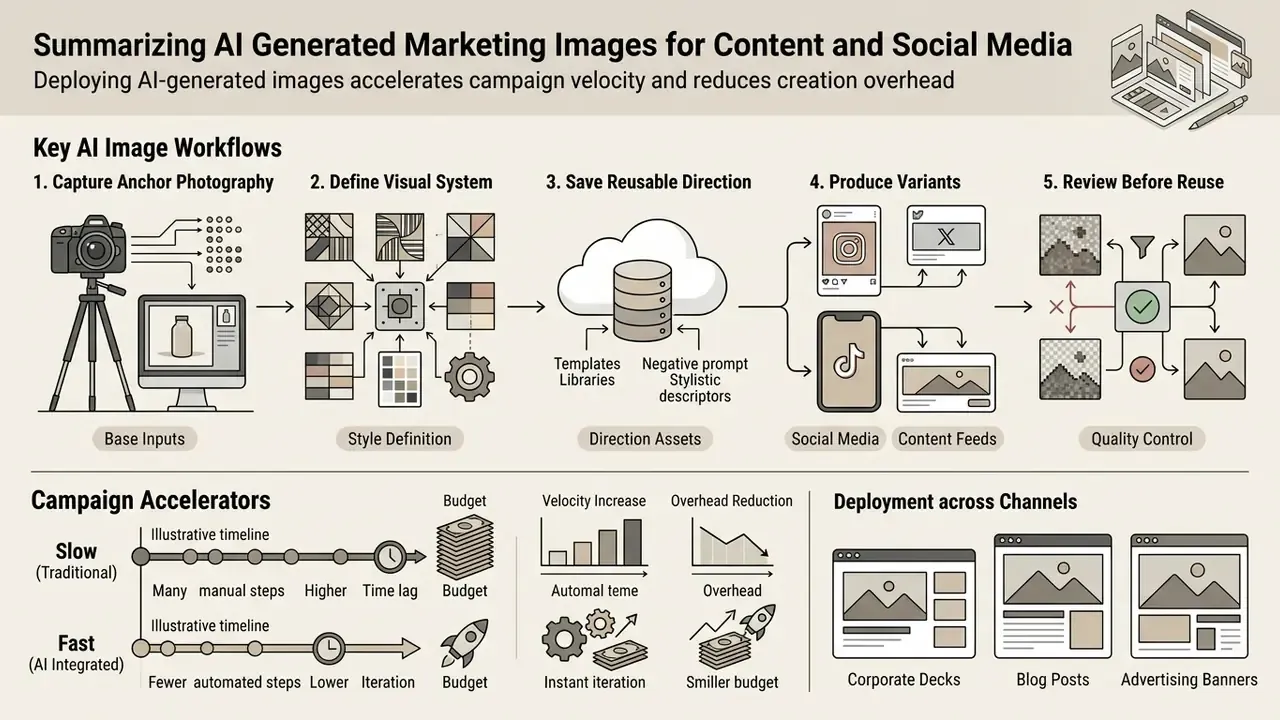
Deploying ai generated marketing images accelerates campaign velocity and reduces asset creation overhead. Organizations now use synthetic imagery across advertising channels, corporate blogs, and social media platforms to deliver targeted visual communications, and content creators increasingly treat it as one more production tool rather than a novelty.
«An analysis of 15.2 million posts on Pixiv, including 2.4 million AI-generated images, shows AI content has materially reshaped creation and consumption dynamics in online communities.»
Industry guidance keeps pace with volume: advertising trade frameworks published in 2025 and 2026 recommend mapping generative AI into defined workflows, retaining human review at approval gates, and disclosing AI-generated content in consumer-facing work.
Illustrative composite scenario (not a verified client case). A commercial marketing team facing 40 distinct visual variations for an omni-channel launch inside three business days can realistically meet that deadline by combining structured prompt templates with centralized asset guidelines: one locked style reference, one negative prompt block, and channel-specific aspect ratios generated in batches. The measurable lever is not raw generation speed but template reuse. The same skeleton prompt, re-parameterized per channel, produces brand-compliant social assets and web banners at a fraction of the traditional production timeline. Treat volume figures like these as planning heuristics rather than benchmarked outcomes; published academic results on audience response to AI creatives remain mixed, and that uncertainty is worth stating out loud to a CMO.
Product Shots, Advertising and Business Branding
Creating a commercial product shot with a synthetic background environment requires preserving physical product dimensions and logo legibility. High-fidelity workflows start with a clean anchor photograph on a neutral backdrop, centred framing, accurate colour, and visible labels and textures at 1080p or higher, before generative background synthesis is applied. Teams working from existing photography should review image-to-image AI generators for background replacement and canvas extension specifically.
A five-stage production sequence documented in current workflow guides:
Enterprise branding guidelines require verifying label integrity, edge stitching, and material textures under high zoom, plus A/B testing of generated composites against the real product. Adding an ai image face tool or a product staging engine lets brands swap contextual backgrounds while keeping absolute accuracy on core physical merchandise. Where a generated visual might be mistaken for unretouched documentary photography, disclosure obligations apply.
Images for Social Media, Corporate Decks and Blog Posts
Adapting synthetic media assets for social media posts, investor materials, and blog posts means matching specific aspect ratios and layout compositions per distribution channel. Different platforms and document formats demand distinct visual formats, and choosing the ratio before prompting avoids an entire regeneration cycle.
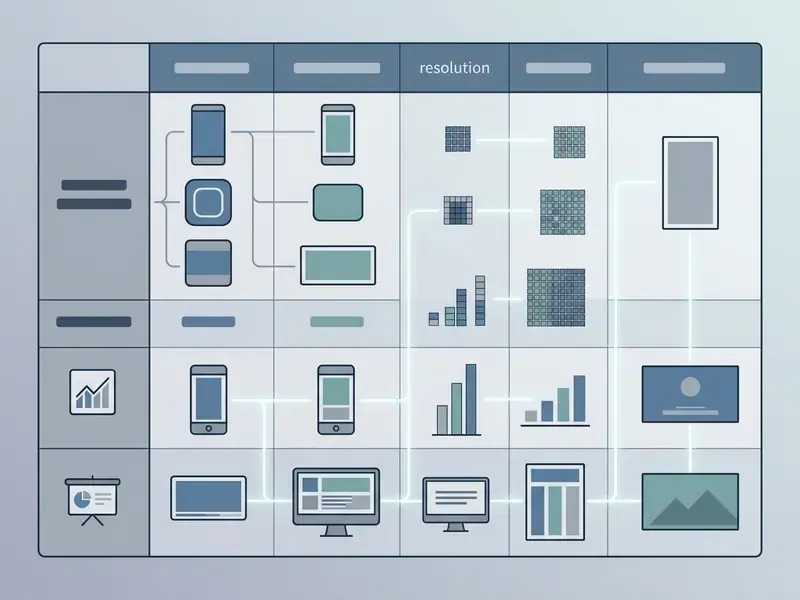
Two operational rules from published accessibility and brand guidance: keep the original aspect ratio when resizing rather than stretching, and account for platform cropping. Profile images render circular, and cover images stretch if supplied below minimum dimensions. Adjusting prompt composition parameters before execution keeps essential visual elements (product, face, headline space) inside safe display zones.
For corporate media standardization, the higher-value work is not chasing individual platform specs. Build a single master asset per concept at the largest required resolution, then derive crops through outpainting and safe-zone templates. Creators evaluating specialized software options can explore our Canva AI generator review to streamline design publishing, or compare free AI image generators for lower-stakes social output.
How to Get High-Quality and Consistent AI Images
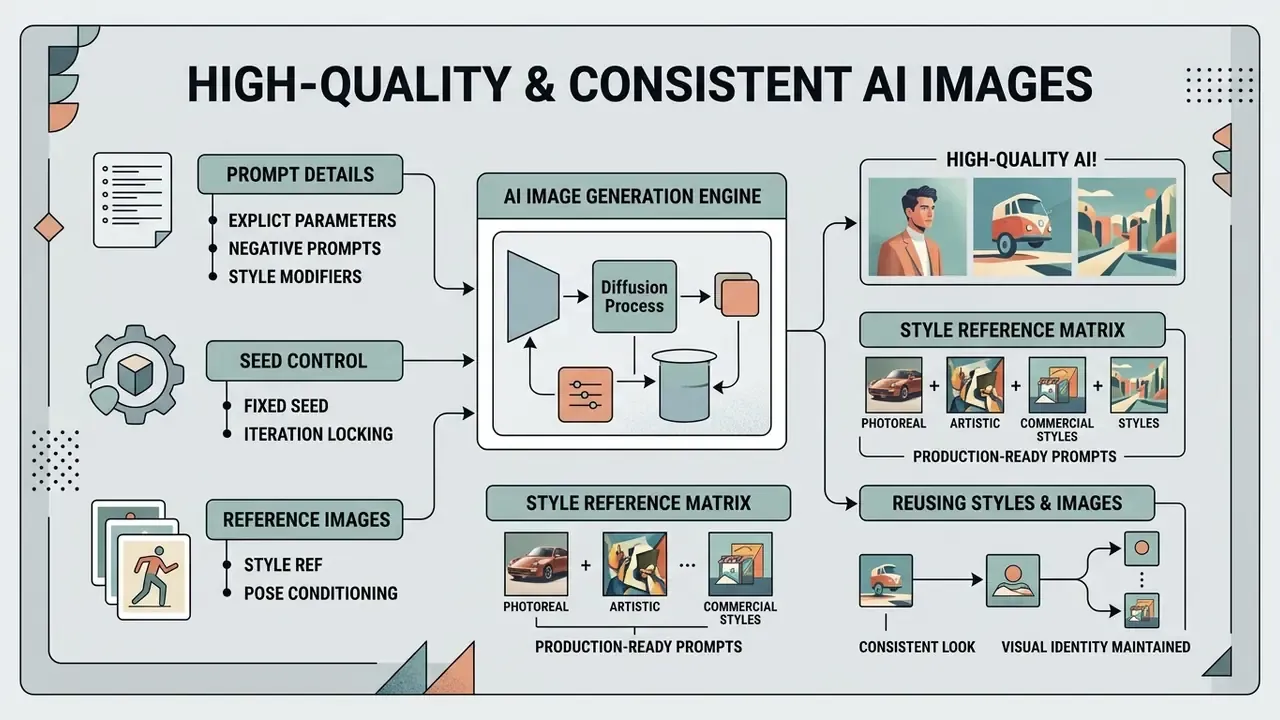
Generating high-resolution visual assets requires explicit prompt parameterization, seed control, and reference image conditioning. Consistency across recurring character models or product lines depends on locking core stylistic embeddings across successive generation calls.
«CLIP-based metrics and R-Precision quantify semantic alignment between prompt and output across a roughly 15,000-image evaluation set.»
Peer-reviewed approaches converge on three mechanisms. Shared-attention alignment (StyleAligned, 2023) explicitly targets style consistency across a series of images rather than a single frame. Pairwise CLIP-based semantic consistency scoring (CVPRW 2024) supplies a measurable way to compare repeated outputs instead of judging them by eye. Training-free consistency methods (ConsiStyle, 2025) show that post-generation processing is a legitimate part of the pipeline, and multi-identity customization research (CVPR 2026) extends the problem to scenes containing several recurring characters at once.
For governance purposes, quantitative consistency scoring has a second use. It converts "the brand look drifted" from a subjective complaint into a threshold a QA step can enforce.
Prompt Details That Improve Photorealistic and Artistic Results
Achieving photorealistic quality in synthetic images depends on specifying optical camera characteristics rather than vague quality adjectives. Indicate focal length, shutter speed, aperture, and sensor grain, and the model produces high quality assets that read as lifelike photography. Vendor prompting guidance is explicit here: include the word "photorealistic", use photography vocabulary, request pores, wrinkles, fabric wear and micro-imperfections, and avoid language implying studio staging or polish where documentary realism is the goal.
Photorealistic Prompt Example:
"A medium close-up photograph of a financial analyst working at a dark wooden desk with multi-monitor displays, shot on 85mm lens, f/2.8 aperture, soft natural window light from the left, subtle depth of field, visible fabric texture on suit, realistic skin pores, photorealistic."
Negative: "plastic skin, airbrushed, cartoon, extra fingers, warped monitor text, watermark, logo, oversaturated"
For ai art synthesis, referencing specific artistic movements, medium types (watercolour, oil painting, vector line art) and colour palettes guides ai art generators toward predictable stylistic expressions. A widely used template structure: [Style] image of [subject], [composition/angle], [lighting], [colour palette], [mood/atmosphere], [additional details]. Use it consistently and you create stunning images without re-inventing the brief every time.
Style reference matrix with production-ready prompts
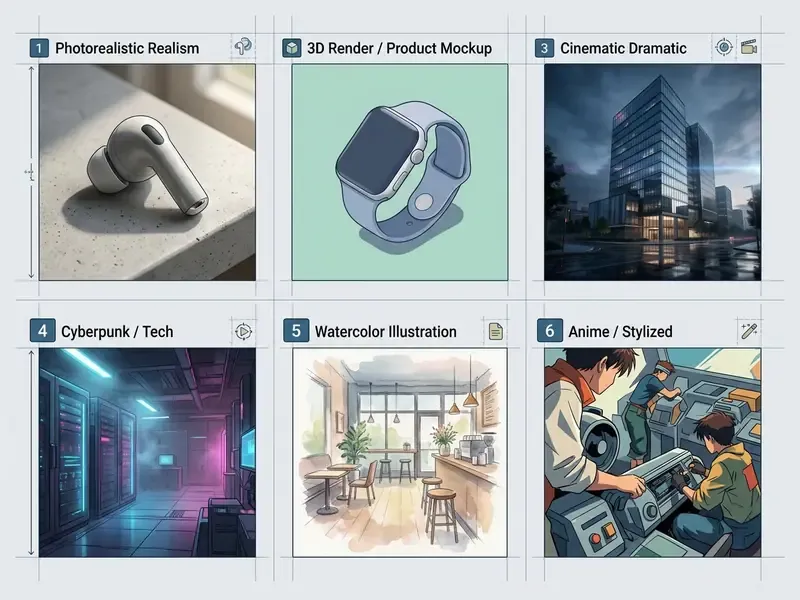
One caution for text-heavy creatives: diffusion models remain unreliable at rendering legible typography and at reasoning tasks. Where exact wording matters, think prices, legal lines, product names, generate the background and typeset the text in a design tool.
Reusing Styles and Reference Images for Consistency
Visual continuity across a multi-asset campaign depends on reusing reference image links, character seeds, and style weight vectors across generation calls. Platforms supporting character reference parameters lock facial geometry and key traits across different background scenes, while style references transfer colour, texture, and lighting without importing the source subject. Official documentation across current tools distinguishes three controls: character reference (identity lock), style reference (look lock), and framing or camera-angle tags (composition lock). Reference-based edit models preserve an existing image's content while regenerating only selected regions, which is a controlled-variation workflow rather than a full re-roll.
A financial software team building an onboarding campaign generated a consistent digital mascot across twelve distinct user interface scenarios. By locking the character reference asset, fixing the seed, and holding style parameters steady through an ai image enlarger workflow, the team preserved identity traits without visual distortion. More importantly, they recorded the reference asset ID alongside each export, so a thirteenth scene could be produced months later with matching output. That detail sounds bureaucratic until someone requests scene thirteen.
Where a series must survive a model upgrade, pin the model version. A new checkpoint will reinterpret the same seed and prompt differently; treating model version as a controlled dependency is standard practice anywhere visual identity is audited.
Commercial Use, Rights and Safe Use of AI-Generated Images
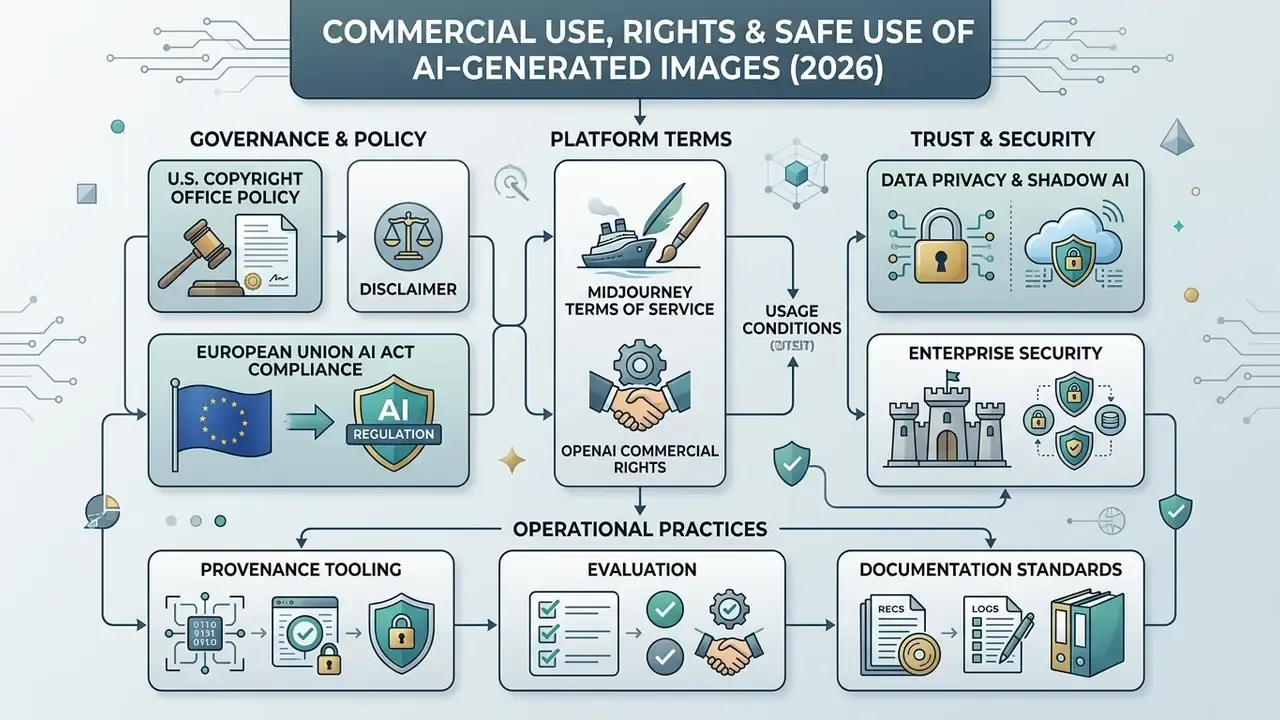
Commercial deployment of synthetic media requires verifying provider license agreements, user terms of service, and public copyright regulations. Organizations must also confirm that deployed visual assets do not infringe third-party trademarks or proprietary design rights. Litigation in this area moves fast, so if case tracking matters to your risk register, browse the hub.
Data Privacy, Shadow AI and Enterprise Security
For banks, insurers, healthcare providers, and public bodies, the dominant risk in image generation is not aesthetic. It is what leaves the perimeter inside a prompt. Campaign briefs, unreleased product designs, customer photographs, and account data have all been observed entering consumer-grade generators through personal accounts.
Shadow AI. Unsanctioned use of non-approved generators by employees produces three compounding exposures: confidential input retained on third-party infrastructure, outputs with no provenance record, and assets published under licence terms nobody reviewed. Mitigation is procedural as much as technical: an approved-tool register, a blocked-domain list for unvetted generators, and an intake channel fast enough that staff do not route around it. That last point gets underestimated. People bypass controls mostly when the sanctioned path is slower than the deadline.
Vendor security assessment checklist:
Input hygiene policy, minimum viable rules. Never enter personal data, account identifiers, unpublished financials, or client-identifying material into a public generator. Use synthetic placeholders in prompts and composite real assets locally. Route any brief classified above "internal" through an approved private instance. Apply the same review NIST guidance recommends for any AI tool: inspect privacy and security settings, including retention and training behaviour, before deployment rather than after.
Reproducibility for Model Risk Management. Where visual assets support regulated communications, the generation record belongs in the same evidence store as the approval record: model name and version, seed, sampler and step count, guidance scale, prompt and negative prompt, reference asset hashes, operator identity, reviewer identity, and publication date. That is also the dataset that answers a regulator's provenance question in one query, which is the difference between a two-hour response and a two-week reconstruction.
What to Check Before Using AI Images in Commercial Projects
Before publishing synthetic visuals in public advertising or corporate branding, legal and marketing operations teams should run a formal compliance review checklist.
- Copyright Eligibility Review: Verify the extent of human creative contribution and disclaim purely synthetic elements where intellectual property offices require it. Material that is more than de minimis and machine-generated must be excluded from a registration claim.
«Under current U.S. law, purely AI-generated works are not protected by copyright, while AI-assisted inventions may remain patentable.» Generative AI and IP Under US Law, SSRN. https://papers.ssrn.com/sol3/papers.cfm?abstract_id=4694569
- Trademark and Brand Clearance: Audit generated outputs for accidental reproductions of protected third-party logos, trade dress, recognizable faces, or proprietary characters. Where such elements are central rather than incidental, clearance is required. AI reverse image search tools provide a fast first-pass check against existing published imagery.
- Model License Scope: Confirm that the software provider's tier explicitly grants commercial distribution rights, output restrictions, indemnity protections, and confidentiality terms, and that your organization's revenue band is covered.
- Transparency and Labeling Compliance: Ensure output metadata includes appropriate provenance credentials (C2PA / Content Credentials, for example) and that consumer-facing disclosure is applied wherever a synthetic or materially altered visual could affect perceptions of authenticity, identity, or representation.
- Evidence Retention: Archive prompts, version history, reference inputs, reviewer sign-off, and
Free AI Image Generators: Limits to Review Before Choosing
Free tier image generation services often enforce operational constraints that block commercial deployment. Free offerings frequently include public gallery publication rules, mandatory watermarking, lower rendering resolutions, credit caps, and explicit non-commercial personal usage restrictions. One widely used generator states plainly that free outputs are watermarked, lower-resolution, and for personal preview only, with commercial rights unlocked on paid tiers. An ai image enhancer on a free plan often carries the same watermark logic, so check the output, not the pricing page.
Quality ceilings matter as much as licence ceilings:
«All evaluated open models score below 45% on reasoning-driven generation tasks, performing weakest on mathematical and causal prompts.»
Practically, free and open models are least reliable exactly where marketing briefs are most demanding: counted objects, correct spatial relations, legible text, and logical scene construction.
Commercial operations using a free ai image generator must inspect platform terms to avoid copyright infringement. Vendor claims of "no watermark, commercial use included" on free tiers are marketing statements, not audited standards, so verify them in the terms of use. Choosing professional plans or reviewing options in our best free ai art generator comparison matrix clarifies which platforms remove watermarks and grant explicit commercial usage rights. Platform-specific terms are covered in our Microsoft AI image generator overview and Google AI image generator overview.
FAQ: AI That Can Create Images
Do I Need Design Skills to Create Images Using AI?
No. Specialized graphic design skills are not required to generate basic images using modern AI tools. Natural language text prompts combined with automated style presets let non-technical users synthesize visual assets quickly, so start with our AI image generator overview if you are choosing a first tool. Current prompt-engineering guidance shows that clarity, specificity, an assigned role, supplied examples, and step-splitting reduce ambiguity far more than fluency in design software does. That said, foundational knowledge of visual composition, lighting terminology, and prompt engineering noticeably improves output consistency, particularly for photorealistic and brand-controlled work. So: no design skills needed to start, some craft needed to finish.
Can I Generate Images Online Without Downloading Software?
Yes. Numerous browser-based online platforms provide full image generation capabilities without local installation. Users access web interfaces through a standard browser, see our AI art generator capabilities guide for a feature-level breakdown, enter text prompts, adjust style parameters, and download high-resolution outputs directly. Browser-only generation is documented across major vendor and editor platforms in 2026, including assistant interfaces, design suites, and search-integrated creators. For specialized workflows, tools described in our bing ai image guide demonstrate accessible online generation options, while stylized use cases are covered in our Ghibli-style generator comparison.
Can an AI Chatbot Generate Pictures From a Conversation?
Yes. Advanced conversational AI chatbots integrated with multimodal image generation models can produce visual assets directly inside a chat dialog, which effectively turns an ai computer generator into a dialogue partner. Users request visual creations, describe scene modifications, and refine outputs through follow-up prompts. Documented limits apply: audio and video inputs are unsupported in several assistant pipelines, the exact number of requested images is not always returned, performance varies by language, and free tiers impose generation caps.
How Do I Make Two Generated Images Match Each Other?
Lock three variables and change only one at a time: the character or style reference asset, the seed, and the model version. Keep composition tags (framing, camera angle, lighting preset, palette) identical between runs and vary only the scene description. For measurable verification rather than visual judgement, score pairs with a CLIP-based semantic consistency metric and set a minimum threshold for approval.
Can I Own or Trademark an AI-Generated Logo or Character?
Copyright and trademark answer differently. Purely machine-generated expression is not registrable for copyright in the United States, though human-authored arrangement, selection, and editing may be claimed with the AI portions disclaimed. Trademark protection, by contrast, attaches to use in commerce as a source identifier, so a generated mark may still be registrable, subject to clearance against existing marks and the risk that the output resembles protected trade dress. Obtain counsel before adopting a generated asset as a core brand identifier.
What Should a Prompt Never Contain in an Enterprise Setting?
Customer names, account or policy numbers, internal financials, unreleased product specifications, identifiable photographs of individuals without consent, and any material classified above "internal." Substitute synthetic placeholders, then composite real assets locally or inside an approved private instance with contractual zero data retention.
Which AI Creation Tool Fits a Regulated Workflow Best?
There is no single answer, and anyone offering one is selling. Self-hosted open-weights deployments give the strongest data control and full pipeline logging. Enterprise agreements with commercial vendors trade some control for indemnity, provenance metadata, and support. Assistant-based and ai assisted text to image generation tools suit ideation, not final regulated output. Pick per use case, document the decision, and review the choice when the next ai creator latest release changes the terms. An ai creator tool that cannot produce an audit log is, for regulated work, not a candidate.
Internal Navigation and Hub Resources
For deeper analyses on synthetic media licensing, model benchmarking, and enterprise automation workflows, open the hub to examine the complete guidance datasets. Additional tool comparisons and workflow guides are available across our resource indexes:
- Complete tool indices and feature breakdowns: view the guide
- Comparative model performance rankings: browse the hub
- Adjacent media tooling: AI voice generators, animation makers, video compressors
- Platform homepage and core tools: Hypeart AI Media Disclaimer: Editorial commentary, composite operational scenarios, and illustrative case examples do not constitute formal legal, regulatory, or financial advice. Vendor pricing, plan thresholds, API limits, and platform terms cited here reflect published documentation as of February 2026 and change frequently. Commercial deployment of generative AI systems should be evaluated together with qualified corporate legal counsel and your information security function.