Editorial review: Marcus Hale, AI Governance & Model Risk Editorial Lead, with 12+ years in model risk assessment and vendor due diligence for regulated enterprises. Note: Marcus Hale is an internal author. His statements reflect our in-house governance framework, not an external published source, and his biography is illustrative rather than documentary.
Executive Summary: What Changed in 2026
Who This Comparison Is Written For
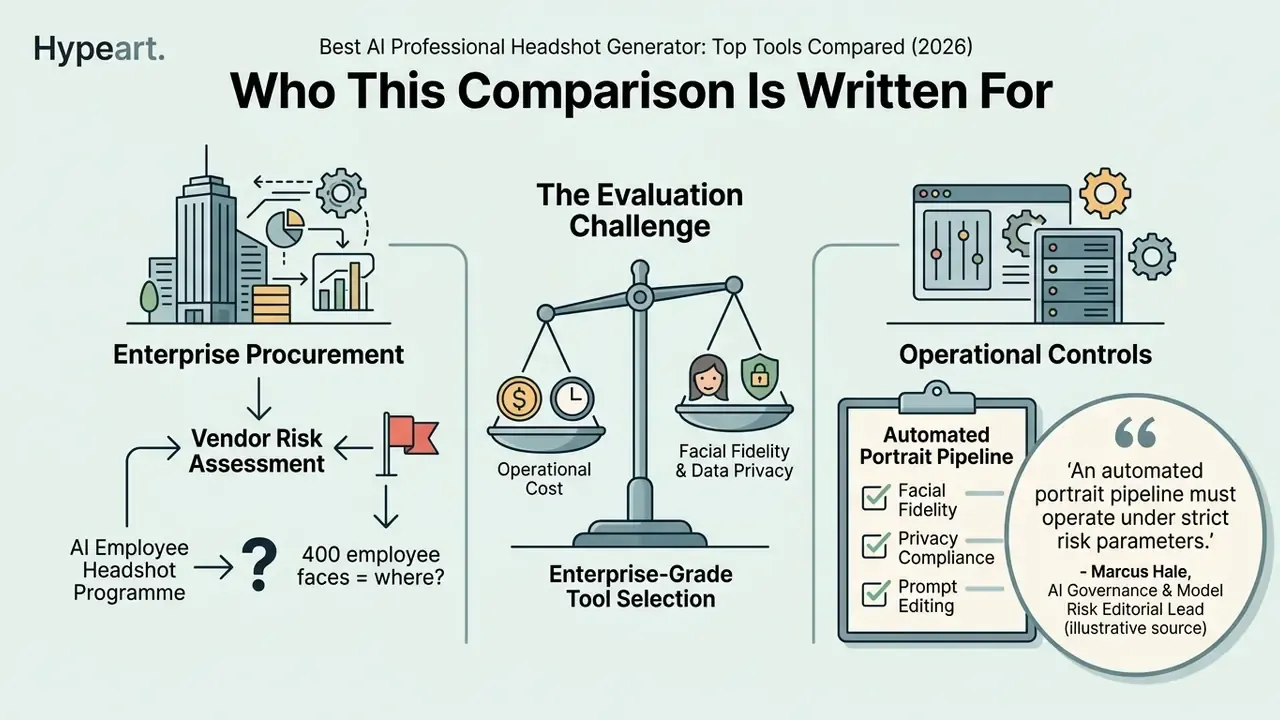
If you sign off on vendor risk at a bank, a lender or a mature fintech, an employee headshot programme looks trivial until someone asks the uncomfortable question: where did 400 biometric selfies go?
That is the real procurement problem. A headshot generator is a small purchase with a disproportionate data footprint. It touches employee consent, biometric retention, brand governance and, in EU-facing markets, content-labelling rules. So this guide compares output quality, yes, but it weighs deletion windows, training opt-outs and audit evidence just as heavily.
Selecting an enterprise-grade image synthesis tool means balancing facial fidelity, operational cost and strict data governance. US financial institutions and mature technology firms increasingly evaluate generative image workflows to standardise corporate branding while keeping risk controls intact. The pattern mirrors any other model deployment: define the owner, define the limits, keep the evidence.
How We Evaluate the Best AI Professional Headshot Generators
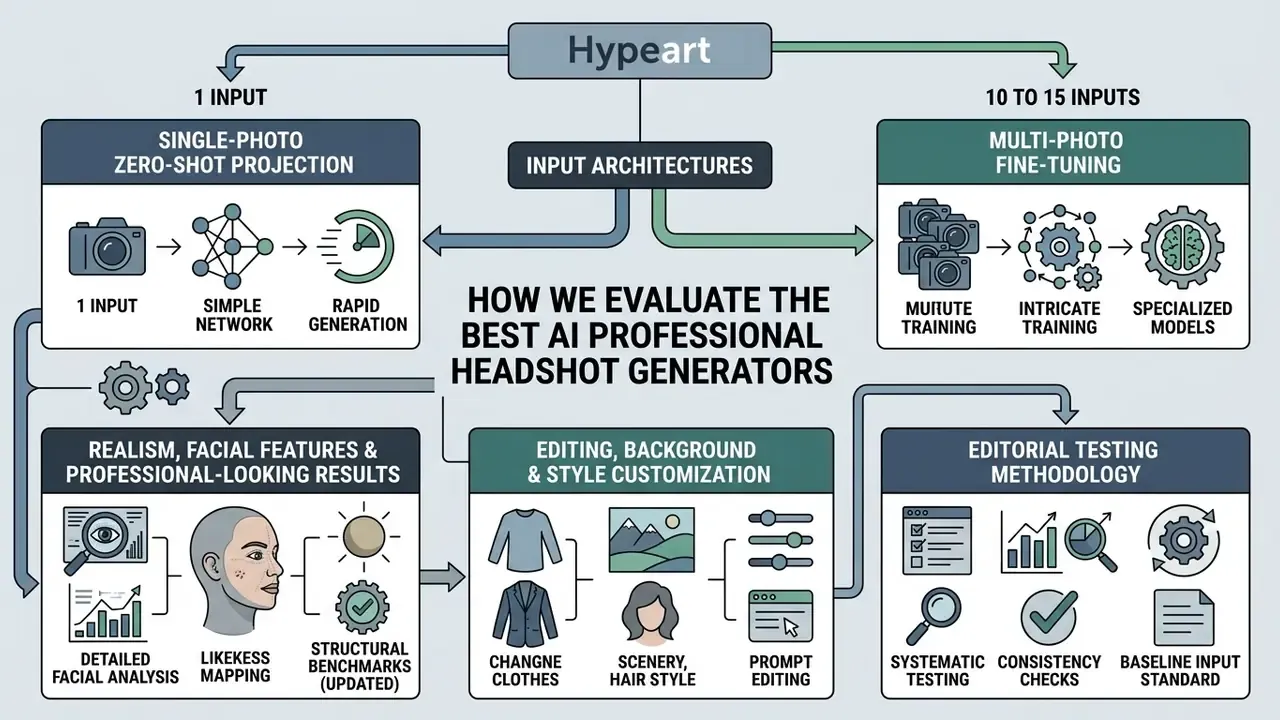
To identify the best ai professional headshot generator, governance leaders should assess tools across seven dimensions: input architecture, facial feature preservation, image quality, style customization, generation speed, total cost and data privacy. Judging whether an ai headshot generator realistic claim holds up requires quantifiable benchmarks, not marketing adjectives.
In a risk-adjusted model, an ai photo generator for professional headshot workflows must trade visual fidelity against model drift and biometric privacy liability. Prioritise vendors offering reproducible output quality, clear commercial licensing and documented photo deletion schedules. Everything else is preference.
Single-Photo vs. Multi-Photo Input Architectures
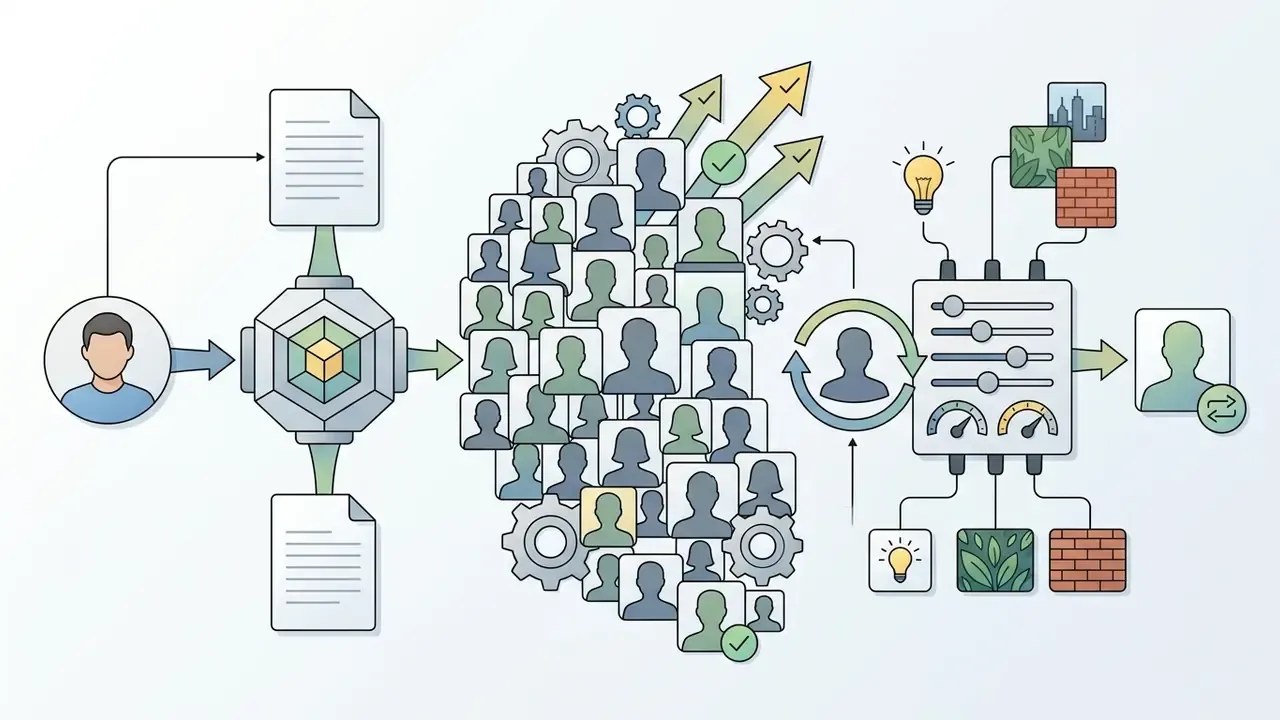
Generative portrait models in 2026 split into two training pipelines, and the choice sets both onboarding friction and likeness ceiling.
- Multi-Photo Fine-Tuning (10 to 15 inputs).Used by Aragon.AI, BetterPic and HeadshotPro. Each subject gets a dedicated LoRA weights package trained on their own uploads, which yields high facial likeness across varied angles, wardrobes and lighting setups. The trade-off is ingest friction: employees must dig up a dozen recent, unfiltered solo photos before anything starts.
- Single-Photo Zero-Shot Projection (1 input).Used by newer engines such as Dreamwave, which tells users to "upload 1 clear photo where you like the way you look." Facial recognition projection renders 4K portraits from one clean smartphone selfie. Upload friction disappears and rollouts compress sharply, though expression variety and pose range tend to be narrower. And a weak source selfie propagates its flaws through the whole gallery.
Practical selection rule: if the deliverable is a locked corporate directory photo for 150 people, single-photo pipelines cut onboarding to minutes. If the deliverable is an executive press kit needing 40 to 120 varied frames, multi-photo fine-tuning still wins on likeness stability.
Realism, Facial Features and Professional-Looking Results
A genuinely ai headshot generator realistic output depends on accurate 3D facial landmark placement, natural eye highlights and authentic skin texture. Weak pipelines betray themselves through visible digital artifacts: asymmetrical pupils, waxy skin, extra teeth, mismatched earrings, eyeglass frames fused into the cheekbone. Each one quietly breaks professional trust.
«Faces generated by StyleGAN2 were rated "real" in 68% of trials, compared with just 52% for authentic photographs (t(121) = -6.8, p < .001), measured on the AI-19 dataset.»
Editing, Background and Style Customization Options
Post-generation controls let users modify backgrounds, outfits and lighting without distorting core facial structure. Platforms with granular multi-axis adjustment let one professional photo stretch across multiple professional profiles: corporate site, speaker panel, investor deck.
Modern ai headshot generator tools now bundle parametric editing. Adobe Firefly accepts a reference photo and exposes style, background, lighting, camera angle and colour tone inside the Generate Image flow. HeadshotPro allows attire, background prompts and camera angles to change while locking the underlying face model. Canva leans on automatic lighting correction and background enhancement. Magic Hour surfaces background, attire and style preferences directly through its API (Adobe Firefly Documentation, 2026; HeadshotPro Product Update, 2026; Canva AI Headshot Generator, 2026; Magic Hour API Docs, 2026). Flexible customization options keep generated images inside corporate visual identity standards without a full re-generation cycle. Worth noting: teams weighing adjacent creative workloads often benchmark these engines against the best image generating ai models for general-purpose output.
Editorial Testing Methodology
This protocol is our systematic evaluation framework for corporate and personal AI portrait tools. It follows the repeatable, scenario-based structure used in NIST's 2025 generative-image evaluation plan: fixed reference inputs, mixed human and metric realism scoring, timed generation, price-per-usable-output normalisation, explicit handling of retention rules.
- Baseline input standard upload a fixed dataset of 15 high-resolution reference photos per subject, with varied lighting, angles and neutral expressions. For single-photo engines, the strongest frame from that same dataset is submitted alone, so both architectures face identical source material.
- Fidelity scoring measure facial feature preservation with automated cosine similarity metrics alongside human review panels that hunt for structural artifacts.
- Customization depth test multi-axis editing across corporate attire swaps, neutral background changes and studio lighting adjustments.
- Prompt-compliance testing issue a standard set of natural-language edit instructions (outfit swap, background replacement, tie removal, glare removal) and score whether the engine executes without drifting facial identity or spawning new artifacts.
- Accessory and inclusivity stress test repeat generations with prescription eyewear, religious head coverings, facial hair, freckles, visible scars and the full Fitzpatrick skin-tone range, watching for over-smoothing or synthetic bias.
- Speed and operational latency measure total turnaround from file ingest to final high-resolution delivery, recorded separately for instant (sub-minute) and deep-train pipelines.
- Cost efficiency calculate price per usable asset by dividing package cost by the count of photorealistic "keepers", not by the marketed image count.
- Data retention auditing verify vendor compliance with automated photo deletion timelines, model deletion rules and opt-outs for training reuse, cross-checking marketing pages against the binding privacy policy and DPA.
Best AI Headshot Generator Tools Compared
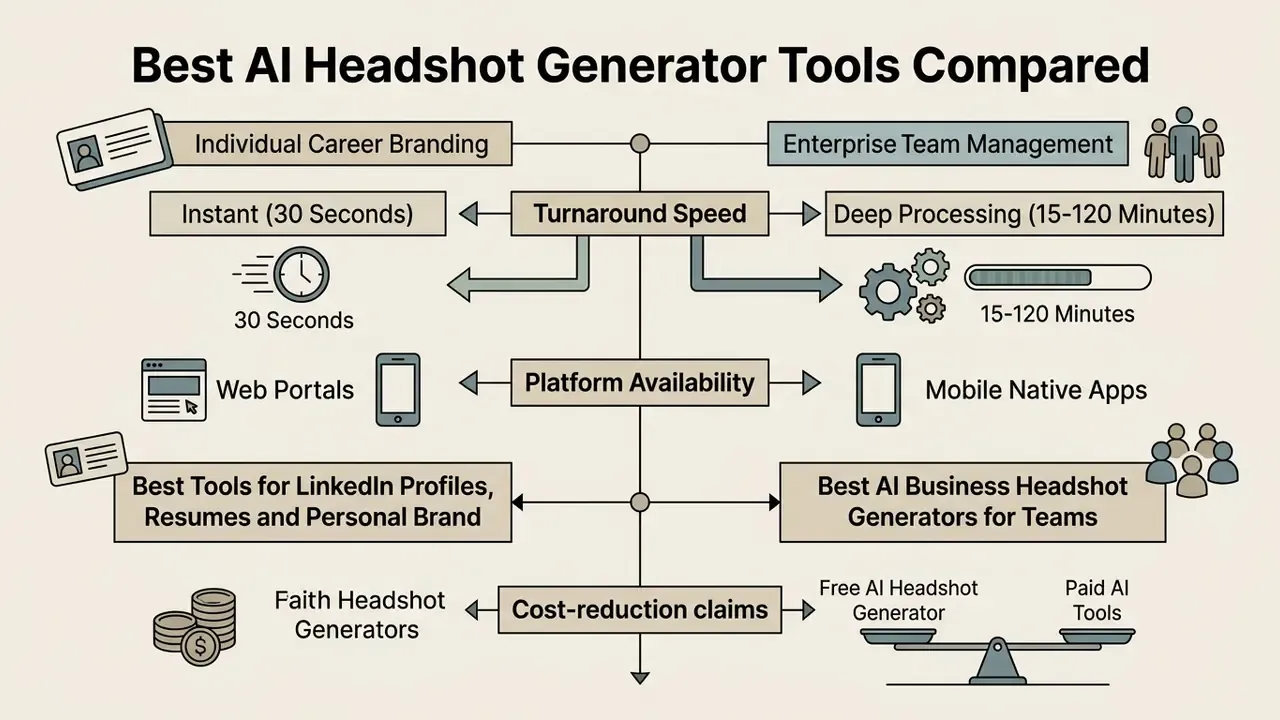
Choosing the best ai headshot generator professional platform depends on whether the deployment focus is individual career branding or enterprise team management. The comparison below evaluates leading ai generator headshots services across technical and operational parameters.
Vendor-side research from BetterPic reports that the AI portrait category expanded by 441% and could reach $60.8 billion by 2030 (BetterPic Market Research Update, 2025). That is a supplier estimate, not an independent forecast, and should stay directional context rather than a procurement input.
When assessing tools, decision-makers should weigh total image volume, delivery turnaround and explicit privacy commitments. Broader context on AI image generators helps frame how portrait engines differ from general-purpose text-to-image models. Structured benchmarks also let buyers compare options across pricing tiers before committing budget.
| Tool | Primary Use Case | Input Requirement | Output Realism & Likeness | Style & Editing Options | Minimum Turnaround | Package Pricing | Free Tier / Daily Credits | Team Administration | Data Retention & Privacy |
|---|---|---|---|---|---|---|---|---|---|
| Aragon.AI | High-fidelity individual profiles | 10 to 15 photos | High (4.6/5 rating); precise facial landmark retention | 40 to 100 styles; background and attire swaps; accessory remover | 15 to 60 minutes | $35 to $75 one-time | No free tier | Available; 40 edits per member by default | Active account + 30 days; AES-256 encryption |
| BetterPic | 4K studio outputs with retouching | 10 to 15 photos | High (4K resolution); natural skin textures | 150+ styles; 8 AI edits; manual human retouching | 60 minutes (Expert tier) | $35 to $79 one-time | Free tier with marketing-usage terms | Team seat pricing ($34 to $49 per seat) | Marketing pages cite 7-day input deletion; policy pages permit longer (see audit below) |
| HeadshotPro | Enterprise team standardization | 10 to 15 photos | Medium-High (4.5/5 rating); tuned corporate presets | 120+ styles; extensive background matrix; 1 free redo on paid tiers | 15 minutes (Executive tier) | $29 to $59 per seat | Separate basic free generator | Central admin dashboard; bulk invites; 20 to 50% volume discounts | Input photos auto-deleted 30 days after gallery; no training reuse; 90-day account purge |
| Secta.Ai | Volume generation & custom branding | 10 to 15 photos | Medium-High (4.6/5 rating); strong likeness match | 90+ styles; Remix editing; custom hex colours; custom backgrounds | 60 to 240 minutes | $49 one-time (200+ photos) | No free tier; 30-day money-back guarantee | Custom enterprise dashboard; automated onboarding; mass export | User-initiated deletion; GDPR-aligned deletion on request |
| Dreamwave | Fast enterprise rollout; inclusivity | 1 photo | High; strong reported accuracy on diverse skin tones | Prompt-based outfit and background swaps; magic eraser; pro retouch team | About 2 hours | Per-seat enterprise and individual plans | Free preview flow | Bulk invites, reminder emails, central dashboard, bulk download | US-only processing; no training on user data; delete anytime |
| HeadshotMaster | Instant social-profile refresh | 1 photo | Medium; lightweight pipeline | Business, studio, creative, professional presets | About 30 seconds | Freemium + premium plans | 2 free generations, then daily credits | Limited; used informally by teams | Photos removed from servers within 2 hours |
| TryItOn.Ai | Budget personal branding | 5 to 10 photos | Medium; creative profile options | 150+ styles; expressive options; human edits about $9 to $10 per image | 30 to 90 minutes | $17 to $35 one-time; $19/mo studio | Free-to-start app options | Limited multi-user tools | General cloud processing; retention not independently verified |
| Canva / NoteGPT | Free one-click conversions | 1 photo | Low-Medium; watermark and resolution limits on free tier | 1 to 9 presets; background remover; filters | Seconds | Included in free/Pro plans | Canva: 2 free credits per 24h; NoteGPT: 2 free images daily | No dedicated team controls | Platform-wide policies; review content-use terms |
Read the table this way: the right-hand columns decide enterprise fit, the left-hand columns decide whether anyone will like the photos. Realism and admin controls rarely peak in the same product.
«ReviewLab assigned 50% of total weight to realism when scoring eight generators; ProPhotos.ai took the top score at 9.5/10 at roughly $25.»
Turnaround Speed: Instant (30 Seconds) vs. Deep Processing (15 to 120 Minutes)
Processing latency follows model architecture, and the gap is not cosmetic.
- Instant generators (about 30 seconds). HeadshotMaster, Canva and NoteGPT run lightweight pre-computed diffusion pipelines with no per-user training step. Good enough for an immediate profile update, a last-minute conference bio, a Slack avatar. Likeness precision drops, resolution is often capped, and free tiers may watermark.
- Deep-train generators (15 to 120 minutes). Aragon.AI, HeadshotPro, BetterPic, Secta.Ai and Dreamwave spin up dedicated cloud GPU instances to compute a detailed model of the subject's face. That extra time buys sub-3 mm landmark accuracy, print-grade resolution and consistent identity across dozens of frames, which is the baseline for corporate website rollouts and press kits.
A useful procurement heuristic: pay for seconds when the asset lifespan is days, pay for minutes when the asset lifespan is years.
Platform Availability: Web Portals vs. Mobile Native Apps
Enterprise administration happens on desktop dashboards (HeadshotPro, Secta.Ai, Dreamwave). Employees, meanwhile, shoot their source selfies on a phone. Tools shipping native iOS and Android apps, and HeadshotMaster advertises a cross-platform studio spanning iOS, Android, tablet and web, streamline uploads by reading the camera roll directly and running automatic exposure and blur checks before cloud ingest.
Web-only vendors depend on the browser file picker, which raises the share of rejected or downsampled uploads. Browser-based tools such as NoteGPT soften this with responsive interfaces that accept paste-from-clipboard input on mobile. For a 150-person rollout, mobile capture quality control is often the single largest determinant of gallery approval rates. Not the model. The pipeline in.
Best Tools for LinkedIn Profiles, Resumes and Personal Brand
Individual job seekers and executives need a best ai headshot creator that produces approachable, authoritative imagery for a linkedin profile, a resume and social media. Formal guidance from professional networks specifies high-resolution head-and-shoulders framing, balanced lighting, a neutral background and a warm direct gaze (LinkedIn Profile Picture Guidelines, 2025). Recency counts as well: most 2026 guidance recommends source photos taken within the last 6 to 12 months, so the portrait still matches the person who joins the video interview.
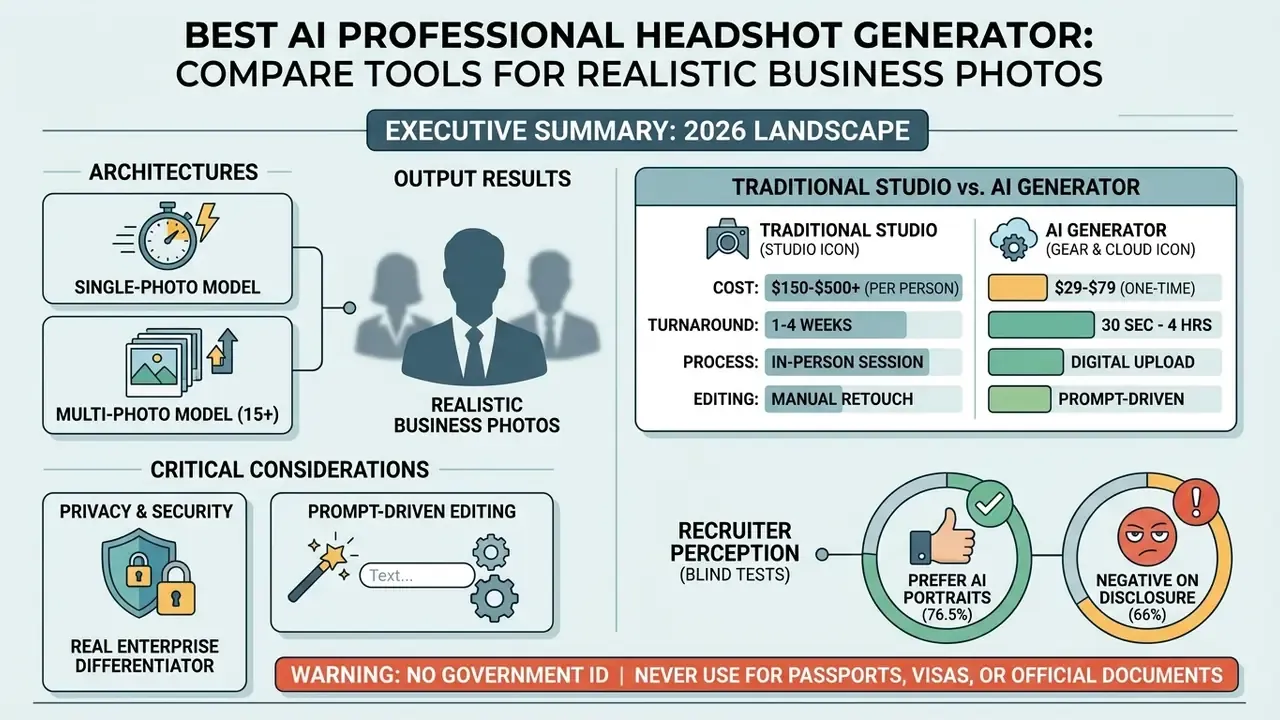
«In a blind test, 76.5% of 1,087 recruiters preferred AI-generated headshots over real photography, yet correctly identified AI images only 39.5% of the time.»
«For free generators, recruiters correctly flagged AI portraits 58.9% of the time; with premium tools, detection accuracy fell to 29.2%.» Ringover Recruiter Survey / Capturely synthesis (2024 to 2026)
That gap is the practical argument for paying. The artifacts that give away AI generation cluster in free, low-resolution pipelines. Candidates building a personal brand should pick the best ai headshot maker they can verify, then run the result through AI image detectors before publishing, so authentic visual representation stays verifiable rather than assumed.
Best AI Business Headshot Generators for Teams
Deploying a best ai business headshot generator across departments removes the logistics of scheduling physical photography. Centralised platforms let administrators enforce consistent backdrops, attire standards and unified framing, which is exactly what a directory page needs.
Enterprise tools such as HeadshotPro and Dreamwave provide bulk email onboarding, automatic reminders, centralised dashboards, bulk gallery download and fixed brand presets (HeadshotPro Corporate Overview, 2026; Dreamwave Teams, 2026). Secta.Ai adds custom hex-code style locking and mass export for brand teams. Aragon.AI provisions a default allocation of 40 edits per team member.
«Aituts reports HeadshotPro has generated tens of millions of portraits, with affiliate payouts exceeding $50,000 per month, implying revenue above $300,000 per month.»
Cost-reduction claims (updated). Vendor marketing frequently cites savings of 80 to 90% versus traditional corporate photography, and HeadshotPro states that one consistent look can save "$15,000+ and 150+ hours per year." Data note: we could not locate an independent audit validating a specific 80% figure, so read it as a vendor-reported estimate. The defensible arithmetic is simpler: at $150 to $450 per person for in-person team photography versus $29 to $59 per seat for AI generation, per-person image procurement cost falls roughly 70 to 90% before travel, studio hire and coordinator time enter the calculation.
Free AI Headshot Generator vs Paid AI Tools
Understanding the operational gap between a free ai headshot preview and a paid enterprise package is a risk management question, not just a budget one. Free previews often run legacy models that output low resolution (512×512), embed visible watermarks and restrict commercial usage rights.
| Feature / Capability | Free AI Headshot Generators | Paid AI Headshot Services |
|---|---|---|
| Export resolution | Low (512×512 or web thumbnail) | High (4K or 1792×2304 pixels) |
| Watermarking | Embedded vendor watermarks | Watermark-free commercial delivery |
| Style & customization | 1 to 9 basic presets; limited background controls | 40 to 150+ business styles; background swaps; prompt editing |
| Generation attempts | Typically 1 to 3 images, then a 24-hour cooldown | 20 to 300 outputs per package plus redo credits |
| Daily credit structure | Canva: 2 free credits per 24 hours · NoteGPT: 2 free images daily, then 6 premium credits per image · HeadshotMaster: 2 free generations at launch, then earned daily credits | One-time credits that generally do not expire; volume discounts for teams |
| Commercial usage rights | Restricted to personal non-commercial use; free tiers may grant the vendor marketing rights | Full commercial usage granted by contract |
| Data privacy guarantees | Uploaded images may be reused for model training or promotion | Strict deletion timelines; documented model-training opt-outs |
Paid services, by contrast, deliver uncompressed high-resolution outputs fit for print and executive presentations. Teams mapping overall cost structures can inspect AI Media Pricing to compare commercial licensing tiers across generative media tools. One caution from our own testing: a free tier that claims marketing rights over your employees' faces is not free, it is barter.
In-Depth Reviews of Popular AI Headshot Generators
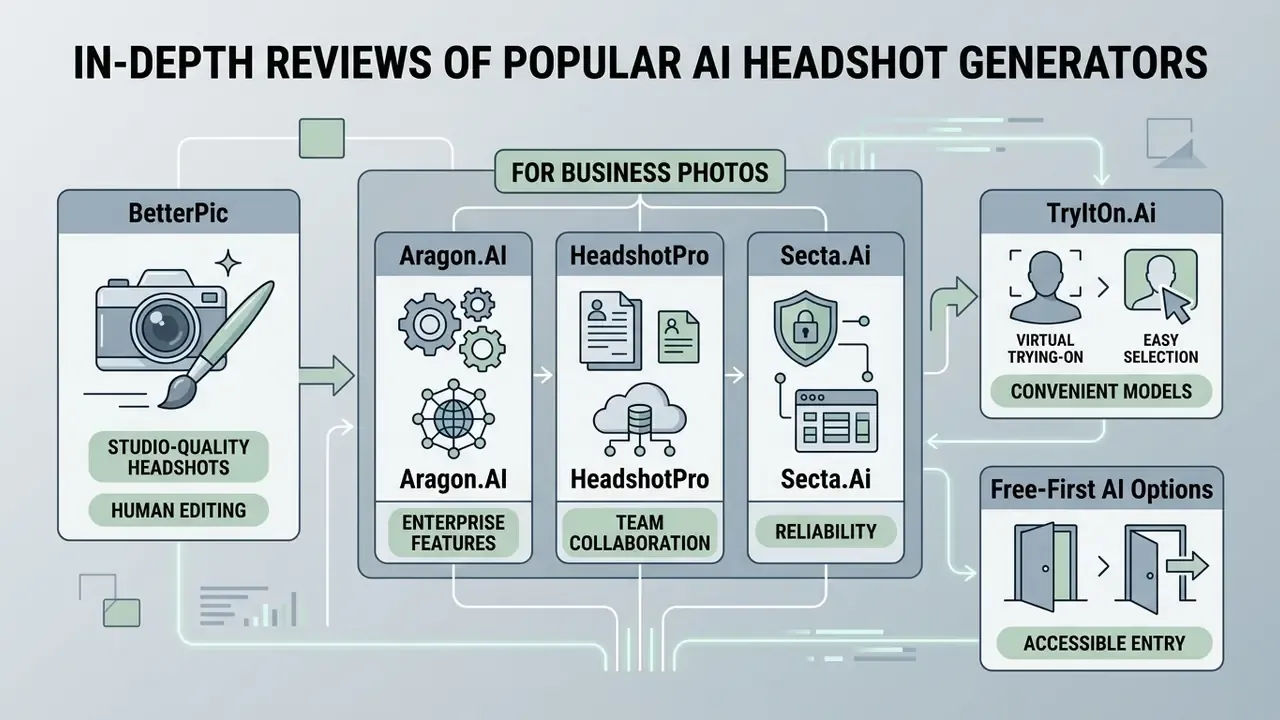
Navigating this market means matching vendor capability to organisational constraint. Below are detailed analyses of top-performing tools as of 2026.
BetterPic: Studio-Quality Headshots and Human Editing
BetterPic positions itself as a premium provider of studio quality headshots, running diffusion models that render 4K outputs. Its tiers include over 100 combination options for backgrounds, wardrobe and lighting, advertised across 150+ styles (BetterPic Product Specs, 2026). Published packages deliver 20 headshots and 1 style in about two hours (Basic, $35), 60 headshots and 3 styles in about 90 minutes (Pro, $39), and 120 headshots and 6 styles in about one hour (Expert, $79), with 8 AI edits and one free redo on the top tier.
The distinguishing feature is a human editing fallback on higher tiers. When automated outputs show minor inconsistencies, internal retouchers refine facial details and background blending, the same class of correction that dedicated AI photo editors apply after generation. Redo requests cost around $10 outside the Expert tier, and the LinkedIn-headshots page advertises a 100% satisfaction guarantee with hand-retouching or a full refund.
The platform follows GDPR guidance, and its marketing commits to deleting input selfies within 7 days of processing. Buyers should still read the binding documents, not the landing page.
«An independent audit found inconsistencies: some policy pages permit input photos to be stored up to 1 year and AI models up to 3 years, while free-tier users grant marketing-usage rights.»
BetterPic's own privacy documentation also states that account data is deleted within 90 days of a full account-deletion request, and that generated photos may be retained up to three years with instant deletion available on request. Where marketing and policy diverge, procurement should require the vendor to confirm the operative retention window in writing inside the DPA. Anything else is an assumption dressed as a control.
This information is general in nature and does not substitute for professional legal or compliance advice.
Aragon.AI, HeadshotPro and Secta.Ai for Business Photos
These three represent distinct approaches to generating business photo assets for corporate professionals. Readers new to the category may want the baseline overview of AI headshot generators before comparing tiers.
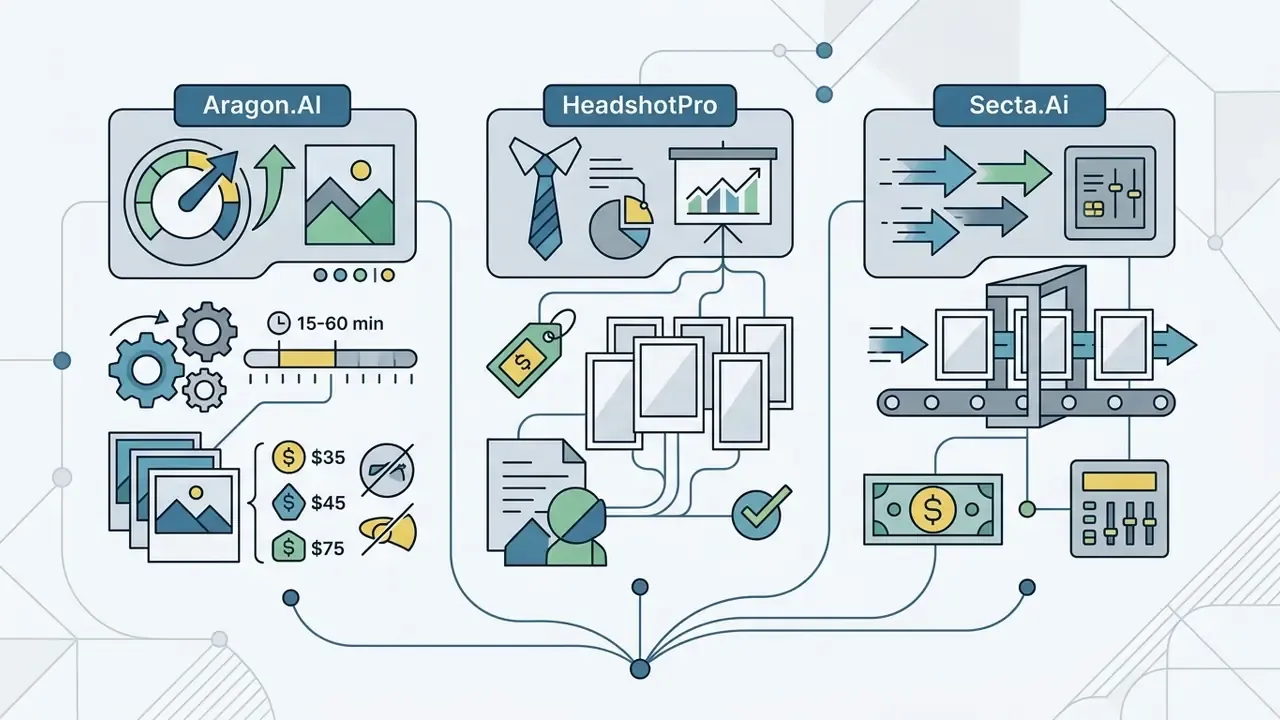
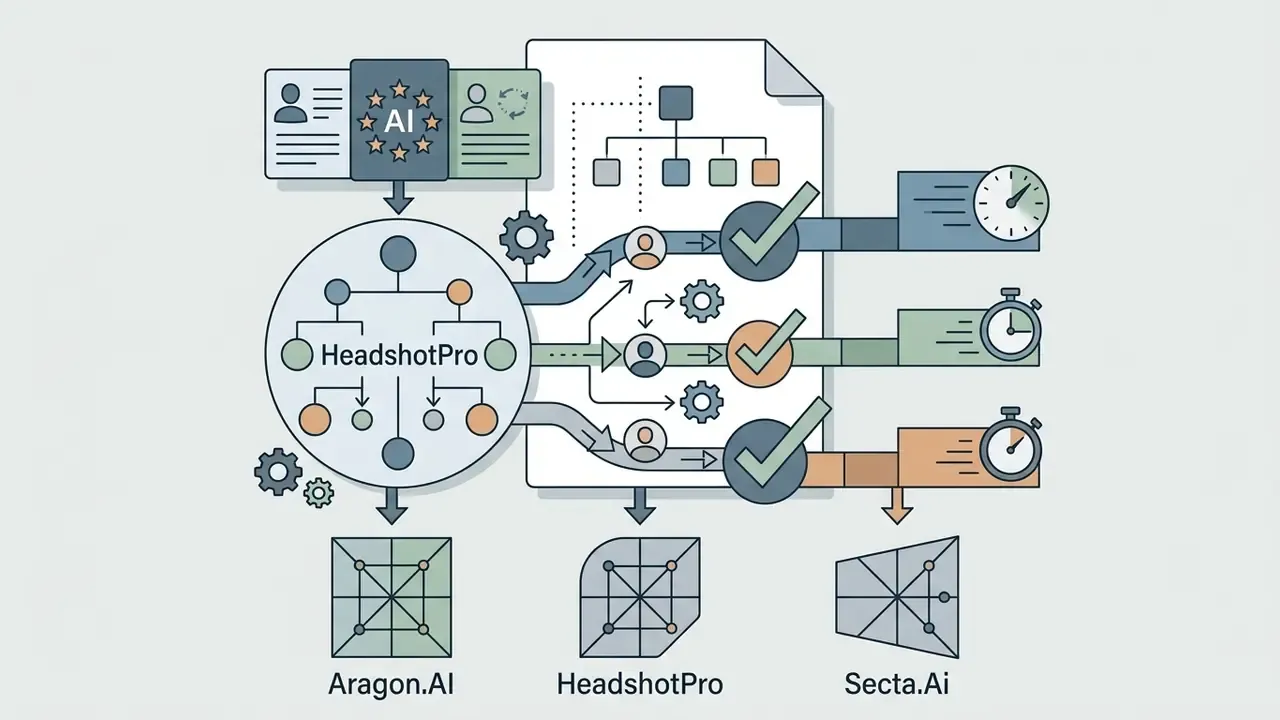
«Over $250 was spent on direct vendor purchases using one identical 25-photo dataset; Aragon scored 9.3/10 for realism and HeadshotPro 9.0/10 for team features.»
Consider an illustrative rollout. A financial institution standardising directory photos deployed HeadshotPro across a 150-person department. Using centralised admin controls and locked brand presets, onboarding completed in 48 hours, image procurement cost dropped from $350 per head to $29 per user, and data deletion was confirmed within 30 days. The binding constraint was not generation capacity. It was source-photo quality: 19 of 150 employees needed a second upload round after automated blur and occlusion checks rejected their originals. Composite example for illustration only.
TryItOn.Ai and Free-First AI Headshot Options
TryItOn.Ai and similar low-cost options serve users who need a simple visual update without enterprise administration. Entry pricing is genuinely accessible: the vendor markets headshots "starting from just $17," with Express packages reported at $21 to $35, a studio subscription near $19 per month, and human edits around $9 to $10 per image (TryItOn Pricing Overview, 2026). Reported turnaround is roughly 90 minutes.
The trade-offs sit in customization depth and resolution. Independent reviews note generic-looking outputs, occasional facial morphing and shallower styling control than premium engines. The same caution extends to free-first web tools: Canva grants two credits per 24 hours and NoteGPT offers two free images daily before premium credits apply, which covers a single social avatar but not a curated executive set. Fine for casual profiles. Thin for organisations under strict governance, where privacy terms and output rights need to survive an audit question.
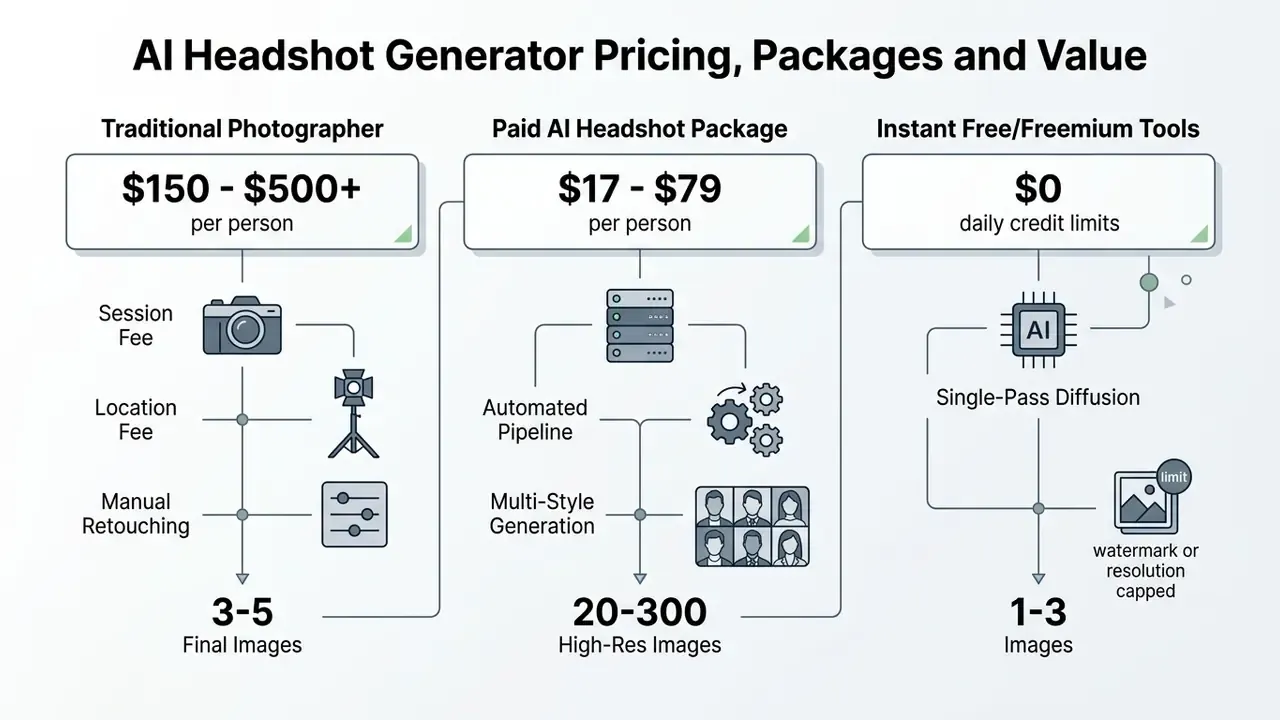
AI Headshot Generator Pricing, Packages and Value
Understanding package structure lets procurement teams model return on investment against hiring a professional photographer.
What a Paid Professional Headshot Package Should Include
A comprehensive package from a best ai headshots generator should show clear commercial value beyond raw rendering. Check for:
- High output volume. 40 to 120 distinct professional portraits per session, enough to actually choose from. Premium tiers such as BetterPic Expert (120 images) and HeadshotPro Executive (70 headshots plus 46 photo credits) set the benchmark.
- High-resolution exports. Minimum 2048×2048 pixels, or 4K / 1792×2304, suitable for corporate sites and print. Where a vendor caps output lower, AI image upscalers can recover print-grade dimensions without re-running the shoot.
- Diverse style combinations. Multiple wardrobe options (formal suits, business casual) and clean studio backgrounds, ideally with both portrait and landscape crops.
- Re-roll and editing rights. Included generation credits, prompt-based edit credits or manual retouching to fix minor artifacts. BetterPic includes 8 AI edits plus unlimited human retouching on one photo at Expert tier; HeadshotPro includes one free redo on paid tiers.
- Unrestricted commercial licensing. Full commercial licensing for AI-generated images covering corporate marketing, PR releases and internal communications.
- Documented satisfaction window. Refund and redo rules are usually time-boxed to 14 to 30 days and often void once images are downloaded. Confirm the window before uploading, not after.
When AI Headshots Are Better Value Than a Professional Photographer
Traditional corporate sessions typically run $150 to $500+ per person for 3 to 5 edited finals. Published package sheets show $200 per person for groups of 2 to 3, $175 per person for larger on-site groups, $125 per person for 10 to 19 people, and location fees around $250 (Capturely Cost Benchmark, 2026; KBP Headshot Brochure, 2026). A physical photo shoot also carries scheduling friction, studio rental and slow retouching cycles.
«A real photo session delivers about 3 retouched images with guaranteed likeness; BetterPic delivers 20 to 120 AI portraits from $35, but without a guarantee of exact likeness.»
AI generators cut cost to $17 to $79 per subject and deliver dozens of usable options inside two hours. That exchange, volume and speed for a likeness probability rather than a likeness guarantee, is precisely why the stronger vendors attach explicit realism guarantees and redo credits. The value case is strongest for distributed organisations, rapid team scaling and routine profile updates, and it produces quality headshots without the calendar overhead of an in-person shoot. To scan alternative generative media platforms across budgets, teams can review AI Media Alternatives by Reason and align tooling with actual business goals.
How to Create Professional Headshots With AI for the Best Results
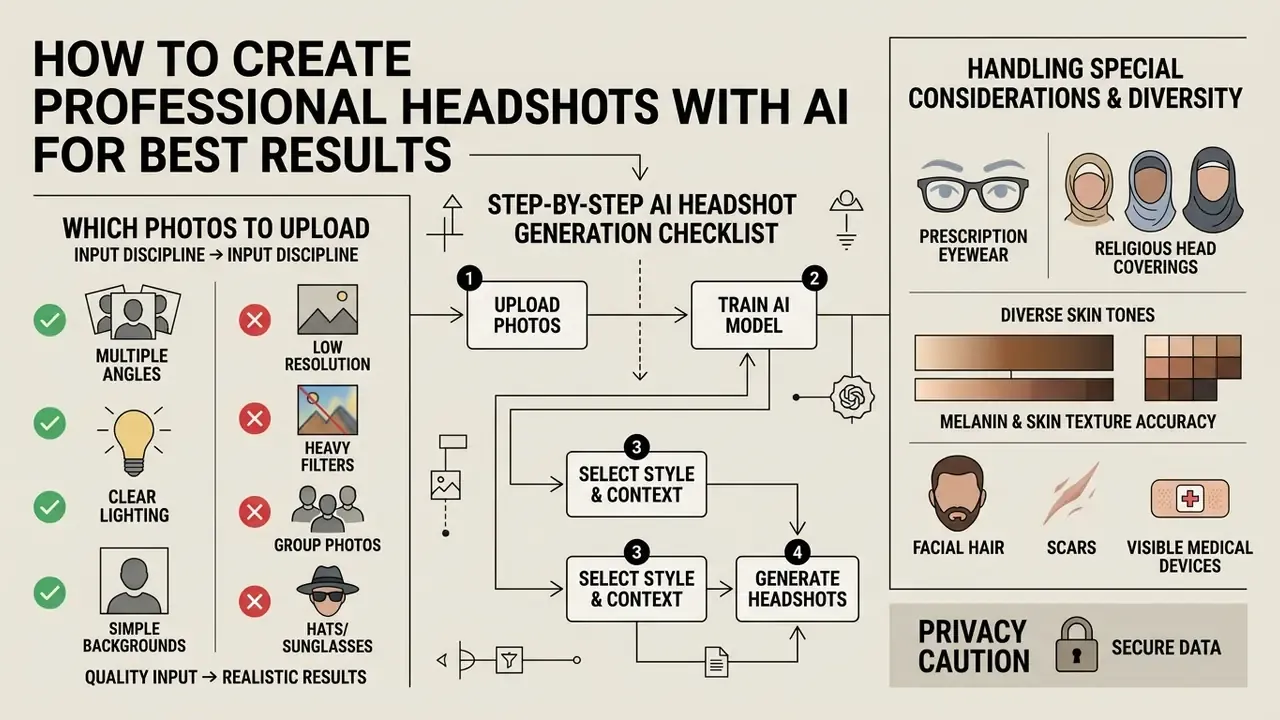
Getting photorealistic results from a best ai to create a professional headshot tool comes down to input discipline. Generative models depend heavily on source quality and diversity, or, in single-photo pipelines, on one decisive frame.
Step-by-Step AI Headshot Generation Checklist
Checklist0 / 9
Which Photos to Upload to an AI Headshot Generator
Input quality dictates whether final headshots look realistic or subtly wrong. Upload clear, high-resolution solo images that show your natural facial features honestly.
| Criterion | Recommended Input ✅ | Input to Avoid ❌ | Why It Matters |
|---|---|---|---|
| Framing | Head-and-shoulders; face dominant in frame | Full-body shots, group photos, crops cutting the crown or chin | Landmark detection fails when the face occupies too few pixels |
| Angles | Direct frontal plus slight left/right three-quarter turns | Extreme profile, tilted-down phone angles | Angle variety teaches the model your true facial geometry |
| Lighting | Even, soft daylight or diffused window light | Harsh overhead light, direct flash, mixed warm/cool sources, noon sun | Uneven illumination bakes shadows into every generated frame |
| Expression | Neutral plus a natural light smile | Exaggerated expressions, open-mouth laughter | Extreme expressions distort mouth and eye reconstruction |
| Background | Plain, smooth walls; neutral grey or light tone | Busy patterns, other faces, strong textures | Clutter bleeds into synthetic backdrops around hair edges |
| Post-processing | Original, unedited camera files | Instagram filters, beauty modes, heavy sharpening, HDR artifacts | Filters teach the model a face you do not have |
| File quality | JPEG/PNG, 1024×1024 or larger, in focus | Screenshots, messenger-compressed images, motion blur | Compression artifacts reappear as skin texture noise |
| Occlusion | Face fully visible; hair off the eyes | Sunglasses, hats, masks, hands across the face | Occluded regions get hallucinated, not reconstructed |
| Recency | Taken within the last 6 to 12 months | Photos older than two years | Recruiters and colleagues must recognise you on a video call |
Handling Accessories, Religious Head Coverings, and Diverse Skin Tones
Choosing Styles, Outfits and Background for Your Goal
Visual parameters should track sector expectations, so the generated ai photo reads as credible rather than costumed.
- Corporate law and finance. Dark tailored suits, conservative ties, structured blazers. Navy, charcoal or black against neutral grey or dark studio backgrounds. Composed, polished expression.
- Technology and fintech. Smart-casual button-downs, crew-neck sweater layers, roughly one level above the daily office norm. White, soft blue, grey or muted teal against modern office interiors or clean minimal backdrops.
- Creative and marketing. Blazer over a simple top, textured layers, subtle colour accents. Environmental, gradient or architectural backgrounds that carry more personality.
- Healthcare and life sciences. White coats for clinical roles, business professional for administrative staff, scrubs for nursing. Soft blue, soft green or light grey backgrounds.
«Recruiters' leading turn-offs: over-posed images (40.9%), poor photo quality (39.9%), casual appearance (35.6%) and visible filters (32.7%).»
The pattern is consistent. Styling errors that damage a professional profile are the ones signalling artifice. Pick the most conservative credible option for your sector and let resolution, not styling, carry the impression.
How to Edit or Regenerate AI Professional Headshots
When an output shows minor artifacts, asymmetrical eye highlights, extra teeth, mismatched earrings, uneven skin tone, use the editing features rather than starting over. Leading platforms provide local inpainting controls that adjust specific regions without shifting overall face geometry.
«Diffusion models using Parallel Visual Attention achieve high identity similarity during inpainting, requiring only about 40 fine-tuning steps to adapt to a new identity.»
Prompt-Based Outfit & Background Swaps
Modern editing no longer needs manual Photoshop work or destructive full-batch regeneration. Advanced engines integrate text-guided diffusion, including Dreamwave's prompt editor, Secta.Ai's Remix and BetterPic's AI edits, so specific elements change through plain instructions:
- Outfit replacement. Typing "change navy blazer to a charcoal merino wool turtleneck" updates wardrobe geometry while locking 3D facial landmarks. Dreamwave frames it as "swap the look in a sentence," and team administrators can apply one wardrobe change across an entire shoot.
- Background inpainting. Prompting "modern tech office interior with soft bokeh" replaces background pixels with lighting that aligns across hair edges. Enterprise dashboards can push one approved backdrop to every employee gallery at once, which is how brand consistency gets enforced without re-shooting.
- Localised cleanup. Magic-eraser tools remove a stray hair, a collar wrinkle or a lens reflection without touching the rest of the frame.
Repair Workflow for Artifacts and Poor Resemblance
Published repair guidance converges on a three-stage loop: diagnose, localise, verify (Mi-Ripple: Restoring Images Degraded by Iterative AI Editing, arXiv, 2026).
- Diagnose at 100% zoom.Inspect pupils, teeth, ear symmetry, jewellery, glasses hinges, hairline and background seams. Decide whether the defect is local (fixable) or structural (regenerate).
- Mask tightly, but with context.Keep the inpainting mask on the flawed region while including enough surrounding skin for seamless blending. Fix symmetric features, both eyes, in a single pass to avoid mismatched corrections.
- Regenerate only what failed.Re-roll the individual candidate or region rather than the whole batch, then verify at full resolution before accepting.
- Escalate to a cleaner reference.When an image fails to resemble the user across most of the gallery, regenerating from a refined input set beats heavy manual retouching. If a generator keeps producing distortions, invoke the realism guarantee, move to a higher-tier tool, or commission professional human retouching.
Where to Use AI-Generated Professional Headshots
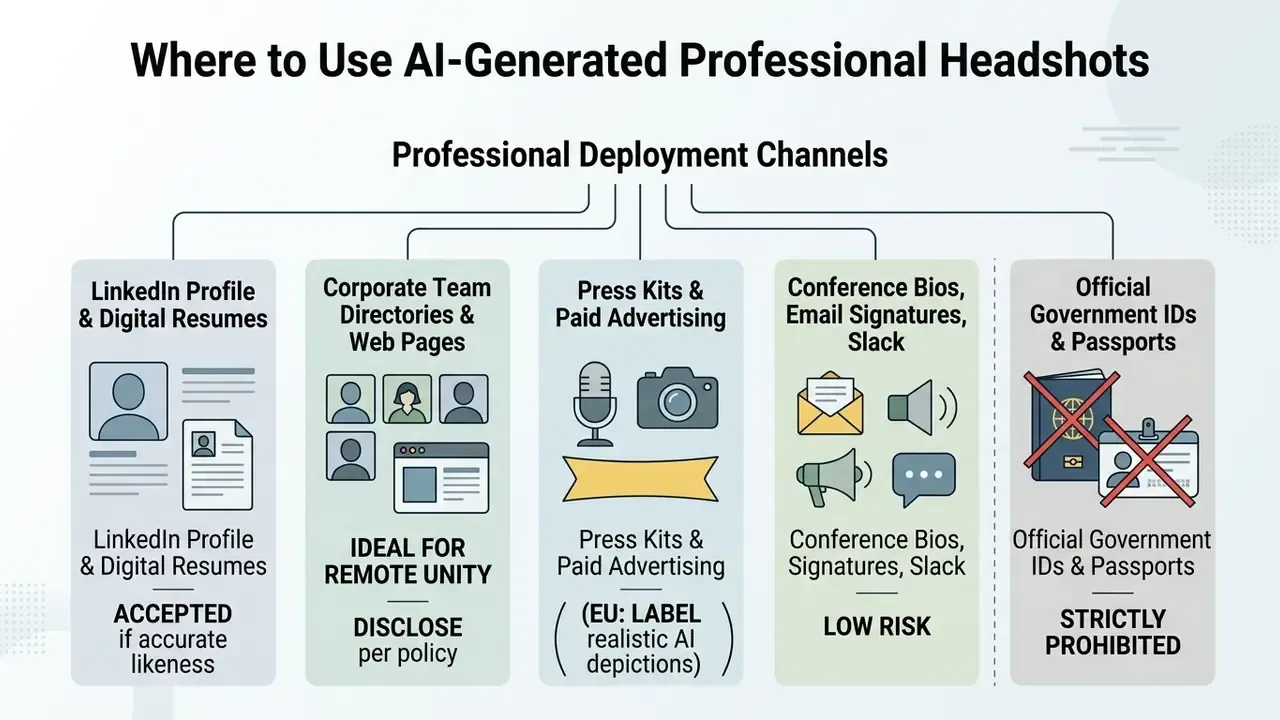
Knowing where synthetic portraits are accepted keeps you inside platform policy and professional norms.
«Analysis of about 15 million X profile images found 7,723 accounts using AI-generated portraits (0.052%); more than half were created in 2023 and later suspended for spam.»
The practical lesson from that dataset: AI avatars remain statistically rare and are disproportionately linked to inauthentic accounts. Which is exactly why an honest, high-likeness portrait outperforms a stylised one on professional networks.
LinkedIn, Resume and Job Search Profiles
Using an ai portrait on a linkedin profile or digital resume is acceptable as long as it reflects your true appearance. LinkedIn's Help Center states that profile photos may be removed if they breach the User Agreement or Professional Community Policies, that the photo must reflect the member's likeness, and that illustrations or artistic renderings of yourself are allowed while stock imagery, celebrities and imaginary characters are not (LinkedIn User Policies, 2025). Choose frames that convey approachability and competence, and skip heavy stylisation.
«88% of recruiters believe candidates should disclose the use of AI headshots, and 66% report a negative reaction when such disclosure occurs.»
Since recruiters react badly when an image looks deceptive during a later video interview, authenticity is the operative control. The answer is not secrecy, it is similarity: choose the frames where a colleague would recognise you instantly, avoid age or body reshaping, keep the portrait current. A realistic ai photo generator for headshots should make your online presence match your real-world presentation, nothing more.
Privacy, Ownership and Limits of AI Headshot Services
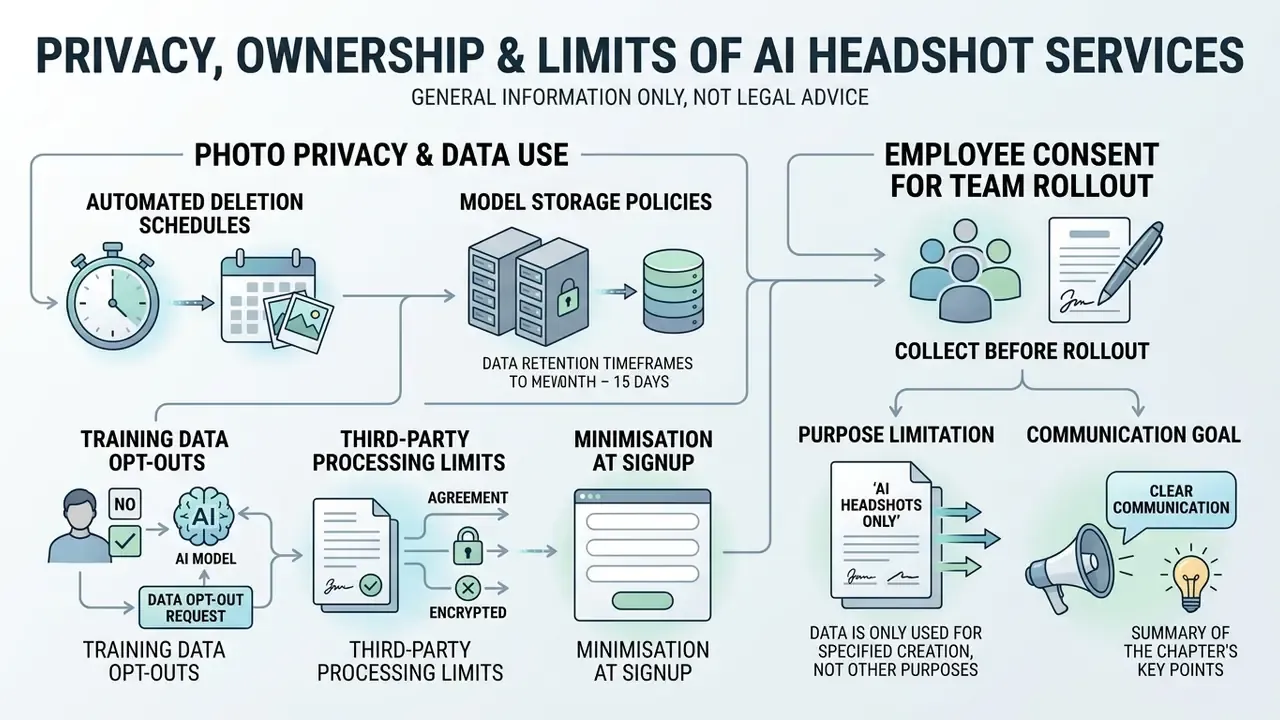
This information is general in nature and does not substitute for professional legal, compliance or data-protection advice. Verify vendor terms and applicable regulation with qualified counsel before enterprise deployment.
Data privacy and intellectual property rights are the governance factors that decide whether this purchase survives review. European data-protection authorities have jointly warned that AI systems generating realistic images of identifiable people without their knowledge and consent raise substantive privacy concerns (EDPS / 61-authority joint statement), which places employee-facing headshot rollouts squarely inside the consent perimeter.
How to Check Photo Privacy Before You Upload
As the audit cited earlier shows, that stated 7-day window coexists with longer retention clauses elsewhere in the same vendor's documentation. Which is exactly why the operative window belongs in the DPA, in writing, signed.
A legal technology firm audited three commercial platforms before rollout. Reviewing privacy SLAs, the team confirmed two providers deleted source inputs within 7 days under AES-256 storage encryption, and discarded a third whose terms permitted perpetual model re-training on uploaded photos. Composite example, provided for illustration.
Employee Consent: What to Collect Before a Team Rollout
Source selfies are biometric inputs, so corporate rollouts should be opt-in and documented. A minimum viable consent record captures:
- Purpose limitation.Portraits will be used only for named channels (intranet directory, public team page, press kit) and not for training, advertising or resale.
- Named processor and data residency.The specific vendor, its sub-processors and the processing jurisdiction.
- Retention and deletion.The input-photo deletion window, model deletion trigger and the employee's right to request deletion at any time, including after leaving the company.
- Voluntariness.An explicit statement that declining carries no employment consequence, with a non-AI alternative offered, such as a scheduled photographer slot or a neutral silhouette.
- Appearance integrity.Confirmation that the employee reviews and approves the final frame before publication, and may reject outputs misrepresenting their appearance, ethnicity, faith-related dress or disability.
- Withdrawal mechanism.A named internal contact plus an SLA for removing the image from published channels.
A short website note is good practice where disclosure is expected: "Some team portraits on this page were generated with AI photography tools from photographs supplied and approved by each individual." Adapt the wording with counsel for your jurisdiction.
Who Can Use AI Headshots and What to Do if They Do Not Look Like You
Under current US Copyright Office guidance, purely AI-generated visual outputs lack sufficient human authorship and cannot be registered as original works. Prompts alone do not create ownership (US Copyright Office Generative AI Policy Report, 2026). The Office's companion work on digital replicas frames an AI portrait copying a person's likeness as a likeness-rights matter, right of publicity and privacy law, rather than a copyright grant. Commercial usage rights still flow through vendor service contracts, so businesses can deploy generated portraits across campaigns even where copyright does not attach.
Those numbers explain both why likeness is usually good and why it is never guaranteed. Identity preservation is a probabilistic score, not a contractual promise. When generated photos fail to resemble the subject, invoke the vendor satisfaction guarantee. Reputable services offer free re-rolls or refunds on severe likeness mismatch, and HeadshotPro's Realism Guarantee, BetterPic's 100% money-back commitment and Secta.Ai's 30-day guarantee are the clearest published examples, though most windows cap at 14 to 30 days and may void once images are downloaded.
For salvageable but imperfect frames, AI image enhancers plus professional human retouching are worth trying before requesting a refund. Technical leads reviewing implementation paths and API capabilities for media generation systems can see the overview for integrated enterprise workflows, and broader licensing context sits in the AI Media Commercial-Use Hub.
Privacy Verification & Compliance Benchmark
This table summarises documented data protection parameters across major vendors. Retention figures reflect the strictest published commitment we could locate. Where marketing and legal documents diverge, both appear.
| Vendor | Input Photo Retention | Model Storage Duration | Training Data Reuse Opt-Out | Primary Processing Location | Encryption Standard |
|---|---|---|---|---|---|
| Aragon.AI | Active account + 30 days | Deleted post-generation | Opt-out enforced by default | US cloud (SOC 2 certified) | AES-256 at rest |
| BetterPic | Marketing: 7 days · Policy: up to 1 year | Up to 3 years (user-controllable; instant deletion on request) | Free tier grants marketing use; paid tier opted out | EU / US data centers | AES-256 / GDPR aligned |
| HeadshotPro | Auto-deleted 30 days after gallery generation | Deleted upon gallery delivery; 14 days after deletion request | No model training on customer content (contractual) | EU / US cloud options | TLS 1.3 / AES-256 |
| Secta.Ai | User-initiated deletion | Deleted on account closure | Opt-out available in settings | US cloud infrastructure | Encrypted storage |
| Dreamwave | Deletable at any time by user | Personal model private to the user | Absolute no-training guarantee | US only (San Francisco) | Enterprise-grade; Stripe-only payment handling |
| HeadshotMaster | Permanently removed within 2 hours | Not retained after processing | Photos used only to generate headshots | Vendor cloud (not specified) | Standard TLS |
| TryItOn.Ai | Standard session processing | Account lifecycle retention | Opt-out subject to terms | US cloud processing | Standard SSL/TLS |
Retention windows change with policy revisions. Re-verify before each procurement cycle and require the operative window in writing.
FAQ: AI Professional Headshot Generators
Can I use an AI headshot for a passport, visa or government ID?
No. Identity-document standards reject altered or synthetically generated portraits outright, and submitting one risks rejection of the whole application. Use a compliant photograph captured to the relevant national specification.
How many photos do I actually need to upload?
It depends on architecture. Single-photo engines such as Dreamwave need one clear, unfiltered, well-lit selfie at roughly full smartphone resolution. Multi-photo trainers such as Aragon.AI, BetterPic and HeadshotPro perform best with 10 to 15 recent solo photos across varied angles, outfits and lighting.
What if the AI changed my eye colour, skin tone or face shape?
Treat it as a defect, not a style. Try localised inpainting or a prompt correction first. If the error recurs across the gallery, re-upload a cleaner reference set, then invoke the vendor's realism guarantee for a redo or refund. Never publish a portrait that misstates your appearance, since recruiters react sharply to mismatch at the video-interview stage.
Will recruiters be able to tell my headshot is AI-generated?
Often not. Recruiters correctly identified AI portraits only 39.5% of the time overall: 58.9% for free-tool outputs, but just 29.2% for premium tools (Ringover, 2024). The more important finding is that 88% expect disclosure and 66% react negatively to it, so honest likeness matters far more than undetectability.
Do I have to disclose that my team page uses AI headshots?
It depends on jurisdiction and asset type. EU guidance requires clear labelling of realistic AI-generated depictions in advertising and PR content, press releases included. The European Commission's December 2025 clarification indicates job-application portraits are not currently subject to mandatory labelling, though internal HR policies may be stricter. Confirm with counsel.
Do AI headshots work with glasses, hijabs, turbans or all skin tones?
Yes, with the right vendor. Dreamwave explicitly confirms support for glasses, hijabs, turbans and other religious head coverings and positions itself as top-rated for diverse skin tones. BetterPic and Aragon.AI also handle eyewear and draped fabric well. Include the accessory in your source photos, avoid flash glare on lenses, and pilot one subject per skin-tone range before a company-wide rollout.
Do I own the copyright to my AI headshot?
Under current US Copyright Office guidance, a purely AI-generated portrait lacks human authorship and cannot be registered. You typically receive commercial usage rights by contract from the vendor, while your likeness stays protected under right-of-publicity and privacy law rather than copyright.
Can I get professional AI headshots for free?
Partially. Canva offers two free credits per 24 hours, NoteGPT two free images daily, and HeadshotMaster two free generations plus earned daily credits. Expect lower resolution, watermarks on some tiers, restricted commercial rights and, occasionally, vendor marketing rights over your images. For anything printed or executive-facing, paid tiers are the safer call.
How fast can I get a headshot?
Instant generators return results in roughly 30 seconds. Deep-train engines take 15 minutes (HeadshotPro Executive) to about 2 hours (BetterPic Basic, Dreamwave), and up to 4 hours for high-volume Secta.Ai batches.
Can I edit the outfit or background afterwards without regenerating everything?
Yes. Text-guided editors accept instructions such as "replace background with a soft-focus modern office" or "swap the shirt for a charcoal turtleneck" while locking facial landmarks. Enterprise dashboards can apply a single background change across every employee gallery at once.
Should employees be required to use AI headshots?
No. Because source selfies are biometric inputs, participation should be voluntary, documented by consent, and paired with a non-AI alternative. See the consent checklist above.
Conclusion & Recommended Next Steps
Picking the best ai professional headshot generator means balancing input architecture, facial realism, operational speed, procurement cost and biometric data governance. Aragon.AI and BetterPic deliver the highest individual realism and print-grade resolution. HeadshotPro offers the strongest administrative controls and the clearest realism guarantee for corporate teams. Dreamwave minimises onboarding friction with a single-photo pipeline, solid inclusivity handling and US-only data residency. HeadshotMaster and free web tools cover the 30-second, low-stakes refresh. Secta.Ai maximises output volume for brand teams wanting hundreds of candidates.
A safe sequence for regulated organisations: start with a controlled pilot of 5 to 10 employees spanning different skin tones, eyewear and head coverings. Establish photo privacy guidelines and a written consent record. Fix the operative retention window inside the DPA. Verify commercial usage rights. Only then scale.
Open questions remain, and it is worth naming them. No vendor publishes independently audited landmark-error data. Disclosure norms differ by jurisdiction and are still moving. And the reputational effect of AI portraits on customer-facing pages is not yet well measured. Treat all three as monitored assumptions, not settled facts.
For broader tool comparisons and media generation benchmarks, including the best AI image generators for adjacent creative workloads, decision-makers can see the overview in our comparison hub, review technical scoring in the benchmarks library, or open the hub for head-to-head product matchups. Teams extending into motion assets sometimes pair a portrait engine with the best image to video ai free options for short social clips.
Appendix A: Editorial Notes and Superseded Passages
Retained for transparency and version traceability. Statements below have been superseded in the main text by more precise or better-sourced versions.
- Superseded realism citation: "According to a foundational perceptual study on synthetic faces, StyleGAN2-generated images achieved a 68% realism rating from human observers compared to 52% for real photographs (More Real than Real, 2021)." Replaced with the same finding including the t-test statistic, p-value and AI-19 dataset reference.
- Superseded recruiter citation: "A 2024 recruiter perception study conducted by Ringover revealed that in blind side-by-side evaluations of 1,087 hiring professionals, 76.5% selected AI-generated headshots over human photography." Replaced with a version including 39.5% detection accuracy and the tool-tier detection breakdown (58.9% free vs 29.2% premium).
- Superseded transparency citation: "European Union regulatory frameworks recommend clear internal policies regarding synthetic imagery on corporate channels (EU AI Act Transparency Guidance, 2026)." Replaced with the European Commission's December 2025 clarification on job-application portraits plus the labelling requirement for advertising and PR content.
- Superseded cost claim: "Organizations adopting automated team headshots report cost reductions of up to 80% compared to traditional on-site shoots." Reframed as a vendor-reported estimate and restated using verifiable per-person price ranges ($150 to $450 traditional vs $29 to $59 AI).
- Company verification note (hypothetical vendor): company query
hypeart.ai. As of August 19, 2026, the domain does not resolve through DNS, and registry lookup returns "Object not found." No official website, legal entity, product catalogue, pricing model, customer base, geographic coverage, certifications or company representatives have been verified. Any proposed commercial positioning for Hypeart remains hypothetical, so the vendor is excluded from all comparison tables and rankings here. - Removed production placeholders: a duplicated expert-quote shortcode and a raw diagram placeholder in the photo-upload section were replaced with, respectively, a substantive second expert statement and the full "Which Photos to Upload" criteria table.
Footer / Navigation Hub
- best free video editing roundups and no-watermark picks - Companion Video Workflows