That split matters more than feature counts. One tier is a sandbox. The other is a production input.
What this guide covers. Testing methodology and what "free" really buys you. A side-by-side comparison of eight platforms. Input modes beyond text, including photo, hum and reference audio. Vocal and instrumental engines. Post-processing utilities for stems, vocal removal and format conversion. Data handling and voice-cloning consent. Licensing, Content ID disputes and a prompting framework with ready templates. Search demand for these terms is global, too: Dutch-language queries for the beste ai muziek generator land on almost the same shortlist as English ones.
How We Evaluated the Best Free AI Music Generators in 2025
Ranking the best free ai music generator 2025 requires examining three unglamorous things: quotas, output fidelity and intellectual property terms. Generative platforms rely on audio diffusion and transformer architectures, which burn real server compute. Consequently, every ai music generator free 2025 model enforces hard technical limits on unpaid accounts.
Our framework analyzed platforms across four metrics: credit allocation structure, export options, structural coherence and commercial usage rights. Unpaid plans work as evaluation sandboxes, not end-to-end commercial solutions. We reproduced the same six-part prompt on every platform, exported each result at the highest available bitrate, and logged credit consumption per generation to check vendor-published quotas against observed behavior.
One caveat before the numbers. Quotas move. A tier that offered unlimited generation in autumn can arrive metered in spring, so treat every figure below as a snapshot rather than a contract.
What "Free" Means: Credits, Downloads and Usage Limits
Free tier allocations decide how many complete songs or stems you can create each month. Most services grant non-replenishing signup credits or a daily operational allowance, a structure that mirrors the token economics documented in our overview of free AI video generators. Suno, for example, provides 50 credits per day on its free plan according to published plan documentation, while other tools restrict unpaid access to monthly allowances or trial tokens. These figures come from vendor pricing pages rather than independent audits, so re-verify them before any production commitment. If you are modelling the cost of scaling past the free plan, explore the hub of usage and cost calculators first.
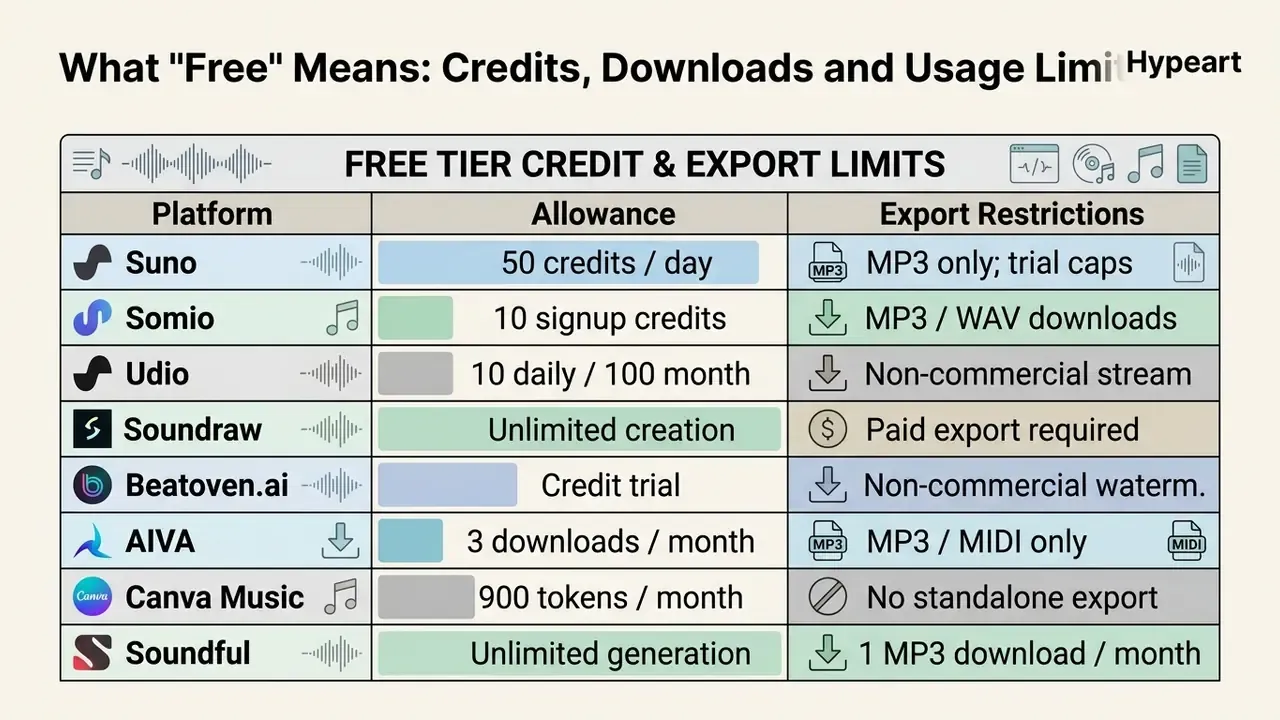
Download limits are the second constraint, and often the sharper one. Unpaid access usually caps you at low-bitrate MP3, withholding uncompressed WAV, FLAC or multi-track stem splitting. Canva's free music plan permits up to ten soundtracks per day but blocks downloading the audio as a standalone file, which makes it a design-tool add-on rather than an asset source. You can see the overview of standard software pricing structures to benchmark free tier restrictions against paid ones.
Sound Quality, Customization and Song Creation Features
Audio fidelity in generated music depends on sampling rates, harmonic coherence and prompt alignment. High quality AI models output stereo audio at 48 kHz in waveform space, which minimizes the phase artifacts common in low-resolution spectrogram conversion. Published objective metrics back this up:
Advanced tools read structured text prompts to manage tempo, mode, chord progressions and vocal delivery. Baseline consumer output typically renders at 44.1 kHz / 16-bit, while professional export paths target 24-bit / 48 kHz for video scoring. The gap is audible mainly after processing: compressed material collapses faster under limiting and EQ.
Customization depth varies a lot between beginner-friendly text-to-song models and granular arrangement suites. Full-length tools process text lyrics alongside style tags to build multi-verse arrangements with recognizable melodies and harmonies. Instrumental systems let editors adjust section energy, swap instrumentation, and extend or trim durations to match visual content. Research on edit-first workflows argues that robust systems should expose synchronized representations for form, harmony, melody, rhythm and segmentation, plus constrained local edits that revise one section without regenerating the whole track. That is, honestly, the feature that separates a toy from a tool.
E-E-A-T Verification: Free Access & Usage Terms (checked early 2026)
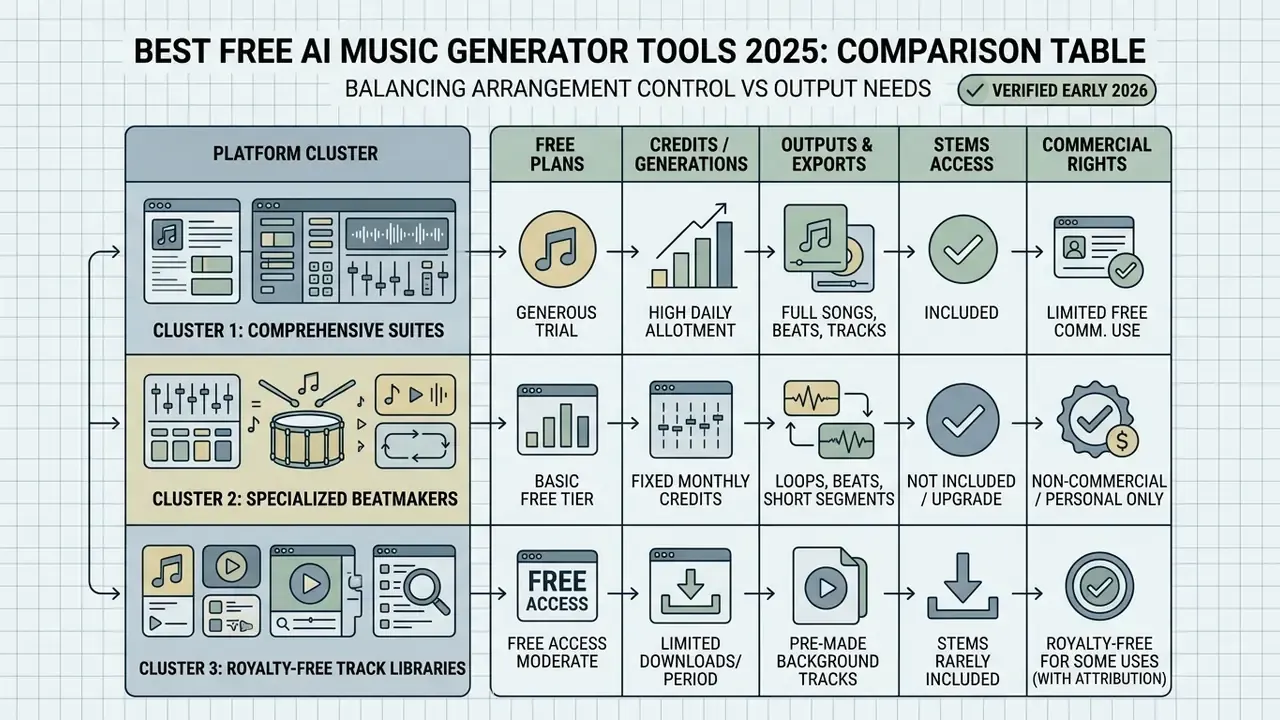
Best Free AI Music Generator Tools 2025: Comparison Table
| Platform | Generation focus | Vocals / instrumental | Free tier limit | Editing tools | Download formats | Commercial license | Optimal scenario |
|---|---|---|---|---|---|---|---|
| Somio | Full songs, BGM and acapella | Both (multilingual) | 10 free credits | Prompt optimization, remix, extend, section replace, vocal remover, stem splitter | MP3, WAV (320 kbps / 24-bit paths) | Non-commercial on free; full license on paid | Rapid prompt-to-song testing |
| Suno | Full song creation | Both (full production) | 50 credits / day | v5.5 Voices, Extend, Suno Studio, Weirdness slider, 12-stem split | MP3 free; WAV, 12 WAV stems plus MIDI on paid | Paid tiers only | Complete vocal tracks and lyrics |
| Udio | Arrangement and remix | Both (style-focused) | 10 daily / 100 monthly; 3 full-length generations per day | Inpaint, Extend (up to 10 sections), Remix, Sessions waveform trim | Platform playback / MP3 (export limited during licensing transition) | Paid tiers only | Granular sectional editing |
| Soundraw | Custom instrumental | Instrumental only | Unlimited generation | Energy and structure editor, instrument toggles, length control | Requires paid plan (MP3 / WAV) | All paid plans covered; rights survive cancellation | Background music for video |
| Beatoven.ai | Emotion-driven sync | Instrumental only | Trial generation credits | Timeline emotion points, text/audio/video-to-music input | Watermarked preview; MP3, WAV on paid | Paid tiers only | Podcast and video soundtracking |
| AIVA | Cinematic score | Instrumental (orchestral) | 3 downloads / month | MIDI piano roll editor, 250+ style presets | MP3, MIDI (paid WAV and multitrack) | Non-commercial on free | Film and game composition |
| ElevenLabs | Vocal synthesis and music | Vocals and speech | 10,000 chars / month | Audio tag control, PVC/IVC, ~30-second style reference | MP3, WAV | Requires paid plan | Human-like vocal isolation |
| Mureka | Voice cloning and songs | Both (custom voice) | Free trial credits | Character voice builder, Region Editing, MusiCoT structuring | MP3 (WAV on paid tiers) | Paid tiers only | Custom voice song creation |
Read the table as three clusters. Suno, Udio and Somio are the AI song generator group for vocals and lyrics. Soundraw, Beatoven.ai and AIVA are the instrumental generator group for royalty free music under video, games and podcasts. ElevenLabs and Mureka are voice specialists, useful when the vocal identity matters more than the arrangement. Only Soundraw currently promises that a licensed download stays commercially usable after cancellation, which is worth noting if your project archive has to outlive your subscription.
Advanced Input Modalities: Image, Rap, Hum and Audio References
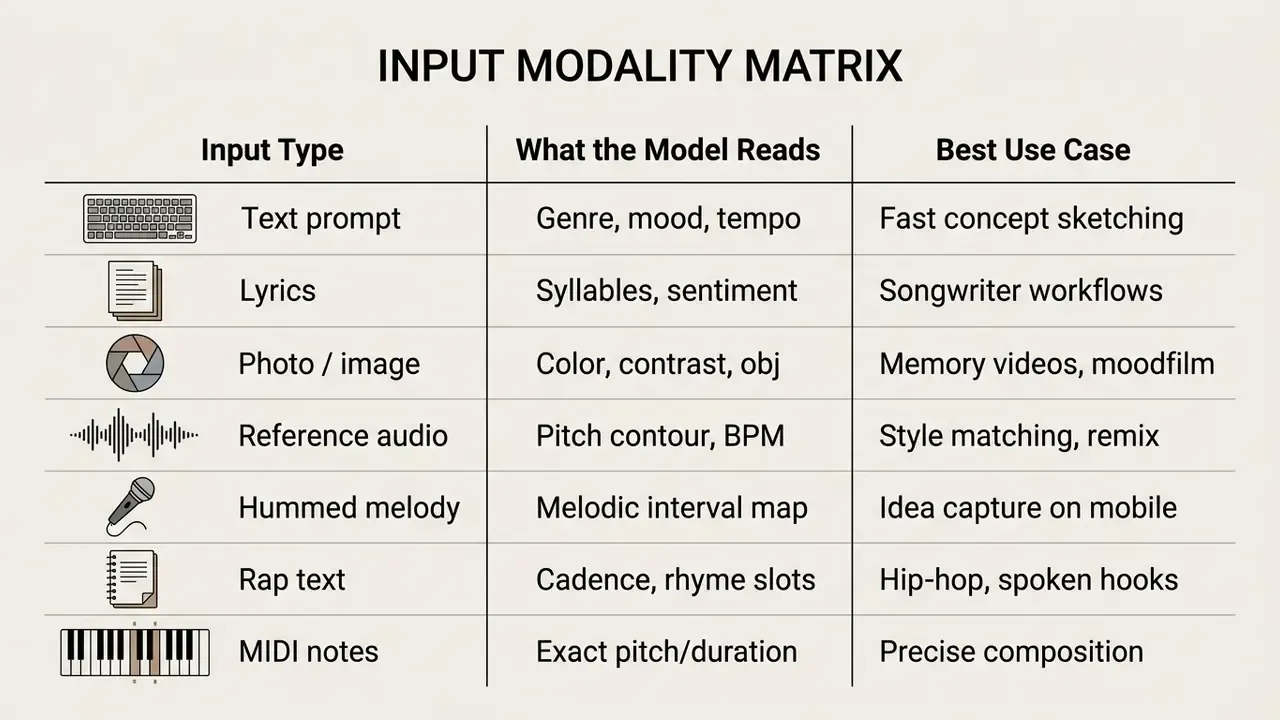
Beyond text prompts, modern generators accept non-text inputs. These modes matter for a simple reason: a reference file communicates rhythmic feel and timbre far more precisely than adjectives ever will.
- Photo-to-music
- Vision-conditioned engines analyze image contrast, color temperature and semantic content to pick scale modes, instrumentation and tempo. A cold, high-contrast night cityscape usually maps to minor modes and 90 to 110 BPM electronic textures; a warm beach frame maps to major modes, acoustic guitar and slower tempos. Google's Lyria 3.5 documentation confirms stereo generation from either text or images. If you are preparing source frames, our guide to online photo editors covers color and contrast prep.
- Audio reference and hummed melodies
- Upload a reference MP3 or record a vocal hum. The model extracts the pitch contour and rhythm grid, then builds an arrangement around it. Somio exposes this as a dedicated Reference input mode; ElevenLabs Music accepts a roughly 30-second audio guide for style and sonic control; Mureka accepts uploaded audio or a link as a vocal reference.
- Text-to-rap generators
- Flow-alignment models sync rapid cadence delivery to 80 to 90 BPM drum patterns, handling rhyme placement, multisyllabic stress and bar boundaries. You can specify rhyme targets, emotional register and regional style without writing metrically perfect lyrics yourself.
- Lyrics-to-song
- Paste an existing poem, letter or verse and the model infers melody, key and harmonic support from syllable structure and sentiment.
- Acapella mode
- A vocal-only song type yields isolated sung lines with no accompaniment. Useful for demos, layering over an existing beat, or building a hook library.
- MIDI note input
- Browser-based piano-roll editors let you draw notes and reassign instruments, a deterministic entry point for producers who already hear the melody.
One practical note on uploads. Reference audio you do not own is still someone's recording, and using it as a style guide does not launder its provenance. Hum instead when the source is commercial.
Best AI Music Generators for Full Songs With Vocals
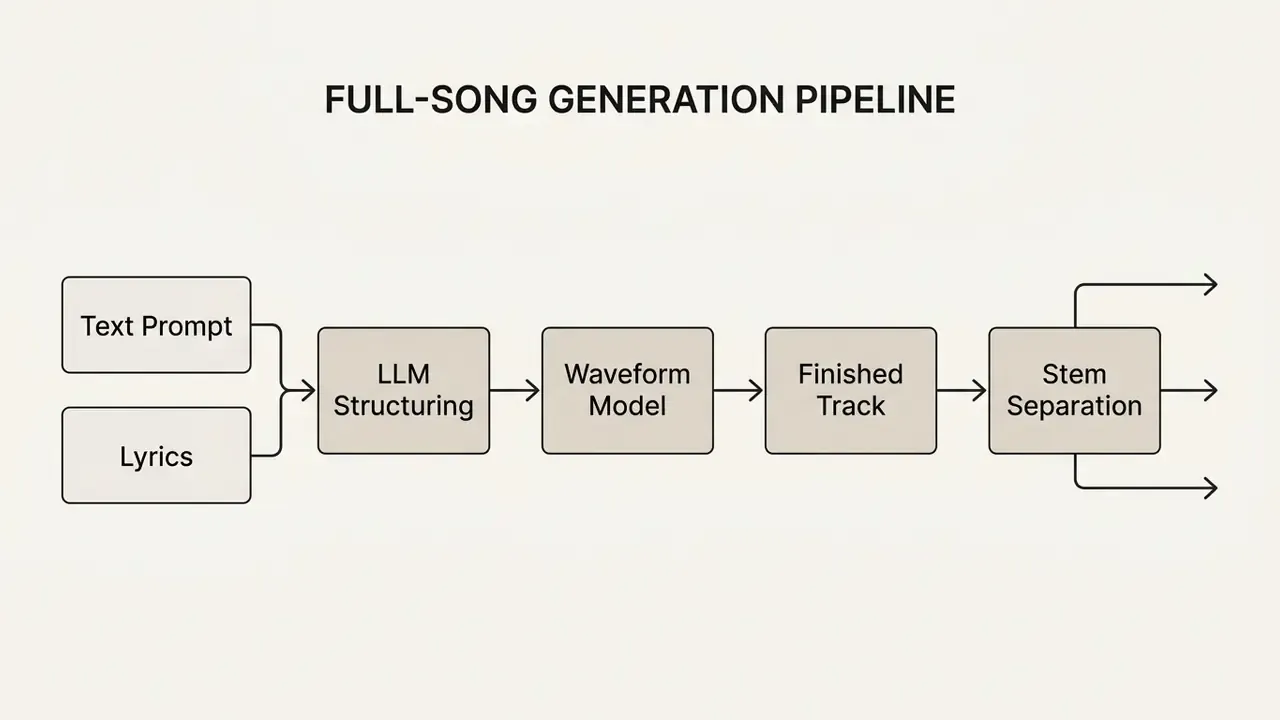
Producing complete songs with vocals requires systems that synthesize natural vocal timbres on top of coherent backing tracks. The leading text-to-music models pair large language models for lyrics generation with waveform diffusion so verse-to-chorus transitions actually land. That combination is what makes these the best ai for song creation right now, at least among consumer tools.
Independent benchmarking quantifies the gap between model generations:
Academic evaluation has standardized around three axes: lyric-following accuracy measured via phoneme error rate, style similarity to the prompt, and human mean-opinion scores for vocal naturalness. That distinction matters in practice. A track can score beautifully on timbre realism while mispronouncing half its lyrics, and listeners forgive the first far less than the second.
Somio: Studio-Quality Songs From AI Prompts
Somio works as an AI music generator from text, automatically expanding a short description into detailed arrangement tags. The system optimizes your prompt to specify key, tempo and vocal delivery before generation runs, which cuts the variance you get from unstructured prompting. Simply describe the idea and the platform fills in the technical vocabulary you might not know yet.
New accounts receive 10 free credits to test song creation across multiple languages, including generating lyrics in a target language even when the prompt itself is written in another. The platform produces full-length tracks with distinct vocal and instrumental layers and exports in MP3 or WAV. Four input modes are available (Prompt, Lyrics, BGM, Reference), with song type selectable as full song, instrumental or acapella. Saved prompts and lyrics can be reused with different style settings, which supports systematic A/B testing of arrangements without retyping inputs. Small thing, but it saves an hour on any real project.
Suno: Full Song Creation for Beginners and Creators
Suno targets content creators and pop-leaning producers. Its architecture generates complete songs with lyrics, vocal harmonies and dynamic arrangements from a single prompt, usually in under a minute. You can paste custom text lyrics or let the built-in AI lyrics generator compose structured verses around a theme.
The free tier offers 50 daily credits, enough to evaluate multiple music styles and genre blends in one sitting. Sharing options enable direct MP3 exports for social media. Commercial usage rights, stem exports and high-fidelity WAV downloads stay behind Pro and Premier subscriptions.
Suno Studio and advanced controls. Suno Studio adds a browser-based generative audio workstation. Advanced users can push a "Weirdness" slider to inject harmonic variance, isolate up to 12 separate WAV stems (vocals, backing vocals, drums, bass, guitar, keyboard, strings, brass, woodwinds, percussion, synth, FX) and export raw MIDI for external DAW work. The v5.5 release added Voices, letting users record or upload their own singing and generate songs in their own vocal identity. Audio uploads of up to eight minutes can serve as generation input, and the mobile app imports lyrics from notes and audio from voice memos.
Udio: Precise Editing, Extension and Remix Controls
Udio is the choice when you need surgical changes rather than another roll of the dice. Its editing suite includes Inpaint, Extend and Remix to modify specific sections of a generated track.
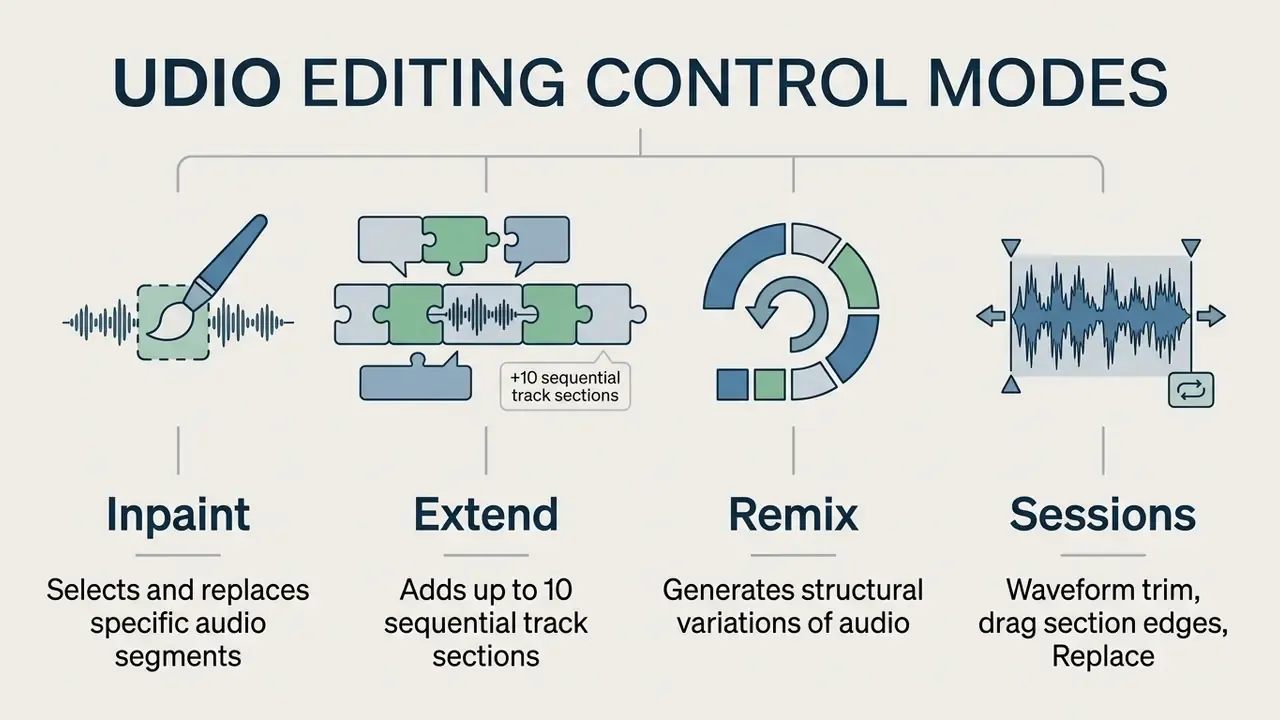
Inpaint lets you highlight part of a waveform and regenerate vocals or instrumentation without disturbing the surrounding audio. Extend appends intro, verse or outro segments before or after the source, building tracks several minutes long across a maximum of ten stacked sections. Sessions adds waveform-level control: highlight a segment, drag its boundaries, run Replace. One important limitation: after Udio's 2025 label licensing agreement, audio, video and stem downloads were restricted across all tiers. That makes the platform strongest as an in-browser editing and prototyping environment, not an export pipeline.
Best Free AI Beat Generator and Instrumental Music Tools
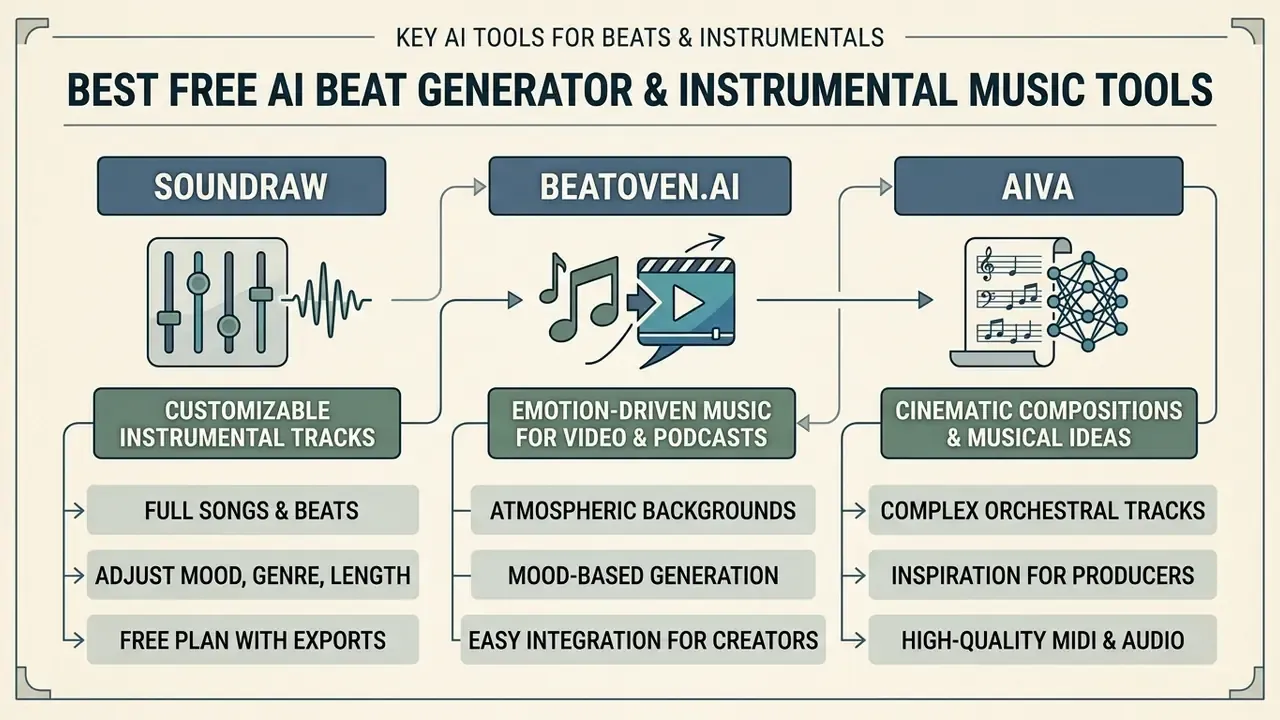
For producers, video editors and game developers, background music and drum patterns matter more than vocal synthesis. Finding the best ai beat generator 2025 comes down to clean mix separation, a customizable tempo grid and royalty-free licensing you can document. Among the best free ai beat generator options, the instrumental-first tools tend to be more usable on unpaid plans than the song generators are.
There is a structural reason for that:
To review automated production workflows for video, you can browse the hub and evaluate secondary editing applications.
Soundraw: Customizable Instrumental Tracks
Soundraw is a customizable instrumental generator built for video background scoring. Instead of leaning entirely on free-text prompts, you select a genre, mood and target length, then audition candidate backing tracks. Preset moods include Smooth, Motivational & Inspiring, Photography and Comedy, which map neatly onto common editorial briefs.
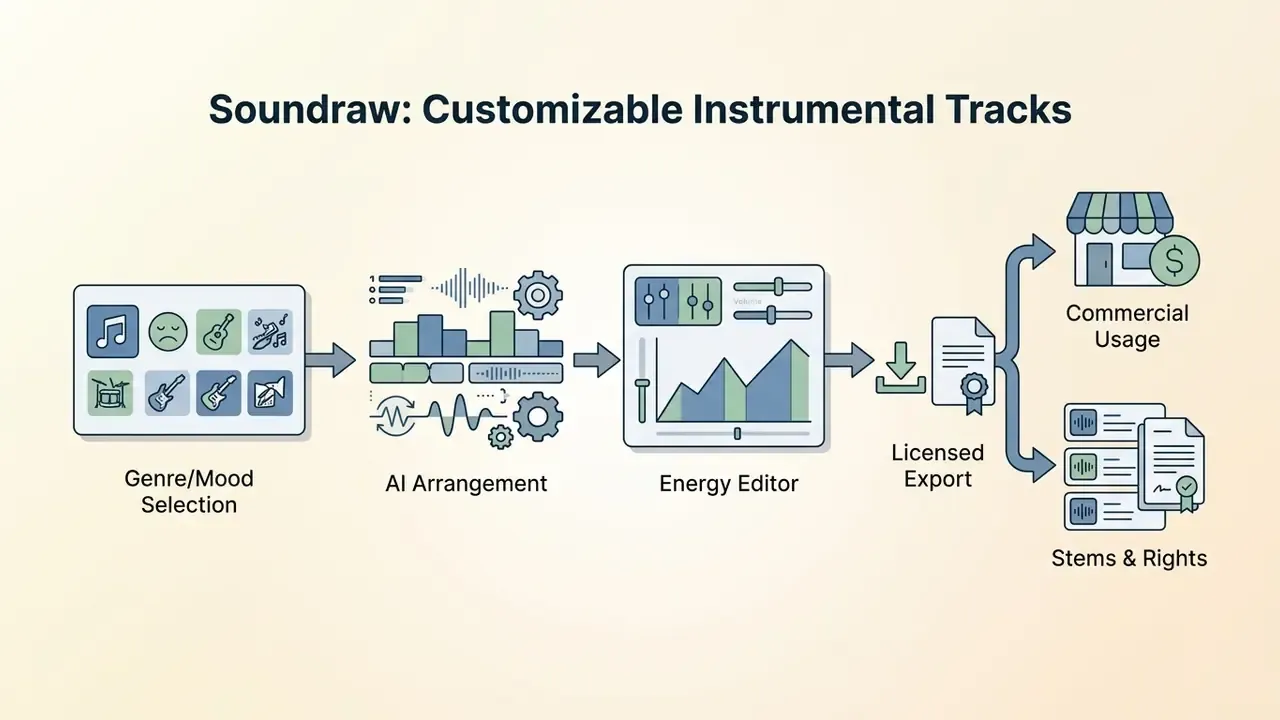
Its built-in editor gives granular control over structure. The technical basis for that kind of controllable rhythmic variation is documented:
Editors can adjust the energy of individual sections, raising intensity across a chorus or stripping the drums under dialogue. Paid subscriptions grant broad commercial rights across YouTube, UGC, product videos, tutorials, live streams, social media, video games, client work, radio and TV, and those rights stay valid even if the subscription lapses later.
Beatoven.ai: Emotion-Driven Music for Video and Podcasts
Beatoven.ai scores to emotion rather than genre, aligning background audio with a narrative arc. Upload video or audio, drop emotional transition markers along a timeline, and generate an adaptive soundtrack. Three input paths are supported: text-to-music, audio-to-music and video-to-music. Place an emotion at a specific point, trigger "Create Emotion", and that passage regenerates.
The platform specializes in royalty free tracks for videos, podcasts, short films, trailers, audiobooks, advertisements, livestreams and social media clips. Because it stays strictly instrumental, it avoids vocal collision, so a music bed never fights the voiceover for the same frequency space.
AIVA: Cinematic Compositions and Musical Ideas
AIVA (Artificial Intelligence Virtual Artist) serves film composers, game developers and arrangers. The engine generates instrumental music across more than 250 stylistic presets, from orchestral scores to symphonic metal and ambient soundscapes. Its earliest models trained on classical repertoire, which is why it treats voice-leading and cadential resolution more conservatively than pop-oriented engines. Useful when you need musical ideas that obey music theory rather than vibes.
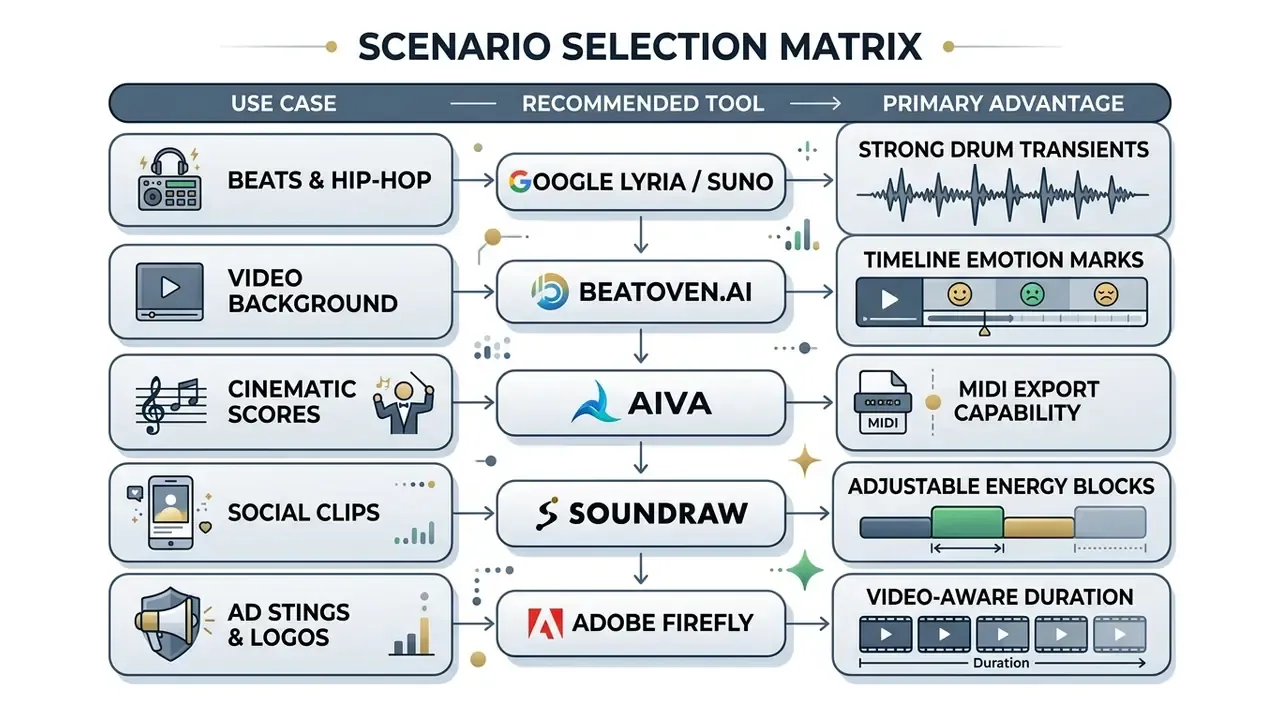
AIVA exports compositions as MIDI files or multi-track audio. Import the MIDI into a DAW to refine arrangements, reassign virtual instruments, or adjust chord voicings and key signatures. Adobe Firefly Generate Soundtrack complements this set differently: it analyzes an uploaded video, then lets you set vibe, style, purpose, energy, tempo and duration before exporting WAV.
AI Music Creation Tools for Vocals, Voice and Lyrics
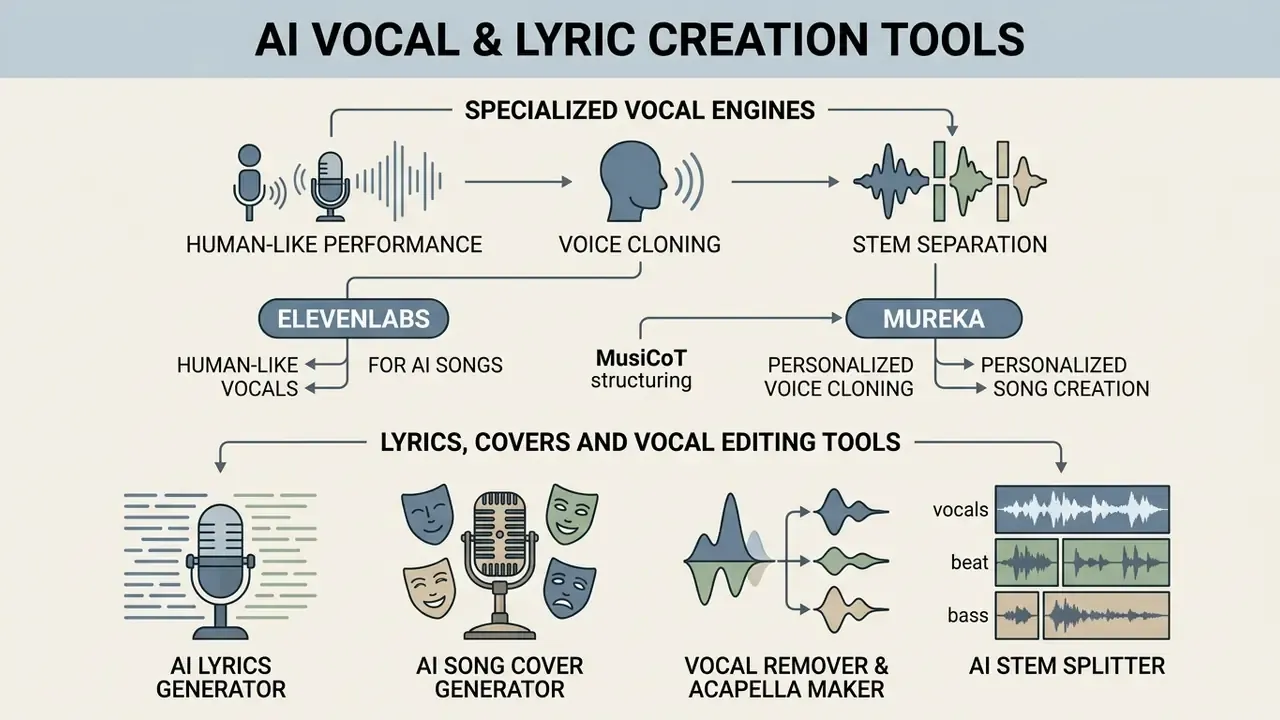
Specialized vocal engines cover needs the all-in-one song generators handle poorly: human-like performance, voice cloning and stem separation. Readers comparing speech-focused platforms can consult our guide to AI voice generators for voice quality, language support and licensing detail. Together, these are the best ai music creation tools for producers who want to isolate acapellas, clean up noise, or build a custom vocal line from scratch.
For commercial safety guidelines across generative media, explore the hub.
ElevenLabs: Human-Like Vocals for AI Songs
ElevenLabs concentrates on realistic voice synthesis and vocal customization. Built first for text-to-speech, its newer models read expressive tags such as [whispers], [sighs] or [excited] to shape cadence and emotional delivery. The v3 model adds multi-speaker dialogue handling plus better stress and cadence modeling.
Producers use Instant Voice Cloning (IVC) and Professional Voice Cloning (PVC) to build distinct timbres from clean speech samples. IVC works from short samples and requires explicit confirmation of rights and consent; PVC fine-tunes on extended audio, with at least one hour and ideally around three hours recommended. Worth knowing: PVC accepts spoken voice only, so singing samples are not supported. Vocal performance for songs comes from the dedicated music model, which generates full songs with vocals, AI-written lyrics and multilingual singing. The output holds up for vocal tracks, spoken-word overlays and dialogue integration.
Mureka: Personalized Voice Cloning and Song Creation
Mureka converts reference vocal samples into custom singing characters. Upload an acapella file, provide a link, or record singing directly, and the platform creates a fixed singer "Character" with its own avatar.
That character can then perform new songs generated on the platform. For creators building a recognizable channel identity, it means consistent vocal branding across original songs without booking studio time again.
MusiCoT structuring. Mureka uses MusiCoT (Music Thought Chain), which decomposes generation into sequential steps: chord progression mapping, then rhythm generation, then arrangement layering, then vocal synthesis. Because each stage conditions on the previous one, structure tends to hold across a full-length track instead of drifting after the first chorus. Region Editing allows section-level adjustment and extension. Multi-language vocal synthesis covers English, Spanish and Chinese, with basic and advanced modes for quick generation or full control over composition, arrangement and vocal character. You can also train a personalized model on prior works so new output stays close to an established style.
Lyrics, Covers and Vocal Editing Tools
Beyond the primary song generators, a set of utility tools handles task-specific editing inside the production pipeline:
- AI lyrics generator Large language models trained on song structures produce rhyming verse-chorus lyrics from a topic and genre prompt, with structural tags for verse, pre-chorus, chorus and bridge.
- AI song cover generator Replaces the vocal layer of an existing file with a different synthesized voice while keeping melody and tempo. Vendor documentation clarifies that cover engines do not simply filter the source recording; they read melody and structure, then rebuild vocals and production in the new voice and genre.
- Vocal remover and acapella maker Source separation algorithms remove vocals from a mixed file, isolating clean acapella lines or instrumental backing.
- AI stem splitter Separates a stereo file into isolated stems (drums, bass, vocals, instruments) for remixing and mastering.
One thing creators underestimate: AI origin is increasingly detectable at the platform level.
Essential AI Post-Processing Tools: Stem Separation, Vocal Removal and Format Conversion
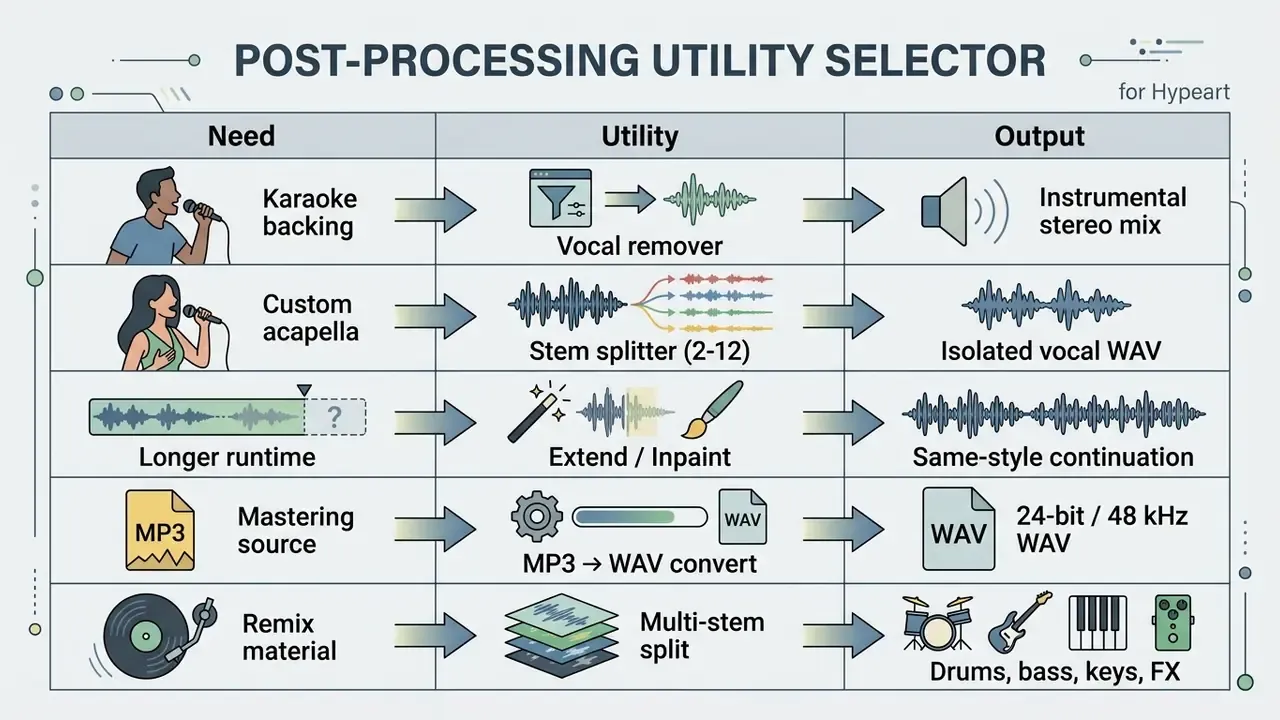
Complete audio workflows need post-generation utilities. Generation is the first stage only. The difference between a usable asset and a demo almost always happens afterwards.
- AI stem splitters and vocal removers.Neural isolation separates a stereo bounce into discrete stems: vocal, bass, drums, instruments. Documented tiers vary widely. ACE Studio exposes Basic 2-stem, Professional 6-stem, Advanced all-detected-stems and Customized isolation modes, while Suno's API documents
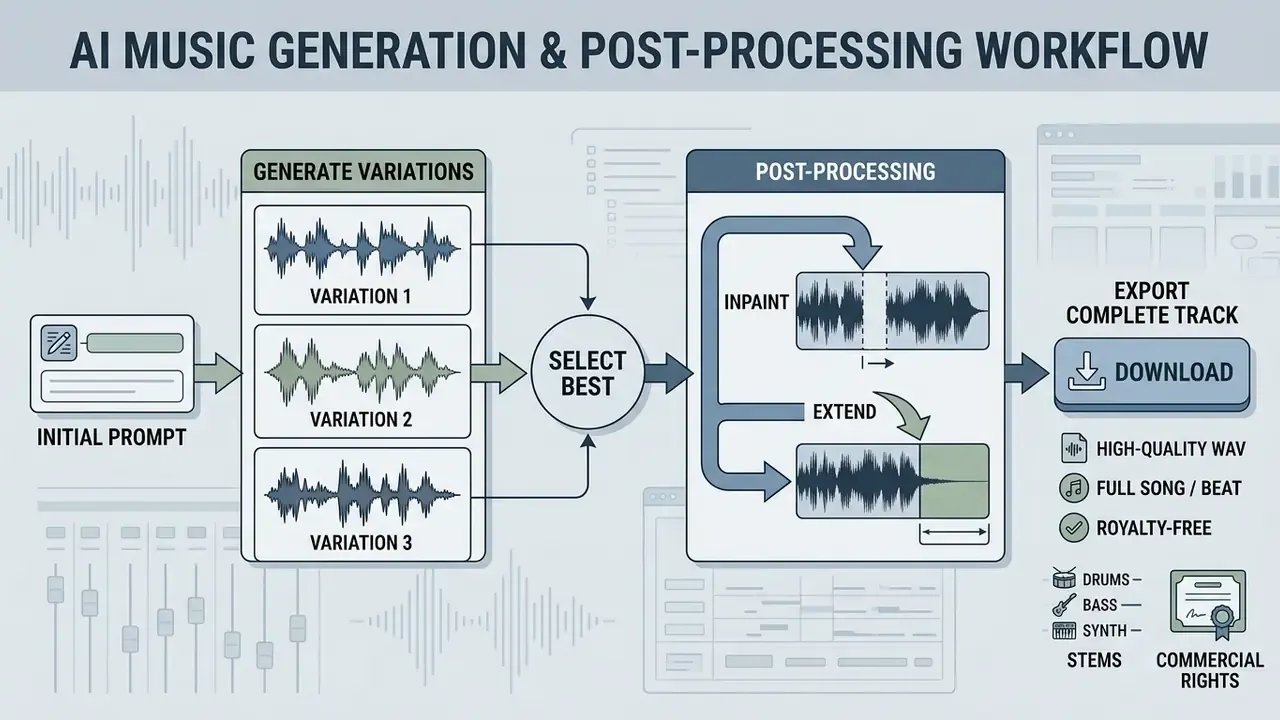
separate_vocalfor two stems andsplit_stemfor up to twelve. Moises separates vocals and instruments from any uploaded song. Use it to build a custom acapella, mute lead vocals for karaoke backing, or rebalance a mix that came out vocal-heavy. - Track extension (Extend and Inpaint).Rather than regenerating a whole composition, section-replacement algorithms append intro or outro bars, or swap a specific eight-bar passage. Workflow: pick a continuation point, generate the extension, audition the join for phase or tempo discontinuity, then commit. Udio permits up to ten stacked sections; Suno and Somio expose comparable extend and section-replace controls.
- Lossless format converters (MP3 to WAV).Previews render in compressed MP3 at 128 to 320 kbps, while professional video scoring and mastering need uncompressed 24-bit / 48 kHz WAV to preserve dynamic range and avoid cascading generational loss on re-encode. Converting an already-lossy MP3 to WAV does not restore discarded frequency content; it only prevents further degradation. So export the highest-fidelity format your plan allows at the source.
- Loudness normalization.Streaming platforms normalize to roughly minus 14 LUFS integrated, and broadcast targets differ. Generated tracks frequently arrive hotter than that, so a final limiter pass prevents platform-side gain reduction from flattening your mix.
- Compression for delivery.Music paired with video needs predictable file sizes for upload pipelines. Our guide to video compressors covers the trade-offs between file-size reduction and quality loss on the visual half of the deliverable.
Data Security, Voice Biometrics and Shadow AI Risk
Free audio platforms sit outside most corporate procurement processes, which makes them a routine Shadow AI vector. Three risk categories deserve explicit review before anyone uploads anything.
Training on user content. Free tiers often reserve broader rights over submitted material than paid tiers do. Before uploading unreleased masters, client stems or internal narration, confirm whether the provider retains prompts, lyrics and audio for model improvement, and whether an opt-out exists. Somio, for instance, states that songs made on the platform stay private to the account and that prompts, lyrics and tracks are not shared or reused. Get that kind of term in writing for any vendor you standardize on.
Voice biometrics. A cloned voice is biometric-adjacent data. ElevenLabs requires explicit confirmation of rights and consent for Instant Voice Cloning, and that requirement is not a formality: the U.S. Copyright Office's 2024 report on digital replicas notes that individuals may license their voices but cannot fully assign all rights, and that unauthorized replicas raise both copyright and state-law publicity exposure. Practical controls are simple enough. Written performer consent covering the specific synthetic use. Retention limits on uploaded samples. Deletion of voice models when the project closes.
Deepfake and content-policy liability. Generating a recognizable artist's voice, or a colleague's, without documented consent creates exposure independent of copyright. Right of publicity, fraud and platform policy violations all apply. Treat voice cloning as a governed capability with named approvers, not a self-service button. Content policy varies sharply by vendor too, which matters if your team also evaluates adjacent tools such as a free nsfw ai generator where acceptable-use terms differ substantially from mainstream audio platforms.
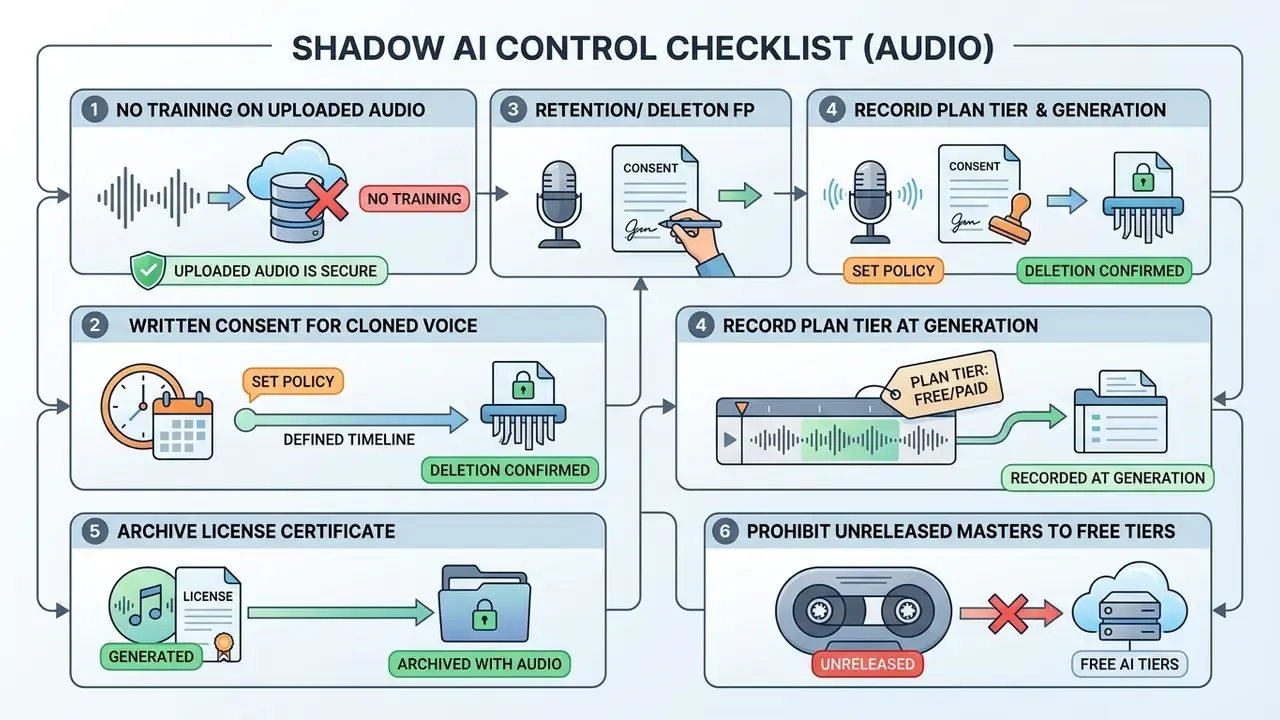
Assign an owner to that checklist. A control nobody owns is a control that does not exist.
How to Choose the Best AI Music Generator for Your Project
Selection depends on technical skill, commercial licensing requirements and distribution goals. A solo video editor needs different licensing terms and workflow speed than a working producer does; comparing options alongside free video editing software helps align audio and visual toolchains from the start.
To evaluate audio next to visual tools, check our guide to free video editing app mobile options, or explore the hub for head-to-head tool comparisons.
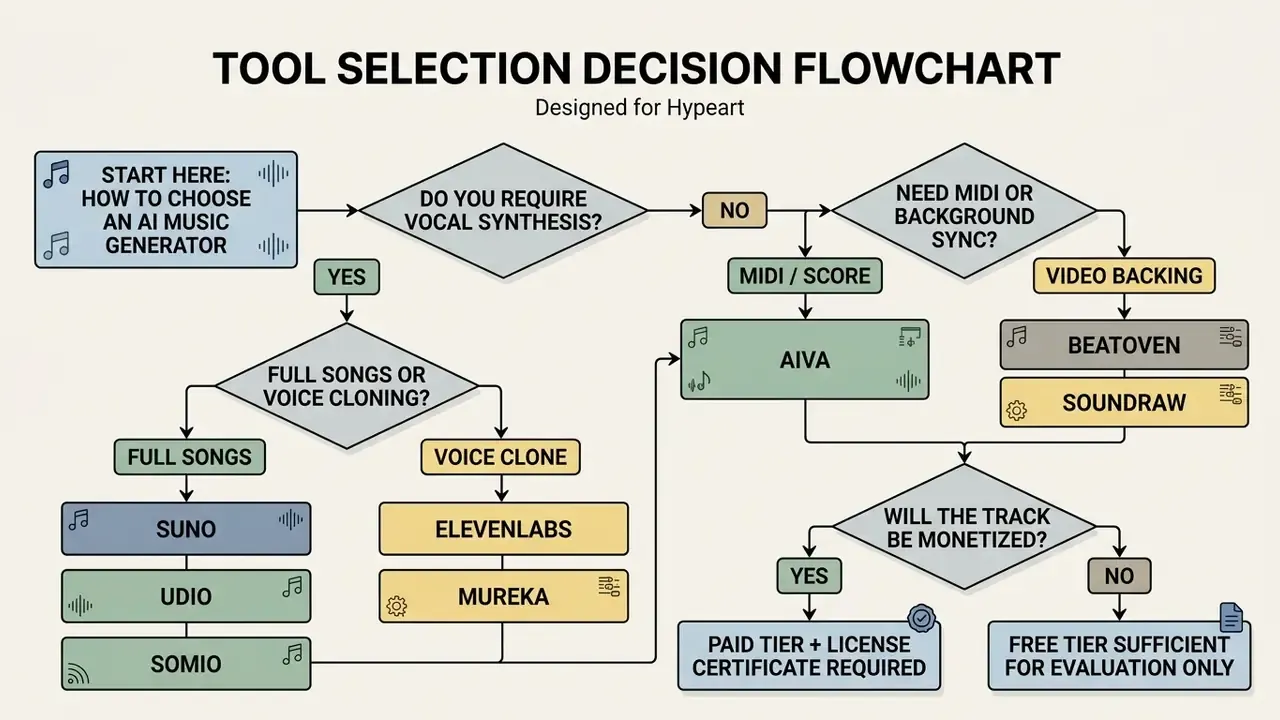
In text: if you need vocals, choose between full-song engines (Suno, Udio, Somio) and voice-cloning engines (ElevenLabs, Mureka). If you do not, decide whether you need MIDI and score editing (AIVA) or video-synced background music (Beatoven.ai, Soundraw). Then ask the money question. Monetized output requires a paid tier and a retained license certificate; a free plan is fine for evaluation and nothing more.
Best Free AI Music Generator App for Beginners
For users with no formal background in music theory, the best free ai music creation app has to offer a plain text prompt interface and automated arrangement. Anyone searching for the best ai music generator for beginners 2024 or a best free ai music maker app is really asking one question: can I get a finished track without learning a DAW first?
Tools like Suno and Tunee let you enter basic genre and mood keywords and return complete songs. Tunee states explicitly that no music theory or production software is required, and Suno's flow reduces to describing genre, mood and theme (or pasting lyrics) and pressing Create. Mobile-friendly web apps streamline this further, so beginners can test prompt concepts before paying for anything. Among best free ai music generator apps, the honest ranking for novices is: Suno for songs, Soundraw for background music, Somio when you want MP3 or WAV out of a free account.
Tools for YouTubers, Podcasters and Social Media Creators
Content creators, video bloggers and podcasters need royalty free tracks they can monetize on YouTube, Twitch and social media. Automated copyright detection such as YouTube's Content ID flags background audio constantly, which makes documented licensing essential rather than nice to have. And the volume of material in the system keeps growing:
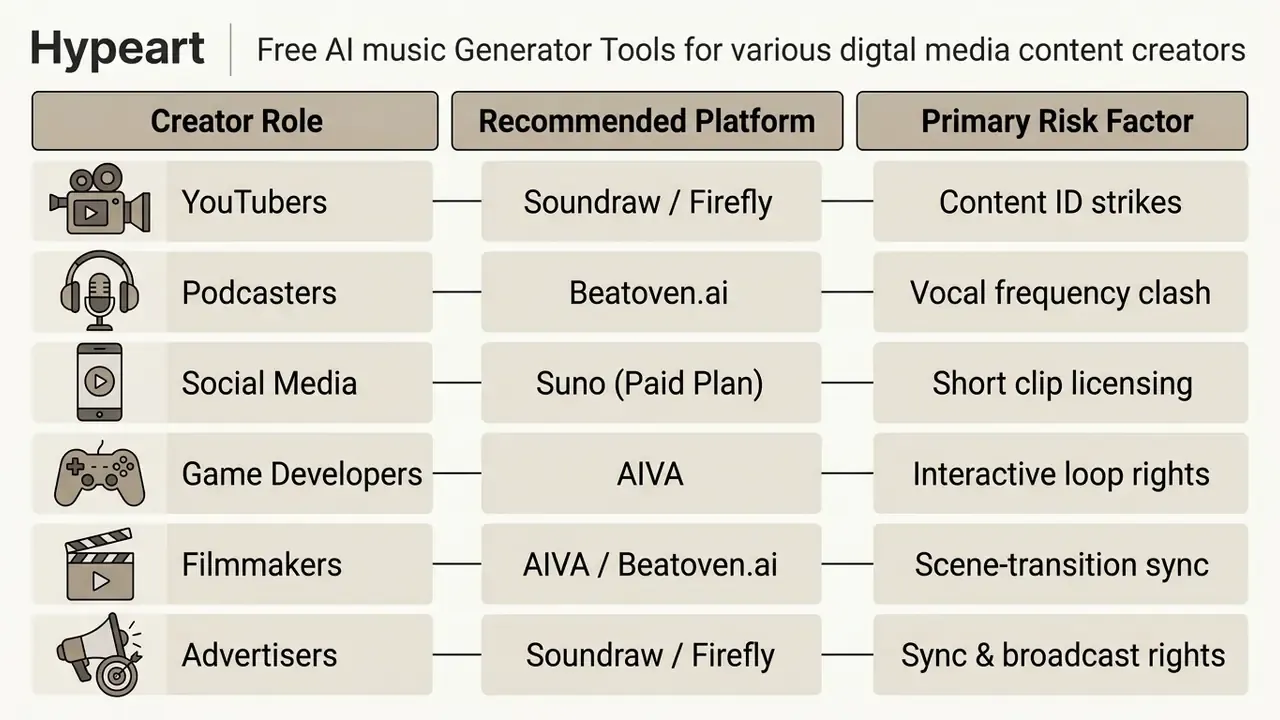
Adobe Firefly Generate Soundtrack and Soundraw design their licensing specifically for background scoring. Both supply copyright-cleared instrumental tracks that reduce automated monetization claims, and they pair naturally with AI video generators in an end-to-end content pipeline.
Commercial Rights, Royalty-Free Music and Copyright Claims
Commercial usage rights remain the murkiest part of generative audio. Under current U.S. Copyright Office guidance, works generated entirely by AI without human creative input cannot claim copyright protection (Source: USCO Report on Copyright and Artificial Intelligence, 2024). https://www.copyright.gov/ai/
Jurisdiction matters too. The European Parliament's 2025 study concludes that purely AI-generated output without substantial human intervention is not copyrightable in the EU, while UK law recognizes computer-generated works and attaches a 50-year protection term. The same track can therefore hold different status depending on where it is exploited.
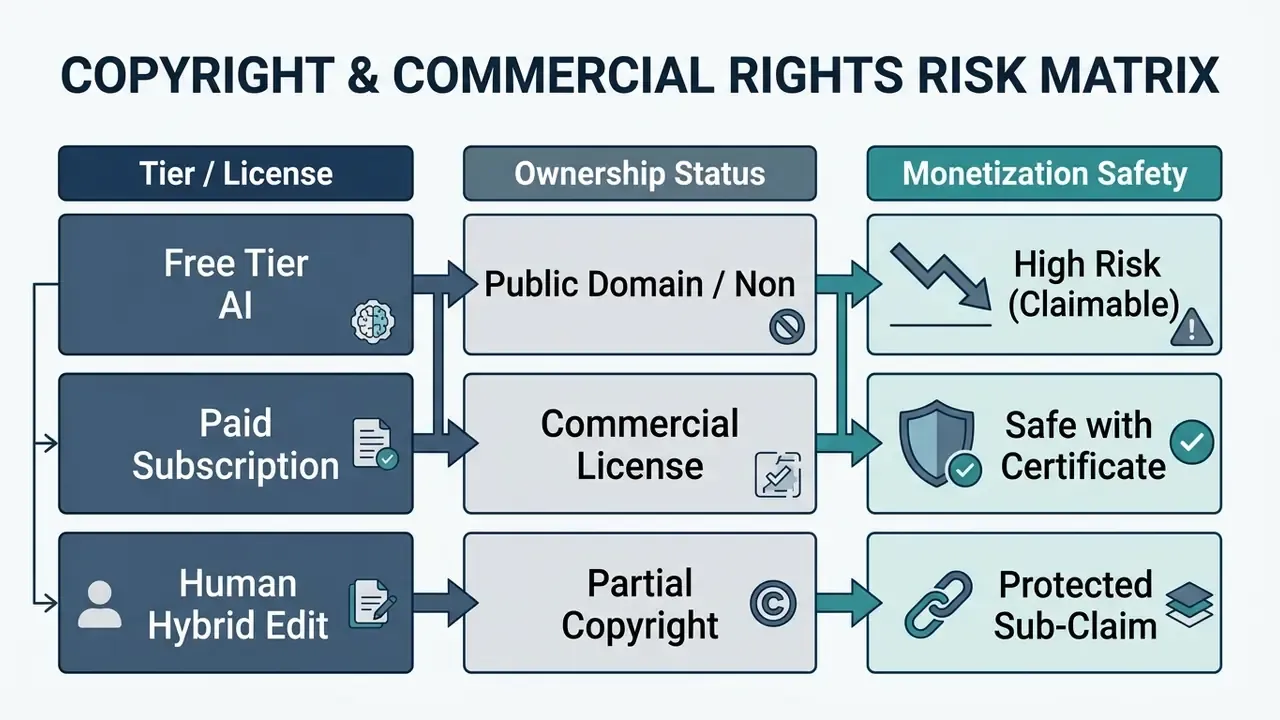
To reduce exposure, keep an audit trail of the production process. When distributing tracks commercially:
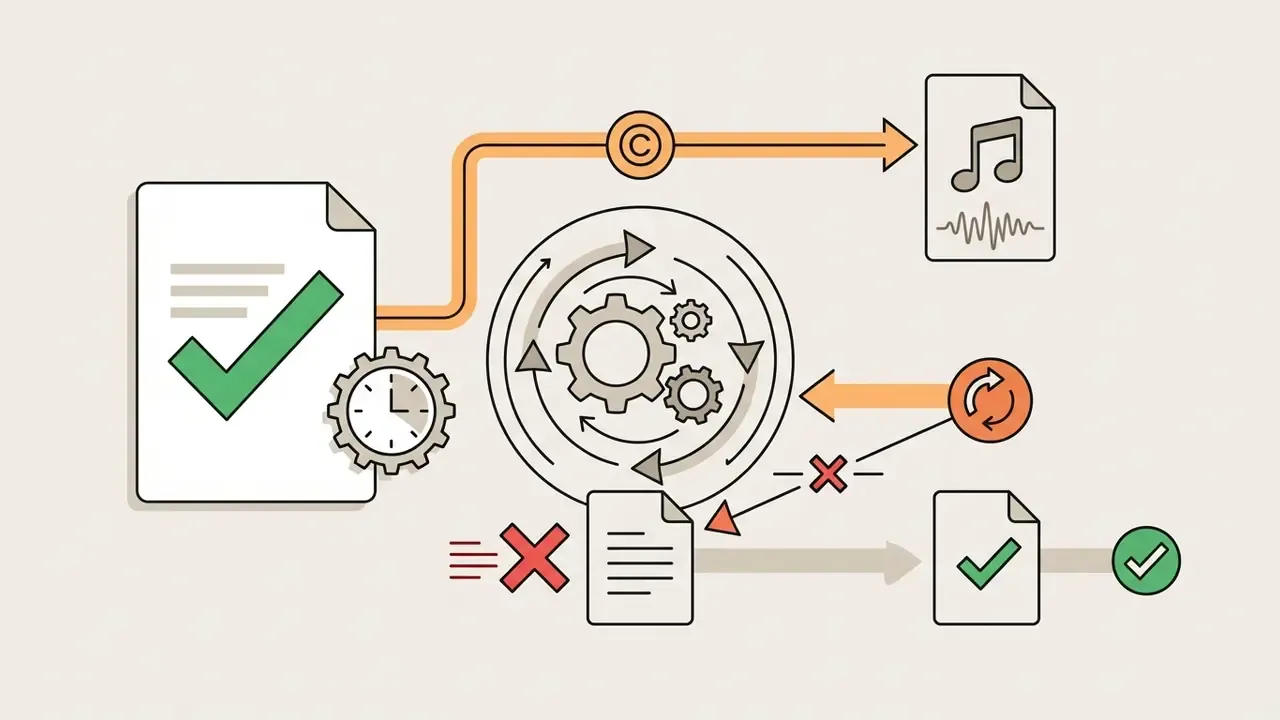
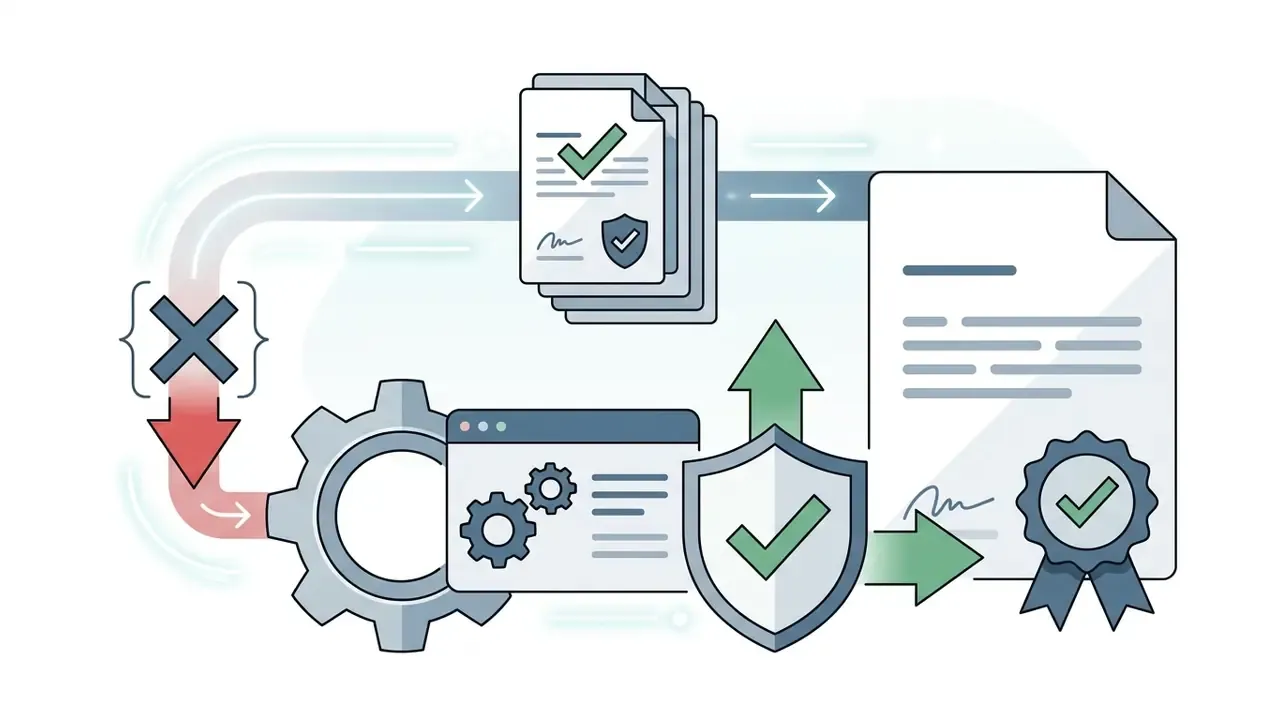
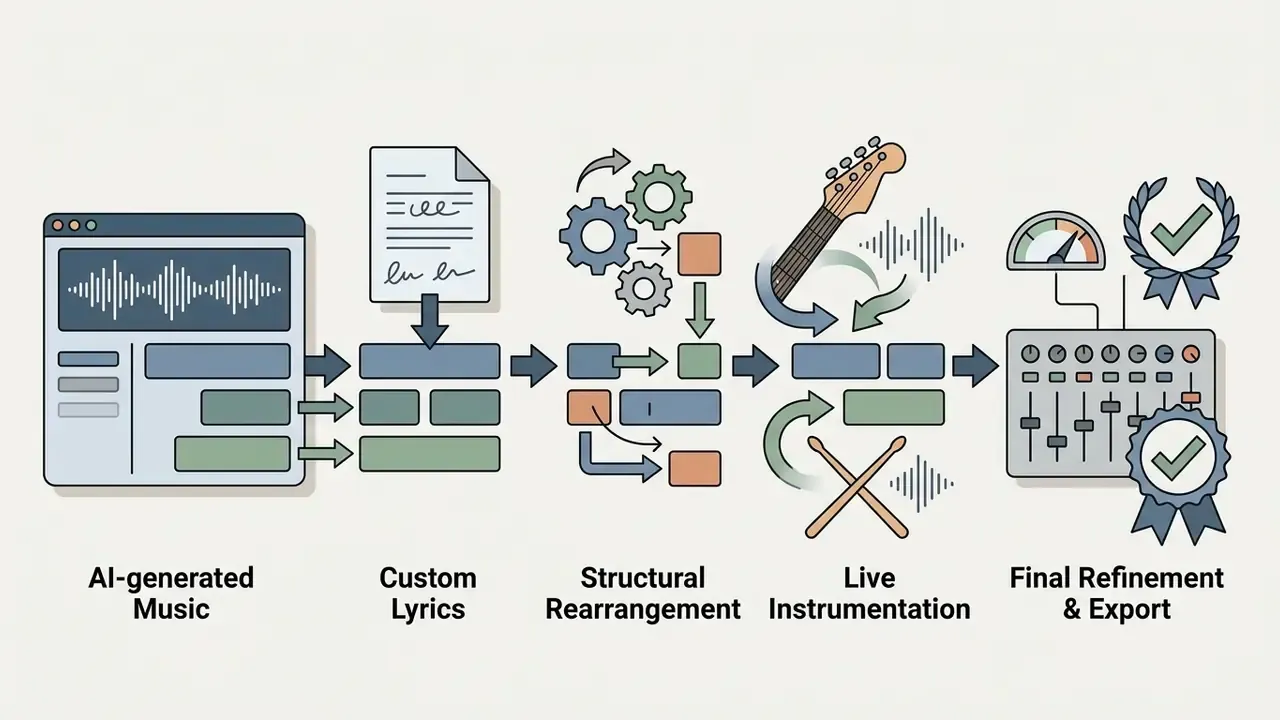
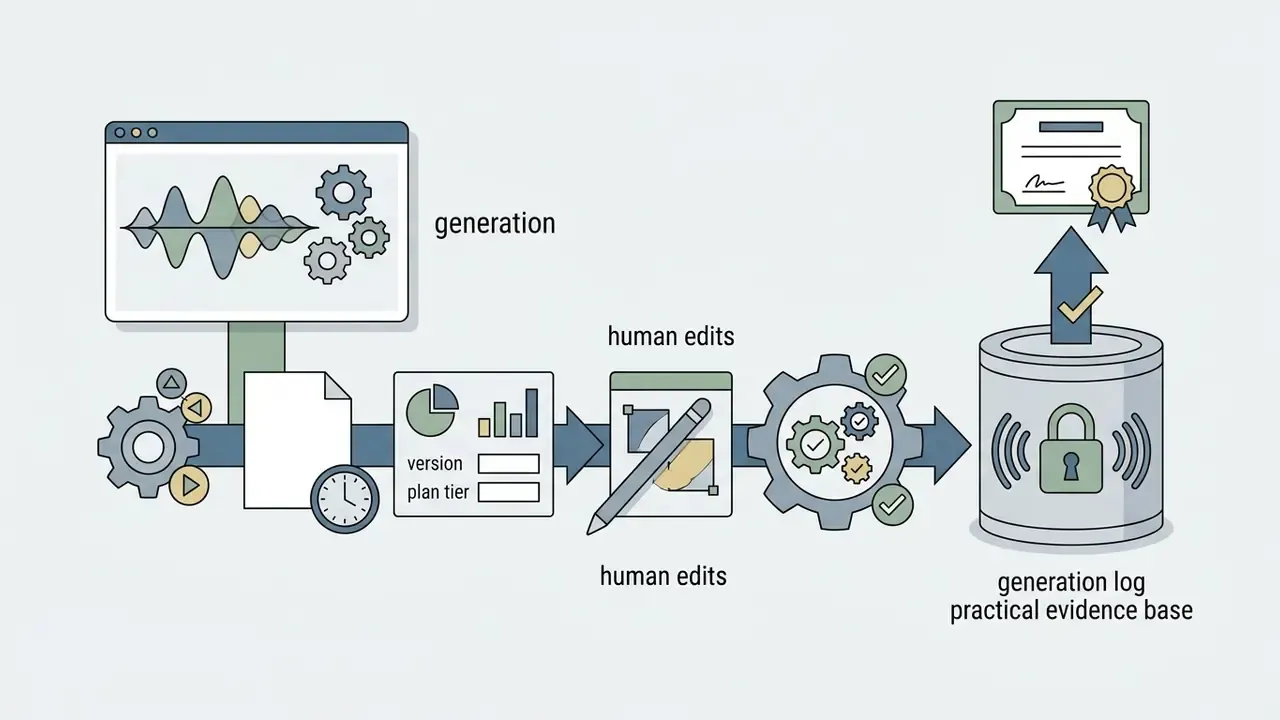
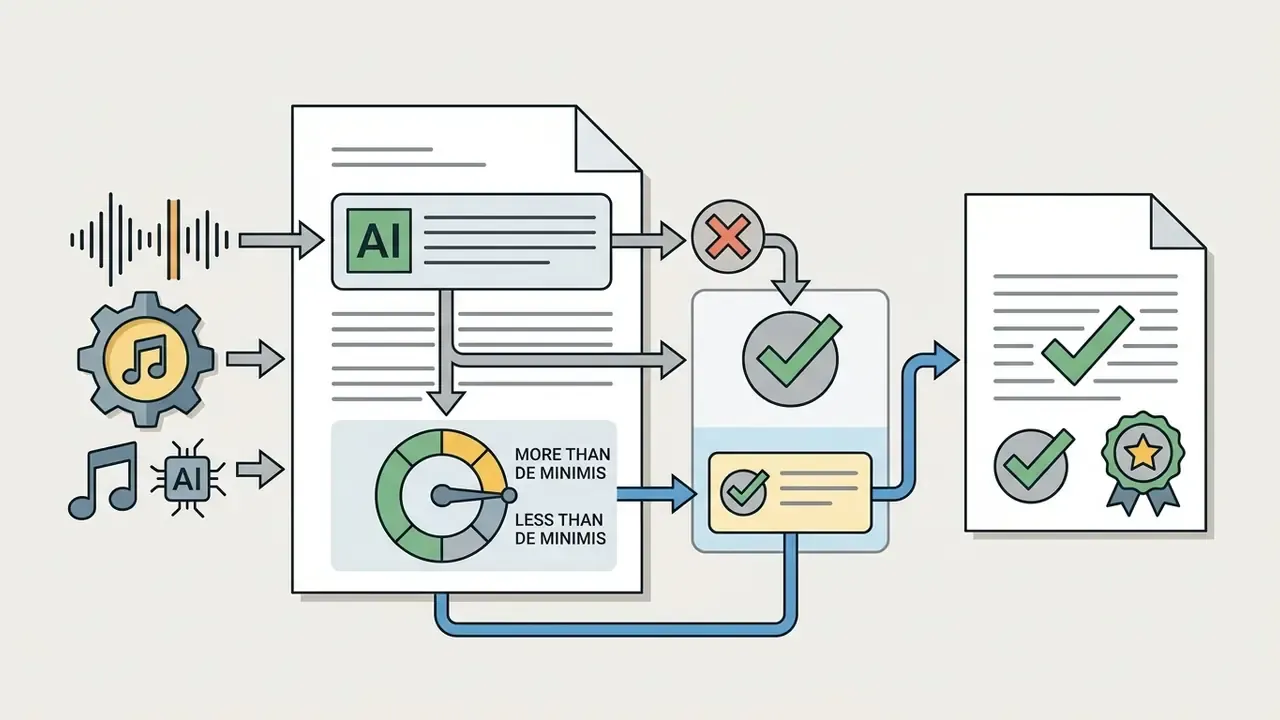
Enforcement risk is not hypothetical. Major labels have sued Suno and Udio over the use of protected recordings in training, and Suno has raised substantial venture funding while those actions proceed, a combination that concentrates regulatory attention on the largest free-tier providers. Udio's 2025 licensing settlement, which restricted downloads platform-wide, shows how fast litigation outcomes can change export capability for existing users. Treat generated audio as a dependency with revocable terms rather than a permanent asset, and keep a fallback library you already own.
How to Create AI Music From a Text Prompt
Polished output comes from iteration, not from one lucky prompt. Published workflow research describes a four-stage loop: write a novice prompt stating the idea, rewrite it as an expert-level description with instrumentation, mood and genre keywords, generate from the refined prompt, then compare versions and revise. In practice you move from a concept sentence to a technical brief.
Creators building multi-asset social campaigns can combine AI audio with free ai tools for social media content creation to streamline production.
Describe Genre, Mood, Lyrics and Music Style
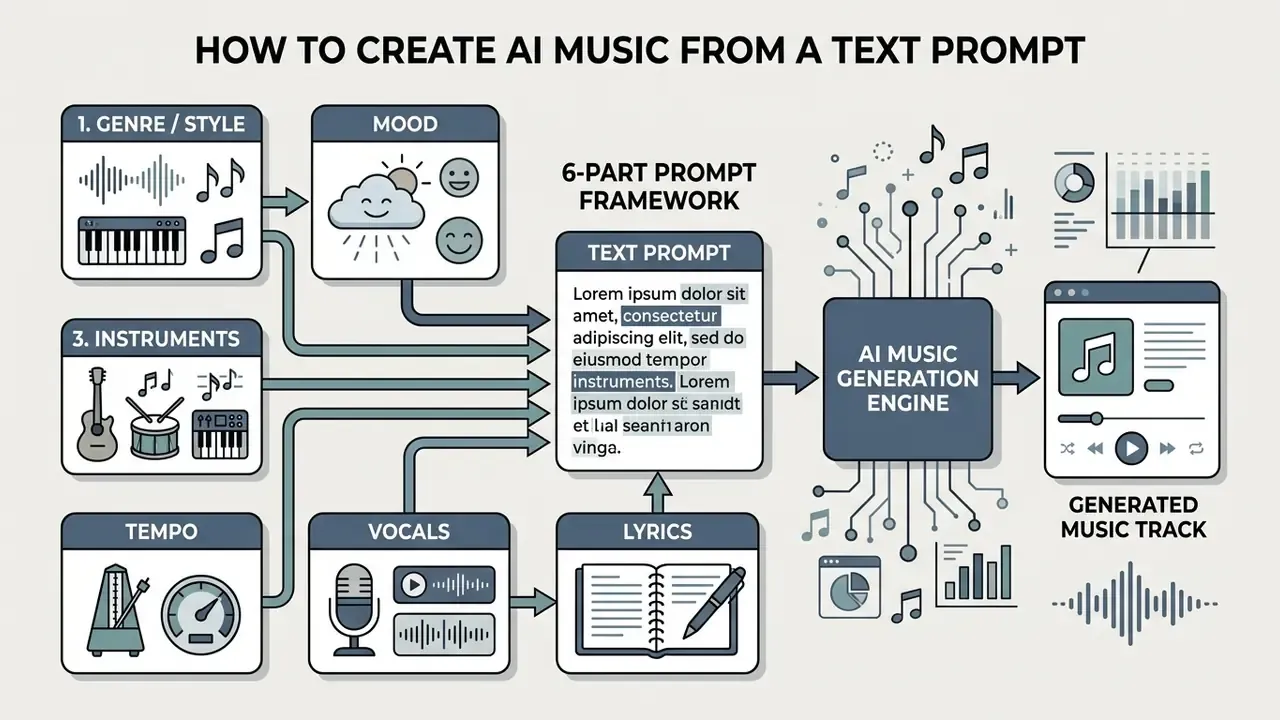
Effective prompts use concrete descriptions, not vague qualitative adjectives. The Google Cloud Lyria prompt guide recommends structuring inputs across six parameters in a fixed order (Source: Google Cloud Lyria Prompting Framework, 2025):
- Genre and style Specify primary and sub-genres, for example 1980s synthwave, lo-fi hip-hop, cinematic orchestral.
- Mood and emotion Define the emotional tone: melancholic, high-energy, dark, contemplative.
- Instrumentation List lead and rhythm instruments: distorted electric guitar, analog synthesizers, acoustic grand piano. The keyword instrumental excludes vocals outright.
- Tempo and rhythm Give BPM values or rhythmic terms: 90 BPM, driving 4/4 beat, syncopated groove.
- Vocal style and language Specify vocal character: airy female vocals, soulful male vocals, rap cadence, instrumental only.
- Lyrics Provide custom lyrics with structural tags such as
[Verse],[Chorus]and[Bridge].
Free-text description outperforms rigid tag-only input in measured relevance:
Ready-to-use prompt templates.
SYNTHWAVE (video intro, 30-45 sec)
1980s synthwave, retro-futuristic and driving, analog
polysynth pads + gated reverb drums + fretless bass,
112 BPM steady 4/4, instrumental only, no vocals.
LO-FI STUDY BEAT (podcast bed, loopable)
Lo-fi hip-hop, warm and unhurried, dusty upright piano +
vinyl crackle + brushed drums + soft sub bass, 78 BPM
swung groove, instrumental only, minimal melodic movement
in the 200 Hz to 4 kHz range.
CINEMATIC TRAILER CUE
Cinematic orchestral, tense building to triumphant,
low strings ostinato + timpani + brass swells + choir,
90 BPM rising to 120 BPM, instrumental,
[Intro 8 bars quiet] [Build 16 bars] [Climax 16 bars].
RAP HOOK
Boom-bap hip-hop, confident and gritty, sampled soul chops
+ hard-hitting kick and snare + vinyl noise, 88 BPM,
male rap cadence with doubled hook,
[Verse] ... [Chorus] ...
Common prompting mistakes.
- Contradictory descriptors
- "aggressive metal ballad at 60 BPM with upbeat energy" forces the model to average incompatible features. The result is a muddy compromise.
- BPM and genre mismatch
- Asking for drum and bass at 90 BPM, or slow blues at 160 BPM, fights the rhythmic priors baked into the model.
- Over-stuffed instrumentation
- Eight or more instruments usually yields a crowded mix. Three to five named instruments give the arranger room to breathe.
- Vague mood words
- "good", "cool", "professional" carry no acoustic information. Replace them with warm, brittle, hypnotic, urgent.
- Lyrics inside the style field
- Keep lyrics in their own field with structural tags. Mixing them into the style description degrades both.
- Ignoring reference audio
- If a feel is hard to describe, upload a 20 to 30 second reference or hum the melody. Pitch contour and rhythm grid extraction says more than three sentences of adjectives.
Generate, Edit and Download the Complete Track
Once the prompt is submitted, work through an iterative production process:
For video projects that need custom visual elements, explore free animation apps, review the guide to animation makers, or check free video editing apps without watermark options to finish the post-production pipeline.
FAQ: Frequently Asked Questions About Free AI Music Generators
What is the best free AI music generator in 2026?
Suno and Udio remain the top choices for full songs with vocals, with daily free credits for non-commercial use. Somio suits fast prompt-to-song testing, since 10 signup credits still allow MP3 and WAV export. For background instrumental tracks, Soundraw and Beatoven.ai offer the strongest customization, while AIVA covers cinematic and orchestral work with MIDI export. There is no single winner; the answer depends on whether you need vocals, stems or a license certificate.
Can I legally monetize AI-generated music on YouTube and Spotify?
Monetization depends on your subscription tier. Free plans generally restrict usage to non-commercial personal projects. Paid plans usually grant commercial rights, though tracks generated entirely by AI cannot claim statutory copyright ownership under U.S. law. The U.S. Copyright Office has also advised that works produced entirely by AI without human authorship are not entitled to musical-work royalty payments.
How do I clear a YouTube Content ID claim on AI-generated music?
"Royalty-free" describes a license term, not a copyright status, so an AI track can still trigger Content ID when a similar recording is registered by a rightsholder. Dispute through YouTube Studio and attach evidence of your license: the platform-issued commercial certificate, the invoice showing the plan active on the generation date, and your generation log with prompt and timestamp. AI origin alone is not a defense. Proof of rights is.
What is the difference between MP3 and WAV exports in AI generators?
MP3 is compressed audio, fine for online previews and social uploads. WAV is uncompressed and preserves dynamic range, which makes it necessary for professional mixing, video scoring and mastering. Converting MP3 to WAV prevents further generational loss but cannot restore frequency content compression already discarded.
Do free AI music generators include vocal removal and stem splitting?
Rarely on basic free plans. Specialized tools such as Suno (paid tiers, up to 12 stems), Moises, ACE Studio (2, 6 or all detected stems) and Somio offer multi-track separation, letting producers isolate vocals, drums, bass and instrumental elements for remixing.
Can I generate music from a photo or a hummed melody?
Yes. Vision-conditioned engines such as Google's Lyria accept images alongside text, mapping contrast, color temperature and scene content to mode, instrumentation and tempo. Reference-based platforms including Somio, Mureka and ElevenLabs Music accept an uploaded audio file or a recorded hum, then extract pitch contour and rhythm grid to build an arrangement around it.
Is there an AI acapella maker for vocal-only tracks?
Yes. Selecting the Acapella song type in Somio returns vocal-only output with no accompaniment. Alternatively, generate a full song and run a stem splitter or vocal remover to isolate the vocal from the finished mix.
How fast do AI models generate complete songs?
Speed varies by model and hardware rather than following one benchmark. Published model cards report roughly four minutes of music in about 20 seconds on an A100-class GPU, and vendors typically advertise a full song in under a minute. A 2024 review found only 6 of 27 surveyed music models supported real-time interaction. Expect anywhere from 20 seconds to several minutes depending on server load, track length and prompt complexity, and note that coherence tends to degrade beyond the five-minute mark.
Are my uploads and prompts used to train the model?
It depends on the provider and the tier. Some platforms state that prompts, lyrics and generated tracks stay private to the account and are not reused; others reserve broader rights on free plans. Confirm the data-handling clause before uploading unreleased masters, client stems or identifiable voice samples.
Do I need consent to clone someone's voice for a song?
Yes. ElevenLabs requires explicit confirmation of rights and consent for Instant Voice Cloning, and U.S. Copyright Office analysis of digital replicas notes that unauthorized voice replicas raise copyright and state-law publicity exposure. Obtain written, use-specific consent and set a deletion policy for voice models when the project ends.
Summary of Findings
| Goal | Primary Platform | Key Requirement |
|---|---|---|
| Vocal song creation | Suno / Udio | Clear text lyrics and style tags |
| Prompt-to-song speed testing | Somio | Prompt optimization plus MP3/WAV export |
| Video background scoring | Soundraw / Beatoven.ai | Royalty-free commercial license |
| Cinematic composition | AIVA | MIDI export and score editing |
| Custom voice synthesis | ElevenLabs / Mureka | High-quality training sample plus consent |
| Stem work and remixing | Suno Studio / Moises / ACE Studio | Multi-stem WAV separation |
| Image or hum-based ideas | Lyria / Somio Reference mode | Non-text input support |