«Evaluating software requires looking past marketing terms like "free". Open-source tools guarantee operational autonomy, while freemium applications trade convenience for export limits and recurring subscription prompts.»
- Editorial Research Desk, AI Governance & Digital Workflow Practice (2026)
Last updated: August 2026 · Reviewed by: Software & Licensing Review Board
What "Free" Means in Animation Apps
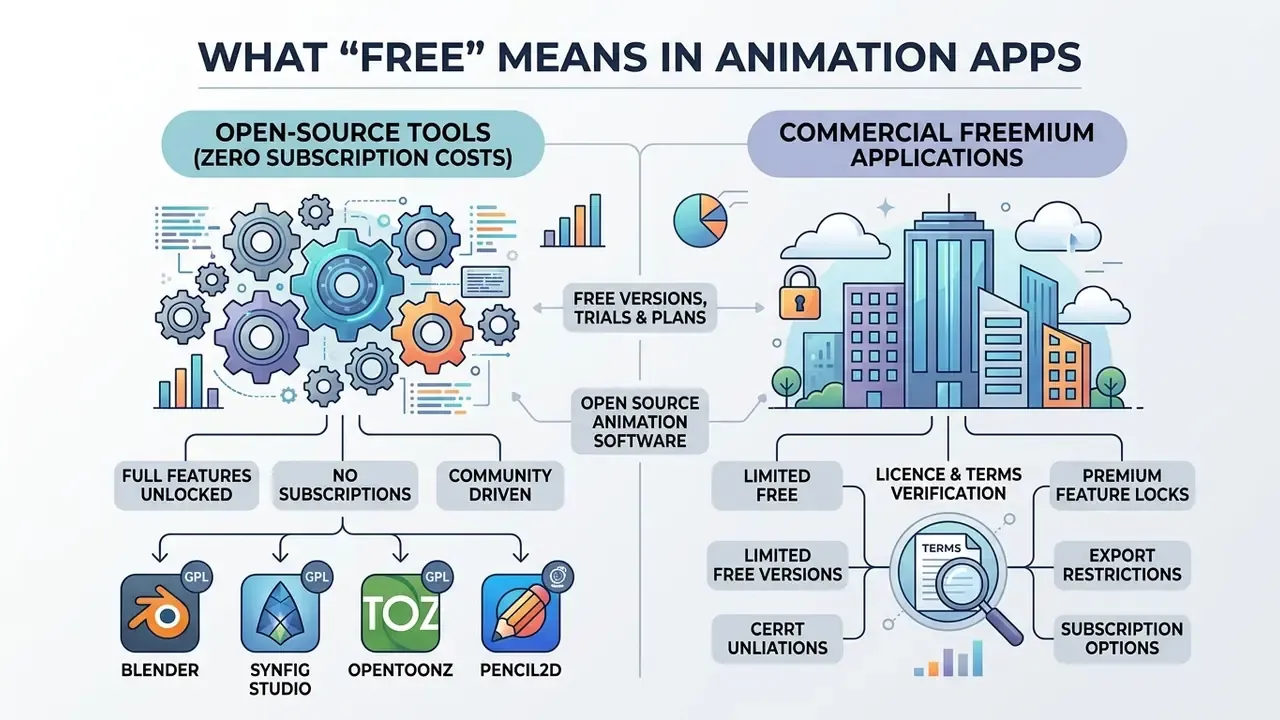
Free animation software falls into two distinct legal and operational categories: open-source tools with zero subscription costs, and commercial freemium applications. Understanding that split prevents unexpected paywalls, export watermarks, and lost work halfway through a project.
Put simply: open-source licences grant permanent rights to use, modify, and monetise your output. Freemium plans grant temporary convenience in exchange for capped resolution, watermarks, and upgrade prompts. Both can be the right answer. They are rarely the right answer for the same job.
Free Versions, Trials and Freemium Plans
Commercial animation apps use free versions, free plans, and limited trials to onboard users before monetising advanced features. A free plan offers permanent access to a restricted toolset. A free trial hands you full functionality for a fixed window, then asks for a card.
Information here is general and does not replace professional advice. Licence terms and pricing tiers change; verify current conditions on each vendor's official site before starting a commercial project.
Typical restrictions on non-paying accounts include 720p export caps, locked brush sets, forced watermarks, and audio track limits. Powtoon's published pricing documentation, for example, limits free accounts to three-minute videos with a Powtoon watermark and 720p output, while royalty-free premium asset libraries stay behind the paid tiers.
«Free plan: up to 3 minutes video length, 720p output, Powtoon watermark, and basic templates and characters.»
FlipaClip's Terms of Use go further: a free trial auto-converts into a paid auto-renewing subscription, and project export features are tied to the paid "Unlocker". Check the export path before you invest twenty hours in a complex sequence. Teams mapping long-term software costs can review pricing tiers across digital media platforms, then compare them with the export ceilings documented for free photo editors, which follow an almost identical freemium pattern.
One more practical detail. Export format matters as much as export resolution. MP4 suits social delivery, PNG or TIFF sequences preserve transparency for compositing, GIF stays useful for tiny UI loops, and Lottie or animated SVG keeps web assets light. If a free tier blocks the format your pipeline needs, the other limits hardly matter.
Open Source Animation Software Without Subscription Fees
Open-source animation software gives you full access to source code and features under licences such as the GNU General Public License (GPL) or a BSD licence. No subscription fees, no platform limits, no commercial restrictions on the output.
«Synfig Studio is distributed under the GNU GPL, which permits use, modification, and redistribution without subscription fees or usage limits.»
- Blender
- GNU GPL v2+, fully free for commercial and non-commercial use, no export limits (blender.org).
- Synfig Studio
- GNU GPL v3, fully free open source, no subscription fees (synfig.org).
- OpenToonz
- Modified BSD Licence, free open source derived from Studio Ghibli workflows (opentoonz.github.io).
- Pencil2D
- GNU GPL v2, lightweight free open source for 2D hand-drawn work (pencil2d.org).
- Krita
- GNU GPL v3, free digital painting suite with a frame-by-frame animation timeline (krita.org).
- FlipaClip
- Freemium, 3 free layers, watermarked exports without the paid upgrade (Visual Blasters official listings, 2026).
- Powtoon
- Freemium, 3-minute maximum duration, 720p cap, watermark on the free tier (powtoon.com).
How to Choose a Free Animation App
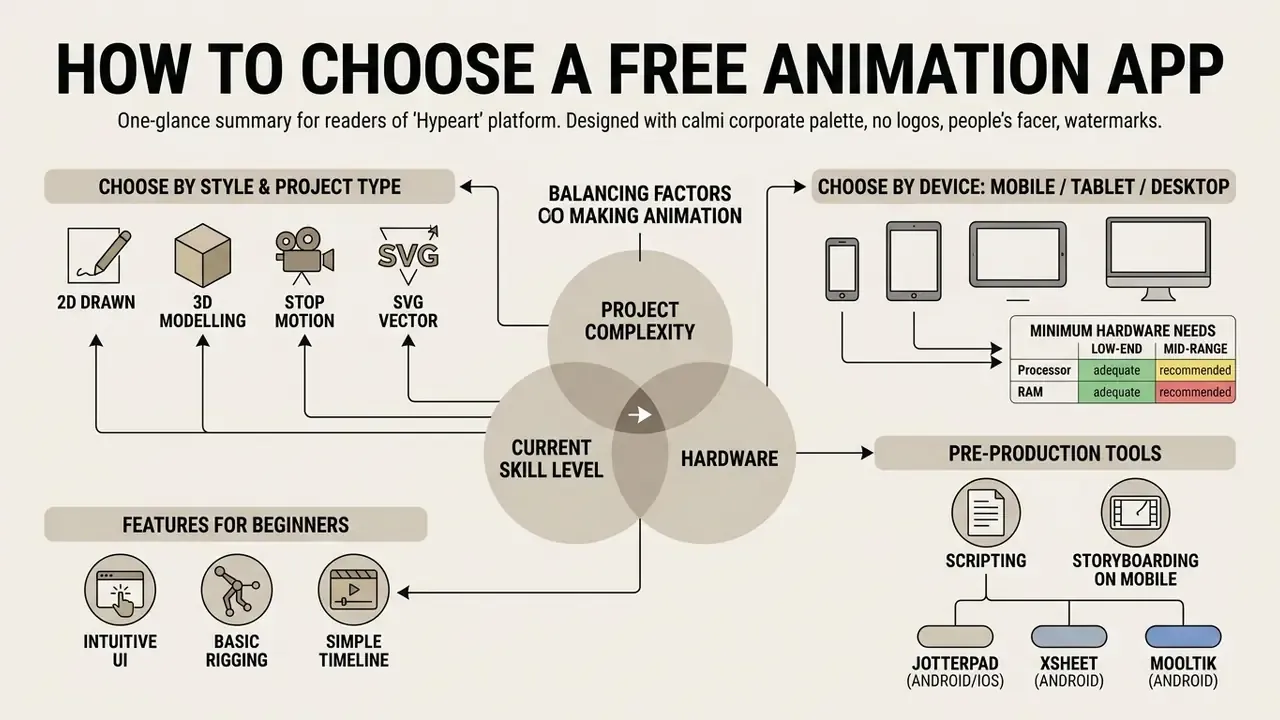
Picking the right app to make animation means balancing hardware, project complexity, and your current skill level. Define the visual goal early. Switching software mid-production is the most expensive mistake in this category. Readers new to the field can review the broader taxonomy of animation makers to see how template-driven platforms differ from frame-based drawing tools.
Choose by Animation Style and Project Type
Animation styles demand different toolsets and different data structures. Hand drawn animation leans on frame animations and onion skinning to guide organic movement between keyframes.
Vector based animation and motion graphics work with path-based shapes, which enables automatic tweening and scalable svg animations without redrawing anything (W3C SVG 2 Specification, 2025). Stop motion animation needs a precise camera capture interface. 3D animation depends on spatial rigging and lighting.
Style also decides the file model you inherit. OpenToonz, for instance, separates Toonz Vector (PLI), Toonz Raster (TLV), and standard Raster (TIF) levels, and level-specific effects must be applied in a fixed order in the effect chain. A structural detail, yes, and irrelevant until your project outgrows a single scene.
Frame rate deserves an early decision too. Twelve frames per second halves your drawing workload and still reads as deliberate, stylised motion; twenty-four gives smoother action but doubles the clean-up pass. Beginners almost always underestimate that arithmetic.
Choose by Device: Mobile, Tablet or Desktop
Hardware dictates real-time rendering speed, canvas size, and input precision. Desktop environments supply the processing headroom for high-resolution renders and complex node structures.
Tablets with a pressure-sensitive stylus offer the most natural environment for traditional hand drawn frame creation. Instructional modules on digital in-betweening name the stylus as the preferred input for hand-drawn correction passes. Mobile environments on Android devices, iPhones, and iPads give you touch-first convenience for quick sketches and short social clips, at the cost of canvas size and pointer precision. Creators who need mobile editing alongside drawing can explore an android video editor comparison for on-the-go options.
Minimum hardware requirements matrix
| Software | CPU / GPU baseline | RAM (minimum → comfortable) | Storage and notes |
|---|---|---|---|
| Blender 5.x LTS | 4 CPU cores; GPU with 2 GB VRAM | 8 GB → 16-32 GB for simulation and 4K rendering | Windows 8.1+, macOS 11.2+, Linux glibc 2.28+; heaviest option in this guide |
| OpenToonz | Dual-core desktop CPU; discrete GPU optional | 4 GB → 8 GB for multi-level scenes | Scene folders grow fast with raster (TLV/TIF) levels |
| Synfig Studio | Dual-core desktop CPU | 4 GB → 8 GB for nested canvases | Vector-first, so file sizes stay small |
| Krita | Dual-core CPU; OpenGL-capable GPU | 4 GB → 8 GB+ for large canvases | Android build available; big brush files raise RAM use |
| Pencil2D | Any modern dual-core CPU | 2 GB → 4 GB | Runs on low-spec and older laptops |
| FlipaClip / Animation Desk | Mid-range mobile SoC | 2 GB device RAM → 4 GB+ | Layer count is the practical limit, not raw CPU |
| Powtoon / browser tools | Any device with a modern browser | 4 GB | Needs a stable connection; rendering happens server-side |
Features That Matter for Beginners
Beginners need an intuitive interface and friendly interfaces that reduce friction in the first hour. The essentials: onion skinning for frame overlays, multi-layer support, solid drawing tools, sound effects integration, and direct video editing options. Vendor documentation for beginner-oriented tools such as Clip Studio Paint, RoughAnimator, and Animation Desk converges on the same five-part baseline, namely a simple UI, onion skinning, brush tools, audio import and export, and one-click output to MP4, GIF, or an image sequence.
Software with a steep learning curve buries new users under dense menus. Adjacent concepts help as well. Trimming, compression, and aspect-ratio handling all affect delivery; a primer on video compression and file-size control explains why a 4K frame sequence turns unusable on a mid-range phone.
Tools with visual timeline management make the core concepts, spacing and timing, easier to feel rather than memorise.
That number matters because usability, not feature count, predicts whether a beginner ever finishes a first animation.
Pre-Production Tools: Scripting and Storyboarding on Mobile
Before drawing keyframes, animators use lightweight mobile tools to structure script, timing, and shot order. Skipping pre-production is the most reliable way to abandon a project at the halfway mark.
- JotterPad (Android/iOS) Formats animation screenplays in standard Fountain and Final Draft syntax, then exports production-ready PDFs for voice talent or collaborators. The free tier covers writing and formatting; cross-device sync sits behind the paid plan.
- XSheet (Android) A simple tool for storyboards, timing sheets, and animatics. Frames can be drawn directly or imported, which helps when you are working out shot timing away from a desk. Stability varies by device.
- Mooltik (Android) A storyboarding app that also supports hand-drawn animation inside scenes, with onion skinning and audio, exporting single boards or rough animatic MP4 previews.
- Firoona (Android) A focused storyboard app with a clean interface. It exports board images and animatics with an audio track, although dialogue and action descriptions stay inside the app.
A one-hour animatic built in XSheet or Mooltik routinely saves several hours of redrawn keyframes, because timing errors surface before any clean-up begins.
Corporate and Security Risk Assessment: Local vs Cloud Processing
For teams in regulated environments, finance, healthcare, legal, public sector, the decisive variable is not feature depth. It is where the project data lives. Fully offline desktop tools (Blender, Pencil2D, Krita, Synfig Studio, OpenToonz, Glaxnimate) keep assets on the local machine or inside the internal network. Browser-based and mobile freemium tools (Powtoon, Canva, SVGator, cloud-synced tiers of FlipaClip and Animation Desk) upload source assets to vendor infrastructure, which raises data-residency, retention, and confidentiality questions.
IT and security approval checklist before whitelisting an animation app
- Processing locationDoes the tool render locally, or are project files uploaded to vendor servers?
- Account requirementCan it be used without corporate SSO or a personal email registration?
- Asset retentionHow long are uploaded assets stored, and can projects be deleted permanently?
- Licence scopeDoes the free tier permit commercial and client-facing output without royalties?
- Output integrityDo watermarks or resolution caps make the deliverable unusable?
- Update channelIs the installer signed and distributed from an official domain or a verified app store?
- Offline capabilityCan the tool run inside an air-gapped or restricted network segment?
- Exit pathAre project files stored in open formats (SVG, PSD, image sequence) rather than a proprietary cloud container?
Estimating the hidden cost of "free" software
Free licences shift cost from procurement to payroll. A simple, auditable model:
Total cost of ownership = (training hours × blended hourly rate) + (support incidents × average resolution hours × rate) + migration and export rework + a risk reserve for the absent SLA.
A steep-curve suite such as Blender or OpenToonz usually needs 20 to 40 hours of structured training per operator before production-grade output. Pencil2D or FlipaClip reach basic output in under two hours. So if a team of five ships one 15-second explainer per month, a template-based freemium tool almost always wins on TCO. If that same team produces weekly branded assets and must keep full IP control offline, the open-source suite wins decisively, and carries no seat-based renewal risk. Finance leads who want to model the trade-off in numbers can view the guide to cost calculators before signing anything.
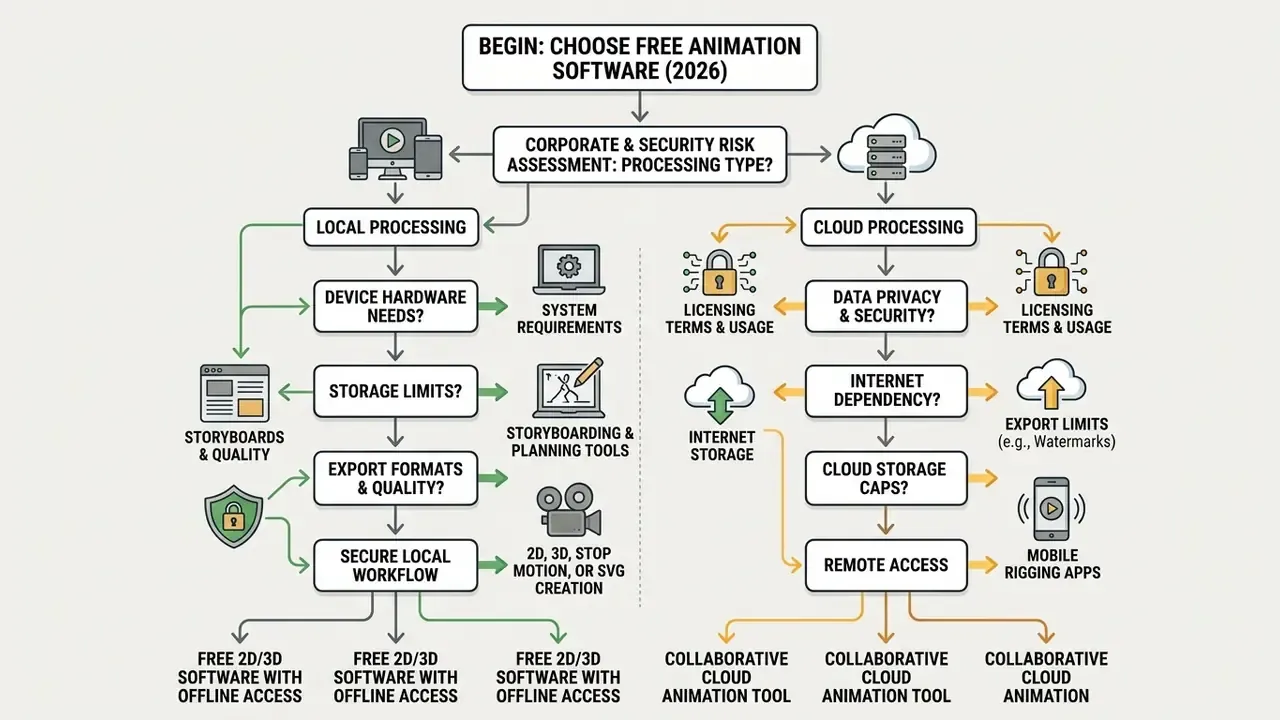
Desktop users working in 3D should choose Blender. Desktop beginners who want simple 2D drawing should choose Pencil2D or Krita. Vector animators should select Synfig Studio or Glaxnimate. Mobile users who want frame-by-frame drawing should use FlipaClip; those avoiding per-frame drawing should use Stick Nodes or Draw Cartoons 2; physical object animators should use Stop Motion Studio. Teams restricted to local processing should exclude browser-based tools entirely.
Quick Comparison of the Best Free Animation Apps
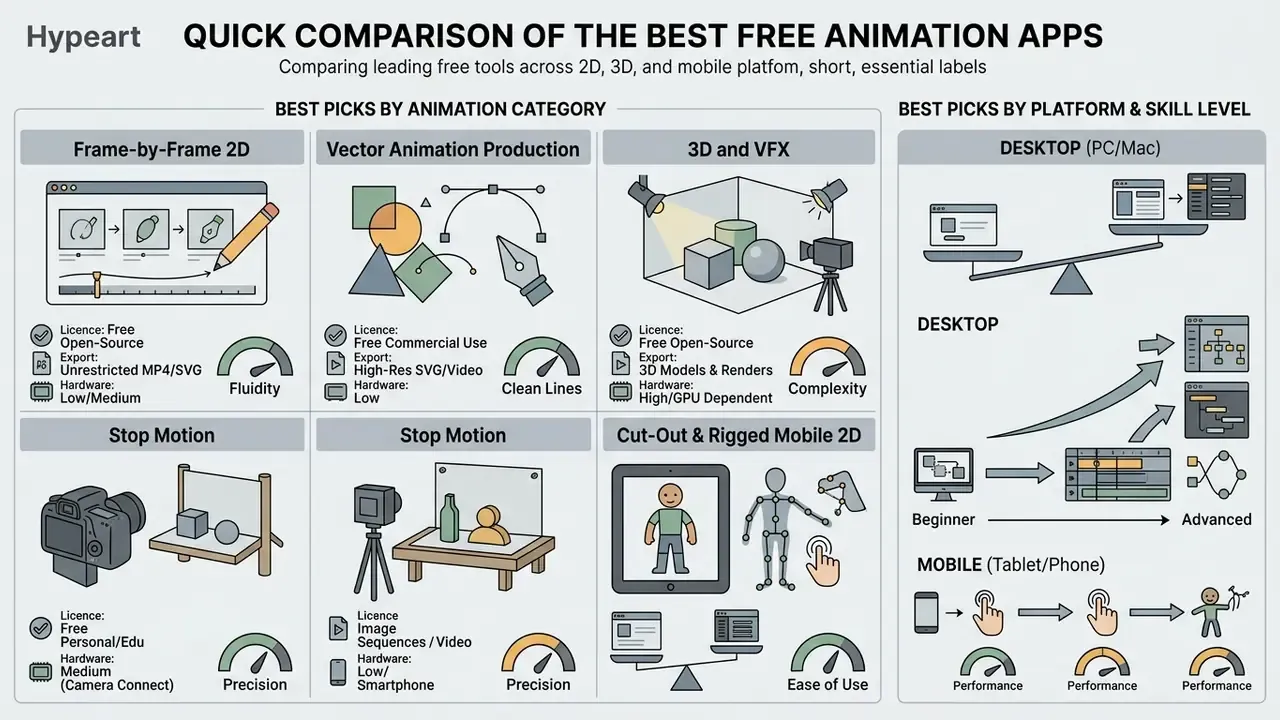
Comparing free animation software across platforms exposes the real trade-off between ease of use and professional depth. The table below adds a data-handling column, so teams can filter by confidentiality requirements rather than features alone.
Best Picks by Animation Category
Different animation tools lead specific creative domains:
- Frame-by-frame 2D Pencil2D (desktop), Krita (desktop and Android), FlipaClip (mobile)
- Vector animation Synfig Studio (desktop), Glaxnimate (vector motion), SVGator (browser, UI/UX)
- Production 2D OpenToonz (desktop studio pipeline)
- 3D and VFX Blender (full desktop suite)
- Stop motion Stop Motion Studio (mobile and desktop)
- Cut-out and rigged mobile 2D Stick Nodes, Draw Cartoons 2
Best Picks by Platform and Skill Level
Beginners on mobile devices get the most from touch-optimised tools such as FlipaClip or Animation Desk, which is why they dominate lists of animation drawing apps free of charge. Desktop users who want lightweight drawing can start with Pencil2D or Krita before moving to Synfig Studio or Blender (Pencil2D Docs, 2026).
Teams comparing broader creative suites can browse the hub of software alternatives, or open the hub of head-to-head matchups when two candidates look equivalent on paper.
| Application | Animation Style | Supported Platforms | Free Licence Model | Target Skill Level | Core Feature Set | Data Processing | Free Tier Limitations |
|---|---|---|---|---|---|---|---|
| FlipaClip | 2D frame-by-frame | Android, iOS, macOS | Freemium | Beginner | Onion skinning, touch drawing, up to 6 free audio tracks | Local project files; optional cloud backup; account-linked purchases | Watermark on export; 3 free drawing layers; export tied to paid Unlocker |
| Animation Desk | 2D hand-drawn | iOS, Android, Windows | Freemium | Beginner to intermediate | Storyboard controls, onion skinning, custom brushes, animatic assembly | Local editing; Kdan Cloud sync on paid tiers | 3 sketch layers plus 1 background; high-res export and advanced brushes need a subscription |
| Stop Motion Studio | Stop motion | iOS, Android, Windows, macOS | Freemium | Beginner | Camera frame capture, frame timeline, audio overlays, rotoscoping | Local device storage | 4K export, green screen, DSLR remote and sound library behind the paywall |
| Stick Nodes | Node-based cut-out | Android, iOS | Freemium | Beginner | Node and joint rigging, keyframes with automatic tweening, custom figures | Local device storage | Sound support and some effects reserved for Pro |
| Draw Cartoons 2 | 2D puppet / rigged | Android, iOS | Freemium | Beginner to intermediate | Skeletal puppet characters, pivot assignment, asset packs | Local device storage | Asset packs and advanced export require lifetime Pro |
| Pencil2D | 2D hand-drawn | Windows, macOS, Linux, FreeBSD | Free open source (GPL) | Beginner | Minimalist UI, raster and vector layers, camera and sound layers, basic timeline | 100% local, offline | No automated tweening or advanced camera controls |
| Krita | 2D raster painting plus animation | Windows, macOS, Linux, Android | Free open source (GPL v3) | Beginner to intermediate | Advanced brush engines, PSD support, animation timeline, onion skin, storyboard docker | 100% local, offline | No vector tweening or bone rigging; heavy files need RAM |
| Synfig Studio | 2D vector and bitmap | Windows, macOS, Linux | Free open source (GPL v3) | Intermediate to advanced | Bone rigging, waypoint interpolation, gradient paths, layer cut-outs | 100% local, offline | Complex node-based interface; steeper learning curve |
| OpenToonz | 2D studio pipeline | Windows, macOS, Linux | Free open source (BSD) | Intermediate to advanced | Toonz Vector and Raster levels, Xsheet, particles, Plastic tool, GTS scanning | 100% local, offline | Dense professional UI built for production pipelines |
| Blender | 3D, VFX, 2D hybrid | Windows, macOS, Linux | Free open source (GPL) | Intermediate to advanced | Full 3D pipeline, Grease Pencil 2D, motion tracking, compositor | 100% local, offline | High system requirements; steep initial learning curve |
| Glaxnimate | Vector motion, SVG and Lottie | Windows, macOS, Linux | Free open source | Intermediate | Lottie, animated WebP, SMIL SVG export, animated path shapes, animateMotion | 100% local, offline | Narrow scope; no raster painting or 3D |
| SVGator | Browser SVG / UI motion | Web browser | Freemium | Beginner to intermediate | Path morphing, colour animation, export to SVG, JS, Dart, GIF, video | Cloud-based; projects stored on vendor servers | Animated SVG exports watermarked on the free plan; limited storage and export count |
| Powtoon | Web motion graphics | Web browser | Freemium | Beginner | Drag-and-drop templates, characters, royalty-free asset library, voiceover | Cloud-based; assets uploaded to vendor servers | 3-minute cap; mandatory watermark; 720p output; MP4 export restricted |
No matching rows Clear one or more filters to restore the matrix.
Key Takeaways for Beginners
Creators benchmarking broader digital creation software can compare options across verified categories. For head-to-head breakdowns of adjacent generative tools, see the comparison of the best AI art generators.
Best Free Mobile Animation Apps for Beginners
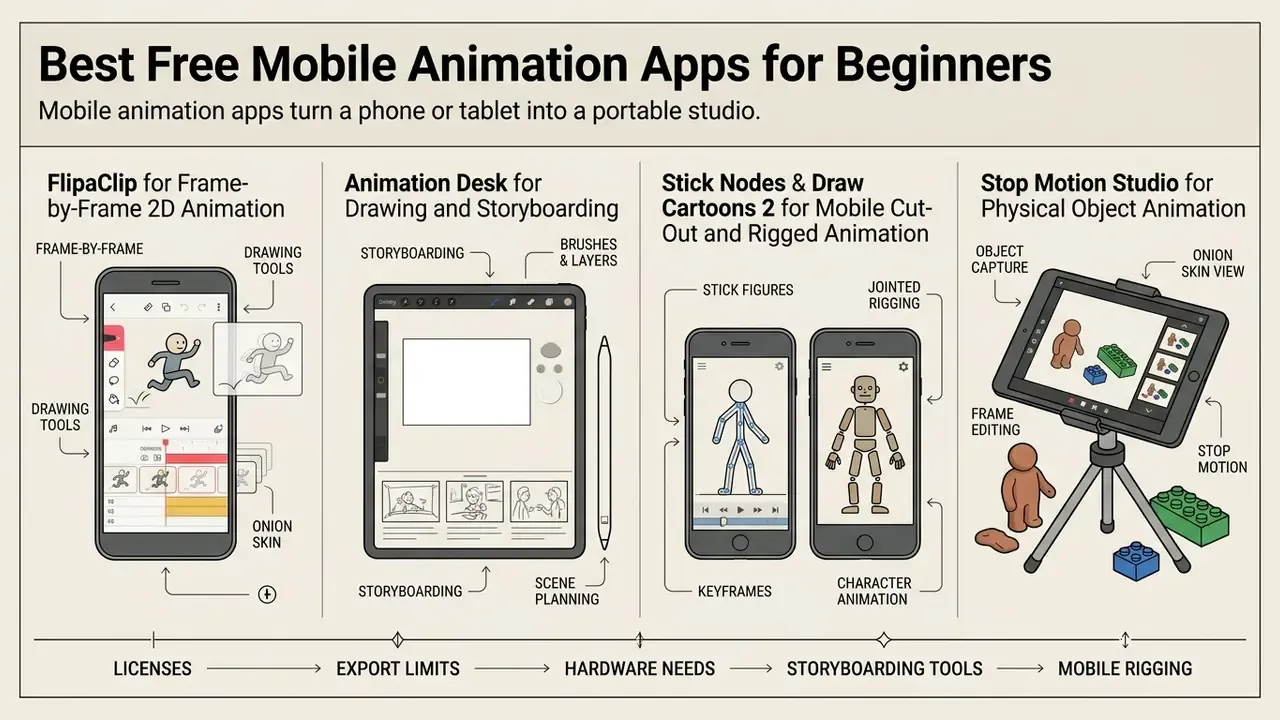
Mobile animation apps turn a phone or tablet into a portable studio. Touch input and stylus support make them a strong place to learn the core principles, on a train, in a lecture hall, wherever. The best free mobile animation apps trade canvas size for immediacy, and for a first project that trade is usually worth it.
FlipaClip for Frame-by-Frame 2D Animation
FlipaClip is the reference mobile app for frame-by-frame 2D animation. Its developer, Visual Blasters LLC, reports more than 80 million lifetime installs on the official product site, a vendor-stated figure rather than an independently audited metric. It runs on Android, iOS, iPadOS, macOS (Apple silicon), and ChromeOS devices.
The free plan includes three drawing layers (ten with the paid upgrade), onion skinning overlays, basic brush tools, and up to six audio tracks. You can export short cartoons as MP4 video, animated GIF, or PNG sequences with transparency. Removing the default watermark, unlocking project export, and raising the layer ceiling all require the FlipaClip Plus upgrade.
Illustrative case (composite, for illustration only)
Situation: An educational team needed non-technical staff to produce simple 15-second animated instructional loops on mobile tablets.
Action: The team deployed FlipaClip's free tier, using onion skinning and stylus-based drawing templates to structure 12 fps frame sequences.
Result: Staff produced 20 reviewed training loops with no licensing cost, finishing first drafts within two hours of onboarding.
Animation Desk for Drawing and Storyboarding
Animation Desk offers a structured environment for hand-drawn sequences and visual storyboarding. Available on iPad, iPhone, Android, and Windows, it mimics the layout of a physical animation desk (Kdan Mobile, 2026).
It supports frame-by-frame drawing over imported video, images, and Photoshop layers, plus customisable brush palettes, frame-rate settings, and timeline playback control. Sequences can be assembled into animatic storyboards, which is genuinely useful when you need to pitch a concept before committing to clean-up. The free version lets creators draft animatics and export frame sequences; store documentation lists video, GIF, PDF sheet, Photoshop, and individual-frame outputs across tiers. Advanced brush packs and cloud sync need a Kdan subscription.
Stick Nodes and Draw Cartoons 2 for Mobile Cut-Out and Rigged Animation
Frame-by-frame drawing is slow, and it is not the only path on a phone. Creators who want automated in-between motion should look at cut-out and puppet apps, which move rigged parts instead of redrawing sprites.
- Stick Nodes Node-based stick-figure rigging. You animate by dragging joint nodes, then use keyframes and the tween button to generate in-between frames automatically. Custom figures and joints can be built and saved. The free version covers the core workflow; sound and extra effects live in Pro.
- Draw Cartoons 2 A mobile 2D puppet animation app for assembling skeletal character models, assigning pivot points, and keyframing movement without redrawing each frame. Bundled asset packs give beginners usable characters immediately, and a one-time Pro purchase unlocks the full library.
For explainer content where characters walk, wave, or gesture, cut-out rigging typically cuts production time by more than half compared with per-frame drawing. The same logic that makes vector tweening attractive on desktop, only with a touchscreen.
Stop Motion Studio for Physical Object Animation
Stop Motion Studio animates physical objects, clay figures, and paper cut-outs through the device camera. It provides frame-by-frame capture controls, grid overlays, and live onion skinning, and supports built-in cameras, DSLRs, USB webcams, and remote camera devices depending on the platform.
Frames can be captured automatically at set intervals or triggered manually, with manual control over focus, exposure, ISO, and white balance. The free version includes timeline editing, frame reordering, copy, paste and delete of frames, basic audio recording, plus foreground and background effects. Green screen removal, 4K export, and DSLR remote control are paid add-ons.
Best Free 2D Animation Software for Desktop
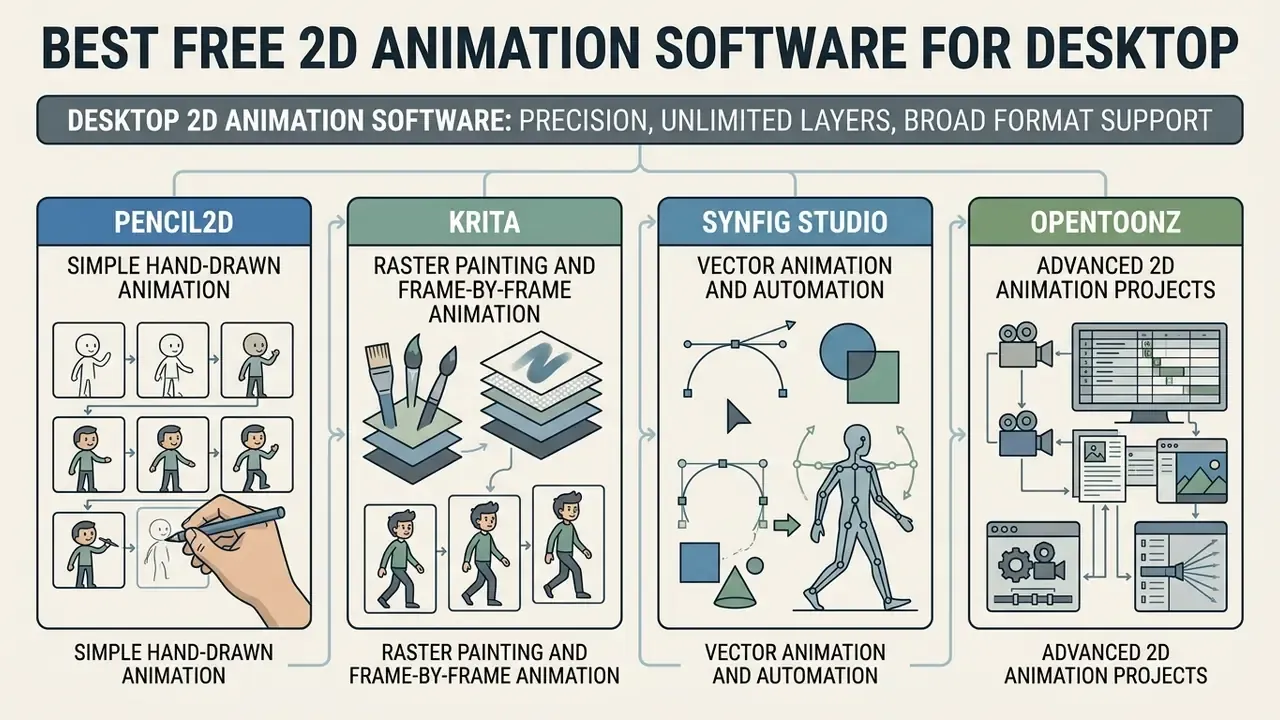
Desktop 2D animation software gives you precision, unlimited layers, and broad format support. Open-source desktop applications deliver professional-grade pipelines with no ongoing licence cost, and they run entirely offline, which keeps client assets on your own machine.
Pencil2D for Simple Hand-Drawn Animation
Krita for Raster Painting and Frame-by-Frame Animation
Krita (Windows, macOS, Linux, Android) is primarily a digital painting suite, yet it ships robust frame-by-frame 2D animation tools: flexible brush engines, PSD layer support, onion skinning, a storyboard docker, and export to frame sequence or video. That combination suits illustrators moving from static artwork to animated sequences, because the brushes and colour management they already trust carry over unchanged.
The Android build is close to a direct port of the desktop version, which is both a strength and a limit. PSD files travel between devices through cloud storage, but the dense interface really wants a large screen and a pen. Krita is released under the GNU GPL v3, so commercial output carries no licensing obligation.
Synfig Studio for Vector Animation and Automation
Synfig Studio is an open-source 2D vector animation package designed to remove manual frame-by-frame drawing through automated tweening (Synfig Studio Manual, 2026). It generates smooth vector motion from spatial keyframes.
«Synfig Studio is a free and open-source 2D animation package designed for producing film-quality animation using vector and bitmap artwork.»
Synfig supports skeletal bone rigging with parent and child bones, layer cut-outs, parametric shapes, and complex path deformation. Waypoint in and out interpolation settings control exactly how values change between keyframes, which is the mechanism behind its tweening. The node-based workflow has a steeper learning curve, no question, and in return it offers film-quality vector control to independent animators.
OpenToonz for Advanced 2D Animation Projects
OpenToonz is a production-grade 2D suite derived from Toonz, the software famously customised by Studio Ghibli (OpenToonz Project, 2026). Released under a modified BSD licence, it supports full studio pipelines.
Best Free Tools for 3D, Motion Graphics and SVG Animation
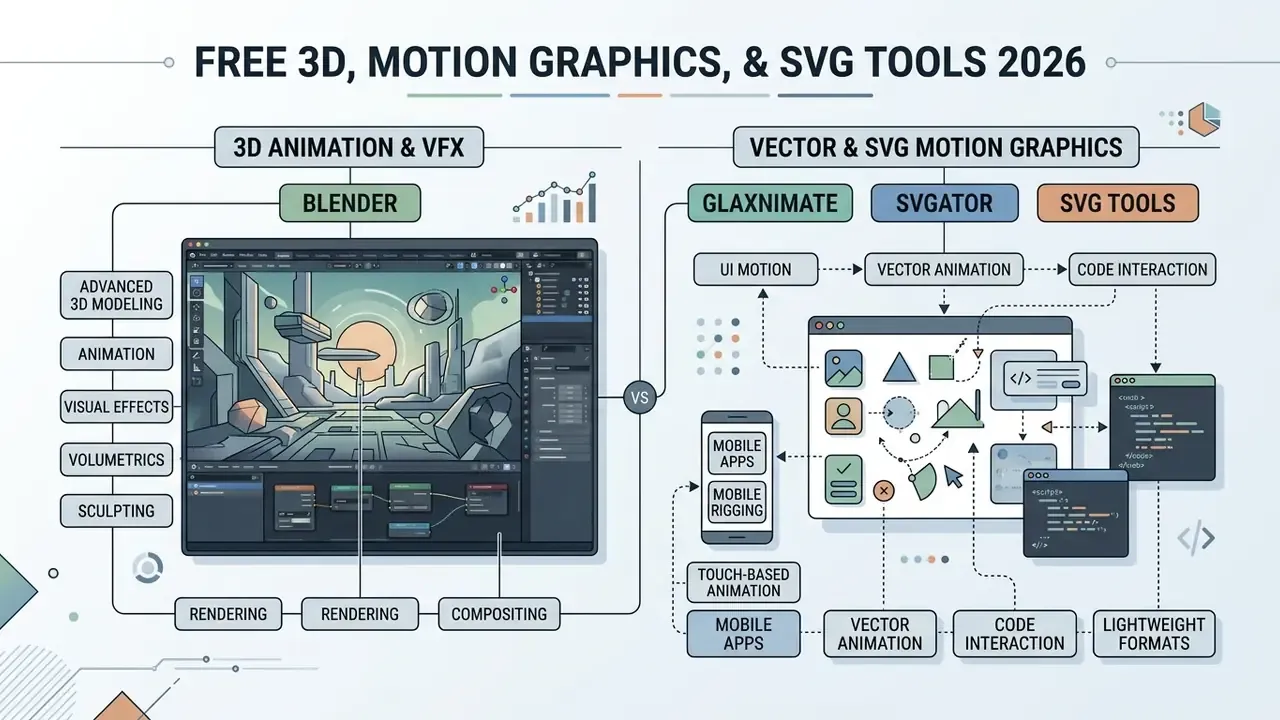
Advanced projects often need 3D spatial modelling, heavy visual effects, or lightweight vector code formats for the web. Different problems, different tools.
Blender for Free 3D Animation and Visual Effects
Blender is the reference standard for free, open-source 3D graphics, licensed under the GNU GPL (Blender Foundation, 2026).
«Blender is a public project hosted on blender.org, licensed under the GNU GPL and free to use, modify and distribute without restriction.»
It covers the whole pipeline: 3D modelling, sculpting, rigging, spatial animation, simulation, rendering, compositing, and motion tracking. Blender 4.4 shipped in March 2025, and Blender 5.2 LTS arrived in July 2026 with maintenance through 2028. Worth noting, because Grease Pencil data-model changes in the 5.x line can force manual adjustment of older files.
Blender also includes Grease Pencil, a hybrid tool whose stated goal is a 2D animation tool fully immersed in a 3D environment. Stylus or mouse input is placed in 3D space as strokes, which enables traditional 2D animation, cut-out animation, motion graphics, and storyboarding inside one scene (Blender 5.2 LTS Manual, 2026).
«Blender adoption in education rose from 55% in 2014 to 75% in 2024, industrial use from 45% to 70%, and game-industry use from 35% to 60%.»
Illustrative case (composite, for illustration only)
Situation: An indie developer needed 3D character rigs plus matching 2D UI motion graphics, with no software budget.
Action: The developer combined Blender's rigging toolset with Grease Pencil, producing spatial character assets and vector UI overlays in one environment.
Result: A complete asset library ready for engine import, with less tool-switching friction and no commercial software fees.
Glaxnimate, SVGator and SVG Tools for Vector and UI Motion
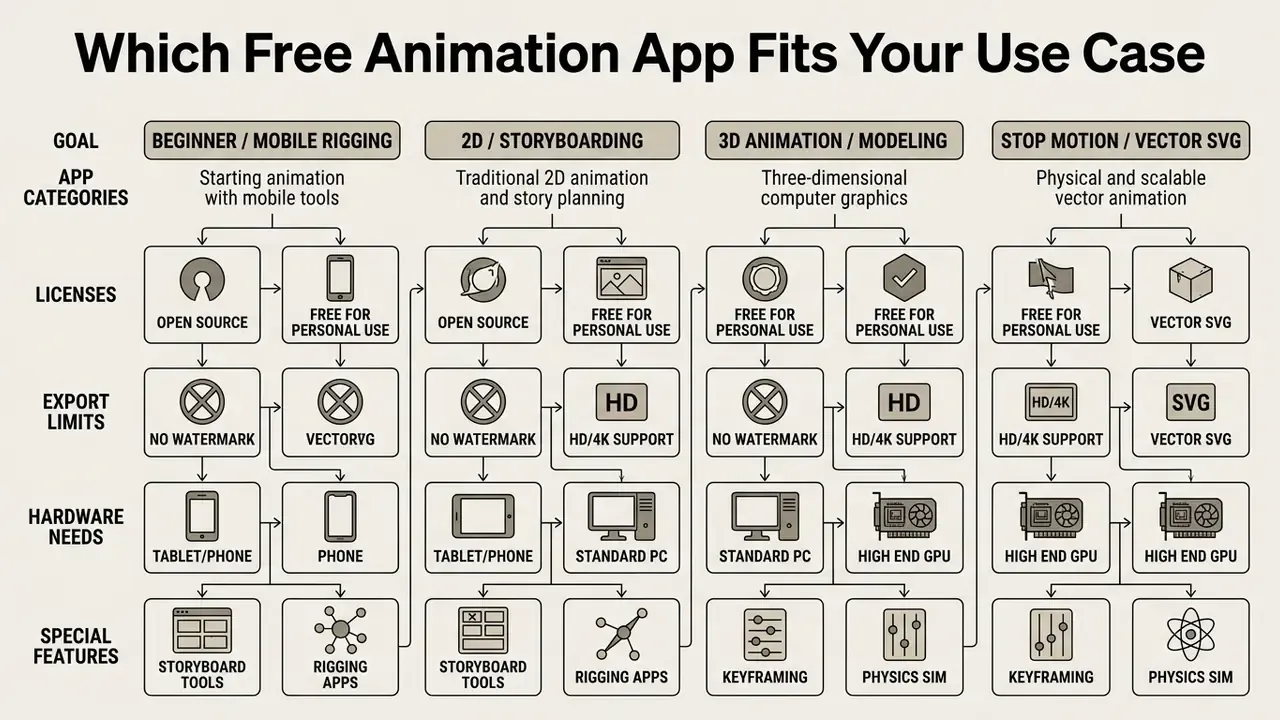
Which Free Animation App Fits Your Use Case
Selecting software means matching your primary creative goal against each application's strengths and platform limits. Nothing more mystical than that.
Apps for Learning and Building Professional Animation Projects
FAQ: Free Animation Apps
Do I need strong drawing skills to use free animation apps?
No. Traditional 2D apps such as Pencil2D, Krita, and FlipaClip do reward drawing ability. Vector automation tools (Synfig Studio), 3D suites (Blender), and mobile puppet apps (Draw Cartoons 2, Stick Nodes) rely on path manipulation, skeletal rigging, and automatic tweening instead of manual illustration. The core of animation is timing and acting, not line quality.
What is the most common mistake beginners make with free animation software?
Over-animating, and ignoring basic timing. Beginners push movement into every element on the timeline, and the result reads as noise. Focus on primary motion paths, spacing, and subtle secondary action before adding visual effects. Make each movement intentional.
Can I use open-source animation software for commercial projects?
Yes. Tools under the GNU GPL (Blender, Pencil2D, Krita, Synfig Studio) or a modified BSD licence (OpenToonz) allow unlimited commercial use, monetisation, and client delivery with no licence fees or export royalties. Freemium apps differ: check whether watermarks, resolution caps, or MP4 export restrictions apply to your tier.
Which free animation app is best for web UI micro-interactions?
SVGator (browser) and Glaxnimate (desktop) are the strongest options for UI and UX work, with vector path morphing and direct export to lightweight SVG code, Lottie, and animated WebP. Choose Glaxnimate if project files must stay local.
Can I make animations online without downloading software?
Yes. Browser platforms such as Powtoon, Canva, and SVGator run entirely in a modern browser with no installation. The trade-offs: watermarks or resolution caps on free tiers, dependence on a stable connection, and source assets uploaded to vendor servers.
How long does a first animation take?
A 5 to 15 second loop in FlipaClip or Pencil2D is realistic within two hours of first opening the app. A template-based explainer in Powtoon or Canva can be done in minutes. A rigged 3D shot in Blender usually follows 20 to 40 hours of structured learning.
What hardware do I actually need?
Pencil2D and FlipaClip run on low-spec laptops and mid-range phones with 2 to 4 GB of RAM. Krita, Synfig Studio, and OpenToonz are comfortable from 4 to 8 GB. Blender's official baseline is four CPU cores, 8 GB of RAM, and a GPU with 2 GB of VRAM, with 16 GB or more recommended for simulation and high-resolution rendering.
Which free tools work offline for confidential projects?
Blender, Pencil2D, Krita, Synfig Studio, OpenToonz, and Glaxnimate process everything locally and can run inside restricted network segments. Powtoon, Canva, and SVGator are cloud services, so assess them against your organisation's data-residency rules first.
Editorial Information and Authority Disclosures