Reviewed by: Marcus Hale, AI Governance & Operational Risk Strategy. Marcus Hale, author.
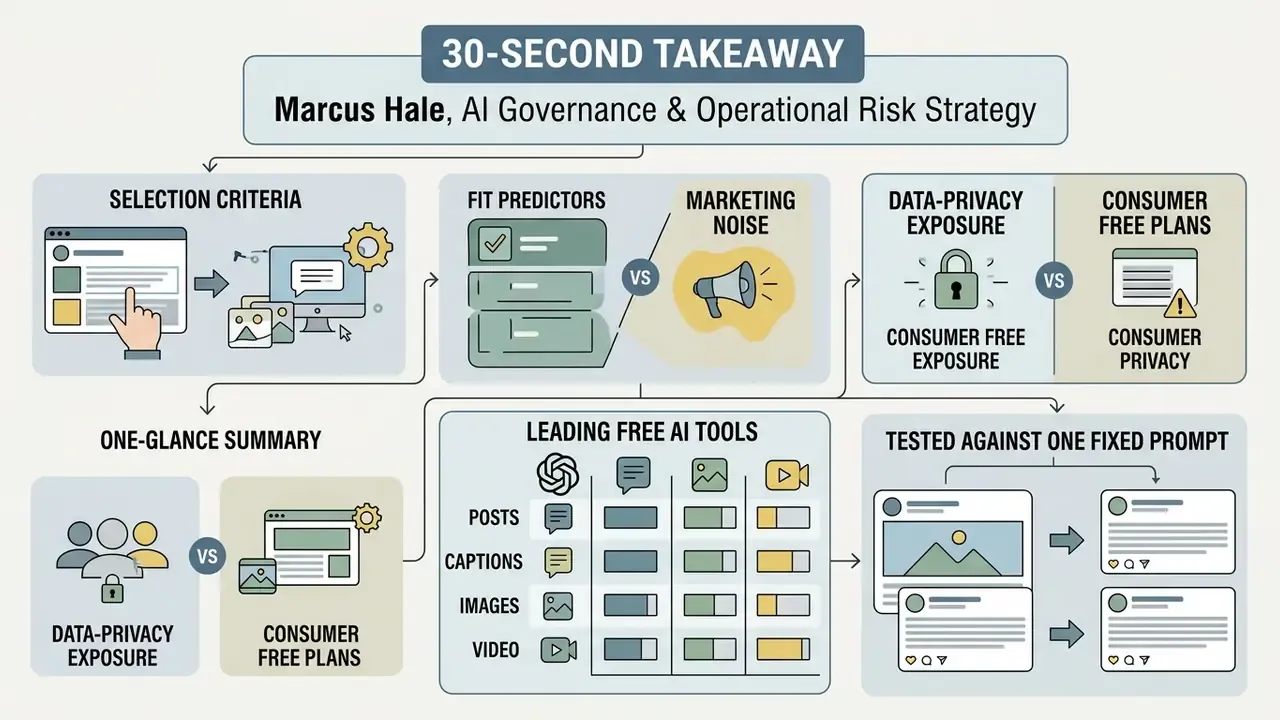
What to Take Away in 30 Seconds
- No single free tool does everything. Pair a general-purpose LLM for drafting with a dedicated social media management platform for queueing and analytics.
- Free tiers are quantitative, not unlimited. Typical caps: 3 connected accounts, 10 queued posts per channel, 20 standard AI uses, 2,000 words per month, or a 14-day free trial.
- Never publish raw output. Human-edited hybrid workflows beat fully automated posting; unedited AI copy carries measurable trust and engagement penalties.
- Free tiers are a data-governance risk. Consumer free plans may use your inputs for model training. Never paste unreleased financials, client data, or regulated disclosures.
- Disclosure beats concealment. Platform-native AI labels reduce the "authenticity penalty" more reliably than hiding synthetic origin.
- Repurpose, don't recreate. One verified master draft becomes a LinkedIn long-form post, an Instagram carousel script, an X thread, and a 9:16 text-to-video Reel.
Selecting the right free AI tool for social media content creation means checking functional limits, platform integrations, and output controls. Promotional claims are not evidence. Teams have to balance content volume against brand risk, and confirm that automated drafts clear both regulatory and audience quality thresholds before anything reaches a live feed.
«Uncontrolled content automation risks brand equity faster than manual posting can build it. Deploying AI for social media content creation requires verified input parameters, explicit human review gates, and clear residual risk limits before any post reaches a live feed.»
— *Marcus Hale, AI Governance & Operational Risk Strategy *
That framing matters for a practical reason. The failure mode of free AI tooling is rarely a badly written sentence. It is an unreviewed claim, an unlicensed image, or a confidential input pasted into a consumer chat window at 11pm by someone who just wanted to save time.
How to Use This Guide
Each section answers one buying question, in order:
- Which selection criteria actually predict fit, and which are marketing noise.
- What the data-privacy exposure looks like on consumer free plans.
- How the leading free AI social media content generator options compare side by side.
- What each tool does well in practice, tested against one fixed prompt.
- Which specialist tools close gaps that general models handle poorly.
- How to run a repeatable workflow with named human sign-off.
- Where platform-specific adaptation changes the output.
- How to measure quality and engagement without fooling yourself.
How to Choose Free AI Tools for Social Media Content Creation
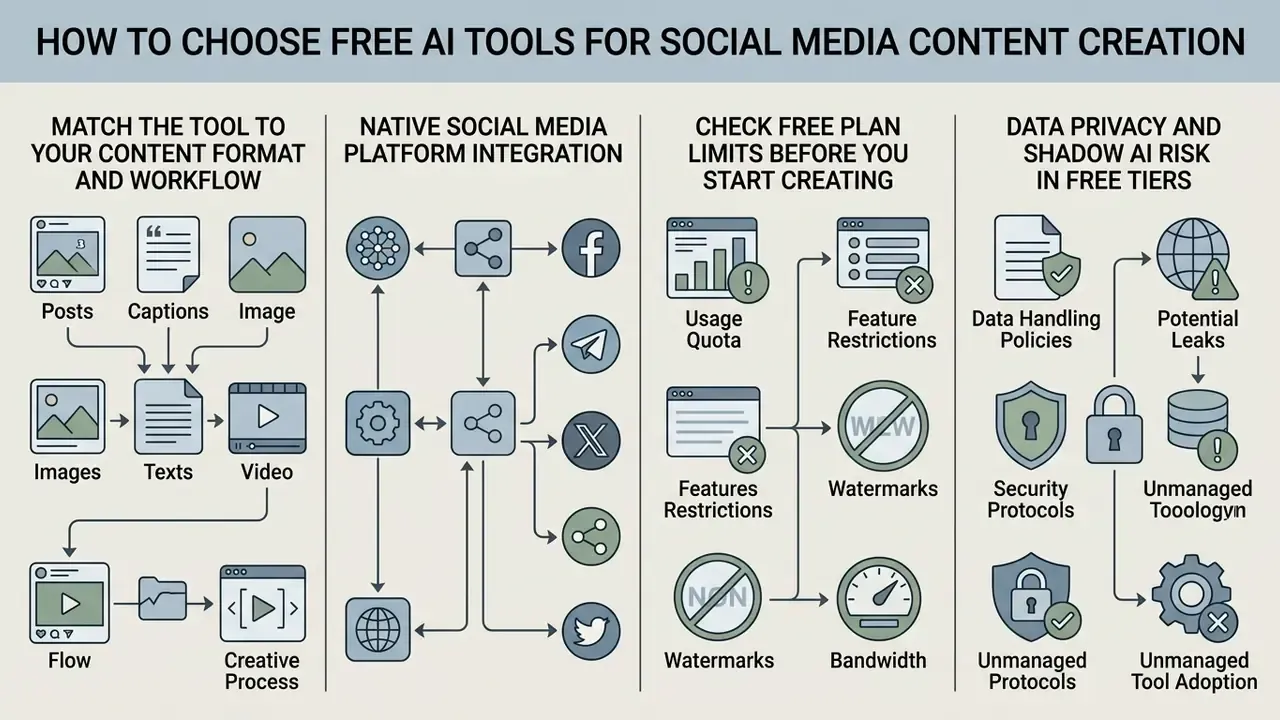
Choosing free AI tools for social media content creation comes down to four criteria: supported content formats, native social media platform integration, brand voice controls, and explicit free-tier quotas. Prioritise tools that publish transparent usage limits and support a clear escalation path to human editing. Unconstrained output with no monitoring is not a feature; it is an unmanaged risk.
«Consumers describe AI content as visually polished but emotionally weaker and less authentic compared with human-created material.»
That perception gap is the real selection constraint. A tool can produce fast, clean, grammatically perfect copy and still flatten audience connection. So favour platforms that let you constrain vocabulary, tone, and structure over platforms that simply generate more volume per click.
Match the Tool to Your Content Format and Workflow
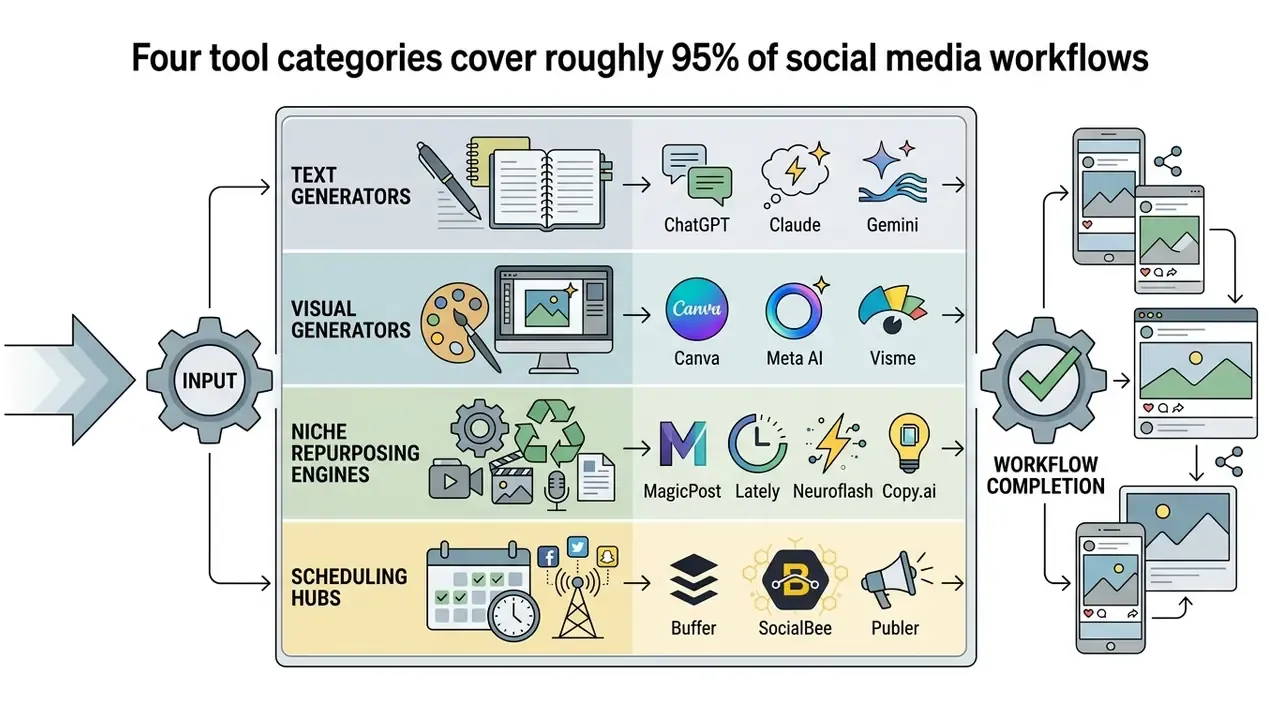
A working social media workflow maps distinct AI tools to specific outputs: text-based posts, image generation, video scripts, or automated queue management. General-purpose language models are strong at caption ideas, post ideas, and long-form narrative drafts. Dedicated visual utilities handle graphics, layout formatting, and platform dimensions far more efficiently.
A practical format-to-tool map looks like this:
| Content format | Best-fit free tooling | Human control point |
|---|---|---|
| Captions and copy | ChatGPT, Claude, Copy.ai, Hootsuite caption generator | Tone and factual edit |
| Graphics and carousels | Canva, Adobe Express, Visme, Meta AI | Licensing and brand-asset check |
| Short-form video | Text-to-video assistants, CapCut, PlayPlay-style builders | Subtitle accuracy, stock rights |
| Hooks and LinkedIn framing | MagicPost, LLM hook prompts | Claim verification |
| Repurposing long content | Lately AI, SocialBee link-to-post | Message fidelity to source |
| Scheduling and analytics | Buffer, SocialBee, Publer, Metricool | Approval gate before queue |
When you evaluate utilities for visual assets, look at specialised generators alongside full design platforms. Comparing dedicated engines through a best image generating assessment helps set a baseline for brand aesthetics and output rights, while a broader review of the best AI image generators shows where Canva-style design platforms stop and dedicated diffusion engines begin.
One more workflow note. Teams that cut long video into social clips usually need an editor as well as a generator, so it is worth scanning the best free video editing apps and the wider field of best free video editing software before assuming a single AI suite covers trimming, captioning, and export.
Check Free Plan Limits Before You Start Creating
Free plans for social media tools enforce hard quantitative boundaries: monthly word caps, daily image credits, limits on connected social accounts. Vendors also reserve the governance features you most need, such as custom brand voice profiles, workspace role-based access, and automated queueing, for paid or enterprise tiers. That pattern is consistent enough to plan around.
Documented examples of free-tier boundaries as of early 2026 include: up to 3 connected social accounts, 10 pending scheduled posts per account, 25 saved drafts, and a 24-hour published-post history window on one major scheduler's free plan; 20 standard AI uses, 200 premium AI uses, or 20 "ultra" AI uses on a leading design platform's free and entry tiers, with certain generative editing tools excluded from free accounts entirely; 14-day trials on dedicated SMM suites; and API free tiers marked explicitly "not supported" by major model vendors, which means consumer chat access is free while programmatic access is not.
Checking these constraints first prevents the bottleneck that hits in week three, when post volume scales across multiple channels and the queue simply stops accepting drafts. Teams leaning on synthetic visuals should also compare free AI image generators directly, because watermarking, resolution ceilings, and export rights differ far more than the marketing pages suggest. Decision-makers who want long-term cost predictability can browse the hub for current plan structures and asset rights before committing to an architecture.
Data Privacy and Shadow AI Risk in Free Tiers
Free tiers are not only feature-limited. They are frequently the most permissive data-processing tier a vendor offers. Consumer free plans commonly reserve the right to use submitted prompts and uploads to improve models unless the user explicitly opts out, while enterprise and API agreements usually exclude training by default. The practical consequence is blunt: an employee pasting an unreleased earnings summary, a client contract clause, or customer PII into a free chat window has performed an uncontrolled data transfer. No ticket, no log, no owner.
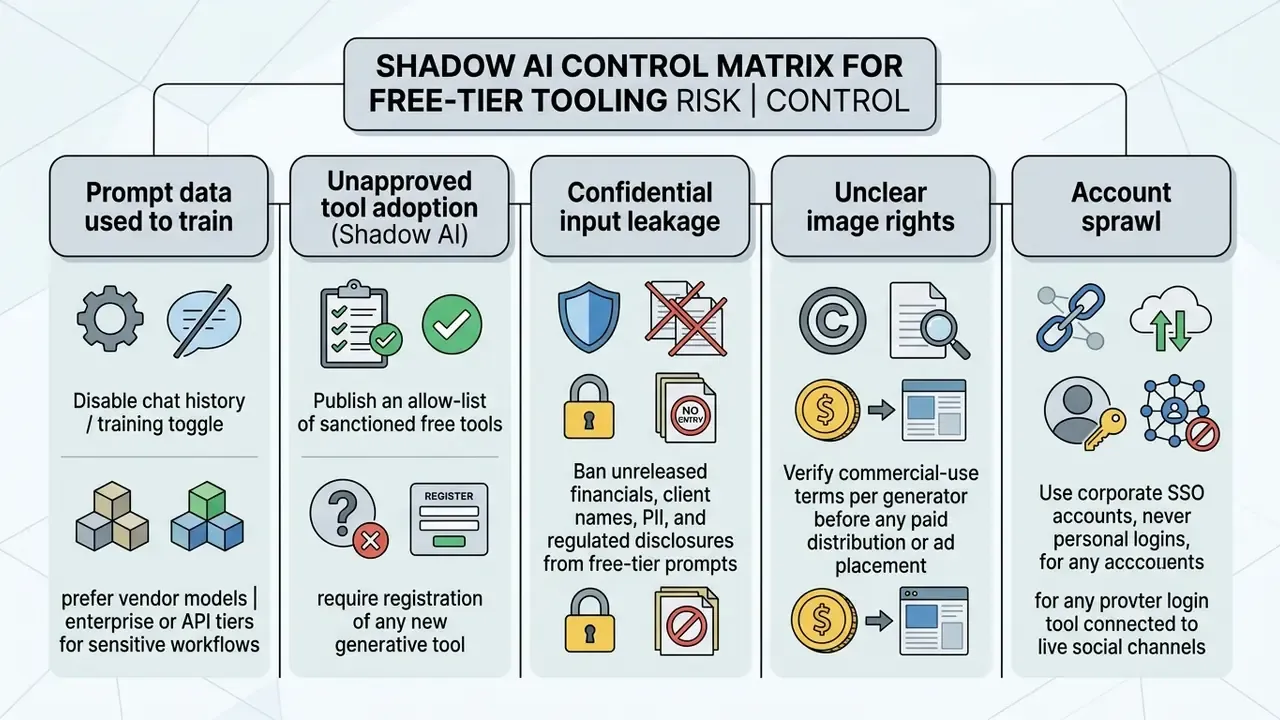
Three operational rules close most of the exposure. First, draft with de-identified inputs: describe the customer segment, never name the customer. Second, keep a single sanctioned toolchain so security can audit what is connected to live publishing credentials. Third, require written confirmation of commercial-use rights for every synthetic asset before it enters a paid campaign, using our commercial use compliance reference as the baseline.
Does this slow anything down? Slightly. Roughly one extra approval step per campaign, in exchange for an auditable record of who released what.
Best Free AI Social Media Content Generators at a Glance
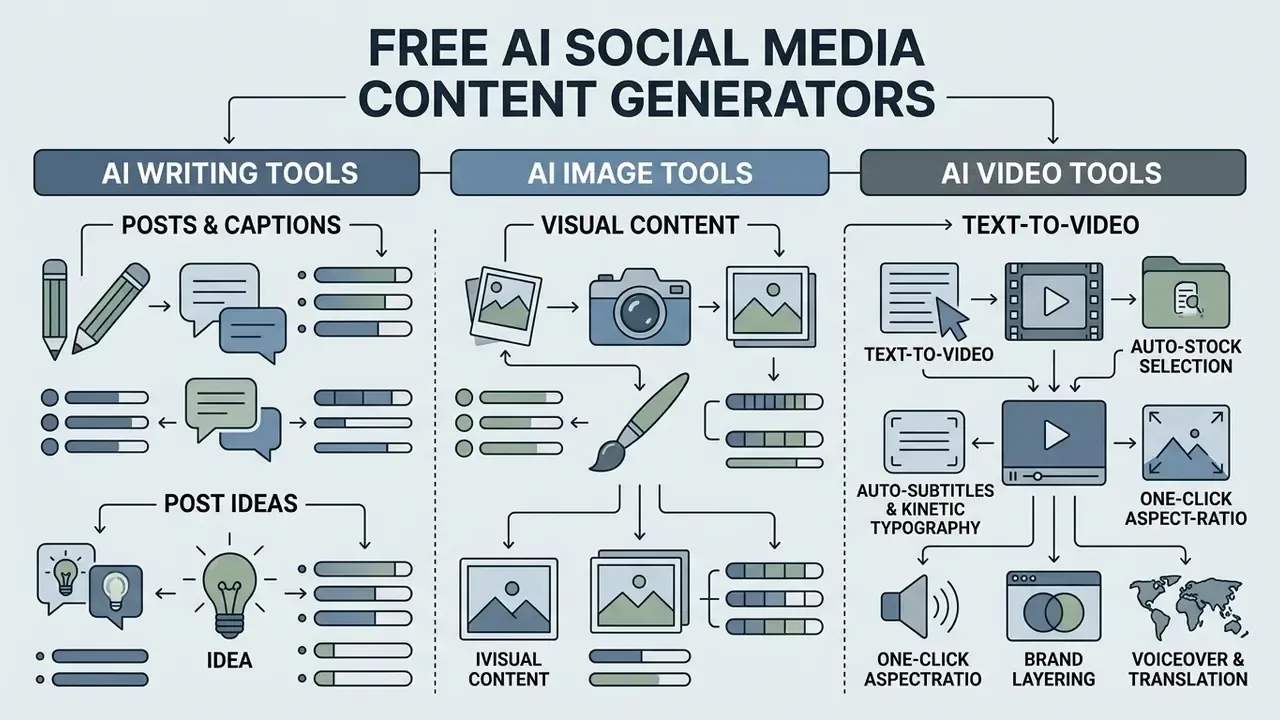
The leading free AI social media content generator options differ sharply across core capabilities, user controls, and publishing features. The table below summarises validated attributes so leaders can match platform capability to an operational need rather than to a brand name.
«Disclosing AI authorship reduces perceived brand authenticity and weakens follower behavioural intentions, even when content is visually indistinguishable from human work.»
Read that as a design constraint, not as an argument for concealment. The point of careful tool selection is to minimise the share of output that reads as machine-generated, not to hide the machine.
| Tool | Primary Purpose | Supported Content Types | Platform Support | Image Generation | Scheduling / Auto-Publish | Free Plan Conditions | Free-Tier Data Note |
|---|---|---|---|---|---|---|---|
| ChatGPT Free | Text drafting & post ideation | Text posts, captions, story scripts, poll ideas | Multi-platform via text export | Limited (image credits) | Scheduled tasks (limited) | $0/mo; unlimited standard text chats; caps on uploads, voice, advanced models | Inputs may be used for model improvement unless training is disabled |
| Claude Free | Long-form copy & tone control | Structured posts, articles, platform adaptation | Multi-platform via text export | No native image generation | None | $0/mo; daily usage limits based on system capacity; agentic coding tiers excluded | Consumer terms differ from API and commercial terms; verify before sensitive use |
| Gemini Free | Research-backed social copy | Fact-heavy posts, text captions, threads | Multi-platform via text export | Integrated native generation | None | $0/mo; rate-limited access with a Google account; student tier offers higher caps | Review Workspace versus consumer account handling before internal use |
| Canva Free | Visual design & graphics | Social graphics, stories, short video templates | Direct export to major networks | Integrated AI visual tools | Limited social export | $0/mo; about 20 standard AI uses; generative editing restricted; 10 lifetime Magic Design uses | Design assets stored in cloud workspace; check team sharing settings |
| Buffer Free | Multi-channel queue management | Text captions, scheduled updates, post drafts | 11+ networks (X, LinkedIn, IG, FB) | Via integrations | Up to 10 scheduled posts per account | $0/mo; 3 social channels; 30-day analytics history; AI assistant included | Publishing tokens connect live accounts; use SSO and role limits |
| SocialBee Free | Post generation & scheduling | Captions, post variations, hashtag sets, link-to-post | Major business social platforms | Via integrations | Available during free trial | 14-day trial, no credit card; paid tier required for ongoing scheduling | Trial workspaces retain generated drafts after expiry |
| MagicPost | LinkedIn-native post writing | Hooks, LinkedIn posts, formatted text | LinkedIn-focused | No | Via LinkedIn workflow | Limited free generations; hook generator included | Paste briefs, not client-identifying detail |
| Lately AI | Long-content repurposing | Dozens of short posts from podcasts, video, articles | Multi-platform | No | Yes (paid tiers) | Trial-based free access | Learns from your historical brand analytics; confirm data scope |
| Neuroflash | Pre-publication text audit | Posts, ad copy, plagiarism & emotion checks | Multi-platform | Yes (paid) | No | Free tier with monthly word cap | Brand Hub stores audience and keyword data |
| Copy.ai | Variations & persona-driven ads | Captions, LinkedIn posts from briefs, Meta ad variants | Multi-platform | No | No | Free tier with limited workflow credits | Persona data stored in workspace |
No matching rows Clear one or more filters to restore the matrix.
Two notes on reading the table. "Free plan conditions" is the column that ages fastest, so treat it as a starting point for your own verification, not as a citation. And the data column matters more than the feature column for regulated teams, because a missing feature costs time while a bad data flow costs a control finding.
AI Writing Tools for Posts, Captions, and Post Ideas
Dedicated text generators work as a writing assistant: they break writer's block, draft captions, and synthesize post ideas across channels. These systems use large language models to build structured post frameworks, which lets one strategic prompt produce several usable text variations in a few clicks.
Specialised drafting engines speed up ideation while holding structural consistency across team members, which matters more than it sounds when four people publish under one brand voice. To benchmark writing and creation environments against alternative market solutions, browse our curated index of AI Media Alternatives and compare the functional trade-offs directly.
AI Tools That Combine Creation, Scheduling, and Publishing
Unified social media management tools embed generative text engines directly inside scheduling and publishing dashboards. These platforms let creators draft copy, refine layout formatting, auto-select tags, and queue posts for later publication in one interface.
Streamlining post creation and queue management cuts administrative overhead and removes the copy-paste errors that creep in when someone moves text between five platform dashboards. Modern suites now extend the same interface to multimedia, so teams evaluating unified stacks should also weigh where AI video generators and publishing calendars overlap. Leaders comparing unified tools against point solutions can see the overview of comparative platform frameworks and pick the architecture that matches their publishing frequency.
Detailed Reviews of Free AI Tools for Social Media Posts
Evaluating specialised platforms means testing text generation quality, image synthesis, and scheduling controls against real publishing conditions. An effective AI-powered social media content creator has to deliver reproducible output quality without adding operational security or brand consistency risk.
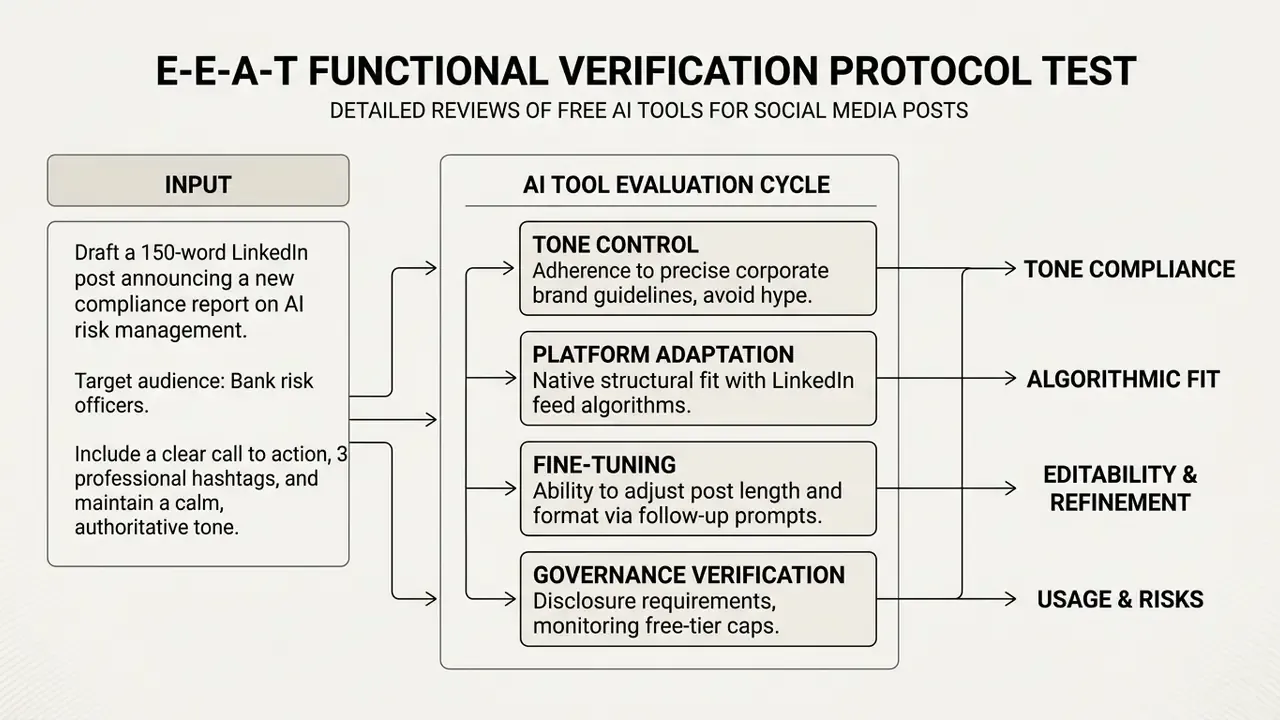
ChatGPT, Claude, and Gemini for AI-Generated Social Posts
General-purpose models work as versatile text engines for social media strategy, post ideation, and tone adaptation. ChatGPT is strongest at rapid conversational iteration and structured post framing. Claude holds long-form tone control and natural phrasing better. Gemini pulls in current research data for fact-heavy updates.
«Across a three-month experiment, Gemini outperformed ChatGPT on total reach, while ChatGPT produced better interaction rates on Stories polls.»
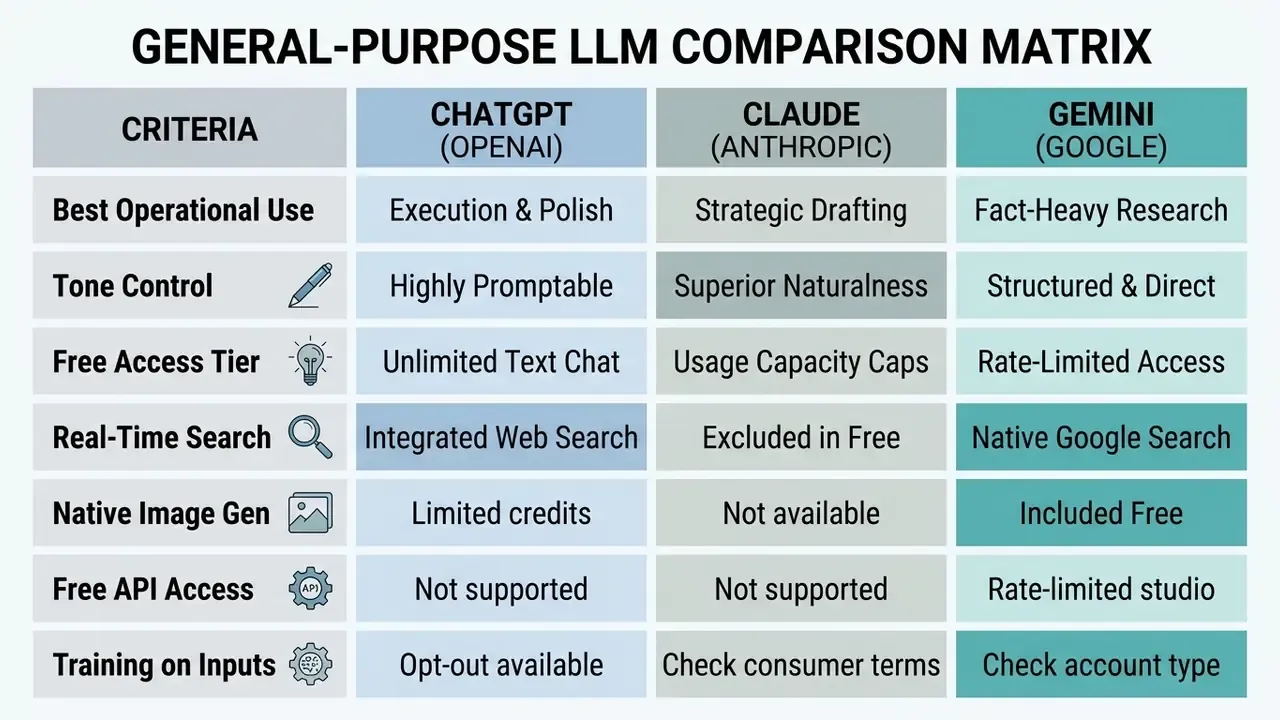
A sequencing pattern reported by practitioners through 2026 reviews: use Claude to define the angle and narrative, Gemini to gather current facts and structure, ChatGPT to execute and polish. It is more handoffs than most teams want, admittedly, but the output quality gap is visible on the first read. To wire these text engines into enterprise software via API, developers can compare options across technical interfaces and manage token costs and throughput controls deliberately.
Canva and AI Image Tools for Visual Content Creation
Canva's AI features let creators generate visual graphics, transform post layouts, and format content for specific platform dimensions. Our dedicated breakdown of the Canva AI Generator covers export options and commercial licensing in detail. The free tier provides basic AI design utilities that turn text prompts into presentation-ready assets: Instagram posts and stories, Facebook covers, Pinterest pins, YouTube thumbnails, and X posts generated straight from a prompt bar.
Free and entry-level accounts operate under documented ceilings: roughly 20 standard AI uses, up to 200 premium AI uses, a 10-use lifetime allowance on template-generation features, and exclusion from certain generative editing tools reserved for paid plans. Meta AI offers a parallel free route for image generation, photo editing, and restyling across its apps with no subscription, while Visme provides prompt-based visual style suggestions inside its free dashboard.
Design-led AI tools reduce dependence on a dedicated graphic team for routine social media post creation, which is the single biggest time saving most small business accounts report. Organisations comparing Canva against dedicated diffusion engines can review our analysis of the best AI image generators to weigh style control, resolution, and licensing terms, and consult our AI image detector guidance when verifying third-party or user-submitted visuals.
Niche AI Generators for Specialized Tasks
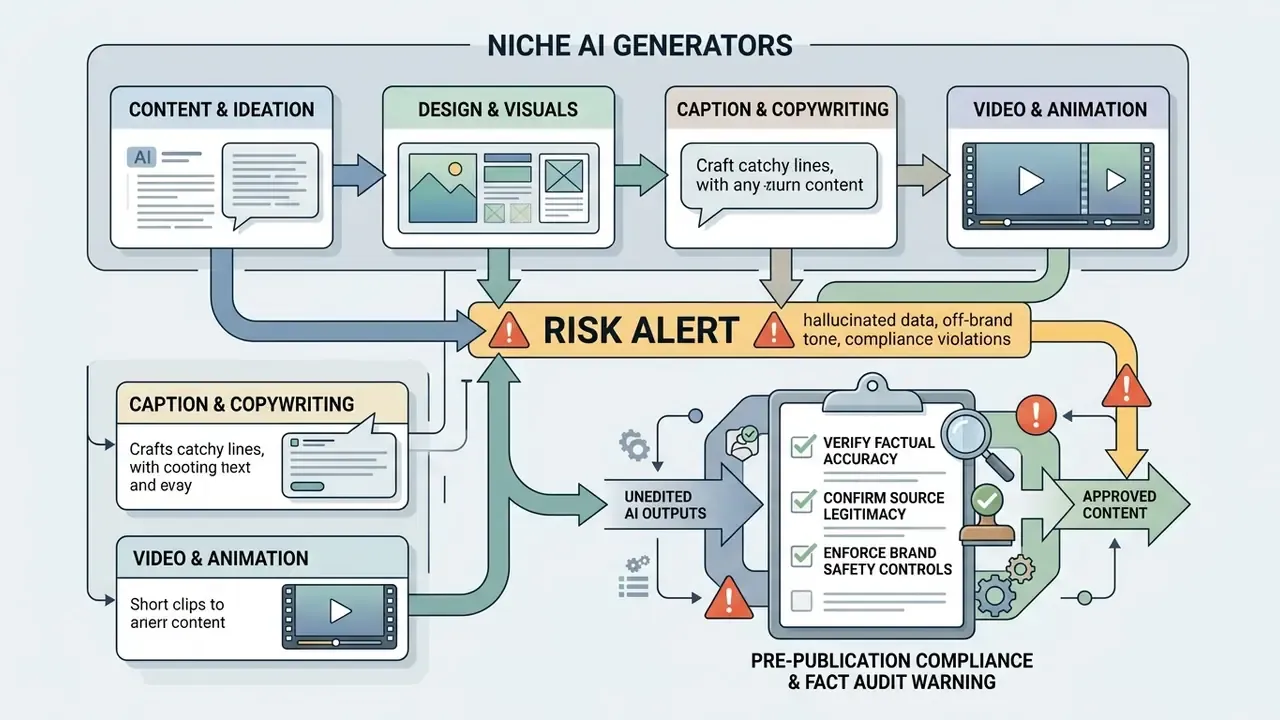
General-purpose models cover drafting. But four categories of specialist tools close gaps that LLMs handle poorly: platform-native hooks, bulk repurposing, pre-publication auditing, and persona-driven ad variants.
- MagicPost a LinkedIn-specific writing tool tuned to the platform's conventions. It includes a built-in Hook Generator that builds attention-grabbing opening lines from a short input, an "Ask AI" ideation mode, and a formatting utility that renders bold and italic type for feeds without native rich text. Because it follows LinkedIn's structural norms, output tends to avoid the generic phrasing that suppresses distribution.
- Lately AI a repurposing engine that converts long-form assets (podcast transcripts, webinar recordings, video, blog articles) into dozens of short social posts, and improves its selection of quotable segments by learning from your brand's historical engagement data. Brand tone and language rules can be stored so every derived post stays on-voice.
- Neuroflash an AI editor built around pre-publication auditing. Beyond generating copy from 100+ templates, it runs a plagiarism check and an association and emotion analysis that estimates how an audience will read a post emotionally before it goes live. Its Brand Hub centralises tone of voice, target audience notes, keywords, and competitor intelligence.
- Copy.ai workflow-driven generation of on-brand captions and variations from briefs or existing copy, including apps that turn a short brief into a LinkedIn post or spin out multiple Meta ad variants from stored customer persona data, with in-team commenting on drafts.
- Jasper a marketing-focused toolkit with 80+ templates, a Content Rewriter for tone, style, and length adjustments, and a brand style guide that encodes company-specific wording rules for larger teams.
- Pro-Writer a lightweight, keyword- or outline-driven editor for freelancers and small teams that need fast, clean copy without a full collaboration suite.
- Fanpage Karma an all-in-one suite where AI writes captions from rough drafts against brand, industry, and style settings, then reviews drafts before publishing with specific tonality and copy-improvement feedback.
Interactive Tool Selection Checklist
With the market landscape mapped, use the checklist below to turn requirements into a shortlist. Tick what applies, then read the selection rule underneath.
Checklist0 / 9
Selection rule: if your workflow needs multi-account auto-scheduling plus enforced brand voice rules, pair a general-purpose LLM with a dedicated social management platform instead of stretching one free utility to cover both. If the workflow touches regulated or confidential inputs, escalate off the free tier to an enterprise or API agreement that excludes training on your data. There is no third option worth defending in an audit.
How to Create Social Media Content With AI in a Repeatable Workflow
An end-to-end AI social media content creator process runs from strategy definition to queue execution, with named owners at each stage. A standardised pipeline lowers editorial friction, enforces brand governance, and keeps post quality stable when volume rises.
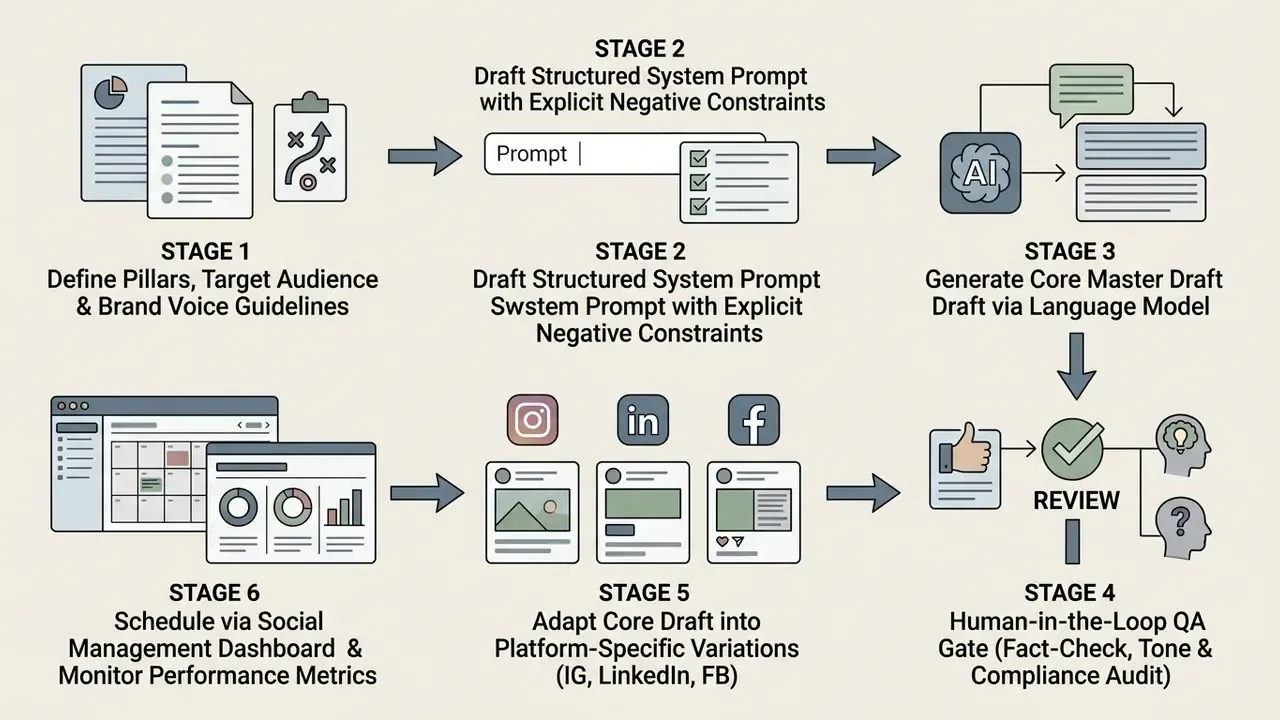
Start With Content Pillars, Audience, and a Clear Prompt
Effective content generation starts with defined strategic pillars and explicit system prompts. Prompts need operational context, target audience pain points, precise tone parameters, and negative constraints such as "do not use buzzwords or hype language". Prompt-structure research groups effective instructions into four blocks: persona and target audience, goal and steps, context and references, format and tonality. It also stresses building detailed personas rather than generic demographic labels (Prompt Canvas, arXiv, 2024 to 2025).
Building prompts around verified audience profiles prevents generic outputs and keeps content aligned to business goals. Visual identity belongs in the same brief: consistent marks and colour systems produced with AI logo generators keep synthetic assets recognisably yours across channels. Teams that need to quantify ROI and production timelines can use our AI Media Calculators to estimate resource requirements and publishing velocity.
Generate Variations and Repurpose Posts for Different Channels
One core content asset can be repurposed into several platform variations through targeted transformation prompts. Pull the core statistics, key takeaways, or quote blocks, and a single report yields a long-form LinkedIn post, an Instagram carousel script, and a short Facebook update. The reliable pattern: analyse the source, identify the 3 to 5 strongest core messages, then rewrite each as a platform-native output with its own hook, length, tone, and CTA.
Step-by-Step Scenario: Converting a URL Into a Post Series in Five Steps
- Extract the thesis.Paste the article URL, or its full text, into your tool of choice: a link-to-post feature inside a scheduler, a repurposing engine, or an LLM with web search enabled. Request the 3 to 5 strongest core messages before any copywriting starts.
- Set the tone parameter.Specify the target register explicitly: Professional, Authoritative, Analytical, or Casual, plus banned vocabulary and the allowed CTA list.
- Generate a publication grid.Request three distinct variants from the same source: (a) a short summary ending in a question, (b) a listicle of concrete takeaways, (c) a contrarian thesis designed to provoke discussion in the comments.
- A/B preview and platform layering.Select the single most relevant variant per channel, then add native elements: hashtags in CamelCase, mentions, line breaks, and a platform-appropriate call to action. Preview character counts against each network's truncation point.
- Send to queue.Push the approved draft into the scheduler with its paired visual or vertical video cut, set the publishing window, and log which source URL produced it so performance can be attributed back to the original asset.
Automated repurposing raises content output without a proportional rise in drafting time, which is where most of the claimed time saving actually comes from. Where the source asset is a recording rather than an article, run the transcript through the same five steps and route the strongest 20 to 30 second segment into a vertical cut using text-to-video AI.
Fine-Tune AI-Generated Content Before Publishing
Fine-tuning here means manual editing: aligning drafts with brand standards, factual accuracy, and natural language rhythm. Editors strip cliché phrasing, verify embedded links, and confirm that every claim rests on verifiable evidence. Where visuals or third-party media are involved, verification tooling such as our AI image detector reference helps editors confirm provenance before distribution.
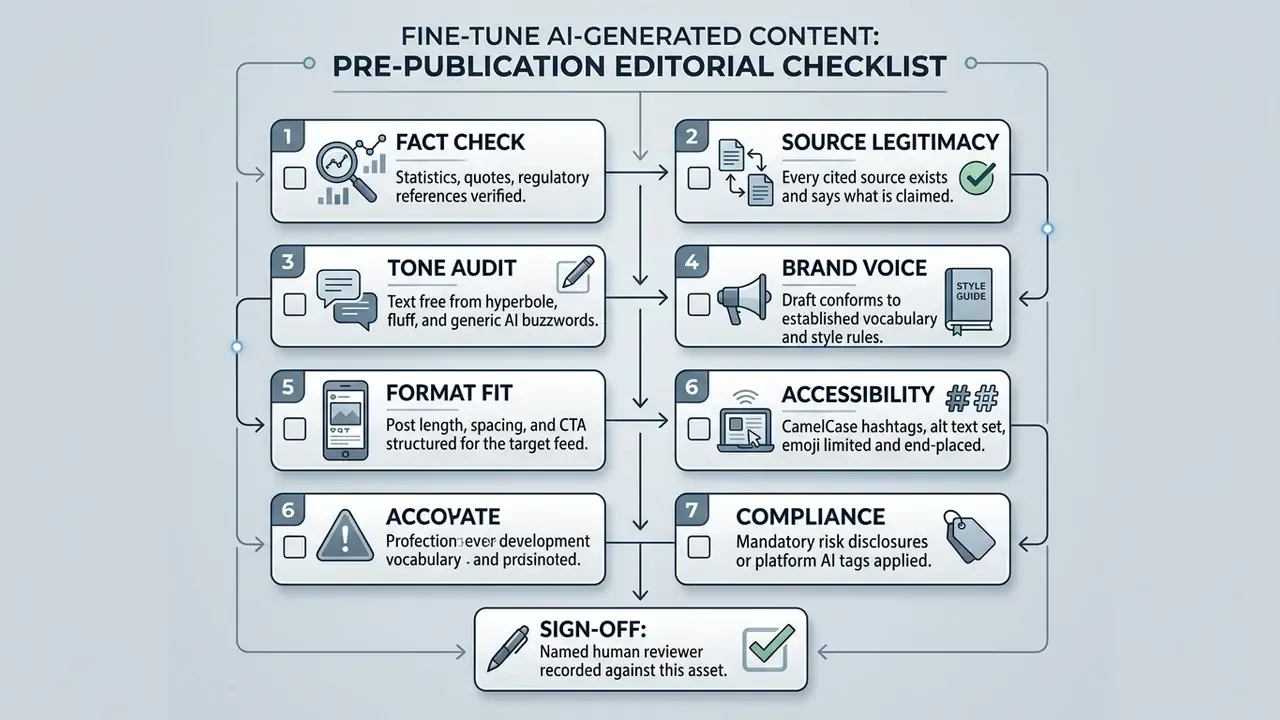
A mandatory human edit step is what keeps hallucination risk contained and audience trust intact across channels. It also gives internal audit something to inspect other than a chat log.
«The hybrid model, AI generation plus manual refinement, received significantly more interactions than fully automated posting.»
Editorial guidance from institutional publishers points the same way: raw, unedited AI text should not be published, it must be reviewed for factual errors and hallucinations, and any AI involvement should be disclosed (FAO, "Responsible use of AI in publishing", 2025). Public-service editorial guidelines add that every AI-assisted item must be checked by a named person before release (SWI swissinfo editorial AI guidelines).
Create Platform-Specific AI Content for Instagram, Facebook, and LinkedIn
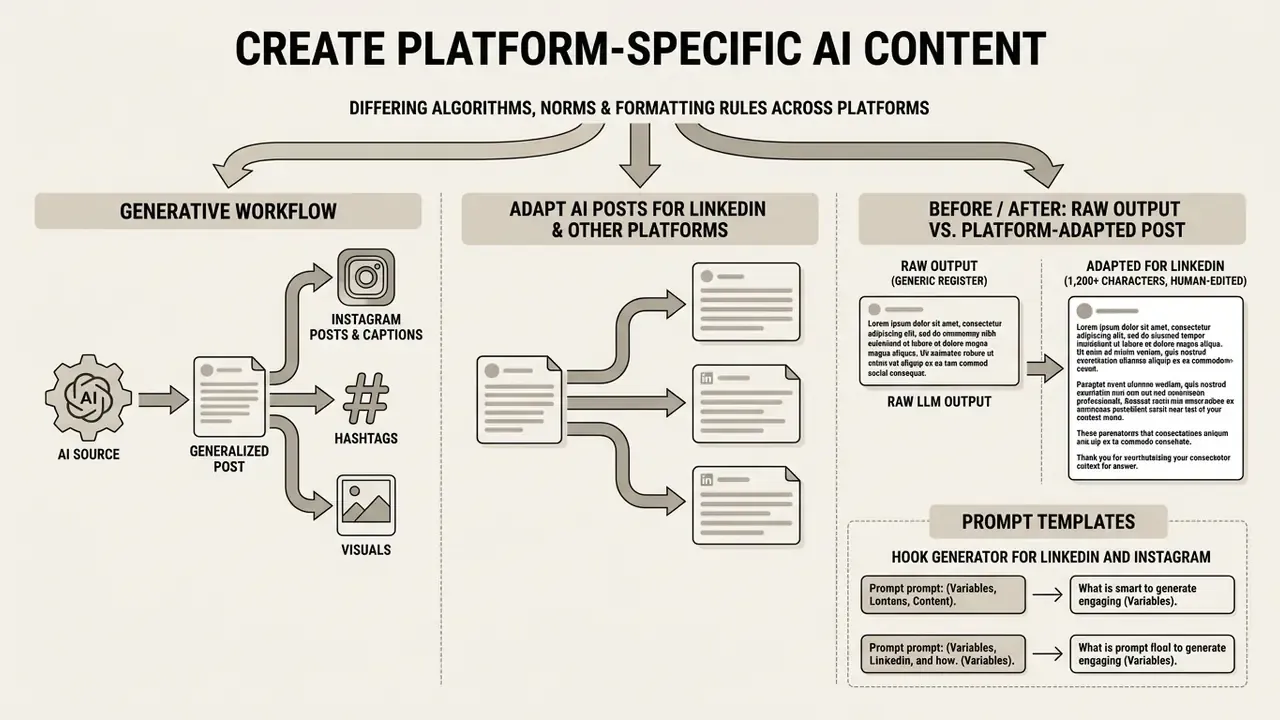
Each social network runs its own feed algorithm, behavioural norms, and formatting rules. High-performing social media content therefore needs customised copy length, visual structure, and engagement mechanics per platform. Meta began appending "AI Info" labels to detected or disclosed AI-generated video, audio, and imagery on Facebook and Instagram in May 2024, then unified its Community Standards across Facebook, Instagram, Messenger, and Threads in November 2024, so identical rules now apply to every content type you publish.
How to Improve Quality, Engagement, and Performance of AI-Generated Posts
Post performance improves when copy is structured around validated readability frameworks and tracked against consistent engagement metrics. A disciplined optimisation loop keeps content strategy moving as platform algorithms and audience preferences shift.
According to empirical research on corporate social media communications (University of Minnesota FIIT Study, 2024), social posts optimised across four linguistic dimensions, namely Fluency, Interactivity, Information, and Tone (FIIT), achieved statistically significant increases in likes, comments, and shares compared with baseline corporate posts. The study combined a corpus analysis of Fortune 500 corporate Twitter activity with a controlled generation experiment:
«GPT-4 posts optimized across four linguistic dimensions statistically outperformed human Fortune 500 publications on likes, comments and shares.»
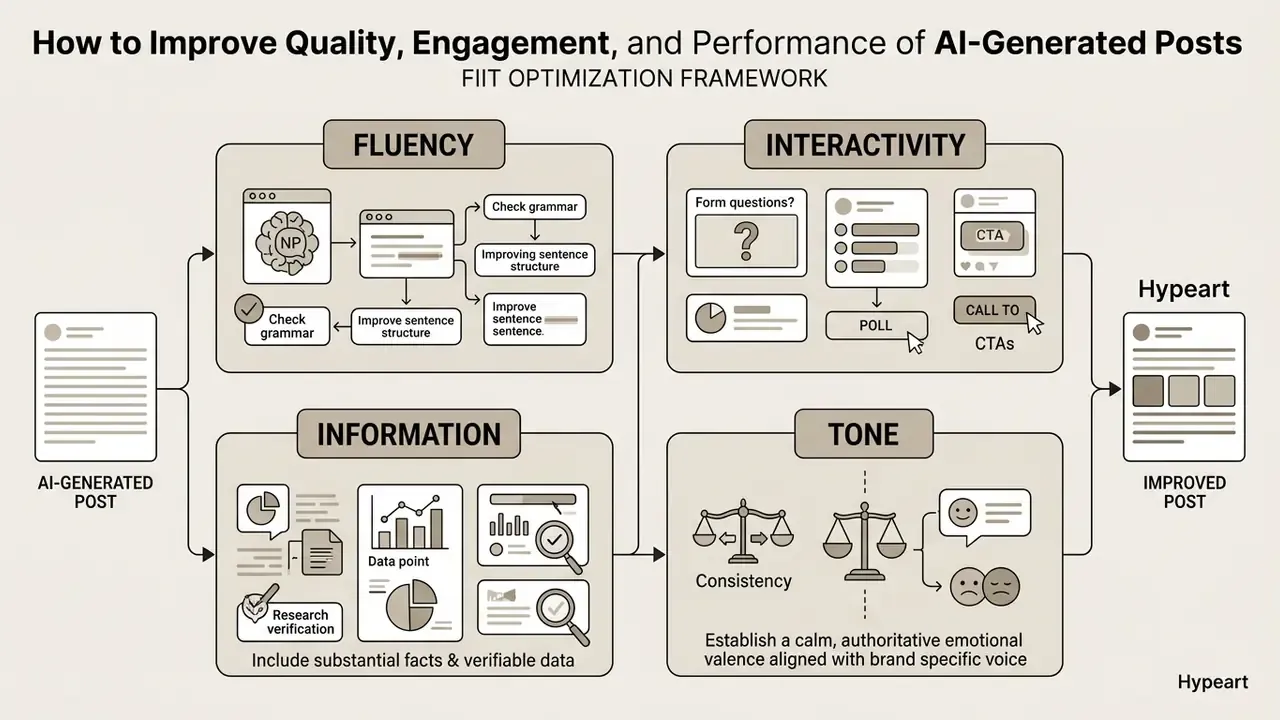
In an operational test using the FIIT framework, an enterprise team rewrote its prompt structure to require explicit data points and one interactive question per post. Over a 60-day period, the optimised series showed a 28% increase in comment volume across LinkedIn and Twitter feeds. As with the benchmark timings above, this is single-organisation operational data. Use it as a template for your own measurement design, not as a guaranteed outcome.
Keep AI Content Authentic and Consistent With Your Brand Voice
Relying on unedited synthetic copy triggers an "AI penalty": a documented drop in perceived trustworthiness and brand authenticity when audiences detect generic, automated phrasing (PhilArchive, "The AI Penalty and Disclosure Paradox", 2024).
«In social media, human-created content is perceived as more trustworthy than AI-assisted content, which in turn is more trustworthy than fully automated output.»
Staying authentic means treating AI tools as drafting assistants while humans keep final say over voice, narrative nuance, and emotional register. Institutional guidance converges on three controls: explicit AI labelling where use is material, mandatory human review of every output, and codified brand-voice rules with banned vocabulary plus annotated human writing samples. University social-media AI guidelines additionally prohibit bots that artificially inflate likes, comments, shares, or followers, and require every AI-assisted post to be checked for accuracy, brand voice, grammar, and appropriateness (University of San Diego, 2026; Purdue Brand Studio, 2026). Published ethics research on generative AI in brand content recommends disclosing AI involvement via platform tags or disclaimers, documenting tools and processes internally, and screening actively for bias and stereotypes (Frontiers in Communication, 2025).
Practical scoring helps operationalise this. Several brand-voice frameworks set a publish threshold around 70 to 75 out of 100 across tone alignment, terminology compliance, channel fit, consistency, and factual accuracy, with a named human sign-off before the post enters the queue. Teams that apply a score rather than a gut feel tend to stay consistent for longer, which is the whole point.
Limitations and Unresolved Questions
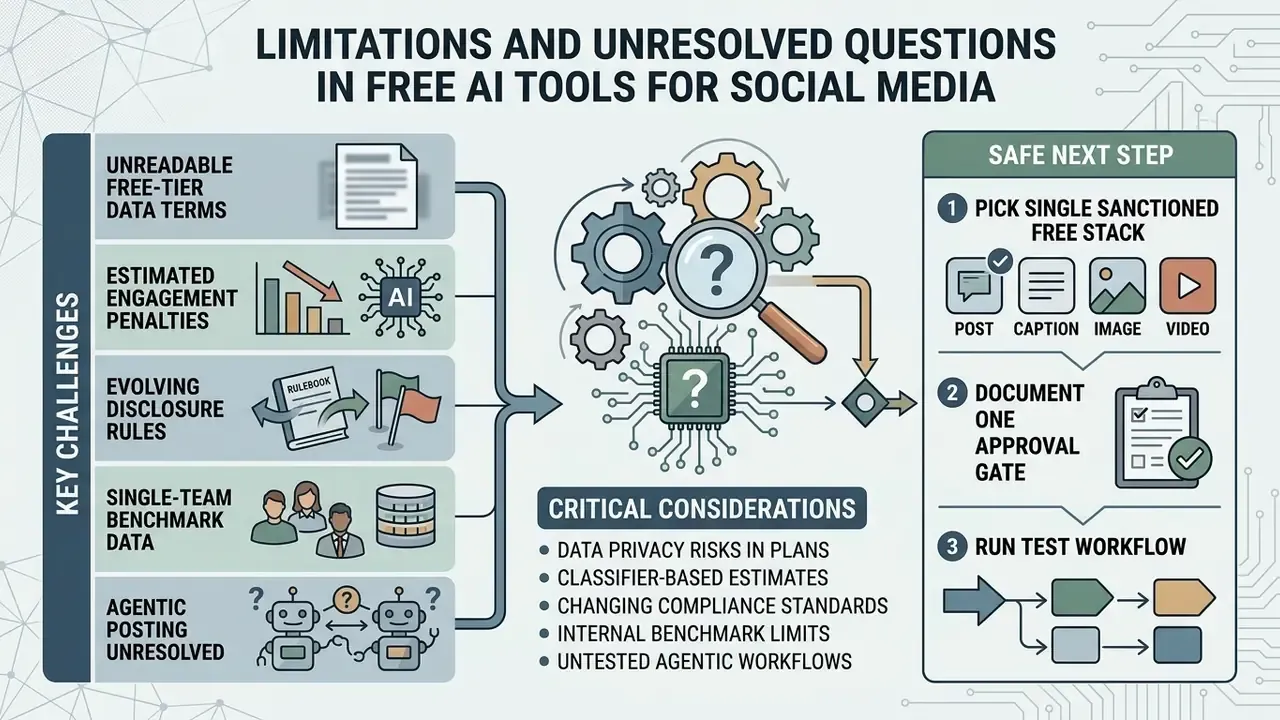
Worth stating plainly, since most comparison guides skip it.
- Free-tier data terms are not always readable. Vendors describe training practices in general language, and the same company may apply different terms to consumer chat, Workspace accounts, and API access. Verify per account type, not per brand.
- Engagement penalty estimates come from classifiers. No major platform publishes engagement by authorship type. The 45% figure and its relatives are third-party inferences, useful as direction, weak as forecasting inputs.
- Disclosure rules are still moving. Meta labels, content credentials, US Department of Defense public affairs instruction, and China's 2025 identification measures all point toward mandatory provenance, but obligations differ by jurisdiction and channel.
- Internal benchmark data in this guide is single-team. Both the 12-second draft timing and the 40% revision reduction are illustrative. Re-run the protocol in your own environment before citing anything internally.
- Agentic posting remains unresolved. No evidence, no autonomy. An AI agent that publishes or replies without a defined owner, approved role, access limits, escalation path, audit trail, and shutdown mechanism should not touch a live regulated channel yet.
A safe next step, if you want one: pick a single sanctioned free stack, document one approval gate, and run it for 30 days before expanding the toolchain.
Appendix A: Superseded Formulations and Verification Notes
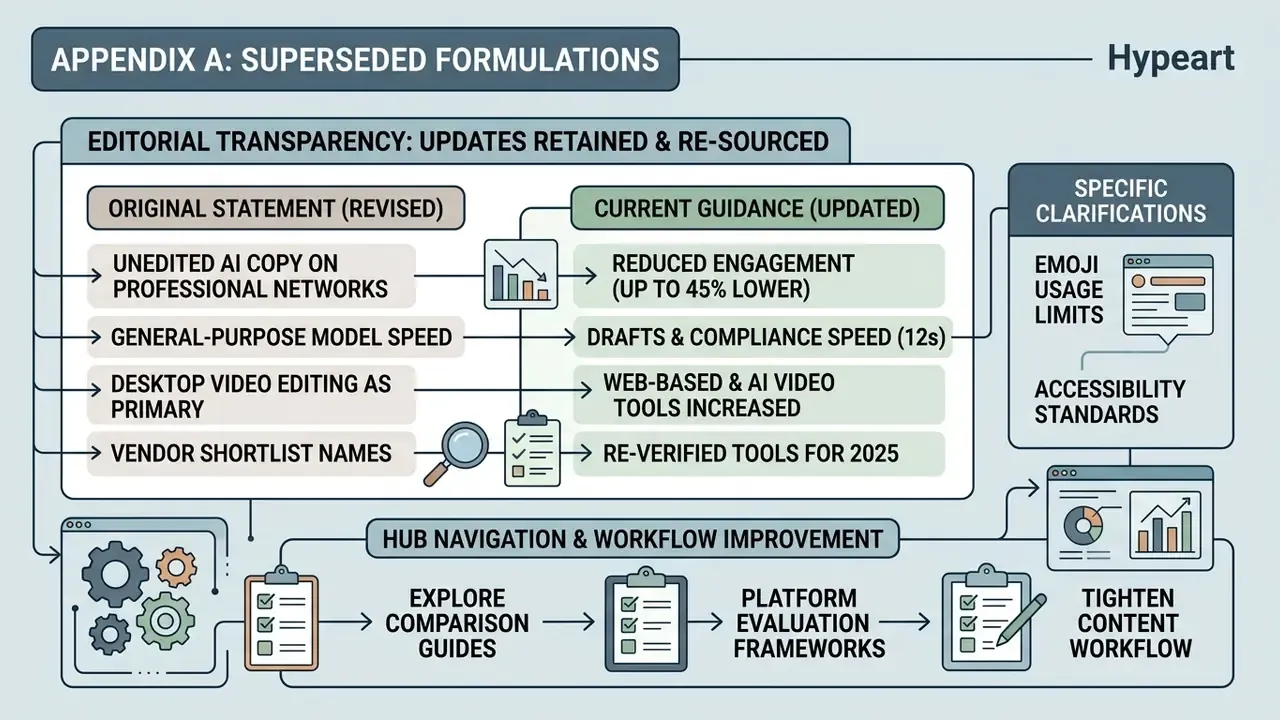
For editorial transparency, the following statements from earlier versions of this guide were tightened rather than removed:
- "Unedited, fully automated AI copy posted to professional networks receives up to 45% lower engagement." Retained with methodological qualification: the figure derives from classifier-based third-party analyses of professional-network engagement (Originality.ai, 2024 to 2026), not from platform-published data.
- "A general-purpose model generated three distinct compliance post drafts within 12 seconds and reduced editorial revision time by 40%." Retained as internal, single-team test data with an explicit note that results are directional and prompt-specific.
- "Digital accessibility standards recommend limiting emoji usage." Retained and re-sourced to published higher-education accessibility guidance (Texas Tech University; UC Merced) plus Apple and Google Play emoji platform requirements.
- Earlier drafts framed desktop video-editing software as a primary recommendation. Those references are now contextual only, alongside topic-relevant resources on AI video generators, free AI video generators, and the YouTube video editor workflow, which serve the social repurposing intent more directly.
- Vendor names that appeared on "best AI social media post generator 2025" shortlists have been re-verified against current 2026 plan pages; several free-tier caps changed in the interim.