Hale's framing comes from evaluating creative-operations pipelines, and it transfers cleanly to the gaming table. A generated battle map is a production asset. Before it reaches players, it has to satisfy spatial rules, export specifications, and licensing constraints, in that order.
Tabletop role-playing games lean hard on spatial visualization: narrative movement, tactical combat, environmental exploration. Modern artificial intelligence platforms now let game masters produce high-resolution fantasy environments, multi-level dungeons, and gridded battle maps straight from natural language prompts. Understand the technical mechanics, the tactical design constraints, and the licensing frameworks, and these tools slot into campaign prep without friction. Skip that homework, and you get pretty pictures that no token can stand on.
Key Takeaways in 30 Seconds
- What it is An AI DnD map maker converts text prompts into playable maps that preserve walls, corridors, cover, and grid alignment, unlike generic image generators that output flat pixels without map semantics.
- Which models matter Flux 1.1 Pro and Flux Dev for clean architectural geometry, Midjourney v6/v7 for painterly regional maps, SDXL Lightning and Stable Diffusion with ControlNet for local, sketch-guided control, Imagen 4 for high-fidelity texture detail.
- Grid math you must respect Roll20 defaults to 70 px per 5 ft square, Foundry VTT to 100 px (50 px minimum), Owlbear Rodeo commonly 140 px, and print requires 300 DPI at 1 inch per square.
- Prompt structure that works perspective, then layout geometry, then functional terrain, then numeric lighting ranges. Copy-ready templates for dungeons, taverns, coves, cities, forests, and world maps sit further down the page.
- Free tier reality 3 to 10 credits or daily caps, 1024 px resolution ceilings, and visible wordmarks or invisible identifiers such as Google SynthID.
- Commercial use AI-only output is not registrable under U.S. copyright law without meaningful human authorship. Human editing, layering, and arrangement can be protected. Always verify the vendor's current terms before selling modules.
What Is an AI DnD Map Maker?
An ai dnd map maker is a specialized software tool that converts natural language descriptions, or explicit spatial constraints, into playable visual layouts for Dungeons & Dragons and other tabletop RPG systems. Unlike general-purpose image platforms, a dedicated ai dnd map generator preserves spatial logic, architectural boundaries, and grid compatibility. That last property is the whole point.
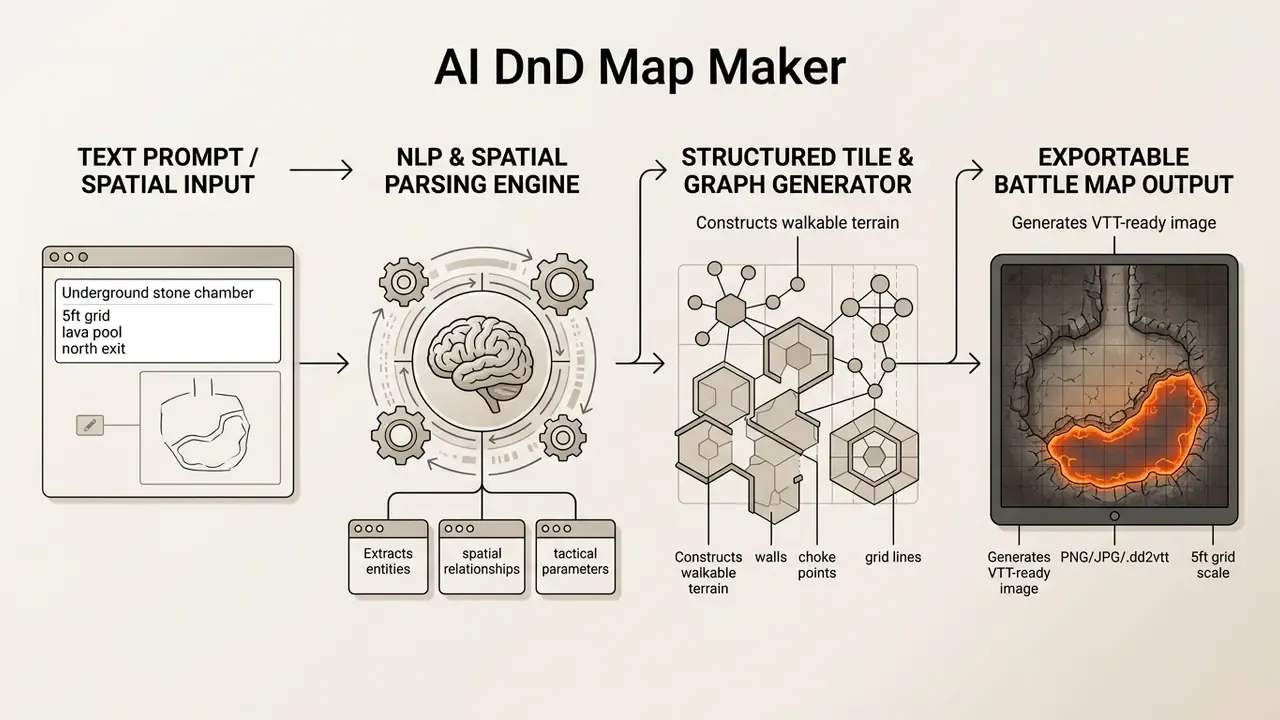
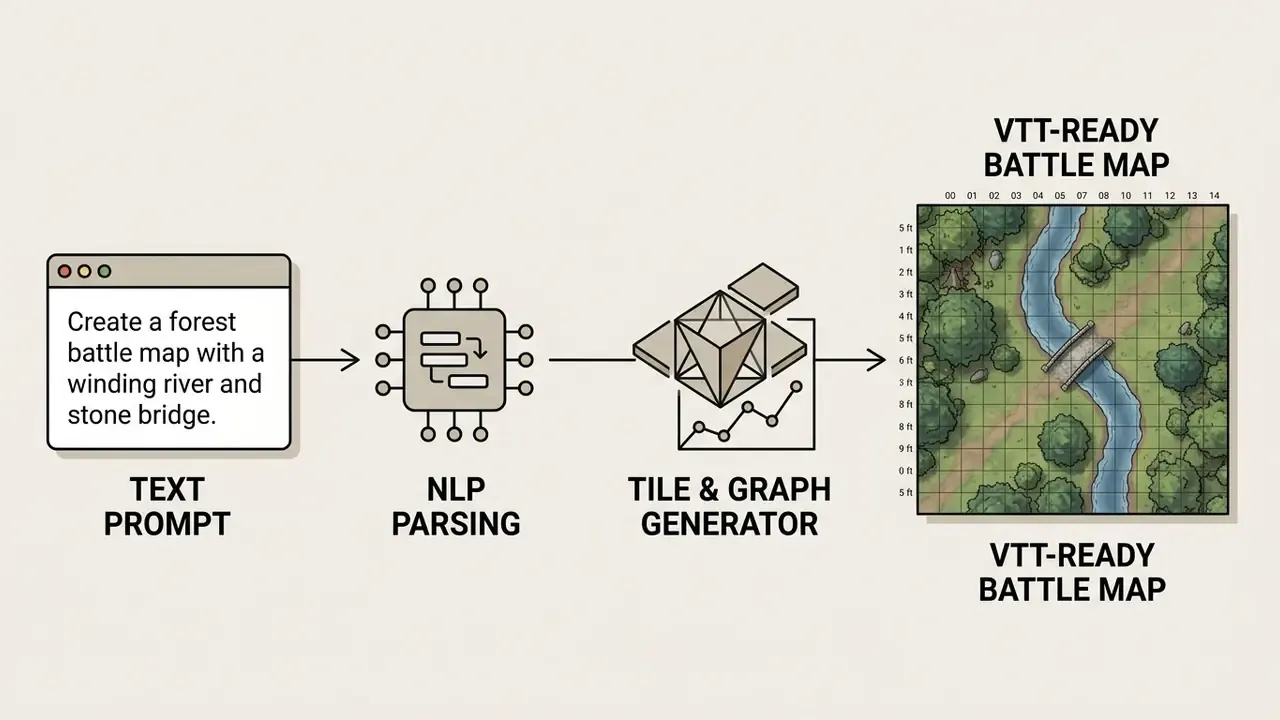
Standard image generators produce flat pixels without structural awareness. They happily render impossible staircases, doors opening into solid rock, and grid lines that drift by three pixels per square. A specialized map generator ai, by contrast, uses natural language processing to parse spatial descriptors such as corridors, rooms, and hazards, then maps them onto discrete tile grids or conditioned diffusion models. That architecture is what lets an ai generated environment keep functional game semantics for a tabletop rpg session instead of merely looking the part.
«Tabletop role-playing games can be treated as complex content generators, where system rules and structures produce playable worlds, with AI acting as an additional sub-generator.»
That distinction matters more than it sounds. The AI is a sub-generator inside a human-run system, not a replacement for the game master. For a broader comparison of the underlying visual engines, review our AI art generator comparison before committing to a paid map platform, and see the overview of tool categories if you are still mapping the landscape.
Choosing the Right AI Model for Map Generation
Most commercial map platforms are wrappers around a small number of foundation models. The model choice decides whether your walls stay straight and your grid stays square. Knowing which engine sits behind a service is the fastest way to predict output quality, and it costs you nothing but a glance at the vendor's docs.
| Model / Engine | Strongest Use Case | Practical Notes |
|---|---|---|
| Flux 1.1 Pro / Flux Dev | Top-down battlemaps, architectural geometry | Best straight-wall fidelity and text-free surfaces; Flux 1.1 Pro is the common premium tier on commercial map tools |
| Midjourney v6 / v7 | Painterly world and regional maps, concept cartography | Add explicit negatives (for example --no isometric, no perspective) when a flat overhead battlemap is required |
| SDXL Lightning / Stable Diffusion 1.5 | Local generation with ControlNet (Tile, Depth, Canny) | Sketch-to-map control: feed a hand-drawn floorplan and let the model texture it while preserving your layout |
| Imagen 4 | High-detail surface texture, parchment and relief effects | Frequently offered inside multi-model catalogs; free tiers may embed invisible SynthID identifiers |
| Video models (Runway, Luma Dream Machine) | Animating a finished static map | Used as a post-process step on an exported PNG, not as the primary map generator |
Platforms such as BattlemapAI, CharGen, FantasyGen, BatlGrid, Dungeon Map Builder, and Dungeon Scrawl expose these engines through map-specific interfaces. CharGen advertises 160+ selectable image models, including Flux Pro, Midjourney V7, and Imagen 4. Hybrid editors like Inkarnate and Dungeon Alchemist go the other way, pairing curated asset libraries with AI assistance so the geometry stays fully editable after generation.
One practical habit borrowed from model governance: record the engine, prompt, and seed for every map you keep. A two-column note in your campaign folder is enough. When a publisher, a co-GM, or a marketplace later asks how an asset was produced, you have the provenance instead of a guess.
World, City, Dungeon and Battle Map Types
Tabletop RPG mapping operates across four spatial scales: continent-wide world maps, urban city maps, interior dungeon maps, and tactical battle maps. Each scale does a different job during campaign management.
- World and Fantasy Maps: Macro-level maps showing continents, mountain ranges, trade routes, and ocean channels, used to manage overland travel and regional geography. Hex-based overland grids, commonly 6-mile hexes, support travel-time bookkeeping.
- City Maps: Settlement-scale layouts highlighting districts, major roadways, fortifications, waterways, gates, and key structures such as taverns, temples, markets, and guild halls.
- Dungeon Maps: Interior and subterranean floor plans with multi-room complexes, branching corridors, vertical shafts, tower floorplans, and secret chambers.
- Battle Maps: Micro-scale combat environments overlaid with a 1-inch (5-foot) square grid, featuring explicit cover, terrain height, difficult terrain, and line-of-sight obstacles.
Academic work such as the Zelda GAN framework shows that macro-level mission graphs can govern room assembly, keeping generated dungeons logically progressive from entry chamber to final encounter.
«A user study found that procedurally generated dungeons were comparable in perceived quality to hand-authored levels.»
From Prompt to Generated Maps
Turning a textual prompt into usable generated maps depends on conditional generative models that read spatial keywords. The generator ai parses geometry, lighting, surface texture, and objective landmarks, then lays out environmental structure accordingly.
Research from the Moonshine Framework (2024) shows that models trained on paired dataset maps and textual metadata translate descriptors like "narrow choke point" or "central pillar" into functional spatial layouts with useful reliability.
«Longer textual descriptions yield closer alignment between the text and the generated map, so prompt detail directly drives output fidelity.»
When a game master specifies structural constraints, the system conditions its denoising or tile-placement algorithm on those parameters, so the can generate function returns something cartographically sound rather than decorative. MapGPT (ACL 2024) demonstrates the same principle from the opposite direction: topological relations written as plain text ("Place X is connected with Y") condition generation about as reliably as a visual reference does. Text is a legitimate control signal, not a wish list.
Why Use an AI Map Generator for DnD Campaigns?
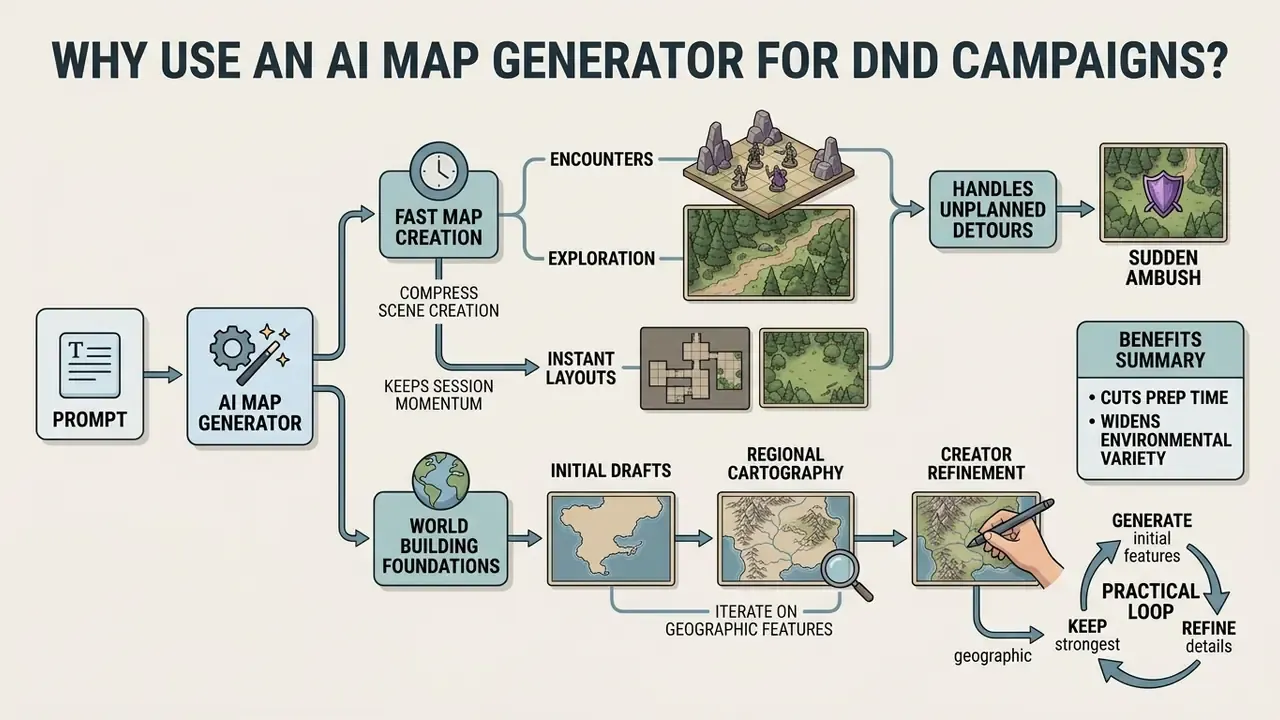
Using an ai map generator dnd cuts campaign preparation time and widens environmental variety across sessions. Automated systems let game masters create maps on the spot, moving attention away from manual drawing toward narrative design and encounter balance.
Internal workflow evaluations of creative AI tooling suggest that prompt-based generation can compress scene assembly by roughly 75 to 80 percent compared with manual digital painting or tile-by-tile assembly, letting a coordinator deploy a tailored tactical environment in seconds. Vendor documentation across the category claims something similar: prompt-to-gridded-map turnaround measured in seconds rather than hours. Treat both numbers as workflow indicators, not controlled benchmarks. Actual savings depend on how much manual retouching your table demands, and a fussy table demands plenty.
Fast Map Creation for Encounters and Exploration
«Game masters already use generative tools to create characters, environments, and quests, adapting the results to their own campaigns.»
With automated generation, a GM can generate maps for unplanned detours, say a sudden ambush in a forest clearing or an unmapped tavern cellar, in under thirty seconds. Pacing survives. Immersion survives too. Research into real-time procedural generation supports the same on-the-fly model: runtime pipelines using seeded grid creation, room placement, spawn-point generation, or entropy-based wave function collapse can produce coherent local geometry without pre-storing a full map (Reinforcement Learning-Enhanced Procedural Generation, arXiv, 2025).
AI-Generated Maps as a Starting Point for World Building
Treating ai-generated maps as foundational drafts lets creators iterate on regional cartography before the setting hardens. Generated environments are visual prompts, not finished canon. They suggest a bay, a mountain pass, a suspicious island, and you decide what it means.
«Game masters value tools that "ignite their creativity" by supporting improvisation rather than dictating finished content.»
A practical loop: generate an initial coastline or dungeon complex, keep the strongest geographic features, then hand-place narrative anchors, political borders, and campaign secrets over the generated terrain. Comparing several AI image generators pays off here, because coastline plausibility and river logic vary sharply between engines. One model gives you rivers that run uphill; another gives you a delta you would swear was drawn by a human cartographer. Iterative refine passes, reshaping coastlines, adding archipelagos, nudging landmarks, let a single seed map expand outward into neighboring regions while one visual identity holds across the campaign.
Cost matters at scale, especially if you generate dozens of variants per arc. If you plan to budget generation credits across a long campaign, browse the hub to estimate media processing costs before you commit to a tier.
How to Use an AI DnD Map Generator
Creating a custom map with an ai d&d map generator follows a structured workflow that turns narrative concepts into grid-aligned assets. A systematic process is what keeps the output both attractive and tactically usable, and it lets the generator create something you can actually import.
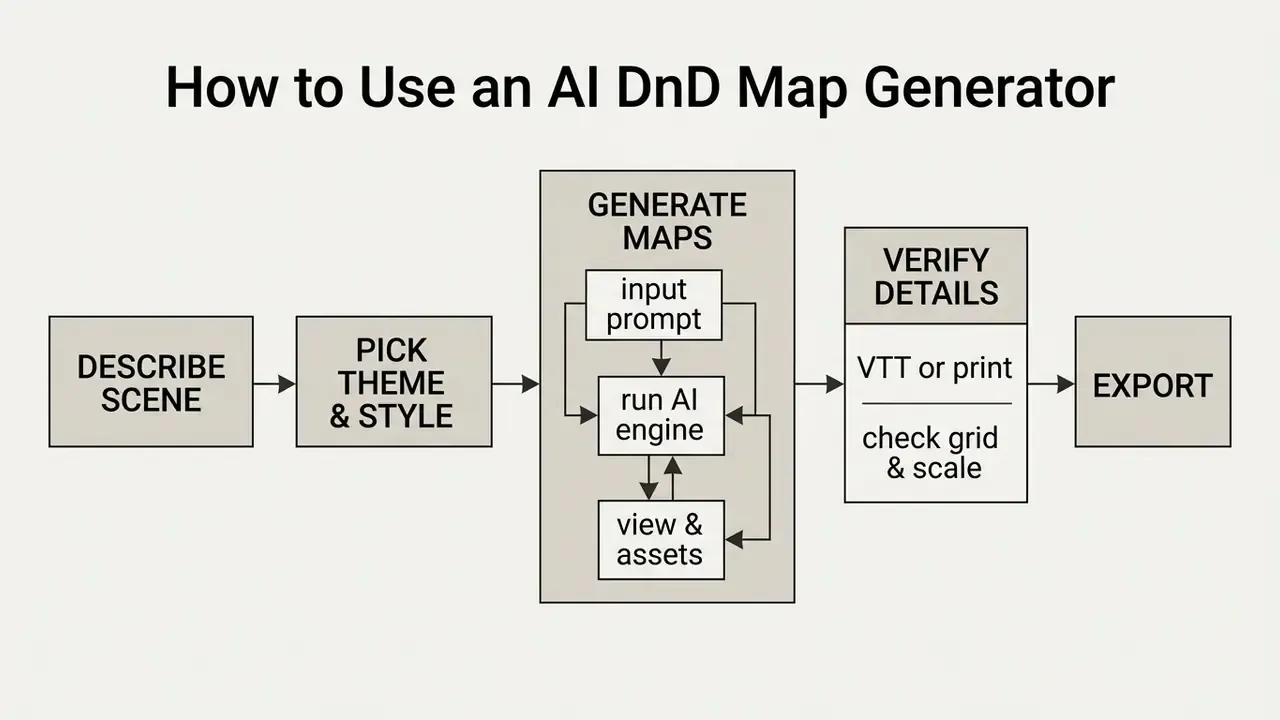
Figure caption: visual step-by-step pipeline for generating battle maps with an ai dnd map generator: describe the scene, pick a style, generate, verify grid alignment, then export for VTT import or 300 DPI printing.
Describe the Map Vision in a Prompt
An effective prompt defines four parameters: perspective view, geometry layout, functional obstacles, and lighting conditions. State them explicitly and the model stops inventing ambiguous, unplayable terrain.
To maximize structural accuracy in a dnd ai map generator, build prompts around these elements:
- Perspectivetop-down battlemap view, orthographic projection.
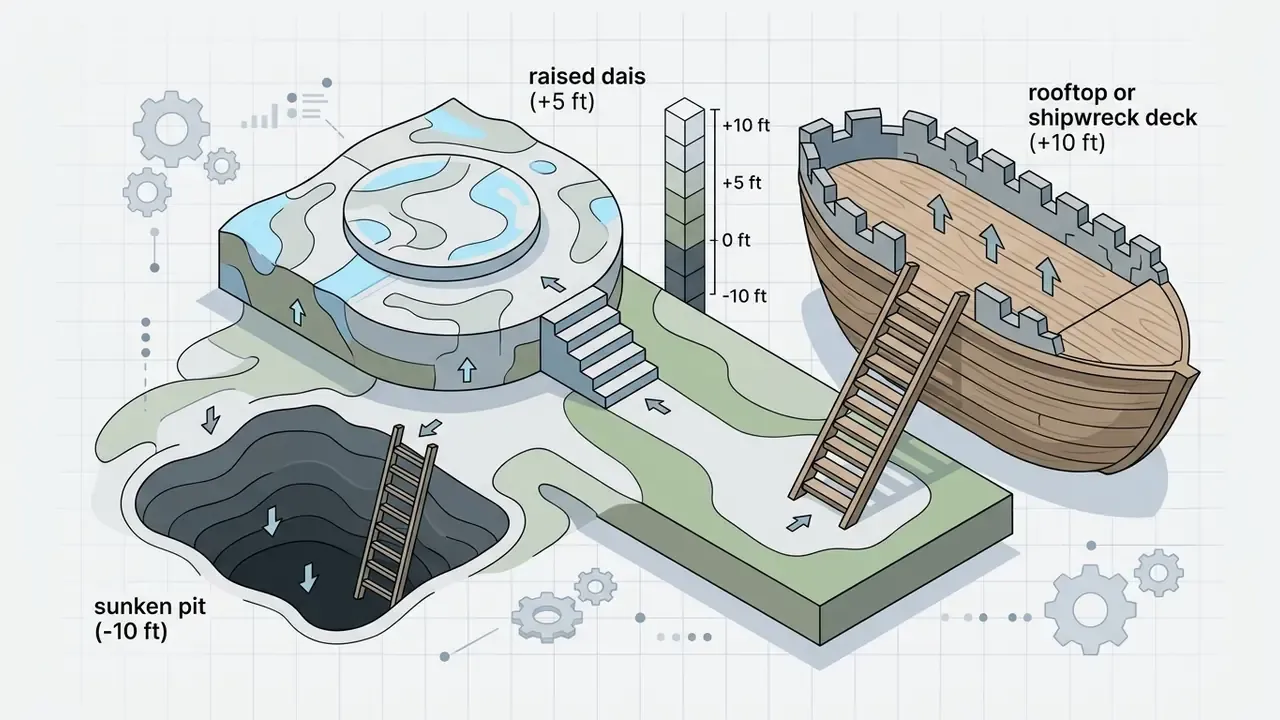
- Layout and geometry20x20 grid, central rectangular chamber, 5-foot corridors, raised stone dais (+5 ft), sunken pit (-10 ft), stairs.
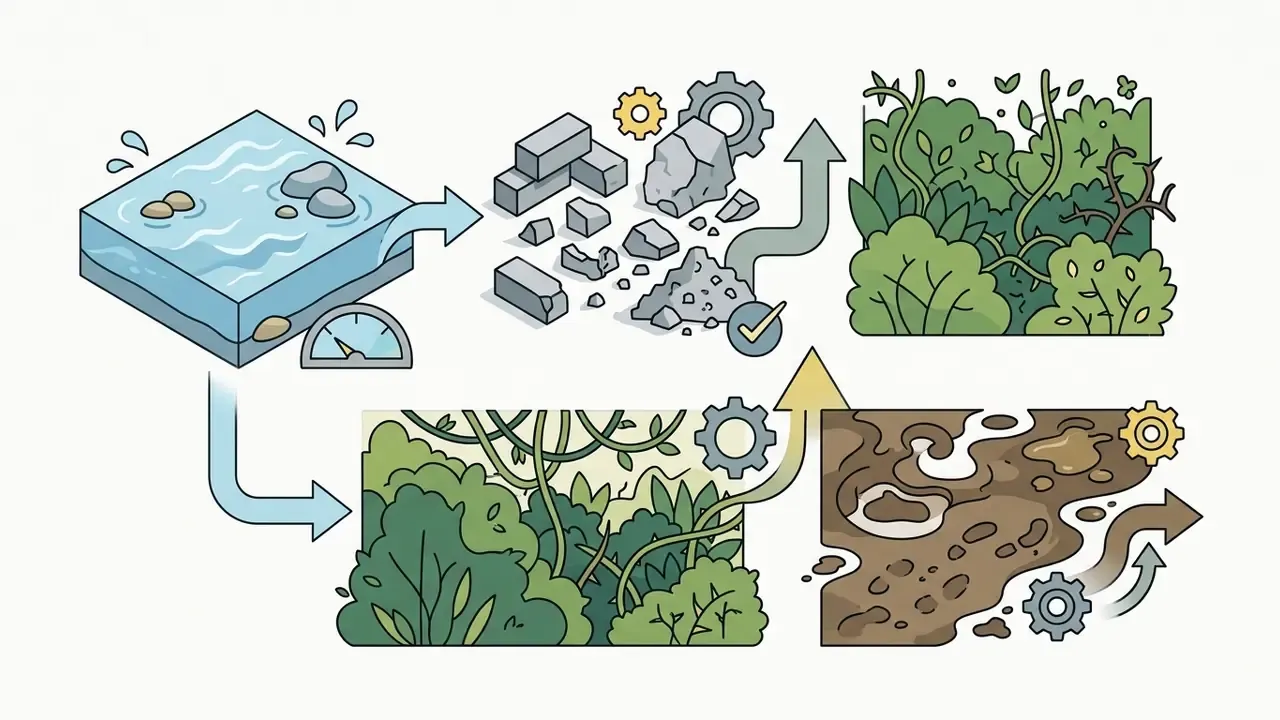
- Functional terrainstone pillars giving half-cover, sunken lava pit, wooden doors, shallow water as difficult terrain.
- Lighting and atmospheredim torchlight with a 20-foot bright radius and 20 to 40 ft dim radius, dark shadows, damp stone texture.
Research from Liu & Chilton (CHI 2022) shows that prompts naming explicit subjects and structural properties produce far higher spatial consistency than abstract mood descriptions.
«Explicitly stating structural properties and key objects in the prompt substantially improves the spatial consistency of generated layouts.»
The same study recommends sampling three to nine seeds per prompt, because one description can yield wildly different images.
Weak prompt vs. strong prompt
WEAK:   "a dungeon map for d&d, cool and dark"
STRONG: "Top-down orthographic battlemap, 25x25 grid of 5ft squares,
         flooded stone crypt, knee-deep murky water (difficult terrain),
         four crumbling pillars giving half-cover, three sarcophagi,
         single north stair entrance, green torchlight 20ft bright /
         20-40ft dim, no characters, no text labels, readable layout"
The weak version leaves scale, viewpoint, cover, and entry points undefined, so the model invents perspective and fills the frame with clutter. The strong version pins down every tactical variable the encounter depends on. One caveat worth naming: heavily grim or gore-laden phrasing can trip platform content filters, and policies differ by vendor, which is the same moderation logic discussed in our note on the character ai nsfw filter debate. Describe atmosphere through architecture and light, not viscera.
Ready-to-Use Prompt Templates for Common Encounters
Copy these blocks straight into a dnd map creator ai, then swap dimensions, biome, or light source to fit your encounter. Each template already carries perspective, grid size, cover, hazards, and lighting.
1. Underground Boss Arena
Top-down battlemap, 30x30 grid of 5ft squares, obsidian ritual chamber,
glowing red runes on the floor, central lava pit (hazard, 15ft across),
eight stone pillars providing half-cover, raised altar dais +5ft with stairs,
two side corridors, dynamic shadows, 8k resolution, photorealistic fantasy
style, no characters, no text
2. Roadside Tavern Interior
Top-down tactical map, 20x15 grid of 5ft squares, cozy medieval tavern
interior, wooden tables and benches (half-cover), roaring fireplace emitting
warm orange light 20ft bright radius, long bar counter, kitchen door,
cellar trapdoor, staircase to upper rooms, detailed plank floor texture,
readable layout, no characters
3. Coastal Pirate Cove
Top-down battle map, 40x30 grid of 5ft squares, subterranean sea cave,
wooden docks and gangplanks, stranded shipwreck hull as elevated platform
+10ft, shallow turquoise water (difficult terrain), scattered treasure
chests, stalagmite cover, dim torchlight and shafts of daylight from a
ceiling breach, no characters
4. City District (Urban Chase or Ambush)
Top-down city map, 50x50 grid of 5ft squares, bustling medieval market
district at dusk, cobbled main avenue, four narrow side alleys as choke
points, market stalls giving half-cover, fountain plaza, two-story rooftops
accessible by external stairs (+10ft elevation), lantern light pools,
aerial orthographic view, no characters
5. Forest Clearing with Ruins
Top-down battlemap, 30x30 grid of 5ft squares, moonlit forest clearing,
ancient toppled stone ruins providing half and three-quarters cover,
shallow creek crossing diagonally (difficult terrain), campfire emitting
15ft bright light, dense treeline blocking line of sight at the borders,
mushroom rings, painterly fantasy style, no characters
6. Regional World Map (Campaign Overview)
Aged parchment fantasy world map, hand-drawn ink cartography, one continent
with three mountain ranges rendered in profile, central desert, two river
systems flowing to the coast, six labeled port cities, forest symbols,
compass rose, decorative border, sepia palette, Tolkien-inspired style
7. Jungle Temple Ruins (Exploration Set-Piece)
Top-down dungeon map, 35x35 grid of 5ft squares, overgrown jungle temple
interior, cracked flagstones, vine-covered pillars, secret door in the
north wall, pit traps marked as dark openings, central sacrificial chamber
with cursed idol on a raised platform +5ft, shafts of green light from
collapsed ceiling, no characters
Pick a Theme, Style and Map Details
The visual theme sets the tone of the dnd map and should match how you present it: laptop, projector, or printed sheet. Choosing between AI art generators at this stage is mostly a question of which style family each engine renders convincingly. Different fantasy themes bring distinct visual grammar:
- Top-down tactical high-clarity overhead perspective built for grid alignment and token placement, with strong silhouette readability.
- Aged parchment sepia-toned, hand-drawn manuscript look with worn edges, ideal for regional world maps and hand-held player props.
- Isometric 3D fixed 45-degree view with equal-scale axes, giving vertical depth to multi-level dungeons.
- Realistic render high-detail textures, physically based materials, dynamic lighting, volumetric fog, layered environmental shadows.
- Hand-drawn ink visible sketch lines and uneven strokes for an artist-made feel that suits handouts.
- Pixel art / retro low-resolution tile aesthetic for retro-flavored settings and quick reference maps.
Recurring fantasy motifs, enchanted forests, floating islands, ancient castles, glowing artifacts, volcanic wastes, pair predictably with these styles. Reuse the same style keywords across a campaign and visual continuity takes care of itself. If you need a refresher on style terminology and how models interpret it, our AI art generator glossary entry covers the vocabulary along with free-tier trade-offs. Comparing plan structures before you subscribe is also sensible, so browse the hub for licensing and plan overviews.
Generate, Explore and Refine the Result
Once the first variants land, judge them on spatial flow, room connectivity, and visual clutter. In practice, output from a dnd map creator ai often arrives with small artifacts or a grid boundary that sits a few pixels off. Annoying, not fatal.
Modern systems support iterative feedback: modify a single prompt parameter, or mask a region and regenerate only that patch. For heavier cleanup, removing a stray artifact, repairing a broken wall line, extending a map edge, a dedicated photo editor workflow is usually faster than a full regeneration, and outpainting tools can expand an image to hit an exact grid-aligned resolution. Exploring several seed variations from the same base prompt lets you pick the layout that fits the encounter you actually planned.
Formal cartographic practice treats evaluation as an iterative stage judged on clarity, accuracy, usability, and visual quality. Newer generative-cartography work adds automated checks that compare output against design standards and flag visual inconsistencies before export. Borrow that idea: a two-minute review pass beats a mid-session apology.
How to Create Tactical Dungeon and Battle Maps
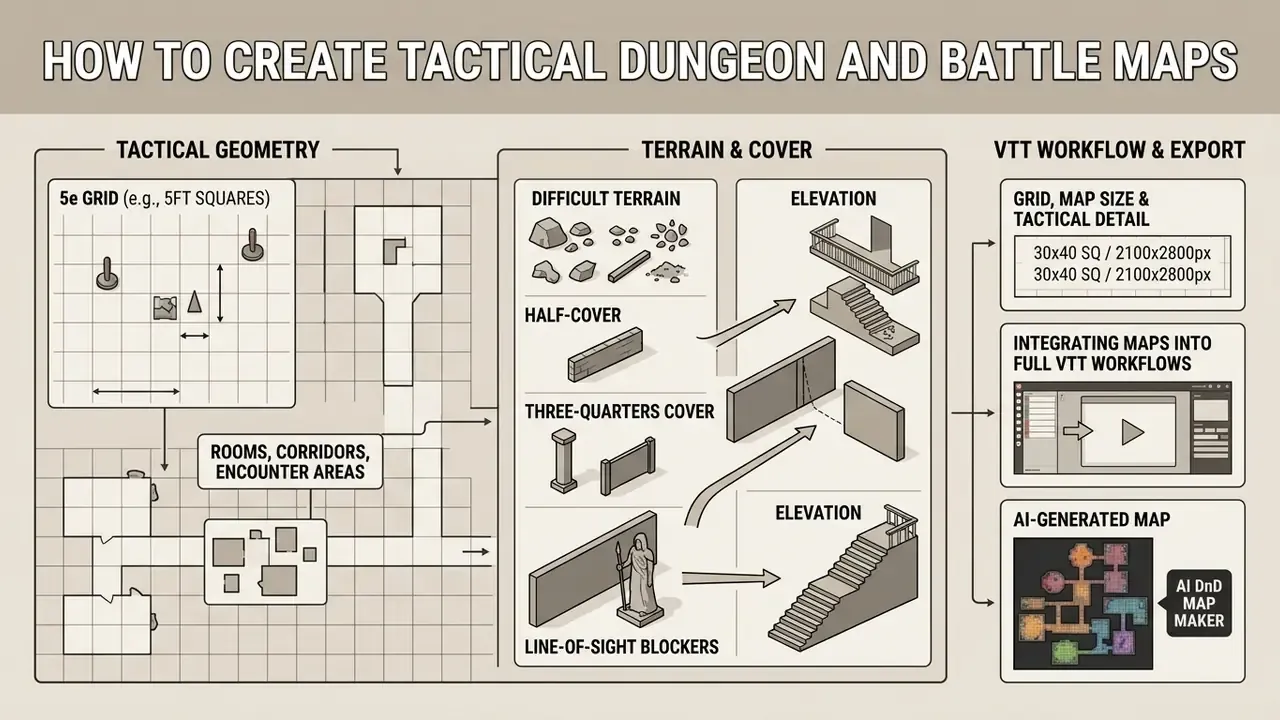
Tactical battle maps demand precise geometry to support Fifth Edition (5e) rules and grid-based combat. Building playable subterranean structures with an ai dungeon map generator means balancing room scale, cover placement, and line-of-sight boundaries. The previous section covered how to operate the tool. This one covers what makes the resulting layout playable.
Rooms, Corridors and Encounter Areas
A well-designed dungeon offers varied engagement spaces, not a chain of hallways with monsters in them. Tactical depth comes from choke points, alternate routes, and open skirmish areas that reward movement.
Classic level-design practice in tabletop adventure manuals, including Tome of Adventure Design (Frog God Games) and Dungeoncraft, argues against linear flow-chart dungeons. The recommended alternative: divide the map into sections, for example nine blocks on graph paper, then add circular paths and one or two entrances per area. These are craft conventions from published design guides rather than peer-reviewed findings, so treat them as heuristics validated by decades of table use.
Circular hallways, multiple chamber entrances, and central encounter hubs prevent combat bottlenecks and encourage repositioning. Choke points work best when they are genuinely narrow with no bypass, since crossing one exposes a character to attack from several angles at once.
«A GAN combined with graph grammars produces a coherent sequence of challenges, from keys to the final boss, preserving tactical and narrative integrity.»
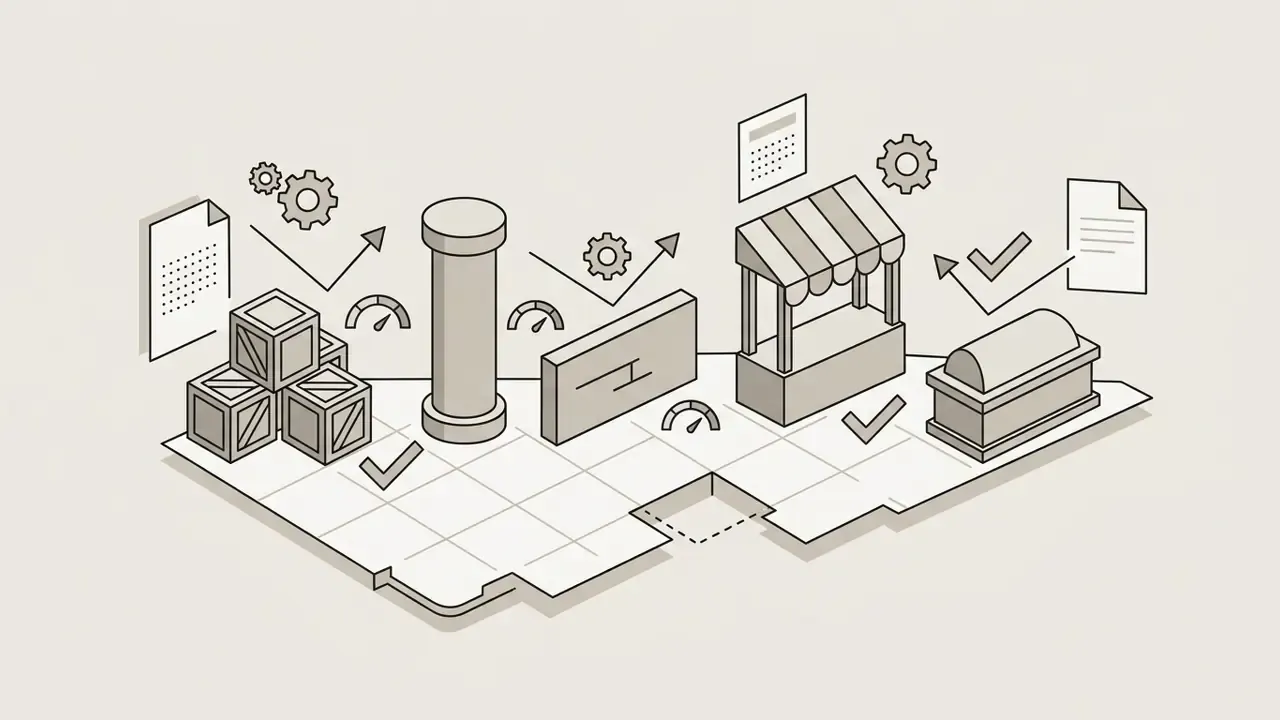
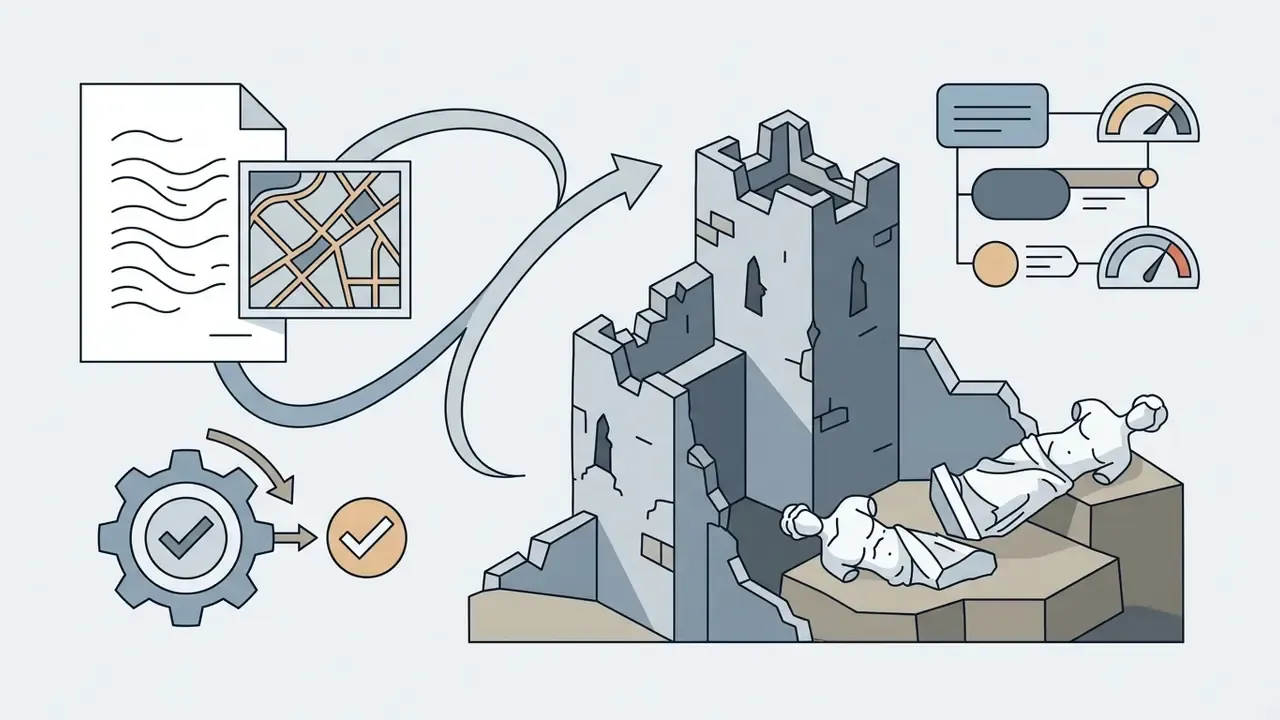
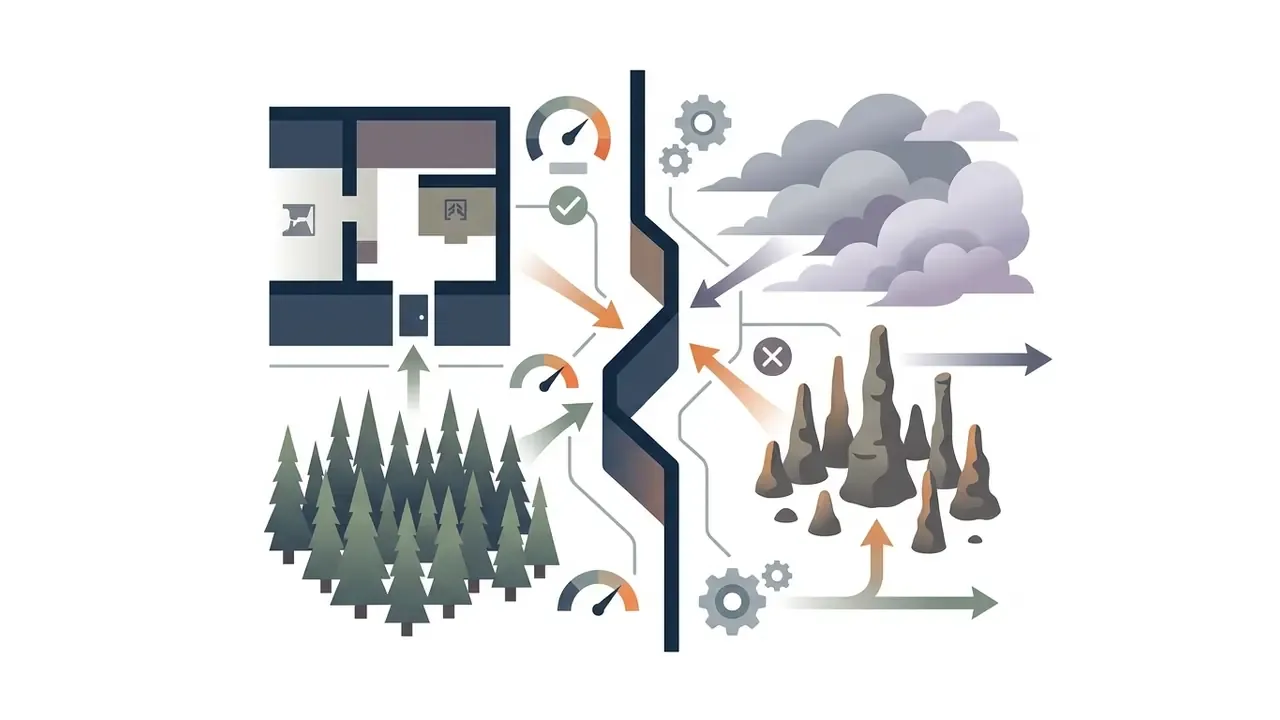
Cover and elevation vocabulary worth baking directly into prompts:
Grid, Map Size and Tactical Detail
Grid scaling is the core technical metric of tactical d map design. Standard mechanics run on a 1-inch square equal to 5 feet of movement, which translates into precise pixel requirements at import time.
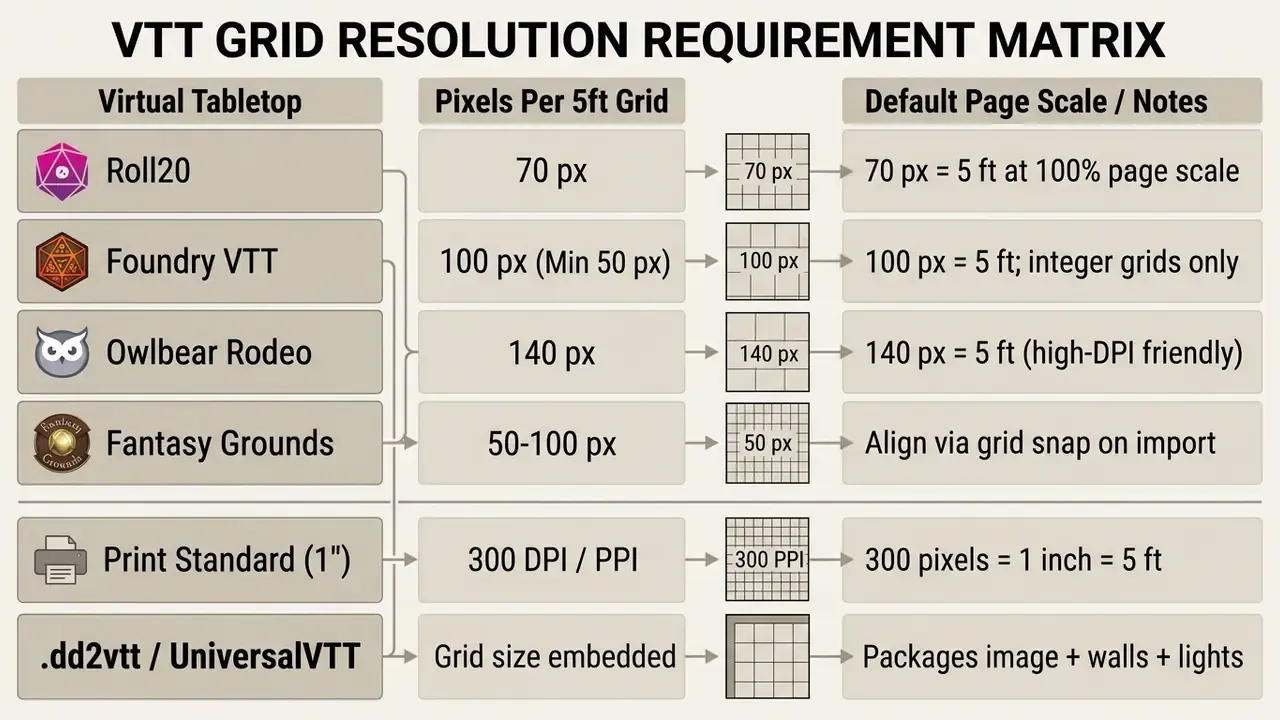
Table alt text: grid resolution requirements per virtual tabletop, listing pixels per 5-foot square for Roll20, Foundry VTT, Owlbear Rodeo, Fantasy Grounds, print output, and the .dd2vtt Universal VTT format.
When generating assets for virtual tabletops, make sure the map edges land flush on grid squares. A 20x20 map for Foundry VTT at 100 pixels per cell needs exactly 2000x2000 pixels. Partial cells along the border are the usual source of token offset during play, and players notice immediately. Worth remembering: Foundry ignores embedded DPI metadata for imported images entirely. DPI only matters when the map will be printed at one inch per square.
Integrating maps into full VTT workflows
A finished image is only the first deliverable. A production-ready scene also carries walls, lighting, and matching tokens.
- Format export
- for Foundry VTT and compatible platforms, export
.dd2vttor.UniversalVTTfiles. These package the map image together with grid size, line-of-sight wall data, and light-source coordinates, which removes most manual wall-drawing work. - Grid alignment pass
- save the source map, export PNG at your target pixels-per-square, upload, then align the grid before configuring walls, doors, dynamic lighting, and fog of war.
- Token and asset pairing
- reuse identical style keywords, for example "grimdark ink style, muted palette", in both the map prompt and any character or monster token prompts, so the encounter reads as one visual set.
- Monster and NPC art
- pair a battlemap generator with a token generator and a creature generator to produce map, minis, and stat-block art in one sitting. That bundled workflow is the real advantage specialized RPG suites hold over general image tools.
- Print output
- for physical tables, export at 300 DPI, print at 100% scale, and tile pages so each square measures exactly one inch for miniatures.
Animated Battle Maps (MP4 / WEBM)
Static PNGs are no longer the ceiling. Current pipelines turn a finished map into a looping animated scene, flowing lava, flickering torchlight, drifting fog, falling snow, rippling water, using video models such as Runway Gen-2 or Luma Dream Machine. Some dedicated map builders export animated WebM directly.
The workflow is short. Finalize the static map, upscale it to the required grid resolution, feed it to a video model with a tight motion prompt ("subtle lava flow, flickering ember light, no camera movement"), then import the resulting MP4 or WEBM into Foundry VTT as the scene background layer. Two constraints matter. Keep the camera locked, or your grid drifts out of alignment. And watch file size, because large looping backgrounds punish players on weaker hardware, so compress before distribution. Our animation and motion tooling guide covers export settings, a clipchamp video editor walkthrough handles trimming and compression on a lightweight desktop, and if you want to stitch several animated locations into a single session recap, the collage video approach works well. Prompt-driven video is moving fast too, as our notes on chatgpt video generation capabilities and the practical chatgpt video generator overview describe. Developer-side automation of longer clips is documented in our Google Veo implementation guide, and for wider integration patterns you can browse the hub.
City Maps and Connected Campaign Locations
Linking macro-scale world maps to urban layouts from a dnd city map generator ai keeps geography consistent across a campaign. Players moving from overland travel into a city need spatial orientation that holds up.
A structured mapping hierarchy links three operational scales:
- Regional mapsettlement locations, major landforms, and travel distances on a 6-mile hex grid. Keep two versions, a GM copy with hidden sites and a player copy showing only discovered locations.
- City district mapwalls, gates, main avenues, waterways, residential blocks, and points of interest such as taverns, temples, markets, and government buildings.
- Local site mapgridded floor plans for specific taverns, castles, or sewer dungeons inside the city.
Clear geographic links between scales prevent narrative disconnects during long arcs. A simple consistency rule keeps it honest: every dungeon entrance drawn at site scale should appear as a marked feature on the city or regional map above it. Break that rule twice and your players will start drawing their own map, which is either a compliment or a warning.
Free AI DnD Map Makers, Limits and Commercial Use
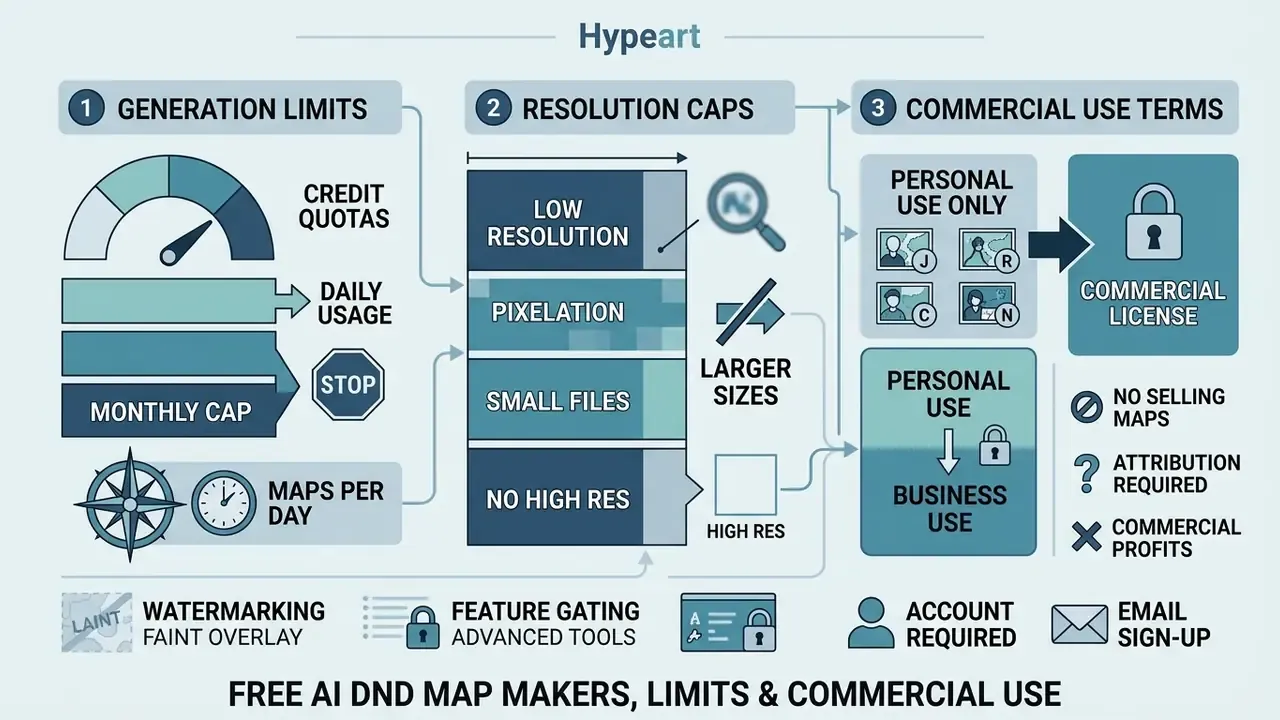
Evaluating an ai dungeon map generator free service means checking three things: generation quotas, resolution caps, and commercial licensing terms. The right choice depends on whether assets stay at your home game or ship as a product, a decision our guide to AI image generators for commercial use breaks down in licensing terms.
| Tool Category | Example Platforms | Free Tier Limits | Grid & VTT Support | Export Formats | Commercial License Rights |
|---|---|---|---|---|---|
| Prompt Battlemap Generators | BattlemapAI, CharGen | 3 free credits (BattlemapAI); daily generations across 160+ models (CharGen); resolution capped near 1024px | Integrated square/hex grid, optional overlay, VTT-standard PPI | PNG, JPG | Restricted to paid/Plus tiers |
| VTT-Integrated AI Engines | TT-RPG App, BatlGrid | Daily credit resets (2 to 5 maps/day), watermarked outputs | Native grid alignment, walls, fog of war, light exports | PNG, JPG, .dd2vtt | Personal use only on free plans |
| Hybrid Editors with AI Assist | Inkarnate, Dungeon Alchemist, Dungeon Scrawl | Free tier with asset/resolution limits; Dungeon Scrawl allows unlimited free maps | Fully editable square/hex grids, manual walls | PNG, JPG, project files | Varies by plan; verify before selling |
| Fantasy / World Map Generators | FantasyGen, ZSky AI | Unlimited free generation with small wordmark plate (ZSky); style-limited free tier | Style-driven, grid optional | PNG up to 4K | ZSky states commercial use on all plans; verify current terms |
| Open-Source PCG Frameworks | Moonshine, Word2World, Dungeon Map Builder | Unlimited generation via local hardware or self-hosting; free square and hex grids | Discrete tile-based grids | Raw JSON grids, PNG, .dd2vtt, animated WebM | Dependent on repository license (MIT/Apache) |
Read the table as a shortlist filter, not a verdict. Tiers change quietly, and the column that changes most often is the last one.
What "Free" Means for an AI Map Generator
Free tiers across commercial ai map maker dnd services tend to enforce the same four boundaries. In an ai map generator dnd free plan, expect:
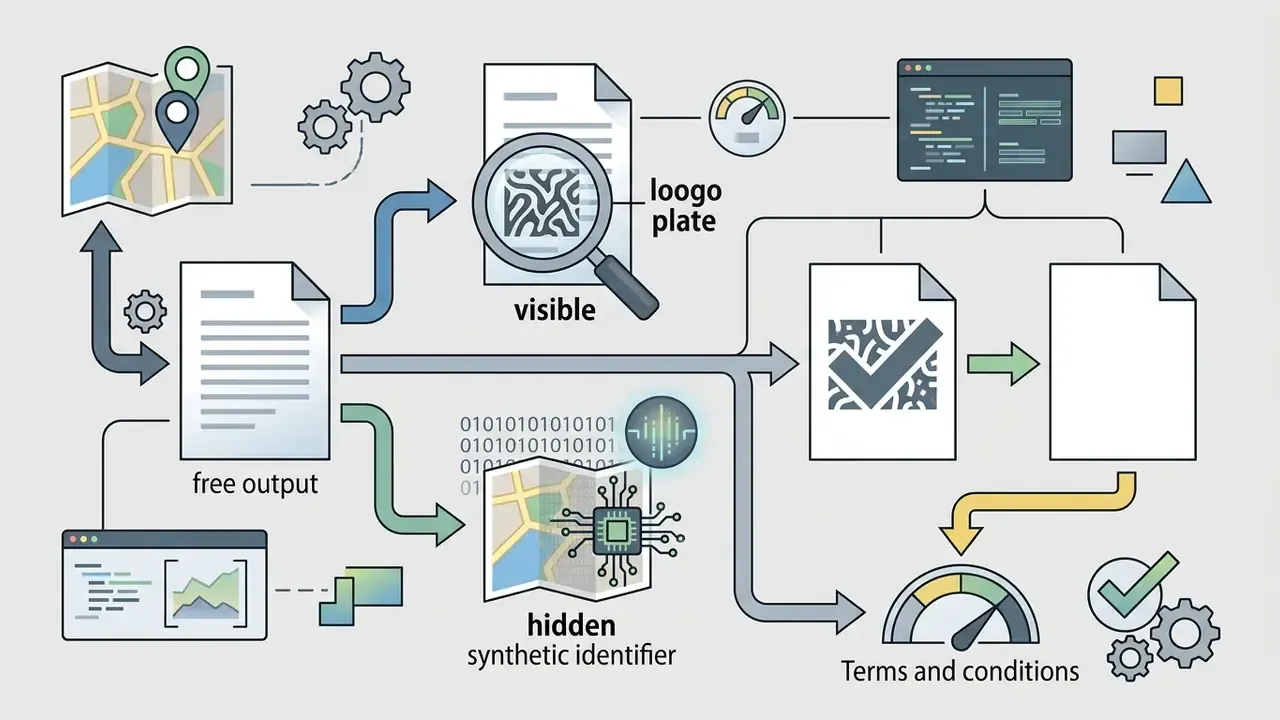
.dd2vtt export, wall and light data, large-format print, and commercial-rights packs almost always sit behind a paid tier.Knowing these constraints tells you quickly whether a dnd map maker free ai plan covers your sessions or whether an upgrade is unavoidable. If you are still shortlisting, compare free AI art generators and their export limits alongside map-specific platforms. For monetization rules across formats, review the Commercial License for AI Media entry, and if a vendor's documentation leaves you guessing, open the hub for platform assistance.
Check Commercial-Use Rights Before Publishing Maps
«Material generated wholly by AI without sufficient human authorship is not registrable; human selection, arrangement, or editing may be protected.»
In practice: human arrangement, custom editing, hand-placed labels, and multi-layered manual design over AI output can qualify for protection. An untouched raw generation cannot. That gap is exactly where careful documentation of your own edits earns its keep.
Vendors keep distinct commercial terms, and they rarely align. Major AI providers generally assign output ownership to users under current terms of service. OpenAI's help documentation states that users own the images they create with DALL·E and may reprint, sell, and merchandise them, subject to the applicable content policy. Many specialized map tools take the opposite stance and require an active commercial tier: CharGen restricts free-tier maps to personal use and unlocks commercial licensing on Plus and above, BattlemapAI grants full commercial rights only on paid plans, and Dungeon Map Builder states there are no commercial-use restrictions on its exports. Platform rules add a third layer, since Patreon's commerce guidelines require creators to own or hold rights to what they publish and prohibit infringing third-party copyright or trademark.
Verify terms before you list an adventure module for sale. Our overview of commercial licensing for AI-generated images outlines the clauses that most often shift between plan tiers, the AI Media Commercial-Use Hub collects the licensing guides in one place, and for how courts are treating training data and output ownership you can see the overview of generative AI legal developments.
Pre-Export Quality Checklist
Run this pass before dropping any generated map into a live session. Ten items, five minutes.
- Grid flush checkmap edges land on whole squares, with no partial cells along any border.
- Resolution mathgrid count multiplied by target pixels-per-square equals the exact export dimensions (for example, 20 × 100 px = 2000 px).
- Artifact sweepno duplicated doors, floating walls, corridors that dead-end into nothing, or garbled text glyphs.
- Connectivity auditevery room is reachable, and each encounter area has at least two access points wherever the design intends flanking.
- Tactical legibilitycover, difficult terrain, and elevation changes stay distinguishable at player zoom level.
- Lighting consistencylight sources painted into the image match the light sources you configure in the VTT.
- No stray characters or labelstokens belong in the VTT, not baked into the background.
- Licensing statusconfirm the plan tier that produced the file permits your intended use, and check for wordmarks or embedded identifiers.
- File hygienecompress large PNGs or animated backgrounds so players on modest hardware can load the scene.
- Print variantif the map goes to a physical table, re-export at 300 DPI and test-print one page at 100% scale to verify the 1-inch square.
AI DnD Map Maker FAQ: Mobile Access, Styles and Image Guidance
Can I access an AI DnD map generator on mobile devices?
Yes. Most commercial dnd map generator ai services run as cloud-based web apps accessible through mobile browsers on iOS and Android, and several vendors ship dedicated apps. Heavy computation and neural network inference happen on server GPUs, while the interface handles prompt input and previewing on a phone screen. On-device pipelines such as Google AI Edge can also run generation locally on Android and iOS hardware. Detailed editing and VTT grid alignment, though, remain far easier on a desktop display.
How does Edge-Image guidance work for map creation?
Edge-Image guidance uses structural line art, depth maps, or rough user sketches as spatial control inputs for generative diffusion models. By reading edge boundaries, the model preserves the exact layout of walls, corridors, and rooms you drew, while rendering stylized textures, lighting, and environmental detail on top. In local Stable Diffusion or SDXL setups this runs through ControlNet modules (Canny, Depth, Tile). Platform documentation for on-device generators notes that depth estimates can be supplied as additional generation context alongside style adapters such as LoRA weights.
Can I generate detailed battle maps without any drawing skills?
Yes. Text-to-map engines let you build a complete battle map from natural language alone. Specify room dimensions, terrain biome, lighting, and object placement, and the model handles layout and rendering. Research systems show the same principle end-to-end: Word2World generates coherent, playable worlds directly from textual narratives without requiring drawing skill or technical expertise (Word2World, Story-Driven World Generation Study, https://arxiv.org). Taste still helps. Drawing ability does not.
Are AI-generated maps compatible with Roll20 and Foundry VTT?
Most dnd map ai generator tools export standard PNG or JPG files ready for immediate import. Advanced generators also export .dd2vtt or .UniversalVTT files, which package the image alongside pre-aligned grid scale, light-source coordinates, and dynamic lighting wall boundaries for Foundry VTT and compatible platforms. For Roll20, confirm the image resolves to 70 pixels per 5-foot square at 100% page scale before import.
Which AI model produces the best battle maps?
For top-down tactical maps with straight walls and clean architecture, Flux 1.1 Pro and Flux Dev are currently the most reliable. Midjourney v6/v7 excels at painterly world and regional cartography but drifts toward isometric or perspective views unless you constrain it explicitly. SDXL Lightning and Stable Diffusion with ControlNet give the tightest control when you already have a sketched floorplan, while Imagen 4 handles parchment and relief textures particularly well.
Can I sell adventure modules containing AI-generated maps?
It depends on three separate layers: the vendor's plan tier, copyright registrability, and the storefront's policy. Most map platforms restrict free-tier output to personal use and unlock commercial rights on paid plans. Under U.S. Copyright Office guidance (2025), purely AI-generated imagery is not registrable without meaningful human authorship, although your own edits, arrangement, and layout work can be. Marketplaces such as Patreon additionally require that you hold rights to everything you publish. General information, not legal advice, so verify current terms before listing.
How many prompt variations should I generate per map?
Sample three to nine seeds from the same prompt. CHI research on prompt engineering found that a single description can produce significantly different images, so seed exploration beats rewording a prompt that is already well structured. Once one variant has the right geometry, refine it locally with mask or inpainting tools instead of starting over.
Can AI generate animated battle maps for VTTs?
Yes. Export a finished static map, then pass it through a video model such as Runway Gen-2 or Luma Dream Machine with a short, camera-locked motion prompt to add flowing lava, flickering torchlight, or drifting fog. Some map builders export animated WebM directly. Import the MP4 or WEBM as a Foundry VTT scene background, and compress the file to protect performance for players on lower-end machines.
Which map scale should a new GM build first?
Start with a single battle map for the encounter you know is coming this week. World maps feel more exciting, but they generate more open questions than answers, and an unused continent is expensive prep. Build the fight, run it, then work outward: site map, city district, region. That sequence keeps every generated asset attached to something that actually happens at the table.