Who this guide is for, and how to use it
Three readers get different value here. A content lead wants the prompt formula and the troubleshooting matrix. A CFO or COO wants the plan comparison and the cost of controls. A CRO, CCO or Head of Model Risk wants one thing above all: proof that a synthetic-media pipeline can be inventoried, reproduced and signed off.
Read it in that spirit. Sections 1 to 3 settle the capability question, sections 4 and 5 settle the plan and Shadow AI question, sections 8 to 11 give you the production mechanics, and sections 19 to 24 give you the control set you will need to defend in front of internal audit. The tables are built to be lifted into a procurement pack. The checklists are built to be dated, owned and stored.
One honest caveat before we start. Vendor terms in this market change on a monthly cadence. Everything price-related below is a snapshot, and every snapshot in this article is flagged where it could not be verified.
Can ChatGPT create AI video: short answer and real capabilities
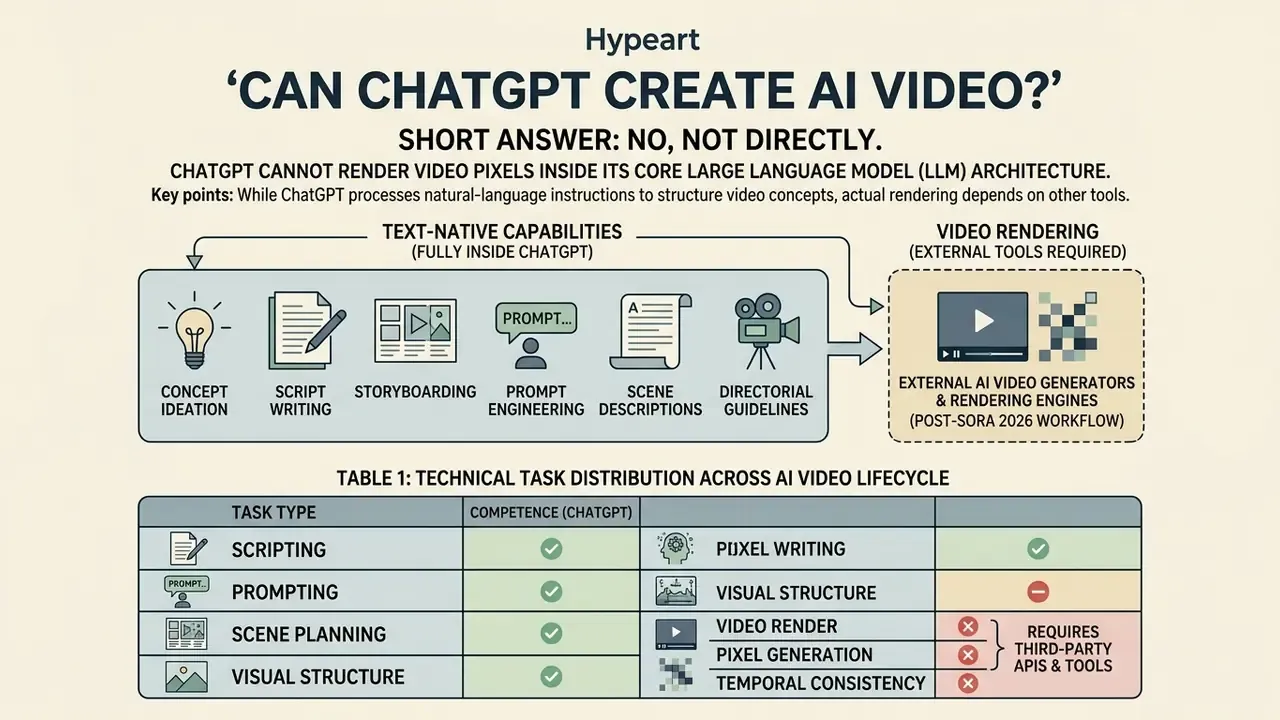
ChatGPT cannot render video pixels inside its core Large Language Model (LLM) architecture. It operates as an orchestration engine that writes scripts, generates prompts, plans storyboards and, where an integration exists, triggers a separate diffusion video model or third-party service. The primary boundary lies between text reasoning and visual synthesis.
So, can ChatGPT create AI videos? Not on its own. Can you make AI videos on ChatGPT at all? Yes, through a hand-off you design and control.
While ChatGPT processes natural-language instructions to structure video concepts, actual rendering depends on specialized diffusion architectures. Organizations evaluating whether ChatGPT can make AI videos must treat ChatGPT as the cognitive layer that prepares inputs for image and video synthesis engines. Understanding this distinction prevents governance teams from misallocating model-risk controls across textual and visual generative pipelines, which is a surprisingly common finding in first-round AI inventory reviews.
«Sora is a diffusion transformer trained on video and images; it compresses video into spacetime latent representations and decomposes them into patches.»
That architectural difference matters for audit design. An LLM produces text tokens that can be logged, diffed and reviewed. A video diffusion model produces a binary asset whose reproducibility depends on prompt, seed, model version and sampler settings, all of which must be captured separately if you need an evidentiary trail.
| Workflow Stage | Action Required | Executed by ChatGPT (Base Model) | Executed by an OpenAI Video Model (historical Sora path) | External Video Generator / Editor (2026 default) |
|---|---|---|---|---|
| Ideation & Scripting | Draft video structure, dialogue, hooks, timestamps | Yes | No | Optional |
| Prompt Engineering | Convert script scenes into visual prompts with camera angles | Yes | No | Optional |
| Scene-by-Scene Plan | Format structured tables matching frames to audio | Yes | No | Optional |
| Direct Video Rendering | Generate MP4/WebM files from text or image prompts | No | Yes (until API sunset, 24 Sep 2026) | Yes (primary path) |
| Video Editing & Re-cut | Trim timeline, modify visual elements, apply filters | No | Partial (storyboard and re-cut in the discontinued app) | Yes |
| Voice, Captions, Music | Narration, subtitle burn-in, licensed audio bed | Text only | Partial | Yes |
| Export & Publishing | Render final master with encoded captions and audio | No | Historical | Yes |
Table 1: Technical task distribution across the AI video creation lifecycle. Sources: OpenAI API documentation, OpenAI Help Center, vendor documentation (2025 to 2026).
Six stages are text-native and fully inside ChatGPT's competence. Three of them, rendering, timeline editing and export, are not. That is why the honest framing is "ChatGPT owns pre-production," not "ChatGPT makes videos." For a survey of the engines that own the rendering stage, see our overview of AI video generators and the shortlist in best free AI video generators.
What happened to Sora, and what the market moved to (Updated)
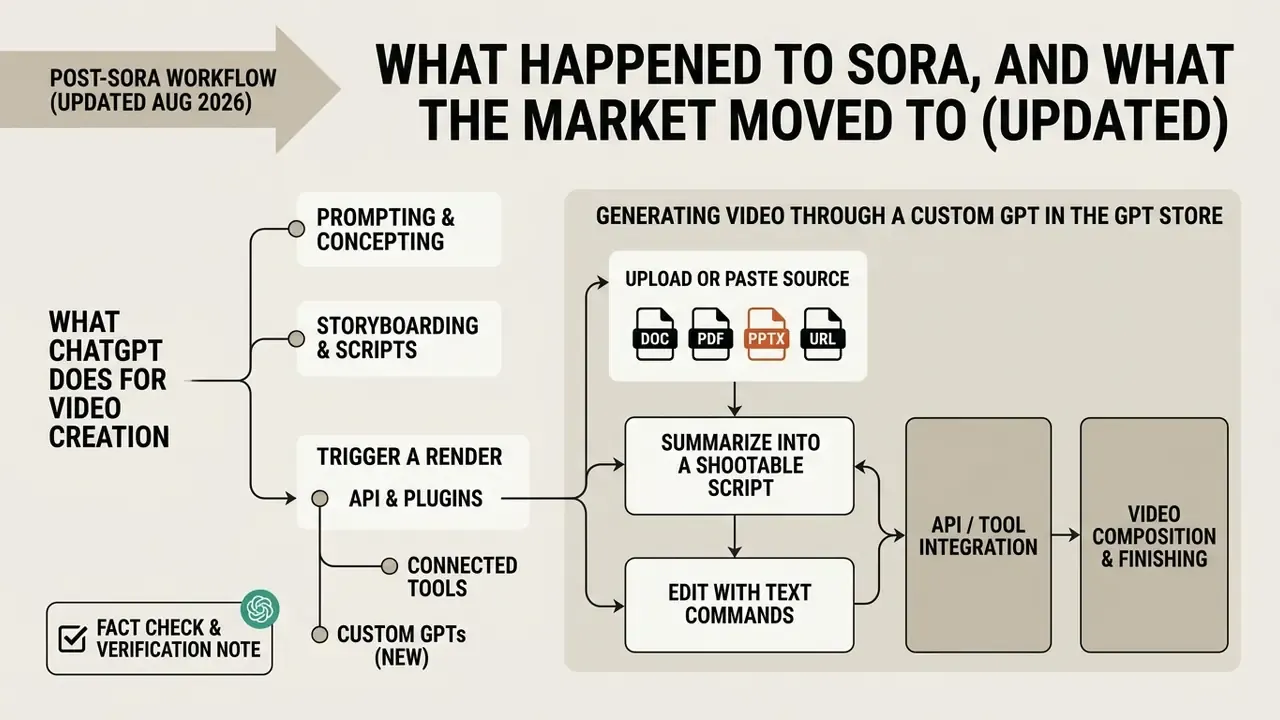
Updated August 2026. OpenAI announced the Sora shutdown on 24 March 2026, closed the web and app experiences on 26 April 2026, and scheduled the Videos API endpoints (POST /videos, GET /videos/{video_id}/content) for shutdown on 24 September 2026. OpenAI's own product page now states that the Sora product is no longer available. Public reporting attributes the decision to unit economics: roughly $1 million per day in operating cost against approximately $2.1 million in total lifetime revenue, compounded by a collapsed licensing arrangement and continuing copyright and deepfake exposure.
Practical consequences for planning:
- There is currently no consumer video generator sold by OpenAI. A "ChatGPT video generator" exists only as a workflow that routes through someone else's model. There is no standalone ChatGPT video generation app either, and the ChatGPT app's video generation feature that people remember from 2025 was Sora sitting behind the chat surface.
- If you generated assets in Sora and never exported them, treat 24 September 2026 as a deletion deadline, not trivia. Export before the API is retired.
- Any resolution or quota table that lists "Sora in ChatGPT Plus at 720p" is obsolete. The historical parameters (480p and 720p on Plus; 1080p, 20-second clips and up to five concurrent jobs on Pro) are preserved in Appendix A for reference only.
- Model risk teams should update their inventory. A retired model is a change event. Re-validate any documented process, playbook or control that referenced the Sora endpoint, and close out the ones that no longer have an owner.
The replacement architecture is the Cognitive Hub pattern: ChatGPT prepares the script and the prompt stack, and rendering is delegated to external engines (Runway, Pika, Luma Dream Machine, Kling AI, Google Veo, see our Google Veo implementation guide) or to avatar platforms (Synthesia, HeyGen, Colossyan) for presenter-led corporate video.
One consequence is easy to miss. Every hand-off adds a vendor, a contract, a retention policy and a log you now own. That is the real cost line most ROI models forget.
What ChatGPT does for video creation without generating the clip
ChatGPT serves as a comprehensive pre-production assistant. It generates structured scripts, scene breakdowns, voice-over drafts and metadata optimized for digital video platforms, and it turns raw notes or business documentation into production-ready formats: hooks, scene calls and call-to-action (CTA) statements.
Creators and enterprise teams use ChatGPT to draft keyword-rich video titles, descriptions and closed-caption transcripts for training portals, corporate channels, YouTube and short-form feeds. When combined with tools in our AI Media Commercial-Use Hub, the text model structures prompts that specify lighting, camera movement and character actions, which streamlines the technical pipeline before any visual rendering begins.
A useful discipline: give ChatGPT constraints, not topics. "A video about productivity" produces mush. "A 45-second 9:16 internal announcement for 1,200 branch staff, one message: expense approvals move to the new portal on 1 October, neutral corporate tone, 110 words maximum" produces something usable on the first pass.
That difference is worth about two review cycles per asset in practice, which is where most of the time saving actually lives.
When ChatGPT can trigger a render: API, connected tools and Custom GPTs (Updated)
ChatGPT initiates video generation only when a rendering service is attached to it. Historically that was OpenAI's own Videos API. Today it is Custom GPTs in the GPT Store, actions and connectors, or an orchestration layer your engineering team builds around third-party APIs. In these environments the user submits a text prompt or reference image, and ChatGPT passes the structured request to the underlying video model.
«OpenAI trained text-conditional diffusion models jointly on videos and images of variable durations, resolutions and aspect ratios.»
Under the hood the model converts natural language into spatio-temporal latent patches. Understanding that mechanism helps you write prompts that describe motion and continuity, not just static composition. For a deeper primer on the category, see our guide to text-to-video tools. Teams estimating rendering economics across diffusion stacks can consult our AI Media Pricing Guides and AI Media Calculators.
Step-by-step: generating video through a Custom GPT in the GPT Store
Document, PDF, PPTX and URL to video
One of the highest-ROI enterprise scenarios never starts with a blank prompt. It starts with content you already own: a policy PDF, a product deck, a knowledge-base article.
- Upload or paste the source.ChatGPT accepts PDF, DOCX, PPTX and TXT files. Avatar platforms such as Synthesia accept the same formats (typically up to around 50 MB) plus public URLs, with practical limits on very long pages.
- Summarize into a shootable script.Prompt: "Extract the five most important points from this document and write a 45-second training script: narration column capped at 115 words, plus a B-roll or on-screen column for each beat. Flag anything that requires legal review."
- Convert each beat into a scene promptor into avatar slides with on-screen text.
- Renderin an avatar platform (Synthesia, HeyGen, Colossyan) for presenter-led explainers, or in a generative engine for cinematic B-roll.
- Verify against the source document.Summarization is where confabulation shows up. NIST defines confabulation as output that is false, diverges from the prompt, or contradicts prior context (NIST AI 600-1, 2024). Every factual claim in a document-derived script must be checked against the original, line by line, by a named human.
A small observation from reviewing this pattern on policy documents: models rarely invent whole facts here. They soften qualifiers. "May be eligible" becomes "is eligible," and that single word is the compliance incident.
ChatGPT Free, Go, Plus, Pro, Business/Team, Enterprise and API: where video work is actually safe
Since OpenAI no longer ships a first-party consumer video renderer, tier selection is now less about resolution caps and more about throughput, tooling and data governance. Consumer tiers are where Shadow AI incidents originate. Business tiers are where controlled production belongs.
| Capability / Control | Free | Go (~$8/mo) | Plus ($20/mo) | Pro ($200/mo) | Business / Team (~$25 to $30 per seat) | Enterprise (custom) | API / Platform |
|---|---|---|---|---|---|---|---|
| Scripting, storyboarding, prompt engineering | Yes (limited messages) | Yes (about 10x Free limits) | Yes (priority) | Yes (highest priority, no peak-hour limits) | Yes | Yes | Yes |
| File uploads (PDF/DOCX/PPTX) for doc-to-video | Limited | Higher | Higher | Highest | Higher plus shared workspace | Higher plus admin policy | Programmatic |
| First-party video rendering | No | No | No (discontinued 26 Apr 2026) | No (discontinued 26 Apr 2026) | No | No | Videos API sunsets 24 Sep 2026 |
| Third-party Custom GPTs / connectors for rendering | Restricted | Limited | Yes | Yes | Yes, with admin allow-listing | Yes, with allow-listing plus DLP review | Build your own |
| Content used to improve models by default | Yes (opt-out available) | Yes (opt-out available) | Yes (opt-out available) | Yes (opt-out available) | No | No | No |
| SSO / SAML, SCIM provisioning, RBAC | No | No | No | No | SSO available | SSO plus SCIM plus domain verification | Org and project keys, scoped roles |
| Admin console, retention controls, audit/compliance API | No | No | No | No | Partial | Yes | Yes (logging your own) |
| Published security attestations (e.g. SOC 2) | n/a | n/a | n/a | n/a | Business-tier commitments | Enterprise commitments | Platform commitments |
| Best fit | Idea drafting only | Personal creators | Individual producers, prompt stacks | High-volume producers, agencies | Small teams with governance needs | Regulated enterprises, banks, insurers | Automated pipelines, GRC integration |
Table 2: Operational and governance matrix. Consumer pricing per OpenAI's published plan pages; privacy and administrative controls per OpenAI's business and enterprise privacy commitments and Terms of Use (verify the current version before procurement). Business/Team seat pricing and Enterprise terms are quoted commercially and should be confirmed with OpenAI directly.
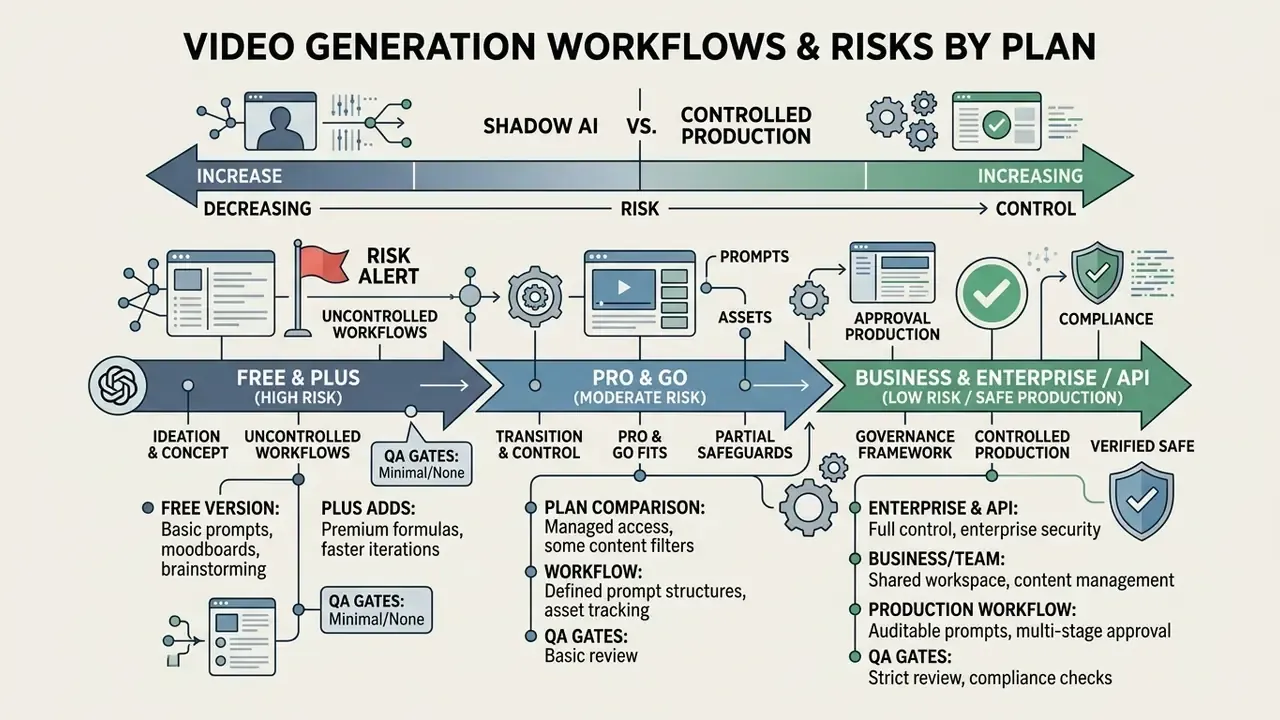
Read the table diagonally, not row by row. The only line that changes your risk posture materially is training-by-default, and it flips at the Business boundary.
Shadow AI vs controlled production: a risk matrix
| Deployment mode | Typical trigger | Data risk | IP / brand risk | Auditability | Recommended control |
|---|---|---|---|---|---|
| Personal consumer account (Free/Go/Plus/Pro) on corporate work | Marketer needs a clip today | High: prompts may include confidential or customer data, and training opt-out is user-controlled | High: no brand kit, unclear licence chain | None (no org logs) | Block via policy and provide a sanctioned alternative |
| Consumer account plus third-party Custom GPT | "It renders inside ChatGPT" | High: double egress (OpenAI plus vendor) | High: vendor licence unknown to legal | None | Allow-list vetted GPTs only, on business tiers |
| ChatGPT Business/Team, allow-listed tools | Departmental content ops | Moderate: no training by default, workspace retention | Moderate: brand kit enforced manually | Partial (admin console) | Named owner, prompt library, human review gate |
| Enterprise or API pipeline with logging | Regulated comms, training at scale | Low: contractual retention, no training | Low: cleared asset library, licensed voices | Full (prompt, seed, model version, approver) | MRM validation, C2PA provenance, four-eyes sign-off |
The pattern is consistent with the persona's core rule: no evidence, no autonomy. A pipeline without logs is not a pipeline. It is a hobby with brand exposure.
What the free version of ChatGPT can do for video
The free tier is strictly limited to text-based planning, ideation and external prompt formulation. Free users cannot render MP4 files, and there is no first-party video engine to access in any case since April 2026.
However, the ChatGPT free version's video generation capability is genuinely useful at the pre-production stage. Free users can generate complete video outlines, shot lists, caption drafts and voice-over scripts, then export those text outputs manually into an external rendering platform. Options with usable free allowances are compared in our roundups of free AI video generators and AI Media Comparison Matrices.
Watch three things on free plans anywhere in the chain: forced watermarks, resolution ceilings, and, most importantly for business use, licences that permit personal use only. That third one has ended more campaigns than any artifact ever did.
Where ChatGPT Pro and Go fit
ChatGPT Pro ($200 per month) is aimed at professional studios and high-throughput teams: prioritized traffic, no peak-hour limits, the highest storage and message allowances, and extended access to advanced reasoning and agentic tooling. For a video team, the ChatGPT Pro video generation payoff is now measured in iteration speed on prompt stacks and long-document processing, not in render resolution. ChatGPT Go, at roughly $8 per month, expands text, upload and image limits over Free for budget-conscious creators, but the official documentation reviewed for this guide attributes no video-generation benefit to Go at all.
Neither Pro nor Go provides organizational controls. Regulated teams that need SSO, retention policy, no-training-by-default and audit trails should move to Business/Team, Enterprise or the API, regardless of individual convenience. Convenience is not a control.
How to create an AI video with ChatGPT: workflow from idea to export (with compliance gates)
Creating an AI video with ChatGPT requires a structured pipeline that moves from concept and script through prompt engineering, scene rendering, post-production and export. Each stage needs human oversight to maintain visual consistency, factual accuracy and messaging control.
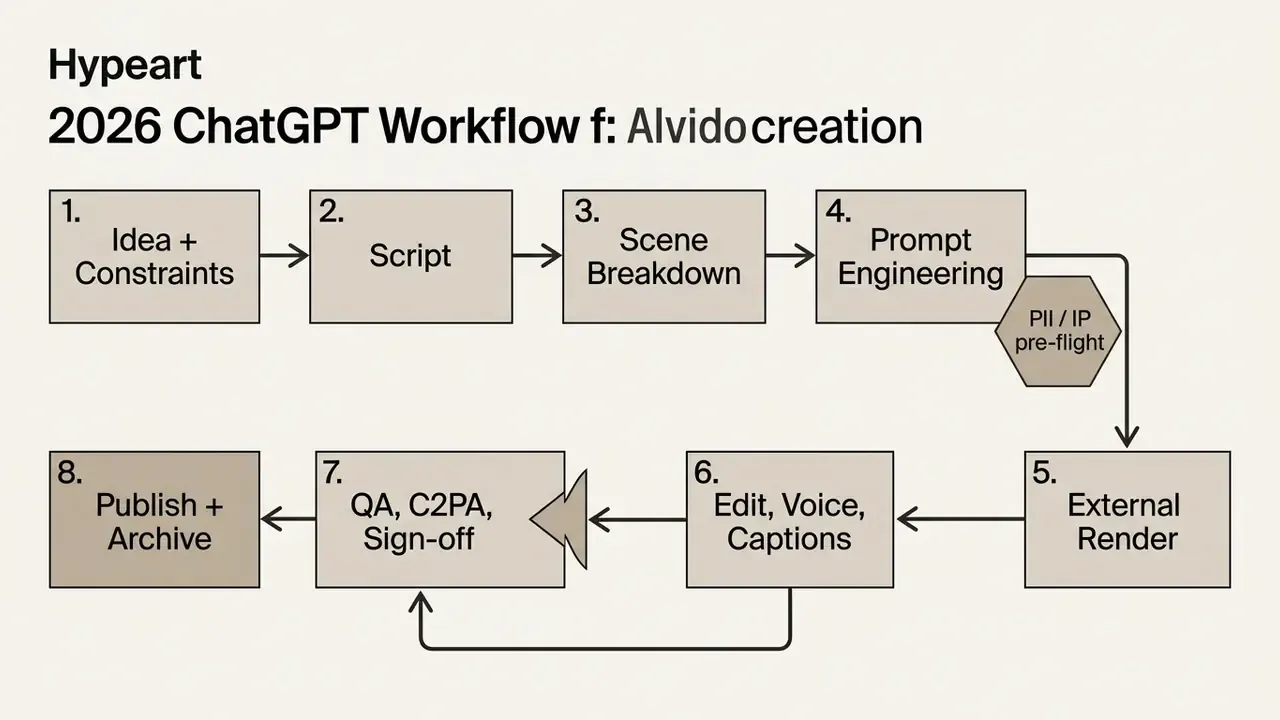
4a. Pre-flight control gate. Strip confidential data, customer identifiers and PII from prompts. Confirm every reference image, logo, font and audio bed is owned or licensed. Confirm the chosen engine's commercial terms.
Step 4a is the one teams skip. It is also the only step that a regulator will ask about first.
Scripts: how to prompt ChatGPT to write a video (Updated)
To draft an effective script, prompt ChatGPT with explicit parameters: format, audience, tone, duration and the single message you must land. A robust prompt instructs the model to structure copy into an attention-grabbing hook, clear narrative blocks and a definitive close.
Proven structures from production practice:
- Long-form explainer hook, promise and setup, three to five content blocks, mid-video re-hook, payoff, CTA and outro, with
00:00timestamps in the description. - Short-form (Shorts, Reels, TikTok) hook under 10 to 12 words, three teaching points, CTA. Hook archetypes that reliably work: pattern interrupt, curiosity gap, bold claim.
- Corporate announcement or training context, what changes, what the viewer must do, where to get help.
Always cut the first draft by about a third. Narration reads slower than text scans, and asking for a target word count gives the model a constraint it can actually hit. For the metadata layer, ask for a title under 60 characters, a 150 to 200 word description that front-loads keywords, and tags ordered from specific to broad.
Adjacent constrained-generation utilities make the same point about narrow instructions in a different register. An ai lyrics generator shows how tight metre and rhyme rules discipline output for a music bed you still have to license. An ai lottery generator illustrates randomized mechanics you might script around in a giveaway video, without pretending the model predicts anything. And an ai love letter generator is the extreme case of tone conditioning: change one adjective in the brief and the entire register moves. Peripheral to corporate video, useful as a demonstration of prompt constraint. Related creative-prompting techniques are covered in our comparison of ChatGPT image generation versus alternative tools.
Storyboards, the prompt formula and ready-to-use templates (Updated)
Converting a script into a storyboard requires one prompt per scene specifying camera angle, subject motion, lighting and visual style. Consistency comes from locking subject and environment descriptions and pasting the identical block into every prompt iteration. Not a paraphrase of it. The identical block.
A standard scene-by-scene table produced by ChatGPT covers shot size (medium shot, extreme close-up), camera movement (slow pan right, static, dolly-in) and atmosphere. Precise prompts reduce model drift when submitted to diffusion tools.
The reusable formula:
[Subject] + [Action] + [Environment] + [Visual style] + [Shot type] + [Camera movement]
+ [Lighting] + [Mood] + [Duration] + [Aspect ratio]
+ Keep [what must stay unchanged] consistent
+ Avoid [artifacts, text, extra subjects]
Template string: "[Subject] [action] in [environment]. [Visual style] look, [shot type], [camera movement]. [Lighting], mood is [mood]. [Duration], [aspect ratio]. Keep [consistency anchor] unchanged. Avoid [negative constraints]."
Example 1, cinematic (16:9). "A woman in a grey coat walks along a wet city street at night. Cinematic, medium tracking shot moving with her, neon reflections on the pavement, cool blue key light. Mood is calm and slightly lonely. 8 seconds, 16:9. Keep her coat and hair consistent throughout. Avoid text, logos and other pedestrians."
Example 2, product or commercial (1:1). "A matte black water bottle rotates slowly on a pale concrete surface. Clean commercial look, close-up, slow orbit around the subject, soft diffused light from the upper left. 6 seconds, 1:1. Keep the bottle shape and label position fixed. Avoid reflections that distort the label; no hands in frame."
Example 3, vertical short (9:16). "Close-up of a watchmaker's hands assembling a mechanical watch on a wooden bench. Warm morning window light, cinematic macro aesthetic, slow dolly-in. 5 seconds, 9:16, action centred in the upper two thirds so captions can sit underneath. Keep the sleeve colour and bench texture unchanged. Avoid readable text on the components, finger blur and hard cuts."
Two details separate amateur prompts from production prompts: the negative constraint (what to avoid) and the caption safe zone (where to leave room for text). Both save credits and regenerations. For vertical delivery, export at 1080 by 1920, 30 or 60 fps, H.264 MP4, and keep subtitles to one or two short lines in the lower-middle band, clear of platform UI overlays at the top, bottom and right edge.
What kinds of video you can realistically create with ChatGPT plus an AI stack
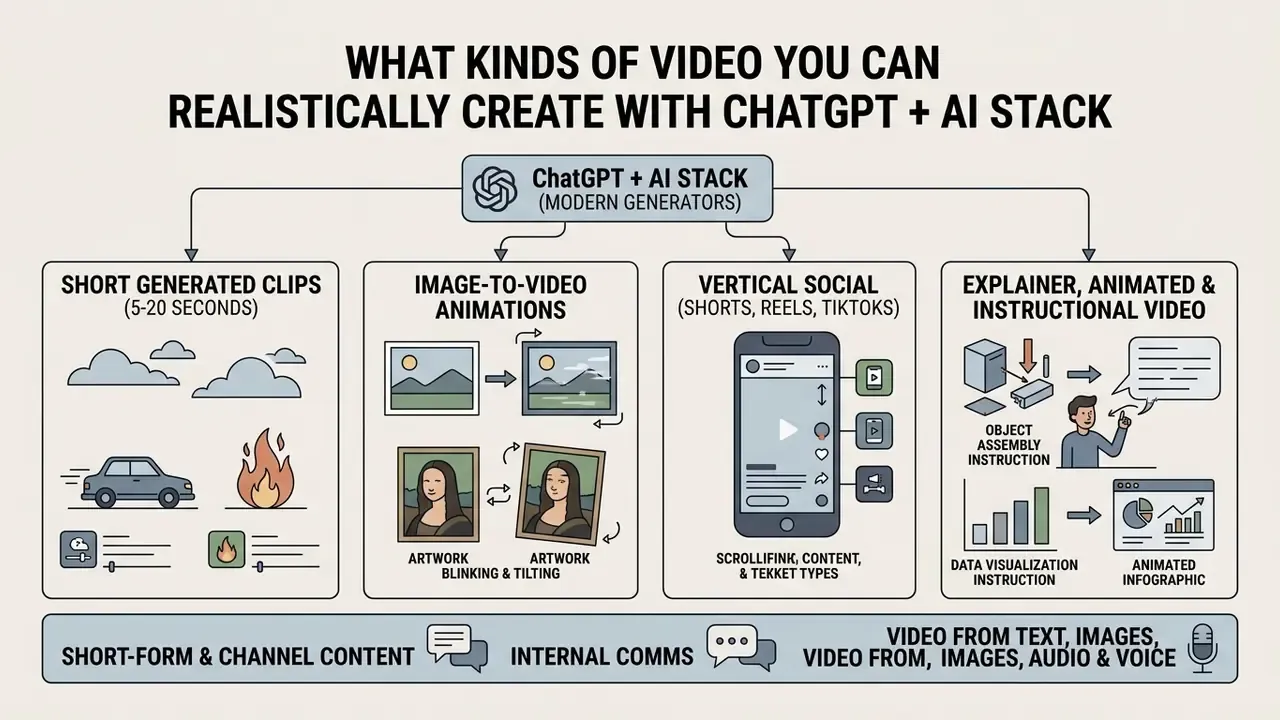
Combining ChatGPT with modern generators enables four practical output classes: short generated clips, typically 5 to 20 seconds, image-to-video animations, vertical social shorts, and longer edited pieces assembled from multiple generated or stock scenes. Avatar platforms add a fifth: presenter-led corporate video at scale.
Short-form and channel content: Shorts, Reels, internal comms (Updated)
ChatGPT excels at generating high-retention structures for vertical formats, formatting copy into dynamic 15 to 60 second frameworks. It drafts concise titles, keyword-rich descriptions and timecoded chapter markers that improve search visibility. It also drafts punchy captions that fit inside platform safe zones, so text overlays never obscure UI elements.
The same mechanics transfer directly to regulated business use cases, which is where the ROI usually sits: compliance micro-training, product-condition explainers for customers, branch or field-team announcements, and onboarding welcome clips. Fast-swap captions (three to five words, refreshed every 0.6 to 1.2 seconds) improve mobile readability, but disclosure labels and mandatory legal text must remain legible for the full duration where the law requires it. Tool selection for this format is compared in our roundup of the best AI video generators.
Channel identity is a separate workstream from the clips themselves. Teams building a new internal series or a creator channel often standardize the visual wrapper first, using an ai logo generator for concept marks, an ai logo maker app for mobile iteration, or a browser-based ai logo maker for quick variants. One caution for regulated brands: machine-generated approximations of an official mark must never ship without brand and legal approval, and in most banks that approval is a hard gate, not a courtesy.
Explainer, animated and instructional video (Updated)
Explainer and instructional video benefits from ChatGPT's ability to reduce complex material into clear multi-step lesson plans. The model structures information into two-column or three-column shooting scripts that separate spoken narration from visual and animation cues, the format recommended in public instructional-design guidance (narration column, visual column, animation and editing column).
When producing animated training material, ChatGPT generates detailed descriptions for graphic assets, character interactions and motion paths. Reduce content to no more than five key questions, order them logically, then rewrite the narration the way you would say it aloud. For the visual asset layer, see our guides to AI art generators and animation makers. Character consistency across scenes is preserved by writing one detailed character description, locking it, and pasting it unchanged into every prompt.
Video from text, images, audio and voice
Multimodal production combines text-to-video, image-to-video and voice synthesis to turn static media into dynamic assets. ChatGPT writes the narrative script, an image model generates key frames, and specialized audio models produce synchronized narration.
An image-to-video workflow uses a pre-rendered graphic as the first-frame anchor, directing the diffusion model to animate specific elements within the scene.
«Image-to-video diffusion models use the first frame as an anchor and animate specified scene elements while preserving visual consistency.»
The most common failure here is describing only the motion you want and saying nothing about what must be preserved, so the face drifts across the clip. A reusable image-to-video prompt names the subject and what must not change about it, one specific movement, camera behaviour, background behaviour, lighting, duration and aspect ratio. For the narration layer, review licensing and quality trade-offs in our guide to AI voice generators. Research on synchronized audio generation, for example MMAudio (CVPR 2025), shows that frame-level alignment of audio to video is now a distinct model capability rather than a post-production fix.
ChatGPT vs a dedicated AI video generator: when you need external tools
ChatGPT is optimized for conceptual planning, scripting and prompt formulation. Dedicated platforms offer specialized controls for digital avatars, multi-language lip-sync, camera manipulation and branded templates, plus the governance features regulated buyers require.
| Feature / Requirement | ChatGPT (orchestration layer) | Avatar platform (HeyGen, Synthesia, Colossyan) | Cinematic engine (Runway, Kling, Luma, Veo, Pika) |
|---|---|---|---|
| Primary focus | Scripting, prompt generation, edit planning | Photorealistic presenters, corporate training, localization | Motion control, style transfer, visual effects |
| Presenter avatars | None | Native, including studio-trained custom avatars | Limited or third-party |
| Multilingual voice and lip-sync | Text translation only | 70 to 160+ languages, one-click translation, voice cloning | Cinematic audio focus |
| Brand kit enforcement | Manual prompt constraints | Native brand kits (logo, fonts, locked palette) | Manual overlay in post |
| Layered timeline editing | Storyboard tables only | Multi-track timeline, slide and PPTX import | Node or frame-level control |
| Document or URL to video | Summarization and scripting | Native (PPTX, PDF, DOCX, TXT, URL) | Rare |
| SSO / SCIM, team roles, workspace admin | Business and Enterprise tiers | Enterprise tiers | Varies, often team-level only |
| Data residency and retention controls | Enterprise or API contractual | Enterprise contractual | Frequently limited, verify |
| GRC / MRM integration (logs, exportable audit trail) | Via API logging | Partial | Usually DIY via API |
| Consent and likeness workflow | n/a | Documented avatar consent processes | Creator's responsibility |
Table 3: Architectural and governance comparison. Sources: vendor documentation and public sector transparency records (2025 to 2026). Use our AI video generator comparison to shortlist platforms after reviewing this table.
Read the bottom four rows first if you work in a regulated firm. Feature parity is common in this market; audit-trail parity is not.
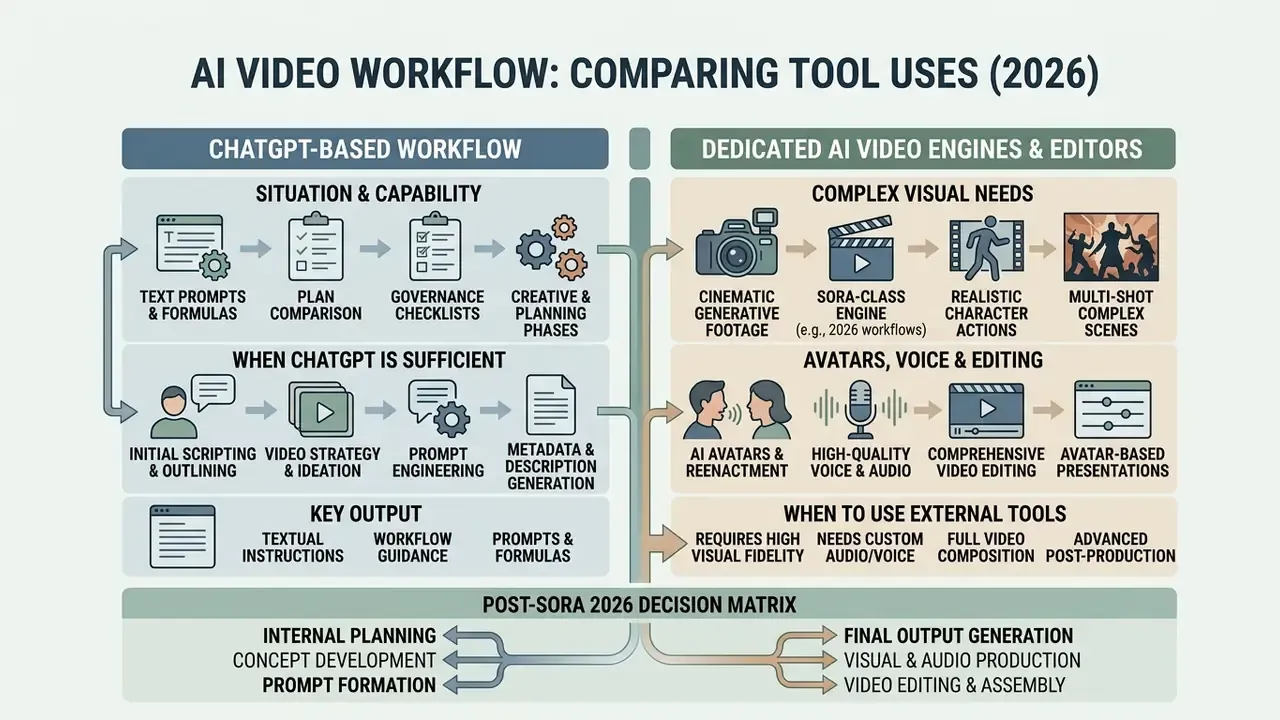
Avatars vs cinematic generative footage: how to choose
Choose an avatar platform when the deliverable is a person explaining something, and the value drivers are scale, localization and control: compliance and policy training, product walkthroughs, HR and onboarding, multi-market sales enablement, and anything that must be regenerated whenever a regulation or price changes. Public transparency records for these platforms document PowerPoint and PDF import as a video template, brand kits, and scripted delivery in 70+ languages with realistic lip-sync, capabilities no chat interface replicates.
Choose a cinematic generative engine when the deliverable is atmosphere, B-roll, product motion or a stylized hook, and no fixed presenter or exact on-screen wording is required. Practical rule: if the script contains numbers, legal wording or a named product commitment, put those words on screen in the editor or in an avatar's captioned slide. Never inside a diffusion render.
Choose both for most corporate pieces: avatar for the spine, generative footage for the cutaways. Enterprises evaluating specialized alternatives can review platform-level options such as PixVerse AI.
When ChatGPT alone is sufficient
ChatGPT is fully sufficient when the goal ends at a reviewable draft: text generation, storyboard design, rapid concept exploration or a simple teaser plan. In these early-stage workflows, the conversational model converts unstructured concepts into reviewable scripts and production blueprints quickly and at negligible cost.
For small teams and social creators, using ChatGPT to structure raw ideas into prompt sequences is the efficient starting point before committing compute to heavy rendering. It is also the cheapest place to fail, which matters more than it sounds.
When you must move to Sora-class engines, avatars, voice or an AI editor
Dedicated platforms become necessary when projects require photorealistic human presenters, multi-language voice cloning, strict corporate brand enforcement or multi-track visual editing. Applications such as corporate compliance training, localized sales pitches and multi-region marketing campaigns depend on specialized features that consumer conversational interfaces do not offer.
Enterprises tracking intellectual-property and copyright disputes around synthetic media can consult our AI Litigation and Case Timelines to align procurement with emerging legal standards. Sora's own shutdown, driven partly by copyright and deepfake exposure, is a reminder that platform risk and legal risk are not separate columns in the same spreadsheet.
Limitations of AI video generation and the problems you will actually hit
Current video models frequently exhibit technical artifacts: spatial hallucination, prompt non-compliance, character morphing across frames, distorted on-screen text and temporal inconsistency. Identifying these limitations early prevents compliance failures and wasted credits.
«Consistency is vital for video generation tasks.»
Benchmark work is blunt about the failure surface. Diffusion video models systematically struggle with physics realism, object permanence and precise camera trajectories over longer durations. Evaluations of video-language models, for example VideoHallucer (2024), report that most tested models still show significant hallucination, with limited improvement on extrinsic factual errors. NIST's Generative AI Profile formalizes the vocabulary: confabulation is output that is false, diverges from the prompt, or contradicts prior context (NIST AI 600-1, 2024). That definition maps cleanly onto both a fabricated statistic in a script and a warped hand in a render.
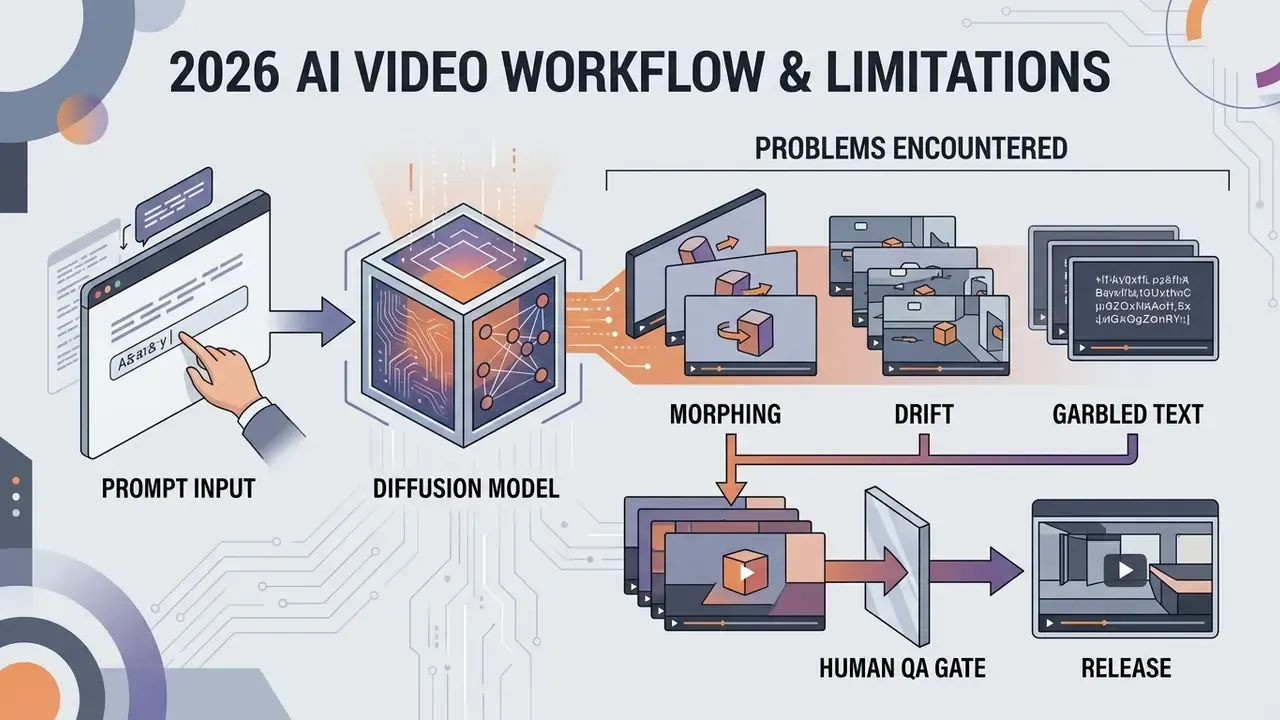
Troubleshooting matrix: six failures and their exact fixes
| Symptom | Root cause | Precise fix |
|---|---|---|
| Clip ignores part of the prompt | Too many instructions competing in one render | One action per clip. Split complex scenes into 3 to 5 second shots and stitch in the editor |
| Character's face or clothing changes between scenes | The description was reworded from prompt to prompt | Write one character-lock block and paste it verbatim into every prompt; never paraphrase |
| On-screen text is garbled or misspelled | Diffusion models render typography poorly | Ban text in the prompt. Generate clean footage and add titles and subtitles in the editor, where you control the font |
| Script overruns the slot | You asked for a duration instead of a word count | Constrain by words: about 150 words equals 60 seconds of narration. Ask for "110 words maximum," not "45 seconds" |
| Narration sounds robotic | No speaker persona or audience defined | Name the speaker, the audience and the register: "internal ops manager addressing branch staff, calm and factual" |
| Captions do not match the audio | Captions were built from the draft script, not the recording | Caption the final voice track, then verify. Accessibility guidance requires synchronized captions before release |
| Flicker, warped faces, extra limbs, stray watermarks | Vague or self-contradictory negative constraints | Add only the artifacts you actually observed; avoid contradictions such as "slow dolly-in" plus "no camera movement" |
Why AI video ignores prompt elements or changes scene details
Models drop prompt elements when positive prompts are overloaded with conflicting instructions, or when negative constraints are broad and self-cancelling. Because diffusion engines operate probabilistically across latent spatio-temporal patches, complex instructions produce visual drift or unintended background morphing.
To reduce divergence: simplify the positive description, use one camera motion per scene, and keep negative constraints short and specific, for example excluding "flicker, extra limbs, warped faces, on-screen text." Vendor prompting guidance converges on the same discipline: state exclusions concisely, and keep the positive prompt as the primary scene definition. Research on negative-prompt optimization (CVPR 2025) supports the broader point that exclusion signals measurably improve output quality when they are targeted rather than generic.
Worth adding, since it costs nothing: keep a per-engine prompt library with the version that worked. Most "the model got worse" complaints turn out to be undocumented model updates plus undocumented prompts.
Pre-export QA and the model-risk checklist (Updated)
Before exporting an AI-generated video for public or commercial release, run a documented QA pass covering on-screen text accuracy, audio-visual synchronization, animation defects, caption fidelity and audio licensing.
Craft checklist
- Closed captions match the final spoken narration word for word.
- Lip-sync drift is within tolerance. Audiovisual quality literature uses 100 ms of audio delay and 140 ms of video delay as artifact-detection thresholds, per Monitoring of audio visual quality by key indicators: detection of selected audio and audiovisual artefacts, Springer (2017). ISO/IEC TS 20071-25:2017 similarly defines synchronized secondary audio as lip-synchronized to the original voicing. Treat sub-100 ms as the working target and confirm against your platform's own delivery spec.
- No garbled typography, warped hands or faces, or identity drift between scenes.
- Every visual and audio asset holds a valid commercial licence, with the licence stored alongside the master.
Model-risk and compliance checklist (regulated environments)
If a reviewer cannot reconstruct the asset from the log six months later, the log is decorative.
- Inventory
- the rendering model, version and vendor are registered as a model or third-party service, with an owner of record.
- Reproducibility
- prompt text, negative constraints, seed where exposed, model version and generation timestamp are logged.
- Data control
- no confidential data, customer identifiers or PII appeared in any prompt or uploaded asset, and egress paths, including Custom GPTs, are allow-listed.
- Human-in-the-loop
- a named reviewer fact-checked every claim against a primary source and signed off before release.
- Provenance
- content credentials or C2PA-style metadata, plus any statutory AI label, are attached and survive the export.
- Retention
- prompts, approvals, licences and the master file are archived to the same standard as other regulated marketing or training material.
Commercial use of AI video: rights, verification and tool choice
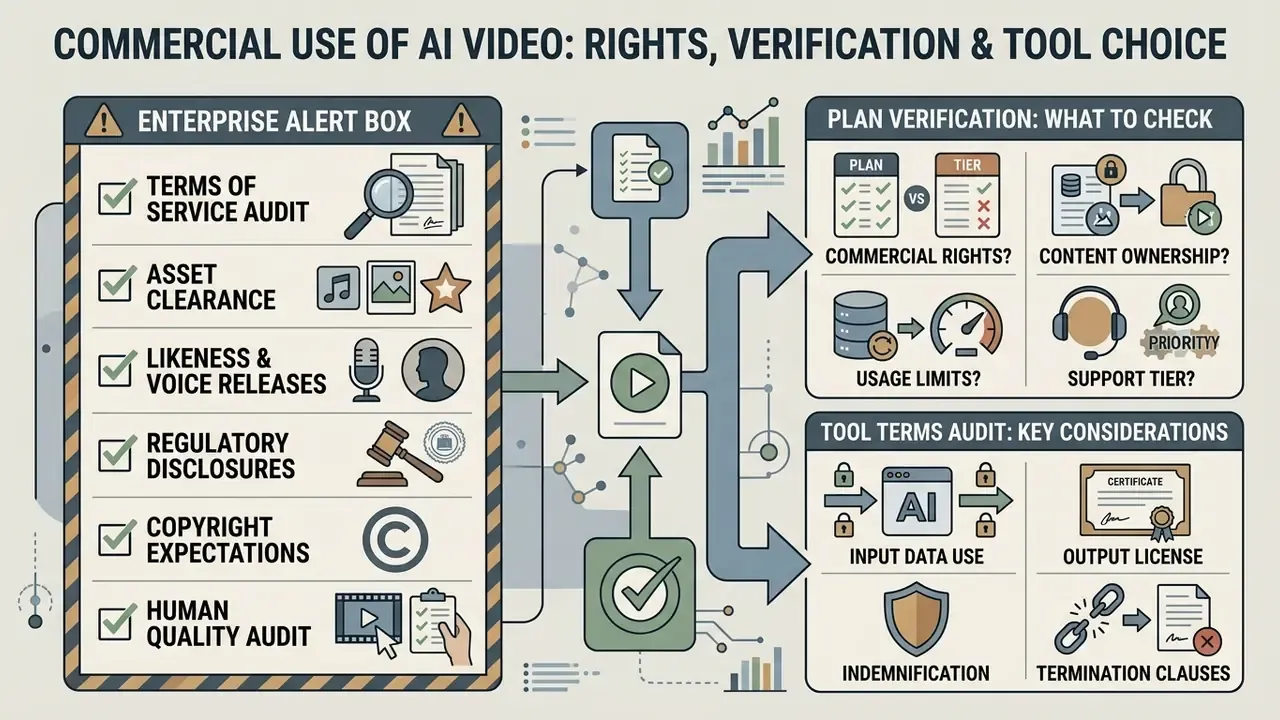
Commercial deployment of AI-generated video requires verifying platform terms of service, clearing intellectual-property rights for all input assets (images, audio, brand marks), and adhering to statutory disclosure requirements for synthetic performers and synthetic media.
Legal disclaimer: this information is general in nature and does not replace advice from qualified counsel or an intellectual-property specialist. Requirements differ by jurisdiction, industry and channel.
Enterprise Alert Box, commercial publication verification checklist:
What to check in the plan and in the tool's terms
Organizations must examine OpenAI's Terms of Use and Service Terms alongside every rendering vendor's licence, to ensure commercial usage rights match the deployment model. Consumer terms generally allow users to use output for any purpose, including commercial purposes, subject to the terms. Separately, service terms can grant the provider a licence over content you share publicly on their platform surfaces. Governance teams should also confirm whether output on a given plan carries watermarks or resolution restrictions that would undermine brand standards.
Parallel rights questions for adjacent tooling are covered in our guide to commercial use of AI image generators and in vendor-specific reviews such as the Canva AI Generator commercial-use overview.
Preparing AI-generated video for business publication
Preparing an AI-generated video for corporate release involves inserting approved brand assets, conducting manual fact-checking, verifying caption accuracy and applying mandatory AI disclosure labels where required by law. Public-sector and university AI content guidelines converge on the same three obligations: human review and approval before publication, no unauthorized generation or alteration of official marks, and manual verification of captions and transcripts.
By maintaining strict human-in-the-loop oversight, and by logging who approved what, on which model version, with which licences, companies can deploy AI-assisted video while keeping legal, regulatory and brand-safety risk defensible.
Measurable impact, open questions and a safe next step
What to measure. Four metrics survive executive scrutiny: cycle time from brief to approved master, cost per approved minute including control overhead, localization cost per additional language, and rework rate after review. Track them before and after the pipeline change, or the ROI conversation becomes an opinion contest.
What remains unresolved. Three things, honestly. First, synthetic-media disclosure law in the US is still fragmenting by state, so today's label may not satisfy tomorrow's statute. Second, provenance metadata survives some export paths and not others, and platform re-encoding can strip it. Third, vendor durability is now a live model-risk factor; Sora's closure proves that a first-party product can disappear inside thirteen months of launch. Plan for portability of prompts, scripts and masters, not just of vendors.
A safe next step. Pick one low-risk, high-volume asset class, internal onboarding clips are usually ideal, and run it end to end on a business-tier account with one allow-listed rendering vendor, full logging and a named approver. Measure the four metrics above for one quarter. Then decide whether to widen scope, extend to customer-facing communications, or stop. No pilot should graduate without evidence; that is the whole point.
FAQ: ChatGPT video generation capabilities
Can ChatGPT create videos?
No. It writes scripts, storyboards, prompts, captions and voice-over copy, and it can generate still images. It does not render video, edit a timeline or export a file.
Does ChatGPT still have a video generation feature?
Not as a first-party product. Sora's web and app experiences closed on 26 April 2026, and the Videos API is scheduled to shut down on 24 September 2026. Rendering in 2026 happens in third-party engines, sometimes surfaced inside ChatGPT through Custom GPTs.
Can you make AI videos with ChatGPT for free?
The ChatGPT-side work, meaning scripts, prompts and captions, is available on free and low-cost tiers. Rendering requires a generator with a free allowance, and those are usually watermarked, resolution-capped and licensed for personal use only.
How long should a script be for a 60-second video?
Roughly 150 words. Always brief ChatGPT with a word count rather than a duration.
Why is the text in my AI video garbled?
Video diffusion models render typography poorly. Ban text in the prompt and add titles and subtitles in the editor.
Which plan should a regulated company buy?
Not a personal consumer plan. Use ChatGPT Business/Team, Enterprise or the API, where content is not used for model training by default and administrative controls exist. Then allow-list the rendering vendors your legal and security teams have reviewed.
What should we log for audit purposes?
At minimum: prompt text, negative constraints, seed where exposed, engine name and model version, generation timestamp, the reviewer who signed off, and the licence covering every input asset.
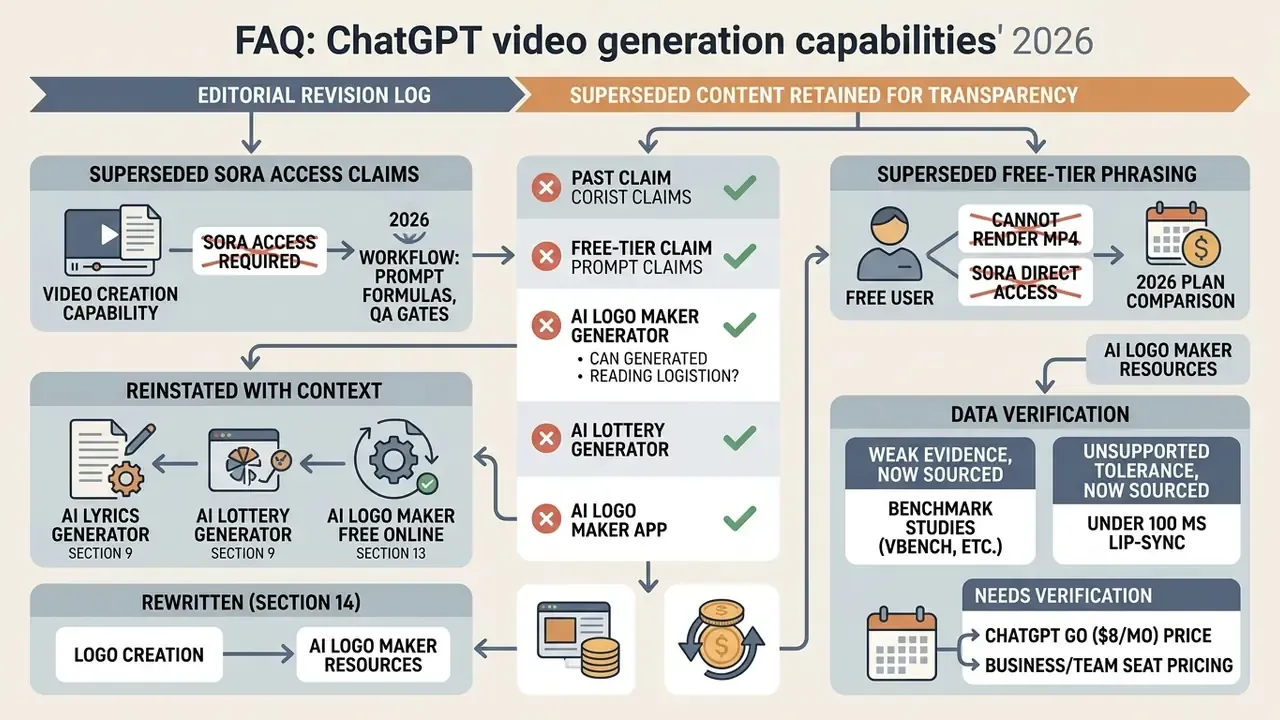
Appendix A: editorial revision log (superseded content, retained for transparency)
Additional resources and navigation
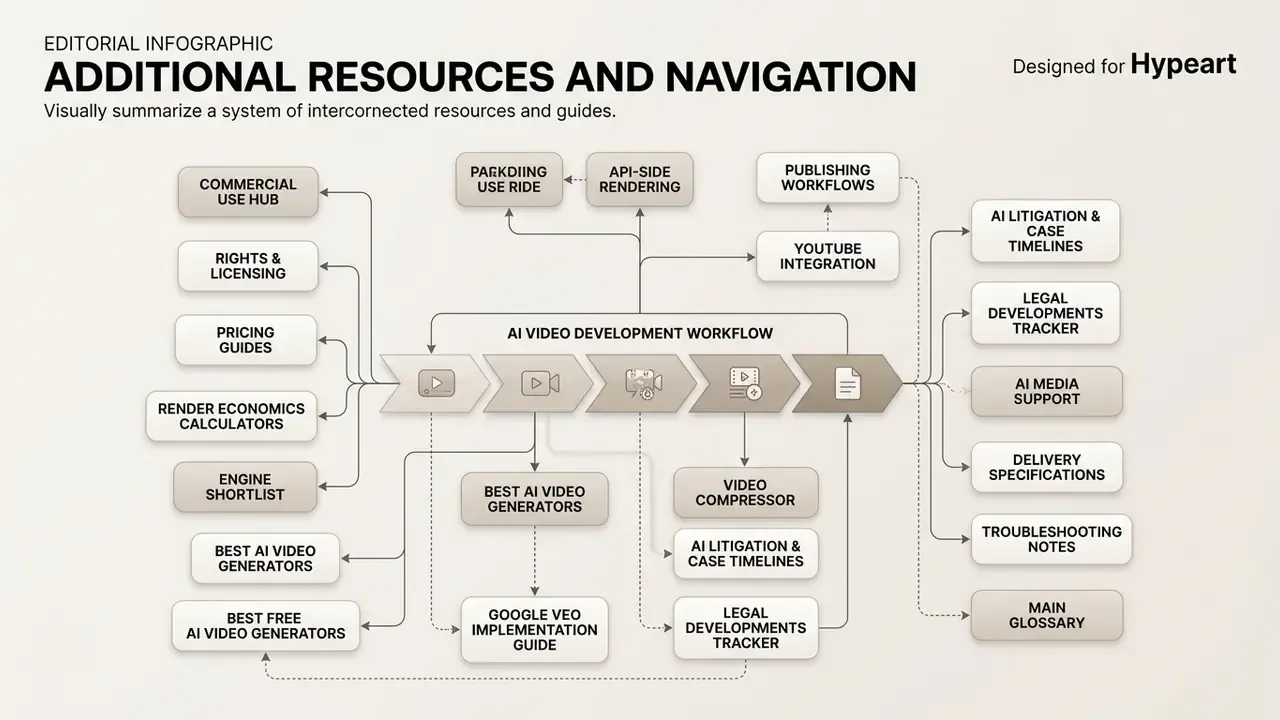
- Browse definitions in our main glossary.
- Review rights and licensing in the AI Media Commercial-Use Hub.
- Estimate render economics with AI Media Pricing Guides and AI Media Calculators.
- Shortlist engines via best AI video generators and best free AI video generators.
- Plan API-side rendering with our Google Veo implementation guide.
- Package deliverables using YouTube publishing workflows and a video compressor.
- Track legal developments in AI Litigation and Case Timelines.
- Check delivery specifications and troubleshooting notes in AI Media Support.