Why should a risk or compliance leader care about a marketing tool? Because the prompt is a data transfer, the output is a published claim, and both leave a trail somebody will eventually ask about.
"No evidence, no autonomy. In media production as in governance, AI models need explicit boundaries, verifiable audit trails, and strict role separation."
Executive Summary
- ChatGPT does not render video. It is an orchestration layer: it writes scripts, shot lists, JSON payloads, and visual motion prompts. MP4/WebM frames are synthesized by dedicated diffusion models (Veo 3.1, Sora 2, Kling 3 Pro, Seedance 2.5, Wan 2.7, PixVerse V5, CogVideoX).
- One copy-ready meta-prompt (provided below) turns any topic into a two-column script table: narration on the left, visual motion prompt on the right.
- Keyframe control (Start Frame to End Frame) is the fastest way to kill temporal drift in image-to-video generation.
- Compliance is not optional. US Copyright Office guidance requires human authorship, while the EU AI Act (from 2 August 2026) and California SB 1050 mandate machine-readable synthetic-media disclosure.
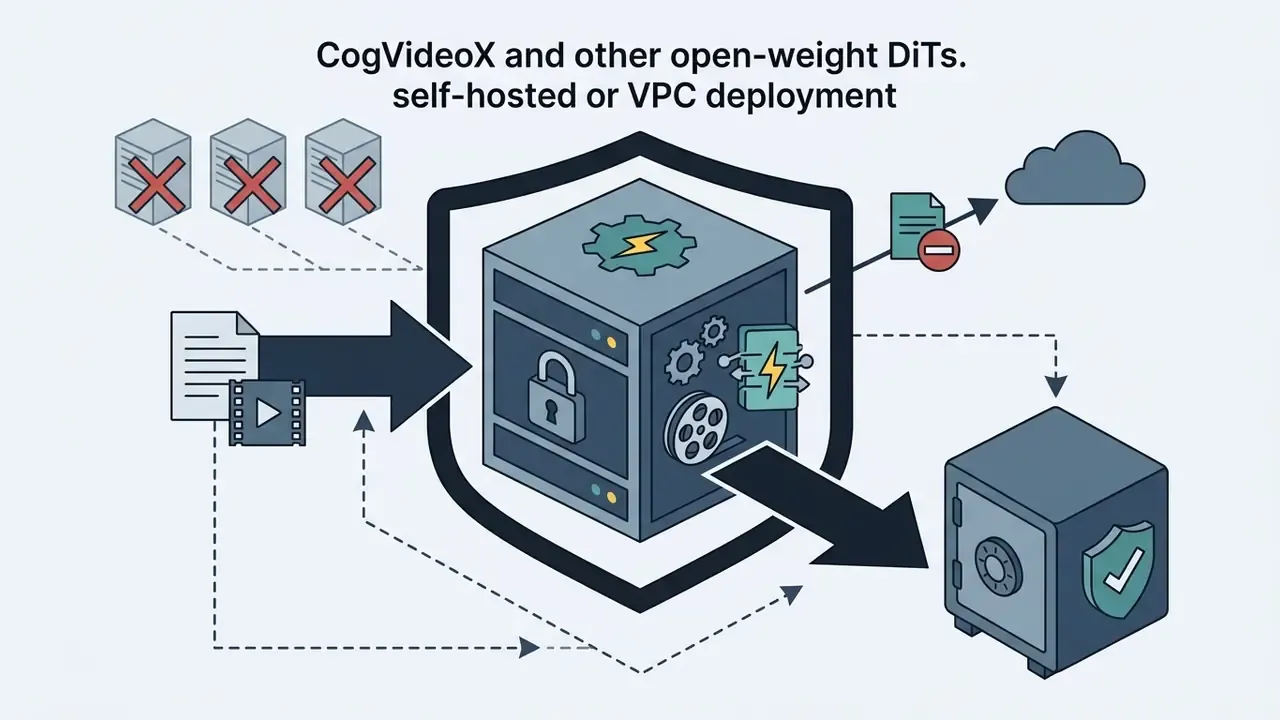
- Enterprise selection criteria must include SOC 2 Type II attestation, contractual non-training clauses, VPC or on-premise deployment, and C2PA provenance metadata. Clip length and aspect ratio are the easy part.
What Is a ChatGPT Video Generator and Can ChatGPT Create Videos
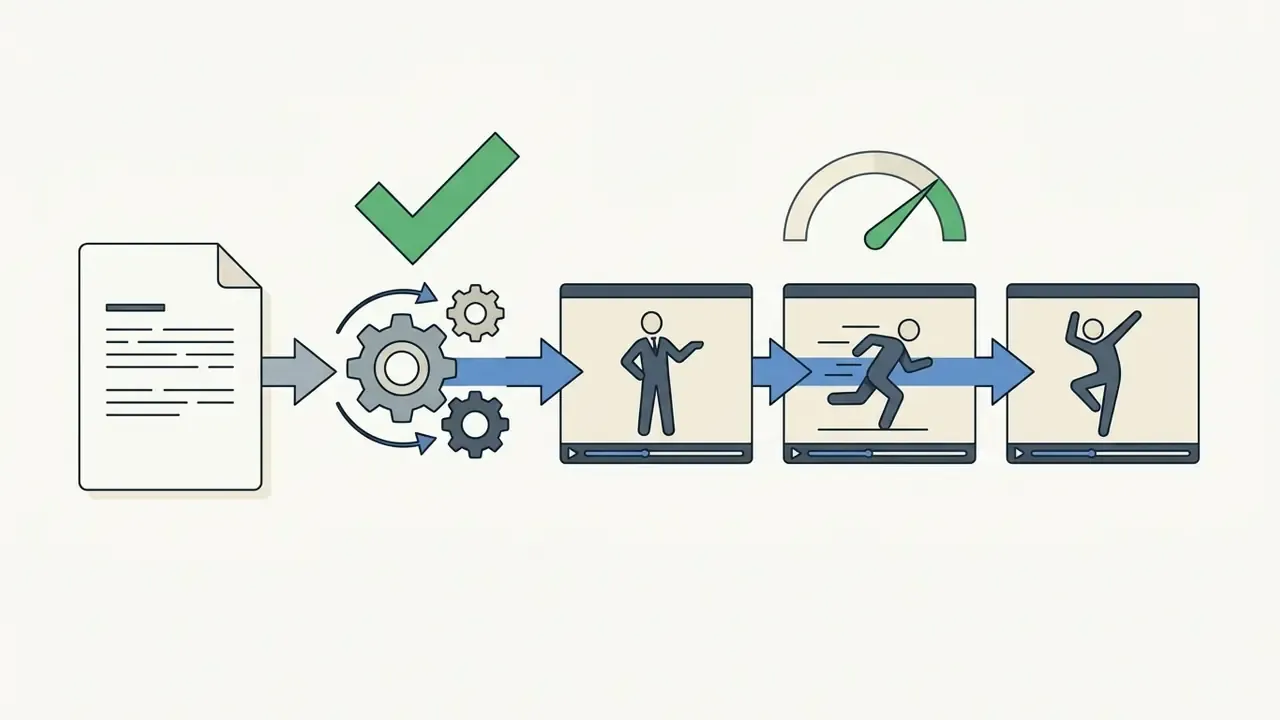
ChatGPT does not natively render MP4 or WebM files. It operates as an orchestration and prompt engineering layer that structures text scripts, while connected neural video diffusion models generate the frames. Users searching for a chatgpt video generator almost always mean a two-stage workflow: Large Language Models (LLMs) formulate the creative brief, and specialized text-to-video tools execute the visual rendering.
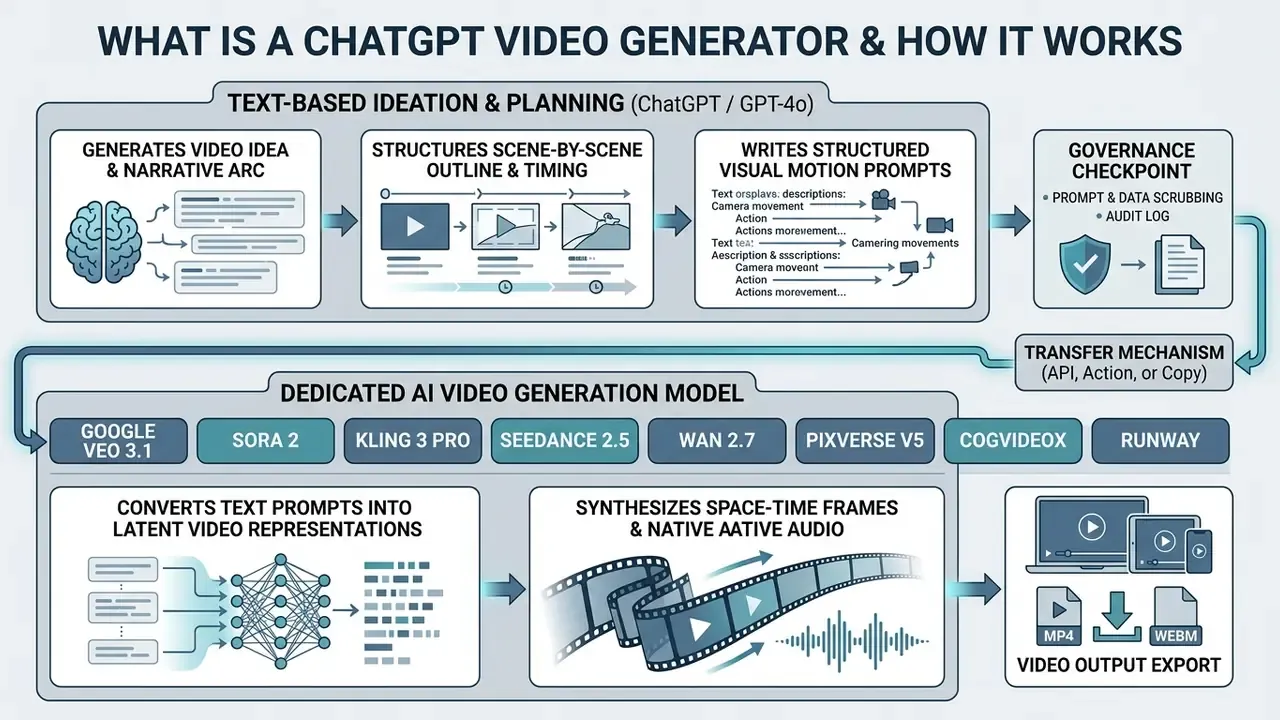
Whether can chatgpt create ai video outputs directly is really a question about architecture. ChatGPT relies on transformer models optimized for text and multimodal token processing. Video rendering needs space-time U-Nets or 3D diffusion transformers (DiTs) trained on millions of video-text pairs to hold temporal consistency across frames. Different objective, different math, different output space.
«Modern video generators, CogVideoX, Lumiere, Vidu, rely on diffusion transformers trained on millions of video-text pairs; the LLM only supplies text conditioning.»
What ChatGPT Does in the AI Video Creation Process
ChatGPT is the planning engine for pre-production. It converts high-level concepts into production-ready material: scene-by-scene outlines, dialogue scripts, voiceover narration, visual prompts, metadata titles.
By pinning down camera directions, lighting parameters, and subject movement in words, ChatGPT standardizes what the video model receives. A common operational method uses structured JSON or table output that maps scene numbers directly to narration and visual instructions. One prompt in, one reviewable brief out.
In one evaluation of media workflows for automated compliance videos, a team used ChatGPT to turn 40-page regulatory PDFs into structured shot lists. Updated: the group logged an internally measured reduction of roughly 70% in script preparation time (analyst hours per module, across 12 modules). To be precise: this is a single-organization internal benchmark, not an audited industry average, and it should be re-measured in your own environment. The resulting prompts were fed straight into an external video model, showing how text orchestration accelerates pre-production without surrendering human editorial oversight.
«GPT4Motion shows GPT-4 generating a Blender script from a text query, a physics engine building the scene, and Stable Diffusion rendering frames, with no model fine-tuning.»
How ChatGPT Differs from an AI Video Generator and Video Model
The gap between an LLM and a video model sits in output space and training objective. ChatGPT models probability distributions over text tokens to produce coherent language. A video model operates on spatial and temporal latents to produce pixel arrays.
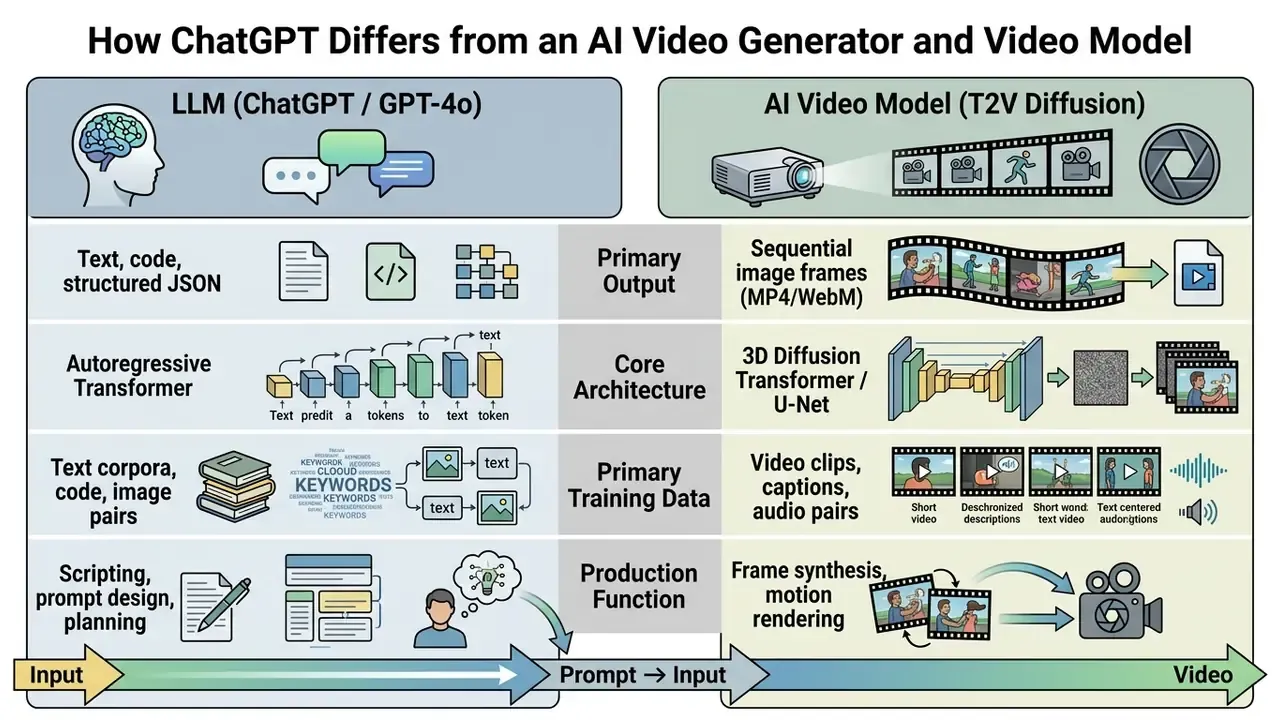
Updated, 2026 model matrix. Current space-time generation leans on specialized 3D variational autoencoders (VAEs) and diffusion transformers that compress video along both spatial and temporal dimensions. Enterprise workflows pick models by generation traits, not by marketing tier:

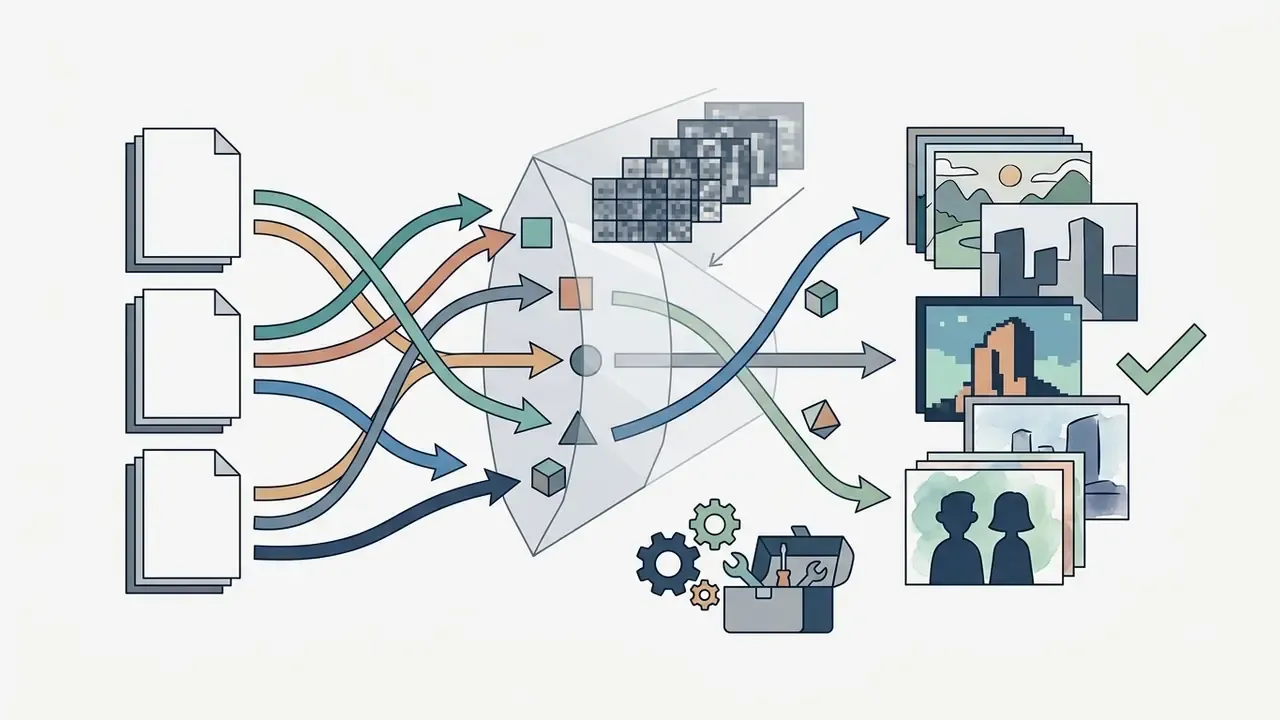
«Lumiere generates the entire temporal sequence in a single pass through a space-time U-Net, eliminating global interpolation artifacts between keyframes.»
OpenAI's standalone Sora web experience was discontinued on April 26, 2026, which pushed the industry toward integrating video models through REST APIs and specialized workflow interfaces rather than a single native chat window. Teams comparing capabilities across vendors can start from a structured overview of AI video generators before burning generation credits.
Shadow AI, Data Boundaries, and Enterprise Selection Criteria
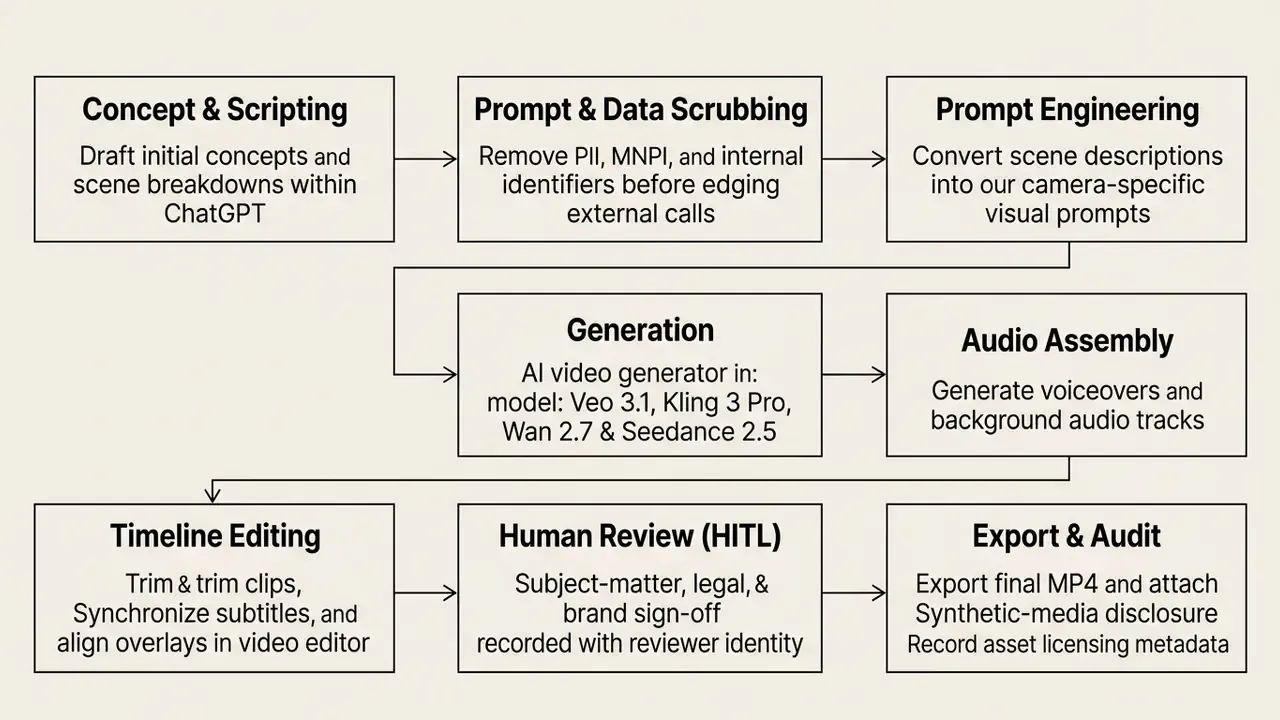
Before a single prompt leaves the organization, treat the text itself as an outbound data transfer. Pasting draft regulatory scripts, unreleased product specs, customer identifiers, or material non-public information into a personal consumer AI account is the most common Shadow AI failure mode in banking and insurance. The video model never sees a pixel of confidential data. The prompt does.
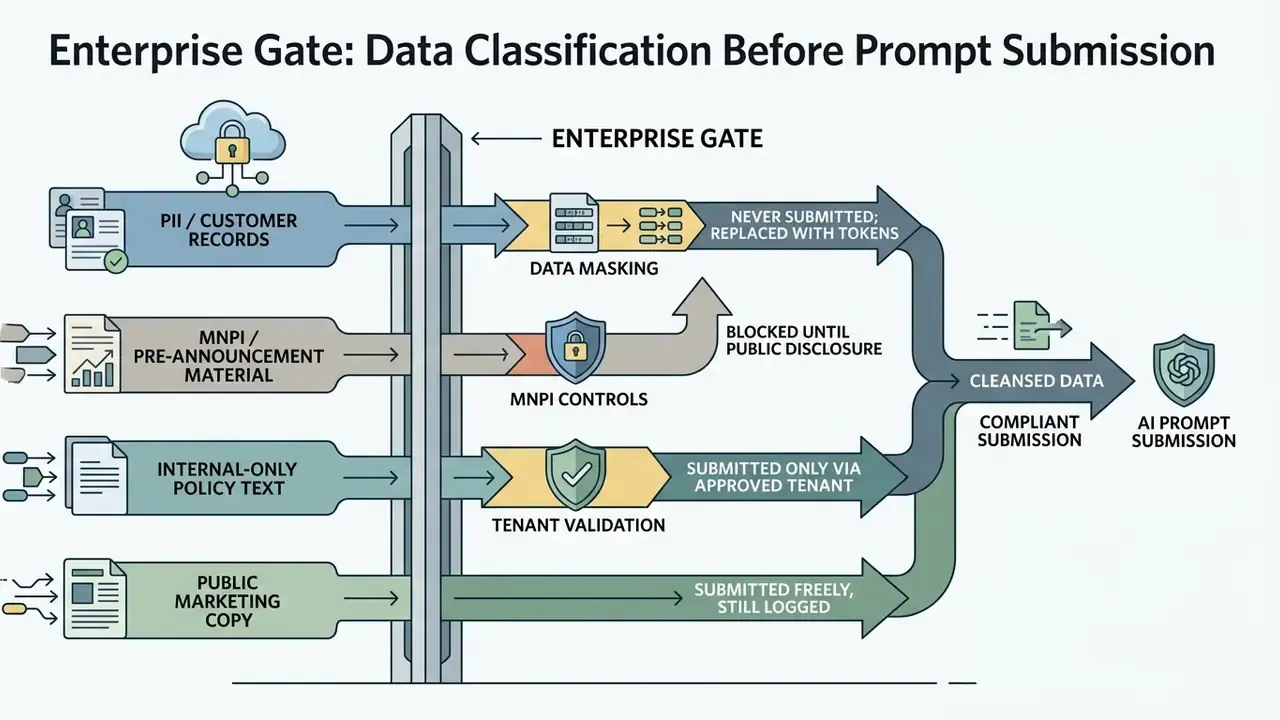
Vendor evaluation therefore needs a security column sitting next to the creative one. Ask for it in writing:
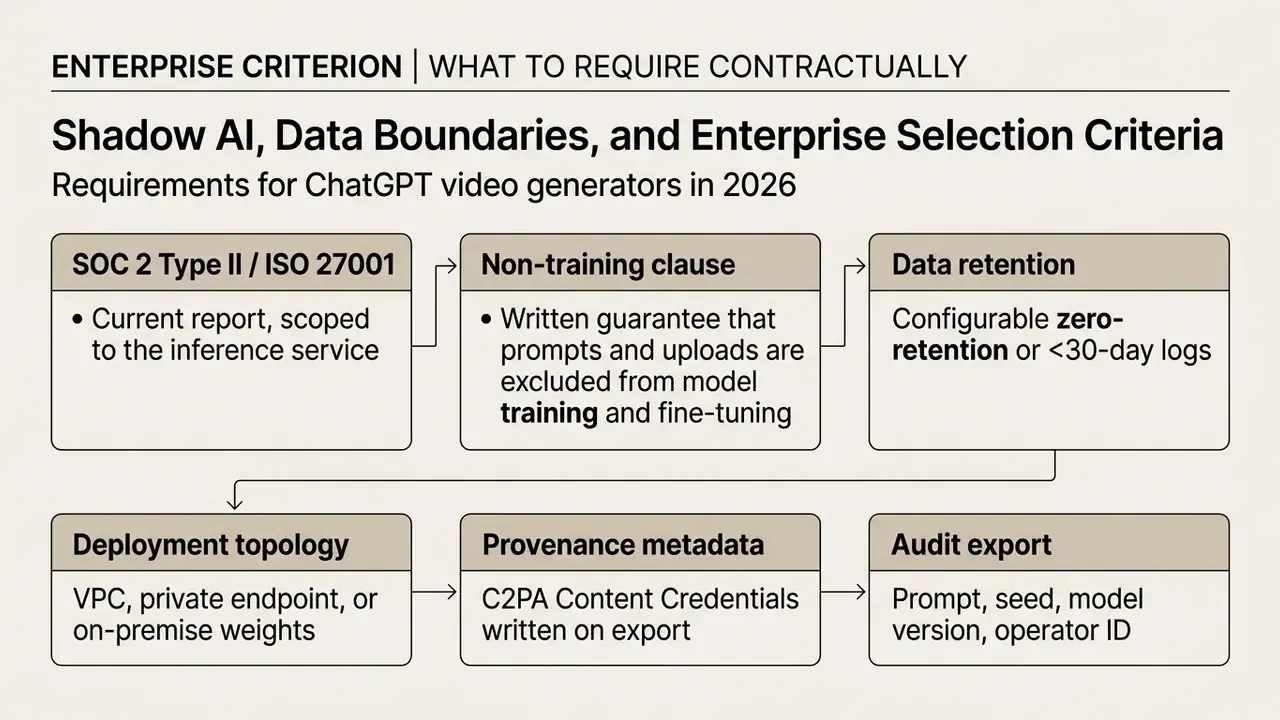
One caveat worth stating plainly: an attestation report is not a control. Someone in your organization still has to read the scope section and confirm the inference endpoint is actually inside it.
How to Create Video with ChatGPT: A Step-by-Step Path from Idea to Export
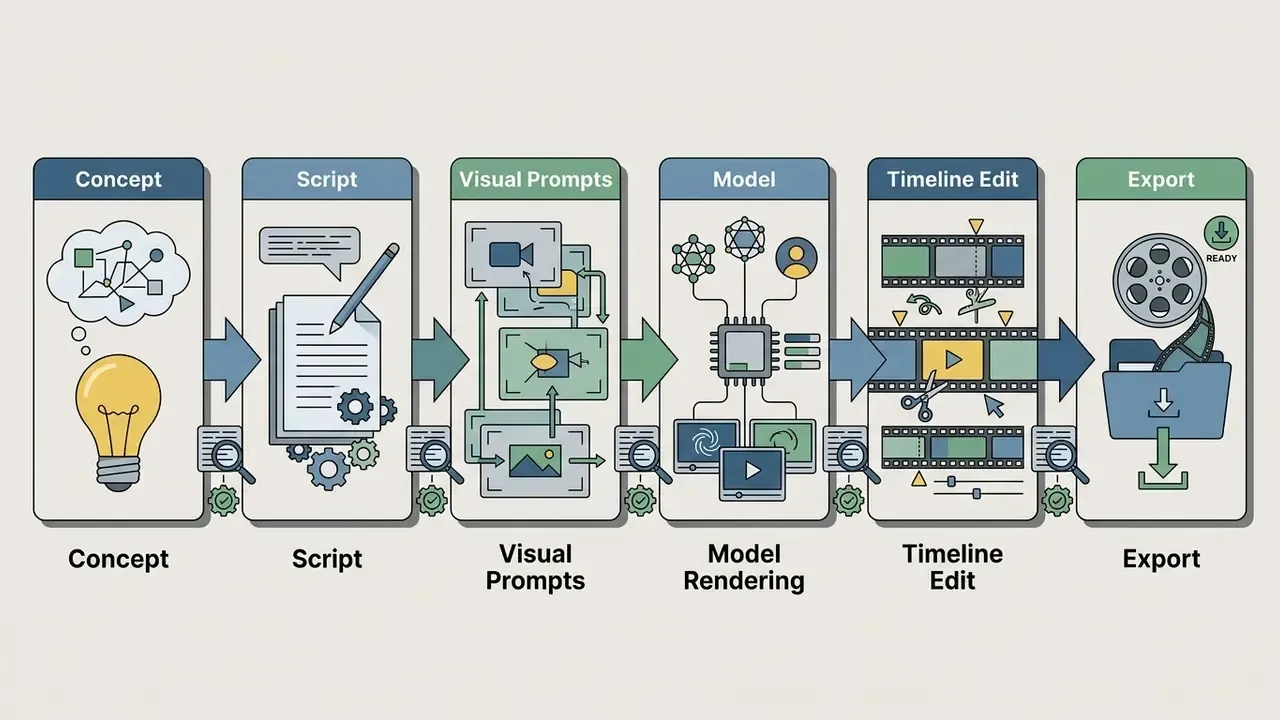
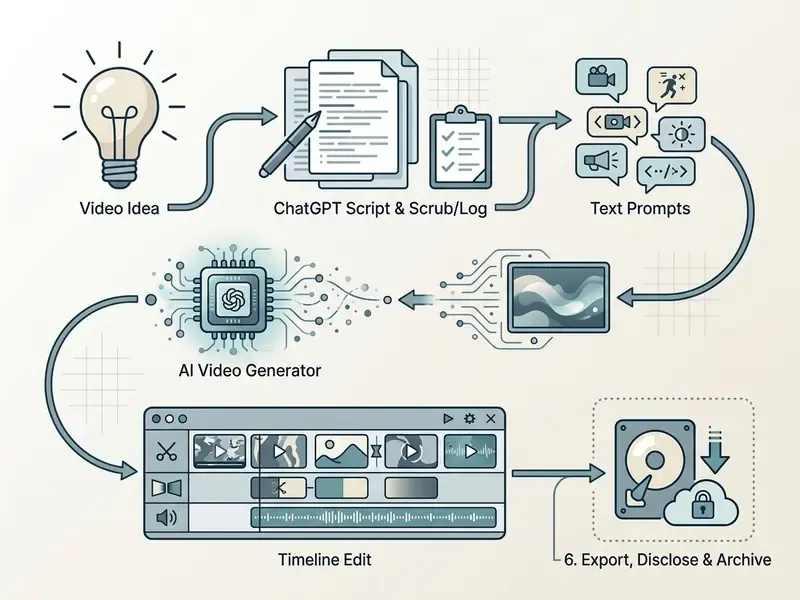
Creating an AI video with ChatGPT runs through six stages: concept definition, script drafting, visual prompt structuring, video model rendering, timeline editing, final export. A structured sequence prevents visual inconsistency and quietly saves generation credits.
Prepare the Idea, Script, and Text Prompts in ChatGPT
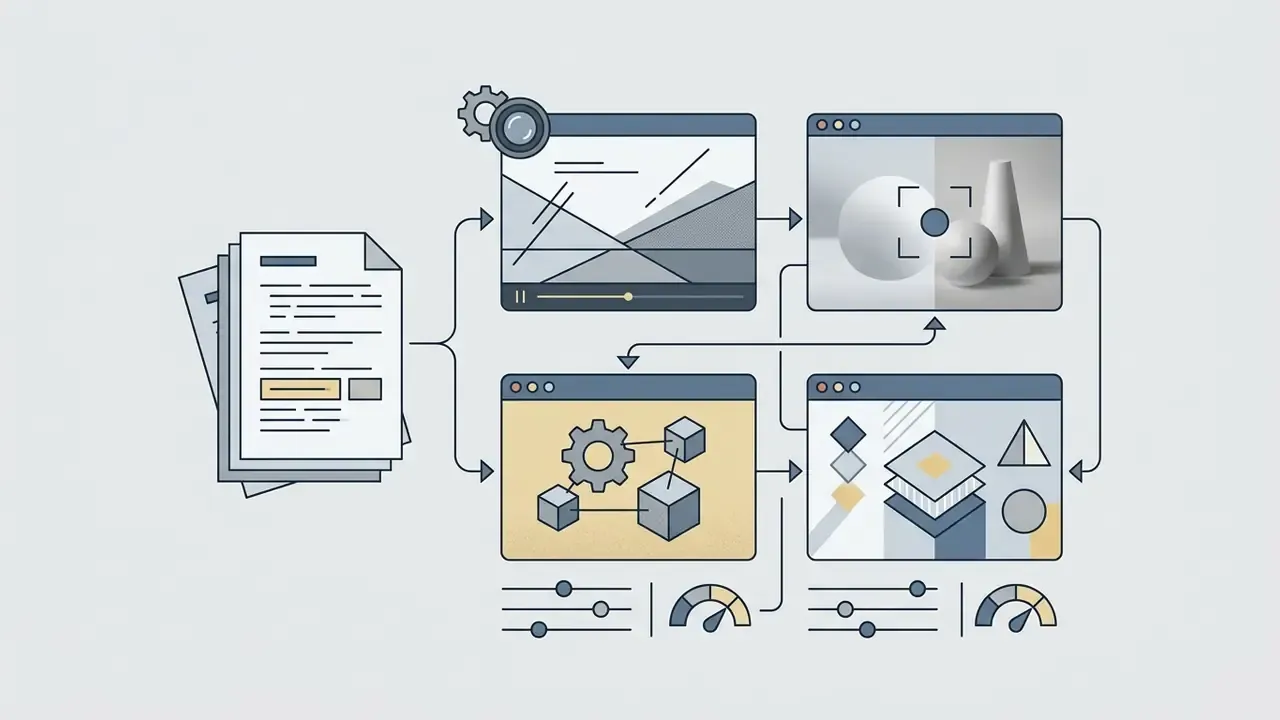
Step one turns a general topic into a scene-by-scene script. Tell ChatGPT to act as a video director and produce a two-column script table: narration or dialogue on the left, detailed visual scene description on the right.
For functional visual prompts, require four parameters per scene:
Copy-ready script meta-prompt. Paste this into ChatGPT and replace the bracketed variables:
Act as an expert video director. Write a [60-second] video script about [INSERT TOPIC] tailored for [TARGET AUDIENCE].
Strictly follow this structural breakdown:
1. Hook (0.0-1.5s): Pattern-interrupt visual & verbal statement to halt scrolling.
2. Retention Beats (1.5-45s): 3 concise key insight beats (max 15 words per line).
3. Call to Action (45-60s): Direct summary and single clear action step.
Format the response exclusively as a 2-column markdown table:
Column 1: Audio / Narration Transcript (Exact spoken words)
Column 2: Visual Motion Prompt (Subject, Action, Lighting, Camera Control, Render Style)
Constraints: 130-150 spoken words per minute, no jargon without a one-clause definition,
no claims that require legal review, no named third parties.
For internal or regulated content, append one more line: "Flag any sentence that would require compliance or legal review before publication." That single instruction turns the LLM into a first-pass reviewer instead of an unchecked author. It will miss things. It still catches the obvious ones.

«VidProM contains 1.67M real user prompts and 6.69M generated videos, the largest public analysis of how users describe scenes for T2V models.»
Choose the Video Model, Style, and Generation Parameters
Model choice depends on output goals, resolution requirements, and acceptable motion parameters. Enterprise implementations weigh supported aspect ratios, clip lengths, and native audio generation, and increasingly read the supportedAspectRatios field the API returns before submission. A side-by-side view of leading AI video generators shortens that evaluation cycle considerably.
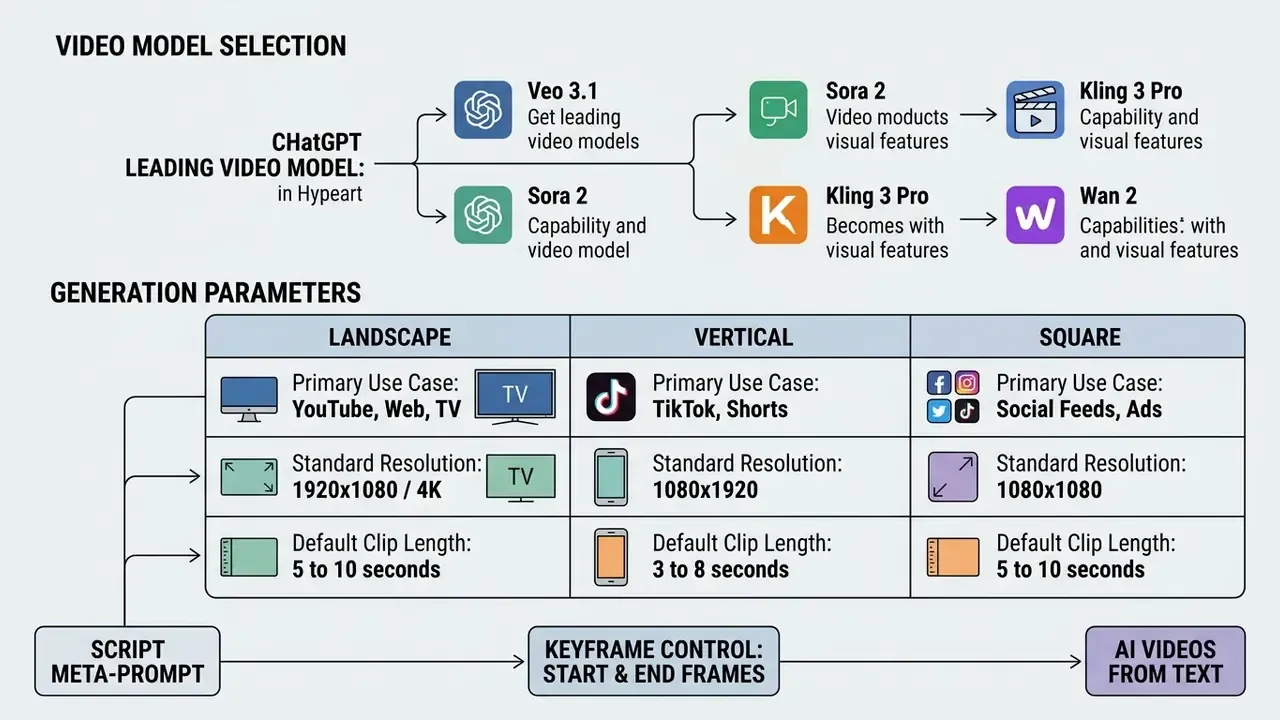
Check platform specifications before you set parameters. Most configurations support 16:9 for standard displays and 9:16 for mobile vertical feeds, while some vendors expose 21:9, 4:3, 3:4, and 9:21 for cinematic or legacy delivery. Practitioners building repeatable pipelines can review parameter conventions across text-to-video AI tools, alongside deeper technical comparisons in the AI Media Comparison Matrices and developer-focused AI Media API Guides.
Producing Long-Form Video Beyond the Generation Limit
Most raw video models cap single-pass generation at 3 to 5 minutes. Free tiers often cap at seconds; paid workflow platforms stretch to roughly 30 minutes per generation. To build long-form pieces of 10 to 30+ minutes:
- Chunking have ChatGPT split the master outline into 2-minute chapters, each with its own hook and recap line.
- Seed Locking reuse a fixed random seed ID across prompt batches to preserve visual style, character appearance, and grading.
- Style Anchoring repeat identical style descriptors (lens, film stock, lighting temperature, palette) verbatim in every chapter prompt. Drifting adjectives cause visible grading jumps.
- Timeline Concatenation export chapters and stitch them with 0.5-second cross-dissolves at scene boundaries.
- Continuity Pass re-read the assembled audio against the master outline to confirm no chapter repeats or contradicts another. That failure is common in chunked generation and embarrassing in training material.
Prompts for ChatGPT Video Generators: How to Get Controlled Results
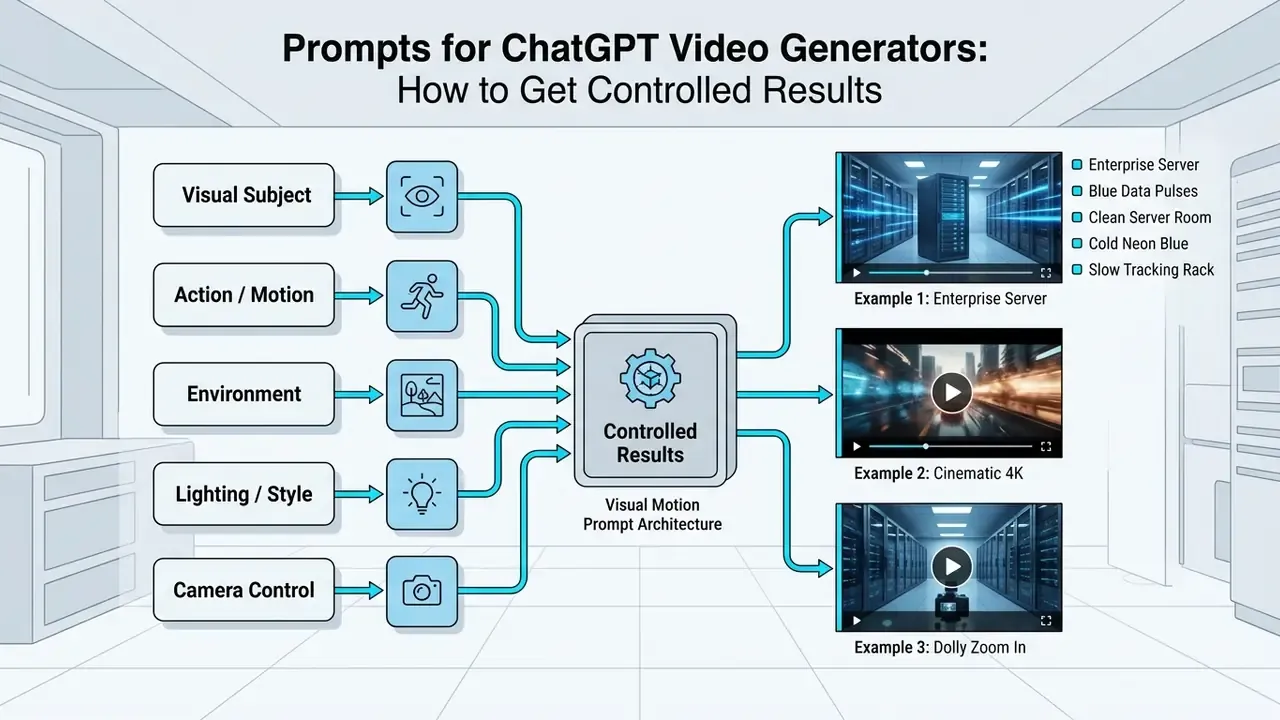
Predictable output demands structured prompts that name subject, action, visual style, lighting, camera movement, and pacing. Vague prompts produce erratic motion and hallucinated geometry.
Prompt Structure: Idea, Scenes, Style, and Motion
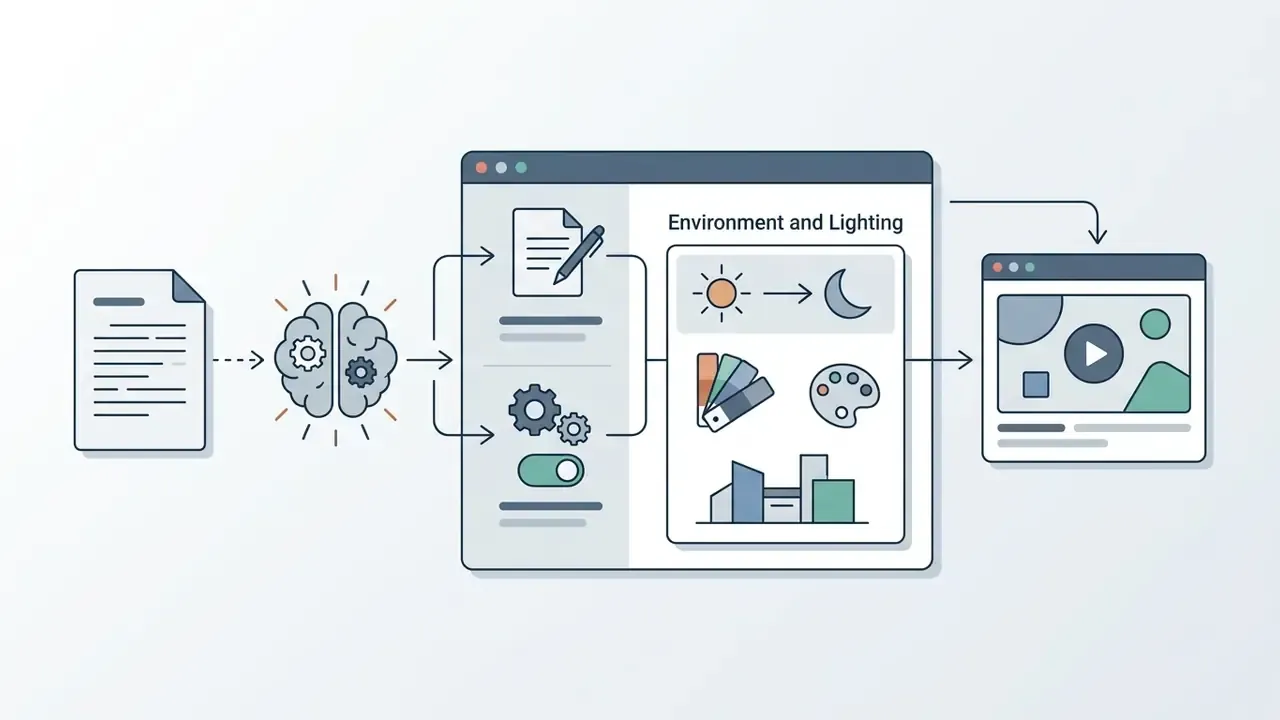
A complete visual motion prompt carries six fields. Have ChatGPT build every generator prompt on this frame:
- Core Subjectclear description of the central object, person, or asset.
- Specific Actionone defined movement ("walks slowly forward", not "is active").
- Environmental Settingbackground context, weather, atmospheric depth.
- Lighting and Colornamed sources (volumetric sunlight, warm tungsten, neon overhead).
- Camera Motionexact technique (static tripod, slow pan right, orbital tracking).
- Pacing and Stylerendering style (photorealistic 35mm film, digital render, 2D vector).
One dominant camera move, one dominant subject action per shot. Stacking three simultaneous motions is the most reliable way to get warped limbs and melting geometry.
«T2V-CompBench evaluates 1,400 prompts across 7 compositionality categories; models consistently underperform on dynamic attribute binding and object interaction.»
How to Turn a ChatGPT Script into a Clear Scene Brief
To avoid confusing the video model, split multi-scene scripts into individual briefs under one rule: one prompt, one deliverable.
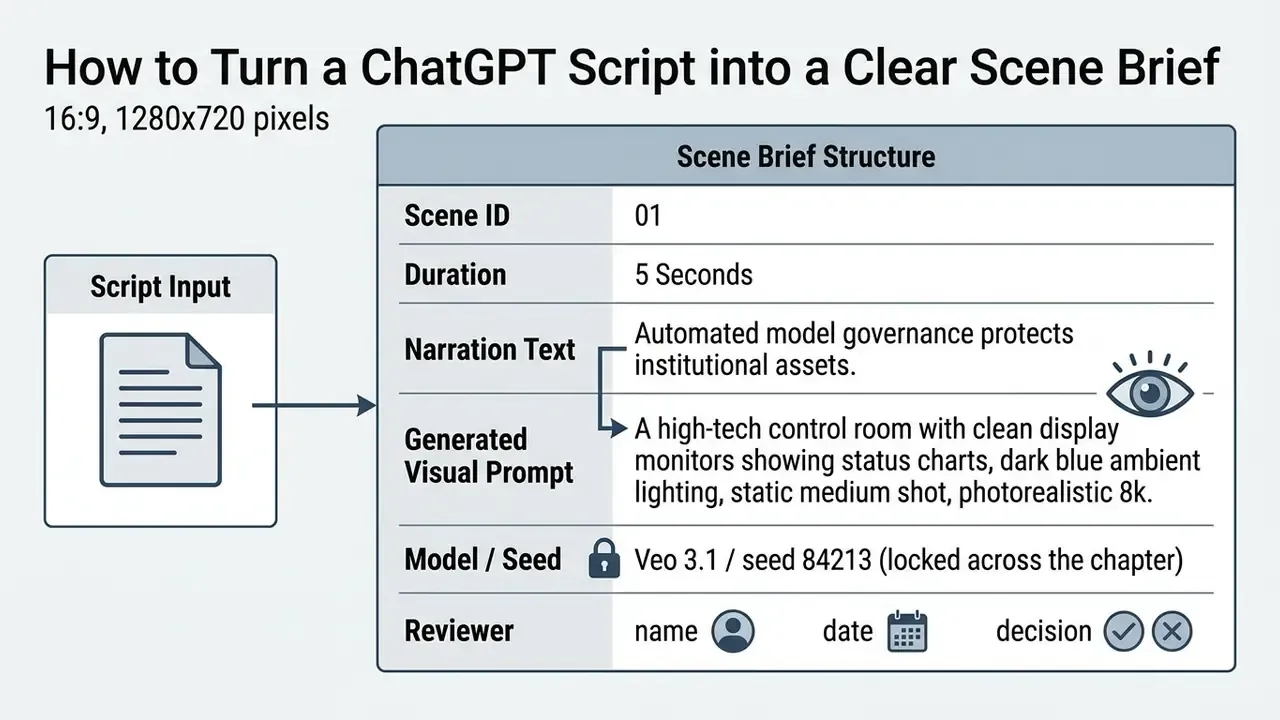
Decomposing a master script into self-contained briefs prevents attribute bleeding, where visual elements from scene two show up in scene one. It also creates the audit unit an internal reviewer or examiner can actually inspect: one narration line, one prompt, one clip, one signature. That last column matters more than the render quality.
How to Edit, Regenerate, and Restyle AI-Generated Video
When a clip carries visual errors or wrong motion, use targeted repair rather than rerunning a general text prompt.
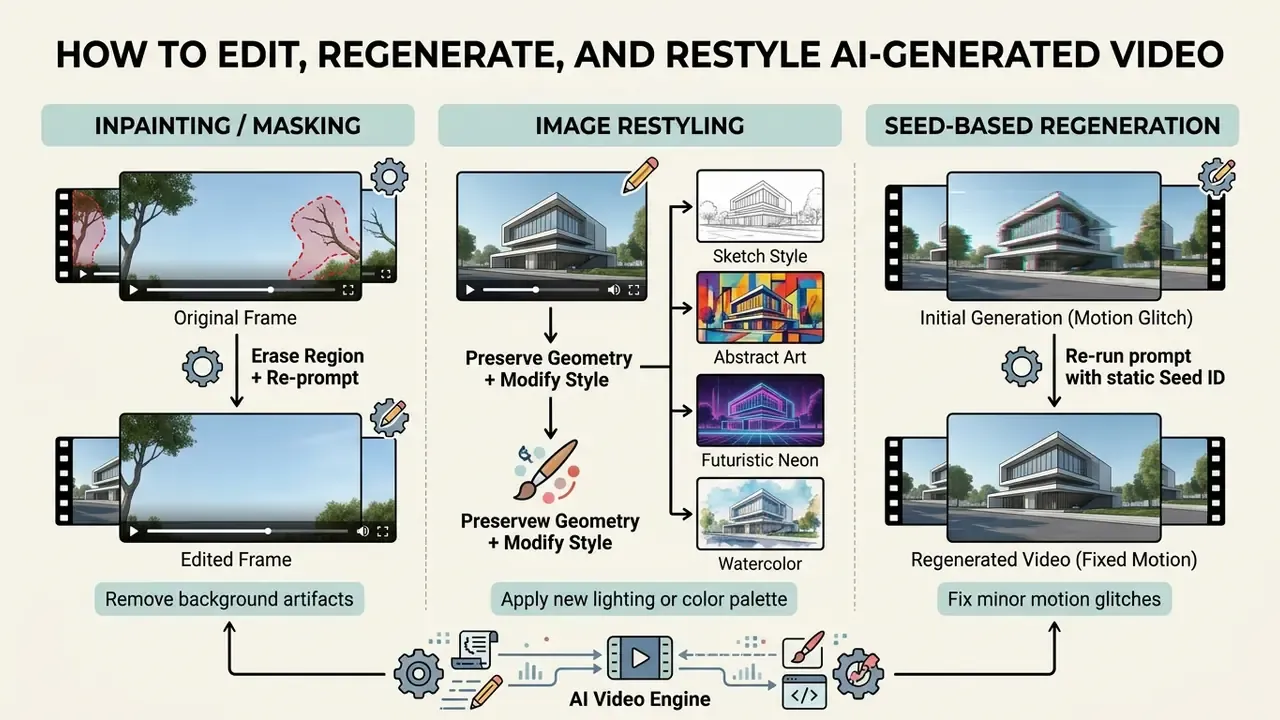
Mask-based inpainting lets creators modify isolated regions while preserving composition; masks must match source dimensions and carry an alpha channel in most image APIs. A look at the current field of video editing tools helps teams decide whether region-level repair belongs in the generation tool or in post. If a clip needs full re-rendering, adjust style descriptors in ChatGPT while locking the original camera movement terms word for word.
Which AI Video Creation Tools Work with ChatGPT
AI video creation tools connect to ChatGPT either through direct API actions (GPT Actions) or by manual transfer of structured scene-by-scene scripts. Category choice depends on whether the project needs synthetic camera footage, animated stills, or an avatar-led presenter.
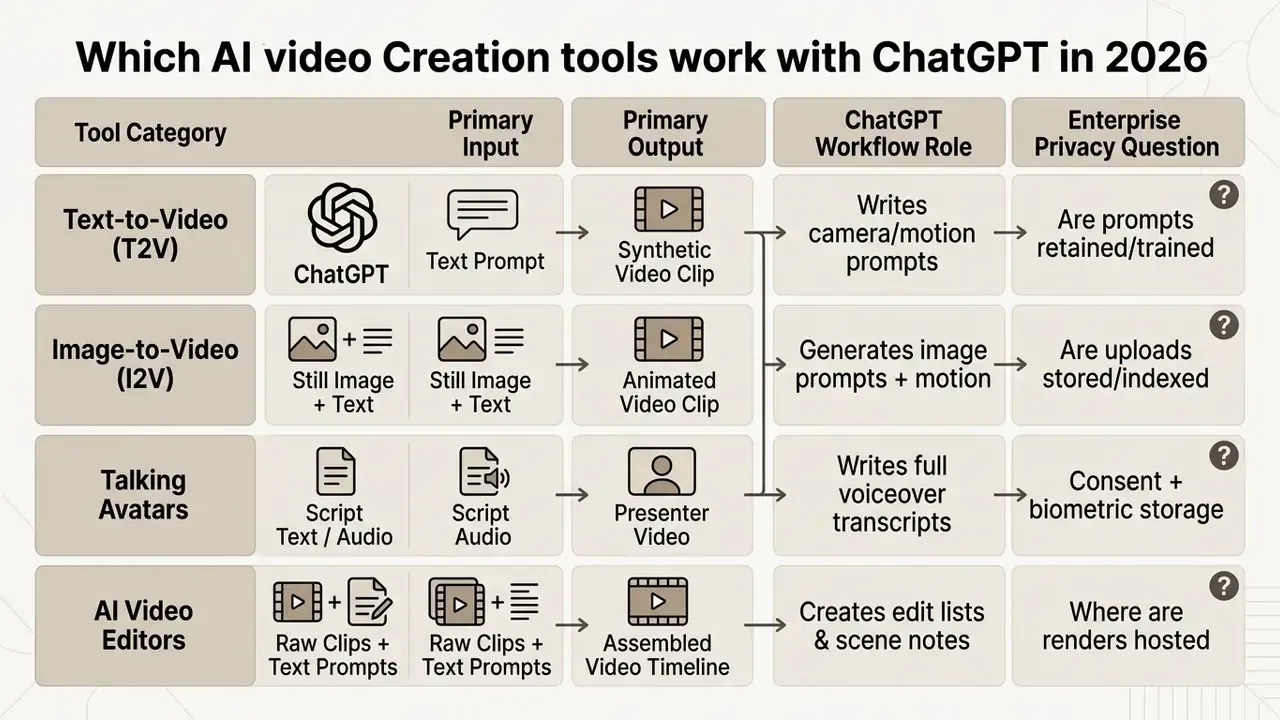
Markdown comparison table detailing AI video tool categories, input/output specifications, ChatGPT's role in the production pipeline, and the enterprise data-privacy question each category raises.
Text-to-Video and Image-to-Video for Scene Generation
Text-to-video (T2V) engines synthesize frames purely from descriptive text, which buys creative freedom for imaginative or unfilmable scenes. Models such as Google Veo 3.1 produce 8-second clips at 1080p or 4K with natively synchronized audio, cutting the need for separate sound layers. Implementation details, quotas, and pricing for the Google Veo 3.1 API start to matter as much as visual quality once volume scales.
Image-to-video (I2V) engines take a reference image as the first frame, which tightens control over subject appearance and character consistency across scenes. Using ChatGPT to write both the still-image prompts and the follow-on image-to-video animation prompts keeps sequential clips visually coherent.
Keyframe Controlling: Start Frame and End Frame Pipeline
To eliminate temporal distortion in I2V generation, structure prompts around a Start Frame (F₀) and an End Frame (Fₙ). Most current generators, Seedance, Kling, and the Wan family included, accept JPG/JPEG/PNG/WEBP uploads up to roughly 20 MB per frame slot.
[Transition Vectors]: Camera performs slow push-in track. Subject morphs state smoothly from F0 to Fn.
Interpolate light intensities from dark ambient (0%) to volumetric neon (100%).
Maintain object identity without edge bleeding. No new objects enter frame.
- Start Frame (F₀)establishes geometry, composition, subject position (for example: close-up of a closed cybernetic vault door).
- End Frame (Fₙ)defines the final structural state (for example: wide shot of the opened vault revealing illuminated blue servers).
- ChatGPT Motion Bridge Promptask for intermediate motion vector descriptions:
- Validationinspect the first and last 6 frames. If the render does not land on Fₙ, shorten the duration parameter instead of adding descriptive text. Over-long durations cause most endpoint drift.
This two-anchor approach turns a still product photo into a controlled 5-second dynamic ad, and it costs far fewer credits than re-rolling a pure T2V prompt until the composition happens to match the brief. The same interpolation logic sits under template-driven animation makers that move between fixed key poses.
Avatars, AI Voices, and Video Editors for Finished Clips
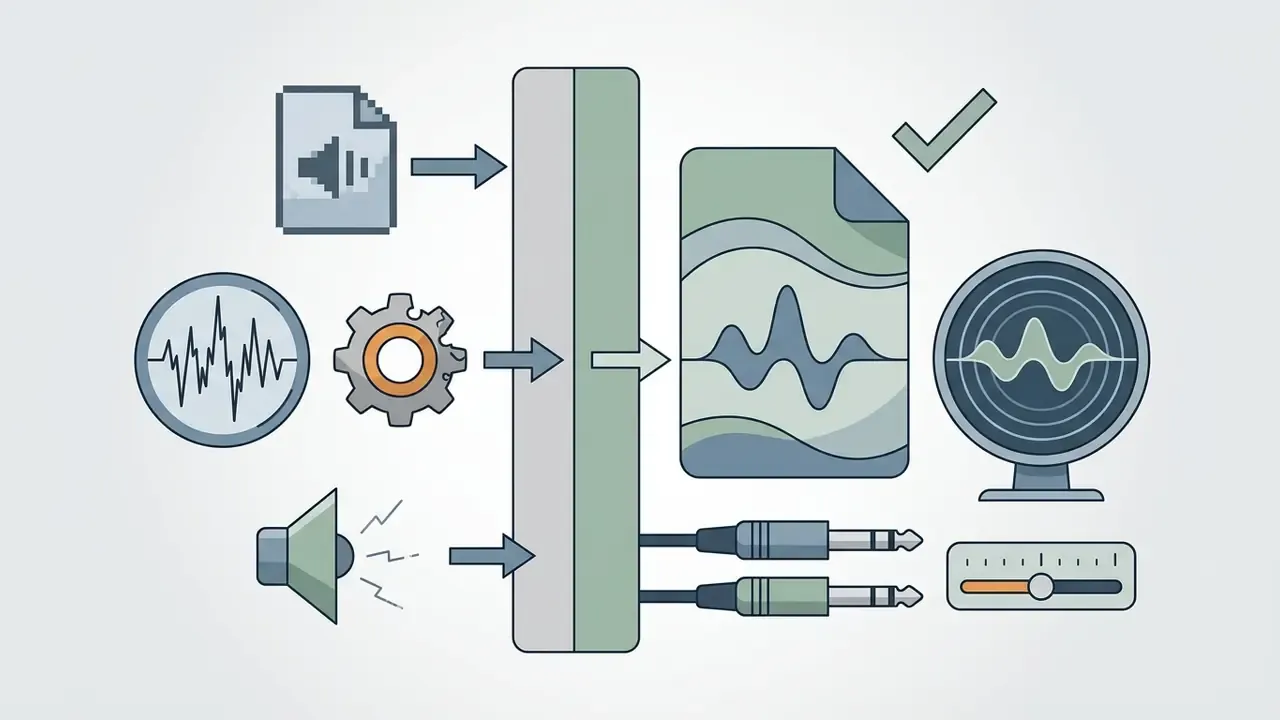
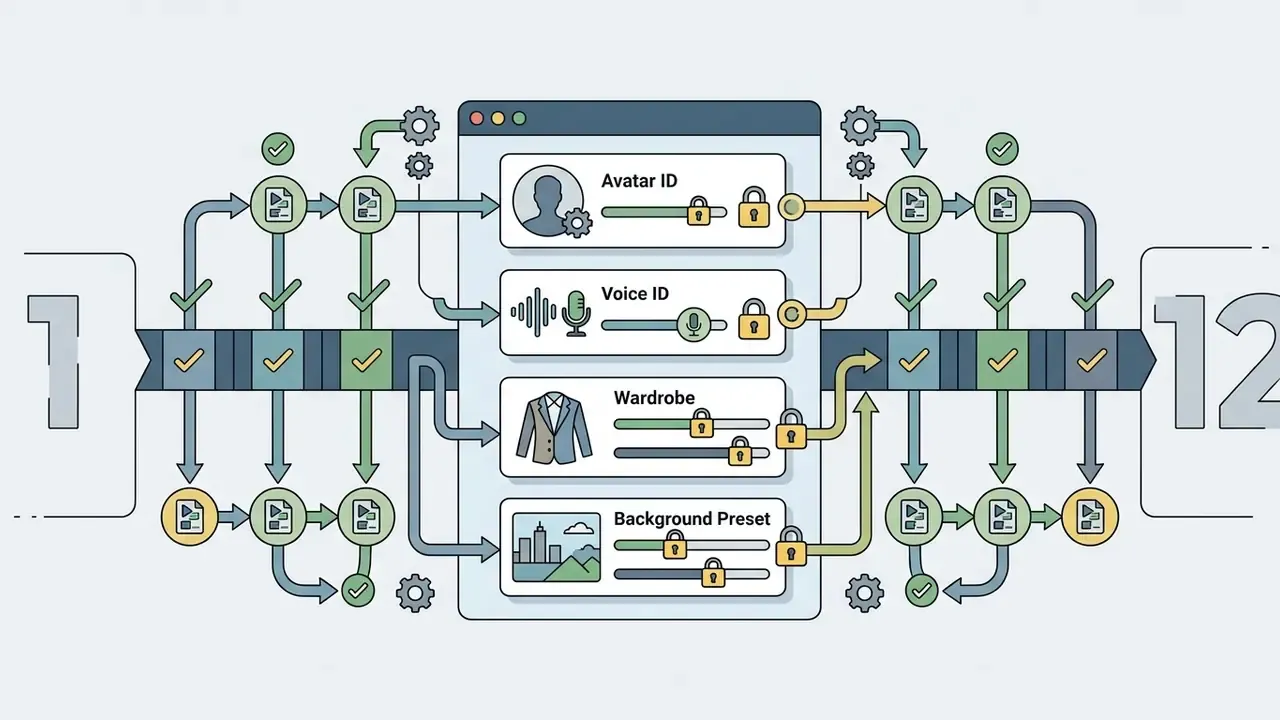
Presenter-led videos, corporate training, and educational explainers often run on synthetic avatar tools such as Synthesia, HeyGen, or VisionStory. ChatGPT writes the speech script, which is then mapped to an avatar with automated lip-sync. Comparing AI voice generators separately from avatar rendering usually beats accepting whichever voice ships as default.
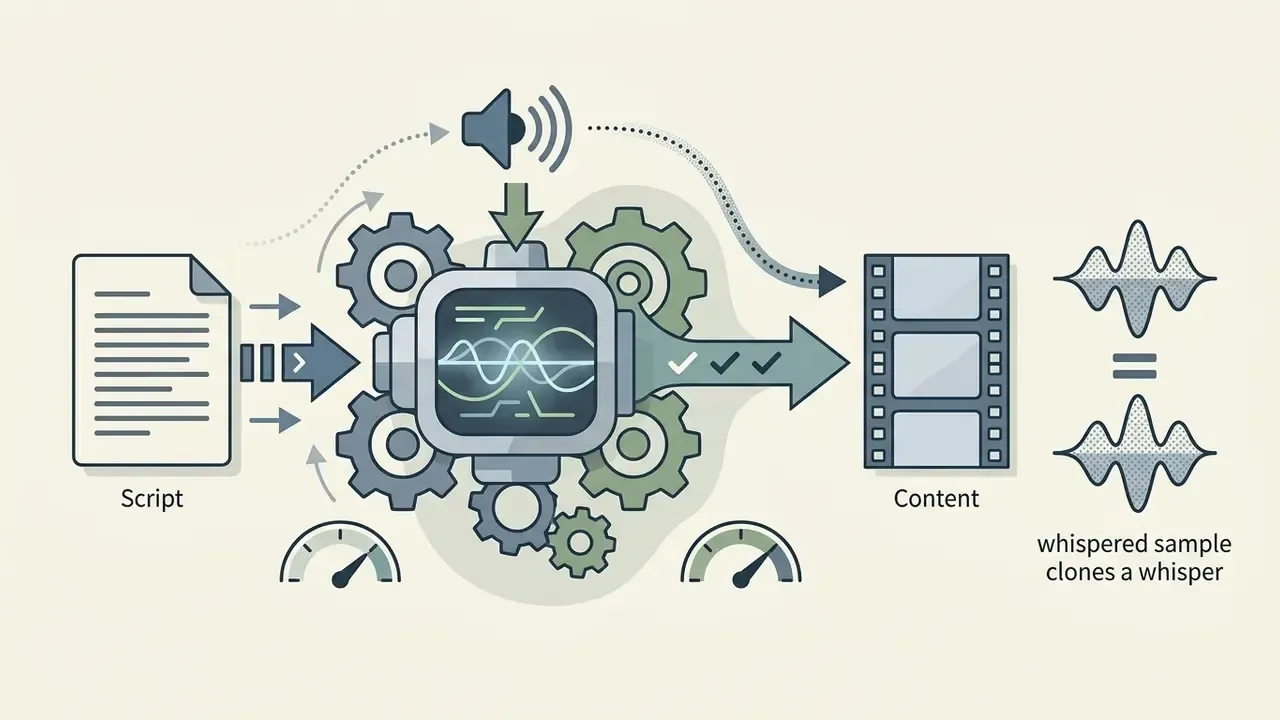
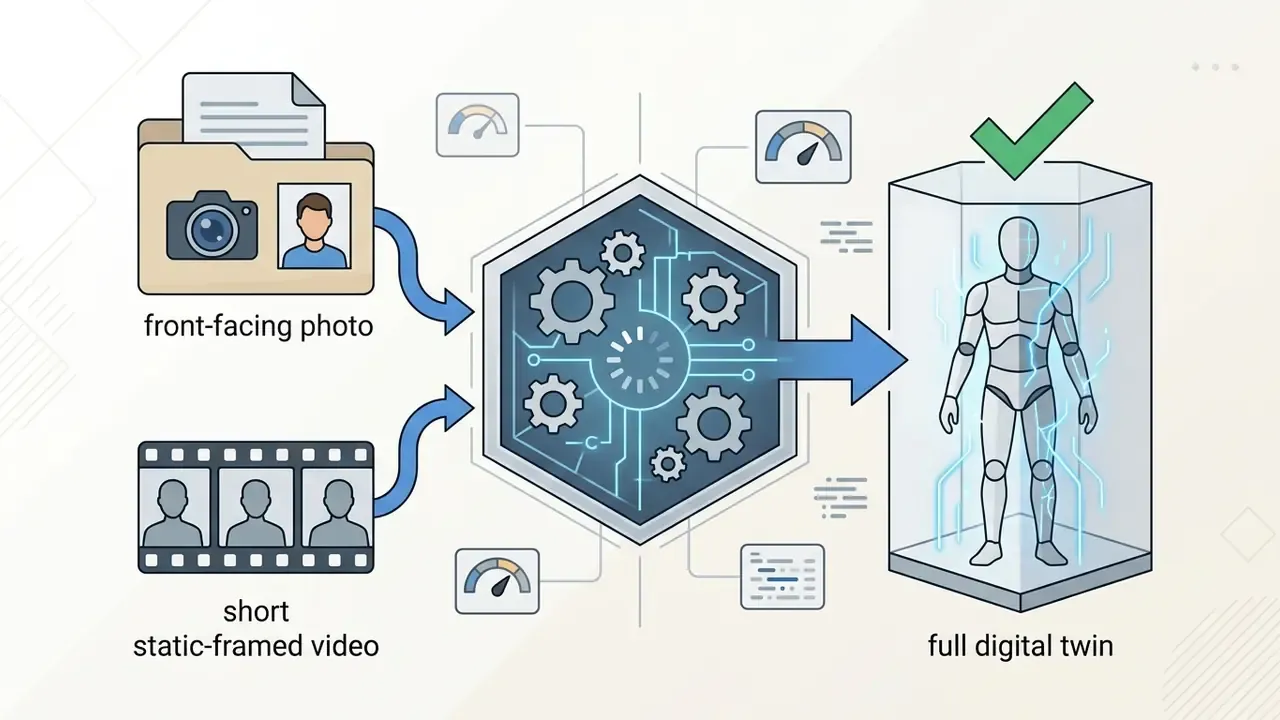
Voice cloning and digital twin protocol. Technical requirements are consistent across major vendors:
AI-driven editors speed post-production by reading text commands to split scenes, generate subtitles, and insert transitions. A broader review of chatgpt video generation methods clarifies how voice cloning and avatar rendering slot into existing corporate publishing systems.
«FIRM-Video-8B (built on Qwen3-VL) achieves the best total and semantic VBench scores at best-of-8 sampling for CogVideoX-2B and Wan2.1, enabling automatic selection of the strongest clip among candidates.»
Free ChatGPT Video Generator Options, Tiers, and Commercial Use
Free tiers hand out limited trial credits, 480p or 720p output, and watermarks. Full commercial rights and unbranded exports live on paid pro or enterprise plans. Organizations evaluating these tools need to read past the feature list into license terms and data usage rights. A comparison of free AI video generators is a faster starting point than testing each vendor blind.
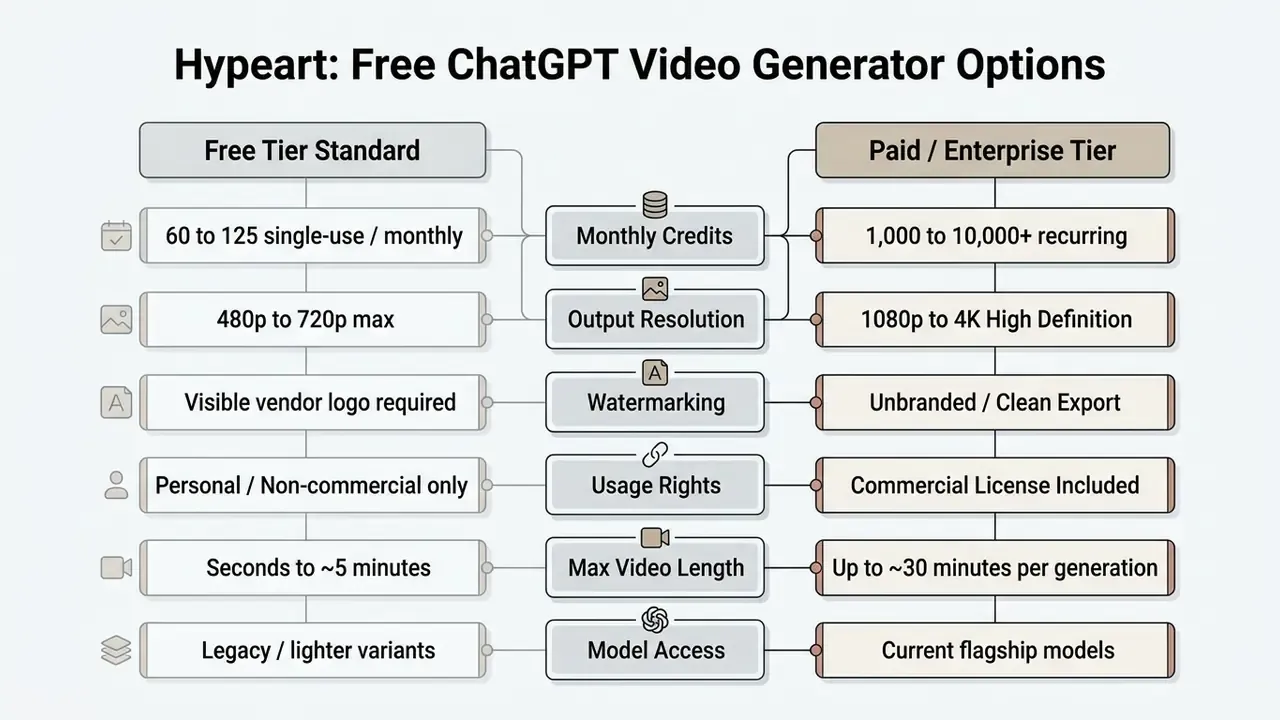
What Is Usually Available in a Free AI Video Generator
How to Verify Export Rights and Commercial Usage
Deciding whether an AI-generated video can legally run in commercial advertising means checking three independent legal layers: platform terms of service, copyright law, and synthetic media disclosure mandates.
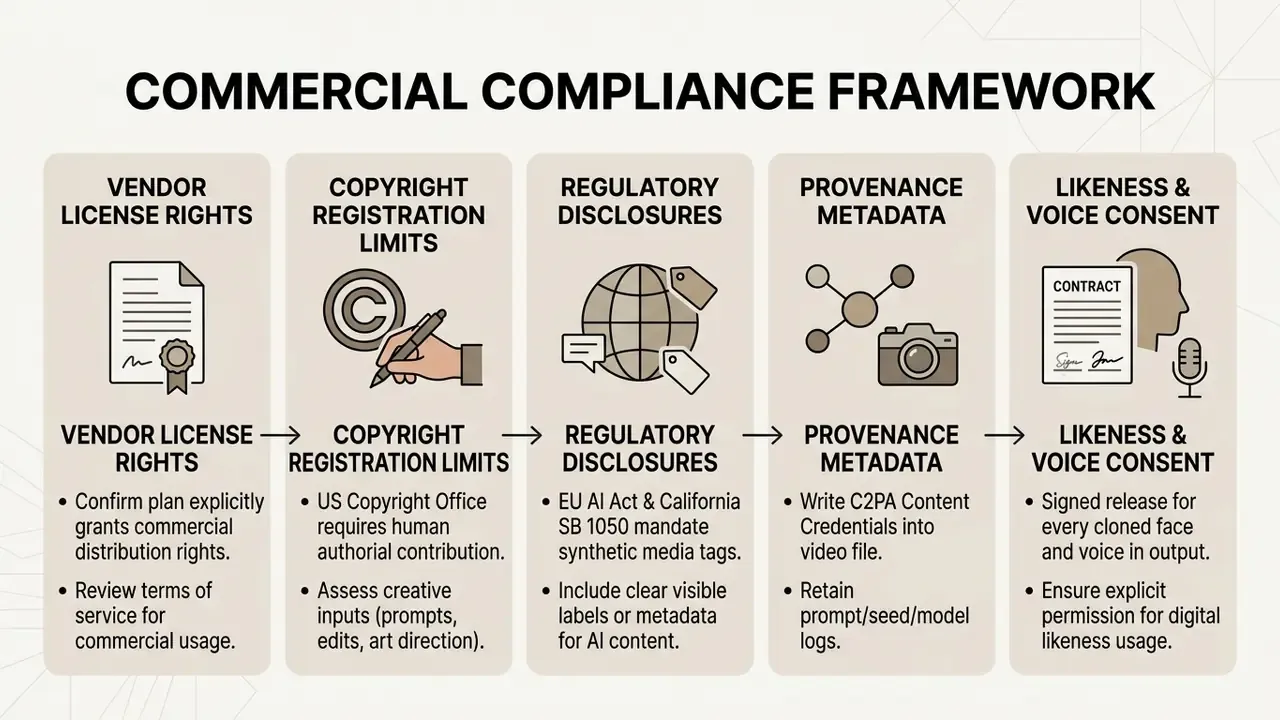
Under US Copyright Office guidance, purely AI-generated visual media without human authorial contribution cannot be registered; protection attaches only to human-authored elements, and applicants must disclose non-de-minimis AI-generated material in the registration. The Office's 2024 digital-replica report goes further, recommending that individuals be able to license, but not wholly assign, rights to their image and voice. On top of that, the EU AI Act (effective August 2, 2026) and California SB 1050 require synthetic video to carry machine-readable disclosures; SB 1050 extends the duty to synthetic performers in advertising and public postings.
«T2VSafetyBench identifies 14 risk categories in AI video, including copyright infringement and misinformation; no single model dominated across all categories.»
Before commercial deployment, inspect the licensing agreement for a formal commercial license and confirm the rules for broad commercial use. The same logic carries across modalities; see how it plays out for AI image generators commercial use. Additional compliance resources and litigation tracking sit in the AI Media Commercial-Use Hub and the AI Litigation and Case Timelines database.
This section is general information and does not replace advice from qualified counsel on copyright, likeness rights, and AI content licensing in your jurisdiction.
Practical Use Cases for ChatGPT AI Video Creator Workflows
Pairing ChatGPT with an AI video generator serves four business functions reliably: regulated internal training, product explainers, faceless publishing channels, and short-form social marketing. Standardized script prompts hold brand tone steady while output volume rises. For smaller campaigns, a comparison of free AI video generators for social content narrows the shortlist fast.
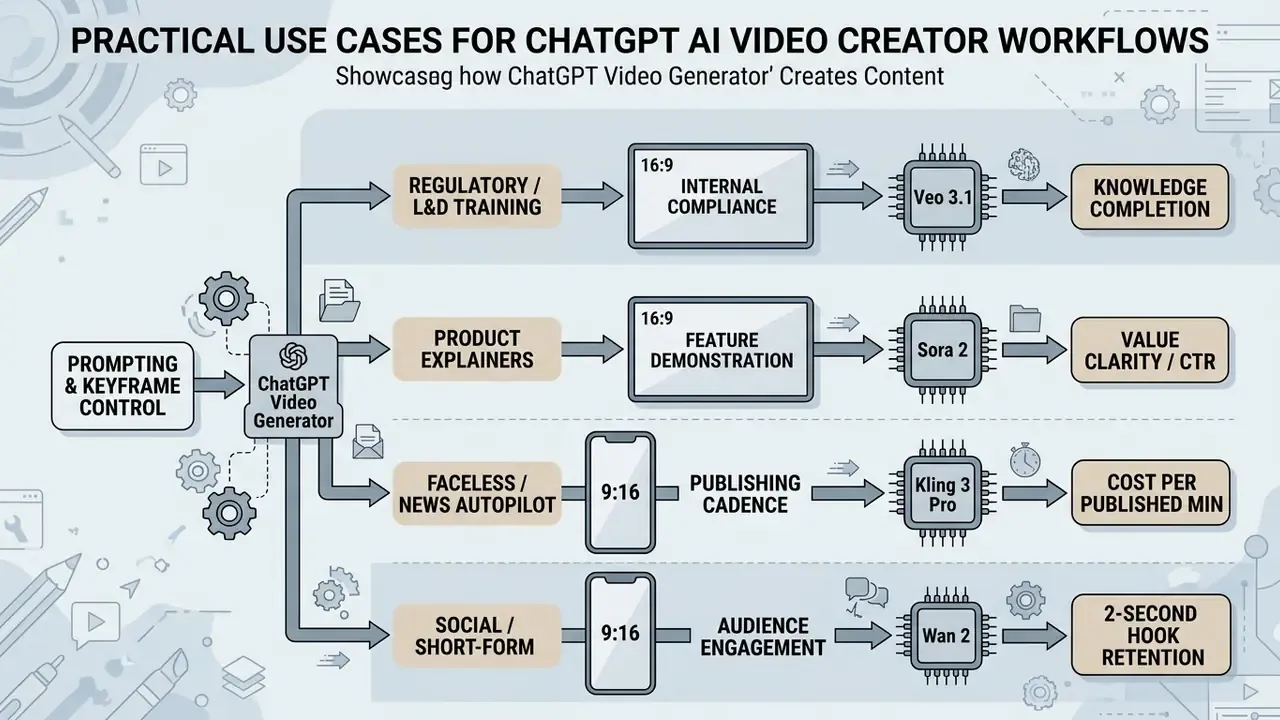
Regulatory Training and Compliance Video from Finished Scripts
«The TFM attack achieves an average jailbreak success rate of 52% on Pixverse and 60% on Hailuo, which makes a pre-publication safety pass mandatory for corporate video.»
Commercial marketing and product demos lean on a proven four-part structure: Hook, Problem, Solution, Call to Action. Instructing ChatGPT to follow it keeps messaging tight and focused on user value.
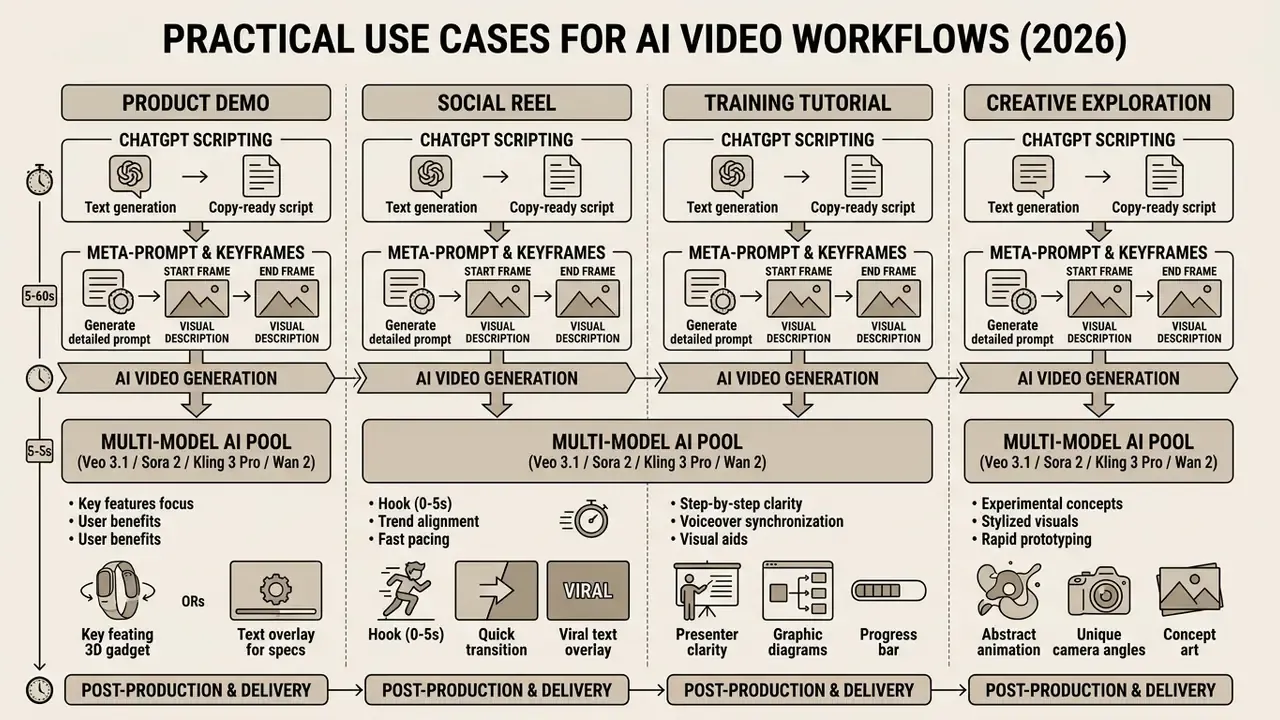
For product demos, request a two-column Visual/Voiceover table structured as Hook, value promise, demo flow in 3 to 5 steps, proof, CTA, plus three alternative hooks for A/B testing.
Automating Faceless YouTube and Daily News Channels
A scalable faceless channel needs a fully automated text-to-media pipeline:
- Script AutomationChatGPT parses daily RSS feeds, earnings calendars, or topic prompts into 60-second news scripts using the retention-hook formula. One scheduled prompt produces the day's brief.
- Voice Synthesis and Cloningscript text goes to a neural voice engine. Custom clones need a clean 30-second studio sample (WAV, 44.1 kHz, no background noise); stock neural voices skip the consent overhead entirely.
- B-Roll MatchingChatGPT's visual prompts match key terms to auto-paired stock footage or render 5-second cinematic clips through Kling 3 Pro, Veo 3.1, Seedance 2.5, or PixVerse V5.
- Automated Captionssubtitles burn into the lower 35% safe region with animated word-by-word highlights for silent viewing.
- Publishing and Disclosureone-click publish to Shorts, Reels, and TikTok with a synthetic-media label applied at upload; prompt, model, and seed archived per episode.
Editorial accuracy stays a human responsibility. Automated news pipelines need a factual review step before publication, because the LLM will narrate whatever the feed contained, confidently and in a pleasant voice. Channel-level publishing mechanics are covered in the YouTube video editor workflow guide.
YouTube Shorts, TikTok, and Social Video from ChatGPT Prompts
Short-form vertical video demands immediate pacing. Prompts should establish a visual hook inside the first 2 seconds, then keep narration under 150 words per minute.
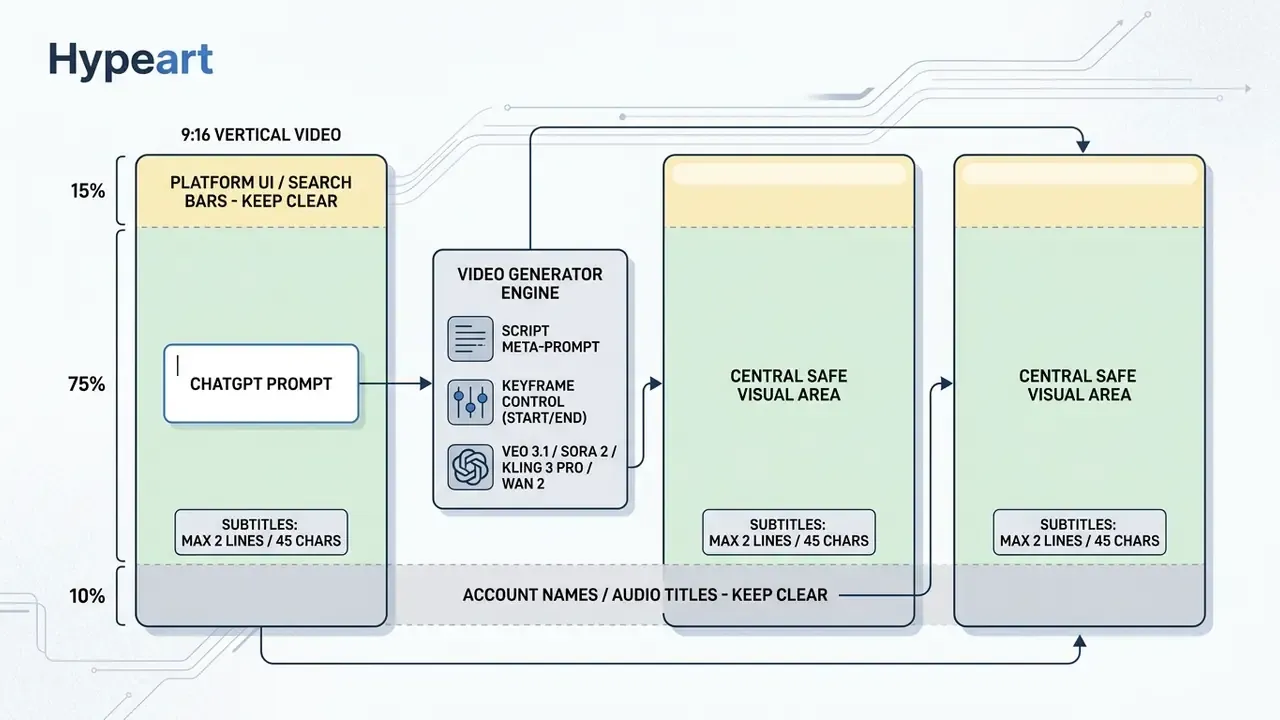
When burning subtitles into vertical 9:16 frames, keep text inside the central 75% band to avoid native app overlays on TikTok or YouTube Shorts. Accessibility guidance also caps captions at two lines and roughly 30 to 45 characters per line, synchronized with the audio. Creative teams running social campaigns can adapt multi-frame formats such as a collage video layout to show several angles at once.
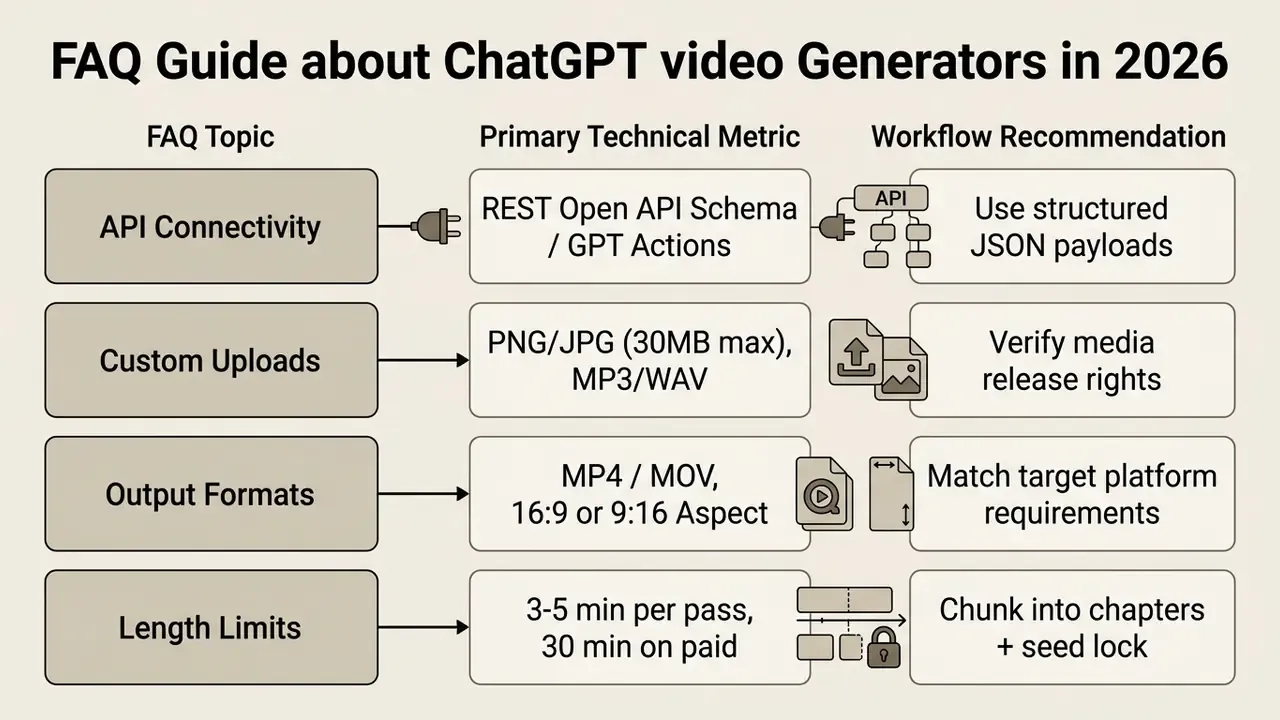
FAQ About ChatGPT Video Generators
Recurring technical questions cluster around API connectivity, custom media uploads, and output format compatibility across major platforms.
Does ChatGPT Actually Create Videos?
No. ChatGPT generates text: scripts, scene descriptions, shot lists, JSON payloads. It does not render frames. Producing an actual MP4 requires a separate video generation model or workflow platform, connected through a Custom GPT or GPT Action, or reached by pasting the structured script into the tool.
Is Direct Integration with ChatGPT Required to Create Videos?
No. Integration via custom GPTs or GPT Actions is optional. Creators can copy structured scripts and visual prompts from a standard ChatGPT web session into standalone generator portals or API consoles by hand.
Direct API integration simplifies multi-step workflows by letting ChatGPT push JSON payloads straight to an external video service. Vendors publish OpenAPI schemas and bearer-key authentication for exactly this pattern, as seen in platforms such as PixVerse AI. Troubleshooting steps live in the AI Media Support and Troubleshooting portal, and cost scenarios can be modeled with the interactive AI Media Calculators.
Can You Upload Your Own Images, Voice, and Face?
Yes. Most modern tools support custom uploads: high-resolution headshots for avatar generation, brand logos for scene placement, reference images for image-to-video animation, including separate Start Frame and End Frame slots for keyframe-controlled motion.
Voice cloning needs clean WAV or MP3 samples of the target speaker, typically a 30-second continuous read at 44.1 kHz with no background noise. Organizations must confirm that every uploaded face, image, and voice sample carries written consent and a likeness release, and that the vendor contractually excludes those biometrics from model training.
What Languages, Aspect Ratios, and Formats Are Supported by AI Video Tools?
Leading platforms handle major international languages for prompts and script generation, including English, Spanish, Mandarin, French, German, and Arabic. Workflow platforms extend voiceover and caption coverage to 80+ languages and 100+ dialects with thousands of neural voices.
Supported technical output formats typically include:
- Aspect Ratios: 16:9 (landscape standard), 9:16 (vertical mobile), 1:1 (square social), with 21:9, 4:3, 3:4, and 9:21 on selected models.
- Container Formats: MP4 (H.264 or H.265 codec) and MOV.
- Frame Rates: 24 fps, 30 fps, and 60 fps at 720p, 1080p, or 4K.
How Do I Make a Video Longer Than the Model's Limit?
Split the ChatGPT master outline into 2-minute chapters, lock a single random seed and identical style descriptors across all chapter prompts, render chapters separately, then concatenate on a timeline with short cross-dissolves. Free tiers commonly cap generations at seconds to five minutes; paid workflow plans reach roughly 30 minutes per generation.
Pre-Publication Governance Checklist
Checklist0 / 9
Limitations, Open Questions, and a Safe Next Step
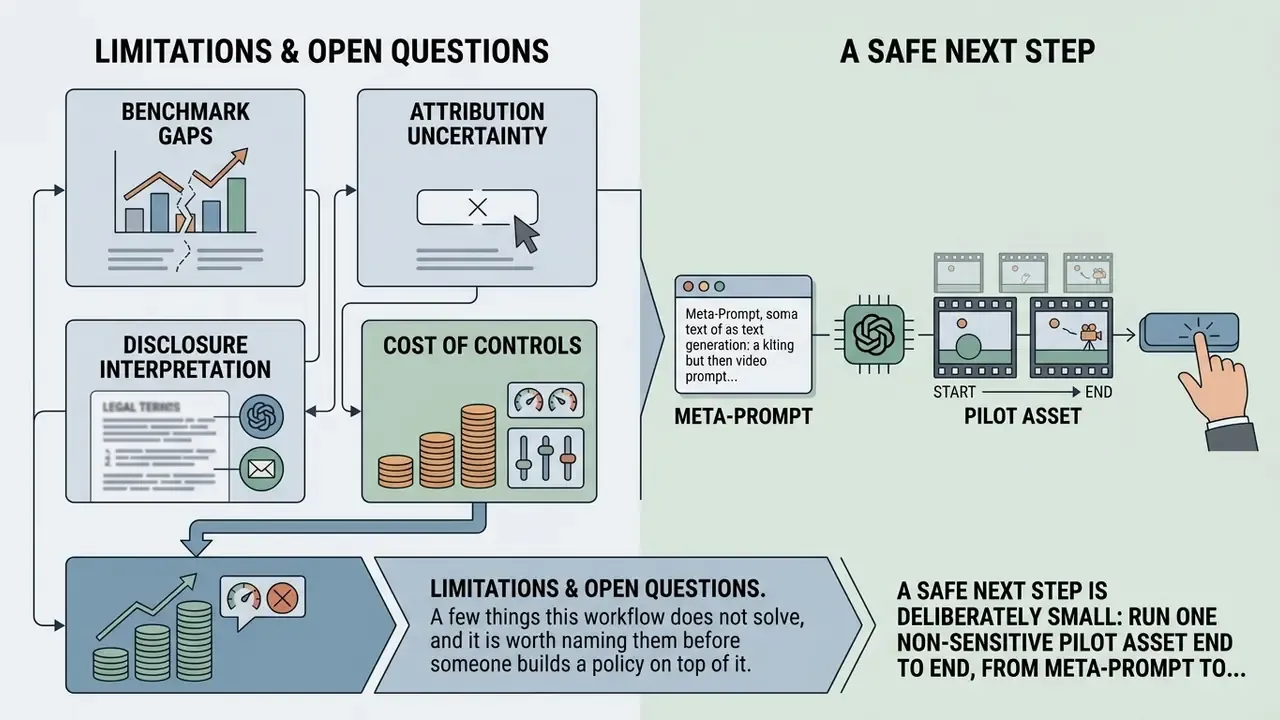
A few things this workflow does not solve, and it is worth naming them before someone builds a policy on top of it.
- Benchmark gaps. Public T2V benchmarks measure aesthetic quality and prompt adherence, not regulatory accuracy. No standard scorecard tells you whether a rendered AML explainer misstates an obligation.
- Attribution uncertainty. Training-data provenance for most commercial video models is undisclosed. Contractual indemnities partly transfer that risk; they do not remove it.
- Disclosure interpretation. Machine-readable labeling duties under the EU AI Act and SB 1050 are still being operationalized. Expect guidance to move during 2026, and re-check before a broad campaign launch.
- Cost of controls. ROI models that count credit spend but exclude review hours, storage, consent administration, and archival overhead will overstate returns. Treat every published minute as fully loaded.
A safe next step is deliberately small: run one non-sensitive pilot asset end to end, from meta-prompt to archived MAM record, and count the control hours. Then decide whether the format scales in your risk appetite. Nothing dramatic. Just evidence.
Summary and Key Takeaways
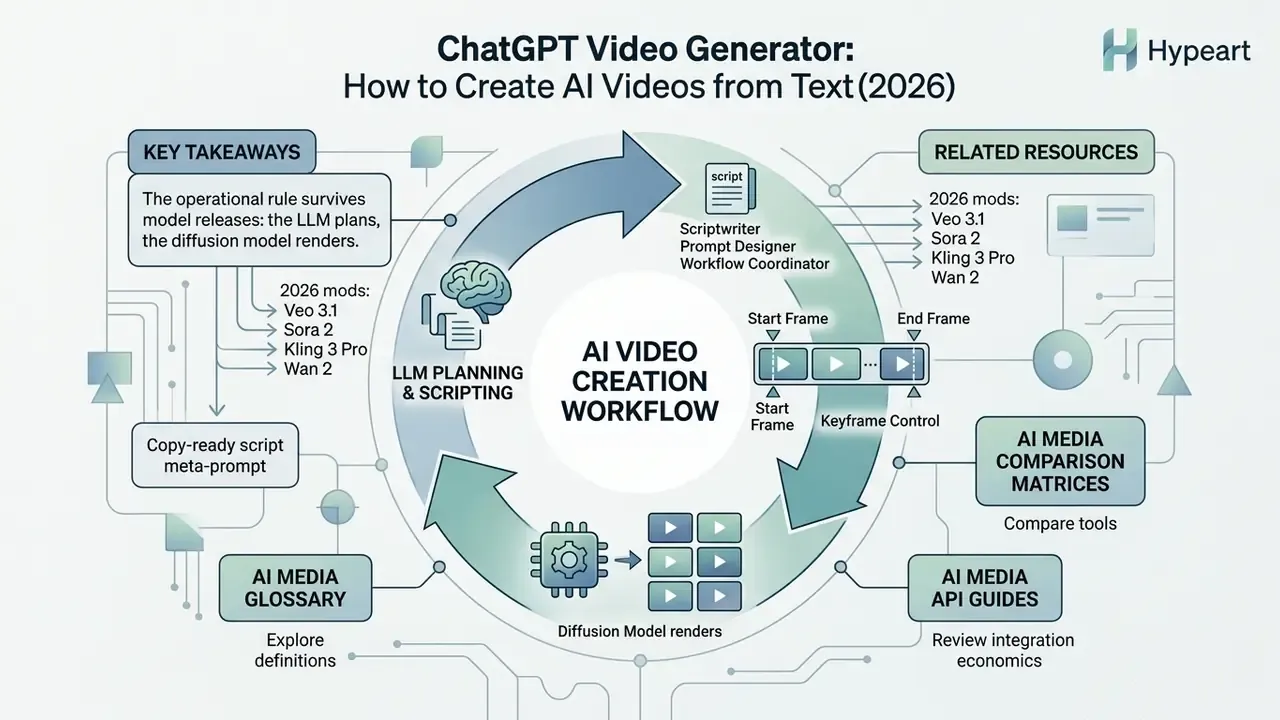
ChatGPT works best here as scriptwriter, prompt designer, and workflow coordinator. Pair its text reasoning with specialized video diffusion models and text ideas become publishable assets, with human oversight, licensing discipline, and creative control still in place.
«OpenVid-1M contains over 1M video clips at 512×512 and above, including a 433K HD subset; training on such data measurably improves quality and text-video alignment.»
The operational rule survives every model release: the LLM plans, the diffusion model renders, and a named human signs off. Teams that formalize that separation, with copy-ready meta-prompts, keyframe control, seed locking, prompt scrubbing, and archived audit trails, ship faster than teams chasing whichever generator trended last quarter.