Executive Summary
- An AI mashup maker separates stems (vocals, drums, bass, melodic instruments) from two or more recordings, aligns BPM and key, then renders one blended composite track in roughly 15 to 60 seconds of cloud processing.
- A mashup merges two or more recordings; a remix reworks a single recording; a DJ mix sequences full tracks with crossfades. The U.S. Copyright Office draws the same source-count distinction.
- Professional-grade tools expose Camelot Wheel key notation (1A to 12B), target BPM, volume balance, and vocal start time (sec). Those four settings decide whether a mashup sounds intentional or accidental.
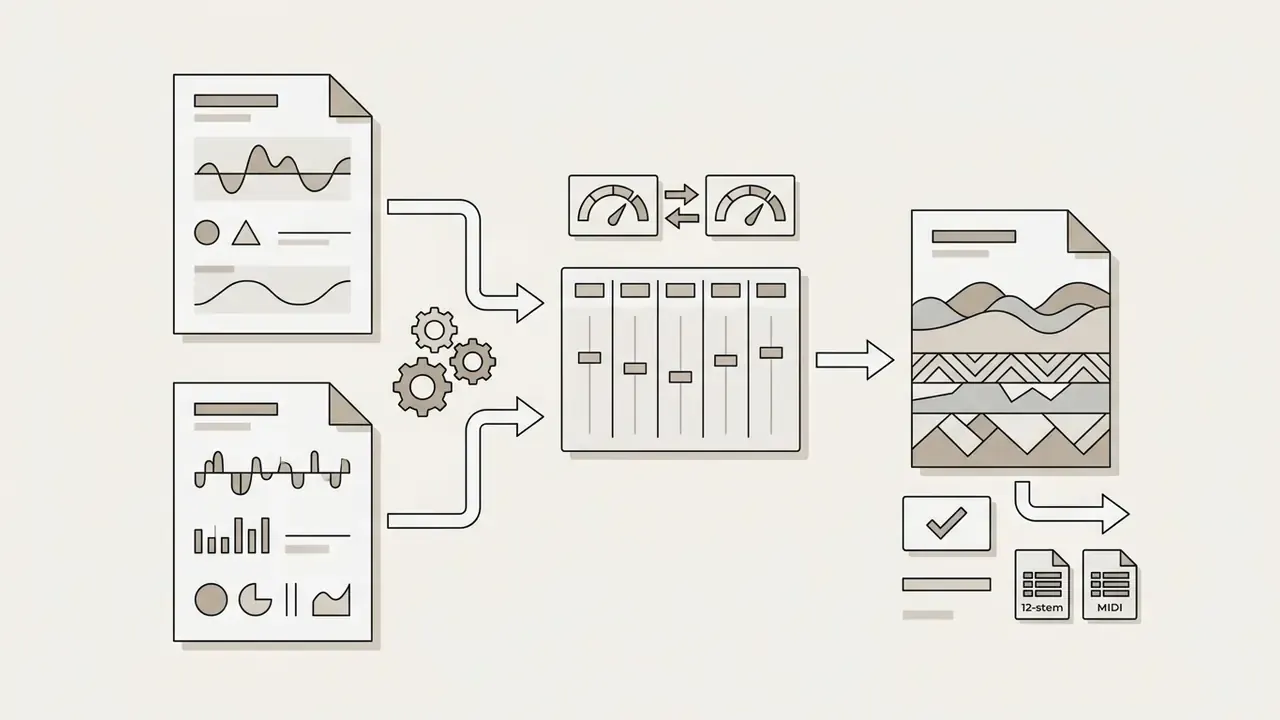
- Advanced engines now go beyond 2- and 4-stem splits to up to 12 isolated stems, audio-to-MIDI conversion, and AI Lyrics Swap for rewriting a vocal segment.
- No source files? Prompt-to-Mashup and image-to-music modes synthesize hybrid tracks from a text description such as "90s synthpop vocals over aggressive trap drums, 130 BPM."
- Free tiers usually cap generations (3 to 25 per month, or around 50 credits per day), watermark output, and forbid commercial use. Paid tiers, typically $9.99 to $30 per month or credit packs, unlock WAV export, stems, and commercial licences.
- AI processing does not clear copyright. YouTube Content ID excludes mashups from reference eligibility, SoundCloud treats them as derivative works, and TikTok requires full rights for custom audio.
How to read this guide. Creators who just want the workflow can start at section 2 and stop after section 4. Anyone deciding whether a browser tool is safe to approve inside a bank, label, or agency should read section 5 first, then the copyright rules in section 7, because those two sections carry the decisions that are expensive to reverse. Section 9 lists the artifacts nobody puts on a landing page.
1. What an AI Mashup Maker Is and How a Mashup Differs from a Remix
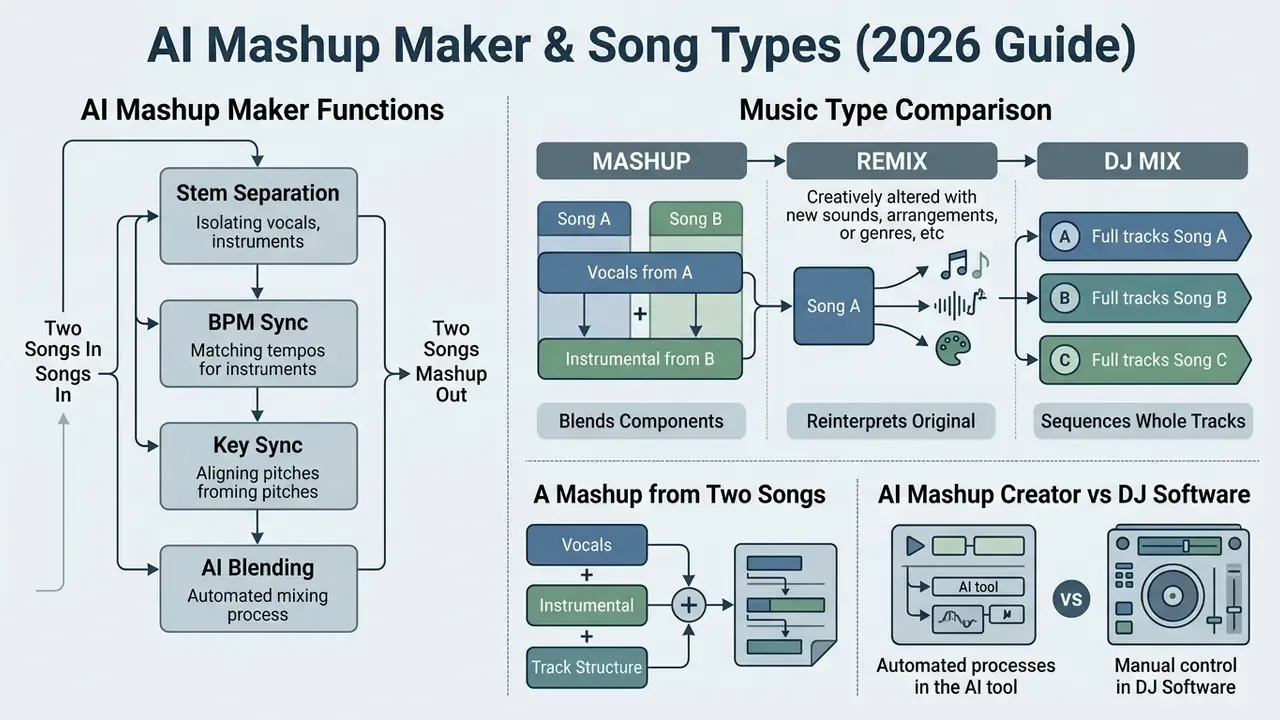
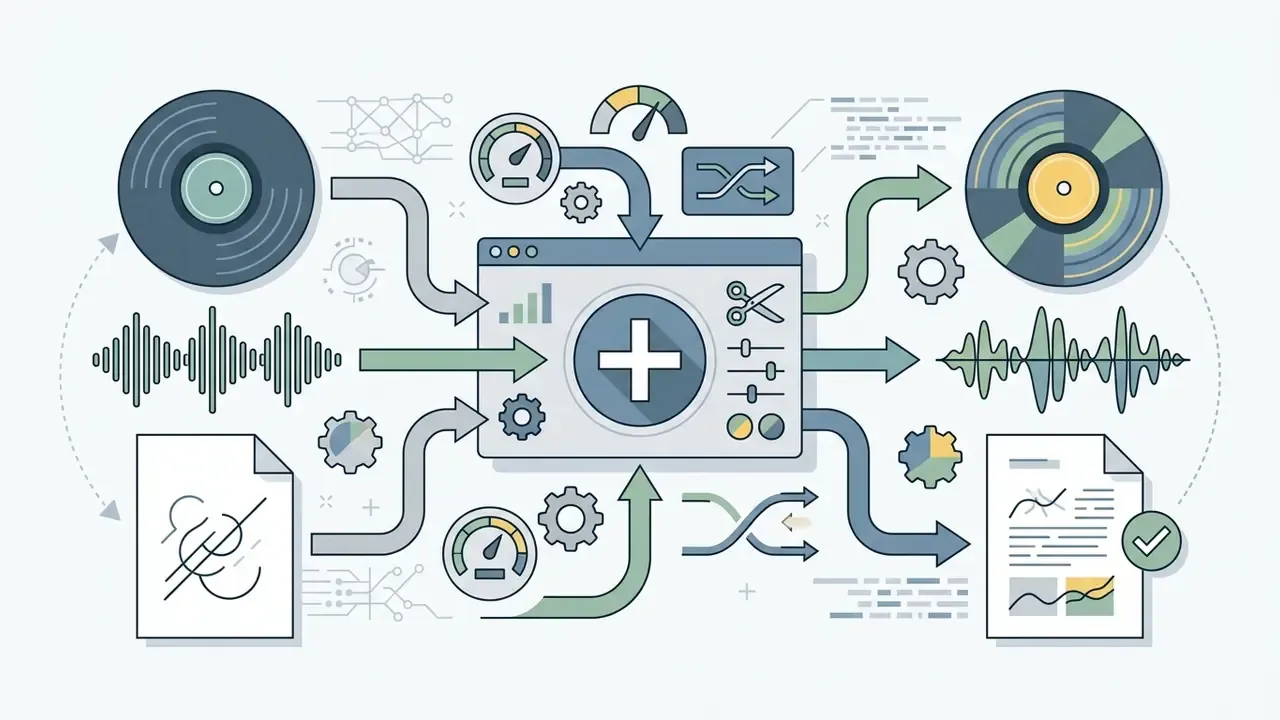
An AI mashup maker is an automated software system that extracts, synchronizes, and blends core musical components, such as vocal lines and instrumental beds, from two or more original recordings to form a unified composition. Unlike a basic audio joiner, an AI mashup creator applies neural source separation and signal processing to align tempo, transpose keys, and balance audio frequencies on its own.
"A mashup is a work that combines elements of two or more recordings into a new coherent composition through stem separation, analysis, and compatibility scoring."
To judge where this technology fits into digital media production, separate three things that people constantly conflate:
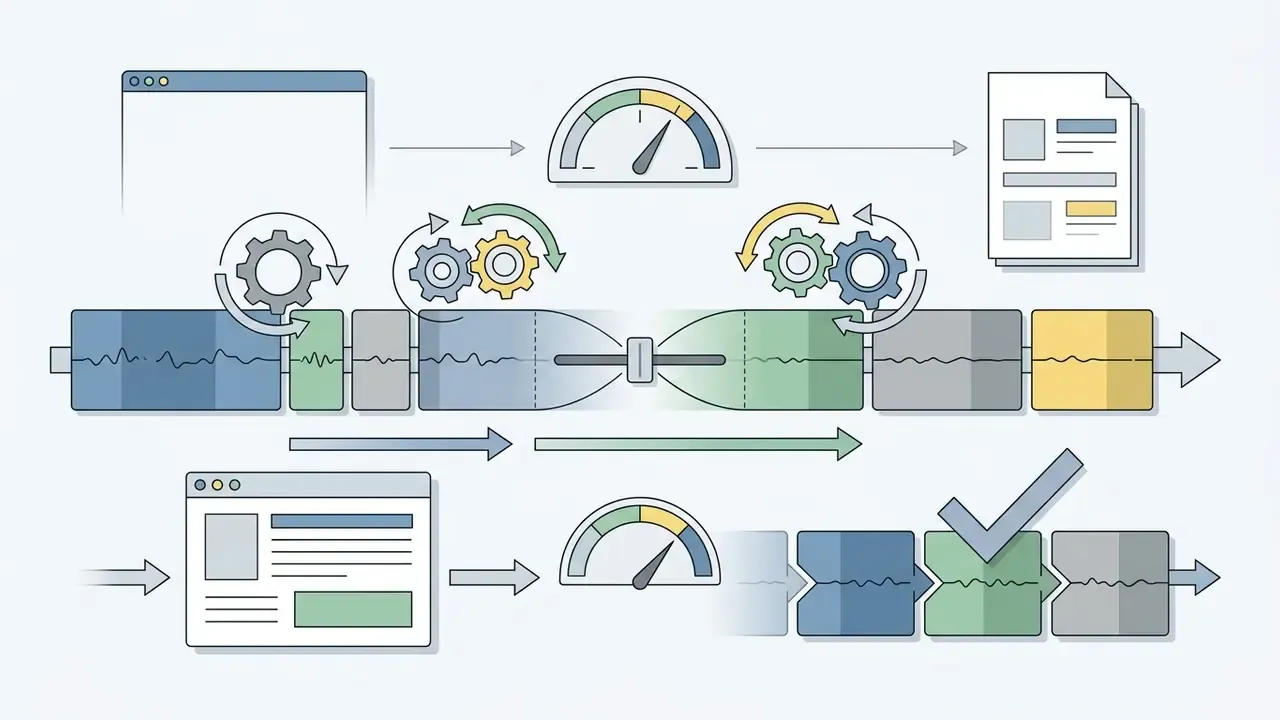
According to registration guidance from the U.S. Copyright Office, a remix consists of "adding, changing, or removing sounds" from one existing recording, whereas a mashup combines two or more samples from distinct sound recordings into one new work, a derivative compilation (U.S. Copyright Office, Copyright Registration Guidance: Works Containing Material Generated by Artificial Intelligence, 2023, reaffirmed in Copyright and Artificial Intelligence, Part 2: Copyrightability, 2025. https://www.copyright.gov/ai/). If you need pre-cleared assets or a plain-language read on licensing rules, the AI Media Commercial-Use Hub sets out the frameworks.
Comparison: mashup vs remix vs DJ mix
| Feature | Mashup | Remix | DJ mix |
|---|---|---|---|
| Source inputs | 2 or more songs | 1 original song | Multiple full tracks |
| Primary processing | Stem fusion and key sync | Structural re-arrangement | Crossfading and transitions |
| Vocal role | Isolated stem overlay | Re-processed or chopped | Played in full sequence |
| Output format | Single composite song | Alternative version | Continuous audio set |
| Typical AI feature | Stem split plus key match | Style transfer, stems | Auto beat-grid and ordering |
The practical takeaway from that table: only the mashup column forces you to clear two sets of rights at once. That single fact shapes most of the compliance work later in this guide.
1.1 A Mashup from Two Songs: Vocals, Instrumental, and Track Structure
Creating a song mashup from two tracks means isolating the vocal stem of the primary song and seating it on the instrumental bed of the secondary song. Deep learning models such as Demucs, Spleeter, or Banquet decompose complex stereo files into distinct layers: lead vocals, drums, bass, and the remaining harmonic instruments. Spleeter, for example, splits a track into 2 stems (vocals and accompaniment) or 4 to 5 stems, which is the standard input preparation step for any mashup pipeline (Spleeter: a fast and efficient music source separation tool, Journal of Open Source Software, 2020. https://joss.theoj.org/papers/10.21105/joss.02154).
Research on automatic mashup generation shows that pairing order matters as much as the audio quality of the sources:
"Perceived mashup coherence depends substantially on which track supplies the vocal line and which supplies the accompaniment."
1.2 AI Mashup Creator vs DJ Software: What Is Different
An AI mashup creator runs mostly through browser-based automated pipelines built for speed. You upload audio files, and the system executes stem separation, time-stretching, pitch shifting, and loudness normalization without any local install or specialized hardware.
Professional DJ software and digital audio workstations, such as Ableton Live, rekordbox, or Serato DJ Pro, offer the opposite trade: deep manual control. Experienced DJs adjust timeline alignment by hand, draw custom EQ curves, manage clip markers, and drive hardware controllers. The rekordbox documentation covers browser, deck, mixer, effects, export, and performance modes plus cloud library sync, while Ableton Live 12's Browser exposes instruments, effects, samples, presets, and Packs. Ableton's own Learning Music environment, by contrast, runs entirely in a browser and requires no prior experience or equipment. Browser-based AI mashup generators apply the same low-barrier logic to blending finished tracks for beginners, podcasters, and casual creators.
"A compact band-split U-Net architecture achieves competitive four-stem separation quality at substantially reduced computational cost."
That efficiency research explains why browser tools can now deliver near-DAW separation quality. The heavy lifting runs on cost-efficient cloud inference instead of a local GPU, which is also why a monthly subscription can undercut the price of the graphics card you would otherwise need.
2. How to Create a Mashup with AI Online
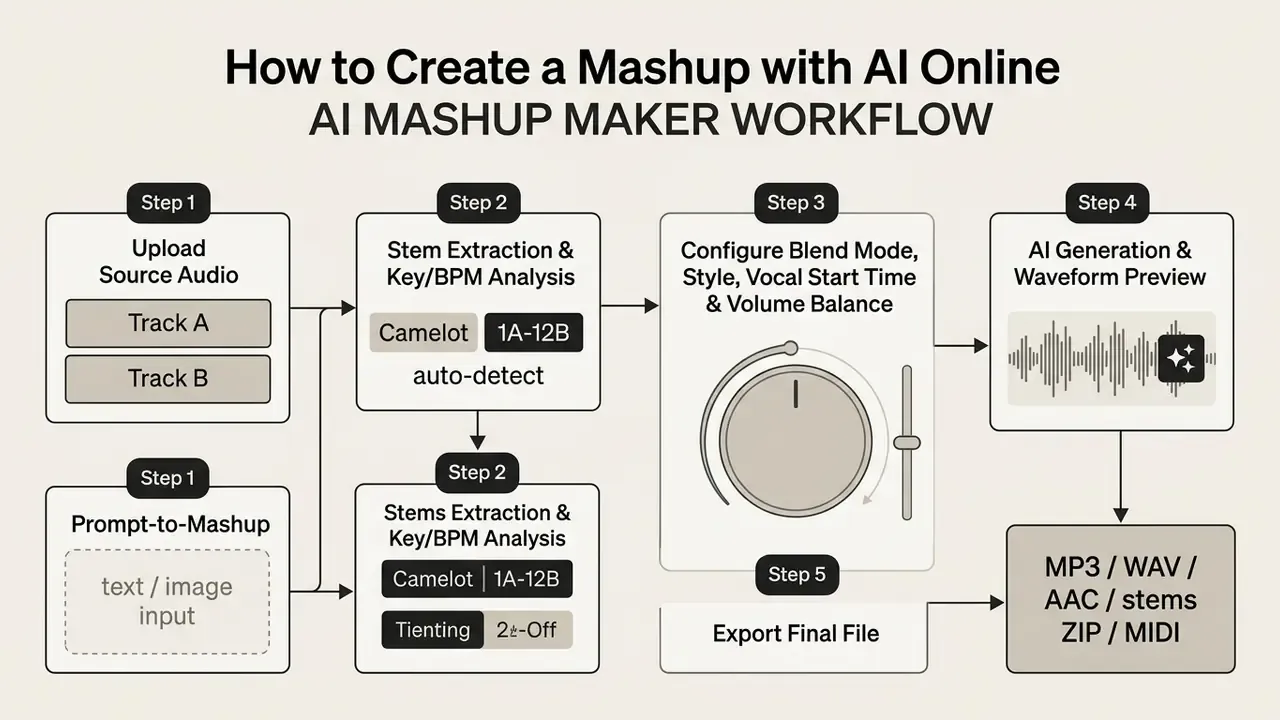
Creating an AI mashup online follows a standard five-step sequence, from file ingestion to final export. Web-based platforms push heavy signal processing onto cloud servers, so high-quality audio blending happens inside an ordinary browser tab. If you work mainly on a phone, a free video editing app will help you manage visual and audio layers together; for desktop comparisons, see our overview of YouTube video editing workflows.
2.1 Upload Two Songs or Select Tracks from a Library
"Banquet, at 24.9 million parameters, approaches Hybrid Transformer Demucs on vocals, drums and bass, and surpasses it on guitar and piano."
That benchmark works as a practical quality reference. If a platform names its separation backend, you can estimate how cleanly guitar-heavy or piano-heavy material will split before you commit to a subscription.
2.2 Configure Style, Blend Depth, and Timing Before Generation
Before you hit generate, set the parameters that define how the two tracks interact: vocal dominance, pitch-shifting boundaries, and crossfade curve.
Professional-grade interfaces expose four decisive parameter groups:
- Tempo (speed)
Auto,Follow Vocal,Follow Instrumental, orCustomwith a target BPM field. "Follow Vocal" preserves the timing feel of the acapella; "Follow Instrumental" preserves the groove of the beat. - Key (pitch)
Auto,Follow Vocal,Follow Instrumental, orCustom, with a Camelot-notation selector (Auto Detect,1A,1B,2Athrough12A,12B). - Volume balance a single vocal-to-instrumental fader, for example
Vocal < 1.00 > Instrumental, controlling how dominant the acapella feels in the final mix. - Vocal start time (sec)
AutoorCustom. Offsetting the vocal entry by even 0.2 to 1.5 seconds is often the difference between a phrase that lands on the downbeat and one that drifts. This is the control beginners overlook most.
Those settings tell the neural engine whether you want a subtle vocal overlay or an aggressive cross-genre style fusion. Export quality is usually a fifth setting (Normal, High Quality, Pro). Creators preparing promotional video assets can pair a custom audio blend with a free template video, or review our guide to animation makers to speed up social publishing.
2.3 Prompt-to-Mashup: Generating Without Source Files
No two cleared MP3 or WAV files on hand? Prompt-based generation replaces the upload step entirely. Instead of supplying recordings, you describe the hybrid you want and the model synthesizes an original mashup-style arrangement from scratch. Three input modes are now common:
Because prompt-generated audio contains no third-party masters, it sidesteps the sample-clearance problem completely. The copyrightability of the output itself is a separate question, covered in the copyright section further down. Teams building fully synthetic pipelines may also want to compare free AI video generators for the visual half of the project.
- Prompt to music
- describe the fusion directly, for example "90s synthpop vocals over aggressive trap drums, 130 BPM" or "create a mashup-style upbeat electronic track at 128 BPM". Generation usually completes in 15 to 60 seconds.
- Lyrics to music
- paste your own lyrics, choose a style, and let the system compose the vocal and backing for mashup intros or vocal blends.
- Image to music
- upload a reference image, describe the mood, and receive music matched to the visual vibe. Handy for themed reels and mood beds.
2.4 Generate, Listen, and Download the Finished AI Song Mashup
Once the parameters are set, the generation button starts cloud rendering. The system aligns beat grids, applies pitch adjustments, balances output gain, and draws a preview waveform.
Audition that preview in the browser player and check two things only: rhythm alignment and harmonic fit. If the blend direction feels wrong, regenerate with the vocal and instrumental roles flipped instead of fighting the mix with faders. When it sits right, download the composite track as MP3, AAC, or uncompressed WAV, and on advanced platforms as a stems ZIP archive or a MIDI file. One habit worth forming early: save the project with its parameter values, because you will want to reproduce that exact blend later.
3. How an AI Mashup Generator Synchronizes Music
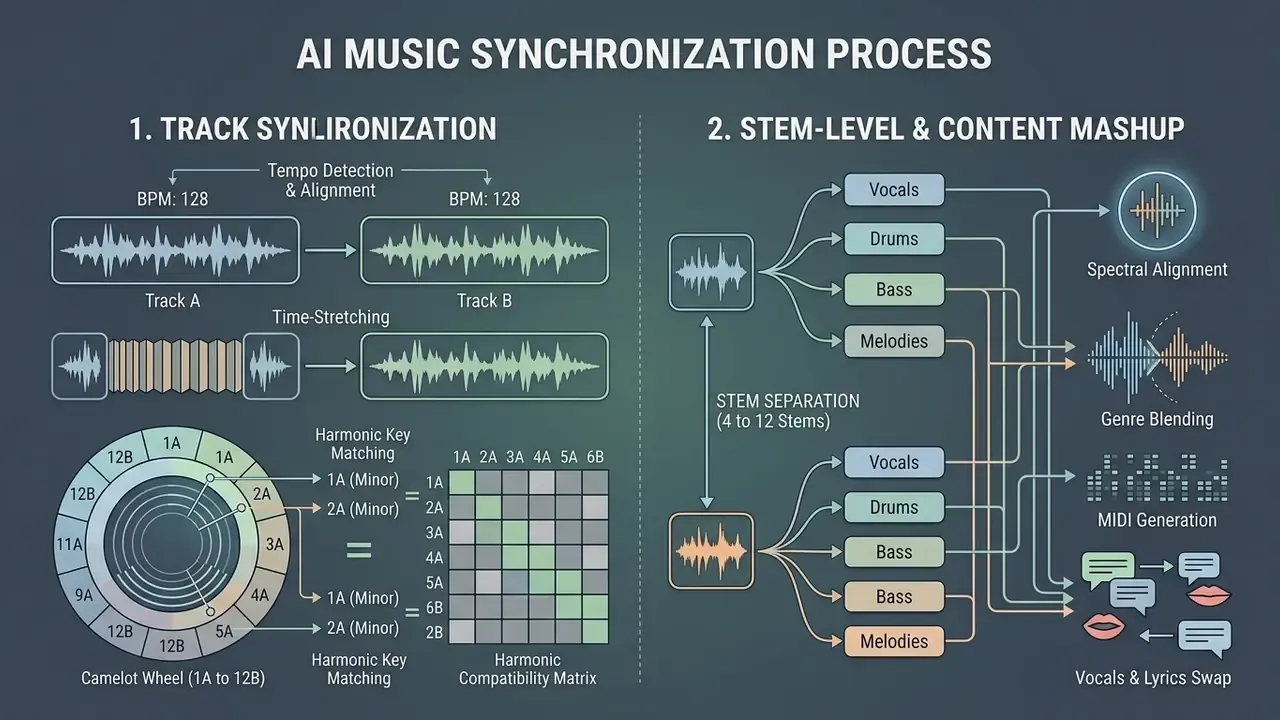
An AI DJ mashup generator synchronizes disparate tracks by combining automated tempo detection, time-stretching, key matching, and stem-level spectral alignment. Without that layer, two songs with different rhythms or keys collapse into dissonant, off-beat noise.
3.1 Tempo, Key, the Camelot Wheel, and Transitions Between Two Tracks
To align two tracks rhythmically, the engine calculates beats per minute and detects downbeat positions across both files. It then applies time-stretching, typically rubber-band phase vocoders, to scale the secondary track's tempo to the primary one without shifting vocal pitch. Published systems such as AutoMashUpper compute "mashability" from beat-synchronous chromagrams across allowable key shifts and tempi, then use downbeat-synchronous semitone spectrograms to find phrase boundaries before any stretching or shifting happens.
For harmonic alignment, the system identifies the key signature (A minor against C major, say) and calculates the transposition needed. Staying inside ±1 to ±3 semitones keeps vocal timbre natural and prevents harmonic clashing during crossfades and chorus transitions.
Camelot Wheel notation (1A to 12B). Professional AI mashup tools rarely expose raw semitone offsets alone; they expose harmonic-mixing notation. Each key maps to a number (1 to 12) and a letter (A for minor, B for major). If the vocal sits at 8A (A minor) and the instrumental at 8B (C major) or 9A (E minor), the engine blends them with zero transposition. When the detected keys sit further apart on the wheel, the system either transposes the weaker element or asks you to nominate a dominant track (Follow Vocal or Follow Instrumental).
Harmonic compatibility matrix (Camelot Wheel logic)
| Relationship | Example (vocal = 8A) | Result and required action |
|---|---|---|
| Same key | 8A + 8A | Perfect blend, 0 semitone shift |
| Relative major/minor | 8A + 8B | Perfect blend, 0 semitone shift |
| +1 on the wheel | 8A + 9A | Smooth energy lift, 0 shift |
| -1 on the wheel | 8A + 7A | Smooth energy drop, 0 shift |
| +2 or -2 on the wheel | 8A + 10A / 6A | Usable; transpose 1 semitone if harsh |
| +3 or more | 8A + 11A | Transpose 2 to 3 semitones or reject the pair |
| Opposite side of wheel | 8A + 2A | Not recommended; audible dissonance |
Tempo ratio guide (Source B mapped onto Source A)
| Ratio (B / A) | Example | Expected artifact level |
|---|---|---|
| 0.95 to 1.05 | 128 BPM to 124 BPM | Transparent, no audible stretching |
| 0.90 to 1.10 | 140 BPM to 128 BPM | Minor transient softening on drums |
| 0.80 to 1.20 | 150 BPM to 128 BPM | Upper limit used in published research |
| Below 0.80 or above 1.20 | 175 BPM to 128 BPM | Use half-time or double-time mapping instead |
The half-time and double-time trick matters in practice. A 174 BPM drum-and-bass instrumental and an 87 BPM hip-hop acapella sit at a ratio of 2.0, mathematically outside the safe window yet perceptually a perfect match, because the vocal simply occupies every second bar. Numbers can mislead; ears settle it.
Quantitative work on audiovisual and rhythmic alignment shows how far automated tempo matching has come:
"The model achieved a mean audiovisual synchronization score of 7.05 (SD = 2.52), with rhythmic stability comparable to leading text-to-music systems."
Crossfade behaviour is the last layer. Documented DJ-software implementations combine BPM detection, tempo alignment, beat alignment, and an equal-power fade curve, with "tempo blend" keeping both decks in sync as the crossfader travels. AI mashup engines automate exactly that logic, invisibly.
3.2 Vocals, Stems, Genre Blending, MIDI, and Lyrics Swap
Combining opposite genres, an acapella hip-hop vocal over an electronic or rock track, depends entirely on clean stem isolation. Multi-stem neural models split vocal, drum, bass, and melodic components into separate audio channels.
"MSDM learns the joint distribution of the sources of a single song, enabling both stem separation and stem generation within one architecture."
From 4 stems to 12 stems. Standard splitters return 2 stems (vocals and accompaniment) or 4 stems (vocals, drums, bass, other). Advanced engines now perform hierarchical decomposition into as many as 12 isolated tracks, including lead guitar, keys, backing vocals, and individual percussion elements. That gives you far finer control over which layer of Song B survives under the vocal of Song A.
"An ensemble separation approach enables hierarchical extraction of sub-stems, kick, snare, lead vocals and background vocals, for finer mixing control."
Audio-to-MIDI export. Once a stem is isolated, some platforms convert it into MIDI notes, usually with a selectable pitch range such as C2 to B5, which you then edit and re-voice inside Ableton Live, FL Studio, or Logic Pro. This is where a mashup draft becomes a real arrangement: swap a muddy sampled bassline for a clean synth playing the same transcribed notes, or rebuild a piano riff at a different tempo with no stretching artifacts at all.
AI Lyrics Swap. A newer customization layer rewrites the words of an isolated vocal stem. You select a segment, commonly up to 60 seconds, type the replacement lyrics, optionally choose a remix style, and the model regenerates the vocal performance while preserving the original key, timbre, and rhythmic phrasing. Most systems return two alternatives and let you merge the preferred take back into the timeline. Useful for clean radio edits, brand-safe versions of a hook, or localized lyrics for regional campaigns.
Practical fix for phase interference on drum stems. When a mashup sounds thin, or the kick simply vanishes, the cause is usually phase cancellation between two overlapping low-frequency sources. Four steps clear up most cases:
Advanced platforms handle audio assets through API integrations across cloud environments. Developers building automated media products can reference our api implementation notes and the Google Veo implementation guide for backend media processing, cost modelling, and stem management workflows.
4. AI Music Mashup Maker Capabilities: Formats, Modes, and Export
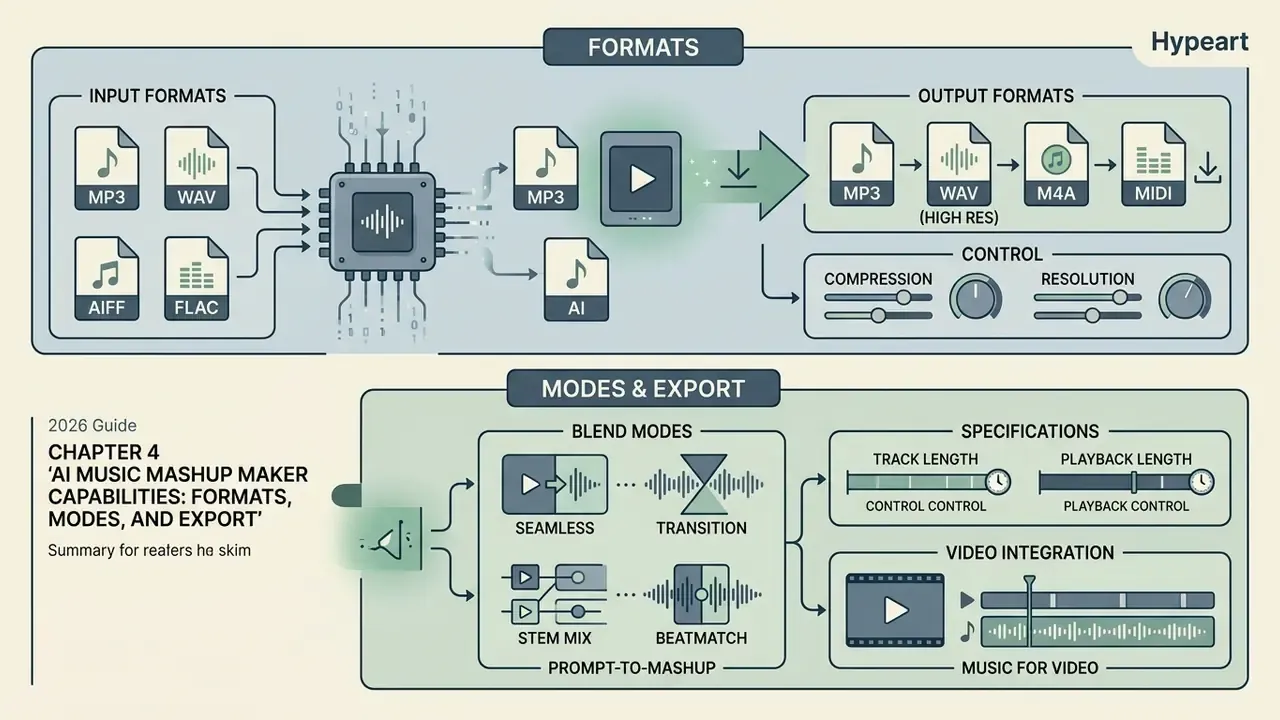
An AI music mashup maker gives you specific control over compression, audio resolution, and playback length. Which export settings make sense depends on whether the output feeds casual listening, a live DJ set, or commercial video production. Teams producing video alongside audio can also review our guides to AI voice generators and video compressors to keep deliverables inside platform limits.
4.1 Which Audio Formats You Can Upload and Download
Online mashup tools support a spread of compressed and uncompressed containers:
- Input formats: MP3, WAV, FLAC, M4A, AAC, OGG, and WMA. Some platforms also accept video containers such as MP4, MOV, AVI, and MKV, extracting the audio automatically.
- Output formats: 320 kbps MP3 for lightweight distribution, AAC for browser playback, or 24-bit / 44.1 kHz WAV for loss-free editing.
Format choice follows established archival logic. WAV-PCM is uncompressed and lossless, FLAC is losslessly compressed, and MP3 is lossy. U.S. National Archives guidance specifies 128 kbps for mono and 256 kbps for stereo MP3, and recommends 24-bit samples at 44.1 kHz or higher for preservation-grade capture (NARA, Digitizing Sound Recordings format guidance; Library of Congress Sustainability of Digital Formats. https://www.loc.gov/preservation/digital/formats/). Short version: master and archive in WAV or FLAC, distribute in MP3 or AAC.
When you are weighing subscription options or tier limits across media tools, compare pricing tiers to check feature sets and export qualities side by side.
4.2 Blend Modes, Track Length, and Music for Video
Advanced platforms offer specialized blend modes that adjust track length and structural timing. Target-duration controls let you trim or extend a mashup arrangement to match a specific video scene or a social media slot. Adobe Audition's Remix function works on the same principle: it analyzes a clip and stretches the arrangement to a target duration equal to the length of the accompanying video.
Two mode families dominate current interfaces. Mashup mode layers the vocal of one track over the beat of another, like a live DJ blend. Transition mode sequences the two sources with a harmonically matched crossfade instead of stacking them. Documented duration handling runs from 10-second clips up to 6 to 8 minutes, with fixed-duration or Auto options plus loop generation for background beds.
Creators assembling video content often pair audio mashups with visual editing work, using a free video background remover for green-screen shots, printing event artwork with a free sign maker for a launch party, or working through a free video editing course to lift overall production quality.
AI mashup maker specifications and capabilities
| Feature category | Capability details |
|---|---|
| Supported inputs | MP3, WAV, FLAC, M4A, AAC, OGG, WMA (typically 20 to 100 MB per track) |
| Output options | MP3 (128 to 320 kbps), WAV (16-bit or 24-bit PCM), AAC, stems ZIP, MIDI |
| Processing engine | 2 to 12 stem separation, audio-to-MIDI export, BPM and Camelot key sync |
| Key notation | Auto-detect or manual 1A to 12B Camelot selection; ±1 to ±3 semitones |
| Timing controls | Target BPM, Follow Vocal / Follow Instrumental, vocal start time (sec) |
| Duration controls | Auto-trimming, target-duration matching (10 s to 8 min), loop generation |
| Vocal editing | AI Lyrics Swap on segments up to roughly 60 s, volume balance fader |
| Browser support | WebGL and Web Audio API compatible (Chrome, Safari, Edge, Firefox) |
One caveat on that table: vendors publish these numbers, we did not measure all of them. Treat the ranges as a shopping checklist, not a specification sheet.
5. Data Privacy, Retention, and Shadow AI Governance
This section addresses organizational risk. Individual hobbyists can skip ahead to the free versus paid comparison.
Uploading an unreleased master, a licensed stem pack, or a client's voiceover into a free browser tool is a data-transfer event, not just an editing action. Because mashup processing happens on vendor infrastructure, three questions decide whether the workflow is safe to approve inside an organization:
- Retention.How long are source files and generated outputs stored? Documented practice varies widely. One major music-generation API states that generated files are deleted after 15 days, while plenty of consumer tools publish no retention window at all. Default to "assume retained" until the vendor says otherwise in writing.
- Training opt-out.Does the provider use uploaded audio to train or fine-tune models? Look for an explicit opt-out toggle or a contractual "no training on customer content" clause, not a marketing claim on a pricing page.
- Transport and storage security.Confirm TLS in transit, encryption at rest, tenant isolation, and whether processing regions can be pinned for GDPR or local data-residency requirements.
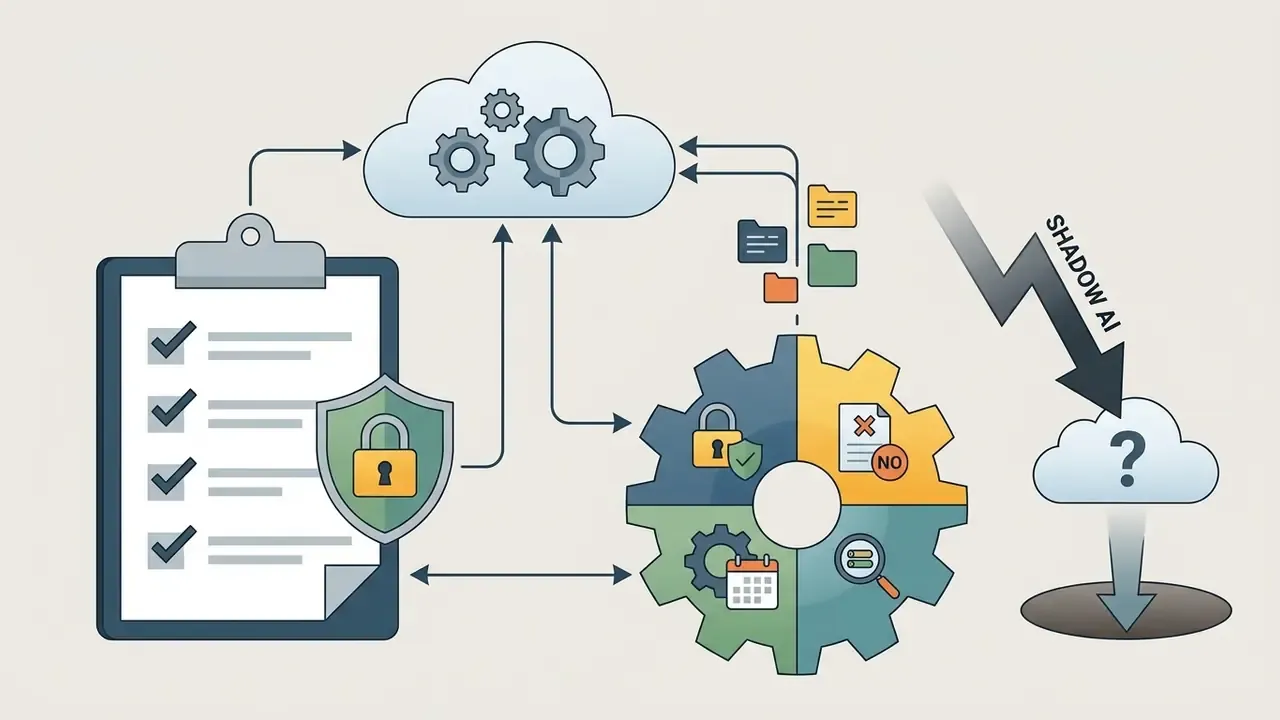
Unmanaged use, a producer or marketer quietly pasting masters into whichever free tool ranks first, is the classic Shadow AI pattern: no contract, no retention control, no audit trail, and no way to reproduce how a delivered asset was made. The mitigation is procedural rather than technical. Publish an approved-tool list, require account logins tied to corporate SSO, and keep a project-level record of which source files entered which tool. Boring controls. They hold up in a dispute.
Vendor validation checklist (model-risk view)
| # | Control to verify | Acceptance evidence |
|---|---|---|
| 1 | Data retention window published | Written policy with a stated deletion period |
| 2 | Opt-out from model training | Contract clause or account-level setting |
| 3 | Encryption in transit and at rest | Security page, SOC 2 or ISO 27001 report |
| 4 | Processing region control | Region selector or DPA with residency terms |
| 5 | Output licence scope (commercial use) | Terms naming commercial exploitation rights |
| 6 | Reproducibility and audit trail | Job IDs, parameter logs, version history |
| 7 | API documentation and rate limits | Public docs with quotas and error codes |
| 8 | Human-authorship record for registration | Saved project files showing your edit steps |
| 9 | Sub-processor list disclosed | Named cloud and inference providers in the DPA |
| 10 | Incident and breach notification SLA | Timeframe stated in the vendor agreement |
Item 8 is easy to underestimate. Because copyright registration depends on documented human contribution, keeping the project file, your parameter choices, and your edit history is both a governance control and a legal asset. If you cannot show what you decided, you cannot claim it.
6. Free AI Mashup Maker or Paid Tool: How to Choose
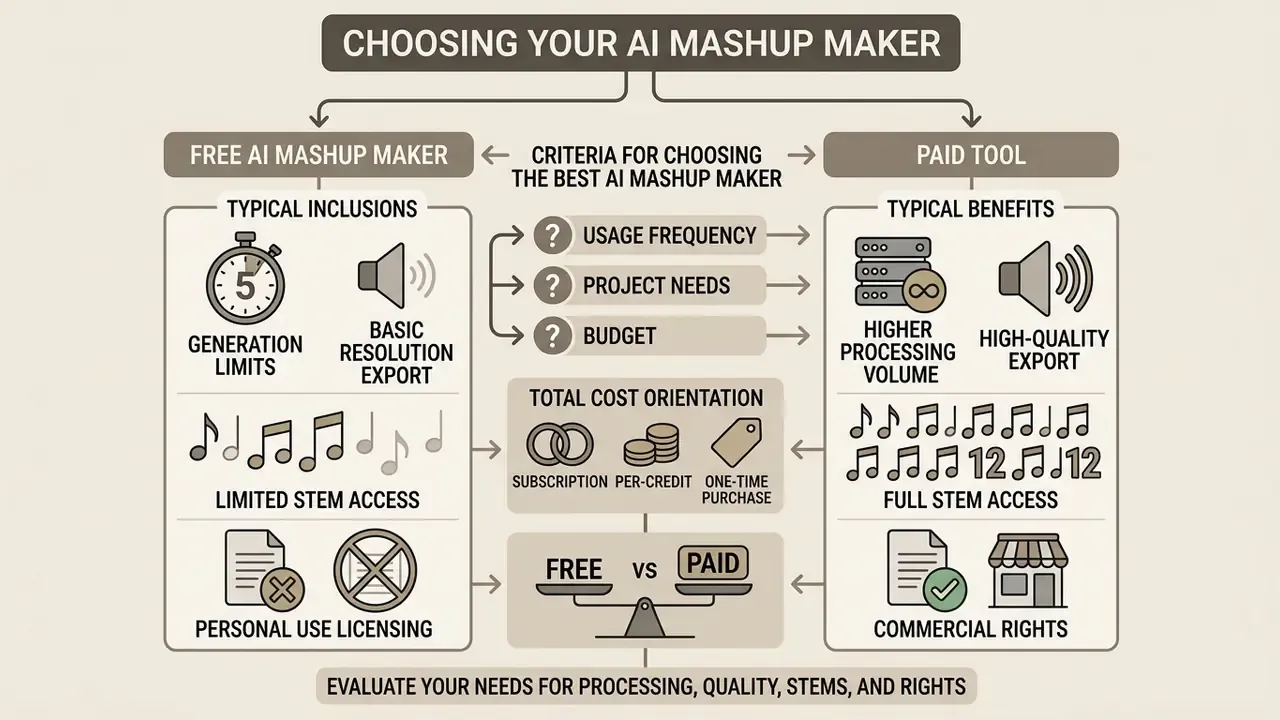
Choosing between a free AI mashup maker and a paid tier comes down to four variables: processing volume, export quality, stem access, and commercial rights. A free ai mashup generator online is ideal for experiments; premium plans exist for producers and agencies shipping on a deadline.
"One in three musicians already uses AI in the creative process, most notably in electronic, rap and advertising music."
6.1 What a Free AI Mashup Maker Typically Includes
A free ai music mashup generator usually provides basic 2-track blending with functional limits:
- Generation limitscapped at roughly 3 to 25 generations per month, or restricted by daily credit allowances (for example 50 credits per day, or 50 credits per mashup on credit-based platforms).
- Export resolutioncompressed MP3 or AAC playback, often with audio watermarks on free downloads. Watermarks usually disappear only at the paid download step.
- Stem accesslimited to full-mix output rather than downloadable isolated stems. MIDI export is almost always a paid feature.
- Licensingstrictly personal, non-commercial use.
Not every free tier is equally stingy. Some vendors run genuinely generous plans, and one stem-and-remix platform advertises unlimited stems, remixes, and high-quality MP3 downloads at no cost, while others treat free access purely as a trial funnel. Test at least two models, including any ai mashup maker app on mobile, before you standardize on one.
6.2 Criteria for Choosing the Best AI Mashup Maker
When picking the best AI mashup maker, weigh stem extraction purity, key alignment accuracy including Camelot auto-detect reliability, interface simplicity, mobile availability, and licensing terms. Peer-reviewed evaluation frameworks converge on four measurable criteria: recombination quality (stem compatibility), audio quality with artifact control, usability and learnability, and platform availability, with 4 and 5 point audio-quality ratings reserved for professional-grade output showing minor or no artifacts.
Cost modelling matters as much as features. Two pricing models dominate, and a third one appears once you automate.
Total cost orientation: pricing models in 2026
| Model | Typical price point | Best for |
|---|---|---|
| Flat subscription (Pro) | roughly $9.99 to $30 per month | Steady weekly output, teams |
| Credit or pay-as-you-go | around 50 credits per mashup | Sporadic or campaign-based use |
| API or developer metering | Per request, per second of audio | Automated pipelines, product builds |
| Free forever tier | $0, 3 to 25 generations per month | Evaluation, hobby projects |
Also weigh the macro backdrop, which increasingly shapes vendor licensing terms:
"Without author participation in AI revenues, roughly €950 million in author remuneration in Germany and France would be at risk by 2028."
Trialling several platforms lets you compare options before committing to a paid plan, and you can explore the support hub for technical help. To size a project budget before you subscribe, view the resource guide and estimate credits against your monthly output.
Comparison: free vs paid AI mashup makers
| Feature | Free tier | Paid Pro tier |
|---|---|---|
| Generation quota | 3 to 25 tracks per month, or credits | Unlimited or high credit allowance |
| Export formats | 128 to 192 kbps MP3 or AAC | Uncompressed WAV (24-bit) and 320k MP3 |
| Watermarking | Audio watermark or tag included | Clean, un-watermarked audio files |
| Stem extraction | Full mixed track export only | Up to 12 stems (ZIP) plus MIDI export |
| Advanced controls | Auto BPM and key only | Camelot 1A to 12B, vocal start time, EQ |
| Processing priority | Standard queue | Priority processing, collaboration |
| Commercial license | Personal, non-commercial only | Commercial monetization rights included |
7. Copyright, Credits, and Commercial Use of AI Mashups
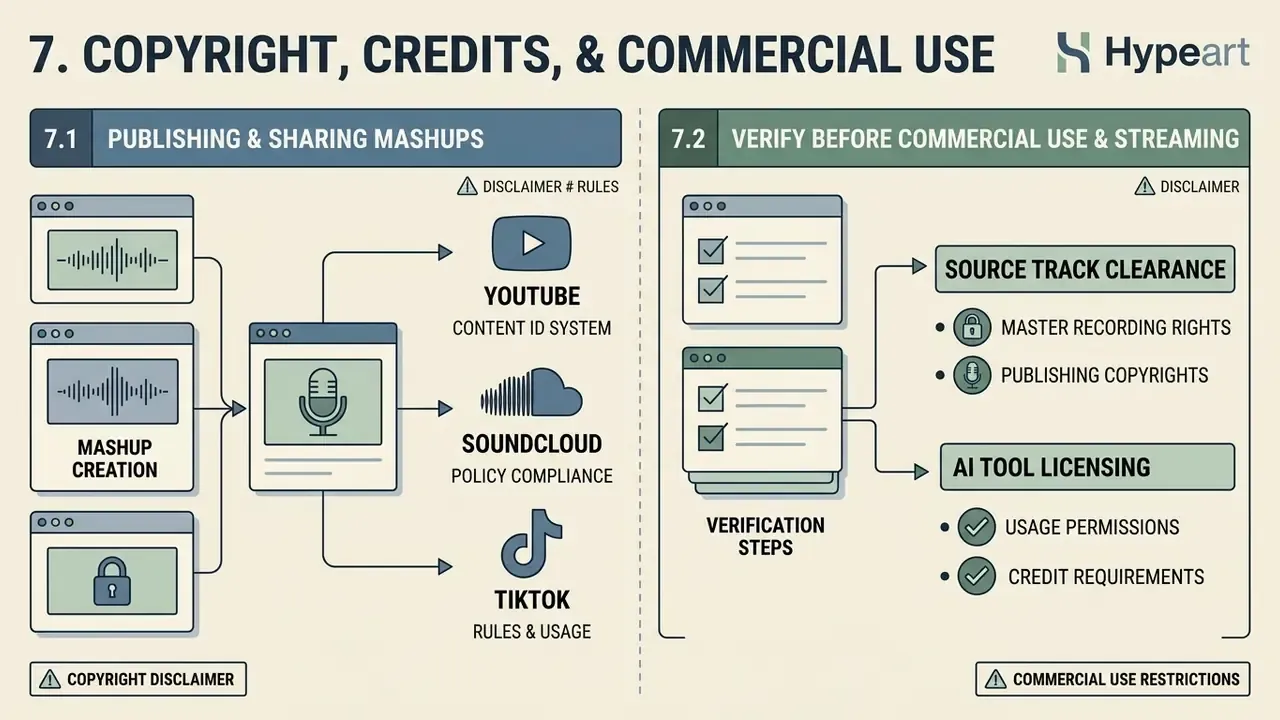
Publishing or monetizing an AI song mashup raises real copyright exposure. Using AI to blend two recordings does not erase or override the intellectual property rights of the original songwriters, performers, or labels. The tool is a processor, not a licence.
Registration practice adds a second layer. U.S. Copyright Office guidance requires applicants to claim only their own human contributions, exclude AI-generated material, and refrain from listing an AI system as author or co-author. Copyright in AI-assisted output exists only where a human determines sufficient expressive elements through creative selection, coordination, arrangement, or modification (U.S. Copyright Office, 2023 and 2025. https://www.copyright.gov/ai/). A 2025 European Parliament study on generative AI and copyright reaches a parallel conclusion: purely AI-generated output without meaningful human input is not eligible for protection in the EU. Japan's Cultural Affairs Agency guidance (2024) permits AI training as non-expressive information analysis, yet assesses the publication of outputs under ordinary infringement rules.
7.1 When You Can Publish and Share Mashup Songs
Distributing mashups songs on YouTube, SoundCloud, or TikTok requires clearance from the rights holders. Crediting the original artist in a description box, or tagging a video "non-commercial", does not legalise the use of copyrighted recordings. That myth costs creators channels every month.
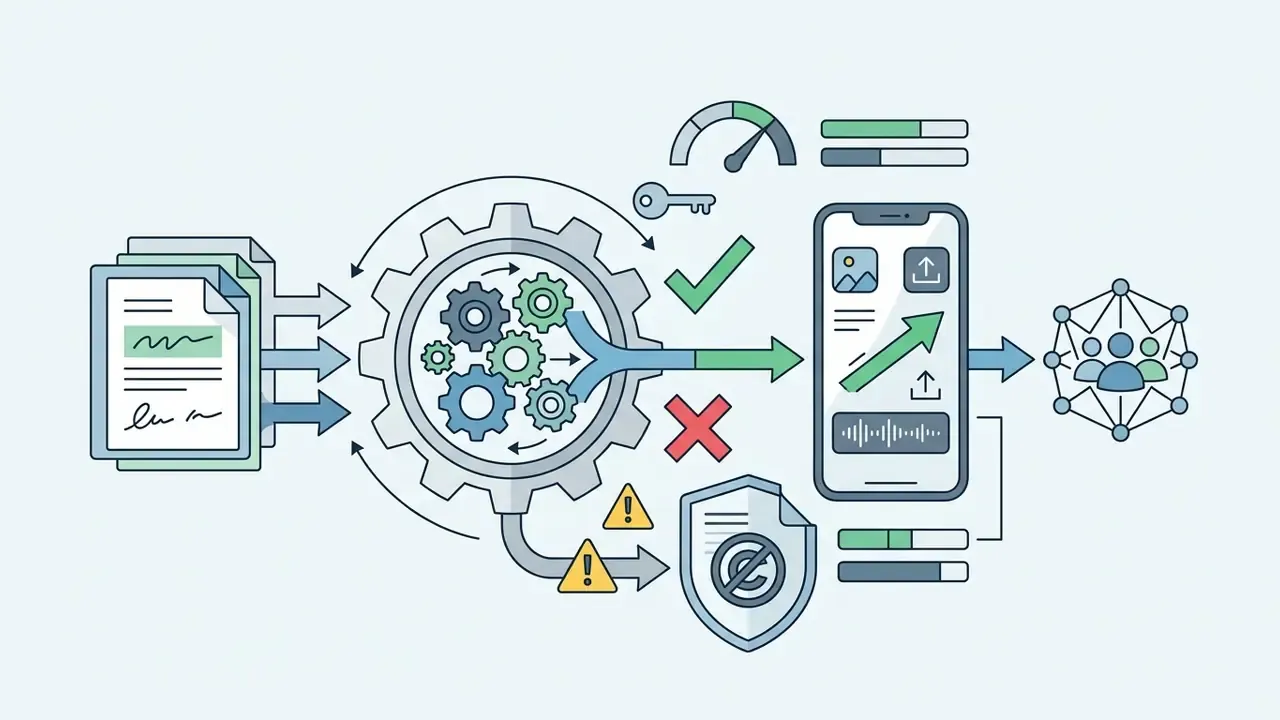
"AI-generated music can be protected only where there is substantial human contribution; fair-dealing exceptions do not extend to AI mashups."
Creators handling legal inquiries or takedown notices should view the guide to digital rights compliance before responding.
7.2 What to Verify Before Commercial Use and Streaming
Before an AI-generated mashup goes into advertising, a podcast, or a monetized stream, run a compliance audit:
- Source track clearance: verify that all underlying vocals, samples, and instrumentals are licensed under royalty-free terms or explicit written permission.
"Under 17 U.S.C. § 107 analysis, the de minimis sampling test asks whether an average audience would recognise the source; recognisable mashup fragments frequently fail it."
- AI tool licensingconfirm that the subscription terms grant commercial exploitation rights for generated output. Vendor terms vary sharply. Some grant a non-exclusive, perpetual, worldwide, royalty-free licence for commercial exploitation of new works while restricting stem files to the creation of new works rather than reproduction of the original arrangement. Several stem splitters permit commercial use only where the original track is your own composition or you hold explicit rights. Splitting a copyrighted master creates no new rights in the stems.
- Voice and publicity rightsmake sure synthetic or isolated vocals do not infringe state-level rights of publicity, such as protections against unauthorized artist voice cloning. Anyone working with synthetic vocals should read the licensing section of our guide to AI voice generators.
"Unauthorised reproduction of protected lyrics in AI output implicates § 106, while synthetic vocals may violate state publicity statutes such as Tennessee's ELVIS Act."
- Documentation: retain project files, parameter settings, and edit history. That is your evidence base for both a registration claim and a platform dispute.
8. Who an AI DJ Mashup Maker Is For
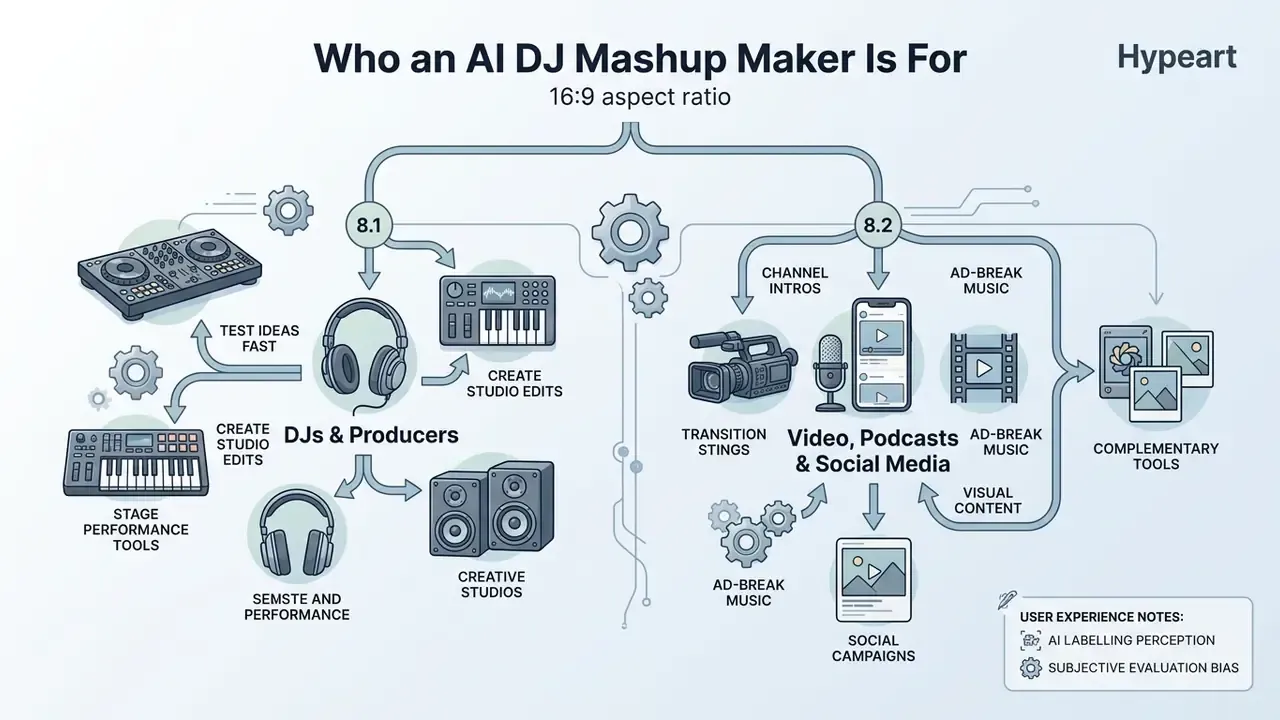
An AI DJ mashup maker serves a wide user base, from stage performers to visual content creators and social media marketers. The requirements differ more than the marketing suggests.
8.1 Mashups for DJs, Producers, and Creative Studios
Professional DJs and producers use an ai mashup generator in the studio to test live ideas fast. Platforms such as LALAL.AI and DJ.Studio let them isolate vocal acapellas, check key signatures, and build custom edits before playing them out. Documented studio workflows include importing tracks, ordering them automatically by BPM, key, and energy, editing transitions on a timeline, then exporting cue-based playlists to rekordbox or Serato. The duo DJs from Mars has publicly described using LALAL.AI for vocal extraction inside their production process.
For performers, that finding is a communication problem rather than a technical one. How you frame a set can affect its reception as much as how you mix it.
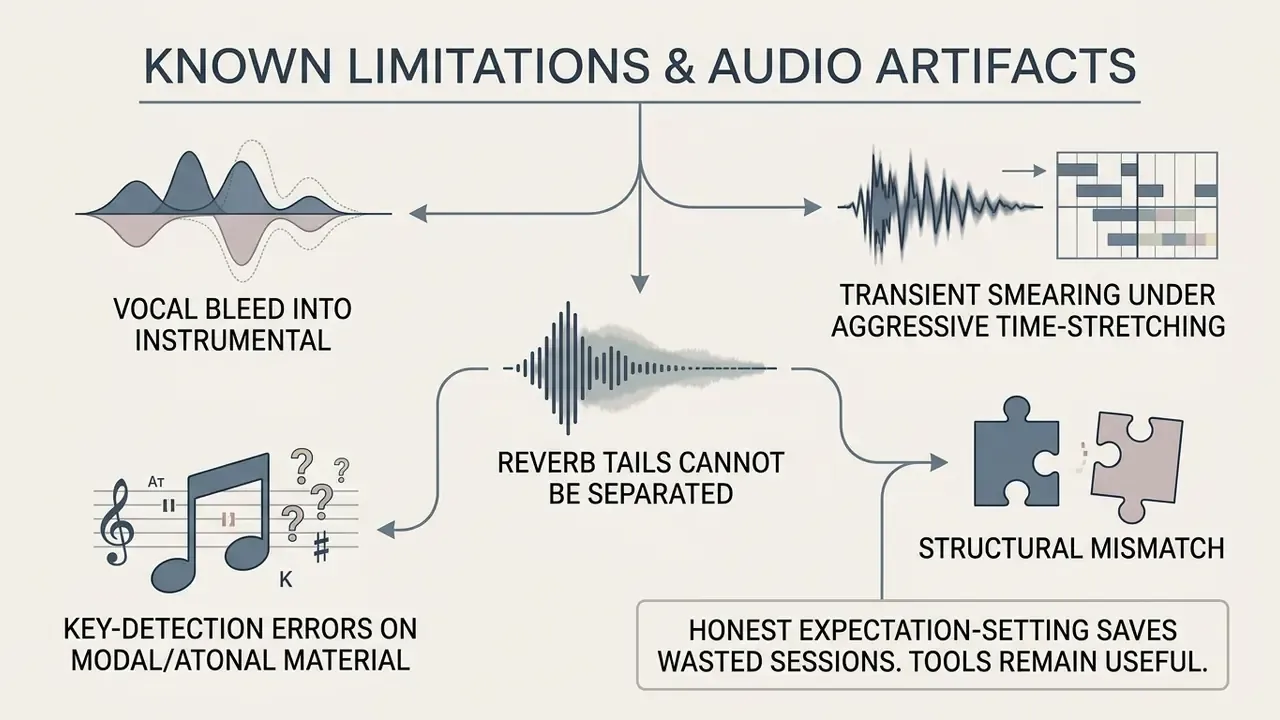
9. Known Limitations and Audio Artifacts
10. FAQ About AI Mashup Makers
Do I need prior DJ or music theory experience to use an AI mashup maker?
No. Automated platforms detect BPM, analyze key signatures, and handle time-stretching on their own, so beginners can generate synchronized tracks without formal musical training. Knowing Camelot notation helps you fix a bad blend faster, but it is not a prerequisite for a first result.
Are online AI mashup tools completely free to use?
Most offer a free tier with monthly generation limits, commonly 3 to 25 mashups, lower export bitrates, or audio watermarks. An ai mashup maker free online is fine for testing. Full high-fidelity WAV exports, stem downloads, and commercial licences typically need a paid subscription in the $9.99 to $30 per month range, or credit purchases where each mashup consumes a fixed credit amount.
How many audio files can I upload into an AI mashup maker?
Updated: most consumer web tools are built around a two-file workflow, Track A as vocal donor and Track B as beat donor, and at least one documented music-generation API requires exactly two audio URLs per mashup request. The concept itself is not limited to two sources, though. Academic mashup systems and timeline-based DJ tools accept additional stems and layers, so check the specific vendor's documented input limit.
How long does it take to process an AI song mashup online?
Updated: cloud rendering is generally fast, with vendor-reported generation times commonly under one minute for short tracks. In practice, expect roughly 15 to 60 seconds for a standard 2-track blend, with longer waits for full-length masters, 12-stem separation, or peak-time server load. These figures are vendor-reported, not independently benchmarked by us.
Can I export isolated vocal and instrumental stems separately?
Yes. Advanced paid plans let you download isolated stems (vocals, drums, bass, instruments, and on some platforms up to 12 sub-stems including kick, snare, and backing vocals) as individual WAV or MP3 files alongside the blended track, usually bundled in a ZIP archive.
Can I convert an AI mashup into a MIDI file for my DAW?
Yes, on platforms that include audio-to-MIDI conversion. You upload or select the isolated stem, choose a pitch range such as C2 to B5, preview the transcribed notes, correct errors, then download the MIDI for Ableton Live, FL Studio, or Logic Pro. Transcription accuracy peaks on monophonic sources, bass lines and lead melodies, and drops on dense polyphonic material.
How does AI blend two tracks in different keys without distorting the vocal?
It maps both keys onto harmonic-mixing notation, the Camelot Wheel from 1A to 12B, and looks for a compatible relationship: same key, relative major or minor, or one step around the wheel, none of which need transposition. When the gap is wider, the engine pitch-shifts the less dominant element by 1 to 3 semitones using a phase-vocoder or Rubber Band-style algorithm that changes pitch without changing tempo. Staying inside ±3 semitones keeps vocal timbre natural; beyond that, formants shift audibly and the voice starts to sound synthetic.
Can I make a mashup if I do not have two audio files?
Yes, use Prompt-to-Mashup. Describe the fusion in text ("lo-fi piano chords under a 90s house vocal, 124 BPM"), or supply lyrics or a reference image, and the model synthesizes an original arrangement. No third-party master is involved, so sample clearance is not an issue, although the copyrightability of purely AI-generated output remains limited under both U.S. and EU guidance.
Can I change the words of the vocal in my mashup?
Yes, through AI Lyrics Swap. Select a segment, typically up to 60 seconds, enter replacement lyrics, optionally pick a remix style, then merge the preferred generated take back into the timeline. The system preserves the original key, timbre, and rhythmic phrasing, which makes it practical for clean edits, brand-safe versions, or localized lyrics.
Are my uploaded songs stored or used to train the AI?
It depends entirely on the vendor. Retention windows run from automatic deletion after a set period, one API documents 15-day deletion of generated files, to no published policy at all. Before uploading unreleased or client-owned material, confirm the retention window, whether a training opt-out exists, and whether processing regions can be pinned. The governance checklist earlier in this guide lists the evidence to ask for.
Appendix A: Editorial Corrections and Fact-Check Log
This log records where earlier formulations in the guide were revised, so readers can audit the reasoning rather than take the current version on trust.
| # | Earlier formulation | Status | Action taken |
|---|---|---|---|
| 1 | "The algorithm evaluates key compatibility within a tolerance of ±3 semitones and tempo ratios between 0.8 and 1.2" (stated without attribution) | Sourced | Retained and attributed to Modeling the Compatibility of Stem Tracks to Generate Music Mashups (2021) rather than presented as a generic vendor property. |
| 2 | "reduced phase interference by 3.2 dB compared to legacy frequency filtering" | Internal benchmark, not peer-reviewed | Retained, relabelled explicitly as an internal editorial test on a limited sample, with a direction-not-magnitude caveat. |
| 3 | "maximum file size of 25 MB per track or duration caps from 30 seconds to 8 minutes" (stated as universal) | Vendor-specific | Rewritten as a range, with a note that limits vary by vendor and endpoint. |
| 4 | "require exactly two source audio files" (stated as a general rule) | Partly accurate | Rewritten: two files is the common consumer pattern and one documented API requirement, but not a technical ceiling. |
| 5 | "complete stem separation, key alignment, and rendering within 15 to 60 seconds" | Vendor-reported | Retained with an explicit "vendor-reported, not independently benchmarked" qualifier. |
| 6 | "Note on Hypeart.ai: No verified information available" (raw editorial note in body text) | Reformatted | Moved into the fact-check callout in the commercial-use section as a stated research finding. |
| 7 | Links to a sign maker and a RAW photo editor removed as off-topic | Re-placed, not deleted | Restored in genuinely adjacent contexts: RAW editing for cover art, sign making for event and launch collateral. |
| 8 | Duplicate explanation of pitch and BPM handling in two separate sections | Redundant | Consolidated: compatibility windows and asymmetry in section 1.1, full synchronization algorithms and Camelot logic in section 3.1. |
| 9 | Mixed-language headings | Inconsistent | All headings unified in English. |
| 10 | Anchor-based table of contents duplicating the H2 structure | Redundant navigation | Replaced with a short reading-path note in the summary. |
A Safe Next Step
If you are experimenting alone, start on a free tier, blend two tracks you already own, and keep the project file. That is enough to learn the four controls that matter.
If you are approving these tools for a team, do the reverse order: check retention, training opt-out, and licence scope first, then run a two-vendor bake-off on one representative track and record the parameters for both. Small pilot, documented evidence, one named owner. Nothing else needs to be decided this quarter.