Three Things to Know Before You Generate
- Two workflows, two outcomes.Image-to-image (InstantID, ControlNet, IP-Adapter) preserves your real facial geometry; text-to-image invents a new, fictional identity with unlimited stylistic freedom.
- "Free" is a licensing question, not only a price question.Free tiers differ in credits, resolution caps, watermark policy, and, most importantly, commercial rights. OpenAI grants commercial use on free credits; Midjourney's non-paid access is restricted to CC BY-NC 4.0.
- AI portraits are not valid for government identity documents.Passports, visas, driver's licenses, and national ID cards require unmanipulated optical photography. Use AI portraits for LinkedIn, resumes, avatars, marketing, and creative work only.
Why this matters if you own risk, not marketing
For a bank, a credit union, or a mature fintech, a free portrait tool is a small vendor with an outsized data footprint: it processes biometric identifiers, stores derived embeddings, and publishes terms that change without notice. That is a third-party risk question, a shadow AI question, and, once the asset appears in an advertisement, a disclosure question. Marketing owns the output. Risk owns the exposure. This page keeps both in one frame: how to produce a usable portrait, and how to prove afterwards that you were allowed to.
An AI portrait generator free online no sign-up tool transforms uploaded selfies or text prompts into high-resolution personal portraits, in most cases without registration and without visible watermarks. Modern platforms combine diffusion architectures and generative adversarial networks (GANs) to render realistic headshots, studio portraits, and stylized artistic avatars directly in a web browser, with no local hardware requirement.
«In automated image synthesis, identity preservation without clear governance and data control creates operational and legal exposure.»
What Is an AI Portrait Generator Free Online?
An AI portrait generator free online is a cloud-based application that converts source images or natural language descriptions into synthesized human portraits. These systems use machine learning models trained on millions of image-text pairs to predict facial structure, skin texture, studio lighting, and background context. Users reach them through a browser to generate digital avatars, professional resume photos, or creative character art.
«In an interactive web experiment, average accuracy in recognizing AI-generated portraits reached only 53.76 percent, barely above chance.»
That near-coin-flip detection rate explains why AI headshots now pass as studio photography on professional networks. It also explains why disclosure rules for synthetic human depictions are tightening in parallel. Detection is weak; documentation has to be strong.
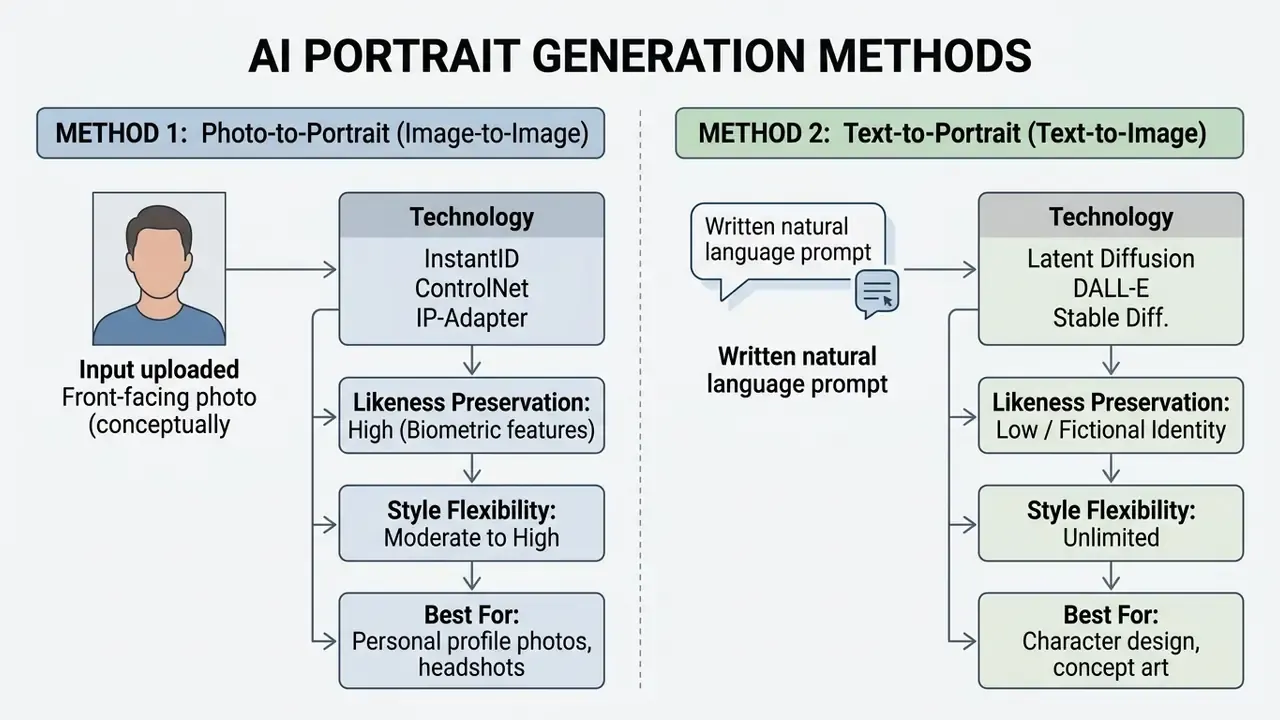
Portrait generation from an uploaded photo
Image-to-image portrait generation uses an uploaded photo as a structural reference: it preserves biometric identity while altering lighting, wardrobe, or artistic style. Frameworks such as InstantID apply facial landmark detectors and vision encoders to extract identity embeddings from a single selfie (InstantX, 2024). One selfie, one embedding, many renders.
«Diffusion models outperform GANs in synthesis quality and controllability, which drove their rapid adoption in commercial creative applications.»
The underlying pipeline routes image embeddings into cross-attention layers via an IP-Adapter, while ControlNet locks facial keypoints. Implementation order matters in production stacks: the IP-Adapter unit runs before the ControlNet unit, because the ControlNet consumes the projected face-embedding output as its input. Get that order wrong and likeness drifts by the third seed. This dual-conditioning architecture lets an ai face portrait generator render a generated portrait that keeps exact facial proportions while applying new photographic medium effects or digital paint textures. It is also the reason an ai portrait generator from photo free online service can beat a text-only tool on resemblance without asking for twenty training images.
Readers comparing transformation engines rather than portrait presets can review image-to-image portrait generators to see how reference-conditioned pipelines differ across vendors.
Text-to-portrait generation without a photo
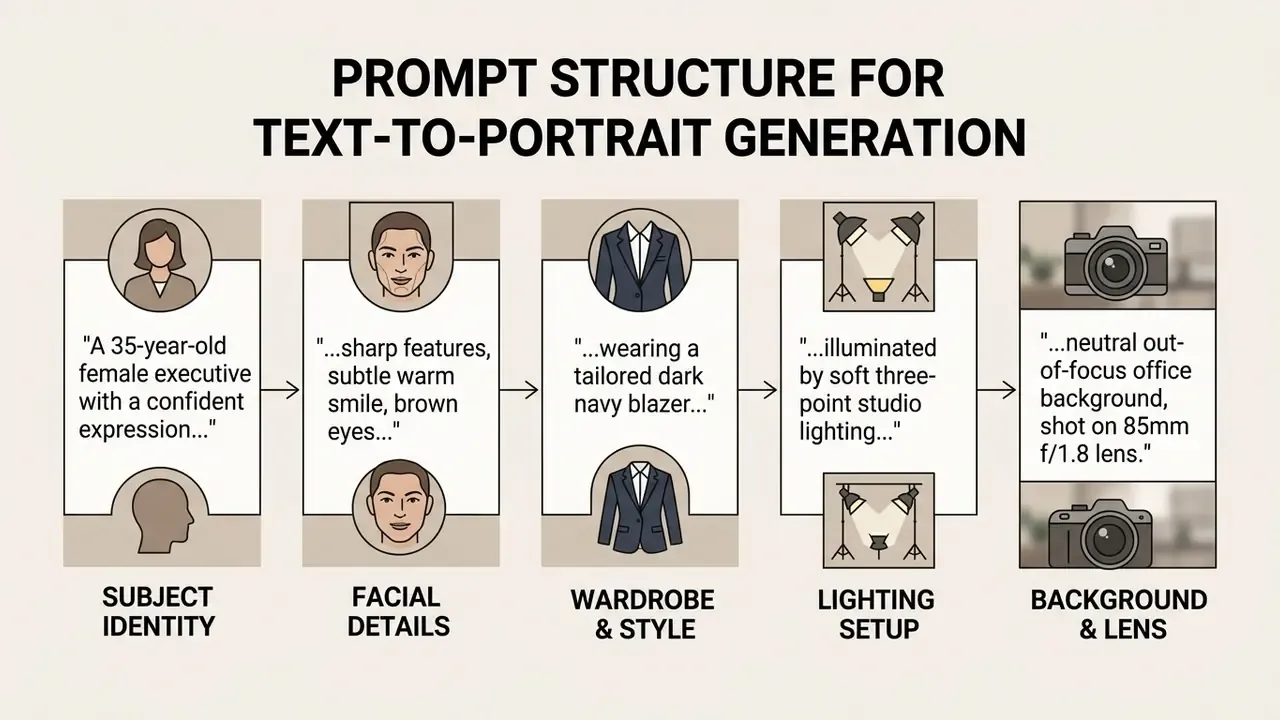
Text-to-portrait generation synthesizes a completely new portrait online from written prompts, with no input photograph at all. Users specify physical attributes, demographic characteristics, facial expressions, attire, lighting setups, and camera specifications. Nobody's biometrics enter the pipeline, which is why this route is often the safer default for stock-style marketing faces.
What "free" means for an AI portrait generator
Free access tiers for an ai portrait generator online free platform usually run on credit-based or rate-limited models. Vendors give non-paying users daily or monthly generative credits, capped output resolutions, or non-commercial usage licenses. Users who want zero-friction access can compare free AI generators that require no account registration before uploading biometric data anywhere.
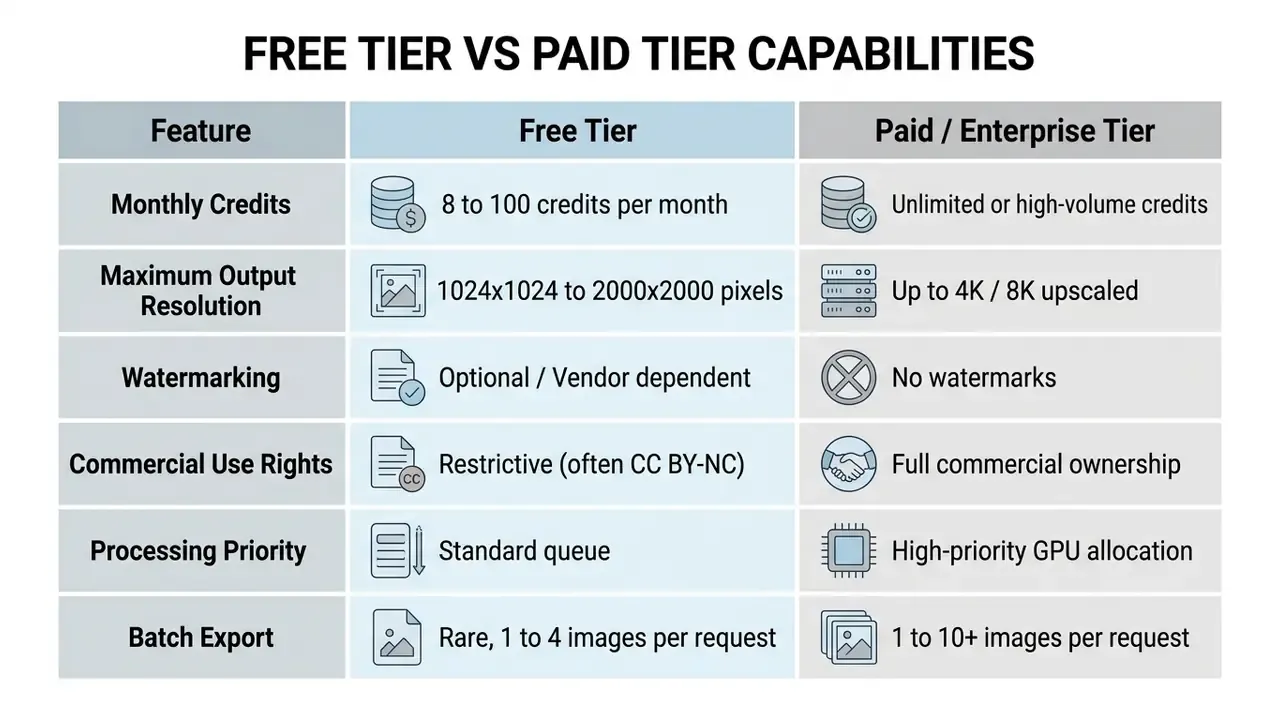
Adobe Firefly offers high-resolution downloads up to 2000x2000 pixels for free account holders, accepting JPEG, JPG, PNG, and WEBP uploads up to 40 MB (Adobe Documentation, 2026). Other web utilities restrict free exports to lower resolutions or stamp watermarks on non-paid tiers (Fotor Documentation, 2026). Several browser-first generators publish the opposite policy and advertise watermark-free export with no account requirement. So the "free" label alone predicts nothing about output rights or quality. Read the terms, not the badge.
Modeling the real cost of a "free" portrait program
Finance and risk owners evaluating free tiers at organizational scale should price control effort and residual risk, not only license fees. The model below converts a nominally zero-cost workflow into a figure you can compare against studio photography or a paid enterprise plan.
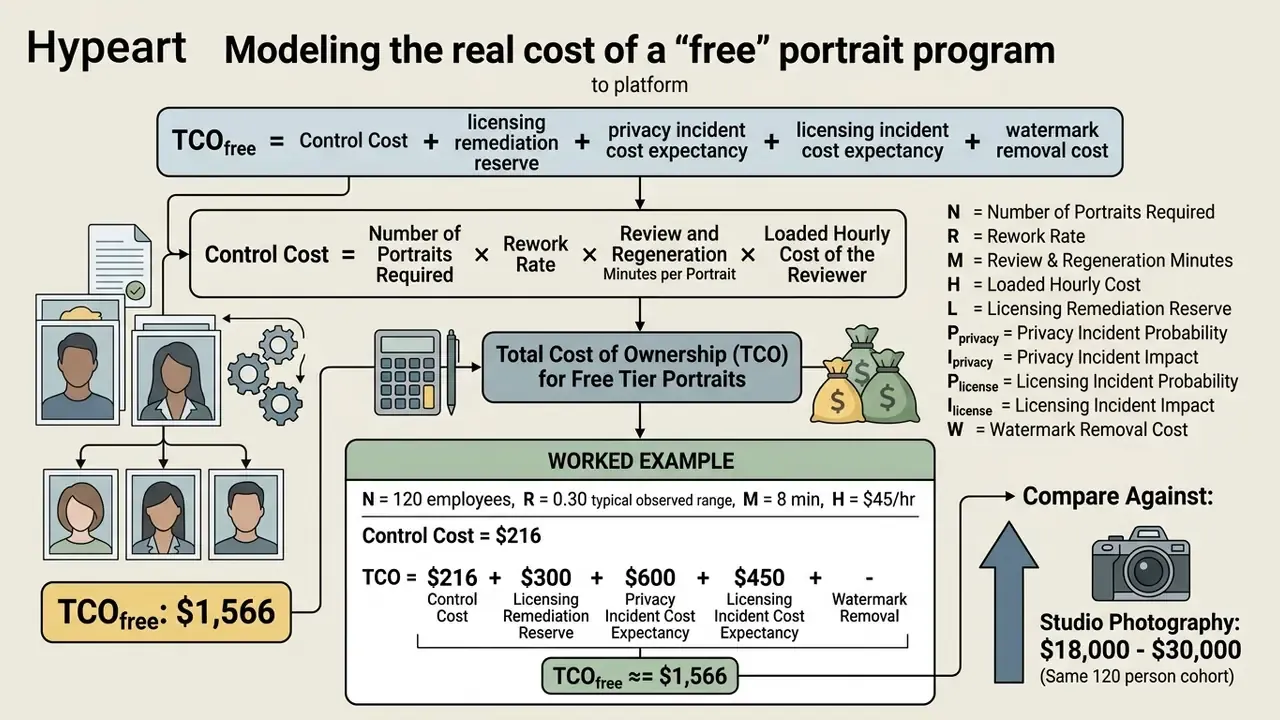
The comparison still favors generative workflows by roughly an order of magnitude. The point of the model is not the winner; it is the crossover. It shows where a paid tier with explicit commercial rights and documented deletion schedules costs less than governing a free one. Probabilities here are illustrative placeholders, and each institution should substitute its own incident history.
How to Create an AI Image of Yourself for Free
To create an ai image of yourself free, pick a web-based ai portrait generator free upload photo tool, submit a clear front-facing image, configure style presets or text prompts, and process the output. The generation cycle takes 5 to 30 seconds depending on GPU server load and model complexity.
Illustrative composite scenario: a financial technology team evaluating generative tools needed standardized executive headshots for a distributed workforce without booking photography studios. The team ran an image-to-image workflow with reference photos and controlled diffusion pipelines, enforcing strict face-visibility criteria. It produced studio-quality corporate portraits across 120 employee profiles and cut asset procurement timelines by roughly 85 percent. Treat the figure as hypothetical rather than audited, but the pattern holds: the three-step workflow below scales beyond individual use.
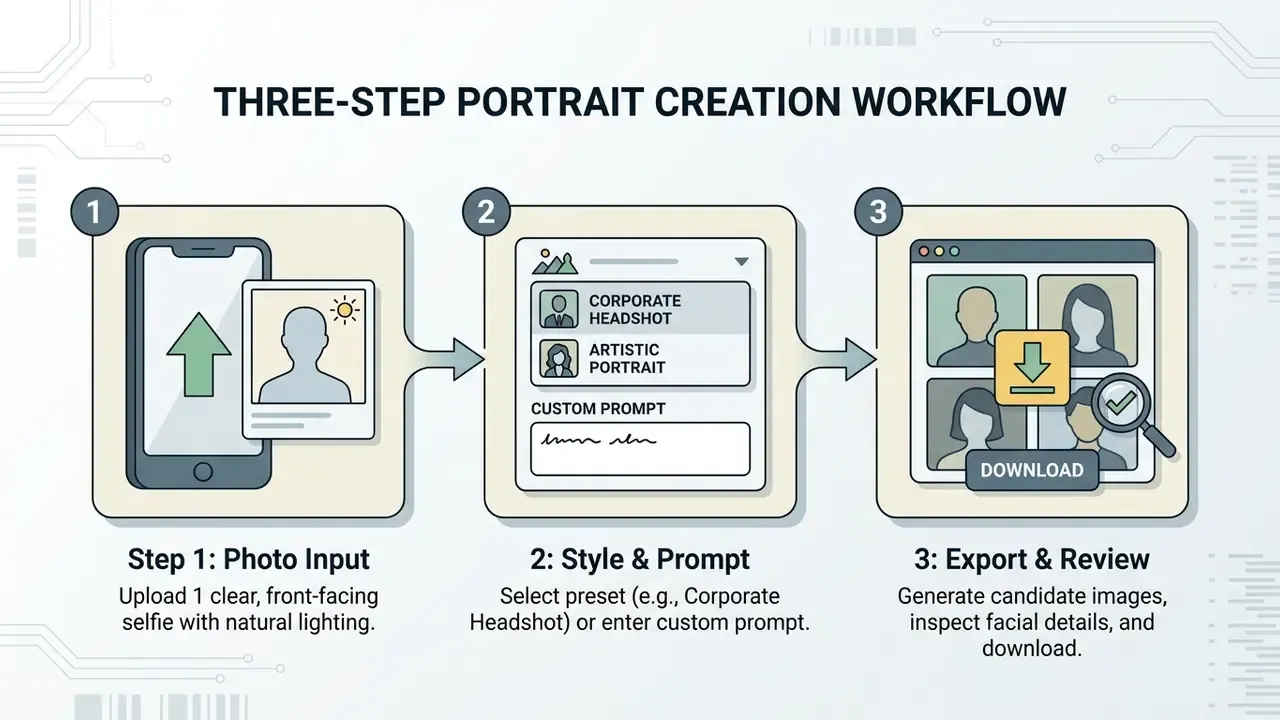
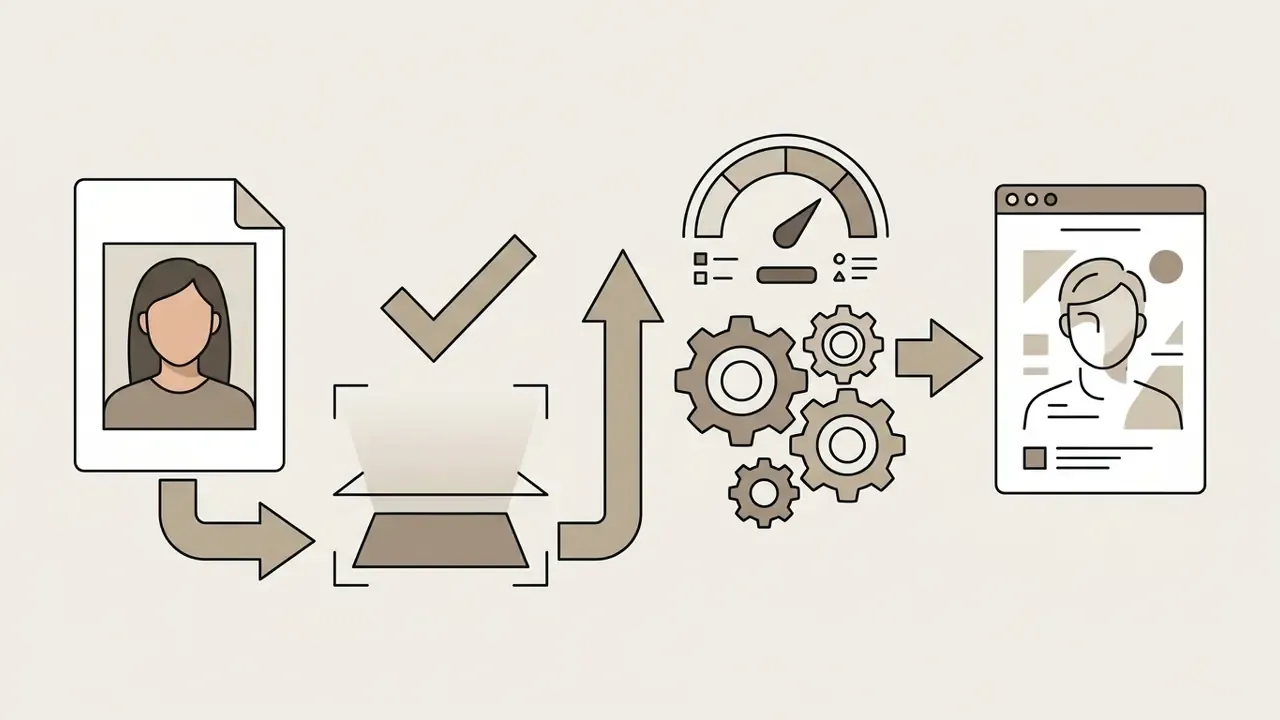
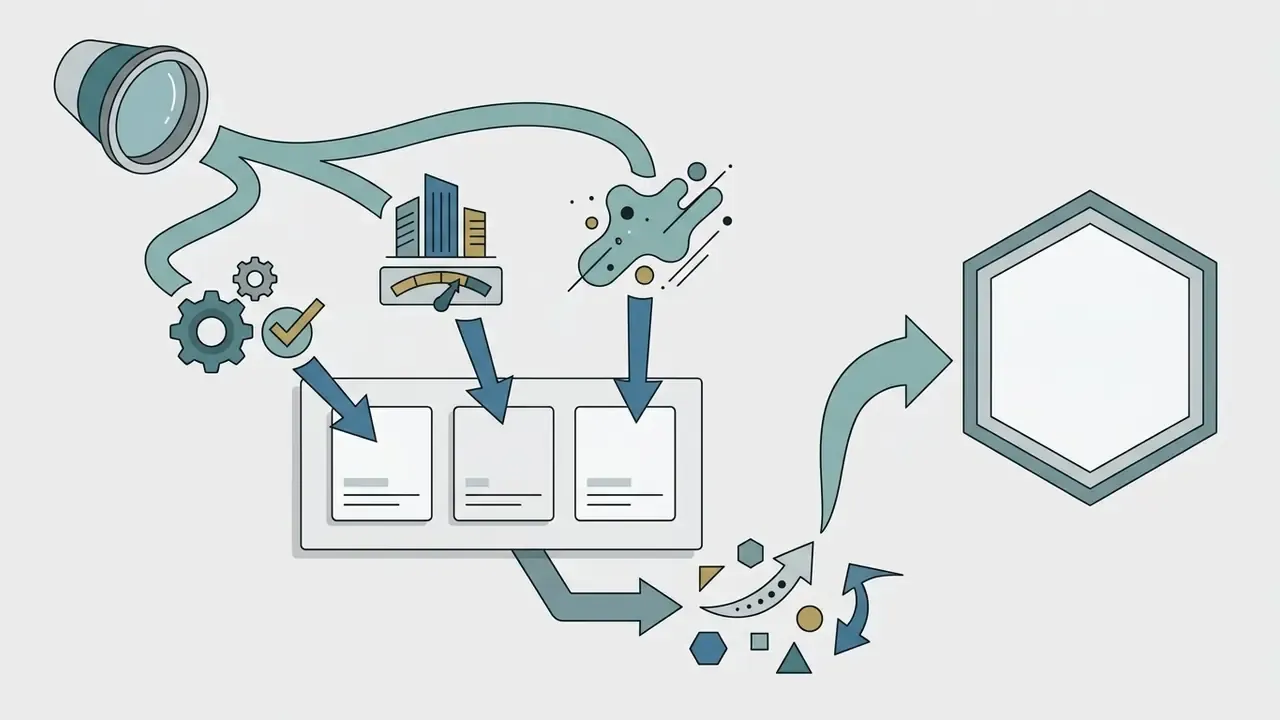
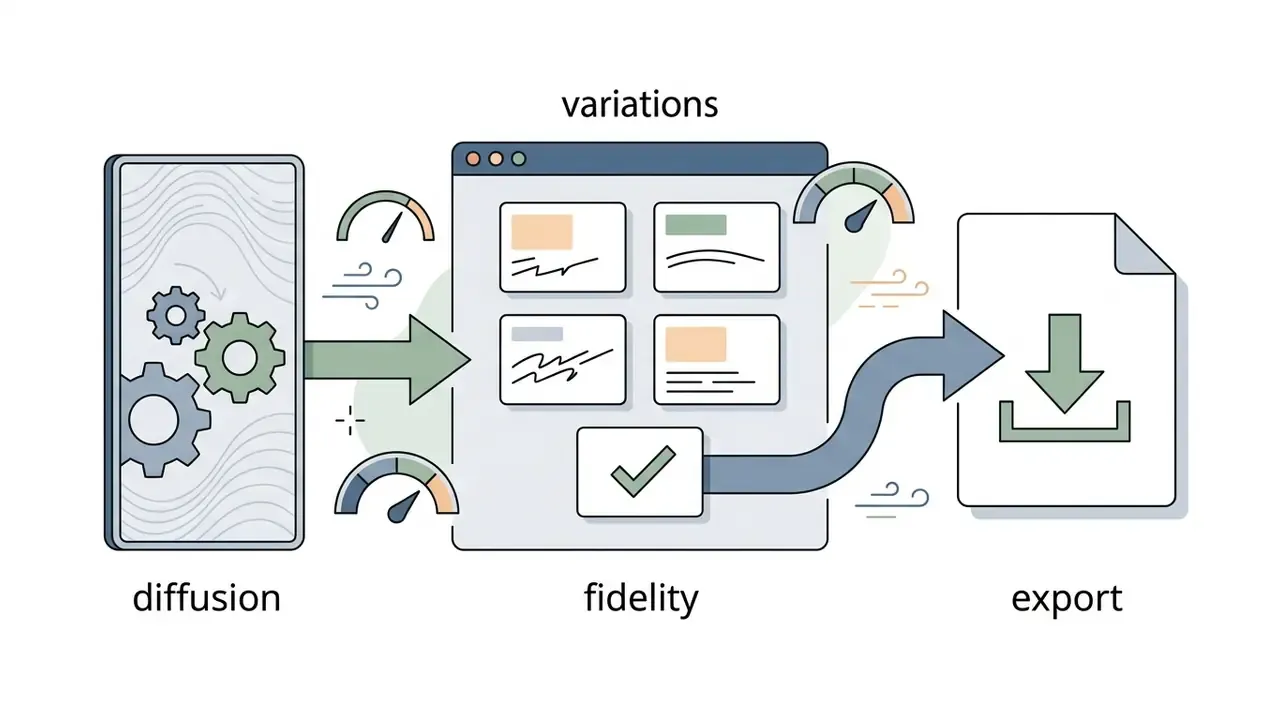
Upload a clear front-facing photo or selfie
The accuracy of an ai self portrait generator from photo depends on the clarity and lighting of the source photograph. Input files should have eye-level camera angles, balanced daylight or soft artificial light, and full visibility of eyes, nose, and mouth.
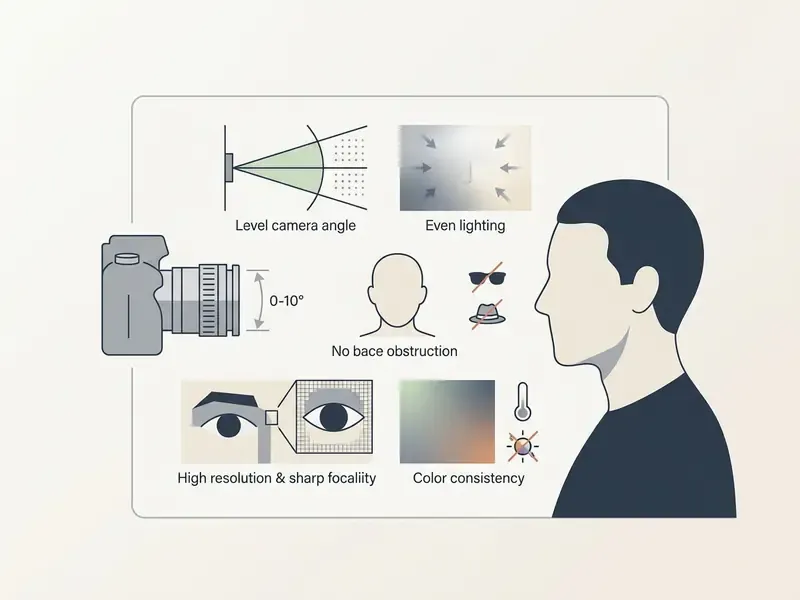
Photographs taken from steep angles or in dark rooms increase reconstruction artifacts, because diffusion attention layers mistake shadow boundaries for permanent facial contours. A bathroom mirror selfie at 11 p.m. is the classic failure case.
Choose a portrait style and customize the prompt
Selecting a style preset configures the model's latent space parameters. It decides whether the ai portrait generator upload photo free tool renders photorealistic photographic texture or stylized artwork.
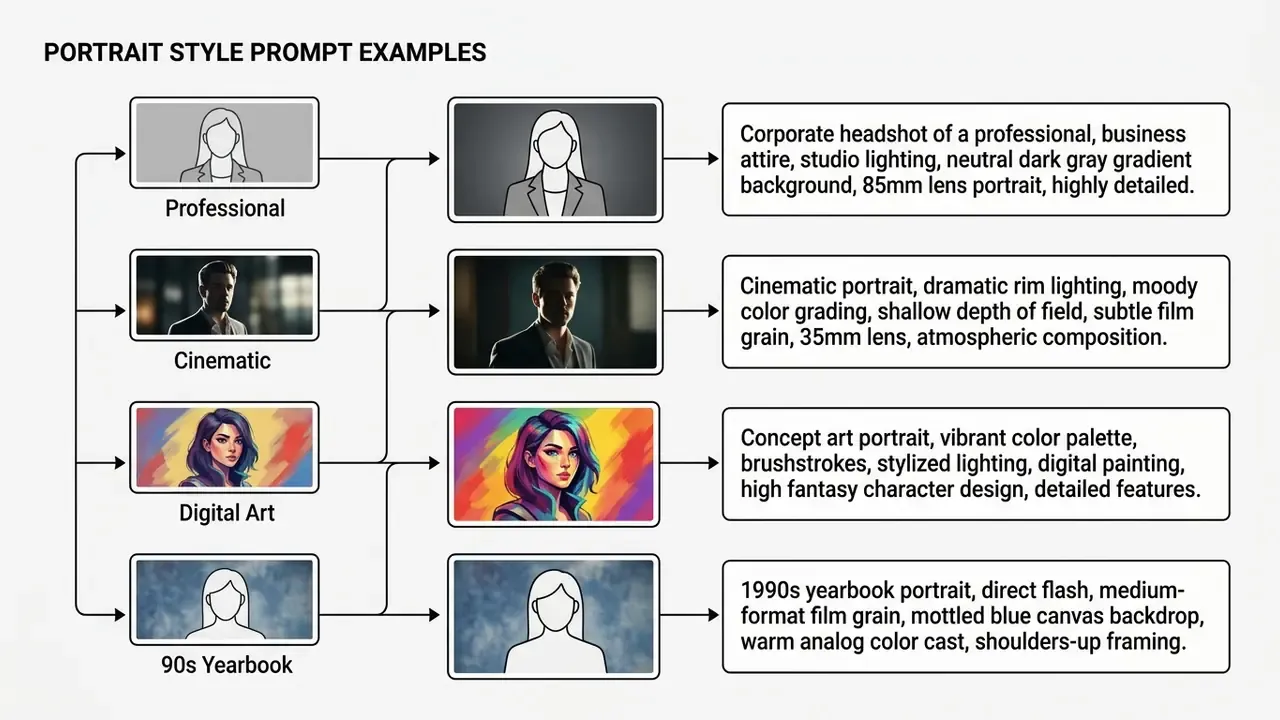
Adding explicit negative prompts, such as "blurry, distorted facial features, oversaturated, extra limbs," keeps the diffusion process from introducing the usual generative flaws.
Generate, review, and download your portrait
Running the generation task yields several variations tied to the initial seed value. Review the options and confirm that identity preservation matches your expectations before exporting. Most APIs and web front ends return between one and ten candidate images per request, so batch review should come before batch download.
To compare tiers before you commit credits, compare options in our free-tier credit and cost calculators to work out credit limits, resolution caps, and effective cost per usable portrait.
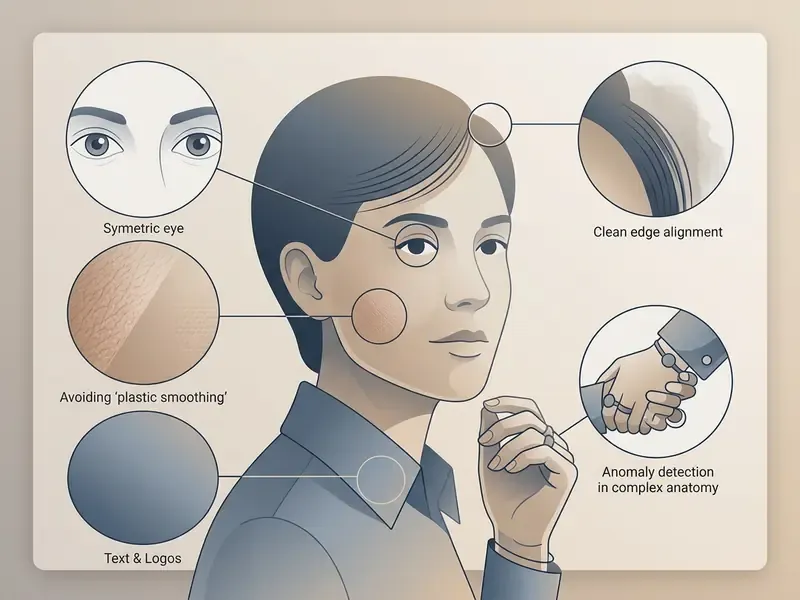
Batch export tools let you save multiple candidates in PNG or JPEG for deployment across digital platforms. Several editors export an entire group of retouched portraits at once, which matters when you are populating a team directory rather than a single profile.
AI Portrait Styles: Realistic, Professional, Creative, and Trending Niches
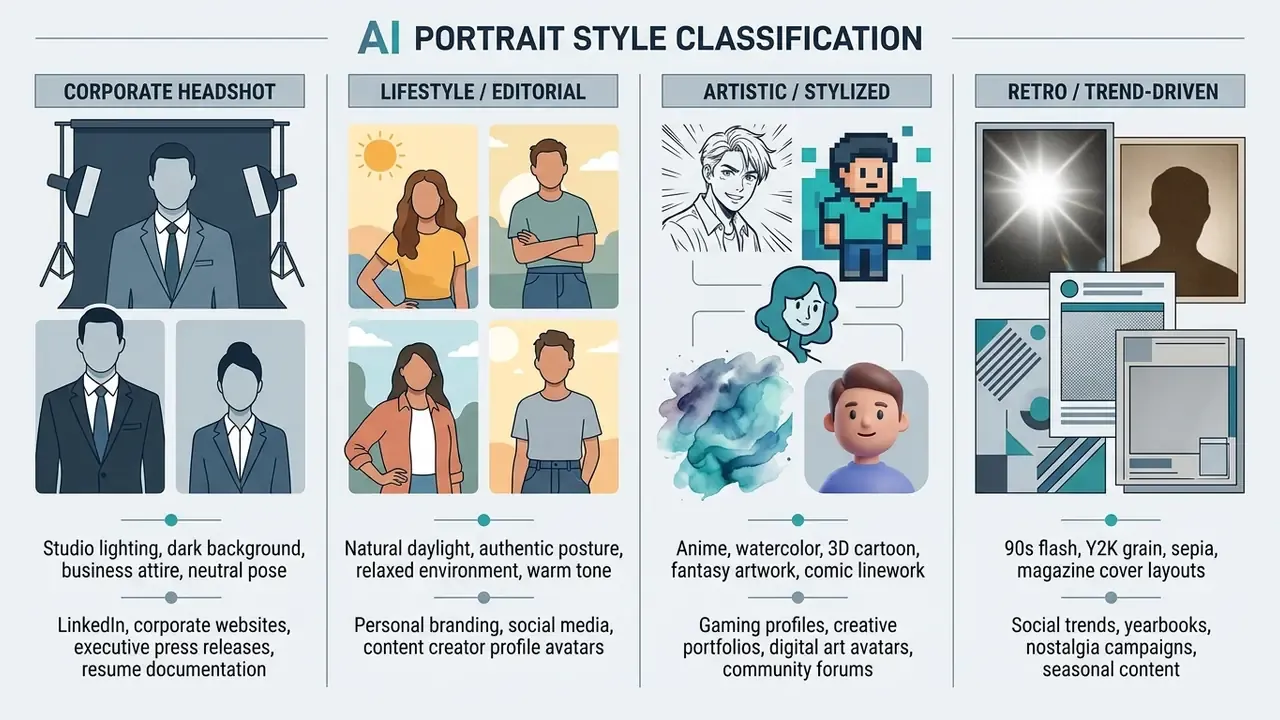
AI portrait platforms cover a wide range of aesthetic categories, from corporate communications to personal social accounts and digital media projects. Pick the style and framing first, then optimize input quality and prompt precision for that target. Working in reverse wastes credits.
«Stable Diffusion XL shows significant gender imbalance under neutral prompts, associating traditionally masculine garments with male figures and amplifying stereotypes in female depictions.»
Style presets inherit those training-data asymmetries. Teams generating portraits for mixed cohorts should audit outputs across gender and wardrobe categories rather than trust a single preset to behave neutrally. For a regulated employer, that audit is also fair-treatment evidence you may need later.
Realistic and professional AI headshots
Professional headshot styles favor authentic lighting, restrained attire, and neutral backgrounds. Those outputs suit corporate directories, investor decks, and professional networking profiles. Buyers comparing dedicated tools can read our AI headshot generator guide for portrait quality, customization depth, pricing, and privacy comparisons.
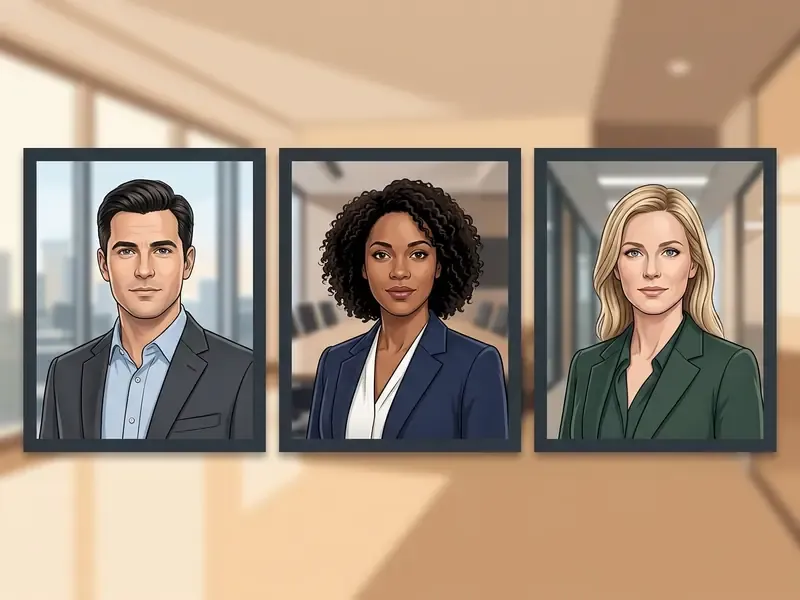
Corporate photography guidance published by large enterprises and platform-level profile-photo advice converge on the same short list: wear what you would wear to work, keep backgrounds uncluttered and out of focus, and hold a natural, non-suggestive posture so brand presentation stays consistent across a directory. The specific corporate policy previously cited here could not be verified; see Appendix A.
«An SDXL study documented racial homogenization: the model rendered nearly all Middle Eastern men as dark-skinned, bearded, and wearing traditional headwear.»
For corporate directories, that homogenization risk is operational rather than academic. One global preset applied across an international workforce can produce stereotyped depictions of entire regions. Per-employee reference photos and human review stay mandatory, and someone senior should sign off on the final set.
Creative AI art portrait styles
Artistic presets convert user photographs into distinct visual media styles using conditional generative networks trained on specific art movements and illustration techniques. This is the territory of a free ai art portrait generator: less literal likeness, far more range.
«Conditional Creative Adversarial Networks (CCAN) trained on WikiArt generate portraits in impressionist and surrealist styles, emulating aspects of the human creative process.»
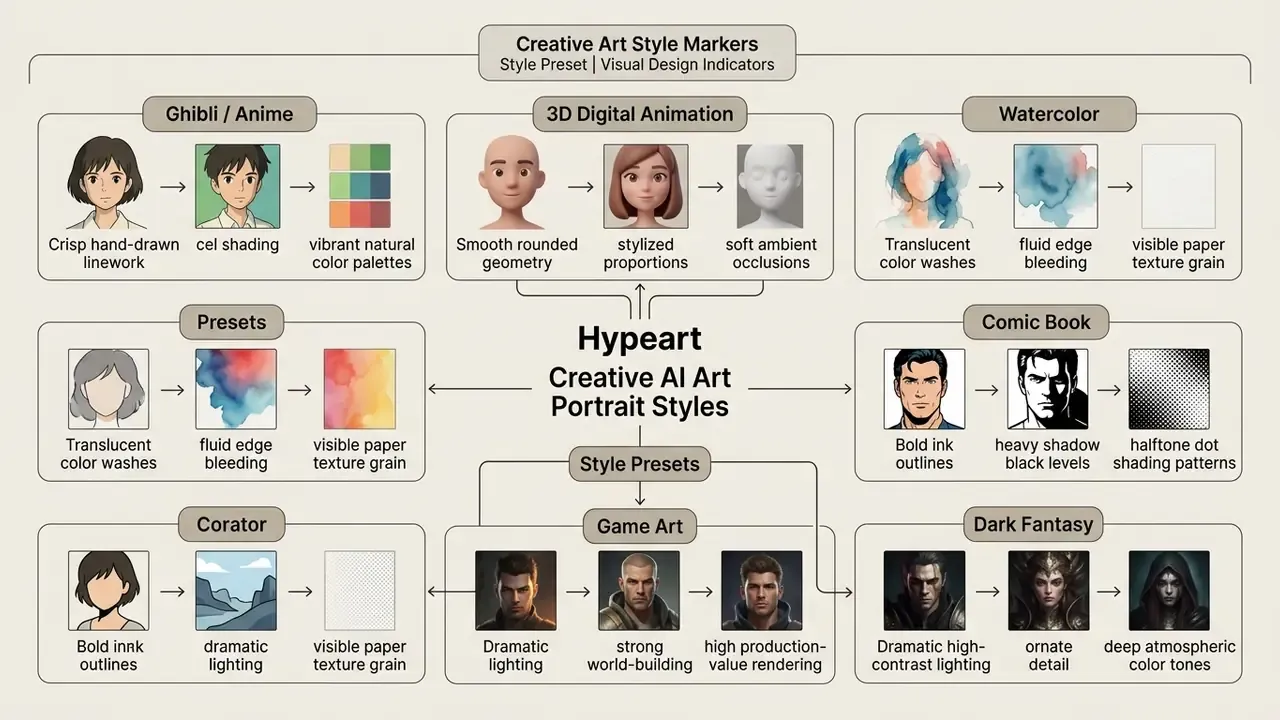
Anyone searching for a free ai art generator portrait workflow or an ai art self portrait online experiment can explore specialized creative models, such as our comparison of Ghibli-style AI generators, to judge style accuracy and rendering performance. A free ai art portrait rarely survives a resemblance test, and that is usually the point.
Trending and niche portrait styles
Modern generators serve specific demographic requirements and social-media aesthetics. These are the highest-demand niches in 2026:
- Vintage yearbook, sepia, and 90s aesthetics. Recreates analog medium-format film texture, direct on-camera flash reflections, and mottled retro canvas backdrops from 1990s school photography.
- Y2K, magazine, and light-shadow looks. Applies early-2000s digital grain, cover-layout framing, and hard directional shadow shaping for editorial-style social content.
- Old money and luxury framing. Muted palettes, tailored knitwear, estate interiors, and full-length composition rather than tight headshots.
- Kids and student yearbooks. Tunes face-smoothing conservatively for age-appropriate school portraits with clean studio backdrops, school-friendly wardrobe, and natural expressions.
- Inclusive and non-binary portraits. Uses neutral latent-space conditioning to bypass rigid binary gender presentation defaults while keeping natural proportions.
- Couples and family synthesis. Employs multi-subject identity pipelines, for example dual-ControlNet conditioning, to render consistent group portraits from separate reference photos, including vintage, cinematic, ink-art, and 3D-cartoon family variants.
- Profession-specific headshots. Tailors wardrobe and environment for real estate agents, physicians, legal advisors, firefighters, police officers, and corporate executives, including uniform accuracy in full-length framing.
- Fantasy, knight, and game-character sets. Applies detailed costume, atmospheric lighting, and immersive environments while preserving facial identity for gaming profiles and community avatars.
Full-body, half-length, and character portraits
Shot composition directives inside the prompt decide whether the model returns a tight facial close-up, a waist-up bust shot, or a full-length body view. Style choice also shifts default framing: professional presets lean half-length, while fashion, luxury, and red-carpet presets favor full-length composition.
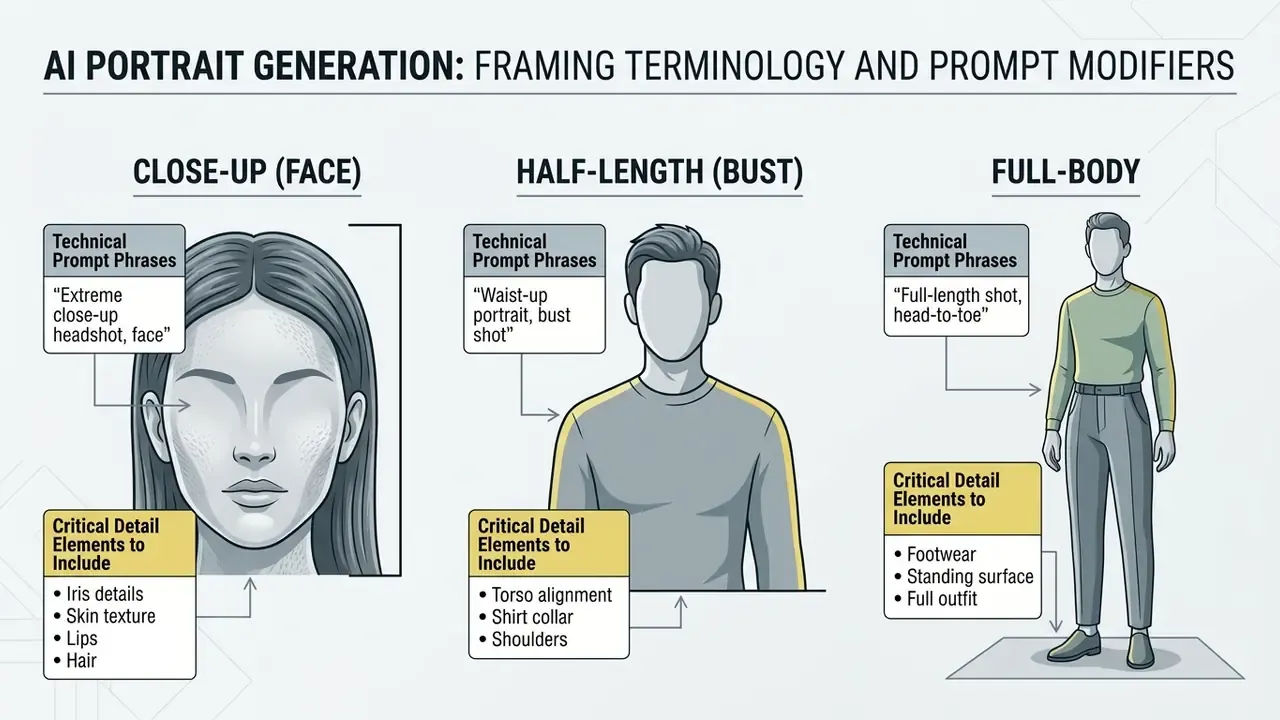
For full-body generations, spell out footwear and ground surface texture. Otherwise the diffusion model quietly truncates the lower portion of the frame.
How to Get Better AI Portrait Results From a Photo
Getting a free ai image generator realistic portrait result comes down to three things: input source data, precise prompt modifiers, and post-generation retouching. High-fidelity outputs depend on feeding clean biometric reference points to the vision encoder.
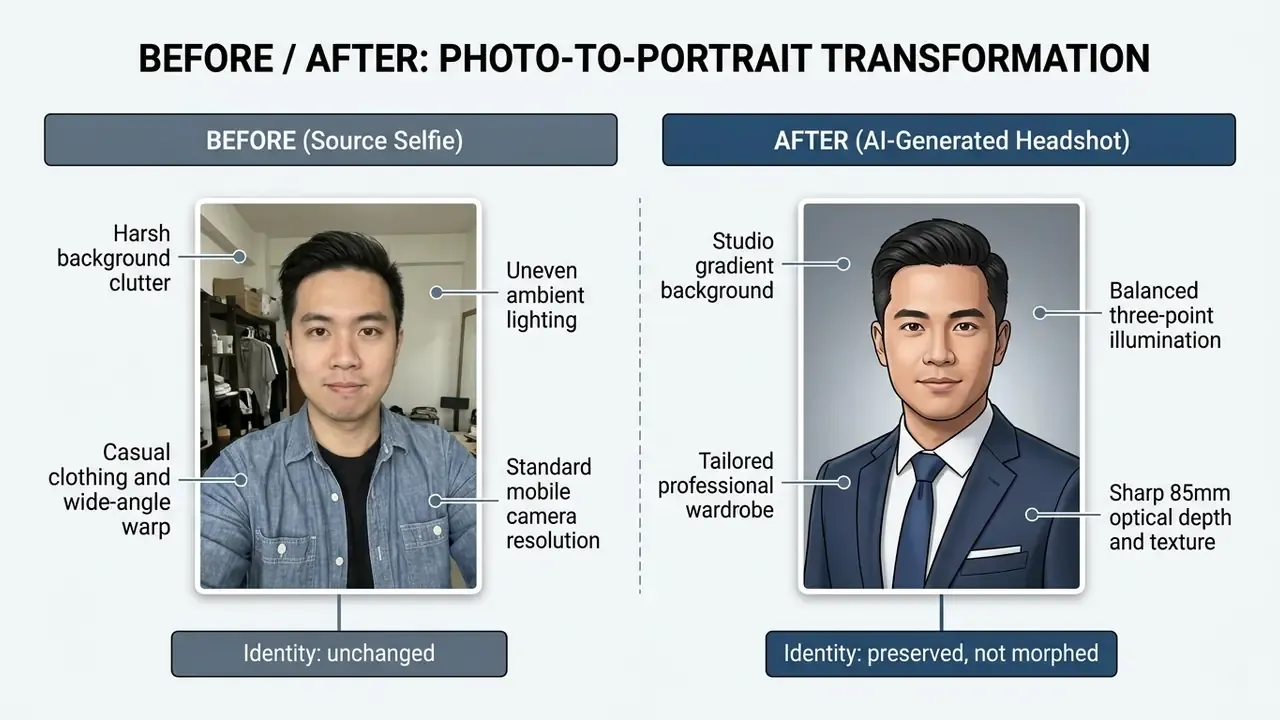
Source photo quality, face visibility, and facial features
Input image parameters govern face-synthesis accuracy directly. Pose deviation, uneven illumination, and lens distortion are the three dominant failure drivers, and each has a documented corrective path in the research literature.
«A depth-based perspective-correction pipeline rectifies selfie distortion through depth estimation, translation regression, and differentiable reprojection, improving the realism of AI portraits.»
Earlier face-synthesis research showed something similar: normalizing pose and illumination before synthesis substantially raises downstream face-recognition rates. That is why frontalization and light normalization remain the standard preprocessing pair. The specific percentage figures previously quoted in this section could not be traced to a verifiable source and have been withdrawn; the correction record sits in Appendix A.
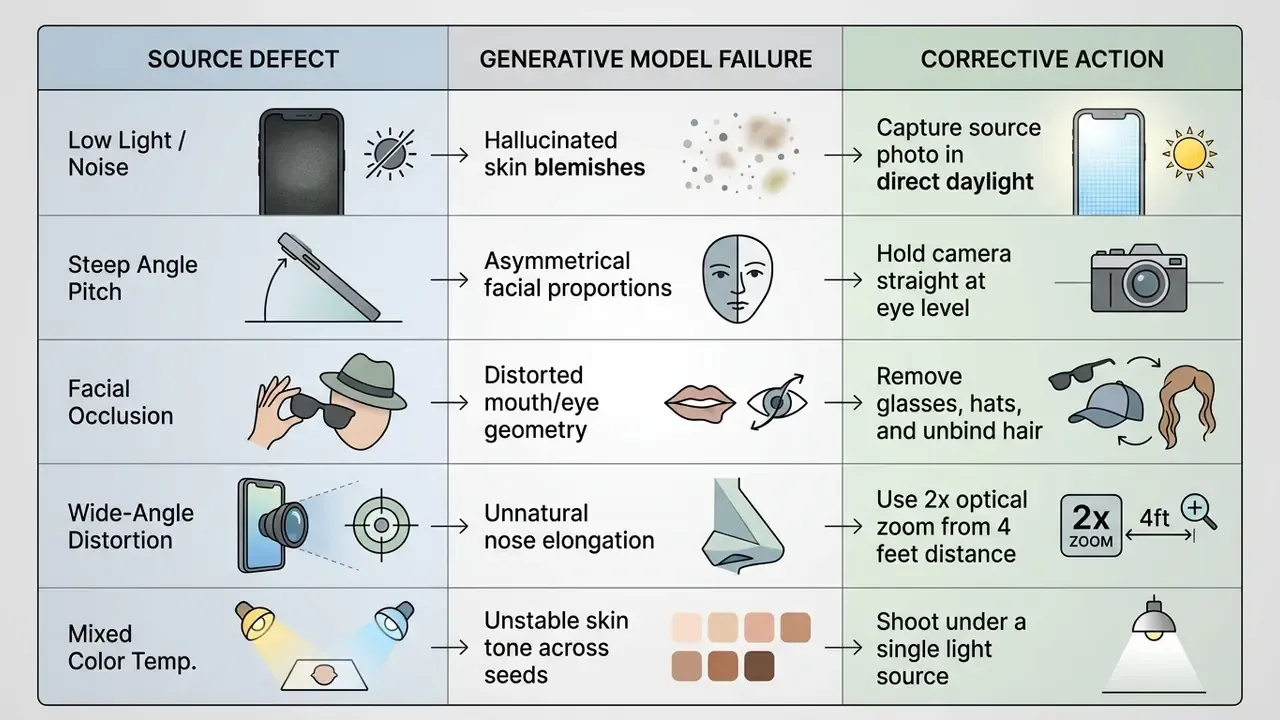
Clear biometric landmarks let the best free ai portrait generator systems hold exact eye spacing, jawline contours, and the small distinctive features that make a face recognizable.
Prompts for realistic, professional, and artistic portraits
An effective ai portrait generator realistic free online prompt needs structured phrase sequencing. Put camera specifications and lighting directives immediately after the primary subject description.
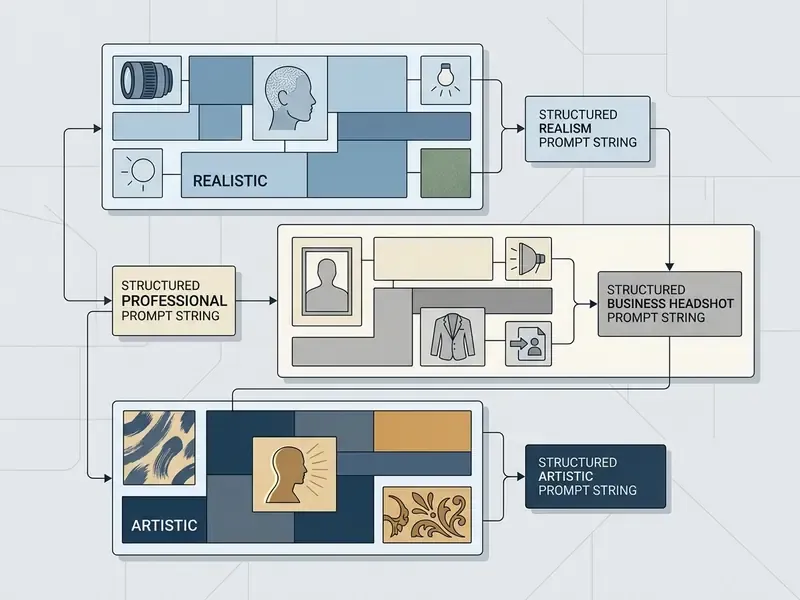
Avoid contradictory terms such as "perfect skin" or "flawless face." They trigger smoothing filters, erode photographic realism, and produce that synthetic plastic look nobody wants on a résumé. Negative prompts should list the artifacts you refuse, not the qualities you want.
Editing a generated portrait after creation
Post-generation editing lets you refine specific regions of a generated portrait without re-running the whole diffusion pipeline. Mask-based inpainting replaces background elements, adjusts wardrobe details, or shifts lighting angles while identity stays locked. Readers who need broader retouching capability can compare AI photo editors and our free photo editor guide for export limits and privacy terms.
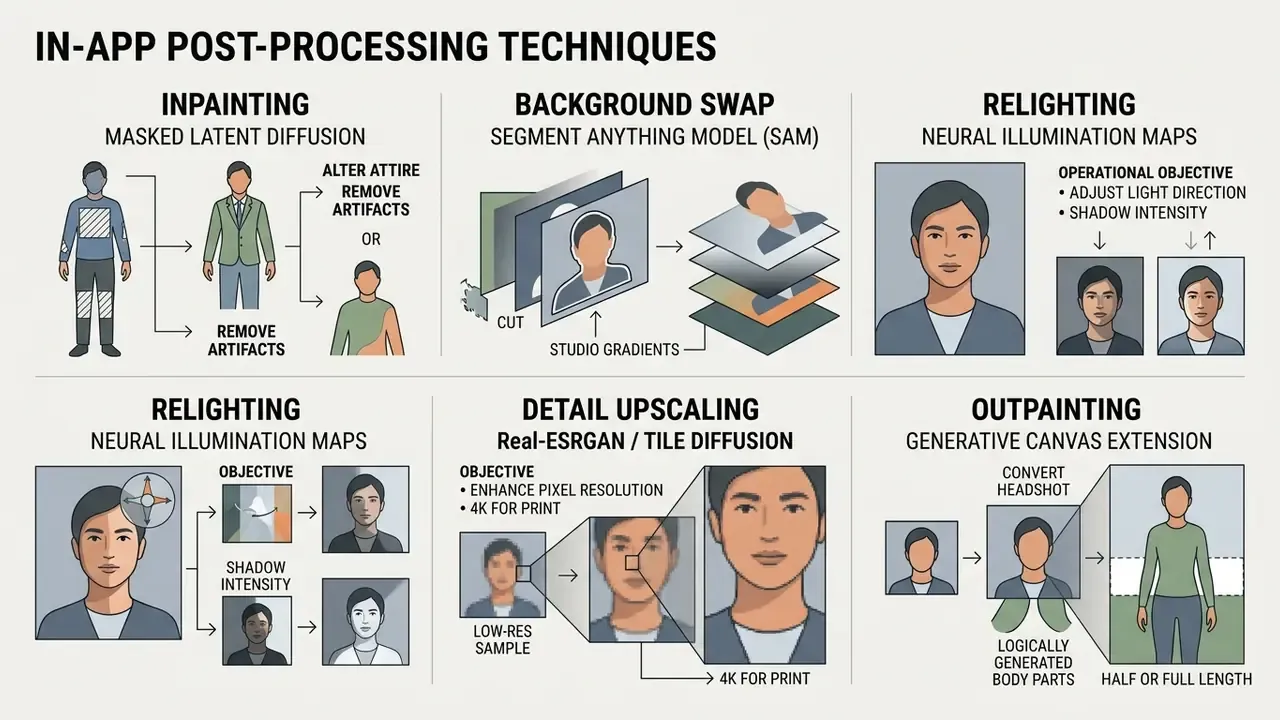
Inpainting adjustments keep a minor generation flaw from invalidating an otherwise ideal candidate. Cheaper than another twenty seeds, too.
Practical post-generation touch-ups
When a portrait needs fine-tuning rather than regeneration, run these three quick passes:
- Background erasure and replacement.If the model leaves artifacts or hallucinated objects, pass the image through a Segment Anything Model (SAM)-based tool and swap the background for a clean studio gradient. The face stays untouched, and you skip seed roulette.
- Facial retouching and eye symmetry.Fix minor iris misalignment, asymmetric catchlights, or over-smoothed skin with localized brush-based inpainting on a small mask instead of regenerating the frame. Blemish-first removal followed by compatible inpainting is the same sequence used in published portrait-retouching research.
- Generative canvas uncropping (outpainting).To turn a tight headshot into a half-length or full-body asset for print layouts and banners, apply AI image expansion tools to extend the borders while wardrobe and lighting stay consistent. Lock instructions such as "no face morphing" and "match existing light direction" so the extension does not drift.
Consumer editors add finishing options too: stickers, typography overlays, photo effects, and template placement. One portrait becomes a set of publish-ready assets, including cards, banners, and matching profile-cover pairs.
Where You Can Use AI Portraits and When Commercial Use Is Allowed
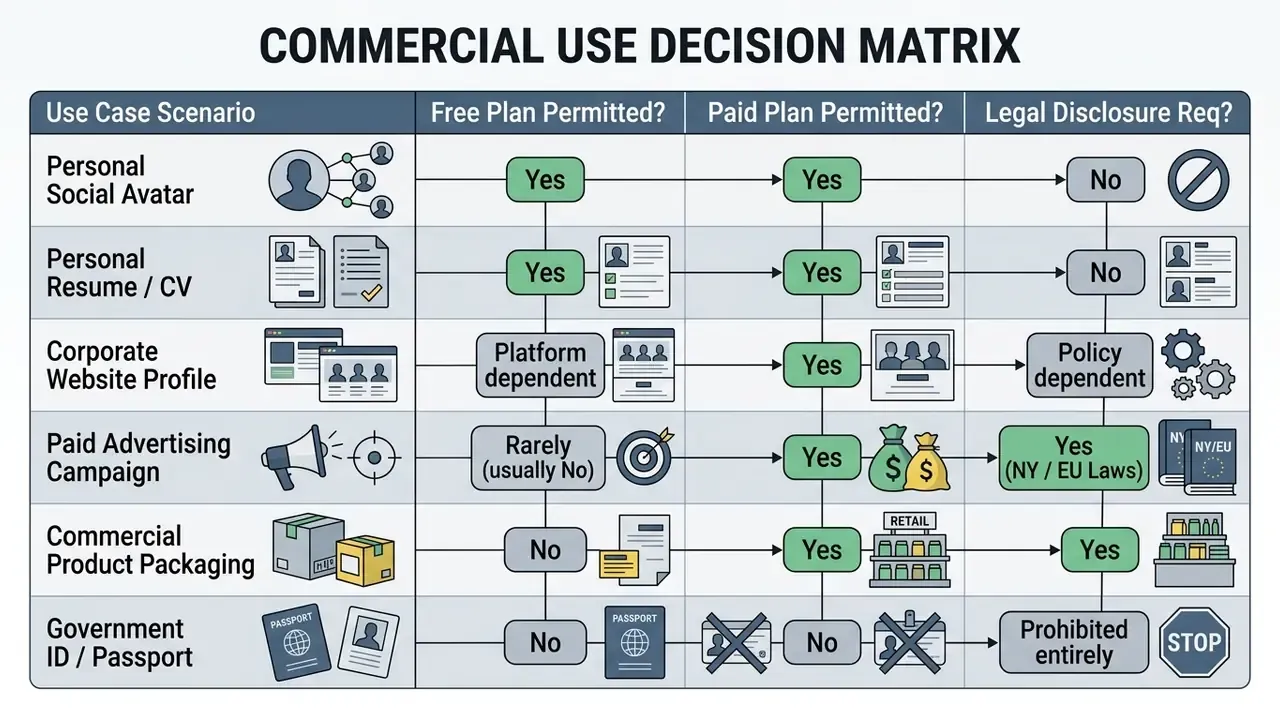
Whether an ai image of myself free output can be deployed legally depends on platform licensing terms, publicity rights, and commercial disclosure regulations. Three separate questions, often answered by three different documents.
«AI-generated faces are perceived as more trustworthy than real ones: diffusion-model faces received a mean trust rating of 4.70 versus 4.03 for real faces on a 7-point scale.»
That trust asymmetry is commercially valuable and ethically loaded at the same time. Synthetic faces can outperform authentic photography on perceived credibility, which is exactly why advertising regulators now demand disclosure. For a regulated lender, "more trustworthy than reality" is not a feature to celebrate quietly.
Organizations reviewing enterprise AI media usage can read the overall AI Media Commercial-Use guide for framework standards across image and video licensing, plus the broader commercial use of AI image generators overview for rights across output types.
Professional headshots and business portrait needs
Publishing AI headshots on commercial corporate websites, in marketing collateral, or across monetized media channels turns the asset into commercial usage. An ai personal photo generator free tier is usually the wrong place to source those files.
To review platform-specific commercial rights and usage guidelines, consult the official terms published by major providers:
- OpenAI Terms of Use (Updated 2026)
- Adobe Firefly Legal Terms (Updated 2026)
- Canva AI Product Terms (Updated 2026)
Legal exposure around synthetic likenesses is still moving; our litigation index tracks the filings that shift these terms.
Check license terms before commercial use
Licensing rules differ sharply between providers. OpenAI permits commercial exploitation of outputs created on free credit allocations (OpenAI Policy, 2026), while platforms operating under Creative Commons non-commercial licenses (CC BY-NC 4.0) restrict free-tier outputs to personal use only (Midjourney Terms Summary).
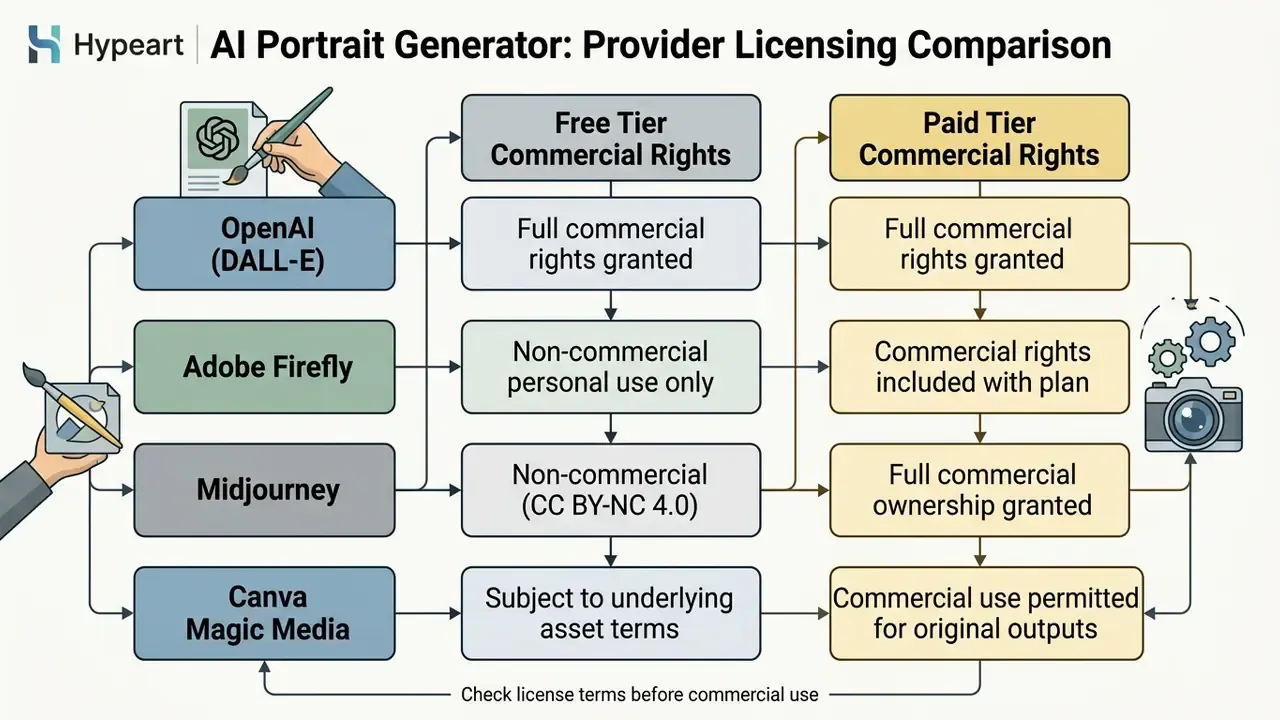
«Where training datasets contain Creative Commons Share Alike material, that obligation may extend to models and AI outputs, constraining commercial use.»
Practical Applications Across Real-World Scenarios
AI-generated portraits solve specific asset-creation bottlenecks across very different user domains. The matrix below maps who benefits, what they produce, and which constraint disappears.
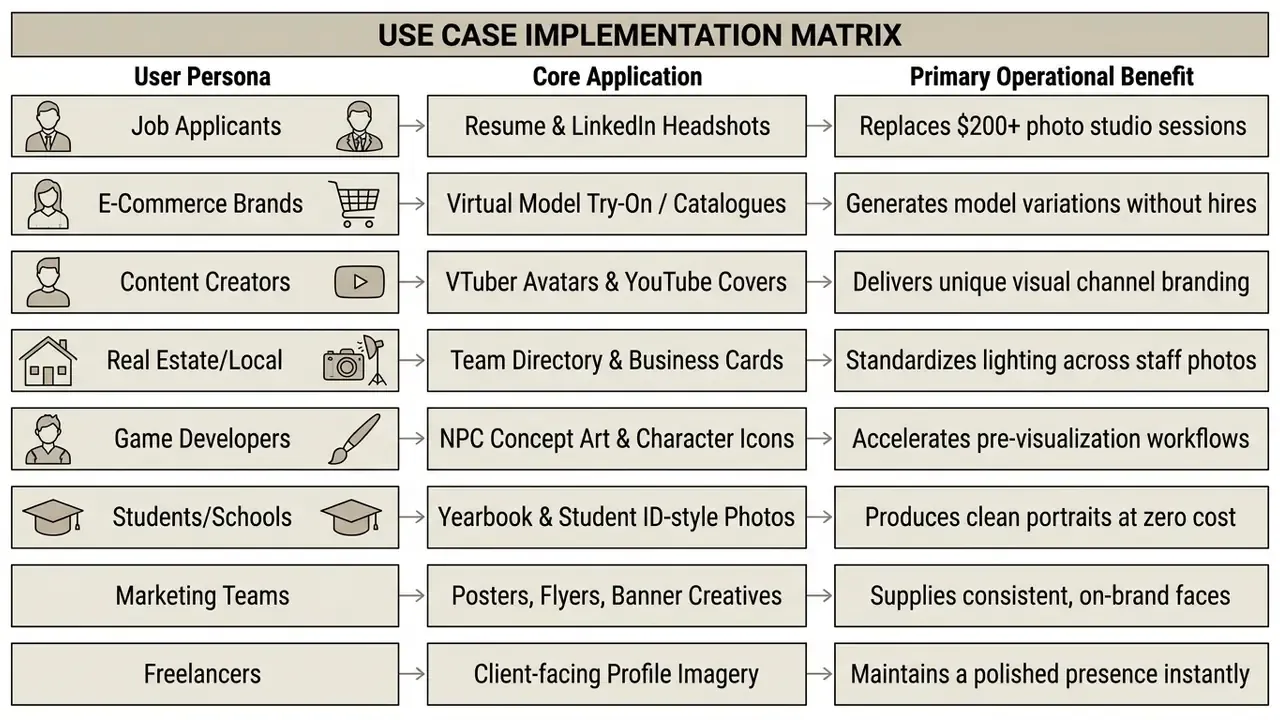
Field feedback across these segments agrees on one point: small teams value uniformity more than artistry. A five-person company website with five differently lit, differently framed photographs reads as improvised. The same five faces rendered with one lighting setup and one background read as an organization. Creators pull the opposite way and optimize for variety, generating several stylistic variants of one face to match content verticals on YouTube, TikTok, and Instagram.
Mind the boundaries. Marketing and e-commerce deployments need both a commercial license and, where the depiction is realistic, disclosure under EU and New York rules. Virtual-model catalogue use adds one more condition: no real, identifiable person's likeness may be reproduced without documented consent.
Privacy and Safe Use of Uploaded Face Photos
This section is general information and does not substitute for advice from a data protection specialist or legal counsel. Requirements for processing biometric data vary by jurisdiction.
Uploading personal face photographs to cloud services introduces biometric privacy considerations and data security duties. For regulated institutions, it also introduces a vendor you may not have onboarded.
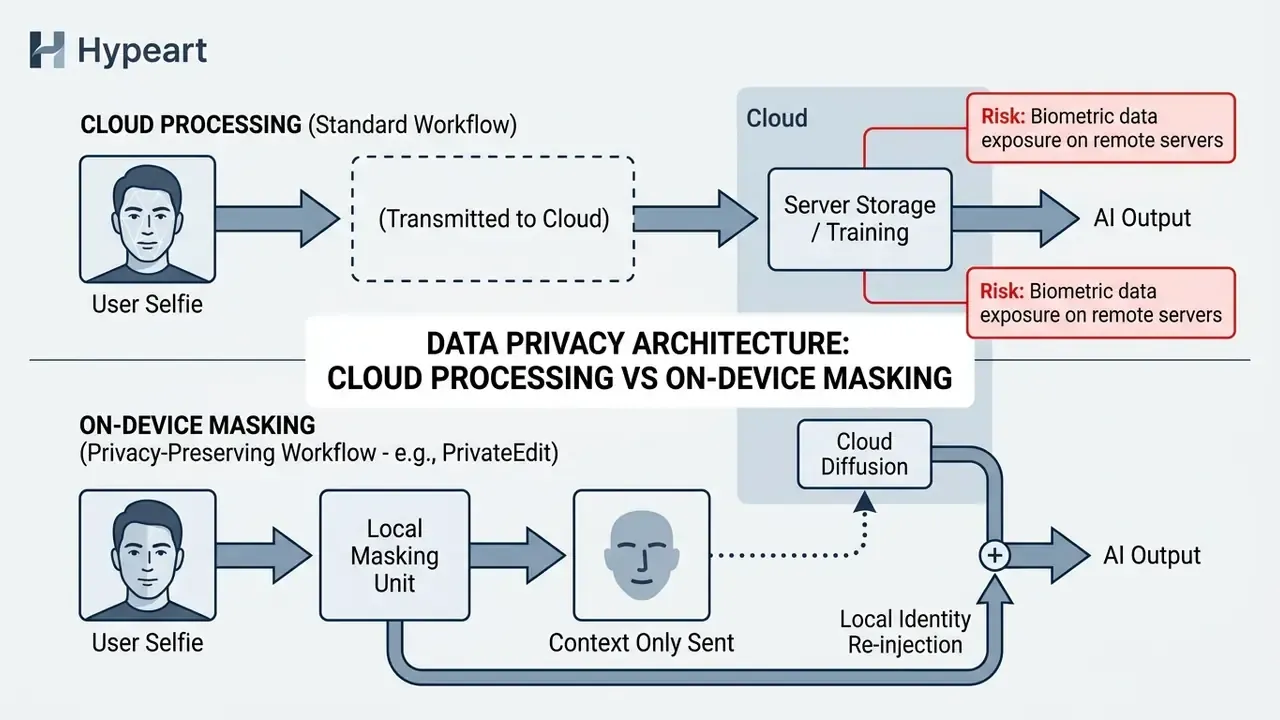
«An audit of six synthetic face datasets found that in every case the generator reproduced samples from the real training data, exposing the identities of specific individuals.»
Regulatory baselines point the same way. The UK ICO's guidance on AI and data protection treats image and biometric processing as high-risk and requires documented assessment. NIST SP 800-63A requires explicit notice and consent before biometric collection, plus granular deletion controls. US NTIA facial-recognition best practices recommend publishing collection, storage, and use policies and obtaining specific consent before storing a photograph or faceprint.
Storage, deletion, and visibility of uploaded photos
Retention policies vary widely between operators. Privacy-focused utilities delete uploaded source photographs within 24 hours to 30 days (HeadshotPro Policy, 2026), while other consumer portals keep uploaded images indefinitely unless someone requests manual account deletion (AI Pictures Policy, 2026).
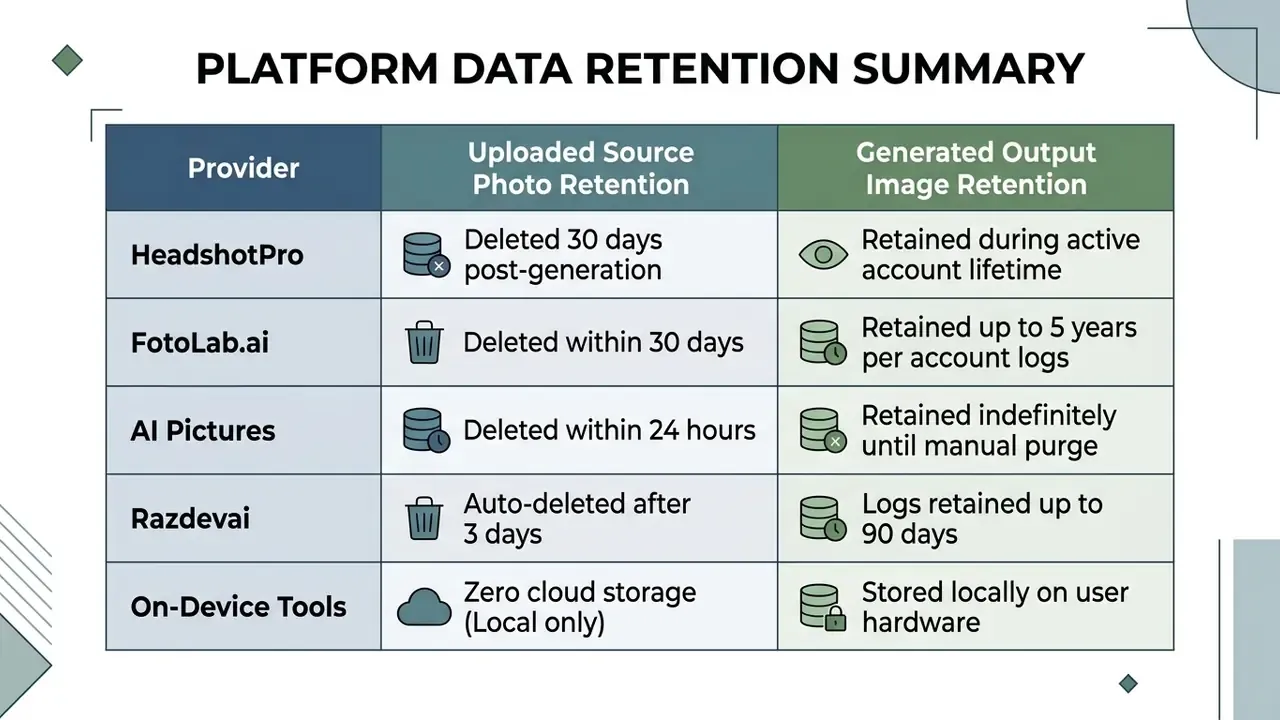
Audits of deep generative frameworks show that synthetic face generators can leak biometric training samples through membership inference attacks (Shahreza & Marcel, 2024). Differential privacy evaluations add a second finding: many image-to-image face tools offer no mathematical identity-isolation guarantee at all.
«Differential privacy audits of FaceFusion and InstantID showed high identity distinguishability in embedding space; formal identity-level privacy guarantees are not provided.»
Shadow AI control checklist for IT and security teams
Unmanaged employee uploads of colleague or customer photographs to consumer portrait sites are the most common biometric exposure path inside organizations. The controls below close it without banning the technology outright, which matters because outright bans mostly move the traffic to personal devices.
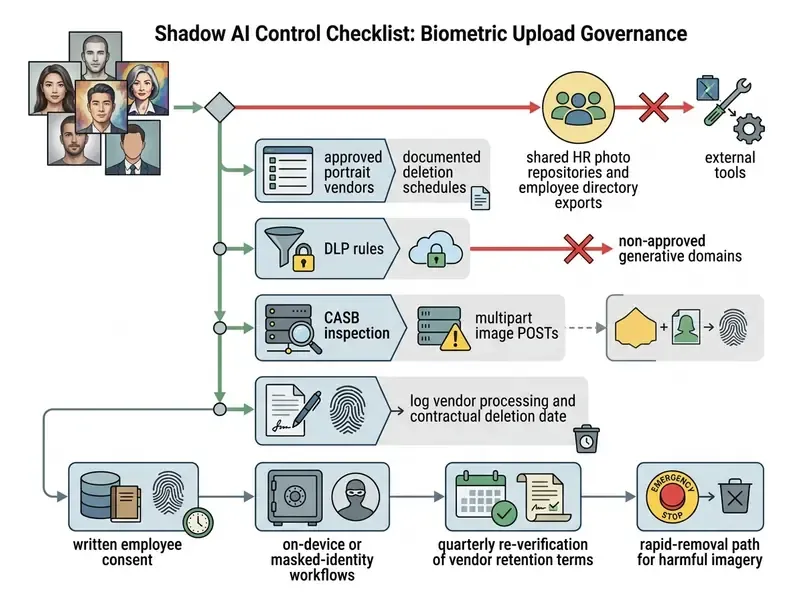
One practical note from review work: the log line in item six is the artifact auditors ask for first. Without it, you cannot demonstrate that a deletion obligation was ever tracked, let alone met.
Using your own face and photos of other people
Generating synthetic portraits from photographs of third parties, including colleagues, acquaintances, or public figures, without explicit consent violates privacy rights and basic ethical standards. It is also the fastest route to an internal incident report.
Ethical & legal compliance directives
- Explicit Consent: Do not process face photos of living individuals without documented authorization.
- Biometric Protection: Treat facial embeddings as protected personal identifiable information (PII).
- Non-Impersonation: Refrain from generating deceptive images intended to misrepresent third parties.
- Purpose Limitation: Use the image only for the purpose covered by the consent that was given.
- Minor Protection: Apply stricter consent and retention rules to any portrait of a child.
Guidance from international data protection authorities confirms that facial photos constitute biometric data and require explicit consent before machine learning processing (Australia OAIC Facial Recognition Guidance, 2026). Australian guidance adds that collection of sensitive information, which many photographs of identifiable people contain, must follow the consent pathway and stay reasonably necessary and proportionate.
«Generative AI can produce manipulative content depicting real people, requiring watermarking and ethical standards for distributing synthetic portraits.»
A 2026 joint statement led by the European Data Protection Supervisor sets out three operational obligations for AI image systems: robust safeguards against misuse, transparency about capabilities and limits, and rapid removal mechanisms for harmful personal imagery.
FAQ About Free AI Portrait Generators
What is the best ai portrait generator free online tool available?
It depends on the job. For high-resolution commercial headshots, Adobe Firefly provides free monthly generative credits with strong style controls up to 2000x2000 resolution and accepts JPEG, JPG, PNG, and WEBP uploads up to 40 MB. For text-driven artistic portraits, Canva Magic Media generates across a wide preset range in the browser. For instant, friction-free experiments, tools that skip registration are faster, though they disclose far less about data retention. Anyone hunting for the best ai portrait generator online should rank licensing and retention alongside output quality.
Can I generate AI portraits online for free without sign-up or watermarks?
Yes. Multiple browser-based platforms offer instant generation tiers where you upload a photo, apply style filters, and export high-definition portraits without an account and without visible watermarks. Batch processing, 4K upscaling, priority GPU queues, and explicit commercial-use rights normally require at least a free account, and often a paid plan.
How do I choose the best free ai portrait generator for personal headshots?
Judge tools on input format support (JPEG, PNG, WEBP), credit allocations, watermark policy, resolution caps, published data-retention schedules, and identity-preservation technology. Platforms built on ControlNet or IP-Adapter pipelines deliver better facial likeness from a single uploaded selfie. If two candidates tie on quality, pick the one with the shorter documented deletion window.
Can I access a free AI portrait generator on mobile devices, and are non-English versions available?
Yes to both. Most generators run directly in iOS and Android browsers with no dedicated app install, and web interfaces adapt to mobile viewports for uploading and downloading. Several vendors also publish native apps. Interfaces are frequently localized, which is why German-language users often search the equivalent query "ai portrait generator kostenlos" and land on the same web tools described here.
Which input image formats are supported by AI portrait generators?
Standard web platforms accept JPEG, JPG, PNG, and WEBP, typically with maximum file sizes between 10 MB and 40 MB per upload. Output downloads are usually JPEG or PNG, with free tiers capped between 1024x1024 and 2000x2000 pixels.
How closely will the AI-generated portrait resemble my actual face?
Resemblance depends on selfie quality and identity-conditioning architecture. Clear, front-facing source photos under neutral lighting give the highest likeness when processed through specialized image-to-image models.
«Across 287,000 image ratings from 12,500 participants, overall success in identifying AI-generated portraits reached only 62 percent, slightly above chance.» Source: "How good are humans at detecting AI-generated images?", Real or Not quiz study (2025).
If you need to verify whether an image in circulation is synthetic, read our overview of AI image detectors.
Why does my AI-generated portrait look blurry or plasticky?
Blurry or waxy output usually means the source selfie lacked focal sharpness, carried heavy shadows, or the prompt contained contradictory terms such as "flawless skin." Fix it by uploading a source image of at least 1024x1024 pixels shot in natural daylight and specifying exact optical directives, for example "shot on 85mm lens, visible skin pores, natural skin texture." Add a negative prompt listing "plastic skin, waxy, oversmoothed, blurry" to suppress smoothing filters.
Can AI portraits be used for passports, visas, or ID cards?
No. AI-generated or AI-enhanced portraits are unsuitable for passports, citizen ID cards, driver's licenses, and visa applications, because biometric verification systems require unmanipulated optical photography. Use AI portraits for professional profiles, resumes, social avatars, marketing, and creative projects instead.
Can AI portrait generators improve low-quality selfies?
Partially. Generators can correct lighting, reduce noise, sharpen facial detail, and rebuild cluttered backgrounds, turning an ordinary phone photo into a professional-looking portrait. They cannot recover detail that was never captured. If the eyes are out of focus or the face is heavily occluded, the model invents geometry rather than restoring it.
Are my uploaded photos used to train the model?
Vendor policies diverge, sometimes drastically. Some providers state explicitly that uploaded files are never used for AI training and are deleted within 24 hours. Others retain generated outputs indefinitely and reserve broader processing rights. Read the retention clause before uploading photos of employees, clients, or children, and favor vendors that publish an explicit deletion schedule.
Where can I review platform guides and alternative creative tools?
Feature comparisons and workflow overviews sit across our directory:
- View the guide to side-by-side evaluations of leading generators.
- Consult our AI headshot generator overview for specialized headshot analysis.
- Check the free photo editor guide for post-processing and export details.
- Compare art-focused engines in our best AI art generator comparison.
- See the overview in our support center for technical assistance and user documentation.
- Explore integration details through our developer API documentation.
- Track legal developments in synthetic media through our litigation analysis index.
Summary and Next Steps
Choosing an ai portrait generator free online means balancing output fidelity, style range, commercial licensing terms, and biometric data privacy. If you need professional corporate headshots, supply high-resolution, front-facing reference photos under balanced light and write structured prompts that include camera parameters. If you want a trend-driven or artistic look, pick the aesthetic first, whether yearbook, Y2K, anime, fantasy, or 3D cartoon, and accept lower literal likeness in exchange for stylistic range.
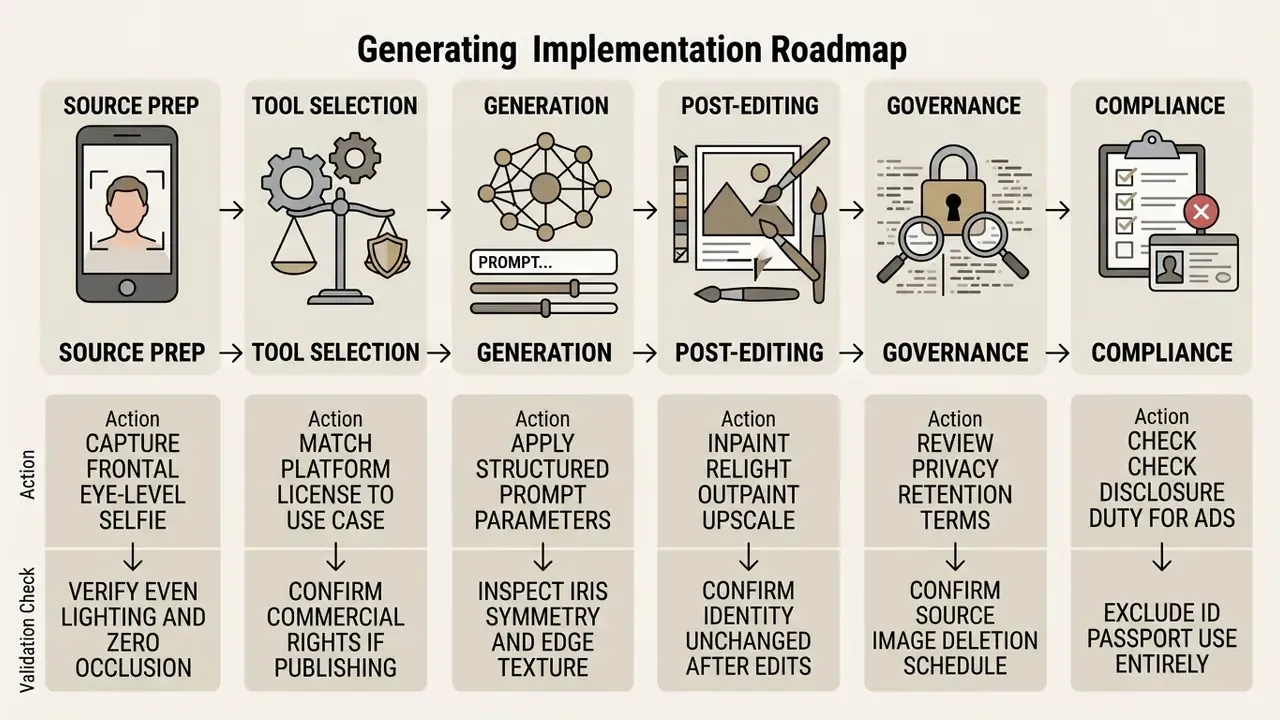
Limitations and open questions
Three gaps remain honest to state. First, detection research is unstable: accuracy figures move between 53 and 62 percent across studies, so no institution should rely on human review to spot synthetic imagery. Second, vendor retention claims are self-reported, and independent verification of deletion is rare, which leaves a residual assumption in every control checklist above. Third, disclosure duties under the EU AI Act and state-level US rules are still being interpreted, so a compliant campaign in Q1 2026 may need relabeling later in the year.
A safe next step, for individuals and institutions alike: run one pilot cohort, keep the vendor log, and re-read the license before anything reaches a paid channel.
To benchmark leading platforms side by side, review our comparison of the best AI image generators and browse the reference index for adjacent workflows such as photo editing, outpainting, and voice generation.
Appendix A: Editorial Corrections and Source Notes
This appendix preserves the original wording of statements revised during editorial review, together with the verification outcome. It exists so readers can audit the change history rather than trust an unmarked edit.
| Original statement (previous version) | Verification outcome | Current version |
|---|---|---|
| "Research from Columbia University emphasizes placing the primary subject description at the absolute beginning of the prompt to ensure attention mechanisms prioritize facial structure over background details (Columbia University Prompt Engineering Guidelines)." | Attribution could not be verified against a retrievable primary document. | Retained as an editorial prompt-ordering recommendation, supported by vendor prompt references that use the subject → action → style sequence, with no academic attribution. |
| "Empirical studies demonstrate that normalizing input lighting and camera angle increases facial recognition match rates from 1.5 percent to 62.1 percent in identity-preserving generative systems (CiteseerX, Frontal Face Synthesis Study)." | Specific figures could not be tied to a citable, currently retrievable study; the directional finding is supported by frontalization and illumination-normalization literature. | Replaced with the depth-based selfie perspective-distortion rectification pipeline (2023–2024) and a general statement that pose and illumination normalization improve downstream recognition. |
| "Corporate style guidelines from major institutions require neutral, non-distracting backgrounds and natural posture to maintain brand consistency (Munich Re Corporate Photography Policy)." | The named corporate policy document could not be verified in the research set. | Reformulated as a convergent summary of enterprise portrait guidance and platform profile-photo advice, without single-source attribution. |
| "Artistic presets convert user photographs into distinct visual media styles... (Creative Portraiture CAN Study)." | Weak, non-specific citation. | Replaced with the Conditional Creative Adversarial Network (CAN/CCAN) WikiArt portraiture study. |
| "In automated image synthesis, identity preservation without clear governance and data control creates operational and legal exposure." (Marcus Hale) | Expert commentary, not a published finding; Marcus Hale is the author. | Marcus Hale, author. |
| Case studies describing 120 employee profiles and 45 remote advisors. | No audited client data available. | Relabeled as illustrative composite scenarios with hypothetical figures. |
| FAQ heading containing a non-English keyword variant ("kostenlos"). | Language inconsistency in an English-language reference document. | Rewritten as a plain-English mobile and localization question that references the German query variant in quotation only. |
| Duplicate internal anchors ("compare options" used for two different destinations). | Navigation ambiguity. | Replaced with distinct, descriptive anchors pointing to the calculator resources, pricing guide, and reference index respectively. |
| Standalone table of contents block. | Duplicated the H2 structure without adding decision value. | Replaced with a short governance framing section for risk and compliance readers. |
For adjacent definitions and workflow explainers, compare options across the full reference index.