Last editorial update: 2026. Reviewed by the AI Governance and Model Risk editorial desk.
Executive Summary for Risk and Finance Leaders
What Is an AI Report Generator?
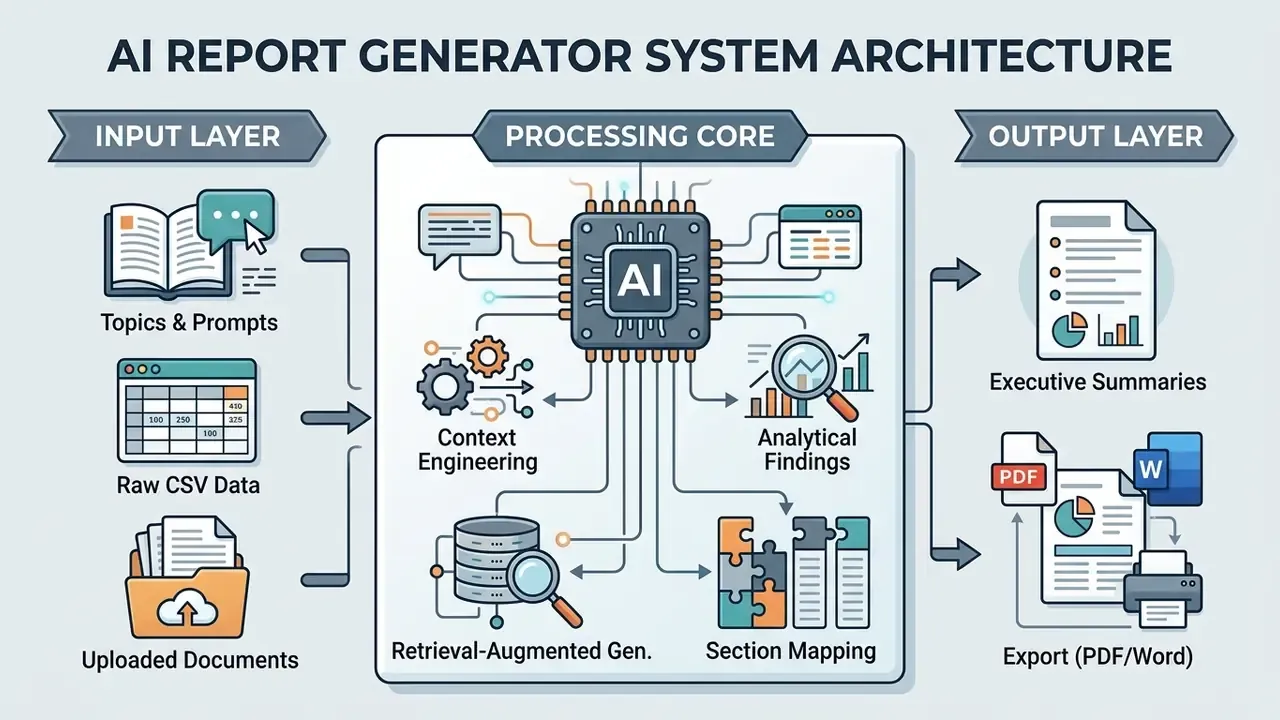
An AI report generator is a digital application that automates the report writing process by parsing user inputs, organizing narrative structures, and outputting formatted drafts. These systems take raw context, such as text summaries, spreadsheet metrics, or research notes, and map it into standard document sections: executive summaries, methodologies, findings, and strategic recommendations.
How AI Generates a Structured Report
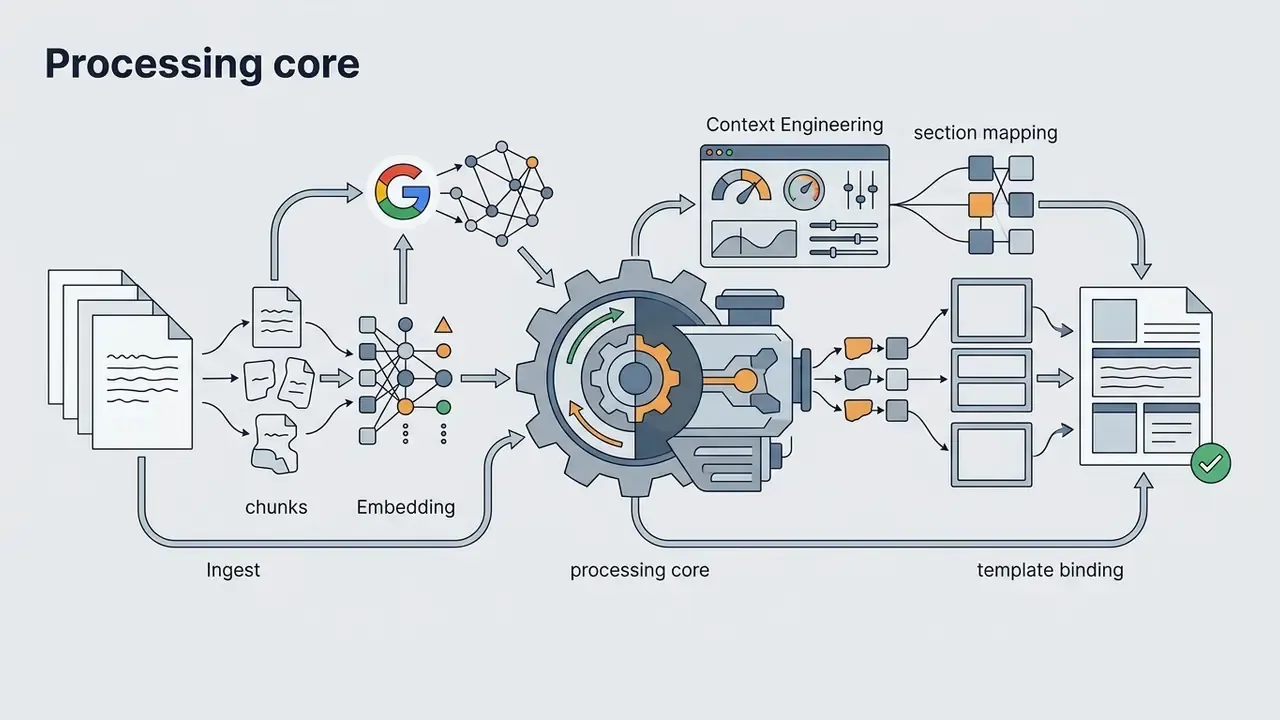
An AI report generator builds a structured report by pushing inputs through a retrieval, structuring, and decoding pipeline. Long-context language models analyze the prompt, extract relevant facts, and construct an outline aligned with predefined document rules. Research published in ACL Findings (2025) on LLaMA-Clinic shows that task-specific fine-tuning and reinforcement learning let AI systems generate structured, multi-section outputs with a 92.8% acceptability rating among expert reviewers.
The generation engine maps extracted data points into logical headings and holds narrative coherence section by section. With complex data sets, advanced pipelines use retrieval-augmented generation (RAG) to cross-reference claims against ingested reference files. That pipeline is what keeps generated reports inside a standardized format instead of drifting into unformatted free text.
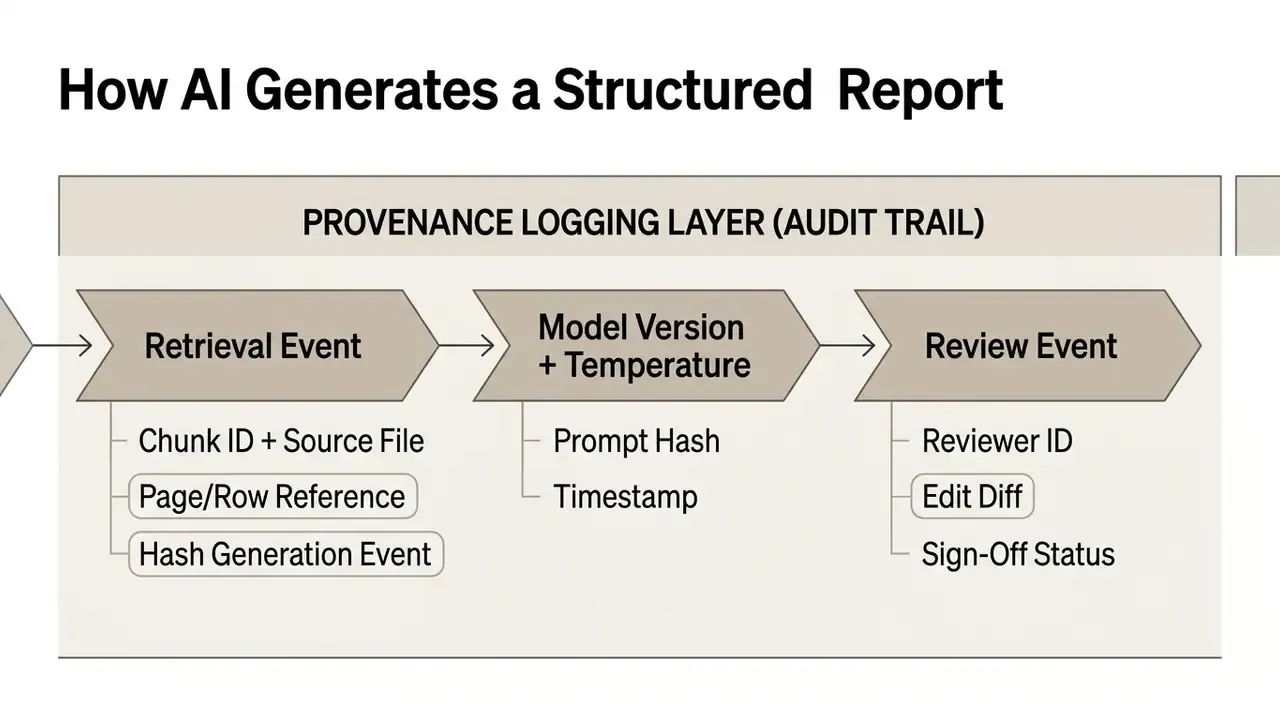
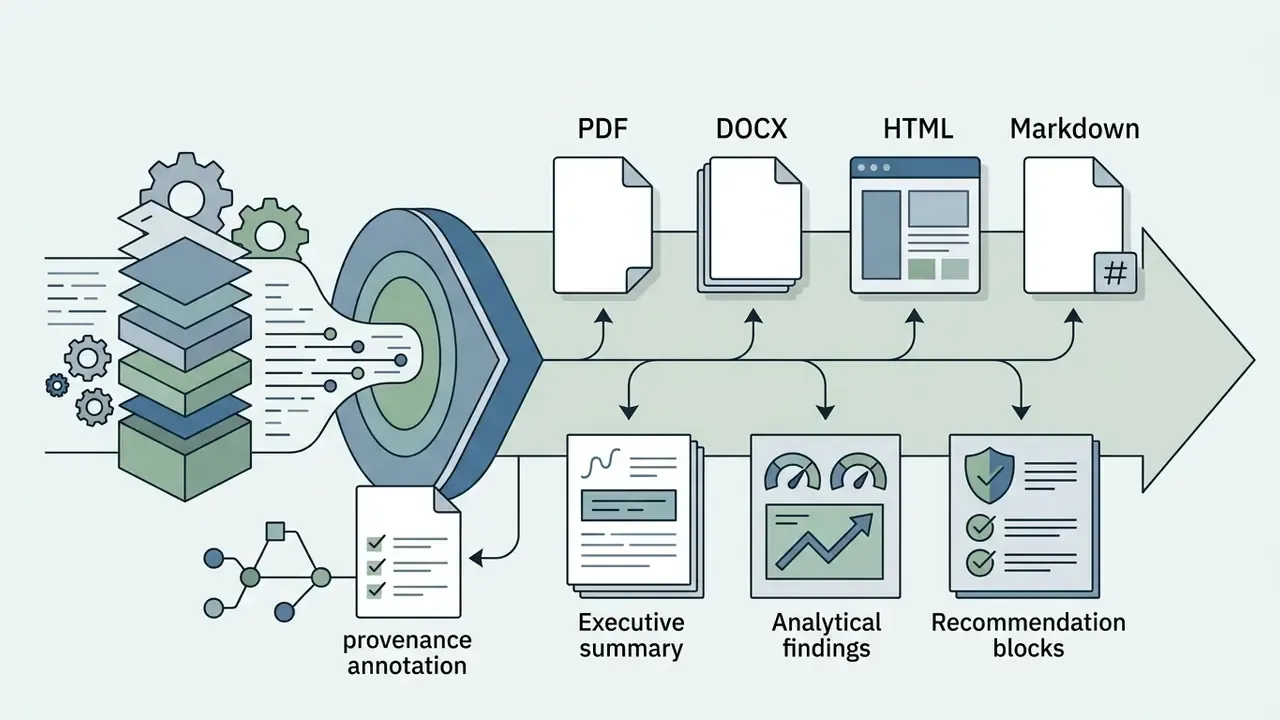
For regulated functions, provenance logging at the retrieval-chunk level is what converts a generative draft into auditable evidence. Each numeric claim should trace back to a specific row, page, or table in an approved source artifact, with model version and decoding parameters recorded alongside the output. One practical detail auditors ask about early: can you reproduce yesterday's report from yesterday's inputs? If not, the pipeline is not yet controlled.
Types of Reports You Can Create With AI
Who Needs an AI Report Maker
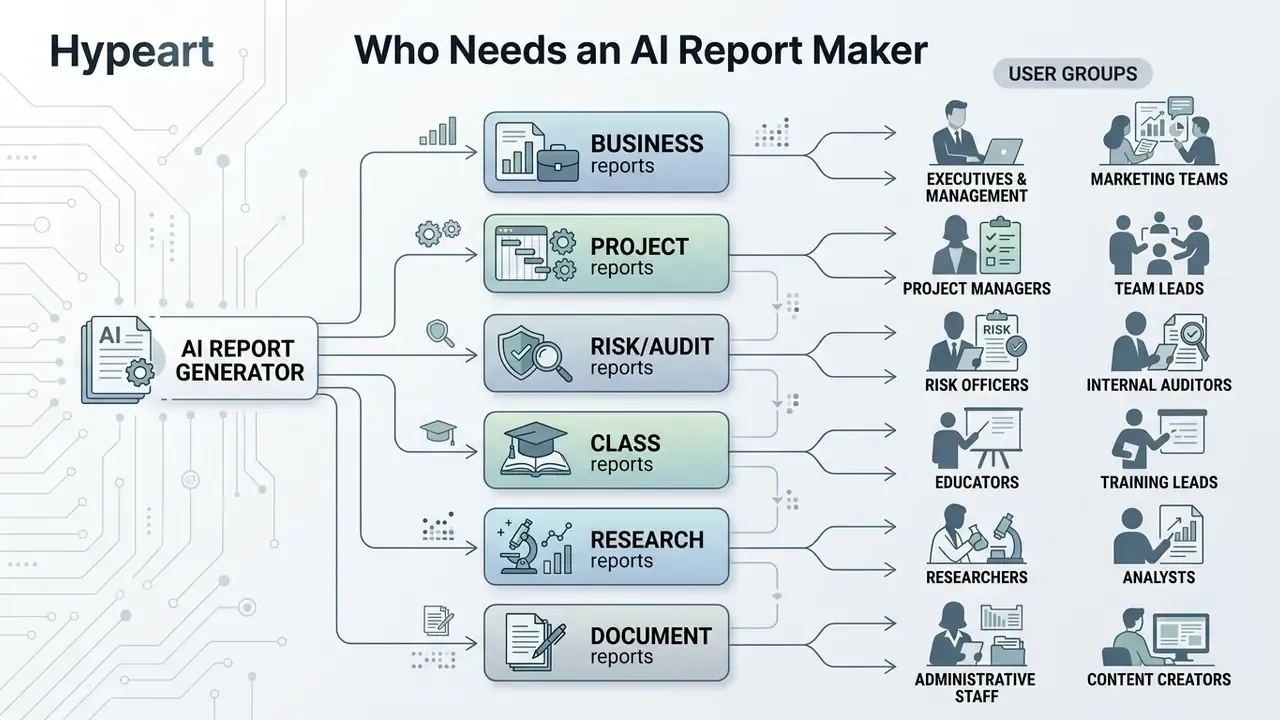
An AI report creator serves several professional roles by cutting manual drafting time and standardizing formatting across operations:
- Business Executives and Analysts Operations teams draft market summaries and internal performance reviews directly from raw telemetry or financial spreadsheets.
- Risk, Audit and Compliance Leaders Chief Risk Officers, Heads of Model Risk, and internal audit teams assemble control narratives, validation evidence packs, and regulatory briefings with traceable source references.
- Project Managers Delivery leads compile weekly progress updates, risk assessments, and closure documents across multi-departmental teams. A project report AI generator earns its keep on the fourth or fifth repeat cycle, not the first.
- Research Teams and Consultants Analysts synthesize secondary market research, organize interview transcripts, and draft initial client-facing briefing papers.
- Students and Academic Researchers Coursework authors organize preliminary findings, build outlines, and draft structured assignments. An AI report generator for students is a scaffolding tool, nothing more.
When benchmarking output styles across model families, teams run controlled prompt suites that vary tone, length, and formality, then score the drafts against a fixed editorial rubric before locking a production configuration. Two side notes from that process. Deliberately playful test sets, of the kind catalogued in the collection of funny ai prompts, are useful for probing tone boundaries and refusal behavior. And the widely shared errors documented in the review of funny google ai answers are a cheap reminder of what an unverified generative claim looks like in public. Teams evaluating adjacent generative tooling categories can also review the methodology in the comparison of the best AI art generators as a template for structured multi-vendor scoring.
What You Need Before Creating a Report With AI
High-quality report generation depends on structured, explicit inputs supplied before the model runs. Generative systems work on the context you give them; incomplete or ambiguous input raises the odds of narrative gaps and factual errors.
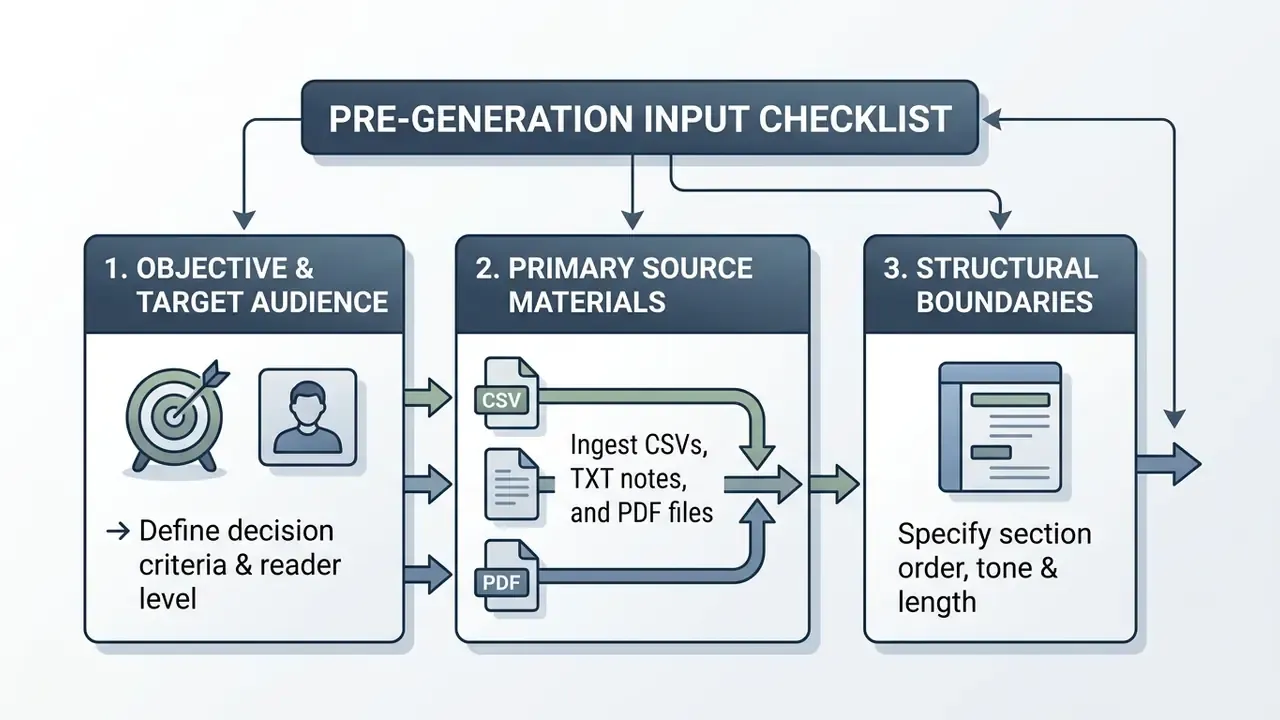
Checklist in list form: (1) objective, decision criteria and reader seniority; (2) approved primary source artifacts with version identifiers; (3) structural boundaries covering section order, tone, page length, and citation requirements.
Define the Report Topic, Objective and Audience
A precise prompt needs the core topic, an explicit business objective, and the target reader profile. Prompt engineering guidance from the U.S. National Institute of Standards and Technology (NIST AI 600-1; confirm the current release before formal citation in 2026) stresses that generative inputs must define task constraints, organizational domain context, and target output formats.
Audience definition drives vocabulary, technical depth, and presentation style. An executive summary for a Chief Risk Officer needs dense metrics and risk-adjusted parameters. An operational briefing needs process steps and milestone tracking. Without explicit audience boundaries, models default to generic web-style phrasing. That is the single most common cause of a draft that reads fine and helps no one.
Add Text, Data, Notes or Existing Documents
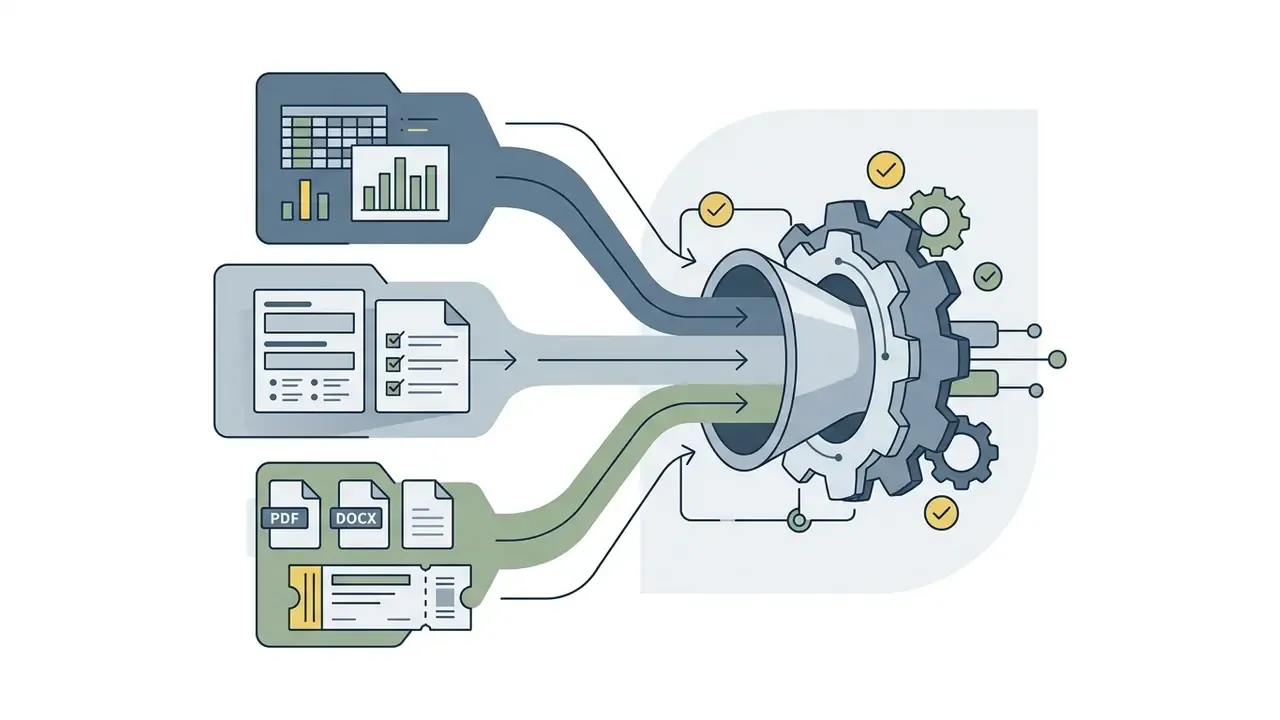
Supplying factual primary sources suppresses hallucination and grounds the output in verified evidence. An AI data report generator processes uploaded CSV spreadsheets, raw interview notes, project logs, or PDF research papers.
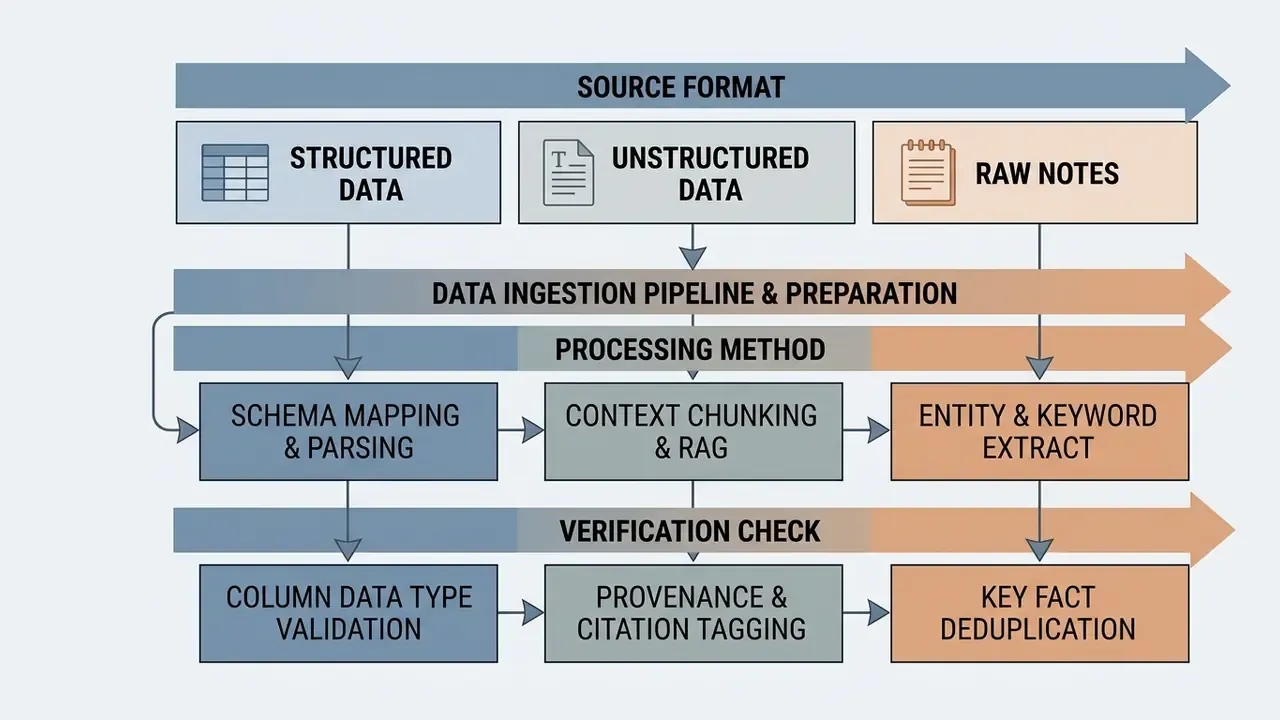
The U.S. Department of Commerce Generative AI and Open Data Guidelines (2025) recommend submitting inputs in structured, machine-readable formats with clear field definitions. Clean, structured source files keep metrics consistent across the whole document.
«Models without local fine-tuning show at least a 15% drop in F1 and at least 35% lower ROUGE-L/BLEU under external validation.»
Source: Evaluating LLMs for Clinical Note Processing, PMC (2024). https://pmc.ncbi.nlm.nih.gov/articles/PMC12988631/
Teams handling scanned source artifacts should normalize them before ingestion. Guidance on converting captured documents into machine-readable text sits in the overview of image-to-text conversion tools.
Choose Report Structure, Length and Tone
Explicit document length, tone of voice, and structural headings are what make the output usable. Official style frameworks, including the UK Government Digital Service guidelines, recommend concise active phrasing with distinct structural headings.
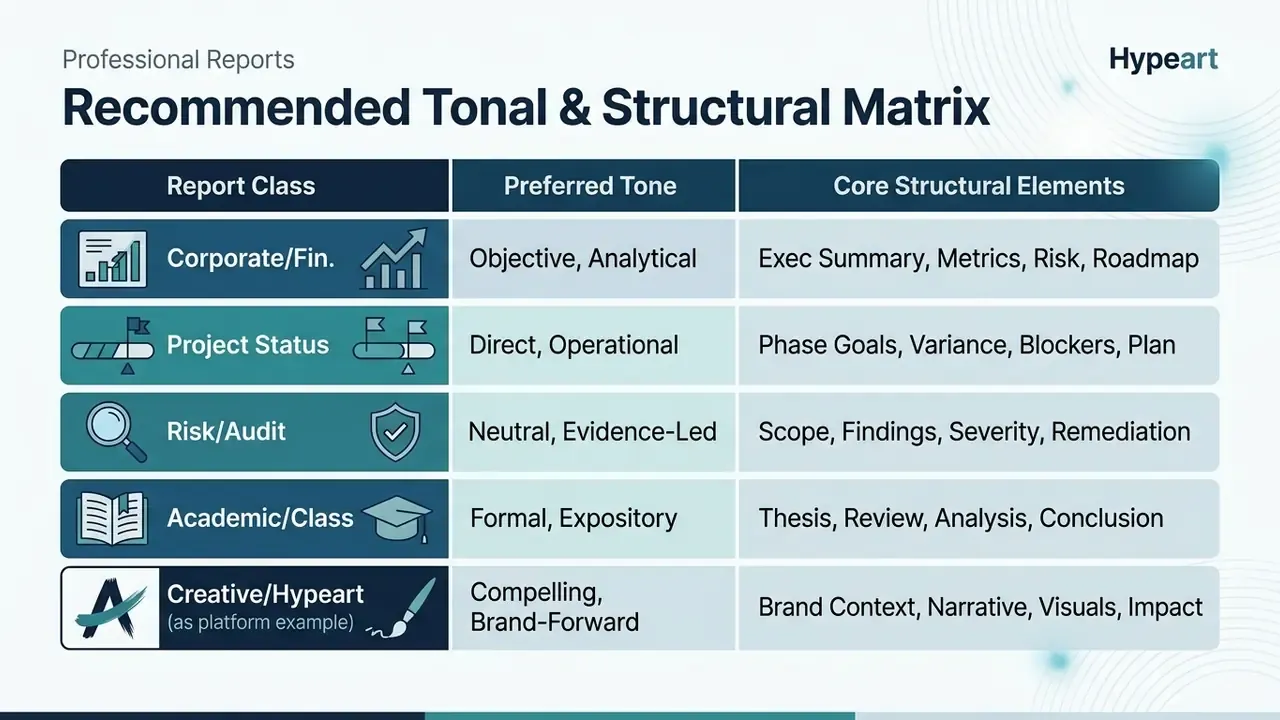
Specifying the exact section hierarchy stops the model from quietly skipping an analytical step. In high-volume enterprise projects, operational leaders use workflow connectors through custom api endpoints to pass structural parameters straight from internal project management databases. Teams estimating token and rendering costs for automated pipelines can review comparable developer economics in the Google Veo API implementation guide.
How to Use an AI Report Generator Online
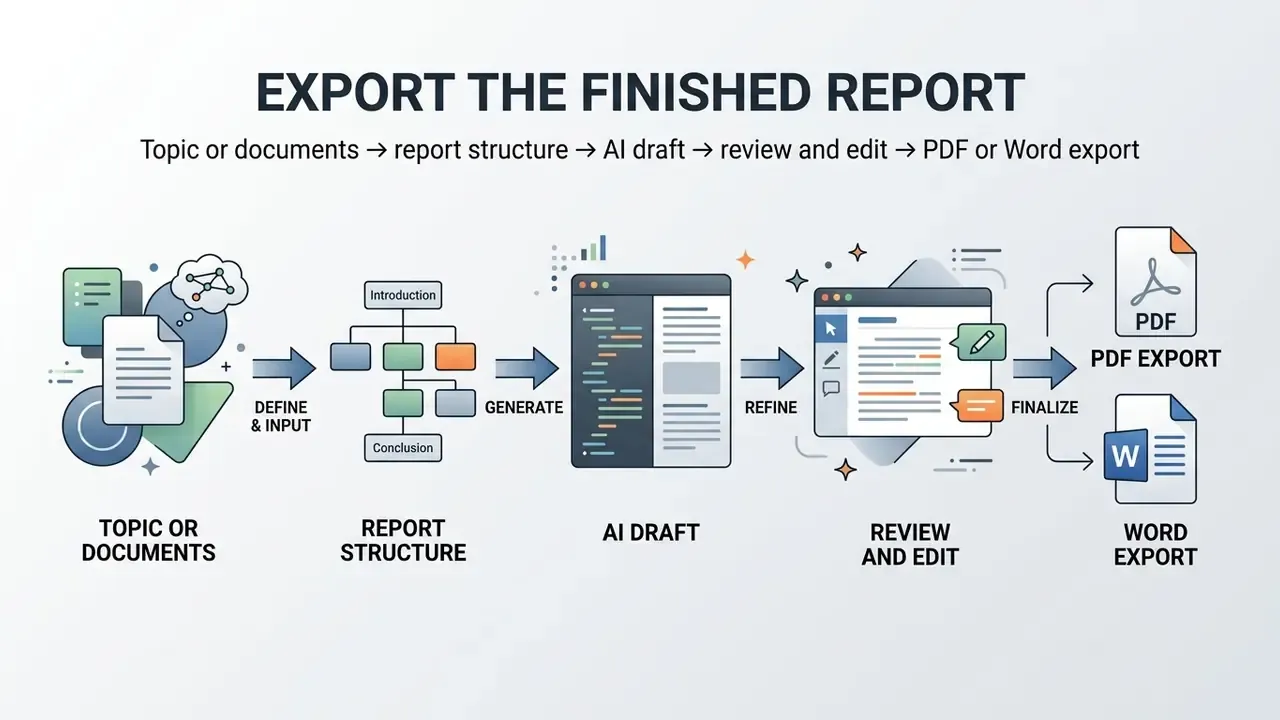
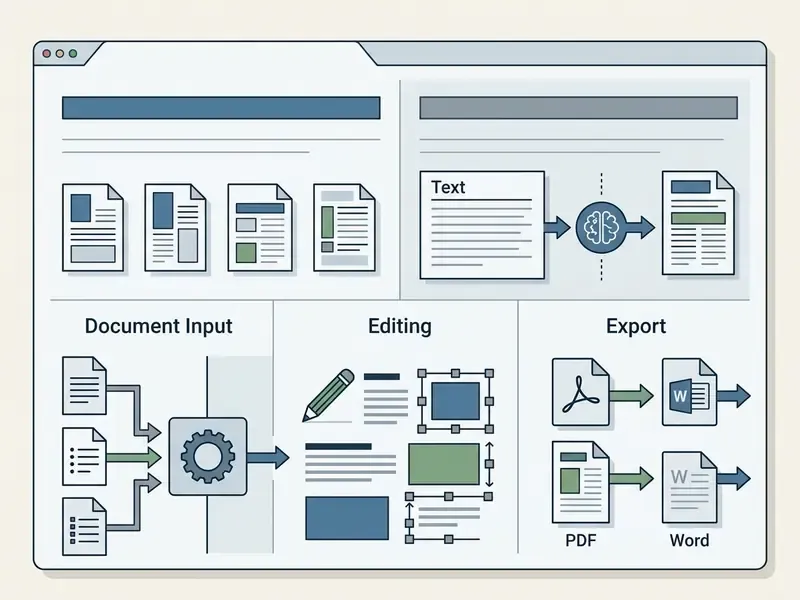
Creating a report with an online AI report generator follows a four-stage workflow: input ingest, automated generation, manual draft review, and document export. The sequence matters. Skip review and you have shipped an untested model output to a stakeholder.
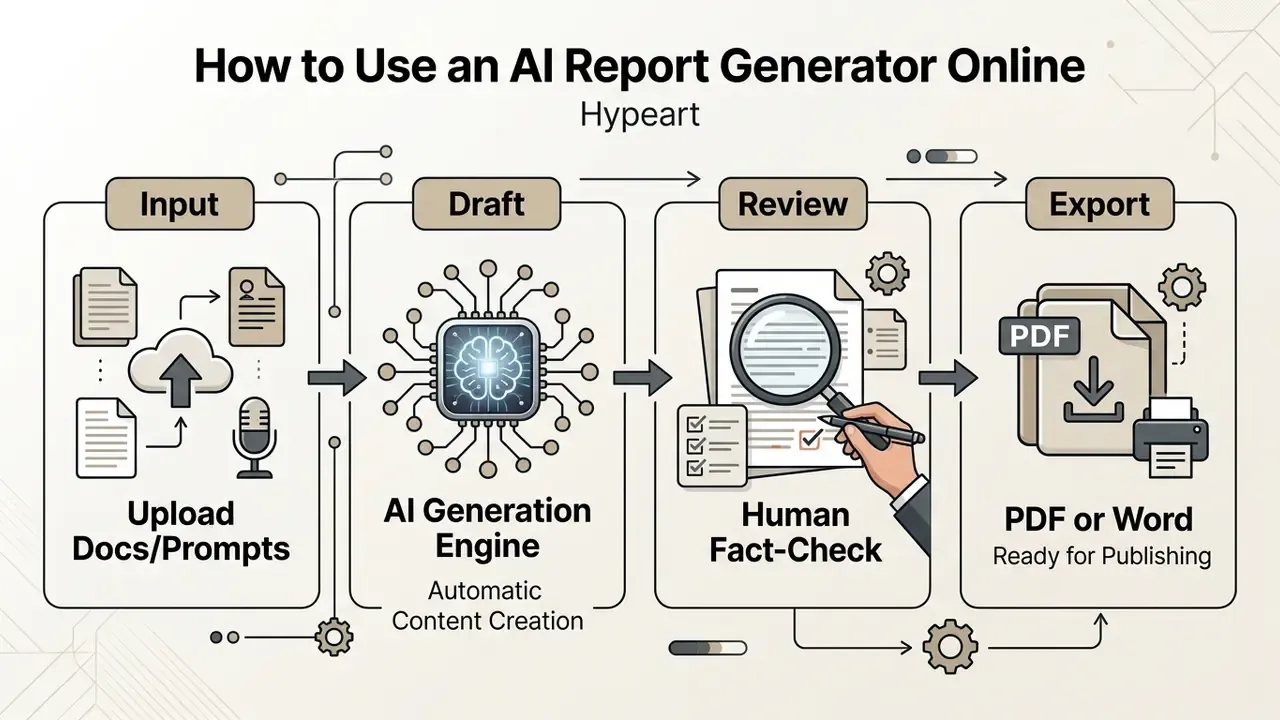
Enter a Prompt or Upload Source Materials
The first operational phase is pasting a structured prompt or uploading primary source files into the generator tool. High-performing prompts follow the P.O.C.K. framework: Persona, Output, Context, and Knowledge.
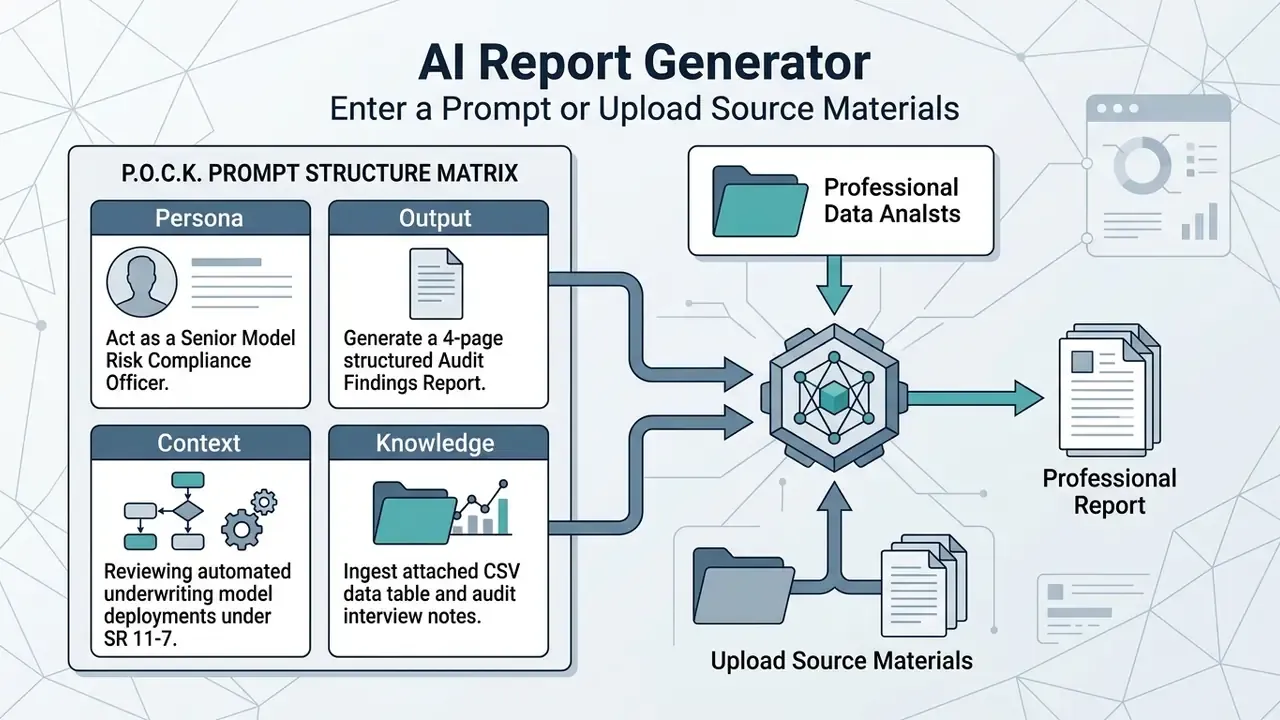
Production-Ready Report Prompt Library
Multilingual Report Generation and Localization Pipeline
Multimodal report generators can take input context in one language and produce verified output in more than 50 target languages, including English, German, French, Spanish, Portuguese, Japanese, Korean, Simplified and Traditional Chinese, Hindi, and Standard Arabic. Stronger pipelines apply language-specific contextual embedding spaces to preserve native corporate phrasing rather than literal word-for-word translation.
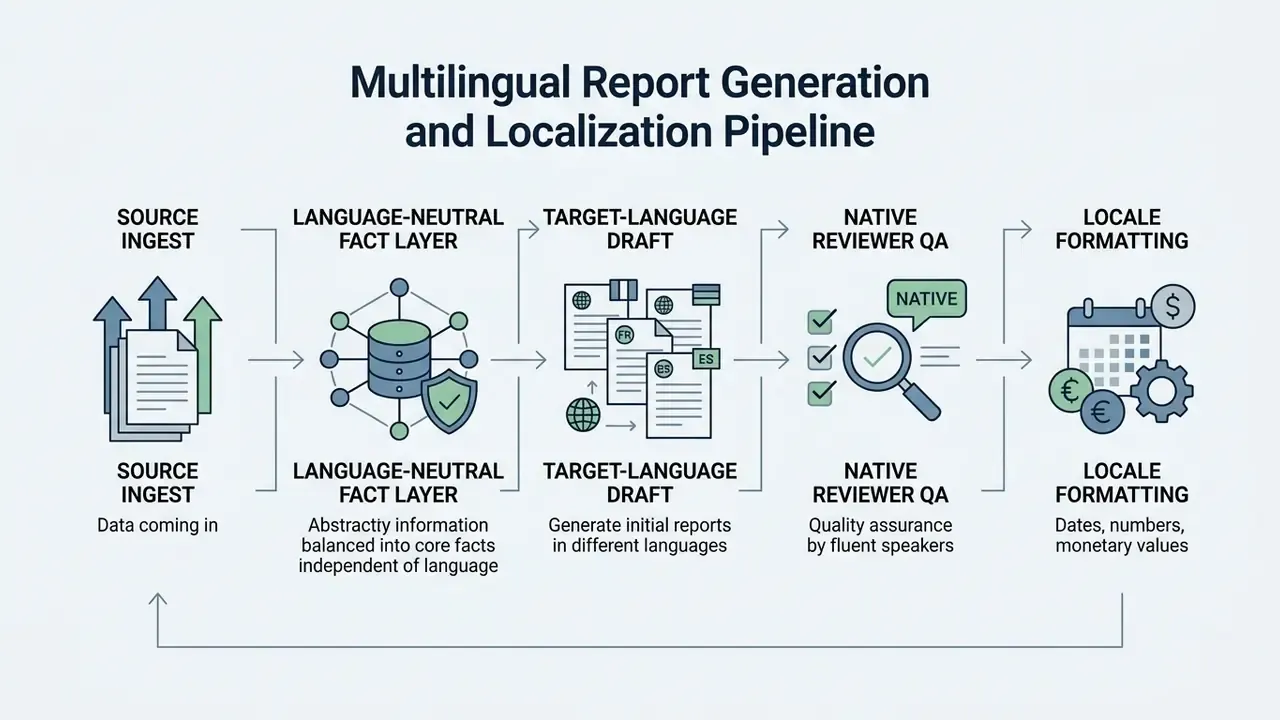
Localization QA must verify numeric formatting conventions (decimal and thousands separators), currency symbols, date order, and regulatory terminology equivalence. For right-to-left languages such as Arabic and Hebrew, layout engines must confirm mirrored table alignment and correct heading direction in exported PDFs. A mistranslated capital-adequacy term costs more to fix after distribution than before.
Workflow ROI: AI-Driven vs. Traditional Report Creation
Moving from manual compilation to a retrieval-augmented AI workflow changes operational metrics sharply. Independent product research indicates the average professional spends two to four hours per report on writing and formatting alone. A structured AI workflow compresses that phase into minutes and shifts the effort toward verification.
| Workflow Phase | Traditional Manual Process | AI-Augmented Workflow | Efficiency Gain |
|---|---|---|---|
| Data Extraction & Aggregation | 90–120 mins (manual copy-pasting) | 3–5 mins (automated CSV/PDF ingest) | ~95% faster |
| Outline & Structural Mapping | 30–45 mins (manual formatting) | Instantly mapped via templates | ~90% faster |
| Draft Narrative Generation | 120–180 mins (writing text) | 1–2 mins (LLM generation) | ~98% faster |
| Fact-Checking & Quality Audit | 30–45 mins (peer review) | 15–20 mins (3-Tier Audit Protocol) | ~50% faster |
| Total Time per 10-Page Report | 4.5 – 6.5 Hours | 20 – 30 Minutes | ~90% Total ROI |
These are gross figures. The governance section below converts them into risk-adjusted ROI by adding control costs, validation overhead, and residual risk exposure.
Generate, Review and Refine the Report Draft
Once inputs are processed, the engine builds a first-pass draft from the supplied parameters. The user then performs an active editorial review covering structural flow, factual accuracy, and sentence clarity.
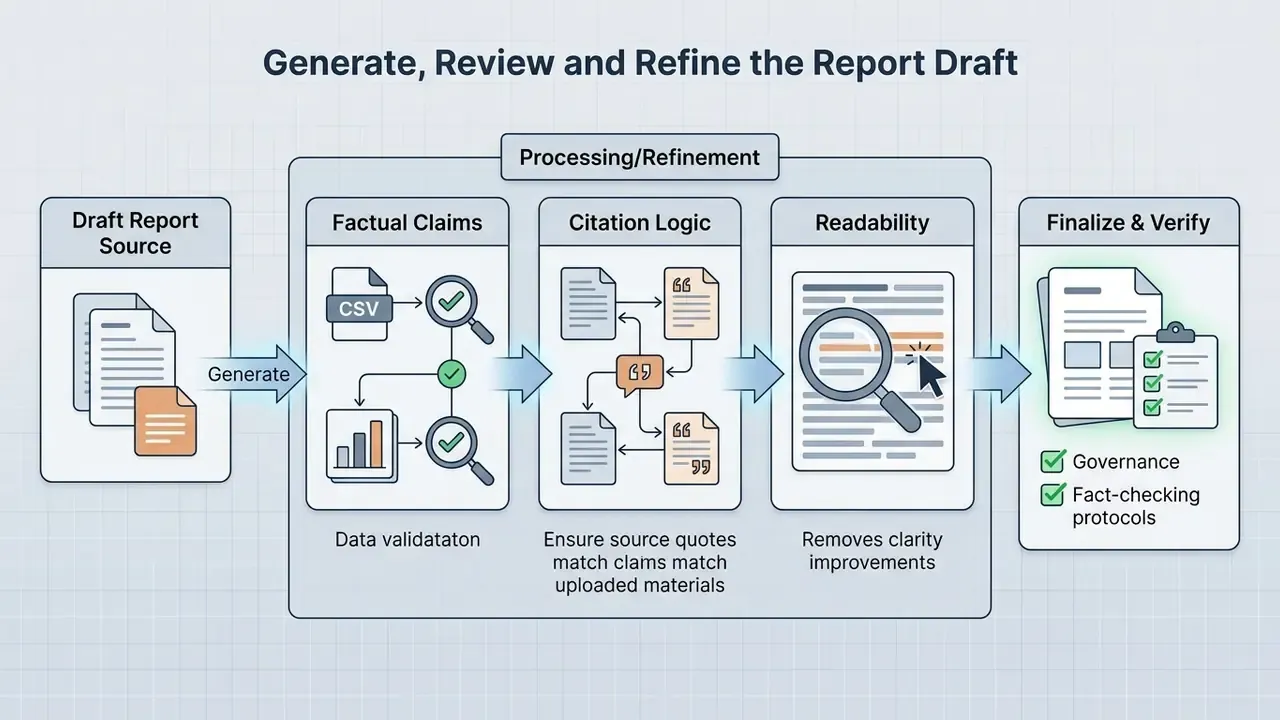
Updated benchmark evidence. A benchmarking study on clinical note summarization built on the MIMIC-IV corpus evaluated 16 large language models across 30,000 text samples and reported measurable variation between model families and summarization modes:
«Across 16 LLMs tested on 30,000 clinical notes, Gemma-3-27B led extractive summarization, while smaller models frequently matched larger ones.»
Source: MIMIC-IV Clinical Note Summarization Benchmark, PMC (2024/2025). https://pmc.ncbi.nlm.nih.gov/articles/PMC12872987/
The practical implication: model size alone does not predict report accuracy. Task fit, decoding settings, and source-grounding design matter more. Human oversight still catches the subtle contextual omissions that automated metrics miss entirely. Use inline editors to refine section phrasing and strip redundant blocks. Teams needing setup guidance can consult AI Media Support and Troubleshooting protocols, and questions about output ownership are covered in the guidance on commercial licensing of AI tools.
For reproducible regulated output, set deterministic decoding controls (temperature at or near zero, fixed seed where supported), pin the model version, and store the prompt hash. Numerical consistency checks should recompute at least one derived figure per table independently of the model. It is a small step, and it catches most of the embarrassing errors.
Export the Finished Report
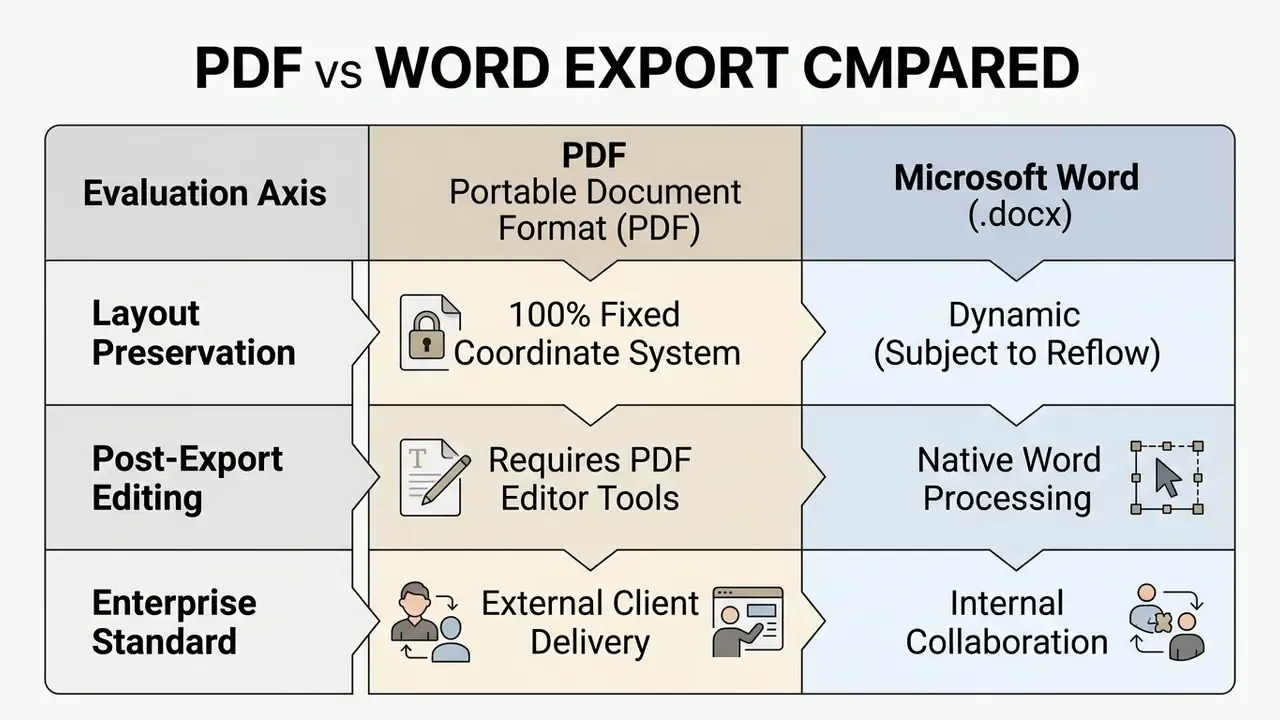
The final step exports the report into standard distribution formats, primarily PDF or Microsoft Word (.docx). PDF exports preserve visual layout, font scaling, and pagination across mobile and desktop viewers. An AI report generator in Word document format is usually the internal choice, while PDF goes to clients and committees.
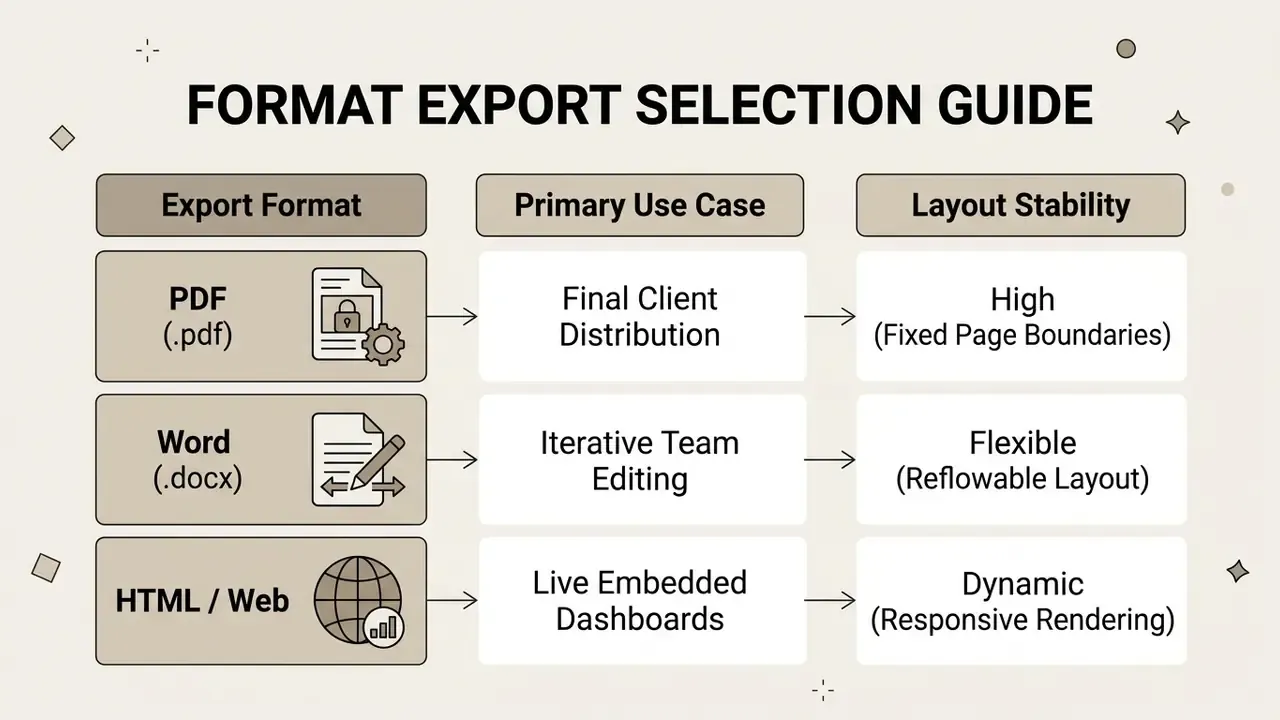
Word formats support ongoing collaborative editing, track-changes review, and integration with enterprise document management platforms such as SharePoint or Google Drive.
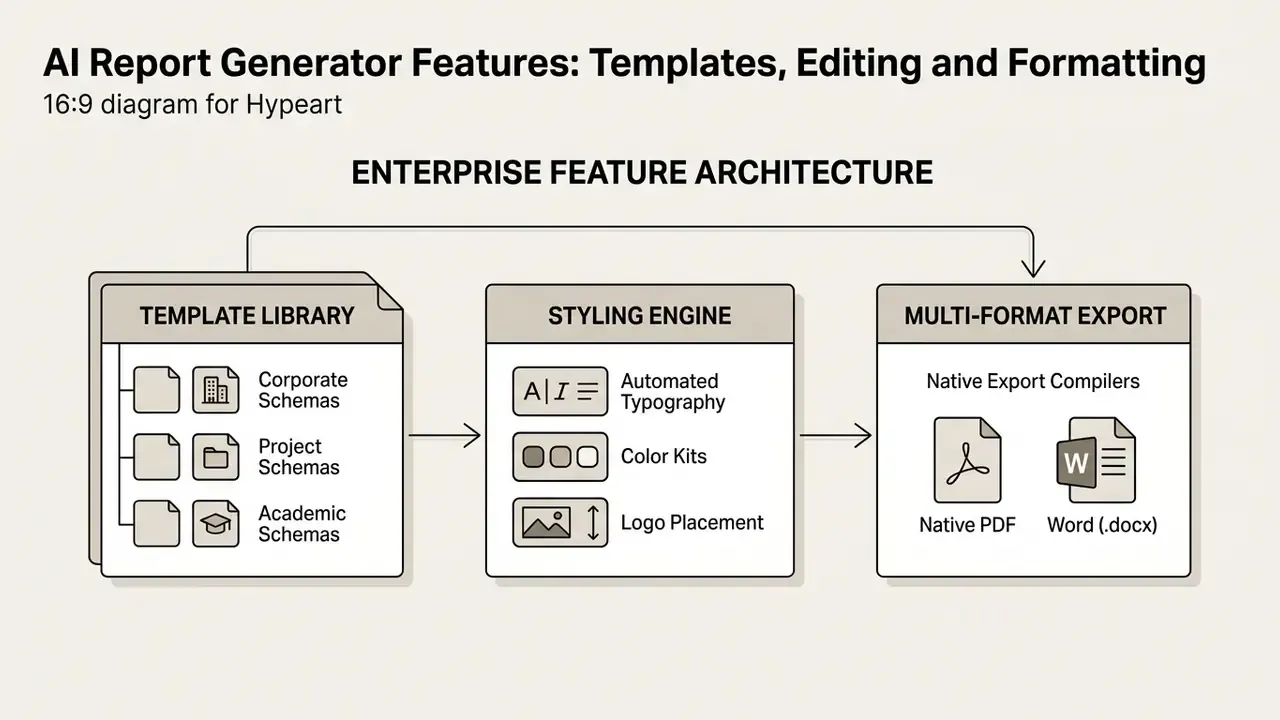
AI Report Generator Features: Templates, Editing and Formatting
Modern AI report generators bundle custom template libraries, dynamic content editing, and automated design styling to produce publication-ready documents. Evaluating those features helps organizations pick software that matches how their teams actually work. Groups comparing adjacent creative and document-editing suites can review capability breakdowns such as the guide to online photo editors and the AI photo editing tools overview as a model for feature-by-feature evaluation.
Report Templates for Business, Project and Class Work
«The K-SOAP format extends the classic SOAP structure with a keyword section, letting readers extract essential information quickly.»
Source: CliniKnote: Clinical Note Generation from Doctor-Patient Conversations, arXiv (2024). https://arxiv.org/html/2408.14568v1
The K-SOAP example points at a broader principle: adding a machine-readable key-fact block at the top of any template measurably shortens reader scan time and simplifies downstream verification.
Custom Content, Structure and Professional Formatting
Advanced generators expose real-time formatting controls for corporate brand assets, color palettes, custom typography, and logo placement. Automated layout engines format headings, blockquotes, bulleted lists, and data tables without manual desktop publishing work.
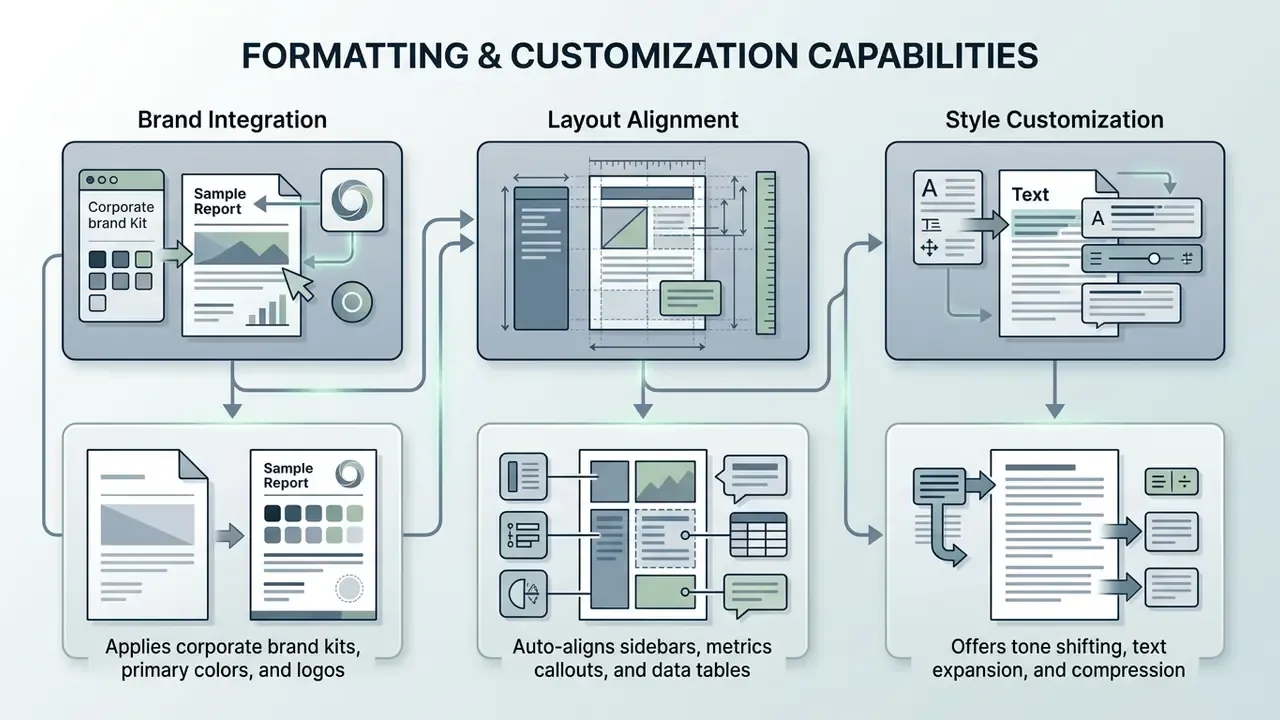
When configuring corporate formatting parameters, publishing teams load standardized brand assets, custom typography suites, and vector logo files. For data-visual integration, enterprise teams pair raw text outputs with structured dashboards or dedicated presentation suites to keep visual cohesion across client deliverables. Lock design systems at the template level so individual authors cannot override typography, table styling, or disclosure footers. Otherwise you will spend the next quarter reconciling eleven versions of the same risk table.
Generate Reports in PDF and Word Document Formats
Dual export paths to PDF and Word (.docx) keep output compatible with corporate publishing standards. PDF rendering locks visual element coordinates, so formatting does not shift between operating systems.
Technical Print and Layout Dimensions
When configuring output compilers in an AI document generator, match layout geometry to distribution requirements:
- A4 Standard (International Business) 210 × 297 mm | 794 × 1123 px at 96 DPI | 2480 × 3508 px at 300 DPI print target.
- US Letter (North American Standard) 8.5 × 11 inches (215.9 × 279.4 mm) | 816 × 1056 px at 96 DPI | 2550 × 3300 px at 300 DPI.
- US Tabloid / Ledger (Executive Dashboards) 11 × 17 inches (279.4 × 431.8 mm) | 1632 × 1056 px at 96 DPI.
- Landscape Presentation Page 1123 × 794 px at 96 DPI (A4 rotated), suited to wide KPI tables.
- Booklet / Square Format 793 × 793 px at 96 DPI for short client-facing summaries.
- Flyer / One-Page Brief 416 × 865 px at 96 DPI for condensed distribution formats.
Set bleed and safety margins before export: 3 mm bleed for print-bound reports and a minimum 12.7 mm (0.5 inch) inner margin for bound left-edge documents. Embed fonts in PDF output to prevent substitution shifts, since layout drift on Word-to-PDF conversion most often starts with an unavailable local typeface.
Exporting to Word produces reflowable text containers, so team members can keep editing in standard desktop software. Layout-preserving DOCX modes rely on text-box or table-based structures, meaning they approximate rather than exactly replicate fixed-page geometry. For complex financial projection reports, analysts combine generated text summaries with tools from the AI Media Calculators suite to model precise quantitative projections.
| Feature Capability | Basic AI Free Generators | Advanced Online Report Makers | Enterprise AI Document Suites |
|---|---|---|---|
| Pre-built Templates | 3–5 Basic Layouts | 50+ Specialized Categories | Custom Corporate Templates |
| Document Input Support | Text Prompt Only | PDF, TXT, CSV Upload | Full Database & API Connectors |
| Custom Styling & Branding | None (Default Font) | Custom Colors & Logo | Full Brand Kit & Custom Fonts |
| PDF Export Quality | Standard (Watermarked) | High-Resolution Vector | Secure, Encrypted Layouts |
| Word (.docx) Export | Not Supported | Supported | Supported with Native Styles |
| Provenance / Citation Logs | None | Partial (inline references) | Full retrieval-level audit trail |
How to Check AI-Generated Reports Before Use
Publishing AI-generated reports without verification introduces legal, operational, and reputational risk. An explicit quality assurance protocol keeps outputs at professional standard before executive review or client delivery.
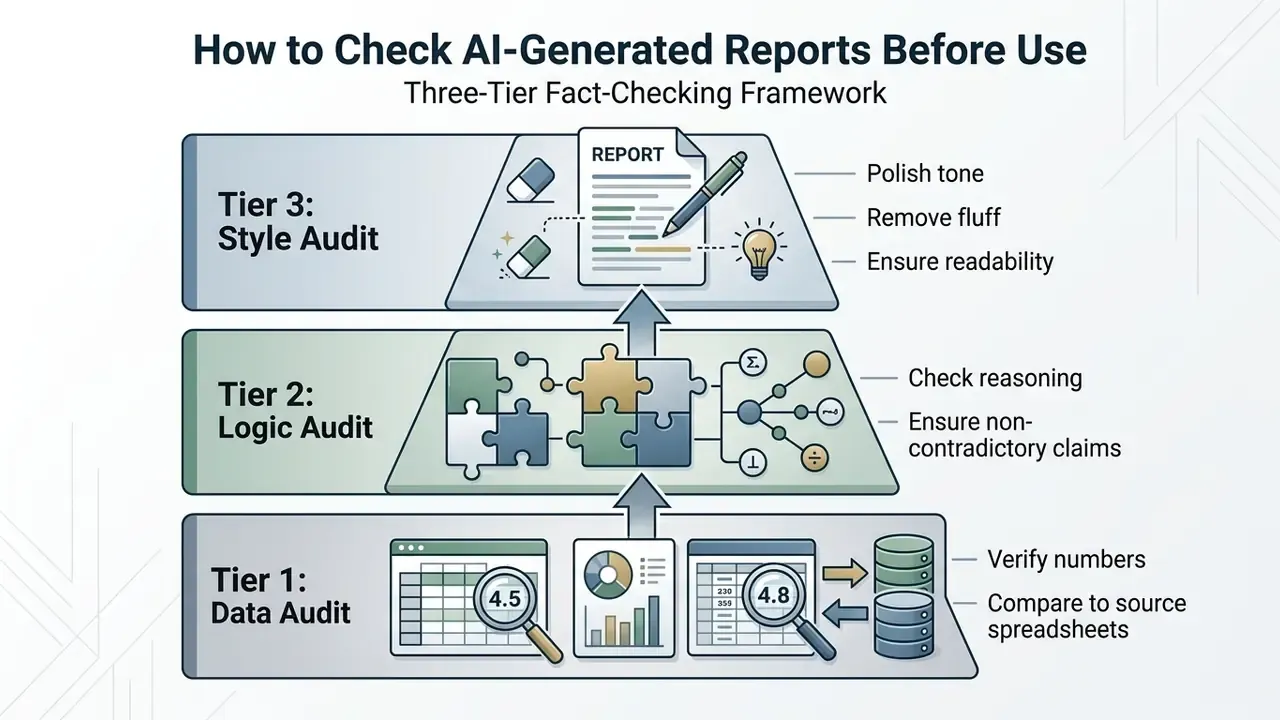
Tiers restated as a list: Tier 1 verifies every figure against its primary source; Tier 2 tests reasoning chains, directional logic, and internal contradictions; Tier 3 enforces readability, tone, and formatting standards.
Verify Data, Analysis and Key Statements
Verification means cross-referencing every metric, data point, and analytical claim against primary source data. The SIGIR 2024 ARGUE framework (Automated Report Generation Under Evaluation) argues that report quality rests on factual coverage, correct source attribution, and verification of individual information units.
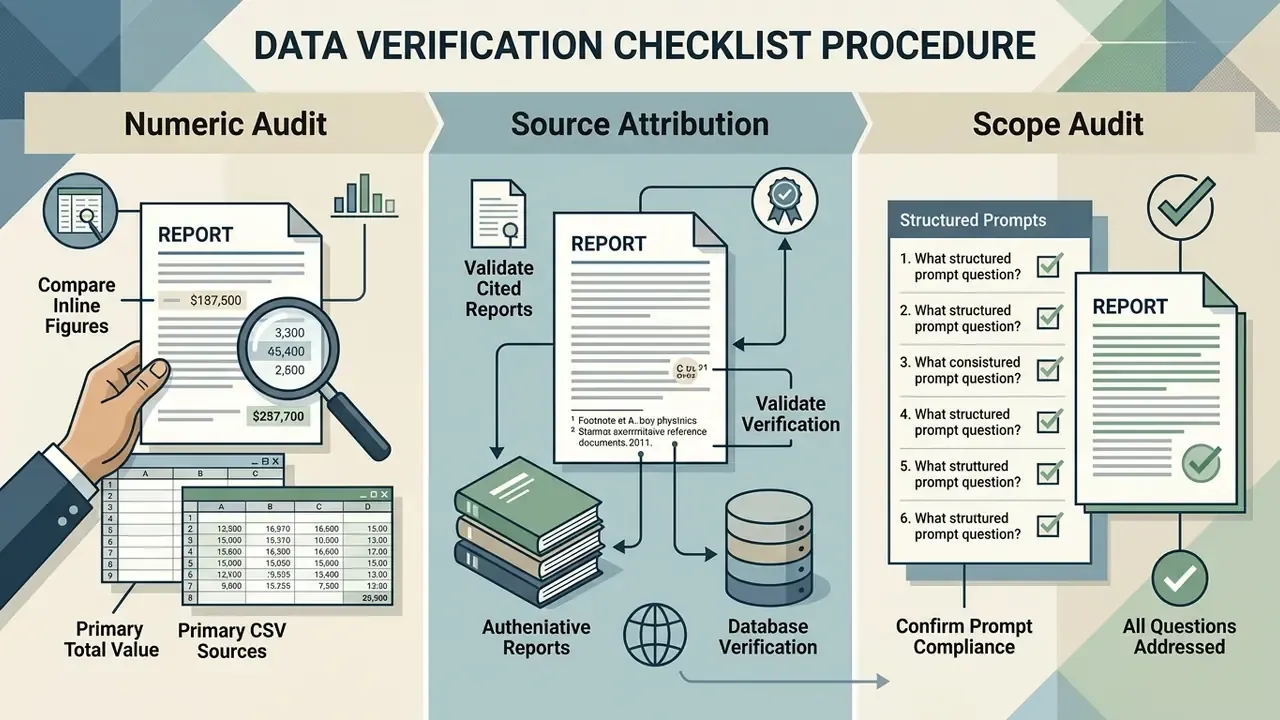
Inspect generated statistics with particular care. Models produce plausible-sounding metrics that have no backing whatsoever in the ingested dataset, and those are the numbers that travel fastest into a board pack.
Audit Trail and Provenance Checklist
Checklist0 / 9
Edit the Draft for Accuracy and Readability
Editorial refinement targets passive voice, repetitive phrasing, and weak transitions. The World Bank Group Publications Editorial Style Guide (2020) recommends cutting redundant passages, simplifying long sentences, smoothing transitions, and replacing passive constructions with active verbs.
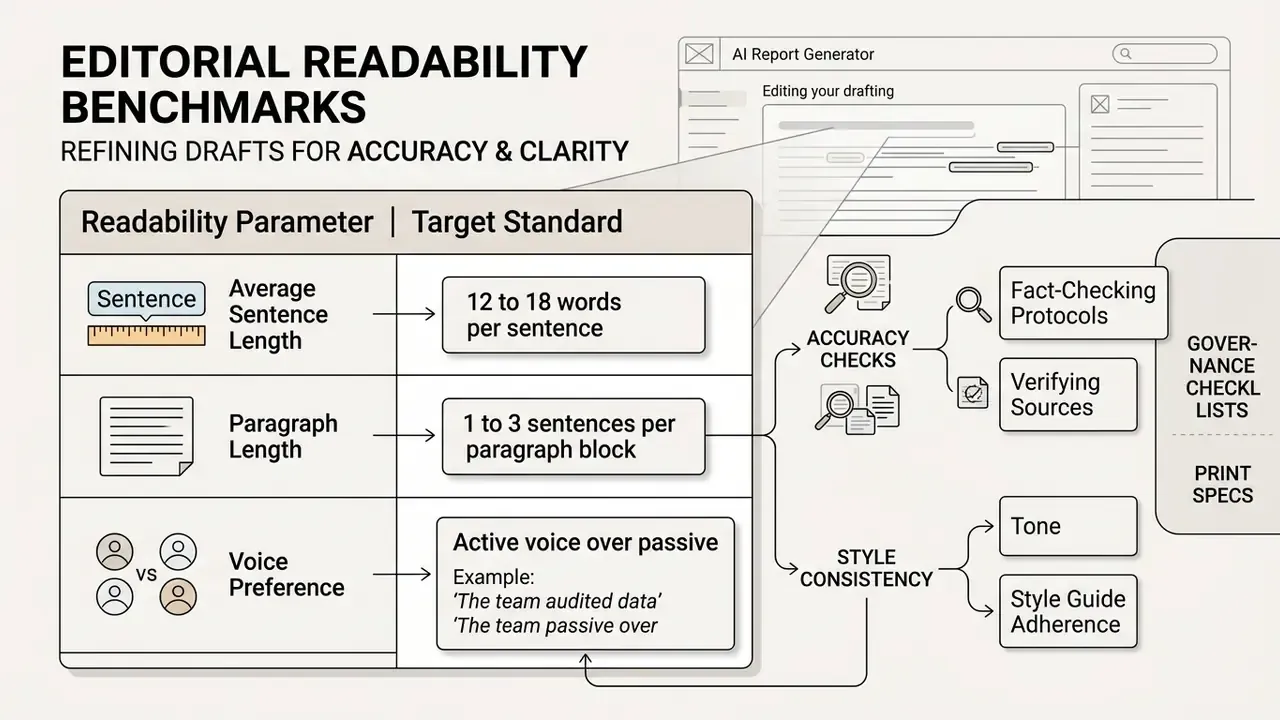
Reviewers should tighten verbose sections so key findings land near the top of each section. A useful redundancy test: for each paragraph, ask whether the same point already appeared earlier. If it did, delete the weaker instance instead of rephrasing it.
Prepare a Professional Version for Teams and Clients
Preparing a final report for enterprise distribution means applying consistent brand styling, verifying security permissions, and completing regulatory review. Newsroom and enterprise compliance guidance (IREX guidance note for newsrooms and journalists; verify the current release in 2026) states that AI-generated material must pass independent fact-checking and human oversight before sign-off.
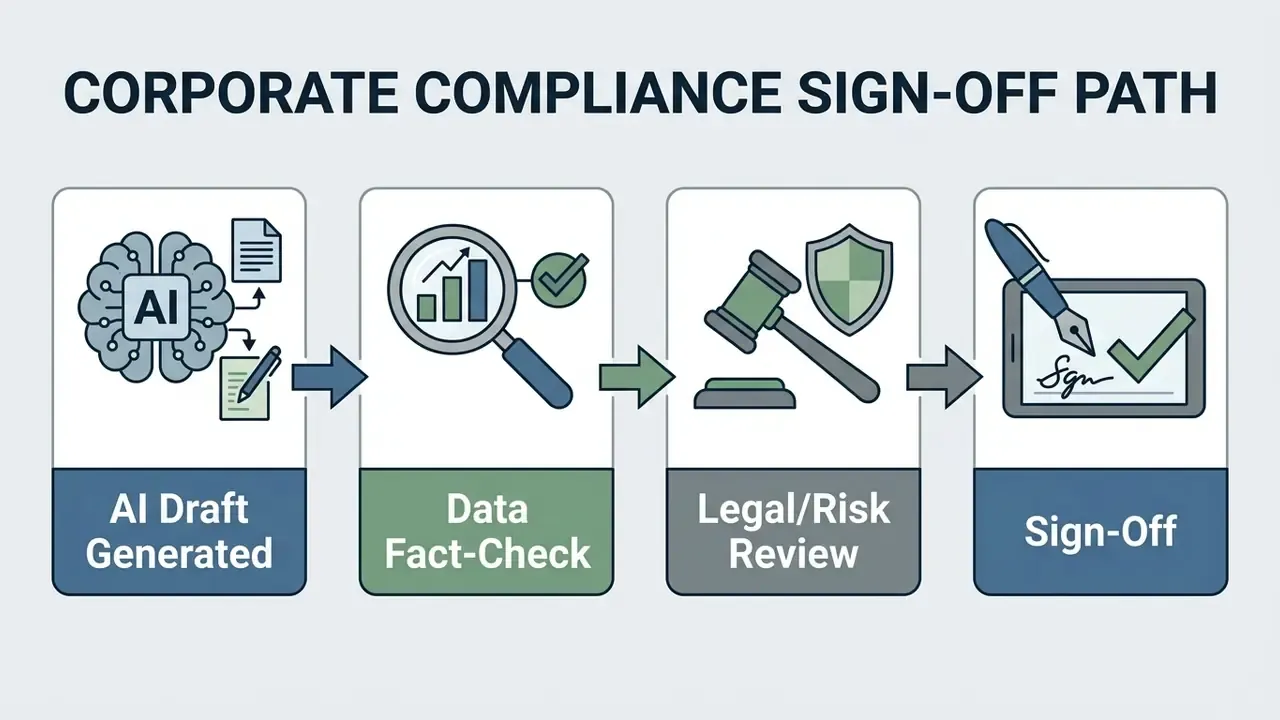
That finding supports one specific design choice. AI can act as a first-pass reviewer of structure and clarity, while final factual accountability stays with named human reviewers. Named, not implied.
To review legal precedents on intellectual property and commercial liability in AI deployment, compliance leads consult the AI Litigation and Case Timelines registry. To weigh competing software choices across standard categories, review the matrices in the AI Media Comparison Matrices overview and the methodology in the best AI image generator comparison.
Model Risk Governance, Control Costs and Regulatory Mapping
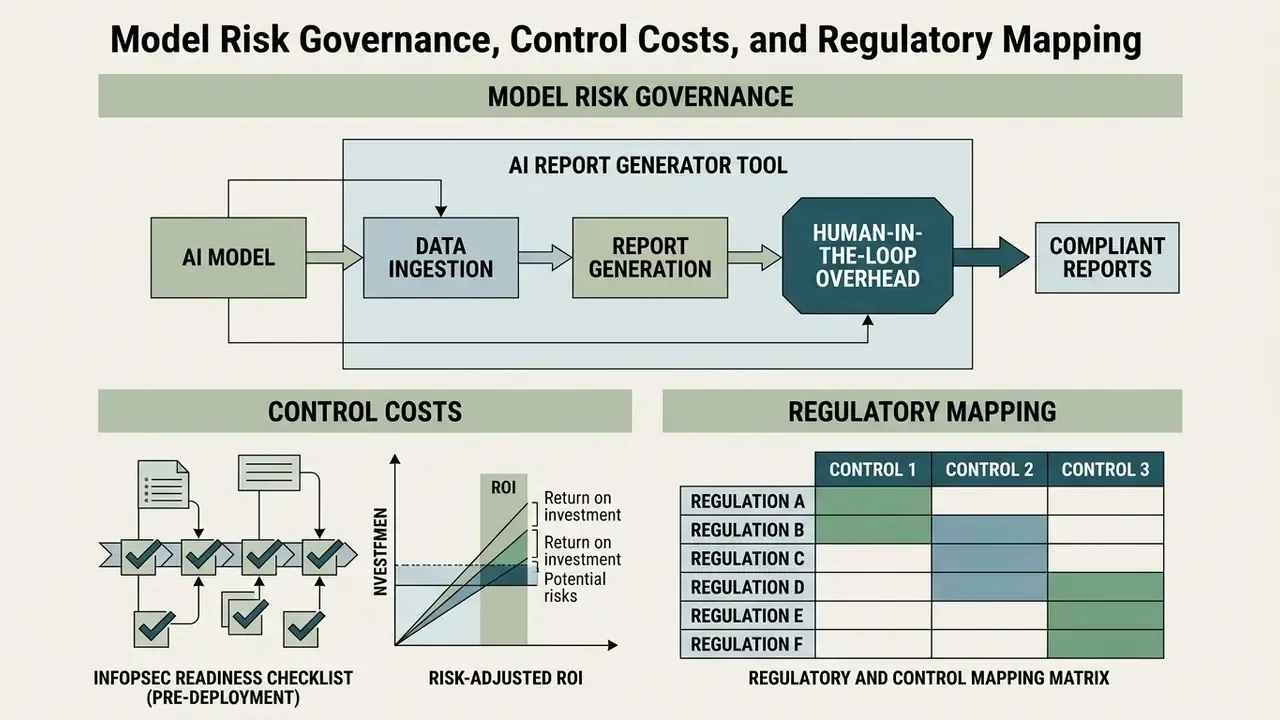
Deploying an AI report generator inside a regulated institution turns a productivity tool into a controlled process. Governance leaders need three artifacts before a pilot reaches production: a control inventory, a risk-adjusted cost model, and a mapping between vendor capabilities and supervisory expectations.
Regulatory and Control Mapping Matrix
| Supervisory or Standards Expectation | What It Requires of a Report Generator | Practical Control Implementation |
|---|---|---|
| Model risk management (SR 11-7-style expectations) | Documented purpose, limitations, validation and ongoing monitoring | Fixed model version, documented use scope, independent review of generated conclusions |
| NIST AI Risk Management Framework / Generative AI Profile | Provenance, content authenticity, and TEVV measures against ground truth | Retrieval-level provenance logs, ground-truth spot checks, automated plus human evaluation |
| SOC 2 Type II | Verified operating effectiveness of security controls over time | Vendor audit report review, exception tracking, annual re-assessment |
| ISO/IEC 27001 (with 27017/27018/27701 extensions) | Information security management, cloud and privacy controls | Encryption in transit and at rest, key management, documented data classification |
| GDPR / CCPA | Lawful basis, minimization, subject rights | PII/NPI redaction before ingest, retention limits, data-processing addendum |
| GRC / MRM system integration | Traceable evidence linked to controls and findings | Export to GRC platforms via ticket-linked findings, structured metadata, API push |
InfoSec Readiness Checklist (Pre-Deployment)
Checklist0 / 10
Human-in-the-Loop Overhead and Risk-Adjusted ROI
Gross time savings overstate value, because verification, governance, and residual risk carry real cost. Use the following model:
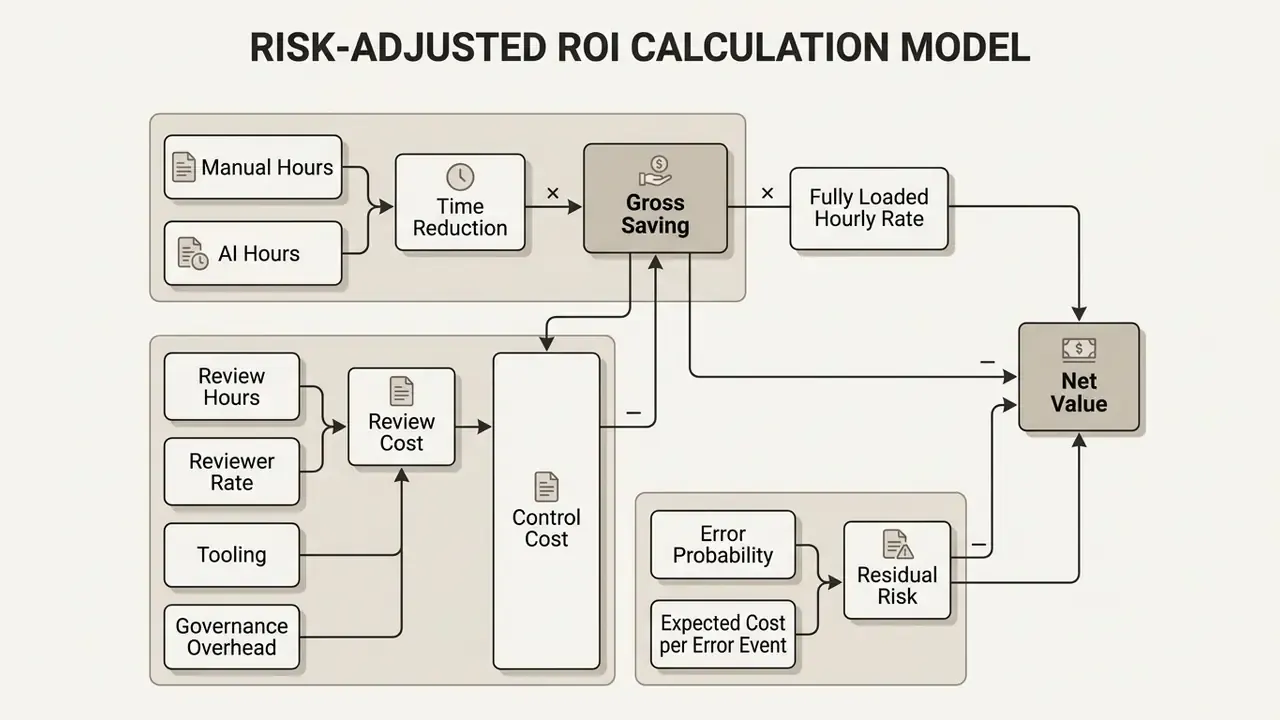
| Cost Component | Illustrative Input | Notes for Modeling |
|---|---|---|
| Manual baseline | 4.5–6.5 hours per 10-page report | Use measured internal timings, not vendor claims |
| AI-assisted baseline | 20–30 minutes generation and assembly | Excludes verification |
| Human-in-the-loop review | 15–20 minutes per report (Tier 1–3 audit) | Scale up for externally distributed or regulatory documents |
| Governance overhead | Validation documentation, monitoring, annual review | Amortize across report volume |
| Tooling and seats | Free to roughly $20 per user per month for standard tiers; enterprise tiers negotiated | Include SSO and security add-ons |
| Residual risk | Probability of an unsourced figure reaching distribution × remediation cost | Reduce with mandatory numeric audit and provenance logs |
Top Enterprise AI Report Generators Compared (2026 Benchmarks)
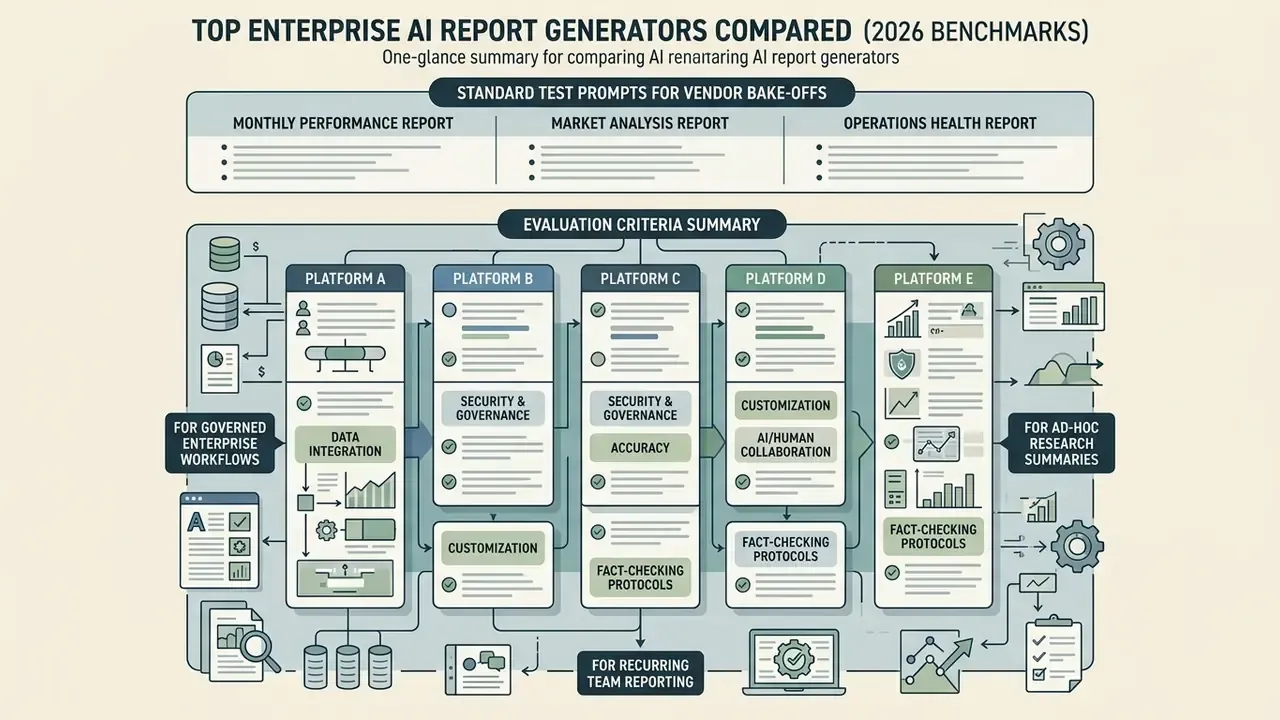
Selecting an enterprise report generator means evaluating workflow integration, governance controls, and document synthesis. Testing methodology matters more than feature lists: evaluate candidates with identical prompts, identical datasets, and a shared rubric covering time to first draft, structure quality, evidence quality, insight depth, revision speed, and sharing flow.
| Platform | Primary Target Use Case | Citation & Evidence Grounding | SOC 2 / Security Tier | Native Export Formats | Starting Price |
|---|---|---|---|---|---|
| ML Clever | Enterprise board and market reports | Advanced inline web research with citations | Enterprise SOC 2 Type II | PDF, DOCX, web link | Free / $20 per month |
| Microsoft Copilot | M365 ecosystem document drafting | Internal SharePoint / Graph data | Enterprise M365 governance | DOCX, PPTX, PDF | Add-on pricing |
| Notion AI | Internal workspace knowledge summaries | Internal workspace pages and databases | Workspace governance | Markdown, PDF | Add-on pricing |
| Claude (Anthropic) | Unstructured long-context analysis | Direct ingest in prompt window | SOC 2 Type II options | Text, Markdown | Free / $20 per month |
| Kuse AI | Quick data-to-report conversions | Basic prompt grounding | Standard web encryption | PDF, DOCX, HTML | Free / tiered |
Pricing and certification claims change often. Confirm both directly with the vendor before procurement.
Standard Test Prompts for Vendor Bake-Offs
- Monthly performance report"Create a monthly performance report with KPIs, variances versus target, and an executive summary."
- Market analysis report"Write a market analysis report for an AI analytics product. Include trends, competitors, and pricing signals."
- Operations health report"Draft an operations health report covering backlog, SLA performance, and staffing risks, with recommendations."
Score each output on structure fidelity, whether every numeric claim carries a source reference, and how cleanly one section can be regenerated without breaking the template.
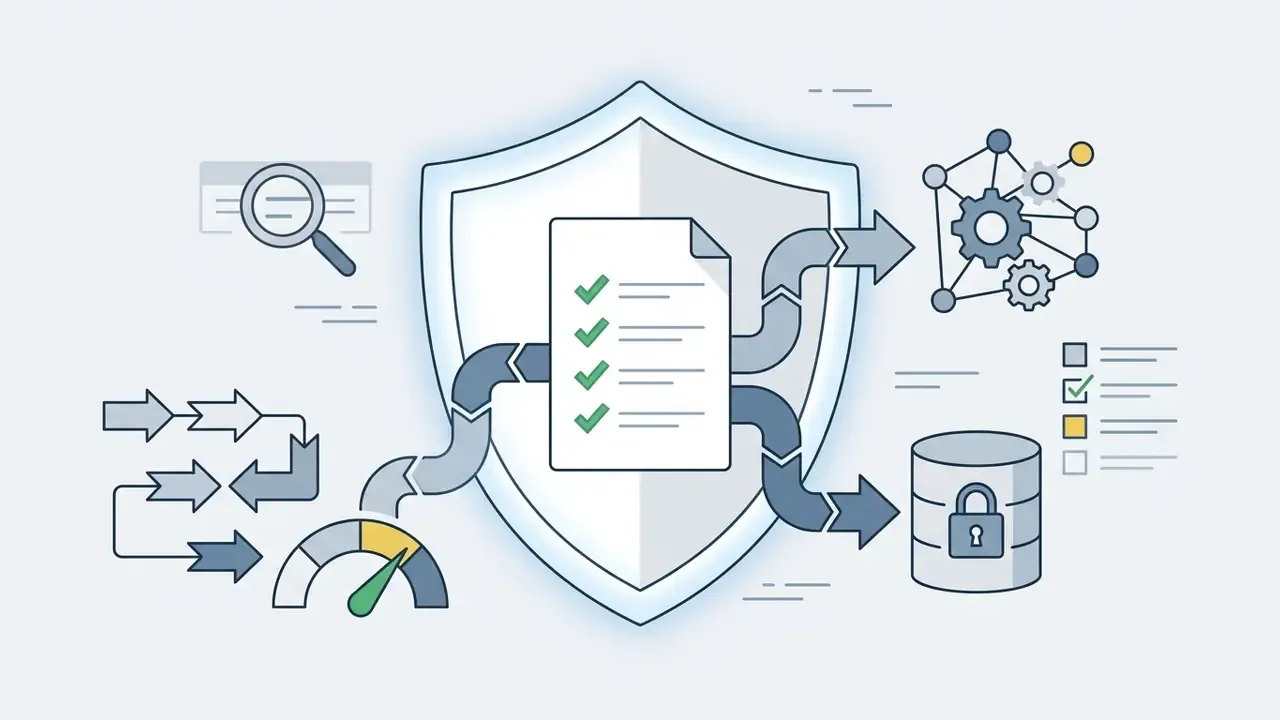
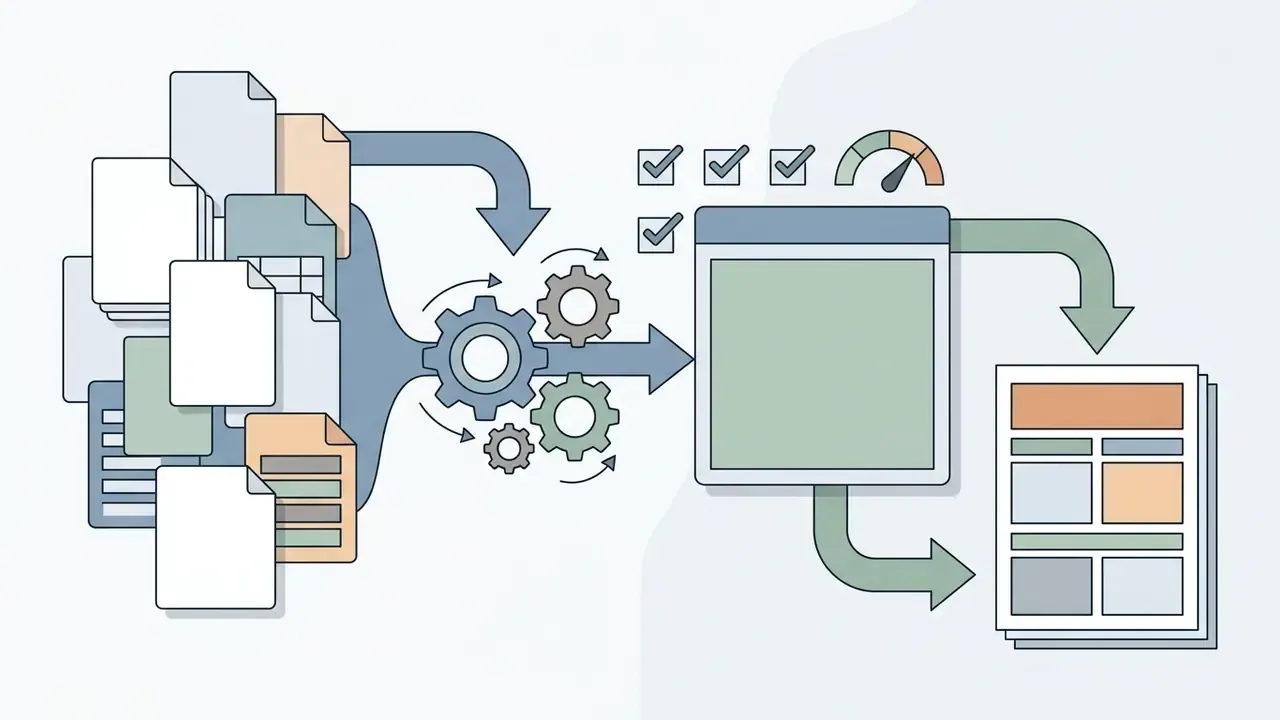
Evaluation Criteria Summary
A purely generative writing assistant, with no report structure, template governance, or evidence handling, will not scale for enterprise reporting no matter how strong the underlying model is.
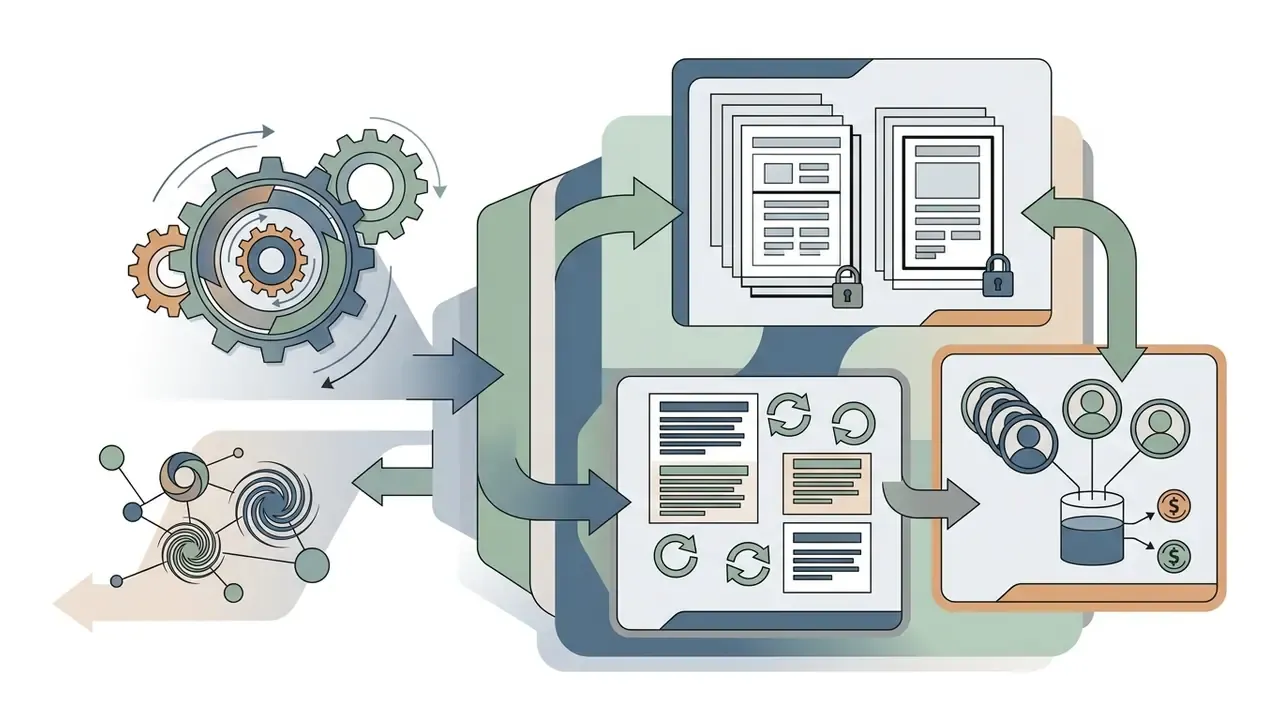
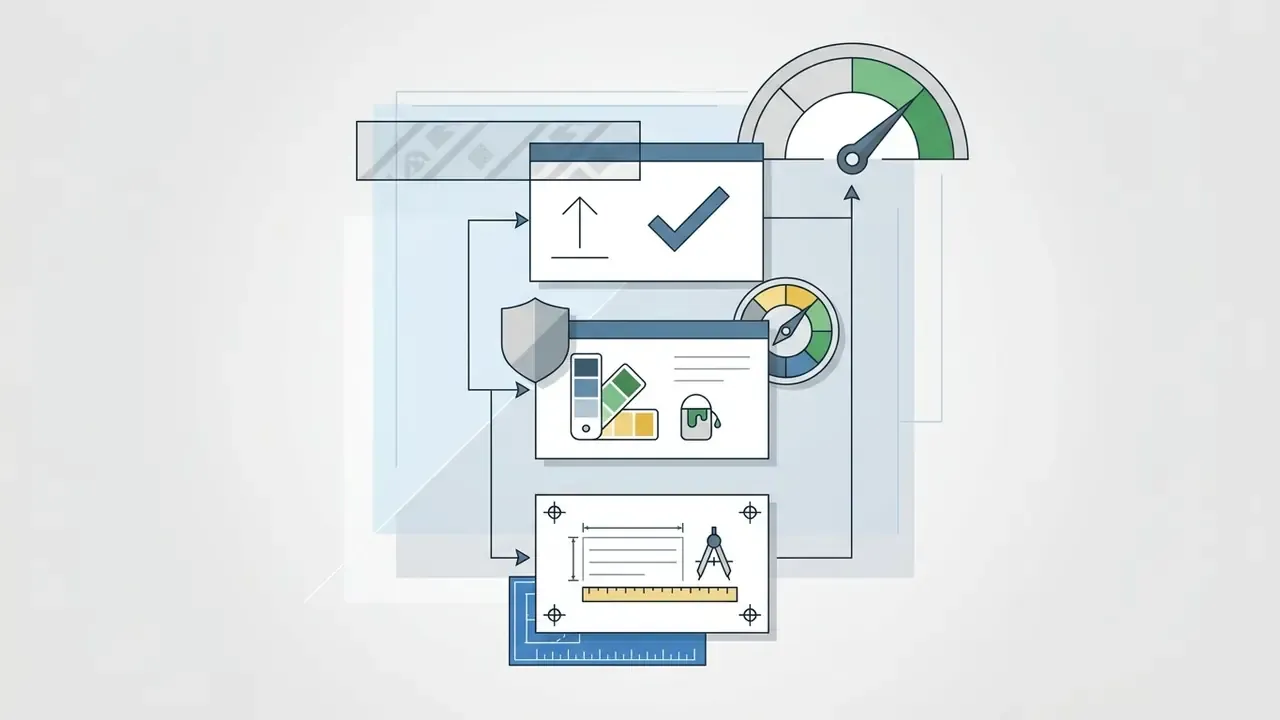
Free AI Report Generator, Pricing and Commercial Use
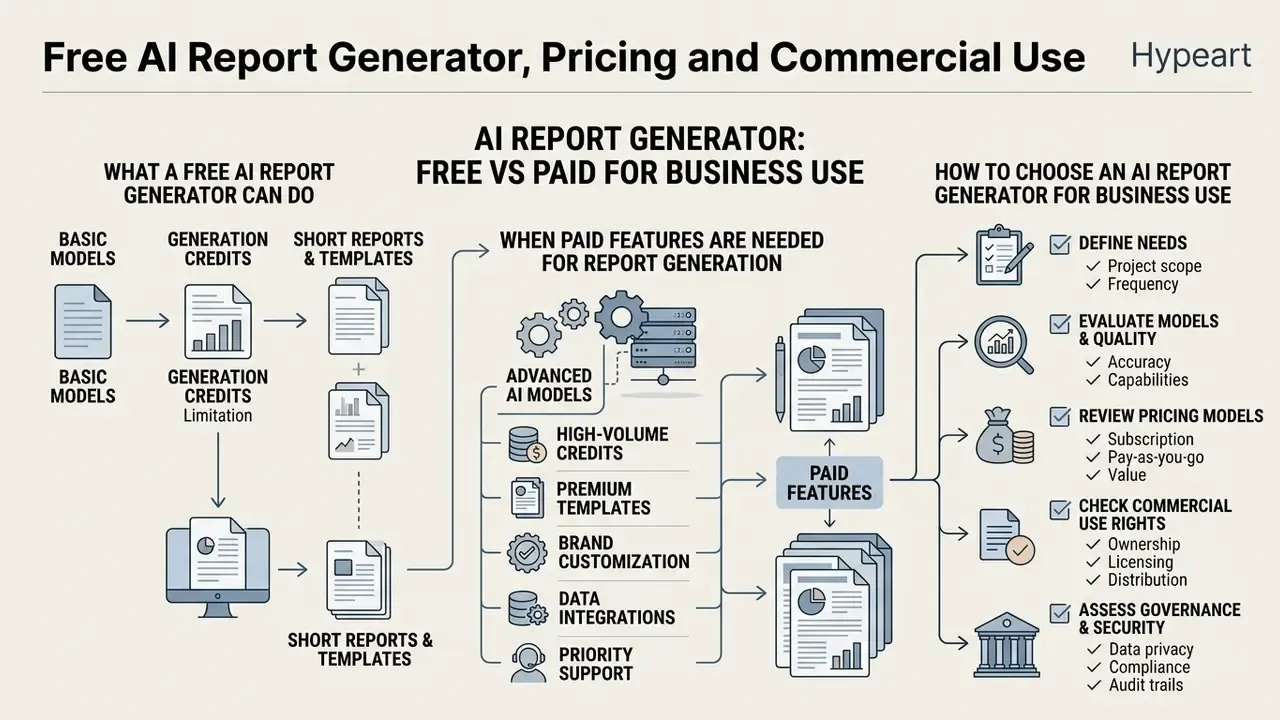
Choosing an AI report generator requires understanding model pricing, generation credits, feature tiers, and commercial usage rights. Options run from free basic plans to enterprise multi-seat subscriptions. Public entry prices in reviewed 2026 listings range from $0 to roughly $20 per user per month, and commercial-use terms vary by vendor, often by tier.
Read that as a quality warning, not an endorsement. Unverified generated documents can pass superficial review while remaining factually unsupported, which is precisely why the three-tier audit protocol is mandatory for business use.
What a Free AI Report Generator Can Do
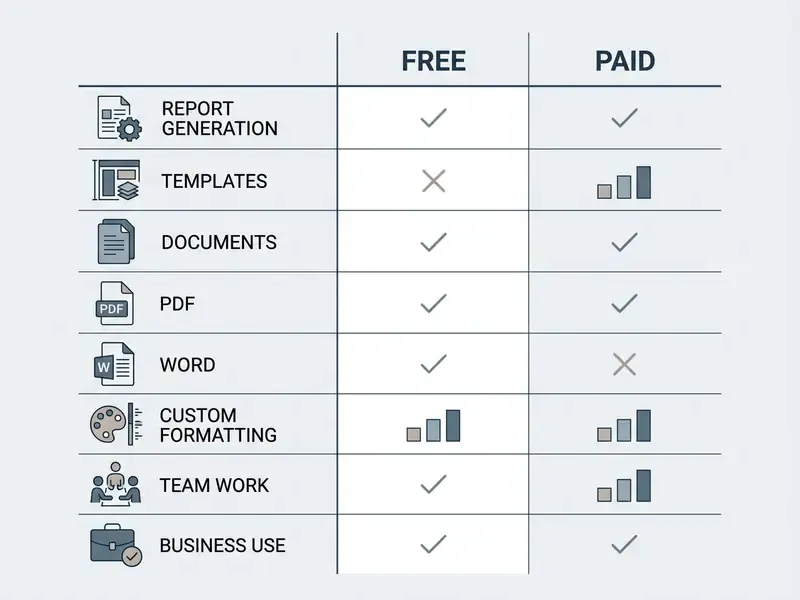
Free AI report tools let users test core mechanics, generate outlines, and create basic drafts. A free AI report generator typically offers monthly credit allotments and access to standard templates.
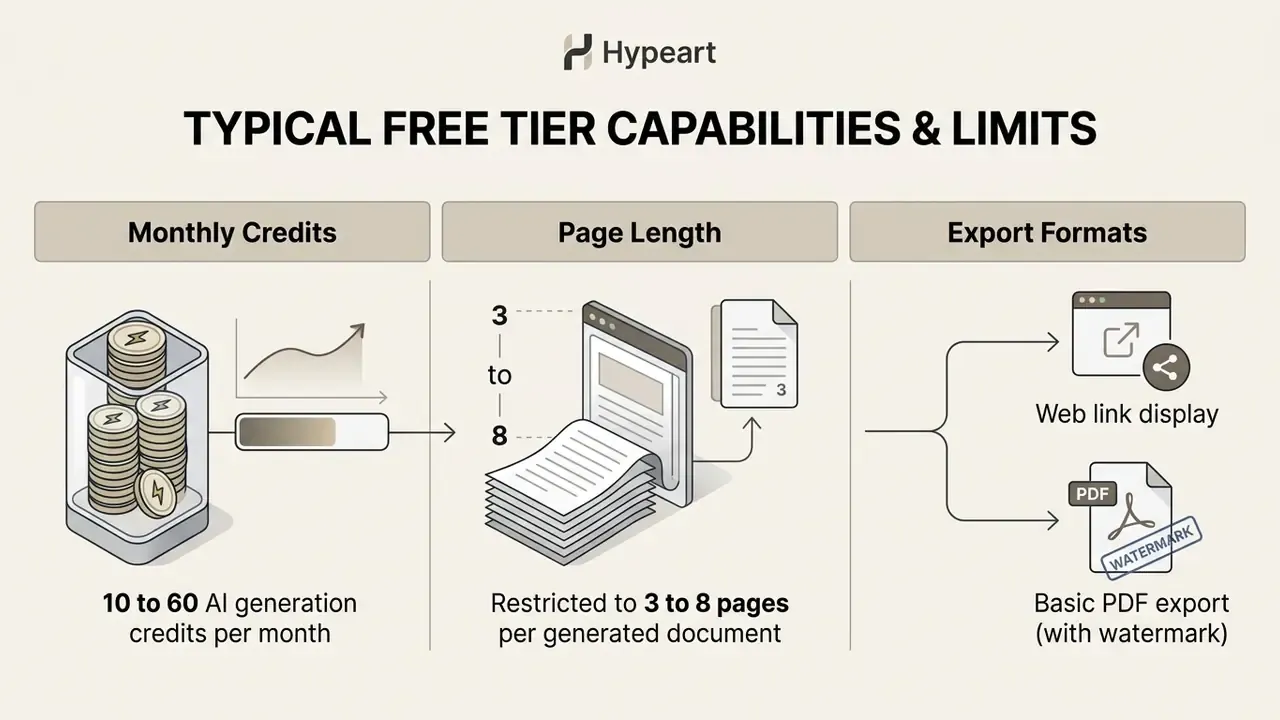
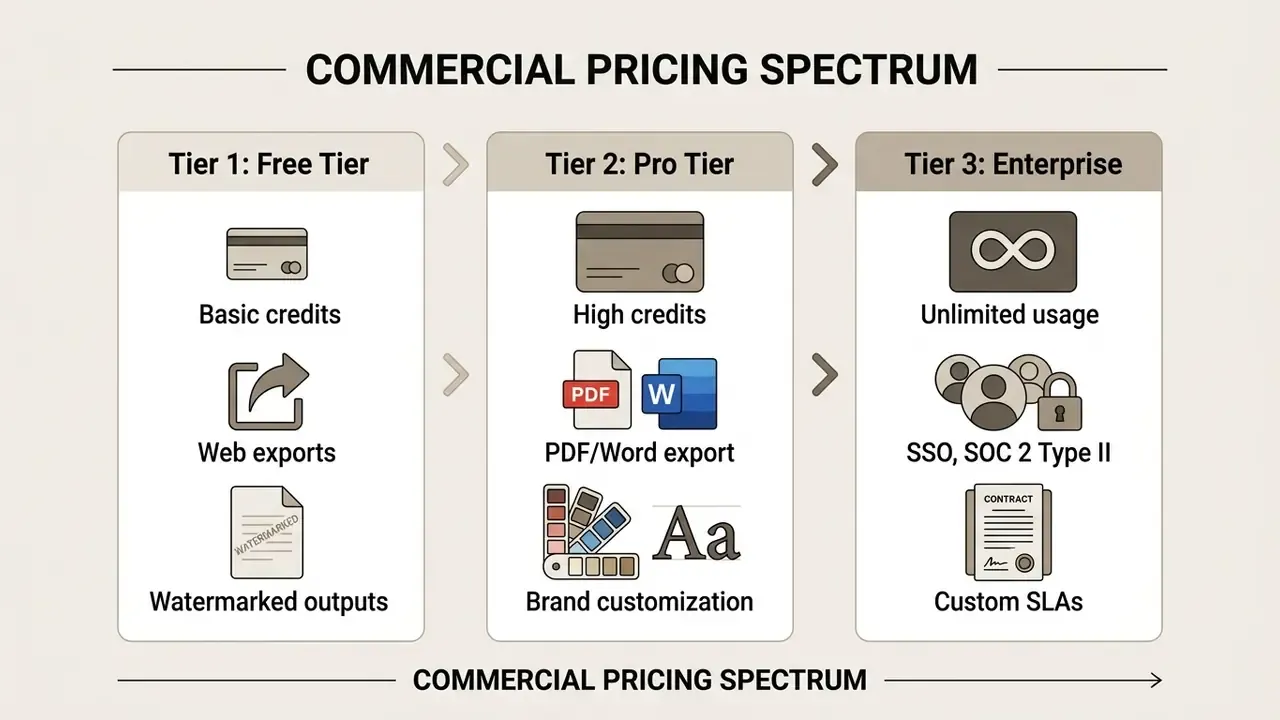
Observed free-tier patterns in 2026 include allotments as low as 10 AI credits per month, mid-range offers around 60 credits with PDF and PNG export, and larger one-time grants of several hundred to several thousand credits with capped page and export counts. A free AI report generator online works well for personal experimentation or academic drafting. It lacks the security guarantees and export formats corporate operations need. Regulated teams generally cannot use free tiers at all, since shared-training and retention terms conflict with confidentiality obligations. Worth stating plainly: "free" here usually means your data is part of the price.
When Paid Features Are Needed for Report Generation
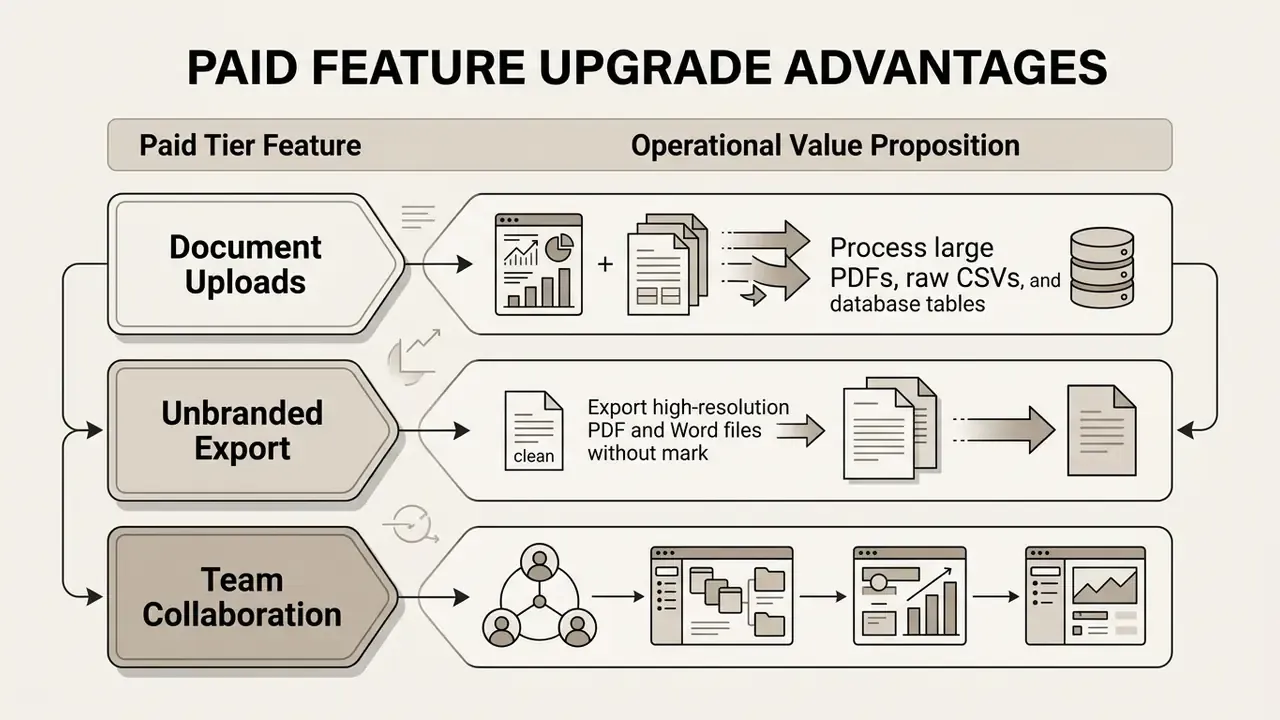
Upgrading becomes necessary when an organization needs high generation volume, custom brand styling, and native Word export. Commercial plans unlock higher credit caps, document ingestion, and collaborative team workspaces.
Organizations planning deployments can reference market benchmarks in the AI Media Pricing Guides for detailed cost analysis. Comparable tier-structure analysis in the guide to free photo editors shows how export restrictions usually differ between free and paid plans across generative tooling categories. Licensing patterns in consumer-facing niche categories, including a furry ai art generator, a futa ai generator, or a funny ai video tool, sit outside enterprise reporting scope entirely, though their glossary entries illustrate how sharply commercial-use terms diverge between vendors.
How to Choose an AI Report Generator for Business Use
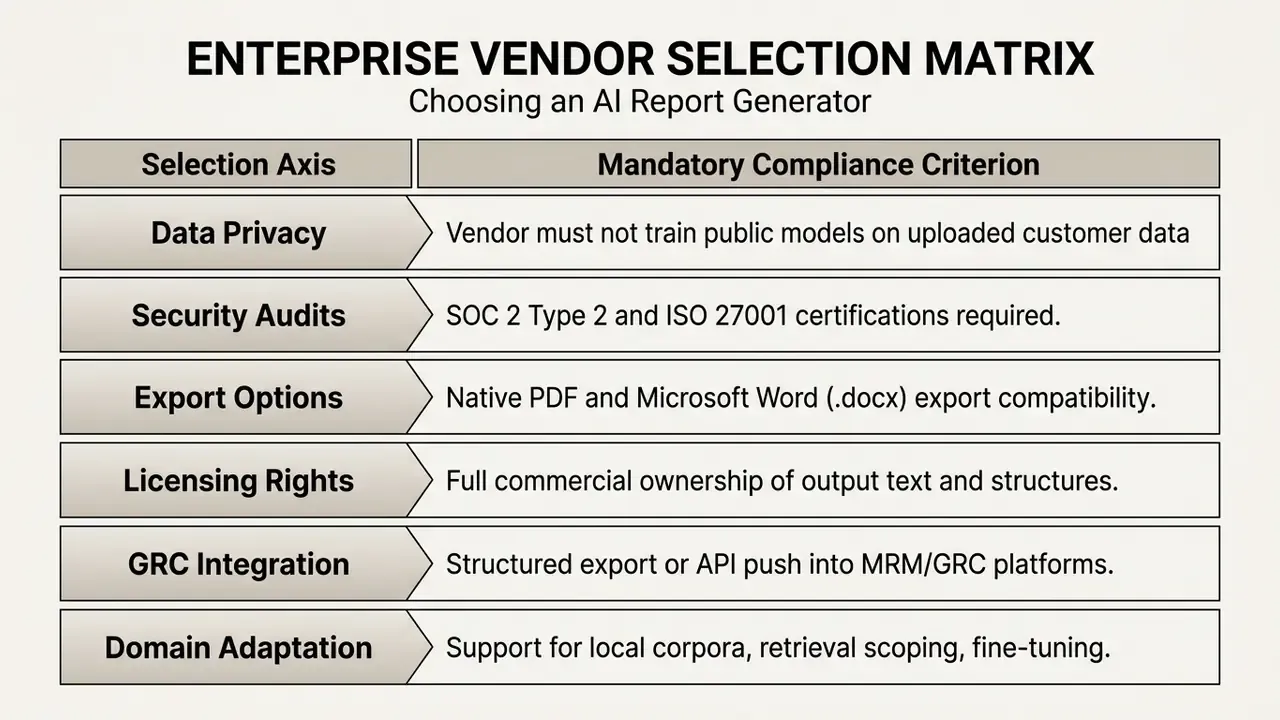
Selecting an enterprise report creation system requires evaluating data security standards, integration capability, and commercial usage rights. Enterprise AI security control guidance (2026 checklist edition; confirm the current publication) specifies that vendors must support role-based access control (RBAC), zero data-retention options for model training, and SOC 2 Type 2 certification.
«Models adapted to local data corpora improve reliability materially; without fine-tuning, F1 drops by at least 15% under external validation.»
Source: Evaluating LLMs for Clinical Note Processing, PMC (2024). https://pmc.ncbi.nlm.nih.gov/articles/PMC12988631/
| Evaluation Criterion | Free Tier Plan | Professional Paid Tier | Enterprise Business Tier |
|---|---|---|---|
| Monthly Generation Volume | 10–60 Credits / Month | 500–2,000 Credits / Month | Unlimited / Custom Allowance |
| Document Input Support | Text Prompts Only | PDFs, CSV, DOCX Uploads | Live API & Database Connectors |
| Branding & Customization | Standard Layout | Custom Logos & Brand Color | Full Enterprise Brand Kits |
| Export Formats | Web Display / Basic PDF | Clean PDF & Word (.docx) | PDF, DOCX, HTML, Markdown |
| Team Workspace | Single User Only | Small Teams (3–5 Seats) | Multi-Seat SSO & Admin Roles |
| Data Privacy Guarantees | Shared Training Pool | Private Data Isolation | Zero Data Retention Agreement |
| Commercial Usage Rights | Limited / Non-Commercial | Full Commercial Rights | Full Commercial & Indemnity |
Usage-scenario summary (text duplicate of the table): study and personal drafting fits free tiers with watermarked PDF output; freelance client deliverables need paid tiers for unbranded PDF and DOCX export; team business reporting needs multi-seat plans with shared credit pools, SSO, and zero-retention agreements.
FAQ: AI Report Generator Questions
What types of reports can an AI report generator create?
Business performance reports, financial analyses, project status updates, risk and audit summaries, market and competitive briefs, research summaries, and academic coursework reports. The structure adapts to the report type you specify in the prompt.
How accurate are AI-generated reports?
Accuracy depends mostly on input quality. The system organizes information and holds formatting reliably, but every numeric claim needs verification against primary sources before distribution.
Can I customize format and style?
Yes. You control section hierarchy, tone, length, typography, colors, logo placement, and page geometry, then export in PDF, DOCX, HTML, or Markdown.
Is an AI report generator free to use?
Many platforms offer free tiers with credit caps and watermarked exports. Paid plans unlock document uploads, unbranded export, higher volumes, and team workspaces. Enterprise plans add SSO, zero retention, and audit support.
Can AI-generated reports be used in regulated reporting?
Only inside a governed workflow with documented scope, provenance logs, deterministic model settings, independent human review, and named sign-off. Treat AI output as unvetted source material until verified.
How many languages are supported?
Leading generators support 30 to 50-plus output languages. Localization QA still has to confirm numeric formatting, currency conventions, date order, and regulatory terminology.
What is the safest first step for a bank?
Pick one recurring, low-severity internal report. Run it through template binding, provenance logging, and a documented three-tier review for two cycles, then measure before expanding scope.
Key Takeaways for AI Report Generation
- Context dictates quality: structured source data, clear objectives, and explicit audience boundaries improve accuracy directly.
- Human verification is essential: generators produce functional drafts, and human review stays mandatory for data accuracy and tone.
- Security and format compatibility matter: enterprise deployment needs SOC 2 compliance, zero data-retention options, and native PDF plus Word export.
- Governance turns speed into value: risk-adjusted ROI depends on control costs and residual risk, not gross time savings.
- Provenance is the deliverable: in regulated functions, a report without traceable source references is a draft, not evidence.
About This Analysis
This guide was produced by the AI Governance and Model Risk editorial desk, which evaluates generative document workflows against model risk management, information security, and reporting standards. Methodology combines identical-prompt vendor testing, peer-reviewed benchmark review (ACL Findings, SIGIR, MIMIC-IV-based studies), public standards documentation (NIST, U.S. Department of Commerce, World Bank editorial guidance), and anonymized enterprise workflow measurements contributed by participating risk and audit teams. Audience assumptions in this article remain hypotheses until confirmed by analytics, interviews, or verified customer research.
General disclaimer: This article is informational and does not constitute legal, financial, compliance, medical, or security advice. Forward-dated publications cited here should be checked against their current published editions before use in regulatory or contractual documentation.