Why should a risk or compliance leader care about a slide tool at all? Because decks are how model results reach decision-makers.
«Autonomous slide generation accelerates drafting, but model risk discipline dictates that no unverified output reaches executive decision-makers without human oversight.»
Last updated: reflects publicly documented Gamma functionality, help-center guidance, and third-party review data as of the 2026 product cycle.
Executive Summary: Key Takeaways for Risk, Compliance, and Operating Leaders
- Architecture Gamma builds decks from fluid vertical cards, not fixed 16:9 slides. This is the single most important design fact. It drives both the speed advantage and the export-fidelity risk.
- Speed vs. verification First drafts appear in seconds, but numeric accuracy, chart fidelity, and citation integrity remain entirely human responsibilities. Generation is non-deterministic, so the same prompt can yield different charts and layouts on repeat runs.
- Export risk is the top operational issue PPTX conversion can substitute fonts, flatten layouts, and warp aspect ratios. PDF is the highest-fidelity export path; PPTX is the highest-editability path. You rarely get both at once.
- Pricing model Freemium with a credit system. Free accounts receive a one-time allocation of AI credits (commonly documented as 400 at signup) that do not refresh. Paid tiers remove branding, raise card limits, and unlock brand kits, analytics, and custom domains.
- Team economics caveat Real-time co-editing is restricted to paid seat holders. Free users invited into a paid workspace cannot co-edit cards, which materially changes total cost of ownership for large teams.
- Governance posture Gamma is a SaaS web application. Before approval in a regulated environment, teams must independently confirm encryption, retention, model-training, SSO, and audit-log terms against internal policy and frameworks such as SR 11-7, the NIST AI Risk Management Framework, and the EU AI Act.
- Best fit internal briefs, project updates, pitch drafts, onboarding guides, and web-shared decks. Weakest fit: decks bound to strict corporate slide masters, complex animation, offline desktop playback, or regulator-facing filings without heavy manual rework.
What is Gamma AI Presentation Maker and Which Tasks Does It Support?
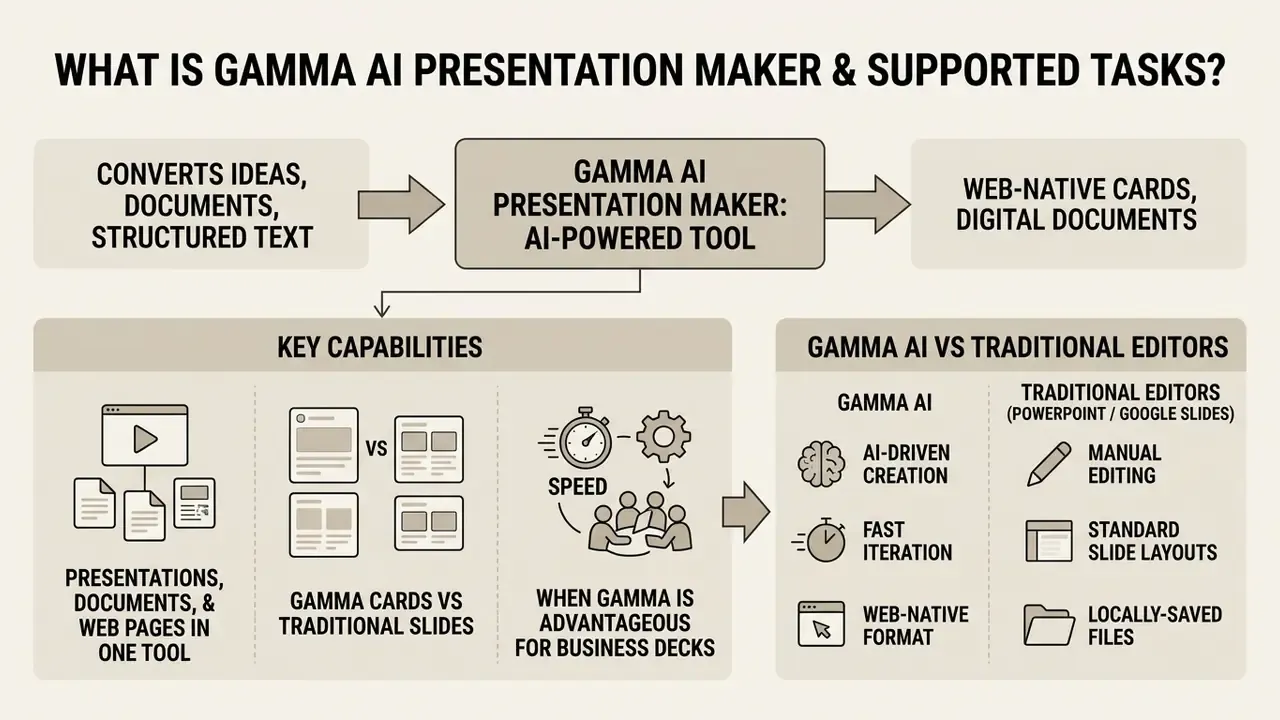
Gamma AI Presentation Maker is an AI-powered presentation maker designed to convert ideas, documents, and structured text into web-native cards, digital documents, and lightweight web pages. Unlike legacy presentation software that relies on manual canvas placement, this presentation maker uses algorithmic layout rules to adjust spacing, typography, and visual assets dynamically as text is entered.
Organizations use the tool to replace time-intensive manual slide formatting for internal briefs, client proposals, research summaries, and strategic overviews. An industry analysis of 10,000 AI-generated presentations quantified how much the input specification matters:
«Detailed prompts of 50 words or more produce presentations scoring 31% higher on quality than brief, single-line requests». - 2Slides Platform Report (2026), analysis of 10,000 AI-generated presentations
The same dataset reports that AI presentation tools assemble first drafts in an average of 22 seconds, with strategy and sales decks achieving higher visual coherence scores than unstructured general content. In practice, the drafting bottleneck moves from formatting to input preparation and verification. That shift is easy to miss on the first pilot.
Presentations, Documents, and Web Pages in One AI Tool
Gamma AI integrates three publishing formats into a single web application: presentations, structured documents, and standalone web pages. Users can enter a central prompt or upload source notes to generate a multi-card presentation deck, a scrollable narrative document, or a hosted landing page on a gamma.site subdomain (custom domains are available on paid tiers). Because the same engine also lays out one-page visual assets, some teams treat it as a lightweight gamma ai flyer generator for internal announcements.
This unified content creation model lets teams re-purpose core business briefs across different stakeholder touchpoints. A single product update outline can be rendered as an executive deck for board review, a detailed document for operational leads, or a public web page for client communication, all without re-keying data across separate applications. Teams that need supporting motion graphics or explainer sequences for embedded media blocks can evaluate a dedicated animation maker or a drawing animation maker rather than forcing motion design inside a card-based deck builder.
How Gamma Cards Differ from Traditional PowerPoint Slides
Gamma replaces standard 16:9 fixed slide canvases with fluid, vertically expanding containers known as cards. Classic PowerPoint slides enforce rigid physical boundaries that force users to split content across multiple frames. Gamma cards expand vertically to accommodate detailed tables, extended copy, or multi-column visual blocks. Fixed card sizes can be enabled deliberately, and they should be, whenever the deck's final destination is a 16:9 export.
This responsive design model ensures that decks adapt automatically to varying screen sizes, including desktop monitors, tablets, and mobile devices. Traditional slide decks often suffer from clipped text or tiny font scaling on smaller viewports, whereas web-native cards keep legible typography and readable visual hierarchies.
The architectural trade-off is symmetrical. Fluid cards optimize for scrolling web consumption; fixed slides optimize for deterministic frame-by-frame playback and print. Every export problem described later in this guide originates in translating the former into the latter.
When Gamma Is Advantageous for Business Presentations and Decks
Gamma works best where rapid drafting, web-based sharing, and asynchronous stakeholder review matter more than strict 16:9 print-oriented slide masters. Typical scenarios: pitching a new product line, delivering weekly cross-functional project updates, summarizing policy documents, and publishing interactive client onboarding guides.
Because cards support live web links, embedded media, and interactive blocks, stakeholders can scroll at their own pace instead of stepping sequentially through static slides. When an enterprise requires strict compliance with legacy PowerPoint slide masters or offline desktop playback, though, a traditional PPT tool is still the safer choice.
Gamma AI vs Traditional Editors (PowerPoint / Google Slides)
| Feature / Dimension | Gamma AI Presentation Maker | Microsoft PowerPoint | Google Slides |
|---|---|---|---|
| Starting material | Prompts, pasted text, outlines, uploaded PDFs/Docs, spreadsheets, web URLs, YouTube links | Blank slides, pre-built PPTX templates, Word outline import | Blank slides, basic workspace templates, Google Docs import |
| Content structure | Responsive, vertically expanding fluid cards on a web canvas | Fixed 16:9 or 4:3 frames | Fixed 16:9 or 4:3 frames |
| Automated layout and design | Algorithmic auto-layout, real-time font and spacing re-balancing, agent-level restyling | Design Ideas (Copilot-assisted), manual template assignment, brand kits | Single-slide layout suggestions, manual positioning |
| Editing interface | Natural language prompt assistant, card-level block editing, Notion-style slash commands | Direct pixel-level drag-and-drop, master slide view | Direct pixel-level drag-and-drop, theme builder |
| Typography control | Hierarchy tokens (Title, Heading, Normal text); limited direct point-size control | Full point-size, kerning, and paragraph-level control | Full point-size and paragraph-level control |
| Presentation and delivery | Interactive web link, scrollable card mode, presenter view, view analytics | Offline slideshow, presenter view, local desktop playback | Browser presentation mode, Google Meet integration |
| File export options | PDF, PPTX, PNG, Google Slides (badged on the Free plan) | Native PPTX, PDF, MP4, PNG, animated GIF | Native Google Slides, PPTX, PDF, PNG, SVG |
Empirical work on perceived slide quality suggests the design gap between machine-generated and human-authored decks is narrower than intuition assumes:
«Median quality ratings for AI-generated and instructor-made slides were identical at 5.0; a Mann-Whitney test (p = 0.84) found no statistically significant difference». - AI-Generated Slides: Are They Good? Can Students Tell?, arXiv preprint (2026)
The practical inference for enterprise teams: aesthetic parity is largely solved, while factual and numerical reliability is not. That is where review effort belongs.
Gamma AI Capabilities for Presentation Creation
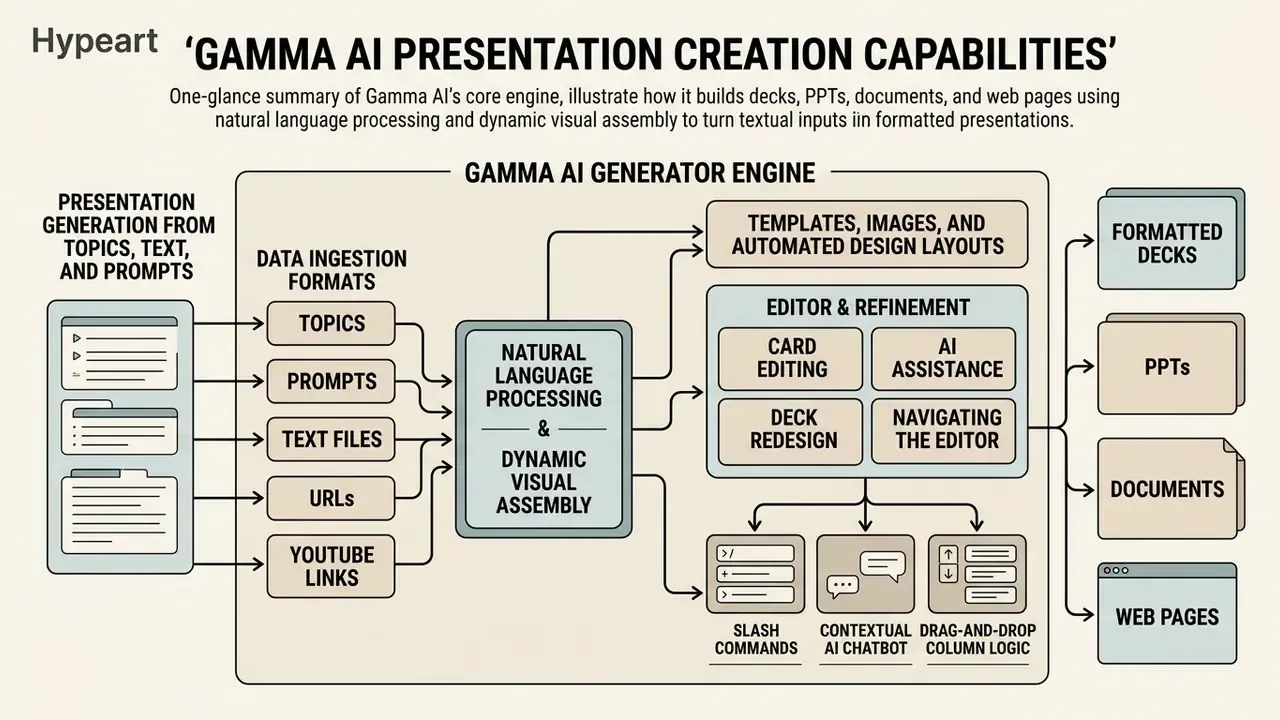
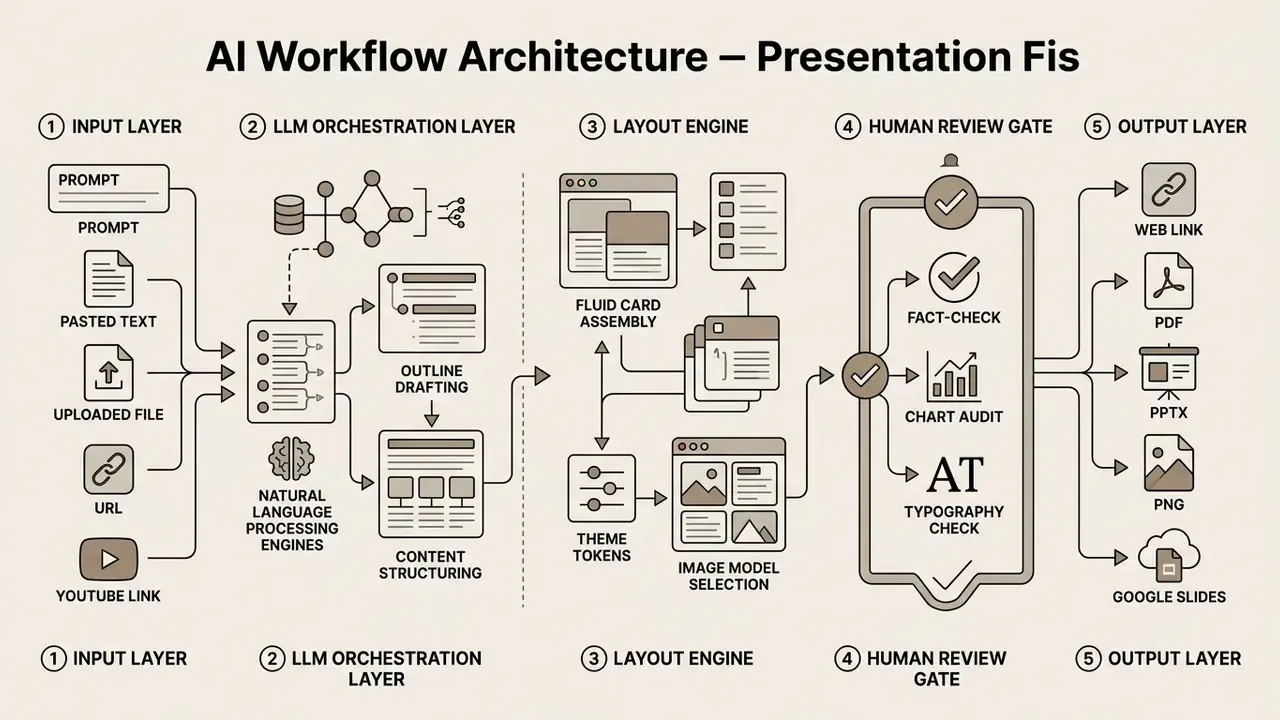
The core engine of this gamma ai generator combines natural language processing with dynamic visual assembly to turn textual inputs into formatted decks. The platform offers dedicated modes for generating brand-new content from prompts (Generate), re-formatting pasted text while preserving wording (Paste), and ingesting existing external documents, decks, or URLs (Import).
That two-stage, edit-based pattern is exactly what Gamma exposes to the user: an editable outline stage, then a rendering stage. Reviewing the outline before rendering is therefore the highest-leverage quality control step in the entire workflow. One minute there saves twenty later.
Presentation Generation from Topics, Text, and Prompts
When using the primary generator, users enter a topic heading or a detailed prompt specifying target audience, core objectives, tone, and desired card count. The system processes the prompt and constructs a structured outline containing titles, card breakdowns, and key bullet points before generating the complete deck.
For existing material, the paste mode parses raw notes, policy briefs, or meeting transcriptions into logical presentation cards. Studies on prompt effectiveness (2Slides Platform Report, 2026) show that contextual prompts exceeding 50 words generate presentations with 31% higher content relevance scores than brief, single-sentence prompts.
«In a blind test with 500 professionals, AI-generated slides were preferred over human-made slides in 54% of cases; satisfaction reached 91% when the template matched the content type». - 2Slides Platform Report (2026)
Gamma's own documentation reinforces the same principle from the vendor side: generation performs noticeably better when grounded in real material, whether a document, a dataset, or a set of notes, than when driven by an abstract topic alone.
Supported Data Ingestion Formats
Gamma processes structured and unstructured data across web content, multimedia, and local files. Knowing the full ingestion surface matters for governance, because every additional input channel is another potential path for confidential data to leave the organization.
| Input category | Supported formats / sources | Primary use case |
|---|---|---|
| Structured documents | .docx, .pdf, .txt, .md (Markdown), .pptx | Converting policy briefs, whitepapers, and legacy decks into card decks |
| Data and spreadsheets | .xlsx, .csv | Generating visual executive summaries from tabular data |
| Web and video links | Direct web URLs, YouTube links | Summarizing online articles or video transcripts into slides |
| Cloud sources | Google Docs, Google Slides imports | Re-styling existing corporate content without rebuilding it |
| Raw prompts and notes | Plain text paste, unstructured bullet points | Rapid drafting of outlines from meeting notes |
| Programmatic | API generation from inputText or multi-page payloads | Automated deck production inside internal pipelines |
Documented upload ceilings matter for large source material: PowerPoint and Word imports are capped around 200 MB, and PDFs around 100 MB. Oversized regulatory filings must be pre-split before ingestion.
Templates, Images, and Automated Design Layouts
Gamma AI offers built-in style themes that manage color palettes, typography pairs, and layout spacing across entire decks. Rather than forcing manual adjustments when new text or visual elements are added, the automated grid resizes text containers and redistributes column widths to prevent overflow. Smart layouts include timeline, gallery, and multi-column structures, and the editor can suggest alternatives in real time.
For media creation, the editor includes automated image model selection alongside integrations with Unsplash, GIPHY, and web image repositories. Users can specify visual presets such as photo-realistic, vector illustration, line art, abstract, or 3D render, so generated visuals align with corporate branding. A brand theme can also be imported from an existing PowerPoint or Google Slides file, extracting colors, fonts, and logos into a reusable theme. Organizations benchmarking generative visual engines across vendors can review a structured comparison of the best AI art generators before standardizing on an image pipeline; novelty engines such as a dream ai generator or a dog to human ai generator illustrate how far stylistic output can drift from a corporate palette if presets are left open.
Card Editing, AI Assistance, and Deck Redesign
Card-level refinement is supported by an AI assistant that executes targeted edits from conversational instructions. Users can highlight specific cards to rephrase text for concise executive reading, change tone from informal to professional, or convert simple text lists into side-by-side comparison tables.
On higher account tiers, global styling commands re-theme entire decks at once. An operator can issue a prompt such as "make all cards more formal with dark corporate backgrounds and high-contrast typography," and the agent applies the change across every card while preserving core content alignment. Multi-card editing and whole-deck restyling are documented as higher-tier capabilities; single-card AI editing is broadly available.
Navigating the Editor: Slash Commands and Inline Formatting Controls
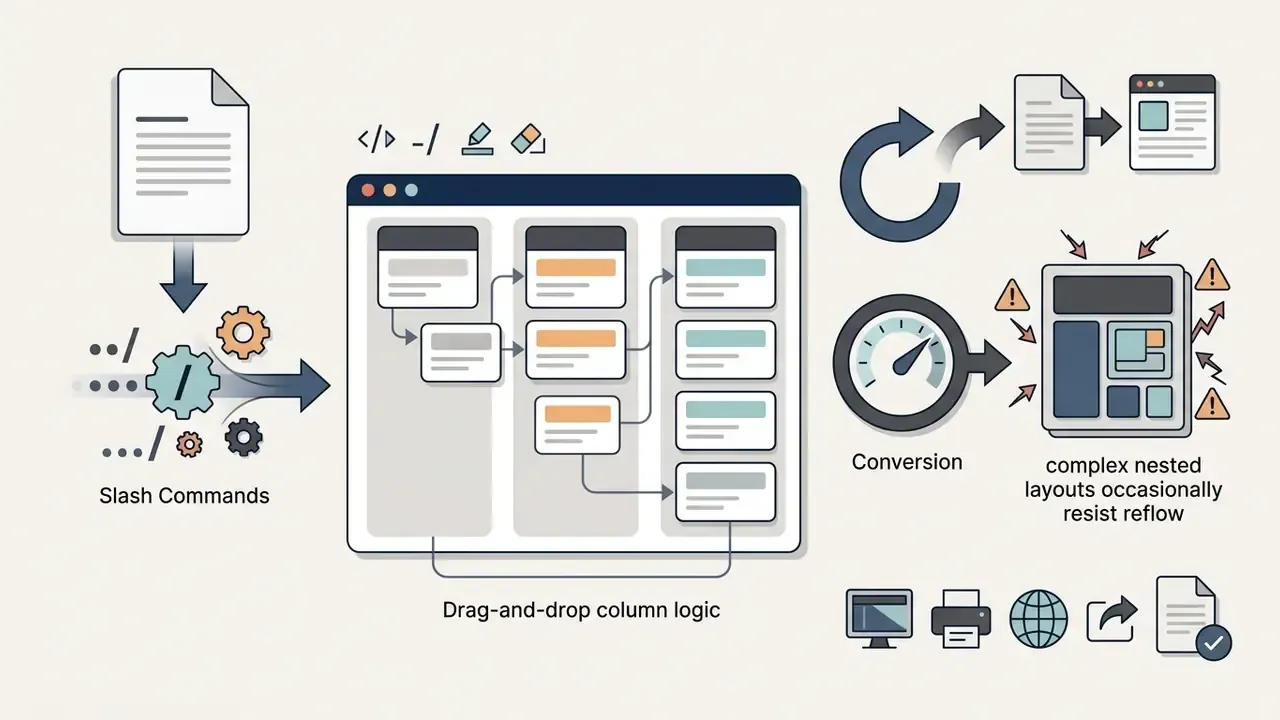
Gamma's editing environment shifts away from traditional slide positioning in favor of block-based canvas editing. Users migrating from PowerPoint or Google Slides should expect a genuine learning curve, because the interface layers several control surfaces at once: a main toolbar, mini-menus between cards, an AI chat panel, and inline commands. Core navigation controls include:

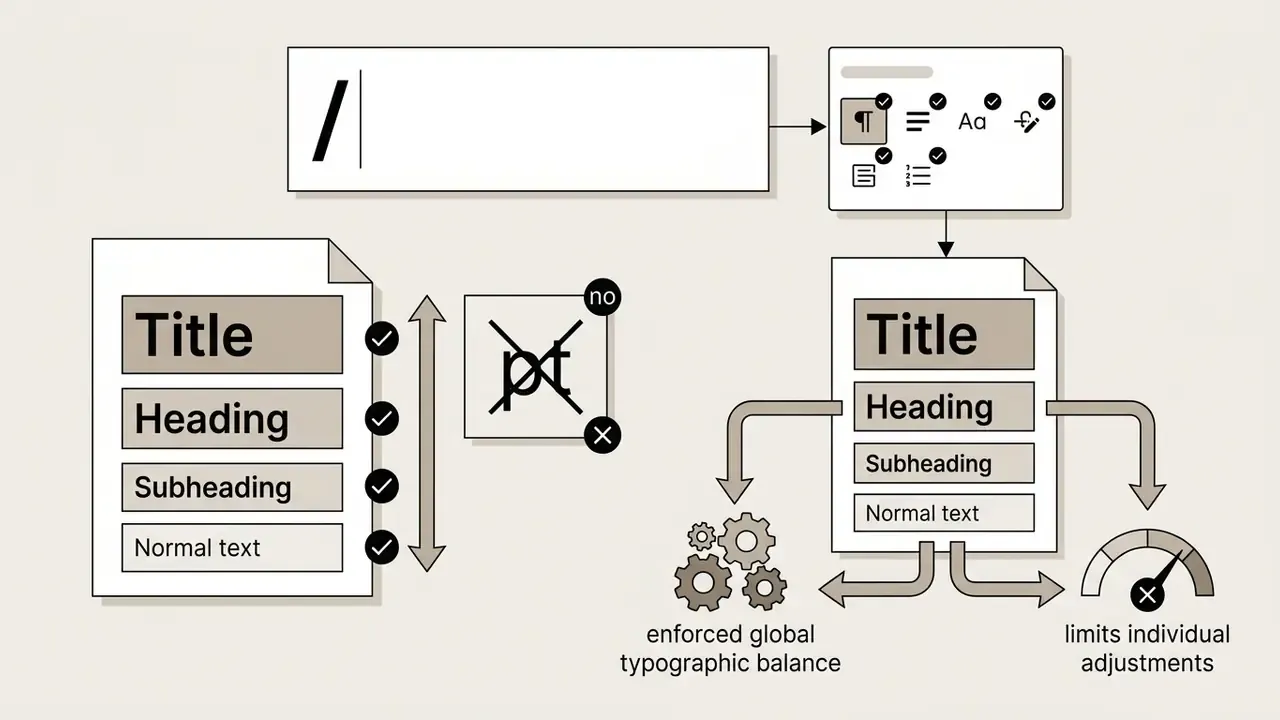
/)trigger inline content insertions such as callout boxes, embedded web links, column splits, tables, charts, and Unsplash/GIPHY media, directly by typing / on any blank line, following Notion-style architecture.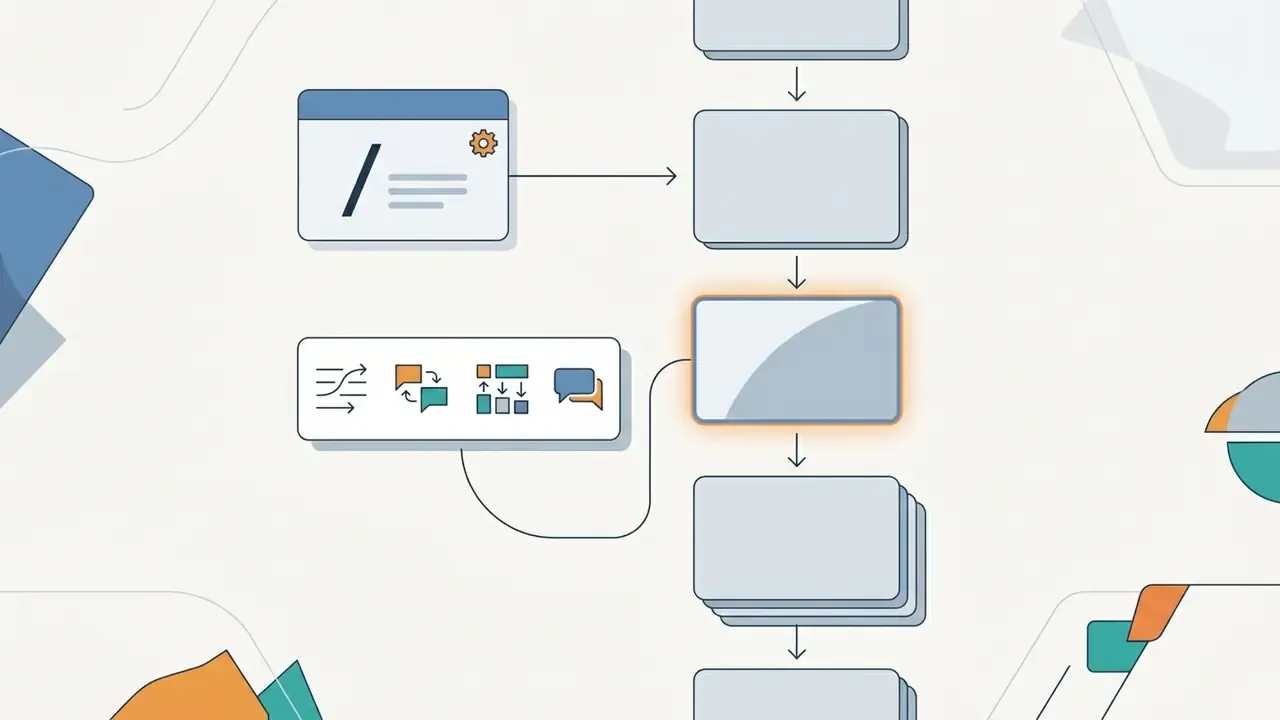
How to Create a Presentation in Gamma AI: Step-by-Step Guide
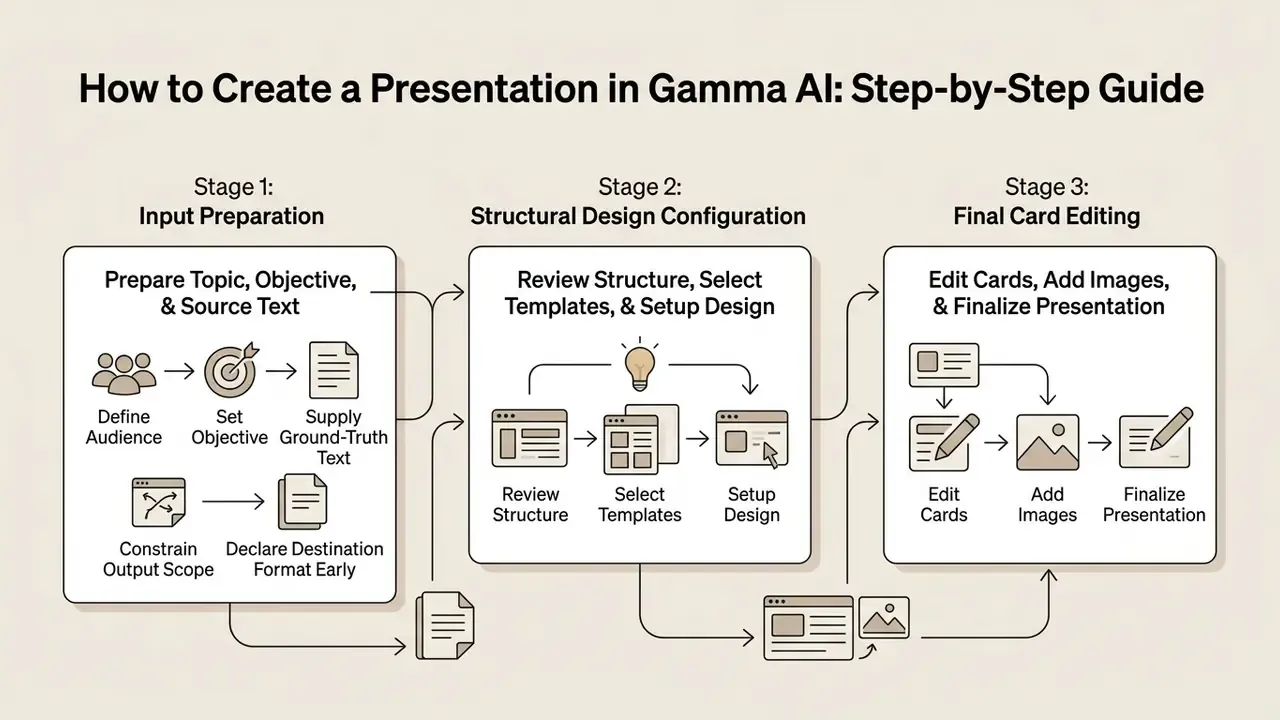
Creating a presentation in Gamma AI follows an iterative three-stage workflow: input preparation, structural design configuration, and final card editing. This sequence prevents most generation errors and keeps AI output aligned with the actual project goal. In regulated environments, treat the review gate between stages two and three as a mandatory control point rather than optional polish.
Preparing the Topic, Objective, and Source Text for Generation
Successful generation depends on the quality and structure of the initial input. Define four core parameters before running the generator: target audience, presentation objective, structural length, and mandatory fact points.
- Define the audience
- state explicitly whether the deck is for technical leads, executive board members, regulators, or external clients.
- Set the objective
- specify the decision outcome required, such as approving a budget, reviewing a policy, or onboarding a partner.
- Supply ground-truth text
- paste verified source notes, data points, or policy text into the input field rather than relying on an abstract topic. Grounded prompts materially reduce fabrication risk. This is also the fastest way to use Gamma AI to create presentation content from text you already trust.
- Constrain output scope
- set the desired card count (for example, 8 to 10 cards) to stop the model from producing an unnecessarily long deck. Free-tier generation is capped near 10 cards per prompt; higher tiers extend this substantially.
- Declare the destination format early
- if the deck must end up as a 16:9 PPTX, enable fixed card sizing before generating rather than converting afterwards.
Reviewing the Structure, Selecting Templates, and Setting Up Design
After receiving the prompt or text input, Gamma generates an editing outline. Review that outline to confirm logical narrative flow before triggering full visual rendering. Sections can be reordered, added, or deleted at this stage, and doing so here is far cheaper than restructuring rendered cards later.
Once the outline is confirmed, select a visual theme that matches the tone of the meeting. Dark themes suit screen-based executive briefings; light, minimal themes are preferable if the deck will be exported to PDF for printing. Note that Gamma's "template" concept behaves as theme and workspace-template application rather than a classic slide-template gallery. The content input drives structure, while the theme governs typography, palette, and spacing. Themes can be switched manually at any point after generation.
Editing Cards, Adding Images, and Finalizing the Presentation
Export, Presentation Modes, and Team Collaboration in Gamma
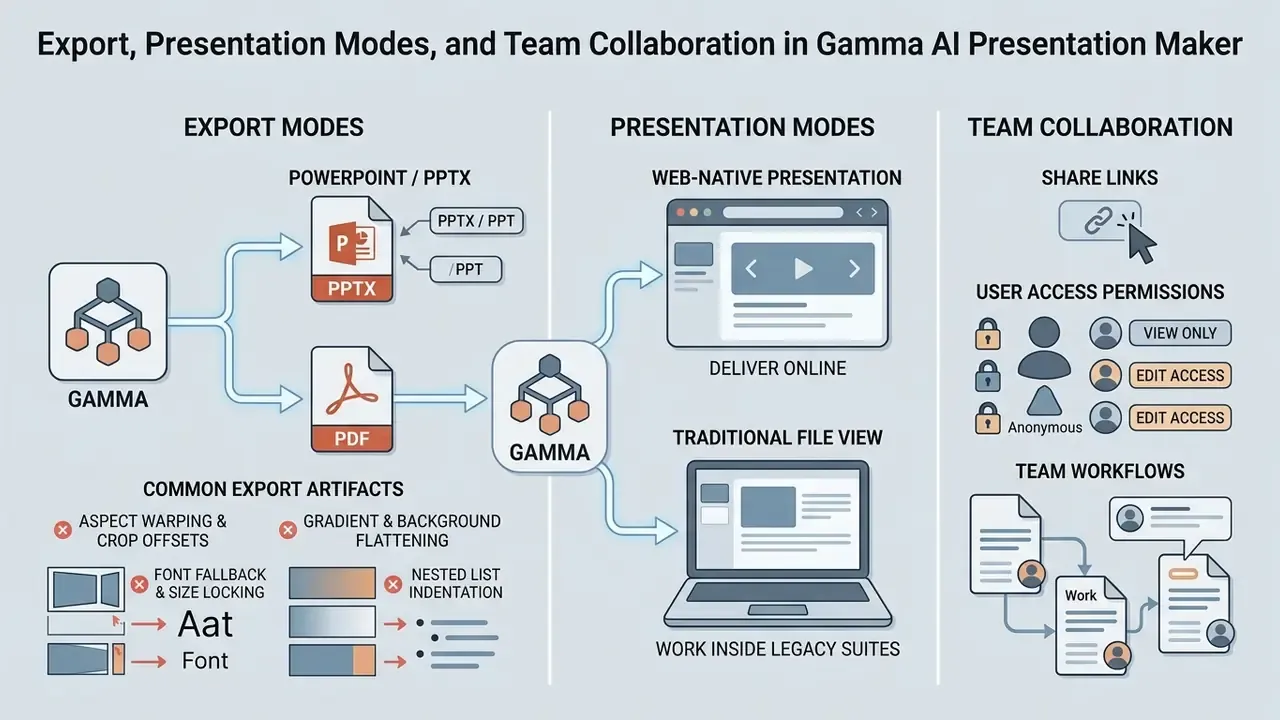
Gamma supports both web-native presentation modes and traditional file exports, so teams can deliver decks online or work inside legacy office suites. The export menu is reached through Share → Export or the three-dot menu, and completed exports are also delivered by email copy.
«Web-first slide generation tools, including Gamma, frequently break layout on PowerPoint export, creating compliance problems for corporate template standards». - Enterprise AI Presentation Tools Report (2026)
This is the most consistent criticism of card-based generators across independent reviews. Plan for it, rather than discovering it during a client meeting.
Exporting Gamma Presentations to PowerPoint, PPT, and PDF
Used as a gamma ai powerpoint generator, the platform exports completed decks to PowerPoint (.pptx), PDF, PNG image stacks, and Google Slides, including on the free plan, where exports carry a Gamma badge. PDF and PNG exports embed fonts directly, which is why they render identically on any machine and remain the preferred format for offline distribution, email attachments, and digital archiving.
Converting decks to PPT preserves editable text blocks and genuine editable tables, so further edits inside desktop PowerPoint are possible. However, because fluid card layouts do not map 1:1 onto fixed 16:9 slide frames, inspect exported PPTX files for text wrapping shifts, font substitutions, gradient rendering, and image scaling. Publicly documented behaviour indicates that Gamma does not guarantee embedding of original fonts into PPTX, and that some exports flatten complex cards into image-like blocks, reducing downstream editability.
Troubleshooting Common Export Artifacts in PPTX and Google Slides
Translating dynamic web containers into fixed 16:9 coordinate planes can trigger predictable layout anomalies. Audit for the following:
- Aspect ratio warping and crop offsetsfluid vertical or square cards with dense media may truncate background images or displace text blocks into unexpected margins after forced 16:9 conversion. Cards that looked "tall" in the editor are the most frequent offenders.
- Font fallback and size lockingGamma uses web-native typography tokens ("Normal text", "Header"). Opened in desktop PowerPoint without matching local fonts, text boxes may warp, bold states may shift, or fonts may substitute, requiring manual replacement or local font installation.
- Gradient and background flatteninggradient headings and layered backgrounds can render as a single flat color, because PowerPoint and PDF readers handle gradients differently from browsers.
- Nested list indentationdeeply nested bullet points can lose hierarchical padding in Google Slides and render as flat lists. Line spacing also drifts.
Resolution protocol: for maximum design fidelity offline, export as PDF. If fully editable PPTX decks are contractually or legally required, apply fixed 16:9 card constraints inside Gamma before running the export wizard, then reopen the file in desktop PowerPoint and run a slide-by-slide visual diff against the web original. Practical fixes for recurring artifacts are also collected in our AI Media Support and Troubleshooting hub.
Enterprise Security, Data Governance, and Shadow AI Control
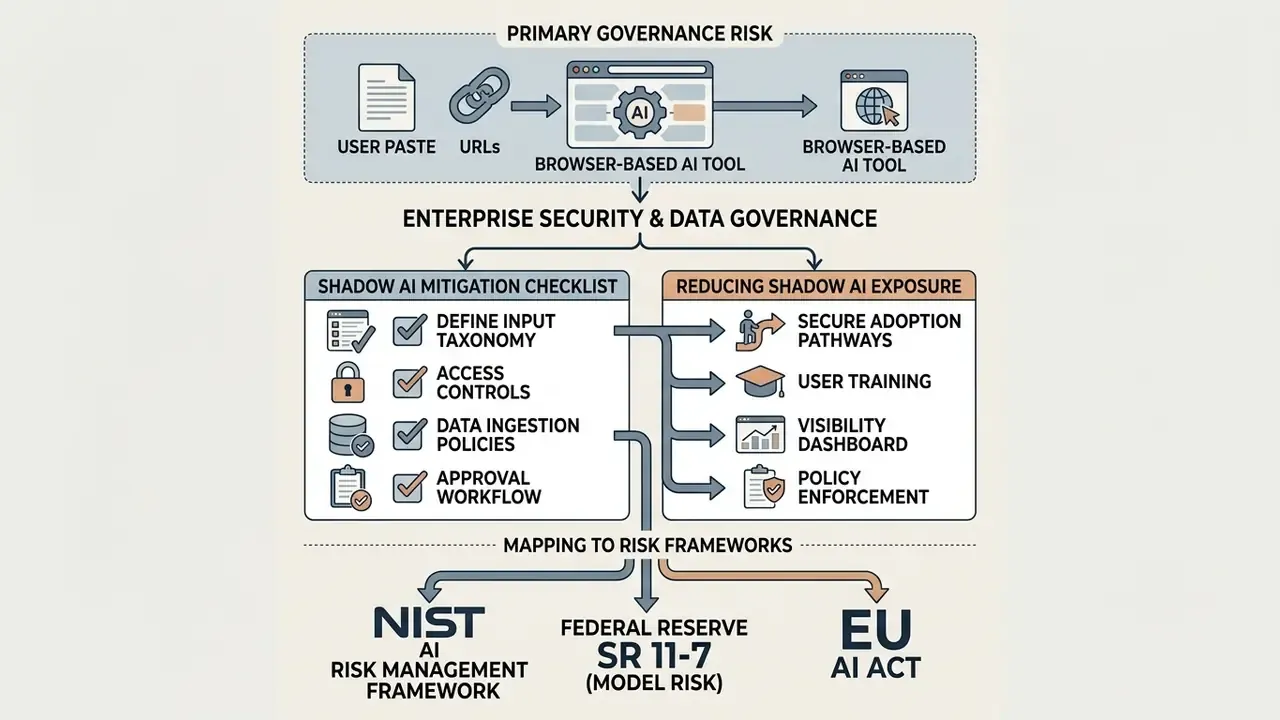
Because Gamma is a browser-based SaaS product that ingests whatever a user pastes into it, the primary governance risk is not the model. It is the input channel. A single pasted excerpt from a confidential model validation report, or a customer data extract, is an uncontrolled data egress event, no matter how well the vendor secures its own infrastructure.
Controls to Verify Before Approving the Tool
| Control domain | What to confirm in writing | Why it matters |
|---|---|---|
| Encryption | Transport encryption (TLS) and encryption at rest for workspace content | Baseline confidentiality requirement for any third-party processor |
| Model training use | Whether customer content is excluded from foundation-model training, and whether zero-retention options exist | Determines whether proprietary text can ever be entered |
| Retention and deletion | Retention windows, deletion SLAs, and export of audit records | Required for records management and regulatory response |
| Identity and access | SSO/SAML availability, admin role management, seat provisioning and deprovisioning | Prevents orphaned accounts holding confidential decks |
| Sharing controls | Ability to force password protection, disable public links, and restrict domain access | Public share links are the most common accidental disclosure vector |
| Certifications | Current attestation reports (for example SOC 2 Type II, ISO 27001) and their scope | Third-party assurance substitutes for internal testing |
| Audit logging | Workspace-level activity logs and change history | Needed to reconstruct who altered a stakeholder-facing artifact |
| DLP interoperability | Whether the domain can be governed by existing CASB/DLP tooling | Enables policy enforcement without a hard block |
Gamma publicly documents transport encryption, restricted internal access to customer information, regular safety audits, password-protected sharing on higher tiers, and administrative permission management on enterprise tiers. Validate these claims directly against the vendor's current security documentation and contractual terms before approval, because certification scope and retention language change between product cycles.
Shadow AI Mitigation Checklist
Reducing Shadow AI Exposure When Teams Use Card-Based Deck Generators
Checklist0 / 8
Mapping to Existing Risk Frameworks
AI-assisted presentation tooling rarely qualifies as a model in the classic sense, since it does not generate quantitative decisions. But the artifacts it produces carry model outputs to decision-makers. That places it inside the documentation and review perimeter of established frameworks:
- Federal Reserve SR 11-7 (model risk management): emphasizes effective challenge and documentation of assumptions. If a generated deck summarizes model results, the reviewer's attestation and the source-to-slide traceability belong in the model documentation package.
- NIST AI Risk Management Framework: the Govern, Map, Measure, and Manage functions map cleanly onto the checklist above. Govern tool approval, map data classifications entering the tool, measure error rates found in review, and manage residual risk through human sign-off.
- EU AI Act: general-purpose AI assistance used for internal drafting is typically low-risk, yet transparency obligations may still apply where AI-generated content is presented externally. Confirm disclosure expectations with counsel for your jurisdiction and use case. Ongoing disputes over training data and output rights are tracked in our AI Litigation and Case Timelines section.
This section describes general governance practice and is not legal, regulatory, or compliance advice. Validate all control requirements with your own legal, information-security, and model-risk functions.
Gamma AI Pricing: Free Access, Subscription Plans, and Limits
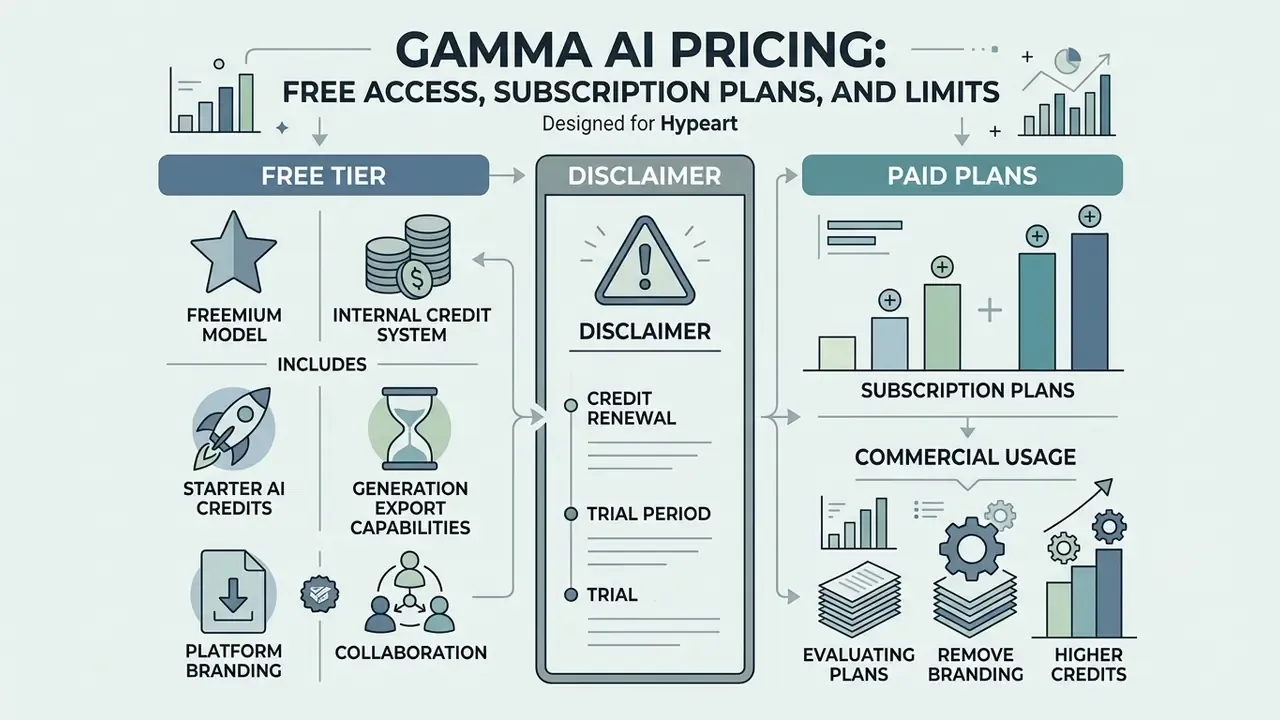
Gamma runs a freemium model powered by an internal credit system. AI actions, such as drafting a deck, editing a card with the assistant, or generating images, consume credits based on task complexity. Independent reviews report indicative consumption of roughly 40 credits for generating a full presentation and around 10 credits for smaller actions such as rewriting a block or querying the chatbot.
According to official plan documentation, free accounts receive a one-time allocation of AI credits at signup (commonly documented as 400), whereas paid subscriptions provide monthly credit top-ups, remove platform branding, and unlock advanced features. Help-center guidance also indicates that free-tier credits do not refresh, that free accounts can accumulate credits up to a ceiling through referrals, and that additional credit bundles can be purchased separately. Queries phrased as "gamma ai presentation generator 2025" still circulate in search, but credit mechanics were revised in the 2026 cycle, so older summaries mislead on limits.
What the Free Tier of Gamma AI Includes
The Free plan suits individual testing, educational projects, and basic presentation creation. It provides full access to the card editor, basic themes, and standard export options.
- Starter AI credits a one-time allocation at account registration (credits do not refresh monthly); no credit card required.
- Generation caps roughly 10 cards per generated prompt.
- Export capabilities PDF, PPTX, PNG, and Google Slides.
- Platform branding exported files and shared links include a "Made with Gamma" badge.
- Collaboration link-based viewing and commenting; full real-time co-editing is a paid capability.
Evaluating Paid Plans and Commercial Usage
Upgrading to paid tiers (Plus, Pro, or Team) lifts generation limits and unlocks the customization controls commercial operations usually require.
Paid plans provide monthly credit allocations or effectively unlimited generation on higher plans, plus support for custom corporate fonts, brand asset kits, password-protected share links, custom domains, view analytics, larger per-prompt card counts, and more advanced models. Public 2026 pricing pages show meaningful variation across Gamma's domain variants, with monthly figures in the high-teens to around $20 per month for professional tiers and lower effective rates on annual billing. Treat any single published number as indicative rather than contractual, and model seat counts using our AI Media Calculators or the wider AI Media Pricing Guides before submitting a budget request.
On rights: Gamma's Terms of Use grant users a license over their own content while granting Gamma broad rights to use that content to operate and improve the service, and separately prohibit commercially exploiting the Service itself. Export and transfer are additionally subject to applicable sanctions and export-control law. When using generated visual assets in client-facing campaigns, review comparable licensing analyses such as the Canva AI Generator commercial-use overview and the broader AI Media Commercial-Use library to understand how design platforms typically handle AI-generated imagery and third-party stock assets.
Third-Party User Sentiment and Workspace Billing Considerations
Independent feedback across software evaluation portals highlights distinct strengths and tradeoffs:

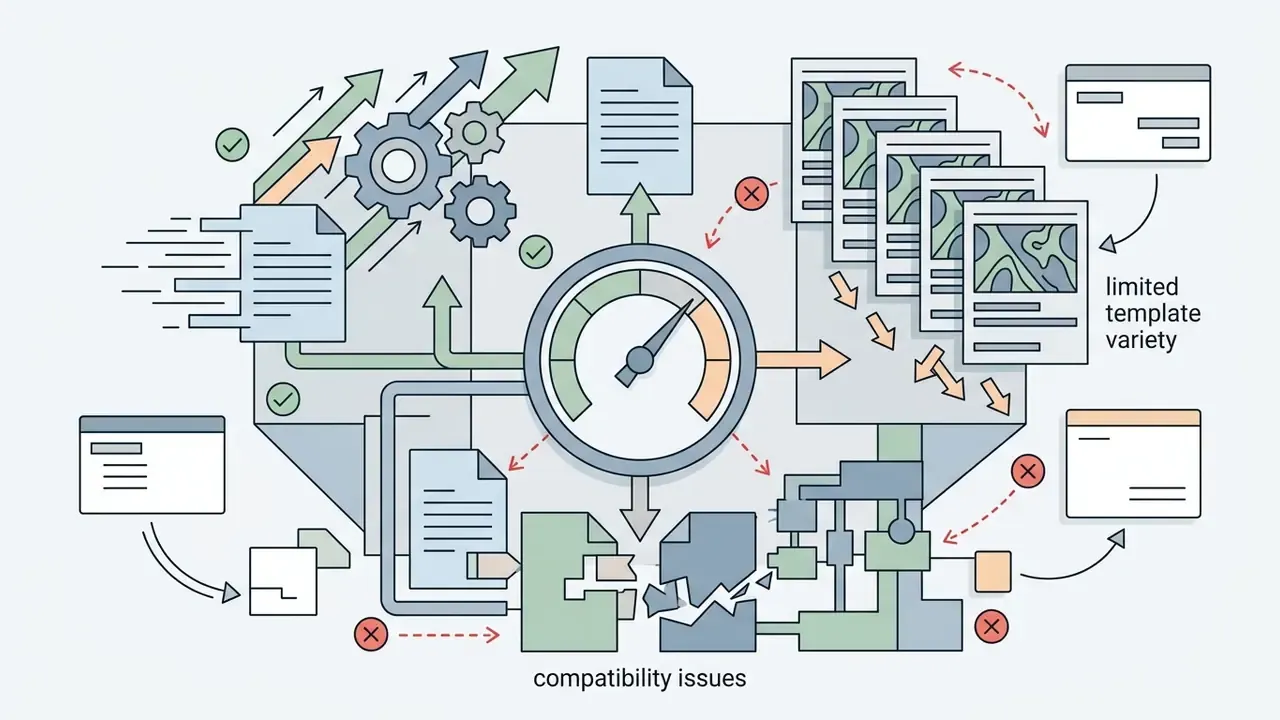

Team seat warning: in collaborative workspaces, real-time co-editing is restricted to paid seat holders. Free users invited into a paid workspace cannot edit cards unless assigned a paid license, which means the realistic cost for a 30-person department is 30 seats, not one. Model this explicitly in any total-cost-of-ownership calculation before rollout.
Gamma AI Subscription Tier Comparison (indicative, 2026 product cycle; verify against the official pricing page)
| Plan tier | AI credits | Generation limit per prompt | Branding and watermarks | Export and feature access |
|---|---|---|---|---|
| Free | One-time starter credits (no monthly refresh); referral top-ups possible | Up to ~10 cards per prompt | "Made with Gamma" badge on shared links and exports | Standard PDF, PPTX, PNG, Google Slides export; basic editing tools; view/comment sharing |
| Plus | Monthly credit allocation (commonly documented around 1,000) | Up to ~15 cards per prompt | Gamma badge removed from all exports and links | Custom brand colors, custom font uploads, real-time co-editing, PDF/PPTX export |
| Pro / Team | Unlimited or organization-level custom credit pools | Up to 30-60 cards per prompt | Fully white-labeled custom domains and branding | Advanced models, multi-card batch editing, agent restyling, password access, analytics, admin controls, API access |
Gamma AI Limitations and When to Choose an Alternative Presentation Tool
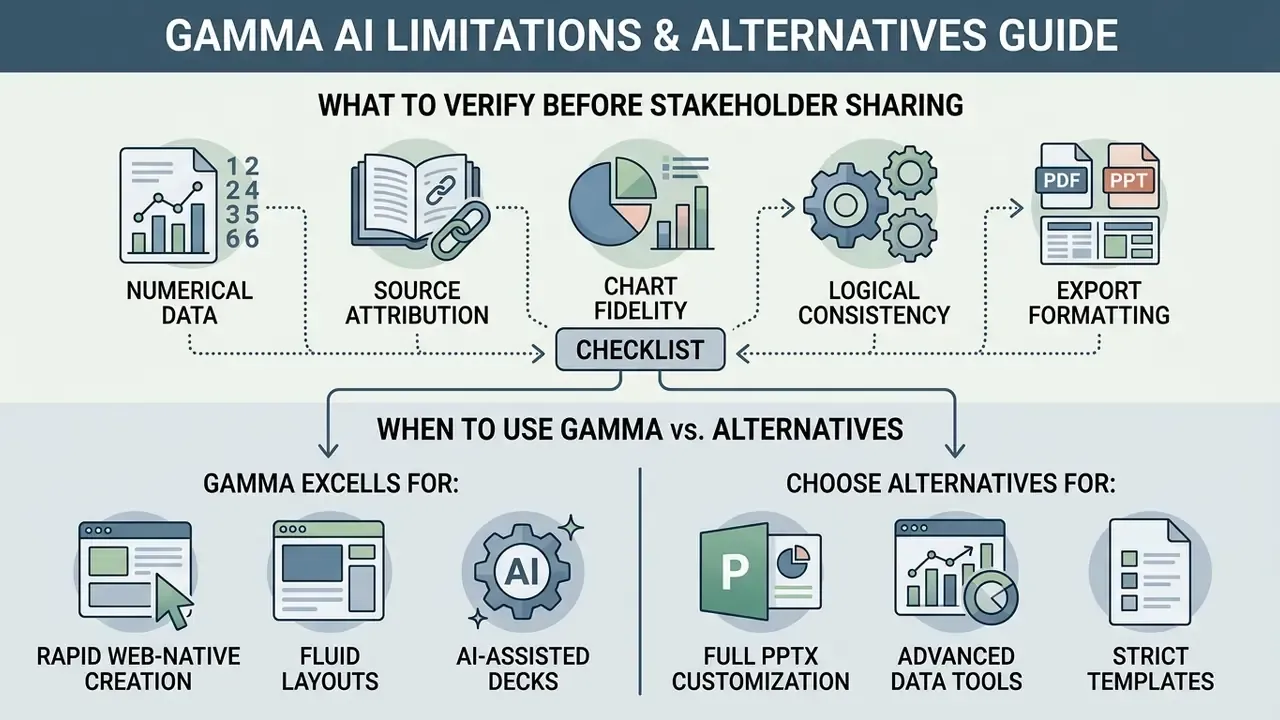
Gamma excels at rapid web-native creation, yet several functional limits push certain enterprise and academic use cases toward other tools. Gamma itself documents that generation is non-deterministic: identical inputs can produce different charts, layouts, and phrasing across runs, and chart type or data formatting cannot be directly parameterized.
«Accuracy and completeness vary substantially across AI slide-generation systems; some produce incomplete or problematic slides that require mandatory review». - AI-Generated Slides: Are They Good? Can Students Tell?, arXiv preprint (2026)
Non-determinism carries a specific governance consequence. A deck cannot be reproduced by re-running the prompt. If an artifact must be auditable, the artifact itself is the record of truth, not the prompt, and it must be versioned and archived.
What to Verify in AI-Generated Content Before Sending to Stakeholders
When Gamma Excels and When You Need a Classic AI PPT Maker
Gamma is a strong fit for teams that prize drafting speed, responsive web viewing, and modern visual design, and that do not need complex animation or print-optimized slide masters. As an ai ppt maker for early drafts, it turns raw text into presentable decks fast.
The downstream value of well-structured slides extends beyond live presentation. Research on automated content repurposing shows how far slide artifacts can travel once they exist in machine-readable form:
«AutoLectures generates narrated lecture videos from PDF slides with alignment F1 above 92% at under $1 per hour of video». - Generating Narrated Lecture Videos from Slides with Synchronized Highlights (AutoLectures), arXiv preprint (2025)
Conversely, Microsoft PowerPoint (with Copilot) or Google Slides remain better suited to organizations with strict brand compliance, complex slide masters, offline playback requirements, or advanced animation needs. Copilot for PowerPoint supports formal brand kits, including logos, hex palettes, and uploaded brand-guideline PDFs, plus explicit brand-compliance checks. Where a brandbook is contractually enforced, that is the strongest documented option.
Comparative Alternatives Overview
- Plus AI best where native PowerPoint and Google Slides add-ins are needed, since files are generated inside the Microsoft or Google ecosystem with no cross-platform conversion.
- Tome narrative storytelling decks with heavy generative art integration and a Gamma-like editing model.
- Canva Magic Design favored by visual designers who need large graphic asset libraries. Note the short prompt window, limited document ingestion (uploads act mainly as visuals), and modest PowerPoint fidelity.
- Beautiful.ai opinionated, constraint-driven slide layouts rather than free-form canvases.
- Copilot for PowerPoint the default when native PPTX, slide masters, and enforced brand kits are non-negotiable.
- Pitch, Chronicle, Presentations.AI commonly cited in 2026 comparisons for collaborative sales decks and template-driven corporate reporting.
The criteria that actually discriminate between these tools: first-draft content quality, editability after generation, prompt adherence, data-handling and residency terms, export fidelity to the required destination format, and free-tier or per-seat cost structure. Side-by-side scoring for adjacent categories sits in our AI Media Comparison Matrices. Teams that also produce portrait assets or personal branding visuals for the same decks can evaluate a dedicated AI headshot generator for consistent executive imagery instead of relying on generic AI illustration.
FAQ About Gamma AI Presentation Maker
Is Gamma AI completely free to use?
Gamma offers a Free plan with a one-time allocation of AI credits at account creation (commonly documented as 400) and no credit card requirement. Free accounts support basic presentation creation, card editing, and exports to PDF, PPTX, PNG, and Google Slides. Free exports include a "Made with Gamma" badge, per-prompt generation is capped near 10 cards, and starter credits do not refresh monthly. Once consumed, continued AI use requires a paid plan or purchased credit bundles.
Can I export Gamma presentations directly into Microsoft PowerPoint?
Yes. Gamma exports decks to standard PowerPoint (.pptx) files on all plans, including the free tier, and editable text and genuine editable tables survive the conversion. Review converted files in PowerPoint, though, to correct layout shifts, text wrapping differences, gradient flattening, and font substitutions caused by translating fluid web cards into fixed 16:9 slides. Gamma does not guarantee that original fonts are embedded in the PPTX file, so recipients may need those fonts installed locally. For maximum visual fidelity, export as PDF instead.
Why can't I set an exact font size in the Gamma editor?
Gamma applies typography as hierarchy tokens (Title, Heading, Subheading, Normal text) rather than absolute point values. This keeps typographic scale consistent across every card and viewport, but individual words or blocks cannot be set to an arbitrary size such as 13pt. Global scale can be adjusted at the theme level or through an agent instruction applied across the deck. If pixel-precise typography is a hard requirement, a native PowerPoint workflow fits better.
How does Gamma handle data security and content privacy?
Gamma states that it uses standard encryption in transit, restricts internal access to customer information, and performs regular safety audits. Higher tiers add password-protected sharing, single sign-on, and administrative permission management. Because certification scope, retention windows, and model-training terms change between releases, organizations in regulated sectors should verify these claims against Gamma's current security and privacy documentation and contractual terms rather than any third-party summary, including this one. Confidential, personally identifiable, or material non-public information should not be pasted into any third-party AI tool without documented approval and a corresponding data-processing agreement.
Can free users collaborate inside a paid team workspace?
No. Real-time co-editing is limited to paid seat holders. Free users invited into a paid workspace can typically view or comment but cannot edit cards until assigned a paid license. For departments planning broad adoption, model cost per editing user, not per workspace.
Does Gamma work on mobile devices?
Yes. Decks are built on responsive web cards that adjust automatically to mobile viewports. The Gamma mobile application lets users view, generate, edit, present, and share presentations from smartphones and tablets, and agent-based editing is supported on mobile as well.
Which input formats and languages are supported?
Gamma ingests Word, PDF, plain text, Markdown, PowerPoint, Excel and CSV spreadsheets, Google Docs and Google Slides imports, direct web URLs, and YouTube links, in addition to pasted prompts. Documented upload ceilings are approximately 200 MB for PowerPoint and Word and 100 MB for PDF. Generation and card editing are supported in a broad set of interface and output languages, including English, Spanish, German, French, Portuguese, and Russian, with some locales historically rolled out in beta. The underlying models parse prompts and source text in the input language to produce localized copy. Verify the current language list in-product for any locale that is business-critical.
Will the same prompt always produce the same deck?
No. Gamma documents that generation is non-deterministic, so identical inputs may return different text, chart types, and layouts on separate runs. For audit purposes, archive the finished file itself along with the reviewer's name and verification date. The prompt is not a reproducible record.
Appendix: Reference Resources and Verification Templates
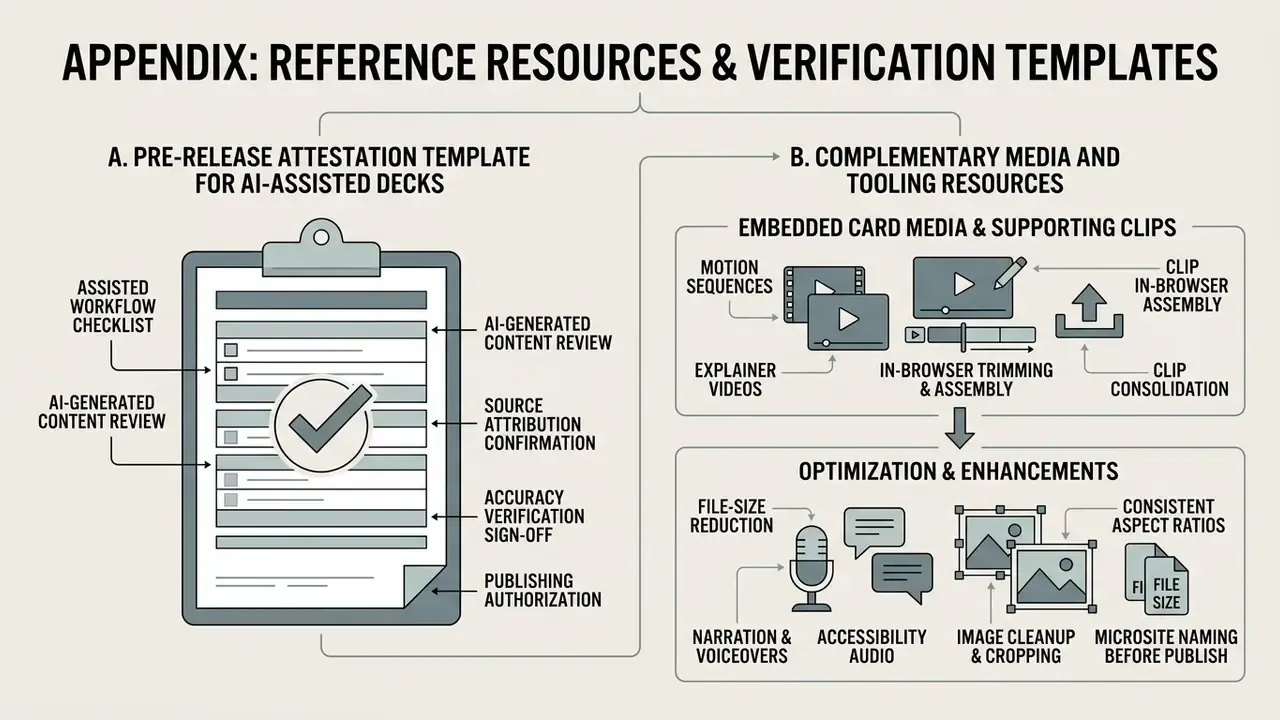
A. Pre-Release Attestation Template for AI-Assisted Decks
| Field | Entry |
|---|---|
| Artifact title and version | |
| Tool and plan used | Gamma (plan / workspace) |
| Input sources supplied | Documents, datasets, URLs, prompts |
| Data classification of inputs | Public / Internal / Confidential / Restricted |
| Numeric claims verified against | Primary source document and version |
| Charts reconciled to source data | Yes / No, reviewer initials |
| Citations verified as existing and accurate | Yes / No, reviewer initials |
| Export format(s) issued and visually audited | PDF / PPTX / Google Slides |
| Named human reviewer and date | |
| Distribution scope | Internal / External / Regulator-facing |
Retaining this record converts an AI-assisted artifact from an undocumented output into a defensible, reviewable deliverable. It is the practical expression of the "effective challenge" principle that supervisory guidance expects.
B. Complementary Media and Tooling Resources
Presentation programs rarely exist in isolation. Decks increasingly carry embedded video, voiceover narration, and edited imagery. For teams building those supporting assets, the references below cover feature limits, pricing structures, and commercial-use terms:
C. Residual Risk Notes and Open Questions
A few points remain genuinely unresolved, and it is more honest to name them than to smooth them over.
First, credit accounting is opaque at the action level. Reviews report indicative costs per generation, yet published figures differ by domain and product cycle, which complicates chargeback modelling for large workspaces. Second, export fidelity depends on the recipient's font environment, something the vendor cannot control and your policy usually cannot either. Third, agent-level restyling changes multiple cards at once, so a single instruction can silently alter the emphasis of a message that a reviewer already approved. Version the file before running deck-wide restyling.
For standardized terminology used throughout this guide, the AI Media Glossary defines generative asset formats, credit systems, and export terminology.
General disclaimer: this article is informational and reflects publicly available product documentation, vendor help-center guidance, and third-party review data at the time of writing. It is not legal, regulatory, financial, or security advice. Product features, pricing, credit allowances, certifications, and contractual terms change frequently. Verify all details with the vendor and with your own legal, information-security, and model-risk functions before making procurement or deployment decisions.