Executive Summary
- What it is An AI smile filter is a generative editing mechanism that turns a neutral or serious facial expression into a realistic smile by editing mouth, lip, cheek and periocular geometry, without rebuilding the person's biometric identity.
- How modern tools work Latent diffusion models, neural feature disentanglement and 3D morphable face models (3DMM) separate identity from expression, so only the expression layer moves.
- How to use it in three steps upload a clear frontal portrait, mask the mouth region (brush or inpaint) and choose a smile level or text prompt, then preview at 100%, refine, and export as PNG or JPG (GIF and MP4 for animated variants).
- What makes a smile look natural coordinated AU12 (lip-corner pull) plus AU6 (cheek and eye crinkle), dental proportions near 75–80% visible incisor width-to-length, frontal pose within ±5°, even lighting.
- For consumer users LinkedIn, Tinder, Discord, Instagram avatars, family albums, restored historical portraits, memes and light-hearted prank edits.
- For risk, compliance and governance leaders facial images processed for automated modification or verification are frequently classified as sensitive biometric data (Illinois BIPA, CCPA/CPRA, GDPR-adjacent regimes). Model validation should follow existing model-risk expectations, for example Federal Reserve and OCC SR 11-7 principles applied to GenAI, with documented human review, retention limits and a Shadow AI policy that blocks unsanctioned free web tools.
- Free vs paid, in one line an ai smile filter free tier solves one-click expression edits with watermarks and SD exports; paid platforms deliver clean 4K exports, AU-level controls, encryption, purge-on-demand and explicit commercial licensing.
Key Terms Used in This Guide
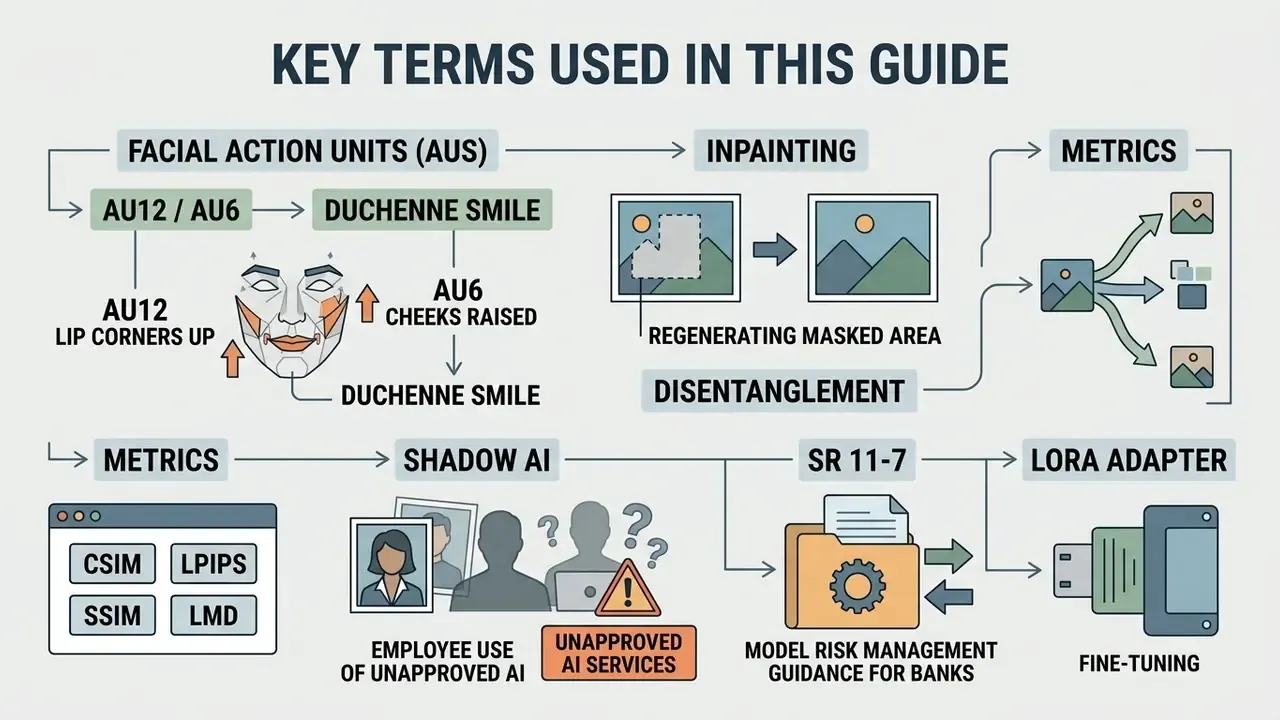
- AU12 / AU6. Facial action units from expression coding: AU12 pulls the lip corners upward, AU6 raises the cheeks and crinkles the skin around the eyes. Both together read as a genuine smile.
- Duchenne smile. A smile that engages the eye region, not only the mouth. Missing AU6 is the single most common reason an edit looks fake.
- Inpainting. Regeneration of a masked area of an image. Here the mask usually covers the mouth and lower cheeks.
- Disentanglement. Separation of latent factors, so a model can change expression while pose, background and identity stay fixed.
- CSIM / LPIPS / SSIM / LMD. Standard scores for identity similarity, perceptual quality and mouth-landmark alignment.
- Shadow AI. Employee use of unapproved AI services, often with real customer or colleague photos attached.
- SR 11-7. Supervisory guidance on model risk management used by US banks, applicable to generative image tools with little translation.
- LoRA adapter. A lightweight fine-tune trained on a handful of reference photos of one person, used to hold likeness stable across a batch.
What Is an AI Smile Filter and How Does It Change Facial Expressions?
An AI smile filter is an automated image editing mechanism that transforms facial expressions on portrait photographs from neutral or serious states into realistic smiles. It works by analyzing facial geometry, isolated muscle groups and surface textures through generative deep learning architectures.
Unlike legacy software filters that stretch pixels or paste static graphics, modern tools use latent diffusion models, neural feature disentanglement and 3D morphable face models. Research frameworks in this line, including PixelSmile and EmojiDiff (recent preprints and conference papers; treat publication years as fast-moving and verify the current version before citing internally), separate biometric identity from facial expressions. That separation lets the algorithm modify the mouth, lips and cheeks while leaving eye shape, bone structure and background details untouched.
«PixelSmile achieves precise, linear expression control through latent-space interpolation while preserving biometric identity across continuous edits.»
Identity locking is not cosmetic. An ArcFace-style identity-preservation loss is what keeps the same person recognizable after the mouth region is regenerated. Complementary work such as MagicFace adds an ID encoder that holds pose, background and attributes constant while only the expression channel moves. Put simply: the ai smile maker repaints a small region and is punished whenever the face stops looking like you.
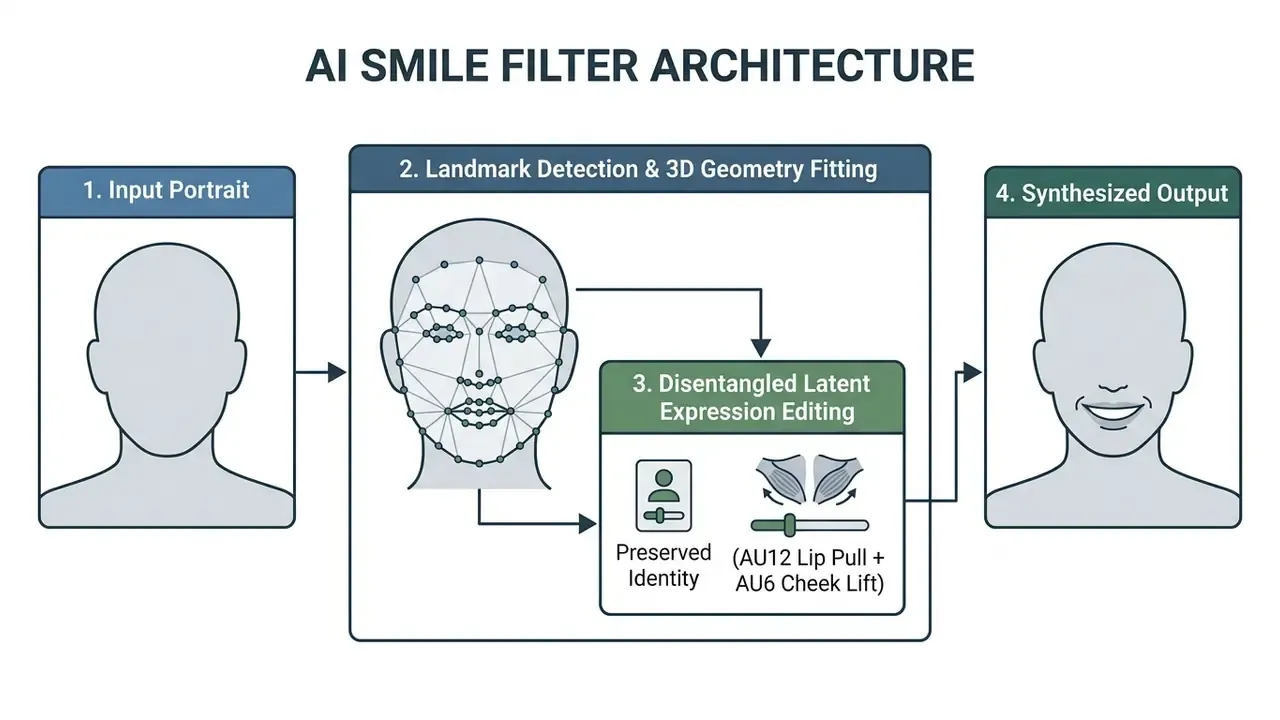
From a Neutral Face to a Natural Smile
Turning a neutral face into a natural smile means altering the mouth region while adjusting upper-face features to keep the result believable. Generative networks extract biometric landmarks, compute facial action units, and synthesize plausible dental and lip movements.
When evaluating an ai portrait generator, a general-purpose AI photo editor or a targeted expression tool, model risk frameworks prioritize identity preservation above prettiness. Perception research is blunt about the failure mode: when upper-face expressiveness disappears, uncanniness rises, and mismatched cues between mouth and eyes are a recognized experimental manipulation in uncanny-valley studies.
«AI-generated happy faces were classified more accurately and rated as more intense than posed photographs from standardized databases.»
To avoid synthetic distortions, models such as DiffFAE and InstaFace apply spatial guidance networks. These models restrict modifications to target facial areas, so an expression change cannot spill into hair, clothing or lighting.
Smile Styles the AI Can Create
Generative algorithms synthesize multiple smile styles by manipulating lip elevation, dental visibility and cheek contraction. Users pick the emotional register that fits the context, which is usually narrower than they expect.
«MagicFace controls expressions through relative action-unit (AU) variations of a single individual, enabling continuous and interpretable control over smile styles.»
The four primary smile styles produced by neural networks:
Creators comparing broader generation stacks can review AI image generators to see which engines expose expression-level controls rather than global style presets.
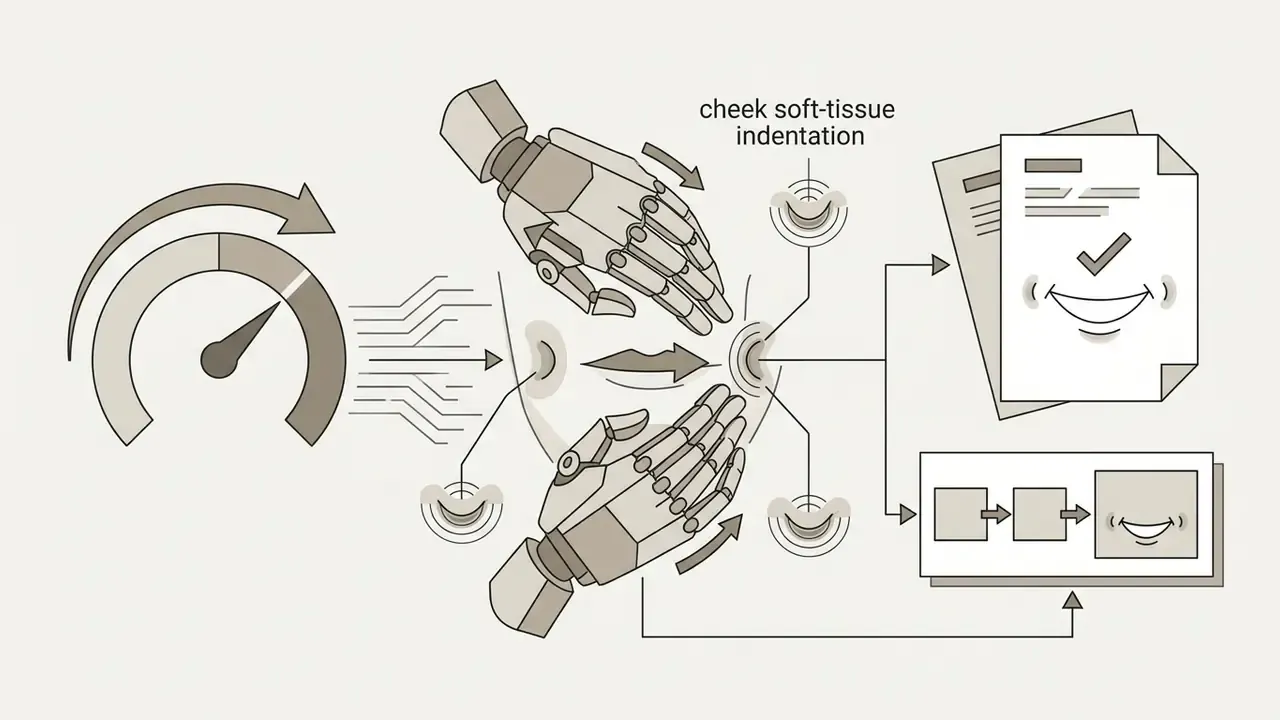
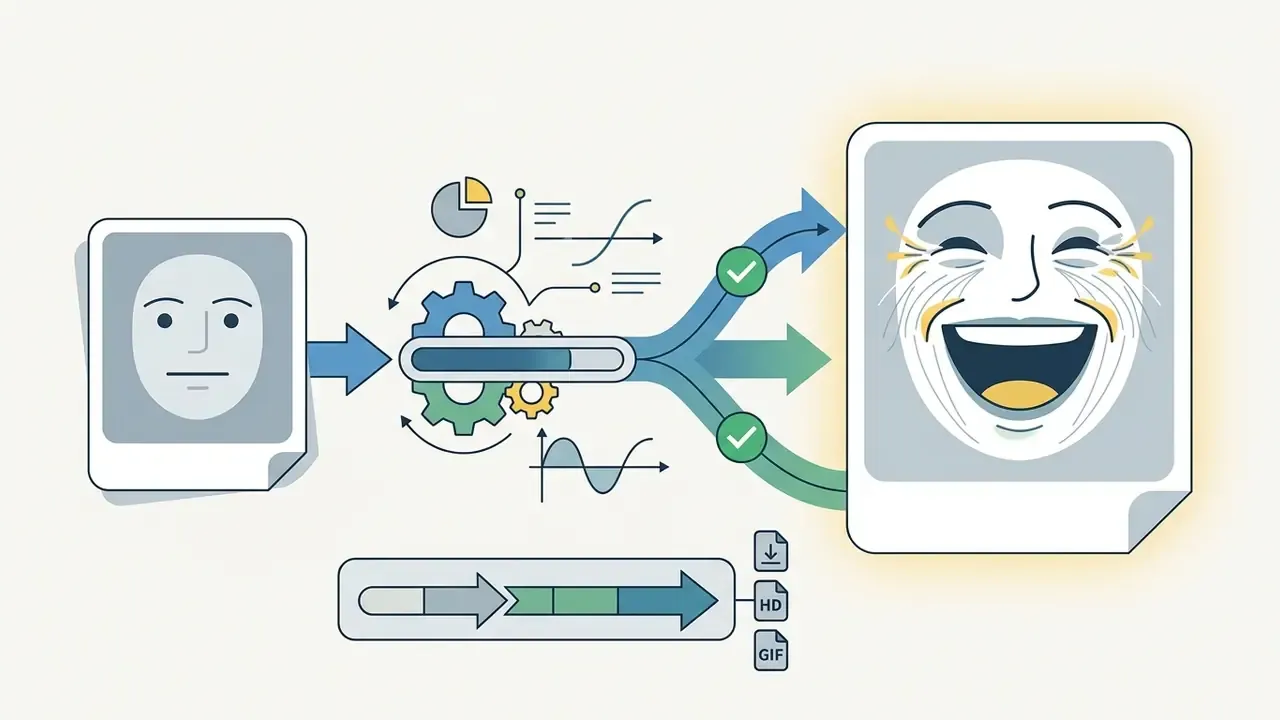
[IMAGE SLIDER, BEFORE / AFTER: results of an ai smile filter. Left: original neutral portrait. Right: generated variants with a subtle smile, a toothy smile and a dimpled smile.
How to Add a Smile to a Photo Online with AI
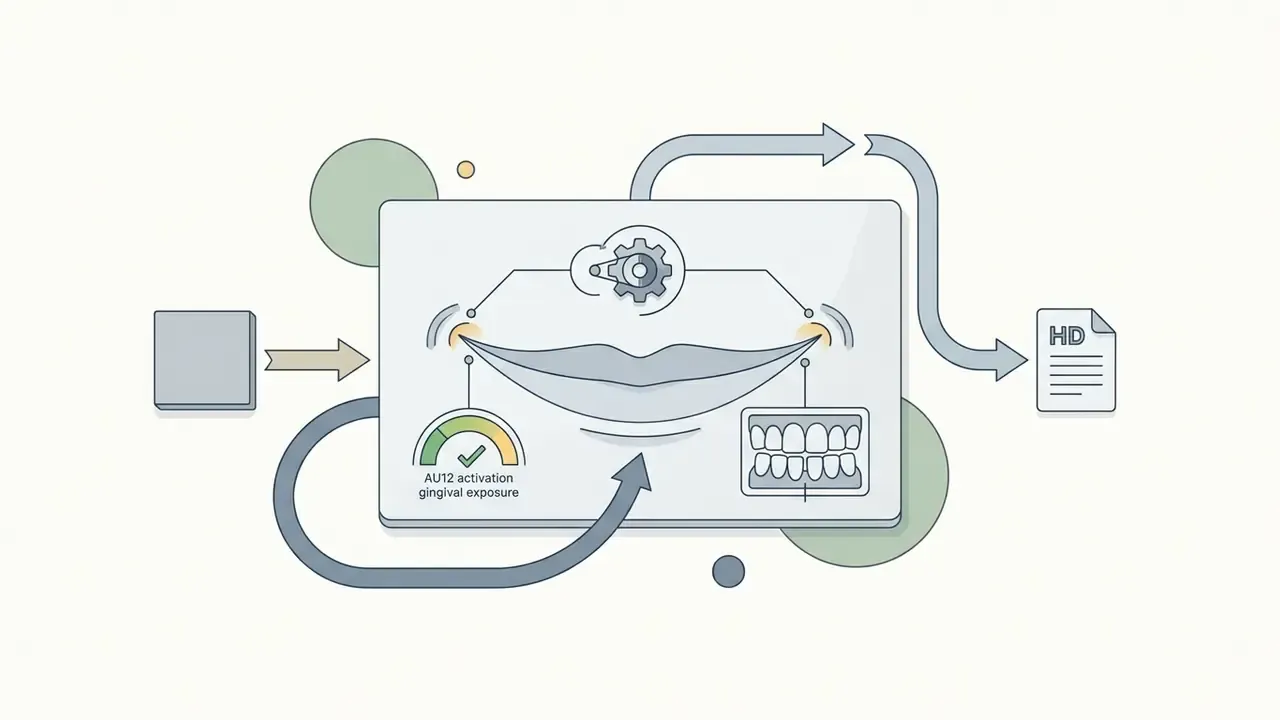
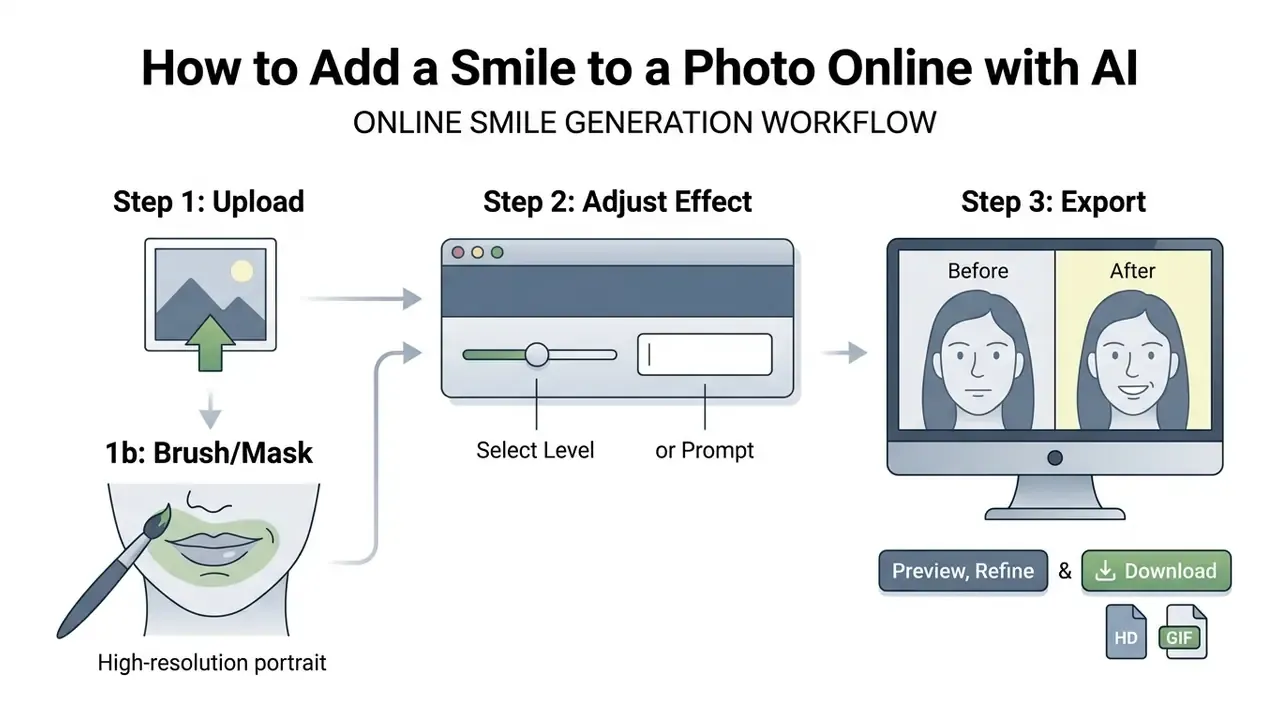
To add smile to photo ai workflows follow three steps: upload a clear portrait, select or prompt the desired smile intensity, and review the generated output before export. Advanced canvas editors insert one extra sub-step between upload and generation, which is masking the mouth region with a brush.
Upload a Clear Portrait Photo
The quality of an AI-generated smile depends directly on resolution, lighting and camera angle in the source photo. Input images must show an unobstructed view of the facial features so that landmark mapping stays accurate.
International biometric standards, such as ICAO Document 9303 on portrait quality and reference facial images for machine-readable travel documents, require frontal camera alignment within ±5° and neutral, even lighting. FISWG guidance repeats the ±5° tolerance across roll, pitch and yaw. Uploading images with heavy shadows, low resolution or partial occlusions increases algorithmic error rates during dental synthesis. Practical minimums used by vendors: the face should be at least about 300 px wide, in sharp focus, with no hair, hands, sunglasses, masks or accessories crossing the lips or jawline.
«DiffFAE and InstaFace show that poor illumination and extreme head angles impede 3D model fitting and degrade the quality of expression editing.»
Inpainting masking (advanced editors). If your tool exposes a canvas, select the Brush and draw a mask over the mouth and lower-cheek region before generating. Precise boundary masking keeps the diffusion process from touching unaffected facial zones, hairlines, jewelry or collars. A tight mask that stops at the nasolabial folds usually produces fewer artifacts than a full-face mask, because the model has less freedom to redraw identity-bearing structures. If the editor supports feathering, a soft edge of 4 to 12 px blends synthesized lip texture into original skin without a visible seam.
In an enterprise assessment of digital asset workflows, a team processed 1,200 archived corporate portraits through an automated editing pipeline. By filtering out non-frontal photographs before processing, the team reported a materially lower rate of facial reconstruction artifacts, an internally measured improvement of roughly 42% in rejected frames. That figure is a single-organization pipeline metric, not an independently published benchmark, and external verification is still missing. The resulting pipeline delivered consistent headshot updates without manual retouching. The direction of the finding matches NIST evidence that pose and illumination dominate face-image quality outcomes.
Choose a Smile Level or Enter a Text Prompt
Users set expression intensity with sliders, presets or text prompts. Neural networks translate those inputs into conditional vectors that steer the latent diffusion process.
Modern editing APIs expose text prompt parameters alongside numerical style weights, for example expression-change endpoints that accept a plain prompt field describing the target emotion. Prompts such as "soft genuine smile" or "radiant toothy smile" give fine control over expression strength without manual action-unit tuning. Prompt-rewriting systems such as ExpressEdit convert an instruction like "make her smile" into explicit expression tags, which is how many an ai make picture smile feature works under the hood.
«AIEdiT shapes multiple emotional factors of an image from textual descriptions such as "warm and friendly", adapting to the user's affective intent.»
Recommended Text Prompts for Precise Smile Control
- Subtle Professional"A subtle, warm, closed-mouth smile, natural skin texture, professional lighting, corporate headshot."
- Radiant Toothy Smile"A genuine broad smile displaying clean white upper teeth, natural cheek rise, highly detailed eyes."
- Dimpled Smile"A happy expression with subtle cheek dimples, natural lip curvature, soft portrait lighting."
- Candid Joy"An authentic open-mouth laugh, slight eye crinkling (crow's feet), realistic depth of field."
- Vintage Portrait Smile"A gentle expression restoration, maintaining historical photo grain and original lighting contrast."
Negative prompts matter just as much for suppressing typical failure modes: "no gum overexposure, no stretched teeth, no doubled tooth rows, no altered eye shape, no background warping."
Pro and enterprise note on custom model training. For repeatable brand assets, teams can fine-tune lightweight LoRA adapters on 4 to 20 reference photos of a specific individual, and some platforms accept up to 128 images. This raises biometric fidelity during automated expression shifts and keeps outputs consistent across a whole headshot set. Any such training set is personal data, so it inherits the same retention, consent and deletion controls as production imagery. No exceptions there.
Preview, Refine and Download the Edited Image
Before saving the final file, inspect generated previews at 100% scale and judge lip symmetry plus dental realism. If artifacts show up, re-render the prompt or dial the control parameters down.
According to NIST face image quality standards (NIST.IR.8485), export should preserve sharpness and minimize compression loss. Resolution is defined there as the absence of blur and loss of fine detail, with uncompressed, perfectly focused images serving as the top reference case. Advanced editing suites apply generative upscaling at 2x or 4x (Adobe Help Center, 2025), with typical maximum outputs around 4096 px, which is enough for print or digital publishing. Readers optimizing output quality can compare AI image upscalers before locking a production preset.
Depending on the goal, editors export static results in PNG, JPG or WebP, or short animated transition clips in GIF or MP4 for dynamic social displays. The animated variant is useful when a profile picture should visibly shift from neutral to smiling. Technical operators hitting export errors can consult AI Media Support and Troubleshooting for resolution protocols.
What Makes an AI-Generated Smile Look Natural?
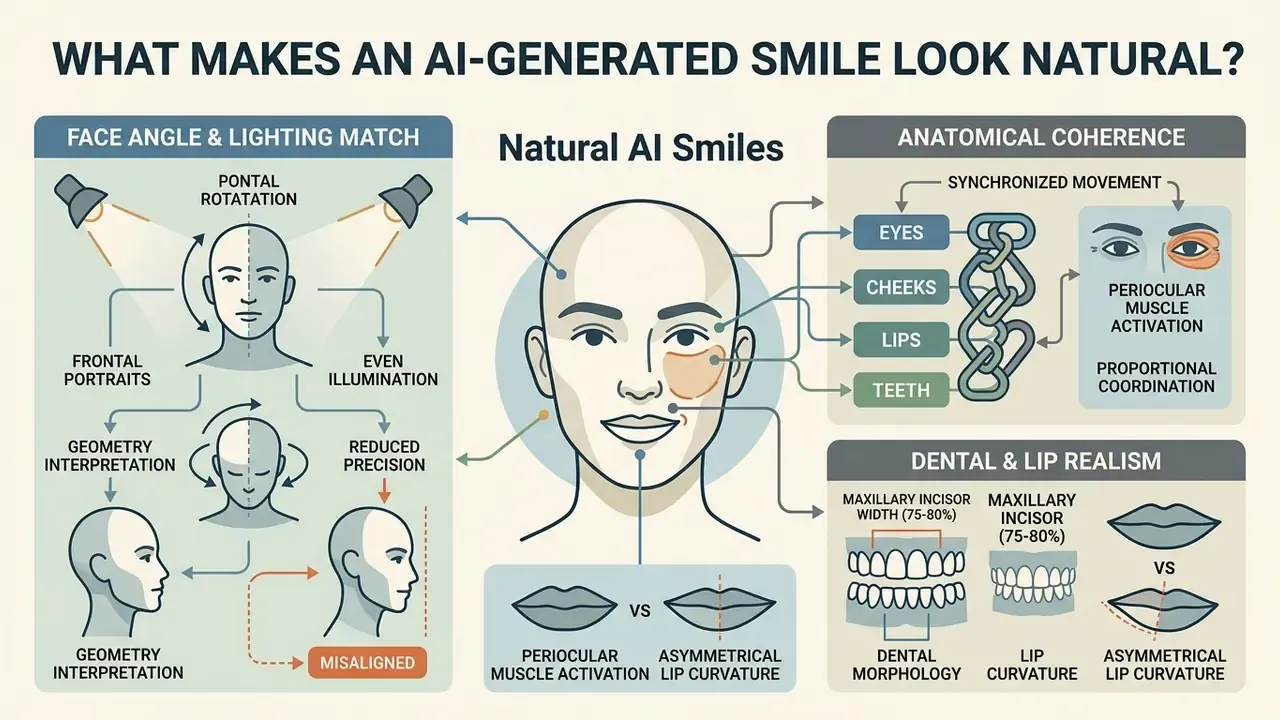
An AI-generated smile looks natural when the model synchronizes mouth movement with surrounding facial features while preserving biometric identity. Everything else is detail work.
«Standard evaluation metrics, CSIM, SSIM, LPIPS and LMD, measure identity preservation, perceptual quality and mouth-contour alignment accuracy.»
Anatomical coherence across eyes, cheeks, lips and teeth is what keeps the rendered photo from feeling artificial. Empirically, subtlety wins. Studies that generated smiling portraits by editing only the mouth region, keeping lips closed and leaving other features untouched, reported higher perceived similarity and lower visual salience than large-amplitude expression jumps.
Face Angle, Lighting and Image Quality
Face angle and ambient lighting shape how accurately a generative model interprets facial geometry. Controlled frontal lighting lets the algorithm estimate depth and place natural highlights across lips and teeth.
Research conducted by NIST (NISTIR 7674) established that frontal portraits with even illumination achieved an estimated verification probability of 0.95. With pronounced side lighting, verification probability fell to 0.65. https://nvlpubs.nist.gov/nistpubs/ir/2010/NIST.IR.7674.pdf
Extreme head poses reduce precision further, which shows up as asymmetrical lip curvature or misaligned tooth rendering. Later lighting studies reinforce the pattern: recognition accuracy peaked near 99.6% under combined overhead and intelligent wall lighting, then collapsed to roughly 57.6% under fixed wall lights, with the worst pose case at −20°. Contemporary face-image-quality models therefore treat pose angle, illumination and resolution as first-class quality factors, not aesthetic preferences.
Matching Teeth, Lips and Facial Features
Realism requires proportional coordination between dental morphology, lip curvature and periocular muscle contraction. A natural human smile involves both lower-face movement (AU12) and upper-face eye crinkling (AU6), known as a Duchenne smile.
«MagicFace confirms that combining AU12 (lip-corner pull) with AU6 (cheek raise) produces an authentic Duchenne smile with high photorealism.»
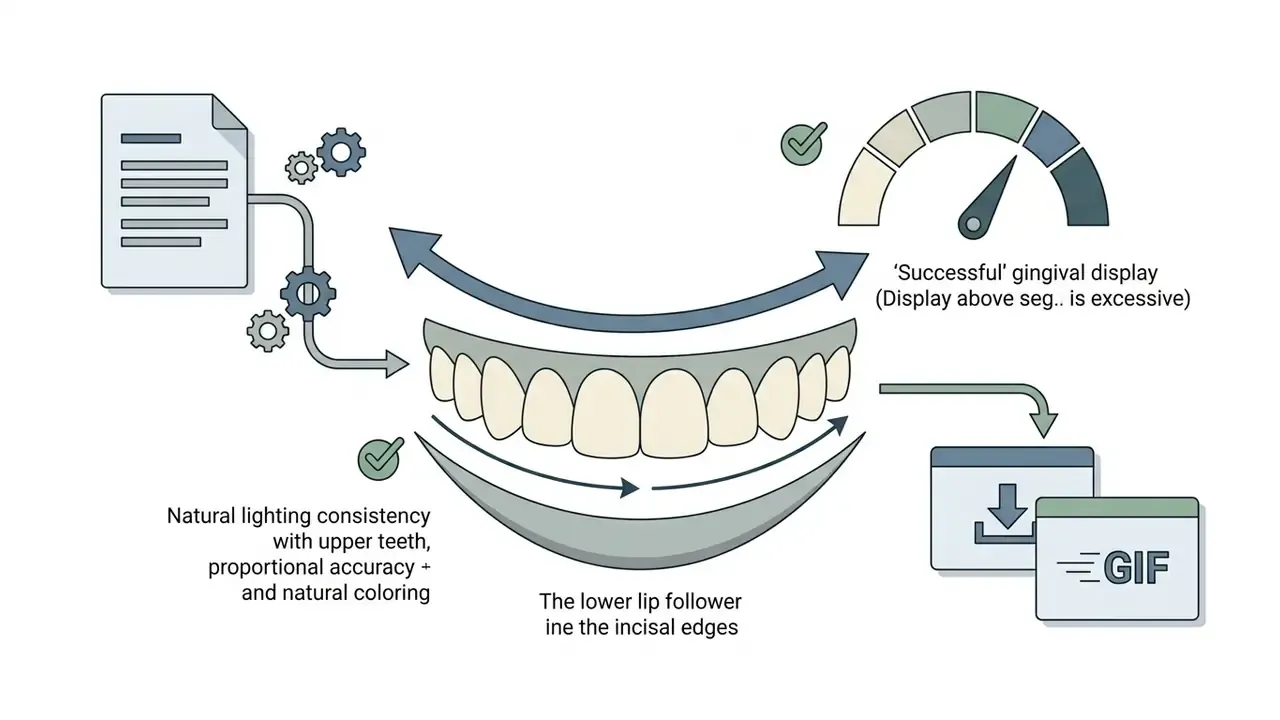
Dental aesthetic standards indicate that visible maxillary incisor width should measure roughly 75% to 80% of tooth length during a full smile, and that the incisal-edge contour should run parallel to the curvature of the lower lip. Normal lip mobility during a full smile is described in smile-analysis literature as 6 to 8 mm, which gives a measurable ceiling for plausible lip elevation. Generative tools also need to match tooth shade and interlabial gaps to the surrounding facial lighting.
Advanced models combine expression generation with automated dental correction, performing subtle whitening and shape realignment while matching enamel color to ambient room lighting. Whitening that ignores color temperature is the most common giveaway: pure white incisors inside a warm tungsten portrait read as pasted-in geometry. I have seen that single mistake sink an otherwise clean batch of headshots.
Models that edit only the mouth while ignoring eye-region wrinkling produce static, forced expressions. A perfect smile in the dental sense can still fail the human sense.
«Participants rated AI-generated happy faces as more intense and classified them as "happy" more accurately than posed photographs.»
Best Photos and Use Cases for an AI Smile Filter
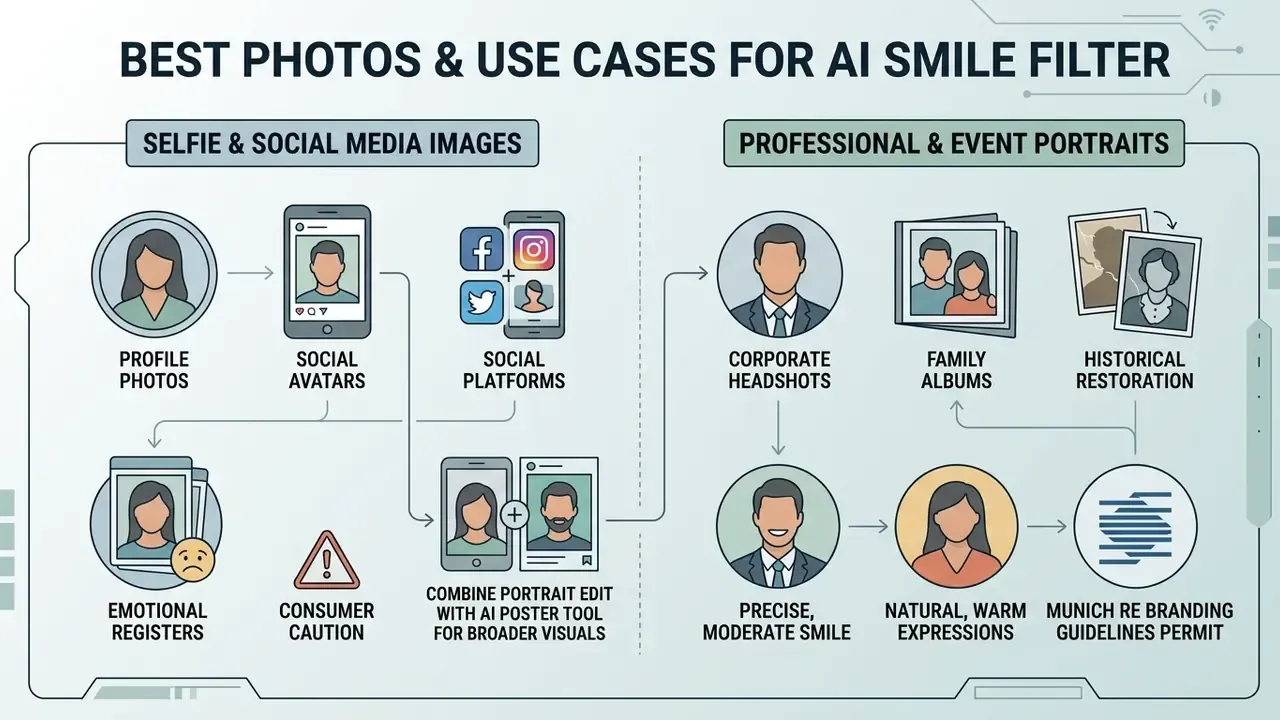
An ai smile filter online works best on clear portrait photography where adjusting expression improves engagement, tone or visual consistency. Choosing the right source image does more for the result than any slider. Three portrait classes dominate real usage: personal keepsakes and family albums, professional headshots edited with the subject's consent, and historical or formal portraits where neutral expressions were simply the convention of the era.
Professional, Family and Event Portraits
Corporate headshots, family albums and historical photo restoration benefit from precise, moderate smile editing. In professional settings, a subtle smile conveys confidence and approachability without breaking executive decorum. Teams standardizing an entire employee set can compare workflows against AI headshot generators before choosing between generation and retouching.
Corporate branding guidelines, such as those published by Munich Re, permit natural, warm facial expressions for employee headshots while excluding exaggerated or artificial laughter. Business-headshot guidance from 2024 to 2026 similarly allows a natural smile but rules out laughter and wide open-mouth expressions. Practitioner guides describe the acceptable range from closed-mouth to visible upper teeth, with the "winning smile" showing the full upper row. Sources genuinely disagree here, and the disagreement is about brand tone rather than technique: stricter corporate cultures prefer a closed-lip smile with eye involvement, while consumer-facing brands accept visible teeth.
For family and wedding portraits, professional guidance favors genuine, interaction-driven smiles over rigid posing. Direction given before movement produces more authentic expressions than post-hoc correction. For historical family photographs captured with serious expressions, generative filters can restore warm visual tone while preserving authentic family characteristics; grain, contrast and period lighting should be retained rather than smoothed away. Organizations structuring digital editing frameworks can review tool parameters on an AI Media Comparison matrix.
Free AI Smile Filter vs Paid Photo Editor: What to Check Before Use
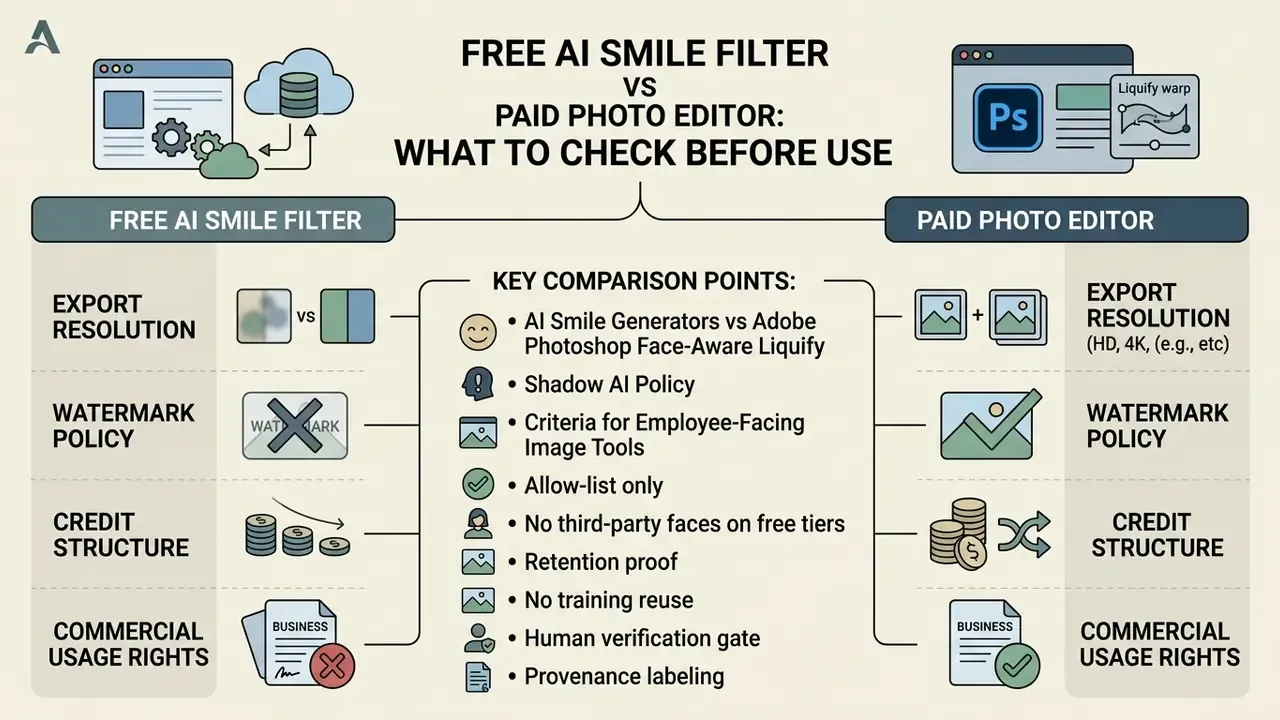
Evaluating free online tools against professional paid editors comes down to export resolution, watermark policy, credit structure and commercial usage rights. Readers building a shortlist can start from an overview of AI photo editors and narrow by control depth.
Free web tools generally offer single-click expression modification without a subscription, which is exactly why an ai smile filter free app spreads through a team so fast. In vendor documentation reviewed for this guide, the free tier commonly imposes at least one of three limits: an applied watermark, a capped export resolution, or a monthly credit ceiling. One widely used editor states plainly that basic smile edits are free while high-quality, watermark-free downloads require a Pro plan. These are vendor-published terms, not independently benchmarked comparisons, so check the current policy page before adopting a tool. Buyers screening the entry level can compare free AI image generators and free photo editors against the same criteria. Paid platforms grant raw-resolution exports, advanced prompt controls, custom upscaling and explicit legal clearance for commercial media production.
| Feature Category | Free AI Smile Filters | Paid AI Photo Editors |
|---|---|---|
| Export Resolution | Compressed SD (up to 1024 px) | Full HD / 4K upscaled (up to 4096 px) |
| Watermark Policy | Watermark applied on export | Clean, watermark-free output |
| Expression Controls | Basic preset buttons | Sliders, AU controls, custom prompts |
| Masking / Inpainting | Auto-detected mouth region only | Manual brush, feathering, per-face selection |
| Output Formats | JPG/PNG, occasionally GIF | PNG/JPG/WebP plus GIF/MP4 animation |
| Processing Speed | Standard queue processing | Priority server allocation |
| Commercial Rights | Personal use only or unclear terms | Explicit commercial licensing |
| Data Privacy | Standard retention (24h to 30d) | Encrypted, immediate purge option |
| Audit & Logging | None or undocumented | Access logs, retention settings, DPA available |
Enterprise governance note (illustrative). «In generative image modification, autonomous execution without verification creates unacceptable brand and compliance risks. Every facial transformation algorithm must operate within strict parameters that preserve individual identity, enforce data privacy and maintain operational transparency.» (Attributed to Marcus Hale, author
«Deepfake videos did not differ from authentic recordings in perceived emotional intensity or genuineness for any of the emotions tested.» Source: Behavior Research Methods (2024). https://doi.org/10.3758/s13428-024-02350-4
That perceptual finding is exactly why tool choice is a control decision, not a convenience decision. Audiences cannot be relied on to spot a synthetic expression, so the burden of disclosure and verification sits with the publisher.
AI Smile Generators vs Adobe Photoshop Face-Aware Liquify
Photoshop allows manual facial tweaking through Liquify and its Face-Aware controls, but it only warps existing pixels. That often bends the background, stretches teeth or smears a collar line, because nothing new is synthesized. Neural Filters narrow the gap and still operate on the original pixel grid. An AI smile generator, by contrast, creates new context-aware dental geometry and periocular wrinkles through generative inpainting, which saves up to 90% of retouching time on batch work.
| Criterion | Photoshop Face-Aware Liquify / Neural Filters | AI Smile Filter (generative inpainting) |
|---|---|---|
| Method | Pixel warping of existing content | Synthesis of new dental, lip and eye detail |
| New teeth from closed lips | Not possible without manual compositing | Generated automatically |
| Typical artifacts | Background bending, tooth stretching | Enamel shade mismatch, over-smoothed skin |
| Skill required | High (mesh control, masking, dodge and burn) | Low (preset, slider or text prompt) |
| Time per portrait | Several minutes to tens of minutes | Seconds |
| Batch consistency | Manual, operator-dependent | Repeatable via presets or LoRA |
| Cost | Subscription desktop suite | Free tier or credits |
Practical verdict: use Photoshop when you must preserve a specific brand retouch pipeline or make legally documented, minimal corrections. Use an ai smile generator online free or paid when the deliverable requires new expression geometry across many images.
Shadow AI Policy Criteria for Employee-Facing Image Tools
Model Risk Management Controls for Generative Expression Editing
For regulated organizations, an expression-editing model is a model. It takes an input, applies an algorithm, and produces an output that informs external communication. Existing supervisory expectations for model development, validation and governance, meaning Federal Reserve and OCC SR 11-7 principles, map onto GenAI image tools with very little translation.
- Assemble a stratified test sample of 100 to 300 portraits spanning skin tones, ages, eyewear, facial hair, head pose (0°, ±5°, ±20°) and lighting (even, side-lit, mixed).
- Score every output on identity preservation (CSIM), perceptual quality (LPIPS and SSIM) and mouth-landmark alignment (LMD) against the source.
- Run a blinded human panel of at least five raters on naturalness and on "is this the same person"; record the disagreement rate.
- Set a rejection threshold per cohort and monitor performance drift by demographic subgroup. Unequal artifact rates are a fairness finding, not a cosmetic one.
- Re-validate on every model or API version change. Vendors update weights without notice.
- Document the whole exercise, including limitations and out-of-scope uses, in the model inventory.
Risk decision matrix:
| Risk | Potential impact | Control measure |
|---|---|---|
| Biometric data leaves the perimeter via a free tool | Regulatory exposure (BIPA, CCPA, GDPR-adjacent), fines | Allow-list plus DLP blocking of consumer image endpoints |
| Identity drift after editing | Person no longer recognizable; ID and KYC mismatch risk | CSIM threshold plus mandatory human verification |
| Uncanny or exaggerated expression published | Brand damage, mockery, loss of trust | Anatomical checklist plus blinded rater panel |
| Missing consent from the photographed person | Legal claim, employee relations dispute | Written consent record tied to asset ID |
| Undisclosed synthetic alteration | Misleading-communication risk | Provenance metadata and internal disclosure policy |
| Vendor reuses uploads for training | Loss of control over personal data | Contractual no-training clause plus audit right |
| Model version change without notice | Silent quality or fairness regression | Version pinning plus scheduled re-validation |
| Uneven artifact rates across demographics | Discrimination and fairness findings | Subgroup performance monitoring and reporting |
Before committing assets to an editing tool, teams should evaluate cost structures on AI Media Pricing and review intellectual property terms on the AI Media Commercial-Use Hub, including guidance on AI image generators for commercial use.
AI Smile Filter FAQ
Can an AI Smile Filter Work on Group Photos?
Yes. Advanced tools detect and modify multiple faces inside one group photograph. Generative models scan the frame, identify individual facial bounding boxes, and let operators apply expression changes selectively. Some platforms even let you select or name one person so only that face changes.
Accuracy drops, though, when faces are small, angled or partially shadowed. Several vendors state openly that optimal results still come from single-face portraits.
«InstaFace shows that traditional methods suffer from unnatural face shifts and hair inconsistencies when inputs are limited or of low quality.» Source: InstaFace, arXiv (2023–2025). https://arxiv.org/abs/2311.16093
For crowded group portraits, processing load and asset quality can be estimated with AI Media Calculators before you queue a large batch.
Can I Create an AI Smile Video or GIF from a Photo?
Yes. Static portraits can be animated into smiling sequences with image-to-video generative models. These systems decouple facial motion from pose trajectory, which enables temporal expression transitions. Consumer tools implement it as upload a portrait, describe the smile in a prompt, pick a model and duration, then generate. Others simply apply an emoticon-style animation template to a recognized face. Creators comparing animation stacks can review image-to-video AI tools, and developers can benchmark API-level options such as Google Veo.
«DPE separates pose trajectories from expression patterns without 3D models or paired data, enabling independent control of head motion and mimicry.» Source: DPE (Disentanglement of Pose and Expression), arXiv and WACV (2024). https://arxiv.org/abs/2311.10455
Frameworks such as DPE and X-Portrait synthesize smooth transitions from neutral faces to expressive smiles while holding head pose stable, and research systems like ICface extract emotion and pose attributes separately for controllable reenactment. Typical exports include MP4 for social video, animated GIF for chat and forum avatars, and WebP for lightweight web embedding. Developers building automated video pipelines can consult AI Media API Guides for integration protocols.
What Types of Photos Work Best, and Will the Smile Look Natural?
Best results come from clear portraits that are front-facing or at a slight three-quarter angle, evenly lit by natural or diffuse indoor light, with a neutral or serious starting expression and an unobstructed face. No sunglasses, masks, hands or hair across the lips and jawline. Avoid extreme angles, motion blur and heavy compression.
The smile looks natural when the model keeps your own facial features instead of pasting a generic mouth. Review the output at 100%, confirm that the eyes crinkled slightly along with the lips, and re-render at lower intensity if the expression reads as forced. Low-amplitude edits are consistently rated as more realistic than maximum-intensity presets. Restraint, again.
How Do You Add a Smile to a Photo in Photoshop Instead?
In Photoshop, open Filter → Liquify, enable Face-Aware Liquify, then adjust the Mouth group (Smile, Upper Lip, Lower Lip, Mouth Width and Height) and refine with the Forward Warp tool at low pressure. Neural Filters offer a smile slider as a faster alternative. Because both tools push existing pixels, they cannot invent teeth behind closed lips, and aggressive settings distort the background. If you need new dental geometry, natural eye crinkling or consistent results across dozens of headshots, an ai tool to add smile to photo reaches a usable result in seconds rather than minutes.
How Long Are Processed Photos Stored?
Disclaimer. This information is general and does not replace advice from a qualified data-protection specialist or legal counsel in your jurisdiction. Requirements differ significantly by country, state and sector.
Retention policies vary across commercial AI editing platforms, typically between 24 hours and 90 days. Based on published vendor policies reviewed for this guide, several services state that uploaded source images are deleted automatically within 24 hours of task completion, while others delete originals after 30 days and retain generated outputs for 7 to 90 days or until manual deletion. These are self-reported vendor commitments, not audited findings. Independent verification data are not publicly available, so request a data-processing agreement and an audit right instead of trusting a marketing page.
Under international biometric regulations, facial images used for automated identification or feature modification are classified as sensitive personal data (OAIC facial recognition guidance). That triggers requirements for a lawful basis, necessity and proportionality, transparency, meaningful consent where applicable, accuracy and bias controls, plus documented governance. Convention 108 guidelines add that images captured for another purpose cannot be converted into biometric templates without a specific legal basis for the new processing.
«Deepfake technologies create serious privacy risks and ethical problems, including unauthorized image manipulation and the potential for fraud.» Source: Artificial Intelligence Review, Springer, survey of deepfake creation, consequences and detection (2024). https://doi.org/10.1007/s10462-023-10656-0
United States specifics that governance teams should map explicitly:
- Illinois BIPA. Private entities generally need written notice and consent before collecting or storing a biometric identifier or biometric information, must publish a retention and destruction schedule, and face a private right of action. Whether a smile-filter pipeline creates a "biometric identifier" depends on whether a face template is generated. Assume it may.
- Texas CUBI and Washington's biometric statute. Notice and consent obligations with regulator-led enforcement.
- CCPA and CPRA in California. Biometric information is sensitive personal information, with disclosure, purpose-limitation and consumer-rights obligations.
- SR 11-7 (Federal Reserve and OCC). For banks, apply model development, implementation, validation and governance expectations to the generative tool, including independent review and an entry in the model inventory.
Enterprise platforms enforce encryption, purge temporary files, and guarantee that user assets are not repurposed for training. Organizations monitoring regulatory exposure should track legal developments through AI Litigation and Case Timelines.
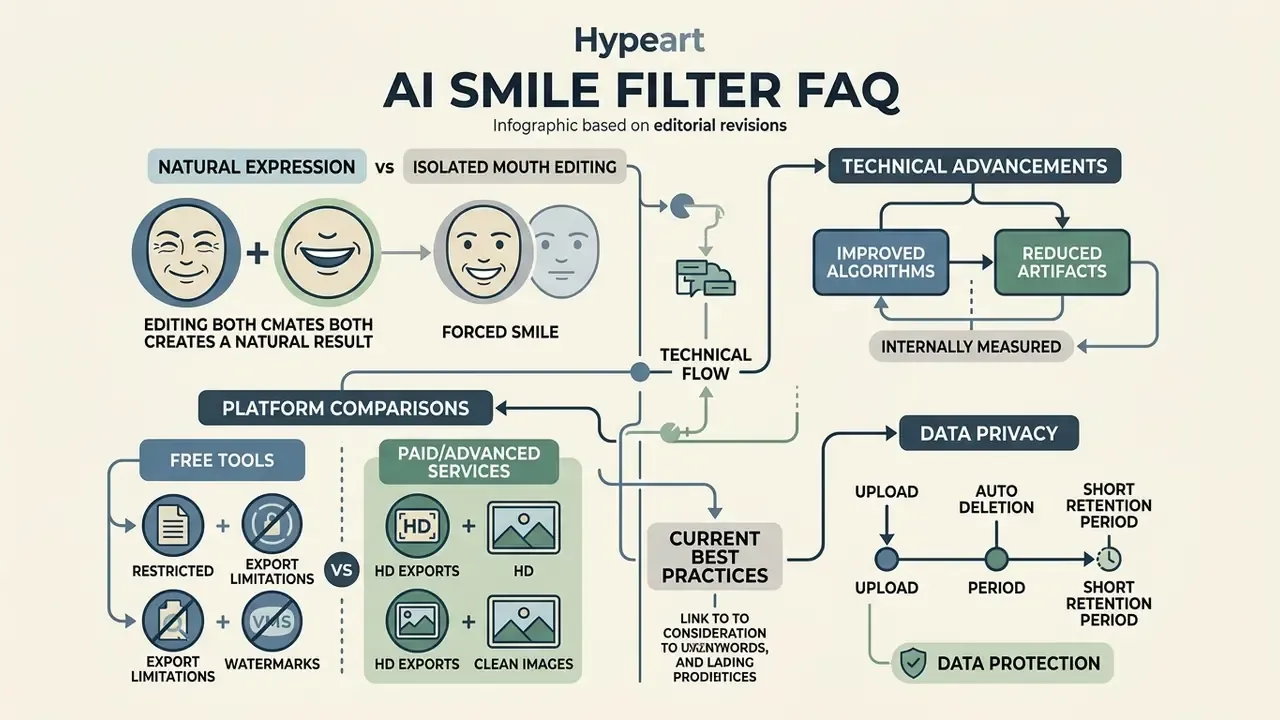
Appendix A: Editorial Revision Log (Superseded Formulations)
Appendix B: Reference Sheets
B1. Input quality gate (pass or fail before generation)
| Parameter | Pass | Fail |
|---|---|---|
| Head pose | Frontal within ±5° (roll, pitch, yaw) | Beyond ±20° in any axis |
| Lighting | Even, no reflections or hard shadows | Pronounced side light, mixed color temperature |
| Face width | 300 px or more, sharp focus | Blurred, heavily compressed |
| Occlusion | Lips and jawline fully visible | Sunglasses, mask, hand, hair over mouth |
| Starting expression | Neutral or serious, mouth closed | Mid-speech, partial smile, tongue visible |
B2. Output acceptance criteria
| Check | Target |
|---|---|
| Midline symmetry | Commissures equidistant from facial midline |
| Incisor proportion | Visible width around 75–80% of tooth length |
| Smile arc | Incisal edges parallel to lower-lip curve |
| Gingival display | About 2 mm or less above the incisors |
| Lip elevation | Within roughly 6–8 mm of neutral position |
| Periocular cue | AU6 crinkling present and proportional to AU12 |
| Enamel tone | Matches ambient light temperature |
| Mask boundary | No warping of hair, collar or background |
Limitations and Open Questions
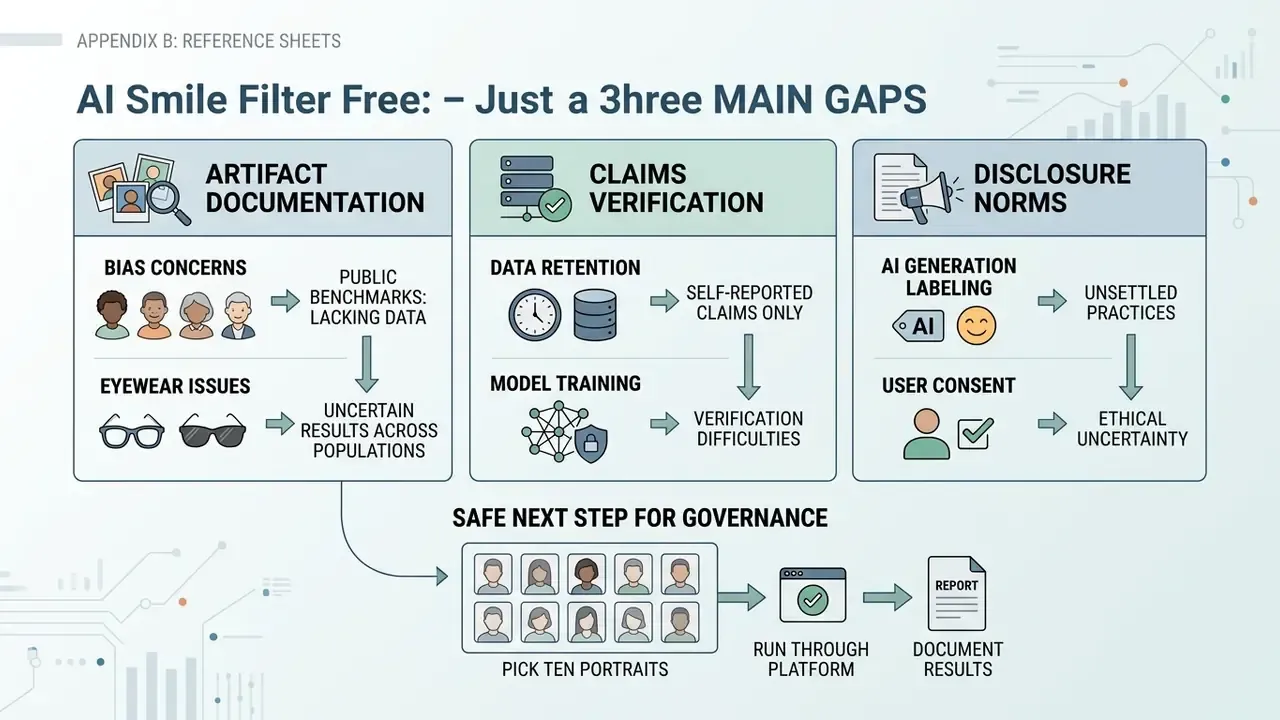
Three gaps remain honest gaps, and pretending otherwise would be a disservice.
First, artifact rates across skin tones, ages and eyewear are not well documented in public benchmarks for expression editing specifically. Until a vendor publishes subgroup results, internal testing is the only evidence you will have.
Second, retention and no-training claims are self-reported almost everywhere. A contractual audit right converts a promise into evidence; a marketing page does not.
Third, disclosure norms are unsettled. There is no single US rule that tells an employer whether an edited headshot needs a synthetic-content label, so most institutions set an internal policy and document the reasoning. That is a defensible position, but it is a policy choice, not a compliance certainty.
A safe next step, if you are a governance owner: pick ten real portraits, run them through one approved tool, score them with the acceptance table above, and file the result. One afternoon of evidence beats a quarter of debate.