For a US financial-services decision-maker the question is narrower than "can we build one?" It is: who owns it, what can it touch, and what evidence will we show an examiner?
"No evidence, no autonomy. Before granting an AI assistant operational latitude in personal or business workflows, institutions and individuals must establish clear task boundaries, verifiable context controls, and continuous audit mechanisms."
Understanding the balance between autonomous capability and governance controls is the core skill in the AI assistant creation process. This guide gives an evidence-based roadmap for choosing tools, defining instructions, adding context, and executing a controlled setup.
Last updated: 2026. Written and reviewed by the AI Media editorial team with input on model risk governance from practitioners in regulated financial services.
Executive Summary for Decision-Makers
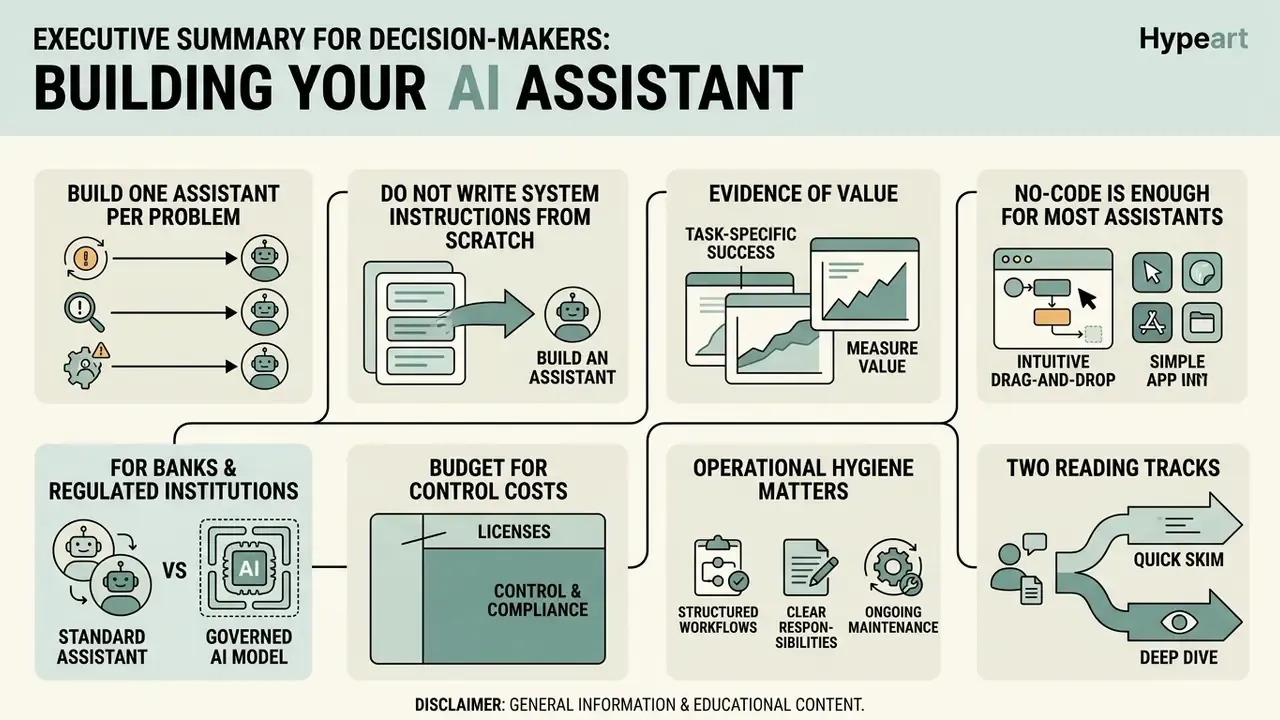
- Build one assistant per problem. Narrow, single-purpose assistants outperform "do-it-all" bots because instructions stay precise and test criteria stay measurable. Federal guidance (OMB M-25-21, M-25-22) ties in-scope AI to a specific target action.
- Do not write system instructions from scratch. Prototype in a normal chat thread, correct the model live on 2 or 3 real tasks, then use the ready-to-copy meta-prompt in this guide to convert that conversation into structured System Instructions.
- Evidence of value exists, but it is task-specific. A 5,179-agent field study found +14% issue resolutions per hour on average and +22.2% for novices; a deployed retrieval-augmented (RAG) customer-service assistant reduced median per-issue resolution time by 28.6%.
- No-code is enough for most assistants. Custom GPTs, Claude Projects, Gemini Gems and Copilot Studio cover instruction depth, file grounding and tool actions without code. Code is required for local open-source models, bespoke UIs, and proprietary API orchestration.
- For banks and regulated institutions, the assistant is a model. Treat it under existing model risk management practice (Federal Reserve SR 11-7 and OCC Bulletin 2011-12): register it in the model inventory, document intended use and limitations, retain validation evidence, and enforce human-in-the-loop approval for any agentic action that moves money, changes records, or speaks to customers.
- Budget for control costs, not just licences. Standard ROI overstates value because validation, monitoring, logging and Shadow AI remediation are omitted. Use the risk-adjusted ROI formula further down.
- Operational hygiene matters. Start each work session in a new thread inside your Project or Custom GPT, and keep memory inspectable, editable and prunable.
Two reading tracks. Individuals and small teams should read the Personal subsections and the free-tools section. Risk, compliance and governance leaders should read the Business, Model Risk, Risk-Adjusted ROI and Commercial Deployment sections, and may skip the personal-productivity examples entirely.
Disclaimer: this article is general information and educational content. It is not legal, regulatory, compliance, security or financial advice. Validate any deployment decision with your own legal counsel, information security function and model risk management team.
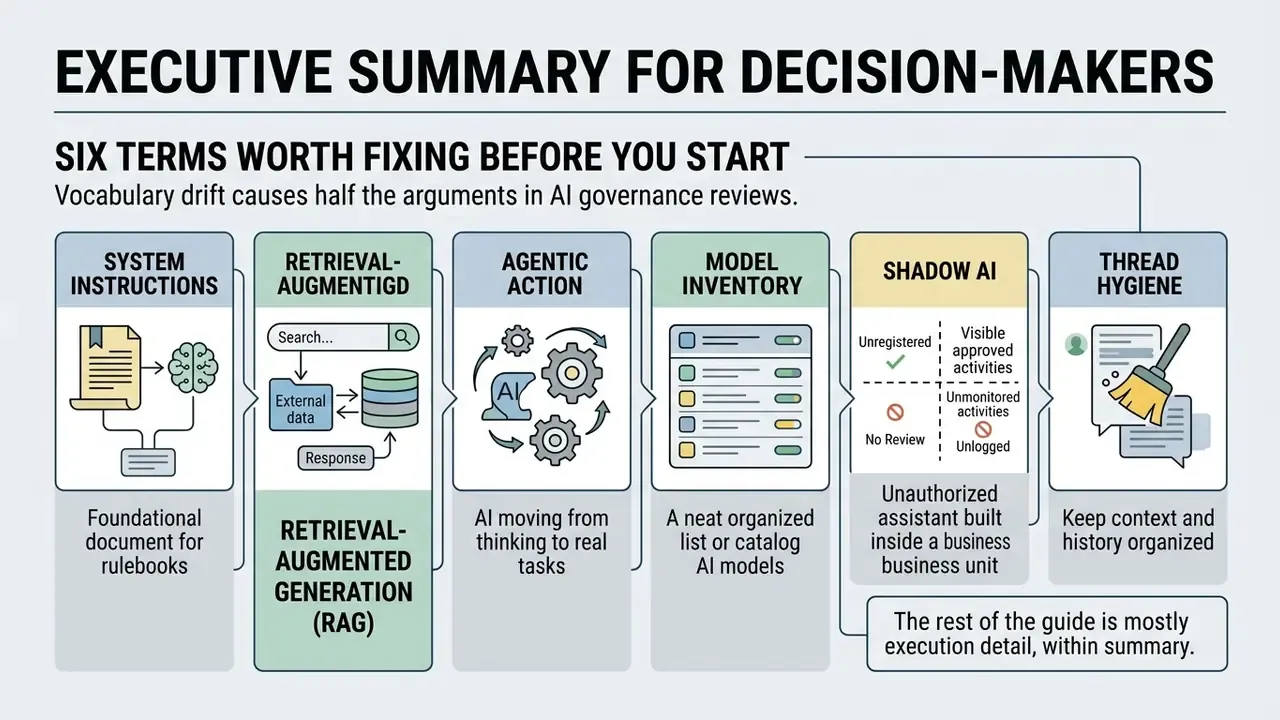
Six Terms Worth Fixing Before You Start
What an AI Assistant Is and What It Can Do
An AI assistant is a software agent that combines a foundation large language model (LLM) with persistent memory, external tools, and information retrieval to execute specific tasks. Unlike a basic chat window that only generates text from an immediate prompt, a custom AI assistant reads external data stores, calls APIs, and holds context across sessions.
Modern assistants rely on architectures that separate inference from context retrieval and tool execution. According to technical frameworks from the National Institute of Standards and Technology (NIST), Retrieval-Augmented Generation grounds an assistant by pulling relevant supporting documents from an external knowledge base before generating a response (NIST, 2025). Draft standards from the Internet Engineering Task Force (IETF) define AI agent protocols through tool enumeration, tool invocation, and runtime integration (IETF, 2025–2026). Together, these capabilities turn a language model into something closer to a digital worker able to run structured workflows.
"A personal LLM agent is an LLM-based agent deeply integrated with personal data, devices and services, whose primary purpose is to reduce the user's routine workload."
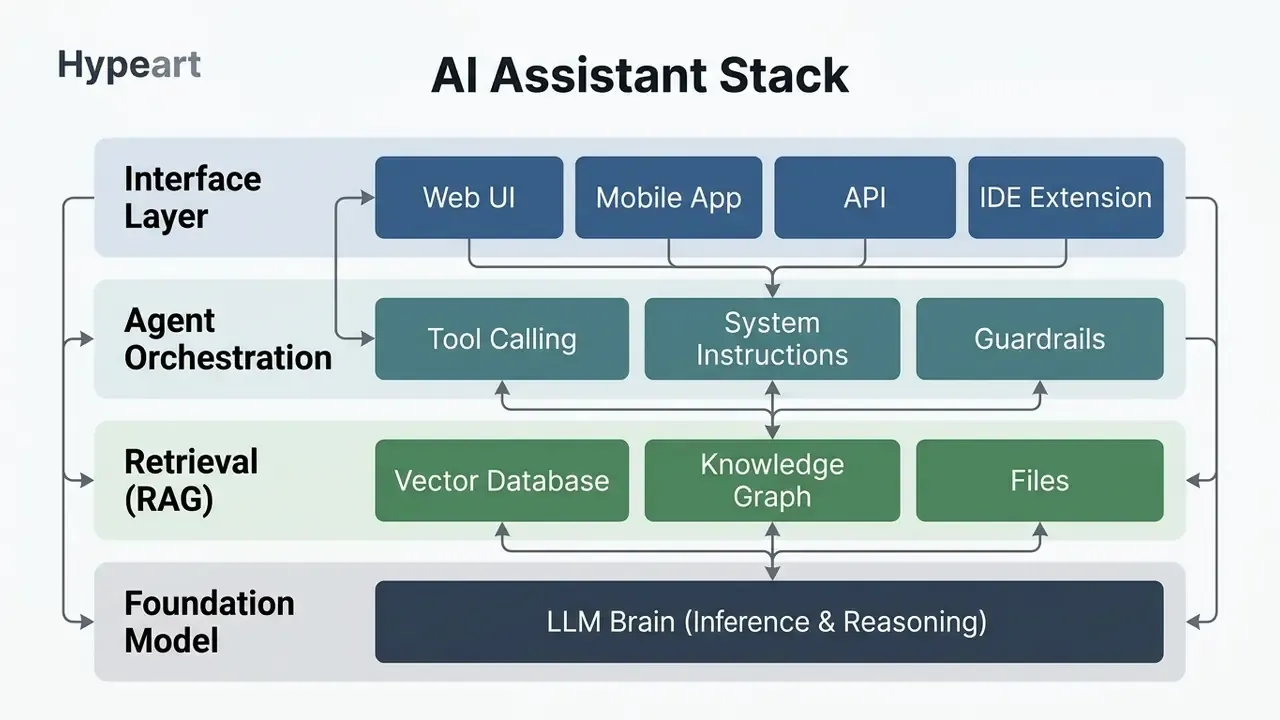
Three layers get conflated in vendor marketing, and it costs review time. Inference transport (how tokens stream to a client) is a different problem from retrieval (how grounded facts reach the prompt), which is again different from agent orchestration (which tools the assistant may enumerate and invoke, under what entitlements). An IETF draft on LLM streaming explicitly places agent-to-tool interaction out of scope, confirming that these layers evolve on separate standards tracks (IETF, 2026). Practically, a governance review must examine each layer separately. A compliant transport layer says nothing about whether the retrieval corpus is authorized, or whether the tool layer can fire an irreversible action.
Personal AI Assistant for Everyday Work and Tasks
A personal AI assistant automates routine individual workflows: inbox triage, document summarization, daily schedule shaping, first-draft writing. By holding a lightweight context of your preferences, a personal assistant can cut daily administrative drag without any enterprise integration work.
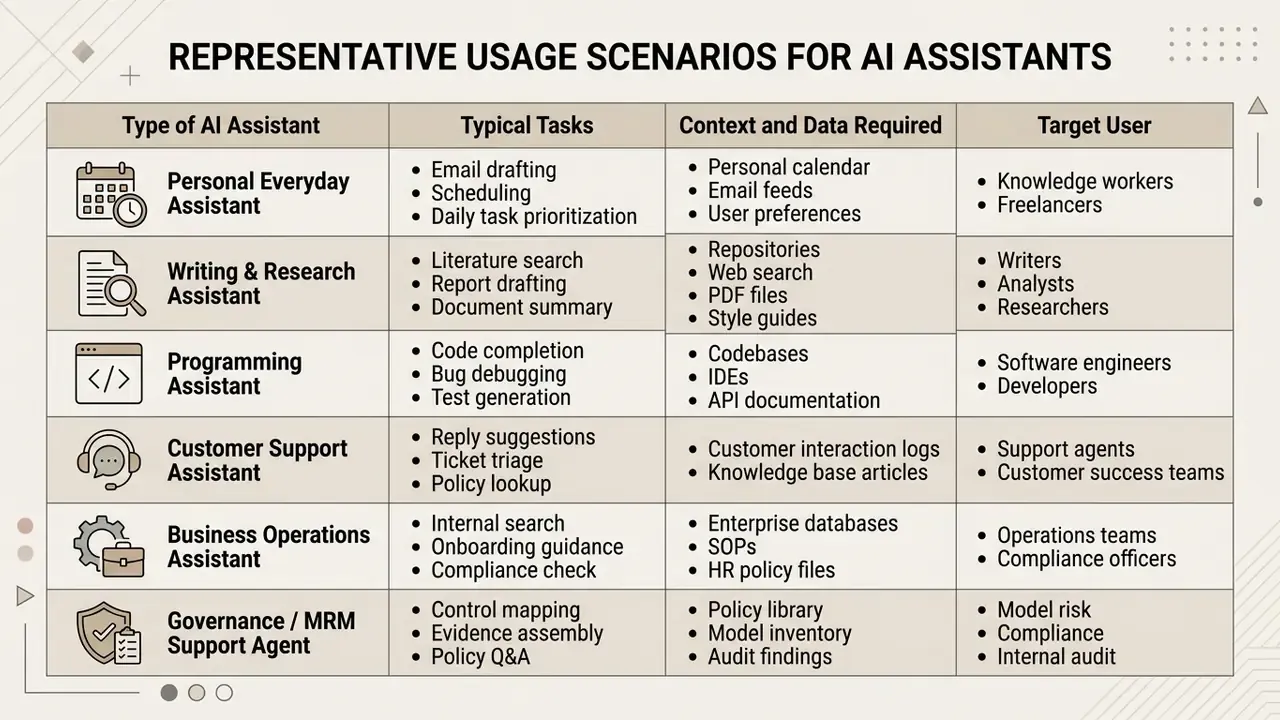
Four practical assistant archetypes. For real efficiency, build specialized assistants per domain rather than one universal bot:
- Writing and content marketing. Stocked with past writing samples, brand voice guidelines and post formats for fast repurposing. Example: slicing one newsletter into a week of shareable LinkedIn nuggets.
- Troubleshooting and technical support. Pre-loaded with software setups, hardware manuals, or tax and compliance rulebooks to deliver step-by-step resolution. Practitioners report using such assistants to absorb routine inbound questions so human attention shifts to complex cases.
- Productivity and daily planning. Configured with review prompts that structure focus hours, prioritize task lists, and turn meeting transcripts into owner-plus-deadline action items.
- Strategic sounding board. Programmed with a specific advisory persona ("Strict Financial Auditor" or "Constructive Executive Coach") to critique roadmaps, pricing decisions or product plans before they reach the team.
A useful heuristic: start with one general assistant in each area, then split it the moment output quality plateaus. Two narrow assistants ("outreach email writer" and "pitch deck builder") almost always beat one broad "marketing bot," because each carries a tighter instruction set and a cleaner knowledge base.
When evaluating how to create a personal AI assistant, individual productivity signals cluster around a handful of daily tasks:
- Email management. Assistants classify priority messages, draft routine replies, and summarize long threads. Practitioner field reports (self-reported workflow logs, not controlled trials, independent verification pending) describe morning inbox processing shrinking from roughly 45 minutes to 10.
- Content generation. Personal assistants help with memos, reports and outlines. Microsoft Copilot telemetry reported by Microsoft shows users completing document drafting roughly 12% faster, alongside about 30 minutes less email reading per week.
- Daily planning. Automated scheduling protects focus time and builds the agenda. Self-reported examples describe calendar planning dropping from about 30 minutes to 5 minutes daily. Treat these as indicative single-user observations, not benchmarks.
- Information synthesis. Research assistants compile web information and compress long reports, with practitioner estimates of 4 to 5 hours saved weekly on routine search. Self-reported, not reproduced under controlled conditions.
"An AI coding assistant can cut task completion time by roughly half for certain classes of tasks."
A UK government study on workplace automation documented an average saving of 26 minutes per day on routine administrative tasks when workers used a personal AI assistant. The underlying report is cited in secondary summaries, so readers needing audit-grade evidence should obtain the primary publication before relying on the number.
Individuals who want to create a personal AI assistant get the fastest wins by delegating structured, low-risk writing and scheduling work. For adjacent creator workflows (voice, imagery, editing) the same narrow-assistant logic applies; see our guide to AI voice generators for how licensing and quality trade-offs are weighed in a comparable tool category.
Custom AI Assistant for Business Users
A custom AI assistant for business users orchestrates multi-user workflows: internal knowledge retrieval, customer support guidance, financial reporting support, employee onboarding. These systems integrate with enterprise databases and enterprise resource planning (ERP) platforms under role-based access controls (RBAC).
In business operations, assistants act as force multipliers for knowledge workers. A field study published by the National Bureau of Economic Research (NBER) covering 5,179 customer support agents found that deploying a generative AI assistant increased issue resolutions per hour by 14% on average (Brynjolfsson et al., 2023). The largest gains (+22.2% resolutions per hour) landed with novice and lower-skilled workers, and customer sentiment improved (+0.18).
"Access to the tool increases productivity by 14% on average, with the largest gains for novice and low-skilled workers."
Enterprise AI Assistant Operational Impact:
- Customer Support Resolution Rate : +14.0% average (+22.2% for novices)
- Customer Sentiment Delta         : +0.18
- Internal Ticket Resolution Time  : -28.6% median reduction via RAG
- Email Reading Time Reduction     : ~30 minutes saved per week
A published customer-service deployment at LinkedIn implemented a retrieval-augmented assistant connected to internal support documentation and historical ticket databases. Support representatives received grounded, source-cited answer suggestions, and median per-issue resolution time fell 28.6% over roughly six months. Retrieval quality was tracked through MRR, Recall@K and NDCG@K; generation quality through BLEU, ROUGE and METEOR. Two lessons transfer directly. The gain came from grounded suggestions with citations, not autonomous replies. And the evaluation stack combined retrieval metrics with generation metrics rather than trusting a single score.
For onboarding, published design research ("Designing AI Assistants for Novices: Bridging Knowledge Gaps in Onboarding") sets out scaffolding-based principles for inexperienced users but reports no deployment KPIs. For automated reporting, we identified no controlled deployment study with published metrics, so institutions should treat reporting automation as an internally measured pilot rather than an evidence-backed benchmark. Honest gap, worth stating.
To explore terminology on media generation tools and related concepts, reference the AI Media Glossary.
Model Risk, Model Inventory and the US Banking Context
For US banks, broker-dealers and large financial institutions, a custom AI assistant is not merely an IT tool. It is a model or a model-adjacent system, and it inherits the supervisory expectations of Federal Reserve SR 11-7 and OCC Bulletin 2011-12 (Supervisory Guidance on Model Risk Management). That framing changes the build sequence: documentation, validation evidence and inventory registration become deliverables, not afterthoughts.
Minimum governance artifacts to produce alongside the assistant:
- Model inventory entry.Register the assistant with an owner, intended use, in-scope users, data sources, model and version identifiers, tool permissions, and known limitations. Undocumented assistants built inside business units are the single largest Shadow AI exposure.
- Conceptual soundness documentation.Record why retrieval grounding, guardrails and prompt design fit the stated business purpose, plus the alternatives considered.
- Independent validation evidence.Preserve the test suite, prompt versions, retrieval corpus snapshot, outcome scores and error taxonomy, so a validator or examiner can reproduce results.
- Ongoing monitoring plan.Define drift triggers (retrieval quality decline, guardrail bypass rate, escalation rate, complaint volume) and re-testing frequency.
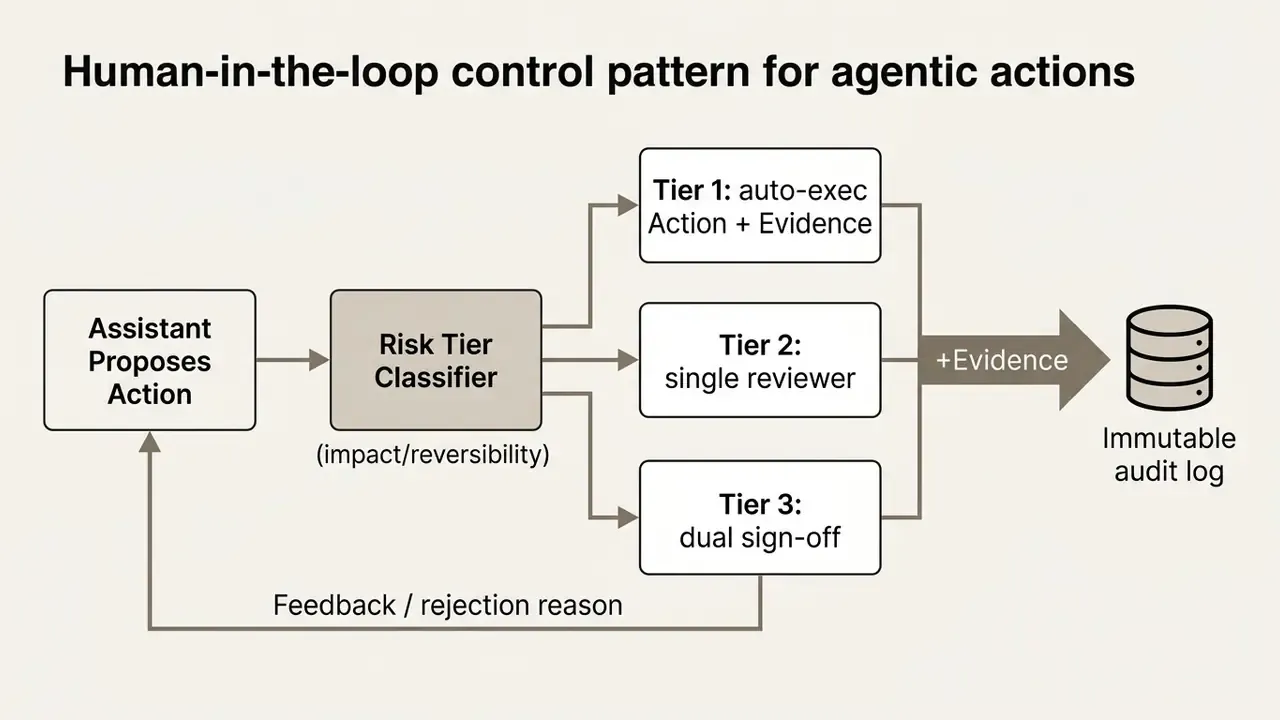
- Human-in-the-loop control points.Specify which agentic actions require explicit human approval: customer-facing communication, transaction initiation, credit or pricing decisions, record modification, and any external API call with financial or legal effect.
- Change management.Treat prompt edits, knowledge base refreshes and model version upgrades as changes requiring re-testing and re-approval, with immutable logs of who changed what and when.
Choose One Specific Use Case Before You Create an AI Assistant
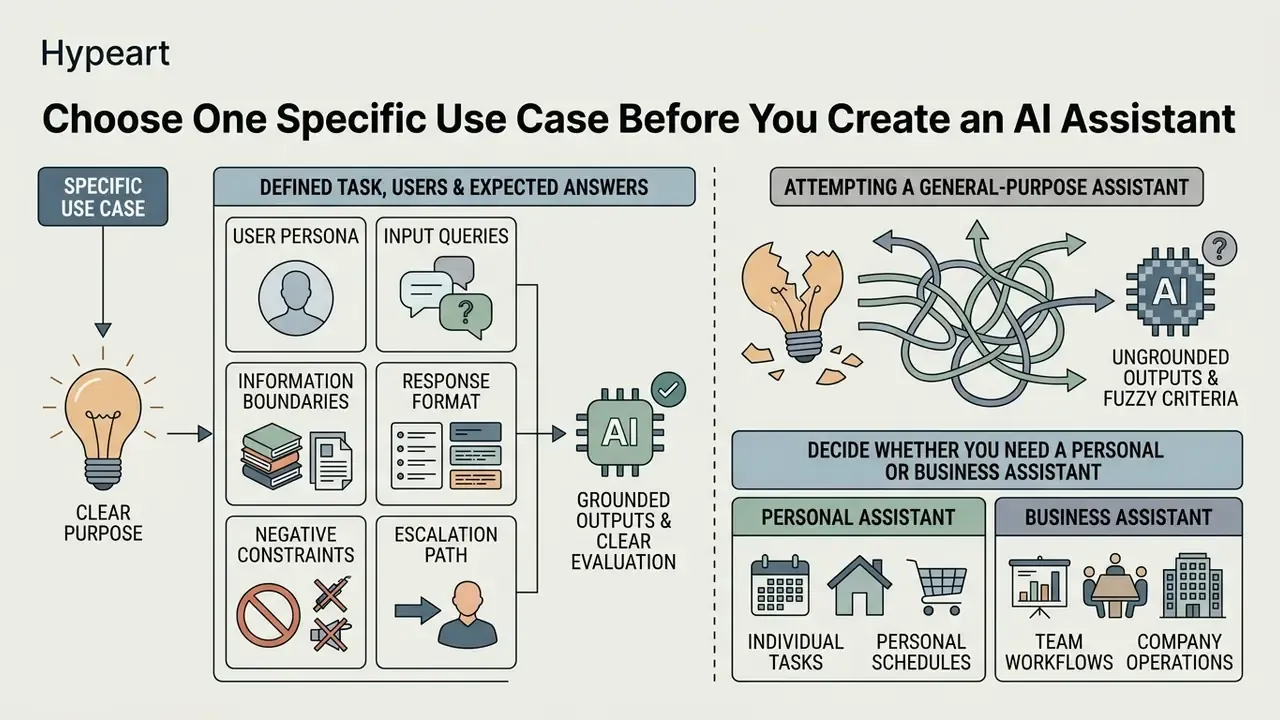
Trying to build a general-purpose assistant that handles every operational task usually produces ungrounded outputs and fuzzy evaluation criteria. Scope the assistant to one well-defined problem and your custom instructions stay precise, your test metrics stay measurable.
Federal guidance from the US General Services Administration (GSA) and the Office of Management and Budget (OMB M-25-21) stresses that AI deployment should isolate a specific target action and set quantifiable success criteria before implementation (OMB, 2025). OMB M-25-22 narrows what counts as in-scope AI to the specific action or target the system performs, which is a useful scoping discipline: if you cannot name the action, you cannot test it. Isolating the problem domain also minimizes operational risk and simplifies guardrail configuration.
Good candidate problems share three traits. They recur weekly or more often. They need the same background context every time. And a wrong answer is recoverable at low cost. Examples that satisfy all three: turning weekly notes into a newsletter draft, checking a vendor contract against your standard requirements, generating lesson plans in a fixed format, producing a filming or equipment setup from a known inventory, or drafting a first-pass response to a recurring customer question type.
Define the Task, Users and Expected Answers
https://www.nist.gov/
That finding is the practical justification for the reverse-engineering workflow described below. Instead of authoring instructions in the abstract, you generate them from a tested conversation where the edge cases already surfaced on their own.
Decide Whether You Need a Personal or Business Assistant
The choice between a personal AI assistant and an enterprise business assistant dictates security posture, access governance and platform architecture. It is not a cosmetic distinction.
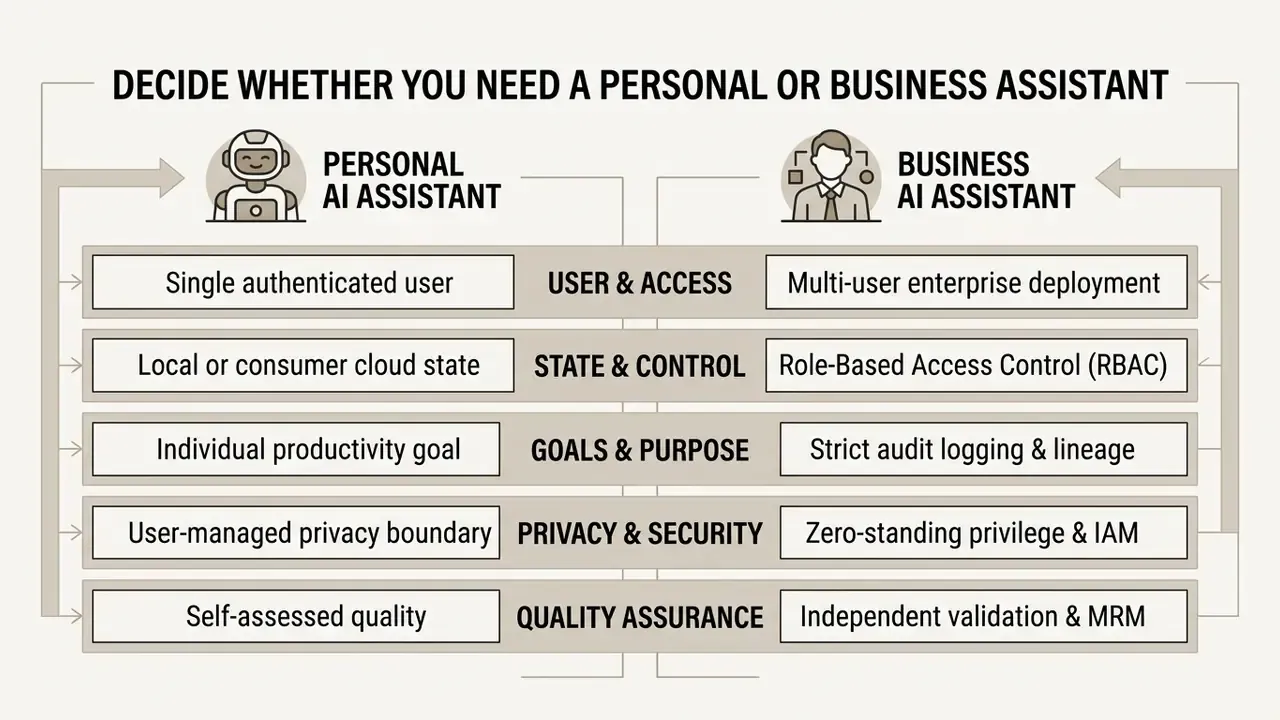
A personal assistant operates inside one authenticated session and optimizes for task adaptation and speed. Vendor implementations follow this pattern: the Jamf AI Assistant, for example, runs under the authenticated user's existing RBAC, cannot elevate privileges, and scopes each conversation to that user and organization.
A business assistant, by contrast, needs identity-bound credentials, short-lived task entitlements, and zero-standing-privilege architecture (Coalition for Secure AI, 2026), where the agent holds a distinct identity separate from the human it serves. It must enforce data isolation so confidential enterprise context never leaks across user permissions or into external foundation model training, and it must be inventoried so autonomous actions stay attributable to someone.
Choose a Platform and Tools to Build Your Assistant
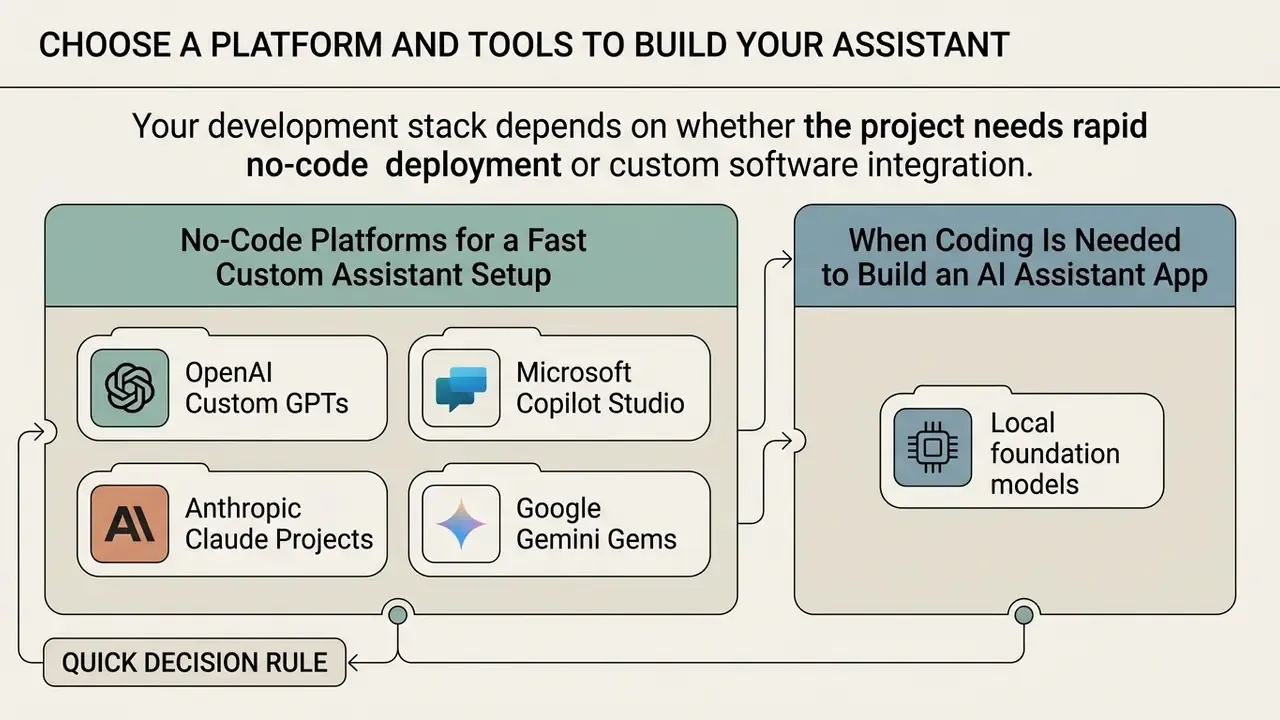
Your development stack depends on whether the project needs rapid no-code deployment or custom software integration. Options run from managed conversational builders to full-stack open-source frameworks.
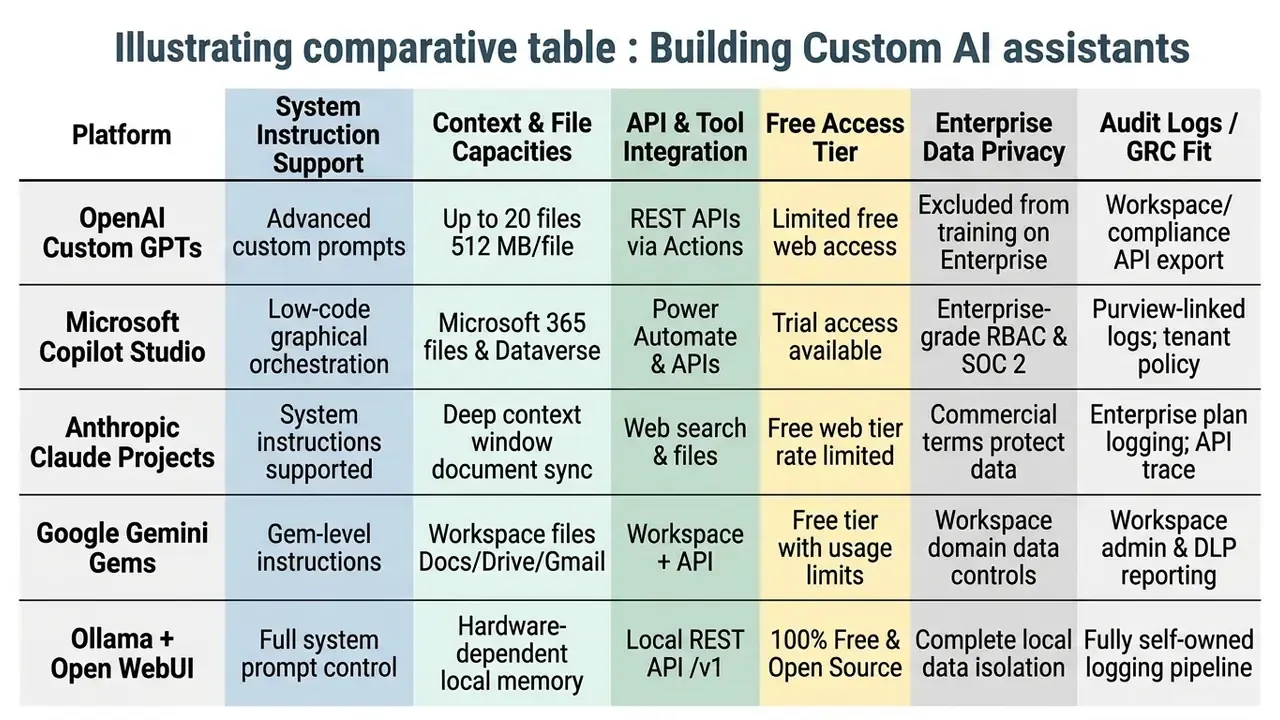
When deciding how to create a custom AI assistant, weigh custom instruction depth, file storage capacity, API availability, audit logging depth, and data privacy terms. In many organizations the choice is pre-constrained by which tools are licensed and approved. Where a genuine choice exists, decide by workflow shape first and model preference second.
No-Code Platforms for a Fast Custom Assistant Setup
No-code visual platforms let non-technical users build, configure and test custom assistants using natural language instructions and a graphical interface. No coding, no infrastructure work.
Key no-code platforms in 2026:
- OpenAI Custom GPTs. Configurable assistants inside ChatGPT. Supports system prompts, custom actions via OpenAPI specifications, and knowledge retrieval attached to up to 20 files (maximum 512 MB per file). Best for hands-free interactive workflows, since it is the platform where you can hold a genuine two-way spoken conversation with a custom assistant through native Voice Mode: useful for walk-and-think planning, driving, or hands-busy fieldwork. Note that OpenAI sunset the legacy Assistants API on 26 August 2026; new programmatic integrations should target the Responses API, while Custom GPTs remain the ChatGPT-side builder.
- Microsoft Copilot Studio. Low-code enterprise platform for graphical design of agent workflows, deep Microsoft 365 telemetry integration, Power Automate connectors and enterprise RBAC (Microsoft, 2026). Best where governance, tenant-level data compliance and threat protection at scale decide the purchase.
- Anthropic Claude Projects. Managed project spaces with persistent document context and system instruction customization for analytical and writing work. Stronger nuance in tone, formatting and complex document editing; the trade-off is that standard project artifacts do not rely on live web retrieval the way search-connected assistants do, so time-sensitive facts must be supplied in context.
- Google Gemini Gems. Customized Gemini instances tuned to specific prompt workflows inside Google Workspace. Zero-friction native integration with Gmail threads, Google Docs and Drive context, which becomes the deciding factor when the source material already lives in Workspace.
Quick decision rule. Choose by the dominant friction in your workflow: voice interaction (Custom GPTs), stylistic and long-document editing (Claude Projects), Workspace-native context (Gemini Gems), or tenant governance and connector breadth (Copilot Studio).
No-code setups excel at rapid prototyping and single-purpose conversational tools. They also operate inside managed vendor environments, which limits custom UI design and fine-grained state management. Readers evaluating adjacent no-code creative tooling under similar free-tier constraints can compare methodologies in our review of free AI video generators.
When Coding Is Needed to Build an AI Assistant App
Custom development becomes necessary when an assistant must integrate with proprietary backend APIs, render a bespoke interface, execute background workflows, or run open-source models locally. Anyone asking how to create an AI virtual assistant with its own front end is in this territory.
Developers write code when requirements demand:
- Local foundation models. Running open-source models such as Llama 3 or Llama 4 locally via Ollama or
llama.cppto satisfy strict data privacy requirements. - Custom API endpoints. Binding interfaces (Open WebUI, for instance) to local inference servers on custom ports (
http://127.0.0.1:10000/v1), where an OpenAI-compatible local server replaces a hosted API. - Complex multi-step agents. Orchestrating autonomous tools that execute code, query SQL databases and write external files, as demonstrated by research platforms like Agent Laboratory (Agent Laboratory, 2024).
- Deterministic audit logging. Capturing full prompt, retrieved-context, tool-call and output lineage in systems your internal audit function controls, rather than depending on vendor log retention windows.
An illustrative composite example: a financial services firm needed an internal credit-analysis assistant able to process non-public loan applications without sending data to third-party cloud APIs. The team wrote a Python middleware wrapper around a self-hosted Llama model with a local vector database, and deployed a fully private assistant that met internal security mandates while holding sub-second inference latency.
"Background agent execution allowed untrusted content to contaminate memory in 91% of cases when auto-save was enabled."
How to Create a Custom AI Assistant Step by Step
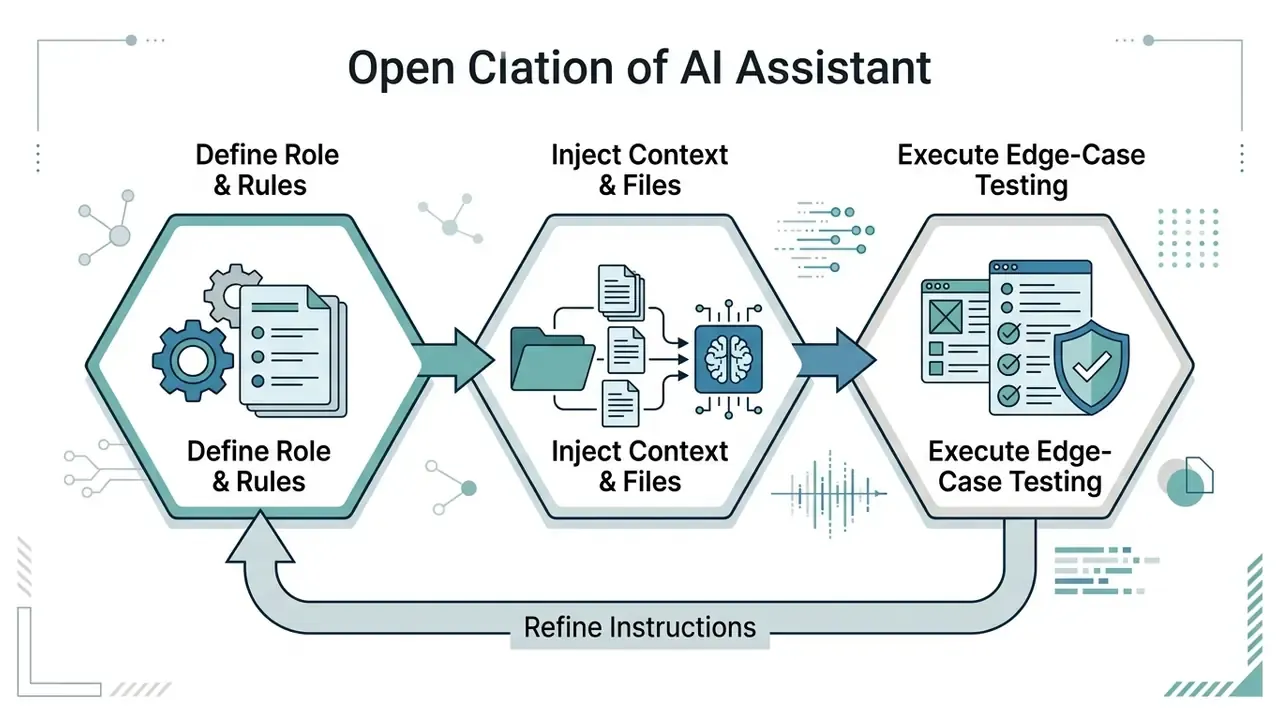
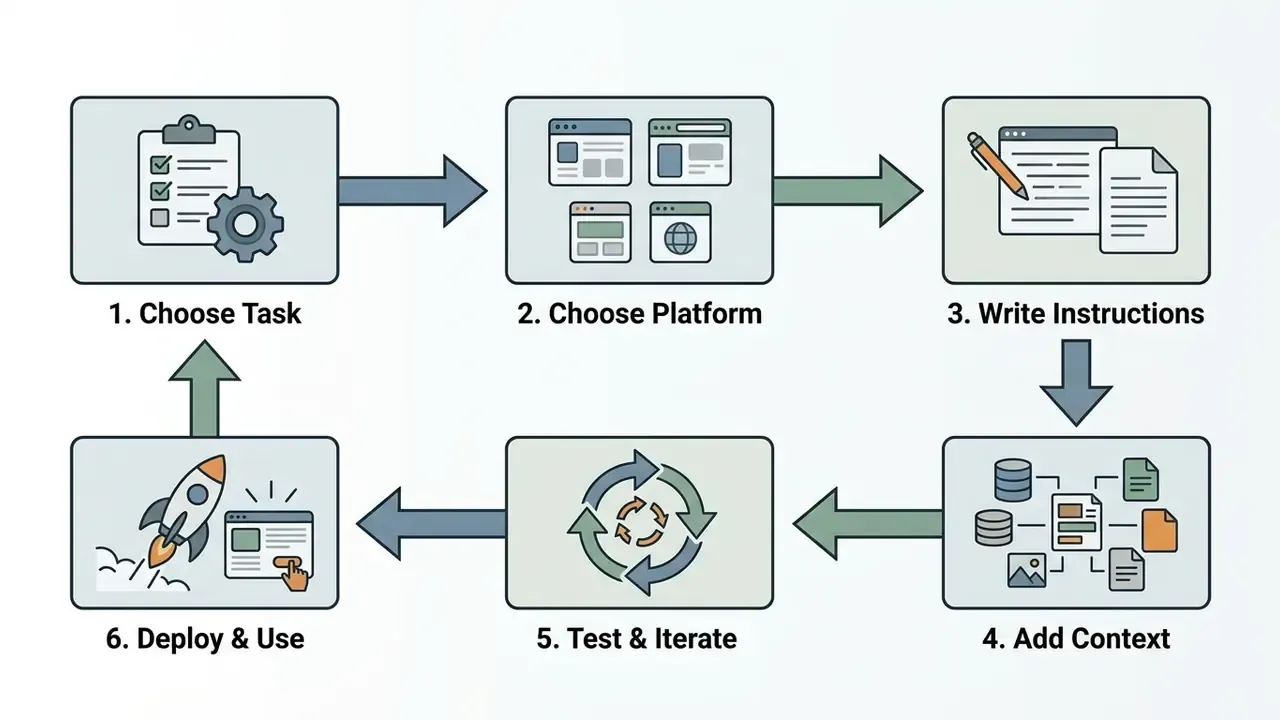
A standardized workflow keeps a custom assistant accurate, predictable and compliant with internal standards. Frameworks such as ISO/IEC 42001:2023 (AI management system), ISO/IEC 23894:2023 (AI risk management) and ISO/IEC 5338:2023 (AI system lifecycle) all emphasize iterative design, continuous testing and documented risk management (ISO/IEC, 2023). The three documents operate at different layers (management system, risk process, lifecycle process), so they complement rather than duplicate each other.
Write Instructions and Give Your Assistant a Clear Role
System instructions (also called developer messages or system prompts) set the assistant's foundational behaviour, operational persona and output constraints.
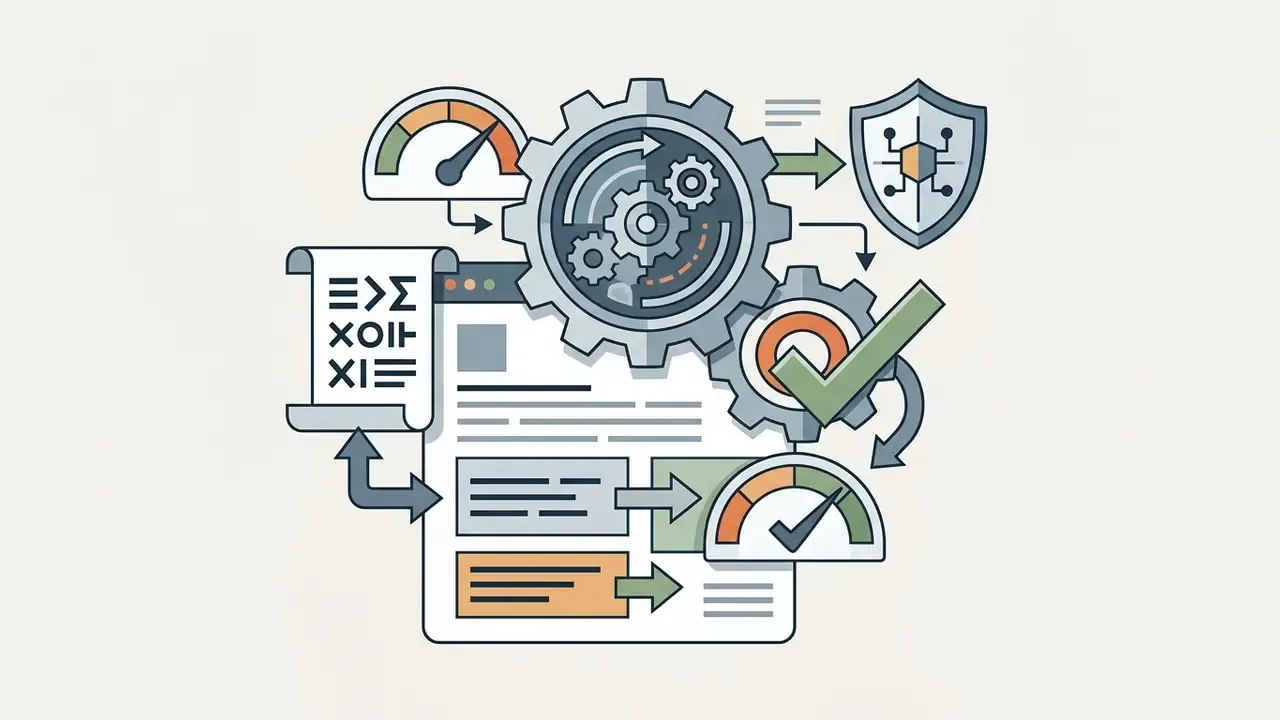
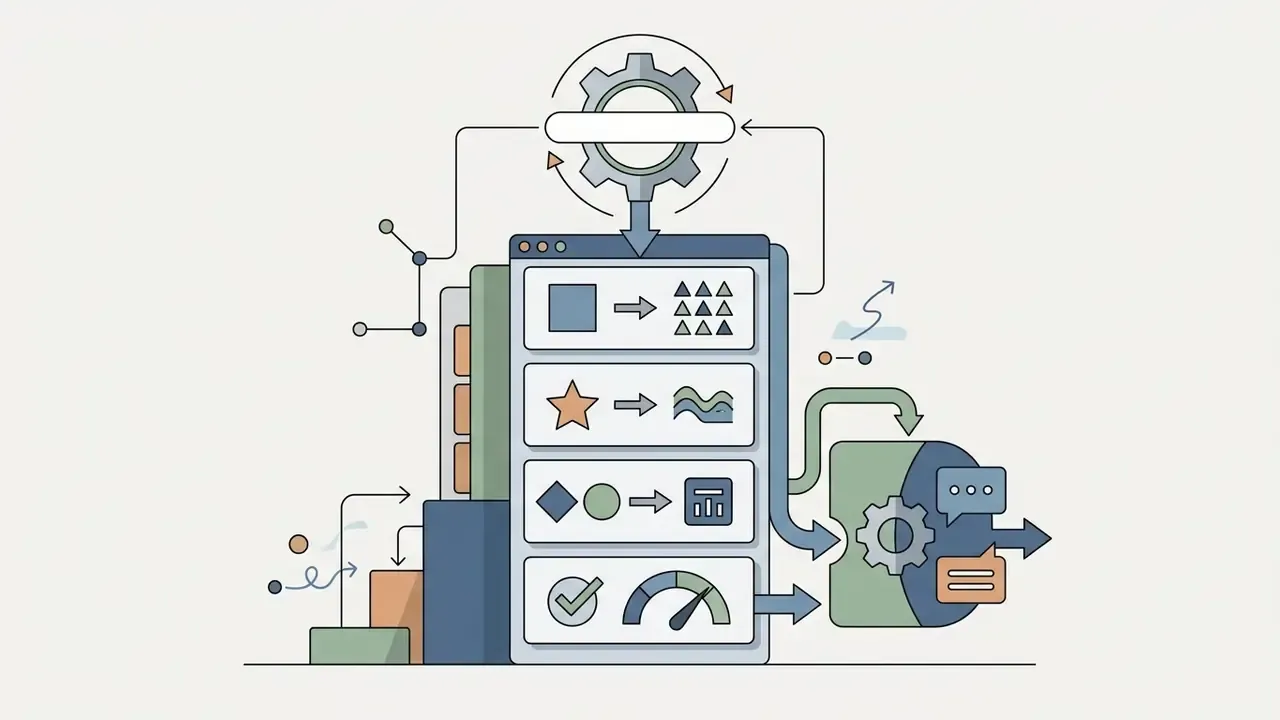
Following OpenAI's prompt engineering guidance, an effective system instruction splits into four blocks (OpenAI, 2026):
Write in the second person and sketch a persona with stakes attached ("you are a detail-oriented data analyst reporting to a reviewer with zero tolerance for unsourced numbers"). Give the assistant notional KPIs, such as "your goal is to surface cost savings" or "your goal is to produce a draft that needs no factual corrections." Objectives shape trade-offs in a way that rules alone cannot.
Structuring instructions explicitly also prevents instruction drift during long multi-turn conversations. NIST-hosted prompt engineering material adds two operational details: a zero-shot instruction should state task, context, output format and constraints, while few-shot examples should be 2 to 3 demonstrations sharing an identical format and reasoning pattern.
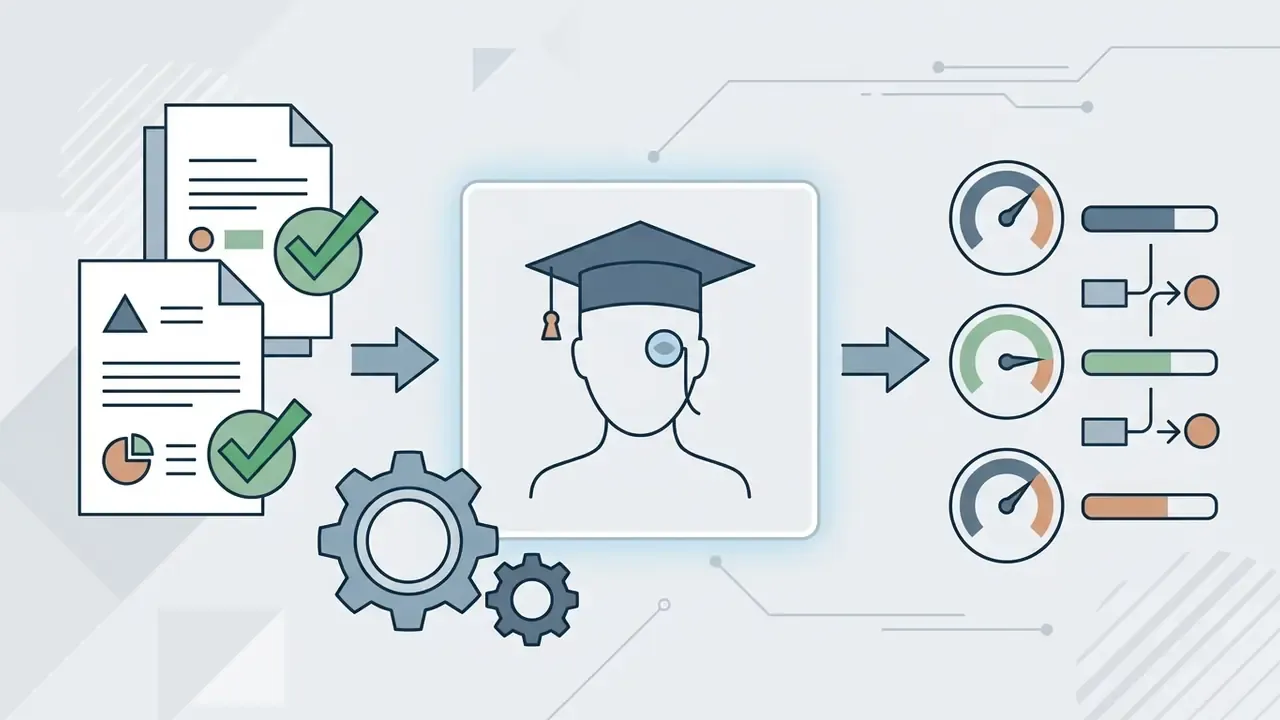
"Prompt engineering practice recommends combining instructions, input data and examples; chain-of-thought prompting raises factual accuracy on complex tasks."
The Iterative Chat-to-Prompt Workflow
Add Context, Files and Background Information
Grounding an assistant in verifiable facts means supplying dynamic context through reference documents or a vector retrieval pipeline.
Context management practices that hold up in production:
- Document hygiene. Clean input files by stripping redundant formatting, headers and irrelevant text before upload.
- Minimal context selection. Supply only the relevant sections. More context is not automatically better; a folder of loosely related documents usually degrades output instead of enriching it.
- Context isolation. Separate trusted internal context from untrusted user input to blunt prompt injection (NIST, 2026). NIST agentic-AI guidance warns that PDFs, emails and RAG content can carry hidden malicious instructions, and recommends intent firewalls, prompt sanitization, sandboxing, encryption and context isolation.
- Refresh discipline. Date-stamp every uploaded file and name who updates it. An assistant grounded in last quarter's price sheet fails silently, which is the worst way to fail.
Typical project knowledge for a working assistant: a brand or style guide, examples of accepted output, a pricing sheet, an existing checklist or template, an equipment or product inventory, and the applicable business policies.
Research on agent memory systems shows that background processing feeds, email or public web links among them, can inject unverified information when ingested uncritically. Data provenance logs make sure every assistant response traces back to an authorized primary document.
"Memory retrieval errors propagate into task execution and security, a critical trust boundary that is hard for users to observe."
Test the Assistant on Real Tasks and Improve It
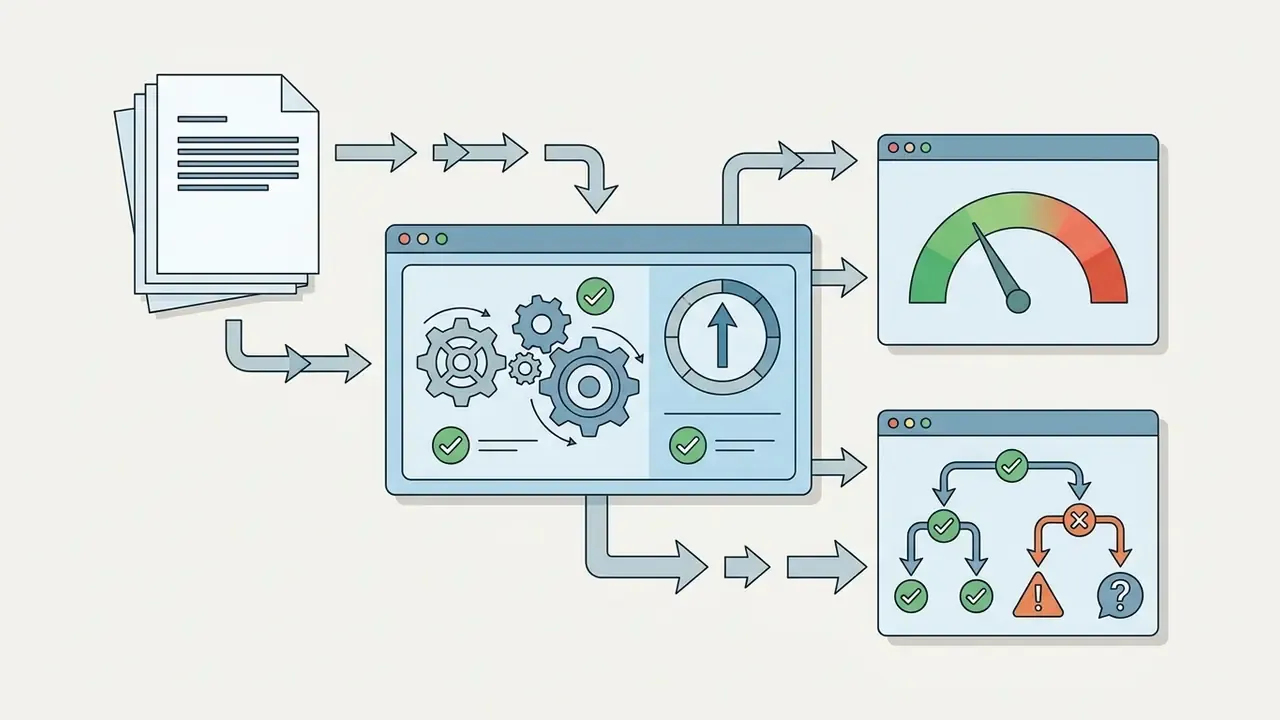
Validating performance requires rigorous testing against realistic queries and edge cases before anyone depends on the output.
Evaluation-Driven Development (EDD) suggests a four-stage methodology:
- Representative query execution. Run a suite of 30 to 50 standard user queries to measure factual accuracy.
- Edge-case stress testing. Benchmark performance on ambiguous prompts, incomplete data, adversarial or injected content, and out-of-scope requests.
- Grounding evaluation. Measure factual correctness with quasi-exact match scoring or LLM-as-a-judge frameworks, and evaluate intermediate artifacts (retrieved passages, tool calls) rather than only final text.
- Iterative prompt refinement. Analyze failure logs, update guardrails, and re-run the suite to confirm that prompt edits introduced no regressions.
Benchmark design practice from GAIA is worth borrowing for internal suites: human-crafted questions, two independent annotators, a fixed system prompt during scoring, and quasi-exact match for answer correctness. That combination makes results reproducible, which is exactly what a validator or examiner needs to see.
Pro tip: enforce thread hygiene for consistent performance. Once your System Instructions and files sit inside a Project or Custom GPT, open a new chat thread for every new task or session. Reusing a long old thread forces the model to chew through outdated conversational history, burning context window budget and raising the odds of the assistant "forgetting" instructions or hallucinating. In an ordinary chat you eventually have to restart when quality decays; with a configured assistant your context is already loaded, so a fresh thread costs nothing and protects output stability.
A team building an internal policy assistant established a regression suite of 100 historical policy queries (internal, self-reported evaluation; figures are not externally audited). The initial prompt configuration misread multi-part leave queries in 18% of cases. After revising the system instruction to force a chain-of-thought breakdown before answering, measured accuracy on the same suite rose to 96%, with every answer citing specific handbook sections. The mechanism is consistent with published prompt-engineering findings that structured reasoning improves factual accuracy on complex tasks. The specific percentages, though, should be reproduced on your own corpus before anyone cites them internally.
Checklist0 / 10
Free Options, Costs and the Commercial-Use Decision
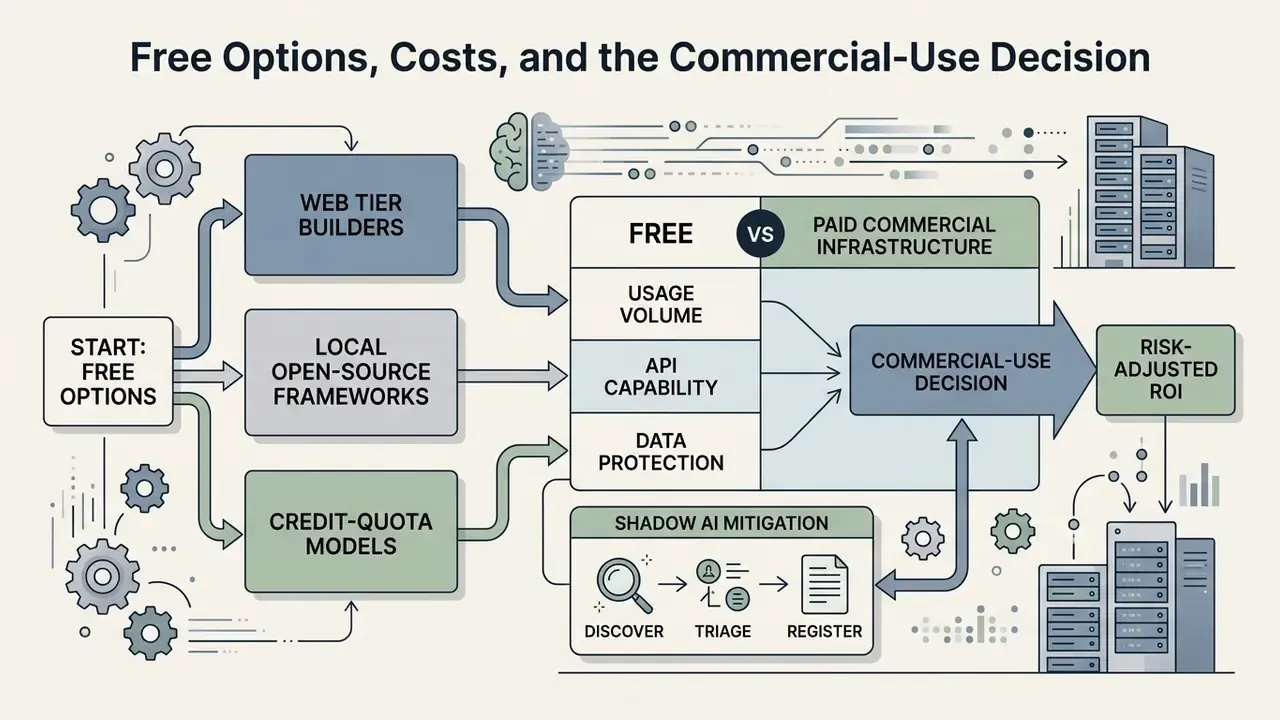
Whether you use free tools or paid commercial infrastructure comes down to usage volume, required API capability, and data protection obligations.
Individual creators can build capable personal assistants on free tiers. Enterprise deployment forces a harder look at commercial licence agreements, operational SLAs and regulatory scope. Worth noting: the EU AI Act defines "making available on the market" as supply in the course of a commercial activity "whether in return for payment or free of charge," so distributing a free assistant does not automatically place it outside regulatory scope. Readers weighing licensing questions in adjacent tool categories can review how usage rights are structured for AI image generation for commercial use.
How to Start With Free AI Assistant Tools
You can create an AI assistant for personal use with zero software spend, either through free platform tiers or local open-source execution. That is the practical answer to how to create a personal AI assistant for free.
Free deployment pathways:
- Web tier builders. Free tiers on ChatGPT, Claude and Gemini support standard custom instruction capabilities, subject to dynamic rate limits and usage quotas. Vendor documentation states that limits vary by plan and are enforced by usage rather than a single published number, so verify current caps on the provider's usage page before building a dependency on them.
- Local open-source frameworks. Deploying open-source models (Llama 3, Mistral, Qwen) locally with Ollama or
llama.cppeliminates per-token API cost; hardware becomes the main expense. Local execution keeps personal data inside your own machine boundary. For a browser interface, Open WebUI can bind to a local OpenAI-compatible endpoint such ashttp://127.0.0.1:10000/v1. - Credit-quota models. Software suites such as JetBrains AI Assistant offer trial tiers with monthly credits for evaluation: AI Trial with 10 or 20 credits per trial period, AI Free with 3 credits per 30 days.
For non-commercial workflows or concept proofing, starting with local tools or free tiers lets you master prompt structure and context grounding before committing budget. Anyone benchmarking free tiers across creative tooling can also consult our comparison of free AI art generators for how quota, watermark and licensing limits typically stack up. For unit-economics modelling, the AI Media Calculators cover token spend and infrastructure sizing.
Risk-Adjusted ROI: Counting Control Costs and Shadow AI
Standard ROI calculations count licence fees against hours saved, which overstates net value in regulated environments where validation, monitoring and evidence retention are recurring costs. Use a risk-adjusted formulation instead:
Risk-Adjusted ROI (annual)
           (Hours Saved x Loaded Hourly Cost) + Quality/Throughput Gains - Expected Loss
ROI  =  ---------------------------------------------------------------------------------
              Licences + Build + Validation + Monitoring + Logging/Storage + Training
where:
  Expected Loss  = Sum( Probability(error type) x Impact(error type) x Volume )
  Validation     = independent review, test-suite construction, documentation
  Monitoring     = periodic re-testing, drift review, incident handling
  Logging        = immutable audit storage and retention
  Training       = user onboarding, escalation drills, prompt discipline
Two practical rules follow. First, an assistant whose outputs need full human re-verification saves review time, not production time, so model the saving accordingly. Second, control costs scale with action risk, not usage volume: a read-only knowledge assistant is cheap to govern, while an assistant permitted to send customer communications or modify records is not.
Legalizing Shadow AI in five steps. Unregistered assistants built inside business units are common and rarely malicious. They are a response to unmet demand. A workable amnesty-and-onboarding path:
- Discover.Survey teams and review SaaS and tenant telemetry for AI tools in use. Publish an amnesty window with no punitive framing.
- Triage.Classify each discovered assistant by data sensitivity, whether it takes actions, and whether outputs reach customers or regulators.
- Register.Enter surviving use cases into the model inventory with an owner, prompt version and data-source list.
- Remediate or retire.Migrate acceptable use cases to approved platforms with logging and RBAC. Retire those that cannot meet control requirements, and offer a sanctioned substitute so demand does not resurface somewhere darker.
- Institutionalize.Publish a lightweight self-service intake so the next assistant is born inside governance rather than outside it.
For context on how data-training and IP disputes are evolving around these tools, see AI Litigation and Case Timelines.
What to Check Before Using an Assistant for Business
Disclaimer: this information is general in nature and does not replace consultation with legal counsel or a compliance specialist when deploying AI systems in regulated industries.
Commercial deployment introduces legal, regulatory and technical questions that go well past performance metrics.
Checklist0 / 7
"For commercial Workspace customers, prompt data and generated content are not used to train models outside the customer's domain without permission."
Five things to verify before an enterprise rollout:
- No-training guarantees. Confirm contractual terms ensuring that prompt inputs, document uploads and generated outputs are not used to train vendor foundation models. Consumer tiers frequently differ from business tiers here. GitHub, for example, documents that interaction data from Copilot Free, Pro and Pro+ may train models unless the user opts out, which is materially different from enterprise terms.
- Data sovereignty and encryption. Ensure data at rest and in transit is encrypted with enterprise keys, with optional regional residency guarantees (EU or US processing bounds), plus DLP coverage for sensitive commercial data as recommended in NIST security guidance.
- Regulatory compliance. Under the EU AI Act, transparency requirements in Article 50 apply from August 2, 2026, requiring deployers to inform users when they interact with an AI system and to mark AI-generated or manipulated content in machine-readable form (European Commission, 2026).
- Access control and auditing. Integrate assistant access with corporate single sign-on (SSO), apply least privilege and short-lived task entitlements, and maintain immutable audit logs of all AI-generated actions. Where two vendors sit close together, weight log completeness and export capability heavily. Evidence you cannot export is evidence you cannot use in an examination. Comparative frameworks for evaluating tool capabilities are illustrated in our best AI art generator comparison.
- Contractual confidentiality. GDPR Article 28(3) requires processors to act only on documented instructions and to bind authorized personnel to confidentiality; EDPB standard contractual clauses require need-to-know access. AICPA Trust Services Criteria treat Security as mandatory and Availability as the category covering committed uptime and recovery, which is the natural home for SLA verification.
To evaluate commercial licensing terms, pricing tiers and business deployment frameworks across media automation tools, visit the AI Media Commercial-Use Hub and review the AI Media Pricing Guides.
E-E-A-T Verification: Platform Terms and Enterprise Data Policies
To verify data handling assertions across major providers, refer to official 2025 and 2026 documentation:
- OpenAI Business Terms (2025/2026). States that Customer Content submitted to business services (ChatGPT Enterprise, ChatGPT Business and the API) is not used to develop or improve OpenAI models unless the customer explicitly agrees (OpenAI Terms).
- Anthropic Commercial Terms (2025). Distinguishes consumer plans (Claude Free, Pro, Max) from commercial API and enterprise terms; consumer updates expressly do not apply to Claude for Work, Government, Education or API use, and commercial outputs carry data privacy and IP ownership commitments (Anthropic Terms).
- Google Workspace with Gemini documentation (2026). Confirms enterprise-grade protections where customer prompts stay within the domain, comply with HIPAA and ISO 42001, and support client-side encryption (Google Workspace Security).
- Microsoft Enterprise AI Code of Conduct (2025/2026). Establishes that customer interaction data within managed enterprise services is protected under Azure and M365 compliance boundaries (Microsoft Trust Center).
FAQ: Common Questions About Creating Your Own AI Assistant
Can I Create My Own AI Assistant Without Coding?
Yes. Non-technical users can build fully operational custom AI assistants without writing code, using managed visual platforms and graphical builders. Copilot Studio, Azure AI Bot Service and OpenAI Custom GPTs all provide drag-and-drop workflow design, automatic document indexing for RAG, and natural language instruction prompts. Microsoft's Bot Service documentation states plainly that no coding or AI expertise is required (Microsoft, 2026). No-code platforms let you upload reference files, define persona rules, and connect standard webhooks with no software engineering background. If you can describe a project in plain language or write a job description, you have the skills to produce a genuinely useful assistant. Most single-purpose assistants take well under an hour to configure. Coding becomes necessary only for proprietary application UIs, self-hosted local model infrastructure, or complex multi-system API orchestration. Separately, note that NIST published an initial public draft of Guidance and Templates for Public-Facing AI Documentation in July 2026, so no-code does not mean no-documentation for public-facing deployments.
How Do I Make an AI Assistant More Personalized Over Time?
Personalization across months of use requires dynamic memory structures and periodic knowledge updates, not just a static system prompt. Key strategies:
- Dual-memory architectures. Separate short-term conversational context (current task constraints) from long-term memory (stable user preferences), as demonstrated in agent memory research (TravelAgent, 2024).
- Selective memory updates. Implement mechanisms that evaluate new interactions, update stored preferences and prune outdated or contradictory entries (Preference-Aware Memory Update, ACL 2026).
- State tracking modules. Maintain structured user profile logs capturing evolving communication preferences and task history across sessions (DFKI Dynamic Personalization, 2024).
- Update-aware evaluation. Benchmarks such as LongMemEval measure multi-session reasoning, temporal reasoning and knowledge updating, which is the right frame for testing whether personalization decays.
"K-LaMP builds a personal knowledge store from a user's interaction history, generating suggestions such as 'Tim Cook's influence on Apple's product line'." K-LaMP: Knowledge-Augmented Language Model Personalization (2024). https://arxiv.org/abs/2401.05459 When configuring long-term memory, build clear memory inspection interfaces so users can view, edit or delete stored details. Control over stored memory is what stops outdated assumptions from quietly degrading assistant performance. "With background monitoring of email and social feeds, injected misinformation influenced agent behaviour in 61% of cases within a session and 76% across sessions." HEARTBEAT Vulnerability Study, Personal AI Agents Security (2024). https://arxiv.org/abs/2401.05459
How Does Long-Term Memory Coexist With Zero-Standing Privilege?
Persistent memory and least-privilege access are compatible only if memory is treated as a governed data store rather than convenience state. Four rules make them coexist in enterprise settings:
- Scope memory to identity and tenant. Memory records inherit the user's RBAC and never widen the entitlement set. The assistant reads memory under the requester's rights, not its own.
- Separate preference memory from content memory. Storing "prefers bullet-point summaries" is low risk. Storing customer records or non-public financial detail in free-form memory is not, and generally belongs in the governed retrieval corpus with provenance instead.
- Gate memory writes. Disable automatic memory writes from untrusted inbound channels. The HEARTBEAT results above show exactly why auto-save from background feeds is a contamination path.
- Make memory inspectable and expirable. Provide a view, edit and delete interface, apply retention limits, and log every write for audit. In personal use this is quality control. In enterprise use it is a control requirement.
What Should I Do First If I Have Only 30 Minutes?
Pick one recurring, low-risk task. Open a normal chat and brain-dump the context. Run it on two real examples and correct the output explicitly. Paste the meta-prompt above to extract System Instructions. Create the Project or Custom GPT, upload only the files that job needs, then start a new thread and use it. Refinement continues afterwards, but by minute 30 the assistant is operational. For additional implementation help and platform troubleshooting, consult AI Media Support and Troubleshooting. Summary of Key Creation Steps
- Scope the task. Isolate one operational problem with clear inputs, outputs and negative constraints.
- Select the platform. Choose no-code builders for speed or custom code for local data privacy, weighting voice, writing quality, Workspace integration and audit logging as decisive features.
- Prototype in chat, then extract. Brain-dump context, test on 2 or 3 real tasks with explicit feedback, then use the meta-prompt to generate structured System Instructions.
- Draft and version instructions. Structure prompts around identity, step-by-step rules, few-shot examples and guardrails, and archive each version.
- Inject context. Supply curated reference files through RAG or structured document context, maintaining provenance and refresh ownership.
- Execute regression testing. Test against real user queries, edge cases and injection attempts, refining instructions from failure analysis.
- Practise thread hygiene. Start every session in a new thread inside the configured assistant.
- Verify compliance and register the model. Confirm data privacy opt-outs, role-based access controls, transparency disclosures, model inventory registration and retained validation evidence before release.
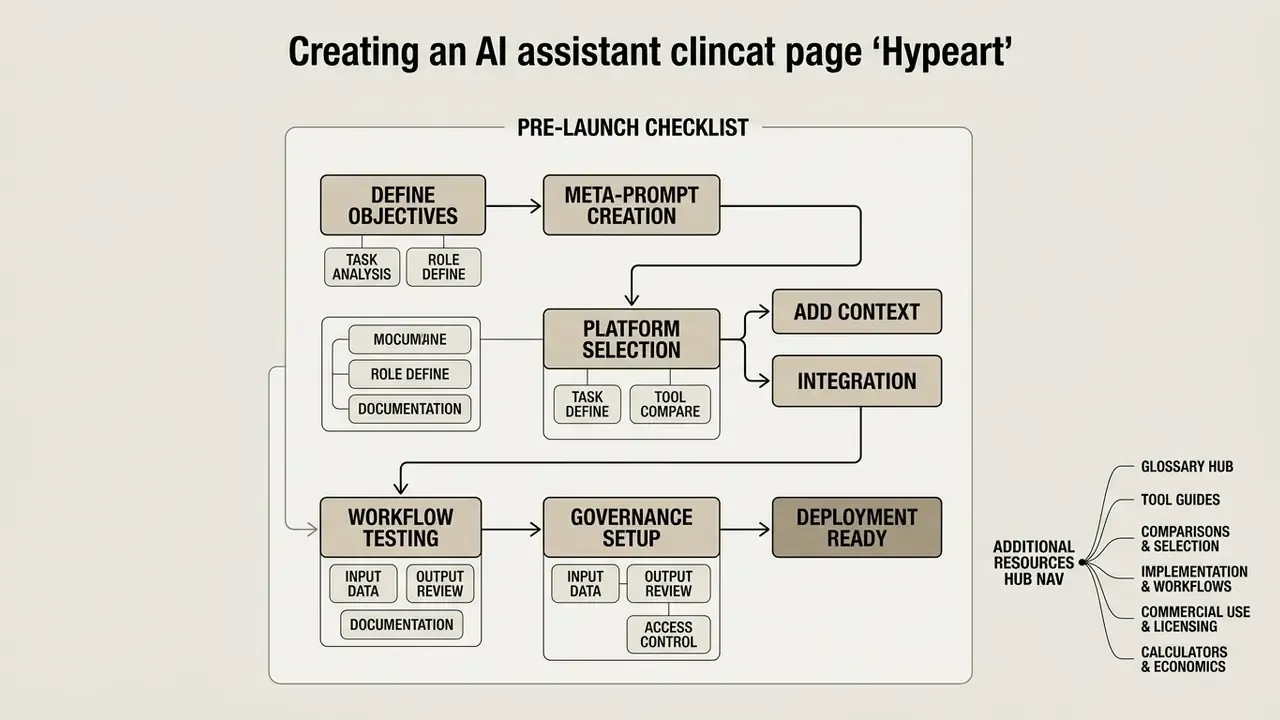
Pre-Launch Checklist
Checklist0 / 15
Appendix A: Editorial Revisions and Source Corrections
For transparency, the following corrections were applied to earlier versions of this guide:
- Corrected citation URL (updated). The NBER working paper reference previously appeared as
https://www.nBER.org/papers/w31161; the correct address ishttps://www.nber.org/papers/w31161. The claim itself (+14% average, +22.2% for novices, +0.18 sentiment) is unchanged and verified. - Attribution added (updated). The RAG customer-service case previously described as "a enterprise team" is now attributed to the published LinkedIn customer-service deployment, including the retrieval and generation metrics used in that evaluation.
- Evidence qualifiers added (updated). Figures drawn from practitioner field reports (inbox 45 to 10 minutes, planning 30 to 5 minutes, 4 to 5 hours per week on search, and the 18% to 96% internal policy-assistant benchmark) are now explicitly labelled self-reported and not independently audited.
- Expert attribution completed. The opening quotation now carries the speaker's role and a clear note that Marcus Hale, author.
- Navigation cleaned. Resource links unrelated to the professional and enterprise scope of this guide were removed and replaced with topically relevant tool comparisons, implementation guides and hub pages.
- nber.org
- - Corrected citation URL (updated). The NBER working paper reference previously appeared as `
- nber.org
- - Corrected citation URL (updated). The NBER working paper reference previously appeared as
https://www.nBER.org/papers/w31161; the correct address is `