«Generative inpainting does not recover hidden historical data; it synthesizes visually plausible textures based on surrounding context. Treating AI photo editing as a deterministic retrieval process rather than a generative probabilistic output creates significant compliance and visual risk.»
Author: Marcus Hale, AI Governance & Risk Specialist, reviewed by the AI Media editorial desk
Last updated: February 2026 | Reading time: ~12 minutes
Key Takeaways
- An AI people remover detects human silhouettes, masks them, and synthesizes new background texture with a diffusion model. It does not reveal pixels that were never captured.
- Modern web editors accept JPG, JPEG, PNG, WebP and iOS-native HEIC/HEIF, with enterprise limits up to 100 MB and 8000 × 8000 px.
- «Free» normally means daily credits, capped export resolution and sometimes a watermark. Paid tiers unlock 4K exports, batch queues and API access.
- Legally, you own the human-authored parts of the photo; purely AI-synthesized regions cannot be copyrighted and must be disclaimed at registration in the US.
Why does any of this matter beyond holiday snapshots? Because the same inpainting stack now sits inside marketing pipelines, listing photos and compliance-reviewed brand assets. Once a synthetic pixel enters a published asset, someone owns that decision.

How an AI People Remover Removes a Person from a Photo
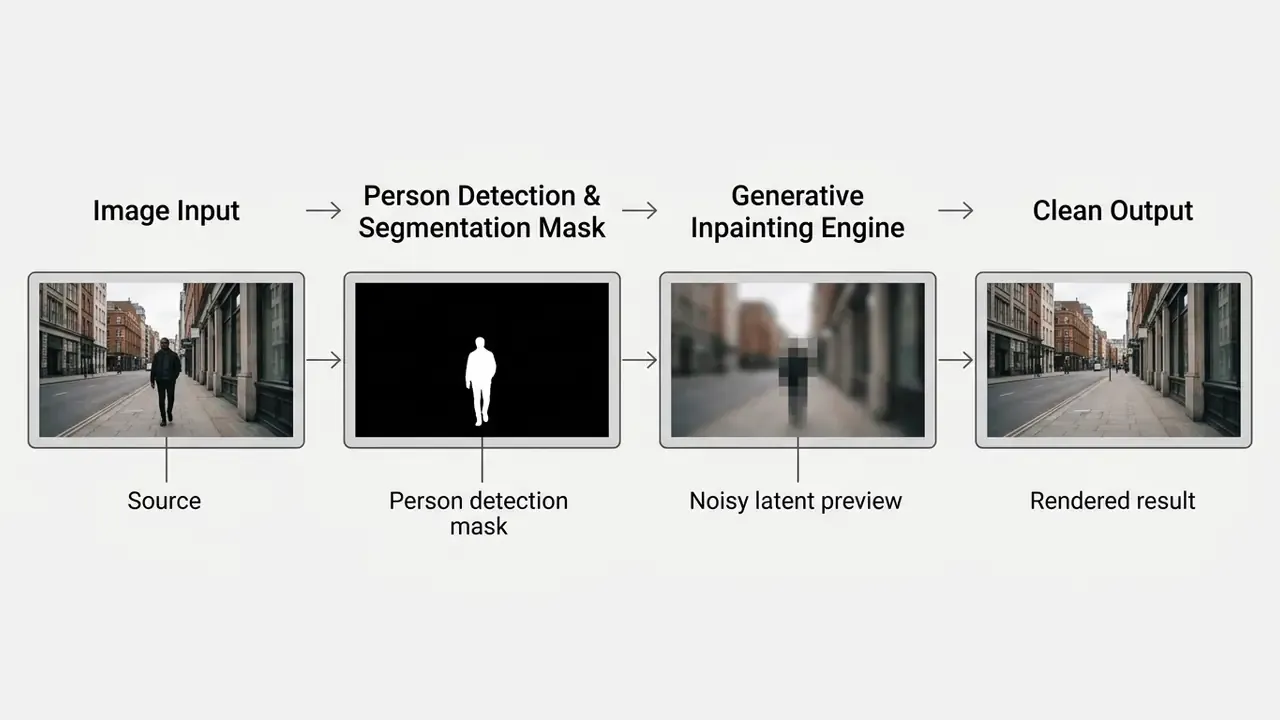
An ai person remover from picture tool uses computer vision to detect human figures, isolates their boundaries via segmentation masks, and fills the vacated area using generative diffusion or inpainting models. The system synthesizes new, contextually appropriate background texture. It does not reveal uncaptured historical pixels. Worth repeating, because most disappointment starts with that misunderstanding.
«Diffusion inpainting models generate new content that is statistically consistent with the training distribution and the local image context, rather than recovering concealed pixels.»
Person Detection and Background Inpainting
Person detection begins with semantic segmentation networks that trace human contours inside the frame. Once the target person or group is masked, generative inpainting fills the gap by reading surrounding pixel patterns. It is the same generative family that powers modern AI photo editors and outpainting tools. Research on datasets like VDOR (Video-Based Object Removal Dataset, 2025) shows diffusion models produce contextually accurate background texture by sampling nearby environmental context rather than retrieving original hidden imagery.
«VDOR pairs 134,281 high-resolution frames in which background plates are captured from video rather than synthesized, an upper bound for object-removal fidelity.»
Foundational work follows the same three-stage split. Automatic Single-Image People Segmentation (2013) framed people removal as target detection → person segmentation → inpainting of the highlighted area, while Mask-Guided Image Person Removal with Data Synthesis (IET Image Processing, 2022) added depth estimation to that chain so the reconstructed background respects scene distance. Self-supervised approaches published in IEEE TPAMI (2022) go further and use background inpainting itself as the supervision signal for human detection, which removes the need for hand-drawn masks during training.
1-Click Passerby Mode Versus Manual Brush Object Mode
Web-based AI people removers split processing into two functional modes. Choosing the wrong one is the single most common cause of a poor result.
- 1-Click Passerby Mode (automated crowd erasure). Built for travel and landmark photography. It automatically identifies non-centric background human contours and erases every detected photobomber instantly, with no manual selection. The main subject survives because the model treats the largest, most central figure as protected foreground.
- Manual Brush Object Mode (precision targeting). Built for complex compositions. You paint over specific subjects, a single individual inside a group, a listing agent in a room, or a stray limb, adjusting brush radius to catch fine boundaries such as hair strands, translucent fabrics and cast shadows.
Under the hood, automatic AI removal relies on pretrained neural networks to draw selection boundaries around detected individuals. Complex edges, though, including stray hair, translucent clothing or moving shadows, usually need manual brush refinement. Interactive mask optimization studies confirm the hybrid route is the efficient one:
«An interactive refinement model reached equal-quality masks with up to 75% less manual input, with peak relative improvement over pure manual labeling of up to 26%.»
«Jointly training the segmentation network and the inpainting network with a mask-dilation loss reduces both object under-coverage and accidental background erasure.» — Inpainting-Driven Mask Optimization for Object Removal, arXiv (2024)
One practical corollary from the occlusion literature: dilating the mask by roughly 3 pixels past the visible silhouette measurably improves coverage, because contact shadows and motion blur extend beyond the body outline.
Text-Prompt Removal and AI Generative Fill Replacement
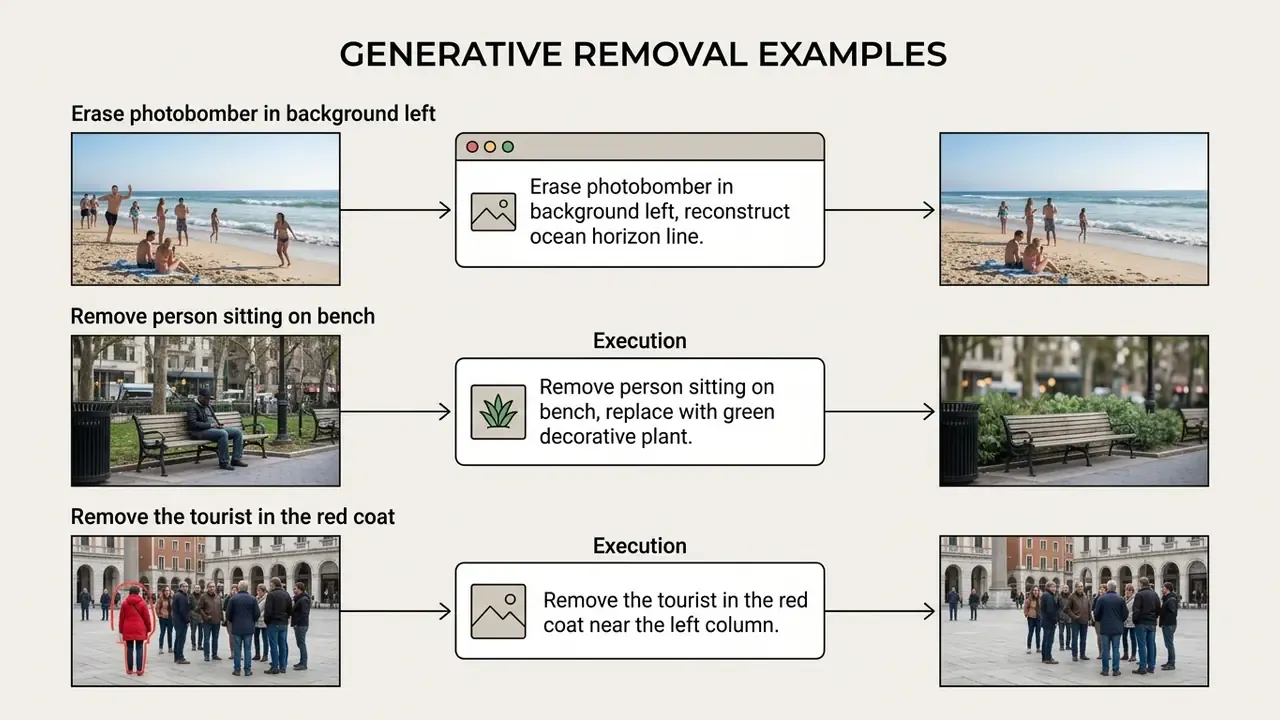
Beyond brush masking, modern diffusion engines run prompt-based subject erasure and generative replacement. Operators issue natural-language commands, for example "remove the bystander in the red coat" or "replace the background person with a wooden bench". The model reads scene semantics, erases the target, then synthesizes either a seamless natural background or a newly prompted object matching perspective, shadows and lighting.
Generative replacement is the right tool when a plain erase would leave an implausible void: an empty restaurant table where a seated guest used to be, or a bare patch of lawn inside a landscaped garden. Rather than asking the model to invent continuity from thin evidence, you hand it an object to render. Prompt-driven fill also handles semantic clean-up that brushes fumble, such as "remove all reflections of people in the shop window" or "delete the crowd along the far shoreline". Teams already working with prompt-based expansion pipelines will recognise the control surface described in our overview of AI outpainting and image-expansion tools.
How to Remove People from a Photo Online in 3 Steps
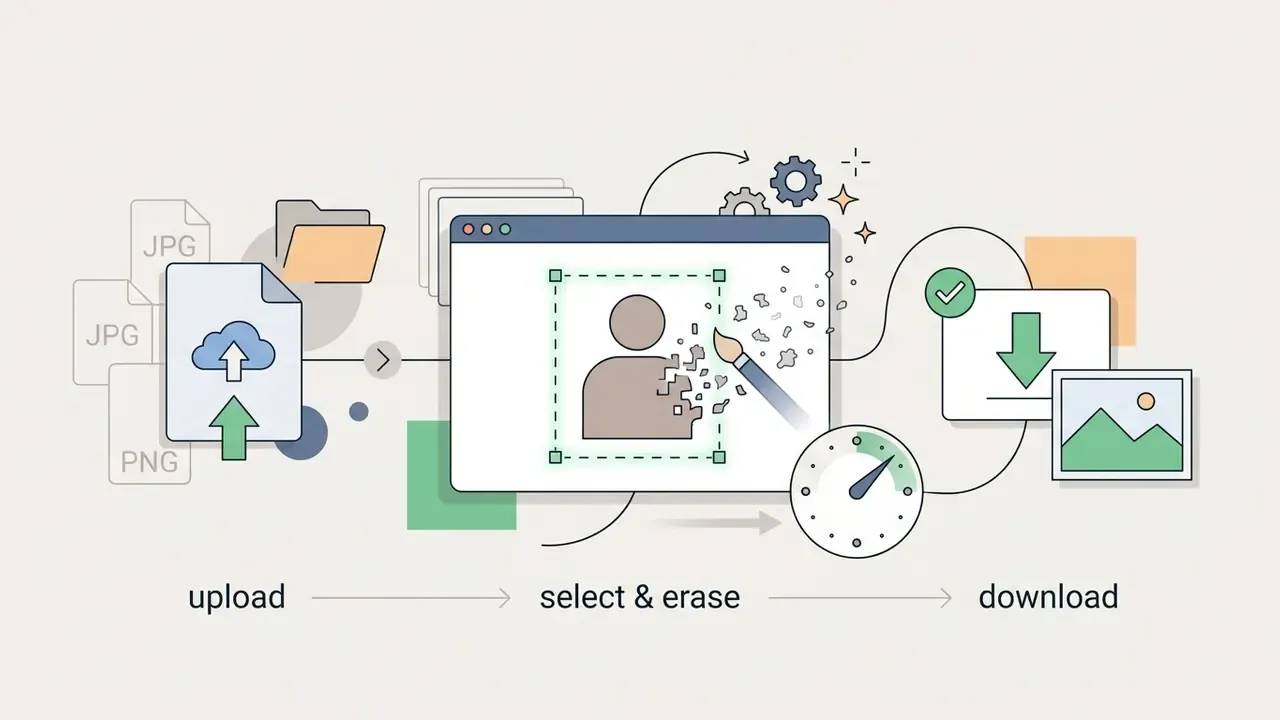
Removing individuals from a photo online means uploading the source image, defining the target subject with auto-detection or a brush, then applying generative fill before downloading the cleaned output. Web-based editors finish this in seconds without legacy desktop software, and the same three-step logic applies across the free photo editors we track and their export limits.
Anyone hunting an ai remove people from photo online free solution can process standard image files straight in a desktop or mobile browser. An ai tool remove people from photo online free platform leans on cloud inference to handle high-resolution assets quickly. Picking a dedicated ai photo editor to remove people collapses complex retouching into three standard steps: upload, mask, and download.
Figure 2 — Three-step interface walkthrough. A sequential, numbered list of three interface captures: Accessibility note: informative screenshots carry equivalent alternative text per WCAG guidance, functional controls describe their function rather than their appearance, and purely decorative frames use empty alt attributes.
- Upload— drag-and-drop panel showing an accepted file with format and size hints visible. Alt: "Upload control for removing a person from a photo online free with AI."
- Select— brush overlay highlighting an unwanted person, with brush-size and hardness sliders in view. Alt: "Brushing over an unwanted person before AI removal."
- Download— side-by-side preview with the export button and format selector. Alt: "Downloading the cleaned image after AI person removal."
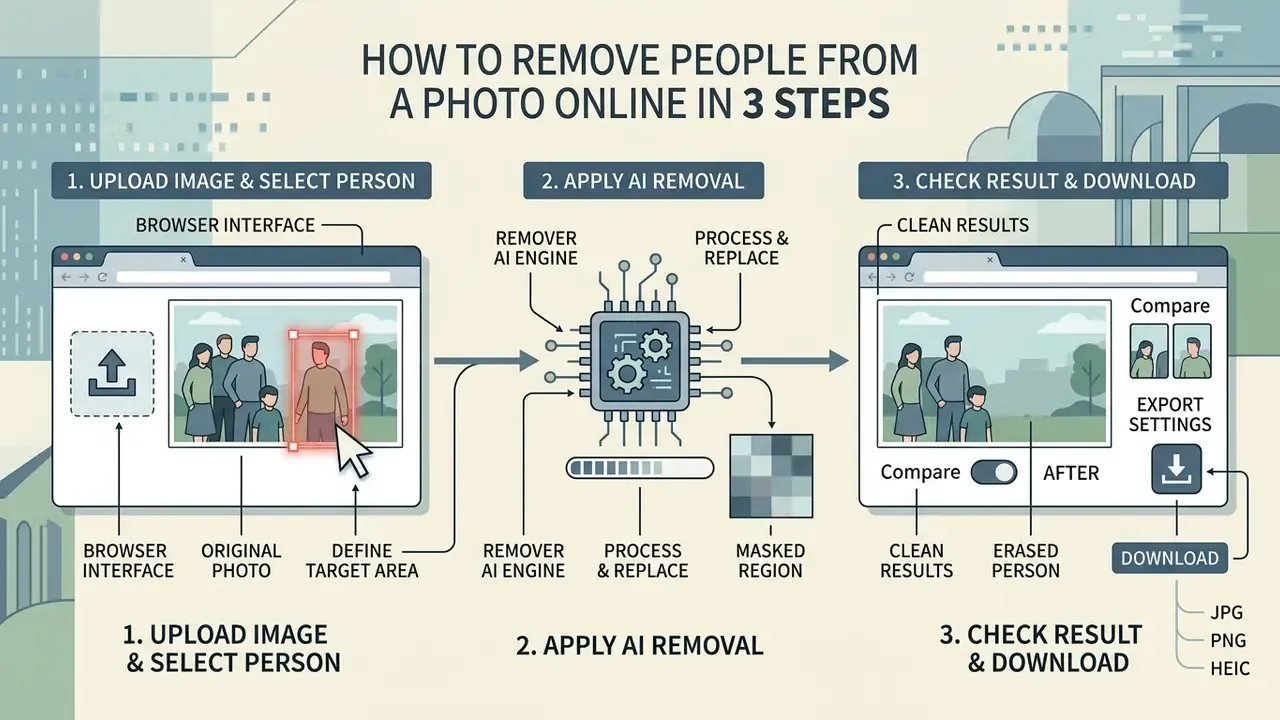
Upload an Image and Select the Unwanted Person
The process starts when you upload a target photo or picture into the browser interface. The editor scans the frame and highlights detected figures automatically, or lets you brush manually over one or several unwanted subjects. Zoom and brush-size controls exist for a reason: mask boundaries decide most of the outcome.
Interface quality matters here more than model quality. Design-system guidance for file inputs (U.S. Web Design System, 2026) requires a visible label, progressive enhancement of the native file input element, and format filtering so unsupported files are rejected before upload. Accessible upload patterns documented in the UX4G Design System 3.0 (2026) add keyboard activation via Tab plus Enter or Space, a "Choose files" fallback beside drag-and-drop, and status or error messages announced to screen readers. Well-built removers expose both whole-subject selection (single click or rectangle) and partial selection (crosshair drag), so a hand, a shoulder or a shadow can be targeted independently of the full body.
Apply AI Removal, Check the Result, and Download
After defining the target area, running the remover ai engine tells the model to replace the masked region with generated background texture. Review the preview for visual continuity, apply touch-up brushes to lingering artifacts, then start the final file download.
Export settings deserve one deliberate pass rather than a reflex click. Generation APIs typically expose the number of variants (commonly 1 to 10), the output container (PNG, JPEG, WebP) and an output-compression value between 0 and 100 percent. PNG for archival masters, WebP or JPEG for web delivery. That choice avoids stacking a lossy pass on top of freshly synthesized texture, which is exactly where visible mush and banding appear. If you are budgeting a large clean-up run, our AI Media Calculators help estimate per-asset processing cost before you commit.
When AI Can Remove People Cleanly and When Results Need Editing
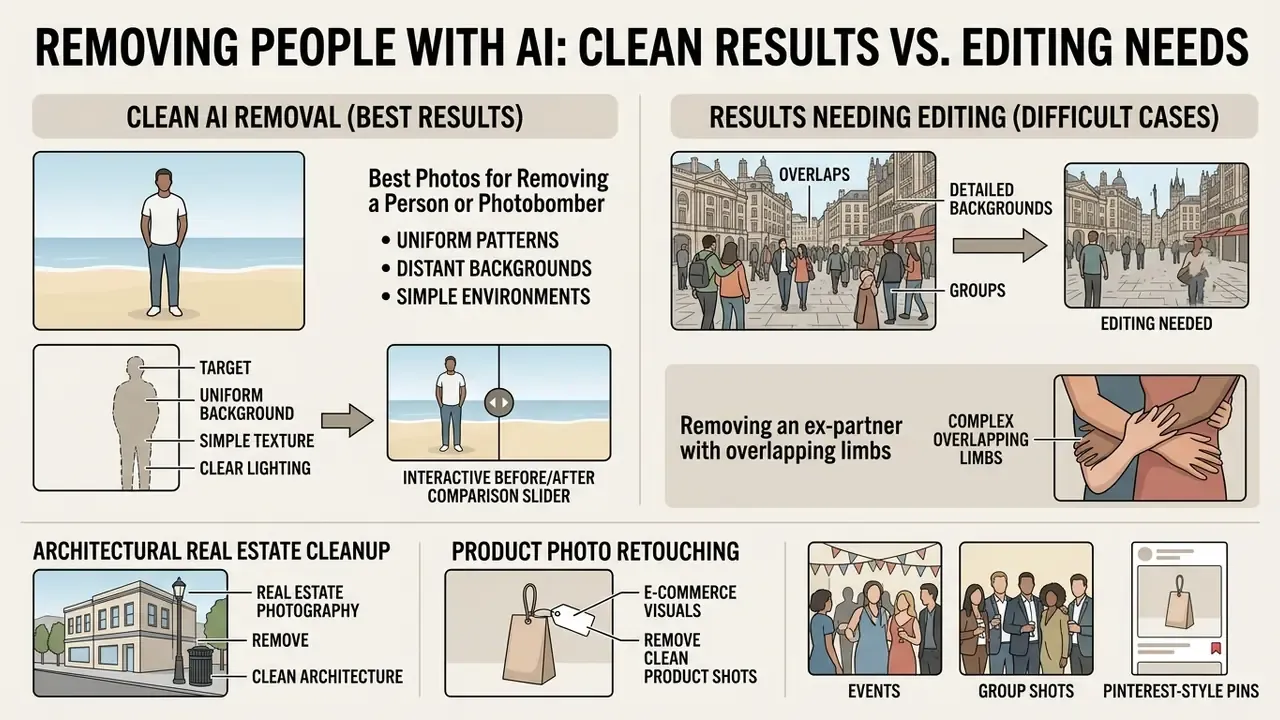
AI algorithms deliver seamless removals when the target stands against a uniform, predictable background with simple texture and clear lighting. Complex environments with overlapping subjects, dense crowds or intricate geometric patterns often produce distortions that demand post-processing.
If an operator needs an ai to remove someone from photo compositions, judging scene complexity first is critical. Tools built to ai remove people from pictures handle isolated photobombers efficiently, yet pulling individuals out of dense crowds tends to leave blurred texture. High quality results come from matching removal strategy to background complexity and clearing lingering distractions or unwanted background elements systematically.
«A modified Stable Diffusion architecture reduced object expansion by 3.6× versus standard SD 2.0 Inpainting while preserving visual-quality metrics.»
Quantitatively, degradation tracks mask area. Structural similarity (SSIM) falls steadily as the masked region grows from 20% to 60% of the frame, and even the strongest published methods degrade most sharply in the 40 to 60 percent band. Failure modes in a 2024 evaluation clustered into three categories: incoherent structure, unreasonable texture, and output that conflicts with human visual perception. That is why a two-pass workflow, generate then correct locally, beats one aggressive pass.
Figure 3 — Interactive before/after comparison slider. An accessible comparison widget with two documented examples: (A) a single photobomber on a uniform beach background, resolved cleanly by automated removal; (B) overlapping subjects in an urban architectural scene, requiring manual brush adjustment along window frames. Slider handle is keyboard-operable; images use alt="ai remove person from photo before and after comparison".
Best Photos for Removing a Person or Photobomber
Ideal photos for AI subject removal feature isolated individuals against non-complex surfaces: open sky, a body of water, blurred fields, flat walls. In those scenes the generative model extrapolates surrounding patterns easily and fills the masked space without visible seams, erasing photobombers cleanly.
Three conditions predict a one-click success. The target has clear edges against the backdrop. The target does not touch or overlap the protected subject. And the surrounding background is inferable, meaning sand, sky, water, foliage, blurred bokeh or a plain wall. Vendor guidance and research converge on the same signal: removal succeeds when the hidden region is bordered by many visible, statistically similar pixels.
Difficult Cases: Overlaps, Detailed Backgrounds, and Groups
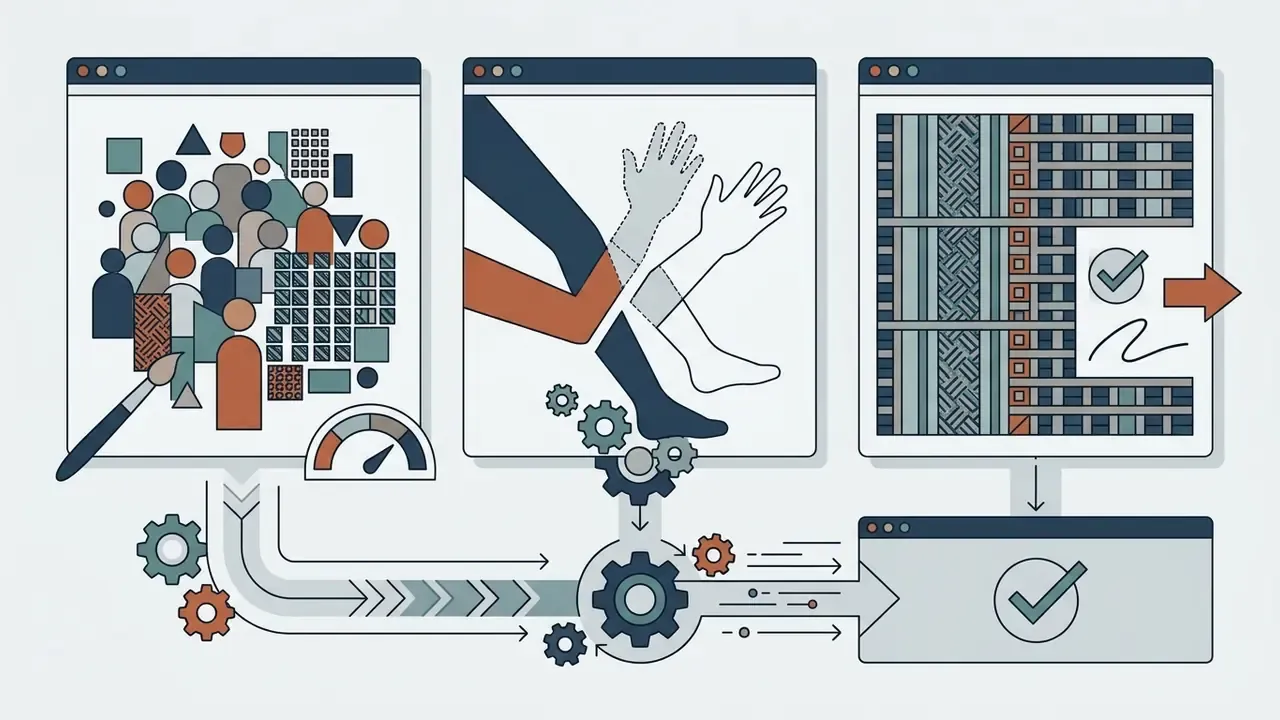
Removal quality drops when a target partially occludes the primary subject, stands inside a dense crowd, or overlaps intricate architectural lines. Research on occlusion handling shows deep masks struggle to rebuild complex structural geometry such as tiled patterns or fine ironwork, so secondary manual retouching is usually required.
«Attentive Eraser redirects the diffusion model's self-attention to suppress foreground activation and amplify background features, reducing artifacts without additional training.»
Architectural Real Estate Cleanup and Product Photo Retouching
- Real estate photography. Removing open-house visitors, listing agents or parked vehicles means preserving continuous architectural lines: floor tiles, window frames, brickwork, skirting boards. Generative engines extrapolate perspective grids to rebuild occlusion zones without wavy structural artifacts, but grout lines and mullions deserve inspection at 100% zoom. A person standing in a doorway is materially harder than the same person against a plain wall, because two planes and a shadow boundary must be rebuilt at once. Interior staging shots follow similar physics to the room-generation workflows covered in our ai home design entry.
- E-commerce visuals. Clearing background staff, mirror reflections or specular glare from product shots calls for strict GS1 colour fidelity. Isolate the product boundary with localized inpainting to prevent accidental smoothing of leather grain, brushed metal or knitted fabric. Photographer reflections in glossy packaging are best handled with prompt-driven fill that names the intended material ("clean glossy black plastic, no reflection").
- Events, group shots and Pinterest-style pins. Wedding and event frames usually hold both a protected group and unwanted bystanders. Run Passerby Mode first, then a brush pass for anyone standing inside the group. For social pins, remove edge-of-frame distractions before cropping, so the engine keeps more surrounding context to sample. Composite affection shots, the kind produced by an ai hug generator, raise the same authenticity questions once figures are added or subtracted.
- Cosmetic retouching adjacent to removal. Wrinkle softening, glare reduction and blemish clean-up use the same inpainting family and can run in one session. Keep them as separate layers or passes so each can be reverted alone. For headshot-specific workflows, see our guide to ai headshot generator portrait quality controls.
- Content-policy edge cases. Some categories, including adult-oriented generators such as an ai hentai generator, sit outside most corporate acceptable-use policies entirely. Confirm classification before any business account touches them. Educational utilities like an ai homework helper picture tool carry a different, lighter risk profile, though student-data rules still apply.
Is It Really Free? Limits, Watermarks, and Download Quality
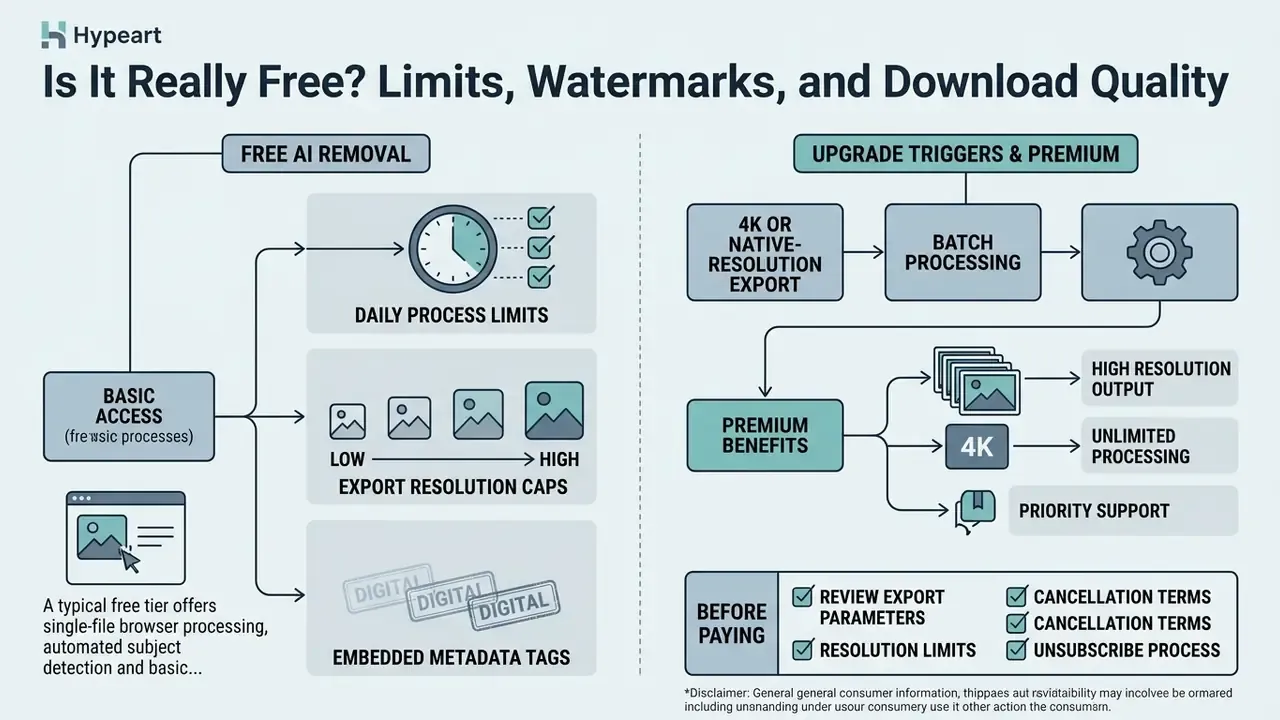
Free web-based AI removal tools generally hand you basic functional access with daily processing quotas, export resolution caps or embedded metadata tags. Unlocking high-definition output and batch queues usually means a paid subscription.
«Post-2023 academic literature contains no empirical study that systematically measures quotas, watermarks or export resolution across commercial people-removal tools.»
Finding an ai remove people from photo free service or an ai remove person from photo free web app means reading platform terms before you commit a high-volume project. Plenty of sites advertise free usage while hiding restrictions such as low-resolution exports or a visible watermark overlay. The same pattern shows up in watermark policies across free AI art and image generators. Comparing vendor pricing tiers, ideally alongside our AI Media Pricing Guides, keeps project requirements aligned with usage policy.
Observed 2026 ranges illustrate the spread rather than a standard. Some generative editors grant a handful of free daily generations tied to an account. Others report roughly 3 AI edits per day on the free plan with watermarks on AI output. A few cap free exports at low resolution. Because these values change often and are rarely published in binding form, treat every figure below as a checklist prompt, not a guarantee.
| Tier Parameter | Free Tier Expectations | Paid / Premium Tier Expectations |
|---|---|---|
| Daily Generations | 3 to 25 credits per day | Unlimited or high-volume monthly allocations |
| Export Resolution | Standard web resolution (e.g., 720p / 1024px) | Full HD, 4K, or native original resolution |
| Watermark Policy | Visible brand mark or metadata tag | No visible watermark; clean commercial export |
| Batch Processing | Single image upload only | Multi-file queue and bulk processing |
| API & Commercial Rights | Non-commercial usage terms | Commercial license grant and developer API access |
| Provenance Metadata | Content Credentials / AI tag often embedded | Metadata retained; some plans allow export control |
What a Free AI Person Remover Usually Includes
A typical free tier offers single-file browser processing, automated subject detection and basic web-resolution export. That is enough to test algorithm quality on casual photos, though daily credit caps and lower output resolution limit commercial utility. One caveat: no visible watermark does not mean no marker. Many providers embed invisible provenance signals or Content Credentials metadata in every generated file.
What to Check Before Paying for an Upgrade
Before buying a subscription, review export parameters, resolution limits and cancellation terms. Under US Federal Trade Commission guidance, providers must clearly disclose auto-renewal terms, recurring fees and straightforward cancellation paths to avoid deceptive billing. Cancellation must be at least as easy as sign-up, and the FTC's 2024 action concerning hidden early-termination fees shows the enforcement risk when it is not. Broader disputes of this kind are tracked in our AI Litigation and Case Timelines.
A practical upgrade trigger appears when three needs coincide: 4K or native-resolution export, batch processing across many assets, and watermark-free commercial output. If only one applies, a free tier plus a manual workaround is usually cheaper. If a tool misbehaves mid-project, our AI Media Support and Troubleshooting hub covers the common failure paths.
AI People Remover vs Object Remover vs Background Remover
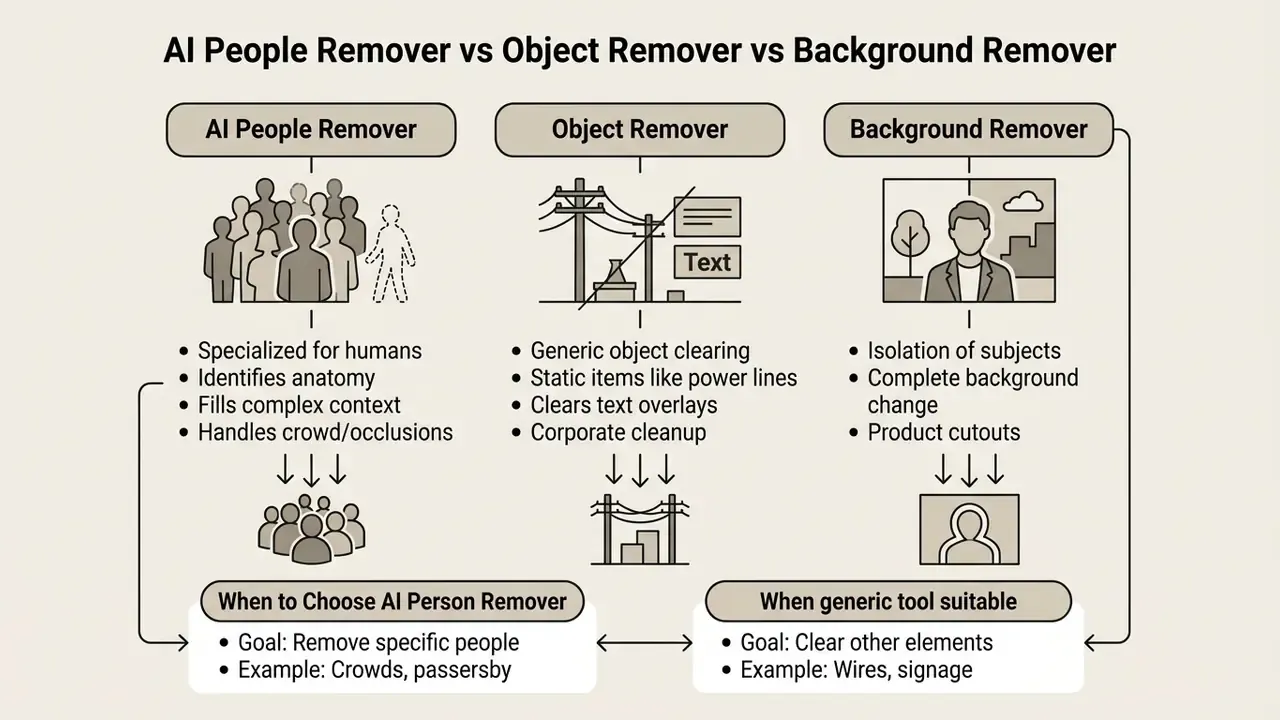
Dedicated AI people removers specialise in identifying human anatomy and filling background context behind it. Object removers eliminate arbitrary items like street signs or logos. Background removers extract the main subject entirely by erasing the surrounding frame.
Choosing correctly depends on your editing goal. A dedicated people remover suits photobombers, while choosing to remove objects or remove unwanted objects applies to non-human items. A full background remover isolates subjects for graphic design layouts and behaves differently from a standard ai picture editor remove people workflow. The real distinction is method, not branding: removers reconstruct erased regions, whereas background removers segment the foreground out and leave transparency behind. That difference also determines how AI-generated visuals behave inside design suites. Side-by-side breakdowns of adjacent categories live in our AI Media Comparison Matrices.
«Blind inpainting with object-aware discrimination removes markers, QR codes and logos without prior knowledge of their content, using the same diffusion mechanisms as human removal.»
Table 2 — Comparison matrix of editing tool categories.
| Feature / Dimension | AI People Remover | Generic Object Remover | Background Remover |
|---|---|---|---|
| Primary Target | Human figures, photobombers, crowd groups | Stray objects, logos, text, blemishes | Entire image background surrounding subject |
| Detection Mechanism | Anatomical pose & human segmentation | Contour detection & prompt guidance | Foreground subject separation |
| Background Treatment | Generates localized background fill | Synthesizes local texture over erased item | Cuts out background to transparent PNG |
| Selection Method | Auto-detect passersby or brush a person | Brush, smart select, or text prompt | One-click automatic subject isolation |
| Best Application | Travel, portrait, and event photo cleanup | Retouching, product photography cleanup | E-commerce product cutouts, graphic composites |
| Typical Failure Mode | Distorted torso where limbs overlap | Ghost outline of the erased object | Halo or lost detail on hair and fur |
When to Choose a Dedicated AI Person Remover
Pick a specialised human remover for photos with complex crowd arrangements, partial body occlusions or dynamic poses. Specialised models use human-specific segmentation priors and separate individual silhouettes more accurately than general-purpose tools. Published human-segmentation pipelines initialise with person detection plus face detection and a skin-colour model before building a trimap. Multi-person pose estimation research exists precisely because joint-to-person association fails in crowds where generic object masking merges two bodies. Practically: more than three overlapping people in frame, use the people-specific engine.
When an Object or Background Tool Is More Suitable
Reach for generic object removers when clearing static items like power lines, text overlays or corporate logos. When the goal is a product cutout with a transparent background for catalog design, background removal is the right call. It also suits any workflow ending in compositing, whether replacing a sky, dropping a subject onto a brand colour, or preparing a layered template, because it preserves the subject edge instead of inventing surroundings.
Can You Use AI-Edited Photos for Commercial Projects?
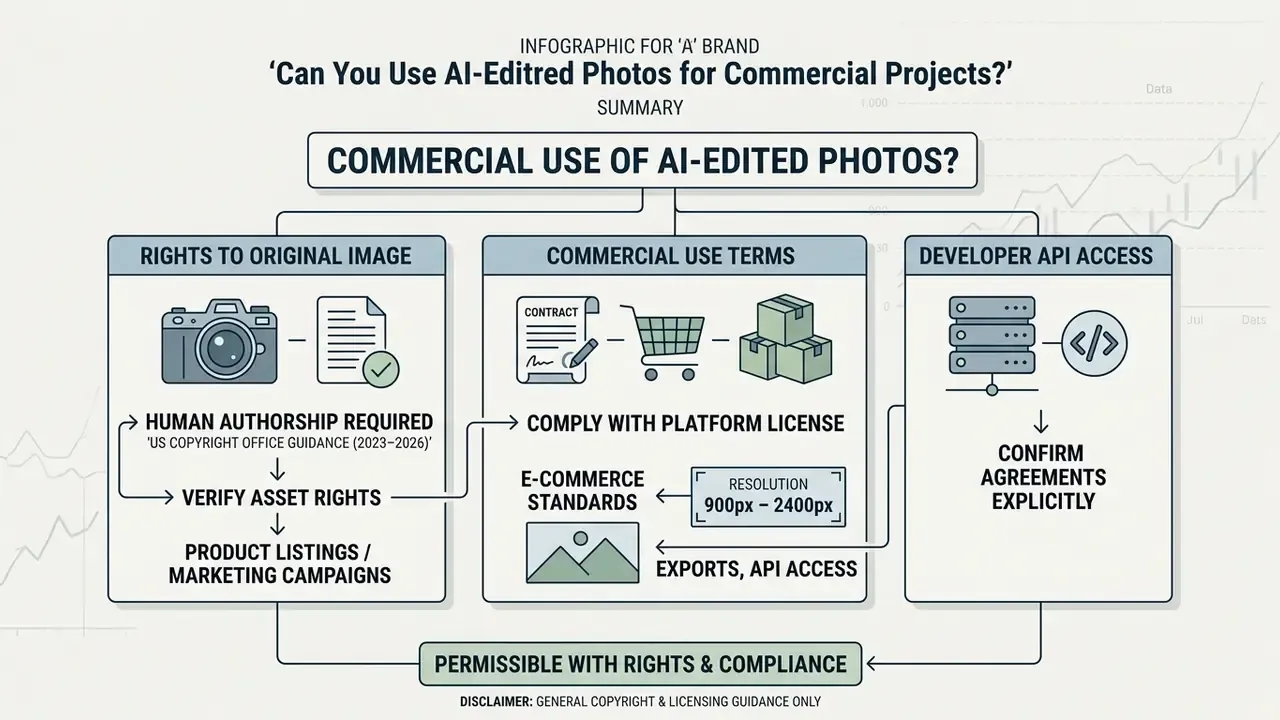
Using AI-edited images commercially is permissible when you hold rights to the underlying photograph and comply with platform licence terms. Purely AI-generated or filled background regions, however, cannot be copyrighted under current US guidance.
Putting edited visuals into product listings or professional marketing campaigns requires verifying asset licensing, and the same questions recur across the broader field of commercial use of AI-generated images. Enterprise teams at scale deploy these tools via an api to process large media catalogs. Reviewing usage rights early prevents legal exposure when modified photos go out across public channels; our AI Media Commercial-Use Hub collects the licence questions worth asking first.
«Generative AI output produced solely from prompts does not satisfy the human-authorship requirement of US copyright law.»
Rights to the Original Image and the Removed Person
According to US Copyright Office guidance (2023–2026), human authorship remains a core requirement for protection, and synthesized AI elements must be disclaimed in registration filings. Commercial platforms such as Adobe Stock additionally require formal model releases when an edited photo depicts an identifiable individual, even if that person is later modified or partly erased. European Parliament analysis (Generative AI and Copyright, 2025) reaches the same conclusion for the EU: fully autonomous output without meaningful human input is not eligible for protection.
«Removing a person from a photograph can affect their digital identity; researchers call for coordinated international legislation protecting individuals against image manipulation.»
Two operational rules follow. First, keep the unedited original archived. It is your evidence of human authorship and of the licence chain. Second, do not assume erasing someone removes their rights. Personality, likeness and digital-replica protections attach to the recognisable person, and the US Copyright Office's Digital Replicas report (2026) notes AI editing can create unauthorised duplication risk even when no authorship is claimed. Platform terms add another layer. Canva's AI Product Terms (2026), for instance, prohibit using AI tools to mislead anyone into believing AI-generated content is human-made.
Commercial Use Terms, Exports, and API Access
Commercial e-commerce standards require product imagery to hold resolution between 900px and 2400px without compression artifacts. The GS1 Product Image Specification Standard sets web product images at 900 × 900 to 2400 × 2400 pixels at 300 ppi with white or transparent backgrounds. GS1 Austria's national guideline is stricter, requiring at least 300 ppi, a minimum 2401 px long edge and a file under 25 MB. Where a cleaned image falls short of those dimensions, upscaling is the standard remedy; see our comparison of AI upscalers for commercial resolution requirements. (Note: GS1 figures reproduce vendor and national-organisation documentation; verify the current revision for your target marketplace before publication.)
Organisations automating media pipelines through developer APIs must confirm their agreements explicitly grant commercial usage rights for synthesized output. Adobe Stock's AI Studio guidance, for example, permits commercial use of AI-edited derivatives once the underlying stock asset is licensed. Image-generation and product-photo-editing endpoints are published by several vendors, and the cost model tends to mirror the pattern documented in our API implementation and developer-economics guides: per-call pricing, concurrency caps and separate licence terms for output reuse. Endpoint-by-endpoint detail sits in the AI Media API Guides.
Image Formats, Devices, and Privacy When Editing Photos Online
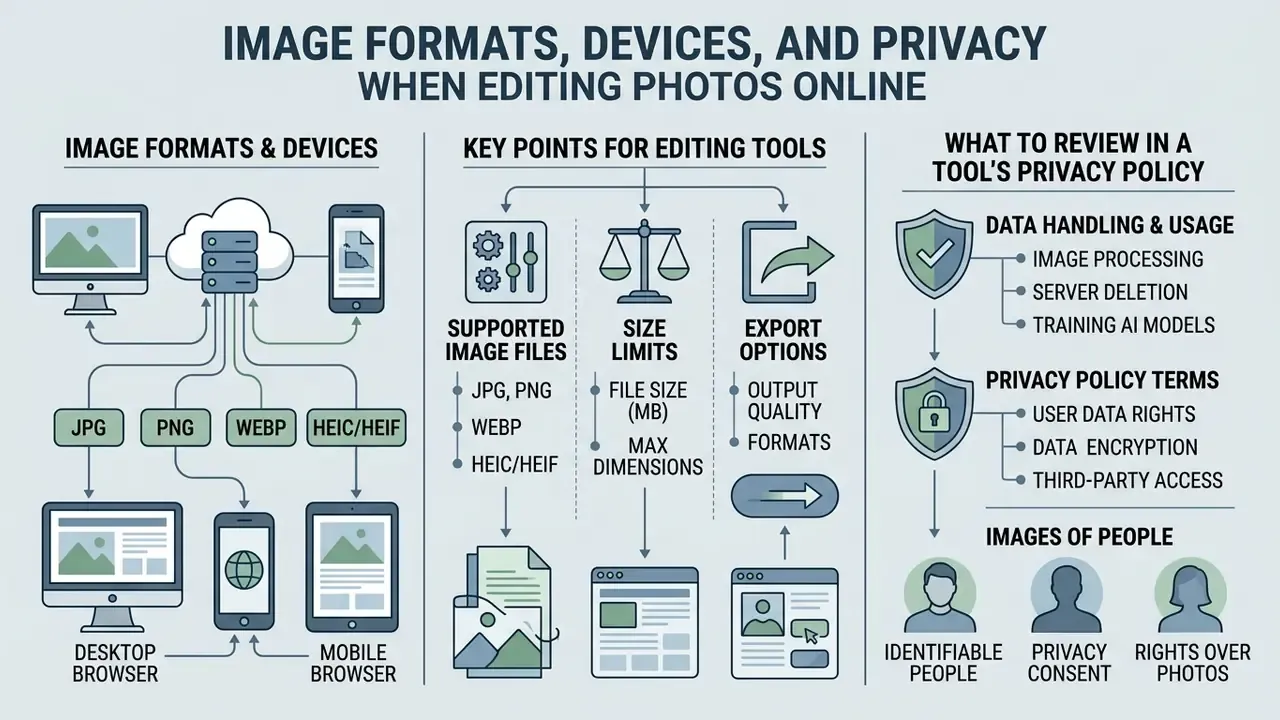
Web-based photo editors support standard raster formats, including JPG, PNG, WebP and HEIC/HEIF, across desktop and mobile browsers. Protecting data privacy means reading vendor retention schedules and opting out of automated model-training pipelines.
When exporting edited images, PNG preserves background transparency and uncompressed quality. A secure online service or mobile app gives you cross-device access, provided the platform guarantees encrypted file upload and automated server deletion for processed images.
Supported Image Files, Size Limits, and Export Options
Modern web-based AI editors support JPG, JPEG, PNG, WebP and iOS-native HEIC/HEIF files, so iPhone photos process without desktop conversion. For professional high-resolution photography, enterprise pipelines accept raw asset uploads up to 100 MB and dimensions up to 8000 × 8000 pixels.
Format behaviour determines what survives the edit:
| Format | Compression | Transparency | Best use after removal |
|---|---|---|---|
| JPG / JPEG | Lossy | Not supported | Web delivery, email, social posts |
| PNG | Lossless | Alpha channel preserved | Archival master, cutouts, print handoff |
| WebP | Lossy or lossless | Preserved in both modes | Fast-loading web assets (Google reports 25–34% smaller than JPEG at similar SSIM, ~26% smaller than PNG losslessly) |
| HEIC / HEIF | Lossy (efficient) | Supported | Native iOS uploads; convert on export for compatibility |
Web editors accept lossy JPGs, uncompressed PNGs and heavily compressed WebP files. Exporting as PNG prevents cumulative compression artifacts, which makes it the preferred format for professional graphics and print. If file weight becomes the constraint after export, apply compression as a deliberate final step rather than mid-pipeline, the same principle covered in our guide to compressors and quality-loss trade-offs.
What to Review in a Tool's Privacy Policy
«DF2023 contains over one million manipulated images, including 100,000 object-removal examples, and is used to train pixel-level forgery-detection models.»
«Aletheia, tested on 839,000 face photographs, accurately identifies edited images that violate user-defined policies and gave participants a sense of protection.» — "My face, my rules": personalized face protection study (2023–2025)
The practical implication of both papers is blunt: removal leaves traces. Editing a photo does not make the edit invisible to forensic tooling, and platforms increasingly run detection on uploads, a landscape we cover in our overview of reverse-image-search and image-provenance tools.
Shadow AI and privacy express checklist (before uploading corporate or personal photos):
Checklist0 / 8
That last pair of questions is where most enterprise trouble starts. An unapproved browser tool holding client photographs is a data-governance incident waiting for an auditor.
FAQ About Removing a Person from a Photo With AI
Can AI Remove Several People From One Picture?
Yes. An ai picture remove people tool can eliminate multiple individuals or crowd groups in one operation. When you instruct an ai remove people from picture engine to erase several targets, the algorithm processes each masked region together. Reconstruction quality, though, depends on how much background context remains; dense crowds covering most of the frame tend to blur. Users can remove multiple figures effectively by applying localized selection masks across sequential passes during editing to reach optimal visual results, a staged approach also described in our photo-editor workflow guide for multi-subject edits.
«Paint by Inpaint builds a large-scale dataset of paired images with and without objects through an automated pipeline, showing that segmentation-mask inpainting works reliably for multi-object removal.» — Paint by Inpaint (2024–2025)
Related research reinforces the ceiling. RORem (CVPR 2025) reports object-removal success improving by more than 18% over prior methods with human-in-the-loop training data, while SmartEraser (CVPR 2025) evaluates removal across three benchmarks using REMOVE, LPIPS, SSIM and PSNR. In short: several people, yes. An entire packed plaza, only with visible compromise.
Does the AI Tool Support Batch Processing for Multiple Photos Simultaneously?
Free web-based tiers usually limit processing to one image at a time to conserve cloud GPU capacity. Enterprise users needing bulk runs across hundreds of assets should deploy developer API workflows, which enable multi-threaded queue uploads, automated mask generation and concurrent batch downloads. Mid-tier subscriptions often sit between the two, offering a multi-file queue that processes sequentially rather than in parallel.
Can the Same AI Tool Remove Objects, Text, or a Logo?
Yes. Most generative inpainting tools handle arbitrary physical items, text overlays, corporate logos and surface defects with the same neural engine. Specialised people removers and general object erasers rely on identical diffusion-based background synthesis. Public product documentation for several removers lists people, text, logos and watermarks together, and prompt-driven variants accept instructions like "remove watermark" or "delete text from image". Teams managing brand assets across many files often pair this with the guidance in our AI design and brand-asset overview. No published benchmark in the sources reviewed shows a "people-only" tool beating a general editor on text or logos. The difference is scope and workflow, not measured accuracy.
Does Removing People Lower the Image Resolution?
No. Removal itself does not resample or recompress the frame; output pixel dimensions match the input. Quality loss, when it appears, comes from two other places: a lossy export format chosen at download, and locally synthesized texture inside the mask that reads softer than the surrounding photograph. Export as PNG for masters, and inspect the inpainted region at 100% zoom instead of judging the thumbnail.
How Do I Remove a Person Standing in Front of a Complex Background?
Brick walls, cityscapes, fences and tree branches are the classic failure set, because the model has to continue a repeating structure across a gap. Three tactics help. Reduce the mask to the tightest viable outline. Run several smaller passes instead of one large one, so each pass has more surrounding evidence. Then switch to prompt-driven generative fill and describe the structure explicitly ("continue the horizontal brick courses"). If the structure still bends, finish with a manual clone or patch pass along the strongest line in the frame.
Appendix A: Superseded Wordings and Editorial Log
Retained for transparency and version traceability:
- Original case-study wording (Section 1) "A commercial media operation evaluated automated subject erasure across 1,200 promotional assets. The technical team implemented automated mask verification to identify hallucinated visual artifacts, reducing manual retouching time by 42% while maintaining brand quality standards." — Superseded because the figure is an unverified operator-reported internal metric; the updated paragraph labels it as such.
- Original mode description (Section 3) "Automatic AI removal relies on pretrained neural networks to draw precise selection boundaries around detected individuals… Interactive mask optimization studies show that combining automated detection with human-guided brush correction reduces manual labeling effort by up to 75% while significantly improving edge fidelity." — Retained in the body but now attributed to Deep-Human-Guided Refinement of Segmentation Masks (arXiv, 2024) and supplemented by Inpainting-Driven Mask Optimization for Object Removal (arXiv, 2024), plus explicit Passerby/Object mode naming.
- Original format list (Section 20) "Modern web editors accept lossy JPGs, uncompressed PNGs, and highly compressed WebP files." — Retained and extended with HEIC/HEIF support, the 100 MB upload ceiling and the 8000 × 8000 px dimension ceiling.
- Media placeholders Draft shortcodes for the pipeline diagram, three-step walkthrough, before/after slider and comparison matrix have been replaced with specified figures, captions and alt-text requirements (Figures 1–3, Table 2).
- Section order The tool-comparison block now precedes the commercial-use block, so readers select a tool before evaluating licensing consequences.