Executive Summary
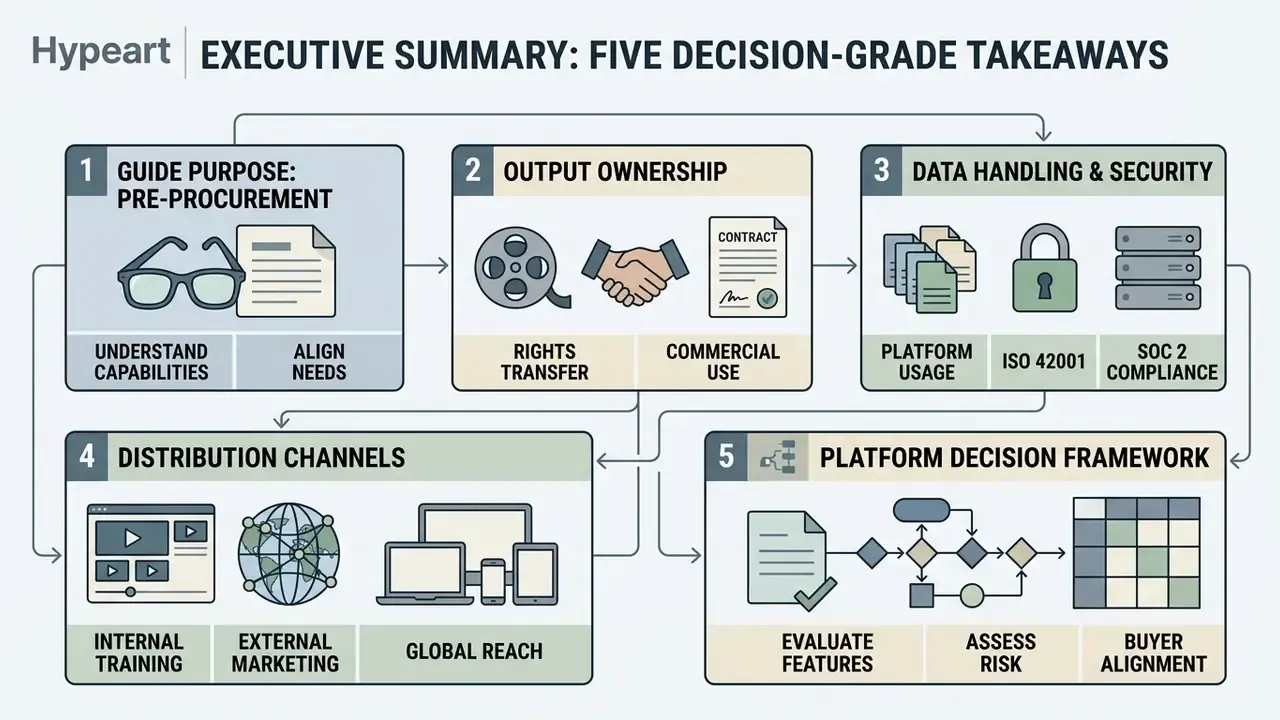
Five decision-grade takeaways for buyers, L&D leaders and risk owners:
- What it is: Synthesia is a deterministic, avatar-led AI video generator built for structured business video: training, onboarding, enablement and internal communications, rather than open-ended cinematic generation. Founded in 2017, Nvidia-backed, used by over 50,000 organizations including roughly 90% of the Fortune 100.
- Core capability stack: Script-to-video from prompts, PDFs, DOCX, PPTX, TXT and URLs; 240+ stock avatars; 1,000+ AI voices; 160+ languages; one-click translation into 140+ languages; AI-generated B-roll via Google Veo 3 and Gemini Omni inside the AI Playground.
- Proven ROI: Five Below cut per-video cost from $12,000 to $400, a 97% reduction. Novelis produced 3,000+ training videos in one quarter, cut course creation time by 83%, and saved nearly $1 million in localization. Academic evidence indicates comprehension parity with traditional studio video.
- Governance posture: SOC 2 Type II certified, ISO 42001 compliant, GDPR compliant, SAML/SSO and SCIM on Enterprise, Brand Kit enforcement, role-based permissions, and SCORM 1.2 / SCORM 2004 export for LMS delivery. AI-generated output is labeled in line with EU AI Act Article 50 requirements.
- Primary risk to control: Stock avatars are contractually prohibited in paid social advertising, paid programmatic advertising and TV broadcast without prior written consent from Synthesia. Custom or personal avatars plus documented consent are the compliant path for promotional distribution.
How to read this guide before a procurement call
Three questions decide most evaluations, and they are worth writing down before you open a demo account:
- Who owns the output? Name the accountable business owner for scripts, avatars and published assets. A platform without a named owner becomes shadow AI within a quarter.
- What data touches the platform? Public marketing copy behaves very differently from draft credit policy, KYC procedures or customer records. Classify first, then pick a tier.
- Where will the video be distributed? Internal LMS, public website and paid media sit under three different licensing regimes. The Commercial License for AI Media question is where most legal reviews stall.
The sections below follow that logic: what the platform is, what it does, how teams run it, how it is controlled, what it costs, and where it stops being the right tool.
What Is Synthesia AI Video Generator
Synthesia is an enterprise-focused AI video generation platform designed to convert written scripts into presenter-led video content without cameras, microphones or physical filming studios. The platform operates primarily through synthetic digital avatars that deliver narrated scripts across multiple languages with synchronized lip movements. Its core architecture serves corporate environments that require structured, repeatable video creation at scale, which is the defining characteristic of modern AI video generators built for business rather than entertainment.
Founded in 2017 by Steffen Tjerrild and Victor Riparbelli, the UK-headquartered platform (Synthesia Ltd, London) has grown into an Nvidia-backed enterprise standard. As of 2026, Synthesia reports deployment across more than 50,000 companies worldwide, including approximately 90% of Fortune 100 companies, replacing physical video infrastructure with text-driven production. It is also the highest-rated AI video generator on G2, holding a 4.7/5 average across 2,000+ reviews.
Types of Video Content You Can Create in Synthesia
Synthesia is engineered for structured business communications rather than open-ended cinematic entertainment. Organizations deploy the platform to produce corporate training modules, employee onboarding video series, technical product demos, explainer videos for customer support, standard operating procedure walkthroughs, sales battlecard reviews and internal executive communications. Marketing video and campaign assets are possible too, with licensing caveats covered later.
Educational institutions and corporate learning departments use these synthetic presenter workflows to update instructional content rapidly. A 2024 peer-reviewed preprint comparing synthetic and traditionally recorded instructional video found no measurable penalty in learning outcomes when synthetic presenters replaced filmed instructors (Updated: attribution and source now named, replacing the earlier anonymous "researchers investigating AI instructional media" phrasing, see Appendix A).
"Learners in both conditions showed significant knowledge gains (p < .001); no significant difference was detected between synthetic and traditionally recorded learning videos (p = .80 for the difference in learning gains)."
That structural equivalency lets learning teams replace static documents with video formats without reducing instructional efficacy. It is also the practical basis on which L&D directors justify dropping agency-produced course video from next year's budget.
How Synthesia Differs from Generative Prompt-to-Video Tools
Synthesia differs fundamentally from prompt-to-video diffusion engines like Sora, Runway or Luma. General-purpose text-to-video AI tools synthesize arbitrary visual scenes from descriptive prompts. Synthesia operates as a deterministic, avatar-centric video generation platform focused on presenter delivery: a talking head that says exactly what the script says.
The platform prioritizes speech fidelity, natural lip syncing and avatar identity control over fluid camera motion or abstract visual synthesis. Presenter models are trained on real human subjects under explicit consent agreements. Studio Avatars require multiple camera-facing recordings plus a recorded consent script, which produces predictable visual presentation suitable for regulated compliance environments.
In risk terms, this is the difference between a reproducible output (same script, same presenter, same frame composition) and a stochastic one. That distinction matters the moment an output must be re-approved by legal after a script revision. Creative freedom is genuinely narrower here. For governed content, that is a feature, not a defect.
Key Features of Synthesia AI Video Creator
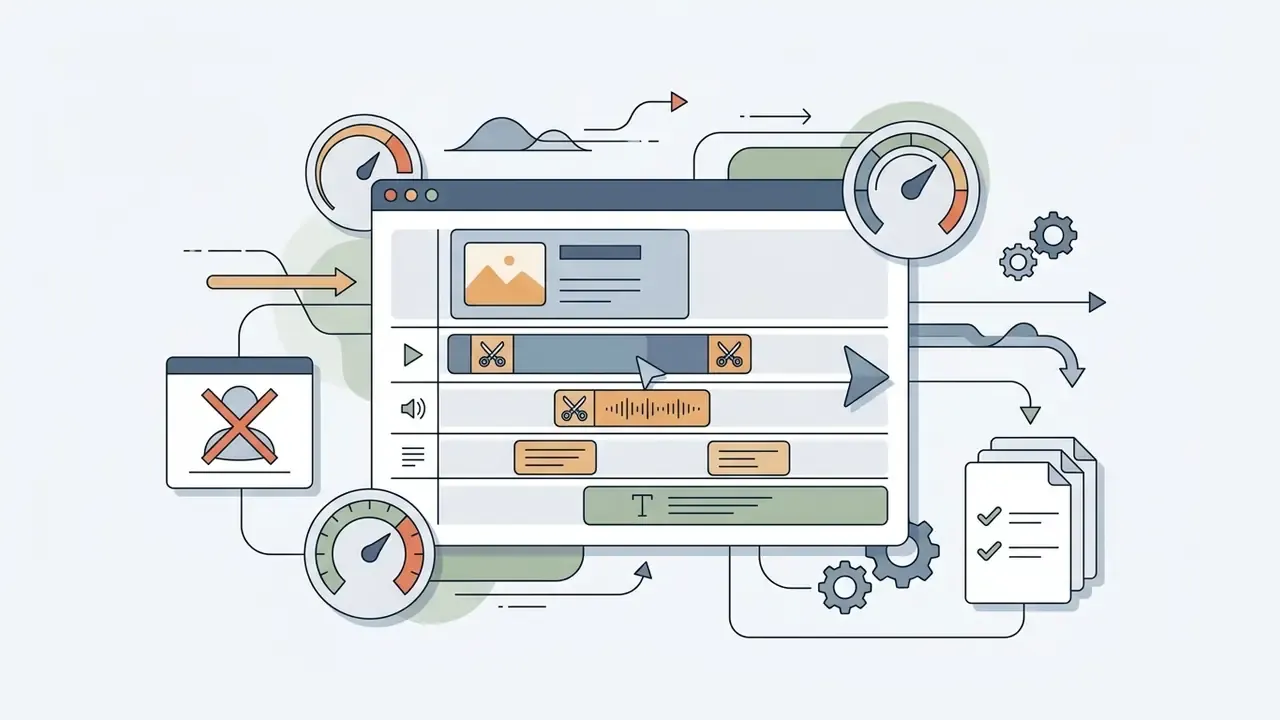
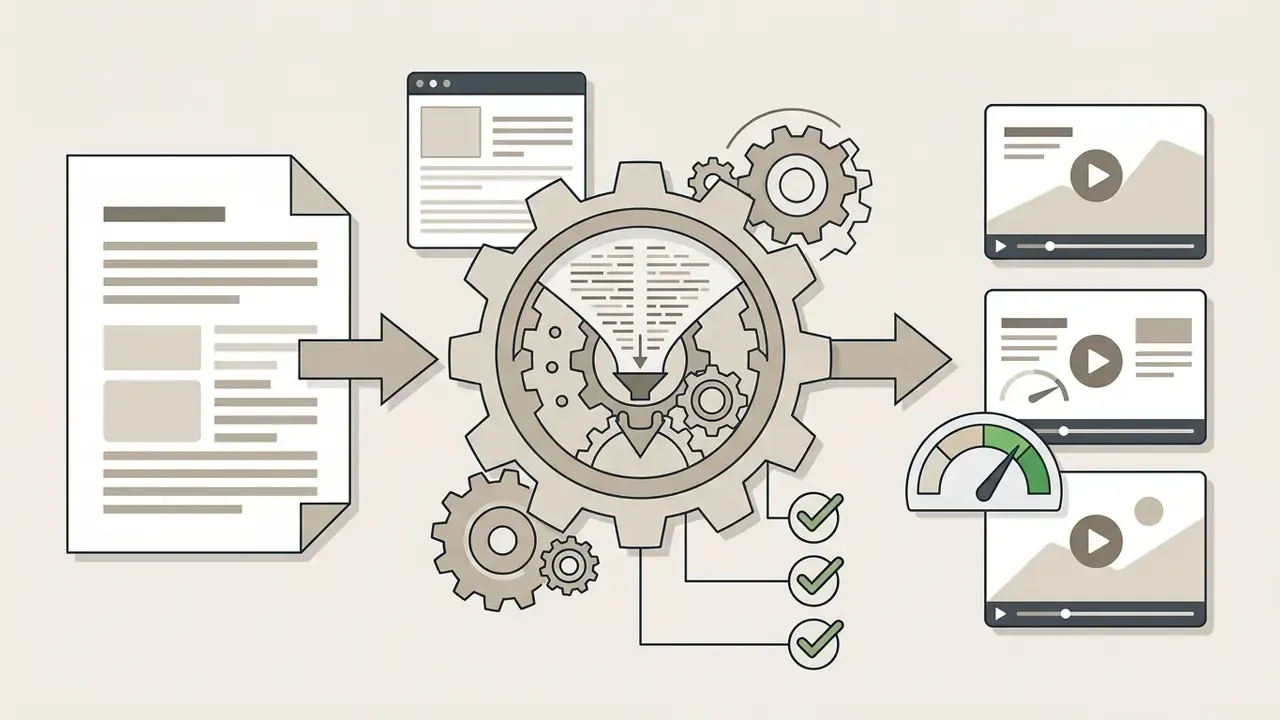
The key features of Synthesia AI video creator include automated script generation, pre-built video templates, an integrated web-based video editor, and rapid content updating. Non-technical teams can assemble, edit and publish professional-looking videos through a browser, with no local render farm and no timeline scrubbing skills required.
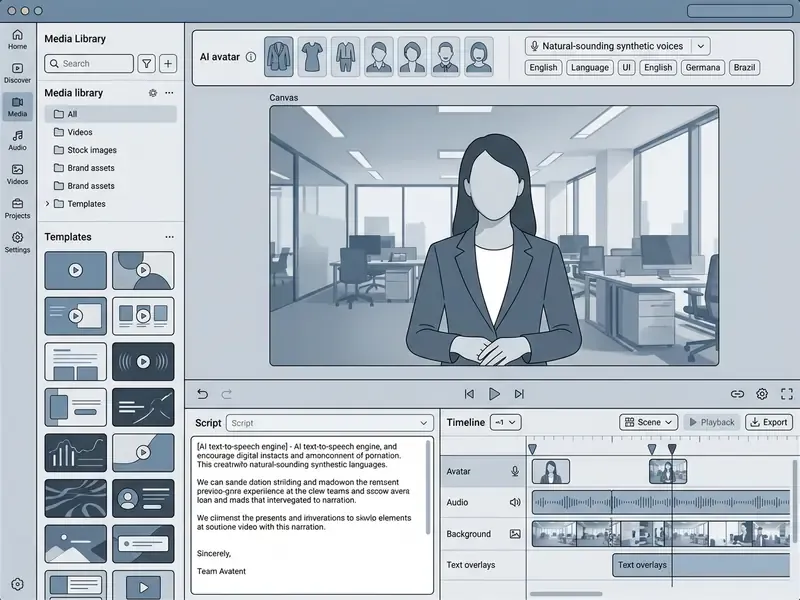
Interface orientation, per Synthesia's own editor documentation: the script box sits at the bottom of the workspace and controls avatar, language and voice for that specific scene; the scene menu sits to the left of the canvas; the avatar selector appears in the top toolbar or beside each scene script; the Media panel holds uploads, stock libraries and Create with AI; and the Generate button sits on the right of the toolbar. Five minutes of orientation, roughly, is enough for a first scene.
AI Script and Text-to-Video Workflow
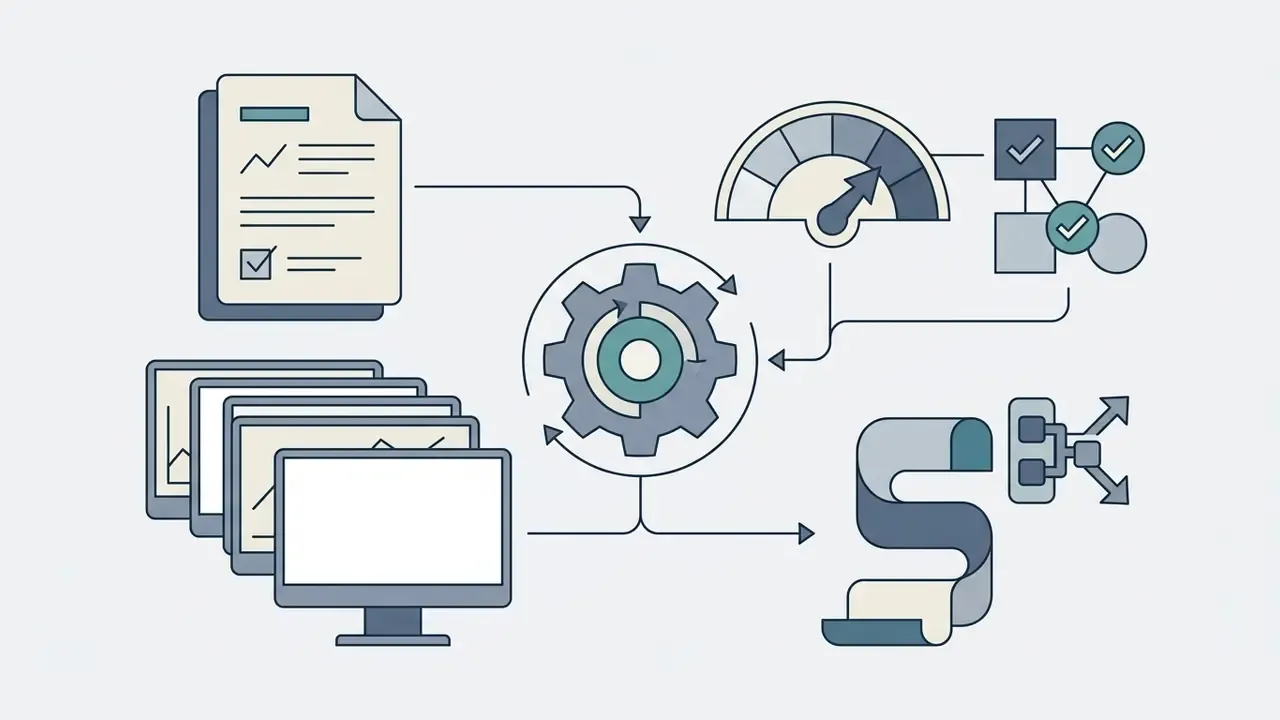
Synthesia's AI Script Generator converts raw text, webpage URLs or uploaded documents into formatted video scripts. The underlying assistant processes .pdf, .docx, .pptx, .ppt, .doc and .txt files, parsing structural sections into discrete scenes. A blog post, a policy memo or a slide deck can all become a first draft. Script quality improves measurably when the prompt specifies topic, audience, objective and tone, the four inputs Synthesia's documentation recommends supplying.
Users can also import pre-written scripts for exact, word-for-word delivery. That exact-import capability is essential for legal, compliance and medical training contexts where automated paraphrasing could introduce regulatory risk. Inside the editor, selected script text can be transformed with Edit with AI actions: Rewrite, Make it longer, Make it shorter, Change tone, Summarize, all without leaving the scene.
Templates, Scenes and Video Editing
Video Generation, Updates and Publishing
Rendering happens in the cloud after a user clicks generate on the main editing interface. Once generated, videos can be updated by modifying the script text or background assets directly in the editor, with no re-recorded audio and no re-filmed talent. This is the single largest operational advantage over conventional video editing workflows.
Published videos export as MP4 files in Full HD (1920×1080), share via web links, or embed through iframe players. Publishing from the video overview page also enables embed code generation and SCORM export. The multilingual player detects the viewer's browser language and serves the matching localized version from a single embedded link, and playback language can be forced through a URL parameter for regional campaigns. Large master files heading into an LMS sometimes need a pass through a helper tool to compress 2gb video online before upload limits become an issue.
AI Avatars, Voices and Multilingual Localization
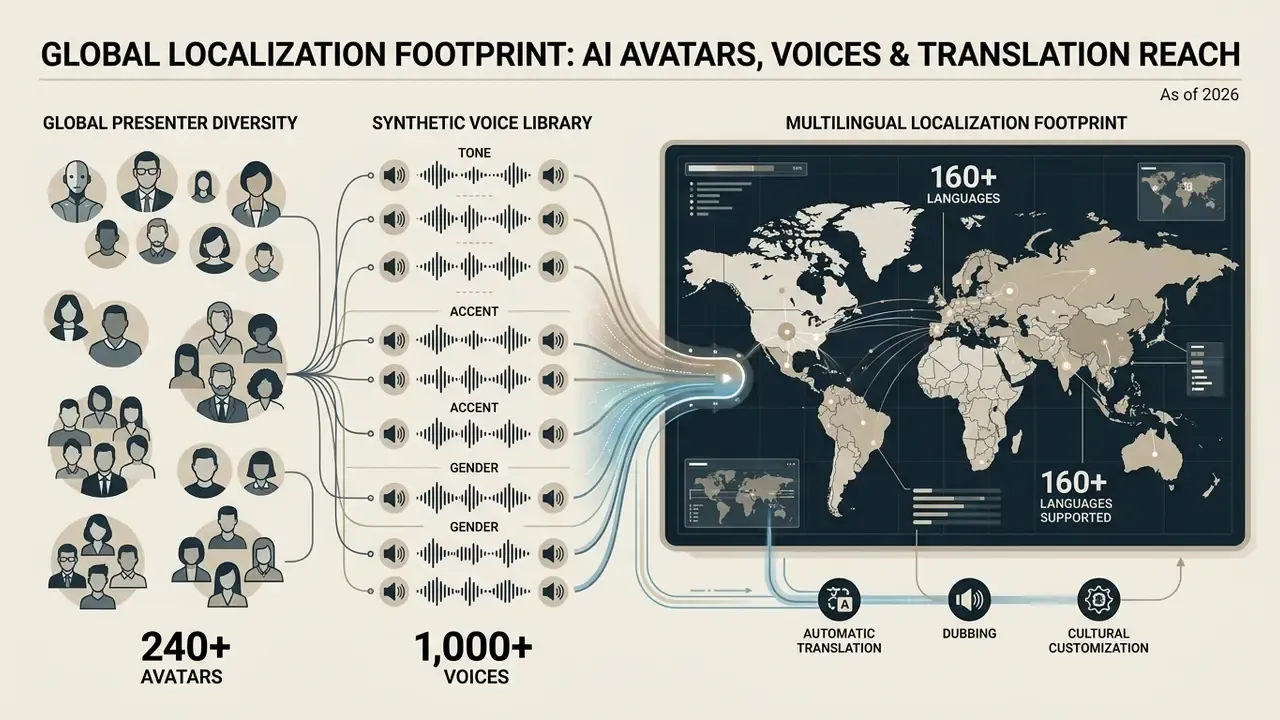
Synthesia provides over 240 stock AI avatars, custom personal avatar generation, and synthetic speech in more than 160 languages. These localized presenter controls let global organizations standardize messaging across international teams without hiring a presenter in every region.
AI Avatar Library and Custom Avatars
Synthesia maintains a built-in library of over 240 stock avatars representing diverse age groups, ethnicities and professional attire styles. These synthetic presenters act as digital spokespersons, delivering scripts with natural head movements and facial expressions.
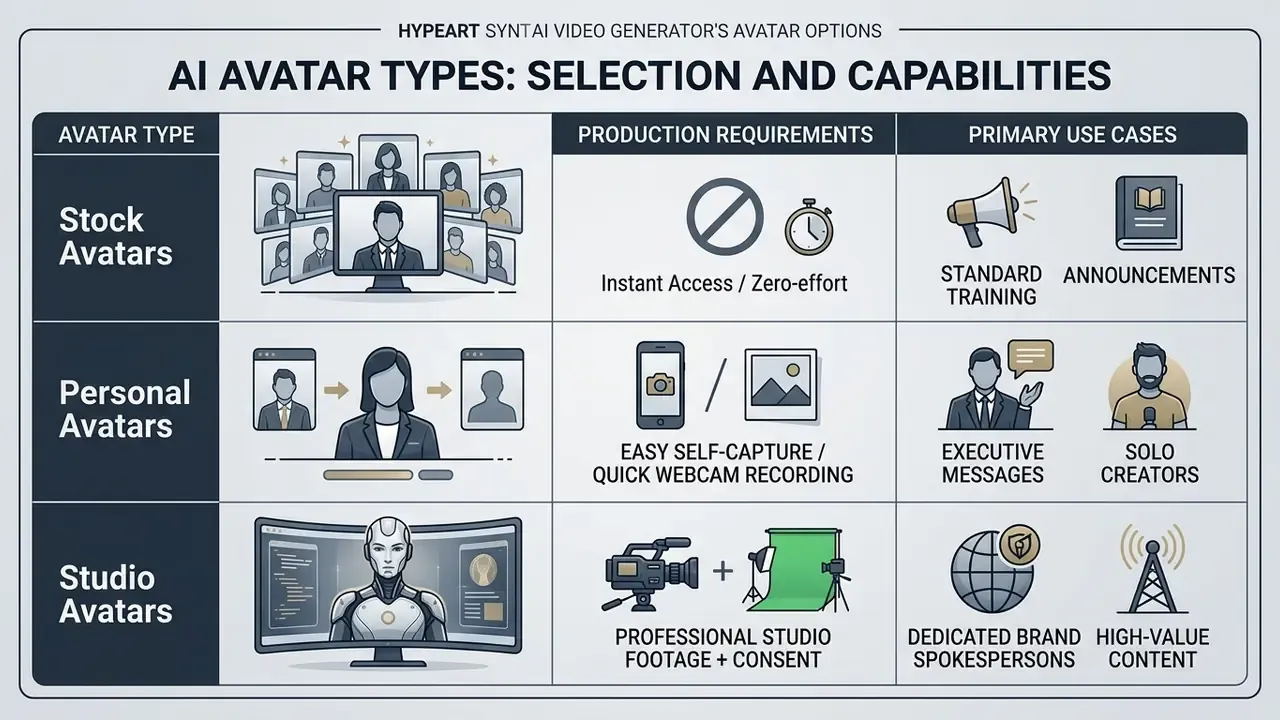
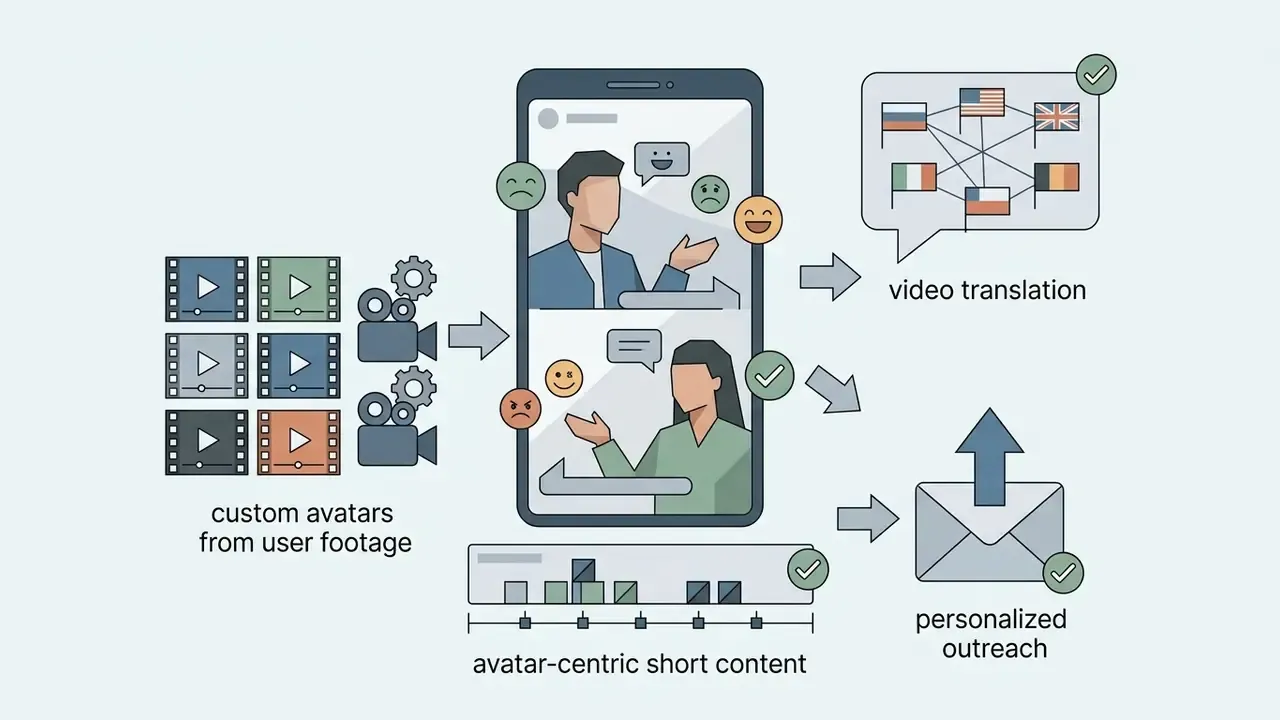
For custom brand representation, organizations can create personal avatars from uploaded photographs or webcam footage, optionally paired with a recorded voice sample, and finalized by submitting a recorded consent video. The same underlying idea powers tools that convert image to video: a still frame plus a voice track becomes a speaking presenter. Enterprise users can commission high-fidelity Studio Avatars, which require multi-angle camera footage and formal consent verification to build a permanent digital twin.
Personal avatars are restricted to paid plans: Starter includes 3, Creator up to 5, Enterprise unlimited. Studio Express-1 is a paid add-on listed at $1,000/year, with fulfillment windows of roughly 1 to 5 working days when the customer supplies footage, and 2 to 7 working days when recorded in Synthesia's studio.
Voice Synthesis, AI Voices and Speech Synchronization
Synthesia offers over 1,000 synthetic AI voices covering more than 160 languages and regional accents. The voice engine features frame-accurate lip syncing, aligning mouth micro-movements to the cadence of the generated audio track across fast cuts and scene transitions.
Creators can adjust pronunciation for specialized terminology, acronyms or proper nouns using phonetic spelling controls or recorded audio samples, then apply those corrections project-wide. Anyone who has heard an AI voiceover mangle "fiduciary" or a ticker symbol will appreciate that control. Advanced voice models preserve speaking pace, emotional inflection and tonal consistency between scenes, and selected voices expose multiple emotional styles.
Creators can also insert timeline-triggered micro-gestures: subtle head nods, raised eyebrows or hand emphasis that reduce synthetic stiffness and align body language with critical points in the script. This gesture layer is the practical difference between a presenter that reads and a presenter that appears to explain.
"Learners reported no significant differences in perceived video quality or instructor presence between synthetic and traditionally recorded videos."
For learning and compliance content, that finding matters more than raw voice realism. It suggests synthetic narration is already sufficient for instructional delivery at scale, even if it still loses to a great human presenter on charisma.
Video Translation and Multilingual Localization
Synthesia's 1-click translation tool translates scripts and on-screen text overlays into over 140 target languages, while the avatar, scene structure and design stay unchanged. The localization system generates duplicate scene structures with translated narration while preserving layouts, branding assets and avatar placements. Translations land in a dedicated "[Video Title] – translations" folder, and the original video can be shared with Include translations enabled so viewers pick their language in the player. Teams with existing localization pipelines can upload XLIFF files instead of using automatic translation.
In 2024, global ad-tech company Criteo used Synthesia to rebuild its newcomer onboarding curriculum for delivery through its LMS across multiple regions (Updated: industry attribution corrected, see Appendix A). By automating script translation and voice generation, Criteo cut localization timelines from weeks to hours while keeping operational standards consistent across international offices.
One caution for regulated content. Machine translation of a compliance script still needs native-language review before publication. The platform will happily render an inaccurate translation with perfect lip sync.
Text-to-Video, AI Images and B-Roll Integration
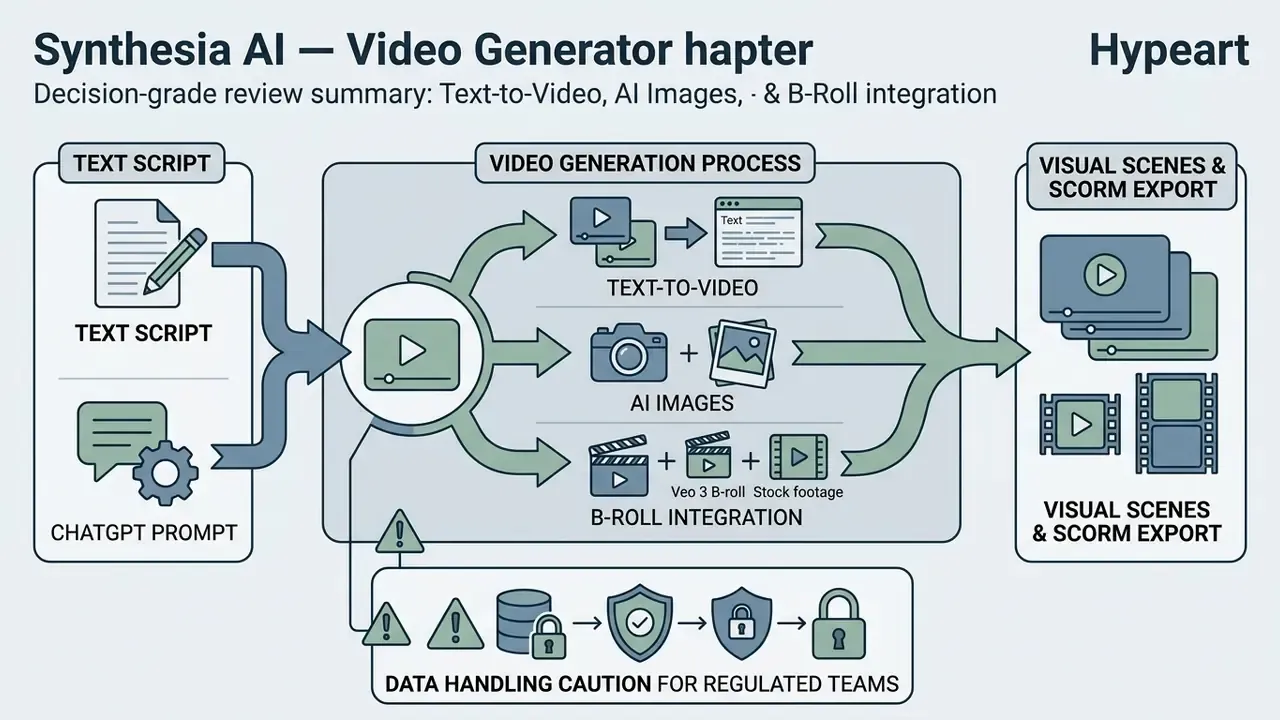
Synthesia combines script-driven avatar narration with integrated stock media, uploaded brand assets and AI-generated visual elements. These media controls let creators contextualize presenter narration with relevant supporting visuals instead of leaving the avatar alone on a flat background for four minutes.
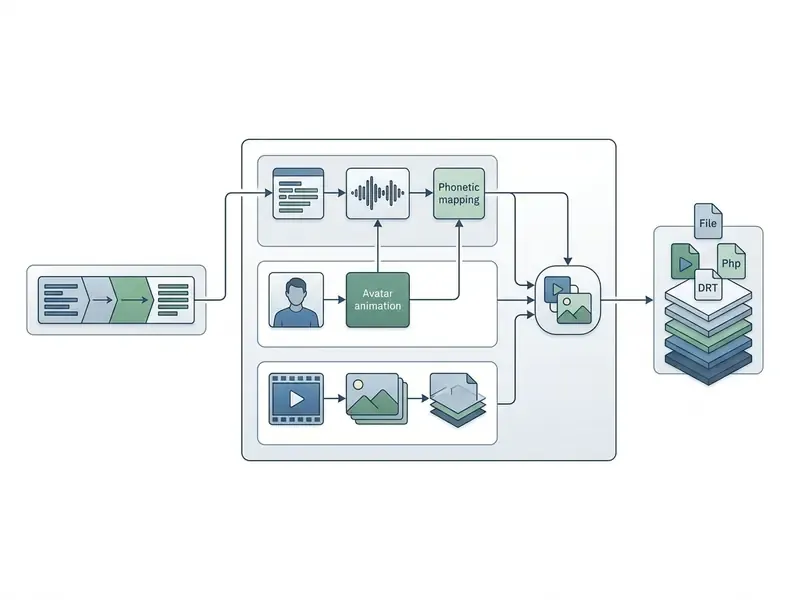
- Process pipeline showing Script Input
- Template Selection
- Avatar/Voice Setup
- Media/B-Roll Insertion
- Cloud Generation
- Multilingual Export
Working with ChatGPT and Text Scripts
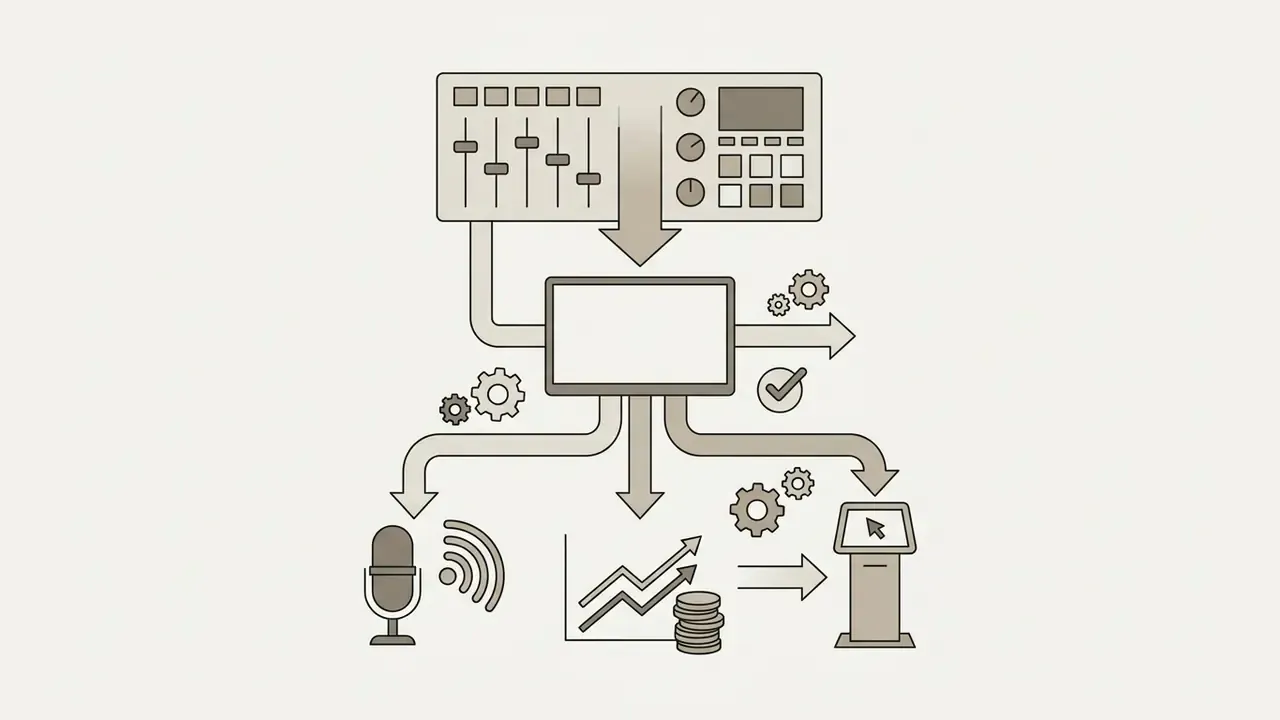
External large language models like ChatGPT can be paired with Synthesia to speed up script authoring and scene structuring. Content teams use external AI models to draft outlines, summarize lengthy technical documentation, or format dialogue for video presentation. Synthesia also publishes a dedicated ChatGPT-to-video workflow page and exposes an API with key-based authentication for programmatic, LLM-driven video generation. That API is the standard route for teams comparing the best AI video generators on automation depth, and the broader patterns are covered in our AI Media API Guides.
1. Generate core script and scene breaks using ChatGPT or an internal LLM.
2. Paste structured script text into Synthesia's script input panel.
3. Select preferred AI avatar, voice profile, and language dialect.
4. Apply brand kit styling, stock media, and AI-generated B-roll.
5. Click generate to render final video output and export share links.
Once pasted into the editor, paragraph breaks automatically divide the text into separate scenes. Editors then use the built-in AI Assistant to rewrite, condense, expand or adjust the tone of individual segments before rendering.
Data-handling caution for regulated teams: drafting scripts in a consumer LLM before importing them into Synthesia creates a second data-processing surface. Confidential product roadmaps, customer records, PII or non-public financial information should be routed only through an enterprise-contracted model instance with training opt-out, never a personal chatbot account. Script-authoring tooling belongs in the same AI inventory as the video platform itself. Miss that, and your model-risk register describes half the pipeline.
AI Images, B-Roll and Visual Scenes
Synthesia's AI Playground integrates top-tier generative video and image engines, including Google's Veo 3 and Gemini Omni (Updated: model stack corrected, see Appendix A). Instead of relying only on third-party stock libraries, teams can enter text prompts inside the editor to render cinematic 1080p B-roll clips, dynamic background transitions and custom visual assets matched to the narration. Image generation runs from Media → Create with AI → Image, with prompt or preset starting points and 1080p output, giving teams the control they expect from standalone AI image generators.
B-roll generation runs from Media → Create with AI → Video: pick a preset or write a prompt, choose an avatar and space where applicable, optionally apply a Brand Kit, select the model, then generate. Clips consume platform credits, so it pays to understand What Are Compute credits before planning a 200-video program; our AI Media Calculators help model that spend against minute allowances.
Integrated access to high-resolution stock libraries, including Getty imagery and footage at full resolution without watermarks on paid plans, lets teams drop in professional cutaways without leaving the workspace. One constraint to note: some AI creation options only apply to workspace-uploaded media or model-generated assets, and cannot be applied to third-party stock footage.
Synthesia Capabilities for Teams and Enterprise Workflows
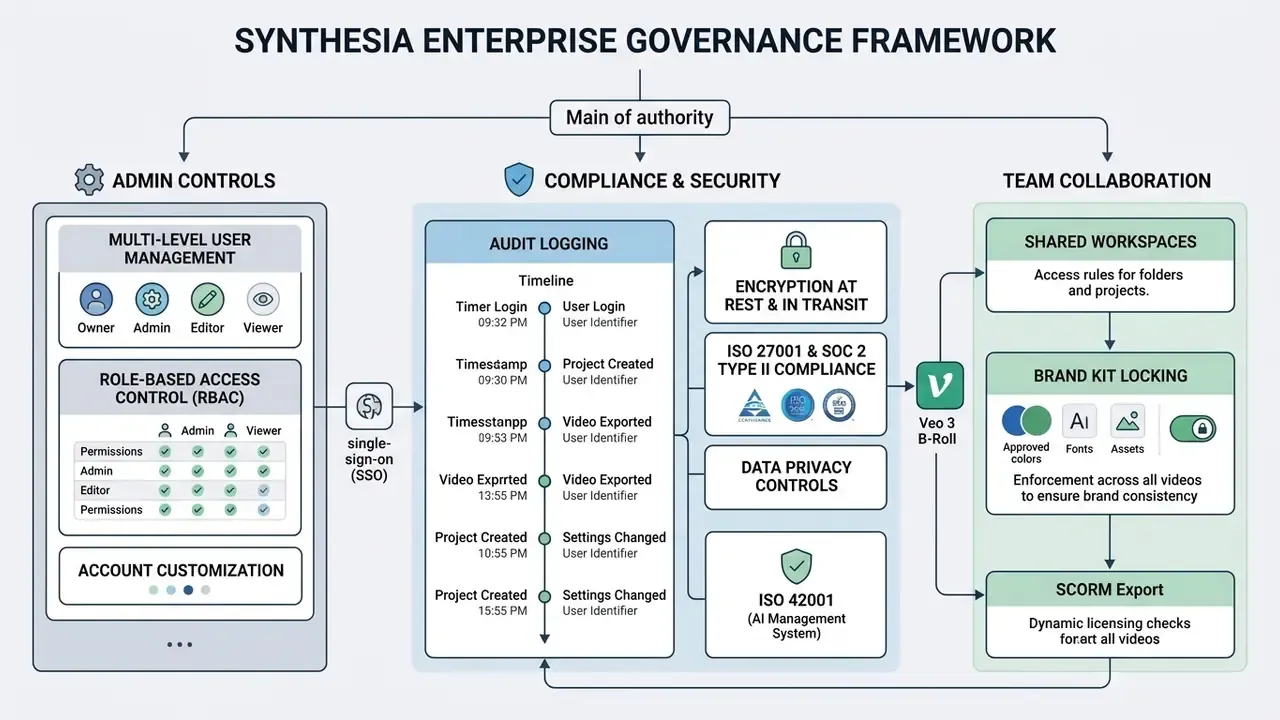
Enterprise deployments incorporate centralized user management, role-based access control, SSO integration and locked brand asset governance. These institutional controls protect visual identity and operational security across multi-user environments. They are also the layer that turns Marcus Hale's governance requirements, decision ownership, data lineage and audit trails, from aspiration into configuration.
Team Collaboration, Branding and Content Management
Synthesia supports collaborative editing through shared workspaces with permission tiers for Admins, Members and Guests, plus a dedicated Brand Admin role that can create, update and delete Brand Kits and templates. Roles govern access to settings, workspace membership, the Library, Avatars and Voices, and Brand Kits, while licenses govern which actions a user may perform. The two controls are configured separately, which is easy to misread during rollout. Workspace administrators can lock Brand Kits to enforce color palettes, corporate fonts, official logos and approved avatar selections across all projects, and organization admins can set an organization-wide default Brand Kit.
Shared asset libraries centralize media management, so team members upload once to the workspace library and colleagues across departments reuse the same assets. Version history lets teams track modifications, review edits and restore previous iterations during collaborative production.
For enterprise Learning and Development infrastructure, Synthesia supports direct export as SCORM 1.2 and SCORM 2004 packages, uploadable straight into corporate Learning Management Systems without transcoding or repackaging. Institutional data governance rests on SOC 2 Type II, ISO 42001 and GDPR compliance, with SAML/SSO and SCIM provisioning available for identity lifecycle management. If an integration behaves unexpectedly mid-rollout, our AI Media Support and Troubleshooting notes cover the common LMS and embed failures.
Corporate Use Cases: Training, Sales and Communications
Large organizations deploy Synthesia across corporate training, sales enablement, customer support and internal communications. According to a published case study, retail chain Five Below adopted the platform to produce over 100 internal training videos annually for its store network.
"Per-video production cost fell from $12,000 to $400, a 97% reduction, while training favorability ratings remained above 90%."
Five Below reduced per-video production cost from $12,000 with external production agencies to $400 using Synthesia. That yielded a 97% reduction in creation costs while keeping employee training favorability above 90%.
Global manufacturer Novelis produced over 3,000 operational training videos in a single quarter using multi-language tools.
"Novelis produced more than 3,000 training videos in one quarter, cut course creation time by 83%, and saved close to $1 million in localization."
Data Security, Privacy and Regulatory Compliance
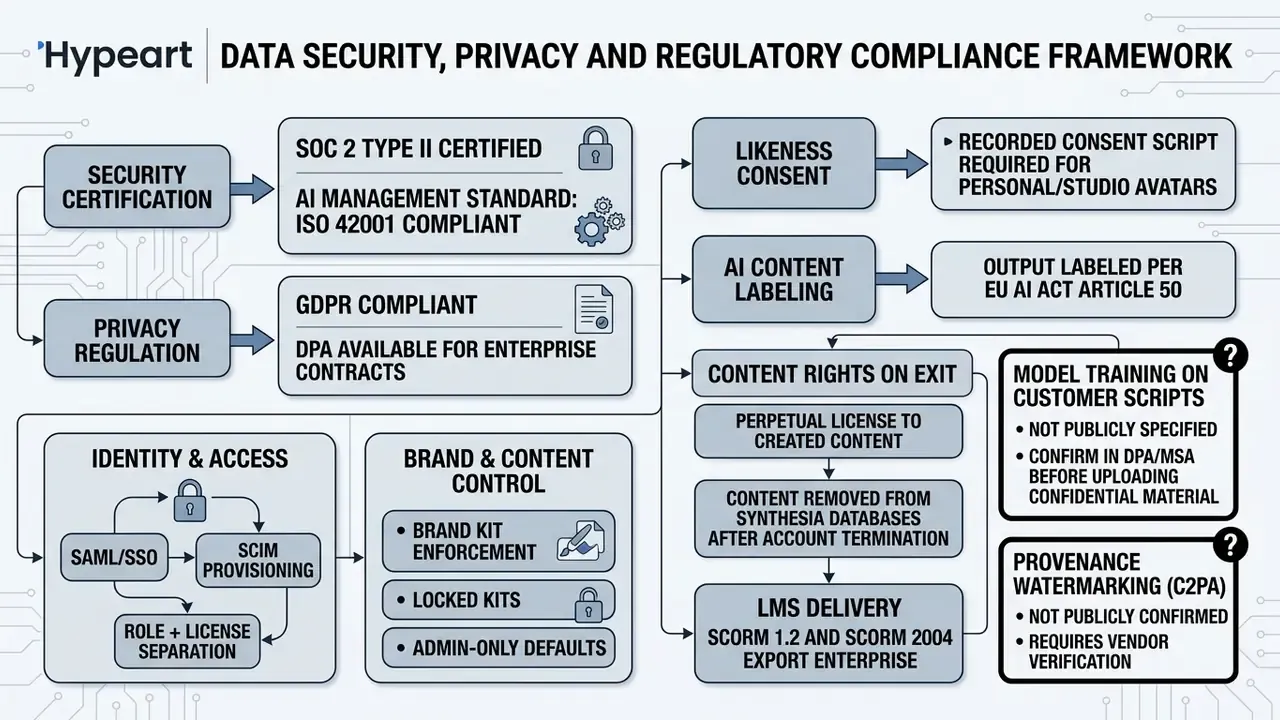
Before a video platform reaches a procurement committee in a regulated institution, the question shifts from features to controls. The table below summarizes what Synthesia publicly documents and what must still be confirmed contractually.
Synthesia Pricing, Free Access and Commercial Licensing
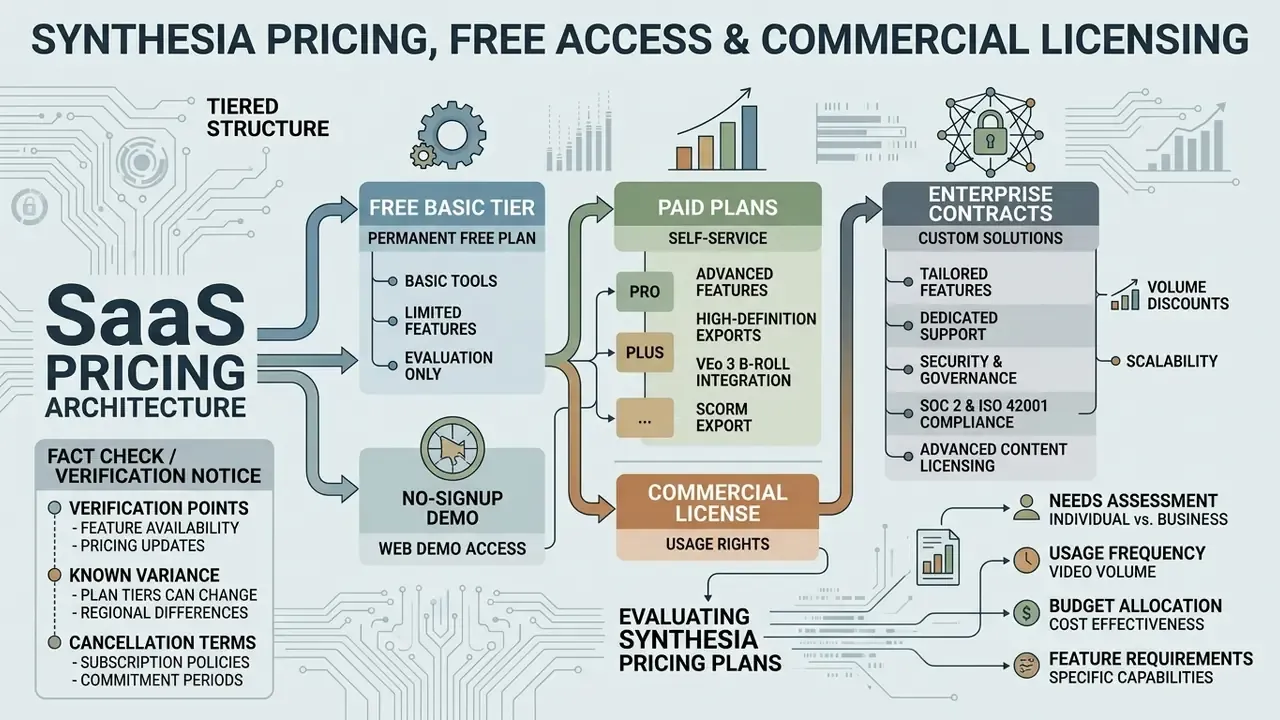
Synthesia uses a tiered SaaS pricing architecture: a free Basic tier, paid self-service plans, and custom enterprise contracts. Picking the right plan means weighing monthly generation quotas, personal avatar allowances and commercial license terms together, not separately.
Pricing and licensing information is general in nature and accurate as of the publication date. Before making commercial commitments, verify current terms on Synthesia's official pricing page and consult a legal professional about your specific distribution scenario. Comparable tier structures across tools are tracked on our pricing pages.
| Pricing Plan | Monthly Cost (Annual Billing) | Included Video Minutes | AI Avatars | User Seats | Commercial Licensing Rights |
|---|---|---|---|---|---|
| Basic (Free) | $0 / month | 10 mins / month (1,200 credits) | 9 Stock Avatars | 1 User | Personal / Evaluation use only (Watermarked, No MP4 download) |
| Starter | $18 / month ($29 billed monthly) | 120 mins / year | 125+ Avatars | 1 Editor, 3 Guests | Standard commercial use (Excludes paid social/TV advertising) |
| Creator | $64 / month ($89 billed monthly) | 360 mins / year | 180+ Avatars | 1 Editor, 5 Guests | Full commercial use + 1-Click Translation (80+ languages) |
| Enterprise | Custom Pricing | Custom / Unlimited | Full Library + Custom | Custom Structure | Custom Enterprise License + SCORM 1.2 & 2004 LMS Export, SSO, SCIM, Multilingual Player |
Free Plan and Free Access Options
Synthesia offers two distinct pathways for non-paying users, and confusing them is the most common evaluation mistake:
- No-signup web demo.Paste a short script into a web template on Synthesia's demo page, submit a name and email address, and receive one pre-rendered AI video in your inbox within minutes. No account, no password, no credit card required. The emailed video can be watched but not edited, re-rendered or shared from a workspace.
- Permanent free Basic plan.Register a free account, again with no credit card, to reach the full editing canvas. This yields 10 video minutes per month (allocated as 1,200 platform credits), nine stock avatars, two stock personal avatars, 60+ templates, closed captions, background music, PowerPoint import, the AI screen recorder, video embeds and web share links.
Free plan outputs carry a prominent Synthesia watermark and cannot be downloaded as standalone MP4 files, which is the standard limitation pattern across free AI video generators. You can still evaluate performance, test script workflows and review rendered output through web share links before upgrading. Note the wording carefully: this is a free plan, not a time-limited free trial of paid features.
Evaluating Synthesia Pricing Plans
Choosing between Starter, Creator and Enterprise depends on required video volume, team size and translation needs. Individual creators and small businesses usually start with Starter: 120 video minutes per year, 125+ avatars, three personal avatars.
Growing content teams move to Creator to unlock 1-click translation, larger minute allocations, up to five personal avatars and API access for automated rendering pipelines. API availability on Creator is documented on Synthesia's current pricing page and should be re-verified against the live plan card before purchase, because tier packaging has shifted between releases. Enterprise plans target large institutions needing custom security policies, dedicated account management, unlimited minutes, unlimited personal avatars, higher API rate limits and bulk generation via API.
Buyers in regulated sectors should budget a cost of control alongside the license fee. SSO/SCIM, SCORM export, organization-wide Brand Kit governance and vendor security review are Enterprise-tier capabilities, so the realistic entry point for a bank or insurer is a custom contract, not a $64 per month self-service seat. Most ROI models I have seen omit exactly that line.
Commercial Use Rights and Monetization
Videos generated on paid plans include commercial use rights for AI-generated content covering internal business operations, website content, corporate training and organic social media publishing. Licensing terms, however, impose specific boundaries on certain promotional channels. Synthesia's Customer Terms also confirm that the license to Synthesia Content persists after the subscription term for content already incorporated into generated videos, subject to continued compliance. That detail matters for archived compliance libraries with multi-year retention obligations. Broader definitions sit in our Commercial Use for AI Media entry and the AI Media Commercial-Use Hub.
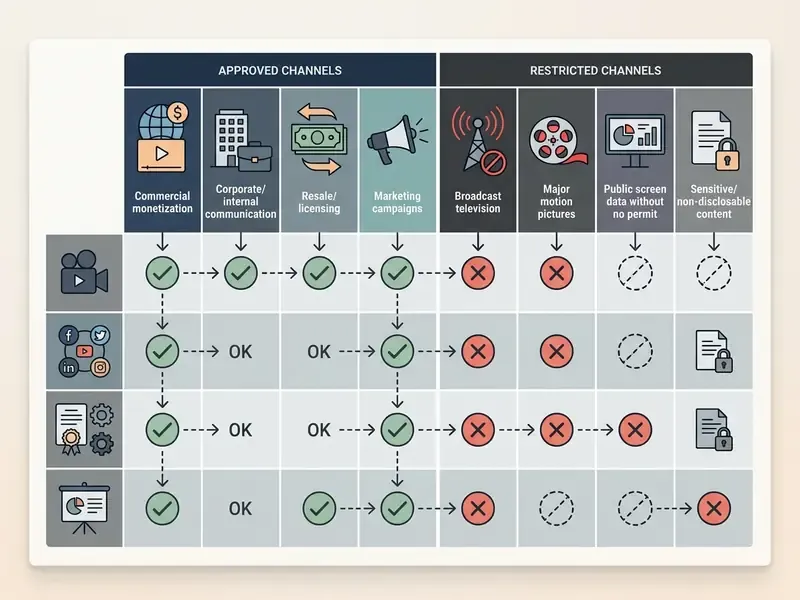
Synthesia's terms explicitly prohibit stock avatars in paid social media advertisements, including boosted Facebook, Instagram, TikTok, YouTube or Snapchat ads, in paid programmatic advertising, and in broadcast television, without prior written consent. Any form of paid promotion using stock-avatar content falls under the same restriction. Organizations planning paid campaigns must use custom personal or webcam avatars, which are permitted for authorized branded business promotion under the platform integrity policy, or obtain an explicit licensing waiver from Synthesia.
Advantages, Limitations and Alternatives
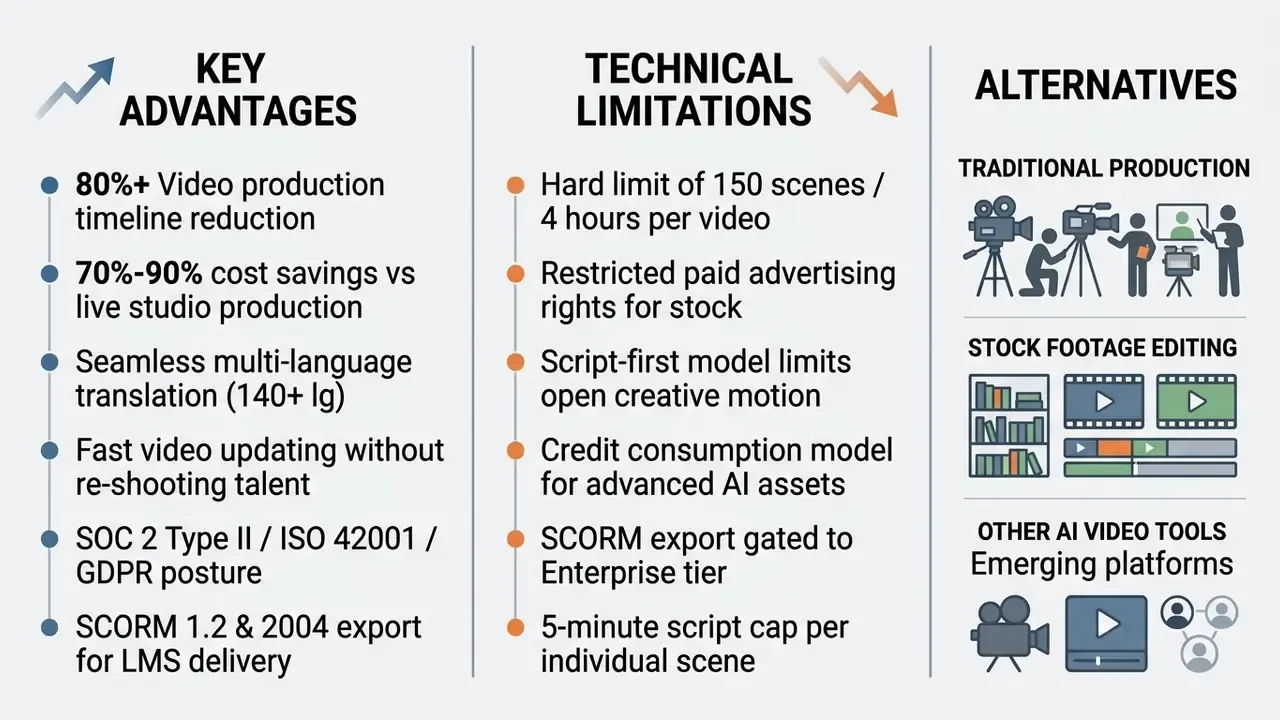
Evaluating Synthesia means balancing operational efficiency gains against structural design constraints. The platform excels at structured business communication. For unconstrained creative projects, other tools fit better.
Scenarios Where Synthesia Justifies Its Cost
Synthesia earns its subscription in organizations producing recurring, text-based video content across multiple languages. Global corporate training programs, standardized compliance updates, multi-regional product documentation and large-scale customer onboarding workflows capture return on investment fastest.
Remove external production agencies, talent scheduling delays, studio rentals and manual dubbing, and payback can arrive within a few projects. Published 2026 cost analyses place traditional production at roughly $1,000 to $50,000 per finished minute, which means a single one-minute live-action shoot can exceed Synthesia's entire annual Creator fee. Break-even sits at approximately $264 of avoided live-action spend on Starter and $804 on Creator.
"Synthetic instructional videos delivered comparable learning outcomes at substantially lower production cost than traditional studio recordings."
The ability to push critical updates by editing script text keeps content accurate without extra production spend. That is precisely why regulated-content owners like it: a changed regulation becomes a script edit and a re-render, not a re-shoot and a new agency invoice.
When to Consider Synthesia Alternatives
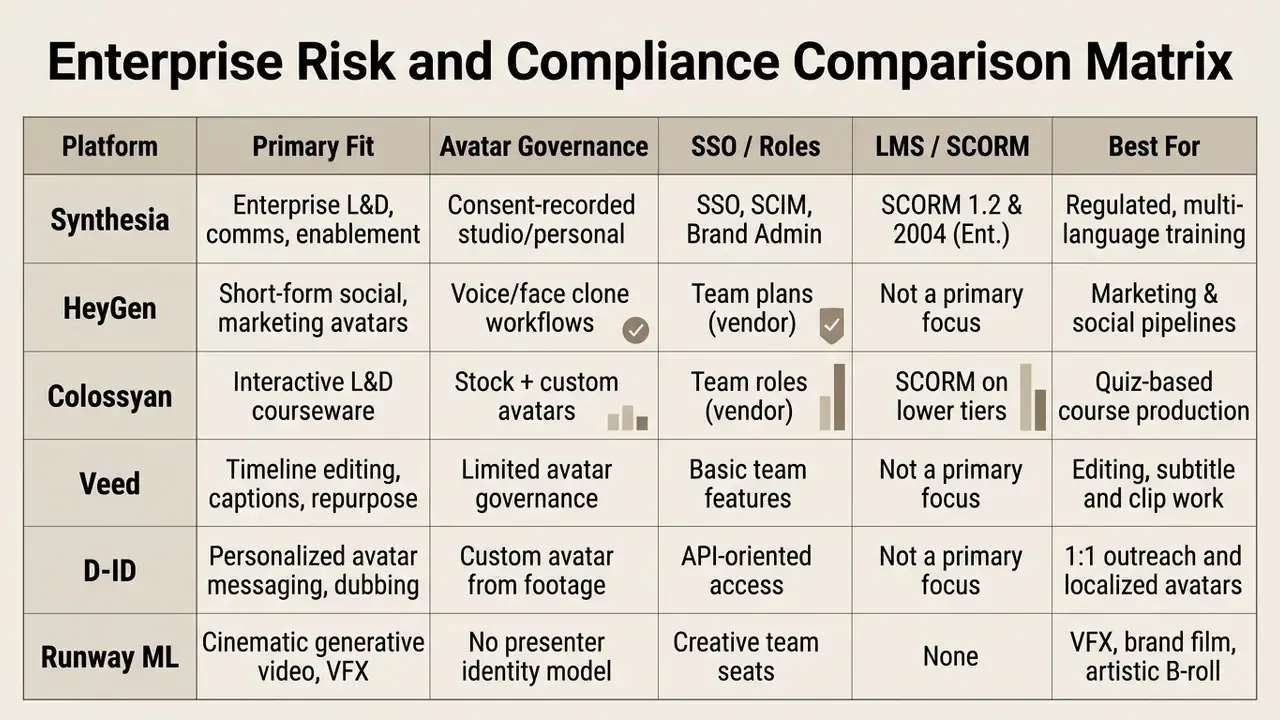
Look elsewhere when the primary goal is unconstrained cinematic content, complex visual animation, or viral short-form social media. HeyGen, Colossyan and Veed balance features differently, and a structured comparison of leading AI video generators is worth running before you commit to an annual contract; the wider AI Media Comparison hub covers adjacent categories.
Enterprise Risk and Compliance Comparison Matrix
Frequently Asked Questions (FAQ)
Can I try Synthesia AI video generator for free without a credit card?
Yes. Synthesia offers a permanent Basic free plan with 10 video minutes per month (1,200 credits) and no credit card at signup. A separate no-signup demo emails you one pre-rendered AI video after you paste a short script into a template.
What are the main limitations of the free Synthesia plan?
Free outputs carry a Synthesia watermark, block MP4 downloads, limit avatar access to nine stock presenters, and prevent direct video file exports. Custom avatar creation and SCORM export are not available on the free tier.
Can I use Synthesia generated videos for commercial business purposes?
Yes. Paid plans grant commercial usage rights for corporate training, internal communications and organic marketing. Stock avatars, however, cannot appear in paid social media ads, paid programmatic advertising or television broadcasts without written permission.
How long does it take to render a video in Synthesia?
Most standard scenes render within a few minutes after you click generate, depending on scene length, avatar complexity and selected visual assets.
Does Synthesia support automatic translation into other languages?
Yes. The 1-click translation feature translates scripts and on-screen text overlays into over 140 languages while generating localized narration, and the multilingual player serves the right version from a single share link.
What resolution do Synthesia videos export in?
Paid plans export Full HD (1920×1080) MP4 files, with additional delivery through share links and embed codes.
Can Synthesia export directly to corporate LMS platforms?
Yes. Enterprise users can export SCORM 1.2 and SCORM 2004 compliant packages for direct upload into a Learning Management System.
Who founded Synthesia and who backs the company?
Synthesia was founded in 2017 by Steffen Tjerrild and Victor Riparbelli, is headquartered in London, and is backed by prominent investors including Nvidia.
What security and AI-governance certifications does Synthesia hold?
Synthesia states that it is SOC 2 Type II certified, ISO 42001 compliant and GDPR compliant, with SAML/SSO and SCIM available for enterprise identity management. AI-generated output is labeled in line with EU AI Act Article 50.
How many scenes can a single Synthesia video contain?
Documentation specifies up to 150 scenes per video, five minutes of script per scene, and four hours of total runtime per file.
Does Synthesia train its models on my uploaded scripts?
Public marketing pages do not fully specify training-data usage for customer scripts. Confirm training opt-out, data residency and retention commitments in the Data Processing Agreement before uploading confidential or personal data.
What happens to my videos if I cancel?
Access continues until the end of the current billing period, after which account access and stored videos end. The customer terms grant a continuing licence for Synthesia Content already incorporated into generated videos, and Synthesia states it removes customer content from its databases once the customer stops using the service. Export critical assets as MP4 or SCORM packages before cancellation.
Summary Checklist for Enterprise AI Video Governance
[  ] Establish central inventory for all AI video software deployments across departments.
[  ] Enforce SSO/SAML and SCIM to eliminate free-tier shadow AI accounts on work emails.
[  ] Verify commercial licensing terms for selected avatar types and distribution channels.
[  ] Require explicit consent agreements and audit trails for custom personal avatars,
     including a documented likeness-revocation procedure for departing personnel.
[  ] Lock Brand Kits to maintain visual identity, font compliance, and logo usage.
[  ] Audit output scripts for legal and regulatory compliance BEFORE cloud rendering,
     and archive the approved script version alongside the rendered asset.
[  ] Confirm SOC 2 Type II, ISO 42001, and GDPR scope plus DPA training opt-out in writing.
[  ] Restrict upstream LLM script drafting to enterprise instances with no data retention.
[  ] Validate SCORM 1.2 / 2004 export against the target LMS before course rollout.
[  ] Budget the cost of control (SSO, SCORM, security review) inside the ROI model.
[  ] Export critical MP4 or SCORM assets before any subscription cancellation.
[  ] Confirm AI-content labeling meets local disclosure requirements (e.g., EU AI Act Art. 50).
A safe next step, if you are early: run one non-confidential internal module end to end, document who approved the script, and see whether your existing model-risk workflow can absorb the evidence. If it cannot, that is the finding, not the video.
The information above is general in nature and does not substitute for advice from a qualified specialist in law, information security or corporate governance.
Appendix A: Editorial Corrections Log
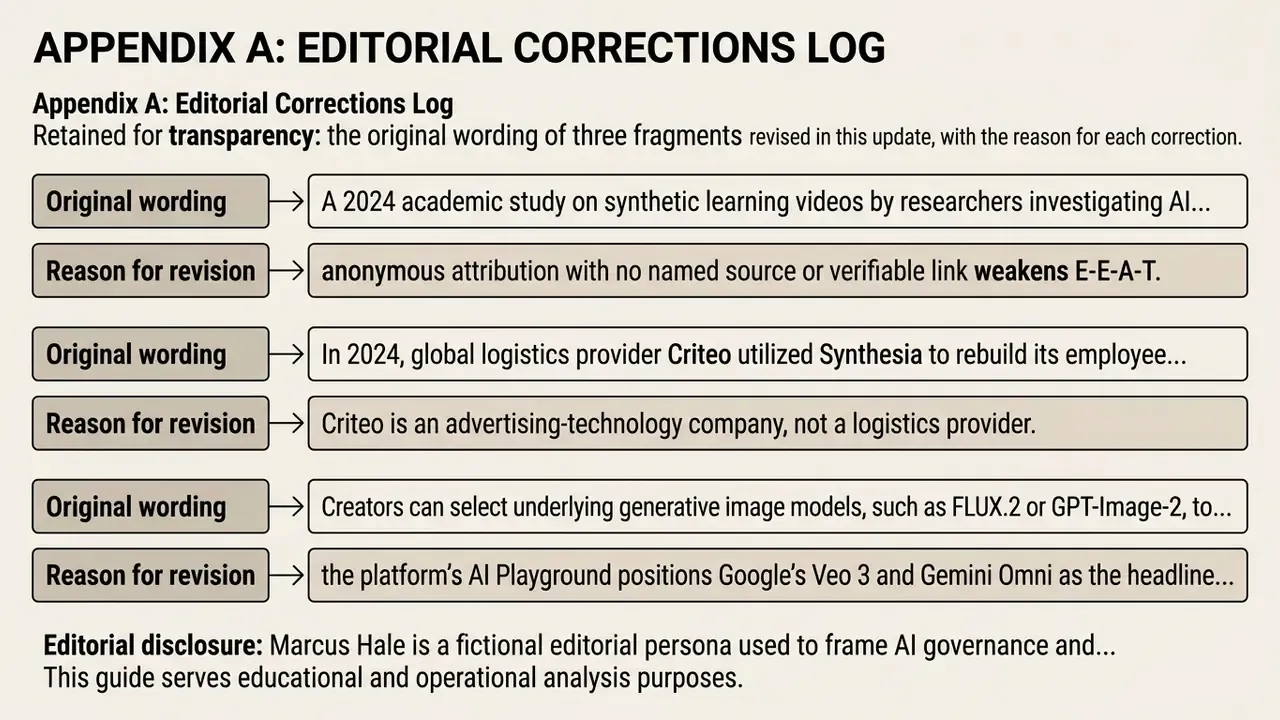
Retained for transparency: the original wording of three fragments revised in this update, with the reason for each correction.
- Original wording: "A 2024 academic study on synthetic learning videos by researchers investigating AI instructional media found that synthetic presenter videos produced learning comprehension outcomes comparable to traditional studio recordings (p = .80 for difference in learning gains)."
Reason for revision: anonymous attribution with no named source or verifiable link weakens E-E-A-T. Replaced in the main text with a named citation to Generative AI for learning: Investigating the potential of synthetic learning videos (arXiv preprint, 2024), including the direction of the result and the significance of learning gains in both conditions.
- Original wording: "In 2024, global logistics provider Criteo utilized Synthesia to rebuild its employee onboarding curriculum across multiple regions."
Reason for revision: Criteo is an advertising-technology company, not a logistics provider. Industry attribution corrected in the main text; the onboarding and LMS use case itself is supported by the 2024 case documentation.
- Original wording: "Creators can select underlying generative image models, such as FLUX.2 or GPT-Image-2, to generate tailored visual scenes."
Reason for revision: the platform's AI Playground positions Google's Veo 3 and Gemini Omni as the headline generative engines for cinematic B-roll and visual asset creation. The main text now reflects the current official model stack; available image models in the Media panel rotate between releases and should be checked in-product.
Author note: Marcus Hale writes about AI governance and model risk for this publication.
This guide serves educational and operational analysis purposes. Organizations should consult official licensing agreements and legal counsel to verify compliance requirements for specific commercial deployment scenarios. Pricing, certification scopes and model availability change frequently; the vendor's official pricing page, customer terms and help center remain the controlling sources. Definitions for the terms used above are collected in our AI Media Glossary.