Why should a risk owner in a bank or a mature fintech care about a photo animation tool? Because the upload is the control point. A marketing team that turns a product still into a 5-second clip is running an inference job on someone else's infrastructure, with a source image that may contain unreleased pricing, a customer's face, or an internal dashboard. That is a model-risk and data-handling question wearing a creative costume.
Executive Summary: Key Takeaways
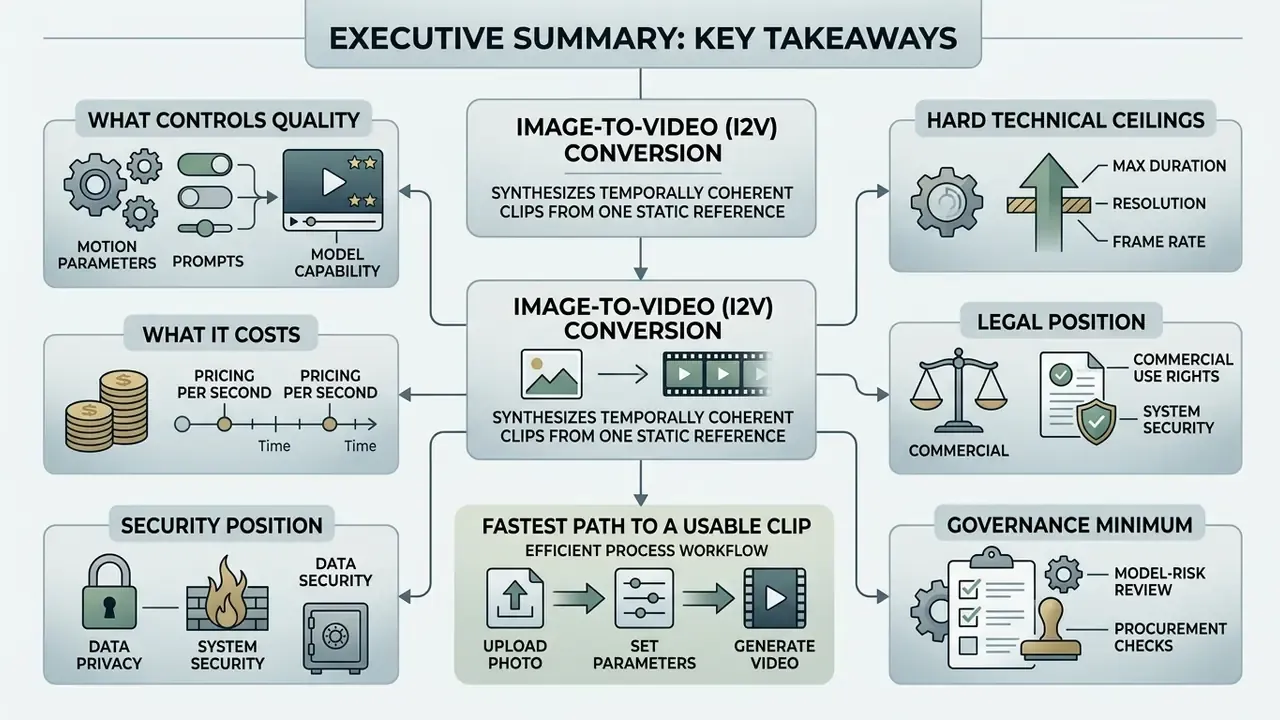
Before the architecture and pricing detail, here is the condensed decision layer for creative directors, model-risk owners, procurement, and marketing operations.
- What it is. Image-to-video (I2V) conversion synthesizes a temporally coherent clip from one static reference image, or from two anchor frames, using latent diffusion and Diffusion Transformer (DiT) backbones.
- What controls quality. Source resolution and contrast, prompt specificity, single-axis camera commands, clip duration, and model tier. Everything else is secondary.
- What it costs. Effective market rates land between roughly $0.05 and $0.12 per rendered second, depending on resolution, audio co-generation, and model fidelity tier.
- Hard technical ceilings. Most production models render 4 to 10 seconds per pass at 720p to 1080p native resolution, with spatial upscalers producing 1080p or 4K exports.
- Legal position. Purely AI-generated output without meaningful human creative contribution is not registrable for copyright in the United States. Commercial rights come from the vendor contract, not from the output itself.
- Security position. Uploading customer photos, internal product prototypes, or any personally identifiable imagery into a public consumer tier is a Shadow AI incident waiting to happen. Enterprise tiers with zero-data-retention terms exist. Use them.
- Fastest path to a usable clip. Clean 1080p photo, single-axis camera prompt, 5-second render, artifact review, export in the target aspect ratio.
- Governance minimum. One sanctioned tool, one named owner, logged prompts and seeds, and a documented escalation path for policy rejections. No evidence, no autonomy.
A caveat we will repeat: audience assumptions in this guide (who buys, who blocks, what they fear) remain hypotheses until your own analytics, interviews, or CRM data confirm them.
What Is AI Image to Video and How Video Generation From an Image Works
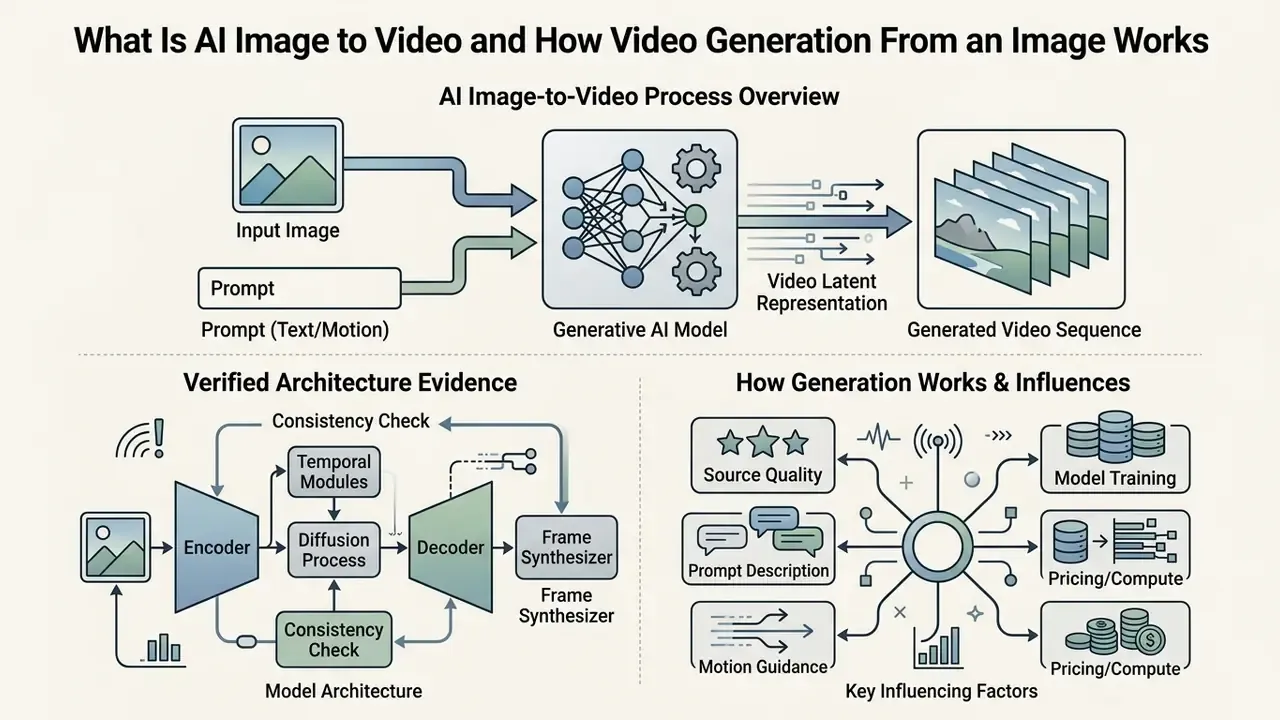
AI image-to-video conversion is the process of synthesizing a temporally coherent dynamic video clip from a single static reference image or dual frame anchors, guided by text prompts and parameterized motion controls. Contemporary platforms and modern AI video generators rely on latent diffusion architectures and Diffusion Transformers (DiTs) to turn static pixels into fluid visual sequences.
"STIV, an 8.7B Diffusion Transformer model, achieves a VBench image-to-video score of 90.1 at 512×512 resolution."
"Lumiere generates the entire temporal duration of the video at once through a Space-Time U-Net, producing realistic, coherent motion."
This single-pass temporal approach enables high-fidelity motion while preserving fine-grained subject details, textures, and ambient lighting across generated video clips. Depth estimation, instance segmentation, and optical-flow reasoning run internally to detect occlusions and hold object boundaries while intermediate frames are synthesized.
How AI Turns a Static Image Into Video Clips
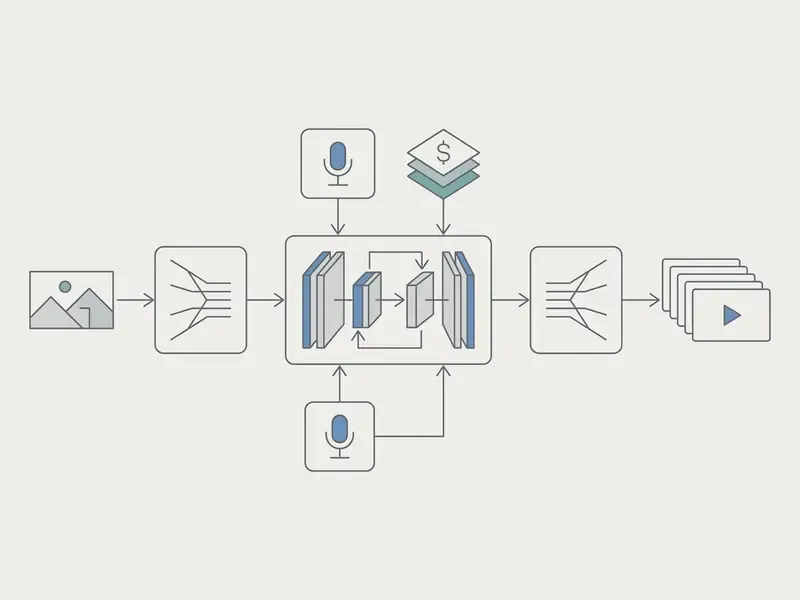
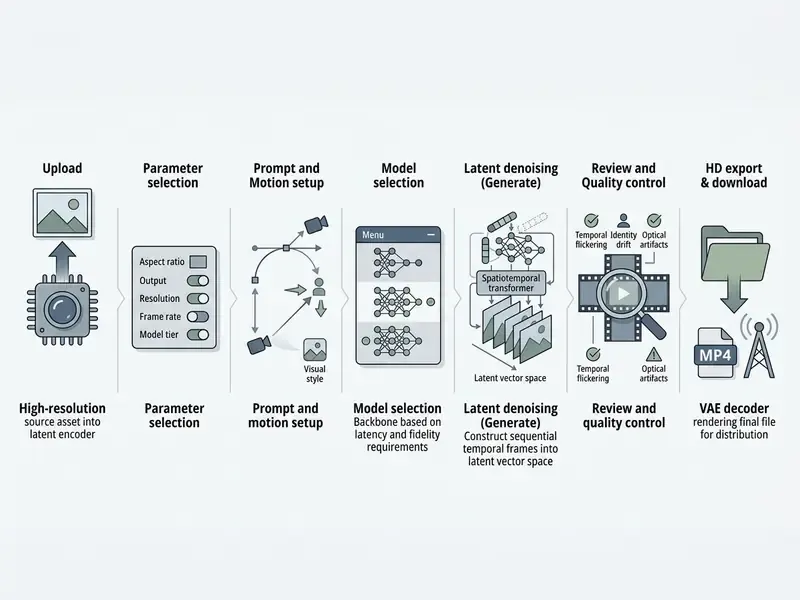
An AI video generator converts a static image into dynamic video clips by holding identity latent vectors in spatial layers while introducing temporal attention across consecutive denoising iterations. The network evaluates structural object boundaries, estimates depth fields, and calculates optical-flow trajectories from explicit user instructions.
During sampling, the diffusion temporal blocks predict how latent pixels shift across consecutive video frames without distorting the primary subject. By treating the first frame as a hard visual anchor, the video model computes motion trajectories that simulate camera shifts, natural physics, and anatomical movement. Depth-aware interpolation research shows why this matters: occlusion handling and flow estimation are what prevent limbs, edges, and background planes from tearing when the camera moves.
Put plainly: the model is not "adding movement" to your photo. It is generating a new sequence conditioned on that photo. The distinction matters when you document provenance for audit.
What Influences Image-to-Video Generation Results
Final visual fidelity in image-to-video generation depends on source photo clarity, prompt specificity, video model architecture, camera parameters, and requested clip duration. Low-contrast or heavily compressed input images increase temporal artifacts, which shows up as subject warping or background swimming.
"VBench++ decomposes video quality into 16 dimensions, including subject identity inconsistency, motion smoothness and temporal flickering."
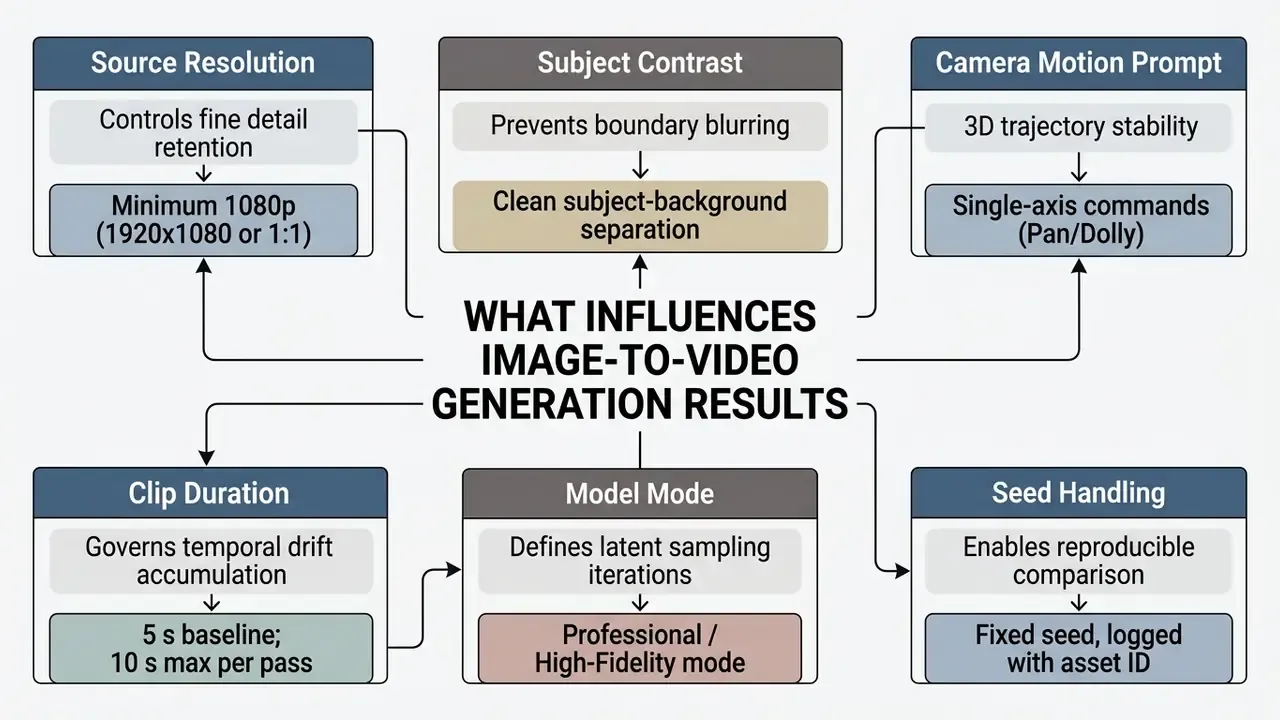
Explicit prompt controls constrain residual motion variance. Specifying camera direction, subject action, and aesthetic boundaries reduces unintended background morphing. Advanced platforms also let operators choose specialized diffusion modes, trading processing speed against frame consistency.
How to Convert Image to Video AI: The Step-by-Step Process
Upload an Image and Choose the Future Video Format
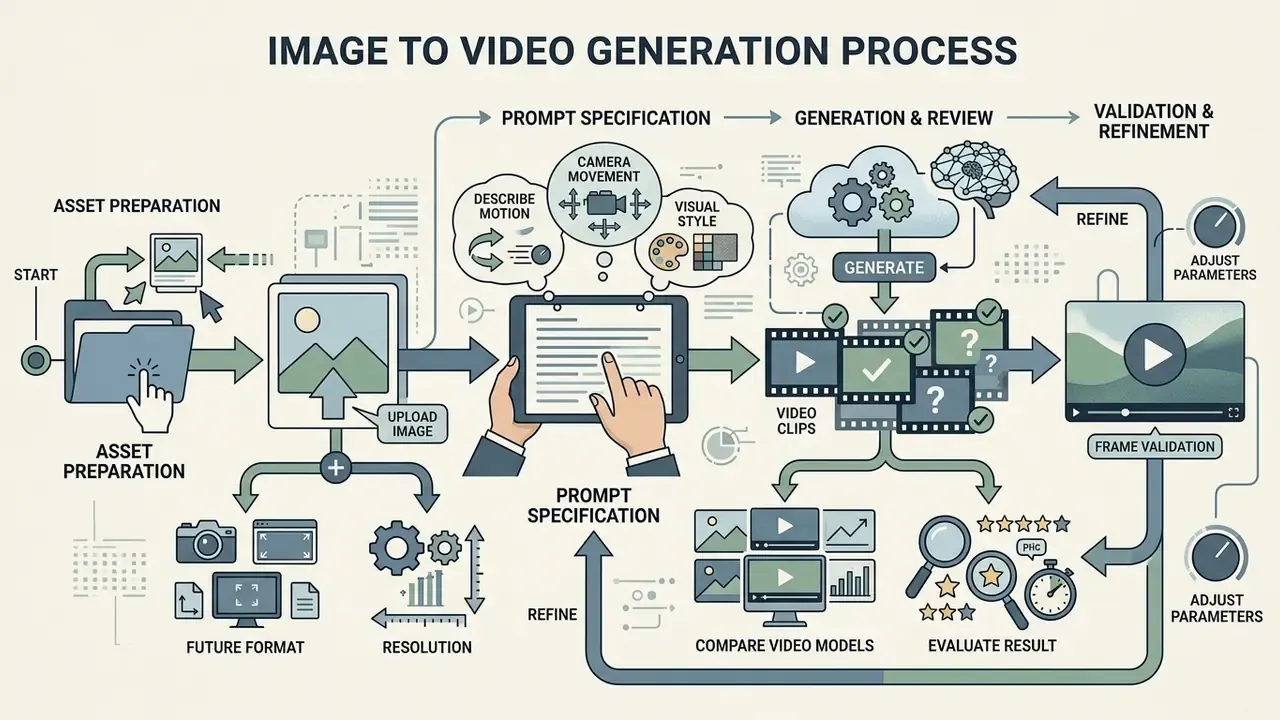
The conversion process begins by uploading a clear, high-resolution source photo formatted for the target display environment. Social media shorts need vertical 9:16 aspect ratios (1080x1920). Web banners and traditional ad campaigns use 16:9 landscape (1920x1080) or 1:1 square layouts (1080x1080). E-commerce catalogue assets most often stay square, matching marketplace listing standards.
Input assets should show a distinct main subject with unambiguous boundaries. Clear composition gives the spatial encoder enough visual information to infer depth maps and calculate background parallax without edge distortion. If the subject sits too close to the frame edge for a planned dolly or pan, use AI outpainting to expand the image first and generate the padding the camera move requires.
Describe Motion, Camera, and Visual Style in the Prompt
Prompt construction for image-to-video generation must separate camera mechanics from subject action. Natural motion needs direct, unambiguous descriptors that define velocity, direction, and shot framing.
Recommended Prompt Syntax:
"[Shot Size] + [Camera Trajectory & Speed] + [Subject Action] + [Lighting & Visual Style]"
Example 1 (Cinematic Product Showcase):
"Medium close-up shot, slow orbital camera pan right, static product bottle with subtle ambient light reflections, crisp photorealistic cinematic lighting."
Example 2 (Dynamic Character Motion):
"Wide angle shot, steady camera tracking forward, character walking forward at slow speed, maintaining facial features, volumetric morning sunlight."
Avoid contradictory motion instructions, such as asking for a fast zoom and a wide horizontal pan at the same time. Single-axis commands let the diffusion model compute plausible physical transitions between latent frames. Vendor camera guides agree on this: a pan is a horizontal rotation from a fixed position with no simultaneous zoom, and an orbit is a smooth, constant-speed circular movement without handheld shake.
Generate, Review Clips, and Refine the Result
Once parameters are set, start the render and evaluate the output against quality standards. Review the generated clip in full-resolution playback to catch subtle temporal defects: facial morphing, background flickering, floating artifacts.
If defects appear, adjust prompt parameters or lock the generation seed for controlled fine-tuning. Lowering motion intensity sliders or applying static background masks stabilizes latent frame transitions on the next pass. Keep the seed identical between iterations so the prompt change is the only variable. That is the same protocol academic benchmarks use to keep comparisons strict, and it is the reason your QC log will actually mean something three months later.
How to Choose an AI App for Pictures to Video: Models, Features, and Control
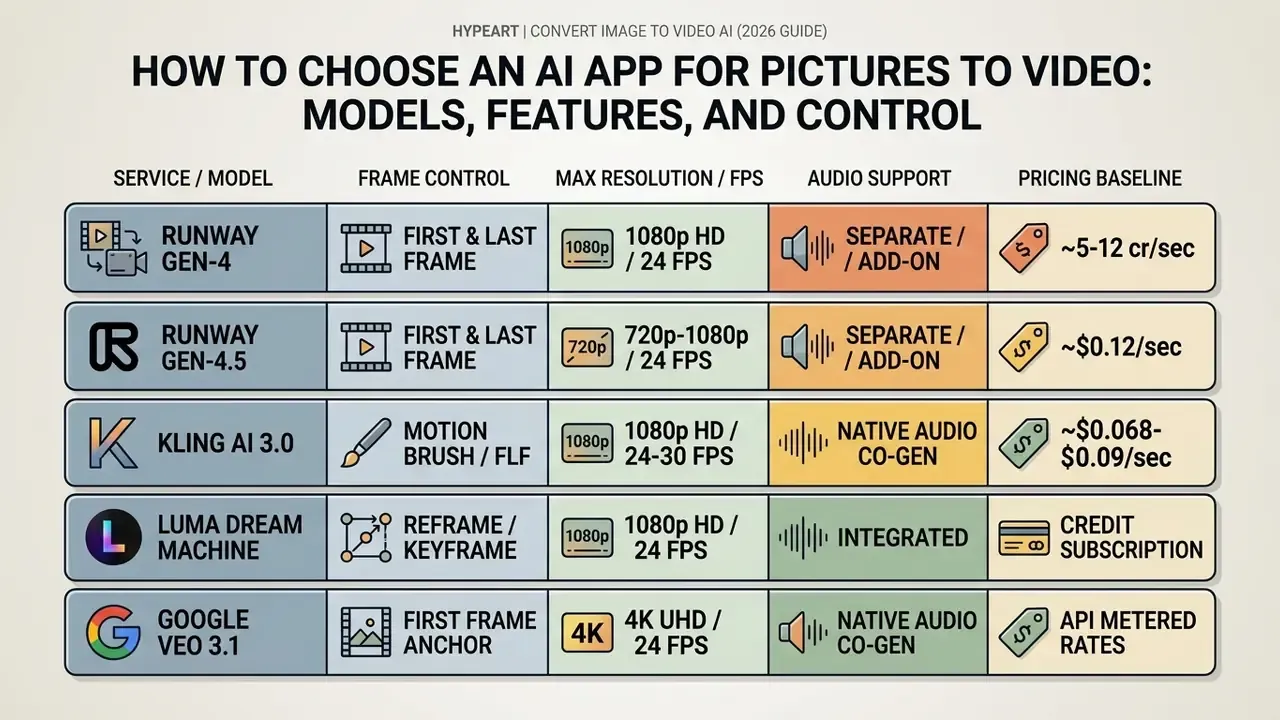
Selecting an enterprise-ready AI app for pictures to video means comparing diffusion backbones, frame anchor controls, motion toolsets, output specifications, and, critically for regulated organizations, data handling terms. Different applications prioritize different trade-offs between rendering speed and visual fidelity.
Evaluating platform capabilities across our AI Media Comparison Matrices helps media architects pick models that slot cleanly into existing creative asset pipelines. If you are choosing an ai app to convert image to video for a regulated business unit, treat the security column as the first filter, not the last.
Enterprise Security & Compliance Matrix (What to Ask Every Vendor)
Feature parity is the easy part of vendor selection. For banks, insurers, healthcare providers, and anyone handling customer imagery, the deciding criteria are contractual rather than creative. Ask for written answers before a single asset is uploaded.
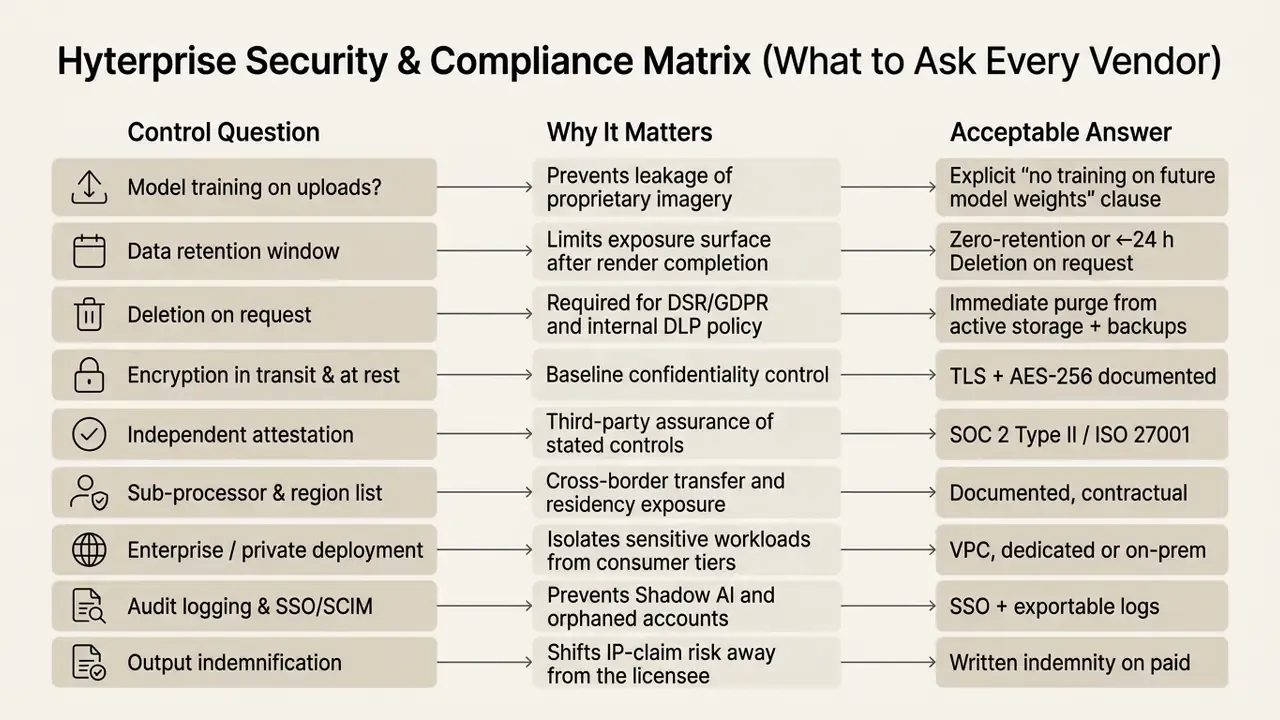
Consumer-grade free tiers rarely satisfy more than two rows of this matrix. If a business unit needs image-to-video capability, procure a sanctioned enterprise tier and publish it internally. That is the only reliable way to stop employees pasting confidential frames into ungoverned public tools. Review our comparison of the best AI video generators to shortlist vendors that publish these terms openly.
One more governance detail that procurement often skips: name the owner. An approved ai photo to video converter without a documented owner, an approved use case, and a shutdown path is just a faster route to an unlogged incident.
Image-to-Video, Text-to-Video, and First & Last Frame Control
Standard text-to-video AI tools generate clips purely from prompt descriptions, which produces variable identity retention. By contrast, image-to-video AI tools use an uploaded picture as frame zero, constraining later denoising steps to preserve initial character and environmental geometry.
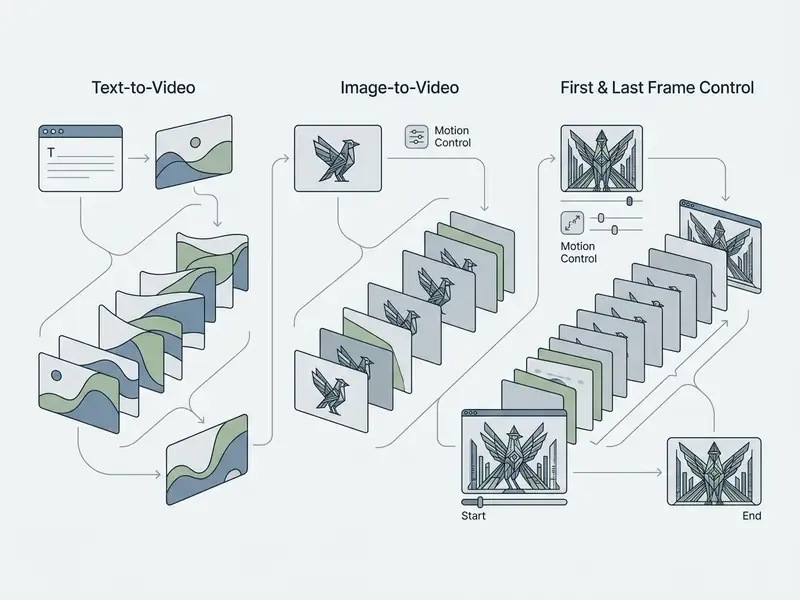
First and last frame control (FLF2V) lets creators upload both a starting frame and an ending frame. The video model interpolates intermediate movement, synthesizing smooth spatial transitions between two predetermined states. Vendor documentation is consistent here: when a first frame or last frame is supplied, the model conditions frame zero and the terminal frame directly; when neither is supplied, generation falls back to prompt-only sampling. FLF is best understood as an extension of image-to-video, not a feature of classic text-to-video.
Motion Control, Camera Motion, and Animation Style
Advanced video creation platforms expose explicit motion controls: directional motion brushes, velocity settings, and virtual camera manipulation. Motion brushes let operators paint specific image regions and assign localized motion vectors.
"Motion-I2V decomposes the task into two stages, motion field prediction and motion-augmented temporal attention, yielding more stable videos under large motion."
Virtual camera controls (pan, tilt, zoom, orbit) override general prompt instructions and impose precise movement.
"CamI2V achieves a 25.5% improvement in camera controllability measured by CamMC on RealEstate10K compared with previous models."
Combining static background masking with precise camera control prevents scene swimming while keeping cinematic motion. Kling-style static brushes freeze painted pixels and suppress camera movement in those regions, which is the fastest fix for a warping background.
Specialized settings in professional generators. Beyond prompts and brushes, several platforms expose operational modes that materially change cost and post-production effort:
- Screen Keying (background removal). The subject is separated from its background during the AI render itself, delivering a keyable output for compositing CGI environments, product scenes, or brand backplates without a manual rotoscope pass.
- Relax Mode (economy queue). Renders are processed in the background at low GPU priority. Turnaround is slower, but credit or subscription consumption drops substantially, which suits non-urgent batch work such as catalogue animation.
- Thinking / Reasoning Mode. The model pre-computes scene physics and motion plausibility before rendering, reducing deformation on complex composite objects, multi-limb subjects, and reflective or transparent materials.
- Duration control and watermark control. Paid tiers expose explicit clip length selection (typically 4, 5, 6, 8, or 10 seconds) and watermark-free export, which free tiers usually withhold.
- Start Frame plus End Frame pairing. Uploading two stills lets the model interpolate a controlled transformation. This is the mechanism behind before-and-after reveals, product state changes, and paired-subject interactions.
Output Quality: Duration, Formats, HD, and Audio
Enterprise output requirements vary by deployment channel. Standard diffusion runs produce 4-second to 10-second clips at 24 frames per second in MP4 containers, balancing compute overhead against visual continuity.
Leading video architectures, including those covered in our Google Veo implementation guide, support native 4K upscaling and co-generated audio tracks. Veo 3.1 documentation lists 720p, 1080p, and 4K output at 24 FPS in MP4 with natively generated audio. High-definition parameters keep exported media sharp on large digital surfaces and broadcast screens. Where native audio is absent, exported MP4s can be finished with music, voiceover, or SFX in a conventional editor.
Image-to-Video API Integration (Python and cURL Examples)
For teams automating catalogue animation, ad variant production, or user-generated media pipelines, the API path removes the browser entirely. Any ai tool to generate video from a single image that lacks an API will eventually become a manual bottleneck. A minimal, production-shaped Python request looks like this:
Security-checked import os from magic_hour import Client # Initialize the API client for automated image-to-video generation client = Client(token=os.getenv("API_KEY")) response = client.v1.image_to_video.generate( assets={"image_file_path": "./assets/product_source.png"}, end_seconds=5.0, resolution="1080p", model="kling-v3", prompt=( "Slow orbital camera pan right, static product, " "cinematic soft studio lighting, stable background" ), wait_for_completion=True, download_outputs=True, download_directory="./renders" ) print(f"Video generated successfully. Download URL: {response.download_url}")The equivalent raw HTTP call, useful for language-agnostic backends and CI pipelines:
Security-checked curl -X POST "https://api.example-i2v.com/v1/image-to-video" \ -H "Authorization: Bearer $API_KEY" \ -H "Content-Type: application/json" \ -d '{ "assets": { "image_url": "https://cdn.example.com/hero.png" }, "end_seconds": 5.0, "resolution": "1080p", "aspect_ratio": "9:16", "seed": 424242, "prompt": "Static camera, subtle fabric movement, soft daylight, no background drift" }'Integration notes for engineering teams:
- Use the async job pattern. Submit the render, receive a job ID, poll status, then download. Set client timeouts generously (three minutes is a safe ceiling for a 5-second clip) and never block a user-facing request thread on generation.
- Pin the seed for reproducibility. Storing the seed alongside the asset ID makes any output auditable and re-creatable, which is a requirement in model-risk documentation.
- Meter per second, not per call. Cost is a function of duration multiplied by resolution and model tier, so enforce duration caps at the API gateway rather than trusting client input.
- Log provenance. Persist
- Handle failures idempotently. Retry on transient 5xx with the same seed; treat content-policy rejections as terminal and route them to human review.
- Separate keys by business unit. One shared key destroys attribution, and attribution is what makes chargeback and abuse detection possible.
Free Generations, Pricing Plans, and Commercial Use of AI Video
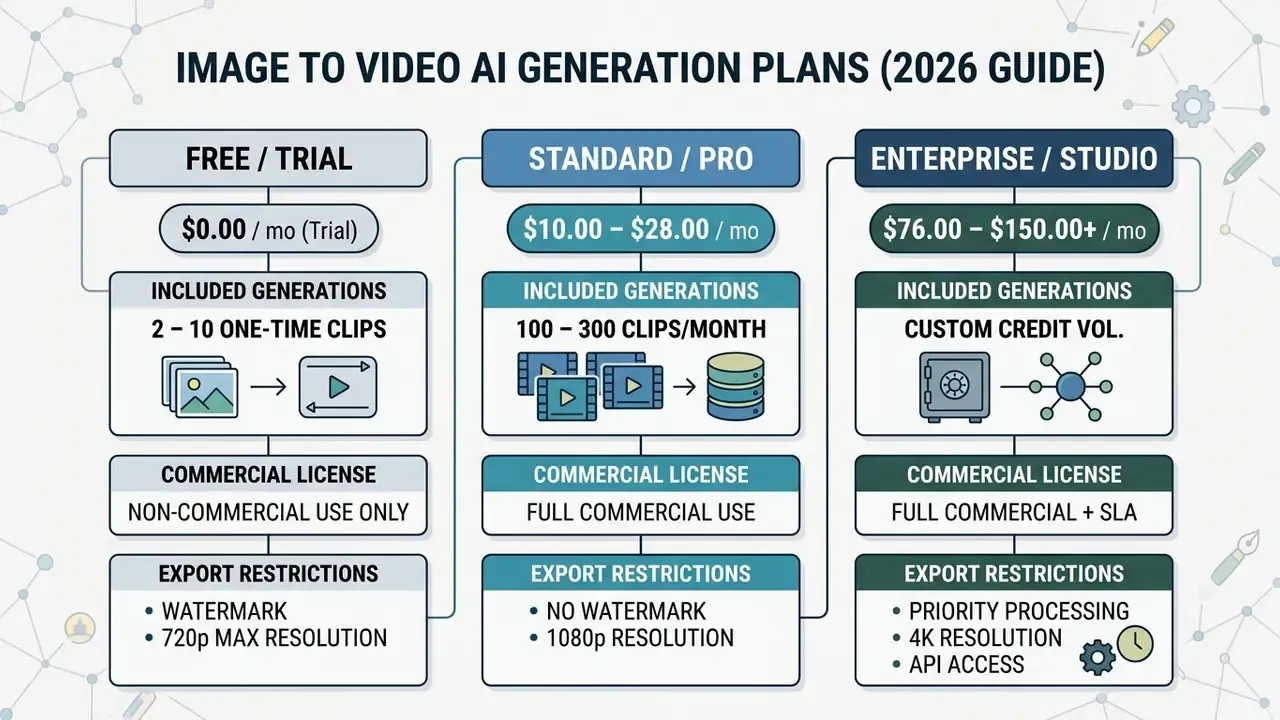
Bringing AI image-to-video tools into business operations requires clear visibility into freemium credit degradation, recurring subscription tiers, and corporate licensing rules.
"Analysis of 1,236 verified G2 reviews found 16.7% of users report pricing difficulties, while only 4.8% can quantify ROI from AI video tools."
That gap between spend visibility and measured return is exactly why per-second cost modelling belongs in the procurement stage, not in the retrospective. Operational finance teams can use our specialized AI Media Calculators to model expected per-clip rendering expense across enterprise volumes.
What Free Image-to-Video AI Usually Includes
Free access tiers let creators evaluate core video model fidelity before committing capital, and our overview of free AI video generators maps which limits bite hardest. Those free structures impose real operational constraints: low credit allocations, watermark overlays, restricted model choice, and non-commercial usage terms.
"Free usage tiers serve architectural evaluation. Production deployment requires paid tiering to secure enforceable commercial indemnification and clean unwatermarked exports." Marcus Hale, author
Free tiers frequently cap export resolution at 480p to 720p and deprioritize rendering queues at peak load. Several platforms also limit free users to a single fast model and expire unused credits monthly. A deeper breakdown of tier mechanics sits in our guide to free AI video generators. Operators should also check the matrices on our AI Media Pricing page to map credit burn rates against anticipated monthly production output.
How to Compare Pricing Plans and Generation Costs
Evaluating paid subscription tiers means calculating the effective net cost per second of rendered video. Credit consumption swings widely based on resolution, duration, audio co-generation, and processing tier.
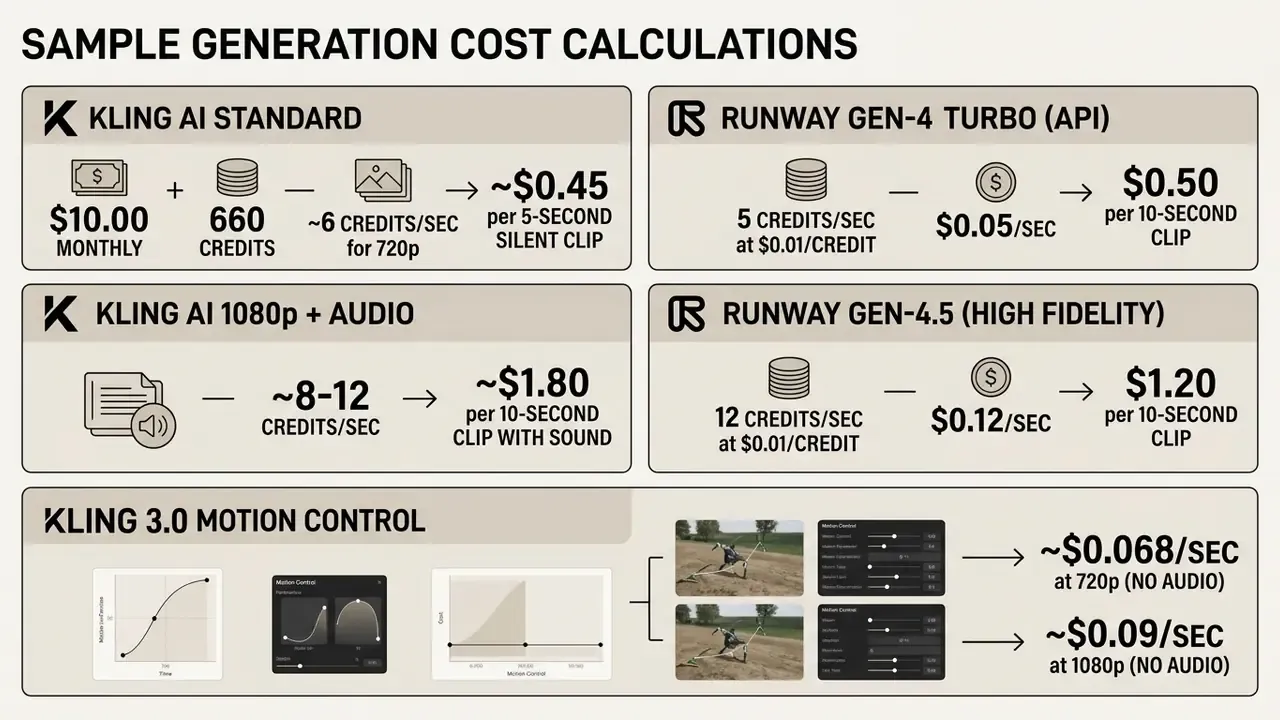
Premium credit multipliers must be justified against campaign performance metrics. Build the unit economics around cost per approved clip, not cost per render. If one in three generations fails QC, the true price of a $0.50 clip is $1.50. Tracking that ratio per model is the single most useful budget control in an image-to-video pipeline. Add control cost too: reviewer time, legal review, and storage of provenance logs are part of total cost of ownership, and ROI models that omit them are optimistic by design.
What to Verify Before Commercial Use of AI-Generated Videos
Before publishing AI-generated video clips in ad campaigns or client deliverables, legal teams should verify asset provenance and platform terms. Our reference material on commercial use of AI image generators covers how output rights are typically structured across tiers.
Legal oversight also ensures uploaded source assets do not infringe third-party trademark rights. Audit the platform Terms of Service to confirm commercial distribution rights are explicitly granted under the active subscription tier, and track precedent through our AI Litigation and Case Timelines.
"The vast majority of commenters agreed that material generated wholly by artificial intelligence, without human creative contribution, is not protectable by copyright."
This information is general and does not replace advice from a qualified attorney on copyright and licensing matters.
Data Privacy, Shadow AI, and Confidential Imagery
Every image-to-video render involves an upload, and that upload is where most governance failures actually happen. Marketing screenshots contain unreleased pricing. Customer service attachments contain identity documents. Product photography contains unannounced hardware. Once any of it reaches an ungoverned consumer tier, retention, training, and jurisdiction leave your control.
Minimum controls before enabling image-to-video across a team:
- Classify inputs first.Publish a simple rule: public marketing assets are permitted; anything containing PII, payment data, health data, or unreleased IP is not, unless routed through the sanctioned enterprise tier.
- Sanction one tool, loudly.Shadow AI grows in the absence of an approved option. Publish the approved vendor, the plan tier, and the request path.
- Contract for zero training and short retention.Written "no training on customer content" and defined deletion windows are non-negotiable for regulated data.
- Enforce SSO, SCIM, and audit logs.Personal accounts create orphaned data stores that nobody can purge during an incident.
- Add DLP patterns for image uploads.Egress rules that flag uploads to unapproved generative endpoints catch most accidental exposure.
- Prefer isolated deployments for sensitive workloads.VPC-scoped, dedicated, or on-premise inference removes the multi-tenant question entirely.
- Anonymize before uploading.Blur faces, badges, screens, and serial numbers in a photo editor before the asset reaches the generator.
Security and compliance requirements vary by jurisdiction and sector. Validate this checklist with your own information-security and privacy functions.
Which Images and Prompts Produce High-Quality AI Video
High-quality AI video starts with pristine source assets and prompts grounded in real-world physics. Understanding generative constraints prevents the usual motion deformities and temporal flickering.
Clean assets give temporal attention layers sharp spatial boundaries, and benchmark work confirms quality is multi-dimensional rather than resolution-bound (see the 16-dimension VBench++ decomposition cited above).
Preparing the Photo: Quality, Composition, and Main Subject
"DreamPose, trained on the UBC Fashion dataset, preserves fabric patterns and garment shape during animation."
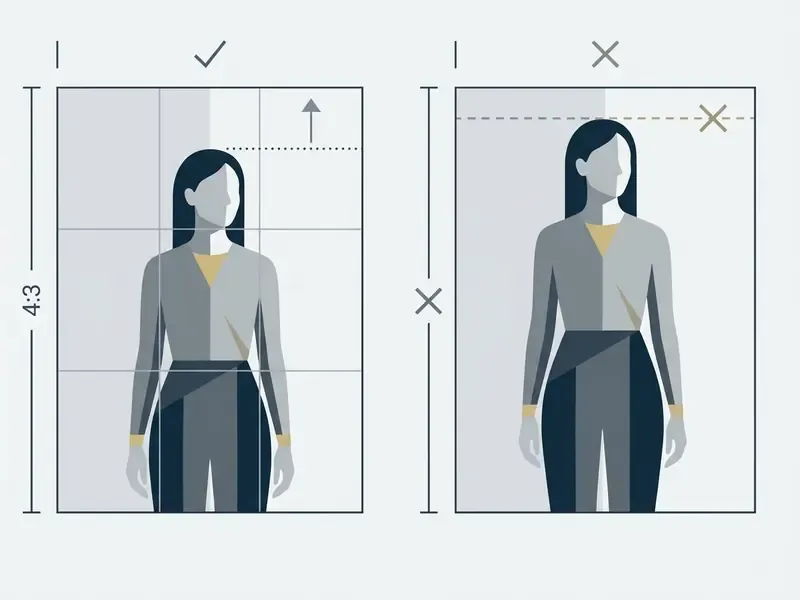
Avoid images with clipped shadows, extreme lens glare, or heavy JPEG compression artifacts. A quick pass in an AI photo editor to recover shadow detail, straighten horizons, and remove sensor noise pays for itself in fewer rejected renders. Sub-optimal inputs force the latent autoencoder to guess structural boundaries, which produces unnatural pixel warping during motion steps.
How to Write Prompts for Natural Motion
Prompts that produce natural movement focus on physical dynamics, clear trajectories, and explicit structural preservation statements. Velocity verbs help the video diffusion model map motion descriptors onto learned physical priors. Physics-aware prompting research groups useful vocabulary into three buckets: dynamics (gravity, friction, velocity, collision, bounce), shape (deformation, rigidity, preservation), and optics (reflection, refraction, shadow behaviour).
Effective Motion Prompt Examples:
- "Slow steady pan right across the mountain landscape, soft wind blowing through forest foliage, high temporal consistency."
- "Static camera position, subtle water waves splashing gently against rocky shore, hyper-realistic fluid physics."
- "Dolly out slowly from the central product display, background remaining stable, studio softbox illumination."
Referencing explicit camera mechanics while instructing the system to preserve core geometry prevents unwanted background deformation. Precise terminology isolates object action from background perspective shift.
"SG-I2V is the first self-guided, zero-shot trajectory-control framework for image-to-video built on Stable Video Diffusion."
Ready-made prompt templates by niche. Copy, swap the subject, keep the structure:
Common Image-to-Video Conversion Errors and How to Fix Them
The five most frequent image-to-video errors are facial blur, background swimming, temporal flickering, sudden frame jumps, and character geometry drift.
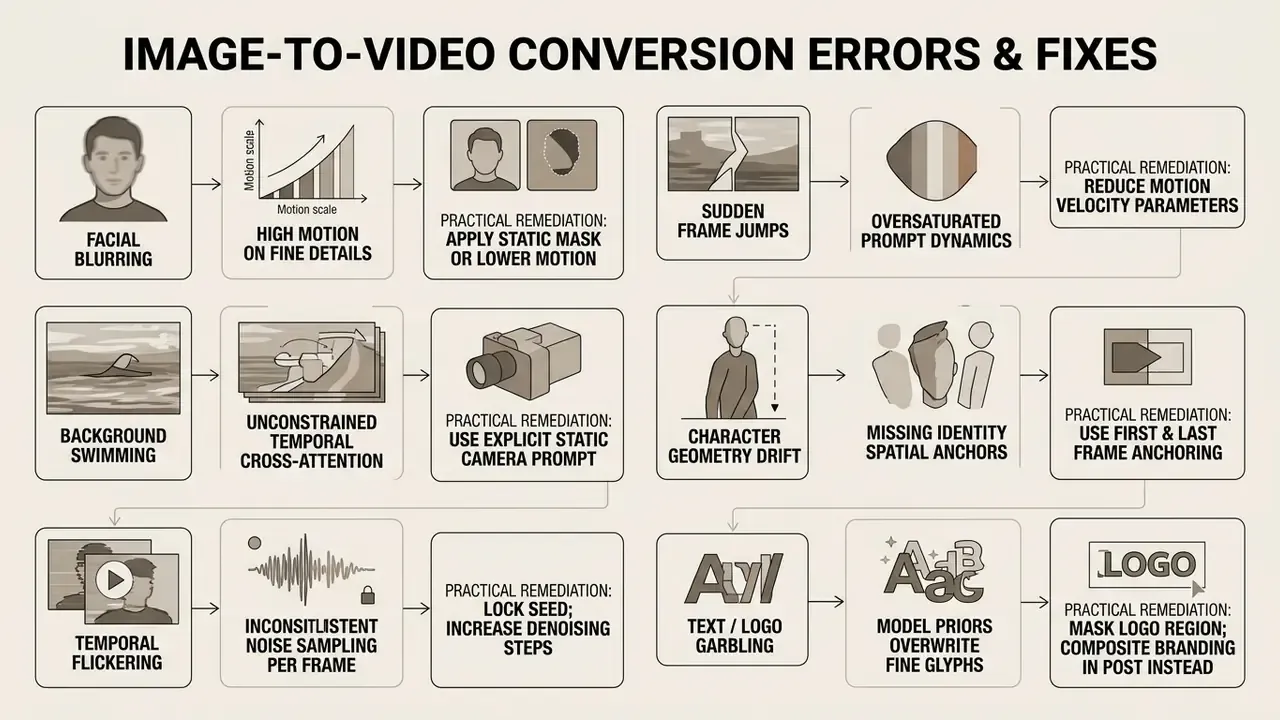
When background pixels float or deform, apply a static brush to freeze secondary elements. If facial features distort during camera moves, lower the motion slider or refine the prompt to prioritize temporal stability.
"AIGVQA-DB, with 36,576 AI-generated videos from 15 models and roughly 370,000 expert ratings, shows motion artifacts and prompt mismatch dominate low scores."
For repeatable QC, adopt the evaluation protocol used in artifact research. Split review into appearance, motion, and camera stability, score each clip on those three axes, and require two reviewers with a third resolving disagreements. Warping error after optical-flow alignment between consecutive frames is the standard quantitative proxy for temporal consistency if you want an automated gate in the pipeline. Two reviewers sounds expensive. It is cheaper than a recalled campaign.
What Tasks AI Convert Images to Video Is Used For
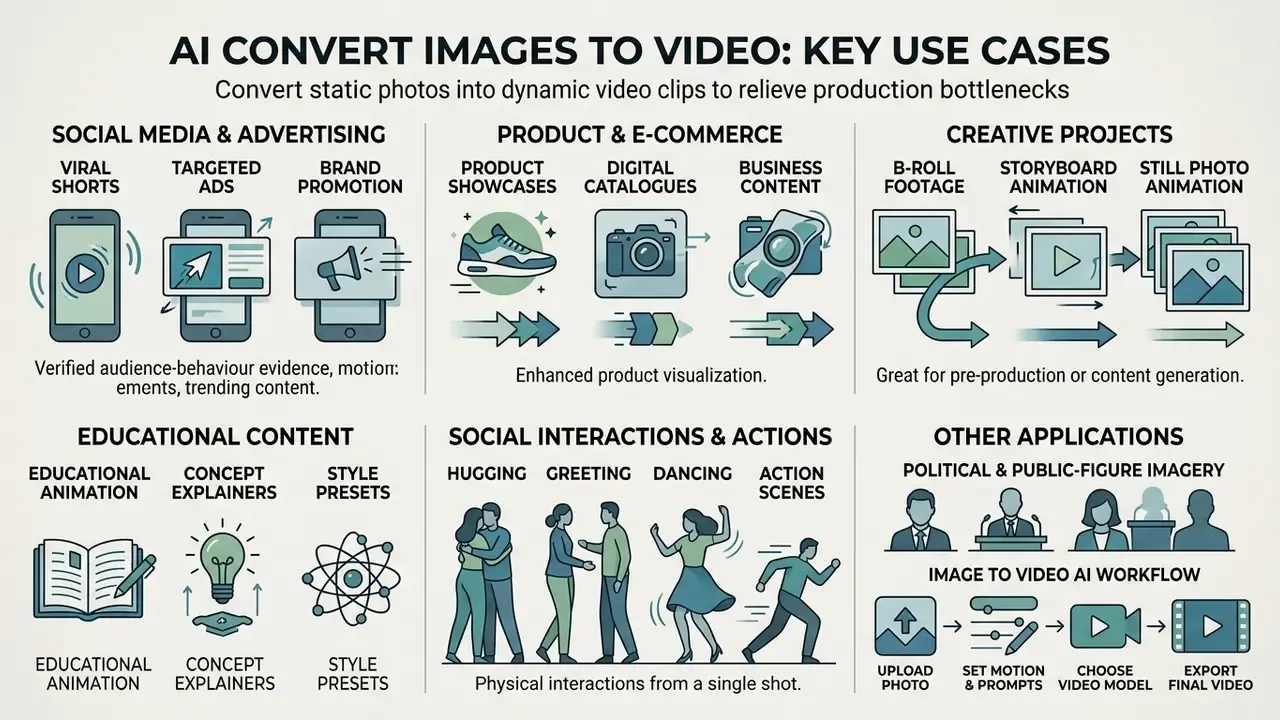
Converting images into dynamic video clips relieves production bottlenecks across commercial advertising, e-commerce catalogue enhancement, digital publishing, education, and creative pre-visualization.
Measurement guidance instead of borrowed campaign data. Rather than trusting third-party uplift percentages, treat animated media as a testable variable. Run static hero images against a looped I2V variant on the same placement, hold creative and audience constant, and read dwell time, view-through, and add-to-cart rate. Academic and industry reviews of generative marketing pipelines document the capability and the workflow savings; the performance delta is always account-specific and has to be measured in your own funnel. Label the expected lift as a hypothesis until the test closes.
Enterprise teams frequently reference our AI Media Commercial-Use Hub to keep licensing compliant across diverse digital ad formats.
Product Videos, E-Commerce, and Business Content
Merchants use image-to-video conversion to animate flat product listings into engaging showcases with a 3D feel. Turning a single hero photograph into a subtle loop highlights fabric drape, surface texture, and material reflection under simulated lighting change.
"DreamPose demonstrates photorealistic garment animation from static photos, including fabric motion and pattern preservation."
Tools with multi-angle product synthesis let merchants project several camera views from one upload: front, three-quarter, side, back, and detail shots generated from a single clean hero image. Dynamic showcases improve buyer confidence and compress catalogue asset timelines. Always review generated angles for proportion accuracy, colour fidelity, logo integrity, and material realism before publishing to a marketplace listing. Marketplaces do enforce accuracy rules, and a hallucinated stitch pattern is a returns problem.
Creative Projects: Bringing Photos to Life, B-Roll, and Storyboards
Production studios deploy image animation to streamline pre-visualization and animatics. Converting static storyboard illustrations into motion clips lets directors test sequence timing, camera angles, and transitions before principal photography, a workflow adjacent to the template-driven approaches covered in our guide to animation makers. The same clips slide neatly into a pitch deck built with a gamma ai presentation tool when the concept moves to client review.
Documentary producers and archivists also use restrained motion to animate historical photography.
"Animate Anyone converts static character images into pose-driven animated video while preserving facial features and clothing under significant pose change."
Subtle camera pans and volumetric light shifts bring static archives to life while respecting original composition. For archival material, restraint is the rule: minimal parallax, no facial reconstruction, preserved grain. That keeps the result documentary rather than synthetic. Concept art, 2D and 3D renders, and matte paintings follow the same pipeline, producing b-roll and presentation assets without a shoot.
FAQ About AI Image-to-Video Conversion
Can you turn a photo into video for free without watermarks?
Most commercial platforms watermark free tier generations, and free exports are frequently capped at 480p to 720p. Unwatermarked, high-definition clips require an active paid subscription that grants commercial rights and clean export access.
How long does it take to generate a video from a picture?
Rendering typically takes between 30 seconds and 3 minutes for a 5-second clip, depending on server load, model complexity, and resolution. Economy or "relax" queues take considerably longer by design. API integrations with dedicated compute offer faster throughput. Set client timeouts around 180 seconds and use asynchronous polling rather than blocking requests.
What system requirements are needed to work with online AI video generators?
Cloud-based generators run all heavy neural computation on remote server clusters. Users need a modern browser, a stable internet connection, and hardware capable of playing 1080p MP4 files. No GPU, plugin, or local installation is required for browser-based workflows, which is also why an ai site to create video from image is so easy to adopt without IT approval. That convenience is precisely the Shadow AI risk.
What should you do if the AI video comes out with deformations and distortions?
Lower the motion intensity parameter, simplify the prompt, and confirm the source image has crisp contrast. Static background brushes and first-and-last-frame controls also remove structural drift. Keep the seed fixed while changing one variable at a time so you can attribute the improvement.
Are AI-generated clips ready for publishing to Reels and TikTok?
Yes. Clips exported in vertical 9:16 at 1080p are ready for short-form platforms. Editors can add voice tracks with an AI voice generator or optimize delivery through an online video compressor. Check each platform's AI-disclosure requirements before publishing.
Can only one photo be used, or are two frames supported?
Both. Single-image generation uses the upload as frame zero and infers all subsequent motion. First & Last Frame (FLF2V) mode accepts two stills and interpolates a controlled transition, which is the more reliable option whenever the ending state matters.
Is there an API for image-to-video, and what does it cost?
Yes. Leading vendors expose image-to-video endpoints supporting model selection, resolution, aspect ratio, duration, and seed. Billing is metered per rendered second or per credit, typically between $0.02 and $0.12 per second depending on model tier and resolution. See the Python and cURL examples above for the standard async job pattern.
Is uploaded content private, and can it be used for model training?
That depends entirely on the plan and the contract. Consumer free tiers often reserve broad rights and retain uploads. Enterprise agreements can guarantee no training on customer content, short retention windows, and immediate deletion on request. Never upload PII, unreleased IP, or client-confidential imagery to an unvetted tier. Verify the security matrix earlier in this guide first.
Who owns the copyright in the resulting video?
The platform grants usage rights by contract; copyright registrability is a separate question. Under 2025 U.S. Copyright Office guidance, material generated wholly by AI without human creative contribution is not protectable, while human-authored selection, arrangement, and editing may be. Document your human contribution and consult counsel for anything commercially significant.
Why does text or a logo in my image break during generation?
Diffusion priors overwrite fine glyph structure during denoising, so small typography degrades first. Mask the logo or text region with a static brush, or generate the clip clean and composite branding back in during editing.
What evidence should we keep for audit?
At minimum: source-image hash and rights record, prompt text, model name and version, seed, resolution, duration, reviewer decision, and timestamp. Store it with the published asset ID. If an internal audit or a rights holder asks how a clip was produced in 2026, that record is the answer.
For technical assistance or integration troubleshooting, consult our dedicated AI Media Support hub.
Social Media, Ads, and Professional Shorts
Social channels demand high-volume, short-form creative formatted for vertical viewing. Image-to-video generators let marketing teams convert existing brand photo assets into dynamic 9:16 video ads for Reels, TikTok, and YouTube Shorts.
Verified audience-behaviour evidence.
The practical implication is unglamorous. Audiences notice physics failures before they notice production value. Rapid video synthesis lets performance marketing teams iterate ad variations at scale without expensive reshoots, but only clips that survive a physics-and-detail review should reach paid distribution. Brand safety review sits in the same gate: a slightly warped hand is a creative flaw, while a garbled logo is a trademark problem.