Executive Summary for Risk, Compliance and Communications Leaders
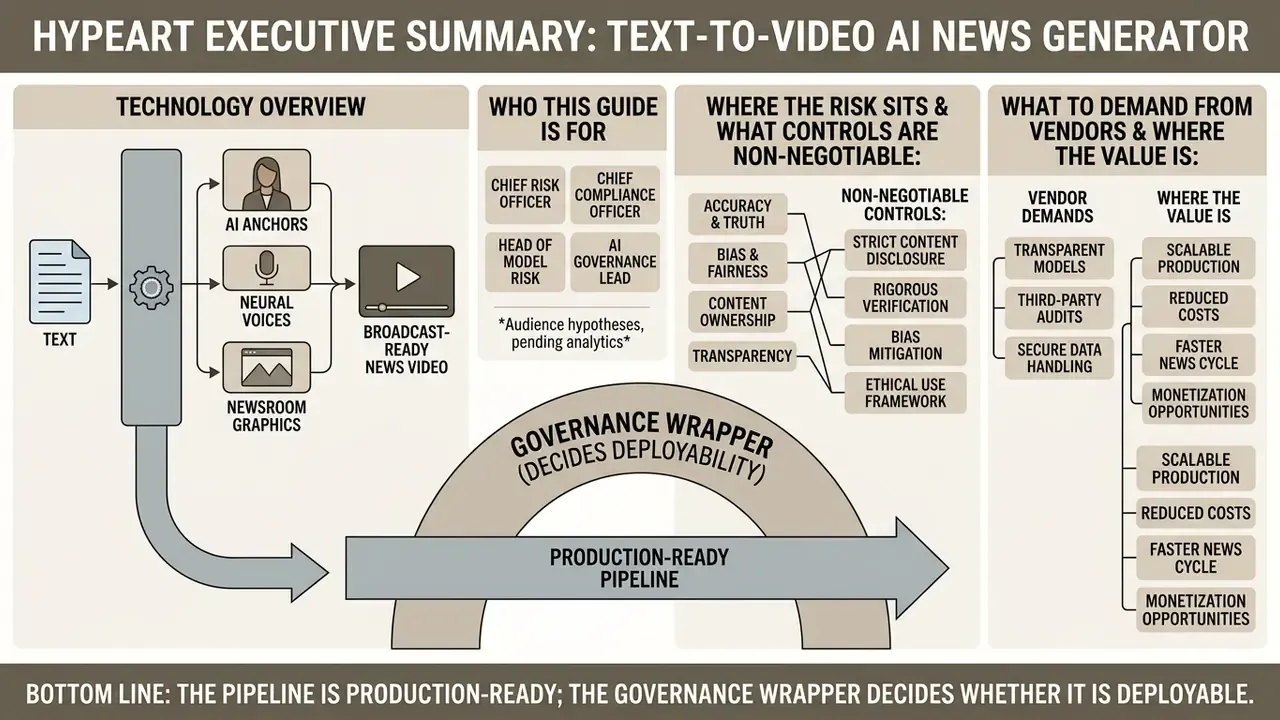
- What the technology is. A text to video AI news generator chains four models together: an LLM for script structuring, a neural text-to-speech (TTS) engine for narration, an avatar engine for lip sync, and an automated compositor for tickers, lower thirds and captions. One document in, one broadcast-ready MP4 out.
- Where the risk sits. Not in rendering, but in ingestion and scripting. Unverified numbers, hallucinated attributions and mismatched B-roll are the three failure modes that create regulatory and reputational exposure. Factual sign-off must therefore happen before speech synthesis, not after rendering.
- What controls are non-negotiable. Human-in-the-loop sign-off with named approvers, provenance metadata (C2PA) embedded at export, on-screen AI disclosure, immutable audit logs of prompt, script, approver and version, plus third-party asset licensing records.
- What to demand from vendors. SOC 2 Type II, SSO/SAML with role-based access control (RBAC), a contractual no-training guarantee on submitted content, private-cloud or VPC deployment options, exportable audit logs, and full commercial licensing including synthetic voice and avatar rights.
- Where the value is. Internal communications, employee training, market and earnings summaries, and localisation of already-approved copy. Investor-facing and regulated disclosures require the highest control tier and, in most institutions, explicit legal review before publication.
- Bottom line. The pipeline is production-ready; the governance wrapper decides whether it is deployable. Treat every generative component as an unvetted source, exactly as the Associated Press does.
Who This Guide Is Written For
The primary reader is a Chief Risk Officer, Chief Compliance Officer, Head of Model Risk or AI governance lead inside a large US bank or a mature fintech. The secondary reader sits in corporate communications or finance transformation and wants an ai news video maker that survives an internal audit.
These audience assumptions remain hypotheses until analytics, interviews or CRM data confirm them. We flag that openly rather than dressing assumption up as research.
Three questions drive the rest of the document. Can this pipeline move from pilot to controlled production? Does traditional model validation cover a synthetic presenter? And who, by name, owns the decision to publish?
What Is a Text to Video AI News Generator?
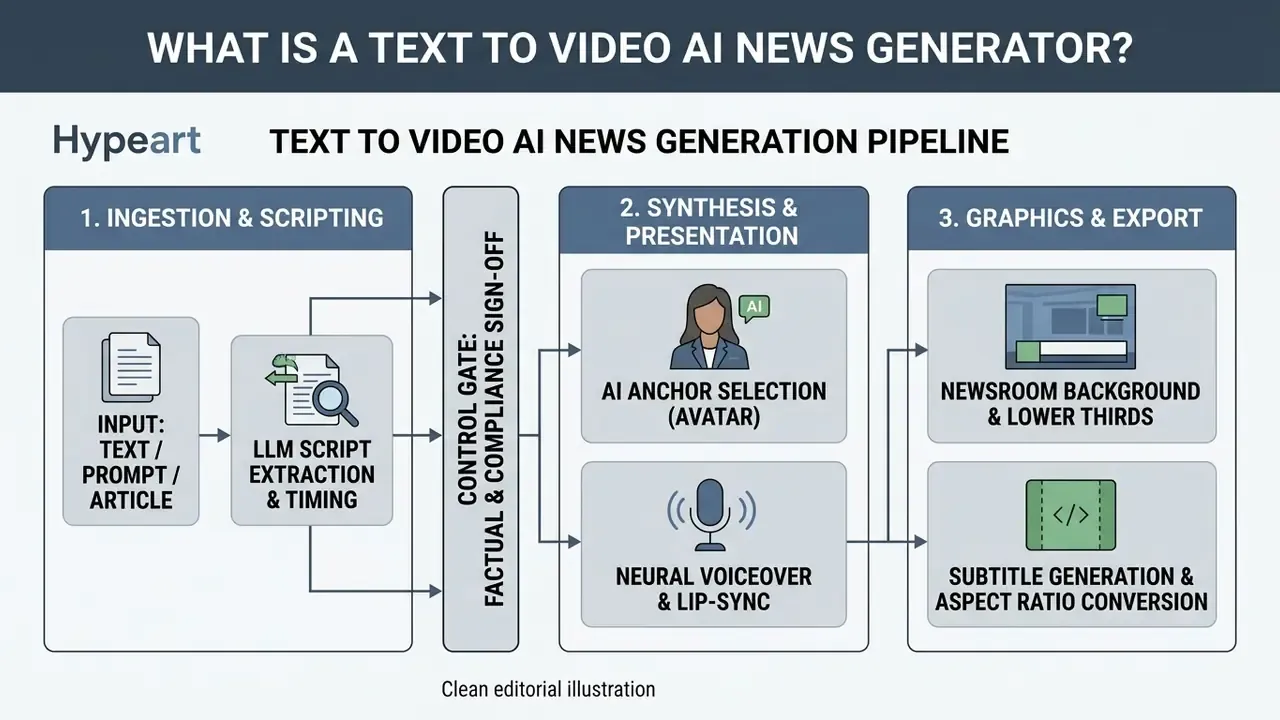
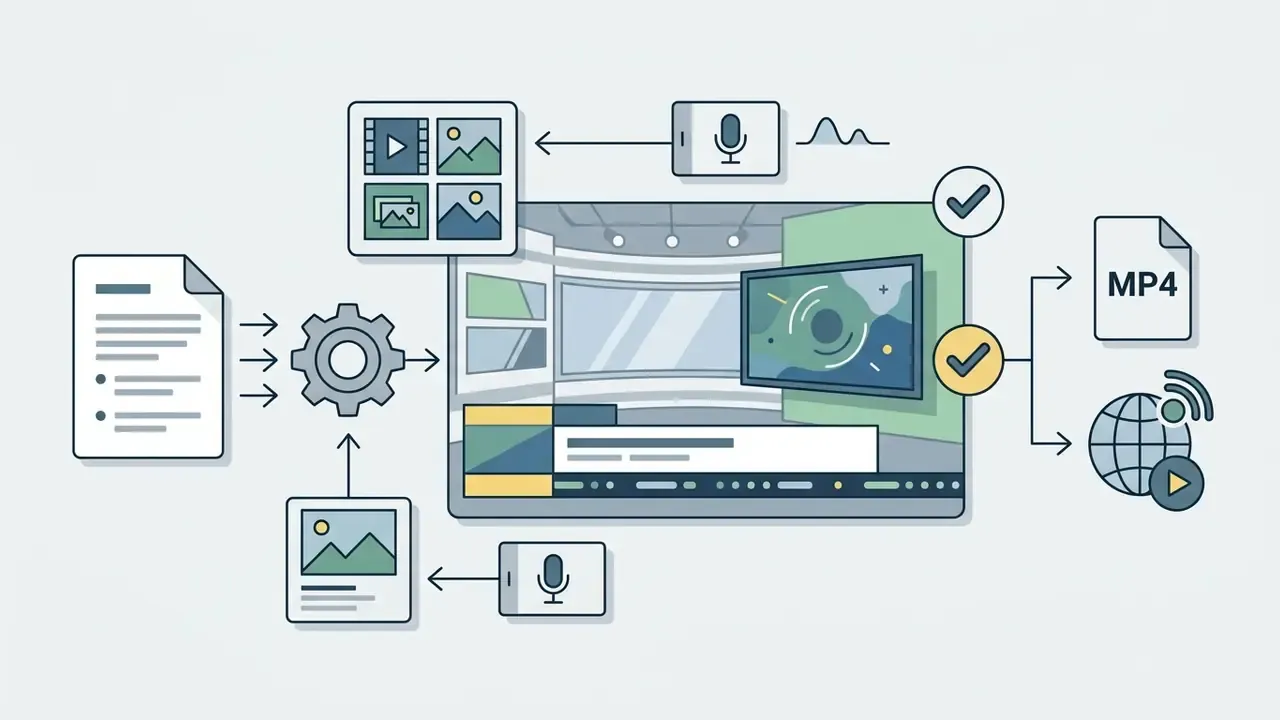
A text to video AI news generator is an automated software pipeline that converts written text, prompts or articles into broadcast-ready news videos with synthetic anchors, AI voiceovers and dynamic newsroom visuals. These ai tools unite large language models (LLMs) for script structuring, neural TTS engines for narration, avatar rendering engines for lip sync, and automated graphic compositing for tickers and lower thirds.
In practice the architecture matters more than the interface. Each stage is a separate model, often from a separate vendor. Each stage is also a separate point of data exposure and a separate point of factual failure.

From Text, Prompt or News Article to Video
Converting raw text into a broadcast segment relies on a multi-stage transformation where language models turn unstructured copy into timed narration beats. Systems such as ReelFramer (arXiv, 2024) use LLMs to extract core entities, locations and actions from a news article before generating visual scene descriptions alongside spoken scripts. ReelFramer's documented workflow runs in three panels: extract news information, generate and edit script premises, then generate and edit the final script. It is the closest published analogue to a newsroom-grade automated scripting chain.
A complementary planning approach comes from VideoDirectorGPT (OpenReview, 2024), which expands a single prompt into a scene-by-scene "video plan" containing layouts, entities and consistency groupings before any frame is generated. The practical lesson for newsrooms is unglamorous: generate the plan first, review the plan, and only then spend compute on rendering.
When converting complex text via an online video platform, the system segments scripts into short acoustic phrases, typically around two words per second, so that breath pauses and on-screen graphic transitions land naturally.
Direct Ingestion: Converting PDF Reports and URLs into Broadcast Scripts
AI News Anchor, Voiceover and Newsroom Visuals
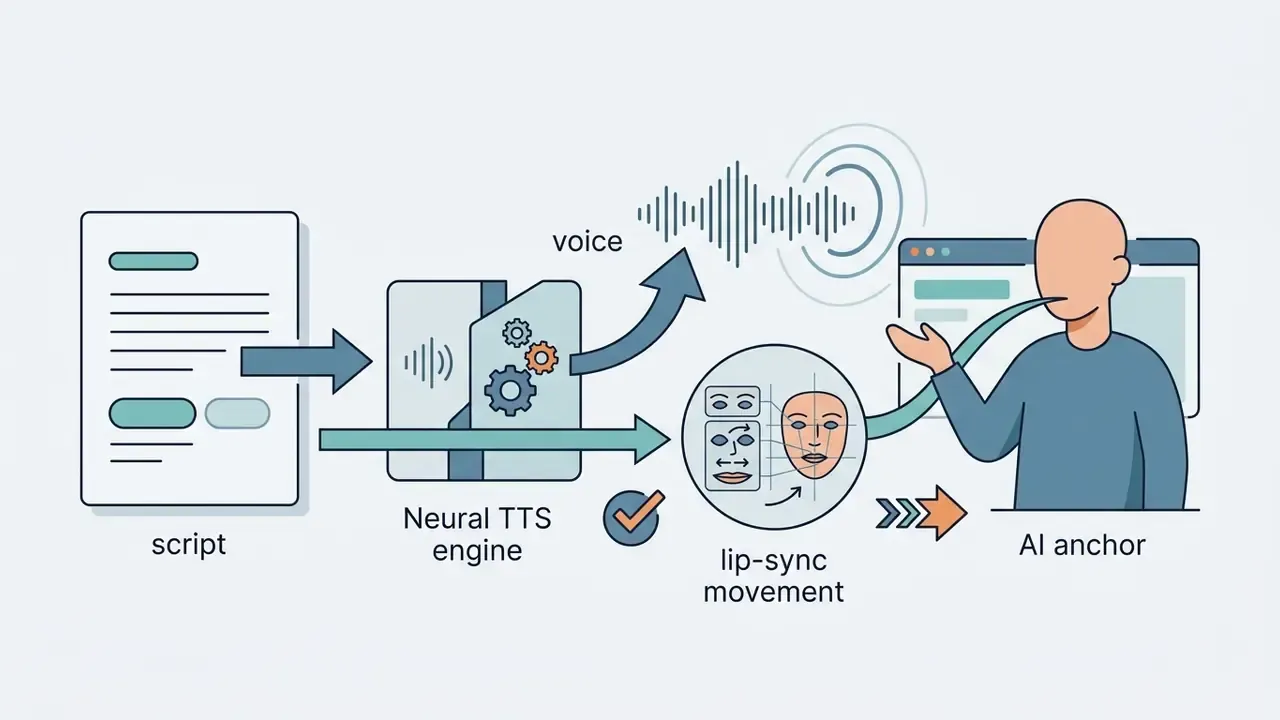
An AI news anchor is the visual presenter, driven by neural speech models that align facial micro-expressions with audio waveforms. Research into digital anchors suggests that accurate lip sync and localised prosody reduce audience psychological distance (Chen, Zeng & Qiu, Journal of Broadcasting & Electronic Media, 2025; DOI requires verification, so treat the findings as directional rather than settled).
Trust in ai anchors is mediated by that psychological distance. Audiences consistently perceive an ai news reporter as less close and less credible than a human presenter. The gap narrows as lip-sync accuracy and accent localisation improve. It does not close.
"Semi-automated videos with human post-editing are rated as favourably as fully human-made videos; highly automated videos perform significantly worse."
That one finding is the strongest available argument for a human-in-the-loop workflow. Post-editing is not merely a compliance cost. It is the variable that preserves audience quality perception.
Broadcast-ready output also needs synchronised newsroom visuals: animated lower thirds, breaking news banners, background loops. When distributing these assets across enterprise channels, technical teams often pair an online video player capable of rendering interactive caption overlays with managed online video hosting for access-controlled internal delivery.
Underlying Video Generation Engines (the 2026 Stack)
Platform choice is, in practice, a choice of underlying generative engines. Evaluate which models a vendor exposes before you evaluate the dashboard.
- Google Veo 3.1 and Gen-4 Turbo. Strongest for photoreal B-roll and non-human news scenes with coherent object physics. Veo 3.1 accepts text and image input and outputs video with native audio, which removes one synchronisation step from the chain. Teams building custom ingestion services can review implementation details and cost structures in the Google Veo API implementation guide or browse the wider AI Media API Guides.
- Kling 3.0 Pro and Seedance 2.0. Stable studio environments and consistent lighting across shot changes, which matters when a bulletin cuts between anchor and graphics.
- OmniHuman 1.5. A specialised facial and upper-body synthesis engine that drives a presenter from a single photograph or a short clip.
- Wan / Wan Effects, Grok, Creatify Aurora, Happy Horse. Supporting models typically used for stylised transitions, effects and stock-substitute footage rather than primary anchor rendering.
One procurement note for 2026: OpenAI's Sora product page states the product is no longer available as of April 2026, so it should not appear as a current export path in any architecture document. Model availability changes faster than contracts. Insist on a model-substitution clause.
Data Residency and Model Isolation: Where Your Script Actually Goes
For banks, insurers and fintechs the governing question is not "does the avatar look real?" It is "where does the unpublished earnings language travel?"
| Deployment model | Data path | Suitable for | Key control to verify |
|---|---|---|---|
| Public SaaS (shared tenancy) | Script leaves your perimeter to vendor and sub-processor APIs | Public, already-published content | Contractual no-training clause; sub-processor list; retention period |
| VPC / private cloud tenancy | Isolated inference, vendor-managed keys | Internal comms, training content | Encryption at rest and in transit; regional residency; log export |
| On-premise / self-hosted models | No egress | Material non-public information, pre-release financials | Model provenance; patching responsibility; internal MRM inventory entry |
| Hybrid (local scripting, cloud render) | Text stays internal; only approved script egresses | Most regulated workflows | DLP rule on the egress path; approver identity in the render request |
Practical rule: classify the script, not the video. If the script contains material non-public information, the pipeline runs under the same controls as any other MNPI-handling system. The model is registered in the inventory with an owner, a validation record and a review cadence. No exceptions for marketing tools.
Which AI News Videos Can You Create?
Organisations use text-to-video ai news tools to produce five core formats: breaking news alerts, daily briefings, company updates, educational explainers and short vertical social clips. Each format has its own aspect ratio, duration limit and visual pacing.
| Format Type | Typical Duration | Primary Aspect Ratio | Key Visual Elements |
|---|---|---|---|
| Corporate & Investor Updates | 2 to 4 minutes | 16:9 | Brand asset overlays, executive digital twins, financial charts |
| Financial / Market Briefings | 60 to 180 seconds | 16:9 | Data-forward lower thirds, index tickers, chart callouts |
| Breaking News Clips | 30 to 60 seconds | 9:16 / 16:9 | Tickers, bold headline banners, high-contrast lower thirds |
| Daily News Briefings | 3 to 5 minutes | 16:9 | Multi-segment scene cuts, studio anchor backdrop, chapter tickers |
| Educational Summaries | 1 to 3 minutes | 16:9 / 1:1 | Diagram overlays, persistent lower-third summaries, explicit text cues |
| Sports & Lifestyle Updates | 30 to 90 seconds | 9:16 / 16:9 | Score-style overlays, lighter conversational pacing |
| Social Media Shorts | 15 to 60 seconds | 9:16 | Large burned-in captions, fast visual cuts, vertical framing |
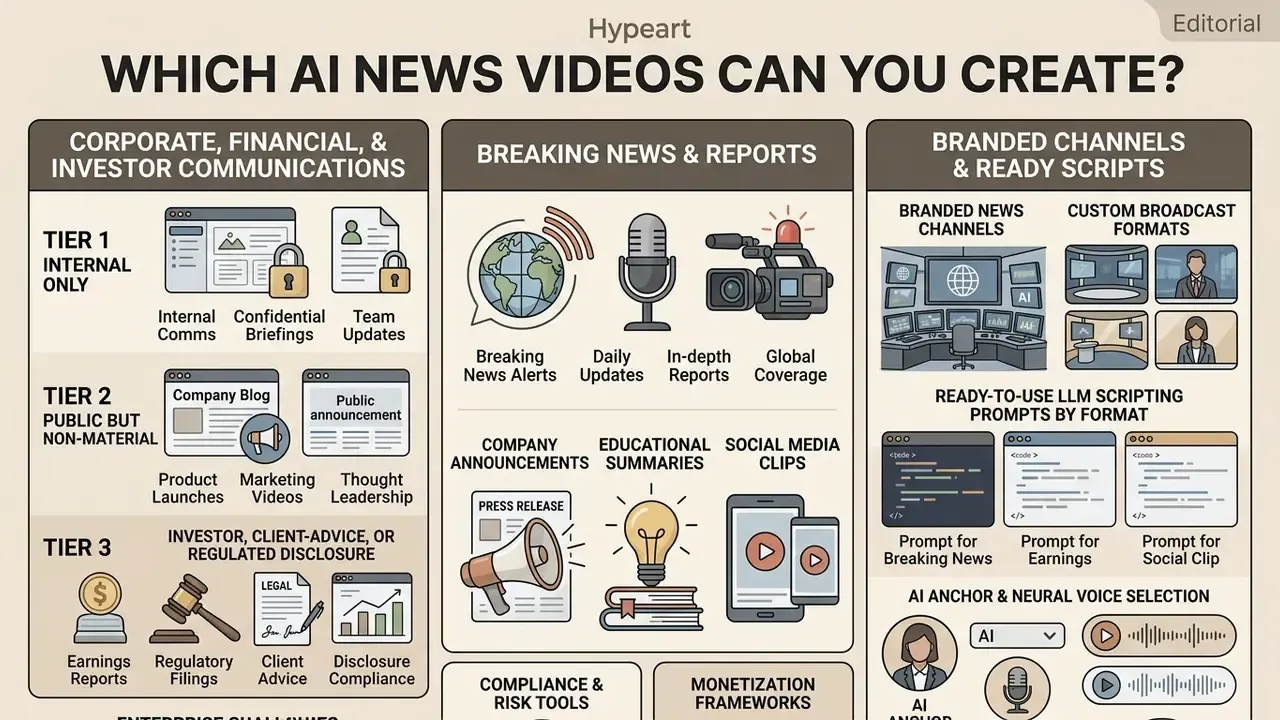
Corporate, Financial and Investor Communications
For regulated organisations the highest-value use cases sit furthest from social media. Internal policy updates, mandatory training refreshers, quarterly performance recaps and multilingual versions of already-approved communications all reuse copy that has already cleared legal review. That collapses the incremental compliance cost to near zero.
Investor-facing and client-facing output is a different control tier. Any synthetic presenter delivering financial information touches disclosure expectations set by the SEC and FINRA for communications with the public, and unlabelled synthetic media touches FTC concerns about deceptive practice. The split most institutions adopt looks like this:
- Tier 1, internal only. AI anchor permitted, single reviewer, standard logging.
- Tier 2, public but non-material (culture, hiring, product explainers). AI anchor permitted, two reviewers, on-screen disclosure, C2PA metadata.
- Tier 3, investor, client-advice or regulated disclosure. AI narration of verbatim approved text only, legal sign-off, no paraphrasing, no synthetic likeness of a real executive without written consent, full audit trail retained.
Breaking News, Daily Updates and News Reports
Breaking news segments demand fast turnaround, which is why teams keep pre-configured newsroom templates and high-impact lower thirds ready. Daily briefings aggregate three to five stories into a structured broadcast, where the anchor introduces each topic before cutting to relevant stock video or image slides. Published practice suggests 30 to 45 seconds for a first alert, up to 60 seconds for a developing story, and 60-second compilations or 5 to 10 minute roundups for recap formats.
In institutional environments, speed still bows to verification. A regional financial institution, illustrative rather than named, built a controlled workflow where raw analyst notes became 45-second market updates through an ai news broadcast generator. A mandatory two-minute compliance review before rendering let the team publish twelve verified daily market clips without a single inaccurate financial statement reaching the audience.
That control is not cosmetic. Audience-reaction analysis of real comment threads on AI-anchor videos found that 41.86% of reactions were negative or hostile, against 21.77% supportive (Analyzing Audience Reactions to AI News Anchors, 2025, synthesising Huang & Yu 2023, Li & Yang 2023 and Gerlich 2023). Synthetic delivery carries a trust penalty by default. Disclosure plus visible human editorial judgement is what mitigates it.
Regulatory guidance is explicit for rapid-turnaround formats. Hong Kong's Generative Artificial Intelligence Technical and Application Guideline (Hong Kong Government, 2024) requires attribution, watermarking or metadata, and full editorial review with fact-checking before publication. Ofcom's Note to Broadcasters: Synthetic media (including deepfakes) (2023) warns that synthetic media in broadcast demands heightened care because of the risk of falsely depicting reality.
Branded News Channels and Custom Broadcast Formats
Running a branded ai news channel generator setup means enforcing strict visual identity rules across every generated asset. Platforms let creators lock a brand kit: colour palettes, approved font pairings, corporate logos, custom avatar wardrobe. Consistency is the point. Every clip should look like it came from the same newsroom, whether it covers markets, sports or company updates. Teams weighing which engine to standardise on can start from a structured AI video generator comparison before committing brand assets to a single vendor.
The documented pattern across vendors is identical: apply colours, fonts and logo once, then reuse newsroom layouts, lower thirds, tickers and headline overlays so every story inherits the same on-screen identity.
Ready-to-Use LLM Scripting Prompts by Format
Copy, paste, replace the bracketed source text. Each prompt forces structure and surfaces unverifiable claims instead of smoothing over them.

"Convert the following text [PASTE] into a 30-second breaking news read. Structure: 1 hook sentence, 2 attributed facts, 1 closing anchor line. Extract the 2 key figures for a ticker. List separately any claim you could not attribute to a named source."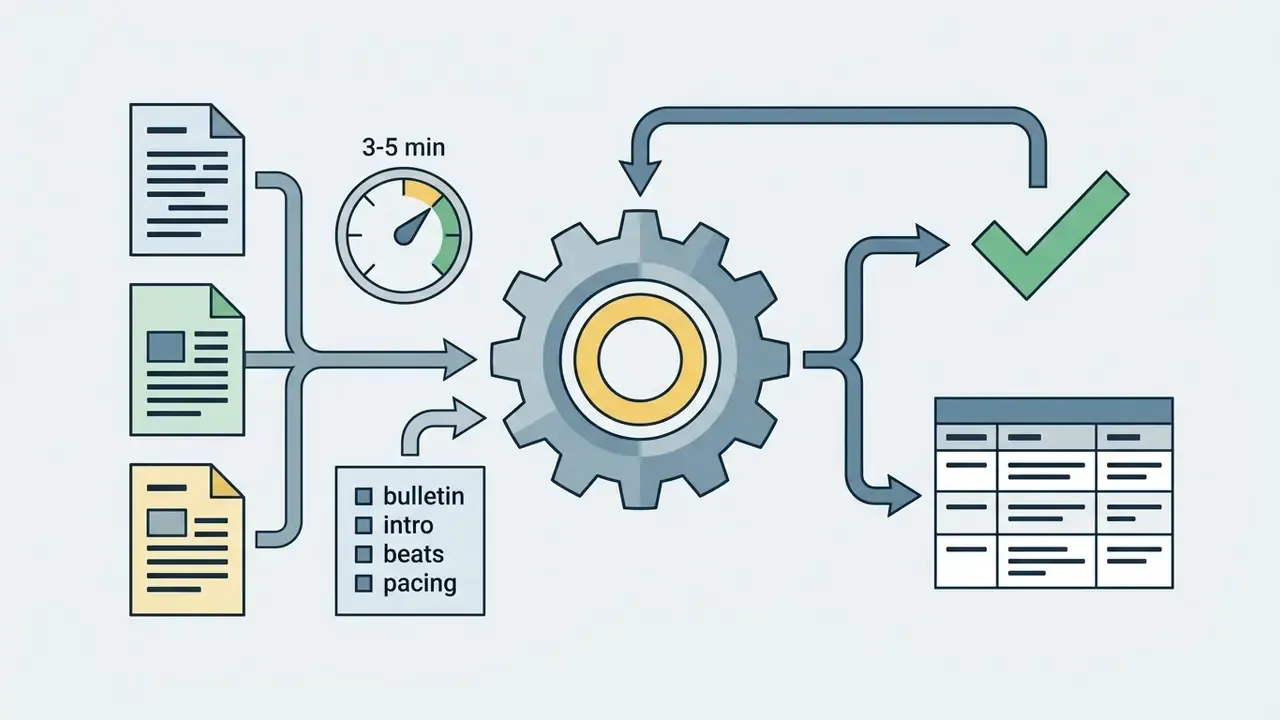
"Build a 4-minute bulletin from these 5 items [PASTE]. One 25-word intro per item, 3 beats each, explicit scene-change markers, 140 words per minute pacing. Output as a table: timecode | spoken text | on-screen note."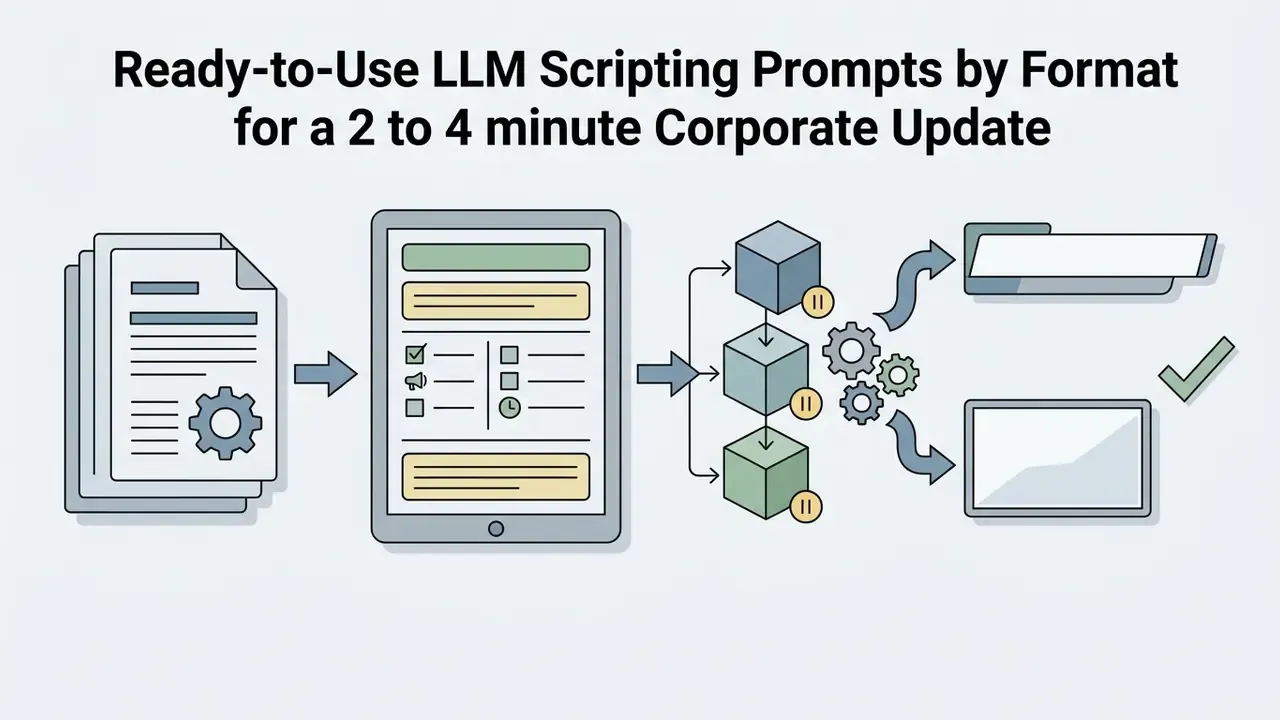
"Draft a corporate update script from this document [PASTE]. Restrained positive tone, 3 logical blocks with pauses for sales-chart graphics, no adjectives that imply forward-looking guidance. Mark every number for lower-third display."
"Summarise this analyst note [PASTE] into a 90-second market update. Convert all percentages into plain-language phrasing. Do not infer causation. End with a one-line disclaimer placeholder."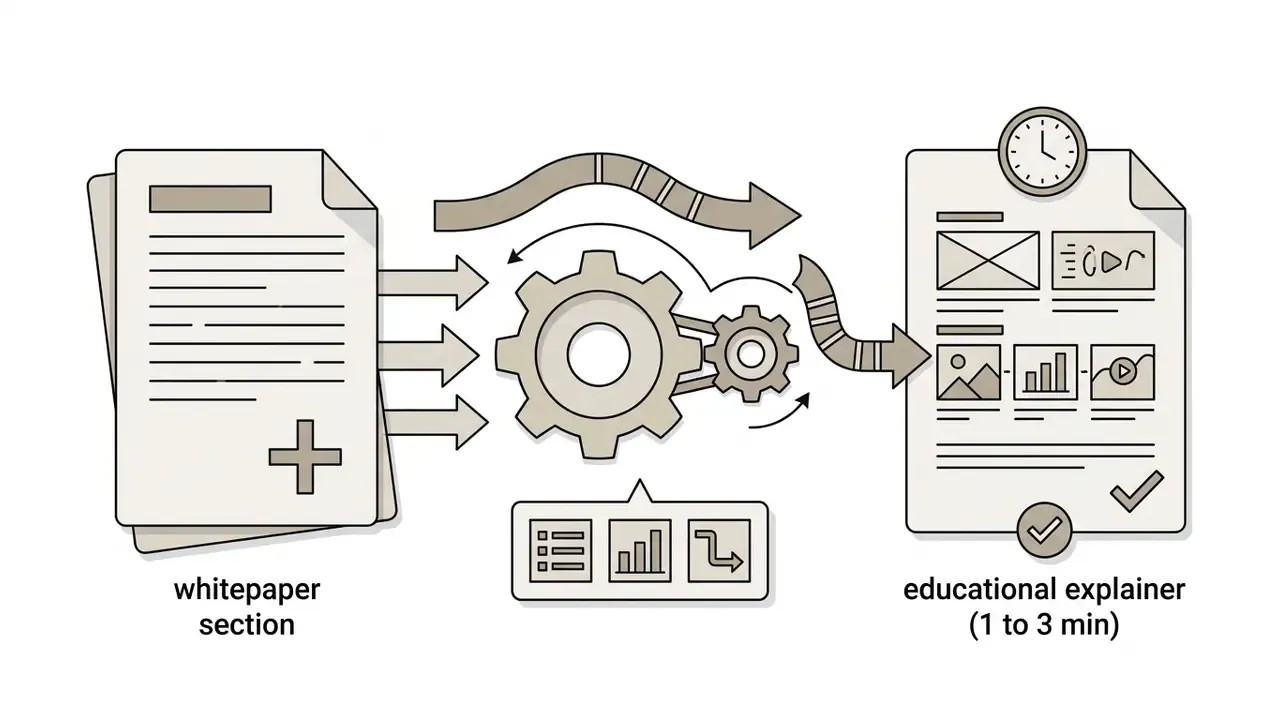
"Turn this whitepaper section [PASTE] into a 2-minute explainer for a non-technical audience. Define each technical term on first use in under 12 words. Suggest one diagram per beat."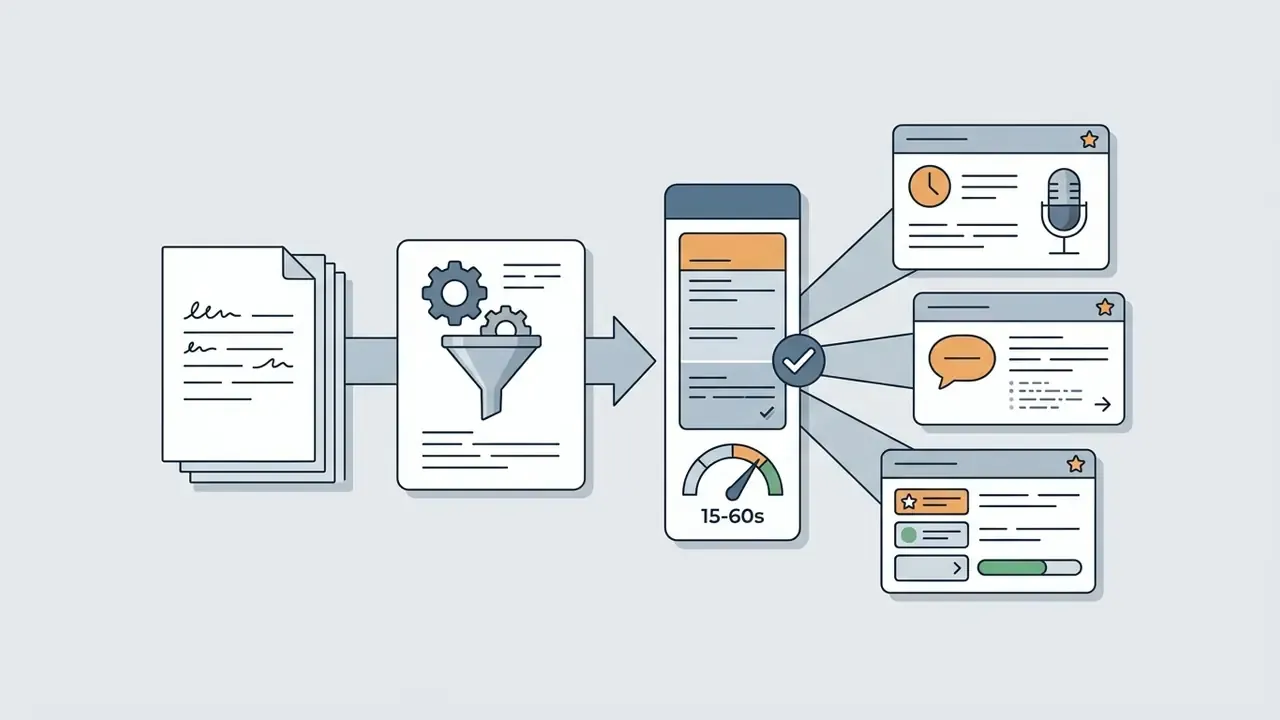
"Rewrite this article [PASTE] as a 45-second vertical script. First 3 seconds must state the single most surprising verified fact. Caption lines max 42 characters. No unattributed superlatives."Features That Matter in an AI News Video Generator
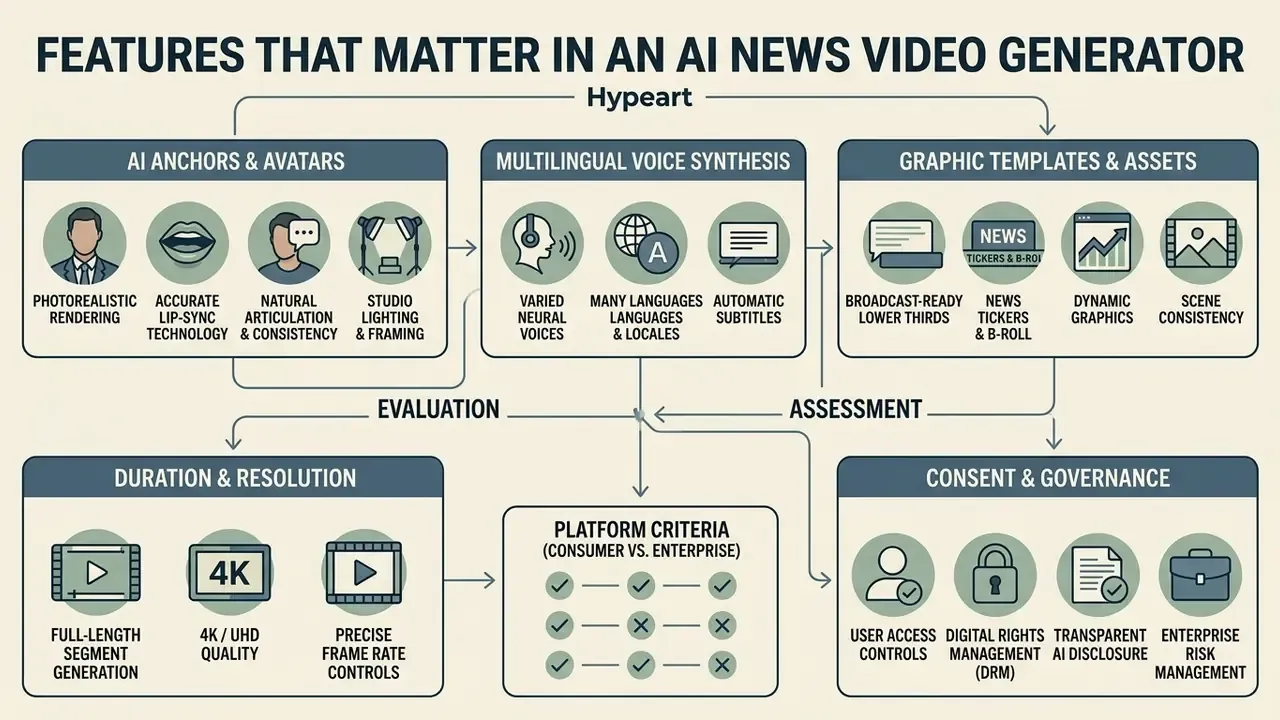
Evaluating an ai news video generator means assessing five technical dimensions: avatar realism, voice synthesis quality, language and localisation depth, graphic template flexibility, and editing control. High-performing platforms add real-time preview and native integration with external media libraries. For enterprise buyers a sixth dimension outranks all five: security and auditability.
AI Anchors, Avatars and Lip-Sync Technology
Modern avatar engines use deep generative models to synchronise phonemes (spoken sound units) with visemes (facial and mouth shapes). The documented chain is consistent across research and product implementations: text, TTS audio, phoneme extraction, viseme mapping, mouth-motion rendering. Wav2Lip-class models and Rhubarb-style phoneme-to-viseme mapping are the reference implementations.
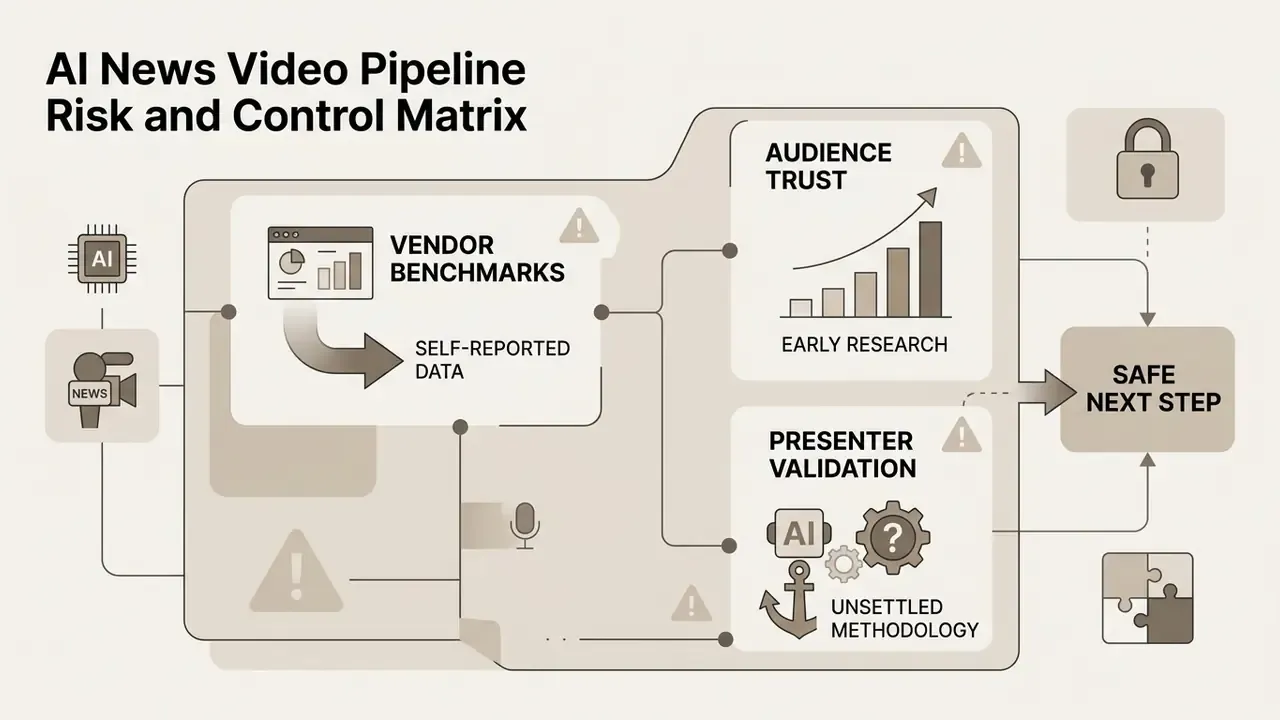
Source-qualified claim. Leading 2026 systems are advertised at roughly 0.02-second (20 ms) facial synchronisation accuracy with micro-expressions, natural blinking and context-aware head movement (HeyGen Avatar IV product documentation, 2026). Those are vendor specifications measured by vendor methodology, not independently validated benchmarks. Treat them as procurement claims to test. Independent 2026 reviews of comparable engines report natural eye contact and gesture alignment in Synthesia, while noting that D-ID output stays recognisably synthetic on close inspection, with limited body movement.
Close scrutiny still reveals artefacts in complex full-body gestures, which is why close-up framing remains the industry standard for digital news anchors.
Capture protocol for a personal AI anchor (digital twin):
- Duration and resolution.Record 15 to 60 seconds at 4K (3840x2160), 30 fps, constant frame rate. Fifteen seconds is the practical floor for current avatar engines; 45 to 60 seconds materially improves gesture variety.
- Lighting and articulation.Use flat frontal lighting with no hard shadows on the jawline. Deliver a neutral-expression read, articulating vowel sounds clearly to give the viseme model clean coverage.
- Framing.Medium close-up, chest to just above the head. Avoid hands crossing the face and rapid torso rotation; both cause mesh tearing and viseme distortion.
- Consistency.Keep wardrobe, background and lighting identical across recapture sessions, otherwise the anchor identity drifts between episodes.
- Consent and governance.Store written likeness and voice consent from the individual, with scope, duration and revocation terms. A digital twin of a named executive is a right-of-publicity asset, not a design asset.
Multilingual Voices, Subtitles and News Graphics
Global reach depends on multilingual voice generation and automated subtitle translation. Vendor-documented coverage in 2026 varies widely, because each platform stacks a different ASR, translation and TTS chain. Fliki documents 80+ translation languages, including translation of lower thirds, slide titles and on-screen labels rather than voiceover alone. Clipchamp claims transcription in over 100 languages. Camb.ai and Checksub document 150+ to 200+. HeyGen advertises 175+ languages for translated output. Treat any single "100+ languages" figure as a marketing aggregate and test your specific target locales.
Export formats matter as much as language counts. Google Cloud TTS and Gemini-TTS document MP3, LINEAR16/WAV, PCM, OGG_OPUS, ALAW and MULAW; OpenAI TTS documents MP3 by default plus OPUS, AAC, FLAC, WAV and PCM. If your archive requires lossless masters, confirm WAV or FLAC availability before signing. Readers assessing narration quality separately can consult the AI voice generator guide for a breakdown of neural voice cloning quality, language support and licensing.
Subtitle engines generate timed SRT or WebVTT files and style captions automatically so that news tickers stay unobscured.
Feature matrix: AI news video platforms (consumer versus enterprise criteria)
| Platform Capability | Standard Requirements | Advanced Enterprise Criteria | Impact on Broadcast Quality / Risk |
|---|---|---|---|
| Script Processing | Raw text or prompt input | URL and PDF parsing with LLM script structuring; narration-only mode that forbids paraphrase | Ensures accurate narrative pacing and beat timing; prevents unauthorised rewording of approved copy |
| Avatar Realism | Static 2D image driver | 3D neural avatar with micro-expressions and gesture controls; consented digital twin from 15 to 60s capture | Reduces viewer psychological distance and synthetic aversion |
| Voice Synthesis | Standard TTS (10+ voices) | Neural voice cloning across 80+ languages with emotion control; lossless WAV/FLAC export | Maintains authoritative tone and localised accent precision |
| Graphic Compositing | Basic text overlays | Dynamic lower thirds, news tickers, brand kit locking, custom font upload (.TTF/.OTF/.WOFF) | Delivers professional, broadcast-compliant visual layout |
| Underlying Models | Single undisclosed engine | Named model access (Veo 3.1, Kling 3.0 Pro, Seedance 2.0, Gen-4 Turbo, OmniHuman 1.5) with substitution clause | Prevents lock-in and mitigates sudden model deprecation |
| Security & Certification | Password login, vendor ToS only | SOC 2 Type II, ISO 27001, SSO/SAML, RBAC, penetration-test summary on request | Determines whether the tool can be approved for internal or MNPI-adjacent content |
| Data Handling | Content may be retained; training use unclear | Contractual no-training guarantee, defined retention window, named sub-processors, regional data residency, DLP-compatible egress | Controls confidentiality exposure of unpublished scripts |
| Deployment Options | Public multi-tenant SaaS | VPC, private cloud or on-premise inference; hybrid local-scripting mode | Enables use with pre-release financial and personal data |
| Audit Trail | No exportable logs | Immutable logs of prompt, source hash, script version, approver identity, render timestamp; API log export to GRC or SIEM | Provides the evidence base for model-risk and regulatory review |
| Export & Rights | 720p watermarked MP4 | 4K unwatermarked export, full commercial licensing, indemnification, C2PA provenance metadata | Prevents copyright disputes and enables multi-channel monetisation |
Summary. Enterprise workflows need advanced script structuring, neural voice cloning, locked brand kits, exportable audit logs, isolated deployment and C2PA provenance metadata. Strip any of those out and you have a demo, not a production system.
How to Generate an AI News Video from Text
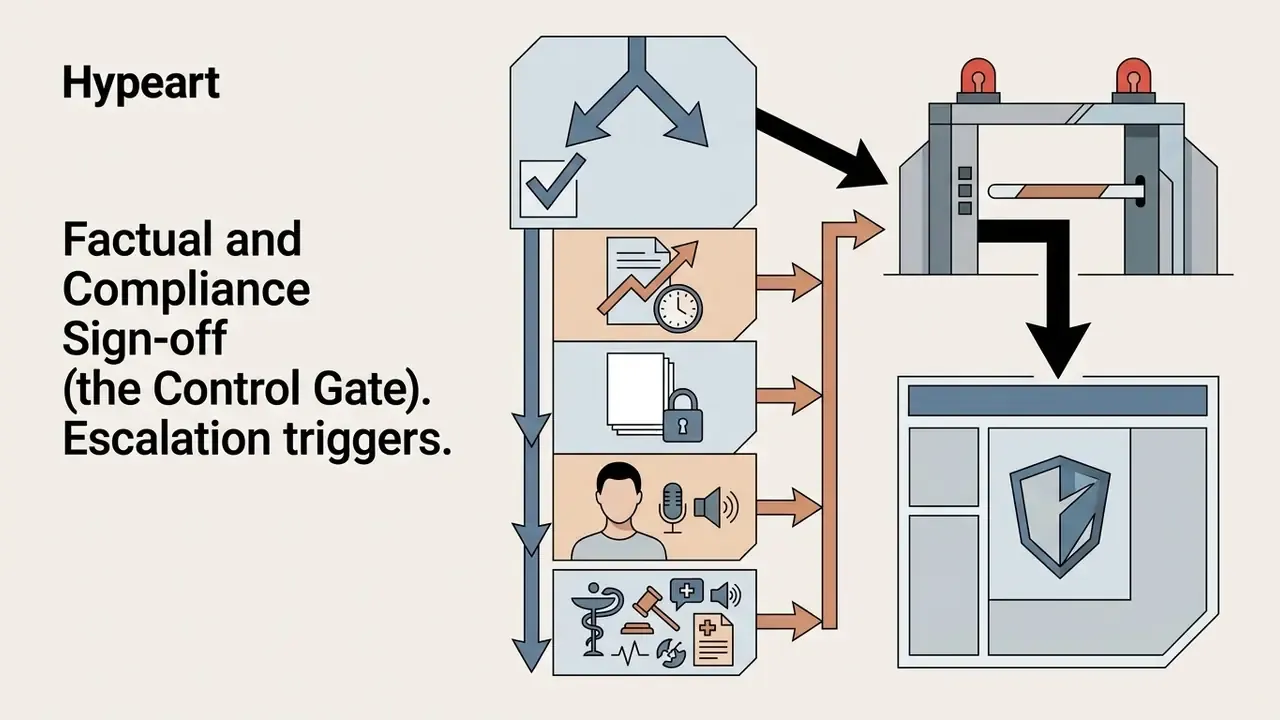
Creating a broadcast-ready ai generated news video takes five easy steps in sequence: script preparation, factual and compliance sign-off, asset styling, scene editing, and final quality assurance before export. The sign-off gate sits deliberately early. Rendering unverified text wastes compute and, worse, creates a synthetic asset that exists before anyone approved its content.
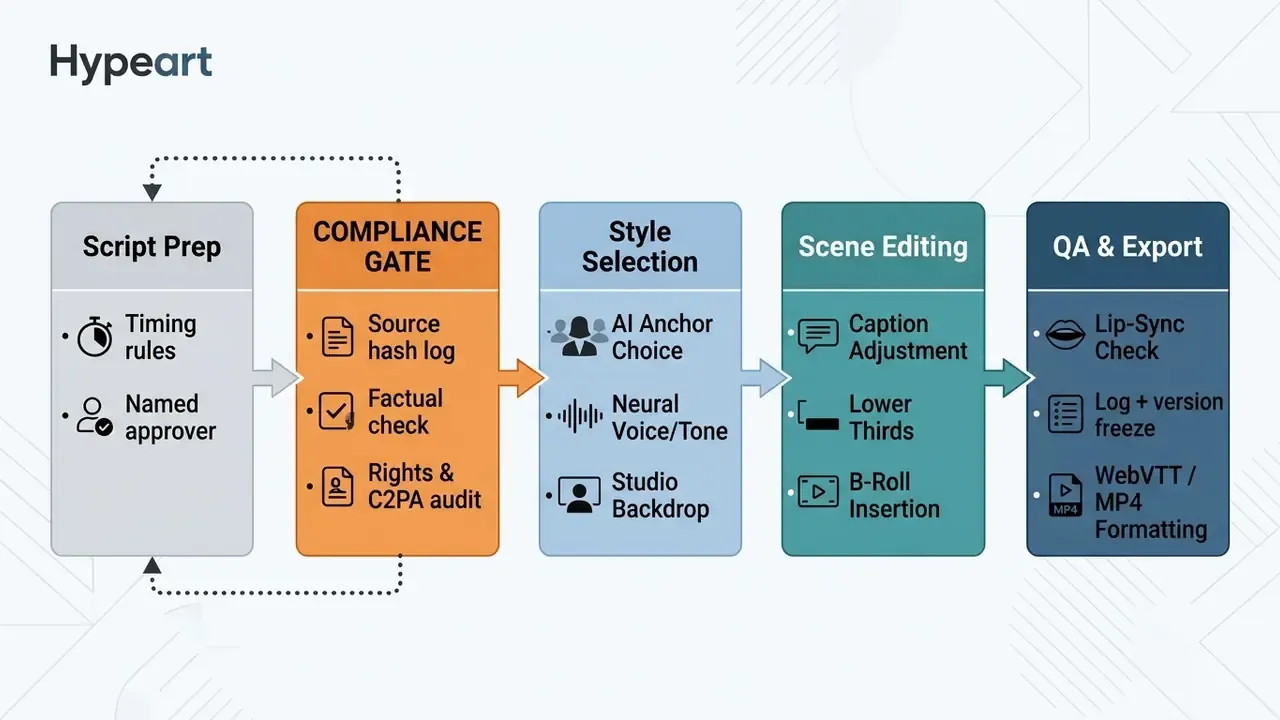
Prepare a Prompt, Script or News Article
Start by refining the source article into a structured broadcast script. Apply a pacing rule of roughly 130 to 150 words per minute for news reporting, which maps to about two words per second when you time individual beats.
Convert complex numerical data into plain-language verbal cues. Write "one in four" instead of "24.87%" (Thaesler et al., 2024).
"Automated news texts are rated significantly less comprehensible because of number density and word choice compared with journalist-written articles."
A practical prompt structure for the visual side, adapted from Adobe Firefly's video-prompt guidance, is: Shot Type + Character + Action + Location + Aesthetic. Request the output as a table with three columns, timecode, spoken text and on-screen note, so reviewers can check narration and graphics side by side instead of watching a render.
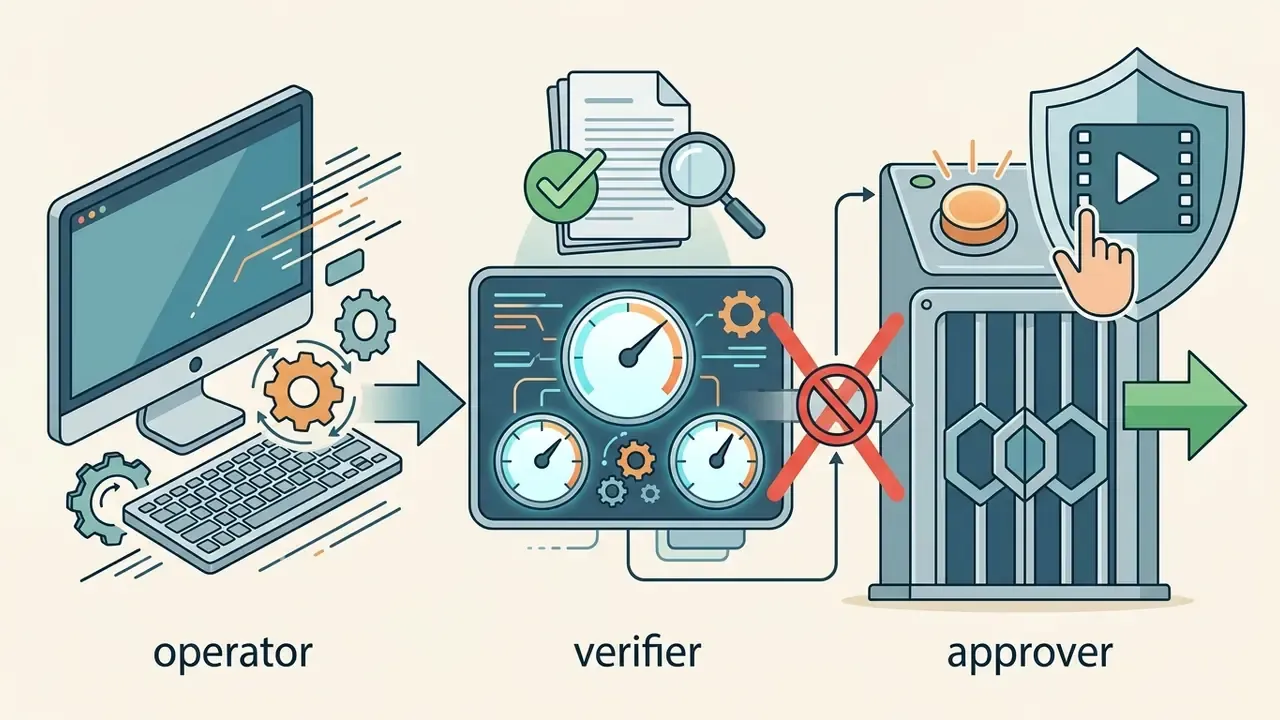
Factual and Compliance Sign-off (the Control Gate)
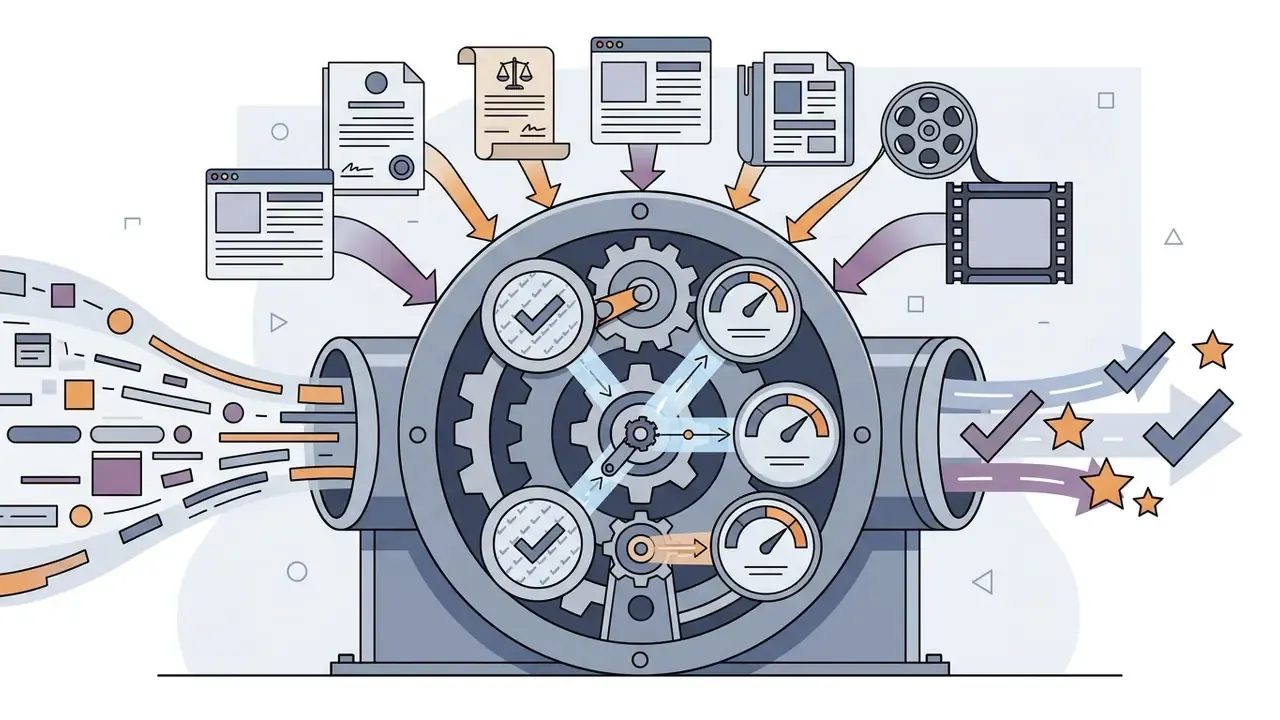
This stage satisfies editorial standards and model-risk expectations at once, including SR 11-7-style validation discipline, where every model output used in a business process requires documented human challenge.


Choose a Template, Anchor, Voice and Visual Style
Select a newsroom studio template that matches the topic's gravity. Match the anchor persona to your audience, choosing an authoritative, calm register for market reports and a more dynamic tone for technology news. Configure background B-roll from licensed stock video or upload custom enterprise assets.
The documented selection methodology is a four-step sequence. Match the template to the topic. Choose a presenter persona consistent with audience and brand, including wardrobe and studio framing, reused across the whole series. Set the voice to an authoritative newscast register with slower formal pacing. Keep backgrounds neutral, branded or studio-style so the ai visual layer supports the script rather than competing with it.
Edit, Export and Publish the Finished Video
Review the generated video inside the built-in video editor. Adjust visual timing so lower thirds never overlap auto-generated captions. Once alignment is verified, export the finished video in 1080p or 4K; desktop 16:9 delivery should meet a 1920x1080 minimum.
Subtitle layout is a hard specification, not a preference. Cap subtitles at two lines and 42 characters per line. BBC Subtitle Guidelines set authoring font size at 7 to 8% of active video height for 16:9, 4:3 and 1:1 formats, and 3.9 to 4.5% for 9:16. Platform delivery differs: Facebook, Instagram and X generally require permanently burned-in subtitles, while YouTube should receive the video without burned-in captions plus a separate SRT or WebVTT track.
Prompt-based editing (magic-box editing). Modern editing tools accept text commands instead of timeline manipulation, which compresses revision cycles from minutes to seconds:
"Replace the background in scene 2 with a dynamic stock-index chart.""Trim the third block by 15% by raising narration pace to 160 words per minute.""Delete scene 4 and extend scene 3 to cover the gap.""Translate on-screen titles into Spanish while preserving Brand Kit typography.""Swap the voiceover to the calm authoritative male voice, same pacing."
There is a material operational advantage here. When a story changes, you regenerate only the affected scenes. Anchor, graphics and pacing stay intact, and corrections need neither a full re-render nor a reshoot.
When preparing audio tracks for multi-language podcast syndication, teams frequently convert speech output using an online video to mp3 converter. For high-volume archiving of 4K masters, run finished files through a video compressor to keep storage costs proportionate to publishing volume.
Pre-publication checklist:
Failure Modes: What to Do When the Pipeline Breaks
| Failure mode | Detection signal | Immediate response | Preventive control |
|---|---|---|---|
| Lip-sync drift after a cut | Mouth motion trails audio at scene joins | Regenerate the affected scene only; do not stretch audio | Lock scene boundaries to sentence boundaries |
| Fabricated or transposed figure | Verifier cannot trace a number to the source document | Halt render; return to script stage; log the incident | Require every numeral to carry a source reference in the script table |
| Context shift during LLM summarisation | Summary asserts causation absent from source | Reject summary; switch to narration-only mode | Prompt instruction: "do not infer causation" |
| Mismatched B-roll | Footage implies an event not in the story | Replace with neutral studio or graphic background | Restrict B-roll to a pre-cleared library mapped to topic tags |
| Voice or likeness used without consent | Presenter resembles a real, non-consenting person | Pull the asset; notify legal; retain evidence | Consent register keyed to every avatar and voice ID |
| Missing disclosure at upload | Platform applies an automatic label or removes content | Re-upload with disclosure; document remediation | Make the disclosure checkbox a mandatory publishing-checklist item |
| Vendor model deprecated mid-campaign | Renders fail or output style shifts | Fall back to the secondary model; re-approve style | Contractual model-substitution clause; two approved engines |
| Unapproved script reaches render | Render request lacks an approver ID | Block at the API gateway; investigate | Technical control: render endpoint rejects unsigned requests |
How to Choose an AI News Generator for Your Workflow
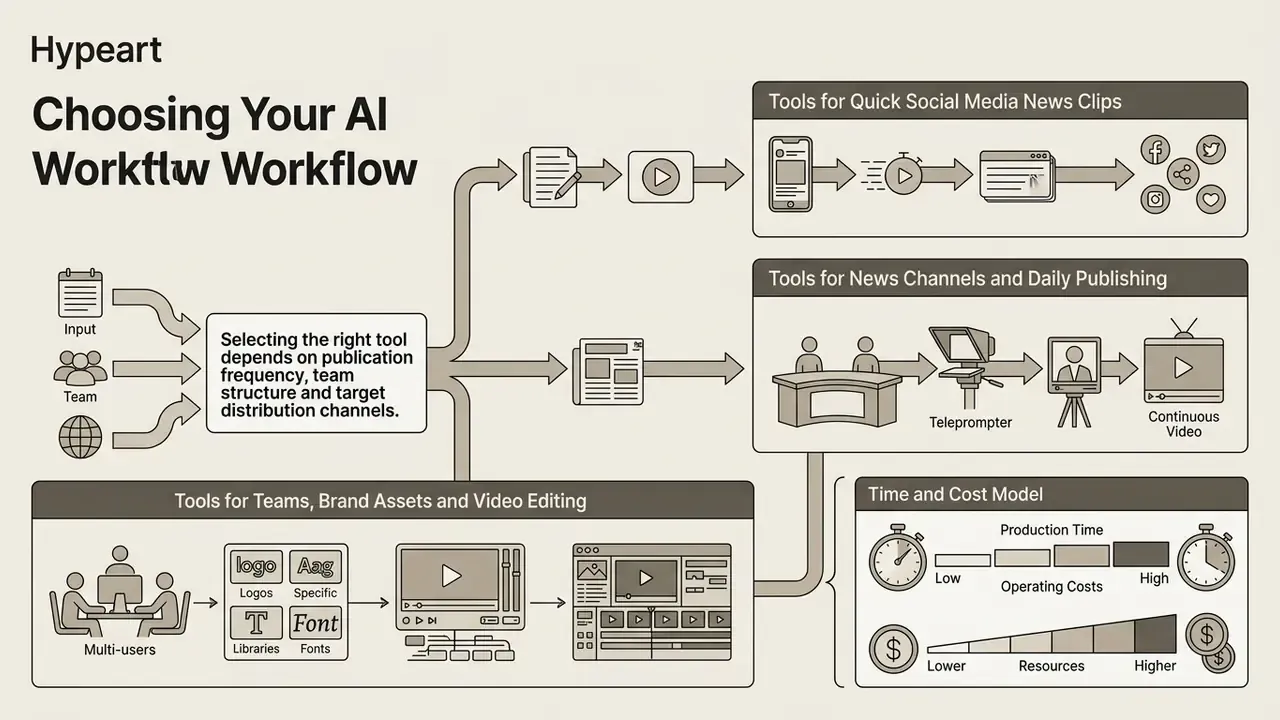
Selecting the right text to video ai news generator depends on publication frequency, team structure and target distribution channels. For regulated organisations, three criteria outrank feature depth: enforceable human review, provenance metadata and watermarking, and integration with existing workflow and governance systems.
NIST's guidance is the most usable public benchmark here. Reducing Risks Posed by Synthetic Content (NIST AI 100-4, 2024, https://nvlpubs.nist.gov/nistpubs/ai/NIST.AI.100-4.pdf) recommends adding provenance tracking, metadata and watermarks at generation time and verifying them before deployment. The AI Risk Management Framework companion (NIST, 2024, https://nvlpubs.nist.gov/nistpubs/ai/NIST.AI.600-1.pdf) specifies that provenance metadata should capture creator, time, location, modifications and sources. IREX's newsroom guidance (2026) adds the editorial parallel: robust content review at every stage, from pitch to publication.
Tools for News Channels and Daily Publishing
Organisations publishing daily ai video generator news updates need continuous production pipelines. Enterprise platforms integrate with newsrooms via MOS (Media Object Server) protocols, connecting script generators directly to broadcast playout systems such as AP ENPS or Ross Video Inception. AP identifies MOS as the integration standard linking newsroom systems, graphics, automation and playout. Ross Video documents OverDrive for automated news playout and QuickTurn for recording, encoding and delivering content straight to social and web from the broadcast chain. Amagi Newspulse covers the adjacent need: one platform for ingest, scheduling, playout, ad delivery, analytics and third-party integration across live, linear and VOD.
To model total operational expenditure across high-volume video pipelines, decision-makers use dedicated AI Media Calculators alongside the vendor-by-vendor AI Media Pricing Guides.
Tools for Teams, Brand Assets and Video Editing
Collaborative workflows need multi-user workspaces, role-based access controls and centralised brand kits. Editors need timeline controls to fine-tune transitions, swap B-roll and upload custom fonts. Vimeo's brand kit accepts logo uploads plus .ttf and .otf brand fonts. Microsoft Clipchamp accepts multiple logos in PNG, JPEG and SVG, and fonts in OTF, TTF and WOFF. Verify format support before migrating a brand system, because one unsupported font format forces every lower third to be rebuilt.
Organisations comparing platform capabilities across enterprise tiers reference specialised AI video generator comparisons and the broader AI Media Comparison Matrices to weigh infrastructure requirements against licensing terms. Teams that also produce motion graphics for lower thirds and explainers can extend the same evaluation with an animation maker guide.
Time and Cost Model (Widget Specification)
Implement as an on-page calculator with two inputs and one derived output:
[Slider: videos per month = 10]  x  [Slider: average duration = 2 min]
        +  [Toggle: review tier = Tier 1 / Tier 2 / Tier 3]
OUTPUT PANEL
Traditional production:      $4,500  /  32 hours
AI pipeline (Tier 1):          $120  /  1.5 hours    -> ~97% cost reduction
AI pipeline (Tier 3, legal):   $760  /  6.5 hours    -> ~83% cost reduction
The Tier 3 row is the number enterprise buyers actually need, because it prices the control layer rather than the render. A defensible enterprise TCO formula:
TCO = platform licence + per-minute render or credit cost + (verifier hours x loaded rate) + (approver hours x loaded rate) + legal review hours + integration and MRM onboarding (one-off) + annual model validation + residual risk provision.
Organisations that omit the verifier, approver and validation terms routinely under-forecast true cost by a factor of three to five. They usually discover the gap during the first audit cycle, which is the worst possible moment.
Free Plans, Pricing and Commercial Use of AI News Videos
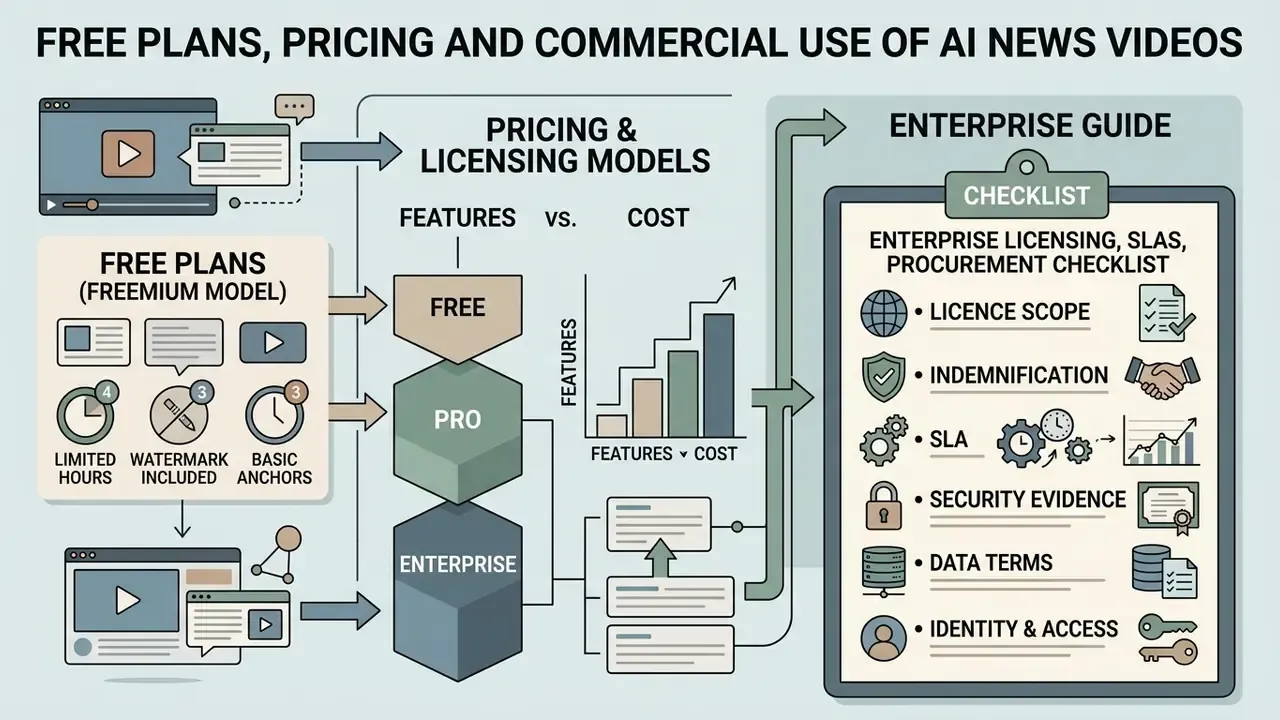
Most commercial ai news generators run a freemium model. Free tiers provide non-commercial licences, low export resolutions (480p to 720p), watermarks and monthly credit caps. Enterprise procurement runs on a different axis entirely: seat-based or volume-based licensing, SLAs, security certification, indemnification and data-handling terms.
What to Check in a Free AI News Generator Plan
Free plans work as proof-of-concept environments and little else. When evaluating free AI video generator plans, check whether credits renew monthly, whether voice cloning is unlocked, and whether exports carry a visible watermark.
Documented 2026 free-tier limits show the spread. HeyGen's free plan is listed at three videos per month, three minutes maximum per video, 720p, watermarked. InVideo AI's free plan offers 10 AI minutes and four exports per week, 720p, watermarked. Pure text-to-video generation tools frequently cap free output at three to ten seconds per clip. Paid creator plans commonly start around $24 per month, with enterprise pricing quoted on volume. Commercial rights on a free ai news generator tier are inconsistent: several vendors restrict free output to personal, non-commercial or internal use, while at least one (Pika Basic) is reported to permit commercial use at $0. Read the terms per vendor. Do not generalise.
Enterprise Licensing, SLAs and Procurement Checklist
For a regulated buyer the free tier is a sandbox, not a shortlist entry. These are the questions that actually decide approval:
- Licence scope. Are synthetic voice, avatar likeness and generated visuals all covered for commercial and paid-media use, including in regulated communications?
- Indemnification. Does the vendor indemnify against third-party IP claims arising from model output, and what is the cap?
- SLA. Uptime commitment, render-queue latency guarantee, incident-response and breach-notification windows.
- Security evidence. SOC 2 Type II report, ISO 27001 certificate, latest penetration-test summary, sub-processor register.
- Data terms. No-training guarantee, retention period, deletion-on-request SLA, regional residency, DLP compatibility on egress paths.
- Identity and access. SSO/SAML, SCIM provisioning, granular RBAC separating operator, verifier and approver roles.
- Auditability. Exportable immutable logs and API access for ingestion into GRC, SIEM or the model inventory.
- Continuity. Model-substitution clause, export of brand kits and project files, escrow or data-portability terms on termination.
- Provenance. C2PA or equivalent metadata written at export by default, not as an optional post-process.
Commercial Use, Brand Assets and Publishing Rights
Publishing ai news videos for monetisation on YouTube or LinkedIn requires explicit commercial licensing. Free plans generally restrict commercial distribution, while paid tiers grant usage rights for generated visuals and synthetic audio.
The legal perimeter extends beyond the platform licence. The U.S. Copyright Office's 2024 report on digital replicas addresses unauthorised use of a person's voice or likeness and the need for protection against unauthorised digital voice replicas. USPTO guidance on name, image and likeness notes that an avatar's creative elements may be copyrightable while its name, image or likeness implicates right-of-publicity law. Separately, platform liability research (2023) documents direct-liability exposure where copyrighted user uploads are made available, which is relevant whenever reposted stock media or user-submitted clips appear in monetised output. Where an asset's origin is uncertain, run it through an AI reverse-image-search check before it reaches a public render, and review the wider AI Media Commercial-Use Hub before signing off on a monetisation plan.
Teams planning custom technical integrations can access developer resources through the Google Veo API implementation guide, while legal teams assess rights exposure through the commercial-use licensing analysis linked above.
YouTube Monetisation and Inauthentic Content Compliance
YouTube does not prohibit AI presenters. Its channel monetisation policy targets mass-produced, generic, repetitive or manipulative content, and separately restricts AI personas on sensitive topics from presenting themselves as human experts (YouTube Help Center, 2026, https://support.google.com/youtube/answer/1311392). AI-assisted content stays monetisable when each upload shows genuine human editorial judgement. YouTube also states that disclosing altered or synthetic content does not reduce reach or monetisation eligibility, while failure to disclose can trigger manual labels, removal or suspension from the Partner Program.
A practical human-in-the-loop threshold for channel safety:
- Original narrative construction. Do not reproduce agency copy verbatim. Route the story through an LLM with an analysis-and-original-angle instruction, then edit the result by hand.
- Varied story selection. Templated uploads covering interchangeable topics at high volume are exactly the pattern the policy targets. Vary story type, length and structure.
- Composite editing. Cut away from the anchor every five to seven seconds to charts, archival B-roll or screenshots of primary sources. This raises retention and makes the editorial contribution evident.
- Mandatory declaration. Tick "Altered or Synthetic Content" at upload. On TikTok, apply the AIGC label or an equivalent clear disclosure for realistic AI-generated people or scenes (TikTok Help Center, 2026). Meta's public transparency policies address content rules and transparency broadly; monetisation-specific AI guidance was not available in official documentation at the time of writing and should be re-checked before launch.
- Keep the evidence. Retain scripts, source links and approver records. If a youtube channel is reviewed, the audit trail is the defence.
Responsible Use: AI-Generated News, Disclosure and Fake News Risks
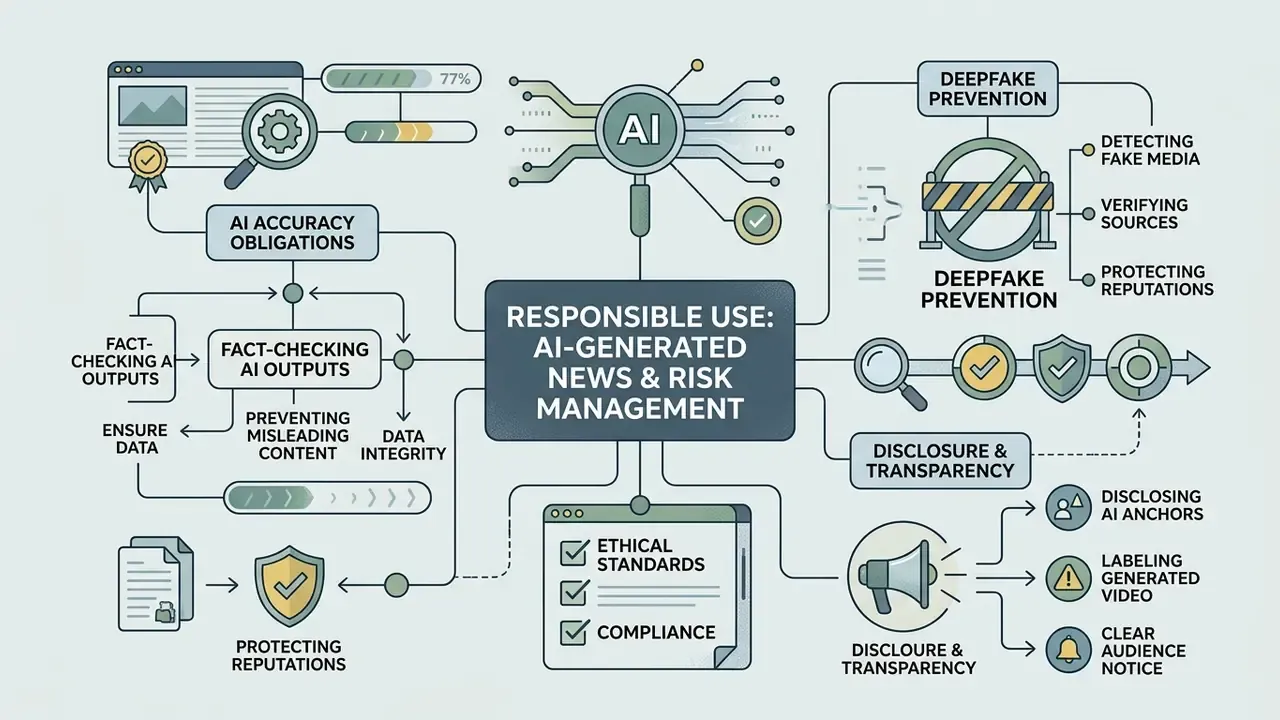
Deploying generative AI in news production brings real ethical obligations around accuracy and deepfake prevention. Misuse of an ai fake news video generator carries severe societal risk, which makes editorial verification the load-bearing control.
How to Avoid Misleading AI News Content
To prevent the spread of misleading information, every AI-generated news script should pass multi-source verification against primary documents, such as official transcripts or peer-reviewed research, before video rendering starts.
Dataset studies such as Official-NV (Wang et al., 2024; arXiv identifier pending verification) show that mismatched headlines and video frames can create deceptive narratives even when the base footage is authentic. The detection problem compounds the editorial one:
"Humans identify AI-generated news image-caption pairs at roughly 60% F1; multimodal language models score below 24%."
If neither humans nor detectors reliably catch synthetic news pairings after publication, the only effective control is upstream. Verify before you render, and never let automated B-roll selection imply an event the source text does not support.
Verification discipline is already well codified. Go to the primary source wherever possible and ask "Who says?" and "How do they know?" (CUNY journalism guidance). Identify every source by name, role, affiliation and credentials. Require at least two independent sources per claim and seek denials from interested parties (AFP Fact-Checking Stylebook). Check proper names, places, dates, numbers, statistics and quotations against recordings, documents or official sites.
When and How to Disclose AI Anchors and Generated Video
Regulatory frameworks such as the EU AI Act (Article 50) and Rhode Island Bill H7387A (2024) mandate clear labelling of synthetic media. Disclosures must be clearly visible, easily readable and present on screen for the whole video.
"Disclosure text in video must be no smaller than the largest font size appearing on screen and must remain displayed for the entire video."
"Mandatory labelling of AI content and disclosure of training data help audiences understand when they are interacting with AI systems." OECD, Facts not Fakes: Tackling Disinformation, Strengthening Information Integrity (2024). https://www.oecd.org/en/publications/facts-not-fakes_f7e9c8b5-en.html
The EU Code of Practice on Transparency of AI-generated Content (European Commission, 2026) adds a second layer: machine-readable marking of AI-generated audio, image, video and text, plus disclosure for deepfakes and public-interest text unless the output was human-reviewed under editorial control. In the United States, AI Labeling Act proposals (2023 and 2026) would require clear, conspicuous disclosure plus embedded provenance metadata. Those are bills, not binding rules, so treat them as direction of travel. NIST's Guidance and Templates for Public-Facing AI Documentation (2026) provides the documentation counterpart, favouring explicit published disclosure over hidden signals.
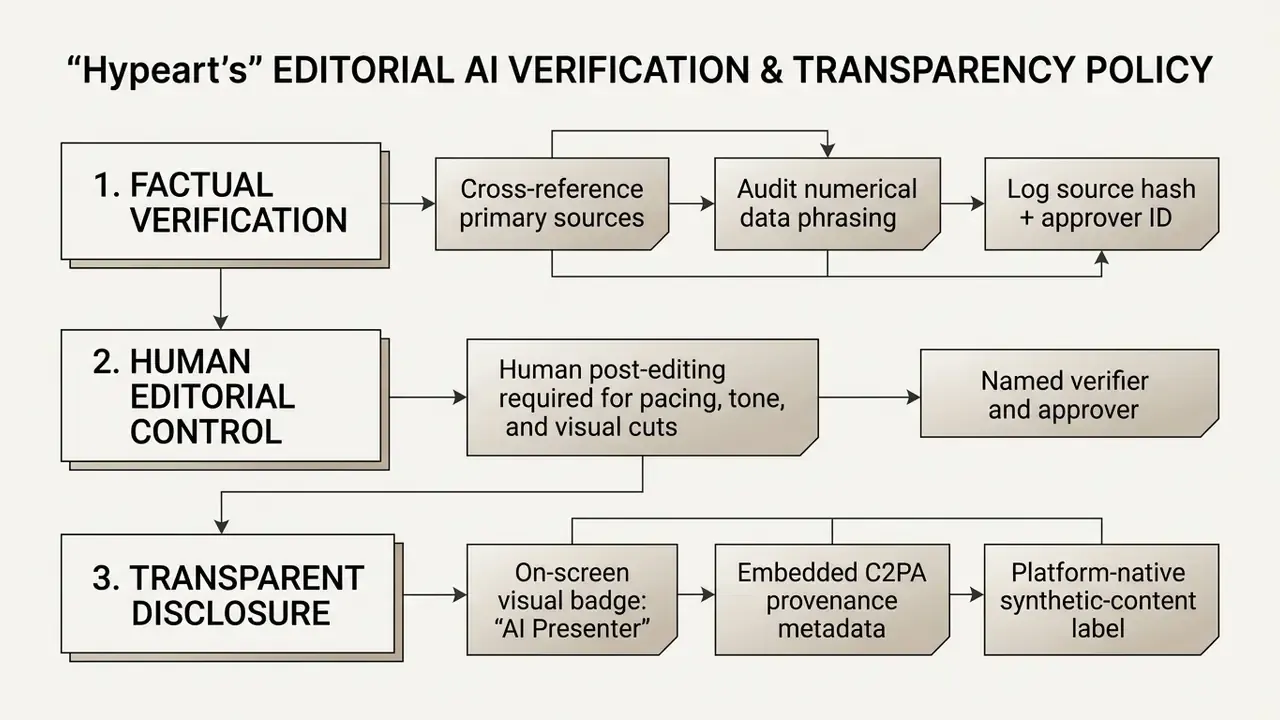
Major news organisations enforce strict generative standards:
| Organisation | Position on AI-generated video | Practical implication |
|---|---|---|
| Associated Press | Generative AI cannot add or subtract visual elements in photos, video or audio; all AI output is unvetted source material requiring human editing. AI may assist with summaries, shotlists, transcription and translation, reviewed before publication. | Use AI for structuring and localisation, never for altering documentary footage. |
| Reuters | Prohibits AI-generated or AI-modified visual elements in visual journalism; approved AI use is limited to non-visual tasks such as captions or scene descriptions. AI use in produced content requires clear disclosure, and AI-voiced packages are checked and edited by Reuters producers. | Synthetic visuals are off-limits in editorial imagery; synthetic voice is permitted with disclosure and human editing. |
| BBC | Generative AI must not directly create News, current affairs or factual journalism content unless AI itself is the subject; synthetic voices must be clearly disclosed and must never mislead audiences. | Disclosure is mandatory and the default answer for factual content is human-created. |
Where the three diverge, and they do, the safe institutional policy is to adopt the most restrictive rule that applies to your output type. AP permits research and transcription assistance. The BBC permits limited use that does not materially mislead. Reuters is strictest on visuals.
When disputes arise over synthetic media usage or copyright claims, compliance officers track developments through AI Litigation and Case Timelines. For technical help with media workflows, consult enterprise support.
Risk and Control Matrix for an AI News Video Pipeline
| Risk scenario | Impact | Primary control | Detective control | Owner |
|---|---|---|---|---|
| Hallucinated figure in a financial update | Regulatory exposure; corrective disclosure | Mandatory source reference per numeral; narration-only mode for approved copy | Pre-render verifier sign-off; post-publication spot audit | Head of Model Risk |
| Unpublished material information egresses to a public API | Confidentiality breach; market-abuse exposure | Classify the script before ingestion; VPC or on-premise inference; DLP rule on egress | SIEM alert on outbound payload patterns | CISO / Data Protection |
| Deepfake impersonation of an executive | Fraud, reputational damage | Consent register; restricted avatar library; C2PA signing of all official output | Reverse-image and provenance monitoring of external channels | Head of Communications |
| Mismatched B-roll implies a false event | Audience deception; editorial breach | Pre-cleared, topic-tagged footage library | Second-reviewer visual check against the script table | Editorial Standards Lead |
| Missing or non-compliant AI disclosure | Platform penalty; EU AI Act Article 50 exposure | Disclosure as a blocking checklist item; template with persistent on-screen badge | Automated publish-time check on the label field | Compliance Officer |
| Unlicensed stock or music in monetised output | Copyright strike; demonetisation | Asset provenance register; licence ID stored with the project file | Quarterly licence reconciliation | Legal / Procurement |
| Model drift changes tone or accuracy after a vendor update | Inconsistent brand voice; new factual errors | Version pinning; change-notification clause | Post-update regression review on a fixed test script | Model Owner |
| No reconstructable audit trail for a published video | Audit and examination finding | Immutable logging of prompt, source, script version, approvers | Periodic log completeness test; GRC log ingestion | Internal Audit |
| Vendor concentration or sudden model deprecation | Production stoppage | Two approved engines; model-substitution clause; exportable project files | Quarterly continuity test render on the secondary engine | Vendor Management |
| Audience trust erosion from synthetic delivery | Engagement and credibility loss | Human post-editing on every asset; transparent labelling | Sentiment monitoring on comments and reach metrics | Head of Communications |
Interpretation note. Every row maps to a single principle from the opening quote: no evidence, no autonomy. The pipeline may generate. Only a named human may publish.
Limitations and Open Questions
FAQ: Frequently Asked Questions About AI News Video Generators
Will YouTube demonetise a channel that publishes AI news videos?
No, not for using AI tools. YouTube's policy targets mass-produced, generic, repetitive or manipulative uploads, and restricts AI personas presenting as human experts on sensitive topics. Channels showing original scripts, varied story selection, real editorial judgement and correct synthetic-content disclosure stay monetisable, and disclosure itself does not reduce reach or eligibility.
Can I turn a PDF report or media release into a news video?
Yes. Ingestion extracts narrative blocks and tables, converts statistics into spoken plain-language cues plus lower-third captions, and produces a scripted, narrated segment. Log the document hash, the extraction output and the approved script separately so the chain stays auditable.
How much source footage do I need to build my own AI anchor?
Fifteen seconds is the practical minimum for current avatar engines. Forty-five to sixty seconds of 4K, 30 fps, flat-lit medium close-up footage yields materially better gesture variety and identity stability. Written likeness and voice consent must be on file before capture.
Can I edit a finished AI news video without a timeline?
Yes. Prompt-based editors accept text commands to delete or replace scenes, change voiceover or accent, adjust pacing and translate on-screen titles. When a story changes, regenerate only the affected scenes; the anchor, graphics and pacing stay intact.
Which AI video models sit under these platforms?
Commonly exposed engines in 2026 include Veo 3.1 and Gen-4 Turbo for photoreal B-roll with native audio, Kling 3.0 Pro and Seedance 2.0 for stable studio environments, and OmniHuman 1.5 for presenter synthesis from a photo or short clip. Confirm the current model list at contract time, because availability changes quickly.
Is AI-generated content detectable?
Only partially. Independent research puts human detection of AI-generated news image-caption pairs at roughly 60% F1 and multimodal model detection below 24%. That is precisely why provenance metadata and explicit labelling, rather than detection, are the recommended controls.
Do I legally have to disclose an AI presenter?
In many jurisdictions and on most major platforms, yes. EU AI Act Article 50 requires clear marking of deepfakes and certain AI-generated public-interest content. Rhode Island's H7387A specifies disclosure text no smaller than the largest on-screen font, displayed for the whole video. YouTube and TikTok require synthetic-content labels. Confirm your specific obligations with counsel.
Can we run this on data that cannot leave our perimeter?
Yes, with the right deployment model. Hybrid configurations keep scripting local and send only approved, declassified scripts to a cloud renderer. Fully self-hosted inference removes egress entirely. Either way, register the models in your model inventory with an owner and a validation record.
What resolution and subtitle settings should we standardise on?
16:9 at a minimum of 1920x1080 for desktop and broadcast; 9:16 at 1080p for social. Subtitles capped at two lines and 42 characters per line. Authoring font size 7 to 8% of active video height for 16:9 and 3.9 to 4.5% for 9:16. Burn captions in for Facebook, Instagram and X, and supply a separate SRT or WebVTT track for YouTube.
How do we price this honestly for a board paper?
Include the control layer. TCO = licence + render credits + verifier hours + approver hours + legal review + one-off integration and model-risk onboarding + annual validation + residual risk provision. Render cost is the smallest line item in any regulated deployment.
Footer / Hub Navigation
- Explore foundational concepts and terminology in the AI Media Glossary.
- Compare narration engines in the AI voice generator guide.
- Review publishing workflows in the YouTube video editor guide.
- Evaluate free-tier limits in the free AI video generator comparison.